




Speaker
Eng Hasan Shamroukh
https://www.youtube.com/watch?v=AmH2nKNPphM
Seminar Agenda
•Security Definition
•Security Solutions
•VPN
•Security Devices
•AAA
•Firewall Configuration
What is Security?
•“The quality or state of being secure/to be free from
danger”
•multiple layers of security
–Physical security
–Personal security
–Operations security
–Communications security
–Network security
–Information security
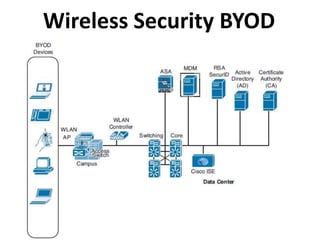
Wireless Security BYOD
Security Elements
•Bring Your Own Device (BYOD)
•Adaptive Security Appliance (ASA)
•Mobile Device Management (MDM)
•RSA SecureID (
•Active Directory (AD)
•Certificate Authority (CA)
•Identity Service Engine (ISE)
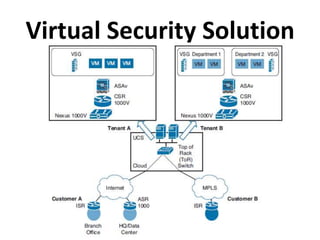
Virtual Security Solution
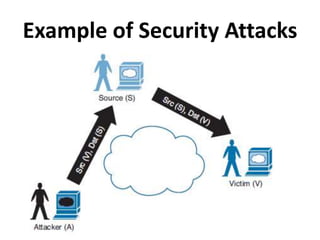
Example of Security Attacks
VPN
•Virtual Private Network
•It is a Data Tunnel to pass safely without being
seen by hacker (attacker)
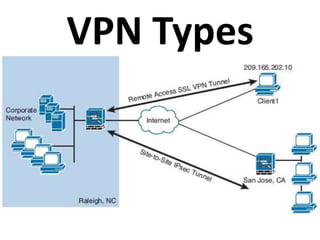
•VPN Types according to devices:
•1- Site-to-Site: No host used generally
•(router-router) (ASA-ASA) (router-ASA)
•2- Remote Access (router-host) (Server-client)
•VPN Types according to layers:
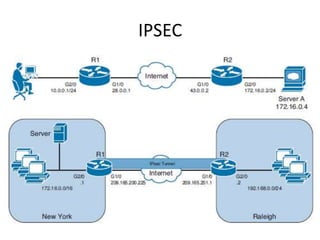
•IPSEC: L3 (IP) used for both site-to-site &
remote access
•SSL: Secure Socket Layer (TCP/L4) used for
remote access
•MPLS VPN: Multi Protocol Label Switching
•L2VPN: CE-CE
•L3VPN: PE-CE
VPN Types
IPSEC
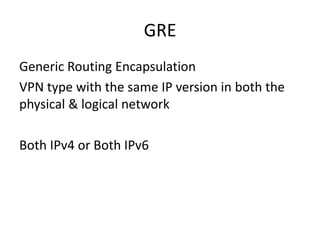
GRE
Generic Routing Encapsulation
VPN type with the same IP version in both the
physical & logical network
Both IPv4 or Both IPv6
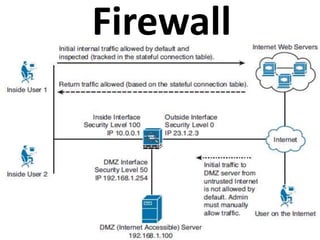
Firewall
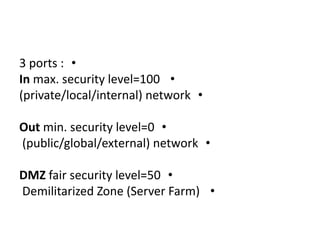
•3 ports :
•In max. security level=100
•(private/local/internal) network
•Out min. security level=0
•(public/global/external) network
•DMZ fair security level=50
•Demilitarized Zone (Server Farm)
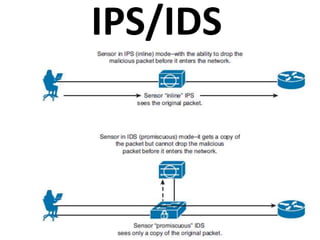
IPS/IDS
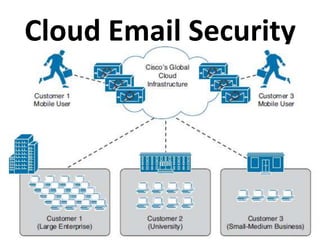
Cloud Email Security
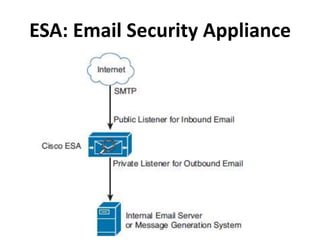
ESA: Email Security Appliance
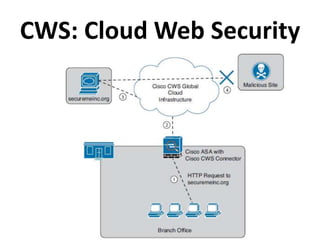
CWS: Cloud Web Security
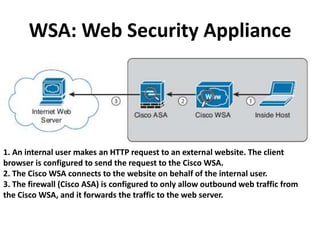
WSA: Web Security Appliance
1. An internal user makes an HTTP request to an external website. The client
browser is configured to send the request to the Cisco WSA.
2. The Cisco WSA connects to the website on behalf of the internal user.
3. The firewall (Cisco ASA) is configured to only allow outbound web traffic from
the Cisco WSA, and it forwards the traffic to the web server.
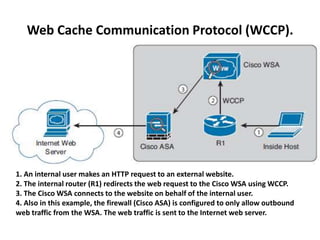
Web Cache Communication Protocol (WCCP).
1. An internal user makes an HTTP request to an external website.
2. The internal router (R1) redirects the web request to the Cisco WSA using WCCP.
3. The Cisco WSA connects to the website on behalf of the internal user.
4. Also in this example, the firewall (Cisco ASA) is configured to only allow outbound
web traffic from the WSA. The web traffic is sent to the Internet web server.
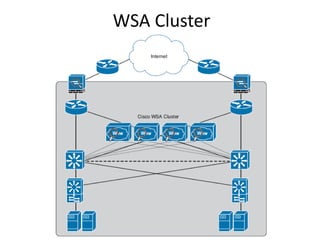
WSA Cluster
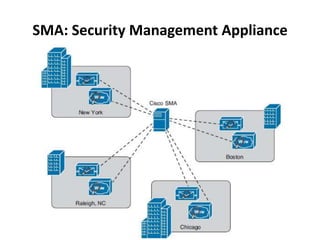
SMA: Security Management Appliance
AAA
•Authentication – Authorization – Accounting
•Authentication: username & password
verification
•Authorization: allowed services for user
•Accounting: applied action towards user
•TACACS+ (just CISCO) RADIUS (all vendors)
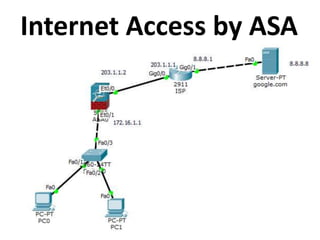
Internet Access by ASA
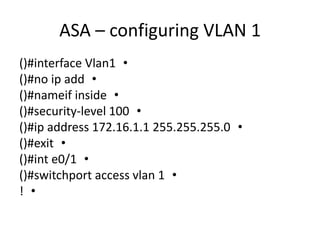
ASA – configuring VLAN 1
•()#interface Vlan1
•()#no ip add
•()#nameif inside
•()#security-level 100
•()#ip address 172.16.1.1 255.255.255.0
•()#exit
•()#int e0/1
•()#switchport access vlan 1
•!
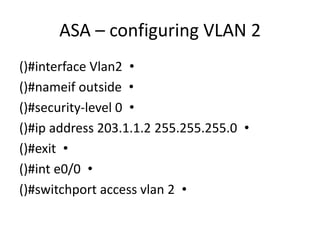
•()#interface Vlan2
•()#nameif outside
•()#security-level 0
•()#ip address 203.1.1.2 255.255.255.0
•()#exit
•()#int e0/0
•()#switchport access vlan 2
ASA – configuring VLAN 2
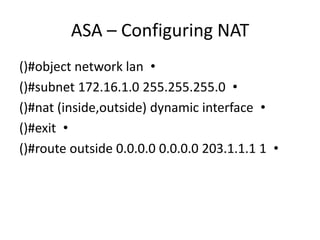
ASA – Configuring NAT
•()#object network lan
•()#subnet 172.16.1.0 255.255.255.0
•()#nat (inside,outside) dynamic interface
•()#exit
•()#route outside 0.0.0.0 0.0.0.0 203.1.1.1 1
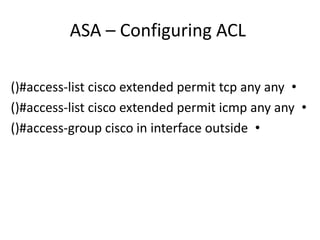
ASA – Configuring ACL
•()#access-list cisco extended permit tcp any any
•()#access-list cisco extended permit icmp any any
•()#access-group cisco in interface outside
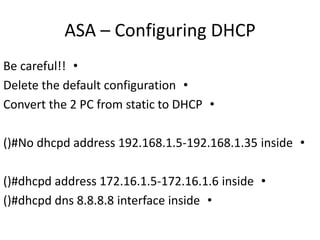
ASA – Configuring DHCP
•Be careful!!
•Delete the default configuration
•Convert the 2 PC from static to DHCP
•()#No dhcpd address 192.168.1.5-192.168.1.35 inside
•()#dhcpd address 172.16.1.5-172.16.1.6 inside
•()#dhcpd dns 8.8.8.8 interface inside
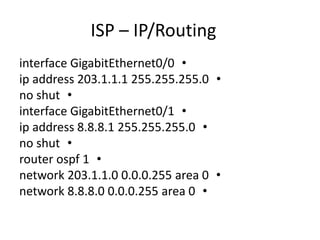
ISP – IP/Routing
•interface GigabitEthernet0/0
•ip address 203.1.1.1 255.255.255.0
•no shut
•interface GigabitEthernet0/1
•ip address 8.8.8.1 255.255.255.0
•no shut
•router ospf 1
•network 203.1.1.0 0.0.0.255 area 0
•network 8.8.8.0 0.0.0.255 area 0
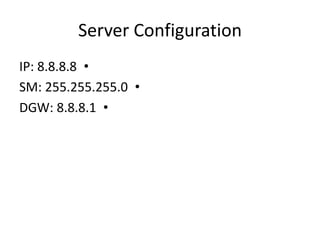
Server Configuration
•IP: 8.8.8.8
•SM: 255.255.255.0
•DGW: 8.8.8.1
Now
•PC>ping 8.8.8.8
•Both hosts can ping the Google server
Network Security
Network Security

Network Security

  • 2.
  • 4.
    Seminar Agenda •Security Definition •SecuritySolutions •VPN •Security Devices •AAA •Firewall Configuration
  • 5.
    What is Security? •“Thequality or state of being secure/to be free from danger” •multiple layers of security –Physical security –Personal security –Operations security –Communications security –Network security –Information security
  • 7.
  • 8.
    Security Elements •Bring YourOwn Device (BYOD) •Adaptive Security Appliance (ASA) •Mobile Device Management (MDM) •RSA SecureID ( •Active Directory (AD) •Certificate Authority (CA) •Identity Service Engine (ISE)
  • 9.
  • 10.
  • 11.
    VPN •Virtual Private Network •Itis a Data Tunnel to pass safely without being seen by hacker (attacker) •VPN Types according to devices: •1- Site-to-Site: No host used generally •(router-router) (ASA-ASA) (router-ASA) •2- Remote Access (router-host) (Server-client)
  • 12.
    •VPN Types accordingto layers: •IPSEC: L3 (IP) used for both site-to-site & remote access •SSL: Secure Socket Layer (TCP/L4) used for remote access
  • 13.
    •MPLS VPN: MultiProtocol Label Switching •L2VPN: CE-CE •L3VPN: PE-CE
  • 14.
  • 15.
  • 16.
    GRE Generic Routing Encapsulation VPNtype with the same IP version in both the physical & logical network Both IPv4 or Both IPv6
  • 17.
  • 18.
    •3 ports : •Inmax. security level=100 •(private/local/internal) network •Out min. security level=0 •(public/global/external) network •DMZ fair security level=50 •Demilitarized Zone (Server Farm)
  • 19.
  • 20.
  • 21.
  • 22.
  • 23.
    WSA: Web SecurityAppliance 1. An internal user makes an HTTP request to an external website. The client browser is configured to send the request to the Cisco WSA. 2. The Cisco WSA connects to the website on behalf of the internal user. 3. The firewall (Cisco ASA) is configured to only allow outbound web traffic from the Cisco WSA, and it forwards the traffic to the web server.
  • 24.
    Web Cache CommunicationProtocol (WCCP). 1. An internal user makes an HTTP request to an external website. 2. The internal router (R1) redirects the web request to the Cisco WSA using WCCP. 3. The Cisco WSA connects to the website on behalf of the internal user. 4. Also in this example, the firewall (Cisco ASA) is configured to only allow outbound web traffic from the WSA. The web traffic is sent to the Internet web server.
  • 25.
  • 26.
  • 27.
    AAA •Authentication – Authorization– Accounting •Authentication: username & password verification •Authorization: allowed services for user •Accounting: applied action towards user •TACACS+ (just CISCO) RADIUS (all vendors)
  • 28.
  • 29.
    ASA – configuringVLAN 1 •()#interface Vlan1 •()#no ip add •()#nameif inside •()#security-level 100 •()#ip address 172.16.1.1 255.255.255.0 •()#exit •()#int e0/1 •()#switchport access vlan 1 •!
  • 30.
    •()#interface Vlan2 •()#nameif outside •()#security-level0 •()#ip address 203.1.1.2 255.255.255.0 •()#exit •()#int e0/0 •()#switchport access vlan 2 ASA – configuring VLAN 2
  • 31.
    ASA – ConfiguringNAT •()#object network lan •()#subnet 172.16.1.0 255.255.255.0 •()#nat (inside,outside) dynamic interface •()#exit •()#route outside 0.0.0.0 0.0.0.0 203.1.1.1 1
  • 32.
    ASA – ConfiguringACL •()#access-list cisco extended permit tcp any any •()#access-list cisco extended permit icmp any any •()#access-group cisco in interface outside
  • 33.
    ASA – ConfiguringDHCP •Be careful!! •Delete the default configuration •Convert the 2 PC from static to DHCP •()#No dhcpd address 192.168.1.5-192.168.1.35 inside •()#dhcpd address 172.16.1.5-172.16.1.6 inside •()#dhcpd dns 8.8.8.8 interface inside
  • 34.
    ISP – IP/Routing •interfaceGigabitEthernet0/0 •ip address 203.1.1.1 255.255.255.0 •no shut •interface GigabitEthernet0/1 •ip address 8.8.8.1 255.255.255.0 •no shut •router ospf 1 •network 203.1.1.0 0.0.0.255 area 0 •network 8.8.8.0 0.0.0.255 area 0
  • 35.
    Server Configuration •IP: 8.8.8.8 •SM:255.255.255.0 •DGW: 8.8.8.1
  • 36.
    Now •PC>ping 8.8.8.8 •Both hostscan ping the Google server