


There are no secrets to success. It is the
result of preparation, hard work, and
learning from failure.”
— Colin Powell
“
PSA – NetSuite SRP (Project Accounting Overview)
Overview | September 2016
Project Accounting
3
Table Of Contents
• Overview of SRP…………....………………………………………………….4
• Project Reporting ………………………………………………………………5
• Resource Assignments (screenshots) …………………………………........8
• Project Billing Setup ………………………………………………………….10
• Fixed Bid, Milestone Billing…….…………………………………………… 12
• Time & Material Billing ……………………………………………………….13
• Time & Expense (screenshots) …………………………………………......14
• Invoicing Customers ……….………………………………………………...18
• Contact Bridgepoint Consulting ….…………………………………..........20
4
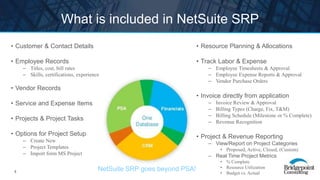
What is included in NetSuite SRP
• Customer & Contact Details
• Employee Records
– Titles, cost, bill rates
– Skills, certifications, experience
• Vendor Records
• Service and Expense Items
• Projects & Project Tasks
• Options for Project Setup
– Create New
– Project Templates
– Import form MS Project
• Resource Planning & Allocations
• Track Labor & Expense
– Employee Timesheets & Approval
– Employee Expense Reports & Approval
– Vendor Purchase Orders
• Invoice directly from application
– Invoice Review & Approval
– Billing Types (Charge, Fix, T&M)
– Billing Schedule (Milestone or % Complete)
– Revenue Recognition
• Project & Revenue Reporting
– View/Report on Project Categories
• Proposed, Active, Closed, (Custom)
– Real Time Project Metrics
• % Complete
• Resource Utilization
• Budget vs. Actual
NetSuite SRP goes beyond PSA!
5
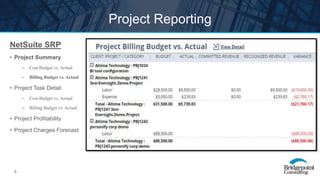
Project Reporting
NetSuite SRP
• Project Summary
– Cost Budget vs. Actual
– Billing Budget vs. Actual
• Project Task Detail
– Cost Budget vs. Actual
– Billing Budget vs. Actual
• Project Profitability
• Project Charges Forecast
6
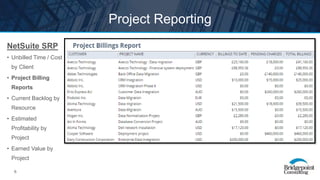
Project Reporting
NetSuite SRP
• Unbilled Time / Cost
by Client
• Project Billing
Reports
• Current Backlog by
Resource
• Estimated
Profitability by
Project
• Earned Value by
Project
7
Project Reporting
NetSuite SRP
• Time Entry
Exceptions
• Utilization by
Employee
• Allocated Utilization
by Project
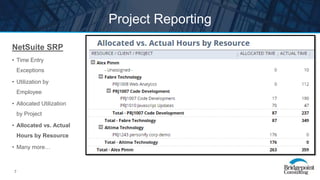
• Allocated vs. Actual
Hours by Resource
• Many more…
8
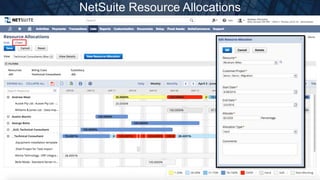
NetSuite Resource Allocations
9
NetSuite Resource Allocations (Search)
10
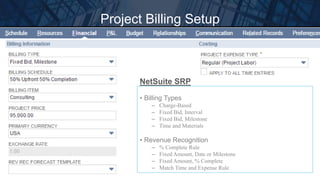
Project Billing Setup
• Billing Types
– Charge-Based
– Fixed Bid, Interval
– Fixed Bid, Milestone
– Time and Materials
• Revenue Recognition
– % Complete Rule
– Fixed Amount, Date or Milestone
– Fixed Amount, % Complete
– Match Time and Expense Rule
NetSuite SRP
11
Project Billing Schedule
12
Fixed Bid, Milestone Projects
• Complete required data on Financial Subtab
• Select Billing Type and create a Billing Schedule
• Select a Service Item to bill
Project
• Create the Sales Order from the Project
• Save the Sales Order
• Bill the initial Amount (Billing Schedule)
Sales
Order
• Record Actual Time by Resource to Project
• Compare Actual Project Cost to EstimateTime Entry
13
Time & Materials Projects
• Complete required data on Financial Subtab
• Select Billing Type
• Select a Service Item on the Task (by Resource)
Project
• Record Time & Expense by Resource to Project
• Approve Time & Expense
• Post Time to GL (Direct Labor or OPEX)
Time &
Expense
• Only approved Time & Expense can be billed
• Select Time & Expense by Date Range
• Edit Invoice with Concessions or Mark-ups
Invoice
Client
14
NetSuite Employee Center
*Single click to create a new Timesheet from Employee Dashboard
*Employee views for Projects and Tasks
15
NetSuite Weekly Timesheet
Capture Weekly Comments
Move from week to week easily!
16
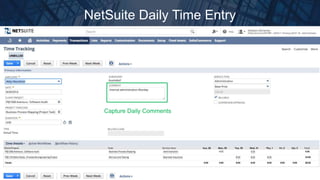
NetSuite Daily Time Entry
Capture Daily Comments
17
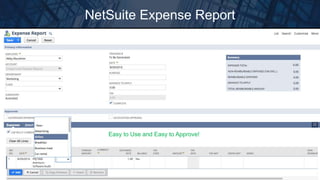
NetSuite Expense Report
Easy to Use and Easy to Approve!
18
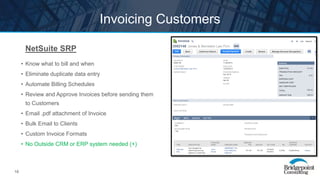
Invoicing Customers
NetSuite SRP
• Know what to bill and when
• Eliminate duplicate data entry
• Automate Billing Schedules
• Review and Approve Invoices before sending them
to Customers
• Email .pdf attachment of Invoice
• Bulk Email to Clients
• Custom Invoice Formats
• No Outside CRM or ERP system needed (+)
19
ANY QUESTIONS?
20
AUSTIN
8310 N. Capital of Texas Highway
Building One, Suite 420
Austin, Texas 78731
Phone: 512-437-7900
WWW.BRIDGEPOINTCONSULTING.COM
DALLAS
325 North Saint Paul St
Suite 2550
Dallas, Texas 75201
Phone: 469-209-4034
HOUSTON
Two Riverway
Suite 1750
Houston, Texas 77056
Phone: 832-626-4495
CONTACT US
AUSTIN | DALLAS | HOUSTON

NetSuite SRP (Project Accounting)

  • 1.
    There are nosecrets to success. It is the result of preparation, hard work, and learning from failure.” — Colin Powell “ PSA – NetSuite SRP (Project Accounting Overview) Overview | September 2016
  • 2.
  • 3.
    3 Table Of Contents •Overview of SRP…………....………………………………………………….4 • Project Reporting ………………………………………………………………5 • Resource Assignments (screenshots) …………………………………........8 • Project Billing Setup ………………………………………………………….10 • Fixed Bid, Milestone Billing…….…………………………………………… 12 • Time & Material Billing ……………………………………………………….13 • Time & Expense (screenshots) …………………………………………......14 • Invoicing Customers ……….………………………………………………...18 • Contact Bridgepoint Consulting ….…………………………………..........20
  • 4.
    4 What is includedin NetSuite SRP • Customer & Contact Details • Employee Records – Titles, cost, bill rates – Skills, certifications, experience • Vendor Records • Service and Expense Items • Projects & Project Tasks • Options for Project Setup – Create New – Project Templates – Import form MS Project • Resource Planning & Allocations • Track Labor & Expense – Employee Timesheets & Approval – Employee Expense Reports & Approval – Vendor Purchase Orders • Invoice directly from application – Invoice Review & Approval – Billing Types (Charge, Fix, T&M) – Billing Schedule (Milestone or % Complete) – Revenue Recognition • Project & Revenue Reporting – View/Report on Project Categories • Proposed, Active, Closed, (Custom) – Real Time Project Metrics • % Complete • Resource Utilization • Budget vs. Actual NetSuite SRP goes beyond PSA!
  • 5.
    5 Project Reporting NetSuite SRP •Project Summary – Cost Budget vs. Actual – Billing Budget vs. Actual • Project Task Detail – Cost Budget vs. Actual – Billing Budget vs. Actual • Project Profitability • Project Charges Forecast
  • 6.
    6 Project Reporting NetSuite SRP •Unbilled Time / Cost by Client • Project Billing Reports • Current Backlog by Resource • Estimated Profitability by Project • Earned Value by Project
  • 7.
    7 Project Reporting NetSuite SRP •Time Entry Exceptions • Utilization by Employee • Allocated Utilization by Project • Allocated vs. Actual Hours by Resource • Many more…
  • 8.
  • 9.
  • 10.
    10 Project Billing Setup •Billing Types – Charge-Based – Fixed Bid, Interval – Fixed Bid, Milestone – Time and Materials • Revenue Recognition – % Complete Rule – Fixed Amount, Date or Milestone – Fixed Amount, % Complete – Match Time and Expense Rule NetSuite SRP
  • 11.
  • 12.
    12 Fixed Bid, MilestoneProjects • Complete required data on Financial Subtab • Select Billing Type and create a Billing Schedule • Select a Service Item to bill Project • Create the Sales Order from the Project • Save the Sales Order • Bill the initial Amount (Billing Schedule) Sales Order • Record Actual Time by Resource to Project • Compare Actual Project Cost to EstimateTime Entry
  • 13.
    13 Time & MaterialsProjects • Complete required data on Financial Subtab • Select Billing Type • Select a Service Item on the Task (by Resource) Project • Record Time & Expense by Resource to Project • Approve Time & Expense • Post Time to GL (Direct Labor or OPEX) Time & Expense • Only approved Time & Expense can be billed • Select Time & Expense by Date Range • Edit Invoice with Concessions or Mark-ups Invoice Client
  • 14.
    14 NetSuite Employee Center *Singleclick to create a new Timesheet from Employee Dashboard *Employee views for Projects and Tasks
  • 15.
    15 NetSuite Weekly Timesheet CaptureWeekly Comments Move from week to week easily!
  • 16.
    16 NetSuite Daily TimeEntry Capture Daily Comments
  • 17.
    17 NetSuite Expense Report Easyto Use and Easy to Approve!
  • 18.
    18 Invoicing Customers NetSuite SRP •Know what to bill and when • Eliminate duplicate data entry • Automate Billing Schedules • Review and Approve Invoices before sending them to Customers • Email .pdf attachment of Invoice • Bulk Email to Clients • Custom Invoice Formats • No Outside CRM or ERP system needed (+)
  • 19.
  • 20.
    20 AUSTIN 8310 N. Capitalof Texas Highway Building One, Suite 420 Austin, Texas 78731 Phone: 512-437-7900 WWW.BRIDGEPOINTCONSULTING.COM DALLAS 325 North Saint Paul St Suite 2550 Dallas, Texas 75201 Phone: 469-209-4034 HOUSTON Two Riverway Suite 1750 Houston, Texas 77056 Phone: 832-626-4495 CONTACT US AUSTIN | DALLAS | HOUSTON

Editor's Notes

  • #5 ONLY NETSUITE SRP HAS PSA, CRM, AND FINANCIALS IN ONE DATABASE
  • #6 NetSuite OpenAir has more pre-built PSA centric reports, but you can build these same reports in NetSuite
  • #7 NetSuite OpenAir has more pre-built PSA centric reports, but you can build these same reports in NetSuite
  • #8 NetSuite OpenAir has more pre-built PSA centric reports, but you can build these same reports in NetSuite
  • #9 Group by Resource Name No Client / Project View (-) Click on Row to Edit Allocation Drag /Edit Allocation (+) Grid and Chart Views Search Available Resources Search by Availability Search for Skills needed
  • #10 Search Available Resources Search by Availability Billing Class (*Job Title) Max Labor Cost Years of Experience Search for Skills needed
  • #11 BOTH APPLICATIONS SUPPORT ADVANCED BILLING AND REV REC NEEDS
  • #12 BOTH APPLICATIONS SUPPORT ADVANCED BILLING AND REV REC NEEDS
  • #15 Easy to Create New Timesheet (+) Single click
  • #16 SAME FUNCTIONS AS OPENAIR Copy Prior Timesheet Weekly Timesheet View Enter Time by Project / Task Capture Comments Weekly (+) Customizable Fields and Views Route Timesheets to Project Manager or Employee Supervisor for Approval
  • #17 ADDITIONAL NETSUITE ONLY FUNCTION Capture Comments Daily (-), note this is easier to do in OpenAir Customizable Fields and Views
  • #18 SAME FUNCTIONS AS OPENAIR Expense Items Client / Customer / Project Task Expense Date Qty, Price, Amount Billable / non-Billable flag Attach individual receipt items Mobile app for attaching screenshots Route Expense Reports to Project Manager or Employee Supervisor for Approval
  • #19 BOTH APPLICATIONS PROVIDE INVOCE CREATION, APPROVAL, AND BULK SENDING