Performance Testing for Web Applications
Techniques, Metrics and Profiling
Ștefan Popa
Software Test Automation Specialist
Agenda
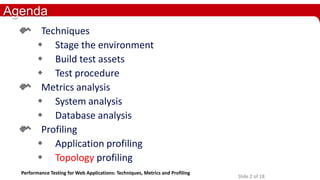
Techniques
 Stage the environment
 Build test assets
 Test procedure
Metrics analysis
 System analysis
 Database analysis
Profiling
 Application profiling
 Topology profiling
Performance Testing for Web Applications: Techniques, Metrics and Profiling

Slide 2 of 18
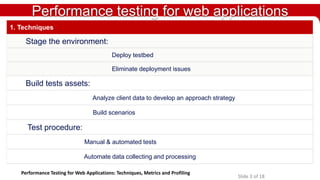
Performance testing for web applications
1. Techniques

Stage the environment:
Deploy testbed
Eliminate deployment issues

Build tests assets:
Analyze client data to develop an approach strategy
Build scenarios

Test procedure:
Manual & automated tests
Automate data collecting and processing
Performance Testing for Web Applications: Techniques, Metrics and Profiling

Slide 3 of 18
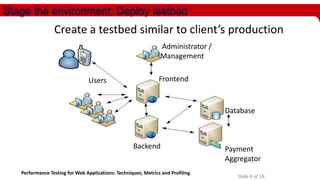
Stage the environment: Deploy testbed

Create a testbed similar to client’s production
Administrator /
Management
Users

Frontend

Database

Backend
Performance Testing for Web Applications: Techniques, Metrics and Profiling

Payment
Aggregator
Slide 4 of 18
Stage the environment: Eliminate deployment issues
 Client’s working infrastructure
 Application server tuning:
-

Network issues
Data compression
Connection pools
Memory allocation

 Test DB server tuning:
-

Best practices or DBA expertise
Resource allocation for the shared pool
Database parameters

Performance Testing for Web Applications: Techniques, Metrics and Profiling

Slide 5 of 18
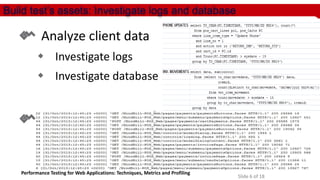
Build test’s assets: Investigate logs and database

Analyze client data
 Investigate logs

 Investigate database

Build scenarios

Performance Testing for Web Applications: Techniques, Metrics and Profiling

Slide 6 of 18
Build test’s assets: Analyze client data to develop an approach strategy
Analyze client’s previous product logs or establish new possible scenarios based on
existing clients

Performance Testing for Web Applications: Techniques, Metrics and Profiling

Slide 7 of 18
Build test’s assets: Build the scenarios

Create the actions

Set the goals
(expected latencies)

Performance Testing for Web Applications: Techniques, Metrics and Profiling

Slide 8 of 18
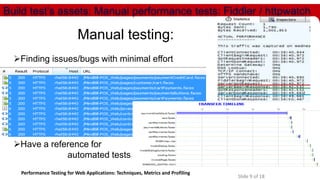
Build test’s assets: Manual performance tests: Fiddler / httpwatch

Manual testing:
Finding issues/bugs with minimal effort

Have a reference for
automated tests
Performance Testing for Web Applications: Techniques, Metrics and Profiling

Slide 9 of 18
Build test’s assets: Manual performance tests: results
Test RUN ID
Test Tool
# of users
# of cycles

1

Login

2

Press "Existing customer" button.

3

Enter the account's Billing Name. Click the "Find" button

4

Click the "Continue" button.

5

Click the button "Update Resources".

6

Select a value from the "Service Number" drop down list.

7

Insert an available "IMEI“. Click the "Retrieve" button.

8

Press add to cart

9

Click the "Service payments" button.

10

Fill in a value for "Amount to pay” Press "Add to cart"

11

Press "Check Out" button.

12

Press "Cash" button.

13

Press "Submit"

14

Press "Finish Sale"

Performance Testing for Web Applications: Techniques, Metrics and Profiling

1
Manual - Fiddler
1
10

2
Manual - Fiddler
1
10

3
Manual - Fiddler
1
10

1.42
0.33
0.29
1.88
0.16
0.68
0.45
2.58
0.49
1.66
1.75
0.33
3.50
0.23

0.68
0.23
0.17
1.53
0.21
0.78
0.5
2.56
0.17
1.37
1.06
0.2
2.81
0.12

0.59
0.31
0.03
1.12
0.03
0.43
0.21
1.85
0.17
1.21
0.78
0.17
2.17
0.06

Slide 10 of 18
Build test’s assets: Develop an automated solution for testing
Transposing the manual scenario into an automated script

Performance Testing for Web Applications: Techniques, Metrics and Profiling

Slide 11 of 18
Build test’s assets: Calibrate tests
Validate script by running with 1 user as in previous manual run.
Test RUN ID

3

4

Test Tool

Manual Fiddler

Automatic jMeter

# of users
# of cycles

1
3

1
10

0.57

0.53

0.03

0.06

0.07

0.08

0.7

0.76

Click "Update Service"

0.17

0.17

Select Service Number

1.4

1.36

0.51

0.51

0.1

0.1

Add to cart.

2.17

2.03

Click Check Out

0.75

0.91

Press "Check"

0.29

0.31

Submit Check number and press Submit

2.51

2.55

Press Close & Finish sale button.

0.35

0.15

Login

Data must be consistent
Press "Existing customer" button.
with manual tests Enter the first name/last name Click the "Find" button
Click the "Continue" button.

Validate actual results

Change "Rate Plan"
Set "Effective Date" (Immediate)

Differences between manual
and automated tests

Performance Testing for Web Applications: Techniques, Metrics and Profiling

Slide 12 of 18
Test runs, analyze results
First stage – Detect low load performance issues
Run ID
Test Tool
# of users

Raise limit to
client’s expected load

1
2
3
4
5
6
7
8
9
10
11
12
13
14
15
16
17
18
19
20
21
22
23
24
25

Open OnlineStore main page.
Sort by provider: LG
Select a preconfigured phone model with promo
Add to cart the phone.
Enter a valid ZIP code and click the Submit button.
Click the Continue button.
Click on the "Postpaid plan type" hyperlink.
Select a rate plan.
Acknowledge age restrictions
Click the "Add to cart" button.
Skip add to cart an accessory.
Click the Check Out button.
Select New Account
Enter new user information. Press Continue Checkout
Enter Account Owner Info
Select Personal address or Postal Service address
Verify Cart
Select Subscriber info and select “new number"
Select Personal address or Postal Service address
Select Shipping Details & select Shipping method
Review cart and confirm Checkout
Agree License and Contract
Enter & submit credit card details.
Order Complete. Press Continue Shopping
Main page loads. Press logout

Performance Testing for Web Applications: Techniques, Metrics and Profiling

5

6

7

Automatic
(jmeter)

Automatic
(jmeter)

Automatic
(jmeter)

1
0.62

10
0.16

20
0.94

50
0.14

50
0.08

50
0.07

100
0.08

0.07

0.04

0.46

0.13

0.06

0.05

0.05

0.42

0.35

1.38

6.8

3.1

0.08

0.09

0.03

0.02

0.25

0.08

0.05

0.01

0.02

1.41

1.52

2.97

13.96

0.05

0.87

0.94

0.82

0.88

2.58

6.21

1.24

0.6

0.63

0.06

0.03

0.49

0.04

1.16

0.03

0.03

0.02

0.01

0.37

0.02

0.01

0.02

0.03

0.05

0.03

0.25

0.05

0.02

0.03

0.04

0.3

0.37

1.14

7.14

2.67

0.06

0.07

0.06

0.06

0.4

0.1

0.02

0.04

0.04

0.05

0.03

0.53

0.05

0.03

0.07

0.08

0.42

0.81

1.69

4.06

0.71

0.32

0.37

0.49

0.98

2.15

3.76

0.59

0.35

0.37

0.38

0.44

1.32

4.7

0.24

0.24

0.25

1.32

4.6

9.44

47.06 28.18 7.46 11.04

0.05

0.03

0.32

0.12

0.02

0.03

0.03

0.17

0.24

0.8

5.54

0.19

1.47

1.62

1.99

3.17

5.75

10.34

1.91

0.07

0.08

0.5

1.09

2.24

5.31

0.99

0.66

0.87

1.43

2.63

5.79

6.42

3.89

0.04

0.05

3.23

3.54

4.87

4.76

0.41

0.33

0.33

2.21

5.64

9.53

27.89

6.67

3.01

2.88

0.11

0.09

0.8

0.14

0.06

0.05

0.06

0.09

0.1

0.52

0.12

0.05

0.06

0.06

Slide 13 of 18

8

9

10

11

Automatic Automatic Automatic Automati
(jmeter)
(jmeter)
(jmeter) c (jmeter)
Performance testing for web applications
Metrics analysis

Automatic data gathering
Automatic data processing
Metrics analysis

Performance Testing for Web Applications: Techniques, Metrics and Profiling

Slide 14 of 18
Metrics analysis: Automate collecting and processing test data

Performance Testing for Web Applications: Techniques, Metrics and Profiling

Slide 15 of 18
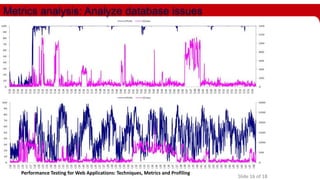
Metrics analysis: Analyze database issues

Performance Testing for Web Applications: Techniques, Metrics and Profiling

Slide 16 of 18
Metrics analysis: Analyze application server issues

Performance Testing for Web Applications: Techniques, Metrics and Profiling

Slide 17 of 18
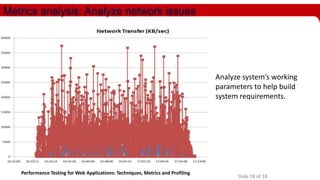
Metrics analysis: Analyze network issues

Analyze system’s working
parameters to help build
system requirements.

Performance Testing for Web Applications: Techniques, Metrics and Profiling

Slide 18 of 18
Performance testing for web applications
Profiling

System-wide load distribution analysis
Database profiling
Application profiling

Performance Testing for Web Applications: Techniques, Metrics and Profiling

Slide 19 of 18
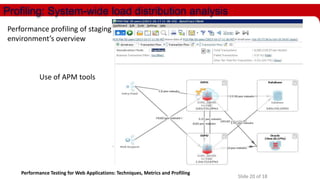
Profiling: System-wide load distribution analysis
Performance profiling of staging
environment’s overview

Use of APM tools

Performance Testing for Web Applications: Techniques, Metrics and Profiling

Slide 20 of 18
Profiling: Database profiling

Workload summary & CPU load

Performance Testing for Web Applications: Techniques, Metrics and Profiling

Slide 21 of 18
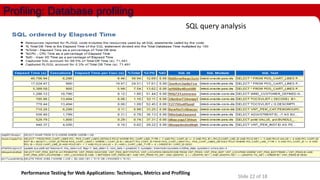
Profiling: Database profiling
SQL query analysis

Performance Testing for Web Applications: Techniques, Metrics and Profiling

Slide 22 of 18
Profiling: Database profiling
Execution plan analysis

Performance Testing for Web Applications: Techniques, Metrics and Profiling

Slide 23 of 18
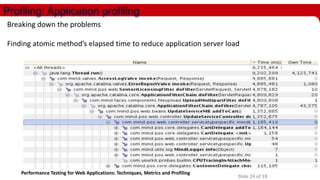
Profiling: Application profiling
Breaking down the problems
Finding atomic method’s elapsed time to reduce application server load

Performance Testing for Web Applications: Techniques, Metrics and Profiling

Slide 24 of 18
Performance tests: Publish the results after multiple iterations
Run ID
# of users

1
2
3
4
5
6
7
8
9
10
11
12
13
14
15
16
17
18
19
20
21
22
23
24
25

Open OnlineStore main page.
Sort by provider: LG
Select a preconfigured phone model with promo
Add to cart the phone.
Enter a valid ZIP code (57722) and click the Submit button.
Click the Continue button.
Click on the "Postpaid plan type" hyperlink.
Select a rate plan.
Acknowledge age restrictions
Click the "Add to cart" button.
Skip add to cart an accessory.
Click the Check Out button.
Select New Account
Enter new user information. Press Continue Checkout
Enter Account Owner Info
Select Personal address or Postal Service address
Verify Cart
Select Subscriber info and select "Give me an Viaero number"
Select Personal address or Postal Service address
Select Shipping Details & select Shipping method
Review cart and confirm Checkout
Agree License and Contract
Enter & submit credit card details.
Order Complete. Press Continue Shopping
Site Loads. Press logout

30
1
0.98

31
10
0.3

66
10
0.09

68
50
0.07

72
50
0.07

73
50
0.06

0.52

0.28

0.05

0.05

0.04

0.05

1.38

1.18

0.09

0.08

0.08

0.08

0.15

0.11

0.01

0.01

0.01

0.01

1.19

1.37

1.28

0.87

0.85

0.91

0.88

1.04

0.82

0.6

0.58

0.61

0.66

0.27

0.03

0.03

0.02

0.04

0.07

0.07

0.02

0.02

0.02

0.02

0.66

0.28

0.03

0.03

0.03

0.02

1.27

0.97

0.06

0.06

0.06

0.07

0.19

0.24

0.04

0.04

0.04

0.04

0.2

0.14

0.07

0.07

0.07

0.07

0.49

0.56

0.28

0.32

0.29

0.3

0.84

0.86

0.34

0.35

0.34

0.35

0.47

0.9

0.2

0.24

0.19

0.35

9.16

9.33

6.65

7.46

5.41

3.38

0.24

0.18

0.03

0.03

0.03

0.04

0.49

0.5

1.34

1.47

1.37

0.49

2.79

2.24

0.07

0.07

0.07

0.07

0.95

1.05

0.62

0.66

0.61

0.74

1.77

1.92

0.04

0.04

0.04

0.04

0.72

0.71

0.29

0.33

0.3

0.42

4.73

5.26

3.01

3.01

2.73

2.15

0.37

0.24

0.06

0.05

0.05

0.05

0.13

0.26

0.07

0.06

0.06

0.04

Performance Testing for Web Applications: Techniques, Metrics and Profiling

Slide 25 of 18
Ștefan Popa - Software Test Automation Specialist

Performance Testing for Web Applications: Techniques, Metrics and Profiling

Slide 26 of 18

Performance testing for web applications – techniques, metrics and profiling

  • 1.
    Performance Testing forWeb Applications Techniques, Metrics and Profiling Ștefan Popa Software Test Automation Specialist
  • 2.
    Agenda Techniques  Stage theenvironment  Build test assets  Test procedure Metrics analysis  System analysis  Database analysis Profiling  Application profiling  Topology profiling Performance Testing for Web Applications: Techniques, Metrics and Profiling Slide 2 of 18
  • 3.
    Performance testing forweb applications 1. Techniques Stage the environment: Deploy testbed Eliminate deployment issues Build tests assets: Analyze client data to develop an approach strategy Build scenarios Test procedure: Manual & automated tests Automate data collecting and processing Performance Testing for Web Applications: Techniques, Metrics and Profiling Slide 3 of 18
  • 4.
    Stage the environment:Deploy testbed Create a testbed similar to client’s production Administrator / Management Users Frontend Database Backend Performance Testing for Web Applications: Techniques, Metrics and Profiling Payment Aggregator Slide 4 of 18
  • 5.
    Stage the environment:Eliminate deployment issues  Client’s working infrastructure  Application server tuning: - Network issues Data compression Connection pools Memory allocation  Test DB server tuning: - Best practices or DBA expertise Resource allocation for the shared pool Database parameters Performance Testing for Web Applications: Techniques, Metrics and Profiling Slide 5 of 18
  • 6.
    Build test’s assets:Investigate logs and database Analyze client data  Investigate logs  Investigate database Build scenarios Performance Testing for Web Applications: Techniques, Metrics and Profiling Slide 6 of 18
  • 7.
    Build test’s assets:Analyze client data to develop an approach strategy Analyze client’s previous product logs or establish new possible scenarios based on existing clients Performance Testing for Web Applications: Techniques, Metrics and Profiling Slide 7 of 18
  • 8.
    Build test’s assets:Build the scenarios Create the actions Set the goals (expected latencies) Performance Testing for Web Applications: Techniques, Metrics and Profiling Slide 8 of 18
  • 9.
    Build test’s assets:Manual performance tests: Fiddler / httpwatch Manual testing: Finding issues/bugs with minimal effort Have a reference for automated tests Performance Testing for Web Applications: Techniques, Metrics and Profiling Slide 9 of 18
  • 10.
    Build test’s assets:Manual performance tests: results Test RUN ID Test Tool # of users # of cycles 1 Login 2 Press "Existing customer" button. 3 Enter the account's Billing Name. Click the "Find" button 4 Click the "Continue" button. 5 Click the button "Update Resources". 6 Select a value from the "Service Number" drop down list. 7 Insert an available "IMEI“. Click the "Retrieve" button. 8 Press add to cart 9 Click the "Service payments" button. 10 Fill in a value for "Amount to pay” Press "Add to cart" 11 Press "Check Out" button. 12 Press "Cash" button. 13 Press "Submit" 14 Press "Finish Sale" Performance Testing for Web Applications: Techniques, Metrics and Profiling 1 Manual - Fiddler 1 10 2 Manual - Fiddler 1 10 3 Manual - Fiddler 1 10 1.42 0.33 0.29 1.88 0.16 0.68 0.45 2.58 0.49 1.66 1.75 0.33 3.50 0.23 0.68 0.23 0.17 1.53 0.21 0.78 0.5 2.56 0.17 1.37 1.06 0.2 2.81 0.12 0.59 0.31 0.03 1.12 0.03 0.43 0.21 1.85 0.17 1.21 0.78 0.17 2.17 0.06 Slide 10 of 18
  • 11.
    Build test’s assets:Develop an automated solution for testing Transposing the manual scenario into an automated script Performance Testing for Web Applications: Techniques, Metrics and Profiling Slide 11 of 18
  • 12.
    Build test’s assets:Calibrate tests Validate script by running with 1 user as in previous manual run. Test RUN ID 3 4 Test Tool Manual Fiddler Automatic jMeter # of users # of cycles 1 3 1 10 0.57 0.53 0.03 0.06 0.07 0.08 0.7 0.76 Click "Update Service" 0.17 0.17 Select Service Number 1.4 1.36 0.51 0.51 0.1 0.1 Add to cart. 2.17 2.03 Click Check Out 0.75 0.91 Press "Check" 0.29 0.31 Submit Check number and press Submit 2.51 2.55 Press Close & Finish sale button. 0.35 0.15 Login Data must be consistent Press "Existing customer" button. with manual tests Enter the first name/last name Click the "Find" button Click the "Continue" button. Validate actual results Change "Rate Plan" Set "Effective Date" (Immediate) Differences between manual and automated tests Performance Testing for Web Applications: Techniques, Metrics and Profiling Slide 12 of 18
  • 13.
    Test runs, analyzeresults First stage – Detect low load performance issues Run ID Test Tool # of users Raise limit to client’s expected load 1 2 3 4 5 6 7 8 9 10 11 12 13 14 15 16 17 18 19 20 21 22 23 24 25 Open OnlineStore main page. Sort by provider: LG Select a preconfigured phone model with promo Add to cart the phone. Enter a valid ZIP code and click the Submit button. Click the Continue button. Click on the "Postpaid plan type" hyperlink. Select a rate plan. Acknowledge age restrictions Click the "Add to cart" button. Skip add to cart an accessory. Click the Check Out button. Select New Account Enter new user information. Press Continue Checkout Enter Account Owner Info Select Personal address or Postal Service address Verify Cart Select Subscriber info and select “new number" Select Personal address or Postal Service address Select Shipping Details & select Shipping method Review cart and confirm Checkout Agree License and Contract Enter & submit credit card details. Order Complete. Press Continue Shopping Main page loads. Press logout Performance Testing for Web Applications: Techniques, Metrics and Profiling 5 6 7 Automatic (jmeter) Automatic (jmeter) Automatic (jmeter) 1 0.62 10 0.16 20 0.94 50 0.14 50 0.08 50 0.07 100 0.08 0.07 0.04 0.46 0.13 0.06 0.05 0.05 0.42 0.35 1.38 6.8 3.1 0.08 0.09 0.03 0.02 0.25 0.08 0.05 0.01 0.02 1.41 1.52 2.97 13.96 0.05 0.87 0.94 0.82 0.88 2.58 6.21 1.24 0.6 0.63 0.06 0.03 0.49 0.04 1.16 0.03 0.03 0.02 0.01 0.37 0.02 0.01 0.02 0.03 0.05 0.03 0.25 0.05 0.02 0.03 0.04 0.3 0.37 1.14 7.14 2.67 0.06 0.07 0.06 0.06 0.4 0.1 0.02 0.04 0.04 0.05 0.03 0.53 0.05 0.03 0.07 0.08 0.42 0.81 1.69 4.06 0.71 0.32 0.37 0.49 0.98 2.15 3.76 0.59 0.35 0.37 0.38 0.44 1.32 4.7 0.24 0.24 0.25 1.32 4.6 9.44 47.06 28.18 7.46 11.04 0.05 0.03 0.32 0.12 0.02 0.03 0.03 0.17 0.24 0.8 5.54 0.19 1.47 1.62 1.99 3.17 5.75 10.34 1.91 0.07 0.08 0.5 1.09 2.24 5.31 0.99 0.66 0.87 1.43 2.63 5.79 6.42 3.89 0.04 0.05 3.23 3.54 4.87 4.76 0.41 0.33 0.33 2.21 5.64 9.53 27.89 6.67 3.01 2.88 0.11 0.09 0.8 0.14 0.06 0.05 0.06 0.09 0.1 0.52 0.12 0.05 0.06 0.06 Slide 13 of 18 8 9 10 11 Automatic Automatic Automatic Automati (jmeter) (jmeter) (jmeter) c (jmeter)
  • 14.
    Performance testing forweb applications Metrics analysis Automatic data gathering Automatic data processing Metrics analysis Performance Testing for Web Applications: Techniques, Metrics and Profiling Slide 14 of 18
  • 15.
    Metrics analysis: Automatecollecting and processing test data Performance Testing for Web Applications: Techniques, Metrics and Profiling Slide 15 of 18
  • 16.
    Metrics analysis: Analyzedatabase issues Performance Testing for Web Applications: Techniques, Metrics and Profiling Slide 16 of 18
  • 17.
    Metrics analysis: Analyzeapplication server issues Performance Testing for Web Applications: Techniques, Metrics and Profiling Slide 17 of 18
  • 18.
    Metrics analysis: Analyzenetwork issues Analyze system’s working parameters to help build system requirements. Performance Testing for Web Applications: Techniques, Metrics and Profiling Slide 18 of 18
  • 19.
    Performance testing forweb applications Profiling System-wide load distribution analysis Database profiling Application profiling Performance Testing for Web Applications: Techniques, Metrics and Profiling Slide 19 of 18
  • 20.
    Profiling: System-wide loaddistribution analysis Performance profiling of staging environment’s overview Use of APM tools Performance Testing for Web Applications: Techniques, Metrics and Profiling Slide 20 of 18
  • 21.
    Profiling: Database profiling Workloadsummary & CPU load Performance Testing for Web Applications: Techniques, Metrics and Profiling Slide 21 of 18
  • 22.
    Profiling: Database profiling SQLquery analysis Performance Testing for Web Applications: Techniques, Metrics and Profiling Slide 22 of 18
  • 23.
    Profiling: Database profiling Executionplan analysis Performance Testing for Web Applications: Techniques, Metrics and Profiling Slide 23 of 18
  • 24.
    Profiling: Application profiling Breakingdown the problems Finding atomic method’s elapsed time to reduce application server load Performance Testing for Web Applications: Techniques, Metrics and Profiling Slide 24 of 18
  • 25.
    Performance tests: Publishthe results after multiple iterations Run ID # of users 1 2 3 4 5 6 7 8 9 10 11 12 13 14 15 16 17 18 19 20 21 22 23 24 25 Open OnlineStore main page. Sort by provider: LG Select a preconfigured phone model with promo Add to cart the phone. Enter a valid ZIP code (57722) and click the Submit button. Click the Continue button. Click on the "Postpaid plan type" hyperlink. Select a rate plan. Acknowledge age restrictions Click the "Add to cart" button. Skip add to cart an accessory. Click the Check Out button. Select New Account Enter new user information. Press Continue Checkout Enter Account Owner Info Select Personal address or Postal Service address Verify Cart Select Subscriber info and select "Give me an Viaero number" Select Personal address or Postal Service address Select Shipping Details & select Shipping method Review cart and confirm Checkout Agree License and Contract Enter & submit credit card details. Order Complete. Press Continue Shopping Site Loads. Press logout 30 1 0.98 31 10 0.3 66 10 0.09 68 50 0.07 72 50 0.07 73 50 0.06 0.52 0.28 0.05 0.05 0.04 0.05 1.38 1.18 0.09 0.08 0.08 0.08 0.15 0.11 0.01 0.01 0.01 0.01 1.19 1.37 1.28 0.87 0.85 0.91 0.88 1.04 0.82 0.6 0.58 0.61 0.66 0.27 0.03 0.03 0.02 0.04 0.07 0.07 0.02 0.02 0.02 0.02 0.66 0.28 0.03 0.03 0.03 0.02 1.27 0.97 0.06 0.06 0.06 0.07 0.19 0.24 0.04 0.04 0.04 0.04 0.2 0.14 0.07 0.07 0.07 0.07 0.49 0.56 0.28 0.32 0.29 0.3 0.84 0.86 0.34 0.35 0.34 0.35 0.47 0.9 0.2 0.24 0.19 0.35 9.16 9.33 6.65 7.46 5.41 3.38 0.24 0.18 0.03 0.03 0.03 0.04 0.49 0.5 1.34 1.47 1.37 0.49 2.79 2.24 0.07 0.07 0.07 0.07 0.95 1.05 0.62 0.66 0.61 0.74 1.77 1.92 0.04 0.04 0.04 0.04 0.72 0.71 0.29 0.33 0.3 0.42 4.73 5.26 3.01 3.01 2.73 2.15 0.37 0.24 0.06 0.05 0.05 0.05 0.13 0.26 0.07 0.06 0.06 0.04 Performance Testing for Web Applications: Techniques, Metrics and Profiling Slide 25 of 18
  • 26.
    Ștefan Popa -Software Test Automation Specialist Performance Testing for Web Applications: Techniques, Metrics and Profiling Slide 26 of 18