Purchasing Computers
for the Library
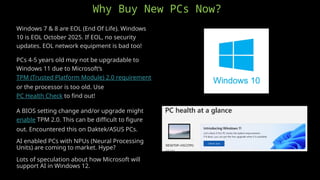
Windows 7 & 8 are EOL (End Of Life). Windows
10 is EOL October 2025. If EOL, no security
updates. EOL network equipment is bad too!
PCs 4-5 years old may not be upgradable to
Windows 11 due to Microsoft’s
TPM (Trusted Platform Module) 2.0 requirement
or the processor is too old. Use
PC Health Check to find out!
A BIOS setting change and/or upgrade might
enable TPM 2.0. This can be difficult to figure
out. Encountered this on Daktek/ASUS PCs.
AI enabled PCs with NPUs (Neural Processing
Units) are coming to market. Hype?
Lots of speculation about how Microsoft will
support AI in Windows 12.
Why Buy New PCs Now?
PC Styles
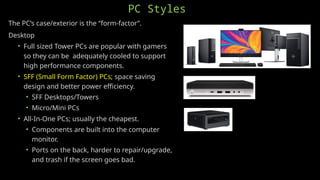
The PC’s case/exterior is the “form-factor”.
Desktop
• Full sized Tower PCs are popular with gamers
so they can be adequately cooled to support
high performance components.
• SFF (Small Form Factor) PCs; space saving
design and better power efficiency.
• SFF Desktops/Towers
• Micro/Mini PCs
• All-In-One PCs; usually the cheapest.
• Components are built into the computer
monitor.
• Ports on the back, harder to repair/upgrade,
and trash if the screen goes bad.
PC Styles
Laptop/Notebook/2-in-1
• 13” to 17” screen size.
• Large laptops can have a full size
keyboard!
• Portability & battery makes for a
great:
• Meeting/Program PC
• Floater
• Backup when power’s out
PC Styles
Tablet
• Best portability.
• Long battery life.
• Great for young children.
• Protective covers?
Lock them down?
• Cable locks.
• Combo or Key?
PC Styles
Chromebooks?
Apple iMac, MacBook, or Mini?
What’s the local school use?
Does the school do one-to-one
computing? If so, students will already
have one.
These devices have their own
management platforms.
• Chrome Enterprise ($50/device/year)
• Google Family Link (free “Parent”
account that can manage five
devices.)
• Apple School Manager (free)
PC Components – CPU (Central Processing Unit)
x86 (80x86) – CISC (Complex Instruction Set Computer).
• Larger; more transistors.
• “Hot” operating temperature.
• Faster processing.
• Easier to program.
• Dominant in PCs.
• Intel
• 14th
Gen, i3-i9 is the latest generation (Oct 2023).
• 14th
Gen i5 has best price/performance , i3 13th
Gen is cheapest.
• There is a stability issue with 13th & 14th
Gen i7 & i9 CPUs. Fix this
month?
• AMD (Usually cheaper than Intel.)
• Zen 5, 9000 Series, Ryzen 5-9 is the latest generation (July 2024).
• Zen 4, Ryzen 5 7600X has best price/performance.
• Zen 3, 5000 Series, Ryzen 5 cheapest but no DDR5 support.
• Better integrated graphics than Intel (Radeon).
PC Components – CPU (Central Processing Unit)
ARM (Advanced RISC Machine)
• RISC (Reduced Instruction Set Computer)
• Smaller; less transistors.
• “Cooler” operating temperature.
• More power efficient.
• Dominant in phones and tablets.
• Apple uses M2-M4 in Macs and A4-A16 in
iPhones & iPads.
• Snapdragon® X Elite is in the new Microsoft
Surface CPU.
• Getting rave reviews! 22 hours of battery life.
PC Components – Disk Drives
Disk Drives have evolved from slow “mechanical” to fast “digital” technology.
• HDD
• Magnetic
• Platters
• “Noisy”
• SATA Bus
• 1st
Gen SSD
• High quality controller & NAND Memory Chips.
• (USB thumb drives use “low” quality controller & NAND.)
• SATA Bus
• Portable durability!
• Much faster and less power.
PC Components – Disk Drives
SSD cont.
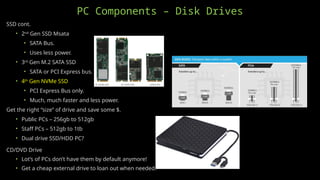
• 2nd
Gen SSD Msata
• SATA Bus.
• Uses less power.
• 3rd
Gen M.2 SATA SSD
• SATA or PCI Express bus.
• 4th
Gen NVMe SSD
• PCI Express Bus only.
• Much, much faster and less power.
Get the right “size” of drive and save some $.
• Public PCs – 256gb to 512gb
• Staff PCs – 512gb to 1tb
• Dual drive SSD/HDD PC?
CD/DVD Drive
• Lot’s of PCs don’t have them by default anymore!
• Get a cheap external drive to loan out when needed.
PC Components – Memory (SDRAM - Synchronous Dynamic Random-Access
Memory)
Memory requirements have increased over time as the OSes
(Operating Systems) have advanced.
• DOS had a 640kb limit.
• 32bit Windows versions had a 4gb limit.
• 64bit Windows versions had a 128gb (XP) to 2tb (Windows
11) limit.
With Windows 7, 4mb of memory was the recommended
minimum.
We don’t talk about Windows 8.
With Windows 10, 8mb of memory became the recommended
minimum for the average user. Same for Windows 11.
Power users should go with at least 16mb of memory
• AAA Gaming
• Photo editing
• Video editing
• Virtual Reality
PC Components – Memory (SDRAM - Synchronous Dynamic Random-Access
Memory)
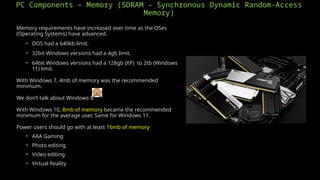
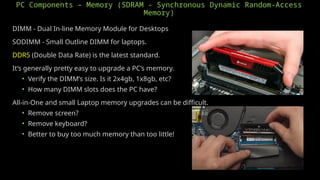
DIMM - Dual In-line Memory Module for Desktops
SODIMM - Small Outline DIMM for laptops.
DDR5 (Double Data Rate) is the latest standard.
It’s generally pretty easy to upgrade a PC’s memory.
• Verify the DIMM’s size. Is it 2x4gb, 1x8gb, etc?
• How many DIMM slots does the PC have?
All-in-One and small Laptop memory upgrades can be difficult.
• Remove screen?
• Remove keyboard?
• Better to buy too much memory than too little!
PC Components - Video
GPU (Graphics Processing Unit)
• Integrated graphics
• GPU is built into the CPU.
• CPU shares its memory with the GPU.
• Discrete graphics
• GPU is separate from CPU.
• GPU has its own memory.
• Separate PCIe video card?
• More $ but way better for gaming, VR, photo/video editing
• Nvidia GeForce RTX 4060 is the best budget GPU.
• Intel’s new Arc GPUs are very affordable.
Monitor
• Use what you already have?
• What style of video ports does the old monitor have?
• Need a video cable adapter? Get the right direction!
• 24” is the new standard size.
• Larger/multiple screens for Staff?
• All PCs now have HDMI video ports.
Other PC Components
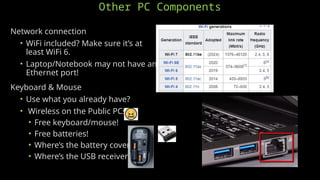
Network connection
• WiFi included? Make sure it’s at
least WiFi 6.
• Laptop/Notebook may not have an
Ethernet port!
Keyboard & Mouse
• Use what you already have?
• Wireless on the Public PCs?
• Free keyboard/mouse!
• Free batteries!
• Where’s the battery cover?
• Where’s the USB receiver?
Where to Buy
Buying new and direct is best!
Dell, HP, & Lenovo websites
• Be assured you’re getting the latest tech.
• Factory warranty and support.
• Check their clearance!
• Dell & Lenovo have discounts available through Techsoup.
Avoid Amazon & Walmart websites
• Likely 3rd
party resellers.
• Likely to be older overstock or refurbished PCs.
Buy in-store at Costco, Sam’s, Walmart, Etc.
• Get a sales tax free card!
Check the State of NE purchasing contracts for pre-negotiated prices.
Where to Buy
Local IT company for installation and support? (DakTek/ASUS)
Used?
• Mostly off-lease PCs that are already 5+ years old.
• Make sure it’s already running Window 11!
• Techsoup has old used PCs.
Amazon’s a good source for cheap Monitors!
Check Reviews.
Have your quote/selection reviewed by Sherm.
Apply for the NLC’s Library Improvement Grant to cover up to 75% of the
spend.
Recommended Software for Public PCs
OS (Operating System)
• Windows 11
• Home or Pro? It will depend on the PC purchased.
• Edge Browser has 5% market share.
• Already has Defender for Anitvirus protection.
• Use local and separate Staff (Admin) & Patron (Standard) logins.
• Apple macOS. Sonoma is current version.
• Alternative OS on old PCs?
• ChromeOS Flex
• Linux
Google’s Chrome Browser - 65% market share
Mozilla’s Firefox Browser - 3% market share
Recommended Software for Public PCs
Remove the bloatware from the new PC!
• Trial software included with a new PC. Usually antivirus.
• Manufacturer's client for management and/or updates.
• Eliminates annoying pop-ups!
Reboot/Restore software (Faronics DeepFreeze)
• A Must Have !
• Secures the PCs and protects Patrons’ privacy.
• Software updates have to be done manually once a month.
• Buy licenses with the NLC’s Medica Grant funds!
Adobe
• Acrobat Reader (Free!)
• Resolves browser PDF viewing and printing issues.
• Adobe Acrobat Pro or Creative Suite?
• Requires account/login.
• Requires credit card on file.
Recommended Software for Public PCs
Microsoft Office
• Needed on all PCs?
• LibreOffice (free open source)
• Google Docs (requires Goggle account)
• 2021 Standard from Techsoup for $36.
• Home & Student for $150.
• Don’t get Office 365 for the Public PCs!
• Requires a Microsoft account!
• OneDrive is shared if same account is used!
• Microsoft offers Office 365 Basic free to nonprofits. Staff?
Roblox
• What the kids play!
• Create a library account/login for install and updates.
Filtering (on the network)
• Provides excellent cybersecurity protection!
• Required for E-Rate and LSTA grant funds.
• Use E-Rate for a discount on Internet service!
• Use LSTA funds for new computers!
• The NLC provides DNSFilter at no charge.
Andrew “Sherm” Sherman
Library Technology Support
Specialist
Nebraska Library Commission
402-471-4559
andrew.sherman@nebraska.gov
• I’m here to help!
• Contact me for assistance with your library’s technology.
• Check out these NCompass technology presentations.
• Secure Computers For Public Use
• Running at least Windows 10. Windows 11 by October, 2025!
• Reboot/Restore software installed (Faronic’s DeepFreeze).
• BIOS secured with an Admin password.
• Internet Filtering For E-Rate CIPA Compliance And Cybersecurity
• The NLC provides DNSFilter for free to NE public libraries!
• Required for E-Rate and other federal grant funds.
• I can assist with the implementation of DNSFilter.
• Provides excellent first level cybersecurity!
• WiFi In the Library
• Upgrade to WiFi 6E/7!
• Ditch the cables.
Questions? Tech News
• NLC Medica Grant funds available
for new network equipment and
reboot/restore software!
• Redbox shutting down!
• Owner Chicken Soup for the Soul
Entertainment in Ch. 7 bankruptcy.
• Paid $375 million for Redbox in
2022.
• Hotspots will be eligible for E-rate!

NCompass Live: Purchasing Computers for the Library

  • 1.
  • 2.
    Windows 7 &8 are EOL (End Of Life). Windows 10 is EOL October 2025. If EOL, no security updates. EOL network equipment is bad too! PCs 4-5 years old may not be upgradable to Windows 11 due to Microsoft’s TPM (Trusted Platform Module) 2.0 requirement or the processor is too old. Use PC Health Check to find out! A BIOS setting change and/or upgrade might enable TPM 2.0. This can be difficult to figure out. Encountered this on Daktek/ASUS PCs. AI enabled PCs with NPUs (Neural Processing Units) are coming to market. Hype? Lots of speculation about how Microsoft will support AI in Windows 12. Why Buy New PCs Now?
  • 3.
    PC Styles The PC’scase/exterior is the “form-factor”. Desktop • Full sized Tower PCs are popular with gamers so they can be adequately cooled to support high performance components. • SFF (Small Form Factor) PCs; space saving design and better power efficiency. • SFF Desktops/Towers • Micro/Mini PCs • All-In-One PCs; usually the cheapest. • Components are built into the computer monitor. • Ports on the back, harder to repair/upgrade, and trash if the screen goes bad.
  • 4.
    PC Styles Laptop/Notebook/2-in-1 • 13”to 17” screen size. • Large laptops can have a full size keyboard! • Portability & battery makes for a great: • Meeting/Program PC • Floater • Backup when power’s out
  • 5.
    PC Styles Tablet • Bestportability. • Long battery life. • Great for young children. • Protective covers? Lock them down? • Cable locks. • Combo or Key?
  • 6.
    PC Styles Chromebooks? Apple iMac,MacBook, or Mini? What’s the local school use? Does the school do one-to-one computing? If so, students will already have one. These devices have their own management platforms. • Chrome Enterprise ($50/device/year) • Google Family Link (free “Parent” account that can manage five devices.) • Apple School Manager (free)
  • 7.
    PC Components –CPU (Central Processing Unit) x86 (80x86) – CISC (Complex Instruction Set Computer). • Larger; more transistors. • “Hot” operating temperature. • Faster processing. • Easier to program. • Dominant in PCs. • Intel • 14th Gen, i3-i9 is the latest generation (Oct 2023). • 14th Gen i5 has best price/performance , i3 13th Gen is cheapest. • There is a stability issue with 13th & 14th Gen i7 & i9 CPUs. Fix this month? • AMD (Usually cheaper than Intel.) • Zen 5, 9000 Series, Ryzen 5-9 is the latest generation (July 2024). • Zen 4, Ryzen 5 7600X has best price/performance. • Zen 3, 5000 Series, Ryzen 5 cheapest but no DDR5 support. • Better integrated graphics than Intel (Radeon).
  • 8.
    PC Components –CPU (Central Processing Unit) ARM (Advanced RISC Machine) • RISC (Reduced Instruction Set Computer) • Smaller; less transistors. • “Cooler” operating temperature. • More power efficient. • Dominant in phones and tablets. • Apple uses M2-M4 in Macs and A4-A16 in iPhones & iPads. • Snapdragon® X Elite is in the new Microsoft Surface CPU. • Getting rave reviews! 22 hours of battery life.
  • 9.
    PC Components –Disk Drives Disk Drives have evolved from slow “mechanical” to fast “digital” technology. • HDD • Magnetic • Platters • “Noisy” • SATA Bus • 1st Gen SSD • High quality controller & NAND Memory Chips. • (USB thumb drives use “low” quality controller & NAND.) • SATA Bus • Portable durability! • Much faster and less power.
  • 10.
    PC Components –Disk Drives SSD cont. • 2nd Gen SSD Msata • SATA Bus. • Uses less power. • 3rd Gen M.2 SATA SSD • SATA or PCI Express bus. • 4th Gen NVMe SSD • PCI Express Bus only. • Much, much faster and less power. Get the right “size” of drive and save some $. • Public PCs – 256gb to 512gb • Staff PCs – 512gb to 1tb • Dual drive SSD/HDD PC? CD/DVD Drive • Lot’s of PCs don’t have them by default anymore! • Get a cheap external drive to loan out when needed.
  • 11.
    PC Components –Memory (SDRAM - Synchronous Dynamic Random-Access Memory) Memory requirements have increased over time as the OSes (Operating Systems) have advanced. • DOS had a 640kb limit. • 32bit Windows versions had a 4gb limit. • 64bit Windows versions had a 128gb (XP) to 2tb (Windows 11) limit. With Windows 7, 4mb of memory was the recommended minimum. We don’t talk about Windows 8. With Windows 10, 8mb of memory became the recommended minimum for the average user. Same for Windows 11. Power users should go with at least 16mb of memory • AAA Gaming • Photo editing • Video editing • Virtual Reality
  • 12.
    PC Components –Memory (SDRAM - Synchronous Dynamic Random-Access Memory) DIMM - Dual In-line Memory Module for Desktops SODIMM - Small Outline DIMM for laptops. DDR5 (Double Data Rate) is the latest standard. It’s generally pretty easy to upgrade a PC’s memory. • Verify the DIMM’s size. Is it 2x4gb, 1x8gb, etc? • How many DIMM slots does the PC have? All-in-One and small Laptop memory upgrades can be difficult. • Remove screen? • Remove keyboard? • Better to buy too much memory than too little!
  • 13.
    PC Components -Video GPU (Graphics Processing Unit) • Integrated graphics • GPU is built into the CPU. • CPU shares its memory with the GPU. • Discrete graphics • GPU is separate from CPU. • GPU has its own memory. • Separate PCIe video card? • More $ but way better for gaming, VR, photo/video editing • Nvidia GeForce RTX 4060 is the best budget GPU. • Intel’s new Arc GPUs are very affordable. Monitor • Use what you already have? • What style of video ports does the old monitor have? • Need a video cable adapter? Get the right direction! • 24” is the new standard size. • Larger/multiple screens for Staff? • All PCs now have HDMI video ports.
  • 14.
    Other PC Components Networkconnection • WiFi included? Make sure it’s at least WiFi 6. • Laptop/Notebook may not have an Ethernet port! Keyboard & Mouse • Use what you already have? • Wireless on the Public PCs? • Free keyboard/mouse! • Free batteries! • Where’s the battery cover? • Where’s the USB receiver?
  • 15.
    Where to Buy Buyingnew and direct is best! Dell, HP, & Lenovo websites • Be assured you’re getting the latest tech. • Factory warranty and support. • Check their clearance! • Dell & Lenovo have discounts available through Techsoup. Avoid Amazon & Walmart websites • Likely 3rd party resellers. • Likely to be older overstock or refurbished PCs. Buy in-store at Costco, Sam’s, Walmart, Etc. • Get a sales tax free card! Check the State of NE purchasing contracts for pre-negotiated prices.
  • 16.
    Where to Buy LocalIT company for installation and support? (DakTek/ASUS) Used? • Mostly off-lease PCs that are already 5+ years old. • Make sure it’s already running Window 11! • Techsoup has old used PCs. Amazon’s a good source for cheap Monitors! Check Reviews. Have your quote/selection reviewed by Sherm. Apply for the NLC’s Library Improvement Grant to cover up to 75% of the spend.
  • 17.
    Recommended Software forPublic PCs OS (Operating System) • Windows 11 • Home or Pro? It will depend on the PC purchased. • Edge Browser has 5% market share. • Already has Defender for Anitvirus protection. • Use local and separate Staff (Admin) & Patron (Standard) logins. • Apple macOS. Sonoma is current version. • Alternative OS on old PCs? • ChromeOS Flex • Linux Google’s Chrome Browser - 65% market share Mozilla’s Firefox Browser - 3% market share
  • 18.
    Recommended Software forPublic PCs Remove the bloatware from the new PC! • Trial software included with a new PC. Usually antivirus. • Manufacturer's client for management and/or updates. • Eliminates annoying pop-ups! Reboot/Restore software (Faronics DeepFreeze) • A Must Have ! • Secures the PCs and protects Patrons’ privacy. • Software updates have to be done manually once a month. • Buy licenses with the NLC’s Medica Grant funds! Adobe • Acrobat Reader (Free!) • Resolves browser PDF viewing and printing issues. • Adobe Acrobat Pro or Creative Suite? • Requires account/login. • Requires credit card on file.
  • 19.
    Recommended Software forPublic PCs Microsoft Office • Needed on all PCs? • LibreOffice (free open source) • Google Docs (requires Goggle account) • 2021 Standard from Techsoup for $36. • Home & Student for $150. • Don’t get Office 365 for the Public PCs! • Requires a Microsoft account! • OneDrive is shared if same account is used! • Microsoft offers Office 365 Basic free to nonprofits. Staff? Roblox • What the kids play! • Create a library account/login for install and updates. Filtering (on the network) • Provides excellent cybersecurity protection! • Required for E-Rate and LSTA grant funds. • Use E-Rate for a discount on Internet service! • Use LSTA funds for new computers! • The NLC provides DNSFilter at no charge.
  • 20.
    Andrew “Sherm” Sherman LibraryTechnology Support Specialist Nebraska Library Commission 402-471-4559 andrew.sherman@nebraska.gov • I’m here to help! • Contact me for assistance with your library’s technology. • Check out these NCompass technology presentations. • Secure Computers For Public Use • Running at least Windows 10. Windows 11 by October, 2025! • Reboot/Restore software installed (Faronic’s DeepFreeze). • BIOS secured with an Admin password. • Internet Filtering For E-Rate CIPA Compliance And Cybersecurity • The NLC provides DNSFilter for free to NE public libraries! • Required for E-Rate and other federal grant funds. • I can assist with the implementation of DNSFilter. • Provides excellent first level cybersecurity! • WiFi In the Library • Upgrade to WiFi 6E/7! • Ditch the cables. Questions? Tech News • NLC Medica Grant funds available for new network equipment and reboot/restore software! • Redbox shutting down! • Owner Chicken Soup for the Soul Entertainment in Ch. 7 bankruptcy. • Paid $375 million for Redbox in 2022. • Hotspots will be eligible for E-rate!