

NBS Hosted VoICE Service
Featuring Polycom IP Telephones
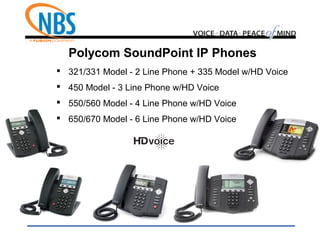
Polycom SoundPoint IP Phones
 321/331 Model - 2 Line Phone + 335 Model w/HD Voice
 450 Model - 3 Line Phone w/HD Voice
 550/560 Model - 4 Line Phone w/HD Voice
 650/670 Model - 6 Line Phone w/HD Voice
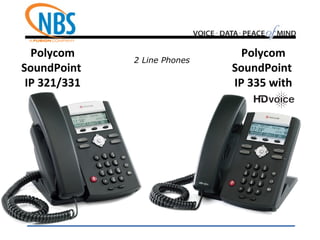
Polycom
SoundPoint
IP 321/331
2 Line Phones
Polycom
SoundPoint
IP 335 with
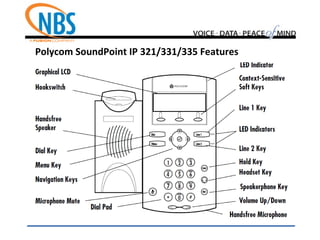
Polycom SoundPoint IP 321/331/335 Features
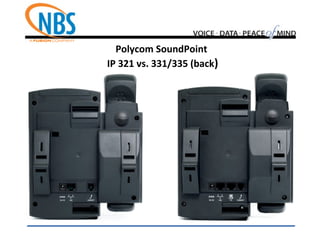
Polycom SoundPoint
IP 321 vs. 331/335 (back)
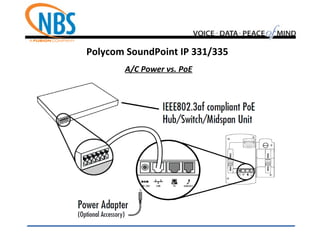
Polycom SoundPoint IP 331/335
A/C Power vs. PoE
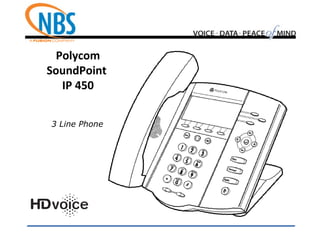
Polycom
SoundPoint
IP 450
3 Line Phone
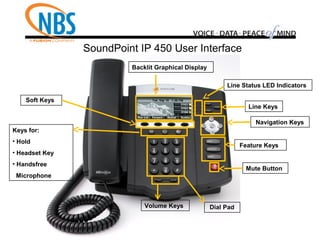
SoundPoint IP 450 User Interface
Navigation Keys
Line Status LED Indicators
Dial Pad
Feature Keys
Backlit Graphical Display
Soft Keys
Keys for:
• Hold
• Headset Key
• Handsfree
Microphone
Volume Keys
Line Keys
Mute Button
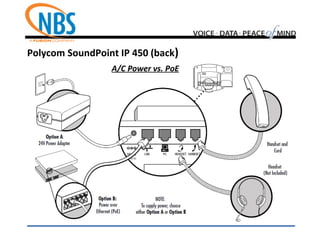
Polycom SoundPoint IP 450 (back)
A/C Power vs. PoE
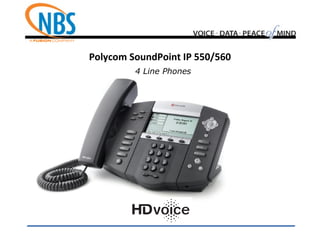
Polycom SoundPoint IP 550/560
4 Line Phones
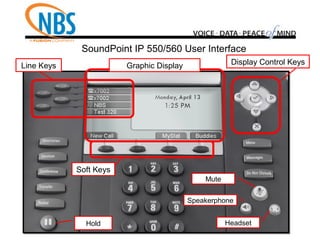
SoundPoint IP 550/560 User Interface
Graphic Display Display Control Keys
Soft Keys
Line Keys
Hold
Mute
Speakerphone
Headset
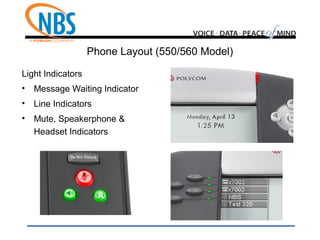
Phone Layout (550/560 Model)
Light Indicators
• Message Waiting Indicator
• Line Indicators
• Mute, Speakerphone &
Headset Indicators
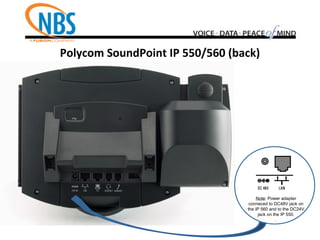
Polycom SoundPoint IP 550/560 (back)
Note: Power adapter
conneced to DC48V jack on
the IP 560 and to the DC24V
jack on the IP 550.
.
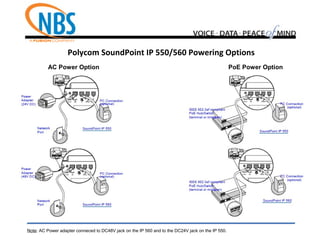
Polycom SoundPoint IP 550/560 Powering Options
AC Power Option PoE Power Option
Note: AC Power adapter conneced to DC48V jack on the IP 560 and to the DC24V jack on the IP 550.
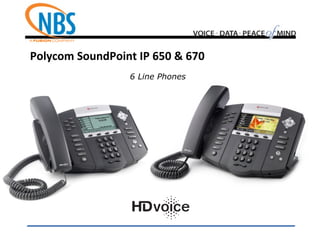
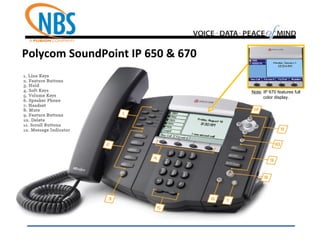
Polycom SoundPoint IP 650 & 670
6 Line Phones
Polycom SoundPoint IP 650 & 670
Note: IP 670 features full
color display.
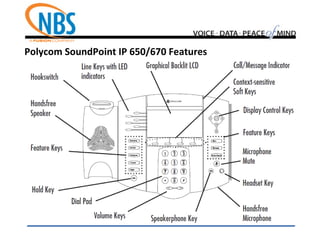
Polycom SoundPoint IP 650/670 Features
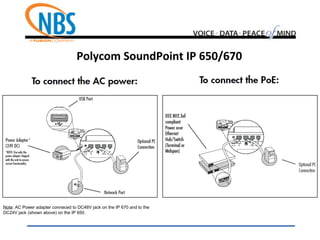
Polycom SoundPoint IP 650/670
Note: AC Power adapter conneced to DC48V jack on the IP 670 and to the
DC24V jack (shown above) on the IP 650.
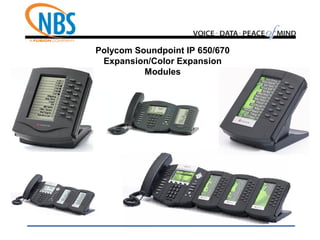
Polycom Soundpoint IP 650/670
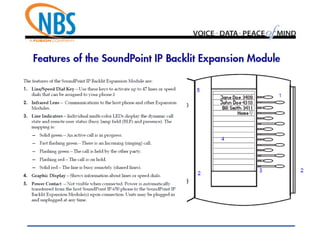
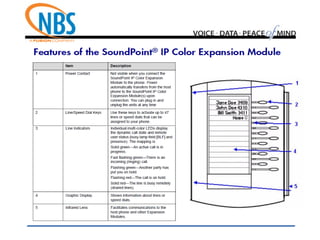
Expansion/Color Expansion
Modules
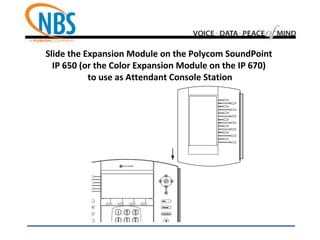
Slide the Expansion Module on the Polycom SoundPoint
IP 650 (or the Color Expansion Module on the IP 670)
to use as Attendant Console Station
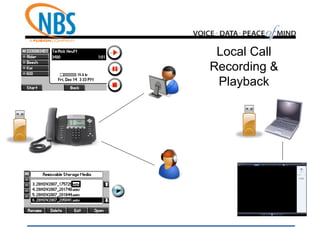
Local Call
Recording &
Playback
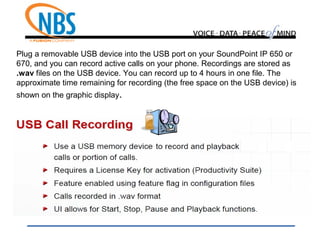
Plug a removable USB device into the USB port on your SoundPoint IP 650 or
670, and you can record active calls on your phone. Recordings are stored as
.wav files on the USB device. You can record up to 4 hours in one file. The
approximate time remaining for recording (the free space on the USB device) is
shown on the graphic display.
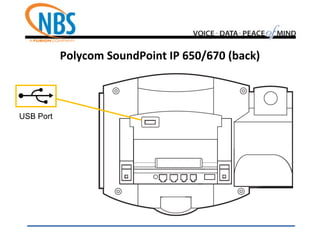
Polycom SoundPoint IP 650/670 (back)
USB Port
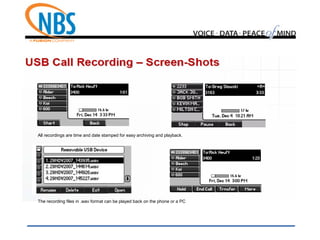
All recordings are time and date stamped for easy archiving and playback.
The recording files in .wav format can be played back on the phone or a PC
Polycom VVX Business Media Phones
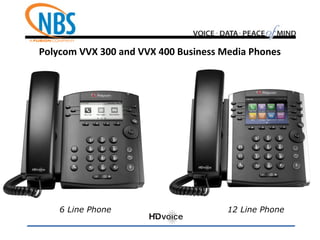
 300 Model - 6 Line Media Phone w/HD Voice
 400 Model - 12 Line Media Phone w/HD Voice
 500 Model - 12 Line TouchScreen w/HD Voice
 600 Model - 16 Line TouchScreen w/HD Voice
Polycom VVX 300 and VVX 400 Business Media Phones
6 Line Phone 12 Line Phone
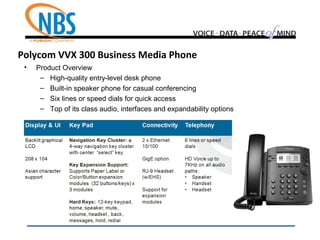
Polycom VVX 300 Business Media Phone
• Product Overview
– High-quality entry-level desk phone
– Built-in speaker phone for casual conferencing
– Six lines or speed dials for quick access
– Top of its class audio, interfaces and expandability options
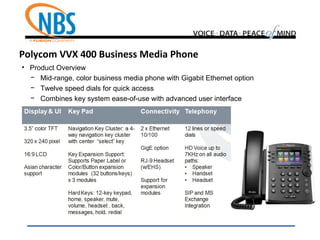
• Product Overview
− Mid-range, color business media phone with Gigabit Ethernet option
− Twelve speed dials for quick access
− Combines key system ease-of-use with advanced user interface
Polycom VVX 400 Business Media Phone
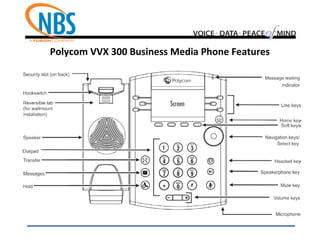
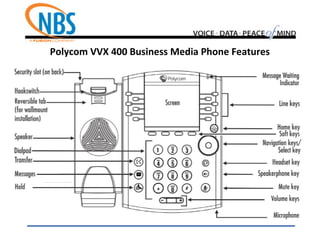
Polycom VVX 300 Business Media Phone Features
Polycom VVX 400 Business Media Phone Features
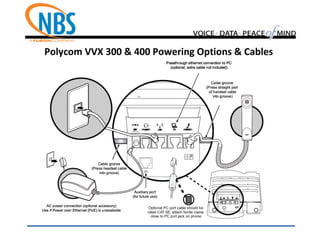
Polycom VVX 300 & 400 Powering Options & Cables
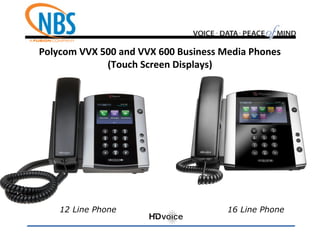
Polycom VVX 500 and VVX 600 Business Media Phones
(Touch Screen Displays)
12 Line Phone 16 Line Phone
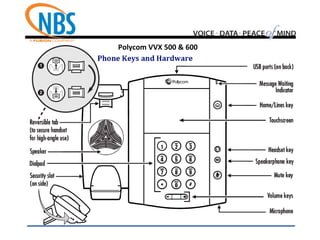
Polycom VVX 500 & 600
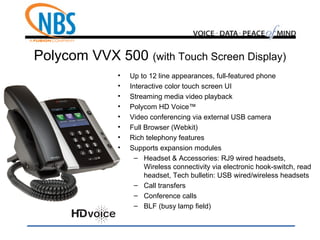
Polycom VVX 500 (with Touch Screen Display)
• Up to 12 line appearances, full-featured phone
• Interactive color touch screen UI
• Streaming media video playback
• Polycom HD Voice™
• Video conferencing via external USB camera
• Full Browser (Webkit)
• Rich telephony features
• Supports expansion modules
– Headset & Accessories: RJ9 wired headsets,
Wireless connectivity via electronic hook-switch, read
headset, Tech bulletin: USB wired/wireless headsets
– Call transfers
– Conference calls
– BLF (busy lamp field)
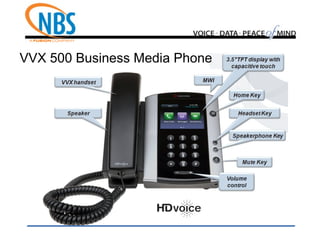
VVX 500 Business Media Phone
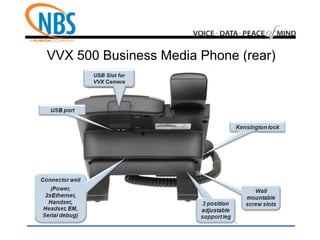
VVX 500 Business Media Phone (rear)
USB Slot for
VVX Camera
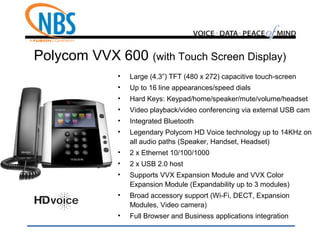
Polycom VVX 600 (with Touch Screen Display)
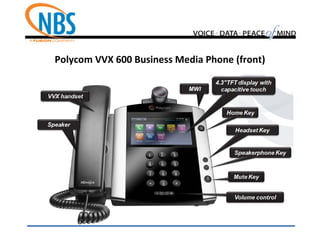
• Large (4.3”) TFT (480 x 272) capacitive touch-screen
• Up to 16 line appearances/speed dials
• Hard Keys: Keypad/home/speaker/mute/volume/headset
• Video playback/video conferencing via external USB cam
• Integrated Bluetooth
• Legendary Polycom HD Voice technology up to 14KHz on
all audio paths (Speaker, Handset, Headset)
• 2 x Ethernet 10/100/1000
• 2 x USB 2.0 host
• Supports VVX Expansion Module and VVX Color
Expansion Module (Expandability up to 3 modules)
• Broad accessory support (Wi-Fi, DECT, Expansion
Modules, Video camera)
• Full Browser and Business applications integration
Polycom VVX 600 Business Media Phone (front)
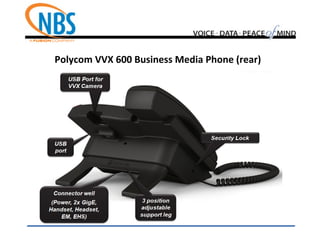
Polycom VVX 600 Business Media Phone (rear)
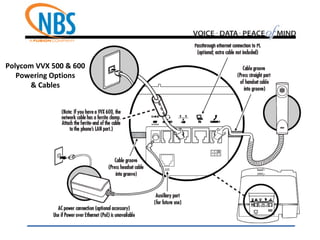
Polycom VVX 500 & 600
Powering Options
& Cables
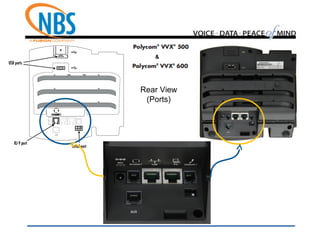
Rear View
(Ports)
&
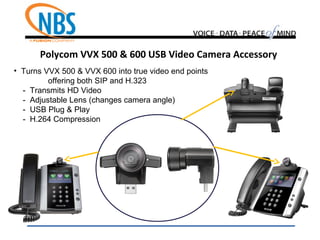
Polycom VVX 500 & 600 USB Video Camera Accessory
• Turns VVX 500 & VVX 600 into true video end points
offering both SIP and H.323
- Transmits HD Video
- Adjustable Lens (changes camera angle)
- USB Plug & Play
- H.264 Compression
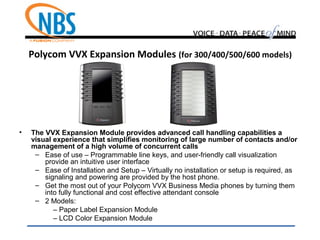
Polycom VVX Expansion Modules (for 300/400/500/600 models)
• The VVX Expansion Module provides advanced call handling capabilities a
visual experience that simplifies monitoring of large number of contacts and/or
management of a high volume of concurrent calls
– Ease of use – Programmable line keys, and user-friendly call visualization
provide an intuitive user interface
– Ease of Installation and Setup – Virtually no installation or setup is required, as
signaling and powering are provided by the host phone.
– Get the most out of your Polycom VVX Business Media phones by turning them
into fully functional and cost effective attendant console
– 2 Models:
– Paper Label Expansion Module
– LCD Color Expansion Module
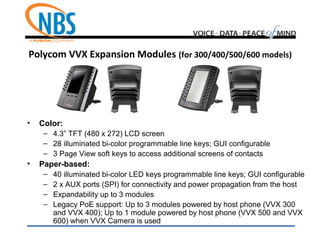
Polycom VVX Expansion Modules (for 300/400/500/600 models)
• Color:
– 4.3” TFT (480 x 272) LCD screen
– 28 illuminated bi-color programmable line keys; GUI configurable
– 3 Page View soft keys to access additional screens of contacts
• Paper-based:
– 40 illuminated bi-color LED keys programmable line keys; GUI configurable
– 2 x AUX ports (SPI) for connectivity and power propagation from the host
– Expandability up to 3 modules
– Legacy PoE support: Up to 3 modules powered by host phone (VVX 300
and VVX 400); Up to 1 module powered by host phone (VVX 500 and VVX
600) when VVX Camera is used
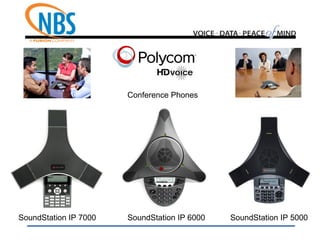
SoundStation IP 6000 SoundStation IP 5000
Conference Phones
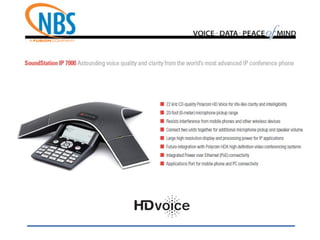
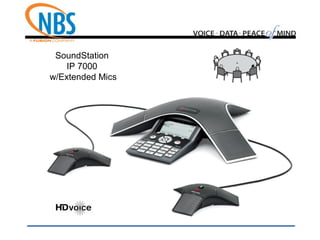
SoundStation IP 7000
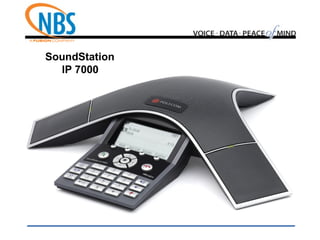
SoundStation
IP 7000
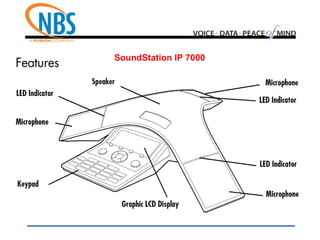
SoundStation IP 7000
SoundStation
IP 7000
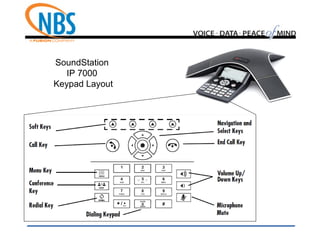
Keypad Layout
SoundStation
IP 7000
w/Extended Mics
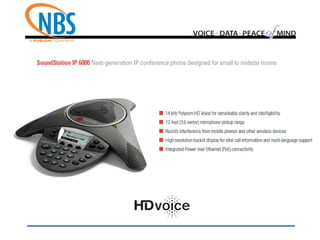
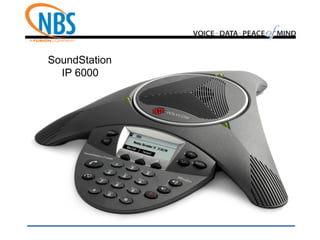
SoundStation
IP 6000
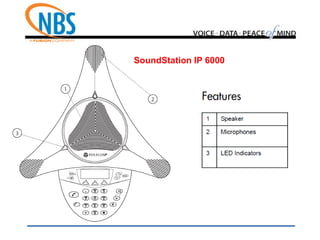
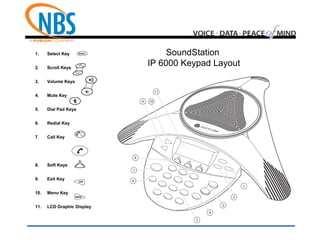
SoundStation IP 6000
1. Select Key
2. Scroll Keys
3. Volume Keys
4. Mute Key
5. Dial Pad Keys
6. Redial Key
7. Call Key
8. Soft Keys
9. Exit Key
10. Menu Key
11. LCD Graphic Display
SoundStation
IP 6000 Keypad Layout
SoundStation
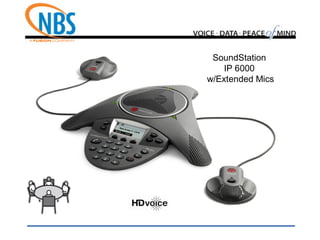
IP 6000
w/Extended Mics
SoundStation
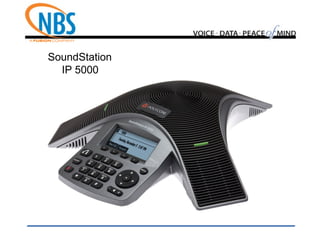
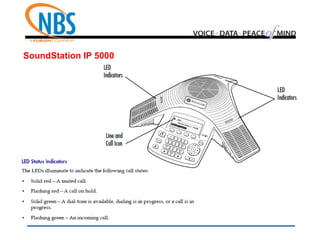
IP 5000
SoundStation
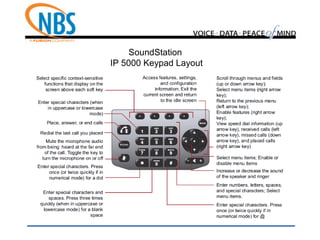
IP 5000 Keypad Layout
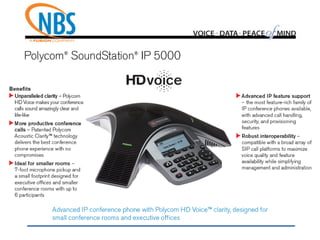
SoundStation IP 5000
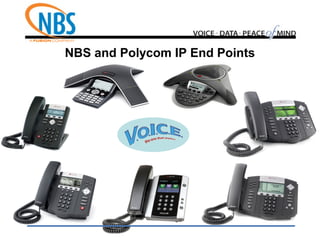
NBS and Polycom IP End Points
Thank you for choosing NBS!
VOICE DATA PEACE MIND

NBS VoICE & Polycom IP Endpoints

  • 1.
    NBS Hosted VoICEService Featuring Polycom IP Telephones
  • 2.
    Polycom SoundPoint IPPhones  321/331 Model - 2 Line Phone + 335 Model w/HD Voice  450 Model - 3 Line Phone w/HD Voice  550/560 Model - 4 Line Phone w/HD Voice  650/670 Model - 6 Line Phone w/HD Voice
  • 3.
    Polycom SoundPoint IP 321/331 2 LinePhones Polycom SoundPoint IP 335 with
  • 4.
    Polycom SoundPoint IP321/331/335 Features
  • 5.
    Polycom SoundPoint IP 321vs. 331/335 (back)
  • 6.
    Polycom SoundPoint IP331/335 A/C Power vs. PoE
  • 7.
  • 8.
    SoundPoint IP 450User Interface Navigation Keys Line Status LED Indicators Dial Pad Feature Keys Backlit Graphical Display Soft Keys Keys for: • Hold • Headset Key • Handsfree Microphone Volume Keys Line Keys Mute Button
  • 9.
    Polycom SoundPoint IP450 (back) A/C Power vs. PoE
  • 10.
    Polycom SoundPoint IP550/560 4 Line Phones
  • 11.
    SoundPoint IP 550/560User Interface Graphic Display Display Control Keys Soft Keys Line Keys Hold Mute Speakerphone Headset
  • 12.
    Phone Layout (550/560Model) Light Indicators • Message Waiting Indicator • Line Indicators • Mute, Speakerphone & Headset Indicators
  • 13.
    Polycom SoundPoint IP550/560 (back) Note: Power adapter conneced to DC48V jack on the IP 560 and to the DC24V jack on the IP 550. .
  • 14.
    Polycom SoundPoint IP550/560 Powering Options AC Power Option PoE Power Option Note: AC Power adapter conneced to DC48V jack on the IP 560 and to the DC24V jack on the IP 550.
  • 15.
    Polycom SoundPoint IP650 & 670 6 Line Phones
  • 16.
    Polycom SoundPoint IP650 & 670 Note: IP 670 features full color display.
  • 17.
    Polycom SoundPoint IP650/670 Features
  • 18.
    Polycom SoundPoint IP650/670 Note: AC Power adapter conneced to DC48V jack on the IP 670 and to the DC24V jack (shown above) on the IP 650.
  • 19.
    Polycom Soundpoint IP650/670 Expansion/Color Expansion Modules
  • 20.
    Slide the ExpansionModule on the Polycom SoundPoint IP 650 (or the Color Expansion Module on the IP 670) to use as Attendant Console Station
  • 23.
  • 24.
    Plug a removableUSB device into the USB port on your SoundPoint IP 650 or 670, and you can record active calls on your phone. Recordings are stored as .wav files on the USB device. You can record up to 4 hours in one file. The approximate time remaining for recording (the free space on the USB device) is shown on the graphic display.
  • 25.
    Polycom SoundPoint IP650/670 (back) USB Port
  • 26.
    All recordings aretime and date stamped for easy archiving and playback. The recording files in .wav format can be played back on the phone or a PC
  • 28.
    Polycom VVX BusinessMedia Phones  300 Model - 6 Line Media Phone w/HD Voice  400 Model - 12 Line Media Phone w/HD Voice  500 Model - 12 Line TouchScreen w/HD Voice  600 Model - 16 Line TouchScreen w/HD Voice
  • 29.
    Polycom VVX 300and VVX 400 Business Media Phones 6 Line Phone 12 Line Phone
  • 30.
    Polycom VVX 300Business Media Phone • Product Overview – High-quality entry-level desk phone – Built-in speaker phone for casual conferencing – Six lines or speed dials for quick access – Top of its class audio, interfaces and expandability options
  • 31.
    • Product Overview −Mid-range, color business media phone with Gigabit Ethernet option − Twelve speed dials for quick access − Combines key system ease-of-use with advanced user interface Polycom VVX 400 Business Media Phone
  • 32.
    Polycom VVX 300Business Media Phone Features
  • 33.
    Polycom VVX 400Business Media Phone Features
  • 34.
    Polycom VVX 300& 400 Powering Options & Cables
  • 35.
    Polycom VVX 500and VVX 600 Business Media Phones (Touch Screen Displays) 12 Line Phone 16 Line Phone
  • 36.
  • 37.
    Polycom VVX 500(with Touch Screen Display) • Up to 12 line appearances, full-featured phone • Interactive color touch screen UI • Streaming media video playback • Polycom HD Voice™ • Video conferencing via external USB camera • Full Browser (Webkit) • Rich telephony features • Supports expansion modules – Headset & Accessories: RJ9 wired headsets, Wireless connectivity via electronic hook-switch, read headset, Tech bulletin: USB wired/wireless headsets – Call transfers – Conference calls – BLF (busy lamp field)
  • 38.
    VVX 500 BusinessMedia Phone
  • 39.
    VVX 500 BusinessMedia Phone (rear) USB Slot for VVX Camera
  • 40.
    Polycom VVX 600(with Touch Screen Display) • Large (4.3”) TFT (480 x 272) capacitive touch-screen • Up to 16 line appearances/speed dials • Hard Keys: Keypad/home/speaker/mute/volume/headset • Video playback/video conferencing via external USB cam • Integrated Bluetooth • Legendary Polycom HD Voice technology up to 14KHz on all audio paths (Speaker, Handset, Headset) • 2 x Ethernet 10/100/1000 • 2 x USB 2.0 host • Supports VVX Expansion Module and VVX Color Expansion Module (Expandability up to 3 modules) • Broad accessory support (Wi-Fi, DECT, Expansion Modules, Video camera) • Full Browser and Business applications integration
  • 41.
    Polycom VVX 600Business Media Phone (front)
  • 42.
    Polycom VVX 600Business Media Phone (rear)
  • 43.
    Polycom VVX 500& 600 Powering Options & Cables
  • 44.
  • 45.
    Polycom VVX 500& 600 USB Video Camera Accessory • Turns VVX 500 & VVX 600 into true video end points offering both SIP and H.323 - Transmits HD Video - Adjustable Lens (changes camera angle) - USB Plug & Play - H.264 Compression
  • 46.
    Polycom VVX ExpansionModules (for 300/400/500/600 models) • The VVX Expansion Module provides advanced call handling capabilities a visual experience that simplifies monitoring of large number of contacts and/or management of a high volume of concurrent calls – Ease of use – Programmable line keys, and user-friendly call visualization provide an intuitive user interface – Ease of Installation and Setup – Virtually no installation or setup is required, as signaling and powering are provided by the host phone. – Get the most out of your Polycom VVX Business Media phones by turning them into fully functional and cost effective attendant console – 2 Models: – Paper Label Expansion Module – LCD Color Expansion Module
  • 47.
    Polycom VVX ExpansionModules (for 300/400/500/600 models) • Color: – 4.3” TFT (480 x 272) LCD screen – 28 illuminated bi-color programmable line keys; GUI configurable – 3 Page View soft keys to access additional screens of contacts • Paper-based: – 40 illuminated bi-color LED keys programmable line keys; GUI configurable – 2 x AUX ports (SPI) for connectivity and power propagation from the host – Expandability up to 3 modules – Legacy PoE support: Up to 3 modules powered by host phone (VVX 300 and VVX 400); Up to 1 module powered by host phone (VVX 500 and VVX 600) when VVX Camera is used
  • 48.
    SoundStation IP 6000SoundStation IP 5000 Conference Phones SoundStation IP 7000
  • 50.
  • 51.
  • 52.
  • 53.
  • 55.
  • 56.
  • 57.
    1. Select Key 2.Scroll Keys 3. Volume Keys 4. Mute Key 5. Dial Pad Keys 6. Redial Key 7. Call Key 8. Soft Keys 9. Exit Key 10. Menu Key 11. LCD Graphic Display SoundStation IP 6000 Keypad Layout
  • 58.
  • 59.
  • 61.
  • 62.
  • 63.
    NBS and PolycomIP End Points
  • 64.
    Thank you forchoosing NBS! VOICE DATA PEACE MIND