Android Code Puzzlers
+TIPS
& TRICKS

Can you solve all our challenges?

NLJUG JFall
Wednesday November 6th
!

Johan Pelgrim & Hugo Visser

The Dutch Android User Group

http://www.dutchaug.org
Johan Pelgrim
• Android Developer!
• Working at VX Company 


@jowipe

http://www.vxcompany.com!

• Organizer The Dutch Android User Group!
• Written Android articles and recipes for

http://www.androidcookbook.com

The Dutch Android User Group

http://www.dutchaug.org
Hugo Visser
• Android Developer!
• Working at Qbus


@botteaap

http://www.qbus-ict.nl!

• Organizer The Dutch Android User Group!
• Developer of Rainy Days 

and Figure Running and ...

The Dutch Android User Group

http://www.dutchaug.org
DutchAUG
• Open Group - Dutch Focus & Spread - Free to join!!
• Monthly meetups http://www.dutchaug.org !
• Started nov 2011 (at droidconNL)!
• Foundation since feb 2013!
• We are a Google Developer Group (GDG)!
• @dutchaug #dutchaug!
The Dutch Android User Group
•
The Dutch Android User Group

http://www.dutchaug.org
DutchAUG
Wiebe

Dennis

Hugo

Johan

Elsinga!
Itude Mobile

Visser!
Qbus

The Dutch Android User Group

http://www.dutchaug.org

Geurts!
Luminis

Pelgrim!
VX Company
DutchAUG
Main sponsor

http://www.nspyre.nl/android
The Dutch Android User Group

http://www.dutchaug.org
DutchAUG
Main sponsor

http://www.vxcompany.com
The Dutch Android User Group

http://www.dutchaug.org
The Dutch Android User Group

http://www.dutchaug.org
DutchAUG

Upcoming meetup

Android 4.4 KitKat
& Play Services 4
January
Utrecht
The Dutch Android User Group

http://www.dutchaug.org
Android Code Puzzlers

Can you solve all our challenges?

•
•
•

We present a puzzle
You chew on it for a while
If you know the answer

(and more importantly...why) 


you win!
The Dutch Android User Group

http://www.dutchaug.org
Everybody Ready?
The Dutch Android User Group

http://www.dutchaug.org
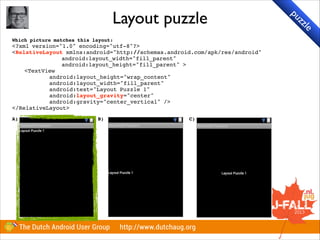
Layout puzzle
Which picture matches this layout:!

<?xml version="1.0" encoding="utf-8"?>!
<RelativeLayout xmlns:android="http://schemas.android.com/apk/res/android"!
android:layout_width="fill_parent"!
android:layout_height="fill_parent" >!
<TextView!
android:layout_height="wrap_content"!
android:layout_width="fill_parent"!
android:text="Layout Puzzle 1"!
android:layout_gravity="center"!
android:gravity="center_vertical" />!
</RelativeLayout>!

!

A)

B)

The Dutch Android User Group

C)!

http://www.dutchaug.org

pu

zz

le
Layout puzzle
Which picture matches this layout:!

<?xml version="1.0" encoding="utf-8"?>!
<RelativeLayout xmlns:android="http://schemas.android.com/apk/res/android"!
android:layout_width="fill_parent"!
android:layout_height="fill_parent" >!
<TextView!
android:layout_height="wrap_content"!
android:layout_width="fill_parent"!
android:text="Layout Puzzle 1"!
android:layout_gravity="center"!
android:gravity="center_vertical" />!
</RelativeLayout>!

!

A)

B)

The Dutch Android User Group

C)!

http://www.dutchaug.org

pu

zz

le
You Only Frag Twice
Single activity, with a single fragment!

!

Activity:!
protected void onCreate(Bundle savedInstanceState) {!
super.onCreate(savedInstanceState);!
setContentView(R.layout.single_fragment);!
if (savedInstanceState == null) {!
getFragmentManager().beginTransaction().add(R.id.single_fragment, !
new YouOnlyFragTwiceFragment());!
}!
}!

!

single_fragment.xml:!
<?xml version="1.0" encoding="utf-8"?>!
<merge>!
<FrameLayout xmlns:android="http://schemas.android.com/apk/res/android"!
android:id="@+id/single_fragment"!
android:layout_width="fill_parent"!
android:layout_height="fill_parent" />!
</merge>!

!

What happens when the Activity is started?!
A) Fragment is shown and filling the screen!
B) Activity crashes!
C) Nothing is shown

The Dutch Android User Group

http://www.dutchaug.org

pu

zz

le
You Only Frag Twice
Single activity, with a single fragment!

!

Activity:!
protected void onCreate(Bundle savedInstanceState) {!
super.onCreate(savedInstanceState);!
setContentView(R.layout.single_fragment);!
if (savedInstanceState == null) {!
getFragmentManager().beginTransaction().add(R.id.single_fragment, !
new YouOnlyFragTwiceFragment());!
.commit();
}!
}!

!

single_fragment.xml:!
<?xml version="1.0" encoding="utf-8"?>!
<merge>!
<FrameLayout xmlns:android="http://schemas.android.com/apk/res/android"!
android:id="@+id/single_fragment"!
android:layout_width="fill_parent"!
android:layout_height="fill_parent" />!
</merge>!

!

What happens when the Activity is started?!
A) Fragment is shown and filling the screen!
B) Activity crashes!
C) Nothing is shown
C) Nothing is shown

The Dutch Android User Group

http://www.dutchaug.org

pu

zz

le
License to click
Fragment layout:!
<Button android:text="Don't click me!"!
android:layout_centerInParent="true"!
android:onClick="clicked" />!

!

In activity:!
public void clicked(View v) {!
Toast.makeText(this, "onClick from activity", 1).show();!
}!

!
!

In fragment:!
public void clicked(View v) {!
Toast.makeText(getActivity(), "onClick from fragment", 1).show();!
}!

!

What happens when
A) Toast “onClick
B) Toast “onClick
C) First “onClick
D) First “onClick

I tap the button?!
from activity” is shown!
from fragment” is shown!
from activity” then “onClick from fragment” is shown!
from fragment” then “onClick from activity” is shown!

The Dutch Android User Group

http://www.dutchaug.org

pu

zz

le
License to click
Fragment layout:!
<Button android:text="Don't click me!"!
android:layout_centerInParent="true"!
android:onClick="clicked" />!

!

In activity:!
public void clicked(View v) {!
Toast.makeText(this, "onClick from activity", 1).show();!
}!

!
!

In fragment:!
public void clicked(View v) {!
Toast.makeText(getActivity(), "onClick from fragment", 1).show();!
}!

!

What happens when
A) Toast “onClick
B) Toast “onClick
C) First “onClick
D) First “onClick

I tap the button?!
from activity” is shown!
from fragment” is shown!
from activity” then “onClick from fragment” is shown!
from fragment” then “onClick from activity” is shown!

A) Toast “onClick from activity” is shown

The Dutch Android User Group

http://www.dutchaug.org

pu

zz

le
A view to a kill
public class GetViewActivity extends Activity {!

!

!
!
!
!
!
!
!
!
!
!
!
!
}!

!
@Override!
protected void onCreate(Bundle savedInstanceState) {!
!
super.onCreate(savedInstanceState);!
!
setContentView(R.layout.view_to_a_kill);!
!
!
!
getFragmentManager().beginTransaction()!
!
!
.replace(R.id.content, new GetViewFragment())!
!
!
.commit();!
}!
!
!

The Dutch Android User Group

http://www.dutchaug.org

pu

zz

le
A view to a kill
public class GetViewFragment extends Fragment {!

!

!

@Override!
public void onCreate(Bundle savedInstanceState) {!
!
super.onCreate(savedInstanceState);!

!

!

!
!

!
!

!
!
!
!

!
!
!
}!

!

!

getView().setOnClickListener(new View.OnClickListener() {!
!
@Override!
public void onClick(View v) {!
!
!
Toast.makeText(getActivity(), "My name is droid, android", 1);!
!
}!
});!

@Override!
public View onCreateView(LayoutInflater inf, ViewGroup view, Bundle saved) {!
!
return inf.inflate(R.layout.fragment_get_view, view);!
}!

!
!

!

}!
What happens when the Activity is started?!
A) Shows a Toast “my name is droid, android”!
B) does nothing but showing a view!
C) Exception in Inflater.inflate()!
D) Exception in GetViewFragment.onCreate()!
E) Exception in Fragment.onCreateView()

The Dutch Android User Group

http://www.dutchaug.org

pu

zz

le
A view to a kill
public class GetViewFragment extends Fragment {!

!

!

@Override!
public void onCreate(Bundle savedInstanceState) {!
!
super.onCreate(savedInstanceState);!

!

!

!
!

!
!

!
!
!
!

!
!
!
}!

!

!

getView().setOnClickListener(new View.OnClickListener() {!
!
@Override!
public void onClick(View v) {!
!
!
Toast.makeText(getActivity(), "My name is droid, android", 1);!
!
}!
});!

@Override!
public View onCreateView(LayoutInflater inf, ViewGroup view, Bundle saved) {!
!
return inf.inflate(R.layout.fragment_get_view, view);!
}!

!
!

!

}!
What happens when the Activity is started?!
A) Shows a Toast “my name is droid, android”!
B) does nothing but showing a view!
C) Exception in Inflater.inflate()!
D) Exception in GetViewFragment.onCreate()
D) Exception in GetViewFragment.onCreate()!
E) Exception in Fragment.onCreateView()

The Dutch Android User Group

http://www.dutchaug.org

pu

zz

le
A view to a kill
public class GetViewFragment extends Fragment {!

!

!

@Override!
public void onCreate(Bundle savedInstanceState) {!
!
super.onCreate(savedInstanceState);!

!

!

!
!

!
!

!
!
!
!

!
!
!
}!

!

!

getView().setOnClickListener(new View.OnClickListener() {!
!
@Override!
public void onClick(View v) {!
!
!
Toast.makeText(getActivity(), "My name is droid, android", 1);!
!
}!
});!

@Override!
public View onCreateView(LayoutInflater inf, ViewGroup view, Bundle saved) {!
!
return inf.inflate(R.layout.fragment_get_view, view);!
}!

!
!

!

}!
What happens when the Activity is started?!
A) Shows a Toast “my name is droid, android”!
B) does nothing but showing a view!
C) Exception in Inflater.inflate()!
D) Exception in GetViewFragment.onCreate()
D) Exception in GetViewFragment.onCreate()!
E) Exception in Fragment.onCreateView()

The Dutch Android User Group

http://www.dutchaug.org

pu

zz

le
Alpha / Beta builds

The Dutch Android User Group

http://www.dutchaug.org

TI

P
Live And Let Die
public class ToastFragment extends Fragment {!
...!
public void onDestroy() {!
super.onDestroy();!
new ToastingAsyncTask().execute(null,null,null);!
}!

!

!

class ToastingAsyncTask extends AsyncTask<String, Integer, Long>{!
protected Long doInBackground(String... params) {!
try {Thread.sleep(500);} catch (InterruptedException e) {}!
return null;!
}!
protected void onPostExecute(Long result) {!
if (getActivity() == null){!
System.out.println(getString(R.string.no_activity));!
}else{!
System.out.println(getString(R.string.activity_leak));!
} !
}!
}
!
what happens when I change the orientation?!
A) Sysout: no_activity!
B) Sysout: activity_leak!
C) Sysout: null!
D) Exception in getActivity !
E) Exception in getString

The Dutch Android User Group

http://www.dutchaug.org

pu

zz

le
Live And Let Die
public class ToastFragment extends Fragment {!
...!
public void onDestroy() {!
super.onDestroy();!
new ToastingAsyncTask().execute(null,null,null);!
}!

!

!

class ToastingAsyncTask extends AsyncTask<String, Integer, Long>{!
protected Long doInBackground(String... params) {!
try {Thread.sleep(500);} catch (InterruptedException e) {}!
return null;!
}!
protected void onPostExecute(Long result) {!
if (getActivity() == null){!
System.out.println(getString(R.string.no_activity));!
}else{!
System.out.println(getString(R.string.activity_leak));!
} !
}!
}
!
what happens when I change the orientation?!
A) Sysout: no_activity!
B) Sysout: activity_leak!
C) Sysout: null!
E) Exception in !
D) Exception in getActivity getString...
E) Exception in getString

The Dutch Android User Group

http://www.dutchaug.org

pu

zz

le
Live And Let Die
public class ToastFragment extends Fragment {!
LogCat:
...!
public void onDestroy() {!
super.onDestroy();!
java.lang.IllegalStateException:
new ToastingAsyncTask().execute(null,null,null);!
}! Fragment ToastFragment not attached

!

to

Activity!

class ToastingAsyncTask extends AsyncTask<String, Integer, Long>{!
! protected Long doInBackground(String... params) {!
try {Thread.sleep(500);} catch (InterruptedException e) {}!
return null;!
}!
!
protected void onPostExecute(Long result) {!
Know about the life cycle of Activities,
if (getActivity() == null){!
System.out.println(getString(R.string.no_activity));!
Fragments, Services!!
}else{!
!
System.out.println(getString(R.string.activity_leak));!
And...!
} !
}! !
}
!

A Context holds your Resources!!

!

“Use the source Luke!”!

what happens when I change the orientation?!
A) Sysout: no_activity!
B) Sysout: activity_leak!
C) Sysout: null!
D) Exception in getActivity !
E) Exception in getString

The Dutch Android User Group

http://www.dutchaug.org

pu

zz

le
Live And Let Die

pu

!
public class Fragment ...!
!
public final String getString(int resId) {!
return getResources().getString(resId);!
}!
!
final public Resources getResources() {!
    if (mActivity == null) {!
        throw new IllegalStateException("Fragment " + this + !
" not attached to Activity");!
    }!
    return mActivity.getResources();!
}!
!

The Dutch Android User Group

http://www.dutchaug.org

zz

le
From Fragment with love
public class ActionbarFragment extends Fragment {!
...!
public View onCreateView(LayoutInflater inf, ViewGroup view, Bundle saved) {!
setHasOptionsMenu(true);!
return inf.inflate(R.layout.fragment_get_view, null);!
}!
public boolean onOptionsItemSelected(MenuItem item) {!
Toast.makeText(getActivity(), "from Fragment", 1).show();!
return true;!
} !
}!

!

public class ActionbarActivity extends Activity {!
...!
public boolean onOptionsItemSelected(MenuItem item) {!
Toast.makeText(this, "from Activity", 1).show();!
return true;!
} !
}!

!

When clicking an ActionBar item: !
a) Shows toast “from Activity”!
b) Shows toast “from Fragment”!
c) Shows both toasts!
d) Shows toast depending on who created the menu item

The Dutch Android User Group

http://www.dutchaug.org

pu

zz

le
From Fragment with love
public class ActionbarFragment extends Fragment {!
...!
public View onCreateView(LayoutInflater inf, ViewGroup view, Bundle saved) {!
setHasOptionsMenu(true);!
return inf.inflate(R.layout.fragment_get_view, null);!
}!
public boolean onOptionsItemSelected(MenuItem item) {!
Toast.makeText(getActivity(), "from Fragment", 1).show();!
return true;!
} !
}!

!

public class ActionbarActivity extends Activity {!
...!
public boolean onOptionsItemSelected(MenuItem item) {!
Toast.makeText(this, "from Activity", 1).show();!
return true;!
} !
}!

!

When clicking an ActionBar item: !
a) Shows toast “from Activity”!
b) Shows toast “from Fragment”!
A) Shows toast “from Activity”
c) Shows both toasts!
d) Shows toast depending on who created the menu item

The Dutch Android User Group

http://www.dutchaug.org

pu

zz

le
Support Library

D
e
tip vel
s & op
tr men
ick t

s

• Fragment / ListFragment / DialogFragment!
• ViewPager!
• LoaderManager / CursorLoader!
• Many many compat classes!
• LruCache / SparseArray!
• Navigation Drawer (DrawerLayout)
The Dutch Android User Group

http://www.dutchaug.org
Google Play Services

• Google Maps v2!
• Geofencing!
• Google+ Sign-in!
• Activity Recognition!
• Google Cloud Messaging!
• And more...
The Dutch Android User Group

http://www.dutchaug.org

D
e
tip vel
s & op
tr men
ick t

s
Casino Royal
public class AsyncTaskActivity extends Activity{!
...!
protected void onResume() {!
super.onResume();!
TextView testV = (TextView) findViewById(R.id.async_text_1);!
new WritingAsyncTask(testV,2000).execute("Bob");!
new WritingAsyncTask(testV,500).execute("loves");!
new WritingAsyncTask(testV,100).execute("Alice");!
} ...!

!

public class WritingAsyncTask extends AsyncTask<String, Void, String> {...!
private final TextView view; //set in Constructor!
private final int timeout; //set in Constructor!
protected String doInBackground(String... params) {!
try {Thread.sleep(timeout);} catch (InterruptedException e) {}!
return params[0];!
}!
protected void onPostExecute(String result) {!
view.setText(view.getText()+" "+result);!
}!
}!

!

What is shown in the TextView when I start the Activity on my Galaxy Nexus: !
a) Alice loves Bob!
b) Bob Alice loves!
c) Bob loves Alice!
d) There is not enough information to decide

The Dutch Android User Group

http://www.dutchaug.org

pu

zz

le
Casino Royal
public class AsyncTaskActivity extends Activity{!
...!
protected void onResume() {!
super.onResume();!
TextView testV = (TextView) findViewById(R.id.async_text_1);!
new WritingAsyncTask(testV,2000).execute("Bob");!
new WritingAsyncTask(testV,500).execute("loves");!
new WritingAsyncTask(testV,100).execute("Alice");!
} ...!

!

public class WritingAsyncTask extends AsyncTask<String, Void, String> {...!
private final TextView view; //set in Constructor!
private final int timeout; //set in Constructor!
protected String doInBackground(String... params) {!
try {Thread.sleep(timeout);} catch (InterruptedException e) {}!
return params[0];!
}!
protected void onPostExecute(String result) {!
view.setText(view.getText()+" "+result);!
}!
}!

!

What is shown in the TextView when I start the Activity on my Galaxy Nexus: !
a) Alice loves Bob!
b) Bob Alice loves!
D) loves Alice!
c) BobThere is not enough information to decide...
d) There is not enough information to decide

The Dutch Android User Group

http://www.dutchaug.org

pu

zz

le
Casino Royal

pu

zz

le

D) There is not enough information to decide...
!
You need to know the targetSdkVersion and the device OS version of the target device!

!

android:targetSdkVersion <

!

13:

parallel execution!

android:targetSdkVersion >= 13 !
&& Device OS >= 14: serial

!
!

execution!

This is what we see in AsyncTask.Java:!

!

public static final Executor SERIAL_EXECUTOR = new SerialExecutor(); !
private static volatile Executor sDefaultExecutor = SERIAL_EXECUTOR;!

!
!

You are in control of the type of execution in SDK >= 11!

!
executeOnExecutor(AsyncTask.THREAD_POOL_EXECUTOR,…);!
!

The Dutch Android User Group

http://www.dutchaug.org
Casino Royal
android:minSdkVersion=“14”!
!
Go for minSdkVersion=“14” (Android 4.0 / Ice Cream Sandwich)!
Second best minSdkVersion = “10” (Android 2.3.3 / Gingerbread)!
E.g. Google Play Services new API’s > 10!
Don’t do anything lower than 10!

!
android:targetSdkVersion=“19”!
!

Always set this to the latest Android API level!

!
!
android:maxSdkVersion!
!

Don’t use this. Everything is backwards compatible by default.!

!
!

The Dutch Android User Group

http://www.dutchaug.org

D
e
tip vel
s & op
tr men
ick t

s
Custom Views
View:!
public class MyCustomView extends LinearLayout {!
public MyCustomView(Context context, AttributeSet attrs) {!
super(context, attrs);!
LayoutInflater.from(context).inflate(R.layout.component, this, true);!
// more stuff here!
}!
}!

!

component.xml!
<?xml version="1.0" encoding="utf-8"?>!
<LinearLayout ... >!
<TextView android:id="@+id/label” ... />!
    <EditText android:id="@+id/value” ... />!
</LinearLayout>!

!

layout.xml!
<LinearLayout android:orientation="vertical">!
<org.dutchaug.androidpuzzlers.customviewmess.MyCustomView/>!
</LinearLayout>!

!

When you inflate layout.xml in an Activity: !
a) Everything works fine!
b) Exception on inflating the XML!
c) Everything appears to look fine, but there are subtle bugs!
d) The app crashes when entering text in the first EditText!

!

Hint: How does the view tree look when the layout is inflated?!

The Dutch Android User Group

http://www.dutchaug.org

pu

zz

le
Custom Views
View:!
public class MyCustomView extends LinearLayout {!
public MyCustomView(Context context, AttributeSet attrs) {!
super(context, attrs);!
LayoutInflater.from(context).inflate(R.layout.component, this, true);!
// more stuff here!
}!
}!

!

component.xml!
<?xml version="1.0" encoding="utf-8"?>!
<LinearLayout ... >!
<TextView android:id="@+id/label” ... />!
    <EditText android:id="@+id/value” ... />!
</LinearLayout>!

!

layout.xml!
<LinearLayout android:orientation="vertical">!
<org.dutchaug.androidpuzzlers.customviewmess.MyCustomView/>!
</LinearLayout>!

!

When you inflate layout.xml in an Activity: !
a) Everything works fine!
b) Exception on inflating the XML! to look fine, but there!
C) Everything appears
c) Everything appears to look fine, but there are subtle bugs!
are crashes when entering text in the first EditText!
d) The app subtle bugs

!

Hint: How does the view tree look when the layout is inflated?!

The Dutch Android User Group

http://www.dutchaug.org

pu

zz

le
Custom Views

pu

zz

le

After inflate:!

!

<LinearLayout>!
<LinearLayout ... >!
<TextView android:id="@+id/label"
<EditText android:id="@+id/value"
</LinearLayout>!
<LinearLayout ...>!
<TextView android:id="@+id/label"
<EditText android:id="@+id/value"
</LinearLayout>!
<LinearLayout ...>!
<TextView android:id="@+id/label"
<EditText android:id="@+id/value"
</LinearLayout>!
</LinearLayout>!

... />!
... />!
... />!
... />!
... />!
... />!

!

Oops:!

!

1.OnSaveInstanceState is called in LinearLayout !
2.LinearLayout calls saveHierarchyState(SparseArray<Parcelable> state) on children!
3.Child returns Parcelable which is put in the state and keyed on the view id!
4.When state is restored, there is a single value for label, and a single value for value.!

!

The Dutch Android User Group

http://www.dutchaug.org
The World Is Not Enough

pu

zz

le

@Override!
protected void onStart() {!
! super.onStart();!
! ! !
! String[] longList = new String[1000000];!
! Intent intent = new Intent(Intent.ACTION_SEND);!
! intent.setType("text/plain");!
! intent.putExtra("dutchaug", longList);!
! startActivityForResult(intent, 100);!

!

}!

!
!

What happens when the activity is started?!
A) OutOfMemoryException in onCreate()

B) IllegalArgumentException in onCreate()

C) Nothing happens, direct invocation of onActivityResult (with cancel code) 

D) Nothing happens, no invocation of onActivityResult

E) System-Intent-Picker for "sent" action will be shown normally

The Dutch Android User Group

http://www.dutchaug.org
The World Is Not Enough

pu

zz

le

@Override!
protected void onStart() {!
! super.onStart();!
! ! !
! String[] longList = new String[1000000];!
! Intent intent = new Intent(Intent.ACTION_SEND);!
! intent.setType("text/plain");!
! intent.putExtra("dutchaug", longList);!
! startActivityForResult(intent, 100);!

!

}!

!
!

What happens when the activity is started?!
A) OutOfMemoryException in onCreate()

B) IllegalArgumentException in onCreate()

C) Nothing happens, direct invocation of onActivityResult (with cancel code) 

D) Nothing happens, no invocation of onActivityResult...
D) Nothing happens, no invocation of onActivityResult

E) System-Intent-Picker for "sent" action will be shown normally

The Dutch Android User Group

http://www.dutchaug.org
The World Is Not Enough

pu

zz

le

Logcat shows:!
26-02 17:25:53.391: E/JavaBinder(6247): !!! FAILED BINDER TRANSACTION !!!!

!

The Binder transaction failed because it was too large.!

!

During a remote procedure call, the arguments and the return value of the
call are transferred as Parcel objects stored in the Binder transaction
buffer. If the arguments or the return value are too large to fit in the
transaction buffer, then the call will fail and
TransactionTooLargeException will be thrown.!

!

The Binder transaction buffer has a limited fixed size (1Mb) which is
shared by all transactions in progress for the process. Consequently this
exception can be thrown when there are many transactions in progress even
when most of the individual transactions are of moderate size.!

The Dutch Android User Group

http://www.dutchaug.org
No more puzzles...
But some more:

The Dutch Android User Group

http://www.dutchaug.org
compound drawable

D
e
tip vel
s & op
tr men
ick t

s

<RelativeLayout ...>!

!

!

!
!

!

<LinearLayout ...>!
<ImageView!
android:layout_marginRight="15dp"!
android:layout_width="wrap_content"!
android:layout_height="wrap_content"!
android:src="@drawable/dutchaug" />!
<TextView!
android:layout_width="wrap_content"!
android:layout_height="wrap_content"!
android:text="DutchAUG" />!
</LinearLayout>!
<!-- this does not require a nested LinearLayout -->!
<TextView!
android:drawableLeft="@drawable/dutchaug"!
android:drawablePadding="15dp"!
android:layout_width="wrap_content"!
android:layout_height="wrap_content"!
android:text="DutchAUG" />!

</RelativeLayout>!

The Dutch Android User Group

http://www.dutchaug.org

DutchAUG
Level list drawable

D
e
tip vel
s & op
tr men
ick t

s

• Drawables have setLevel() 0...10000!
• Assign drawable level range
!
Somewhere in a BaseAdapter far, far away...!

!

if (error) {!
Drawable d = getContext().getResources().getDrawable(R.drawable.error);!
mTextView.setCompoundDrawablesWithIntrinsicBounds(d, null, null, null)!
} else {!
Drawable d = getContext().getResources().getDrawable(R.drawable.ok);!
mTextView.setCompoundDrawablesWithIntrinsicBounds(d, null, null, null)
}!

The Dutch Android User Group

http://www.dutchaug.org
Level list drawable
Level list drawable:!

!

<level-list xmlns:android="http://schemas.android.com/apk/res/android">!
  <item android:maxLevel="0" android:drawable="@drawable/ic_state_ok" />!
  <item android:maxLevel="1" android:drawable="@drawable/ic_state_error" /> !
<!-- more variants... -->!
</level-list>!

!

BetterAdapter.java!

!

// Constants please!!
private static final int LEVEL_OK = 0;!
private static final int LEVEL_ERROR = 1;!

!

if (error) {!
mTextView.getCompoundDrawables()[0].setLevel(LEVEL_ERROR)!
} else {!
mTextView.getCompoundDrawables()[0].setLevel(LEVEL_OK)!
}!

!

Or less verbose:!
!
mTextView.getCompoundDrawables()[0].setLevel(error ? LEVEL_ERROR : LEVEL_OK)!

!

The Dutch Android User Group

http://www.dutchaug.org

D
e
tip vel
s & op
tr men
ick t

s
android.text.format.DateUtils

D
e
tip vel
s & op
tr men
ick t

s

• CharSequence

getRelativeTimeSpanString
(long time, long now, long minResolution)!

• now – System.currentTimeMillis()!
• minResolution – e.g. SECOND_IN_MILLIS
the smallest unit of time will be
seconds.!

• English example: “2 seconds ago”!
• Or in German: “Vor 2 Sekunden”
The Dutch Android User Group

http://www.dutchaug.org

so
android.text.TextUtils

D
e
tip vel
s & op
tr men
ick t

s

• boolean isDigitsOnly(CharSequence str)!
• boolean isEmpty(CharSequence str)!
• String htmlEncode(String s)!
• CharSequence commaEllipsize(...)!
• CharSequence ellipsize(...)
fromHTML
<string name="htmlFormattedText">!
<![CDATA[!
<p>Text with markup for!
<strong>bold</strong>!
and <em>italic</em> text.</p>!
<p>There is also support for a !
<tt>monospaced</tt>font. !
But no use for the !
<code>code</code> tag!</p>!
]]>!
</string>

TextView view = (TextView)findViewById(R.id.sampleText);!
String formattedText = getString(R.string.htmlFormattedText);!
Spanned result = Html.fromHtml(formattedText);!
view.setText(result);

The Dutch Android User Group

http://www.dutchaug.org

D
e
tip vel
s & op
tr men
ick t

s
Annotation Processors

• @InjectView (Butter Knife)


http://jakewharton.github.io/butterknife/!

• @Frozen @Argument


https://bitbucket.org/hvisser/bundles!

• Android Annotations


http://androidannotations.org

The Dutch Android User Group

http://www.dutchaug.org

D
e
tip vel
s & op
tr men
ick t

s
Annotation Processors
public class MainActivityBefore extends Activity {!

!
!
!

int mLoginCount;!
String mCurrentUser;!
long mSessionExpiresAt;!
@Override!
protected void onCreate(Bundle savedInstanceState) {!
super.onCreate(savedInstanceState);!
setContentView(R.layout.activity_main);!
if (savedInstanceState != null) {!
mLoginCount = savedInstanceState.getInt("login_count");!
mCurrentUser = savedInstanceState.getString("user");!
mSessionExpiresAt = savedInstanceState.getLong("session_expire");!

!

DemoBeforeFragment fragment = new DemoBeforeFragment();!
Bundle args = new Bundle();!
args.putString("greeting", "Hello!");!
fragment.setArguments(args);!

!
!
!

D
e
tip vel
s & op
tr men
ick t

s

getFragmentManager().beginTransaction().add(R.id.main_fragment, fragment).commit();!
}!
}!
@Override!
protected void onSaveInstanceState(Bundle outState) {!
super.onSaveInstanceState(outState);!
outState.putInt("login_count", mLoginCount);!
outState.putString("user", mCurrentUser);!
// something is not quite right here...!
outState.putLong("session_expre", mSessionExpiresAt);!
}!

}!

The Dutch Android User Group

http://www.dutchaug.org
Annotation Processors

D
e
tip vel
s & op
tr men
ick t

s

public class DemoBeforeFragment extends Fragment {!
TextView mTextView;!
Button mLoginButton;!

!
!

!

String mGreeting;!
int mVisitCount = 0;!
@Override!
public void onCreate(Bundle savedInstanceState) {!
super.onCreate(savedInstanceState);!
mGreeting = getArguments().getString("greeting");!
mVisitCount = getArguments().getInt("visit_count", 0);!
}!
@Override!
public View onCreateView(LayoutInflater inflater, ViewGroup container, !
Bundle savedInstanceState) {!
View view = inflater.inflate(R.layout.activity_main, container, false);!
mTextView = (TextView) view.findViewById(R.id.greeting);!
mLoginButton = (Button) view.findViewById(R.id.login);!
mTextView.setText(mGreeting);!
return view;!
}!

}

The Dutch Android User Group

http://www.dutchaug.org
Annotation Processors

D
e
tip vel
s & op
tr men
ick t

s

public class MainActivityAfter extends Activity {!

!
!

!

@Frozen int mLoginCount;!
@Frozen String mCurrentUser;!
@Frozen long mSessionExpiresAt;!
@Override!
protected void onCreate(Bundle savedInstanceState) {!
super.onCreate(savedInstanceState);!
setContentView(R.layout.activity_main);!
MainActivityAfterState.restoreInstanceState(this, savedInstanceState);!
if (savedInstanceState != null) {!
Fragment fragment = DemoAfterFragmentBuilder.newDemoAfterFragment("Hello");!
getFragmentManager().beginTransaction().add(R.id.main_fragment,!
fragment).commit();!
}!
}!
@Override!
protected void onSaveInstanceState(Bundle outState) {!
super.onSaveInstanceState(outState);!
MainActivityAfterState.saveInstanceState(this, outState);!
}!

}

The Dutch Android User Group

http://www.dutchaug.org
Annotation Processors

D
e
tip vel
s & op
tr men
ick t

s

public class DemoAfterFragment extends Fragment {!
@InjectView(R.id.greeting) TextView mTextView;!
@InjectView(R.id.login) Button mLoginButton;!

!
!

!

!

@Argument String mGreeting;!
@Argument(required=false) int mVisitCount = 0;!
@Override!
public void onCreate(Bundle savedInstanceState) {!
super.onCreate(savedInstanceState);!
DemoAfterFragmentBuilder.injectArguments(this);!
}!
@Override!
public View onCreateView(LayoutInflater inflater, ViewGroup container, !
Bundle savedInstanceState) {!
View view = inflater.inflate(R.layout.activity_main, container, false);!
Views.inject(this, view);!

!

mTextView = (TextView) view.findViewById(R.id.greeting);!
mLoginButton = (Button) view.findViewById(R.id.login);!
mTextView.setText(mGreeting);!
return view;!
}!
}

The Dutch Android User Group

http://www.dutchaug.org
Proguard

• Code optimalizations


E.g. Log.d has no side effects!

• Code reduction


Unused methods / classes!

• Code obfuscation (secure?)


DexGuard does a better job!

Watch Eric LaFortune on

http://youtube.com/dutchaug
The Dutch Android User Group

http://www.dutchaug.org
Use Lint

• From Eclipse!
• lint <project dir>!
• Jenkins lint plugin

The Dutch Android User Group

http://www.dutchaug.org

D
e
tip vel
s & op
tr men
ick t

s
Jenkins
test and deploy

• Automate Android build,your AndroidManifest!
E.g. use Jenkins build number in

• “There’s a plug-in for that!”

Watch Christopher Orr on

http://youtube.com/dutchaug
The Dutch Android User Group

http://www.dutchaug.org
http://bit.ly/android-puzzlers

THE END
Thanks for your
participation!
Get the puzzle code
The Dutch Android User Group

http://www.dutchaug.org

Android code puzzlers + tips & tricks

  • 1.
    Android Code Puzzlers +TIPS &TRICKS Can you solve all our challenges? NLJUG JFall Wednesday November 6th ! Johan Pelgrim & Hugo Visser The Dutch Android User Group http://www.dutchaug.org
  • 2.
    Johan Pelgrim • AndroidDeveloper! • Working at VX Company 
 @jowipe http://www.vxcompany.com! • Organizer The Dutch Android User Group! • Written Android articles and recipes for
 http://www.androidcookbook.com The Dutch Android User Group http://www.dutchaug.org
  • 3.
    Hugo Visser • AndroidDeveloper! • Working at Qbus
 @botteaap http://www.qbus-ict.nl! • Organizer The Dutch Android User Group! • Developer of Rainy Days 
 and Figure Running and ... The Dutch Android User Group http://www.dutchaug.org
  • 4.
    DutchAUG • Open Group- Dutch Focus & Spread - Free to join!! • Monthly meetups http://www.dutchaug.org ! • Started nov 2011 (at droidconNL)! • Foundation since feb 2013! • We are a Google Developer Group (GDG)! • @dutchaug #dutchaug! The Dutch Android User Group • The Dutch Android User Group http://www.dutchaug.org
  • 5.
    DutchAUG Wiebe Dennis Hugo Johan Elsinga! Itude Mobile Visser! Qbus The DutchAndroid User Group http://www.dutchaug.org Geurts! Luminis Pelgrim! VX Company
  • 6.
    DutchAUG Main sponsor http://www.nspyre.nl/android The DutchAndroid User Group http://www.dutchaug.org
  • 7.
    DutchAUG Main sponsor http://www.vxcompany.com The DutchAndroid User Group http://www.dutchaug.org
  • 8.
    The Dutch AndroidUser Group http://www.dutchaug.org
  • 9.
    DutchAUG Upcoming meetup Android 4.4KitKat & Play Services 4 January Utrecht The Dutch Android User Group http://www.dutchaug.org
  • 10.
    Android Code Puzzlers Canyou solve all our challenges? • • • We present a puzzle You chew on it for a while If you know the answer
 (and more importantly...why) 
 you win! The Dutch Android User Group http://www.dutchaug.org
  • 11.
    Everybody Ready? The DutchAndroid User Group http://www.dutchaug.org
  • 12.
    Layout puzzle Which picturematches this layout:! <?xml version="1.0" encoding="utf-8"?>! <RelativeLayout xmlns:android="http://schemas.android.com/apk/res/android"! android:layout_width="fill_parent"! android:layout_height="fill_parent" >! <TextView! android:layout_height="wrap_content"! android:layout_width="fill_parent"! android:text="Layout Puzzle 1"! android:layout_gravity="center"! android:gravity="center_vertical" />! </RelativeLayout>! ! A) B) The Dutch Android User Group C)! http://www.dutchaug.org pu zz le
  • 13.
    Layout puzzle Which picturematches this layout:! <?xml version="1.0" encoding="utf-8"?>! <RelativeLayout xmlns:android="http://schemas.android.com/apk/res/android"! android:layout_width="fill_parent"! android:layout_height="fill_parent" >! <TextView! android:layout_height="wrap_content"! android:layout_width="fill_parent"! android:text="Layout Puzzle 1"! android:layout_gravity="center"! android:gravity="center_vertical" />! </RelativeLayout>! ! A) B) The Dutch Android User Group C)! http://www.dutchaug.org pu zz le
  • 14.
    You Only FragTwice Single activity, with a single fragment! ! Activity:! protected void onCreate(Bundle savedInstanceState) {! super.onCreate(savedInstanceState);! setContentView(R.layout.single_fragment);! if (savedInstanceState == null) {! getFragmentManager().beginTransaction().add(R.id.single_fragment, ! new YouOnlyFragTwiceFragment());! }! }! ! single_fragment.xml:! <?xml version="1.0" encoding="utf-8"?>! <merge>! <FrameLayout xmlns:android="http://schemas.android.com/apk/res/android"! android:id="@+id/single_fragment"! android:layout_width="fill_parent"! android:layout_height="fill_parent" />! </merge>! ! What happens when the Activity is started?! A) Fragment is shown and filling the screen! B) Activity crashes! C) Nothing is shown The Dutch Android User Group http://www.dutchaug.org pu zz le
  • 15.
    You Only FragTwice Single activity, with a single fragment! ! Activity:! protected void onCreate(Bundle savedInstanceState) {! super.onCreate(savedInstanceState);! setContentView(R.layout.single_fragment);! if (savedInstanceState == null) {! getFragmentManager().beginTransaction().add(R.id.single_fragment, ! new YouOnlyFragTwiceFragment());! .commit(); }! }! ! single_fragment.xml:! <?xml version="1.0" encoding="utf-8"?>! <merge>! <FrameLayout xmlns:android="http://schemas.android.com/apk/res/android"! android:id="@+id/single_fragment"! android:layout_width="fill_parent"! android:layout_height="fill_parent" />! </merge>! ! What happens when the Activity is started?! A) Fragment is shown and filling the screen! B) Activity crashes! C) Nothing is shown C) Nothing is shown The Dutch Android User Group http://www.dutchaug.org pu zz le
  • 16.
    License to click Fragmentlayout:! <Button android:text="Don't click me!"! android:layout_centerInParent="true"! android:onClick="clicked" />! ! In activity:! public void clicked(View v) {! Toast.makeText(this, "onClick from activity", 1).show();! }! ! ! In fragment:! public void clicked(View v) {! Toast.makeText(getActivity(), "onClick from fragment", 1).show();! }! ! What happens when A) Toast “onClick B) Toast “onClick C) First “onClick D) First “onClick I tap the button?! from activity” is shown! from fragment” is shown! from activity” then “onClick from fragment” is shown! from fragment” then “onClick from activity” is shown! The Dutch Android User Group http://www.dutchaug.org pu zz le
  • 17.
    License to click Fragmentlayout:! <Button android:text="Don't click me!"! android:layout_centerInParent="true"! android:onClick="clicked" />! ! In activity:! public void clicked(View v) {! Toast.makeText(this, "onClick from activity", 1).show();! }! ! ! In fragment:! public void clicked(View v) {! Toast.makeText(getActivity(), "onClick from fragment", 1).show();! }! ! What happens when A) Toast “onClick B) Toast “onClick C) First “onClick D) First “onClick I tap the button?! from activity” is shown! from fragment” is shown! from activity” then “onClick from fragment” is shown! from fragment” then “onClick from activity” is shown! A) Toast “onClick from activity” is shown The Dutch Android User Group http://www.dutchaug.org pu zz le
  • 18.
    A view toa kill public class GetViewActivity extends Activity {! ! ! ! ! ! ! ! ! ! ! ! ! ! }! ! @Override! protected void onCreate(Bundle savedInstanceState) {! ! super.onCreate(savedInstanceState);! ! setContentView(R.layout.view_to_a_kill);! ! ! ! getFragmentManager().beginTransaction()! ! ! .replace(R.id.content, new GetViewFragment())! ! ! .commit();! }! ! ! The Dutch Android User Group http://www.dutchaug.org pu zz le
  • 19.
    A view toa kill public class GetViewFragment extends Fragment {! ! ! @Override! public void onCreate(Bundle savedInstanceState) {! ! super.onCreate(savedInstanceState);! ! ! ! ! ! ! ! ! ! ! ! ! ! }! ! ! getView().setOnClickListener(new View.OnClickListener() {! ! @Override! public void onClick(View v) {! ! ! Toast.makeText(getActivity(), "My name is droid, android", 1);! ! }! });! @Override! public View onCreateView(LayoutInflater inf, ViewGroup view, Bundle saved) {! ! return inf.inflate(R.layout.fragment_get_view, view);! }! ! ! ! }! What happens when the Activity is started?! A) Shows a Toast “my name is droid, android”! B) does nothing but showing a view! C) Exception in Inflater.inflate()! D) Exception in GetViewFragment.onCreate()! E) Exception in Fragment.onCreateView() The Dutch Android User Group http://www.dutchaug.org pu zz le
  • 20.
    A view toa kill public class GetViewFragment extends Fragment {! ! ! @Override! public void onCreate(Bundle savedInstanceState) {! ! super.onCreate(savedInstanceState);! ! ! ! ! ! ! ! ! ! ! ! ! ! }! ! ! getView().setOnClickListener(new View.OnClickListener() {! ! @Override! public void onClick(View v) {! ! ! Toast.makeText(getActivity(), "My name is droid, android", 1);! ! }! });! @Override! public View onCreateView(LayoutInflater inf, ViewGroup view, Bundle saved) {! ! return inf.inflate(R.layout.fragment_get_view, view);! }! ! ! ! }! What happens when the Activity is started?! A) Shows a Toast “my name is droid, android”! B) does nothing but showing a view! C) Exception in Inflater.inflate()! D) Exception in GetViewFragment.onCreate() D) Exception in GetViewFragment.onCreate()! E) Exception in Fragment.onCreateView() The Dutch Android User Group http://www.dutchaug.org pu zz le
  • 21.
    A view toa kill public class GetViewFragment extends Fragment {! ! ! @Override! public void onCreate(Bundle savedInstanceState) {! ! super.onCreate(savedInstanceState);! ! ! ! ! ! ! ! ! ! ! ! ! ! }! ! ! getView().setOnClickListener(new View.OnClickListener() {! ! @Override! public void onClick(View v) {! ! ! Toast.makeText(getActivity(), "My name is droid, android", 1);! ! }! });! @Override! public View onCreateView(LayoutInflater inf, ViewGroup view, Bundle saved) {! ! return inf.inflate(R.layout.fragment_get_view, view);! }! ! ! ! }! What happens when the Activity is started?! A) Shows a Toast “my name is droid, android”! B) does nothing but showing a view! C) Exception in Inflater.inflate()! D) Exception in GetViewFragment.onCreate() D) Exception in GetViewFragment.onCreate()! E) Exception in Fragment.onCreateView() The Dutch Android User Group http://www.dutchaug.org pu zz le
  • 22.
    Alpha / Betabuilds The Dutch Android User Group http://www.dutchaug.org TI P
  • 23.
    Live And LetDie public class ToastFragment extends Fragment {! ...! public void onDestroy() {! super.onDestroy();! new ToastingAsyncTask().execute(null,null,null);! }! ! ! class ToastingAsyncTask extends AsyncTask<String, Integer, Long>{! protected Long doInBackground(String... params) {! try {Thread.sleep(500);} catch (InterruptedException e) {}! return null;! }! protected void onPostExecute(Long result) {! if (getActivity() == null){! System.out.println(getString(R.string.no_activity));! }else{! System.out.println(getString(R.string.activity_leak));! } ! }! } ! what happens when I change the orientation?! A) Sysout: no_activity! B) Sysout: activity_leak! C) Sysout: null! D) Exception in getActivity ! E) Exception in getString The Dutch Android User Group http://www.dutchaug.org pu zz le
  • 24.
    Live And LetDie public class ToastFragment extends Fragment {! ...! public void onDestroy() {! super.onDestroy();! new ToastingAsyncTask().execute(null,null,null);! }! ! ! class ToastingAsyncTask extends AsyncTask<String, Integer, Long>{! protected Long doInBackground(String... params) {! try {Thread.sleep(500);} catch (InterruptedException e) {}! return null;! }! protected void onPostExecute(Long result) {! if (getActivity() == null){! System.out.println(getString(R.string.no_activity));! }else{! System.out.println(getString(R.string.activity_leak));! } ! }! } ! what happens when I change the orientation?! A) Sysout: no_activity! B) Sysout: activity_leak! C) Sysout: null! E) Exception in ! D) Exception in getActivity getString... E) Exception in getString The Dutch Android User Group http://www.dutchaug.org pu zz le
  • 25.
    Live And LetDie public class ToastFragment extends Fragment {! LogCat: ...! public void onDestroy() {! super.onDestroy();! java.lang.IllegalStateException: new ToastingAsyncTask().execute(null,null,null);! }! Fragment ToastFragment not attached ! to Activity! class ToastingAsyncTask extends AsyncTask<String, Integer, Long>{! ! protected Long doInBackground(String... params) {! try {Thread.sleep(500);} catch (InterruptedException e) {}! return null;! }! ! protected void onPostExecute(Long result) {! Know about the life cycle of Activities, if (getActivity() == null){! System.out.println(getString(R.string.no_activity));! Fragments, Services!! }else{! ! System.out.println(getString(R.string.activity_leak));! And...! } ! }! ! } ! A Context holds your Resources!! ! “Use the source Luke!”! what happens when I change the orientation?! A) Sysout: no_activity! B) Sysout: activity_leak! C) Sysout: null! D) Exception in getActivity ! E) Exception in getString The Dutch Android User Group http://www.dutchaug.org pu zz le
  • 26.
    Live And LetDie pu ! public class Fragment ...! ! public final String getString(int resId) {! return getResources().getString(resId);! }! ! final public Resources getResources() {!     if (mActivity == null) {!         throw new IllegalStateException("Fragment " + this + ! " not attached to Activity");!     }!     return mActivity.getResources();! }! ! The Dutch Android User Group http://www.dutchaug.org zz le
  • 27.
    From Fragment withlove public class ActionbarFragment extends Fragment {! ...! public View onCreateView(LayoutInflater inf, ViewGroup view, Bundle saved) {! setHasOptionsMenu(true);! return inf.inflate(R.layout.fragment_get_view, null);! }! public boolean onOptionsItemSelected(MenuItem item) {! Toast.makeText(getActivity(), "from Fragment", 1).show();! return true;! } ! }! ! public class ActionbarActivity extends Activity {! ...! public boolean onOptionsItemSelected(MenuItem item) {! Toast.makeText(this, "from Activity", 1).show();! return true;! } ! }! ! When clicking an ActionBar item: ! a) Shows toast “from Activity”! b) Shows toast “from Fragment”! c) Shows both toasts! d) Shows toast depending on who created the menu item The Dutch Android User Group http://www.dutchaug.org pu zz le
  • 28.
    From Fragment withlove public class ActionbarFragment extends Fragment {! ...! public View onCreateView(LayoutInflater inf, ViewGroup view, Bundle saved) {! setHasOptionsMenu(true);! return inf.inflate(R.layout.fragment_get_view, null);! }! public boolean onOptionsItemSelected(MenuItem item) {! Toast.makeText(getActivity(), "from Fragment", 1).show();! return true;! } ! }! ! public class ActionbarActivity extends Activity {! ...! public boolean onOptionsItemSelected(MenuItem item) {! Toast.makeText(this, "from Activity", 1).show();! return true;! } ! }! ! When clicking an ActionBar item: ! a) Shows toast “from Activity”! b) Shows toast “from Fragment”! A) Shows toast “from Activity” c) Shows both toasts! d) Shows toast depending on who created the menu item The Dutch Android User Group http://www.dutchaug.org pu zz le
  • 29.
    Support Library D e tip vel s& op tr men ick t
 s • Fragment / ListFragment / DialogFragment! • ViewPager! • LoaderManager / CursorLoader! • Many many compat classes! • LruCache / SparseArray! • Navigation Drawer (DrawerLayout) The Dutch Android User Group http://www.dutchaug.org
  • 30.
    Google Play Services •Google Maps v2! • Geofencing! • Google+ Sign-in! • Activity Recognition! • Google Cloud Messaging! • And more... The Dutch Android User Group http://www.dutchaug.org D e tip vel s & op tr men ick t
 s
  • 31.
    Casino Royal public classAsyncTaskActivity extends Activity{! ...! protected void onResume() {! super.onResume();! TextView testV = (TextView) findViewById(R.id.async_text_1);! new WritingAsyncTask(testV,2000).execute("Bob");! new WritingAsyncTask(testV,500).execute("loves");! new WritingAsyncTask(testV,100).execute("Alice");! } ...! ! public class WritingAsyncTask extends AsyncTask<String, Void, String> {...! private final TextView view; //set in Constructor! private final int timeout; //set in Constructor! protected String doInBackground(String... params) {! try {Thread.sleep(timeout);} catch (InterruptedException e) {}! return params[0];! }! protected void onPostExecute(String result) {! view.setText(view.getText()+" "+result);! }! }! ! What is shown in the TextView when I start the Activity on my Galaxy Nexus: ! a) Alice loves Bob! b) Bob Alice loves! c) Bob loves Alice! d) There is not enough information to decide The Dutch Android User Group http://www.dutchaug.org pu zz le
  • 32.
    Casino Royal public classAsyncTaskActivity extends Activity{! ...! protected void onResume() {! super.onResume();! TextView testV = (TextView) findViewById(R.id.async_text_1);! new WritingAsyncTask(testV,2000).execute("Bob");! new WritingAsyncTask(testV,500).execute("loves");! new WritingAsyncTask(testV,100).execute("Alice");! } ...! ! public class WritingAsyncTask extends AsyncTask<String, Void, String> {...! private final TextView view; //set in Constructor! private final int timeout; //set in Constructor! protected String doInBackground(String... params) {! try {Thread.sleep(timeout);} catch (InterruptedException e) {}! return params[0];! }! protected void onPostExecute(String result) {! view.setText(view.getText()+" "+result);! }! }! ! What is shown in the TextView when I start the Activity on my Galaxy Nexus: ! a) Alice loves Bob! b) Bob Alice loves! D) loves Alice! c) BobThere is not enough information to decide... d) There is not enough information to decide The Dutch Android User Group http://www.dutchaug.org pu zz le
  • 33.
    Casino Royal pu zz le D) Thereis not enough information to decide... ! You need to know the targetSdkVersion and the device OS version of the target device! ! android:targetSdkVersion < ! 13: parallel execution! android:targetSdkVersion >= 13 ! && Device OS >= 14: serial ! ! execution! This is what we see in AsyncTask.Java:! ! public static final Executor SERIAL_EXECUTOR = new SerialExecutor(); ! private static volatile Executor sDefaultExecutor = SERIAL_EXECUTOR;! ! ! You are in control of the type of execution in SDK >= 11! ! executeOnExecutor(AsyncTask.THREAD_POOL_EXECUTOR,…);! ! The Dutch Android User Group http://www.dutchaug.org
  • 34.
    Casino Royal android:minSdkVersion=“14”! ! Go forminSdkVersion=“14” (Android 4.0 / Ice Cream Sandwich)! Second best minSdkVersion = “10” (Android 2.3.3 / Gingerbread)! E.g. Google Play Services new API’s > 10! Don’t do anything lower than 10! ! android:targetSdkVersion=“19”! ! Always set this to the latest Android API level! ! ! android:maxSdkVersion! ! Don’t use this. Everything is backwards compatible by default.! ! ! The Dutch Android User Group http://www.dutchaug.org D e tip vel s & op tr men ick t
 s
  • 35.
    Custom Views View:! public classMyCustomView extends LinearLayout {! public MyCustomView(Context context, AttributeSet attrs) {! super(context, attrs);! LayoutInflater.from(context).inflate(R.layout.component, this, true);! // more stuff here! }! }! ! component.xml! <?xml version="1.0" encoding="utf-8"?>! <LinearLayout ... >! <TextView android:id="@+id/label” ... />!     <EditText android:id="@+id/value” ... />! </LinearLayout>! ! layout.xml! <LinearLayout android:orientation="vertical">! <org.dutchaug.androidpuzzlers.customviewmess.MyCustomView/>! <org.dutchaug.androidpuzzlers.customviewmess.MyCustomView/>! <org.dutchaug.androidpuzzlers.customviewmess.MyCustomView/>! </LinearLayout>! ! When you inflate layout.xml in an Activity: ! a) Everything works fine! b) Exception on inflating the XML! c) Everything appears to look fine, but there are subtle bugs! d) The app crashes when entering text in the first EditText! ! Hint: How does the view tree look when the layout is inflated?! The Dutch Android User Group http://www.dutchaug.org pu zz le
  • 36.
    Custom Views View:! public classMyCustomView extends LinearLayout {! public MyCustomView(Context context, AttributeSet attrs) {! super(context, attrs);! LayoutInflater.from(context).inflate(R.layout.component, this, true);! // more stuff here! }! }! ! component.xml! <?xml version="1.0" encoding="utf-8"?>! <LinearLayout ... >! <TextView android:id="@+id/label” ... />!     <EditText android:id="@+id/value” ... />! </LinearLayout>! ! layout.xml! <LinearLayout android:orientation="vertical">! <org.dutchaug.androidpuzzlers.customviewmess.MyCustomView/>! <org.dutchaug.androidpuzzlers.customviewmess.MyCustomView/>! <org.dutchaug.androidpuzzlers.customviewmess.MyCustomView/>! </LinearLayout>! ! When you inflate layout.xml in an Activity: ! a) Everything works fine! b) Exception on inflating the XML! to look fine, but there! C) Everything appears c) Everything appears to look fine, but there are subtle bugs! are crashes when entering text in the first EditText! d) The app subtle bugs ! Hint: How does the view tree look when the layout is inflated?! The Dutch Android User Group http://www.dutchaug.org pu zz le
  • 37.
    Custom Views pu zz le After inflate:! ! <LinearLayout>! <LinearLayout... >! <TextView android:id="@+id/label" <EditText android:id="@+id/value" </LinearLayout>! <LinearLayout ...>! <TextView android:id="@+id/label" <EditText android:id="@+id/value" </LinearLayout>! <LinearLayout ...>! <TextView android:id="@+id/label" <EditText android:id="@+id/value" </LinearLayout>! </LinearLayout>! ... />! ... />! ... />! ... />! ... />! ... />! ! Oops:! ! 1.OnSaveInstanceState is called in LinearLayout ! 2.LinearLayout calls saveHierarchyState(SparseArray<Parcelable> state) on children! 3.Child returns Parcelable which is put in the state and keyed on the view id! 4.When state is restored, there is a single value for label, and a single value for value.! ! The Dutch Android User Group http://www.dutchaug.org
  • 38.
    The World IsNot Enough pu zz le @Override! protected void onStart() {! ! super.onStart();! ! ! ! ! String[] longList = new String[1000000];! ! Intent intent = new Intent(Intent.ACTION_SEND);! ! intent.setType("text/plain");! ! intent.putExtra("dutchaug", longList);! ! startActivityForResult(intent, 100);! ! }! ! ! What happens when the activity is started?! A) OutOfMemoryException in onCreate()
 B) IllegalArgumentException in onCreate()
 C) Nothing happens, direct invocation of onActivityResult (with cancel code) 
 D) Nothing happens, no invocation of onActivityResult
 E) System-Intent-Picker for "sent" action will be shown normally The Dutch Android User Group http://www.dutchaug.org
  • 39.
    The World IsNot Enough pu zz le @Override! protected void onStart() {! ! super.onStart();! ! ! ! ! String[] longList = new String[1000000];! ! Intent intent = new Intent(Intent.ACTION_SEND);! ! intent.setType("text/plain");! ! intent.putExtra("dutchaug", longList);! ! startActivityForResult(intent, 100);! ! }! ! ! What happens when the activity is started?! A) OutOfMemoryException in onCreate()
 B) IllegalArgumentException in onCreate()
 C) Nothing happens, direct invocation of onActivityResult (with cancel code) 
 D) Nothing happens, no invocation of onActivityResult... D) Nothing happens, no invocation of onActivityResult
 E) System-Intent-Picker for "sent" action will be shown normally The Dutch Android User Group http://www.dutchaug.org
  • 40.
    The World IsNot Enough pu zz le Logcat shows:! 26-02 17:25:53.391: E/JavaBinder(6247): !!! FAILED BINDER TRANSACTION !!!! ! The Binder transaction failed because it was too large.! ! During a remote procedure call, the arguments and the return value of the call are transferred as Parcel objects stored in the Binder transaction buffer. If the arguments or the return value are too large to fit in the transaction buffer, then the call will fail and TransactionTooLargeException will be thrown.! ! The Binder transaction buffer has a limited fixed size (1Mb) which is shared by all transactions in progress for the process. Consequently this exception can be thrown when there are many transactions in progress even when most of the individual transactions are of moderate size.! The Dutch Android User Group http://www.dutchaug.org
  • 41.
    No more puzzles... Butsome more: The Dutch Android User Group http://www.dutchaug.org
  • 42.
    compound drawable D e tip vel s& op tr men ick t
 s <RelativeLayout ...>! ! ! ! ! ! <LinearLayout ...>! <ImageView! android:layout_marginRight="15dp"! android:layout_width="wrap_content"! android:layout_height="wrap_content"! android:src="@drawable/dutchaug" />! <TextView! android:layout_width="wrap_content"! android:layout_height="wrap_content"! android:text="DutchAUG" />! </LinearLayout>! <!-- this does not require a nested LinearLayout -->! <TextView! android:drawableLeft="@drawable/dutchaug"! android:drawablePadding="15dp"! android:layout_width="wrap_content"! android:layout_height="wrap_content"! android:text="DutchAUG" />! </RelativeLayout>! The Dutch Android User Group http://www.dutchaug.org DutchAUG
  • 43.
    Level list drawable D e tipvel s & op tr men ick t
 s • Drawables have setLevel() 0...10000! • Assign drawable level range ! Somewhere in a BaseAdapter far, far away...! ! if (error) {! Drawable d = getContext().getResources().getDrawable(R.drawable.error);! mTextView.setCompoundDrawablesWithIntrinsicBounds(d, null, null, null)! } else {! Drawable d = getContext().getResources().getDrawable(R.drawable.ok);! mTextView.setCompoundDrawablesWithIntrinsicBounds(d, null, null, null) }! The Dutch Android User Group http://www.dutchaug.org
  • 44.
    Level list drawable Levellist drawable:! ! <level-list xmlns:android="http://schemas.android.com/apk/res/android">!   <item android:maxLevel="0" android:drawable="@drawable/ic_state_ok" />!   <item android:maxLevel="1" android:drawable="@drawable/ic_state_error" /> ! <!-- more variants... -->! </level-list>! ! BetterAdapter.java! ! // Constants please!! private static final int LEVEL_OK = 0;! private static final int LEVEL_ERROR = 1;! ! if (error) {! mTextView.getCompoundDrawables()[0].setLevel(LEVEL_ERROR)! } else {! mTextView.getCompoundDrawables()[0].setLevel(LEVEL_OK)! }! ! Or less verbose:! ! mTextView.getCompoundDrawables()[0].setLevel(error ? LEVEL_ERROR : LEVEL_OK)! ! The Dutch Android User Group http://www.dutchaug.org D e tip vel s & op tr men ick t
 s
  • 45.
    android.text.format.DateUtils D e tip vel s &op tr men ick t
 s • CharSequence getRelativeTimeSpanString (long time, long now, long minResolution)! • now – System.currentTimeMillis()! • minResolution – e.g. SECOND_IN_MILLIS the smallest unit of time will be seconds.! • English example: “2 seconds ago”! • Or in German: “Vor 2 Sekunden” The Dutch Android User Group http://www.dutchaug.org so
  • 46.
    android.text.TextUtils D e tip vel s &op tr men ick t
 s • boolean isDigitsOnly(CharSequence str)! • boolean isEmpty(CharSequence str)! • String htmlEncode(String s)! • CharSequence commaEllipsize(...)! • CharSequence ellipsize(...)
  • 47.
    fromHTML <string name="htmlFormattedText">! <![CDATA[! <p>Text withmarkup for! <strong>bold</strong>! and <em>italic</em> text.</p>! <p>There is also support for a ! <tt>monospaced</tt>font. ! But no use for the ! <code>code</code> tag!</p>! ]]>! </string> TextView view = (TextView)findViewById(R.id.sampleText);! String formattedText = getString(R.string.htmlFormattedText);! Spanned result = Html.fromHtml(formattedText);! view.setText(result); The Dutch Android User Group http://www.dutchaug.org D e tip vel s & op tr men ick t
 s
  • 48.
    Annotation Processors • @InjectView(Butter Knife)
 http://jakewharton.github.io/butterknife/! • @Frozen @Argument
 https://bitbucket.org/hvisser/bundles! • Android Annotations
 http://androidannotations.org The Dutch Android User Group http://www.dutchaug.org D e tip vel s & op tr men ick t
 s
  • 49.
    Annotation Processors public classMainActivityBefore extends Activity {! ! ! ! int mLoginCount;! String mCurrentUser;! long mSessionExpiresAt;! @Override! protected void onCreate(Bundle savedInstanceState) {! super.onCreate(savedInstanceState);! setContentView(R.layout.activity_main);! if (savedInstanceState != null) {! mLoginCount = savedInstanceState.getInt("login_count");! mCurrentUser = savedInstanceState.getString("user");! mSessionExpiresAt = savedInstanceState.getLong("session_expire");! ! DemoBeforeFragment fragment = new DemoBeforeFragment();! Bundle args = new Bundle();! args.putString("greeting", "Hello!");! fragment.setArguments(args);! ! ! ! D e tip vel s & op tr men ick t
 s getFragmentManager().beginTransaction().add(R.id.main_fragment, fragment).commit();! }! }! @Override! protected void onSaveInstanceState(Bundle outState) {! super.onSaveInstanceState(outState);! outState.putInt("login_count", mLoginCount);! outState.putString("user", mCurrentUser);! // something is not quite right here...! outState.putLong("session_expre", mSessionExpiresAt);! }! }! The Dutch Android User Group http://www.dutchaug.org
  • 50.
    Annotation Processors D e tip vel s& op tr men ick t
 s public class DemoBeforeFragment extends Fragment {! TextView mTextView;! Button mLoginButton;! ! ! ! String mGreeting;! int mVisitCount = 0;! @Override! public void onCreate(Bundle savedInstanceState) {! super.onCreate(savedInstanceState);! mGreeting = getArguments().getString("greeting");! mVisitCount = getArguments().getInt("visit_count", 0);! }! @Override! public View onCreateView(LayoutInflater inflater, ViewGroup container, ! Bundle savedInstanceState) {! View view = inflater.inflate(R.layout.activity_main, container, false);! mTextView = (TextView) view.findViewById(R.id.greeting);! mLoginButton = (Button) view.findViewById(R.id.login);! mTextView.setText(mGreeting);! return view;! }! } The Dutch Android User Group http://www.dutchaug.org
  • 51.
    Annotation Processors D e tip vel s& op tr men ick t
 s public class MainActivityAfter extends Activity {! ! ! ! @Frozen int mLoginCount;! @Frozen String mCurrentUser;! @Frozen long mSessionExpiresAt;! @Override! protected void onCreate(Bundle savedInstanceState) {! super.onCreate(savedInstanceState);! setContentView(R.layout.activity_main);! MainActivityAfterState.restoreInstanceState(this, savedInstanceState);! if (savedInstanceState != null) {! Fragment fragment = DemoAfterFragmentBuilder.newDemoAfterFragment("Hello");! getFragmentManager().beginTransaction().add(R.id.main_fragment,! fragment).commit();! }! }! @Override! protected void onSaveInstanceState(Bundle outState) {! super.onSaveInstanceState(outState);! MainActivityAfterState.saveInstanceState(this, outState);! }! } The Dutch Android User Group http://www.dutchaug.org
  • 52.
    Annotation Processors D e tip vel s& op tr men ick t
 s public class DemoAfterFragment extends Fragment {! @InjectView(R.id.greeting) TextView mTextView;! @InjectView(R.id.login) Button mLoginButton;! ! ! ! ! @Argument String mGreeting;! @Argument(required=false) int mVisitCount = 0;! @Override! public void onCreate(Bundle savedInstanceState) {! super.onCreate(savedInstanceState);! DemoAfterFragmentBuilder.injectArguments(this);! }! @Override! public View onCreateView(LayoutInflater inflater, ViewGroup container, ! Bundle savedInstanceState) {! View view = inflater.inflate(R.layout.activity_main, container, false);! Views.inject(this, view);! ! mTextView = (TextView) view.findViewById(R.id.greeting);! mLoginButton = (Button) view.findViewById(R.id.login);! mTextView.setText(mGreeting);! return view;! }! } The Dutch Android User Group http://www.dutchaug.org
  • 53.
    Proguard • Code optimalizations
 E.g.Log.d has no side effects! • Code reduction
 Unused methods / classes! • Code obfuscation (secure?)
 DexGuard does a better job! Watch Eric LaFortune on
 http://youtube.com/dutchaug The Dutch Android User Group http://www.dutchaug.org
  • 54.
    Use Lint • FromEclipse! • lint <project dir>! • Jenkins lint plugin The Dutch Android User Group http://www.dutchaug.org D e tip vel s & op tr men ick t
 s
  • 55.
    Jenkins test and deploy
 •Automate Android build,your AndroidManifest! E.g. use Jenkins build number in • “There’s a plug-in for that!” Watch Christopher Orr on
 http://youtube.com/dutchaug The Dutch Android User Group http://www.dutchaug.org
  • 56.
    http://bit.ly/android-puzzlers THE END Thanks foryour participation! Get the puzzle code The Dutch Android User Group http://www.dutchaug.org