GROUP FUNCTION
OR
AGGREGATE FUNCTION
BY
RAJESH RAO K
TYPES OF GROUP FUNCTION
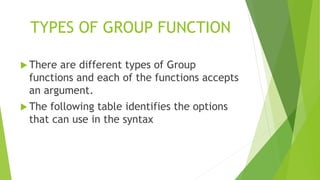
 There are different types of Group
functions and each of the functions accepts
an argument.
 The following table identifies the options
that can use in the syntax
TYPES OF GROUP FUNCTION
GROUP FUNCTION DESCRIPTION
TYPES OF GROUP FUNCTION
GROUP FUNCTION DESCRIPTION
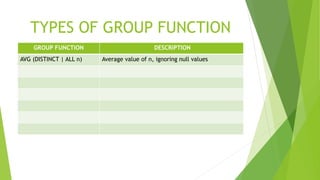
AVG (DISTINCT | ALL n) Average value of n, ignoring null values
TYPES OF GROUP FUNCTION
GROUP FUNCTION DESCRIPTION
AVG (DISTINCT | ALL n) Average value of n, ignoring null values
COUNT ( {*|[DISTINCT|ALL] expr}) Number of rows, where expr evaluates to
something other than null (count all selected
rows using * including duplicate and rows with
nulls
TYPES OF GROUP FUNCTION
GROUP FUNCTION DESCRIPTION
AVG (DISTINCT | ALL n) Average value of n, ignoring null values
COUNT ( {*|[DISTINCT|ALL] expr}) Number of rows, where expr evaluates to
something other than null (count all selected
rows using * including duplicate and rows with
nulls
MAX ([DISTINCT | ALL ] expr ) Maximum value of expr, ignoring null values
MIN ( [DISTINCT | ALL ] expr ) Minimum value of expr, ignoring null values
TYPES OF GROUP FUNCTION
GROUP FUNCTION DESCRIPTION
AVG (DISTINCT | ALL n) Average value of n, ignoring null values
COUNT ( {*|[DISTINCT|ALL] expr}) Number of rows, where expr evaluates to
something other than null (count all selected
rows using * including duplicate and rows with
nulls
MAX ([DISTINCT | ALL ] expr ) Maximum value of expr, ignoring null values
MIN ( [DISTINCT | ALL ] expr ) Minimum value of expr, ignoring null values
STDDEV ( [DISTINCT | ALL ] x ) Standard deviation of n, ignoring null values
TYPES OF GROUP FUNCTION
GROUP FUNCTION DESCRIPTION
AVG (DISTINCT | ALL n) Average value of n, ignoring null values
COUNT ( {*|[DISTINCT|ALL] expr}) Number of rows, where expr evaluates to
something other than null (count all selected
rows using * including duplicate and rows with
nulls
MAX ([DISTINCT | ALL ] expr ) Maximum value of expr, ignoring null values
MIN ( [DISTINCT | ALL ] expr ) Minimum value of expr, ignoring null values
STDDEV ( [DISTINCT | ALL ] x ) Standard deviation of n, ignoring null values
SUM ( [DISTINCT | ALL ] n) Sum values of n, ignoring null values
TYPES OF GROUP FUNCTION
GROUP FUNCTION DESCRIPTION
AVG (DISTINCT | ALL n) Average value of n, ignoring null values
COUNT ( {*|[DISTINCT|ALL] expr}) Number of rows, where expr evaluates to
something other than null (count all selected
rows using * including duplicate and rows with
nulls
MAX ([DISTINCT | ALL ] expr ) Maximum value of expr, ignoring null values
MIN ( [DISTINCT | ALL ] expr ) Minimum value of expr, ignoring null values
STDDEV ( [DISTINCT | ALL ] x ) Standard deviation of n, ignoring null values
SUM ( [DISTINCT | ALL ] n) Sum values of n, ignoring null values
VARIANCE ( [DISTINCT | ALL ] x) Variance of n, ignoring null values
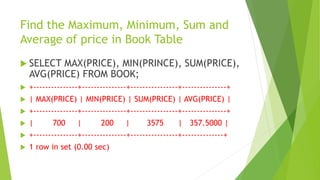
Find the Maximum, Minimum, Sum and
Average of price in Book Table
 SELECT MAX(PRICE), MIN(PRINCE), SUM(PRICE),
AVG(PRICE) FROM BOOK;
 +---------------+---------------+----------------+---------------+
 | MAX(PRICE) | MIN(PRICE) | SUM(PRICE) | AVG(PRICE) |
 +---------------+---------------+----------------+---------------+
 | 700 | 200 | 3575 | 357.5000 |
 +---------------+---------------+----------------+--------------+
 1 row in set (0.00 sec)
Find the Maximum, Minimum, Sum and
Average of price in SKYWARD Book
 SELECT MAX(PRICE), MIN(PRINCE), SUM(PRICE),
AVG(PRICE) FROM BOOK WHERE
PUBLISHER=‘SKYWARD’;
 +---------------+---------------+----------------+---------------+
 | MAX(PRICE) | MIN(PRICE) | SUM(PRICE) | AVG(PRICE) |
 +---------------+---------------+----------------+---------------+
 | 300 | 200 | 1175 | 235 |
 +---------------+---------------+----------------+--------------+
 1 row in set (0.00 sec)
Find out the number of SKYWARD Books
present in the book table
 SELECT COUNT(*) FROM BOOK WHERE
PUBLISHER=‘SKYWARD’;
 +-------------+
 | COUNT(*) |
 +-------------+
 | 5 |
 +-------------+
 1 row in set (0.00 sec)
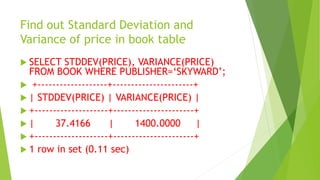
Find out Standard Deviation and
Variance of price in book table
 SELECT STDDEV(PRICE), VARIANCE(PRICE)
FROM BOOK WHERE PUBLISHER=‘SKYWARD’;
 +-------------------+----------------------+
 | STDDEV(PRICE) | VARIANCE(PRICE) |
 +--------------------+----------------------+
 | 37.4166 | 1400.0000 |
 +--------------------+----------------------+
 1 row in set (0.11 sec)
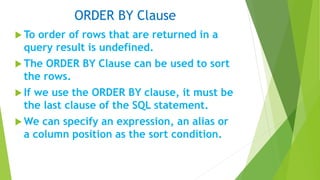
ORDER BY Clause
 To order of rows that are returned in a
query result is undefined.
 The ORDER BY Clause can be used to sort
the rows.
 If we use the ORDER BY clause, it must be
the last clause of the SQL statement.
 We can specify an expression, an alias or
a column position as the sort condition.
ORDER BY Clause - Syntax
 SELECT <COLUMS> FROM TABLENAME
 [ WHERE CONDITION(S) ]
 [ ORDER BY { COLUMN, EXPR, NUMERIC
POSITION} [ASC | DESC ] ];
 ORDER BY: Specifies the order in which
the retrieved rows are displayed.
 ASC orders the rows in ascending order
 DESC orders the rows in descending order
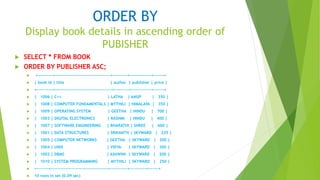
ORDER BY
Display book details in ascending order of
PUBISHER
 SELECT * FROM BOOK
 ORDER BY PUBLISHER ASC;
 +----------+--------------------------------------+----------+---------------+-------+
 | book id | title | author | publisher | price |
 +-----------+---------------------------------------+----------+--------------+-------+
 | 1006 | C++ | LATHA | ANUP | 350 |
 | 1008 | COMPUTER FUNDAMENTALS | MYTHILI | HIMALAYA | 350 |
 | 1009 | OPERATING SYSTEM | GEETHA | HINDU | 700 |
 | 1003 | DIGITAL ELECTRONICS | RASHMI | HINDU | 400 |
 | 1007 | SOFTWARE ENGINEERING | BHARATHI | SHREE | 600 |
 | 1001 | DATA STRUCTURES | SRIKANTH | SKYWARD | 225 |
 | 1005 | COMPUTER NETWORKS | GEETHA | SKYWARD | 200 |
 | 1004 | UNIX | VIDYA | SKYWARD | 300 |
 | 1002 | DBMS | ASHWINI | SKYWARD | 200 |
 | 1010 | SYSTEM PROGRAMMING | MYTHILI | SKYWARD | 250 |
 +--------+---------------------------------------+------------+-----------+-------+
 10 rows in set (0.09 sec)
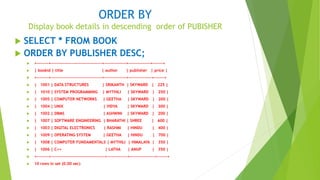
ORDER BY
Display book details in descending order of PUBISHER
 SELECT * FROM BOOK
 ORDER BY PUBLISHER DESC;
 +--------+-----------------------------------+---------------+---------------+-------+
 | bookid | title | author | publisher | price |
 +--------+-----------------------------------+---------------+----------------+-------+
 | 1001 | DATA STRUCTURES | SRIKANTH | SKYWARD | 225 |
 | 1010 | SYSTEM PROGRAMMING | MYTHILI | SKYWARD | 250 |
 | 1005 | COMPUTER NETWORKS | GEETHA | SKYWARD | 200 |
 | 1004 | UNIX | VIDYA | SKYWARD | 300 |
 | 1002 | DBMS | ASHWINI | SKYWARD | 200 |
 | 1007 | SOFTWARE ENGINEERING | BHARATHI | SHREE | 600 |
 | 1003 | DIGITAL ELECTRONICS | RASHMI | HINDU | 400 |
 | 1009 | OPERATING SYSTEM | GEETHA | HINDU | 700 |
 | 1008 | COMPUTER FUNDAMENTALS | MYTHILI | HIMALAYA | 350 |
 | 1006 | C++ | LATHA | ANUP | 350 |
 +--------+-------------------------------------+--------------+-----------------+-------+
 10 rows in set (0.00 sec)
GROUP BY CLAUSE
 We can divide the table of information into
smaller groups using the GROUP BY clause.
 We can then use the group function to return
summary information for each group.
 If we want to find maximum price, minimum
price of the book for each publisher, then we
can use the GROUP BY clause based on
PUBLISHER and code is given below:
 There are totally five groups for each group
we get the aggregate data.
SELECT PUBLISHER, MAX(PRICE), MIN(PRICE),
SUM(PRICE) FROM BOOK GROUP BY PUBLISHER;
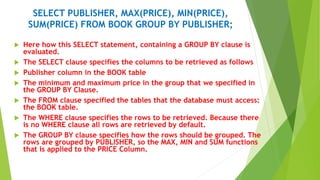
 Here how this SELECT statement, containing a GROUP BY clause is
evaluated.
 The SELECT clause specifies the columns to be retrieved as follows
 Publisher column in the BOOK table
 The minimum and maximum price in the group that we specified in
the GROUP BY Clause.
 The FROM clause specified the tables that the database must access:
the BOOK table.
 The WHERE clause specifies the rows to be retrieved. Because there
is no WHERE clause all rows are retrieved by default.
 The GROUP BY clause specifies how the rows should be grouped. The
rows are grouped by PUBLISHER, so the MAX, MIN and SUM functions
that is applied to the PRICE Column.
SELECT PUBLISHER, MAX(PRICE), MIN(PRICE),
SUM(PRICE) FROM BOOK GROUP BY PUBLISHER;
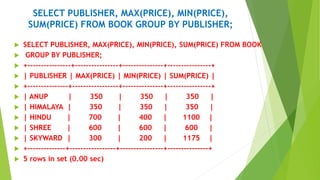
 SELECT PUBLISHER, MAX(PRICE), MIN(PRICE), SUM(PRICE) FROM BOOK
 GROUP BY PUBLISHER;
 +----------------+----------------+---------------+----------------+
 | PUBLISHER | MAX(PRICE) | MIN(PRICE) | SUM(PRICE) |
 +---------------+-----------------+---------------+----------------+
 | ANUP | 350 | 350 | 350 |
 | HIMALAYA | 350 | 350 | 350 |
 | HINDU | 700 | 400 | 1100 |
 | SHREE | 600 | 600 | 600 |
 | SKYWARD | 300 | 200 | 1175 |
 +--------------+-----------------+----------------+---------------+
 5 rows in set (0.00 sec)

MYSQL GROUP FUNCTION.pptx

  • 1.
  • 2.
    TYPES OF GROUPFUNCTION  There are different types of Group functions and each of the functions accepts an argument.  The following table identifies the options that can use in the syntax
  • 3.
    TYPES OF GROUPFUNCTION GROUP FUNCTION DESCRIPTION
  • 4.
    TYPES OF GROUPFUNCTION GROUP FUNCTION DESCRIPTION AVG (DISTINCT | ALL n) Average value of n, ignoring null values
  • 5.
    TYPES OF GROUPFUNCTION GROUP FUNCTION DESCRIPTION AVG (DISTINCT | ALL n) Average value of n, ignoring null values COUNT ( {*|[DISTINCT|ALL] expr}) Number of rows, where expr evaluates to something other than null (count all selected rows using * including duplicate and rows with nulls
  • 6.
    TYPES OF GROUPFUNCTION GROUP FUNCTION DESCRIPTION AVG (DISTINCT | ALL n) Average value of n, ignoring null values COUNT ( {*|[DISTINCT|ALL] expr}) Number of rows, where expr evaluates to something other than null (count all selected rows using * including duplicate and rows with nulls MAX ([DISTINCT | ALL ] expr ) Maximum value of expr, ignoring null values MIN ( [DISTINCT | ALL ] expr ) Minimum value of expr, ignoring null values
  • 7.
    TYPES OF GROUPFUNCTION GROUP FUNCTION DESCRIPTION AVG (DISTINCT | ALL n) Average value of n, ignoring null values COUNT ( {*|[DISTINCT|ALL] expr}) Number of rows, where expr evaluates to something other than null (count all selected rows using * including duplicate and rows with nulls MAX ([DISTINCT | ALL ] expr ) Maximum value of expr, ignoring null values MIN ( [DISTINCT | ALL ] expr ) Minimum value of expr, ignoring null values STDDEV ( [DISTINCT | ALL ] x ) Standard deviation of n, ignoring null values
  • 8.
    TYPES OF GROUPFUNCTION GROUP FUNCTION DESCRIPTION AVG (DISTINCT | ALL n) Average value of n, ignoring null values COUNT ( {*|[DISTINCT|ALL] expr}) Number of rows, where expr evaluates to something other than null (count all selected rows using * including duplicate and rows with nulls MAX ([DISTINCT | ALL ] expr ) Maximum value of expr, ignoring null values MIN ( [DISTINCT | ALL ] expr ) Minimum value of expr, ignoring null values STDDEV ( [DISTINCT | ALL ] x ) Standard deviation of n, ignoring null values SUM ( [DISTINCT | ALL ] n) Sum values of n, ignoring null values
  • 9.
    TYPES OF GROUPFUNCTION GROUP FUNCTION DESCRIPTION AVG (DISTINCT | ALL n) Average value of n, ignoring null values COUNT ( {*|[DISTINCT|ALL] expr}) Number of rows, where expr evaluates to something other than null (count all selected rows using * including duplicate and rows with nulls MAX ([DISTINCT | ALL ] expr ) Maximum value of expr, ignoring null values MIN ( [DISTINCT | ALL ] expr ) Minimum value of expr, ignoring null values STDDEV ( [DISTINCT | ALL ] x ) Standard deviation of n, ignoring null values SUM ( [DISTINCT | ALL ] n) Sum values of n, ignoring null values VARIANCE ( [DISTINCT | ALL ] x) Variance of n, ignoring null values
  • 10.
    Find the Maximum,Minimum, Sum and Average of price in Book Table  SELECT MAX(PRICE), MIN(PRINCE), SUM(PRICE), AVG(PRICE) FROM BOOK;  +---------------+---------------+----------------+---------------+  | MAX(PRICE) | MIN(PRICE) | SUM(PRICE) | AVG(PRICE) |  +---------------+---------------+----------------+---------------+  | 700 | 200 | 3575 | 357.5000 |  +---------------+---------------+----------------+--------------+  1 row in set (0.00 sec)
  • 11.
    Find the Maximum,Minimum, Sum and Average of price in SKYWARD Book  SELECT MAX(PRICE), MIN(PRINCE), SUM(PRICE), AVG(PRICE) FROM BOOK WHERE PUBLISHER=‘SKYWARD’;  +---------------+---------------+----------------+---------------+  | MAX(PRICE) | MIN(PRICE) | SUM(PRICE) | AVG(PRICE) |  +---------------+---------------+----------------+---------------+  | 300 | 200 | 1175 | 235 |  +---------------+---------------+----------------+--------------+  1 row in set (0.00 sec)
  • 12.
    Find out thenumber of SKYWARD Books present in the book table  SELECT COUNT(*) FROM BOOK WHERE PUBLISHER=‘SKYWARD’;  +-------------+  | COUNT(*) |  +-------------+  | 5 |  +-------------+  1 row in set (0.00 sec)
  • 13.
    Find out StandardDeviation and Variance of price in book table  SELECT STDDEV(PRICE), VARIANCE(PRICE) FROM BOOK WHERE PUBLISHER=‘SKYWARD’;  +-------------------+----------------------+  | STDDEV(PRICE) | VARIANCE(PRICE) |  +--------------------+----------------------+  | 37.4166 | 1400.0000 |  +--------------------+----------------------+  1 row in set (0.11 sec)
  • 14.
    ORDER BY Clause To order of rows that are returned in a query result is undefined.  The ORDER BY Clause can be used to sort the rows.  If we use the ORDER BY clause, it must be the last clause of the SQL statement.  We can specify an expression, an alias or a column position as the sort condition.
  • 15.
    ORDER BY Clause- Syntax  SELECT <COLUMS> FROM TABLENAME  [ WHERE CONDITION(S) ]  [ ORDER BY { COLUMN, EXPR, NUMERIC POSITION} [ASC | DESC ] ];  ORDER BY: Specifies the order in which the retrieved rows are displayed.  ASC orders the rows in ascending order  DESC orders the rows in descending order
  • 16.
    ORDER BY Display bookdetails in ascending order of PUBISHER  SELECT * FROM BOOK  ORDER BY PUBLISHER ASC;  +----------+--------------------------------------+----------+---------------+-------+  | book id | title | author | publisher | price |  +-----------+---------------------------------------+----------+--------------+-------+  | 1006 | C++ | LATHA | ANUP | 350 |  | 1008 | COMPUTER FUNDAMENTALS | MYTHILI | HIMALAYA | 350 |  | 1009 | OPERATING SYSTEM | GEETHA | HINDU | 700 |  | 1003 | DIGITAL ELECTRONICS | RASHMI | HINDU | 400 |  | 1007 | SOFTWARE ENGINEERING | BHARATHI | SHREE | 600 |  | 1001 | DATA STRUCTURES | SRIKANTH | SKYWARD | 225 |  | 1005 | COMPUTER NETWORKS | GEETHA | SKYWARD | 200 |  | 1004 | UNIX | VIDYA | SKYWARD | 300 |  | 1002 | DBMS | ASHWINI | SKYWARD | 200 |  | 1010 | SYSTEM PROGRAMMING | MYTHILI | SKYWARD | 250 |  +--------+---------------------------------------+------------+-----------+-------+  10 rows in set (0.09 sec)
  • 17.
    ORDER BY Display bookdetails in descending order of PUBISHER  SELECT * FROM BOOK  ORDER BY PUBLISHER DESC;  +--------+-----------------------------------+---------------+---------------+-------+  | bookid | title | author | publisher | price |  +--------+-----------------------------------+---------------+----------------+-------+  | 1001 | DATA STRUCTURES | SRIKANTH | SKYWARD | 225 |  | 1010 | SYSTEM PROGRAMMING | MYTHILI | SKYWARD | 250 |  | 1005 | COMPUTER NETWORKS | GEETHA | SKYWARD | 200 |  | 1004 | UNIX | VIDYA | SKYWARD | 300 |  | 1002 | DBMS | ASHWINI | SKYWARD | 200 |  | 1007 | SOFTWARE ENGINEERING | BHARATHI | SHREE | 600 |  | 1003 | DIGITAL ELECTRONICS | RASHMI | HINDU | 400 |  | 1009 | OPERATING SYSTEM | GEETHA | HINDU | 700 |  | 1008 | COMPUTER FUNDAMENTALS | MYTHILI | HIMALAYA | 350 |  | 1006 | C++ | LATHA | ANUP | 350 |  +--------+-------------------------------------+--------------+-----------------+-------+  10 rows in set (0.00 sec)
  • 18.
    GROUP BY CLAUSE We can divide the table of information into smaller groups using the GROUP BY clause.  We can then use the group function to return summary information for each group.  If we want to find maximum price, minimum price of the book for each publisher, then we can use the GROUP BY clause based on PUBLISHER and code is given below:  There are totally five groups for each group we get the aggregate data.
  • 19.
    SELECT PUBLISHER, MAX(PRICE),MIN(PRICE), SUM(PRICE) FROM BOOK GROUP BY PUBLISHER;  Here how this SELECT statement, containing a GROUP BY clause is evaluated.  The SELECT clause specifies the columns to be retrieved as follows  Publisher column in the BOOK table  The minimum and maximum price in the group that we specified in the GROUP BY Clause.  The FROM clause specified the tables that the database must access: the BOOK table.  The WHERE clause specifies the rows to be retrieved. Because there is no WHERE clause all rows are retrieved by default.  The GROUP BY clause specifies how the rows should be grouped. The rows are grouped by PUBLISHER, so the MAX, MIN and SUM functions that is applied to the PRICE Column.
  • 20.
    SELECT PUBLISHER, MAX(PRICE),MIN(PRICE), SUM(PRICE) FROM BOOK GROUP BY PUBLISHER;  SELECT PUBLISHER, MAX(PRICE), MIN(PRICE), SUM(PRICE) FROM BOOK  GROUP BY PUBLISHER;  +----------------+----------------+---------------+----------------+  | PUBLISHER | MAX(PRICE) | MIN(PRICE) | SUM(PRICE) |  +---------------+-----------------+---------------+----------------+  | ANUP | 350 | 350 | 350 |  | HIMALAYA | 350 | 350 | 350 |  | HINDU | 700 | 400 | 1100 |  | SHREE | 600 | 600 | 600 |  | SKYWARD | 300 | 200 | 1175 |  +--------------+-----------------+----------------+---------------+  5 rows in set (0.00 sec)