MySQL
An Introduction
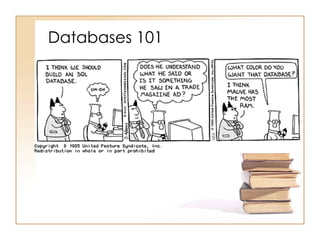
Databases 101
What is MySQL ?
• MySQL is an open source relational
database management system.
• It includes the SQL server and client
programs for accessing the server.
• Widely used by web application
developers, together with PHP and
APACHE
• It is pronounced My-es-que-el
(Not My-Sequel)
MySQL AB
• MySQL AB is a commercial entity
• Marketing & Development
• Originally established in Sweden
• A virtual corporation
• Service, support, training and
consulting
• Profitable since inception
Fact Sheet
• Most popular open source
database
• over 100 million copies
downloaded or distributed
• 6,000,000 active installations
• 35,000 downloads a day
• Certified for all SAP applications
• Elite client list—Yahoo!, NASA,
Google
• Proven track record
Why learn MySQL?
• Leading open source RDBMS
• Ease of use – No frills
• Fast
• Robust
• Security
• Multiple OS support
• Free
• Technical support
• Support large database– up to 50
million rows, file size limit up to 8
Million TB
The MySQL Value Proposition
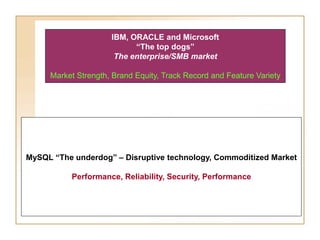
IBM, ORACLE and Microsoft
“The top dogs”
The enterprise/SMB market
Market Strength, Brand Equity, Track Record and Feature Variety
MySQL “The underdog” – Disruptive technology, Commoditized Market
Performance, Reliability, Security, Performance
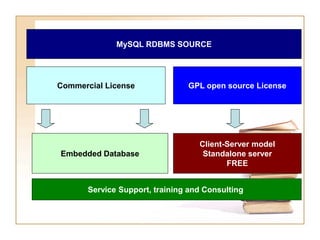
MySQL RDBMS SOURCE
Commercial License GPL open source License
Embedded Database
Client-Server model
Standalone server
FREE
Service Support, training and Consulting
Which edition to use?
• MySQL Enterprise
– most comprehensive offering of MySQL database
software, services and support
• MySQL Cluster
– a fault tolerant database clustering architecture
for deploying highly available mission-critical
database applications
• MySQL Embedded Database
– most popular choice for OEMs/ISVs who want to
cost-effectively embed or bundle a reliable and
high-performance relational database
• MySQL community edition
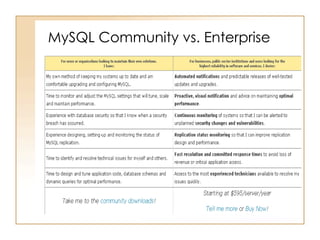
MySQL Community vs. Enterprise
MySQL Enterprise
• MySQL Enterprise Monitor
– a "Virtual DBA Assistant" to enforce MySQL
recommended best practices
• MySQL Enterprise Server
• MySQL Production Support
– get your toughest technical questions
answered quickly
– advise you on how to properly design and
tune your MySQL servers, schema, queries,
and replication set-up
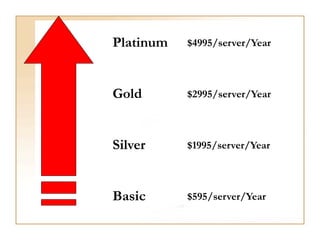
Platinum
Gold
Silver
Basic
$4995/server/Year
$2995/server/Year
$1995/server/Year
$595/server/Year
Where can I get MySQL ?
• http://www.mysql.com/downloads/
• Make sure you pick the correct version
for your OS
• Download MySQL 5.0 Community
Server GA
• Download MySQL Administrator
• Download MySQL Migration Toolkit
• Download MySQL Query Browser
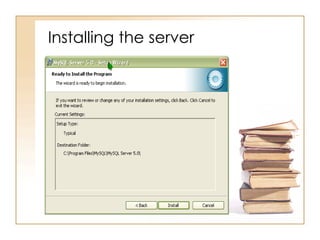
Installing the server
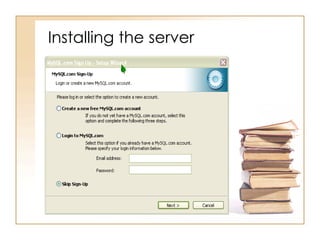
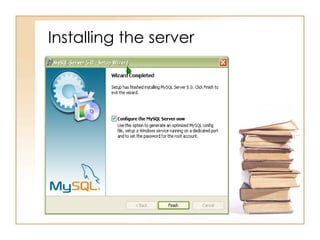
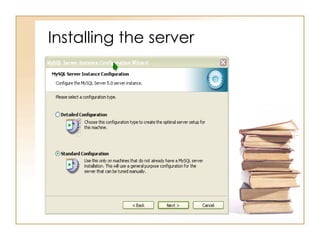
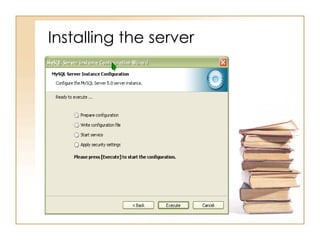
• Follow the screenshots
Installing the server
• If you have firewall, remember
to unblock TCP port 3306
• If you prefer GUI operations,
install Administrator, Migration
Toolkit and Query Brower
• Configuration parameters
stored in “C:Program
FilesMySQLMySQL Server
5.0my.ini”
• Change configuration by
“server instance configuration
wizard”
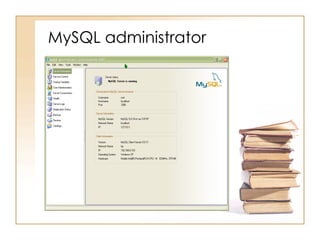
MySQL administrator
Query browser
A set of command line utilities
• mysqld, mysql, mysqladmin, mysqldump
(located in C:Program FilesMySQLMySQL
Server 5.0bin)
• What is it ?
• Why do I want to use it ?
• For what all can I use it ?
• See handout later
About Data types …
• Detailed help in describing your
fields can be found online at the
MySQL user manual. These two
links are very helpful
http://dev.mysql.com/doc/refman/5.0/en
/string-types.html
http://dev.mysql.com/doc/refman/5.0/en
/numeric-types.html
In General:
Refer to chapter 11 of the user manual at
www.mysql.com/doc/en/Reference.html
Quick Example of data types
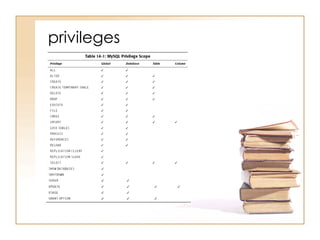
privileges
Storage engine and table types
• ISAM
– Indexed Sequential Access Method
– Fastest table type in MySQL
– Originally used in mSQL by TcX (the
predecessor of MySQL AB)
– Do not support transactions and
foreign key
– No longer supported after version 5.1
• InnoDB
– Purchased by MySQL later
– Large data volume, heavy-load
production system
– Support transactions and foreign key
Word of advice ..
• Describe your fields correctly
• Describe your data tightly
• Secure your server well
• Understand the mechanics
• Use the manual
• Use the mailing list
Questions ?

MySQL 简要介绍

  • 1.
  • 2.
  • 3.
    What is MySQL? • MySQL is an open source relational database management system. • It includes the SQL server and client programs for accessing the server. • Widely used by web application developers, together with PHP and APACHE • It is pronounced My-es-que-el (Not My-Sequel)
  • 4.
    MySQL AB • MySQLAB is a commercial entity • Marketing & Development • Originally established in Sweden • A virtual corporation • Service, support, training and consulting • Profitable since inception
  • 5.
    Fact Sheet • Mostpopular open source database • over 100 million copies downloaded or distributed • 6,000,000 active installations • 35,000 downloads a day • Certified for all SAP applications • Elite client list—Yahoo!, NASA, Google • Proven track record
  • 6.
    Why learn MySQL? •Leading open source RDBMS • Ease of use – No frills • Fast • Robust • Security • Multiple OS support • Free • Technical support • Support large database– up to 50 million rows, file size limit up to 8 Million TB
  • 7.
    The MySQL ValueProposition
  • 8.
    IBM, ORACLE andMicrosoft “The top dogs” The enterprise/SMB market Market Strength, Brand Equity, Track Record and Feature Variety MySQL “The underdog” – Disruptive technology, Commoditized Market Performance, Reliability, Security, Performance
  • 9.
    MySQL RDBMS SOURCE CommercialLicense GPL open source License Embedded Database Client-Server model Standalone server FREE Service Support, training and Consulting
  • 10.
    Which edition touse? • MySQL Enterprise – most comprehensive offering of MySQL database software, services and support • MySQL Cluster – a fault tolerant database clustering architecture for deploying highly available mission-critical database applications • MySQL Embedded Database – most popular choice for OEMs/ISVs who want to cost-effectively embed or bundle a reliable and high-performance relational database • MySQL community edition
  • 11.
  • 12.
    MySQL Enterprise • MySQLEnterprise Monitor – a "Virtual DBA Assistant" to enforce MySQL recommended best practices • MySQL Enterprise Server • MySQL Production Support – get your toughest technical questions answered quickly – advise you on how to properly design and tune your MySQL servers, schema, queries, and replication set-up
  • 13.
  • 14.
    Where can Iget MySQL ? • http://www.mysql.com/downloads/ • Make sure you pick the correct version for your OS • Download MySQL 5.0 Community Server GA • Download MySQL Administrator • Download MySQL Migration Toolkit • Download MySQL Query Browser
  • 15.
    Installing the server •Follow the screenshots
  • 16.
  • 17.
  • 18.
  • 19.
  • 20.
  • 21.
  • 22.
  • 23.
    Installing the server •If you have firewall, remember to unblock TCP port 3306 • If you prefer GUI operations, install Administrator, Migration Toolkit and Query Brower • Configuration parameters stored in “C:Program FilesMySQLMySQL Server 5.0my.ini” • Change configuration by “server instance configuration wizard”
  • 24.
  • 25.
  • 26.
    A set ofcommand line utilities • mysqld, mysql, mysqladmin, mysqldump (located in C:Program FilesMySQLMySQL Server 5.0bin) • What is it ? • Why do I want to use it ? • For what all can I use it ? • See handout later
  • 27.
    About Data types… • Detailed help in describing your fields can be found online at the MySQL user manual. These two links are very helpful http://dev.mysql.com/doc/refman/5.0/en /string-types.html http://dev.mysql.com/doc/refman/5.0/en /numeric-types.html In General: Refer to chapter 11 of the user manual at www.mysql.com/doc/en/Reference.html
  • 28.
    Quick Example ofdata types
  • 29.
  • 30.
    Storage engine andtable types • ISAM – Indexed Sequential Access Method – Fastest table type in MySQL – Originally used in mSQL by TcX (the predecessor of MySQL AB) – Do not support transactions and foreign key – No longer supported after version 5.1 • InnoDB – Purchased by MySQL later – Large data volume, heavy-load production system – Support transactions and foreign key
  • 31.
    Word of advice.. • Describe your fields correctly • Describe your data tightly • Secure your server well • Understand the mechanics • Use the manual • Use the mailing list
  • 32.