iFour ConsultancyMVC
 Introduction to MVC
 MVC vs WEB FORMS
 Architecture of MVC
 Routing
 Bundling
 Filter
 Custom Filter
 Actions
 Action Result
 Action Parameters
 Action Selection
 Action Filters
 Razor
 Layout
 View and Layout
 HTML Helpers in MVC
 Partial View
 Areas
 MVC STATE MANAGEMENT
INDEX
http://www.ifourtechnolab.com/ C# Software Development Companies India
Introduction to MVC
 Software design pattern for developing web applications
 Software architecture pattern which separates the representation of information from the
users interaction with it
 Here M stands for Model, V stands for View and C stands for controller
 ASP.NET MVC helps to develop powerful and pattern-based dynamic websites that enables
a clean separation of concerns and also gives full control on a mark-up
 Also it includes many features that help to develop a sophisticated and modern web
application
http://www.ifourtechnolab.com/ C# Software Development Companies India
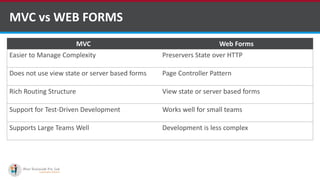
MVC vs WEB FORMS
MVC Web Forms
Easier to Manage Complexity Preservers State over HTTP
Does not use view state or server based forms Page Controller Pattern
Rich Routing Structure View state or server based forms
Support for Test-Driven Development Works well for small teams
Supports Large Teams Well Development is less complex
http://www.ifourtechnolab.com/ C# Software Development Companies India
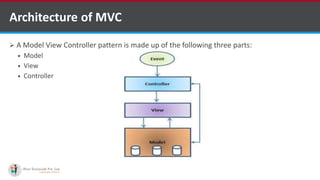
Architecture of MVC
 A Model View Controller pattern is made up of the following three parts:
 Model
 View
 Controller
•A markup language is a set of markup tags
http://www.ifourtechnolab.com/ C# Software Development Companies India
Architecture of MVC (Cont.)
 Model:
 Responsible for managing the data of the application
 It responds to the request from the view and it also responds to instructions from the controller
to update itself
 Lowest level pattern which is responsible for maintaining data
 Represents the application core (for instance a list of database records)
 Also called the domain layer
•A markup language is a set of markup tags
http://www.ifourtechnolab.com/ C# Software Development Companies India
Architecture of MVC (Cont.)
 View:
 The View displays the data (the database records)
 A view requests information from the model, that it needs to generate an output
representation
 Presents data in a particular format like JSP, ASP, PHP
 MVC is often seen in web applications, where the view is the HTML page
•A markup language is a set of markup tags
http://www.ifourtechnolab.com/ C# Software Development Companies India
Architecture of MVC (Cont.)
 Controller:
 It is the part of the application that handles user interaction
 Typically controllers read data from a view, control user input, and send input data to the model
 It handles the input, typically user actions and may invoke changes on the model and view
•A markup language is a set of markup tags
http://www.ifourtechnolab.com/ C# Software Development Companies India
Routing
 A route is a URL pattern that is mapped to a handler
 The handler can be a physical file, such as an .aspx file in a Web Forms application. A
handler can also be a class that processes the request, such as a controller in an MVC
application
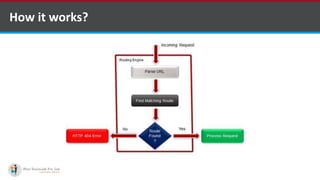
 At runtime, Routing engine use the Route table for matching the incoming request's URL
pattern against the URL patterns defined in the Route table
 Register one or more URL patterns to the Route table at Application_Start event
 When the routing engine finds a match in the route table for the incoming request's URL,
it forwards the request to the appropriate controller and action
 If there is no match in the route table for the incoming request's URL, it returns a 404
HTTP status code
•A markup language is a set of markup tags
http://www.ifourtechnolab.com/ C# Software Development Companies India
How it works?
•A markup language is a set of markup tags
http://www.ifourtechnolab.com/ C# Software Development Companies India
How to define route?
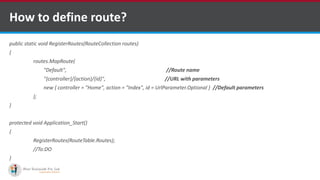
public static void RegisterRoutes(RouteCollection routes)
{
routes.MapRoute(
"Default", //Route name
"{controller}/{action}/{id}", //URL with parameters
new { controller = "Home", action = "Index", id = UrlParameter.Optional } //Default parameters
);
}
protected void Application_Start()
{
RegisterRoutes(RouteTable.Routes);
//To:DO
}
•A markup language is a set of markup tags
http://www.ifourtechnolab.com/ C# Software Development Companies India
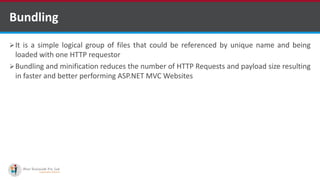
Bundling
It is a simple logical group of files that could be referenced by unique name and being
loaded with one HTTP requestor
Bundling and minification reduces the number of HTTP Requests and payload size resulting
in faster and better performing ASP.NET MVC Websites
•A markup language is a set of markup tags
http://www.ifourtechnolab.com/ C# Software Development Companies India
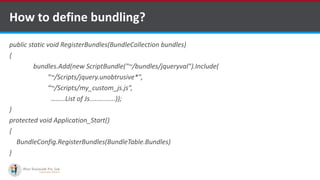
How to define bundling?
public static void RegisterBundles(BundleCollection bundles)
{
bundles.Add(new ScriptBundle("~/bundles/jqueryval").Include(
"~/Scripts/jquery.unobtrusive*",
“~/Scripts/my_custom_js.js”,
….....List of Js..............));
}
protected void Application_Start()
{
BundleConfig.RegisterBundles(BundleTable.Bundles)
}
•A markup language is a set of markup tags
http://www.ifourtechnolab.com/ C# Software Development Companies India
Filter
 ASP.NET MVC Filter is a custom class where you can write custom logic to execute before or after
an action method executes
 Filters can be applied to an action method or controller in a declarative or programmatic way
 MVC provides different types of filters
•A markup language is a set of markup tags
Filter Type Description Built-in Filter Interface
Authorization
filters
Performs authentication and authorizes before executing action
method
[Authorize]
[RequireHttps]
IAuthorizationFilter
Action filters Performs some operation before and after an action method
executes
IActionFilter
Result filters Performs some operation before or after the execution of view result [OutputCache] IResultFilter
Exception filters Performs some operation if there is an unhandled exception thrown
during the execution of the ASP.NET MVC pipeline
[HandleError] IExceptionFilter
http://www.ifourtechnolab.com/ C# Software Development Companies India
Filter
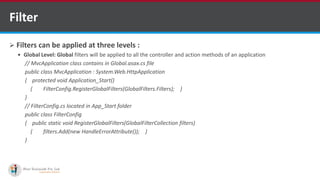
 Filters can be applied at three levels :
 Global Level: Global filters will be applied to all the controller and action methods of an application
// MvcApplication class contains in Global.asax.cs file
public class MvcApplication : System.Web.HttpApplication
{ protected void Application_Start()
{ FilterConfig.RegisterGlobalFilters(GlobalFilters.Filters); }
}
// FilterConfig.cs located in App_Start folder
public class FilterConfig
{ public static void RegisterGlobalFilters(GlobalFilterCollection filters)
{ filters.Add(new HandleErrorAttribute()); }
}
•A markup language is a set of markup tags
http://www.ifourtechnolab.com/ C# Software Development Companies India
Filter
• Controller Level: Filters can also be applied to the controller class. So, filters will be
applicable to all the action method of Controller class if it is applied to a controller class
[HandleError]
public class HomeController : Controller
{
public ActionResult Index()
{
return View();
}
}
•A markup language is a set of markup tags
http://www.ifourtechnolab.com/ C# Software Development Companies India
Filter
 Action method level: Apply filters to an individual action method. So, filter will be
applicable to that particular action method only.
public class HomeController : Controller
{ [HandleError]
public ActionResult Index()
{ return View(); }
}
 Filters run in the following order.
 Authorization filters, Action filters, Response filters, Exception filters
•A markup language is a set of markup tags
http://www.ifourtechnolab.com/ C# Software Development Companies India
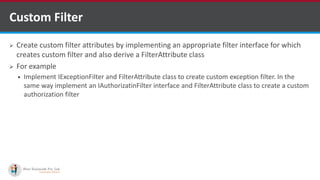
Custom Filter
 Create custom filter attributes by implementing an appropriate filter interface for which
creates custom filter and also derive a FilterAttribute class
 For example
 Implement IExceptionFilter and FilterAttribute class to create custom exception filter. In the
same way implement an IAuthorizatinFilter interface and FilterAttribute class to create a custom
authorization filter
•A markup language is a set of markup tags
http://www.ifourtechnolab.com/ C# Software Development Companies India
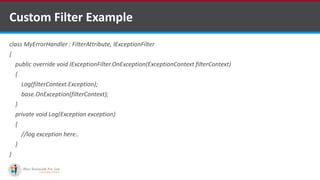
Custom Filter Example
class MyErrorHandler : FilterAttribute, IExceptionFilter
{
public override void IExceptionFilter.OnException(ExceptionContext filterContext)
{
Log(filterContext.Exception);
base.OnException(filterContext);
}
private void Log(Exception exception)
{
//log exception here..
}
}
•A markup language is a set of markup tags
http://www.ifourtechnolab.com/ C# Software Development Companies India
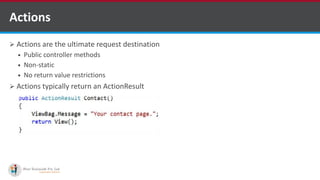
 Actions are the ultimate request destination
 Public controller methods
 Non-static
 No return value restrictions
 Actions typically return an ActionResult
Actions
http://www.ifourtechnolab.com/ C# Software Development Companies India
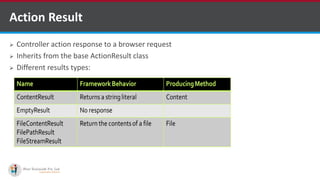
 Controller action response to a browser request
 Inherits from the base ActionResult class
 Different results types:
Action Result
http://www.ifourtechnolab.com/ C# Software Development Companies India
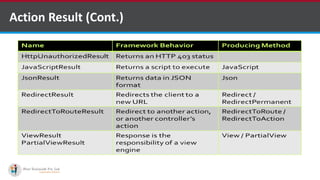
Action Result (Cont.)
http://www.ifourtechnolab.com/ C# Software Development Companies India
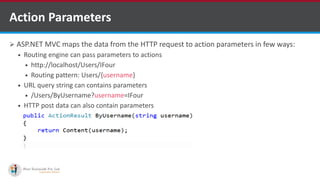
 ASP.NET MVC maps the data from the HTTP request to action parameters in few ways:
 Routing engine can pass parameters to actions
 http://localhost/Users/IFour
 Routing pattern: Users/{username}
 URL query string can contains parameters
 /Users/ByUsername?username=IFour
 HTTP post data can also contain parameters
Action Parameters
http://www.ifourtechnolab.com/ C# Software Development Companies India
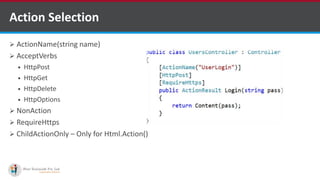
 ActionName(string name)
 AcceptVerbs
 HttpPost
 HttpGet
 HttpDelete
 HttpOptions
 NonAction
 RequireHttps
 ChildActionOnly – Only for Html.Action()
Action Selection
http://www.ifourtechnolab.com/
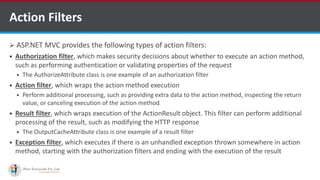
Action Filters
 ASP.NET MVC provides the following types of action filters:
 Authorization filter, which makes security decisions about whether to execute an action method,
such as performing authentication or validating properties of the request
 The AuthorizeAttribute class is one example of an authorization filter
 Action filter, which wraps the action method execution
 Perform additional processing, such as providing extra data to the action method, inspecting the return
value, or canceling execution of the action method
 Result filter, which wraps execution of the ActionResult object. This filter can perform additional
processing of the result, such as modifying the HTTP response
 The OutputCacheAttribute class is one example of a result filter
 Exception filter, which executes if there is an unhandled exception thrown somewhere in action
method, starting with the authorization filters and ending with the execution of the result
•A markup language is a set of markup tags
http://www.ifourtechnolab.com/
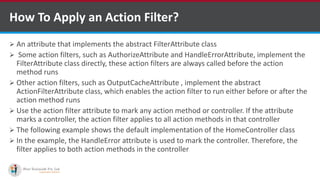
How To Apply an Action Filter?
 An attribute that implements the abstract FilterAttribute class
 Some action filters, such as AuthorizeAttribute and HandleErrorAttribute, implement the
FilterAttribute class directly, these action filters are always called before the action
method runs
 Other action filters, such as OutputCacheAttribute , implement the abstract
ActionFilterAttribute class, which enables the action filter to run either before or after the
action method runs
 Use the action filter attribute to mark any action method or controller. If the attribute
marks a controller, the action filter applies to all action methods in that controller
 The following example shows the default implementation of the HomeController class
 In the example, the HandleError attribute is used to mark the controller. Therefore, the
filter applies to both action methods in the controller
•A markup language is a set of markup tags
http://www.ifourtechnolab.com/
Example for Action Filter
[HandleError]
public class HomeController : Controller
{
public ActionResult Index()
{
ViewData["Message"] = "Welcome to ASP.NET MVC!";
return View();
}
OutputCache(Duration=10)]
public ActionResult About()
{
return View();
}
}
•A markup language is a set of markup tags
http://www.ifourtechnolab.com/
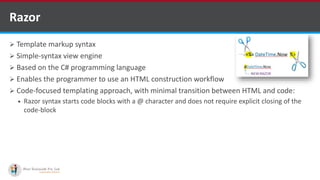
 Template markup syntax
 Simple-syntax view engine
 Based on the C# programming language
 Enables the programmer to use an HTML construction workflow
 Code-focused templating approach, with minimal transition between HTML and code:
 Razor syntax starts code blocks with a @ character and does not require explicit closing of the
code-block
Razor
http://www.ifourtechnolab.com/
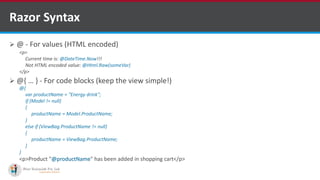
 @ - For values (HTML encoded)
 @{ … } - For code blocks (keep the view simple!)
Razor Syntax
<p>
Current time is: @DateTime.Now!!!
Not HTML encoded value: @Html.Raw(someVar)
</p>
@{
var productName = "Energy drink";
if (Model != null)
{
productName = Model.ProductName;
}
else if (ViewBag.ProductName != null)
{
productName = ViewBag.ProductName;
}
}
<p>Product "@productName" has been added in shopping cart</p>
http://www.ifourtechnolab.com/
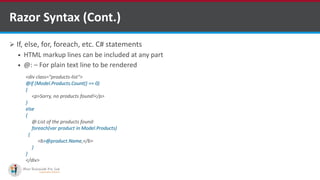
 If, else, for, foreach, etc. C# statements
 HTML markup lines can be included at any part
 @: – For plain text line to be rendered
Razor Syntax (Cont.)
<div class="products-list">
@if (Model.Products.Count() == 0)
{
<p>Sorry, no products found!</p>
}
else
{
@:List of the products found:
foreach(var product in Model.Products)
{
<b>@product.Name,</b>
}
}
</div>
http://www.ifourtechnolab.com/
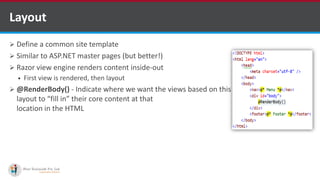
 Define a common site template
 Similar to ASP.NET master pages (but better!)
 Razor view engine renders content inside-out
 First view is rendered, then layout
 @RenderBody() - Indicate where we want the views based on this
layout to “fill in” their core content at that
location in the HTML
Layout
http://www.ifourtechnolab.com/
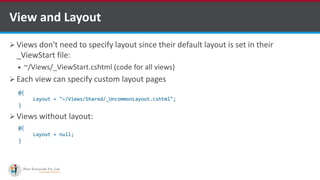
 Views don't need to specify layout since their default layout is set in their
_ViewStart file:
 ~/Views/_ViewStart.cshtml (code for all views)
 Each view can specify custom layout pages
 Views without layout:
View and Layout
@{
Layout = "~/Views/Shared/_UncommonLayout.cshtml";
}
@{
Layout = null;
}
http://www.ifourtechnolab.com/
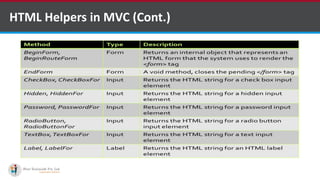
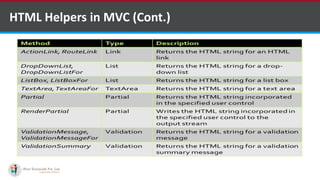
 With MVC, HTML helpers are much like traditional ASP.NET Web Form controls
 Just like web form controls in ASP.NET, HTML helpers are used to modify HTML. But HTML
helpers are more lightweight. Unlike Web Form controls, an HTML helper does not have an
event model and a view state
 In most cases, an HTML helper is just a method that returns a string
 With MVC, you can create your own helpers, or use the built in HTML helpers
HTML Helpers in MVC
http://www.ifourtechnolab.com/
HTML Helpers in MVC (Cont.)
http://www.ifourtechnolab.com/
HTML Helpers in MVC (Cont.)
http://www.ifourtechnolab.com/
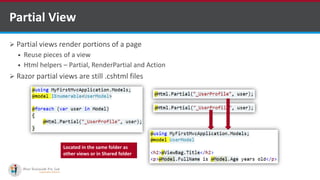
 Partial views render portions of a page
 Reuse pieces of a view
 Html helpers – Partial, RenderPartial and Action
 Razor partial views are still .cshtml files
Partial View
Located in the same folder as
other views or in Shared folder
http://www.ifourtechnolab.com/
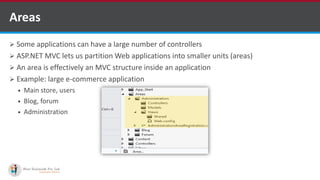
 Some applications can have a large number of controllers
 ASP.NET MVC lets us partition Web applications into smaller units (areas)
 An area is effectively an MVC structure inside an application
 Example: large e-commerce application
 Main store, users
 Blog, forum
 Administration
Areas
http://www.ifourtechnolab.com/
 It is the process by which developers can maintain state and page information over
multiple request for the same or different pages in web application
 Methods which are used in ASP.NET MVC applications:
 Hidden Field
 Cookies
 Query strings
 ViewData
 ViewBag
 TempData
MVC STATE MANAGEMENT
http://www.ifourtechnolab.com/
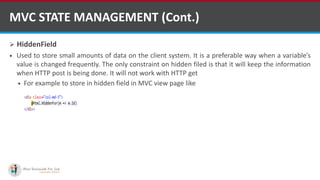
 HiddenField
 Used to store small amounts of data on the client system. It is a preferable way when a variable’s
value is changed frequently. The only constraint on hidden filed is that it will keep the information
when HTTP post is being done. It will not work with HTTP get
 For example to store in hidden field in MVC view page like
MVC STATE MANAGEMENT (Cont.)
http://www.ifourtechnolab.com/
 Cookies
 Small text file which is created by the server and stored on the client hard disk by the browser. It
does not use server memory. Generally a cookie is used to identify users
 When user sends a request to the server, the server creates a cookie and attaches a header and
sends it back to the user along with the response
 The browser accepts the cookie and stores it on the client machine either permanently or
temporarily. The next time the user makes a request for the same site, the browser checks the
existence of the cookie for that site in the folder
 Cookies are two types
 Persistence : Cookies are permanently stored till the time we set
 Non-Persistence : Cookies are not permanently stored on the user’s system. When user closes the
browser the cookie will be discarded
MVC STATE MANAGEMENT (Cont.)
http://www.ifourtechnolab.com/
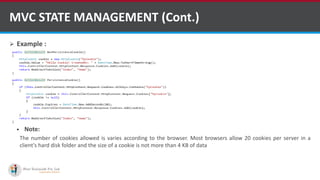
 Example :
 Note:
The number of cookies allowed is varies according to the browser. Most browsers allow 20 cookies per server in a
client's hard disk folder and the size of a cookie is not more than 4 KB of data
MVC STATE MANAGEMENT (Cont.)
http://www.ifourtechnolab.com/
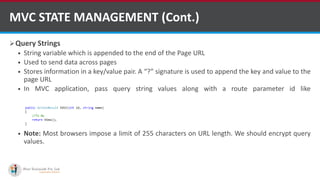
Query Strings
 String variable which is appended to the end of the Page URL
 Used to send data across pages
 Stores information in a key/value pair. A “?” signature is used to append the key and value to the
page URL
 In MVC application, pass query string values along with a route parameter id like
http://MyDomain/product/Edit/1?name=Mobile
 Note: Most browsers impose a limit of 255 characters on URL length. We should encrypt query
values.
MVC STATE MANAGEMENT (Cont.)
http://www.ifourtechnolab.com/
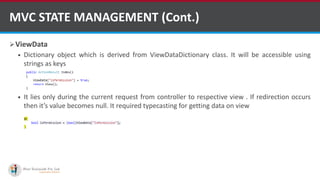
ViewData
 Dictionary object which is derived from ViewDataDictionary class. It will be accessible using
strings as keys
 It lies only during the current request from controller to respective view . If redirection occurs
then it’s value becomes null. It required typecasting for getting data on view
MVC STATE MANAGEMENT (Cont.)
http://www.ifourtechnolab.com/
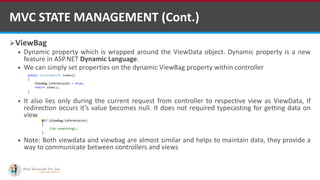
ViewBag
 Dynamic property which is wrapped around the ViewData object. Dynamic property is a new
feature in ASP.NET Dynamic Language.
 We can simply set properties on the dynamic ViewBag property within controller
 It also lies only during the current request from controller to respective view as ViewData, If
redirection occurs it’s value becomes null. It does not required typecasting for getting data on
view
 Note: Both viewdata and viewbag are almost similar and helps to maintain data, they provide a
way to communicate between controllers and views
MVC STATE MANAGEMENT (Cont.)
http://www.ifourtechnolab.com/
 Similarities between ViewBag & ViewData :
 Helps to maintain data during movement from controller to view
 Used to pass data from controller to corresponding view
 Short life means value becomes null when redirection occurs. This is because their goal is to provide a way
to communicate between controllers and views. It’s a communication mechanism within the server call
 Difference between ViewBag & ViewData:
 ViewData is a dictionary of objects that is derived from ViewDataDictionary class and accessible using
strings as keys
 ViewBag is a dynamic property that takes advantage of the new dynamic features in C# 4.0
 ViewData requires typecasting for complex data type and check for null values to avoid error
 ViewBag doesn’t require typecasting for complex data type
MVC STATE MANAGEMENT (Cont.)
http://www.ifourtechnolab.com/
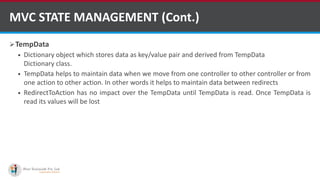
TempData
 Dictionary object which stores data as key/value pair and derived from TempData
Dictionary class.
 TempData helps to maintain data when we move from one controller to other controller or from
one action to other action. In other words it helps to maintain data between redirects
 RedirectToAction has no impact over the TempData until TempData is read. Once TempData is
read its values will be lost
MVC STATE MANAGEMENT (Cont.)
http://www.ifourtechnolab.com/
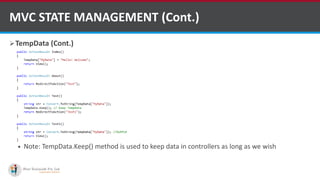
TempData (Cont.)
 Note: TempData.Keep() method is used to keep data in controllers as long as we wish
MVC STATE MANAGEMENT (Cont.)
http://www.ifourtechnolab.com/
 https://www.tutorialspoint.com/mvc_framework/mvc_framework_introduction.htm
 http://www.tutorialspoint.com/asp.net_mvc/
 https://msdn.microsoft.com/en-us/library/dd381412(v=vs.108).aspx
 http://www.tutorialsteacher.com/mvc/asp.net-mvc-tutorials
References
http://www.ifourtechnolab.com/
Questions?
http://www.ifourtechnolab.com/

MVC by asp.net development company in india

  • 1.
  • 2.
     Introduction toMVC  MVC vs WEB FORMS  Architecture of MVC  Routing  Bundling  Filter  Custom Filter  Actions  Action Result  Action Parameters  Action Selection  Action Filters  Razor  Layout  View and Layout  HTML Helpers in MVC  Partial View  Areas  MVC STATE MANAGEMENT INDEX http://www.ifourtechnolab.com/ C# Software Development Companies India
  • 3.
    Introduction to MVC Software design pattern for developing web applications  Software architecture pattern which separates the representation of information from the users interaction with it  Here M stands for Model, V stands for View and C stands for controller  ASP.NET MVC helps to develop powerful and pattern-based dynamic websites that enables a clean separation of concerns and also gives full control on a mark-up  Also it includes many features that help to develop a sophisticated and modern web application http://www.ifourtechnolab.com/ C# Software Development Companies India
  • 4.
    MVC vs WEBFORMS MVC Web Forms Easier to Manage Complexity Preservers State over HTTP Does not use view state or server based forms Page Controller Pattern Rich Routing Structure View state or server based forms Support for Test-Driven Development Works well for small teams Supports Large Teams Well Development is less complex http://www.ifourtechnolab.com/ C# Software Development Companies India
  • 5.
    Architecture of MVC A Model View Controller pattern is made up of the following three parts:  Model  View  Controller •A markup language is a set of markup tags http://www.ifourtechnolab.com/ C# Software Development Companies India
  • 6.
    Architecture of MVC(Cont.)  Model:  Responsible for managing the data of the application  It responds to the request from the view and it also responds to instructions from the controller to update itself  Lowest level pattern which is responsible for maintaining data  Represents the application core (for instance a list of database records)  Also called the domain layer •A markup language is a set of markup tags http://www.ifourtechnolab.com/ C# Software Development Companies India
  • 7.
    Architecture of MVC(Cont.)  View:  The View displays the data (the database records)  A view requests information from the model, that it needs to generate an output representation  Presents data in a particular format like JSP, ASP, PHP  MVC is often seen in web applications, where the view is the HTML page •A markup language is a set of markup tags http://www.ifourtechnolab.com/ C# Software Development Companies India
  • 8.
    Architecture of MVC(Cont.)  Controller:  It is the part of the application that handles user interaction  Typically controllers read data from a view, control user input, and send input data to the model  It handles the input, typically user actions and may invoke changes on the model and view •A markup language is a set of markup tags http://www.ifourtechnolab.com/ C# Software Development Companies India
  • 9.
    Routing  A routeis a URL pattern that is mapped to a handler  The handler can be a physical file, such as an .aspx file in a Web Forms application. A handler can also be a class that processes the request, such as a controller in an MVC application  At runtime, Routing engine use the Route table for matching the incoming request's URL pattern against the URL patterns defined in the Route table  Register one or more URL patterns to the Route table at Application_Start event  When the routing engine finds a match in the route table for the incoming request's URL, it forwards the request to the appropriate controller and action  If there is no match in the route table for the incoming request's URL, it returns a 404 HTTP status code •A markup language is a set of markup tags http://www.ifourtechnolab.com/ C# Software Development Companies India
  • 10.
    How it works? •Amarkup language is a set of markup tags http://www.ifourtechnolab.com/ C# Software Development Companies India
  • 11.
    How to defineroute? public static void RegisterRoutes(RouteCollection routes) { routes.MapRoute( "Default", //Route name "{controller}/{action}/{id}", //URL with parameters new { controller = "Home", action = "Index", id = UrlParameter.Optional } //Default parameters ); } protected void Application_Start() { RegisterRoutes(RouteTable.Routes); //To:DO } •A markup language is a set of markup tags http://www.ifourtechnolab.com/ C# Software Development Companies India
  • 12.
    Bundling It is asimple logical group of files that could be referenced by unique name and being loaded with one HTTP requestor Bundling and minification reduces the number of HTTP Requests and payload size resulting in faster and better performing ASP.NET MVC Websites •A markup language is a set of markup tags http://www.ifourtechnolab.com/ C# Software Development Companies India
  • 13.
    How to definebundling? public static void RegisterBundles(BundleCollection bundles) { bundles.Add(new ScriptBundle("~/bundles/jqueryval").Include( "~/Scripts/jquery.unobtrusive*", “~/Scripts/my_custom_js.js”, ….....List of Js..............)); } protected void Application_Start() { BundleConfig.RegisterBundles(BundleTable.Bundles) } •A markup language is a set of markup tags http://www.ifourtechnolab.com/ C# Software Development Companies India
  • 14.
    Filter  ASP.NET MVCFilter is a custom class where you can write custom logic to execute before or after an action method executes  Filters can be applied to an action method or controller in a declarative or programmatic way  MVC provides different types of filters •A markup language is a set of markup tags Filter Type Description Built-in Filter Interface Authorization filters Performs authentication and authorizes before executing action method [Authorize] [RequireHttps] IAuthorizationFilter Action filters Performs some operation before and after an action method executes IActionFilter Result filters Performs some operation before or after the execution of view result [OutputCache] IResultFilter Exception filters Performs some operation if there is an unhandled exception thrown during the execution of the ASP.NET MVC pipeline [HandleError] IExceptionFilter http://www.ifourtechnolab.com/ C# Software Development Companies India
  • 15.
    Filter  Filters canbe applied at three levels :  Global Level: Global filters will be applied to all the controller and action methods of an application // MvcApplication class contains in Global.asax.cs file public class MvcApplication : System.Web.HttpApplication { protected void Application_Start() { FilterConfig.RegisterGlobalFilters(GlobalFilters.Filters); } } // FilterConfig.cs located in App_Start folder public class FilterConfig { public static void RegisterGlobalFilters(GlobalFilterCollection filters) { filters.Add(new HandleErrorAttribute()); } } •A markup language is a set of markup tags http://www.ifourtechnolab.com/ C# Software Development Companies India
  • 16.
    Filter • Controller Level:Filters can also be applied to the controller class. So, filters will be applicable to all the action method of Controller class if it is applied to a controller class [HandleError] public class HomeController : Controller { public ActionResult Index() { return View(); } } •A markup language is a set of markup tags http://www.ifourtechnolab.com/ C# Software Development Companies India
  • 17.
    Filter  Action methodlevel: Apply filters to an individual action method. So, filter will be applicable to that particular action method only. public class HomeController : Controller { [HandleError] public ActionResult Index() { return View(); } }  Filters run in the following order.  Authorization filters, Action filters, Response filters, Exception filters •A markup language is a set of markup tags http://www.ifourtechnolab.com/ C# Software Development Companies India
  • 18.
    Custom Filter  Createcustom filter attributes by implementing an appropriate filter interface for which creates custom filter and also derive a FilterAttribute class  For example  Implement IExceptionFilter and FilterAttribute class to create custom exception filter. In the same way implement an IAuthorizatinFilter interface and FilterAttribute class to create a custom authorization filter •A markup language is a set of markup tags http://www.ifourtechnolab.com/ C# Software Development Companies India
  • 19.
    Custom Filter Example classMyErrorHandler : FilterAttribute, IExceptionFilter { public override void IExceptionFilter.OnException(ExceptionContext filterContext) { Log(filterContext.Exception); base.OnException(filterContext); } private void Log(Exception exception) { //log exception here.. } } •A markup language is a set of markup tags http://www.ifourtechnolab.com/ C# Software Development Companies India
  • 20.
     Actions arethe ultimate request destination  Public controller methods  Non-static  No return value restrictions  Actions typically return an ActionResult Actions http://www.ifourtechnolab.com/ C# Software Development Companies India
  • 21.
     Controller actionresponse to a browser request  Inherits from the base ActionResult class  Different results types: Action Result http://www.ifourtechnolab.com/ C# Software Development Companies India
  • 22.
    Action Result (Cont.) http://www.ifourtechnolab.com/C# Software Development Companies India
  • 23.
     ASP.NET MVCmaps the data from the HTTP request to action parameters in few ways:  Routing engine can pass parameters to actions  http://localhost/Users/IFour  Routing pattern: Users/{username}  URL query string can contains parameters  /Users/ByUsername?username=IFour  HTTP post data can also contain parameters Action Parameters http://www.ifourtechnolab.com/ C# Software Development Companies India
  • 24.
     ActionName(string name) AcceptVerbs  HttpPost  HttpGet  HttpDelete  HttpOptions  NonAction  RequireHttps  ChildActionOnly – Only for Html.Action() Action Selection http://www.ifourtechnolab.com/
  • 25.
    Action Filters  ASP.NETMVC provides the following types of action filters:  Authorization filter, which makes security decisions about whether to execute an action method, such as performing authentication or validating properties of the request  The AuthorizeAttribute class is one example of an authorization filter  Action filter, which wraps the action method execution  Perform additional processing, such as providing extra data to the action method, inspecting the return value, or canceling execution of the action method  Result filter, which wraps execution of the ActionResult object. This filter can perform additional processing of the result, such as modifying the HTTP response  The OutputCacheAttribute class is one example of a result filter  Exception filter, which executes if there is an unhandled exception thrown somewhere in action method, starting with the authorization filters and ending with the execution of the result •A markup language is a set of markup tags http://www.ifourtechnolab.com/
  • 26.
    How To Applyan Action Filter?  An attribute that implements the abstract FilterAttribute class  Some action filters, such as AuthorizeAttribute and HandleErrorAttribute, implement the FilterAttribute class directly, these action filters are always called before the action method runs  Other action filters, such as OutputCacheAttribute , implement the abstract ActionFilterAttribute class, which enables the action filter to run either before or after the action method runs  Use the action filter attribute to mark any action method or controller. If the attribute marks a controller, the action filter applies to all action methods in that controller  The following example shows the default implementation of the HomeController class  In the example, the HandleError attribute is used to mark the controller. Therefore, the filter applies to both action methods in the controller •A markup language is a set of markup tags http://www.ifourtechnolab.com/
  • 27.
    Example for ActionFilter [HandleError] public class HomeController : Controller { public ActionResult Index() { ViewData["Message"] = "Welcome to ASP.NET MVC!"; return View(); } OutputCache(Duration=10)] public ActionResult About() { return View(); } } •A markup language is a set of markup tags http://www.ifourtechnolab.com/
  • 28.
     Template markupsyntax  Simple-syntax view engine  Based on the C# programming language  Enables the programmer to use an HTML construction workflow  Code-focused templating approach, with minimal transition between HTML and code:  Razor syntax starts code blocks with a @ character and does not require explicit closing of the code-block Razor http://www.ifourtechnolab.com/
  • 29.
     @ -For values (HTML encoded)  @{ … } - For code blocks (keep the view simple!) Razor Syntax <p> Current time is: @DateTime.Now!!! Not HTML encoded value: @Html.Raw(someVar) </p> @{ var productName = "Energy drink"; if (Model != null) { productName = Model.ProductName; } else if (ViewBag.ProductName != null) { productName = ViewBag.ProductName; } } <p>Product "@productName" has been added in shopping cart</p> http://www.ifourtechnolab.com/
  • 30.
     If, else,for, foreach, etc. C# statements  HTML markup lines can be included at any part  @: – For plain text line to be rendered Razor Syntax (Cont.) <div class="products-list"> @if (Model.Products.Count() == 0) { <p>Sorry, no products found!</p> } else { @:List of the products found: foreach(var product in Model.Products) { <b>@product.Name,</b> } } </div> http://www.ifourtechnolab.com/
  • 31.
     Define acommon site template  Similar to ASP.NET master pages (but better!)  Razor view engine renders content inside-out  First view is rendered, then layout  @RenderBody() - Indicate where we want the views based on this layout to “fill in” their core content at that location in the HTML Layout http://www.ifourtechnolab.com/
  • 32.
     Views don'tneed to specify layout since their default layout is set in their _ViewStart file:  ~/Views/_ViewStart.cshtml (code for all views)  Each view can specify custom layout pages  Views without layout: View and Layout @{ Layout = "~/Views/Shared/_UncommonLayout.cshtml"; } @{ Layout = null; } http://www.ifourtechnolab.com/
  • 33.
     With MVC,HTML helpers are much like traditional ASP.NET Web Form controls  Just like web form controls in ASP.NET, HTML helpers are used to modify HTML. But HTML helpers are more lightweight. Unlike Web Form controls, an HTML helper does not have an event model and a view state  In most cases, an HTML helper is just a method that returns a string  With MVC, you can create your own helpers, or use the built in HTML helpers HTML Helpers in MVC http://www.ifourtechnolab.com/
  • 34.
    HTML Helpers inMVC (Cont.) http://www.ifourtechnolab.com/
  • 35.
    HTML Helpers inMVC (Cont.) http://www.ifourtechnolab.com/
  • 36.
     Partial viewsrender portions of a page  Reuse pieces of a view  Html helpers – Partial, RenderPartial and Action  Razor partial views are still .cshtml files Partial View Located in the same folder as other views or in Shared folder http://www.ifourtechnolab.com/
  • 37.
     Some applicationscan have a large number of controllers  ASP.NET MVC lets us partition Web applications into smaller units (areas)  An area is effectively an MVC structure inside an application  Example: large e-commerce application  Main store, users  Blog, forum  Administration Areas http://www.ifourtechnolab.com/
  • 38.
     It isthe process by which developers can maintain state and page information over multiple request for the same or different pages in web application  Methods which are used in ASP.NET MVC applications:  Hidden Field  Cookies  Query strings  ViewData  ViewBag  TempData MVC STATE MANAGEMENT http://www.ifourtechnolab.com/
  • 39.
     HiddenField  Usedto store small amounts of data on the client system. It is a preferable way when a variable’s value is changed frequently. The only constraint on hidden filed is that it will keep the information when HTTP post is being done. It will not work with HTTP get  For example to store in hidden field in MVC view page like MVC STATE MANAGEMENT (Cont.) http://www.ifourtechnolab.com/
  • 40.
     Cookies  Smalltext file which is created by the server and stored on the client hard disk by the browser. It does not use server memory. Generally a cookie is used to identify users  When user sends a request to the server, the server creates a cookie and attaches a header and sends it back to the user along with the response  The browser accepts the cookie and stores it on the client machine either permanently or temporarily. The next time the user makes a request for the same site, the browser checks the existence of the cookie for that site in the folder  Cookies are two types  Persistence : Cookies are permanently stored till the time we set  Non-Persistence : Cookies are not permanently stored on the user’s system. When user closes the browser the cookie will be discarded MVC STATE MANAGEMENT (Cont.) http://www.ifourtechnolab.com/
  • 41.
     Example : Note: The number of cookies allowed is varies according to the browser. Most browsers allow 20 cookies per server in a client's hard disk folder and the size of a cookie is not more than 4 KB of data MVC STATE MANAGEMENT (Cont.) http://www.ifourtechnolab.com/
  • 42.
    Query Strings  Stringvariable which is appended to the end of the Page URL  Used to send data across pages  Stores information in a key/value pair. A “?” signature is used to append the key and value to the page URL  In MVC application, pass query string values along with a route parameter id like http://MyDomain/product/Edit/1?name=Mobile  Note: Most browsers impose a limit of 255 characters on URL length. We should encrypt query values. MVC STATE MANAGEMENT (Cont.) http://www.ifourtechnolab.com/
  • 43.
    ViewData  Dictionary objectwhich is derived from ViewDataDictionary class. It will be accessible using strings as keys  It lies only during the current request from controller to respective view . If redirection occurs then it’s value becomes null. It required typecasting for getting data on view MVC STATE MANAGEMENT (Cont.) http://www.ifourtechnolab.com/
  • 44.
    ViewBag  Dynamic propertywhich is wrapped around the ViewData object. Dynamic property is a new feature in ASP.NET Dynamic Language.  We can simply set properties on the dynamic ViewBag property within controller  It also lies only during the current request from controller to respective view as ViewData, If redirection occurs it’s value becomes null. It does not required typecasting for getting data on view  Note: Both viewdata and viewbag are almost similar and helps to maintain data, they provide a way to communicate between controllers and views MVC STATE MANAGEMENT (Cont.) http://www.ifourtechnolab.com/
  • 45.
     Similarities betweenViewBag & ViewData :  Helps to maintain data during movement from controller to view  Used to pass data from controller to corresponding view  Short life means value becomes null when redirection occurs. This is because their goal is to provide a way to communicate between controllers and views. It’s a communication mechanism within the server call  Difference between ViewBag & ViewData:  ViewData is a dictionary of objects that is derived from ViewDataDictionary class and accessible using strings as keys  ViewBag is a dynamic property that takes advantage of the new dynamic features in C# 4.0  ViewData requires typecasting for complex data type and check for null values to avoid error  ViewBag doesn’t require typecasting for complex data type MVC STATE MANAGEMENT (Cont.) http://www.ifourtechnolab.com/
  • 46.
    TempData  Dictionary objectwhich stores data as key/value pair and derived from TempData Dictionary class.  TempData helps to maintain data when we move from one controller to other controller or from one action to other action. In other words it helps to maintain data between redirects  RedirectToAction has no impact over the TempData until TempData is read. Once TempData is read its values will be lost MVC STATE MANAGEMENT (Cont.) http://www.ifourtechnolab.com/
  • 47.
    TempData (Cont.)  Note:TempData.Keep() method is used to keep data in controllers as long as we wish MVC STATE MANAGEMENT (Cont.) http://www.ifourtechnolab.com/
  • 48.
     https://www.tutorialspoint.com/mvc_framework/mvc_framework_introduction.htm  http://www.tutorialspoint.com/asp.net_mvc/ https://msdn.microsoft.com/en-us/library/dd381412(v=vs.108).aspx  http://www.tutorialsteacher.com/mvc/asp.net-mvc-tutorials References http://www.ifourtechnolab.com/
  • 49.

Editor's Notes

  • #2 Software Outsourcing Company India - http://www.ifourtechnolab.com/
  • #4 Software Outsourcing Company India - http://www.ifourtechnolab.com/
  • #5 Software Outsourcing Company India - http://www.ifourtechnolab.com/
  • #6 Software Outsourcing Company India - http://www.ifourtechnolab.com/
  • #7 Software Outsourcing Company India - http://www.ifourtechnolab.com/
  • #8 Software Outsourcing Company India - http://www.ifourtechnolab.com/
  • #9 Software Outsourcing Company India - http://www.ifourtechnolab.com/
  • #10 Software Outsourcing Company India - http://www.ifourtechnolab.com/
  • #11 Software Outsourcing Company India - http://www.ifourtechnolab.com/
  • #12 Software Outsourcing Company India - http://www.ifourtechnolab.com/
  • #13 Software Outsourcing Company India - http://www.ifourtechnolab.com/
  • #14 Software Outsourcing Company India - http://www.ifourtechnolab.com/
  • #15 Software Outsourcing Company India - http://www.ifourtechnolab.com/
  • #16 Software Outsourcing Company India - http://www.ifourtechnolab.com/
  • #17 Software Outsourcing Company India - http://www.ifourtechnolab.com/
  • #18 Software Outsourcing Company India - http://www.ifourtechnolab.com/
  • #19 Software Outsourcing Company India - http://www.ifourtechnolab.com/
  • #20 Software Outsourcing Company India - http://www.ifourtechnolab.com/
  • #21 Software Outsourcing Company India - http://www.ifourtechnolab.com/
  • #22 Software Outsourcing Company India - http://www.ifourtechnolab.com/
  • #23 Software Outsourcing Company India - http://www.ifourtechnolab.com/
  • #24 Software Outsourcing Company India - http://www.ifourtechnolab.com/
  • #25 Software Outsourcing Company India - http://www.ifourtechnolab.com/
  • #26 Software Outsourcing Company India - http://www.ifourtechnolab.com/
  • #27 Software Outsourcing Company India - http://www.ifourtechnolab.com/
  • #28 Software Outsourcing Company India - http://www.ifourtechnolab.com/
  • #29 Software Outsourcing Company India - http://www.ifourtechnolab.com/
  • #30 Software Outsourcing Company India - http://www.ifourtechnolab.com/
  • #31 Software Outsourcing Company India - http://www.ifourtechnolab.com/
  • #32 Software Outsourcing Company India - http://www.ifourtechnolab.com/
  • #33 Software Outsourcing Company India - http://www.ifourtechnolab.com/
  • #34 Software Outsourcing Company India - http://www.ifourtechnolab.com/
  • #35 Software Outsourcing Company India - http://www.ifourtechnolab.com/
  • #36 Software Outsourcing Company India - http://www.ifourtechnolab.com/
  • #37 Software Outsourcing Company India - http://www.ifourtechnolab.com/
  • #38 Software Outsourcing Company India - http://www.ifourtechnolab.com/
  • #39 Software Outsourcing Company India - http://www.ifourtechnolab.com/
  • #40 Software Outsourcing Company India - http://www.ifourtechnolab.com/
  • #41 Software Outsourcing Company India - http://www.ifourtechnolab.com/
  • #42 Software Outsourcing Company India - http://www.ifourtechnolab.com/
  • #43 Software Outsourcing Company India - http://www.ifourtechnolab.com/
  • #44 Software Outsourcing Company India - http://www.ifourtechnolab.com/
  • #45 Software Outsourcing Company India - http://www.ifourtechnolab.com/
  • #46 Software Outsourcing Company India - http://www.ifourtechnolab.com/
  • #47 Software Outsourcing Company India - http://www.ifourtechnolab.com/
  • #48 Software Outsourcing Company India - http://www.ifourtechnolab.com/
  • #49 Software Outsourcing Company India - http://www.ifourtechnolab.com/
  • #50 Software Outsourcing Company India - http://www.ifourtechnolab.com/