1
Multiple-File Programs,
Inheritance, Templates
•Multiple-File Programs
• header files
• implementation files
• main-program file)
•Inheritance in C++
•Templates in C++
2
Why Multiple Files
• Re-use
• Better data abstraction (data hiding)
• More manageability of large programs
3
The Multiple-File Approach
• Have each major class as a separate program
• Re-use: The class can then be used by other programs using the #include
macro instead of the copy-&-paste approach
• Put the class/function declarations in a header (.h) file, and the
class/function implementations in another (.c or .cpp) file. This
achieves data hiding.
4
Example
class Stack {
public:
typedef int dtype;
Stack(int cap=100);
int getCapacity();
void push(dtype b);
dtype pop();
dtype peek();
bool isEmpty();
private:
dtype *dataptr;
int top;
int capacity;
};
#include "Stack.h"
Stack::Stack(int cap){
top=0;
capacity = (cap>0)?cap:100;
dataptr = new int[capacity];
};
int Stack::getCapacity( ) {
return capacity;
};
int Stack::dtype Stack::pop(){
assert(!isEmpty());
return dataptr[--top];
};
// the implementation of
// the remaining methods
........
#include <cstdlib>
#include <iostream>
#include "Stack.h”
using namespace std;
// local stuff, if any
int main(int argc,
char *argv[]){
………
}
Stack.h file: Stack.cpp file: Project1.cpp file:
5
What should Go into a .h File
• Only declarations (i.e., info to the compiler)
• Nothing that requires storage
• Reason:
• a header file gets included in several files of a project;
• if storage for a variable (or for a code) is allocated multiple times, you get a
multiple-definition compilation error
• Advanced: One exception to this rule is static data (data local to a
file), because the linker does not allocate multiple instances to static
data.
6
Redeclarations Issues
• An X.h file can have: #include “Y.h”
• Consider this scenario:
• The X.h file has:
#include “Y.h”
#include “Z.h”
• The Y.h file has: #include “Z.h”
• This means: the declarations in Z.h are included twice
in X.h. The second declarations are called
redeclarations
• Class redeclarations are not allowed.
• So, we have a problem
7
Redeclarations Issue Solution
• Inside each Z.h file, do:
• Add to at the start of the file (right after all the #includes) the next two lines:
#ifndef Z_H_ // Not that Z is the name of .h file
#define Z_H_
• Add the following line at the very end of Z.h (on a separate line):
#enddef
8
Class Inheritance in C++
• Inheritance allows us to create new classes which are derived from
older classes
• The derived classes are
called subclasses or simply
derived classes
• The older classes are superclasses
or parent classes or base classes
• A derived class automatically includes some of its parent's members,
and can have additional ones.
base
subclass1 subclass2
Notation:
9
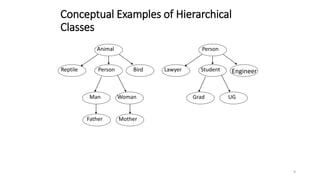
Conceptual Examples of Hierarchical
Classes
Animal
PersonReptile Bird
Man Woman
Person
StudentLawyer Engineer
Grad UG
MotherFather
10
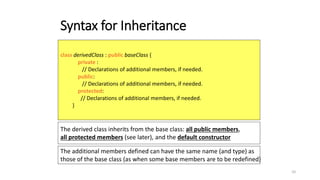
Syntax for Inheritance
class derivedClass : public baseClass {
private :
// Declarations of additional members, if needed.
public:
// Declarations of additional members, if needed.
protected:
// Declarations of additional members, if needed.
}
The derived class inherits from the base class: all public members,
all protected members (see later), and the default constructor
The additional members defined can have the same name (and type) as
those of the base class (as when some base members are to be redefined)
11
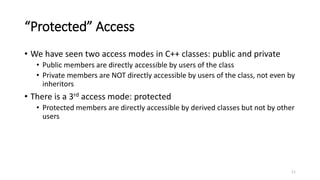
“Protected” Access
• We have seen two access modes in C++ classes: public and private
• Public members are directly accessible by users of the class
• Private members are NOT directly accessible by users of the class, not even by
inheritors
• There is a 3rd access mode: protected
• Protected members are directly accessible by derived classes but not by other
users
12
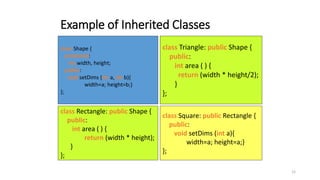
Example of Inherited Classes
class Shape {
protected:
int width, height;
public:
void setDims (int a, int b){
width=a; height=b;}
};
class Rectangle: public Shape {
public:
int area ( ) {
return (width * height);
}
};
class Triangle: public Shape {
public:
int area ( ) {
return (width * height/2);
}
};
class Square: public Rectangle {
public:
void setDims (int a){
width=a; height=a;}
};
13
Another Example of Inherited Classes
(A char stack inherited from string)
class CharStack: public string{
public:
void push(char b){
string str; str += b;
insert(0,str);};
char peek( ){return at(0);};
char pop( ){
char a=at(0); erase(0,1);
return a; };
// size( ) and empty( ) are the
// same in string, so are
// inherited as is.
}
Observations:
• We have no idea how
the string class is
implemented, and we
don’t care
• CharStack inherited
from string all the latter’s
public methods, including
size( ) and empty( )
• We implemented push( ),
pop( ) and peek( ) using
the public methods of
the string class
14
More on Inheritance Syntax
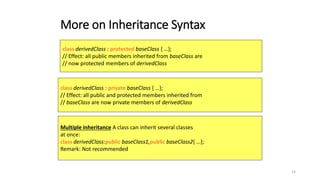
class derivedClass : protected baseClass { …};
// Effect: all public members inherited from baseClass are
// now protected members of derivedClass
class derivedClass : private baseClass { …};
// Effect: all public and protected members inherited from
// baseClass are now private members of derivedClass
Multiple inheritance A class can inherit several classes
at once:
class derivedClass:public baseClass1,public baseClass2{ …};
Remark: Not recommended
15
Templates
• We saw function templates early on
• Templates allow us to turn the type of data into a
parameter that can be changed at will
• For example, we defined stacks/queues/trees of
ints
• If we want a stack/queues/trees of floats, we have to
cut and paste, and change the data type from int to
float
• We reduced this effort by using: typedef int datatype;
• That is still inconvenient, time-consuming, and error
prone
• With templates, we do not need to cut+paste+change
16
Function Templates (Reminder )
• Syntax for declaring a function template:
template<class type> function_declaration;
-Or-
template<typename type> function_declaration;
Example of a Function Template Declaration:
// Returns the minimum of array x[ ]. The data
// type of x[ ] is arbitrary & customizable
template<typename T> T min(T x[], int length){
T m = x[0]; // M is the minimum so far
for (int i=1;i<n;i++)
if (x[i]<m) m=x[i];
return m;
}
Example of Use:
int x[]=
{11, 13, 5, 7, 4, 10};
double y[]=
{4.5, 7.13, 17};
int minx =
min<int>(x,6);
double miny=
min<double>(y,3);
17
Templates with More than One Generic Type
• Templates can have several generic types
• Syntax for their declaration:
• class can be replaced by typename.template<class type1,class type2> funct_decl;
18
Class Templates
• Much as function templates allow argument types
to be parameterized, class templates allow us to
parameterize the types of:
• member variables
• arguments of member functions & constructors
• return values of member functions
• The syntax is similar but somewhat more
cumbersome
19
Class Templates Syntax
• For class template declaration:
• For the implementation of the methods outside the class, the syntax
is:
• For the implementation of the constructors outside the class, the
syntax is:
template<class T> class_declaration;
template<class T> return_type className<T>::methodName(parameter-list){
……}
template<class T> className<T>:: className(parameter-list){……}
20
template <class T> class stack {
private :
T *dataptr;
int top;
int capacity;
public:
stack(int cap=100);
int getCapacity() {return capacity;}
void push(T b);
T pop() {assert(top>0); return dataptr[--top];}
bool isEmpty() {return top==0;}
};
Stack as a Class Template
21
template<class T> stack<T>::stack(int cap){
top=0;
capacity = (cap>0)?cap:100;
dataptr = new T[capacity];
}
template<class T> void stack<T>::push(T b){
if (top < capacity)
dataptr[top++]=b;
else{
capacity *=2; T *newptr=new T[capacity];
for(int k=0;k<capacity/2;k++)
newptr[k]=dataptr[k];
delete [] dataptr; dataptr = newptr;dataptr[top++]=b;
}
}
22
A Complete Program Using a Stack Template
#include <cstdlib>
#include <iostream>
using namespace std;
// template stack definition goes here
int main(int argc, char *argv[]){
stack<int> intS(5); // a stack of integers
cout<<"intS capacity after construction = "<<intS.getCapacity()<<endl;
int x[]={2,3,7,8,-10,14,5};
for (int i=0;i<7;i++)
intS.push(x[i]);
cout<<"intS capacity after pushing 7 elements="<< intS.getCapacity();
cout<<“nEmptying intS: ";
while (!intS.isEmpty())
cout<<intS.pop()<<"; ";
cout<<endl;
23
stack<char *> stringS(5); // a stack of strings
stringS.push("hi");
stringS.push("there");
cout<<"Emptying stringS: ";
while (!stringS.isEmpty())
cout<<stringS.pop()<<"; ";
cout<<endl;
double y[]={3.14,9.8,1.42,12};
stack<double> doubleS(y,4); // a stack of doubles
cout<<"doubleS capacity="<<doubleS.getCapacity()<<endl;
cout<<"Emptying doubleS: ";
while (!doubleS.isEmpty())
cout<<doubleS.pop()<<"; ";
cout<<endl;
}
24
C++ Standard Templates Library (STL)
• C++ comes
with a library
that supports
most of the
data structures
(i.e., classes)
we covered in
this semester
Class What to Include
stack #include <stack>
queue #include <queue>
list #include <list>
heap #include <heap>
set #include <set>
vector #include <vector>
25
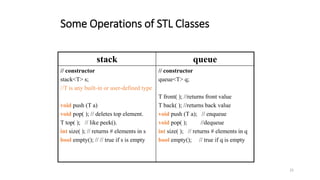
Some Operations of STL Classes
stack queue
// constructor
stack<T> s;
//T is any built-in or user-defined type
void push (T a)
void pop( ); // deletes top element.
T top( ); // like peek().
int size( ); // returns # elements in s
bool empty(); // // true if s is empty
// constructor
queue<T> q;
T front( ); //returns front value
T back( ); //returns back value
void push (T a); // enqueue
void pop( ); //dequeue
int size( ); // returns # elements in q
bool empty(); // true if q is empty

Multiple file programs, inheritance, templates

  • 1.
    1 Multiple-File Programs, Inheritance, Templates •Multiple-FilePrograms • header files • implementation files • main-program file) •Inheritance in C++ •Templates in C++
  • 2.
    2 Why Multiple Files •Re-use • Better data abstraction (data hiding) • More manageability of large programs
  • 3.
    3 The Multiple-File Approach •Have each major class as a separate program • Re-use: The class can then be used by other programs using the #include macro instead of the copy-&-paste approach • Put the class/function declarations in a header (.h) file, and the class/function implementations in another (.c or .cpp) file. This achieves data hiding.
  • 4.
    4 Example class Stack { public: typedefint dtype; Stack(int cap=100); int getCapacity(); void push(dtype b); dtype pop(); dtype peek(); bool isEmpty(); private: dtype *dataptr; int top; int capacity; }; #include "Stack.h" Stack::Stack(int cap){ top=0; capacity = (cap>0)?cap:100; dataptr = new int[capacity]; }; int Stack::getCapacity( ) { return capacity; }; int Stack::dtype Stack::pop(){ assert(!isEmpty()); return dataptr[--top]; }; // the implementation of // the remaining methods ........ #include <cstdlib> #include <iostream> #include "Stack.h” using namespace std; // local stuff, if any int main(int argc, char *argv[]){ ……… } Stack.h file: Stack.cpp file: Project1.cpp file:
  • 5.
    5 What should Gointo a .h File • Only declarations (i.e., info to the compiler) • Nothing that requires storage • Reason: • a header file gets included in several files of a project; • if storage for a variable (or for a code) is allocated multiple times, you get a multiple-definition compilation error • Advanced: One exception to this rule is static data (data local to a file), because the linker does not allocate multiple instances to static data.
  • 6.
    6 Redeclarations Issues • AnX.h file can have: #include “Y.h” • Consider this scenario: • The X.h file has: #include “Y.h” #include “Z.h” • The Y.h file has: #include “Z.h” • This means: the declarations in Z.h are included twice in X.h. The second declarations are called redeclarations • Class redeclarations are not allowed. • So, we have a problem
  • 7.
    7 Redeclarations Issue Solution •Inside each Z.h file, do: • Add to at the start of the file (right after all the #includes) the next two lines: #ifndef Z_H_ // Not that Z is the name of .h file #define Z_H_ • Add the following line at the very end of Z.h (on a separate line): #enddef
  • 8.
    8 Class Inheritance inC++ • Inheritance allows us to create new classes which are derived from older classes • The derived classes are called subclasses or simply derived classes • The older classes are superclasses or parent classes or base classes • A derived class automatically includes some of its parent's members, and can have additional ones. base subclass1 subclass2 Notation:
  • 9.
    9 Conceptual Examples ofHierarchical Classes Animal PersonReptile Bird Man Woman Person StudentLawyer Engineer Grad UG MotherFather
  • 10.
    10 Syntax for Inheritance classderivedClass : public baseClass { private : // Declarations of additional members, if needed. public: // Declarations of additional members, if needed. protected: // Declarations of additional members, if needed. } The derived class inherits from the base class: all public members, all protected members (see later), and the default constructor The additional members defined can have the same name (and type) as those of the base class (as when some base members are to be redefined)
  • 11.
    11 “Protected” Access • Wehave seen two access modes in C++ classes: public and private • Public members are directly accessible by users of the class • Private members are NOT directly accessible by users of the class, not even by inheritors • There is a 3rd access mode: protected • Protected members are directly accessible by derived classes but not by other users
  • 12.
    12 Example of InheritedClasses class Shape { protected: int width, height; public: void setDims (int a, int b){ width=a; height=b;} }; class Rectangle: public Shape { public: int area ( ) { return (width * height); } }; class Triangle: public Shape { public: int area ( ) { return (width * height/2); } }; class Square: public Rectangle { public: void setDims (int a){ width=a; height=a;} };
  • 13.
    13 Another Example ofInherited Classes (A char stack inherited from string) class CharStack: public string{ public: void push(char b){ string str; str += b; insert(0,str);}; char peek( ){return at(0);}; char pop( ){ char a=at(0); erase(0,1); return a; }; // size( ) and empty( ) are the // same in string, so are // inherited as is. } Observations: • We have no idea how the string class is implemented, and we don’t care • CharStack inherited from string all the latter’s public methods, including size( ) and empty( ) • We implemented push( ), pop( ) and peek( ) using the public methods of the string class
  • 14.
    14 More on InheritanceSyntax class derivedClass : protected baseClass { …}; // Effect: all public members inherited from baseClass are // now protected members of derivedClass class derivedClass : private baseClass { …}; // Effect: all public and protected members inherited from // baseClass are now private members of derivedClass Multiple inheritance A class can inherit several classes at once: class derivedClass:public baseClass1,public baseClass2{ …}; Remark: Not recommended
  • 15.
    15 Templates • We sawfunction templates early on • Templates allow us to turn the type of data into a parameter that can be changed at will • For example, we defined stacks/queues/trees of ints • If we want a stack/queues/trees of floats, we have to cut and paste, and change the data type from int to float • We reduced this effort by using: typedef int datatype; • That is still inconvenient, time-consuming, and error prone • With templates, we do not need to cut+paste+change
  • 16.
    16 Function Templates (Reminder) • Syntax for declaring a function template: template<class type> function_declaration; -Or- template<typename type> function_declaration; Example of a Function Template Declaration: // Returns the minimum of array x[ ]. The data // type of x[ ] is arbitrary & customizable template<typename T> T min(T x[], int length){ T m = x[0]; // M is the minimum so far for (int i=1;i<n;i++) if (x[i]<m) m=x[i]; return m; } Example of Use: int x[]= {11, 13, 5, 7, 4, 10}; double y[]= {4.5, 7.13, 17}; int minx = min<int>(x,6); double miny= min<double>(y,3);
  • 17.
    17 Templates with Morethan One Generic Type • Templates can have several generic types • Syntax for their declaration: • class can be replaced by typename.template<class type1,class type2> funct_decl;
  • 18.
    18 Class Templates • Muchas function templates allow argument types to be parameterized, class templates allow us to parameterize the types of: • member variables • arguments of member functions & constructors • return values of member functions • The syntax is similar but somewhat more cumbersome
  • 19.
    19 Class Templates Syntax •For class template declaration: • For the implementation of the methods outside the class, the syntax is: • For the implementation of the constructors outside the class, the syntax is: template<class T> class_declaration; template<class T> return_type className<T>::methodName(parameter-list){ ……} template<class T> className<T>:: className(parameter-list){……}
  • 20.
    20 template <class T>class stack { private : T *dataptr; int top; int capacity; public: stack(int cap=100); int getCapacity() {return capacity;} void push(T b); T pop() {assert(top>0); return dataptr[--top];} bool isEmpty() {return top==0;} }; Stack as a Class Template
  • 21.
    21 template<class T> stack<T>::stack(intcap){ top=0; capacity = (cap>0)?cap:100; dataptr = new T[capacity]; } template<class T> void stack<T>::push(T b){ if (top < capacity) dataptr[top++]=b; else{ capacity *=2; T *newptr=new T[capacity]; for(int k=0;k<capacity/2;k++) newptr[k]=dataptr[k]; delete [] dataptr; dataptr = newptr;dataptr[top++]=b; } }
  • 22.
    22 A Complete ProgramUsing a Stack Template #include <cstdlib> #include <iostream> using namespace std; // template stack definition goes here int main(int argc, char *argv[]){ stack<int> intS(5); // a stack of integers cout<<"intS capacity after construction = "<<intS.getCapacity()<<endl; int x[]={2,3,7,8,-10,14,5}; for (int i=0;i<7;i++) intS.push(x[i]); cout<<"intS capacity after pushing 7 elements="<< intS.getCapacity(); cout<<“nEmptying intS: "; while (!intS.isEmpty()) cout<<intS.pop()<<"; "; cout<<endl;
  • 23.
    23 stack<char *> stringS(5);// a stack of strings stringS.push("hi"); stringS.push("there"); cout<<"Emptying stringS: "; while (!stringS.isEmpty()) cout<<stringS.pop()<<"; "; cout<<endl; double y[]={3.14,9.8,1.42,12}; stack<double> doubleS(y,4); // a stack of doubles cout<<"doubleS capacity="<<doubleS.getCapacity()<<endl; cout<<"Emptying doubleS: "; while (!doubleS.isEmpty()) cout<<doubleS.pop()<<"; "; cout<<endl; }
  • 24.
    24 C++ Standard TemplatesLibrary (STL) • C++ comes with a library that supports most of the data structures (i.e., classes) we covered in this semester Class What to Include stack #include <stack> queue #include <queue> list #include <list> heap #include <heap> set #include <set> vector #include <vector>
  • 25.
    25 Some Operations ofSTL Classes stack queue // constructor stack<T> s; //T is any built-in or user-defined type void push (T a) void pop( ); // deletes top element. T top( ); // like peek(). int size( ); // returns # elements in s bool empty(); // // true if s is empty // constructor queue<T> q; T front( ); //returns front value T back( ); //returns back value void push (T a); // enqueue void pop( ); //dequeue int size( ); // returns # elements in q bool empty(); // true if q is empty