Multimedia for Web Server
Presented By: Pradipta Poudel
BIM 5th Semester
115
Introduction to Multimedia for Web Server
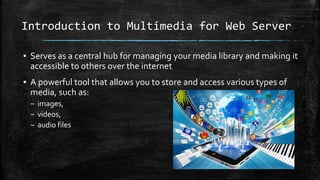
▪ Serves as a central hub for managing your media library and making it
accessible to others over the internet
▪ A powerful tool that allows you to store and access various types of
media, such as:
– images,
– videos,
– audio files
Types of Multimedia for Web Server
▪ Static Multimedia
– Stored on the web server and delivered to the user's browser
without any modification
– Images, audio files, and video files
▪ Dynamic Multimedia
– Generated on the fly by the web server
– Video streaming, interactive multimedia presentations, and games
Accessing Multimedia from Web Server
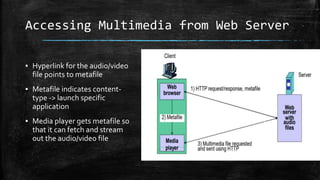
▪ Hyperlink for the audio/video
file points to metafile
▪ Metafile indicates content-
type -> launch specific
application
▪ Media player gets metafile so
that it can fetch and stream
out the audio/video file
Pros and Cons
Pros
▪ Improved User Experience
▪ Reliable access to media files
▪ Improved security of website
Cons
▪ Bandwidth Usage
▪ Page LoadTimes
▪ Accessibility Concerns
Conclusion
▪ Can be a powerful tool for creating
engaging and informative websites
▪ Looking towards the future, we can expect
to see even more advancements in
Multimedia forWeb Server
▪ Multimedia web servers will need user
friendly experience to adapt to meet user
requirements
References
▪ https://genuinenotes.com/wp-content/uploads/2020/01/Unit-7-
Multimedia-Networking.pdf
▪ https://studynotesnepal.com/wp-content/uploads/2023/02/unit-7.pdf
THANKYOU

Multimedia for Web Server

  • 1.
    Multimedia for WebServer Presented By: Pradipta Poudel BIM 5th Semester 115
  • 2.
    Introduction to Multimediafor Web Server ▪ Serves as a central hub for managing your media library and making it accessible to others over the internet ▪ A powerful tool that allows you to store and access various types of media, such as: – images, – videos, – audio files
  • 3.
    Types of Multimediafor Web Server ▪ Static Multimedia – Stored on the web server and delivered to the user's browser without any modification – Images, audio files, and video files ▪ Dynamic Multimedia – Generated on the fly by the web server – Video streaming, interactive multimedia presentations, and games
  • 4.
    Accessing Multimedia fromWeb Server ▪ Hyperlink for the audio/video file points to metafile ▪ Metafile indicates content- type -> launch specific application ▪ Media player gets metafile so that it can fetch and stream out the audio/video file
  • 5.
    Pros and Cons Pros ▪Improved User Experience ▪ Reliable access to media files ▪ Improved security of website Cons ▪ Bandwidth Usage ▪ Page LoadTimes ▪ Accessibility Concerns
  • 6.
    Conclusion ▪ Can bea powerful tool for creating engaging and informative websites ▪ Looking towards the future, we can expect to see even more advancements in Multimedia forWeb Server ▪ Multimedia web servers will need user friendly experience to adapt to meet user requirements
  • 7.
  • 8.

Editor's Notes

  • #6 Encrypted Connections: When multimedia files are served over HTTPS, it ensures that the data transmitted between the server and the user's device is encrypted, reducing the risk of man-in-the-middle attacks. Reducing Vulnerabilities: Multimedia content management systems and frameworks are often well-maintained and frequently updated