Multi-language Programming
with GPRbuild
Vasiliy Fofanov
October 1, 2015
What is GNAT Project technology?
(representation)
• Project definition language
– What programming languages are used by project ?
– Where are the sources ?
– How are they called ?
– How to build them ?
• Toolchain definition database
– How to find and use toolchains and runtimes ?
– User-extensible
What is GNAT Project technology?
(operational)
• Project-aware tools
– GPR* family
• gprbuild
• gprclean
• gprinstall …
– Standard GNAT Pro tools
• gnatcheck
• gnatcoverage …
– IDEs (GPS and GNATbench)
• Project handling API
– To develop user tools…
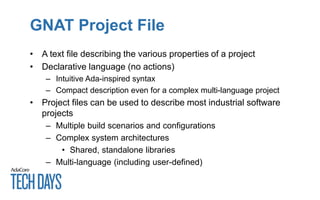
GNAT Project File
• A text file describing the various properties of a project
• Declarative language (no actions)
– Intuitive Ada-inspired syntax
– Compact description even for a complex multi-language project
• Project files can be used to describe most industrial software
projects
– Multiple build scenarios and configurations
– Complex system architectures
• Shared, standalone libraries
– Multi-language (including user-defined)
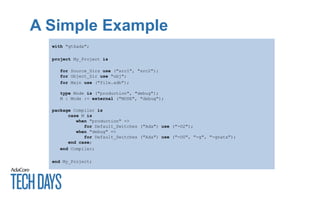
A Simple Example
with "gtkada";
project My_Project is
for Source_Dirs use ("src1", "src2");
for Object_Dir use "obj";
for Main use ("file.adb");
type Mode is ("production", "debug");
M : Mode := external ("MODE", "debug");
package Compiler is
case M is
when "production" =>
for Default_Switches ("Ada") use ("-O2");
when "debug" =>
for Default_Switches ("Ada") use ("-O0", "-g", "-gnata");
end case;
end Compiler;
end My_Project;
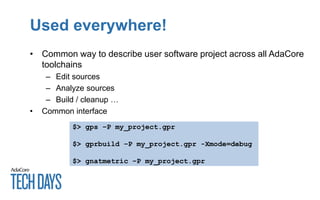
Used everywhere!
• Common way to describe user software project across all AdaCore
toolchains
– Edit sources
– Analyze sources
– Build / cleanup …
• Common interface
$> gps –P my_project.gpr
$> gprbuild –P my_project.gpr -Xmode=debug
$> gnatmetric –P my_project.gpr
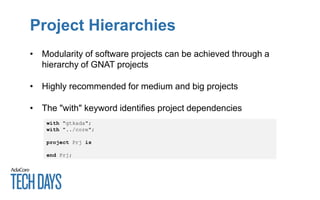
Project Hierarchies
• Modularity of software projects can be achieved through a
hierarchy of GNAT projects
• Highly recommended for medium and big projects
• The "with" keyword identifies project dependencies
with "gtkada";
with "../core";
project Prj is
end Prj;
Multi-Language Projects
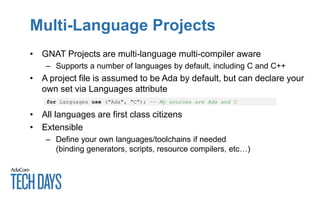
• GNAT Projects are multi-language multi-compiler aware
– Supports a number of languages by default, including C and C++
• A project file is assumed to be Ada by default, but can declare your
own set via Languages attribute
• All languages are first class citizens
• Extensible
– Define your own languages/toolchains if needed
(binding generators, scripts, resource compilers, etc…)
for Languages use ("Ada", "C"); -- My sources are Ada and C
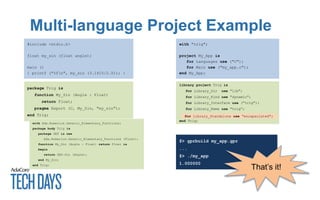
Multi-language Project Example
with "trig";
project My_App is
for Languages use ("C");
for Main use ("my_app.c");
end My_App;
#include <stdio.h>
float my_sin (float angle);
main ()
{ printf ("%fn", my_sin (3.1415/2.0)); }
package Trig is
function My_Sin (Angle : Float)
return Float;
pragma Export (C, My_Sin, "my_sin");
end Trig;
with Ada.Numerics.Generic_Elementary_Functions;
package body Trig is
package GEF is new
Ada.Numerics.Generic_Elementary_Functions (Float);
function My_Sin (Angle : Float) return Float is
begin
return GEF.Sin (Angle);
end My_Sin;
end Trig;
library project Trig is
for Library_Dir use "lib";
for Library_Kind use "dynamic";
for Library_Interface use ("trig");
for Library_Name use "trig”;
end Trig;
for Library_Standalone use "encapsulated";
$> gprbuild my_app.gpr
...
$> ./my_app
1.000000
That’s it!
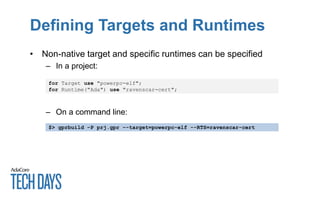
Defining Targets and Runtimes
• Non-native target and specific runtimes can be specified
– In a project:
– On a command line:
for Target use "powerpc-elf";
for Runtime("Ada") use "ravenscar-cert";
$> gprbuild –P prj.gpr –-target=powerpc-elf --RTS=ravenscar-cert
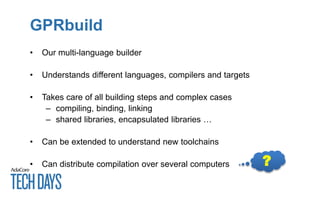
GPRbuild
• Our multi-language builder
• Understands different languages, compilers and targets
• Takes care of all building steps and complex cases
– compiling, binding, linking
– shared libraries, encapsulated libraries …
• Can be extended to understand new toolchains
• Can distribute compilation over several computers ?
Distributed builder
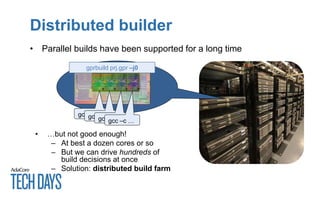
• Parallel builds have been supported for a long time
gcc –c …gcc –c …gcc –c …gcc –c …
gprbuild prj.gpr –j0
• …but not good enough!
– At best a dozen cores or so
– But we can drive hundreds of
build decisions at once
– Solution: distributed build farm
Distributed builder (2)
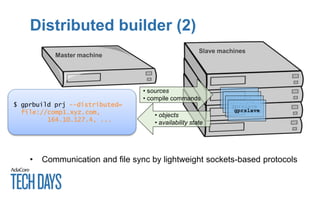
• Communication and file sync by lightweight sockets-based protocols
Master machine
Slave machines
gprslave
gprslave
gprslave
gprslave
• sources
• compile commands
• objects
• availability state
$ gprbuild prj --distributed=
file://comp1.xyz.com,
164.10.127.4, ...
Where to find it all?
• Bundled with all GNAT compiler toolchains
• Also as a separate package
– If you want to keep the current compiler and only update the builder
• Soon on GitHub (~early 2016)
Use It!
• GNAT Project Facility is a mature technology
– Good match for AdaCore product line and our vision of
development process
– Should be powerful enough to replace most if not all custom
build procedures, while remaining accessible
• Are you using it? If not, why?
• Don’t hesitate to ask us for help!
Resources
• Online GPR documentation
http://docs.adacore.com/gprbuild-docs/html/gprbuild_ug.html

Tech Days 2015: Multi-language Programming with GPRbuild

  • 1.
  • 2.
    What is GNATProject technology? (representation) • Project definition language – What programming languages are used by project ? – Where are the sources ? – How are they called ? – How to build them ? • Toolchain definition database – How to find and use toolchains and runtimes ? – User-extensible
  • 3.
    What is GNATProject technology? (operational) • Project-aware tools – GPR* family • gprbuild • gprclean • gprinstall … – Standard GNAT Pro tools • gnatcheck • gnatcoverage … – IDEs (GPS and GNATbench) • Project handling API – To develop user tools…
  • 4.
    GNAT Project File •A text file describing the various properties of a project • Declarative language (no actions) – Intuitive Ada-inspired syntax – Compact description even for a complex multi-language project • Project files can be used to describe most industrial software projects – Multiple build scenarios and configurations – Complex system architectures • Shared, standalone libraries – Multi-language (including user-defined)
  • 5.
    A Simple Example with"gtkada"; project My_Project is for Source_Dirs use ("src1", "src2"); for Object_Dir use "obj"; for Main use ("file.adb"); type Mode is ("production", "debug"); M : Mode := external ("MODE", "debug"); package Compiler is case M is when "production" => for Default_Switches ("Ada") use ("-O2"); when "debug" => for Default_Switches ("Ada") use ("-O0", "-g", "-gnata"); end case; end Compiler; end My_Project;
  • 6.
    Used everywhere! • Commonway to describe user software project across all AdaCore toolchains – Edit sources – Analyze sources – Build / cleanup … • Common interface $> gps –P my_project.gpr $> gprbuild –P my_project.gpr -Xmode=debug $> gnatmetric –P my_project.gpr
  • 7.
    Project Hierarchies • Modularityof software projects can be achieved through a hierarchy of GNAT projects • Highly recommended for medium and big projects • The "with" keyword identifies project dependencies with "gtkada"; with "../core"; project Prj is end Prj;
  • 8.
    Multi-Language Projects • GNATProjects are multi-language multi-compiler aware – Supports a number of languages by default, including C and C++ • A project file is assumed to be Ada by default, but can declare your own set via Languages attribute • All languages are first class citizens • Extensible – Define your own languages/toolchains if needed (binding generators, scripts, resource compilers, etc…) for Languages use ("Ada", "C"); -- My sources are Ada and C
  • 9.
    Multi-language Project Example with"trig"; project My_App is for Languages use ("C"); for Main use ("my_app.c"); end My_App; #include <stdio.h> float my_sin (float angle); main () { printf ("%fn", my_sin (3.1415/2.0)); } package Trig is function My_Sin (Angle : Float) return Float; pragma Export (C, My_Sin, "my_sin"); end Trig; with Ada.Numerics.Generic_Elementary_Functions; package body Trig is package GEF is new Ada.Numerics.Generic_Elementary_Functions (Float); function My_Sin (Angle : Float) return Float is begin return GEF.Sin (Angle); end My_Sin; end Trig; library project Trig is for Library_Dir use "lib"; for Library_Kind use "dynamic"; for Library_Interface use ("trig"); for Library_Name use "trig”; end Trig; for Library_Standalone use "encapsulated"; $> gprbuild my_app.gpr ... $> ./my_app 1.000000 That’s it!
  • 10.
    Defining Targets andRuntimes • Non-native target and specific runtimes can be specified – In a project: – On a command line: for Target use "powerpc-elf"; for Runtime("Ada") use "ravenscar-cert"; $> gprbuild –P prj.gpr –-target=powerpc-elf --RTS=ravenscar-cert
  • 11.
    GPRbuild • Our multi-languagebuilder • Understands different languages, compilers and targets • Takes care of all building steps and complex cases – compiling, binding, linking – shared libraries, encapsulated libraries … • Can be extended to understand new toolchains • Can distribute compilation over several computers ?
  • 12.
    Distributed builder • Parallelbuilds have been supported for a long time gcc –c …gcc –c …gcc –c …gcc –c … gprbuild prj.gpr –j0 • …but not good enough! – At best a dozen cores or so – But we can drive hundreds of build decisions at once – Solution: distributed build farm
  • 13.
    Distributed builder (2) •Communication and file sync by lightweight sockets-based protocols Master machine Slave machines gprslave gprslave gprslave gprslave • sources • compile commands • objects • availability state $ gprbuild prj --distributed= file://comp1.xyz.com, 164.10.127.4, ...
  • 14.
    Where to findit all? • Bundled with all GNAT compiler toolchains • Also as a separate package – If you want to keep the current compiler and only update the builder • Soon on GitHub (~early 2016)
  • 15.
    Use It! • GNATProject Facility is a mature technology – Good match for AdaCore product line and our vision of development process – Should be powerful enough to replace most if not all custom build procedures, while remaining accessible • Are you using it? If not, why? • Don’t hesitate to ask us for help!
  • 16.
    Resources • Online GPRdocumentation http://docs.adacore.com/gprbuild-docs/html/gprbuild_ug.html

Editor's Notes

  • #2 This template can be used as a starter file for presenting training materials in a group setting. Sections Sections can help to organize your slides or facilitate collaboration between multiple authors. On the Home tab under Slides, click Section, and then click Add Section. Notes Use the Notes pane for delivery notes or to provide additional details for the audience. You can see these notes in Presenter View during your presentation. Keep in mind the font size (important for accessibility, visibility, videotaping, and online production) Coordinated colors Pay particular attention to the graphs, charts, and text boxes. Consider that attendees will print in black and white or grayscale. Run a test print to make sure your colors work when printed in pure black and white and grayscale. Graphics, tables, and graphs Keep it simple: If possible, use consistent, non-distracting styles and colors. Label all graphs and tables.
  • #3 Project definition language Describes where the sources of the software project are located, how are they called, how to build them Toolchain definition database Describes how to detect the presence of known toolchains and runtimes and how they should be invoked and used User-extensible Used by gprconfig tool to set up the execution environment Project-aware tools GPR* family gprbuild Gprclean gprinstall Standard GNAT Pro toolchain components AdaCore IDEs (GPS and GNATbench) Official project handling API GNATCOLL.Projects Allows developing user project-aware tools
  • #4 Project definition language Describes where the sources of the software project are located, how are they called, how to build them Toolchain definition database Describes how to detect the presence of known toolchains and runtimes and how they should be invoked and used User-extensible Used by gprconfig tool to set up the execution environment Project-aware tools GPR* family gprbuild Gprclean gprinstall Standard GNAT Pro toolchain components AdaCore IDEs (GPS and GNATbench) Official project handling API GNATCOLL.Projects Allows developing user project-aware tools
  • #17 Microsoft Confidential