




All contents © MuleSoft, LLC
MuleSoft Engineering. Developer
Experience: Metadata definition between
flows on Studio 7
Guillermo Reobasco Agustin Marraco
All contents © MuleSoft, LLC
MuleSoft Meetup:
Virtual Muleys (Online Group - English )
Moderator: Angel Alberici
August Edition, 2021
Recording
All contents © MuleSoft, LLC
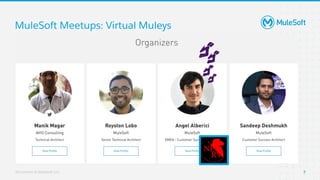
MuleSoft Meetups: Virtual Muleys
7
All contents © MuleSoft, LLC
Check all of our Online English
Group recordings in the Virtual
Muleys youtube channel!
https://mule.is/MQRdF
All contents © MuleSoft, LLC
Announcements & Updates
All contents © MuleSoft, LLC
Learn how Bayer achieved faster time to market
with MuleSoft
On Friday 20th August!
All contents © MuleSoft, LLC
Product Updates
13
● Anypoint Functional Monitoring 2.0 - You can now easily navigate the console to see your
monitors, understand current and past states, and build advanced Monitors using a new built-in
code editor. Have a look at the release notes here!
● Cashing In - As part of our Accelerator for SAP, we have added a new Order to Cash feature, which
provides a blueprint and a set of assets to get you started and significantly reduce implementation
time. Check out the use-cases on Exchange here!
● Blink and you’ll Mesh it - Anypoint Service Mesh is a great way to get the most out of your
microservices and the Anypoint platform. Check out some tips on how to get started here!
● Studio News - There have been a few updates to Studio this month, from making it easier to work
with metadata to notifications for new versions of connectors, right up to improvements on the
funky new dark theme. Check out the release notes here!
All contents © MuleSoft, LLC
Safe harbor statement
The information in this presentation is confidential and proprietary to MuleSoft and may not be disclosed without the
permission of MuleSoft. This presentation is not subject to your license agreement or any other service or
subscription agreement with MuleSoft. MuleSoft has no obligation to pursue any course of business outlined in this
document or any related presentation, or to develop or release any functionality mentioned therein. This document,
or any related presentation and MuleSoft's strategy and possible future developments, products and or platforms
directions and functionality are all subject to change and may be changed by MuleSoft at any time for any reason
without notice. The information on this document is not a commitment, promise or legal obligation to deliver any
material, code or functionality. This document is provided without a warranty of any kind, either express or implied,
including but not limited to, the implied warranties of merchantability, fitness for a particular purpose, or
non-infringement. This document is for informational purposes and may not be incorporated into a contract.
MuleSoft assumes no responsibility for errors or omissions in this document, except if such damages were caused by
MuleSoft intentionally or grossly negligent.
All forward-looking statements are subject to various risks and uncertainties that could cause actual results to differ
materially from expectations. Readers are cautioned not to place undue reliance on these forward-looking
statements, which speak only as of their dates, and they should not be relied upon in making purchasing decisions.
All contents © MuleSoft, LLC
More Product Updates!!!
15
● Cloudhub TGW (AWS Transit Gateway) is getting ready for this Q!
● CH 2.0 is a bit further the line but coming next
● Would you like to know more about them? Make sure you tune in for the MuleSoft’s Quarterly
Customer Roadmap Webinar coming up on August 25th, where you’ll hear updates directly from
the MuleSoft product team around our vision and technology roadmap. Sign up here!
All contents © MuleSoft, LLC
Metadata definition between Flows
All contents © MuleSoft, LLC
Agenda
● Concepts overview and context
● What is DataSense?
● Metadata Definition
● Studio 6 vs Studio 7 approaches
● Metadata assistant
● Demo
● Questions and Answers
17
All contents © MuleSoft, LLC
Guillermo
Reobasco
MuleSoft
Software Engineering LMTS
Agustín
Marraco
MuleSoft
Software Engineering MTS
All contents © MuleSoft, LLC
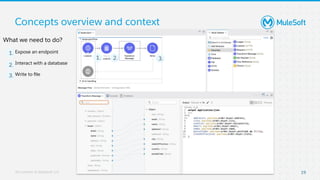
Concepts overview and context
19
What we need to do?
Expose an endpoint
Interact with a database
Write to file
1. 2. 3.
1.
2.
3.
All contents © MuleSoft, LLC
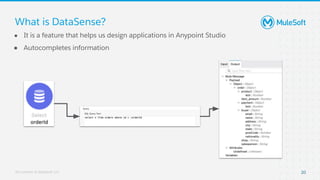
What is DataSense?
● It is a feature that helps us design applications in Anypoint Studio
● Autocompletes information
20
All contents © MuleSoft, LLC
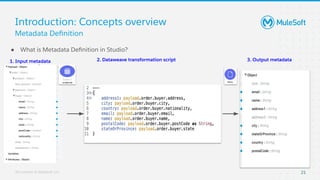
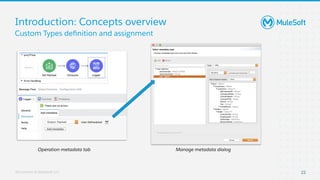
Introduction: Concepts overview
● What is Metadata Definition in Studio?
21
Metadata Definition
1. Input metadata 3. Output metadata
2. Dataweave transformation script
All contents © MuleSoft, LLC
Introduction: Concepts overview
22
Custom Types definition and assignment
Operation metadata tab Manage metadata dialog
All contents © MuleSoft, LLC
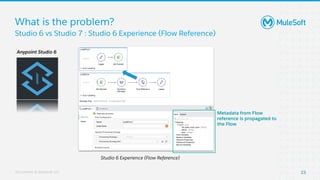
What is the problem?
23
Studio 6 vs Studio 7 : Studio 6 Experience (Flow Reference)
Studio 6 Experience (Flow Reference)
Metadata from Flow
reference is propagated to
the Flow
Anypoint Studio 6
All contents © MuleSoft, LLC
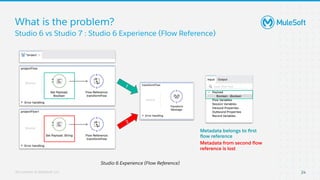
What is the problem?
24
Studio 6 vs Studio 7 : Studio 6 Experience (Flow Reference)
Studio 6 Experience (Flow Reference)
Metadata belongs to first
flow reference
Metadata from second flow
reference is lost
2
1
All contents © MuleSoft, LLC
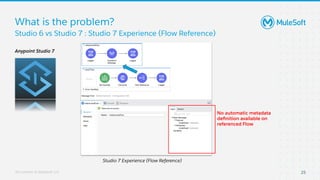
What is the problem?
25
Studio 6 vs Studio 7 : Studio 7 Experience (Flow Reference)
Studio 7 Experience (Flow Reference)
No automatic metadata
definition available on
referenced Flow
Anypoint Studio 7
All contents © MuleSoft, LLC
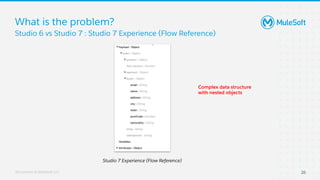
What is the problem?
26
Studio 6 vs Studio 7 : Studio 7 Experience (Flow Reference)
Studio 7 Experience (Flow Reference)
Complex data structure
with nested objects
All contents © MuleSoft, LLC
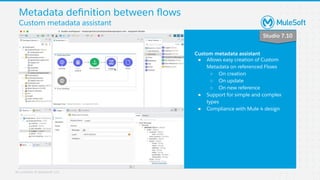
Custom metadata assistant
● Allows easy creation of Custom
Metadata on referenced Flows
○ On creation
○ On update
○ On new reference
● Support for simple and complex
types
● Compliance with Mule 4 design
Studio 7.10
Metadata definition between flows
Custom metadata assistant
All contents © MuleSoft, LLC
1. Metadata experience differences within Studio 6 and 7.
2. Design decisions and differences between Studio versions
3. Stoppers for customers migrating from Studio 6 to 7
4. New Metadata Assistant and use cases for Studio 7.
To Summarize...
All contents © MuleSoft, LLC
Demo Time
29
All contents © MuleSoft, LLC
Want to know more?
30
Check the Studio docs for the latest version and look for:
- Metadata Propagation Between Flows:
- https://docs.mulesoft.com/studio/latest/metadata-propagation-between-
flows
- Propagate Metadata Studio
- https://docs.mulesoft.com/studio/latest/propagate-metadata-studio
- DataWeave
- https://docs.mulesoft.com/mule-runtime/latest/dataweave
You can also check the Ideas Portal or the Forum!
- Ideas portal: https://help.mulesoft.com/s/ideas
- Forum: https://help.mulesoft.com/s/forum
All contents © MuleSoft, LLC
Q&A Time
31
All contents © MuleSoft, LLC
Thank you

Metadata definition between flows on Studio 7 : MuleSoft Virtual Muleys Meetups

  • 1.
    All contents ©MuleSoft, LLC MuleSoft Engineering. Developer Experience: Metadata definition between flows on Studio 7 Guillermo Reobasco Agustin Marraco
  • 2.
    All contents ©MuleSoft, LLC MuleSoft Meetup: Virtual Muleys (Online Group - English ) Moderator: Angel Alberici August Edition, 2021 Recording
  • 3.
    All contents ©MuleSoft, LLC MuleSoft Meetups: Virtual Muleys 7
  • 4.
    All contents ©MuleSoft, LLC Check all of our Online English Group recordings in the Virtual Muleys youtube channel! https://mule.is/MQRdF
  • 5.
    All contents ©MuleSoft, LLC Announcements & Updates
  • 6.
    All contents ©MuleSoft, LLC Learn how Bayer achieved faster time to market with MuleSoft On Friday 20th August!
  • 7.
    All contents ©MuleSoft, LLC Product Updates 13 ● Anypoint Functional Monitoring 2.0 - You can now easily navigate the console to see your monitors, understand current and past states, and build advanced Monitors using a new built-in code editor. Have a look at the release notes here! ● Cashing In - As part of our Accelerator for SAP, we have added a new Order to Cash feature, which provides a blueprint and a set of assets to get you started and significantly reduce implementation time. Check out the use-cases on Exchange here! ● Blink and you’ll Mesh it - Anypoint Service Mesh is a great way to get the most out of your microservices and the Anypoint platform. Check out some tips on how to get started here! ● Studio News - There have been a few updates to Studio this month, from making it easier to work with metadata to notifications for new versions of connectors, right up to improvements on the funky new dark theme. Check out the release notes here!
  • 8.
    All contents ©MuleSoft, LLC Safe harbor statement The information in this presentation is confidential and proprietary to MuleSoft and may not be disclosed without the permission of MuleSoft. This presentation is not subject to your license agreement or any other service or subscription agreement with MuleSoft. MuleSoft has no obligation to pursue any course of business outlined in this document or any related presentation, or to develop or release any functionality mentioned therein. This document, or any related presentation and MuleSoft's strategy and possible future developments, products and or platforms directions and functionality are all subject to change and may be changed by MuleSoft at any time for any reason without notice. The information on this document is not a commitment, promise or legal obligation to deliver any material, code or functionality. This document is provided without a warranty of any kind, either express or implied, including but not limited to, the implied warranties of merchantability, fitness for a particular purpose, or non-infringement. This document is for informational purposes and may not be incorporated into a contract. MuleSoft assumes no responsibility for errors or omissions in this document, except if such damages were caused by MuleSoft intentionally or grossly negligent. All forward-looking statements are subject to various risks and uncertainties that could cause actual results to differ materially from expectations. Readers are cautioned not to place undue reliance on these forward-looking statements, which speak only as of their dates, and they should not be relied upon in making purchasing decisions.
  • 9.
    All contents ©MuleSoft, LLC More Product Updates!!! 15 ● Cloudhub TGW (AWS Transit Gateway) is getting ready for this Q! ● CH 2.0 is a bit further the line but coming next ● Would you like to know more about them? Make sure you tune in for the MuleSoft’s Quarterly Customer Roadmap Webinar coming up on August 25th, where you’ll hear updates directly from the MuleSoft product team around our vision and technology roadmap. Sign up here!
  • 10.
    All contents ©MuleSoft, LLC Metadata definition between Flows
  • 11.
    All contents ©MuleSoft, LLC Agenda ● Concepts overview and context ● What is DataSense? ● Metadata Definition ● Studio 6 vs Studio 7 approaches ● Metadata assistant ● Demo ● Questions and Answers 17
  • 12.
    All contents ©MuleSoft, LLC Guillermo Reobasco MuleSoft Software Engineering LMTS Agustín Marraco MuleSoft Software Engineering MTS
  • 13.
    All contents ©MuleSoft, LLC Concepts overview and context 19 What we need to do? Expose an endpoint Interact with a database Write to file 1. 2. 3. 1. 2. 3.
  • 14.
    All contents ©MuleSoft, LLC What is DataSense? ● It is a feature that helps us design applications in Anypoint Studio ● Autocompletes information 20
  • 15.
    All contents ©MuleSoft, LLC Introduction: Concepts overview ● What is Metadata Definition in Studio? 21 Metadata Definition 1. Input metadata 3. Output metadata 2. Dataweave transformation script
  • 16.
    All contents ©MuleSoft, LLC Introduction: Concepts overview 22 Custom Types definition and assignment Operation metadata tab Manage metadata dialog
  • 17.
    All contents ©MuleSoft, LLC What is the problem? 23 Studio 6 vs Studio 7 : Studio 6 Experience (Flow Reference) Studio 6 Experience (Flow Reference) Metadata from Flow reference is propagated to the Flow Anypoint Studio 6
  • 18.
    All contents ©MuleSoft, LLC What is the problem? 24 Studio 6 vs Studio 7 : Studio 6 Experience (Flow Reference) Studio 6 Experience (Flow Reference) Metadata belongs to first flow reference Metadata from second flow reference is lost 2 1
  • 19.
    All contents ©MuleSoft, LLC What is the problem? 25 Studio 6 vs Studio 7 : Studio 7 Experience (Flow Reference) Studio 7 Experience (Flow Reference) No automatic metadata definition available on referenced Flow Anypoint Studio 7
  • 20.
    All contents ©MuleSoft, LLC What is the problem? 26 Studio 6 vs Studio 7 : Studio 7 Experience (Flow Reference) Studio 7 Experience (Flow Reference) Complex data structure with nested objects
  • 21.
    All contents ©MuleSoft, LLC Custom metadata assistant ● Allows easy creation of Custom Metadata on referenced Flows ○ On creation ○ On update ○ On new reference ● Support for simple and complex types ● Compliance with Mule 4 design Studio 7.10 Metadata definition between flows Custom metadata assistant
  • 22.
    All contents ©MuleSoft, LLC 1. Metadata experience differences within Studio 6 and 7. 2. Design decisions and differences between Studio versions 3. Stoppers for customers migrating from Studio 6 to 7 4. New Metadata Assistant and use cases for Studio 7. To Summarize...
  • 23.
    All contents ©MuleSoft, LLC Demo Time 29
  • 24.
    All contents ©MuleSoft, LLC Want to know more? 30 Check the Studio docs for the latest version and look for: - Metadata Propagation Between Flows: - https://docs.mulesoft.com/studio/latest/metadata-propagation-between- flows - Propagate Metadata Studio - https://docs.mulesoft.com/studio/latest/propagate-metadata-studio - DataWeave - https://docs.mulesoft.com/mule-runtime/latest/dataweave You can also check the Ideas Portal or the Forum! - Ideas portal: https://help.mulesoft.com/s/ideas - Forum: https://help.mulesoft.com/s/forum
  • 25.
    All contents ©MuleSoft, LLC Q&A Time 31
  • 26.
    All contents ©MuleSoft, LLC Thank you