MuleSoft ESB
Sharing Data Across Mule Applications
By
AKASH PRAJAPATI
Scripting Support
Topics :
•Sharing Data Across Mule Applications
Purpose :
- To showcase object store functionality in MuleSoft ESB.
- Using object store, Two different Mule Application shared data.
Pre-requisites :
•Basic under standing of Mule ESB
•JDK 1.8 or above
•Anypoint Studio v 6.2.1 or above
•Mule Server v 3.8.0 EE or above
Details :
(*) Domain Project :
Common resources are placed into this project
(*) Mule Project – 1 :
This Application can store data in the Common Shared Memory – ( Called Object Store )
(*) Mule Project – 2 :
This Application will retrieve all data which are stored in common shared memory – ( Called Object Store )
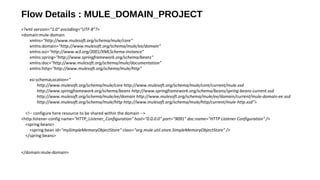
Flow Details : MULE_DOMAIN_PROJECT
<?xml version="1.0" encoding="UTF-8"?>
<domain:mule-domain
xmlns="http://www.mulesoft.org/schema/mule/core"
xmlns:domain="http://www.mulesoft.org/schema/mule/ee/domain"
xmlns:xsi="http://www.w3.org/2001/XMLSchema-instance"
xmlns:spring="http://www.springframework.org/schema/beans"
xmlns:doc="http://www.mulesoft.org/schema/mule/documentation"
xmlns:http="http://www.mulesoft.org/schema/mule/http"
xsi:schemaLocation="
http://www.mulesoft.org/schema/mule/core http://www.mulesoft.org/schema/mule/core/current/mule.xsd
http://www.springframework.org/schema/beans http://www.springframework.org/schema/beans/spring-beans-current.xsd
http://www.mulesoft.org/schema/mule/ee/domain http://www.mulesoft.org/schema/mule/ee/domain/current/mule-domain-ee.xsd
http://www.mulesoft.org/schema/mule/http http://www.mulesoft.org/schema/mule/http/current/mule-http.xsd">
<!-- configure here resource to be shared within the domain -->
<http:listener-config name="HTTP_Listener_Configuration" host="0.0.0.0" port="9091" doc:name="HTTP Listener Configuration" />
<spring:beans>
<spring:bean id="mySimpleMemoryObjectStore" class="org.mule.util.store.SimpleMemoryObjectStore" />
</spring:beans>
</domain:mule-domain>
<?xml version="1.0" encoding="UTF-8"?>
<mule xmlns:objectstore="http://www.mulesoft.org/schema/mule/objectstore"
xmlns:json="http://www.mulesoft.org/schema/mule/json"
xmlns:http="http://www.mulesoft.org/schema/mule/http"
xmlns="http://www.mulesoft.org/schema/mule/core"
xmlns:doc="http://www.mulesoft.org/schema/mule/documentation"
xmlns:spring="http://www.springframework.org/schema/beans"
xmlns:xsi="http://www.w3.org/2001/XMLSchema-instance"
xsi:schemaLocation="http://www.mulesoft.org/schema/mule/json http://www.mulesoft.org/schema/mule/json/current/mule-json.xsd
http://www.springframework.org/schema/beans http://www.springframework.org/schema/beans/spring-beans-current.xsd
http://www.mulesoft.org/schema/mule/core http://www.mulesoft.org/schema/mule/core/current/mule.xsd
http://www.mulesoft.org/schema/mule/http http://www.mulesoft.org/schema/mule/http/current/mule-http.xsd
http://www.mulesoft.org/schema/mule/objectstore http://www.mulesoft.org/schema/mule/objectstore/current/mule-objectstore.xsd">
<objectstore:config name="ObjectStore" objectStore-ref="mySimpleMemoryObjectStore" doc:name="ObjectStore" />
<flow name="mule_app1_projectFlow">
<http:listener config-ref="HTTP_Listener_Configuration" path="/app1/set" doc:name="HTTP" />
<logger level="INFO" message="#['======================= START : APP1 =================================']" doc:name="Logger"/>
<json:json-to-object-transformer returnClass="java.util.HashMap" doc:name="JSON to Object" />
<set-variable variableName="objStrSize" value="#[app.registry.mySimpleMemoryObjectStore.allKeys().size()]" doc:name="Set Count" />
<objectstore:store config-ref="ObjectStore" key="#[new java.lang.Integer(flowVars['objStrSize']+1)]" value-ref="#[payload]" doc:name="Add To ObjectStore"/>
<set-payload value="Payload stored in ObjectStore...!!!" doc:name="Set Payload" />
<!-- <object-to-byte-array-transformer doc:name="Object to Byte Array" /> -->
<logger level="INFO" message="#[payload]" doc:name="Logger"/>
<logger level="INFO" message="#['======================= END : APP1 =================================']" doc:name="Logger"/>
</flow>
</mule>
Flow Details : MULE_APP1_PROJECT
Flow Details : MULE_APP2_PROJECT
<?xml version="1.0" encoding="UTF-8"?>
<mule xmlns:objectstore="http://www.mulesoft.org/schema/mule/objectstore"
xmlns:http="http://www.mulesoft.org/schema/mule/http"
xmlns="http://www.mulesoft.org/schema/mule/core"
xmlns:doc="http://www.mulesoft.org/schema/mule/documentation"
xmlns:spring="http://www.springframework.org/schema/beans"
xmlns:xsi="http://www.w3.org/2001/XMLSchema-instance"
xsi:schemaLocation="http://www.springframework.org/schema/beans http://www.springframework.org/schema/beans/spring-beans-current.xsd
http://www.mulesoft.org/schema/mule/core http://www.mulesoft.org/schema/mule/core/current/mule.xsd
http://www.mulesoft.org/schema/mule/http http://www.mulesoft.org/schema/mule/http/current/mule-http.xsd
http://www.mulesoft.org/schema/mule/objectstore http://www.mulesoft.org/schema/mule/objectstore/current/mule-objectstore.xsd">
<objectstore:config name="ObjectStore" objectStore-ref="mySimpleMemoryObjectStore" doc:name="ObjectStore" />
<flow name="mule_app2_projectFlow">
<http:listener config-ref="HTTP_Listener_Configuration" path="/app2/getall" doc:name="HTTP"/>
<logger level="INFO" message="#['======================= START : APP2 =================================']" doc:name="Logger"/>
<set-variable variableName="varAllData" value="#[new java.util.ArrayList()]" doc:name="Variable - Message Arraylist"/>
<foreach collection="#[app.registry.mySimpleMemoryObjectStore.allKeys()]" doc:name="For Each" counterVariableName="i">
<objectstore:retrieve config-ref="ObjectStore" key="#[new java.lang.Integer(i)]" doc:name="Retrieve Message"/>
<object-to-string-transformer doc:name="Object to String" />
<logger message="Values #[new java.lang.Integer(i)] : #[message.payload]" level="INFO" doc:name="Logger" />
<expression-component doc:name="Add Message to ArrayList">
<![CDATA[flowVars['varAllData'].add(payload)]]>
</expression-component>
</foreach>
<set-payload doc:name="Set Payload" value="#[flowVars['varAllData']] "/>
<logger level="INFO" message="#['==================================']" doc:name="Logger"/>
<logger level="INFO" message="#[payload]" doc:name="Logger"/>
<logger level="INFO" message="#['==================================']" doc:name="Logger"/>
<logger level="INFO" message="#['======================= END : APP2 =================================']" doc:name="Logger"/>
</flow>
</mule>
Testing / Logger Information:
------------------------ Thank You -------------------------
(*) Steps : Execute below URLs.
PROJECT-1 :
Input :
http://localhost:9091/app1/set
Method : POST
Content-Type : application/json
Data : { “id” : “001” , “firstname” : “PRAKASH” }
Output :
Payload stored in ObjectStore...!!!
PROJECT-2 :
Input :
http://localhost:9091/app2/getall
Method : GET
Output:
[ { id=001, firstname=PRAKASH } ]
(*) Validate Log and Payload values

MuleSoft ESB Object Store

  • 1.
    MuleSoft ESB Sharing DataAcross Mule Applications By AKASH PRAJAPATI
  • 2.
    Scripting Support Topics : •SharingData Across Mule Applications Purpose : - To showcase object store functionality in MuleSoft ESB. - Using object store, Two different Mule Application shared data. Pre-requisites : •Basic under standing of Mule ESB •JDK 1.8 or above •Anypoint Studio v 6.2.1 or above •Mule Server v 3.8.0 EE or above
  • 3.
    Details : (*) DomainProject : Common resources are placed into this project (*) Mule Project – 1 : This Application can store data in the Common Shared Memory – ( Called Object Store ) (*) Mule Project – 2 : This Application will retrieve all data which are stored in common shared memory – ( Called Object Store )
  • 4.
    Flow Details :MULE_DOMAIN_PROJECT <?xml version="1.0" encoding="UTF-8"?> <domain:mule-domain xmlns="http://www.mulesoft.org/schema/mule/core" xmlns:domain="http://www.mulesoft.org/schema/mule/ee/domain" xmlns:xsi="http://www.w3.org/2001/XMLSchema-instance" xmlns:spring="http://www.springframework.org/schema/beans" xmlns:doc="http://www.mulesoft.org/schema/mule/documentation" xmlns:http="http://www.mulesoft.org/schema/mule/http" xsi:schemaLocation=" http://www.mulesoft.org/schema/mule/core http://www.mulesoft.org/schema/mule/core/current/mule.xsd http://www.springframework.org/schema/beans http://www.springframework.org/schema/beans/spring-beans-current.xsd http://www.mulesoft.org/schema/mule/ee/domain http://www.mulesoft.org/schema/mule/ee/domain/current/mule-domain-ee.xsd http://www.mulesoft.org/schema/mule/http http://www.mulesoft.org/schema/mule/http/current/mule-http.xsd"> <!-- configure here resource to be shared within the domain --> <http:listener-config name="HTTP_Listener_Configuration" host="0.0.0.0" port="9091" doc:name="HTTP Listener Configuration" /> <spring:beans> <spring:bean id="mySimpleMemoryObjectStore" class="org.mule.util.store.SimpleMemoryObjectStore" /> </spring:beans> </domain:mule-domain>
  • 5.
    <?xml version="1.0" encoding="UTF-8"?> <mulexmlns:objectstore="http://www.mulesoft.org/schema/mule/objectstore" xmlns:json="http://www.mulesoft.org/schema/mule/json" xmlns:http="http://www.mulesoft.org/schema/mule/http" xmlns="http://www.mulesoft.org/schema/mule/core" xmlns:doc="http://www.mulesoft.org/schema/mule/documentation" xmlns:spring="http://www.springframework.org/schema/beans" xmlns:xsi="http://www.w3.org/2001/XMLSchema-instance" xsi:schemaLocation="http://www.mulesoft.org/schema/mule/json http://www.mulesoft.org/schema/mule/json/current/mule-json.xsd http://www.springframework.org/schema/beans http://www.springframework.org/schema/beans/spring-beans-current.xsd http://www.mulesoft.org/schema/mule/core http://www.mulesoft.org/schema/mule/core/current/mule.xsd http://www.mulesoft.org/schema/mule/http http://www.mulesoft.org/schema/mule/http/current/mule-http.xsd http://www.mulesoft.org/schema/mule/objectstore http://www.mulesoft.org/schema/mule/objectstore/current/mule-objectstore.xsd"> <objectstore:config name="ObjectStore" objectStore-ref="mySimpleMemoryObjectStore" doc:name="ObjectStore" /> <flow name="mule_app1_projectFlow"> <http:listener config-ref="HTTP_Listener_Configuration" path="/app1/set" doc:name="HTTP" /> <logger level="INFO" message="#['======================= START : APP1 =================================']" doc:name="Logger"/> <json:json-to-object-transformer returnClass="java.util.HashMap" doc:name="JSON to Object" /> <set-variable variableName="objStrSize" value="#[app.registry.mySimpleMemoryObjectStore.allKeys().size()]" doc:name="Set Count" /> <objectstore:store config-ref="ObjectStore" key="#[new java.lang.Integer(flowVars['objStrSize']+1)]" value-ref="#[payload]" doc:name="Add To ObjectStore"/> <set-payload value="Payload stored in ObjectStore...!!!" doc:name="Set Payload" /> <!-- <object-to-byte-array-transformer doc:name="Object to Byte Array" /> --> <logger level="INFO" message="#[payload]" doc:name="Logger"/> <logger level="INFO" message="#['======================= END : APP1 =================================']" doc:name="Logger"/> </flow> </mule> Flow Details : MULE_APP1_PROJECT
  • 6.
    Flow Details :MULE_APP2_PROJECT <?xml version="1.0" encoding="UTF-8"?> <mule xmlns:objectstore="http://www.mulesoft.org/schema/mule/objectstore" xmlns:http="http://www.mulesoft.org/schema/mule/http" xmlns="http://www.mulesoft.org/schema/mule/core" xmlns:doc="http://www.mulesoft.org/schema/mule/documentation" xmlns:spring="http://www.springframework.org/schema/beans" xmlns:xsi="http://www.w3.org/2001/XMLSchema-instance" xsi:schemaLocation="http://www.springframework.org/schema/beans http://www.springframework.org/schema/beans/spring-beans-current.xsd http://www.mulesoft.org/schema/mule/core http://www.mulesoft.org/schema/mule/core/current/mule.xsd http://www.mulesoft.org/schema/mule/http http://www.mulesoft.org/schema/mule/http/current/mule-http.xsd http://www.mulesoft.org/schema/mule/objectstore http://www.mulesoft.org/schema/mule/objectstore/current/mule-objectstore.xsd"> <objectstore:config name="ObjectStore" objectStore-ref="mySimpleMemoryObjectStore" doc:name="ObjectStore" /> <flow name="mule_app2_projectFlow"> <http:listener config-ref="HTTP_Listener_Configuration" path="/app2/getall" doc:name="HTTP"/> <logger level="INFO" message="#['======================= START : APP2 =================================']" doc:name="Logger"/> <set-variable variableName="varAllData" value="#[new java.util.ArrayList()]" doc:name="Variable - Message Arraylist"/> <foreach collection="#[app.registry.mySimpleMemoryObjectStore.allKeys()]" doc:name="For Each" counterVariableName="i"> <objectstore:retrieve config-ref="ObjectStore" key="#[new java.lang.Integer(i)]" doc:name="Retrieve Message"/> <object-to-string-transformer doc:name="Object to String" /> <logger message="Values #[new java.lang.Integer(i)] : #[message.payload]" level="INFO" doc:name="Logger" /> <expression-component doc:name="Add Message to ArrayList"> <![CDATA[flowVars['varAllData'].add(payload)]]> </expression-component> </foreach> <set-payload doc:name="Set Payload" value="#[flowVars['varAllData']] "/> <logger level="INFO" message="#['==================================']" doc:name="Logger"/> <logger level="INFO" message="#[payload]" doc:name="Logger"/> <logger level="INFO" message="#['==================================']" doc:name="Logger"/> <logger level="INFO" message="#['======================= END : APP2 =================================']" doc:name="Logger"/> </flow> </mule>
  • 7.
    Testing / LoggerInformation: ------------------------ Thank You ------------------------- (*) Steps : Execute below URLs. PROJECT-1 : Input : http://localhost:9091/app1/set Method : POST Content-Type : application/json Data : { “id” : “001” , “firstname” : “PRAKASH” } Output : Payload stored in ObjectStore...!!! PROJECT-2 : Input : http://localhost:9091/app2/getall Method : GET Output: [ { id=001, firstname=PRAKASH } ] (*) Validate Log and Payload values