

Anirban Sen Chowdhary
Can Mule Integrate with RingCentral?
RingCentral as we all familiar with, deals with different kind of APIs that
offers reliable VoIP calling, web meetings, fax, & more features over
cloud communication.
There are different technologies all around like Java, PHP, python,
JavaScripts that can easily integrated with RingCentral APIs. Even
RingCentral has official SDK for them. We can check them
here: https://github.com/ringcentral
However, there is no direct way to connect MuleSoft with RingCentral .
At least RingCentral haven't provided any official way.
So, the question arise that, can be both integrated?
What is the best way we can do?
As we all know that MuleSoft is an integration platform and ESB
framework that can integrate anything anywhere. And so, integrating
with RingCentral will just take a couple of minute to design, implement
and happen.
To start with, we will log on to the RingCentral developer portal and
create an application that can send SMS message to phone numbers. If
you are not sure how to do it, you can refer a step by step easiest
procedure to do so here in previous DZone post:
https://dzone.com/articles/getting-started-with-ringcentral-apis
Once we are done creating an application there that can send SMS
messages, we will use RingCentral APIs in MuleSoft application.
It's just 2 HTTP requests, one to request an access_token, and a second
request to send the SMS.
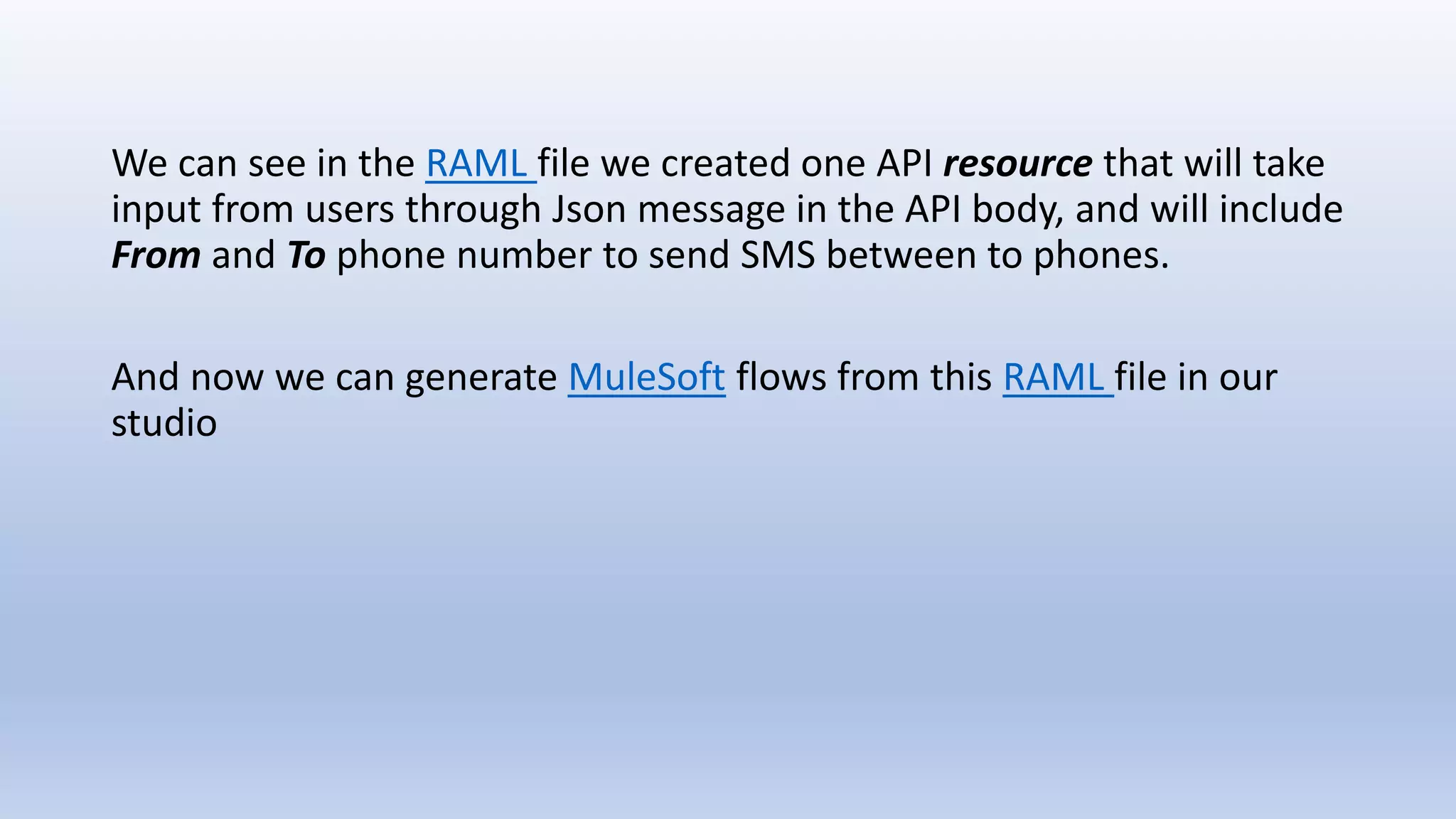
After we create a new MuleSoft application in studio, we will design
our RAML specification as in next slide:
We can see in the RAML file we created one API resource that will take
input from users through Json message in the API body, and will include
From and To phone number to send SMS between to phones.
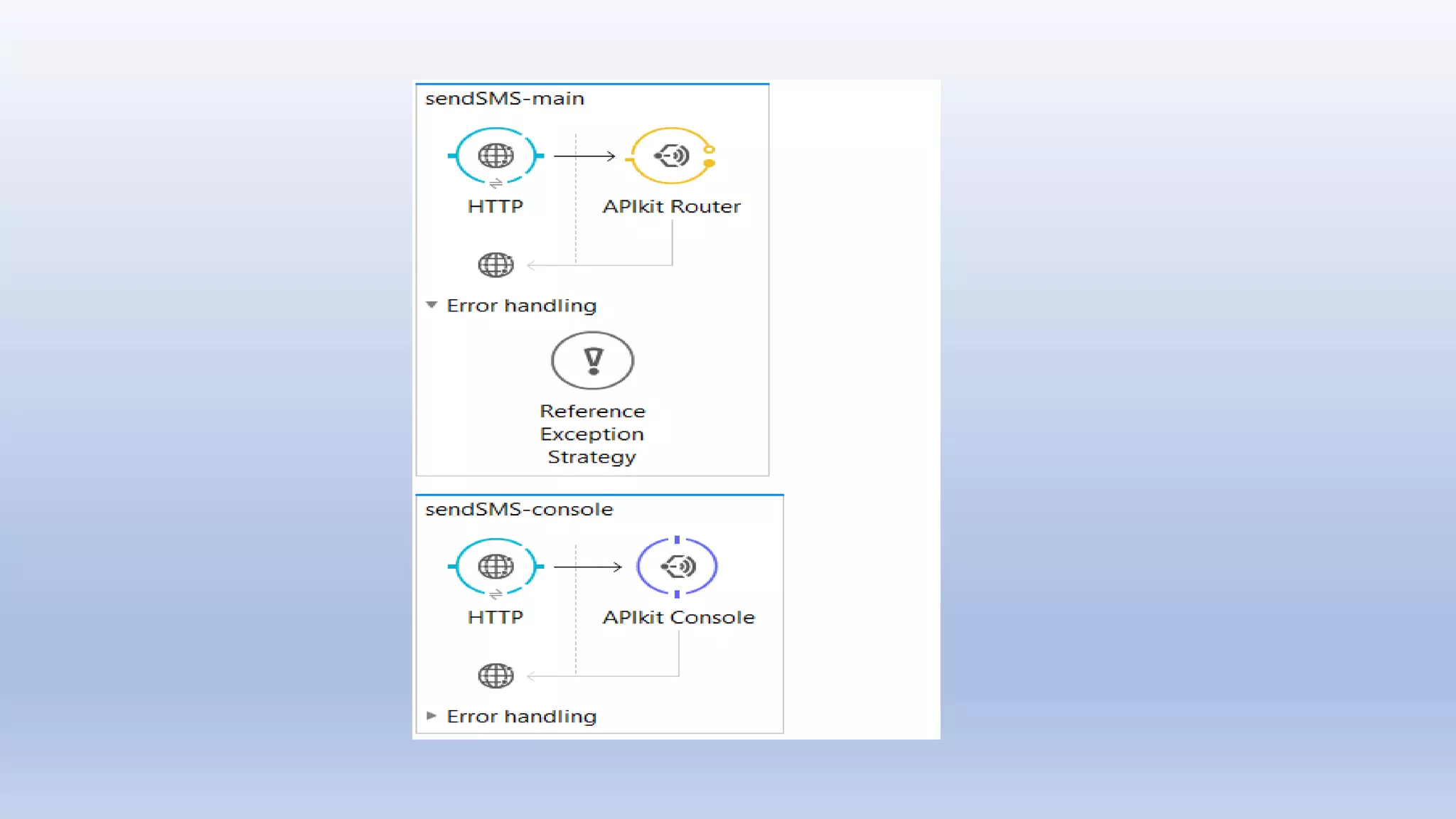
And now we can generate MuleSoft flows from this RAML file in our
studio
The APIKit will generate the basic flows that will route the API calls
between various flows and console.
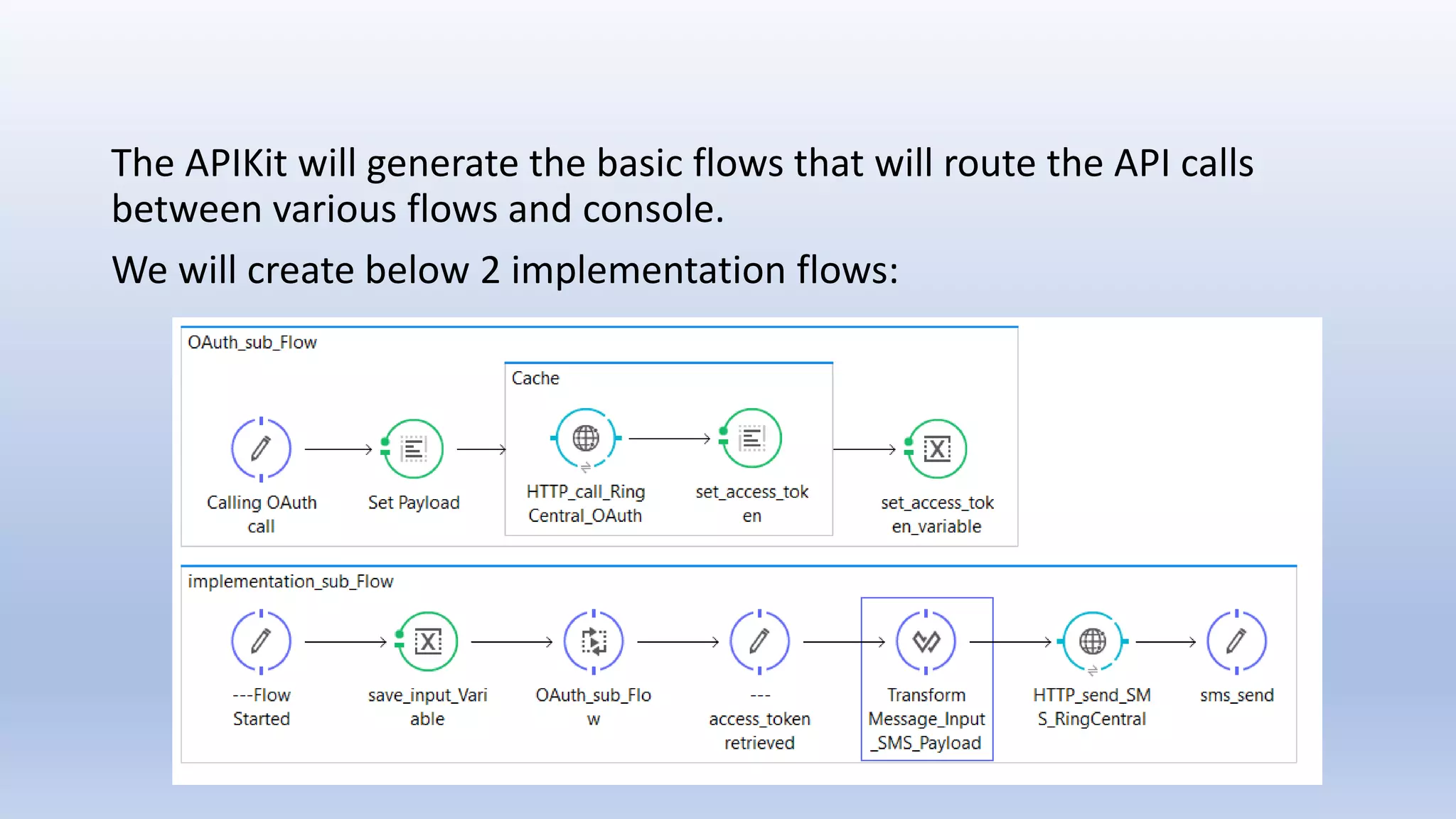
We will create below 2 implementation flows:
As we can see, one flow is to call the RingCentral OAuth 2.0 server and
get the access_token, and the next flow is to call the RingCentral main
API to send SMS messages.
If you noticed in the flows, we have used Caching technique to call
OAuth 2.0 server and store the access_token in the Cache.
Since the default expiration time of access_token is around 60 minute,
we can put it in the Cache for that around of time to avoid excess
calling of RingCentral OAuth 2.0 server.
The next call will be a direct call to RingCentral main API and will
prepare the input payload from the dynamic input it will get from our
POST method call.
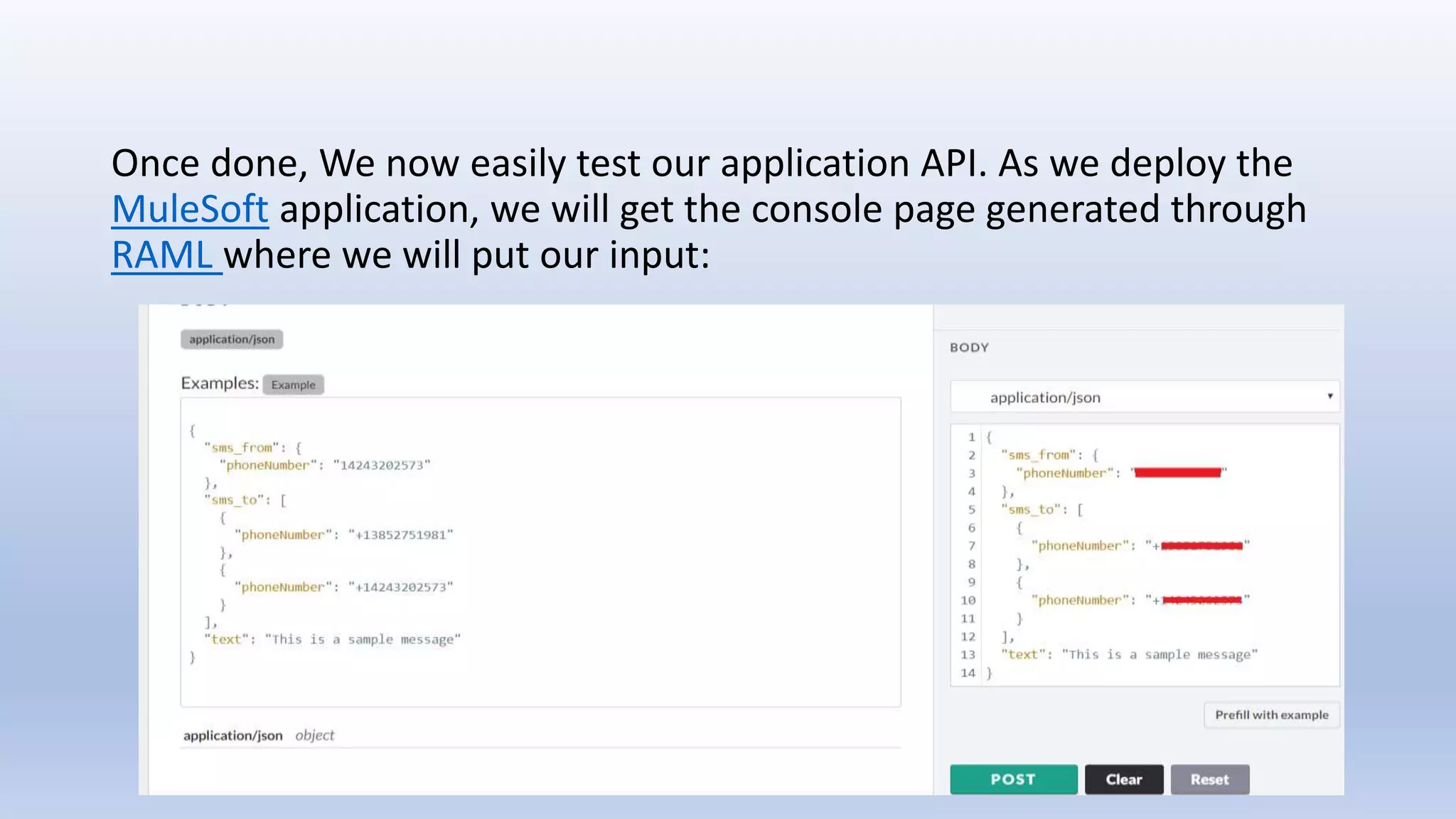
Once done, We now easily test our application API. As we deploy the
MuleSoft application, we will get the console page generated through
RAML where we will put our input:
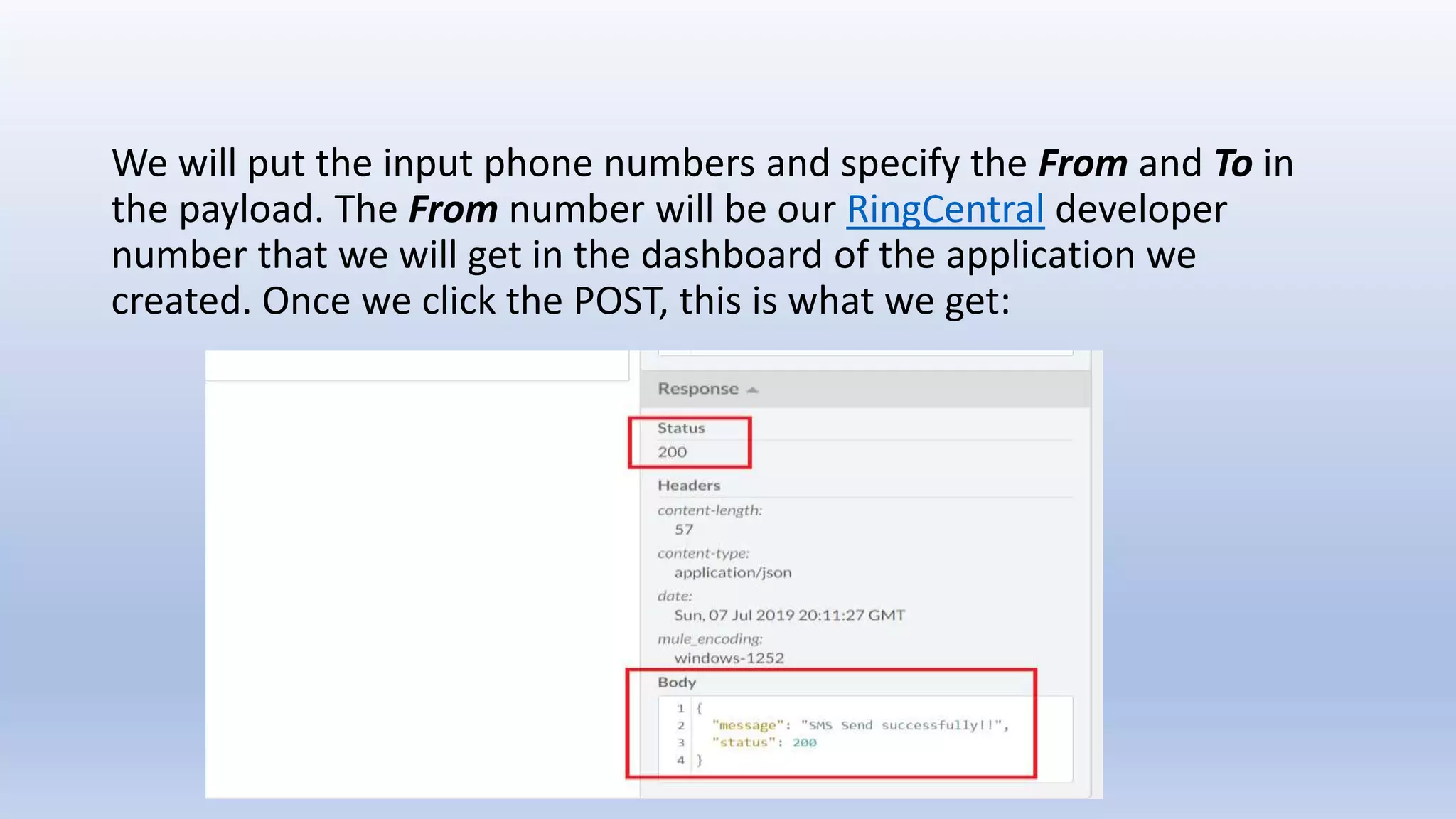
We will put the input phone numbers and specify the From and To in
the payload. The From number will be our RingCentral developer
number that we will get in the dashboard of the application we
created. Once we click the POST, this is what we get:
A success message with 200 Http status, which means our SMS
message is successfully send to all the phone number we mentioned in
our input.
We can see in the article, that it's actually very easy to integrate
MuleSoft with RingCentral with just 2 Http call designed in the flow.
We can create MuleSoft application and integrate RingCentral in those
cases where we need to send SMS messages to the end users, client or
technical support team when one of our application or server is down
or any other exception and unexpected situation had taken place.
Can mule integrate with ring central

Can mule integrate with ring central

  • 1.
    Anirban Sen Chowdhary CanMule Integrate with RingCentral?
  • 2.
    RingCentral as weall familiar with, deals with different kind of APIs that offers reliable VoIP calling, web meetings, fax, & more features over cloud communication. There are different technologies all around like Java, PHP, python, JavaScripts that can easily integrated with RingCentral APIs. Even RingCentral has official SDK for them. We can check them here: https://github.com/ringcentral
  • 3.
    However, there isno direct way to connect MuleSoft with RingCentral . At least RingCentral haven't provided any official way. So, the question arise that, can be both integrated? What is the best way we can do?
  • 5.
    As we allknow that MuleSoft is an integration platform and ESB framework that can integrate anything anywhere. And so, integrating with RingCentral will just take a couple of minute to design, implement and happen. To start with, we will log on to the RingCentral developer portal and create an application that can send SMS message to phone numbers. If you are not sure how to do it, you can refer a step by step easiest procedure to do so here in previous DZone post: https://dzone.com/articles/getting-started-with-ringcentral-apis
  • 6.
    Once we aredone creating an application there that can send SMS messages, we will use RingCentral APIs in MuleSoft application. It's just 2 HTTP requests, one to request an access_token, and a second request to send the SMS. After we create a new MuleSoft application in studio, we will design our RAML specification as in next slide:
  • 8.
    We can seein the RAML file we created one API resource that will take input from users through Json message in the API body, and will include From and To phone number to send SMS between to phones. And now we can generate MuleSoft flows from this RAML file in our studio
  • 10.
    The APIKit willgenerate the basic flows that will route the API calls between various flows and console. We will create below 2 implementation flows:
  • 11.
    As we cansee, one flow is to call the RingCentral OAuth 2.0 server and get the access_token, and the next flow is to call the RingCentral main API to send SMS messages. If you noticed in the flows, we have used Caching technique to call OAuth 2.0 server and store the access_token in the Cache. Since the default expiration time of access_token is around 60 minute, we can put it in the Cache for that around of time to avoid excess calling of RingCentral OAuth 2.0 server. The next call will be a direct call to RingCentral main API and will prepare the input payload from the dynamic input it will get from our POST method call.
  • 13.
    Once done, Wenow easily test our application API. As we deploy the MuleSoft application, we will get the console page generated through RAML where we will put our input:
  • 14.
    We will putthe input phone numbers and specify the From and To in the payload. The From number will be our RingCentral developer number that we will get in the dashboard of the application we created. Once we click the POST, this is what we get:
  • 15.
    A success messagewith 200 Http status, which means our SMS message is successfully send to all the phone number we mentioned in our input.
  • 17.
    We can seein the article, that it's actually very easy to integrate MuleSoft with RingCentral with just 2 Http call designed in the flow. We can create MuleSoft application and integrate RingCentral in those cases where we need to send SMS messages to the end users, client or technical support team when one of our application or server is down or any other exception and unexpected situation had taken place.