

Advanced DBMS
(Assignment –II)
Submitted in partial fulfilment of the requirements for the degree of
Master of Technology in Information Technology
by
Vijayananda D Mohire
(Enrolment No.921DMTE0113)
Information Technology Department
Karnataka State Open University
Manasagangotri, Mysore – 570006
Karnataka, India
(2009)
2
3
Advanced DBMS
4
CERTIFICATE
This is to certify that the Assignment-II entitled (Advanced DBMS,
subject code: MT14) submitted by Vijayananda D Mohire having Roll
Number 921DMTE0113 for the partial fulfilment of the requirements of
Master of Technology in Information Technology degree of Karnataka
State Open University, Mysore, embodies the bonafide work done by
him under my supervision.
Place: ________________ Signature of the Internal Supervisor
Name
Date: ________________ Designation
5
For Evaluation
Question
Number
Maximum Marks Marks
awarded
Comments, if any
1 5
2 5
TOTAL 10
Evaluator’s Name and Signature Date
6
Preface
This document has been prepared specially for the assignments of M.Tech – IT I
Semester. This is mainly intended for evaluation of assignment of the academic
M.Tech - IT, I semester. I have made a sincere attempt to gather and study the
best answers to the assignment questions and have attempted the responses to
the questions. I am confident that the evaluator’s will find this submission
informative and evaluate based on the provide content.
For clarity and ease of use there is a Table of contents and Evaluators section to
make easier navigation and recording of the marks. A list of references has been
provided in the last page – Bibliography that provides the source of information
both internal and external. Evaluator’s are welcome to provide the necessary
comments against each response, suitable space has been provided at the end of
each response.
I am grateful to the Infysys academy, Koramangala, Bangalore in making this a big
success. Many thanks for the timely help and attention in making this possible
within specified timeframe. Special thanks to Mr. Vivek and Mr. Prakash for their
timely help and guidance.
Candidate’s Name and Signature Date
7
TABLE OF CONTENTS
FOR EVALUATION................................................................................................................................................................5
PREFACE...............................................................................................................................................................................6
QUESTION 1...................................................................................................................................................................... 10
ANSWER 1......................................................................................................................................................................... 10
QUESTION 2...................................................................................................................................................................... 15
ANSWER 2......................................................................................................................................................................... 15
BIBLIOGRAPHY.................................................................................................................................................................. 19
8
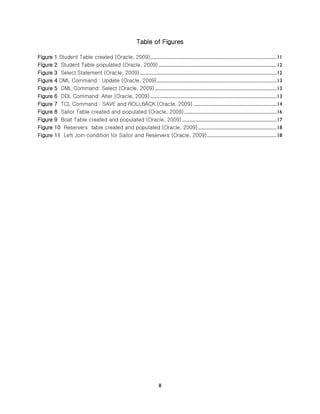
Table of Figures
Figure 1 Student Table created (Oracle, 2009)................................................................................................................11
Figure 2 Student Table populated (Oracle, 2009).........................................................................................................12
Figure 3 Select Statement (Oracle, 2009) .........................................................................................................................12
Figure 4 DML Command : Update (Oracle, 2009)..........................................................................................................13
Figure 5 DML Command: Select (Oracle, 2009)............................................................................................................13
Figure 6 DDL Command: Alter (Oracle, 2009) ................................................................................................................13
Figure 7 TCL Command : SAVE and ROLLBACK (Oracle, 2009) ..........................................................................14
Figure 8 Sailor Table created and populated (Oracle, 2009)..................................................................................16
Figure 9 Boat Table created and populated (Oracle, 2009)....................................................................................17
Figure 10 Reservers table created and populated (Oracle, 2009)......................................................................18
Figure 11 Left Join condition for Sailor and Reservers (Oracle, 2009)..............................................................18
9
ADVANCED DBMS
RESPONSE TO ASSIGNMENT – II
10
Question 1 Make a table using Oracle, SQL and made five entries and run five different
commands.
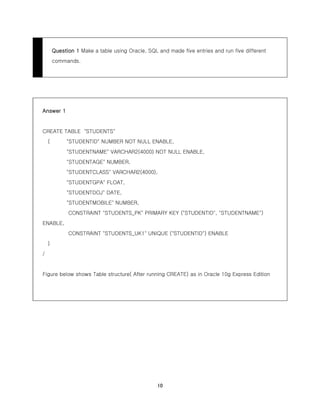
Answer 1
CREATE TABLE "STUDENTS"
( "STUDENTID" NUMBER NOT NULL ENABLE,
"STUDENTNAME" VARCHAR2(4000) NOT NULL ENABLE,
"STUDENTAGE" NUMBER,
"STUDENTCLASS" VARCHAR2(4000),
"STUDENTGPA" FLOAT,
"STUDENTDOJ" DATE,
"STUDENTMOBILE" NUMBER,
CONSTRAINT "STUDENTS_PK" PRIMARY KEY ("STUDENTID", "STUDENTNAME")
ENABLE,
CONSTRAINT "STUDENTS_UK1" UNIQUE ("STUDENTID") ENABLE
)
/
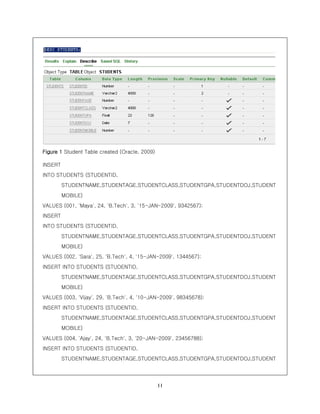
Figure below shows Table structure( After running CREATE) as in Oracle 10g Express Edition
11
Figure 1 Student Table created (Oracle, 2009)
INSERT
INTO STUDENTS (STUDENTID,
STUDENTNAME,STUDENTAGE,STUDENTCLASS,STUDENTGPA,STUDENTDOJ,STUDENT
MOBILE)
VALUES (001, 'Maya', 24, 'B.Tech', 3, '15-JAN-2009', 9342567);
INSERT
INTO STUDENTS (STUDENTID,
STUDENTNAME,STUDENTAGE,STUDENTCLASS,STUDENTGPA,STUDENTDOJ,STUDENT
MOBILE)
VALUES (002, 'Sara', 25, 'B.Tech', 4, '15-JAN-2009', 1344567);
INSERT INTO STUDENTS (STUDENTID,
STUDENTNAME,STUDENTAGE,STUDENTCLASS,STUDENTGPA,STUDENTDOJ,STUDENT
MOBILE)
VALUES (003, 'Vijay', 29, 'B.Tech', 4, '10-JAN-2009', 98345678);
INSERT INTO STUDENTS (STUDENTID,
STUDENTNAME,STUDENTAGE,STUDENTCLASS,STUDENTGPA,STUDENTDOJ,STUDENT
MOBILE)
VALUES (004, 'Ajay', 24, 'B.Tech', 3, '20-JAN-2009', 23456788);
INSERT INTO STUDENTS (STUDENTID,
STUDENTNAME,STUDENTAGE,STUDENTCLASS,STUDENTGPA,STUDENTDOJ,STUDENT
12
MOBILE)
VALUES (005, 'William', 24, 'B.Tech', 3.5, '10-JAN-2009', 1123456);
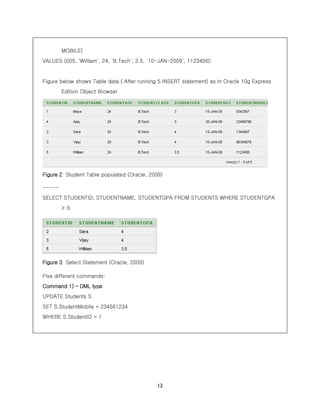
Figure below shows Table data ( After running 5 INSERT statement) as in Oracle 10g Express
Edition Object Browser
Figure 2 Student Table populated (Oracle, 2009)
-----
SELECT STUDENTID, STUDENTNAME, STUDENTGPA FROM STUDENTS WHERE STUDENTGPA
> 3;
Figure 3 Select Statement (Oracle, 2009)
Five different commands:
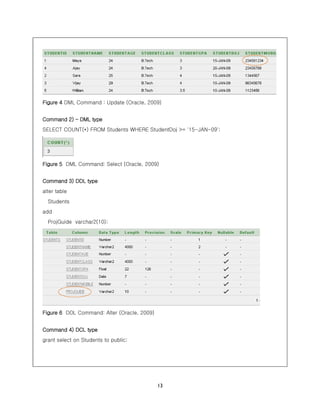
Command 1) – DML type
UPDATE Students S
SET S.StudentMobile = 234561234
WHERE S.StudentID = 1
13
Figure 4 DML Command : Update (Oracle, 2009)
Command 2) – DML type
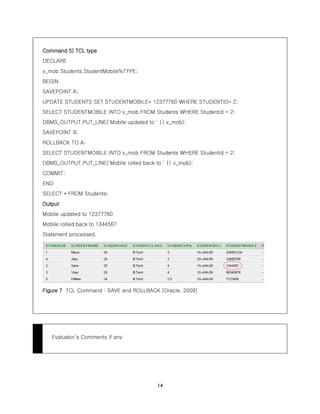
SELECT COUNT(*) FROM Students WHERE StudentDoj >= '15-JAN-09';
Figure 5 DML Command: Select (Oracle, 2009)
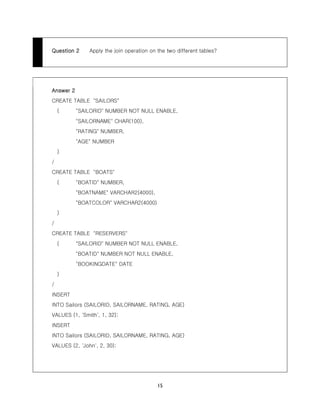
Command 3) DDL type
alter table
Students
add
ProjGuide varchar2(10);
Figure 6 DDL Command: Alter (Oracle, 2009)
Command 4) DCL type
grant select on Students to public;
14
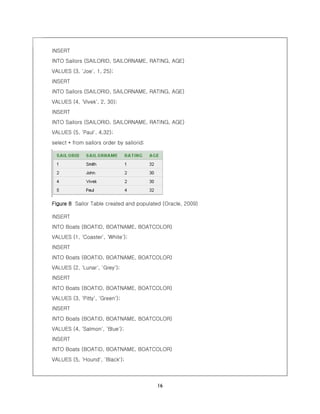
Command 5) TCL type
DECLARE
v_mob Students.StudentMobile%TYPE;
BEGIN
SAVEPOINT A;
UPDATE STUDENTS SET STUDENTMOBILE= 12377760 WHERE STUDENTID= 2;
SELECT STUDENTMOBILE INTO v_mob FROM Students WHERE Studentid = 2;
DBMS_OUTPUT.PUT_LINE('Mobile updated to ' || v_mob);
SAVEPOINT B;
ROLLBACK TO A;
SELECT STUDENTMOBILE INTO v_mob FROM Students WHERE Studentid = 2;
DBMS_OUTPUT.PUT_LINE('Mobile rolled back to ' || v_mob);
COMMIT;
END
SELECT * FROM Students;
Output:
Mobile updated to 12377760
Mobile rolled back to 1344567
Statement processed.
Figure 7 TCL Command : SAVE and ROLLBACK (Oracle, 2009)
Evaluator’s Comments if any:
15
Question 2 Apply the join operation on the two different tables?
Answer 2
CREATE TABLE "SAILORS"
( "SAILORID" NUMBER NOT NULL ENABLE,
"SAILORNAME" CHAR(100),
"RATING" NUMBER,
"AGE" NUMBER
)
/
CREATE TABLE "BOATS"
( "BOATID" NUMBER,
"BOATNAME" VARCHAR2(4000),
"BOATCOLOR" VARCHAR2(4000)
)
/
CREATE TABLE "RESERVERS"
( "SAILORID" NUMBER NOT NULL ENABLE,
"BOATID" NUMBER NOT NULL ENABLE,
"BOOKINGDATE" DATE
)
/
INSERT
INTO Sailors (SAILORID, SAILORNAME, RATING, AGE)
VALUES (1, 'Smith', 1, 32);
INSERT
INTO Sailors (SAILORID, SAILORNAME, RATING, AGE)
VALUES (2, 'John', 2, 30);
16
INSERT
INTO Sailors (SAILORID, SAILORNAME, RATING, AGE)
VALUES (3, 'Joe', 1, 25);
INSERT
INTO Sailors (SAILORID, SAILORNAME, RATING, AGE)
VALUES (4, 'Vivek', 2, 30);
INSERT
INTO Sailors (SAILORID, SAILORNAME, RATING, AGE)
VALUES (5, 'Paul', 4,32);
select * from sailors order by sailorid;
Figure 8 Sailor Table created and populated (Oracle, 2009)
INSERT
INTO Boats (BOATID, BOATNAME, BOATCOLOR)
VALUES (1, 'Coaster', 'White');
INSERT
INTO Boats (BOATID, BOATNAME, BOATCOLOR)
VALUES (2, 'Lunar', 'Grey');
INSERT
INTO Boats (BOATID, BOATNAME, BOATCOLOR)
VALUES (3, 'Pitty', 'Green');
INSERT
INTO Boats (BOATID, BOATNAME, BOATCOLOR)
VALUES (4, 'Salmon', 'Blue');
INSERT
INTO Boats (BOATID, BOATNAME, BOATCOLOR)
VALUES (5, 'Hound', 'Black');
17
select * from Boats order by boatid;
Figure 9 Boat Table created and populated (Oracle, 2009)
INSERT
INTO reservers (SAILORID, BOATID, BOOKINGDATE)
VALUES (1, 1, '16-JAN-2009');
INSERT
INTO reservers (SAILORID, BOATID, BOOKINGDATE)
VALUES (2, 1, '16-JAN-2009');
INSERT
INTO reservers (SAILORID, BOATID, BOOKINGDATE)
VALUES (3, 2, '17-JAN-2009');
INSERT
INTO reservers (SAILORID, BOATID, BOOKINGDATE)
VALUES (4, 2, '17-JAN-2009');
INSERT
INTO reservers (SAILORID, BOATID, BOOKINGDATE)
VALUES (5, 3, '16-JAN-2009');
INSERT
INTO reservers (SAILORID, BOATID, BOOKINGDATE)
VALUES (5, 4, '17-JAN-2009');
INSERT
INTO reservers (SAILORID, BOATID, BOOKINGDATE)
VALUES (5, 3, '18-JAN-2009');
INSERT
INTO reservers (SAILORID, BOATID, BOOKINGDATE)
18
VALUES (1, 3, '18-JAN-2009');
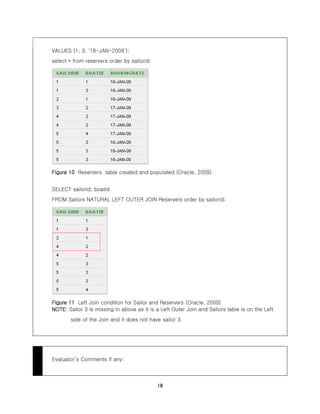
select * from reservers order by sailorid;
Figure 10 Reservers table created and populated (Oracle, 2009)
SELECT sailorid, boatid
FROM Sailors NATURAL LEFT OUTER JOIN Reservers order by sailorid;
Figure 11 Left Join condition for Sailor and Reservers (Oracle, 2009)
NOTE: Sailor 3 is missing in above as it is a Left Outer Join and Sailors table is on the Left
side of the Join and it does not have sailor 3.
Evaluator’s Comments if any:
19
Bibliography
Oracle. (2009). Oracle Database 10g Express edition. California, USA.

MTech - Advanced_DBMS_Assignment

  • 1.
    Advanced DBMS (Assignment –II) Submittedin partial fulfilment of the requirements for the degree of Master of Technology in Information Technology by Vijayananda D Mohire (Enrolment No.921DMTE0113) Information Technology Department Karnataka State Open University Manasagangotri, Mysore – 570006 Karnataka, India (2009)
  • 2.
  • 3.
  • 4.
    4 CERTIFICATE This is tocertify that the Assignment-II entitled (Advanced DBMS, subject code: MT14) submitted by Vijayananda D Mohire having Roll Number 921DMTE0113 for the partial fulfilment of the requirements of Master of Technology in Information Technology degree of Karnataka State Open University, Mysore, embodies the bonafide work done by him under my supervision. Place: ________________ Signature of the Internal Supervisor Name Date: ________________ Designation
  • 5.
    5 For Evaluation Question Number Maximum MarksMarks awarded Comments, if any 1 5 2 5 TOTAL 10 Evaluator’s Name and Signature Date
  • 6.
    6 Preface This document hasbeen prepared specially for the assignments of M.Tech – IT I Semester. This is mainly intended for evaluation of assignment of the academic M.Tech - IT, I semester. I have made a sincere attempt to gather and study the best answers to the assignment questions and have attempted the responses to the questions. I am confident that the evaluator’s will find this submission informative and evaluate based on the provide content. For clarity and ease of use there is a Table of contents and Evaluators section to make easier navigation and recording of the marks. A list of references has been provided in the last page – Bibliography that provides the source of information both internal and external. Evaluator’s are welcome to provide the necessary comments against each response, suitable space has been provided at the end of each response. I am grateful to the Infysys academy, Koramangala, Bangalore in making this a big success. Many thanks for the timely help and attention in making this possible within specified timeframe. Special thanks to Mr. Vivek and Mr. Prakash for their timely help and guidance. Candidate’s Name and Signature Date
  • 7.
    7 TABLE OF CONTENTS FOREVALUATION................................................................................................................................................................5 PREFACE...............................................................................................................................................................................6 QUESTION 1...................................................................................................................................................................... 10 ANSWER 1......................................................................................................................................................................... 10 QUESTION 2...................................................................................................................................................................... 15 ANSWER 2......................................................................................................................................................................... 15 BIBLIOGRAPHY.................................................................................................................................................................. 19
  • 8.
    8 Table of Figures Figure1 Student Table created (Oracle, 2009)................................................................................................................11 Figure 2 Student Table populated (Oracle, 2009).........................................................................................................12 Figure 3 Select Statement (Oracle, 2009) .........................................................................................................................12 Figure 4 DML Command : Update (Oracle, 2009)..........................................................................................................13 Figure 5 DML Command: Select (Oracle, 2009)............................................................................................................13 Figure 6 DDL Command: Alter (Oracle, 2009) ................................................................................................................13 Figure 7 TCL Command : SAVE and ROLLBACK (Oracle, 2009) ..........................................................................14 Figure 8 Sailor Table created and populated (Oracle, 2009)..................................................................................16 Figure 9 Boat Table created and populated (Oracle, 2009)....................................................................................17 Figure 10 Reservers table created and populated (Oracle, 2009)......................................................................18 Figure 11 Left Join condition for Sailor and Reservers (Oracle, 2009)..............................................................18
  • 9.
    9 ADVANCED DBMS RESPONSE TOASSIGNMENT – II
  • 10.
    10 Question 1 Makea table using Oracle, SQL and made five entries and run five different commands. Answer 1 CREATE TABLE "STUDENTS" ( "STUDENTID" NUMBER NOT NULL ENABLE, "STUDENTNAME" VARCHAR2(4000) NOT NULL ENABLE, "STUDENTAGE" NUMBER, "STUDENTCLASS" VARCHAR2(4000), "STUDENTGPA" FLOAT, "STUDENTDOJ" DATE, "STUDENTMOBILE" NUMBER, CONSTRAINT "STUDENTS_PK" PRIMARY KEY ("STUDENTID", "STUDENTNAME") ENABLE, CONSTRAINT "STUDENTS_UK1" UNIQUE ("STUDENTID") ENABLE ) / Figure below shows Table structure( After running CREATE) as in Oracle 10g Express Edition
  • 11.
    11 Figure 1 StudentTable created (Oracle, 2009) INSERT INTO STUDENTS (STUDENTID, STUDENTNAME,STUDENTAGE,STUDENTCLASS,STUDENTGPA,STUDENTDOJ,STUDENT MOBILE) VALUES (001, 'Maya', 24, 'B.Tech', 3, '15-JAN-2009', 9342567); INSERT INTO STUDENTS (STUDENTID, STUDENTNAME,STUDENTAGE,STUDENTCLASS,STUDENTGPA,STUDENTDOJ,STUDENT MOBILE) VALUES (002, 'Sara', 25, 'B.Tech', 4, '15-JAN-2009', 1344567); INSERT INTO STUDENTS (STUDENTID, STUDENTNAME,STUDENTAGE,STUDENTCLASS,STUDENTGPA,STUDENTDOJ,STUDENT MOBILE) VALUES (003, 'Vijay', 29, 'B.Tech', 4, '10-JAN-2009', 98345678); INSERT INTO STUDENTS (STUDENTID, STUDENTNAME,STUDENTAGE,STUDENTCLASS,STUDENTGPA,STUDENTDOJ,STUDENT MOBILE) VALUES (004, 'Ajay', 24, 'B.Tech', 3, '20-JAN-2009', 23456788); INSERT INTO STUDENTS (STUDENTID, STUDENTNAME,STUDENTAGE,STUDENTCLASS,STUDENTGPA,STUDENTDOJ,STUDENT
  • 12.
    12 MOBILE) VALUES (005, 'William',24, 'B.Tech', 3.5, '10-JAN-2009', 1123456); Figure below shows Table data ( After running 5 INSERT statement) as in Oracle 10g Express Edition Object Browser Figure 2 Student Table populated (Oracle, 2009) ----- SELECT STUDENTID, STUDENTNAME, STUDENTGPA FROM STUDENTS WHERE STUDENTGPA > 3; Figure 3 Select Statement (Oracle, 2009) Five different commands: Command 1) – DML type UPDATE Students S SET S.StudentMobile = 234561234 WHERE S.StudentID = 1
  • 13.
    13 Figure 4 DMLCommand : Update (Oracle, 2009) Command 2) – DML type SELECT COUNT(*) FROM Students WHERE StudentDoj >= '15-JAN-09'; Figure 5 DML Command: Select (Oracle, 2009) Command 3) DDL type alter table Students add ProjGuide varchar2(10); Figure 6 DDL Command: Alter (Oracle, 2009) Command 4) DCL type grant select on Students to public;
  • 14.
    14 Command 5) TCLtype DECLARE v_mob Students.StudentMobile%TYPE; BEGIN SAVEPOINT A; UPDATE STUDENTS SET STUDENTMOBILE= 12377760 WHERE STUDENTID= 2; SELECT STUDENTMOBILE INTO v_mob FROM Students WHERE Studentid = 2; DBMS_OUTPUT.PUT_LINE('Mobile updated to ' || v_mob); SAVEPOINT B; ROLLBACK TO A; SELECT STUDENTMOBILE INTO v_mob FROM Students WHERE Studentid = 2; DBMS_OUTPUT.PUT_LINE('Mobile rolled back to ' || v_mob); COMMIT; END SELECT * FROM Students; Output: Mobile updated to 12377760 Mobile rolled back to 1344567 Statement processed. Figure 7 TCL Command : SAVE and ROLLBACK (Oracle, 2009) Evaluator’s Comments if any:
  • 15.
    15 Question 2 Applythe join operation on the two different tables? Answer 2 CREATE TABLE "SAILORS" ( "SAILORID" NUMBER NOT NULL ENABLE, "SAILORNAME" CHAR(100), "RATING" NUMBER, "AGE" NUMBER ) / CREATE TABLE "BOATS" ( "BOATID" NUMBER, "BOATNAME" VARCHAR2(4000), "BOATCOLOR" VARCHAR2(4000) ) / CREATE TABLE "RESERVERS" ( "SAILORID" NUMBER NOT NULL ENABLE, "BOATID" NUMBER NOT NULL ENABLE, "BOOKINGDATE" DATE ) / INSERT INTO Sailors (SAILORID, SAILORNAME, RATING, AGE) VALUES (1, 'Smith', 1, 32); INSERT INTO Sailors (SAILORID, SAILORNAME, RATING, AGE) VALUES (2, 'John', 2, 30);
  • 16.
    16 INSERT INTO Sailors (SAILORID,SAILORNAME, RATING, AGE) VALUES (3, 'Joe', 1, 25); INSERT INTO Sailors (SAILORID, SAILORNAME, RATING, AGE) VALUES (4, 'Vivek', 2, 30); INSERT INTO Sailors (SAILORID, SAILORNAME, RATING, AGE) VALUES (5, 'Paul', 4,32); select * from sailors order by sailorid; Figure 8 Sailor Table created and populated (Oracle, 2009) INSERT INTO Boats (BOATID, BOATNAME, BOATCOLOR) VALUES (1, 'Coaster', 'White'); INSERT INTO Boats (BOATID, BOATNAME, BOATCOLOR) VALUES (2, 'Lunar', 'Grey'); INSERT INTO Boats (BOATID, BOATNAME, BOATCOLOR) VALUES (3, 'Pitty', 'Green'); INSERT INTO Boats (BOATID, BOATNAME, BOATCOLOR) VALUES (4, 'Salmon', 'Blue'); INSERT INTO Boats (BOATID, BOATNAME, BOATCOLOR) VALUES (5, 'Hound', 'Black');
  • 17.
    17 select * fromBoats order by boatid; Figure 9 Boat Table created and populated (Oracle, 2009) INSERT INTO reservers (SAILORID, BOATID, BOOKINGDATE) VALUES (1, 1, '16-JAN-2009'); INSERT INTO reservers (SAILORID, BOATID, BOOKINGDATE) VALUES (2, 1, '16-JAN-2009'); INSERT INTO reservers (SAILORID, BOATID, BOOKINGDATE) VALUES (3, 2, '17-JAN-2009'); INSERT INTO reservers (SAILORID, BOATID, BOOKINGDATE) VALUES (4, 2, '17-JAN-2009'); INSERT INTO reservers (SAILORID, BOATID, BOOKINGDATE) VALUES (5, 3, '16-JAN-2009'); INSERT INTO reservers (SAILORID, BOATID, BOOKINGDATE) VALUES (5, 4, '17-JAN-2009'); INSERT INTO reservers (SAILORID, BOATID, BOOKINGDATE) VALUES (5, 3, '18-JAN-2009'); INSERT INTO reservers (SAILORID, BOATID, BOOKINGDATE)
  • 18.
    18 VALUES (1, 3,'18-JAN-2009'); select * from reservers order by sailorid; Figure 10 Reservers table created and populated (Oracle, 2009) SELECT sailorid, boatid FROM Sailors NATURAL LEFT OUTER JOIN Reservers order by sailorid; Figure 11 Left Join condition for Sailor and Reservers (Oracle, 2009) NOTE: Sailor 3 is missing in above as it is a Left Outer Join and Sailors table is on the Left side of the Join and it does not have sailor 3. Evaluator’s Comments if any:
  • 19.
    19 Bibliography Oracle. (2009). OracleDatabase 10g Express edition. California, USA.