MTBC Cloud EMR
Presentation Outline
 Part 1:
Introduction of Cloud Computing
 Part 2:
Amazon Elastic Cloud Compute (EC2)
 Part 3:
Hosted MTBC-EMR
 Part 4:
EC2 Management Console & Hosted EMR Demo
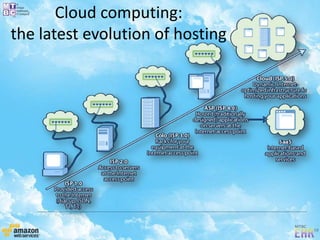
Cloud computing:
the latest evolution of hosting
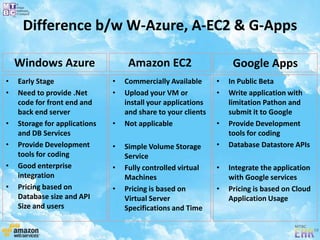
Difference b/w W-Azure, A-EC2 & G-Apps
• Early Stage
• Need to provide .Net
code for front end and
back end server
• Storage for applications
and DB Services
• Provide Development
tools for coding
• Good enterprise
integration
• Pricing based on
Database size and API
Size and users
• Commercially Available
• Upload your VM or
install your applications
and share to your clients
• Not applicable
• Simple Volume Storage
Service
• Fully controlled virtual
Machines
• Pricing is based on
Virtual Server
Specifications and Time
• In Public Beta
• Write application with
limitation Pathon and
submit it to Google
• Provide Development
tools for coding
• Database Datastore APIs
• Integrate the application
with Google services
• Pricing is based on Cloud
Application Usage
Windows Azure Amazon EC2 Google Apps
Highlights of Amazon Service
• Pay only for the resources that you actually consume
• Amazon Machine Image (AMI)
• Amazon Elastic Block Store (S3)
• Amazon Virtual Private Cloud (VPC)
• Elastic IP Addresses
• Amazon CloudWatch
• Elastic Load Balancing
• Security Groups
• VM Import
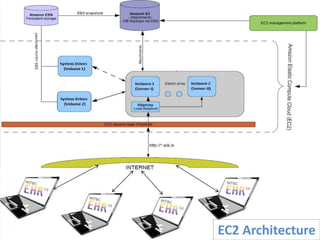
EC2 Architecture
Amazon Pricing Strategy
• Price is based on instance type, its specification
and region were it is running
• Instance Types:
– On Demand Instance
– Reserved Instance
– Spot Instance
• Instance Specification
– Standard Instance
– High Memory Instance
– High CPU Instance
• Instance Regions
– US East (Virginia)
– US West (Northern California)
– EU (Ireland)
– Asia Pacific (Singapore)
– Asia Pacific (Tokyo)
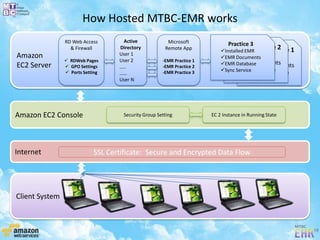
How Hosted MTBC-EMR works
Amazon
EC2 Server
Amazon EC2 Console
Client System
Internet
Practice 1
Installed EMR
EMR Documents
EMR Database
Sync Service
Practice 2
Installed EMR
EMR Documents
EMR Database
Sync Service
Practice 3
Installed EMR
EMR Documents
EMR Database
Sync Service
Microsoft
Remote App
-EMR Practice 1
-EMR Practice 2
-EMR Practice 3
Active
Directory
User 1
User 2
…..
……
User N
RD Web Access
& Firewall
 RDWeb Pages
 GPO Settings
 Ports Setting
Security Group Setting EC 2 Instance in Running State
SSL Certificate: Secure and Encrypted Data Flow
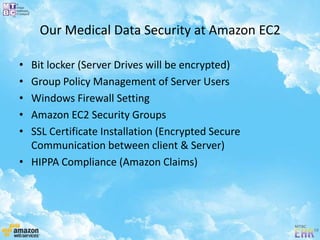
Our Medical Data Security at Amazon EC2
• Bit locker (Server Drives will be encrypted)
• Group Policy Management of Server Users
• Windows Firewall Setting
• Amazon EC2 Security Groups
• SSL Certificate Installation (Encrypted Secure
Communication between client & Server)
• HIPPA Compliance (Amazon Claims)
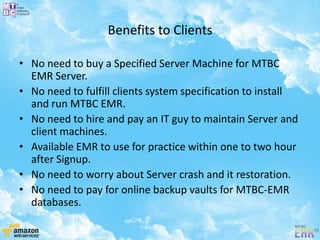
Benefits to Clients
• No need to buy a Specified Server Machine for MTBC
EMR Server.
• No need to fulfill clients system specification to install
and run MTBC EMR.
• No need to hire and pay an IT guy to maintain Server and
client machines.
• Available EMR to use for practice within one to two hour
after Signup.
• No need to worry about Server crash and it restoration.
• No need to pay for online backup vaults for MTBC-EMR
databases.
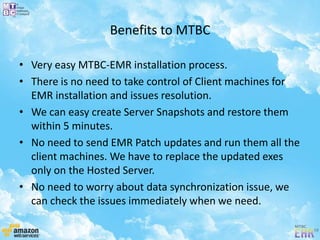
Benefits to MTBC
• Very easy MTBC-EMR installation process.
• There is no need to take control of Client machines for
EMR installation and issues resolution.
• We can easy create Server Snapshots and restore them
within 5 minutes.
• No need to send EMR Patch updates and run them all the
client machines. We have to replace the updated exes
only on the Hosted Server.
• No need to worry about data synchronization issue, we
can check the issues immediately when we need.
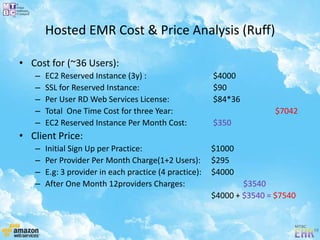
Hosted EMR Cost & Price Analysis (Ruff)
• Cost for (~36 Users):
– EC2 Reserved Instance (3y) : $4000
– SSL for Reserved Instance: $90
– Per User RD Web Services License: $84*36
– Total One Time Cost for three Year: $7042
– EC2 Reserved Instance Per Month Cost: $350
• Client Price:
– Initial Sign Up per Practice: $1000
– Per Provider Per Month Charge(1+2 Users): $295
– E.g: 3 provider in each practice (4 practice): $4000
– After One Month 12providers Charges: $3540
$4000 + $3540 = $7540
What we have done so for Hosted EMR!!!
Integration with MTBC Website
Online Hosted Demo EMR Package for New Clients
Demonstration
 Amazon Web Services Console Demo
 Hosted EMR Demo
References
• Amazon Elastic Compute Cloud (Amazon EC2)
– http://aws.amazon.com/ec2/
• What is cloud computing
– http://www.salesforce.com/in/cloudcomputing/
• HIPAA AND EC2
– http://aws.amazon.com/about-aws/whats-new/2009/04/06/whitepaper-hipaa/
– http://www.ehrdoctors.com/hippa-and-ec2/
• Windows Azure (cloud services operating system)
http://www.microsoft.com/windowsazure/windowsazure/
• Google App Engine
– http://code.google.com/appengine/business/
• Amazon EC2 Pricing Strategy
– http://aws.amazon.com/ec2/#pricing
• Amazon Elastic Block Store (EBS)
– http://aws.amazon.com/ebs/
• Amazon CloudFront
– http://aws.amazon.com/cloudfront/
• Hosted EMR
– demo.mtbc.com
Mtbc cloud ehr

Mtbc cloud ehr

  • 1.
  • 2.
    Presentation Outline  Part1: Introduction of Cloud Computing  Part 2: Amazon Elastic Cloud Compute (EC2)  Part 3: Hosted MTBC-EMR  Part 4: EC2 Management Console & Hosted EMR Demo
  • 4.
    Cloud computing: the latestevolution of hosting
  • 19.
    Difference b/w W-Azure,A-EC2 & G-Apps • Early Stage • Need to provide .Net code for front end and back end server • Storage for applications and DB Services • Provide Development tools for coding • Good enterprise integration • Pricing based on Database size and API Size and users • Commercially Available • Upload your VM or install your applications and share to your clients • Not applicable • Simple Volume Storage Service • Fully controlled virtual Machines • Pricing is based on Virtual Server Specifications and Time • In Public Beta • Write application with limitation Pathon and submit it to Google • Provide Development tools for coding • Database Datastore APIs • Integrate the application with Google services • Pricing is based on Cloud Application Usage Windows Azure Amazon EC2 Google Apps
  • 20.
    Highlights of AmazonService • Pay only for the resources that you actually consume • Amazon Machine Image (AMI) • Amazon Elastic Block Store (S3) • Amazon Virtual Private Cloud (VPC) • Elastic IP Addresses • Amazon CloudWatch • Elastic Load Balancing • Security Groups • VM Import
  • 21.
  • 22.
    Amazon Pricing Strategy •Price is based on instance type, its specification and region were it is running • Instance Types: – On Demand Instance – Reserved Instance – Spot Instance • Instance Specification – Standard Instance – High Memory Instance – High CPU Instance • Instance Regions – US East (Virginia) – US West (Northern California) – EU (Ireland) – Asia Pacific (Singapore) – Asia Pacific (Tokyo)
  • 23.
    How Hosted MTBC-EMRworks Amazon EC2 Server Amazon EC2 Console Client System Internet Practice 1 Installed EMR EMR Documents EMR Database Sync Service Practice 2 Installed EMR EMR Documents EMR Database Sync Service Practice 3 Installed EMR EMR Documents EMR Database Sync Service Microsoft Remote App -EMR Practice 1 -EMR Practice 2 -EMR Practice 3 Active Directory User 1 User 2 ….. …… User N RD Web Access & Firewall  RDWeb Pages  GPO Settings  Ports Setting Security Group Setting EC 2 Instance in Running State SSL Certificate: Secure and Encrypted Data Flow
  • 24.
    Our Medical DataSecurity at Amazon EC2 • Bit locker (Server Drives will be encrypted) • Group Policy Management of Server Users • Windows Firewall Setting • Amazon EC2 Security Groups • SSL Certificate Installation (Encrypted Secure Communication between client & Server) • HIPPA Compliance (Amazon Claims)
  • 25.
    Benefits to Clients •No need to buy a Specified Server Machine for MTBC EMR Server. • No need to fulfill clients system specification to install and run MTBC EMR. • No need to hire and pay an IT guy to maintain Server and client machines. • Available EMR to use for practice within one to two hour after Signup. • No need to worry about Server crash and it restoration. • No need to pay for online backup vaults for MTBC-EMR databases.
  • 26.
    Benefits to MTBC •Very easy MTBC-EMR installation process. • There is no need to take control of Client machines for EMR installation and issues resolution. • We can easy create Server Snapshots and restore them within 5 minutes. • No need to send EMR Patch updates and run them all the client machines. We have to replace the updated exes only on the Hosted Server. • No need to worry about data synchronization issue, we can check the issues immediately when we need.
  • 27.
    Hosted EMR Cost& Price Analysis (Ruff) • Cost for (~36 Users): – EC2 Reserved Instance (3y) : $4000 – SSL for Reserved Instance: $90 – Per User RD Web Services License: $84*36 – Total One Time Cost for three Year: $7042 – EC2 Reserved Instance Per Month Cost: $350 • Client Price: – Initial Sign Up per Practice: $1000 – Per Provider Per Month Charge(1+2 Users): $295 – E.g: 3 provider in each practice (4 practice): $4000 – After One Month 12providers Charges: $3540 $4000 + $3540 = $7540
  • 28.
    What we havedone so for Hosted EMR!!! Integration with MTBC Website Online Hosted Demo EMR Package for New Clients
  • 29.
    Demonstration  Amazon WebServices Console Demo  Hosted EMR Demo
  • 30.
    References • Amazon ElasticCompute Cloud (Amazon EC2) – http://aws.amazon.com/ec2/ • What is cloud computing – http://www.salesforce.com/in/cloudcomputing/ • HIPAA AND EC2 – http://aws.amazon.com/about-aws/whats-new/2009/04/06/whitepaper-hipaa/ – http://www.ehrdoctors.com/hippa-and-ec2/ • Windows Azure (cloud services operating system) http://www.microsoft.com/windowsazure/windowsazure/ • Google App Engine – http://code.google.com/appengine/business/ • Amazon EC2 Pricing Strategy – http://aws.amazon.com/ec2/#pricing • Amazon Elastic Block Store (EBS) – http://aws.amazon.com/ebs/ • Amazon CloudFront – http://aws.amazon.com/cloudfront/ • Hosted EMR – demo.mtbc.com