Silberschatz, Galvin and Gagne ©2013
Operating System Concepts – 9th
Edition
File System Fundamentals
10.2 Silberschatz, Galvin and Gagne ©2013
Operating System Concepts – 9th
Edition
Outlines
 What is a file? What is a directory? What are different types of files?
What are different attributes of a files/directories?
 What is a disk structure? What are disk blocks?
 What is a file system? How does the operating system manage file
system on disk? What is a boot block? What is a superblock?
 How are disk blocks allocated to files?
 Contiguous, Linked and Indexed block allocation
 What is a file control block (inode in Linux)? How does the inode
keep track of data blocks in UFS?
 Example File Systems:UNIX File System,Ext3 file system, NTFS
 File system limits (Maximum file name, Max number of files, Max file
size etc)
10.3 Silberschatz, Galvin and Gagne ©2013
Operating System Concepts – 9th
Edition
File Concept
 Contiguous logical address space
 Types:
 Data
 numeric
 character
 binary
 Program
 Contents defined by file’s creator
 Many types
 Consider text file, source file, executable file
 Hex File Viewer
 https://hexed.it/
 View sample ASCII file contents
10.4 Silberschatz, Galvin and Gagne ©2013
Operating System Concepts – 9th
Edition
File Attributes
 Name – only information kept in human-readable form
 Identifier – unique tag (number) identifies file within file system
 Type – needed for systems that support different types
 Location – pointer to file location on device
 Size – current file size
 Protection – controls who can do reading, writing, executing
 Time, date, and user identification – data for protection, security,
and usage monitoring
 Information about files are kept in the directory structure, which is
maintained on the disk
 Many variations, including extended file attributes such as file
checksum
 Information kept in the directory structure
10.5 Silberschatz, Galvin and Gagne ©2013
Operating System Concepts – 9th
Edition
File info Window on Mac OS X
10.6 Silberschatz, Galvin and Gagne ©2013
Operating System Concepts – 9th
Edition
File Types – Name, Extension
10.7 Silberschatz, Galvin and Gagne ©2013
Operating System Concepts – 9th
Edition
File Operations
 File is an abstract data type
 Create
 Write – at write pointer location
 Read – at read pointer location
 Reposition within file - seek
 Delete
 Truncate
 Open(Fi) – search the directory structure on disk for entry Fi,
and move the content of entry to memory
 Close (Fi) – move the content of entry Fi in memory to
directory structure on disk
10.8 Silberschatz, Galvin and Gagne ©2013
Operating System Concepts – 9th
Edition
Tree-Structured Directories
10.9 Silberschatz, Galvin and Gagne ©2013
Operating System Concepts – 9th
Edition
A Sample UNIX Directory Listing
• A tool to visualize contents of file system
• https://windirstat.net/
10.10 Silberschatz, Galvin and Gagne ©2013
Operating System Concepts – 9th
Edition
Hard Disk Internals (HDD)
10.11 Silberschatz, Galvin and Gagne ©2013
Operating System Concepts – 9th
Edition
Moving-head Disk Mechanism
10.12 Silberschatz, Galvin and Gagne ©2013
Operating System Concepts – 9th
Edition
10.13 Silberschatz, Galvin and Gagne ©2013
Operating System Concepts – 9th
Edition
Disk Structure
 Disk can be subdivided into partitions
 Disks or partitions can be RAID protected against failure
 Disk or partition can be used raw – without a file system, or
formatted with a file system
 Partitions also known as minidisks, slices
 Entity containing file system known as a volume
 Each volume containing file system also tracks that file system’s
info in device directory or volume table of contents
10.14 Silberschatz, Galvin and Gagne ©2013
Operating System Concepts – 9th
Edition
A Typical File-system Organization
10.15 Silberschatz, Galvin and Gagne ©2013
Operating System Concepts – 9th
Edition
Disk Management
 Low-level formatting, or physical formatting — Dividing a disk into
sectors that the disk controller can read and write
 Each sector can hold header information, plus data, plus error
correction code (ECC)
 Usually 512 bytes of data but can be selectable
 To use a disk to hold files, the operating system still needs to record its
own data structures on the disk
 Partition the disk into one or more groups of cylinders, each treated
as a logical disk
 Logical formatting or “making a file system”
 A partition (or disk) with a file system is called a volume
10.16 Silberschatz, Galvin and Gagne ©2013
Operating System Concepts – 9th
Edition
Disk Management (Cont.)
 Raw disk is a partition without a file system. Some OS provide
access to raw disk for apps that want to do their own block
management, keep OS out of the way (databases for example)
10.17 Silberschatz, Galvin and Gagne ©2013
Operating System Concepts – 9th
Edition
Disk Structure
 Disk drives are addressed as large 1-dimensional arrays of logical
blocks, where the logical block is the smallest unit of transfer
 Formatting creates logical blocks on physical media
 The 1-dimensional array of logical blocks is mapped into the
sectors of the disk sequentially
 Sector 0 is the first sector of the first track on the outermost
cylinder
 Mapping proceeds in order through that track, then the rest of
the tracks in that cylinder, and then through the rest of the
cylinders from outermost to innermost
 Logical to physical address should be easy
10.18 Silberschatz, Galvin and Gagne ©2013
Operating System Concepts – 9th
Edition
Disk As Array of Blocks
 Operating System views the disk as a large one-dimensional array of disk
blocks. The disk controller maps the disk blocks to appropriate sectors.
10.19 Silberschatz, Galvin and Gagne ©2013
Operating System Concepts – 9th
Edition
File-System Structure
 File system resides on secondary storage (disks)
 Provided user interface for storage
 Mapping files (logical sequence of blocks) to physical blocks
 Provides efficient and convenient access to disk by allowing
data to be stored, located retrieved easily
10.20 Silberschatz, Galvin and Gagne ©2013
Operating System Concepts – 9th
Edition
File-System Implementation
 Boot control block contains info needed by system to boot OS from that
volume
 Needed if volume contains OS, usually first block of volume
 Boot block is used to initialize the system. How?
 The bootstrap program is stored in ROM (BIOS)
 After hardware initialization, it looks up MBR (master boot record) stored
on the disk to identify the bootable partition
 It then executes the bootstrap loader program stored in boot control
block on the bootable partition
 Volume control block (superblock, master file table) contains volume details
 Total # of blocks, # of free blocks, block size, free block pointers or array
 File control block – storage structure consisting of information about a file (also
knowns as inode in UNIX)
 Directory structure organizes the files
 Names and inode numbers, master file table
10.21 Silberschatz, Galvin and Gagne ©2013
Operating System Concepts – 9th
Edition
Booting from a Disk in Windows
10.22 Silberschatz, Galvin and Gagne ©2013
Operating System Concepts – 9th
Edition
File-System Implementation (Cont.)
 Per-file File Control Block (FCB) contains many details about
the file
 inode number, permissions, size, dates
 NFTS stores into in master file table using relational DB
structures
10.23 Silberschatz, Galvin and Gagne ©2013
Operating System Concepts – 9th
Edition
Allocation Methods - Contiguous
 An allocation method refers to how disk blocks are allocated for
files:
 Contiguous allocation – each file occupies set of contiguous
blocks
 Best performance in most cases
 Simple – only starting location (block #) and length (number
of blocks) are required
 Problems include finding space for file, knowing file size,
external fragmentation, need for compaction off-line
(downtime) or on-line
10.24 Silberschatz, Galvin and Gagne ©2013
Operating System Concepts – 9th
Edition
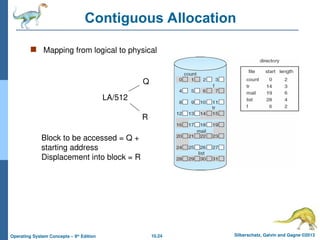
Contiguous Allocation
 Mapping from logical to physical
LA/512
Q
R
Block to be accessed = Q +
starting address
Displacement into block = R
10.25 Silberschatz, Galvin and Gagne ©2013
Operating System Concepts – 9th
Edition
Allocation Methods - Linked
 Linked allocation – each file a linked list of blocks
 File ends at nil pointer
 No external fragmentation
 Each block contains pointer to next block
 No compaction, external fragmentation
 Free space management system called when new block
needed
 Improve efficiency by clustering blocks into groups but
increases internal fragmentation
 Reliability can be a problem
 Locating a block can take many I/Os and disk seeks
10.26 Silberschatz, Galvin and Gagne ©2013
Operating System Concepts – 9th
Edition
Linked Allocation
10.27 Silberschatz, Galvin and Gagne ©2013
Operating System Concepts – 9th
Edition
Allocation Methods – Linked (Cont.)
 FAT (File Allocation Table) variation
 Beginning of volume has table, indexed by block number
 Much like a linked list, but faster on disk and cacheable
 New block allocation simple
10.28 Silberschatz, Galvin and Gagne ©2013
Operating System Concepts – 9th
Edition
File-Allocation Table
10.29 Silberschatz, Galvin and Gagne ©2013
Operating System Concepts – 9th
Edition
Allocation Methods - Indexed
 Indexed allocation
 Each file has its own index block(s) of pointers to its data blocks
 Logical view
index table
10.30 Silberschatz, Galvin and Gagne ©2013
Operating System Concepts – 9th
Edition
Example of Indexed Allocation
10.31 Silberschatz, Galvin and Gagne ©2013
Operating System Concepts – 9th
Edition
Comparison of File Systems
 FAT16 vs FAT32
 https://technet.microsoft.com/en-us/library/cc940351.aspx
 https://web.archive.org/web/20060307082555/http://
www.microsoft.com/technet/prodtechnol/winxppro/reskit/
c13621675.mspx
 Comparison of File Systems
 https://en.wikipedia.org/wiki/Comparison_of_file_systems
 EXT4 File System Structure:
 https://selvamvasu.wordpress.com/2014/08/01/inode-vs-ext4/
 https://kernelnewbies.org/Ext4
 https://opensource.com/article/17/5/introduction-ext4-filesystem
 https://metebalci.com/blog/a-minimum-complete-tutorial-of-linux-ext4-
file-system/
 NTFS:
 http://www.ntfs.com/ntfs.htm
 https://www.ntfs.com/ntfs_basics.htm
Silberschatz, Galvin and Gagne ©2013
Operating System Concepts – 9th
Edition
End of Chapter 10
10.33 Silberschatz, Galvin and Gagne ©2013
Operating System Concepts – 9th
Edition
Layout of UNIX File System (UFS)
10.34 Silberschatz, Galvin and Gagne ©2013
Operating System Concepts – 9th
Edition
Inode – Data Block Addressing in UFS
10.35 Silberschatz, Galvin and Gagne ©2013
Operating System Concepts – 9th
Edition
Overview of Mass Storage Structure
 Magnetic disks provide bulk of secondary storage of modern computers
 Drives rotate at 60 to 250 times per second
 Transfer rate is rate at which data flow between drive and computer
 Positioning time (random-access time) is time to move disk arm to
desired cylinder (seek time) and time for desired sector to rotate
under the disk head (rotational latency)
 Head crash results from disk head making contact with the disk
surface -- That’s bad
 Disks can be removable
 Drive attached to computer via I/O bus
 Busses vary, including EIDE, ATA, SATA, USB, Fibre Channel,
SCSI, SAS, Firewire
 Host controller in computer uses bus to talk to disk controller built
into drive or storage array
10.36 Silberschatz, Galvin and Gagne ©2013
Operating System Concepts – 9th
Edition
Hard Disks
 Platters range from .85” to 14” (historically)
 Commonly 3.5”, 2.5”, and 1.8”
 Range from 30GB to 3TB per drive
 Performance
 Transfer Rate – theoretical – 6 Gb/sec
 Effective Transfer Rate – real –
1Gb/sec
 Seek time from 3ms to 12ms – 9ms
common for desktop drives
 Average seek time measured or
calculated based on 1/3 of tracks
 Latency based on spindle speed
 1 / (RPM / 60) = 60 / RPM
 Average latency = ½ latency
(From Wikipedia)
10.37 Silberschatz, Galvin and Gagne ©2013
Operating System Concepts – 9th
Edition
The First Commercial Disk Drive
1956
IBM RAMDAC computer
included the IBM Model
350 disk storage system
5M (7 bit) characters
50 x 24” platters
Access time = < 1 second
10.38 Silberschatz, Galvin and Gagne ©2013
Operating System Concepts – 9th
Edition
Solid-State Disks
 Nonvolatile memory used like a hard drive
 Many technology variations
 Can be more reliable than HDDs
 More expensive per MB
 Maybe have shorter life span
 Less capacity
 But much faster
 Busses can be too slow -> connect directly to PCI for example
 No moving parts, so no seek time or rotational latency
10.39 Silberschatz, Galvin and Gagne ©2013
Operating System Concepts – 9th
Edition
Flash Memory
10.40 Silberschatz, Galvin and Gagne ©2013
Operating System Concepts – 9th
Edition
Attribute SSD (Solid State Drive) HDD (Hard Disk Drive)
Power
Draw /
Battery
Life
Less power draw, averages 2 – 3
watts, resulting in 30+ minute
battery boost
More power draw, averages 6 – 7
watts and therefore uses more
battery
Cost Expensive, roughly $0.20 per
gigabyte (based on buying a 1TB
drive)
Only around $0.03 per gigabyte,
very cheap (buying a 4TB model)
Capacity Typically not larger than 1TB for
notebook size drives; 4TB max
for desktops
Typically around 500GB and 2TB
maximum for notebook size
drives; 10TB max for desktops
Operating
System
Boot Time
Around 10-13 seconds average
bootup time
Around 30-40 seconds average
bootup time
Noise There are no moving parts and as
such no sound
Audible clicks and spinning can
be heard
Vibration No vibration as there are no
moving parts
The spinning of the platters can
sometimes result in vibration
Heat
Produced
Lower power draw and no moving
parts so little heat is produced
HDD doesn’t produce much heat,
but it will have a measurable
amount more heat than an SSD
due to moving parts and higher
power draw
Failure
Rate
Mean time between failure rate of
2.0 million hours
Mean time between failure rate of
1.5 million hours
File Copy /
Write
Speed
Generally above 200 MB/s and up
to 550 MB/s for cutting edge
drives
The range can be anywhere from
50 – 120MB / s
Encryption Full Disk Encryption
(FDE) Supported on some
models
Full Disk Encryption (FDE)
Supported on some models
File
Opening
Speed
Up to 30% faster than HDD Slower than SSD
Magnetism
Affected?
An SSD is safe from any effects
of magnetism
Magnets can erase data
 Comparison of HDD
and SSD

File_System_Fundamentals savitchAbsJavaPPT Java Programming Part 2

  • 1.
    Silberschatz, Galvin andGagne ©2013 Operating System Concepts – 9th Edition File System Fundamentals
  • 2.
    10.2 Silberschatz, Galvinand Gagne ©2013 Operating System Concepts – 9th Edition Outlines  What is a file? What is a directory? What are different types of files? What are different attributes of a files/directories?  What is a disk structure? What are disk blocks?  What is a file system? How does the operating system manage file system on disk? What is a boot block? What is a superblock?  How are disk blocks allocated to files?  Contiguous, Linked and Indexed block allocation  What is a file control block (inode in Linux)? How does the inode keep track of data blocks in UFS?  Example File Systems:UNIX File System,Ext3 file system, NTFS  File system limits (Maximum file name, Max number of files, Max file size etc)
  • 3.
    10.3 Silberschatz, Galvinand Gagne ©2013 Operating System Concepts – 9th Edition File Concept  Contiguous logical address space  Types:  Data  numeric  character  binary  Program  Contents defined by file’s creator  Many types  Consider text file, source file, executable file  Hex File Viewer  https://hexed.it/  View sample ASCII file contents
  • 4.
    10.4 Silberschatz, Galvinand Gagne ©2013 Operating System Concepts – 9th Edition File Attributes  Name – only information kept in human-readable form  Identifier – unique tag (number) identifies file within file system  Type – needed for systems that support different types  Location – pointer to file location on device  Size – current file size  Protection – controls who can do reading, writing, executing  Time, date, and user identification – data for protection, security, and usage monitoring  Information about files are kept in the directory structure, which is maintained on the disk  Many variations, including extended file attributes such as file checksum  Information kept in the directory structure
  • 5.
    10.5 Silberschatz, Galvinand Gagne ©2013 Operating System Concepts – 9th Edition File info Window on Mac OS X
  • 6.
    10.6 Silberschatz, Galvinand Gagne ©2013 Operating System Concepts – 9th Edition File Types – Name, Extension
  • 7.
    10.7 Silberschatz, Galvinand Gagne ©2013 Operating System Concepts – 9th Edition File Operations  File is an abstract data type  Create  Write – at write pointer location  Read – at read pointer location  Reposition within file - seek  Delete  Truncate  Open(Fi) – search the directory structure on disk for entry Fi, and move the content of entry to memory  Close (Fi) – move the content of entry Fi in memory to directory structure on disk
  • 8.
    10.8 Silberschatz, Galvinand Gagne ©2013 Operating System Concepts – 9th Edition Tree-Structured Directories
  • 9.
    10.9 Silberschatz, Galvinand Gagne ©2013 Operating System Concepts – 9th Edition A Sample UNIX Directory Listing • A tool to visualize contents of file system • https://windirstat.net/
  • 10.
    10.10 Silberschatz, Galvinand Gagne ©2013 Operating System Concepts – 9th Edition Hard Disk Internals (HDD)
  • 11.
    10.11 Silberschatz, Galvinand Gagne ©2013 Operating System Concepts – 9th Edition Moving-head Disk Mechanism
  • 12.
    10.12 Silberschatz, Galvinand Gagne ©2013 Operating System Concepts – 9th Edition
  • 13.
    10.13 Silberschatz, Galvinand Gagne ©2013 Operating System Concepts – 9th Edition Disk Structure  Disk can be subdivided into partitions  Disks or partitions can be RAID protected against failure  Disk or partition can be used raw – without a file system, or formatted with a file system  Partitions also known as minidisks, slices  Entity containing file system known as a volume  Each volume containing file system also tracks that file system’s info in device directory or volume table of contents
  • 14.
    10.14 Silberschatz, Galvinand Gagne ©2013 Operating System Concepts – 9th Edition A Typical File-system Organization
  • 15.
    10.15 Silberschatz, Galvinand Gagne ©2013 Operating System Concepts – 9th Edition Disk Management  Low-level formatting, or physical formatting — Dividing a disk into sectors that the disk controller can read and write  Each sector can hold header information, plus data, plus error correction code (ECC)  Usually 512 bytes of data but can be selectable  To use a disk to hold files, the operating system still needs to record its own data structures on the disk  Partition the disk into one or more groups of cylinders, each treated as a logical disk  Logical formatting or “making a file system”  A partition (or disk) with a file system is called a volume
  • 16.
    10.16 Silberschatz, Galvinand Gagne ©2013 Operating System Concepts – 9th Edition Disk Management (Cont.)  Raw disk is a partition without a file system. Some OS provide access to raw disk for apps that want to do their own block management, keep OS out of the way (databases for example)
  • 17.
    10.17 Silberschatz, Galvinand Gagne ©2013 Operating System Concepts – 9th Edition Disk Structure  Disk drives are addressed as large 1-dimensional arrays of logical blocks, where the logical block is the smallest unit of transfer  Formatting creates logical blocks on physical media  The 1-dimensional array of logical blocks is mapped into the sectors of the disk sequentially  Sector 0 is the first sector of the first track on the outermost cylinder  Mapping proceeds in order through that track, then the rest of the tracks in that cylinder, and then through the rest of the cylinders from outermost to innermost  Logical to physical address should be easy
  • 18.
    10.18 Silberschatz, Galvinand Gagne ©2013 Operating System Concepts – 9th Edition Disk As Array of Blocks  Operating System views the disk as a large one-dimensional array of disk blocks. The disk controller maps the disk blocks to appropriate sectors.
  • 19.
    10.19 Silberschatz, Galvinand Gagne ©2013 Operating System Concepts – 9th Edition File-System Structure  File system resides on secondary storage (disks)  Provided user interface for storage  Mapping files (logical sequence of blocks) to physical blocks  Provides efficient and convenient access to disk by allowing data to be stored, located retrieved easily
  • 20.
    10.20 Silberschatz, Galvinand Gagne ©2013 Operating System Concepts – 9th Edition File-System Implementation  Boot control block contains info needed by system to boot OS from that volume  Needed if volume contains OS, usually first block of volume  Boot block is used to initialize the system. How?  The bootstrap program is stored in ROM (BIOS)  After hardware initialization, it looks up MBR (master boot record) stored on the disk to identify the bootable partition  It then executes the bootstrap loader program stored in boot control block on the bootable partition  Volume control block (superblock, master file table) contains volume details  Total # of blocks, # of free blocks, block size, free block pointers or array  File control block – storage structure consisting of information about a file (also knowns as inode in UNIX)  Directory structure organizes the files  Names and inode numbers, master file table
  • 21.
    10.21 Silberschatz, Galvinand Gagne ©2013 Operating System Concepts – 9th Edition Booting from a Disk in Windows
  • 22.
    10.22 Silberschatz, Galvinand Gagne ©2013 Operating System Concepts – 9th Edition File-System Implementation (Cont.)  Per-file File Control Block (FCB) contains many details about the file  inode number, permissions, size, dates  NFTS stores into in master file table using relational DB structures
  • 23.
    10.23 Silberschatz, Galvinand Gagne ©2013 Operating System Concepts – 9th Edition Allocation Methods - Contiguous  An allocation method refers to how disk blocks are allocated for files:  Contiguous allocation – each file occupies set of contiguous blocks  Best performance in most cases  Simple – only starting location (block #) and length (number of blocks) are required  Problems include finding space for file, knowing file size, external fragmentation, need for compaction off-line (downtime) or on-line
  • 24.
    10.24 Silberschatz, Galvinand Gagne ©2013 Operating System Concepts – 9th Edition Contiguous Allocation  Mapping from logical to physical LA/512 Q R Block to be accessed = Q + starting address Displacement into block = R
  • 25.
    10.25 Silberschatz, Galvinand Gagne ©2013 Operating System Concepts – 9th Edition Allocation Methods - Linked  Linked allocation – each file a linked list of blocks  File ends at nil pointer  No external fragmentation  Each block contains pointer to next block  No compaction, external fragmentation  Free space management system called when new block needed  Improve efficiency by clustering blocks into groups but increases internal fragmentation  Reliability can be a problem  Locating a block can take many I/Os and disk seeks
  • 26.
    10.26 Silberschatz, Galvinand Gagne ©2013 Operating System Concepts – 9th Edition Linked Allocation
  • 27.
    10.27 Silberschatz, Galvinand Gagne ©2013 Operating System Concepts – 9th Edition Allocation Methods – Linked (Cont.)  FAT (File Allocation Table) variation  Beginning of volume has table, indexed by block number  Much like a linked list, but faster on disk and cacheable  New block allocation simple
  • 28.
    10.28 Silberschatz, Galvinand Gagne ©2013 Operating System Concepts – 9th Edition File-Allocation Table
  • 29.
    10.29 Silberschatz, Galvinand Gagne ©2013 Operating System Concepts – 9th Edition Allocation Methods - Indexed  Indexed allocation  Each file has its own index block(s) of pointers to its data blocks  Logical view index table
  • 30.
    10.30 Silberschatz, Galvinand Gagne ©2013 Operating System Concepts – 9th Edition Example of Indexed Allocation
  • 31.
    10.31 Silberschatz, Galvinand Gagne ©2013 Operating System Concepts – 9th Edition Comparison of File Systems  FAT16 vs FAT32  https://technet.microsoft.com/en-us/library/cc940351.aspx  https://web.archive.org/web/20060307082555/http:// www.microsoft.com/technet/prodtechnol/winxppro/reskit/ c13621675.mspx  Comparison of File Systems  https://en.wikipedia.org/wiki/Comparison_of_file_systems  EXT4 File System Structure:  https://selvamvasu.wordpress.com/2014/08/01/inode-vs-ext4/  https://kernelnewbies.org/Ext4  https://opensource.com/article/17/5/introduction-ext4-filesystem  https://metebalci.com/blog/a-minimum-complete-tutorial-of-linux-ext4- file-system/  NTFS:  http://www.ntfs.com/ntfs.htm  https://www.ntfs.com/ntfs_basics.htm
  • 32.
    Silberschatz, Galvin andGagne ©2013 Operating System Concepts – 9th Edition End of Chapter 10
  • 33.
    10.33 Silberschatz, Galvinand Gagne ©2013 Operating System Concepts – 9th Edition Layout of UNIX File System (UFS)
  • 34.
    10.34 Silberschatz, Galvinand Gagne ©2013 Operating System Concepts – 9th Edition Inode – Data Block Addressing in UFS
  • 35.
    10.35 Silberschatz, Galvinand Gagne ©2013 Operating System Concepts – 9th Edition Overview of Mass Storage Structure  Magnetic disks provide bulk of secondary storage of modern computers  Drives rotate at 60 to 250 times per second  Transfer rate is rate at which data flow between drive and computer  Positioning time (random-access time) is time to move disk arm to desired cylinder (seek time) and time for desired sector to rotate under the disk head (rotational latency)  Head crash results from disk head making contact with the disk surface -- That’s bad  Disks can be removable  Drive attached to computer via I/O bus  Busses vary, including EIDE, ATA, SATA, USB, Fibre Channel, SCSI, SAS, Firewire  Host controller in computer uses bus to talk to disk controller built into drive or storage array
  • 36.
    10.36 Silberschatz, Galvinand Gagne ©2013 Operating System Concepts – 9th Edition Hard Disks  Platters range from .85” to 14” (historically)  Commonly 3.5”, 2.5”, and 1.8”  Range from 30GB to 3TB per drive  Performance  Transfer Rate – theoretical – 6 Gb/sec  Effective Transfer Rate – real – 1Gb/sec  Seek time from 3ms to 12ms – 9ms common for desktop drives  Average seek time measured or calculated based on 1/3 of tracks  Latency based on spindle speed  1 / (RPM / 60) = 60 / RPM  Average latency = ½ latency (From Wikipedia)
  • 37.
    10.37 Silberschatz, Galvinand Gagne ©2013 Operating System Concepts – 9th Edition The First Commercial Disk Drive 1956 IBM RAMDAC computer included the IBM Model 350 disk storage system 5M (7 bit) characters 50 x 24” platters Access time = < 1 second
  • 38.
    10.38 Silberschatz, Galvinand Gagne ©2013 Operating System Concepts – 9th Edition Solid-State Disks  Nonvolatile memory used like a hard drive  Many technology variations  Can be more reliable than HDDs  More expensive per MB  Maybe have shorter life span  Less capacity  But much faster  Busses can be too slow -> connect directly to PCI for example  No moving parts, so no seek time or rotational latency
  • 39.
    10.39 Silberschatz, Galvinand Gagne ©2013 Operating System Concepts – 9th Edition Flash Memory
  • 40.
    10.40 Silberschatz, Galvinand Gagne ©2013 Operating System Concepts – 9th Edition Attribute SSD (Solid State Drive) HDD (Hard Disk Drive) Power Draw / Battery Life Less power draw, averages 2 – 3 watts, resulting in 30+ minute battery boost More power draw, averages 6 – 7 watts and therefore uses more battery Cost Expensive, roughly $0.20 per gigabyte (based on buying a 1TB drive) Only around $0.03 per gigabyte, very cheap (buying a 4TB model) Capacity Typically not larger than 1TB for notebook size drives; 4TB max for desktops Typically around 500GB and 2TB maximum for notebook size drives; 10TB max for desktops Operating System Boot Time Around 10-13 seconds average bootup time Around 30-40 seconds average bootup time Noise There are no moving parts and as such no sound Audible clicks and spinning can be heard Vibration No vibration as there are no moving parts The spinning of the platters can sometimes result in vibration Heat Produced Lower power draw and no moving parts so little heat is produced HDD doesn’t produce much heat, but it will have a measurable amount more heat than an SSD due to moving parts and higher power draw Failure Rate Mean time between failure rate of 2.0 million hours Mean time between failure rate of 1.5 million hours File Copy / Write Speed Generally above 200 MB/s and up to 550 MB/s for cutting edge drives The range can be anywhere from 50 – 120MB / s Encryption Full Disk Encryption (FDE) Supported on some models Full Disk Encryption (FDE) Supported on some models File Opening Speed Up to 30% faster than HDD Slower than SSD Magnetism Affected? An SSD is safe from any effects of magnetism Magnets can erase data  Comparison of HDD and SSD