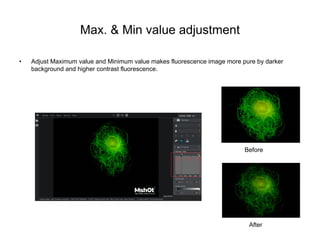
Max. & Min value adjustment
• Adjust Maximum value and Minimum value makes fluorescence image more pure by darker
background and higher contrast fluorescence.
Before
After
Merge Dynamic Fluorescence
• Merge fluorescence multi-images under live view, there are two applications.
• One is overlying multi-images of the same fluorescence to increase its brightness.
• Another is merging different channel fluorescence images under live.
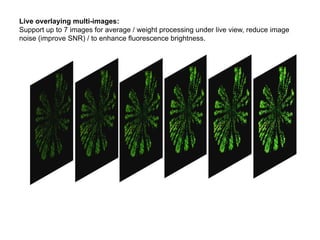
Live overlaying multi-images:
Support up to 7 images for average / weight processing under live view, reduce image
noise (improve SNR) / to enhance fluorescence brightness.
Quick merge different channel dynamic fluorescence images
Merging under live view and in time
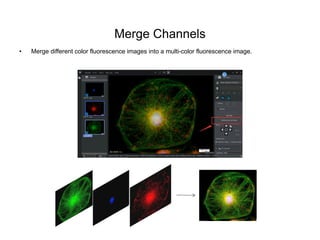
Merge Channels
• Merge different color fluorescence images into a multi-color fluorescence image.
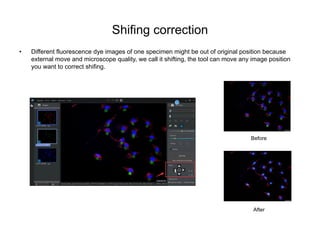
Shifing correction
• Different fluorescence dye images of one specimen might be out of original position because
external move and microscope quality, we call it shifting, the tool can move any image position
you want to correct shifing.
Before
After
Quickly dye
• Just choose R/G/B channel to dye the monochrome fluorescence image for quilkly observation.
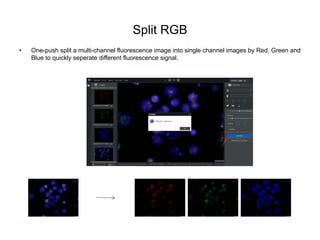
Split RGB
• One-push split a multi-channel fluorescence image into single channel images by Red, Green and
Blue to quickly seperate different fluorescence signal.
Line profile
• Show light intensity of different speciment area.

MSHOT fluorescence microscope imaging software

  • 2.
    Max. & Minvalue adjustment • Adjust Maximum value and Minimum value makes fluorescence image more pure by darker background and higher contrast fluorescence. Before After
  • 3.
    Merge Dynamic Fluorescence •Merge fluorescence multi-images under live view, there are two applications. • One is overlying multi-images of the same fluorescence to increase its brightness. • Another is merging different channel fluorescence images under live.
  • 4.
    Live overlaying multi-images: Supportup to 7 images for average / weight processing under live view, reduce image noise (improve SNR) / to enhance fluorescence brightness.
  • 5.
    Quick merge differentchannel dynamic fluorescence images Merging under live view and in time
  • 6.
    Merge Channels • Mergedifferent color fluorescence images into a multi-color fluorescence image.
  • 7.
    Shifing correction • Differentfluorescence dye images of one specimen might be out of original position because external move and microscope quality, we call it shifting, the tool can move any image position you want to correct shifing. Before After
  • 8.
    Quickly dye • Justchoose R/G/B channel to dye the monochrome fluorescence image for quilkly observation.
  • 9.
    Split RGB • One-pushsplit a multi-channel fluorescence image into single channel images by Red, Green and Blue to quickly seperate different fluorescence signal.
  • 10.
    Line profile • Showlight intensity of different speciment area.