Capitalware's MQ Technical Conference v2.0.1.6
IBM MQ Security:
Deep dive including AMS
Rob Parker
Capitalware's MQ Technical Conference v2.0.1.6
Important Disclaimer
 THE INFORMATION CONTAINED IN THIS PRESENTATION IS PROVIDED FOR INFORMATIONAL
PURPOSES ONLY.
 WHILE EFFORTS WERE MADE TO VERIFY THE COMPLETENESS AND ACCURACY OF THE
INFORMATION CONTAINED IN THIS PRESENTATION, IT IS PROVIDED “AS IS”, WITHOUT
WARRANTY OF ANY KIND, EXPRESS OR IMPLIED.
 IN ADDITION, THIS INFORMATION IS BASED ON IBM’S CURRENT PRODUCT PLANS AND
STRATEGY, WHICH ARE SUBJECT TO CHANGE BY IBM WITHOUT NOTICE.
 IBM SHALL NOT BE RESPONSIBLE FOR ANY DAMAGES ARISING OUT OF THE USE OF, OR
OTHERWISE RELATED TO, THIS PRESENTATION OR ANY OTHER DOCUMENTATION.
 NOTHING CONTAINED IN THIS PRESENTATION IS INTENDED TO, OR SHALL HAVE THE
EFFECT OF:
 CREATING ANY WARRANTY OR REPRESENTATION FROM IBM (OR ITS AFFILIATES OR ITS OR THEIR
SUPPLIERS AND/OR LICENSORS); OR
 ALTERING THE TERMS AND CONDITIONS OF THE APPLICABLE LICENSE AGREEMENT GOVERNING THE
USE OF IBM SOFTWARE.
 Information regarding potential future products is intended to outline our general product
direction and it should not be relied on in making a purchasing decision. The information
mentioned regarding potential future products is not a commitment, promise, or legal obligation
to deliver any material, code or functionality. Information about potential future products may
not be incorporated into any contract. The development, release, and timing of any future
features or functionality described for our products remains at our sole discretion.
2
Capitalware's MQ Technical Conference v2.0.1.6
Agenda
 AMS
 Recap
 Important considerations
 Message format
 When will my message be protected?
 Errors
 Implementation
 Channel Authentication
 Details
 Configuration
 Relation to connection authentication
 Channel authentication recap
 Relation to Authorization
 Authorization recap
Capitalware's MQ Technical Conference v2.0.1.6
AMS
Capitalware's MQ Technical Conference v2.0.1.6
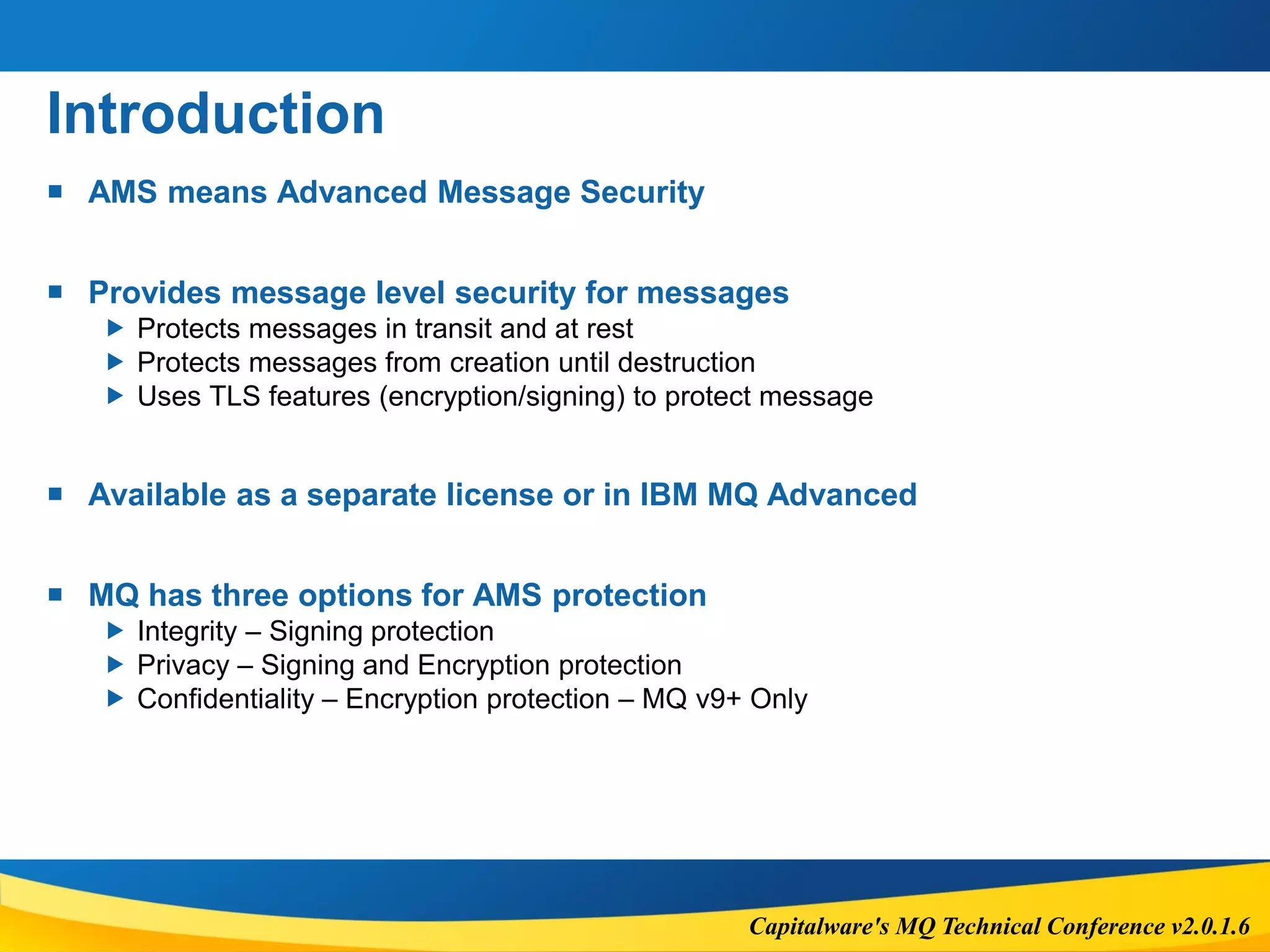
Introduction
 AMS means Advanced Message Security
 Provides message level security for messages
 Protects messages in transit and at rest
 Protects messages from creation until destruction
 Uses TLS features (encryption/signing) to protect message
 Available as a separate license or in IBM MQ Advanced
 MQ has three options for AMS protection
 Integrity – Signing protection
 Privacy – Signing and Encryption protection
 Confidentiality – Encryption protection – MQ v9+ Only
Capitalware's MQ Technical Conference v2.0.1.6
Important considerations
 Performance
 Increase in CPU requirements (but in relation to MQ CPU requirements)
 Cryptographic operations cause a decrease of message throughput
 Impact depends on protection level (Integrity, Confidentiality, privacy)
 Message size
 To accommodate AMS properties, overall message size will increase.
 New message size = 1280 + [Old Message Length] + (200 x [# of recipients])
 AMS does not perform access control
 It just protects the message contents from change and/or reading
Capitalware's MQ Technical Conference v2.0.1.6
Important considerations
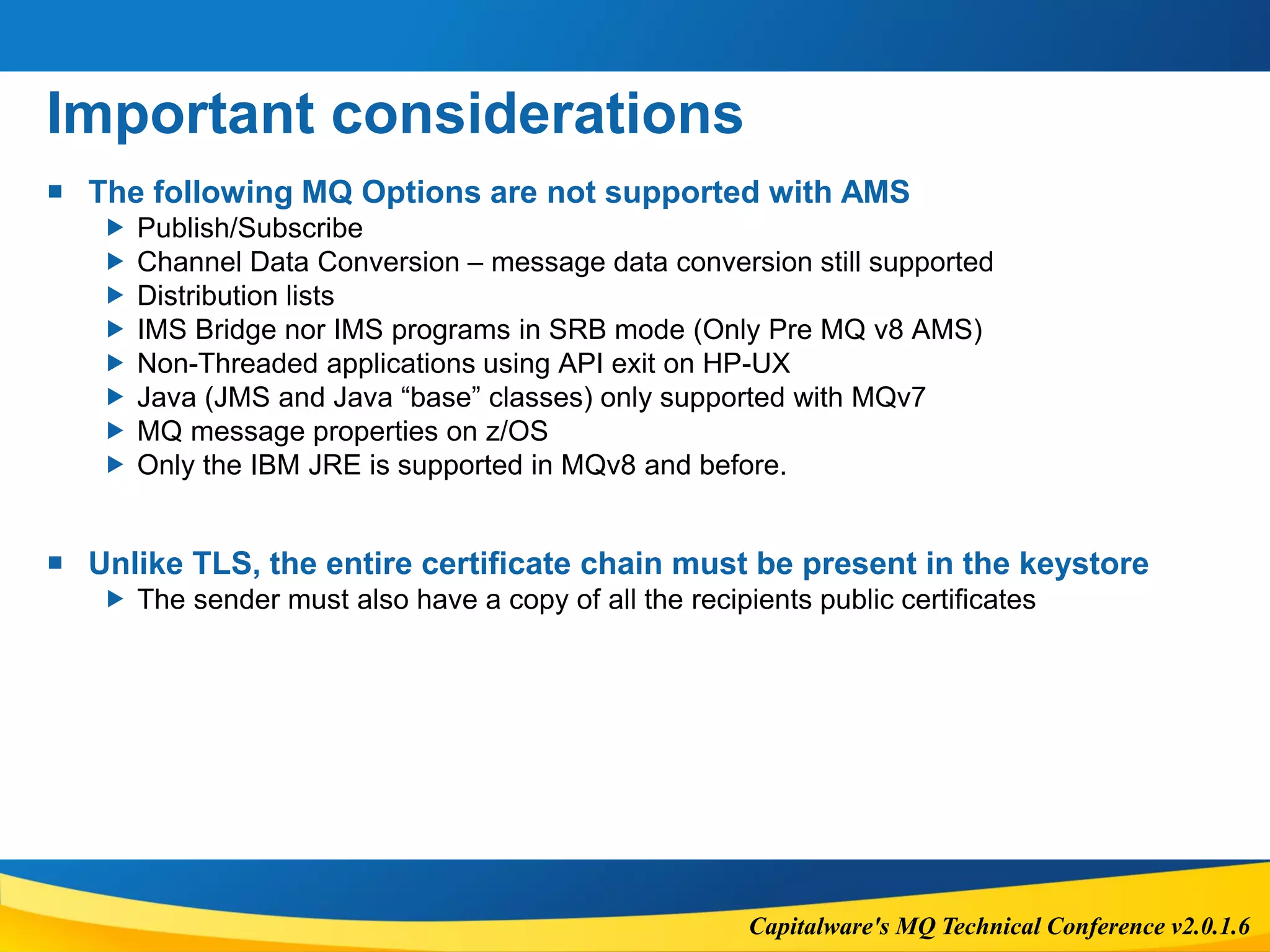
 The following MQ Options are not supported with AMS
 Publish/Subscribe
 Channel Data Conversion – message data conversion still supported
 Distribution lists
 IMS Bridge nor IMS programs in SRB mode (Only Pre MQ v8 AMS)
 Non-Threaded applications using API exit on HP-UX
 Java (JMS and Java “base” classes) only supported with MQv7
 MQ message properties on z/OS
 Only the IBM JRE is supported in MQv8 and before.
 Unlike TLS, the entire certificate chain must be present in the keystore
 The sender must also have a copy of all the recipients public certificates
Capitalware's MQ Technical Conference v2.0.1.6
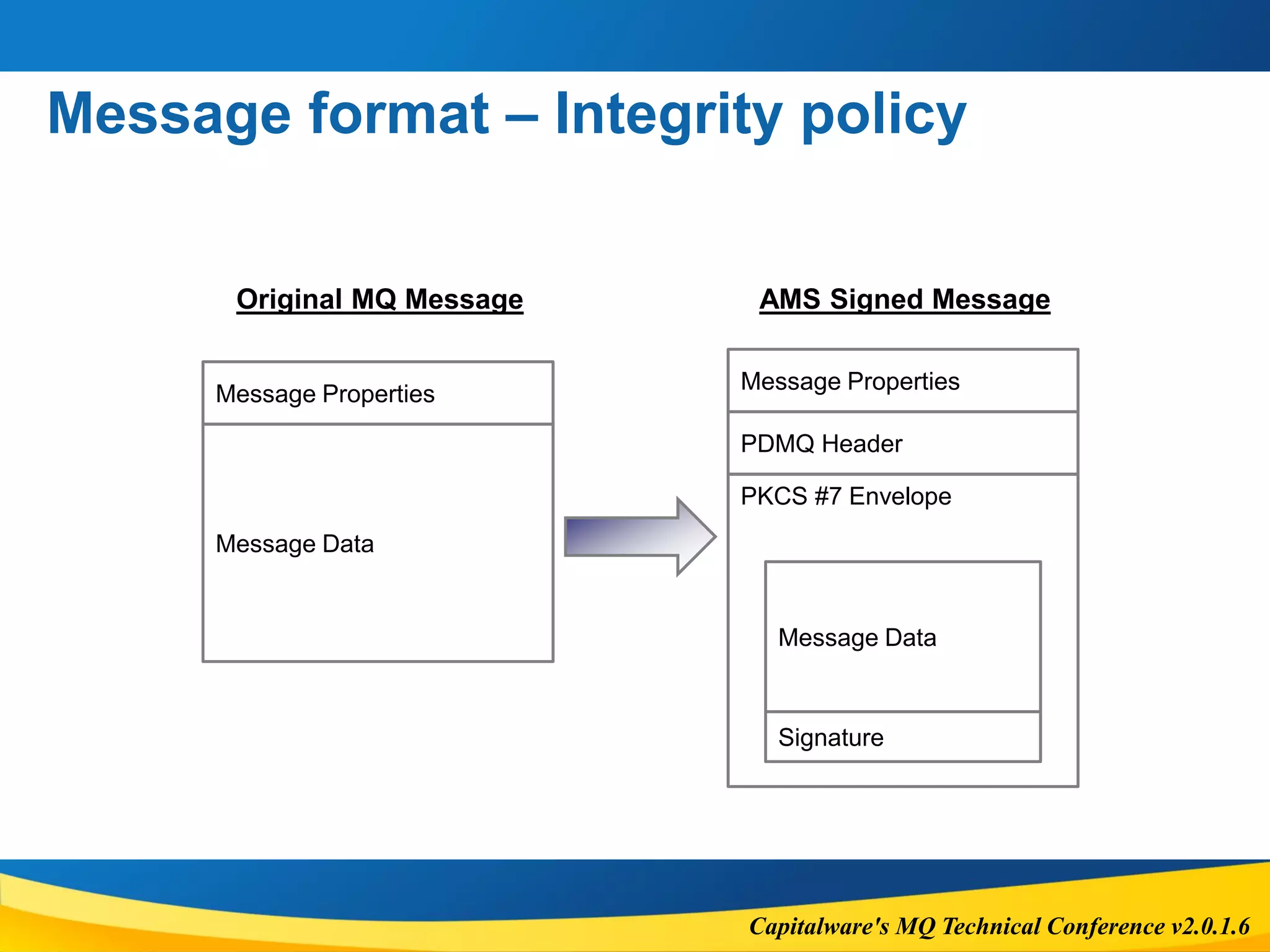
Message format – Integrity policy
Message Data
Message Data
PDMQ Header
PKCS #7 Envelope
Signature
Message Properties
Message Properties
Original MQ Message AMS Signed Message
Capitalware's MQ Technical Conference v2.0.1.6
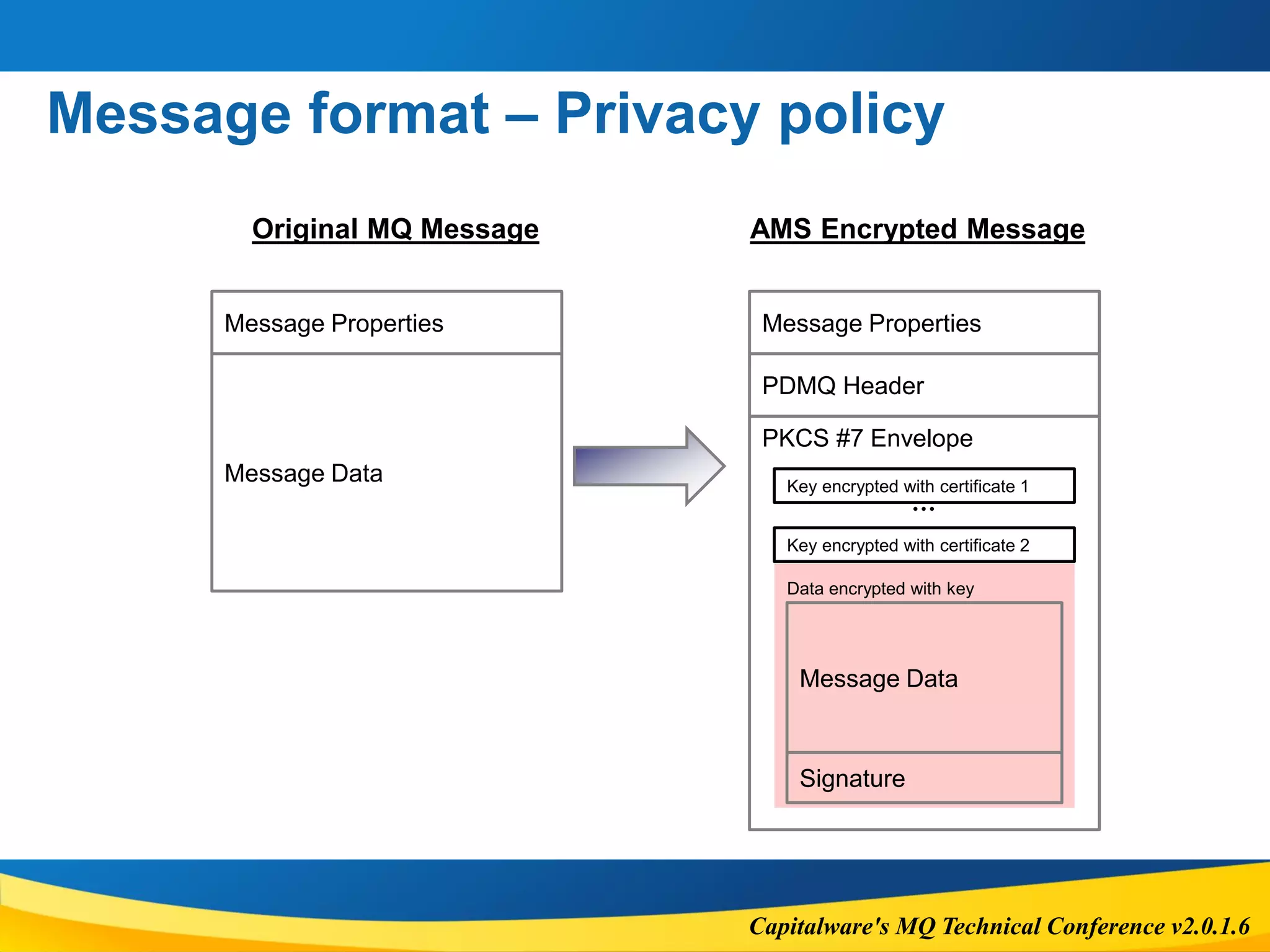
Message format – Privacy policy
Message Data
Original MQ Message AMS Encrypted Message
Message Properties
Message Data
PDMQ Header
PKCS #7 Envelope
Signature
Message Properties
Key encrypted with certificate 1
Data encrypted with key
Key encrypted with certificate 2
…
Capitalware's MQ Technical Conference v2.0.1.6
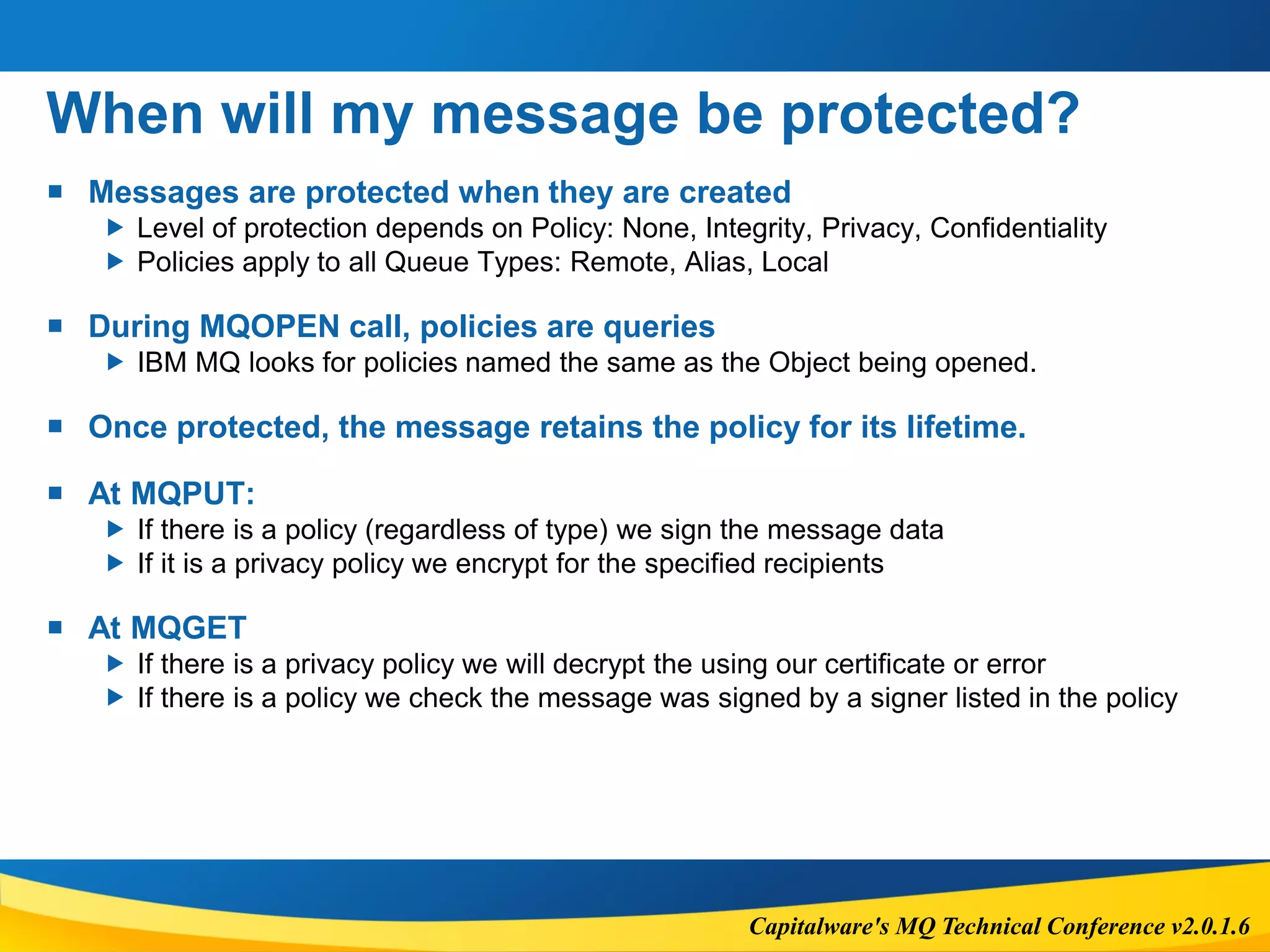
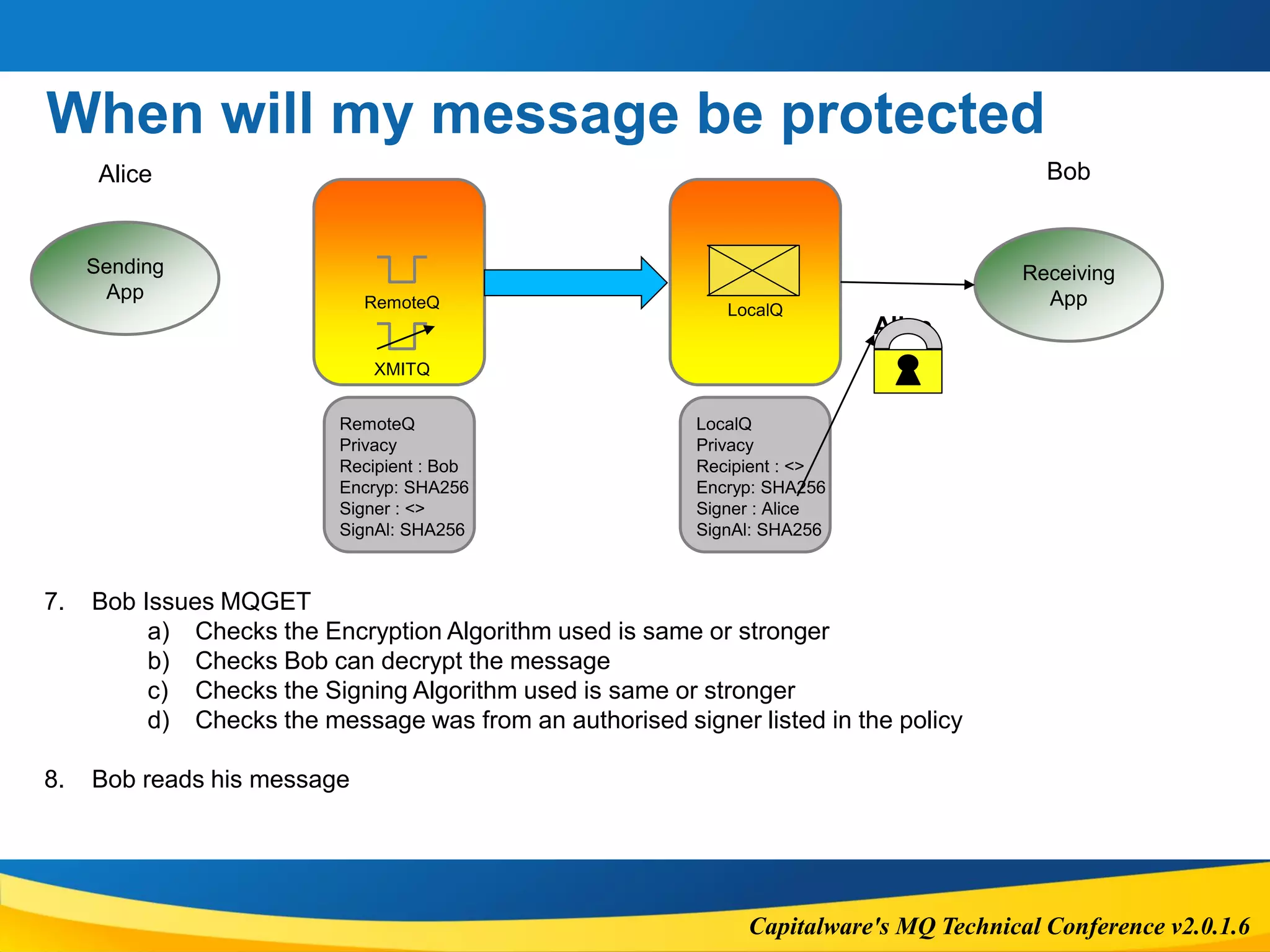
When will my message be protected?
 Messages are protected when they are created
 Level of protection depends on Policy: None, Integrity, Privacy, Confidentiality
 Policies apply to all Queue Types: Remote, Alias, Local
 During MQOPEN call, policies are queries
 IBM MQ looks for policies named the same as the Object being opened.
 Once protected, the message retains the policy for its lifetime.
 At MQPUT:
 If there is a policy (regardless of type) we sign the message data
 If it is a privacy policy we encrypt for the specified recipients
 At MQGET
 If there is a privacy policy we will decrypt the using our certificate or error
 If there is a policy we check the message was signed by a signer listed in the policy
Capitalware's MQ Technical Conference v2.0.1.6
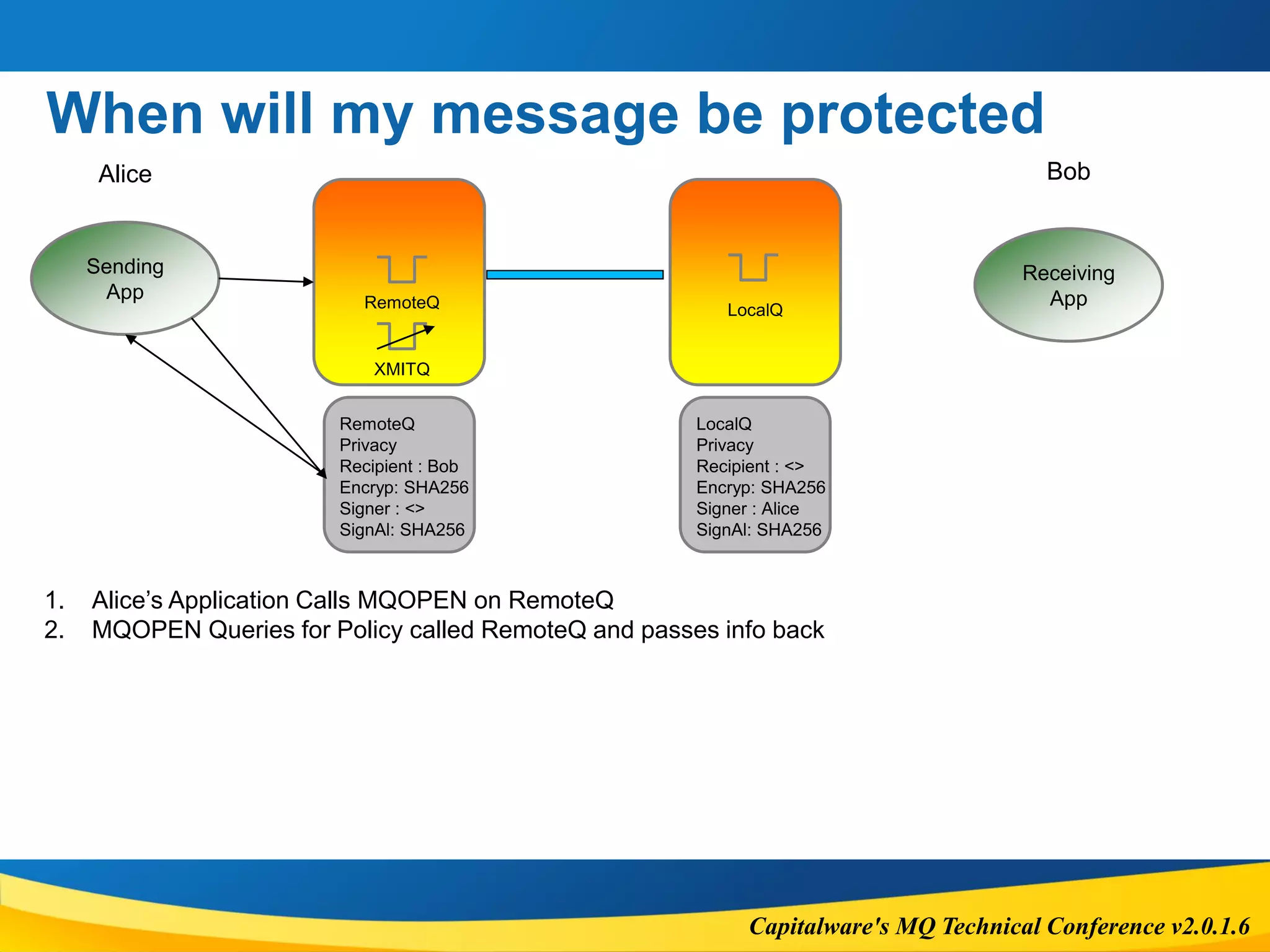
When will my message be protected
Sending
App
Receiving
AppRemoteQ
Alice Bob
RemoteQ
Privacy
Recipient : Bob
Encryp: SHA256
Signer : <>
SignAl: SHA256
LocalQ
LocalQ
Privacy
Recipient : <>
Encryp: SHA256
Signer : Alice
SignAl: SHA256
1. Alice’s Application Calls MQOPEN on RemoteQ
2. MQOPEN Queries for Policy called RemoteQ and passes info back
XMITQ
Capitalware's MQ Technical Conference v2.0.1.6
When will my message be protected
Sending
App
Receiving
AppRemoteQ
Alice Bob
LocalQ
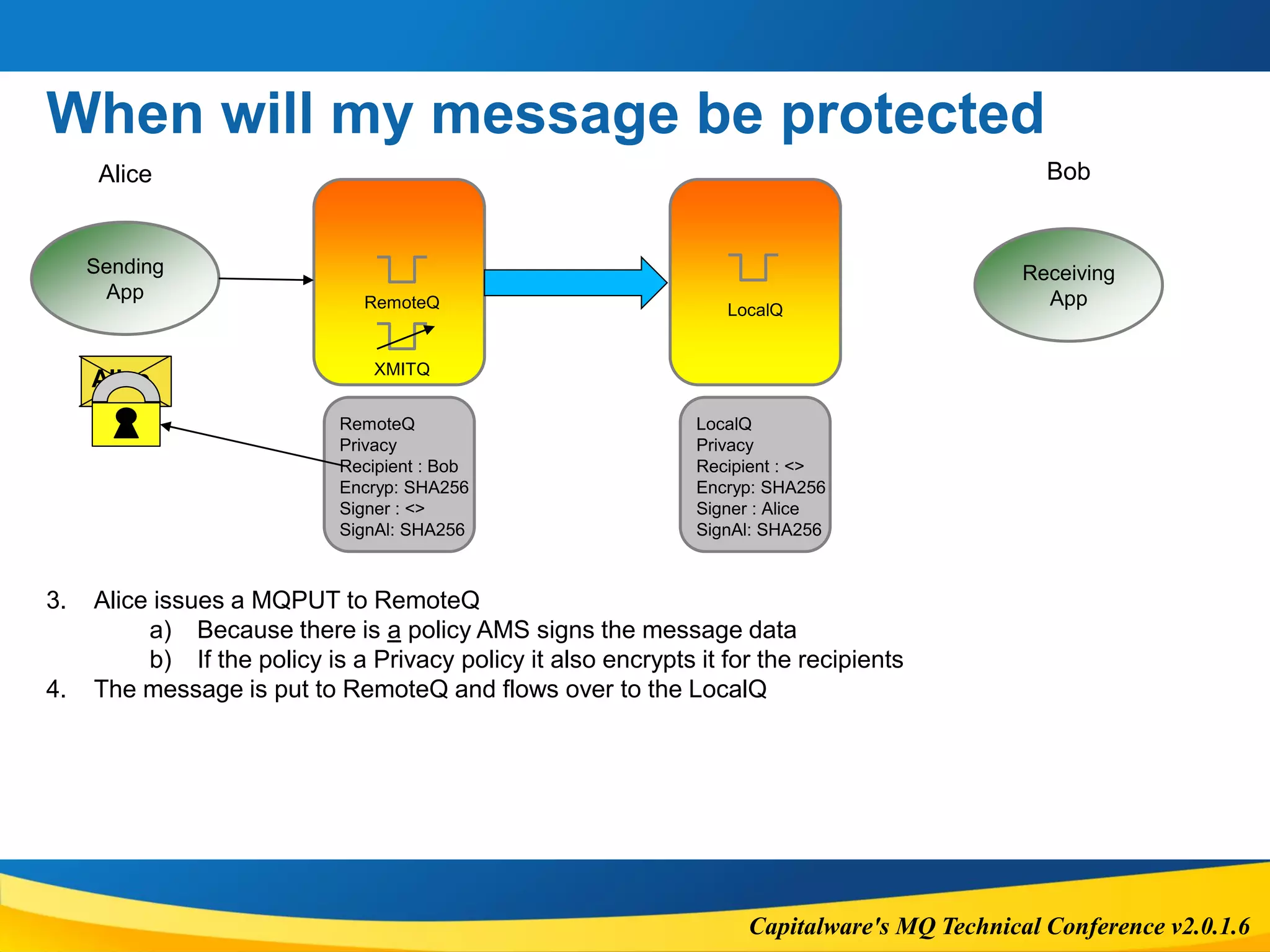
3. Alice issues a MQPUT to RemoteQ
a) Because there is a policy AMS signs the message data
b) If the policy is a Privacy policy it also encrypts it for the recipients
4. The message is put to RemoteQ and flows over to the LocalQ
Alice
RemoteQ
Privacy
Recipient : Bob
Encryp: SHA256
Signer : <>
SignAl: SHA256
LocalQ
Privacy
Recipient : <>
Encryp: SHA256
Signer : Alice
SignAl: SHA256
XMITQ
Capitalware's MQ Technical Conference v2.0.1.6
When will my message be protected
Sending
App
Receiving
AppRemoteQ
Alice Bob
LocalQ
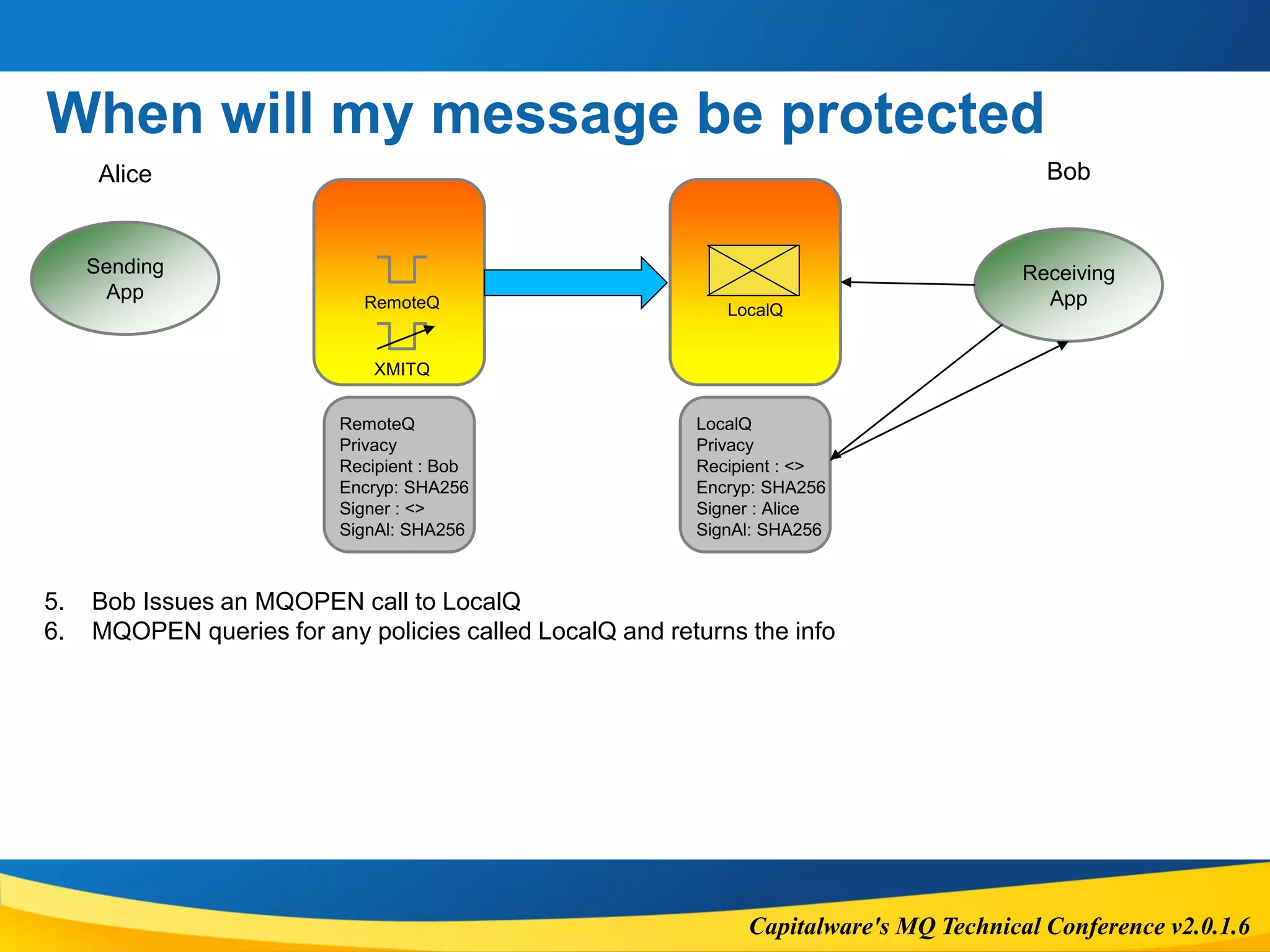
5. Bob Issues an MQOPEN call to LocalQ
6. MQOPEN queries for any policies called LocalQ and returns the info
RemoteQ
Privacy
Recipient : Bob
Encryp: SHA256
Signer : <>
SignAl: SHA256
LocalQ
Privacy
Recipient : <>
Encryp: SHA256
Signer : Alice
SignAl: SHA256
XMITQ
Capitalware's MQ Technical Conference v2.0.1.6
When will my message be protected
Sending
App
Receiving
AppRemoteQ
Alice Bob
LocalQ
7. Bob Issues MQGET
a) Checks the Encryption Algorithm used is same or stronger
b) Checks Bob can decrypt the message
c) Checks the Signing Algorithm used is same or stronger
d) Checks the message was from an authorised signer listed in the policy
8. Bob reads his message
Alice
RemoteQ
Privacy
Recipient : Bob
Encryp: SHA256
Signer : <>
SignAl: SHA256
LocalQ
Privacy
Recipient : <>
Encryp: SHA256
Signer : Alice
SignAl: SHA256
XMITQ
Capitalware's MQ Technical Conference v2.0.1.6
Errors
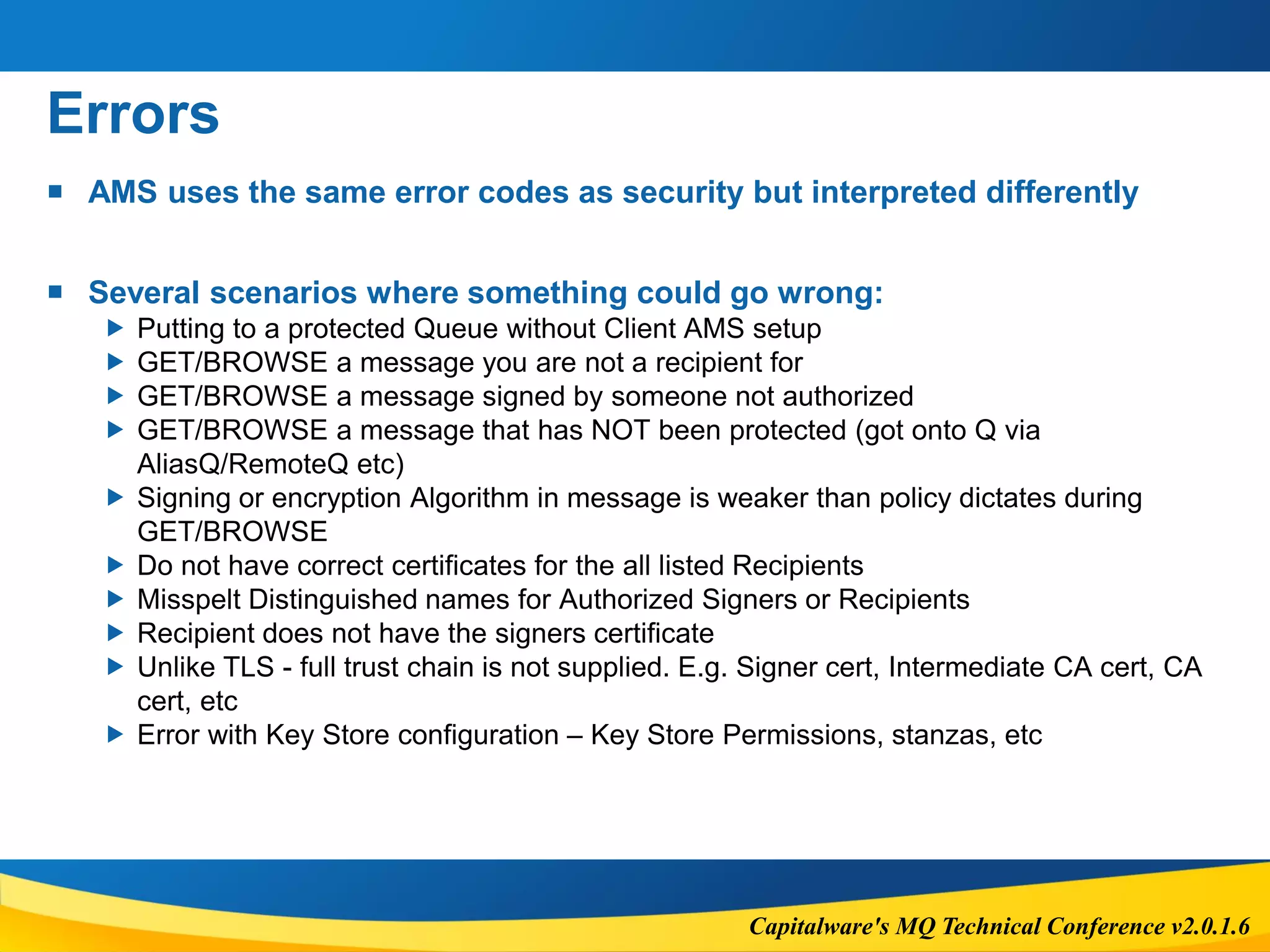
 AMS uses the same error codes as security but interpreted differently
 Several scenarios where something could go wrong:
 Putting to a protected Queue without Client AMS setup
 GET/BROWSE a message you are not a recipient for
 GET/BROWSE a message signed by someone not authorized
 GET/BROWSE a message that has NOT been protected (got onto Q via
AliasQ/RemoteQ etc)
 Signing or encryption Algorithm in message is weaker than policy dictates during
GET/BROWSE
 Do not have correct certificates for the all listed Recipients
 Misspelt Distinguished names for Authorized Signers or Recipients
 Recipient does not have the signers certificate
 Unlike TLS - full trust chain is not supplied. E.g. Signer cert, Intermediate CA cert, CA
cert, etc
 Error with Key Store configuration – Key Store Permissions, stanzas, etc
Capitalware's MQ Technical Conference v2.0.1.6
Errors
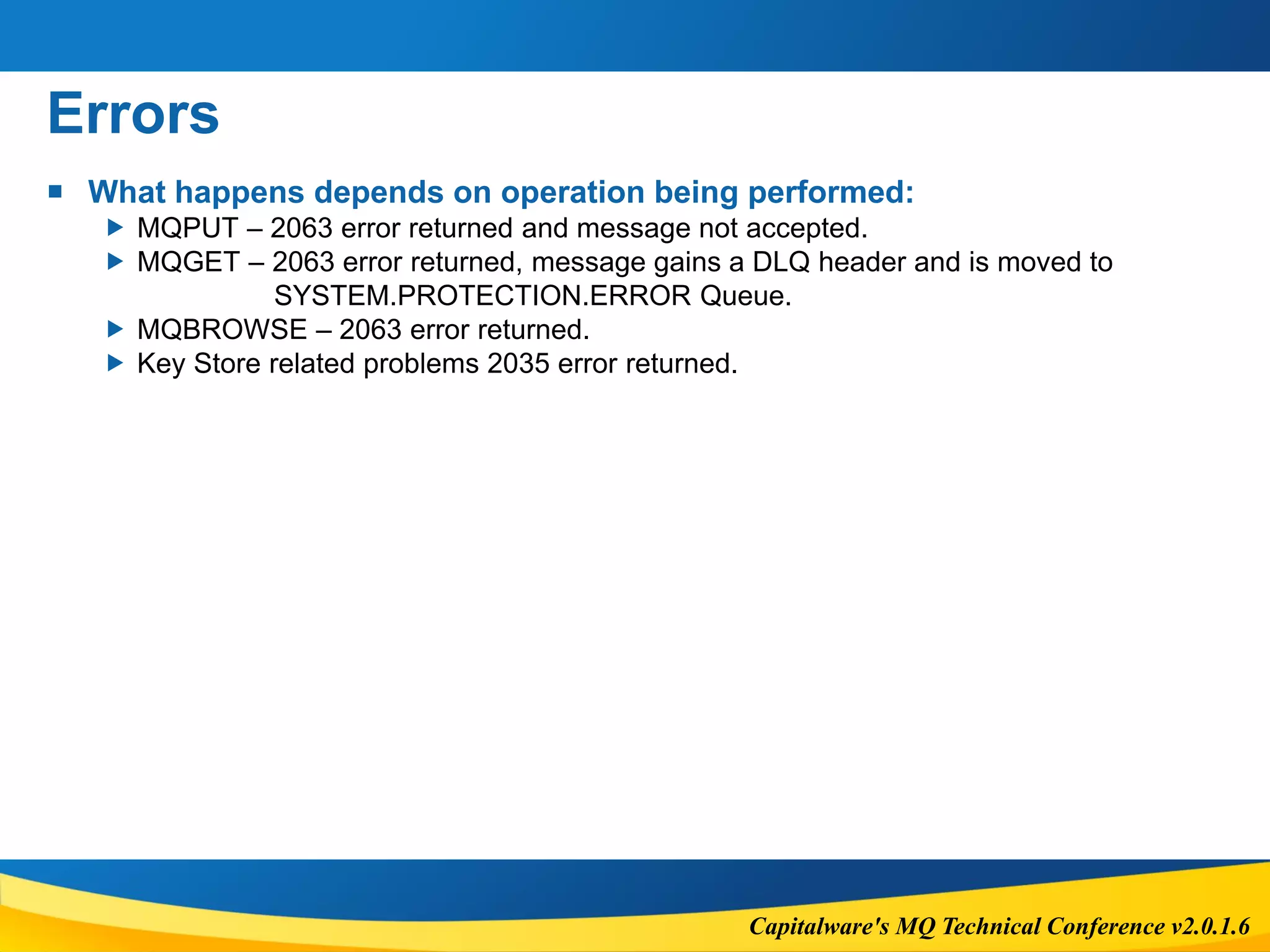
 What happens depends on operation being performed:
 MQPUT – 2063 error returned and message not accepted.
 MQGET – 2063 error returned, message gains a DLQ header and is moved to
SYSTEM.PROTECTION.ERROR Queue.
 MQBROWSE – 2063 error returned.
 Key Store related problems 2035 error returned.
Capitalware's MQ Technical Conference v2.0.1.6
Implementation
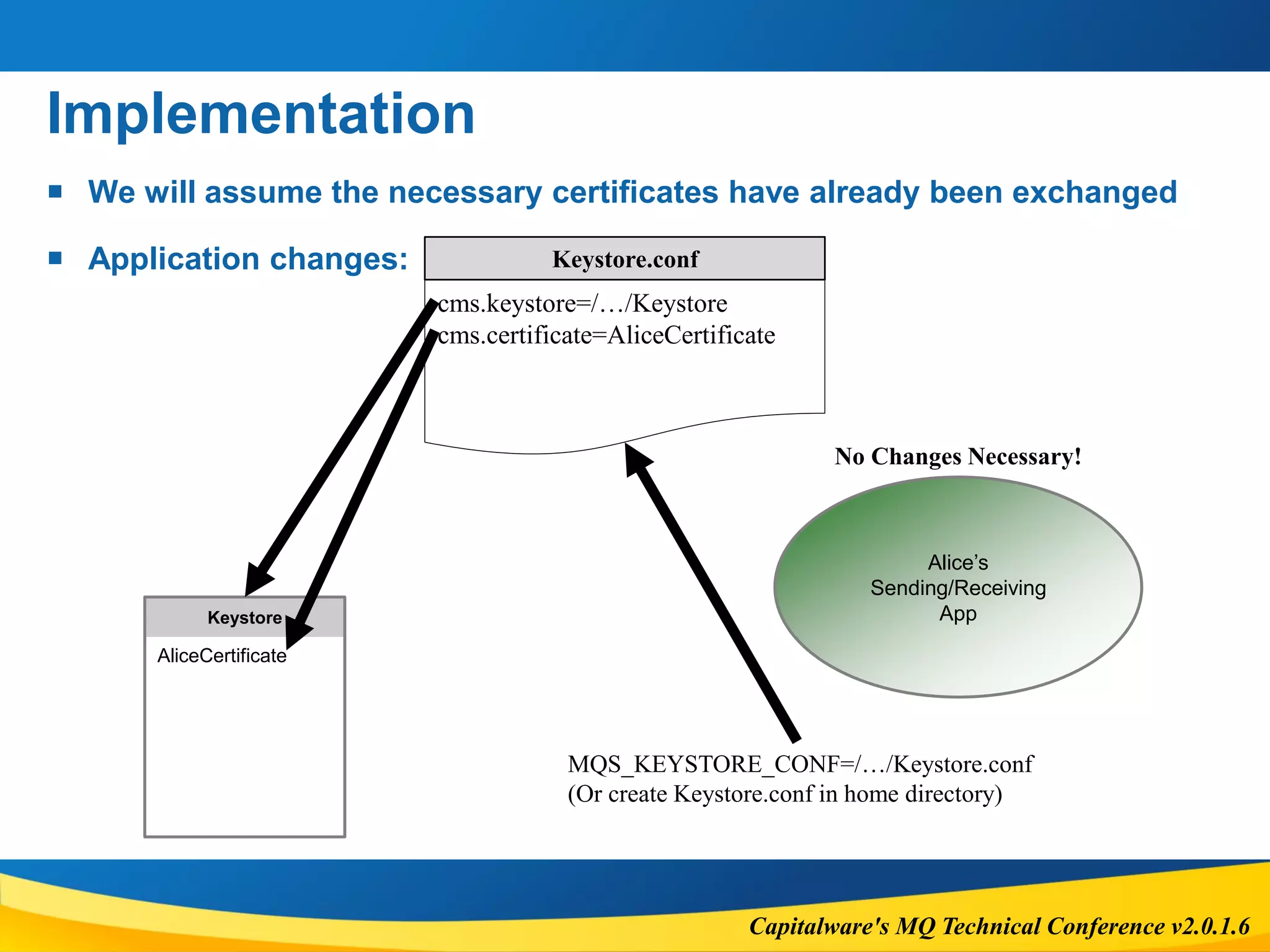
 We will assume the necessary certificates have already been exchanged
 Application changes:
Alice’s
Sending/Receiving
AppKeystore
AliceCertificate
Keystore.conf
cms.keystore=/…/Keystore
cms.certificate=AliceCertificate
MQS_KEYSTORE_CONF=/…/Keystore.conf
(Or create Keystore.conf in home directory)
No Changes Necessary!
Capitalware's MQ Technical Conference v2.0.1.6
Implementation
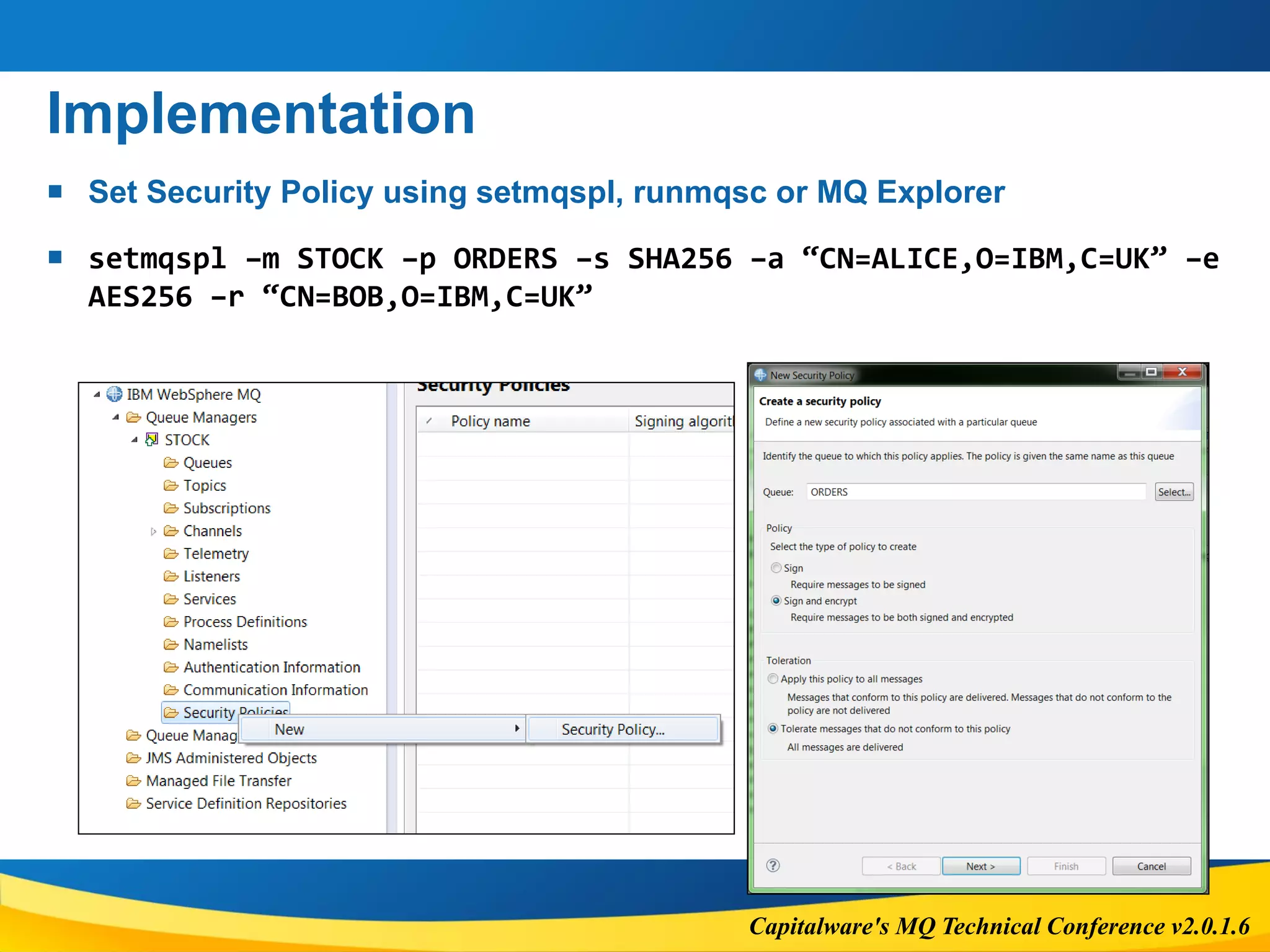
 Set Security Policy using setmqspl, runmqsc or MQ Explorer
 setmqspl –m STOCK –p ORDERS –s SHA256 –a “CN=ALICE,O=IBM,C=UK” –e
AES256 –r “CN=BOB,O=IBM,C=UK”
Capitalware's MQ Technical Conference v2.0.1.6
CHANNEL AUTHENTICATION
Capitalware's MQ Technical Conference v2.0.1.6
Details
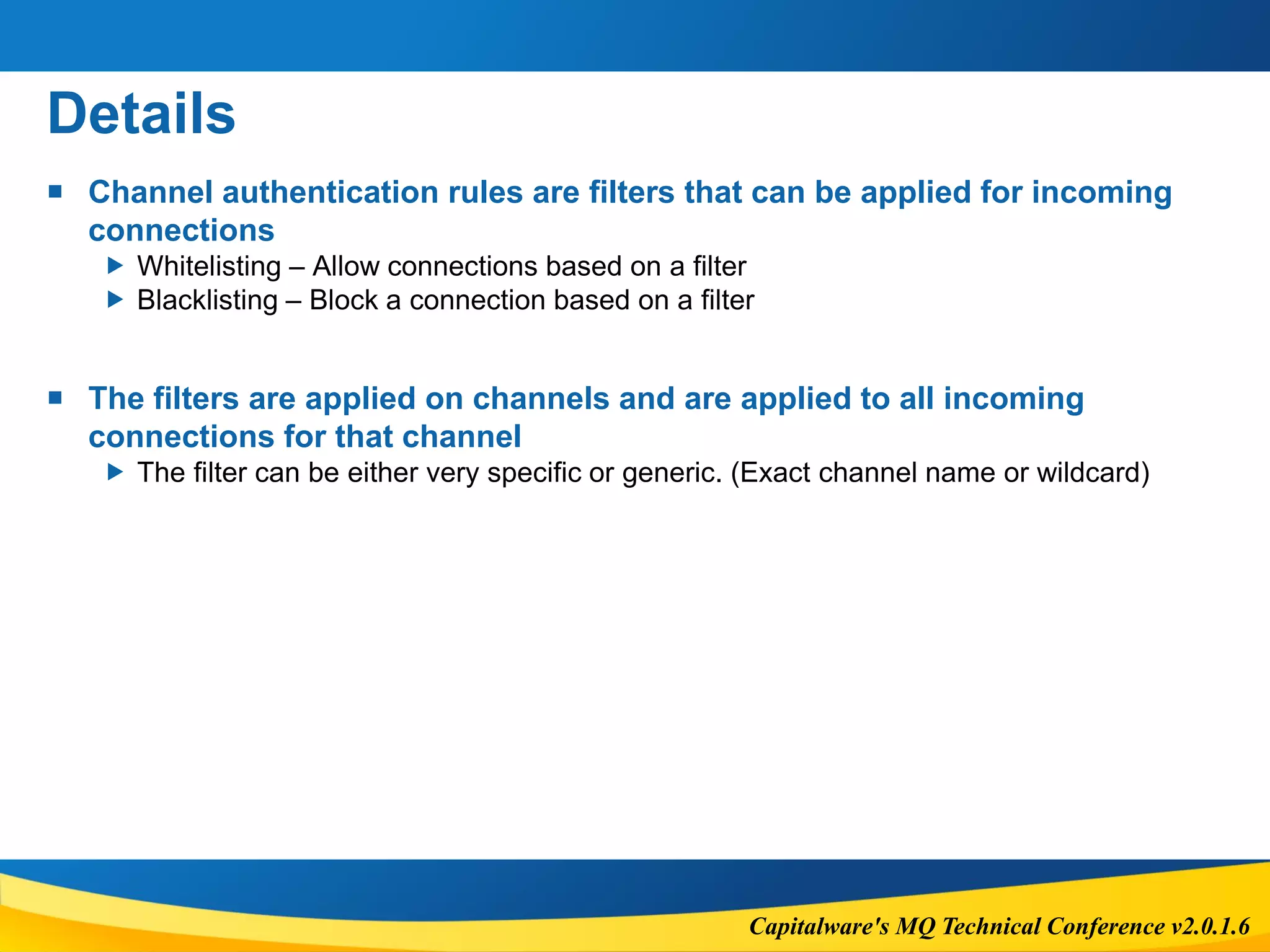
 Channel authentication rules are filters that can be applied for incoming
connections
 Whitelisting – Allow connections based on a filter
 Blacklisting – Block a connection based on a filter
 The filters are applied on channels and are applied to all incoming
connections for that channel
 The filter can be either very specific or generic. (Exact channel name or wildcard)
Capitalware's MQ Technical Conference v2.0.1.6
Details
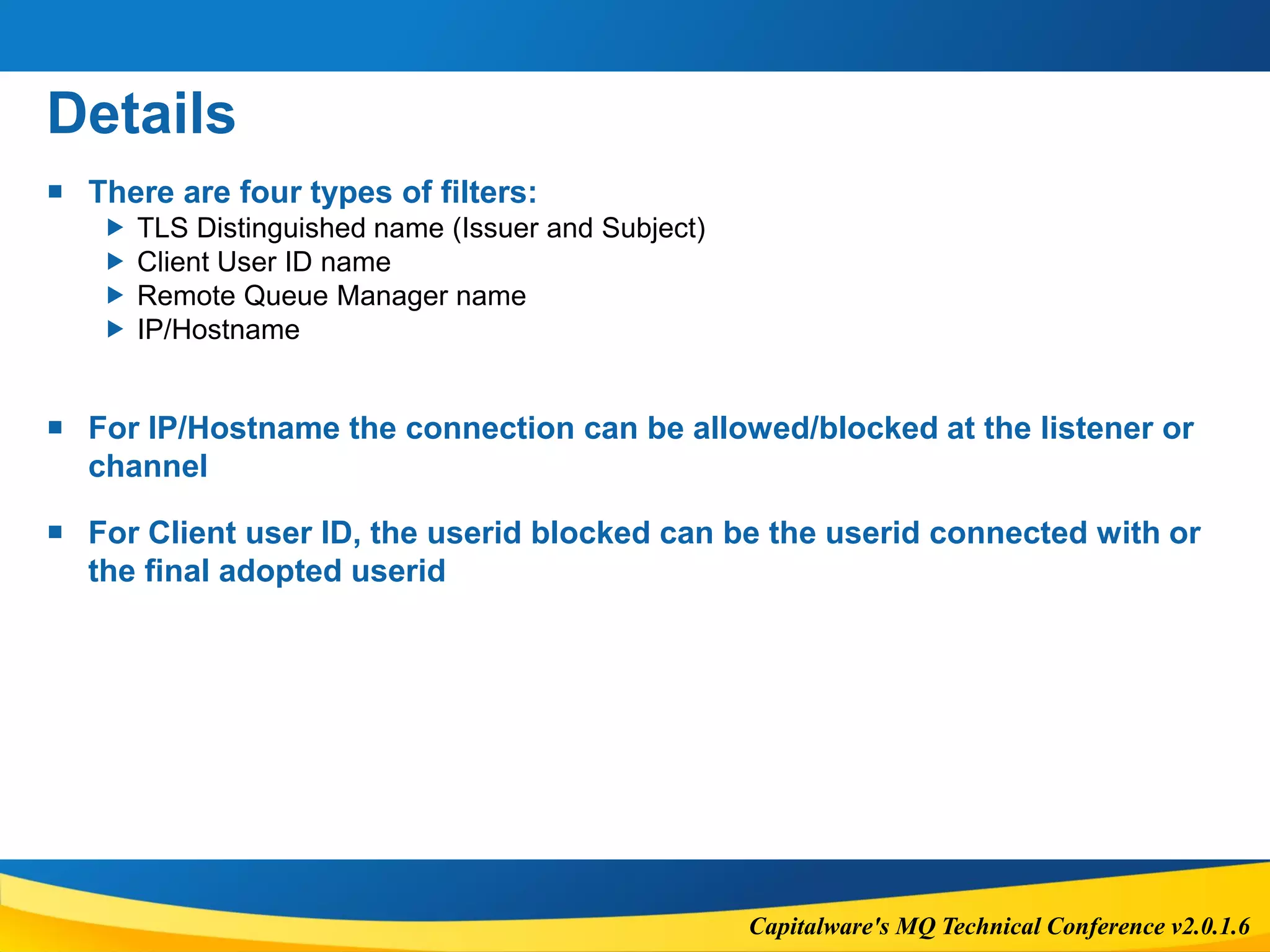
 There are four types of filters:
 TLS Distinguished name (Issuer and Subject)
 Client User ID name
 Remote Queue Manager name
 IP/Hostname
 For IP/Hostname the connection can be allowed/blocked at the listener or
channel
 For Client user ID, the userid blocked can be the userid connected with or
the final adopted userid
Capitalware's MQ Technical Conference v2.0.1.6
Details
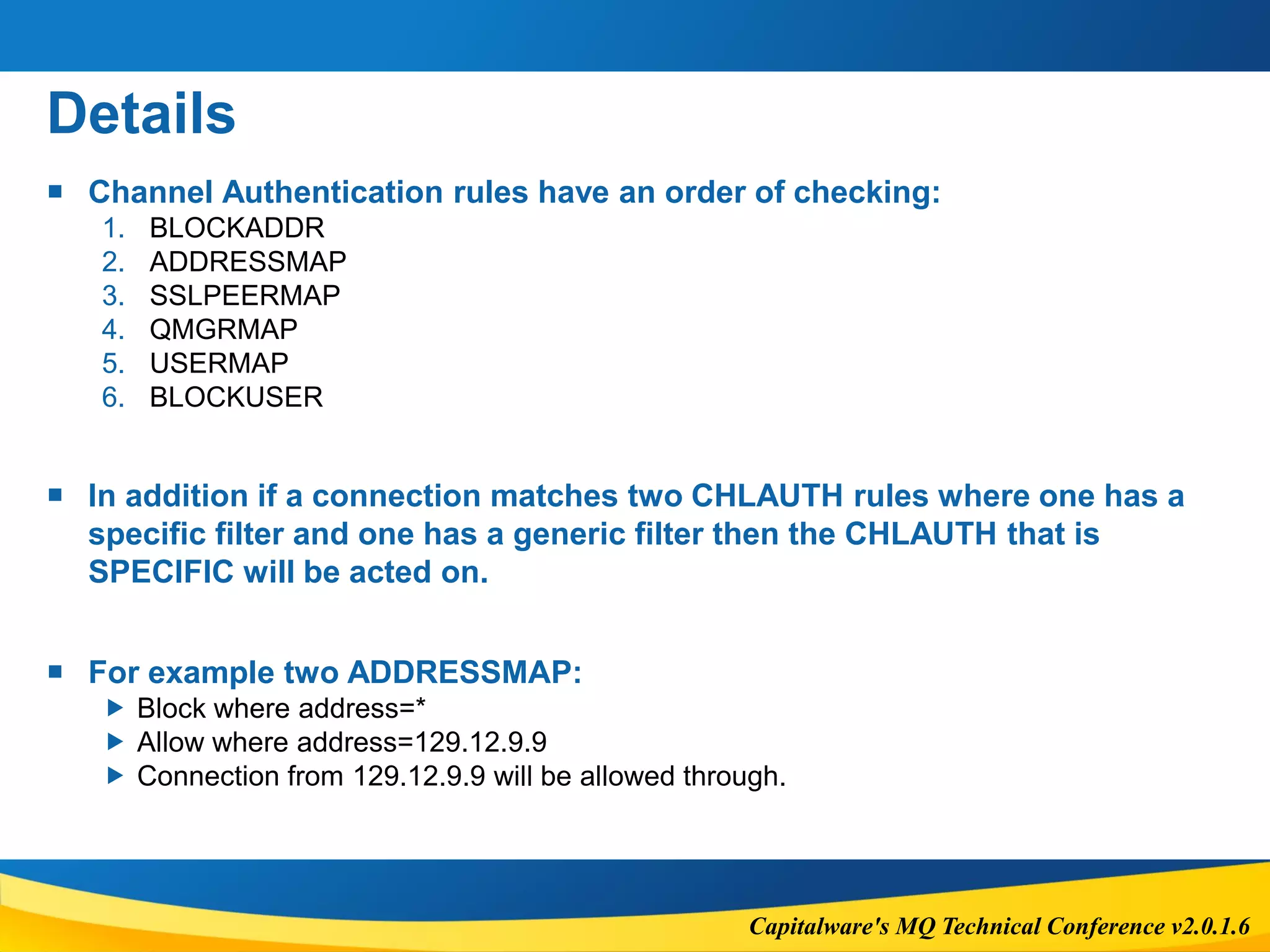
 Channel Authentication rules have an order of checking:
1. BLOCKADDR
2. ADDRESSMAP
3. SSLPEERMAP
4. QMGRMAP
5. USERMAP
6. BLOCKUSER
 In addition if a connection matches two CHLAUTH rules where one has a
specific filter and one has a generic filter then the CHLAUTH that is
SPECIFIC will be acted on.
 For example two ADDRESSMAP:
 Block where address=*
 Allow where address=129.12.9.9
 Connection from 129.12.9.9 will be allowed through.
Capitalware's MQ Technical Conference v2.0.1.6
Details
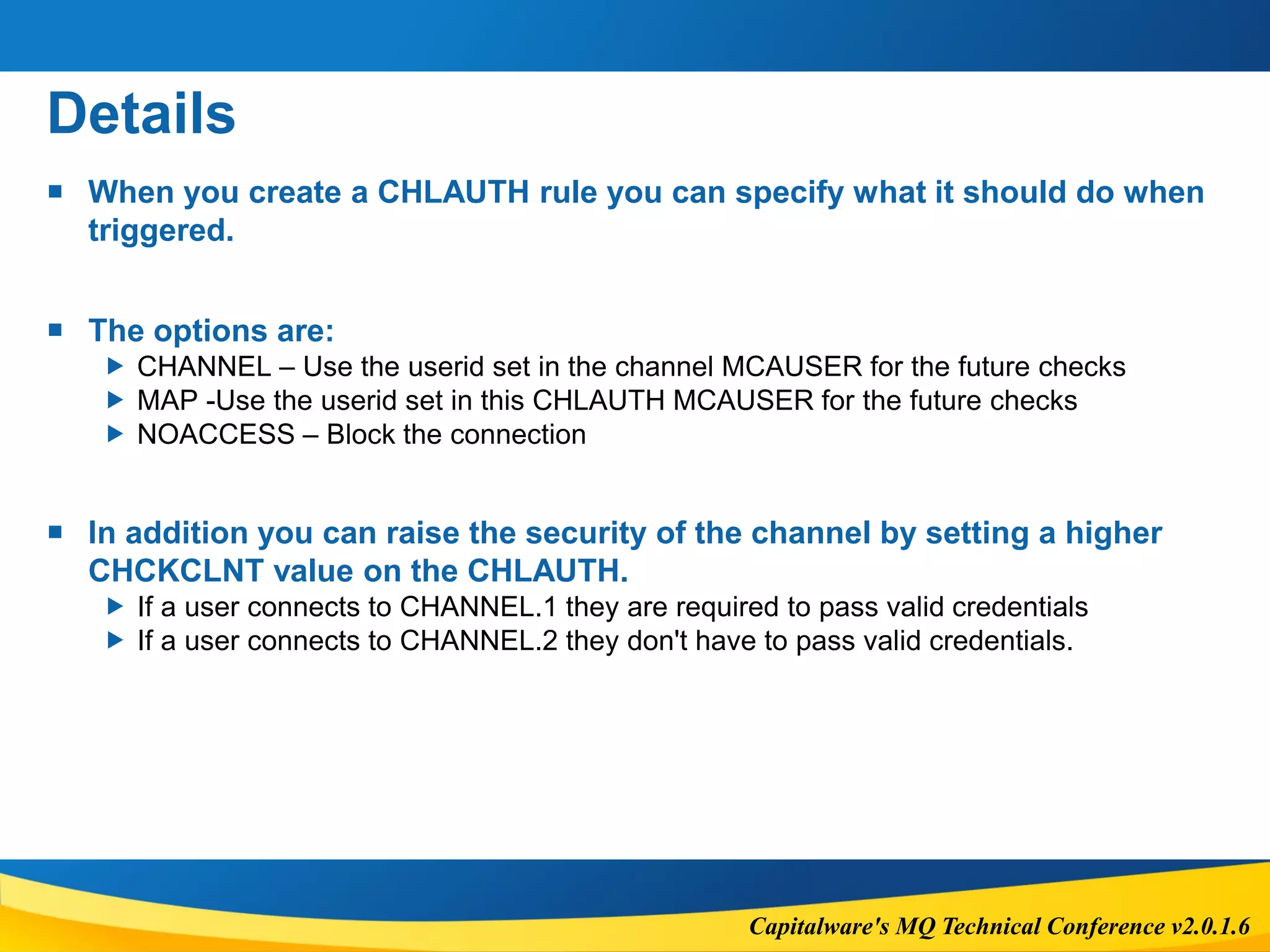
 When you create a CHLAUTH rule you can specify what it should do when
triggered.
 The options are:
 CHANNEL – Use the userid set in the channel MCAUSER for the future checks
 MAP -Use the userid set in this CHLAUTH MCAUSER for the future checks
 NOACCESS – Block the connection
 In addition you can raise the security of the channel by setting a higher
CHCKCLNT value on the CHLAUTH.
 If a user connects to CHANNEL.1 they are required to pass valid credentials
 If a user connects to CHANNEL.2 they don't have to pass valid credentials.
Capitalware's MQ Technical Conference v2.0.1.6
Configuration
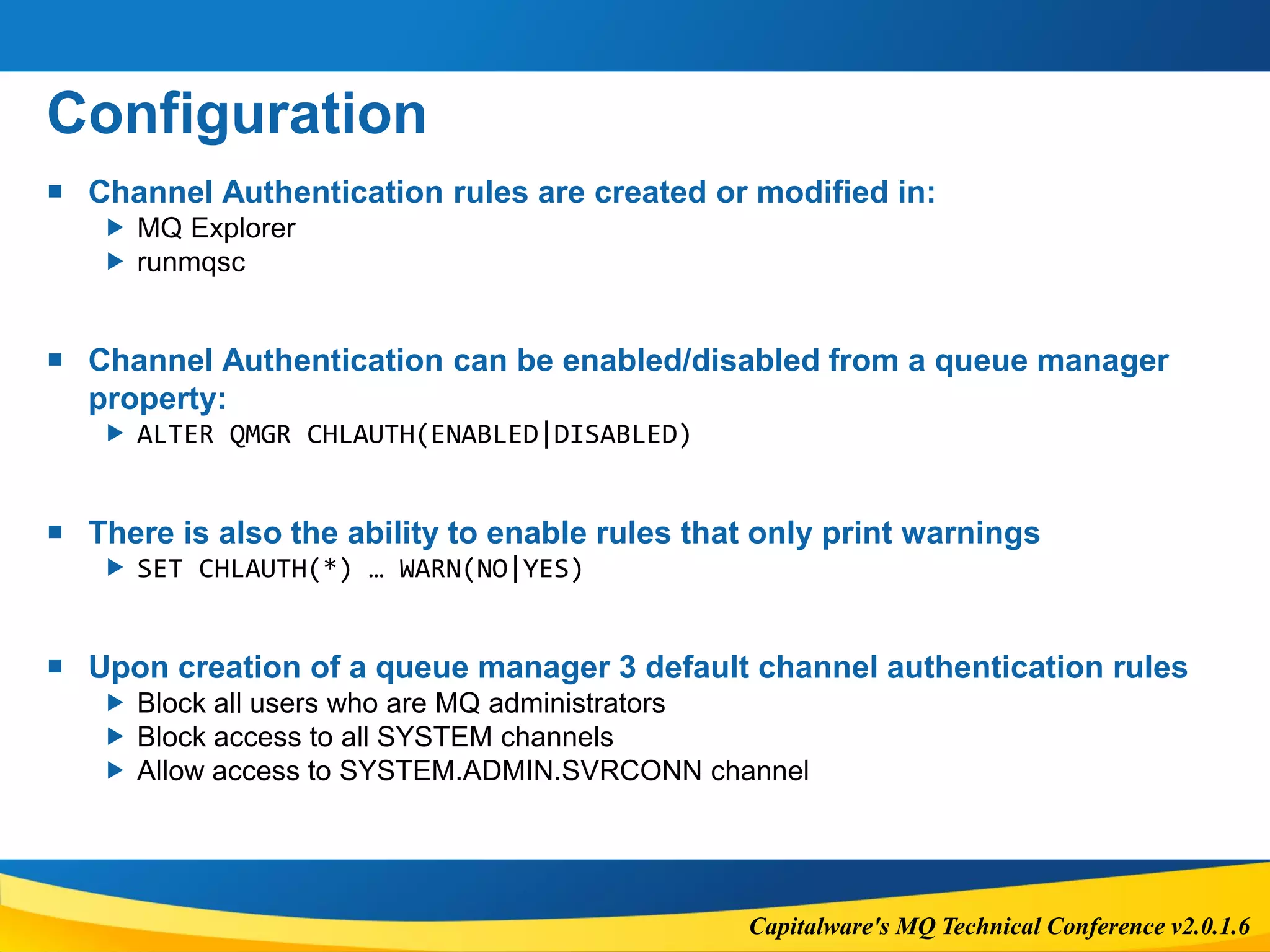
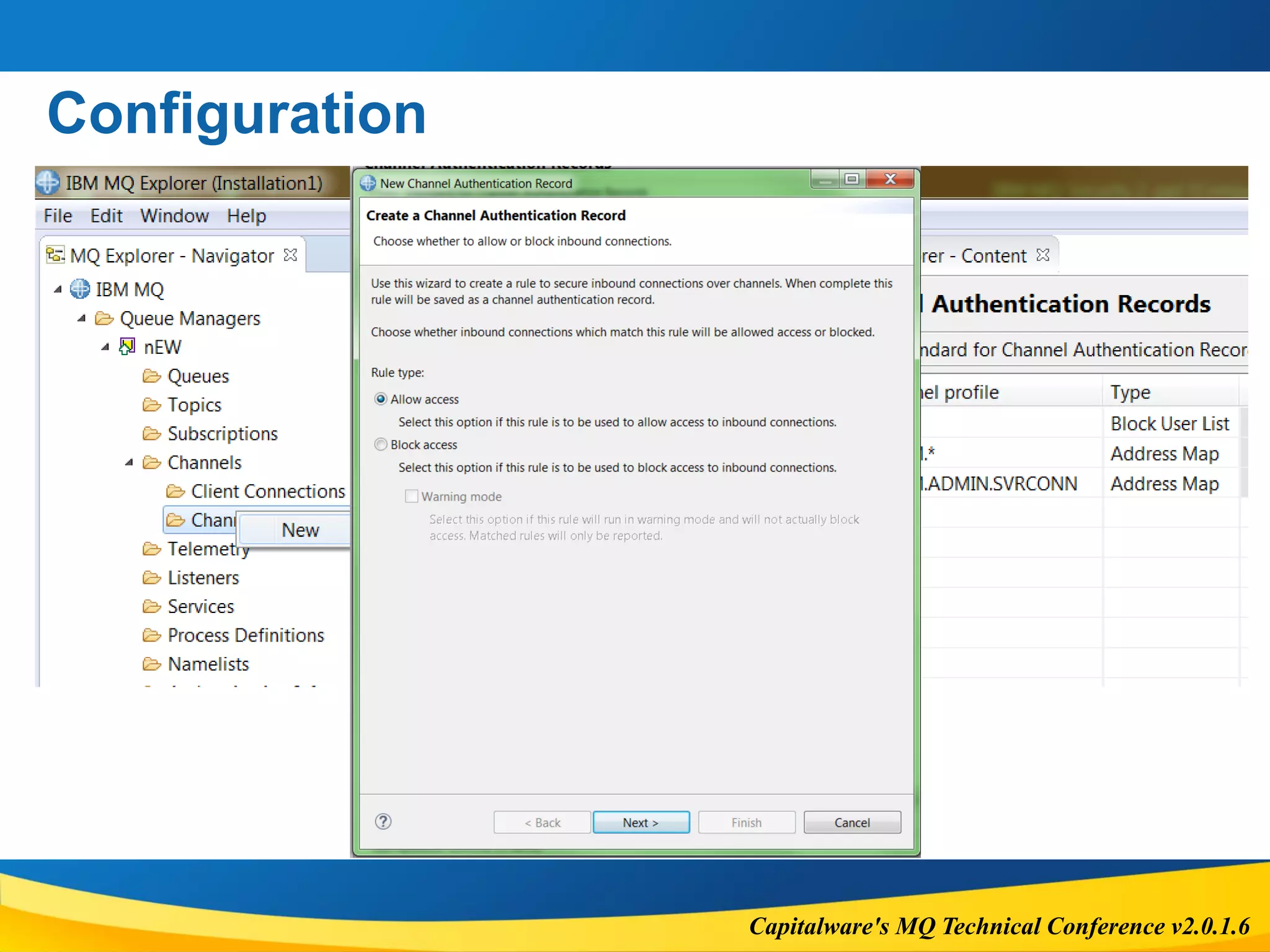
 Channel Authentication rules are created or modified in:
 MQ Explorer
 runmqsc
 Channel Authentication can be enabled/disabled from a queue manager
property:
 ALTER QMGR CHLAUTH(ENABLED|DISABLED)
 There is also the ability to enable rules that only print warnings
 SET CHLAUTH(*) … WARN(NO|YES)
 Upon creation of a queue manager 3 default channel authentication rules
 Block all users who are MQ administrators
 Block access to all SYSTEM channels
 Allow access to SYSTEM.ADMIN.SVRCONN channel
Capitalware's MQ Technical Conference v2.0.1.6
Configuration
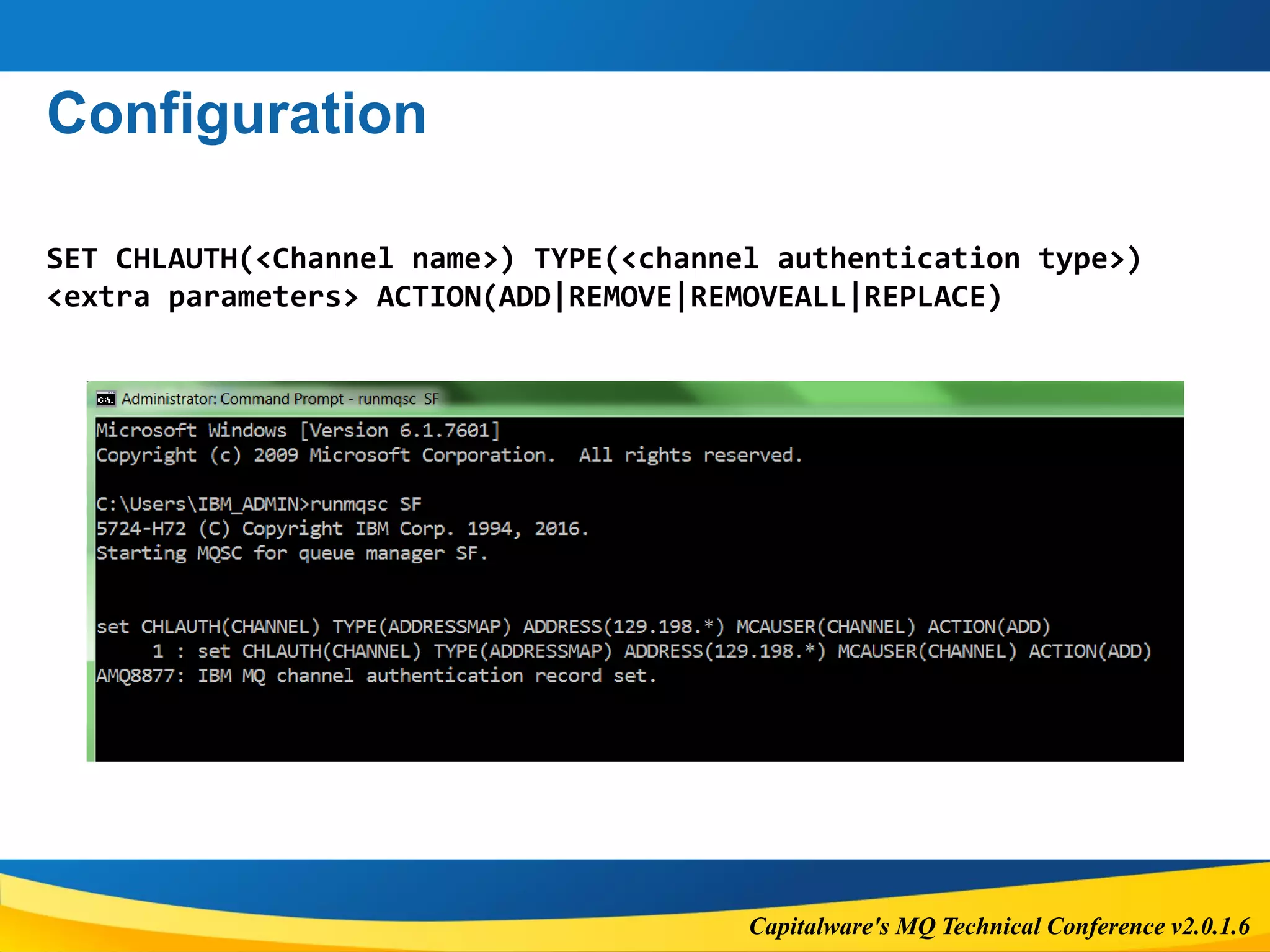
SET CHLAUTH(<Channel name>) TYPE(<channel authentication type>)
<extra parameters> ACTION(ADD|REMOVE|REMOVEALL|REPLACE)
Capitalware's MQ Technical Conference v2.0.1.6
Configuration
Capitalware's MQ Technical Conference v2.0.1.6
Configuration
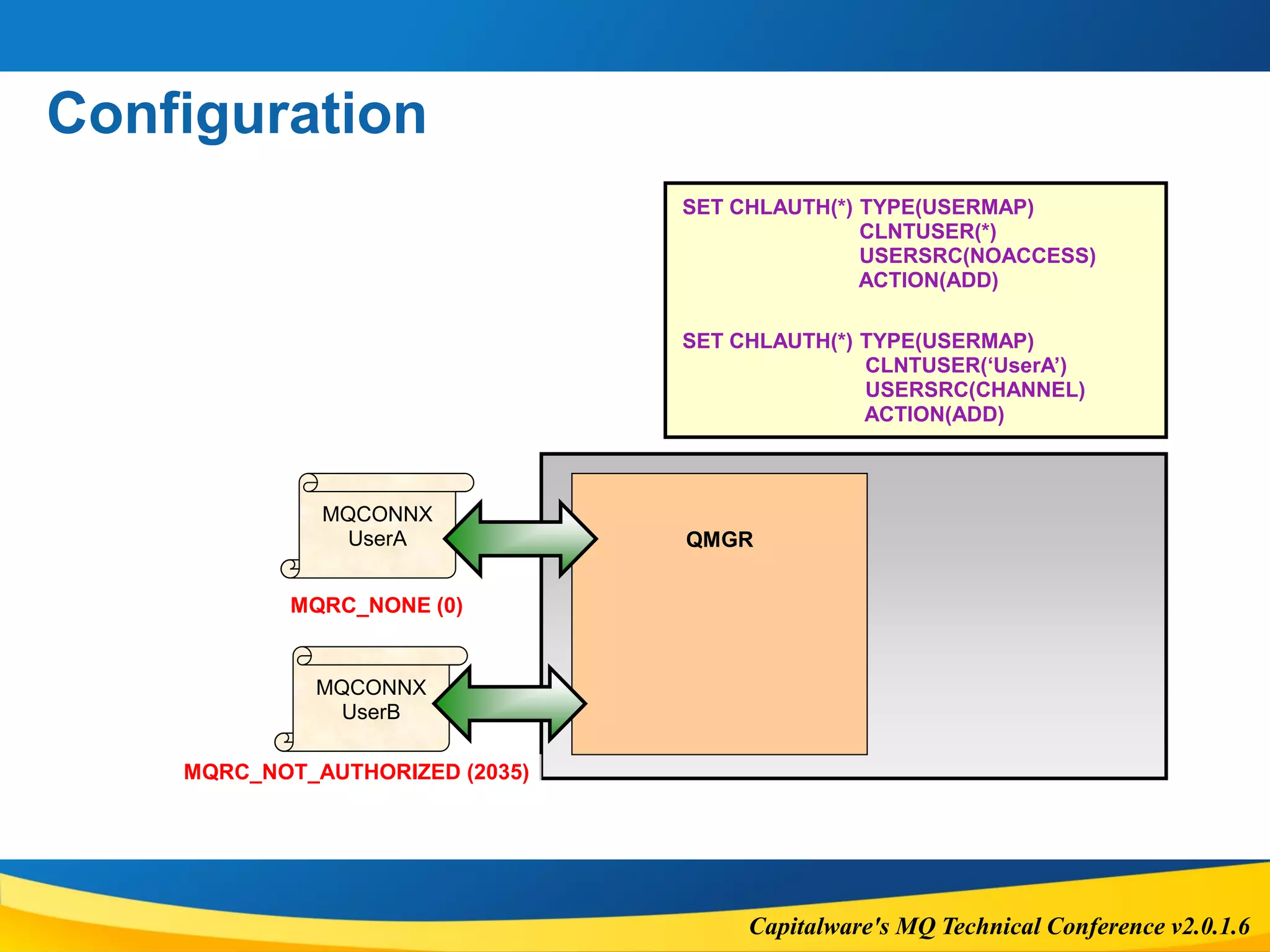
MQCONNX
UserA
MQCONNX
UserB
QMGR
SET CHLAUTH(*) TYPE(USERMAP)
CLNTUSER(*)
USERSRC(NOACCESS)
ACTION(ADD)
SET CHLAUTH(*) TYPE(USERMAP)
CLNTUSER(‘UserA’)
USERSRC(CHANNEL)
ACTION(ADD)
MQRC_NOT_AUTHORIZED (2035)
MQRC_NONE (0)
Capitalware's MQ Technical Conference v2.0.1.6
CHLAUTH & CONNAUTH
Capitalware's MQ Technical Conference v2.0.1.6
Introduction
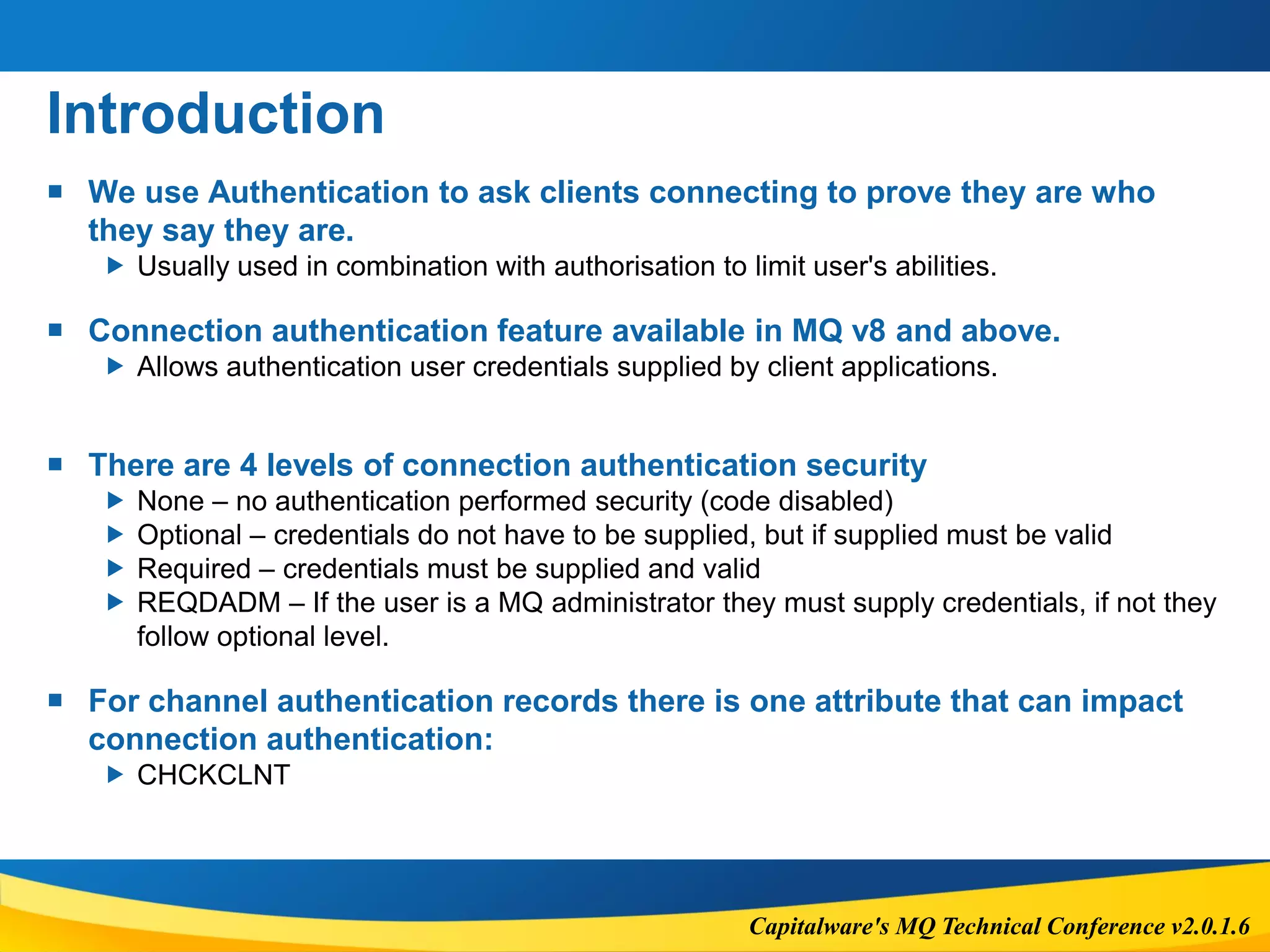
 We use Authentication to ask clients connecting to prove they are who
they say they are.
 Usually used in combination with authorisation to limit user's abilities.
 Connection authentication feature available in MQ v8 and above.
 Allows authentication user credentials supplied by client applications.
 There are 4 levels of connection authentication security
 None – no authentication performed security (code disabled)
 Optional – credentials do not have to be supplied, but if supplied must be valid
 Required – credentials must be supplied and valid
 REQDADM – If the user is a MQ administrator they must supply credentials, if not they
follow optional level.
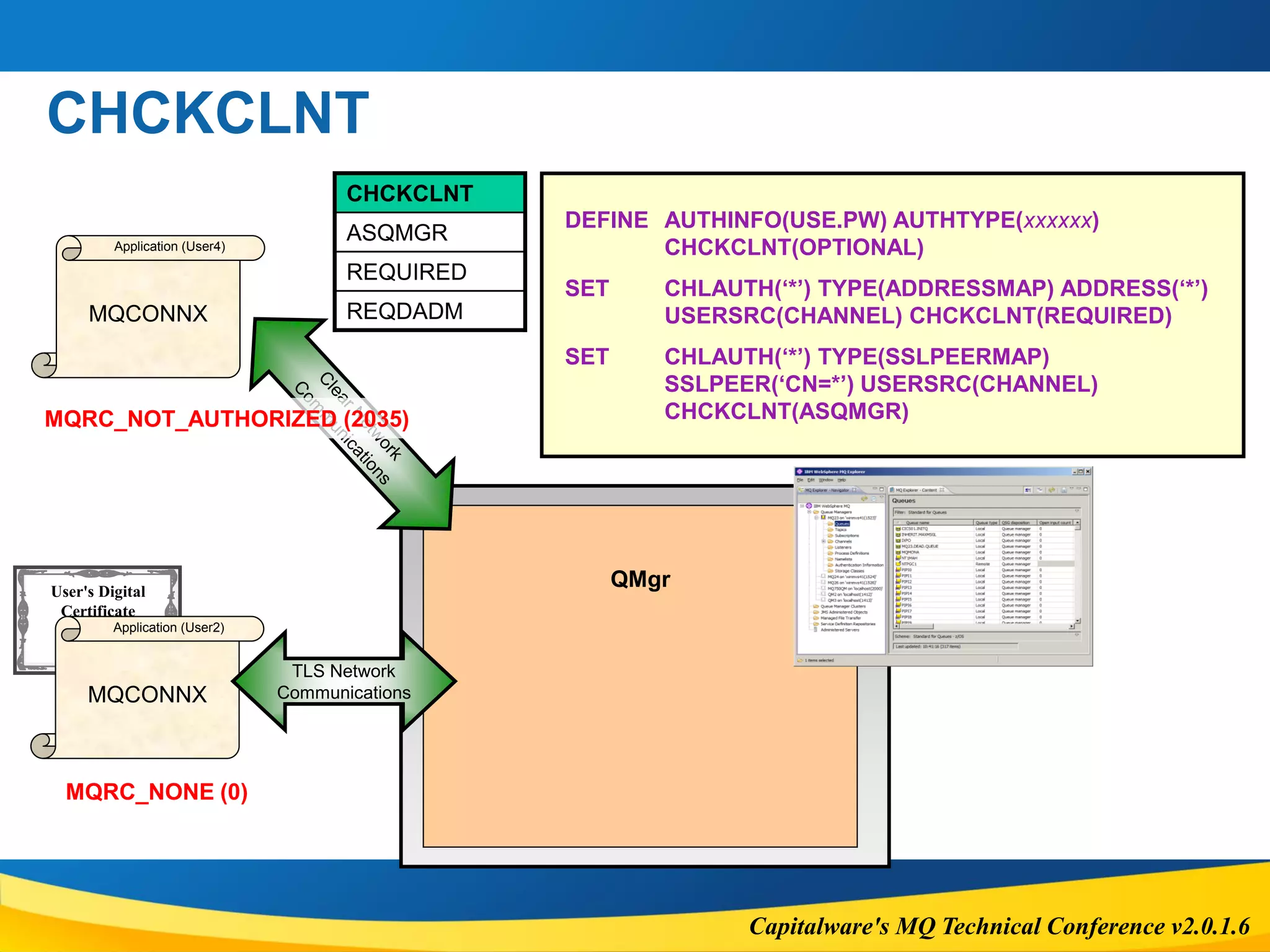
 For channel authentication records there is one attribute that can impact
connection authentication:
 CHCKCLNT
Capitalware's MQ Technical Conference v2.0.1.6
User's Digital
Certificate
CA
Sig
CHCKCLNT
MQCONNX
Application (User4)
QMgr
DEFINE AUTHINFO(USE.PW) AUTHTYPE(xxxxxx)
CHCKCLNT(OPTIONAL)
SET CHLAUTH(‘*’) TYPE(ADDRESSMAP) ADDRESS(‘*’)
USERSRC(CHANNEL) CHCKCLNT(REQUIRED)
SET CHLAUTH(‘*’) TYPE(SSLPEERMAP)
SSLPEER(‘CN=*’) USERSRC(CHANNEL)
CHCKCLNT(ASQMGR)MQRC_NOT_AUTHORIZED (2035)
MQCONNX
Application (User2)
MQRC_NONE (0)
TLS Network
Communications
CHCKCLNT
ASQMGR
REQUIRED
REQDADM
Capitalware's MQ Technical Conference v2.0.1.6
CHLAUTH & AUTHORIZATION
Capitalware's MQ Technical Conference v2.0.1.6
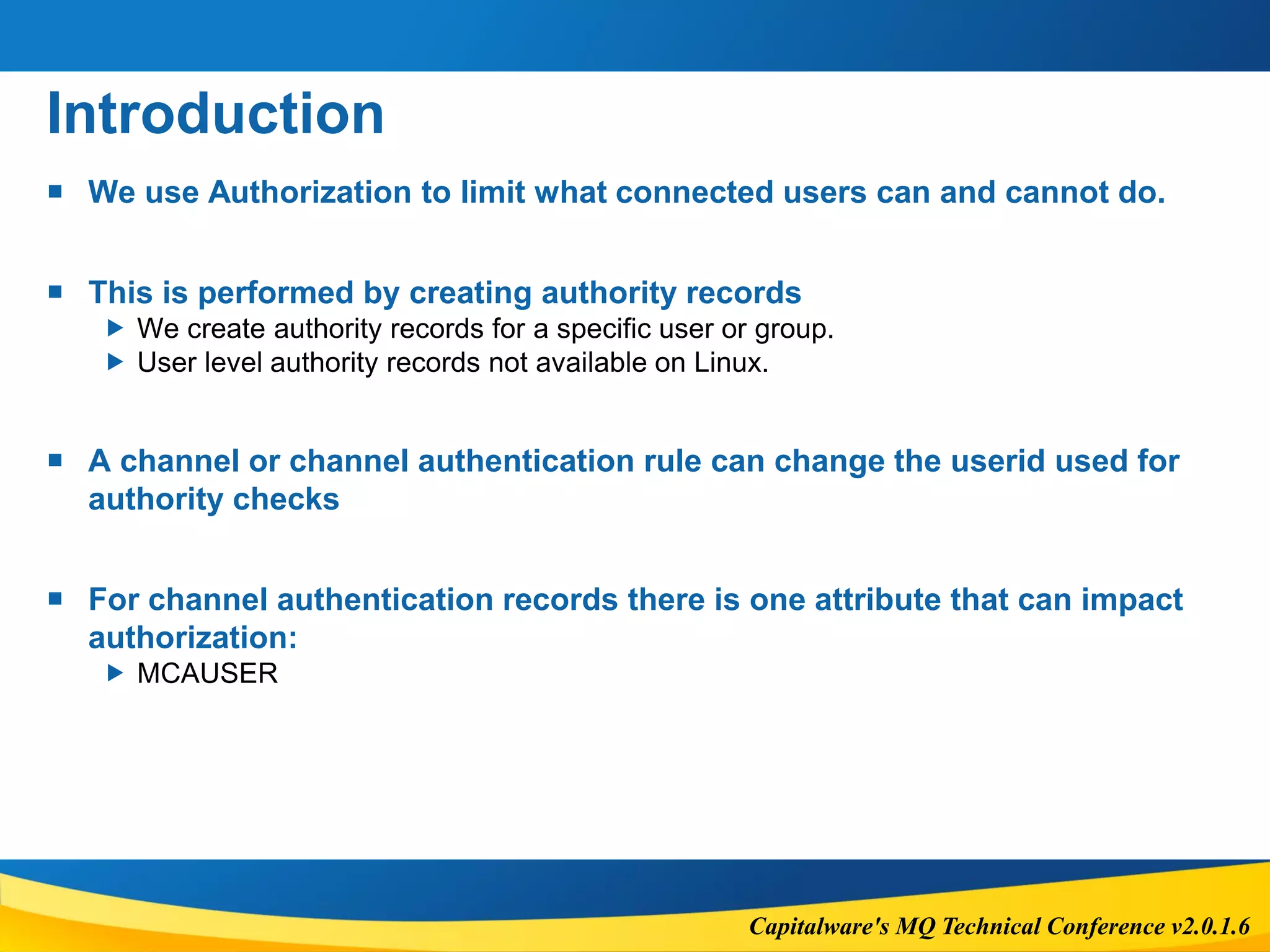
Introduction
 We use Authorization to limit what connected users can and cannot do.
 This is performed by creating authority records
 We create authority records for a specific user or group.
 User level authority records not available on Linux.
 A channel or channel authentication rule can change the userid used for
authority checks
 For channel authentication records there is one attribute that can impact
authorization:
 MCAUSER
Capitalware's MQ Technical Conference v2.0.1.6
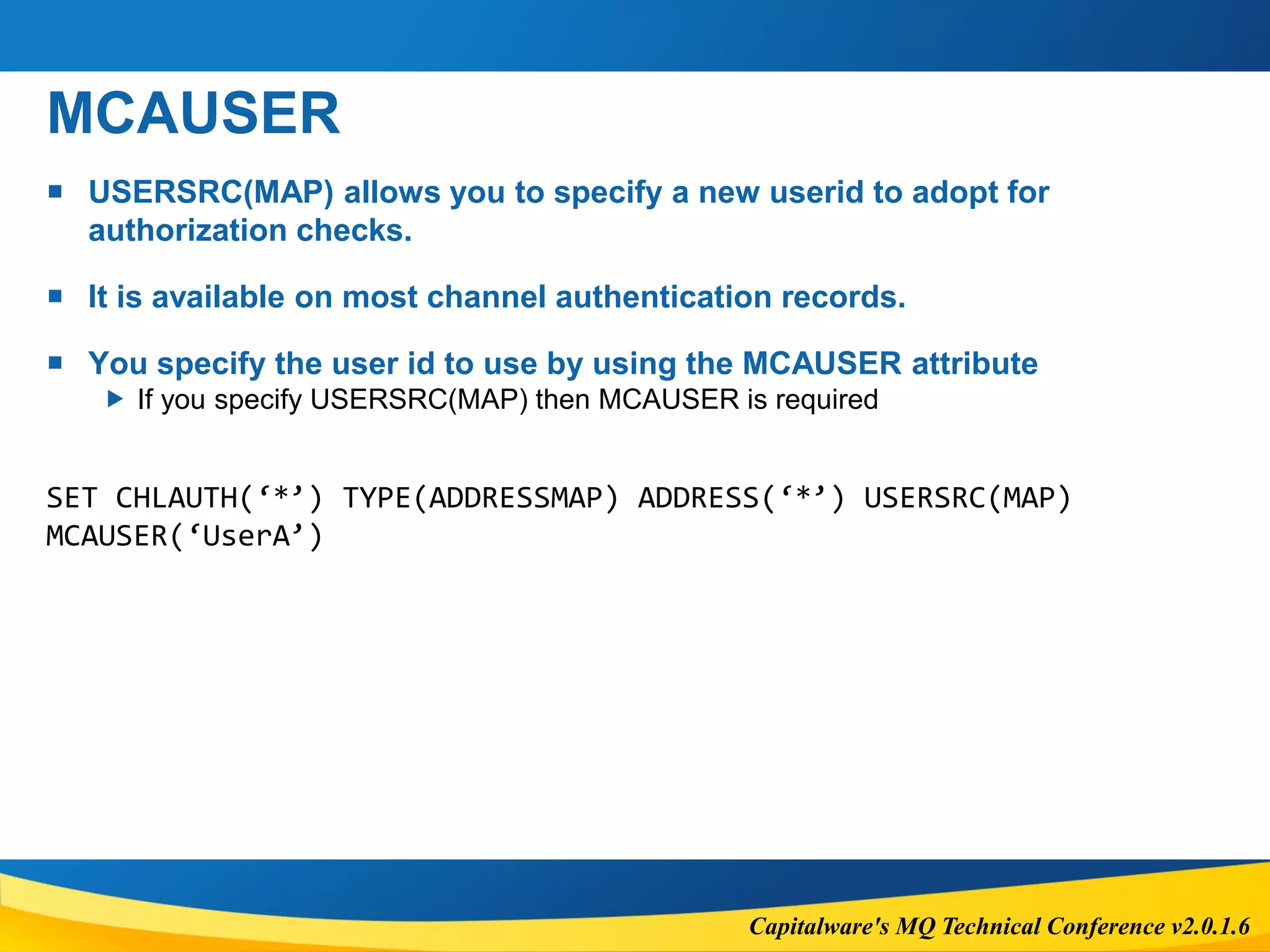
MCAUSER
 USERSRC(MAP) allows you to specify a new userid to adopt for
authorization checks.
 It is available on most channel authentication records.
 You specify the user id to use by using the MCAUSER attribute
 If you specify USERSRC(MAP) then MCAUSER is required
SET CHLAUTH(‘*’) TYPE(ADDRESSMAP) ADDRESS(‘*’) USERSRC(MAP)
MCAUSER(‘UserA’)
Capitalware's MQ Technical Conference v2.0.1.6
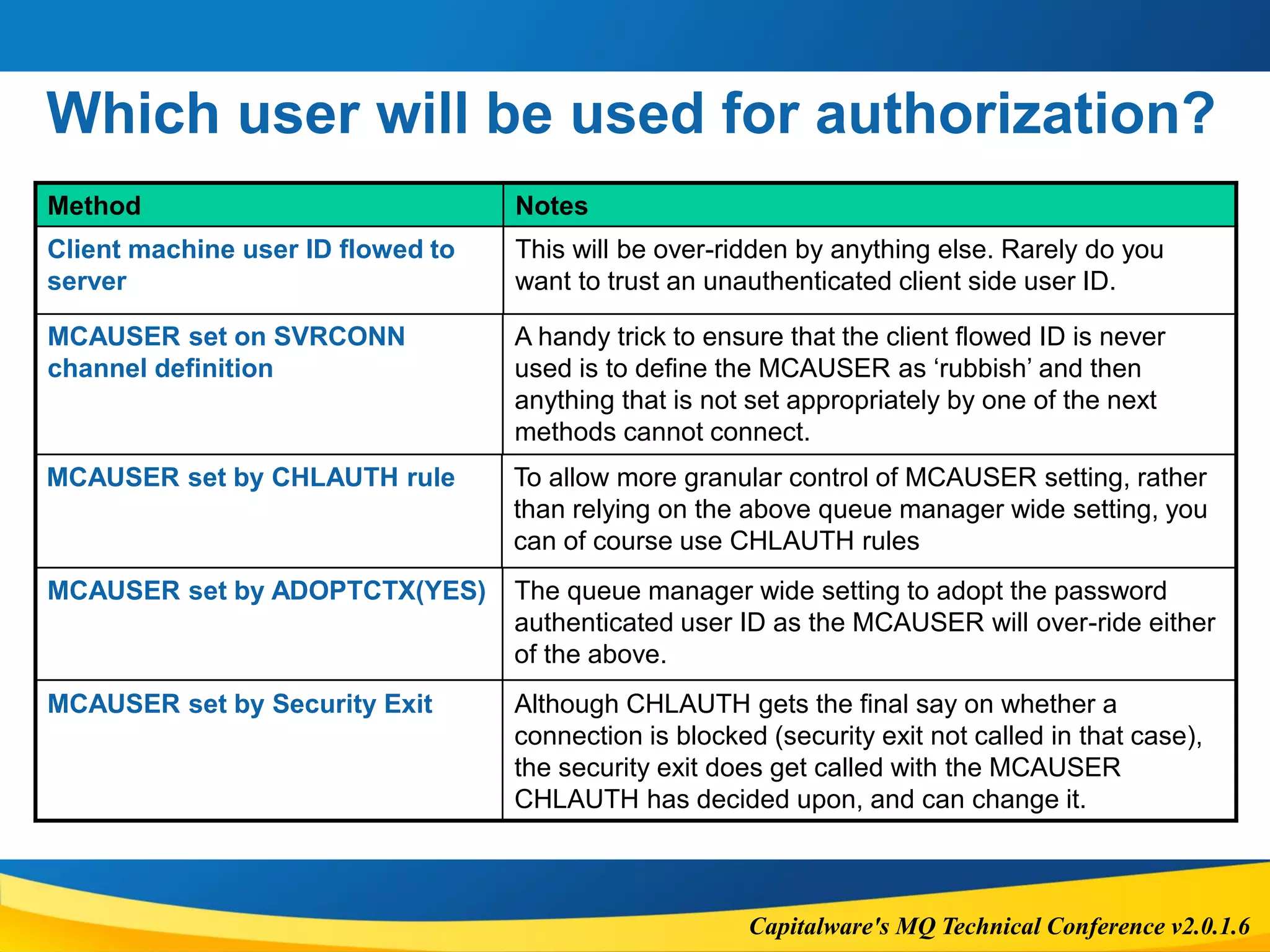
Which user will be used for authorization?
Method Notes
Client machine user ID flowed to
server
This will be over-ridden by anything else. Rarely do you
want to trust an unauthenticated client side user ID.
MCAUSER set on SVRCONN
channel definition
A handy trick to ensure that the client flowed ID is never
used is to define the MCAUSER as ‘rubbish’ and then
anything that is not set appropriately by one of the next
methods cannot connect.
MCAUSER set by ADOPTCTX(YES) The queue manager wide setting to adopt the password
authenticated user ID as the MCAUSER will over-ride either
of the above.
MCAUSER set by CHLAUTH rule To allow more granular control of MCAUSER setting, rather
than relying on the above queue manager wide setting, you
can of course use CHLAUTH rules
MCAUSER set by Security Exit Although CHLAUTH gets the final say on whether a
connection is blocked (security exit not called in that case),
the security exit does get called with the MCAUSER
CHLAUTH has decided upon, and can change it.
Capitalware's MQ Technical Conference v2.0.1.6
Questions & Answers
Capitalware's MQ Technical Conference v2.0.1.6
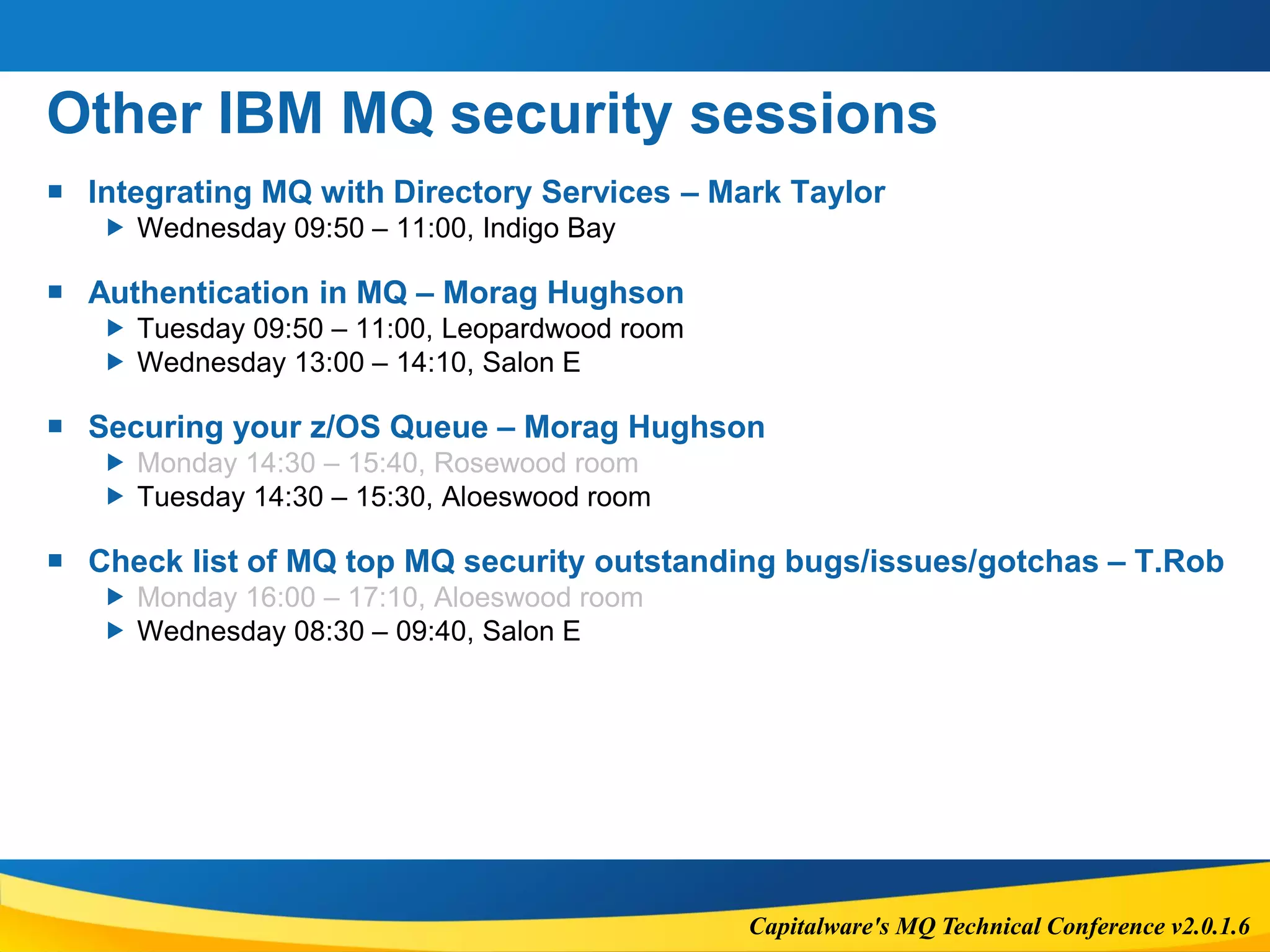
Other IBM MQ security sessions
 Integrating MQ with Directory Services – Mark Taylor
 Wednesday 09:50 – 11:00, Indigo Bay
 Authentication in MQ – Morag Hughson
 Tuesday 09:50 – 11:00, Leopardwood room
 Wednesday 13:00 – 14:10, Salon E
 Securing your z/OS Queue – Morag Hughson
 Monday 14:30 – 15:40, Rosewood room
 Tuesday 14:30 – 15:30, Aloeswood room
 Check list of MQ top MQ security outstanding bugs/issues/gotchas – T.Rob
 Monday 16:00 – 17:10, Aloeswood room
 Wednesday 08:30 – 09:40, Salon E
Capitalware's MQ Technical Conference v2.0.1.6
Trying Something New
 MQ Labs in the
MQ Labs Experiment
Booth next to Aloeswood
MQ for z/OS Images
MQ for Distributed Image
Monday & Tuesday Morning –
drop in

MQTC 2016: IBM MQ Security deep dive including AMS

  • 1.
    Capitalware's MQ TechnicalConference v2.0.1.6 IBM MQ Security: Deep dive including AMS Rob Parker
  • 2.
    Capitalware's MQ TechnicalConference v2.0.1.6 Important Disclaimer  THE INFORMATION CONTAINED IN THIS PRESENTATION IS PROVIDED FOR INFORMATIONAL PURPOSES ONLY.  WHILE EFFORTS WERE MADE TO VERIFY THE COMPLETENESS AND ACCURACY OF THE INFORMATION CONTAINED IN THIS PRESENTATION, IT IS PROVIDED “AS IS”, WITHOUT WARRANTY OF ANY KIND, EXPRESS OR IMPLIED.  IN ADDITION, THIS INFORMATION IS BASED ON IBM’S CURRENT PRODUCT PLANS AND STRATEGY, WHICH ARE SUBJECT TO CHANGE BY IBM WITHOUT NOTICE.  IBM SHALL NOT BE RESPONSIBLE FOR ANY DAMAGES ARISING OUT OF THE USE OF, OR OTHERWISE RELATED TO, THIS PRESENTATION OR ANY OTHER DOCUMENTATION.  NOTHING CONTAINED IN THIS PRESENTATION IS INTENDED TO, OR SHALL HAVE THE EFFECT OF:  CREATING ANY WARRANTY OR REPRESENTATION FROM IBM (OR ITS AFFILIATES OR ITS OR THEIR SUPPLIERS AND/OR LICENSORS); OR  ALTERING THE TERMS AND CONDITIONS OF THE APPLICABLE LICENSE AGREEMENT GOVERNING THE USE OF IBM SOFTWARE.  Information regarding potential future products is intended to outline our general product direction and it should not be relied on in making a purchasing decision. The information mentioned regarding potential future products is not a commitment, promise, or legal obligation to deliver any material, code or functionality. Information about potential future products may not be incorporated into any contract. The development, release, and timing of any future features or functionality described for our products remains at our sole discretion. 2
  • 3.
    Capitalware's MQ TechnicalConference v2.0.1.6 Agenda  AMS  Recap  Important considerations  Message format  When will my message be protected?  Errors  Implementation  Channel Authentication  Details  Configuration  Relation to connection authentication  Channel authentication recap  Relation to Authorization  Authorization recap
  • 4.
    Capitalware's MQ TechnicalConference v2.0.1.6 AMS
  • 5.
    Capitalware's MQ TechnicalConference v2.0.1.6 Introduction  AMS means Advanced Message Security  Provides message level security for messages  Protects messages in transit and at rest  Protects messages from creation until destruction  Uses TLS features (encryption/signing) to protect message  Available as a separate license or in IBM MQ Advanced  MQ has three options for AMS protection  Integrity – Signing protection  Privacy – Signing and Encryption protection  Confidentiality – Encryption protection – MQ v9+ Only
  • 6.
    Capitalware's MQ TechnicalConference v2.0.1.6 Important considerations  Performance  Increase in CPU requirements (but in relation to MQ CPU requirements)  Cryptographic operations cause a decrease of message throughput  Impact depends on protection level (Integrity, Confidentiality, privacy)  Message size  To accommodate AMS properties, overall message size will increase.  New message size = 1280 + [Old Message Length] + (200 x [# of recipients])  AMS does not perform access control  It just protects the message contents from change and/or reading
  • 7.
    Capitalware's MQ TechnicalConference v2.0.1.6 Important considerations  The following MQ Options are not supported with AMS  Publish/Subscribe  Channel Data Conversion – message data conversion still supported  Distribution lists  IMS Bridge nor IMS programs in SRB mode (Only Pre MQ v8 AMS)  Non-Threaded applications using API exit on HP-UX  Java (JMS and Java “base” classes) only supported with MQv7  MQ message properties on z/OS  Only the IBM JRE is supported in MQv8 and before.  Unlike TLS, the entire certificate chain must be present in the keystore  The sender must also have a copy of all the recipients public certificates
  • 8.
    Capitalware's MQ TechnicalConference v2.0.1.6 Message format – Integrity policy Message Data Message Data PDMQ Header PKCS #7 Envelope Signature Message Properties Message Properties Original MQ Message AMS Signed Message
  • 9.
    Capitalware's MQ TechnicalConference v2.0.1.6 Message format – Privacy policy Message Data Original MQ Message AMS Encrypted Message Message Properties Message Data PDMQ Header PKCS #7 Envelope Signature Message Properties Key encrypted with certificate 1 Data encrypted with key Key encrypted with certificate 2 …
  • 10.
    Capitalware's MQ TechnicalConference v2.0.1.6 When will my message be protected?  Messages are protected when they are created  Level of protection depends on Policy: None, Integrity, Privacy, Confidentiality  Policies apply to all Queue Types: Remote, Alias, Local  During MQOPEN call, policies are queries  IBM MQ looks for policies named the same as the Object being opened.  Once protected, the message retains the policy for its lifetime.  At MQPUT:  If there is a policy (regardless of type) we sign the message data  If it is a privacy policy we encrypt for the specified recipients  At MQGET  If there is a privacy policy we will decrypt the using our certificate or error  If there is a policy we check the message was signed by a signer listed in the policy
  • 11.
    Capitalware's MQ TechnicalConference v2.0.1.6 When will my message be protected Sending App Receiving AppRemoteQ Alice Bob RemoteQ Privacy Recipient : Bob Encryp: SHA256 Signer : <> SignAl: SHA256 LocalQ LocalQ Privacy Recipient : <> Encryp: SHA256 Signer : Alice SignAl: SHA256 1. Alice’s Application Calls MQOPEN on RemoteQ 2. MQOPEN Queries for Policy called RemoteQ and passes info back XMITQ
  • 12.
    Capitalware's MQ TechnicalConference v2.0.1.6 When will my message be protected Sending App Receiving AppRemoteQ Alice Bob LocalQ 3. Alice issues a MQPUT to RemoteQ a) Because there is a policy AMS signs the message data b) If the policy is a Privacy policy it also encrypts it for the recipients 4. The message is put to RemoteQ and flows over to the LocalQ Alice RemoteQ Privacy Recipient : Bob Encryp: SHA256 Signer : <> SignAl: SHA256 LocalQ Privacy Recipient : <> Encryp: SHA256 Signer : Alice SignAl: SHA256 XMITQ
  • 13.
    Capitalware's MQ TechnicalConference v2.0.1.6 When will my message be protected Sending App Receiving AppRemoteQ Alice Bob LocalQ 5. Bob Issues an MQOPEN call to LocalQ 6. MQOPEN queries for any policies called LocalQ and returns the info RemoteQ Privacy Recipient : Bob Encryp: SHA256 Signer : <> SignAl: SHA256 LocalQ Privacy Recipient : <> Encryp: SHA256 Signer : Alice SignAl: SHA256 XMITQ
  • 14.
    Capitalware's MQ TechnicalConference v2.0.1.6 When will my message be protected Sending App Receiving AppRemoteQ Alice Bob LocalQ 7. Bob Issues MQGET a) Checks the Encryption Algorithm used is same or stronger b) Checks Bob can decrypt the message c) Checks the Signing Algorithm used is same or stronger d) Checks the message was from an authorised signer listed in the policy 8. Bob reads his message Alice RemoteQ Privacy Recipient : Bob Encryp: SHA256 Signer : <> SignAl: SHA256 LocalQ Privacy Recipient : <> Encryp: SHA256 Signer : Alice SignAl: SHA256 XMITQ
  • 15.
    Capitalware's MQ TechnicalConference v2.0.1.6 Errors  AMS uses the same error codes as security but interpreted differently  Several scenarios where something could go wrong:  Putting to a protected Queue without Client AMS setup  GET/BROWSE a message you are not a recipient for  GET/BROWSE a message signed by someone not authorized  GET/BROWSE a message that has NOT been protected (got onto Q via AliasQ/RemoteQ etc)  Signing or encryption Algorithm in message is weaker than policy dictates during GET/BROWSE  Do not have correct certificates for the all listed Recipients  Misspelt Distinguished names for Authorized Signers or Recipients  Recipient does not have the signers certificate  Unlike TLS - full trust chain is not supplied. E.g. Signer cert, Intermediate CA cert, CA cert, etc  Error with Key Store configuration – Key Store Permissions, stanzas, etc
  • 16.
    Capitalware's MQ TechnicalConference v2.0.1.6 Errors  What happens depends on operation being performed:  MQPUT – 2063 error returned and message not accepted.  MQGET – 2063 error returned, message gains a DLQ header and is moved to SYSTEM.PROTECTION.ERROR Queue.  MQBROWSE – 2063 error returned.  Key Store related problems 2035 error returned.
  • 17.
    Capitalware's MQ TechnicalConference v2.0.1.6 Implementation  We will assume the necessary certificates have already been exchanged  Application changes: Alice’s Sending/Receiving AppKeystore AliceCertificate Keystore.conf cms.keystore=/…/Keystore cms.certificate=AliceCertificate MQS_KEYSTORE_CONF=/…/Keystore.conf (Or create Keystore.conf in home directory) No Changes Necessary!
  • 18.
    Capitalware's MQ TechnicalConference v2.0.1.6 Implementation  Set Security Policy using setmqspl, runmqsc or MQ Explorer  setmqspl –m STOCK –p ORDERS –s SHA256 –a “CN=ALICE,O=IBM,C=UK” –e AES256 –r “CN=BOB,O=IBM,C=UK”
  • 19.
    Capitalware's MQ TechnicalConference v2.0.1.6 CHANNEL AUTHENTICATION
  • 20.
    Capitalware's MQ TechnicalConference v2.0.1.6 Details  Channel authentication rules are filters that can be applied for incoming connections  Whitelisting – Allow connections based on a filter  Blacklisting – Block a connection based on a filter  The filters are applied on channels and are applied to all incoming connections for that channel  The filter can be either very specific or generic. (Exact channel name or wildcard)
  • 21.
    Capitalware's MQ TechnicalConference v2.0.1.6 Details  There are four types of filters:  TLS Distinguished name (Issuer and Subject)  Client User ID name  Remote Queue Manager name  IP/Hostname  For IP/Hostname the connection can be allowed/blocked at the listener or channel  For Client user ID, the userid blocked can be the userid connected with or the final adopted userid
  • 22.
    Capitalware's MQ TechnicalConference v2.0.1.6 Details  Channel Authentication rules have an order of checking: 1. BLOCKADDR 2. ADDRESSMAP 3. SSLPEERMAP 4. QMGRMAP 5. USERMAP 6. BLOCKUSER  In addition if a connection matches two CHLAUTH rules where one has a specific filter and one has a generic filter then the CHLAUTH that is SPECIFIC will be acted on.  For example two ADDRESSMAP:  Block where address=*  Allow where address=129.12.9.9  Connection from 129.12.9.9 will be allowed through.
  • 23.
    Capitalware's MQ TechnicalConference v2.0.1.6 Details  When you create a CHLAUTH rule you can specify what it should do when triggered.  The options are:  CHANNEL – Use the userid set in the channel MCAUSER for the future checks  MAP -Use the userid set in this CHLAUTH MCAUSER for the future checks  NOACCESS – Block the connection  In addition you can raise the security of the channel by setting a higher CHCKCLNT value on the CHLAUTH.  If a user connects to CHANNEL.1 they are required to pass valid credentials  If a user connects to CHANNEL.2 they don't have to pass valid credentials.
  • 24.
    Capitalware's MQ TechnicalConference v2.0.1.6 Configuration  Channel Authentication rules are created or modified in:  MQ Explorer  runmqsc  Channel Authentication can be enabled/disabled from a queue manager property:  ALTER QMGR CHLAUTH(ENABLED|DISABLED)  There is also the ability to enable rules that only print warnings  SET CHLAUTH(*) … WARN(NO|YES)  Upon creation of a queue manager 3 default channel authentication rules  Block all users who are MQ administrators  Block access to all SYSTEM channels  Allow access to SYSTEM.ADMIN.SVRCONN channel
  • 25.
    Capitalware's MQ TechnicalConference v2.0.1.6 Configuration SET CHLAUTH(<Channel name>) TYPE(<channel authentication type>) <extra parameters> ACTION(ADD|REMOVE|REMOVEALL|REPLACE)
  • 26.
    Capitalware's MQ TechnicalConference v2.0.1.6 Configuration
  • 27.
    Capitalware's MQ TechnicalConference v2.0.1.6 Configuration MQCONNX UserA MQCONNX UserB QMGR SET CHLAUTH(*) TYPE(USERMAP) CLNTUSER(*) USERSRC(NOACCESS) ACTION(ADD) SET CHLAUTH(*) TYPE(USERMAP) CLNTUSER(‘UserA’) USERSRC(CHANNEL) ACTION(ADD) MQRC_NOT_AUTHORIZED (2035) MQRC_NONE (0)
  • 28.
    Capitalware's MQ TechnicalConference v2.0.1.6 CHLAUTH & CONNAUTH
  • 29.
    Capitalware's MQ TechnicalConference v2.0.1.6 Introduction  We use Authentication to ask clients connecting to prove they are who they say they are.  Usually used in combination with authorisation to limit user's abilities.  Connection authentication feature available in MQ v8 and above.  Allows authentication user credentials supplied by client applications.  There are 4 levels of connection authentication security  None – no authentication performed security (code disabled)  Optional – credentials do not have to be supplied, but if supplied must be valid  Required – credentials must be supplied and valid  REQDADM – If the user is a MQ administrator they must supply credentials, if not they follow optional level.  For channel authentication records there is one attribute that can impact connection authentication:  CHCKCLNT
  • 30.
    Capitalware's MQ TechnicalConference v2.0.1.6 User's Digital Certificate CA Sig CHCKCLNT MQCONNX Application (User4) QMgr DEFINE AUTHINFO(USE.PW) AUTHTYPE(xxxxxx) CHCKCLNT(OPTIONAL) SET CHLAUTH(‘*’) TYPE(ADDRESSMAP) ADDRESS(‘*’) USERSRC(CHANNEL) CHCKCLNT(REQUIRED) SET CHLAUTH(‘*’) TYPE(SSLPEERMAP) SSLPEER(‘CN=*’) USERSRC(CHANNEL) CHCKCLNT(ASQMGR)MQRC_NOT_AUTHORIZED (2035) MQCONNX Application (User2) MQRC_NONE (0) TLS Network Communications CHCKCLNT ASQMGR REQUIRED REQDADM
  • 31.
    Capitalware's MQ TechnicalConference v2.0.1.6 CHLAUTH & AUTHORIZATION
  • 32.
    Capitalware's MQ TechnicalConference v2.0.1.6 Introduction  We use Authorization to limit what connected users can and cannot do.  This is performed by creating authority records  We create authority records for a specific user or group.  User level authority records not available on Linux.  A channel or channel authentication rule can change the userid used for authority checks  For channel authentication records there is one attribute that can impact authorization:  MCAUSER
  • 33.
    Capitalware's MQ TechnicalConference v2.0.1.6 MCAUSER  USERSRC(MAP) allows you to specify a new userid to adopt for authorization checks.  It is available on most channel authentication records.  You specify the user id to use by using the MCAUSER attribute  If you specify USERSRC(MAP) then MCAUSER is required SET CHLAUTH(‘*’) TYPE(ADDRESSMAP) ADDRESS(‘*’) USERSRC(MAP) MCAUSER(‘UserA’)
  • 34.
    Capitalware's MQ TechnicalConference v2.0.1.6 Which user will be used for authorization? Method Notes Client machine user ID flowed to server This will be over-ridden by anything else. Rarely do you want to trust an unauthenticated client side user ID. MCAUSER set on SVRCONN channel definition A handy trick to ensure that the client flowed ID is never used is to define the MCAUSER as ‘rubbish’ and then anything that is not set appropriately by one of the next methods cannot connect. MCAUSER set by ADOPTCTX(YES) The queue manager wide setting to adopt the password authenticated user ID as the MCAUSER will over-ride either of the above. MCAUSER set by CHLAUTH rule To allow more granular control of MCAUSER setting, rather than relying on the above queue manager wide setting, you can of course use CHLAUTH rules MCAUSER set by Security Exit Although CHLAUTH gets the final say on whether a connection is blocked (security exit not called in that case), the security exit does get called with the MCAUSER CHLAUTH has decided upon, and can change it.
  • 35.
    Capitalware's MQ TechnicalConference v2.0.1.6 Questions & Answers
  • 36.
    Capitalware's MQ TechnicalConference v2.0.1.6 Other IBM MQ security sessions  Integrating MQ with Directory Services – Mark Taylor  Wednesday 09:50 – 11:00, Indigo Bay  Authentication in MQ – Morag Hughson  Tuesday 09:50 – 11:00, Leopardwood room  Wednesday 13:00 – 14:10, Salon E  Securing your z/OS Queue – Morag Hughson  Monday 14:30 – 15:40, Rosewood room  Tuesday 14:30 – 15:30, Aloeswood room  Check list of MQ top MQ security outstanding bugs/issues/gotchas – T.Rob  Monday 16:00 – 17:10, Aloeswood room  Wednesday 08:30 – 09:40, Salon E
  • 37.
    Capitalware's MQ TechnicalConference v2.0.1.6 Trying Something New  MQ Labs in the MQ Labs Experiment Booth next to Aloeswood MQ for z/OS Images MQ for Distributed Image Monday & Tuesday Morning – drop in