MICROPROCESSORS AND
MICROCONTROLLERS
Course code:ECPE12
II. B.Tech IV semester
BY
Dr. Srinivasulu Jogi
DEPARTMENT OF ELECTRONICS AND COMMUNICATION ENGINEERING
National Institute of Technology, Tiruchirappalli,
Tiruchirappalli, Tamilnadu - 620015
1
Module– I & II
8086
MICROPROCESSORS
2
Introduction to processor:
3
• A processor is the logic circuitry that responds to and processes the
basic instructions that drives a computer.
• The
term
processor has generally replaced the term
central
processing unit . The processor in a personal
computer
or
embedded in small devices is often called a microprocessor.
• The processor (CPU, for Central Processing Unit) is the computer's
brain. It allows the processing of numeric data, meaning
information entered in binary form, and the execution of
instructions stored in memory.
Evolution of Microprocessor:
4
• A microprocessor is used as the CPU in a microcomputer. There are
now many different microprocessors available.
• Microprocessor is a program-controlled device, which fetches the
instructions from memory, decodes and executes the instructions.
Most Micro Processor are single- chip devices.
• Microprocessor is a backbone of computer system. which is called
CPU
• Microprocessor speed depends on the processing speed depends
on DATA BUS WIDTH.
• A common way of categorizing microprocessors is by the no. of bits
that their ALU can Work with at a time
 The address bus is unidirectional because the address information is
always given by the Micro Processor to address a memory location
of an input / output devices.
 The data bus is Bi-directional because the same bus is used for
transfer of data between Micro Processor and memory or input /
output devices in both the direction.
 It has limitations on the size of data. Most Microprocessor does
not support floating-point operations.
 Microprocessor contain ROM chip because it contain
instructions to execute data.
 Storage capacity is limited. It has a volatile memory. In secondary
storage device the storage capacity is larger. It is a nonvolatile
memory.
5
Evolution of Microprocessor:
 Primary devices are: RAM (Read / Write memory, High Speed,
Volatile Memory) / ROM (Read only memory, Low Speed, Non Volatile
Memory)
Compiler:
 Compiler is used to translate the high-level language program into machine
code at a time. It doesn’t require special instruction to store in a memory,
it stores automatically. The Execution time is less compared to Interpreter
6
Evolution of Microprocessor:
RISC (Reduced Instruction Set Computer):
• RISC stands for Reduced Instruction Set Computer. To execute each
instruction, if there is separate
• electronic circuitry in the control unit, which produces all the
necessary signals, this approach of the design of the control section
of the processor is called RISC design. It is also called hardwired
approach.
Examples of RISC processors:
• IBM RS6000, MC88100
• DEC’s Alpha 21064, 21164 and 21264 processors
7
Evolution of Microprocessor:
8086 Architecture :
8
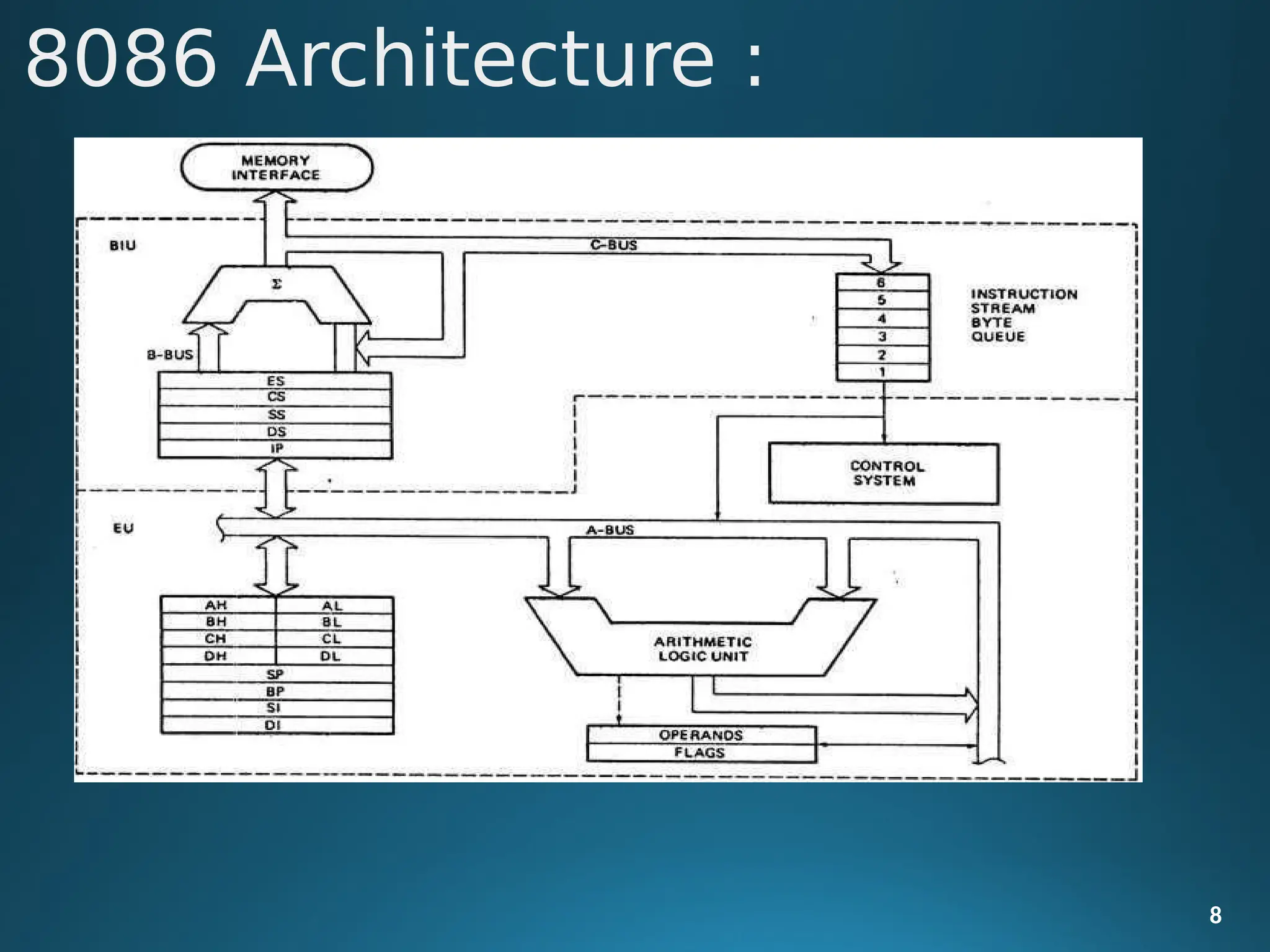
 8086 Microprocessor is divided into
two
EU(Execution Unit) and BIU (Bus Interface Unit).
9
functional units, i.e.,
EU (Execution Unit):
Execution unit gives instructions to BIU stating from where to fetch the data
and then decode and execute those instructions. Its function is to control
operations on data using the instruction decoder & ALU. EU has no direct
connection with system buses as shown in the above figure, it performs
operations over data through BIU.
8086 Architecture :
• BIU(Bus Interface Unit):
 BIU takes care of all data and addresses transfers on the buses for the EU
like sending addresses, fetching instructions from the memory, reading
data from the ports and the memory as well as writing data to the ports
and the memory. EU has no direction connection with System Buses so
this is possible with the BIU. EU and BIU are connected with the Internal
Bus.
• Instruction queue:
 BIU contains the instruction queue. BIU gets up to 6 bytes of next
instructions and stores them in the instruction queue. When EU executes
instructions and is ready for its next instruction, then it simply reads the
instruction from this instruction queue resulting in increased execution
speed.
10
8086 Architecture :
• Segment register:
 BIU has 4 segment buses, i.e. CS, DS, SS& ES. It holds the addresses of
instructions and data in memory, which are used by the processor to
access memory locations. It also contains 1 pointer register IP, which
holds the address of the next instruction to executed by the EU.
11
8086 Architecture :
AX & DX registers:
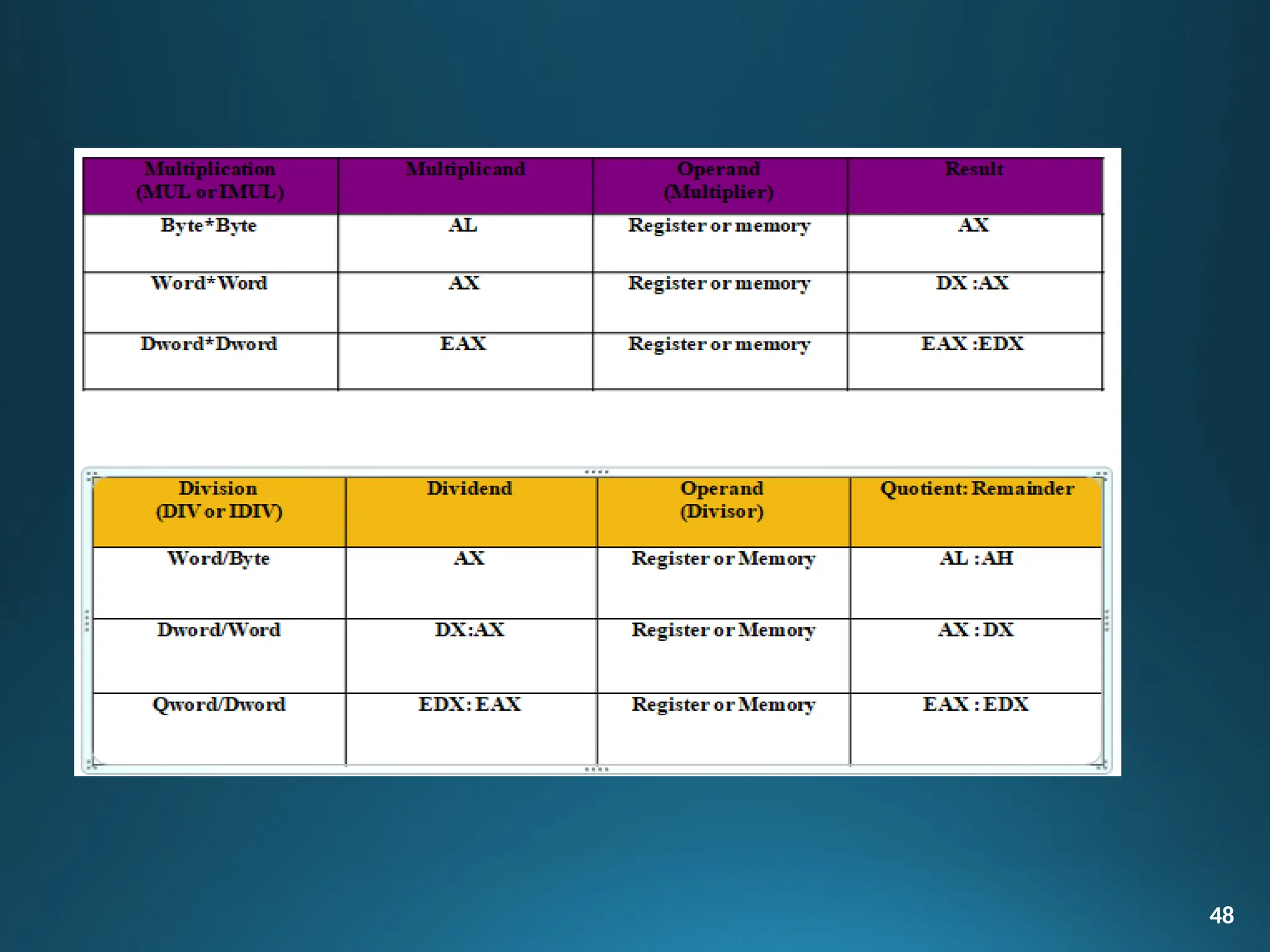
 In 8 bit multiplication, one of the operands must be in AL. The
other operand can be a byte in memory location or in another 8
bit register. The resulting 16 bit product is stored in AX, with AH
storing the MS byte.
 In 16 bit multiplication, one of the operands must be in AX.
 The other operand can be a word in memory location or in
another 16 bit register. The resulting 32 bit product is stored in DX
and AX, with DX storing the MS word and AX storing the LS word.
12
Special functions of general purpose
register
Special functions of general
purpose register
13
BX register :
In instructions where we need to specify in a general purpose
register the 16 bit effective address of a memory location, the
register BX is used (register indirect).
CX register :
In Loop Instructions, CX register will be always used as the implied
counter. In I/O instructions, the 8086 receives into or sends out data
from AX or AL depending as a word or byte operation.
• Segment register:
 BIU has 4 segment buses, i.e. CS, DS, SS& ES. It
14
holds the addresses of
instructions and data in memory, which are used by the processor to
access memory locations. It also contains 1 pointer register IP, which holds
the address of the next instruction to executed by the EU.
Segment register:
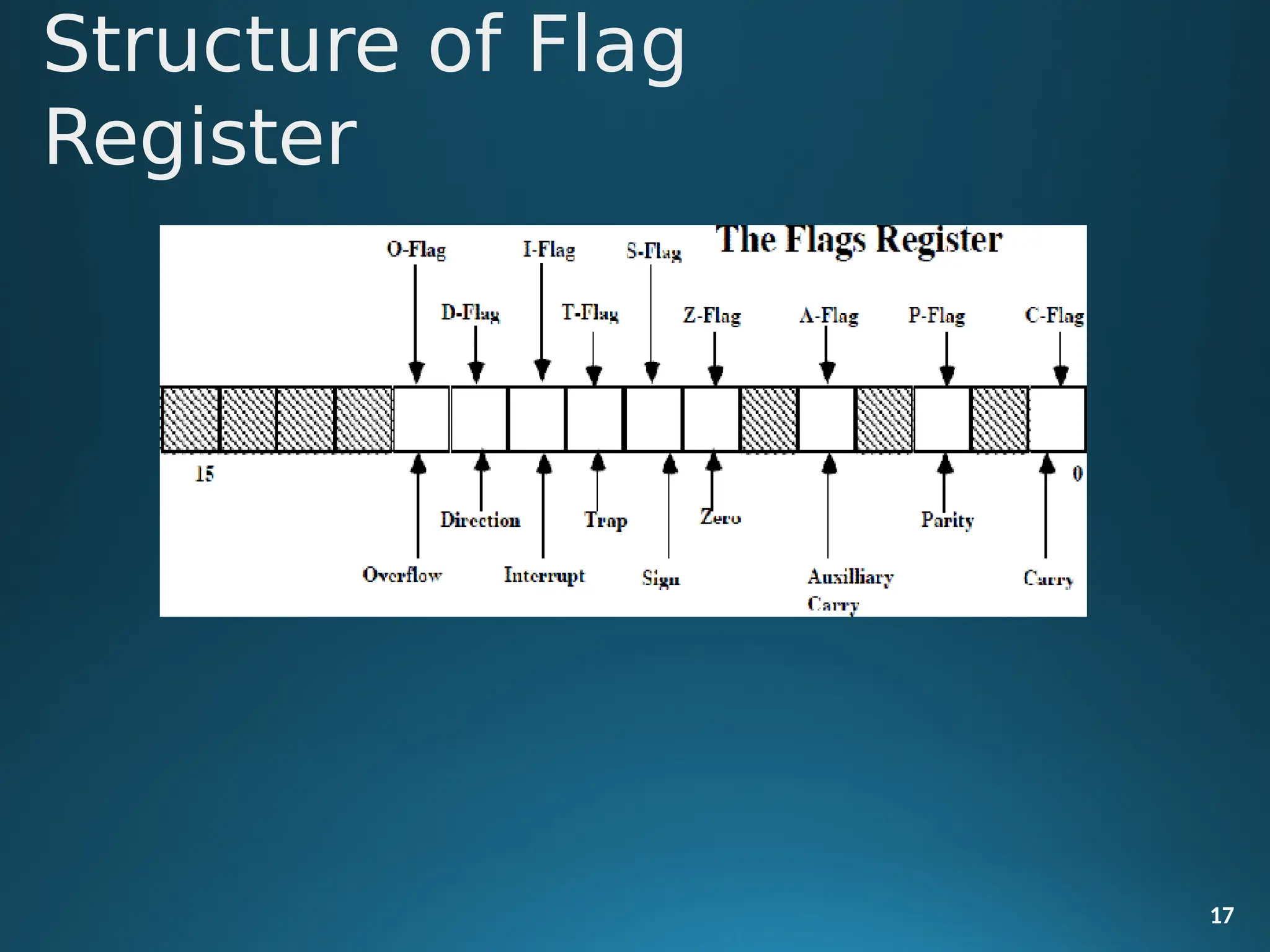
 Flag Register contains a group of status bits called flags that
indicate the status of the CPU or the result of arithmetic operations.
 There are two types of flags:
 The status flags which reflect the result of executing an instruction.
The programmer cannot set/reset these flags directly.
 The control flags enable or disable certain CPU operations.
 The programmer can set/reset these bits to control the
CPU's operation.
15
Flag Register and Functions of 8086
Flags
• Nine individual bits of the status register are used as control flags (3 of
them) and status flags (6 of them).The remaining 7 are not used.
• A flag can only take on the values 0 and 1. We say a flag is set if it has
the value 1.The status flags are used to record specific characteristics
of arithmetic and of logical instructions.
16
Flag Register and Functions of 8086
Flags
Structure of Flag
Register
17
• Control Flags: There are three control flags
• The Direction Flag (D): Affects the direction of moving data blocks by such
instructions as MOVS, CMPS and SCAS. The flag values are 0 = up and 1 =
down and can be set/reset by the STD (set D) and CLD (clear D) instructions.
• The Interrupt Flag (I): Dictates whether or not system interrupts can occur.
Interrupts are actions initiated by hardware block such as input devices that
will interrupt the normal execution of programs. The flag values are 0 =
disable interrupts or 1 = enable interrupts and can be manipulated by the
CLI (clear I) and STI (set I) instructions.
18
Flag Register and Functions of
8086 Flags
• The Trap Flag (T): Determines whether or not the CPU is halted after the
execution of each instruction. When this flag is set (i.e. = 1), the
programmer can single step through his program to debug any errors.
When this flag = 0 this feature is off. This flag can be set by the INT 3
instruction.
• Status Flags: There are six status flags
• The Carry Flag (C): This flag is set when the result of an unsigned
arithmetic operation is too large to fit in the destination register. This
happens when there is an end carry in an addition operation or there an
end borrows in a subtraction operation. A value of 1 = carry and 0 = no
carry.
19
Flag Register and Functions of
8086 Flags
• The Overflow Flag (O): This flag is set when the result of a signed
arithmetic operation is too large to fit in the destination register (i.e. when
an overflow occurs). Overflow can occur when adding two numbers with
the same sign (i.e. both positive or both negative). A value of 1 = overflow
and 0 = no overflow.
• The Sign Flag (S): This flag is set when the result of an arithmetic or logic
operation is negative. This flag is a copy of the MSB of the result (i.e. the
sign bit). A value of 1 means negative and 0 = positive.
20
Flag Register and Functions of
8086 Flags
• The Zero Flag (Z): This flag is set when the result of an arithmetic or logic
operation is equal to zero. A value of 1 means the result is zero and a value
of 0 means the result is not zero.
• The Auxiliary Carry Flag (A): This flag is set when an operation causes a
carry from bit 3 to bit 4 (or a borrow from bit 4 to bit 3) of an operand. A
value of 1 = carry and 0 = no carry.
• The Parity Flag (P): This flags reflects the number of 1s in the result of an
operation. If the number of 1s is even its value = 1 and if the number of 1s is
odd then its value = 0.
21
Flag Register and Functions of 8086
Flags
• Addressing mode indicates a way of locating data or operands. Depending
up on the data type used in the instruction and the memory addressing
modes, any instruction may belong to one or more addressing modes or
same instruction may not belong to any of the addressing modes.
• The addressing mode describes the types of operands and the way they are
22
accessed for executing an instruction. According to the
execution, the instructions may be categorized as
 Sequential control flow instructions and
 Control transfer instructions.
flow of instruction
Addressing Modes of
8086
• Sequential control flow instructions are the instructions which after
execution, transfer control to the next instruction appearing immediately
after it (in the sequence) in the program. For example the arithmetic, logic,
data transfer and processor control instructions are Sequential control flow
instructions.
• The control transfer instructions on the other hand transfer control to
some predefined address or the address somehow specified in the
instruction, after their execution. For example INT, CALL, RET & JUMP
instructions fall under this category.
23
Addressing Modes of
8086
 The addressing modes for Sequential and control flow instructions
are
explained as follows.
 Immediate addressing mode:
 In this type of addressing, immediate data is a part of instruction,
and
appears in the form of successive byte or bytes.
24
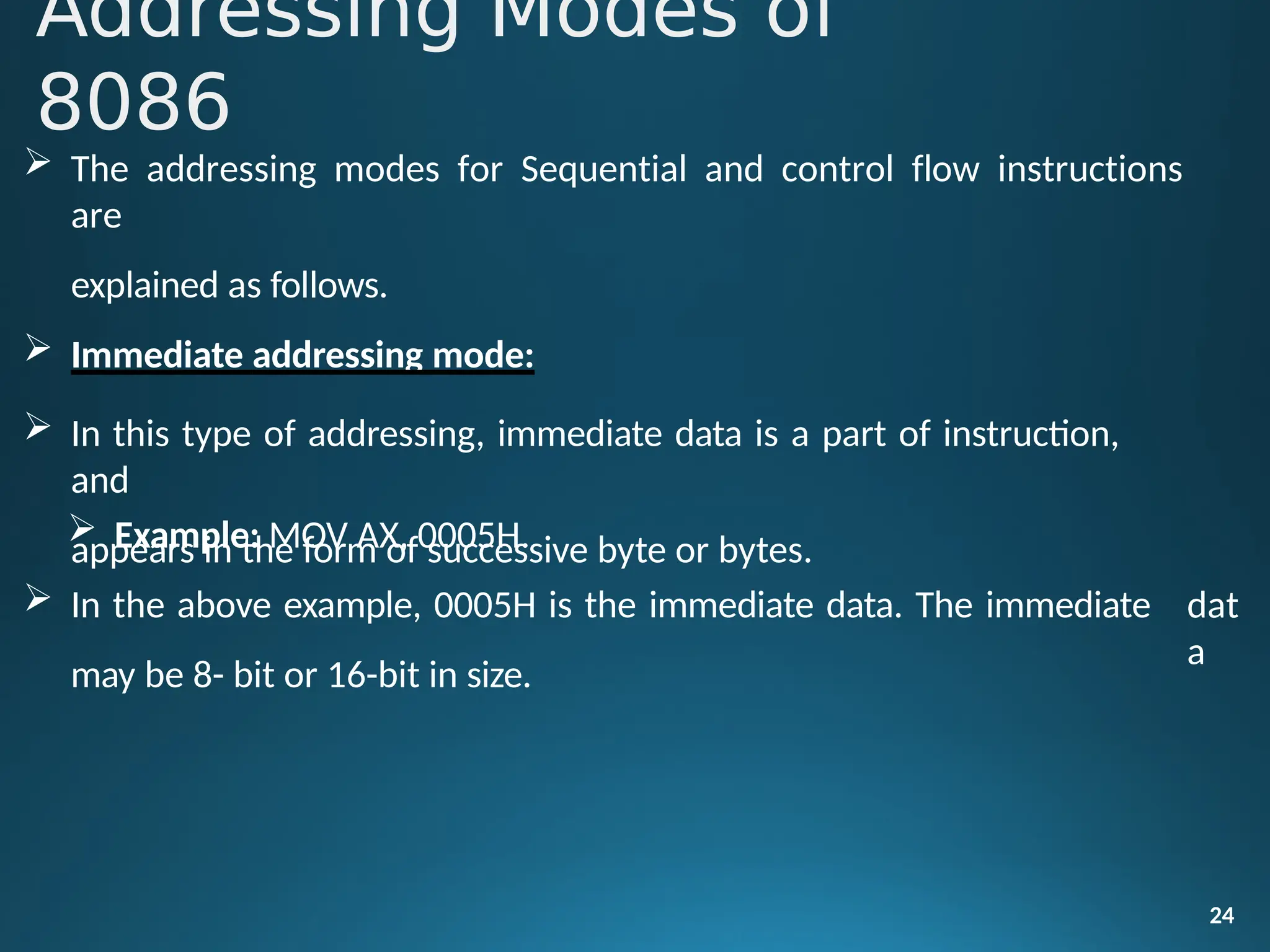
 Example: MOV AX, 0005H.
 In the above example, 0005H is the immediate data. The immediate
may be 8- bit or 16-bit in size.
dat
a
Addressing Modes of
8086
Direct addressing mode:
• In the direct addressing mode, a 16-bit memory address (offset) directly
specified in the instruction as a part of it.
Example: MOV AX, [5000H].
Register addressing mode:
25
• In the register addressing mode, the data is stored in a register and it is
referred using the particular register. All the registers, except IP,
used in this mode.
may be
Example: MOV BX, AX
Addressing Modes of
8086
Register indirect addressing mode:
• Sometimes, the address of the memory location which contains data or
operands is determined in an indirect way, using the offset registers. The
mode of addressing is known as register indirect mode.
• In this addressing mode, the offset address of data is in either BX or SI or
DI Register. The default segment is either DS or ES.
E•
xample: MOV AX, [BX].
26
Addressing Modes of
8086
Indexed addressing mode:
• In this addressing mode, offset of the operand is stored one of the index
registers. DS & ES are the default segments for index registers SI & DI
respectively.
Example: MOV AX, [SI]
• Here, data is available at an offset address stored in SI in DS.
27
Addressing Modes of
8086
Register relative addressing mode:
• In this addressing mode, the data is available at an effective address formed
by adding an 8-bit or 16-bit displacement with the content of any one of
the register BX, BP, SI & DI in the default (either in DS & ES) segment.
28
Example: MOV AX, 50H [BX]
Addressing Modes of
8086
•
29
•
Based indexed addressing mode:
• The effective address of data is formed in this addressing mode, by
adding content of a base register (any one of BX or BP) to the
content of an index register (any one of SI or DI). The default
segment register may be ES or DS. Example: MOV AX, [BX][SI]
Relative based indexed:
• The effective address is formed by adding an 8 or 16-bit displacement with
the sum of contents of any of the base registers (BX or BP) and any one
of the index registers, in a default segment.
Example: MOV AX, 50H [BX] [SI]
•
Addressing Modes of
8086
• Addressing Modes for control transfer instructions:
• Intersegment
– Intersegment direct
– Intersegment indirect
• Intrasegment
– Intrasegment direct
– Intrasegment indirect
30
Addressing Modes of
8086
• Intersegment direct:
 In this mode, the address to which the control is to be transferred is in a
different segment. This addressing mode provides a means of branching
from one code segment to another code segment. Here, the CS and IP of
the destination address are specified directly in the instruction.
Example: JMP 5000H: 2000H;
• Jump to effective address 2000H in segment 5000H.
31
Addressing Modes of
8086
Intersegment indirect:
 In this mode, the address to which the control is to be transferred lies in a
different segment and it is passed to the instruction indirectly, i.e. contents
of a memory block containing four bytes, i.e. IP(LSB), IP(MSB), CS(LSB) and
CS(MSB) sequentially. The starting address of the memory block may be
referred using any of the addressing modes, except immediate mode.
 Example: JMP [2000H].
32
 Jump to an address in the other segment specified at effective
2000H in DS.
address
Modes of
8086
• Intrasegment direct mode:
 In this mode, the address to which the control is to be transferred lies in the
same segment in which the control transfers instruction lies and appears
directly in the instruction as an immediate displacement value. In this
addressing mode, the displacement is computed relative to the content of
the instruction pointer.
33
• The effective address to which the control will be transferred is given
by
34
the sum of 8 or 16 bit displacement and current content of
jump instruction, if the signed displacement (d) is of
8-
IP. In case of
bits (i.e. -
128<d<+127), it as short jump and if it is of 16 bits (i.e.
-
32768<d<+32767), it is termed as long jump.
Example: JMP SHORT LABEL.
• Intrasegment indirect mode:
• In this mode, the displacement to which the control is to be transferred is
in the same segment in which the control transfer instruction lies, but it is
passed to the instruction directly. Here, the branch address is found as the
content of a register or a memory location.
• This addressing mode may be used in unconditional branch
instructions.
• Example: JMP [BX]; Jump to effective address stored in BX.
35
Addressing
Modes
• The contents of different registers are given below. Form the effective or
physical address of the following instructions
• [AX]=1000H, [BX]=2000H, [SI]=3000H, [DI]=4000H, [BP]=5000H,
[SP]=6000H, [CS]= 0000H, [DS]= 1000H, [SS]= 2000H, [ES]=3000H,
[IP]=7000H
• 1. MOV AX, [5000H]
• 2. MOV AX, [BP]
• 3. MOV AX, 5000[BX]
• 4. MOV AX, [BX][SI]
• 5. MOV AX, 5000[BX][SI]
• 6. MOV AX, [DI]
36
Addressing
Modes
INSTRUCTION SET OF 8086
37
• The Instruction set of 8086 microprocessor is classified into 7 Types, they
are:-
• Data transfer instructions
• Arithmetic& logical instructions
• Program control transfer instructions
• Machine Control Instructions
• Shift / rotate instructions
• Flag manipulation instructions
• String instructions
• Data transfer instruction, as the name suggests is for the transfer of
data from memory to internal register, from internal register to
memory, from one register to another register, from input port to
internal register, from internal register to output port etc
MOV instruction
• It is a general purpose instruction to transfer byte or word from
register to register, memory to register, register to memory or with
immediate addressing.
38
Data
Transfer
instructions
General Form:
• MOV destination, source
• Here the source and destination needs to be of the same size, that
is both 8 bit or both 16 bit.
• MOV instruction does not affect any flags.
Example:-
39
•
• MOV BX,
00F2H;
load the immediate number 00F2H
in BX register
• MOV CL, [2000H] ;Copy the 8 bit content of the
memory
location, at a
displacement of2000H
from data segment base to the CL register
Data Transfer instructions
•MOV [589H], BX; Copy the 16 bit content of BX register on to the
memory location, which at a
displacement of 589H from the data segment
base.
• MOV DS, CX; Move the content of CX to DS
PUSH instruction
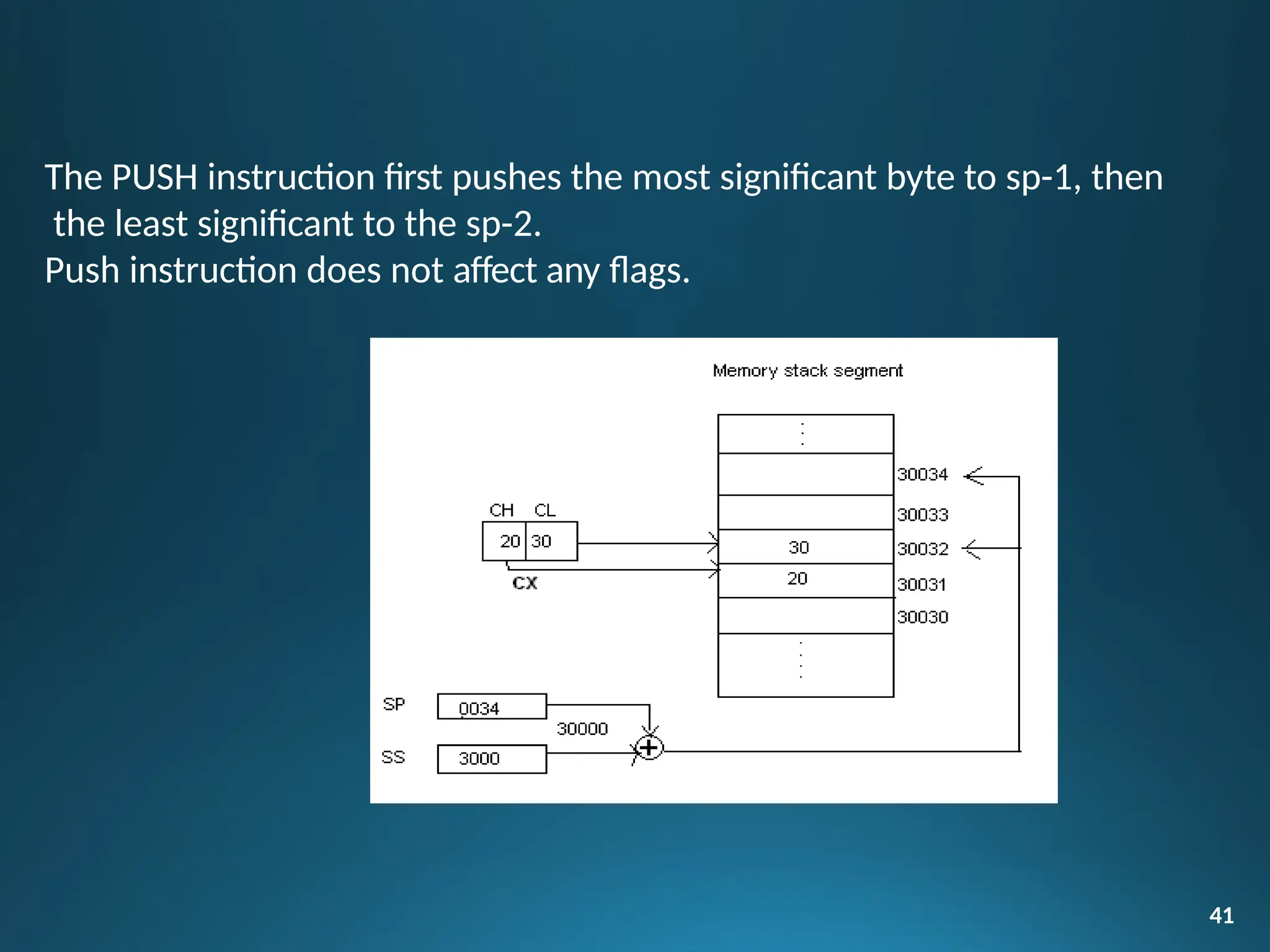
• The PUSH instruction decrements the stack pointer by two and
copies the word from source to the location where stack pointer
now points. Here the source must of word size data. Source can be
a general purpose register, segment register or a memory location.
40
The PUSH instruction first pushes the most significant byte to sp-1, then
the least significant to the sp-2.
Push instruction does not affect any flags.
41
Example:-
• PUSH CX
42
; Decrements SP by 2, copy content of CX to the
stack (figure shows execution of this
instruction)
; Decrement SP by 2 and copy DS to stack
• PUSH DS
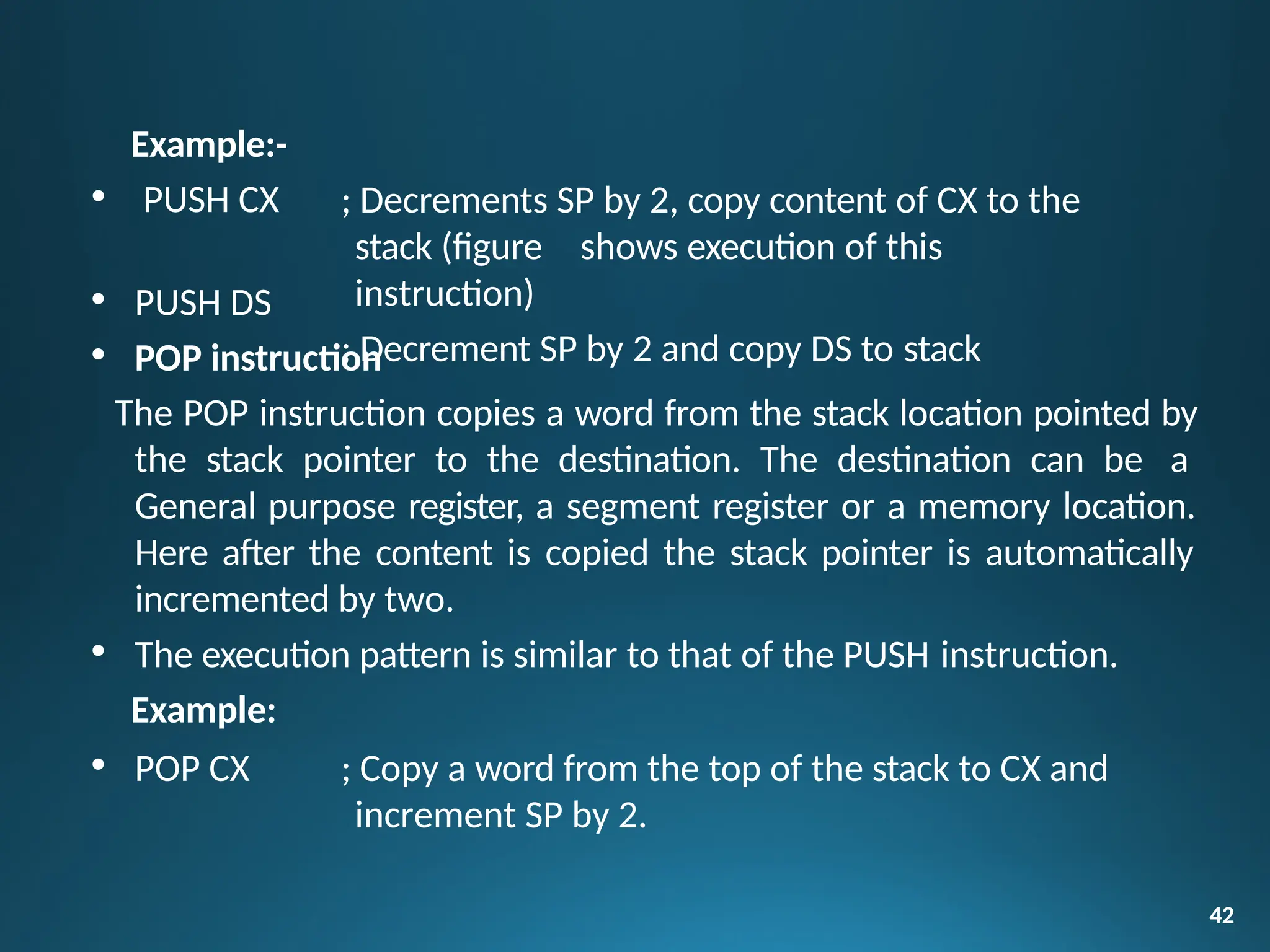
• POP instruction
The POP instruction copies a word from the stack location pointed by
the stack pointer to the destination. The destination can be a
General purpose register, a segment register or a memory location.
Here after the content is copied the stack pointer is automatically
incremented by two.
• The execution pattern is similar to that of the PUSH instruction.
Example:
• POP CX ; Copy a word from the top of the stack to CX and
increment SP by 2.
Move 8 bit data from 30F8H port
Move 16 bit data from 30F8H port
Copy contents of AL to 8 bit port 047H
43
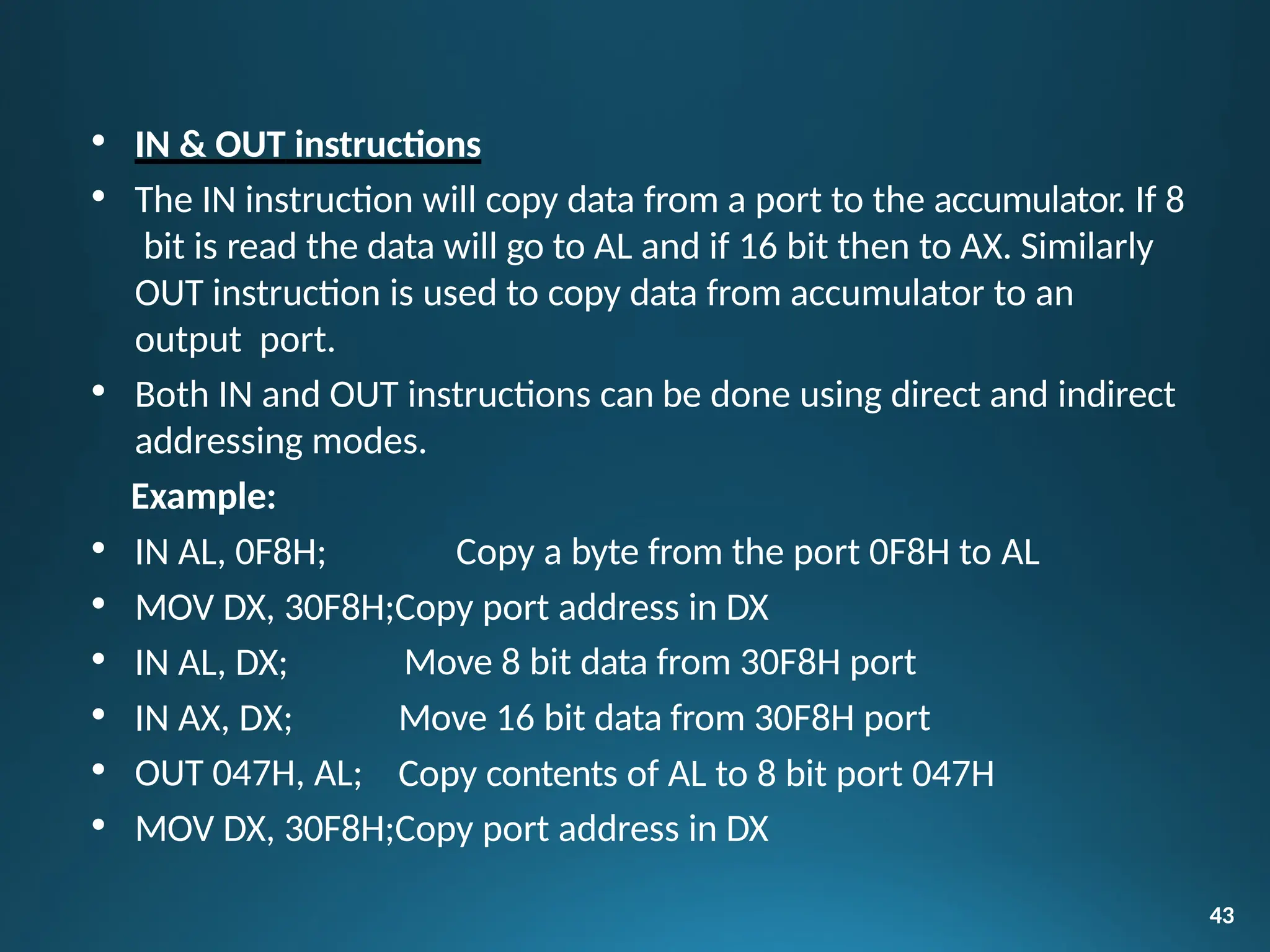
• IN & OUT instructions
• The IN instruction will copy data from a port to the accumulator. If 8
bit is read the data will go to AL and if 16 bit then to AX. Similarly
OUT instruction is used to copy data from accumulator to an
output port.
• Both IN and OUT instructions can be done using direct and indirect
addressing modes.
Example:
• IN AL, 0F8H; Copy a byte from the port 0F8H to AL
• MOV DX, 30F8H;Copy port address in DX
• IN AL, DX;
• IN AX, DX;
• OUT 047H, AL;
• MOV DX, 30F8H;Copy port address in DX
XCHG instruction
• The XCHG instruction exchanges contents of the destination and
source. Here destination and source can be register and register or
register and memory location, but XCHG cannot interchange the
value of 2 memory locations.
General Format
• XCHG Destination, Source
Example:
• XCHG BX, CX; exchange word in CX with the word in BX
• XCHG AL, CL; exchange byte in CL with the byte in AL
• XCHG AX, SUM[BX];here physical address, which is DS+SUM+[BX].
The content at physical
address and the content of AX are interchanged.
44
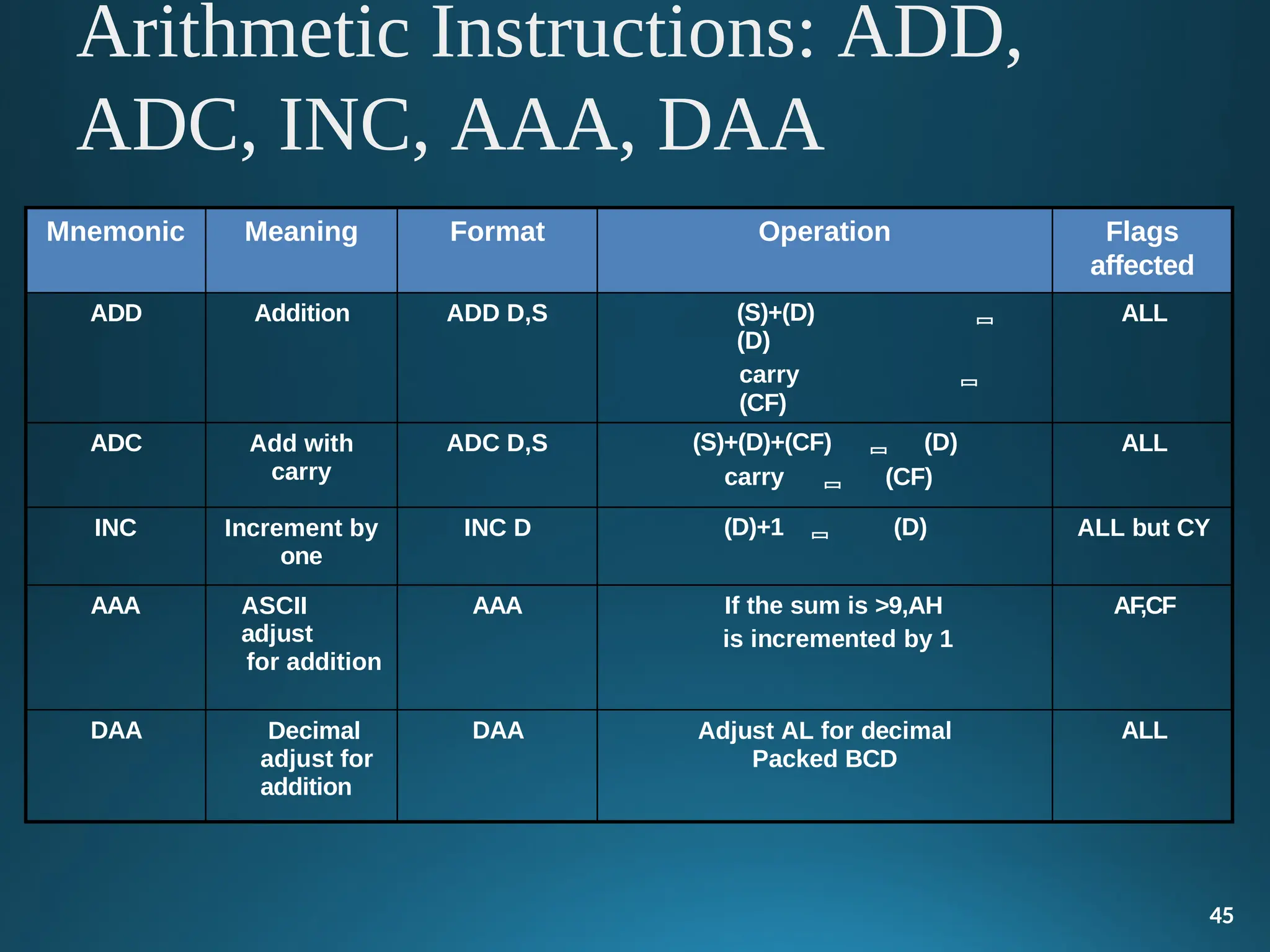
Mnemonic Meaning Format Operation Flags
affected
ADD Addition ADD D,S (S)+(D) 
(D)
carry 
(CF)
ALL
ADC Add with
carry
ADC D,S (S)+(D)+(CF)  (D)
carry  (CF)
ALL
INC Increment by
one
INC D (D)+1  (D) ALL but CY
AAA ASCII
adjust
for addition
AAA If the sum is >9,AH
is incremented by 1
AF,CF
DAA Decimal
adjust for
addition
DAA Adjust AL for decimal
Packed BCD
ALL
45
Arithmetic Instructions: ADD,
ADC, INC, AAA, DAA
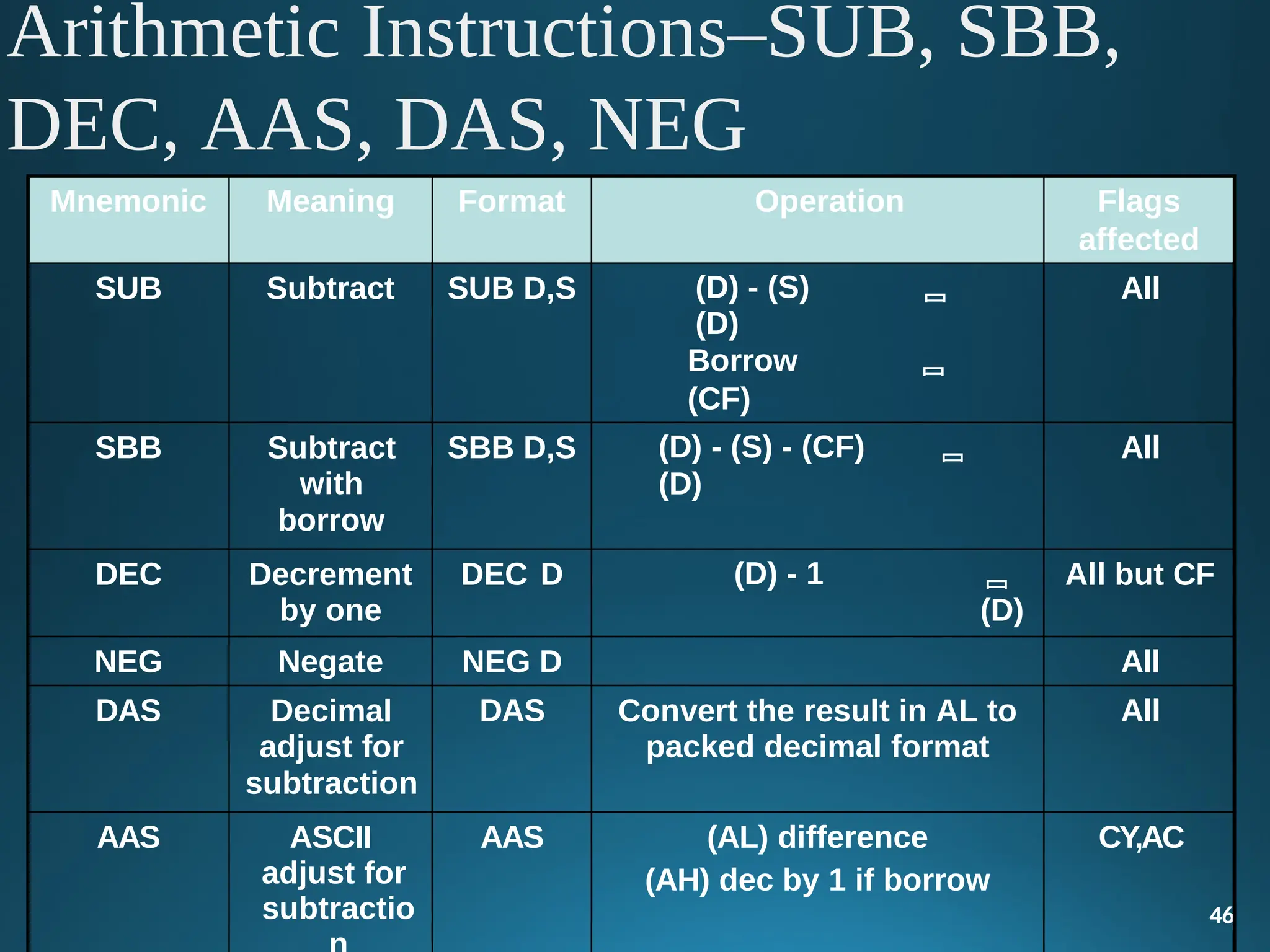
Arithmetic Instructions–SUB, SBB,
DEC, AAS, DAS, NEG
46
Mnemonic Meaning Format Operation Flags
affected
SUB Subtract SUB D,S (D) - (S) 
(D)
Borrow 
(CF)
All
SBB Subtract
with
borrow
SBB D,S (D) - (S) - (CF) 
(D)
All
DEC Decrement
by one
DEC D (D) - 1 
(D)
All but CF
NEG Negate NEG D All
DAS Decimal
adjust for
subtraction
DAS Convert the result in AL to
packed decimal format
All
AAS ASCII
adjust for
subtractio
AAS (AL) difference
(AH) dec by 1 if borrow
CY,AC
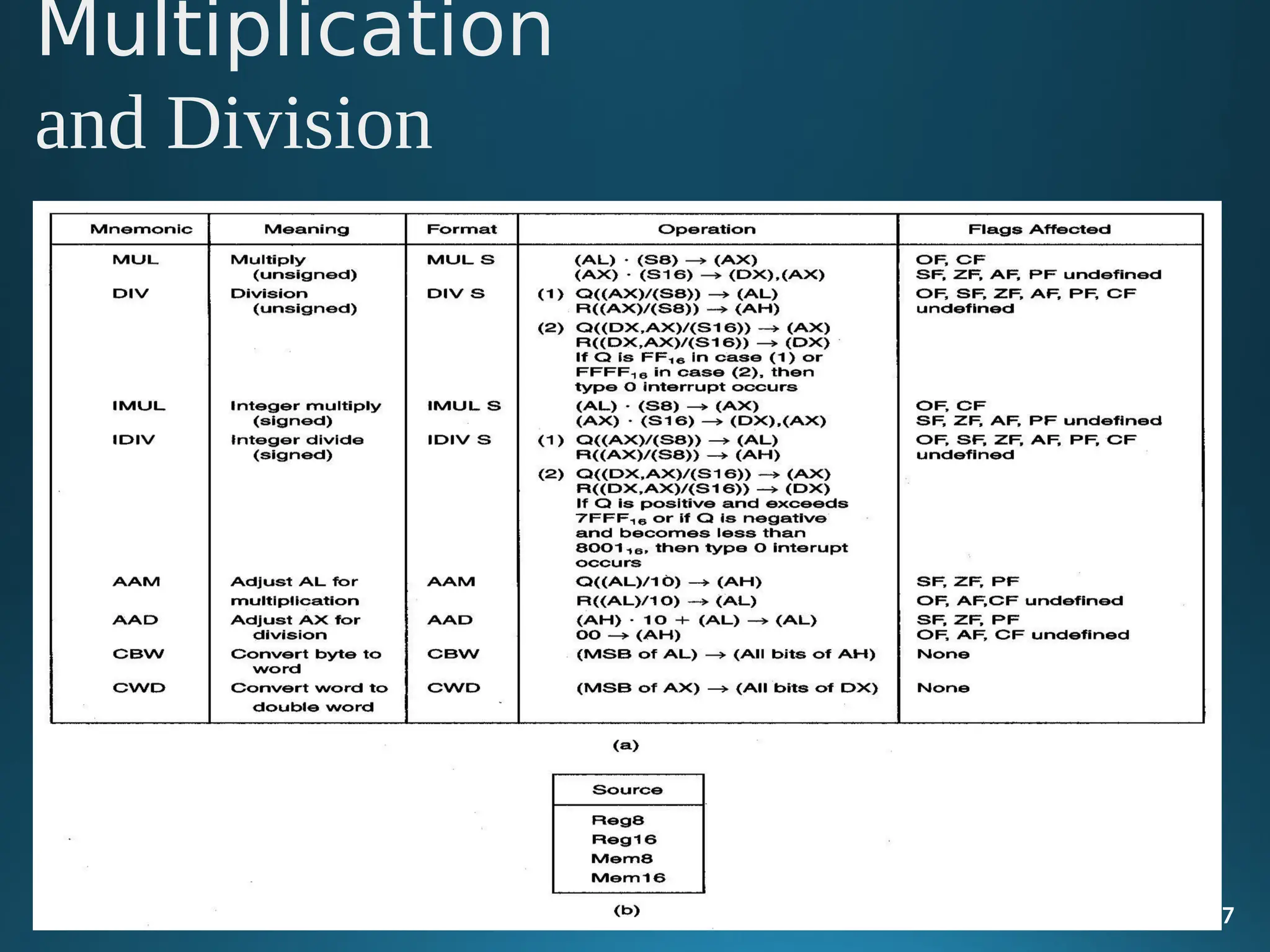
Multiplication
and Division
47
48
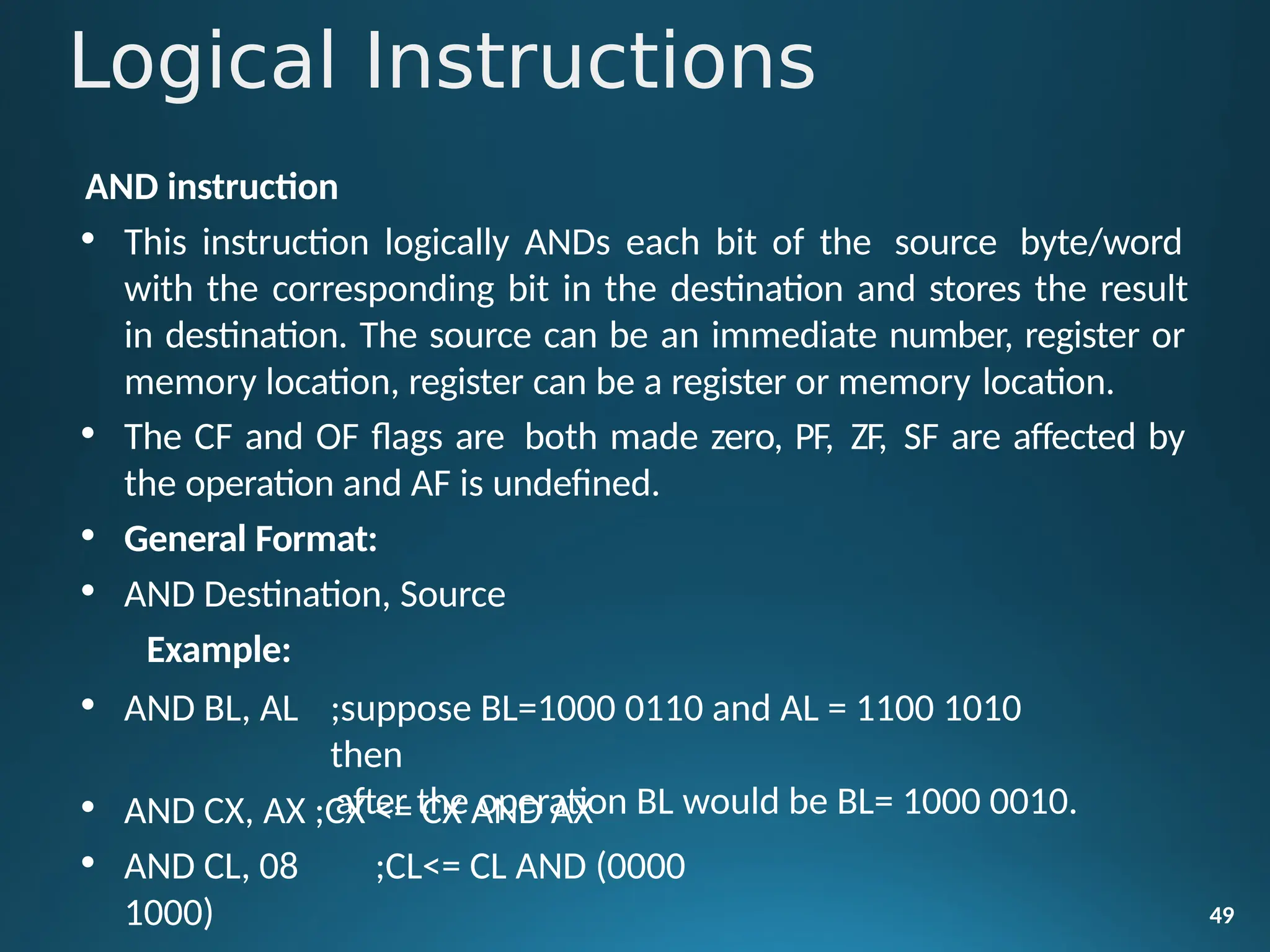
AND instruction
• This instruction logically ANDs each bit of the source byte/word
with the corresponding bit in the destination and stores the result
in destination. The source can be an immediate number, register or
memory location, register can be a register or memory location.
• The CF and OF flags are both made zero, PF, ZF, SF are affected by
the operation and AF is undefined.
• General Format:
• AND Destination, Source
Example:
49
• AND BL, AL ;suppose BL=1000 0110 and AL = 1100 1010
then
after the operation BL would be BL= 1000 0010.
• AND CX, AX ;CX <= CX AND AX
• AND CL, 08 ;CL<= CL AND (0000
1000)
Logical Instructions
OR instruction
• This instruction logically ORs each bit of the source byte/word with
the corresponding bit in the destination and stores the result in
destination. The source can be an immediate number, register or
memory location, register can be a register or memory location.
• The CF and OF flags are both made zero, PF, ZF, SF are affected by
the operation and AF is undefined.
• General Format:
• OR Destination, Source
50
Example:
• OR BL, AL; suppose BL=1000 0110 and AL = 1100 1010 then
after the operation BL would be BL= 1100 1110.
• OR CX, AX;CX <= CX AND AX
• OR CL, 08;CL<= CL AND (0000 1000)
NOT instruction
• The NOT instruction complements (inverts) the contents of an
operand register or a memory location, bit by bit. The examples are
as follows:
Example:
• NOT AX (BEFORE AX= (1011)2= (B) 16 AFTER EXECUTION AX=
(0100)2= (4)16).
• NOT [5000H]
51
XOR instruction
• The XOR operation is again carried out in a similar way to the AND
and OR operation. The constraints on the operands are also similar.
The XOR operation gives a high output, when the 2 input bits are
dissimilar. Otherwise, the output is zero. The example instructions
are as follows:
Example:
• XOR AX,0098H
• XOR AX,BX
• XOR AX,[5000H]
52
Shift / Rotate Instructions
• Shift instructions move the binary data to the left or right by
them within the register or memory location. They also can
multiplication of powers of 2+n and division of powers of 2-n.
53
shifting
perform
• There are two type of shifts logical shifting and arithmetic shifting,
later is used with signed numbers while former with unsigned.
SHL/SAL instruction
• Both the instruction shifts each bit to left, and places the MSB in CF and LSB
is made 0. The destination can be of byte size or of word size, also it can be
a register or a memory location. Number of shifts is indicated by the count.
• All flags are affected.
General Format:
• SAL/SHL destination, count
54
SHR instruction
55
• This instruction shifts each bit in the specified destination to the right and
0 is stored in the MSB position. The LSB is shifted into the carry flag. The
destination can be of byte size or of word size, also it can be a register or a
memory location. Number of shifts is indicated by the count.
• All flags are affected
• General Format:
SHR destination, count
String - a byte or word array located in memory.
Operations that can be performed with string instructions:
• copy a string into another string
• search a string for a particular byte or word
• store characters in a string
• compare strings of characters alphanumerically
56
String Instruction Basics
 Source DS:SI, Destination ES:DI
– You must ensure DS and ES are correct
– You must ensure SI and DI are offsets into DS and
ES
respectively
 Direction Flag (0 = Up, 1 = Down)
– CLD - Increment addresses (left to right)
– STD - Decrement addresses (right to left)
57
String Control
Instructions
58
1) MOVS/ MOVSB/ MOVSW
Dest string name, src string name
This instruction moves data byte or word from location in DS to
location in ES.
2) REP / REPE / REPZ / REPNE / REPNZ
Repeat string instructions until specified conditions exist. This is
prefix a instruction.
3) CMPS / CMPSB / CMPSW
Compare string bytes or string words.
4)SCAS / SCASB / SCASW
Scan a string byte or string word.
Compares byte in AL or word in AX. String address is to be loaded
in DI.
5)STOS / STOSB / STOSW
Store byte or word in a string.
Copies a byte or word in AL or AX to memory location pointed by
DI.
6)LODS / LODSB /LODSW
Load a byte or word in AL or AX
Copies byte or word from memory location pointed by SI into AL or
AX register.
59
60
These instructions are similar to branching or looping instructions. These
instructions include unconditional jump or loop instructions.
Classification:
•Unconditional transfer instructions
•Conditional transfer instructions
•Iteration control instructions
•Interrupt instructions
Unconditional transfer instructions
 CALL: Call a procedure, save return address on stack
 RET: Return from procedure to the main program.
 JMP: Goto specified address to get next instruction
CALL instruction: The CALL instruction is used to transfer execution
of program to a subprogram or procedure.
61
CALL instruction
 Near call
1.Direct Near CALL: The destination address is specified in the
instruction itself.
2.Indirect Near CALL: The destination address is specified
in any
62
16-bit register, except IP.
 Far call
1.DirectFar CALL: The destination
address
is specified in
the
instruction itself. It will be in different Code Segment.
2. Indirect Far CALL: The destination address is specified in two
word memory locations pointed by a register.
JMP instruction
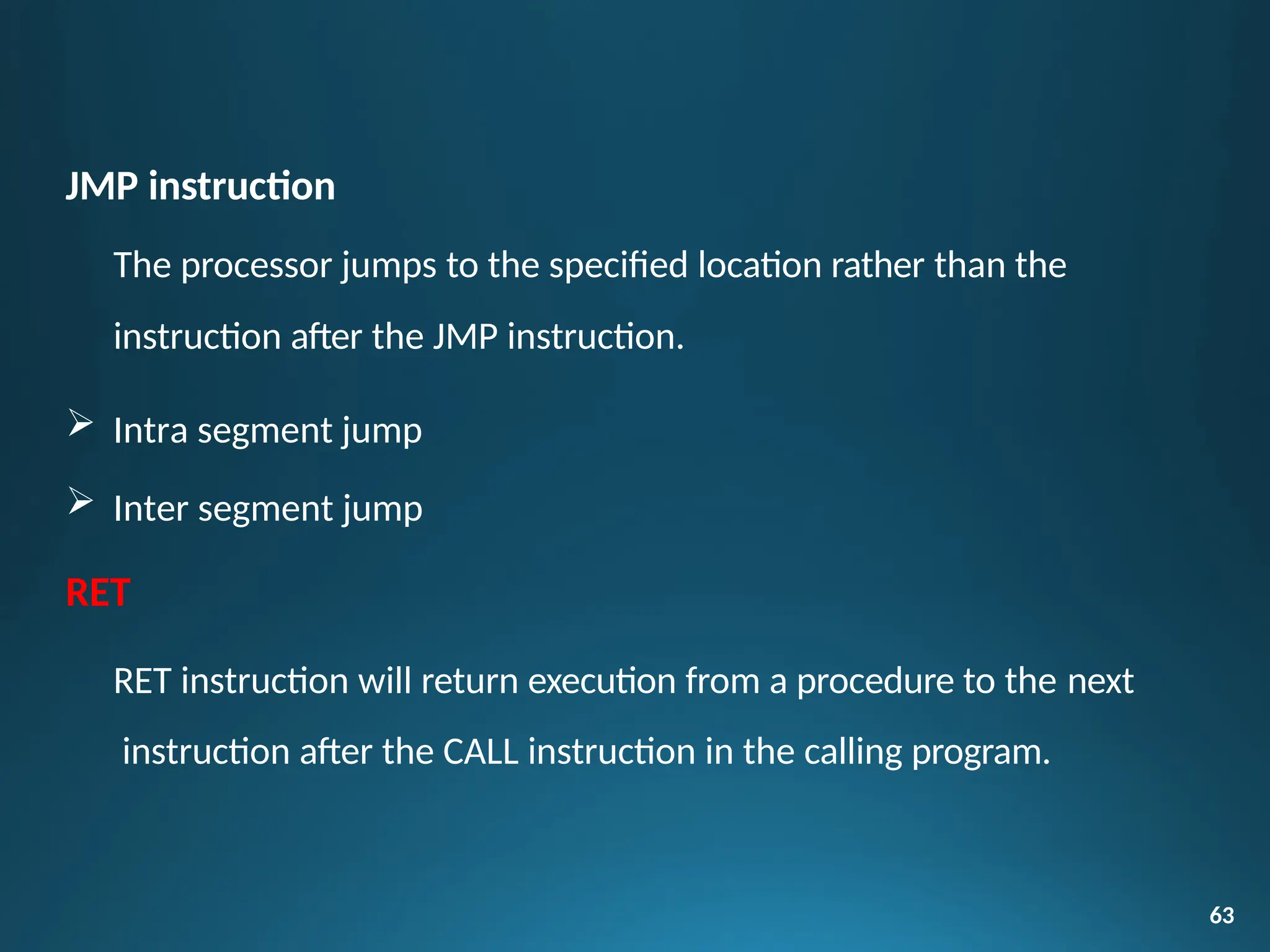
The processor jumps to the specified location rather than the
instruction after the JMP instruction.
 Intra segment jump
 Inter segment jump
RET
RET instruction will return execution from a procedure to the next
instruction after the CALL instruction in the calling program.
63
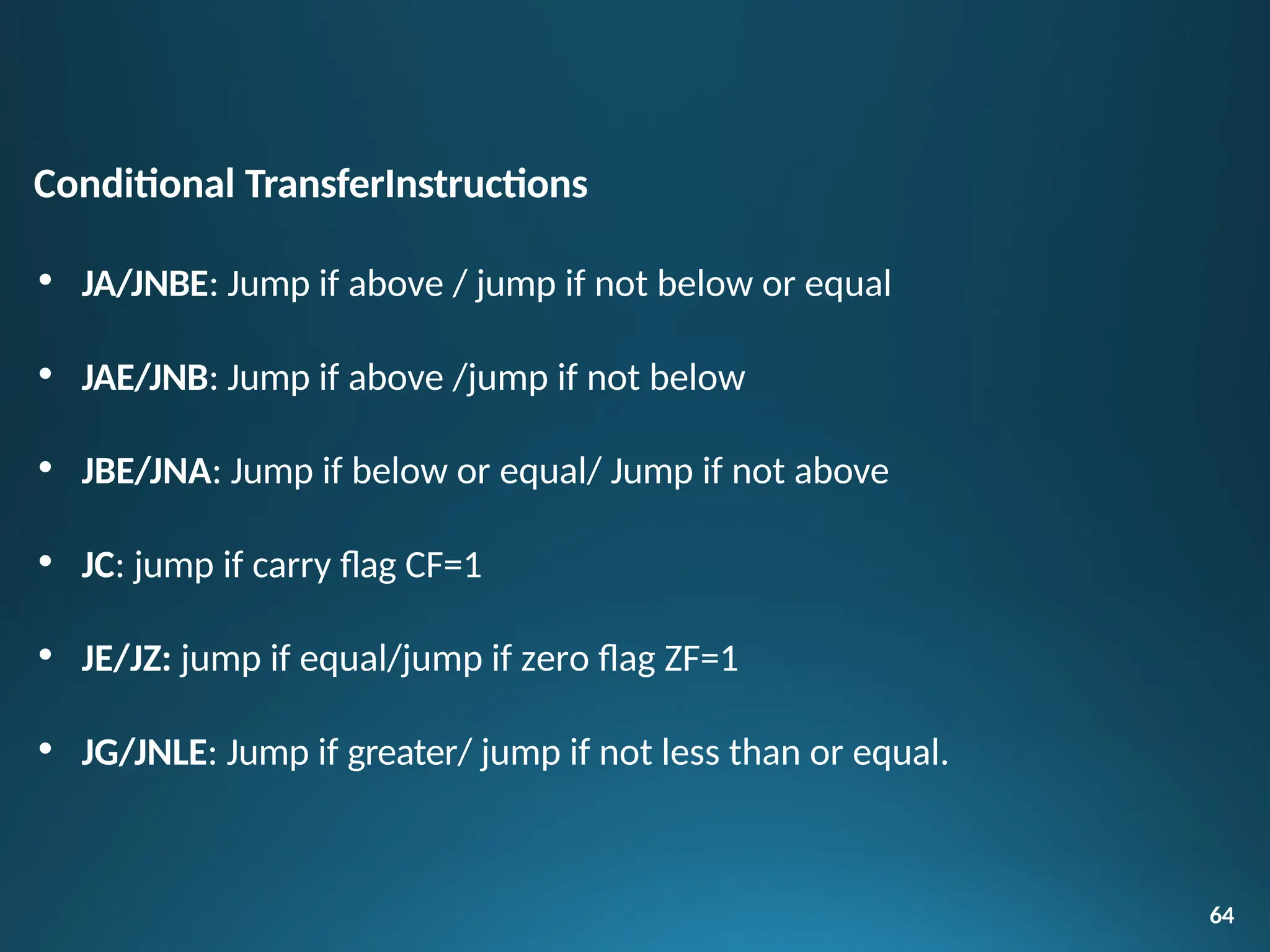
Conditional TransferInstructions
• JA/JNBE: Jump if above / jump if not below or equal
• JAE/JNB: Jump if above /jump if not below
• JBE/JNA: Jump if below or equal/ Jump if not above
• JC: jump if carry flag CF=1
• JE/JZ: jump if equal/jump if zero flag ZF=1
• JG/JNLE: Jump if greater/ jump if not less than or equal.
64
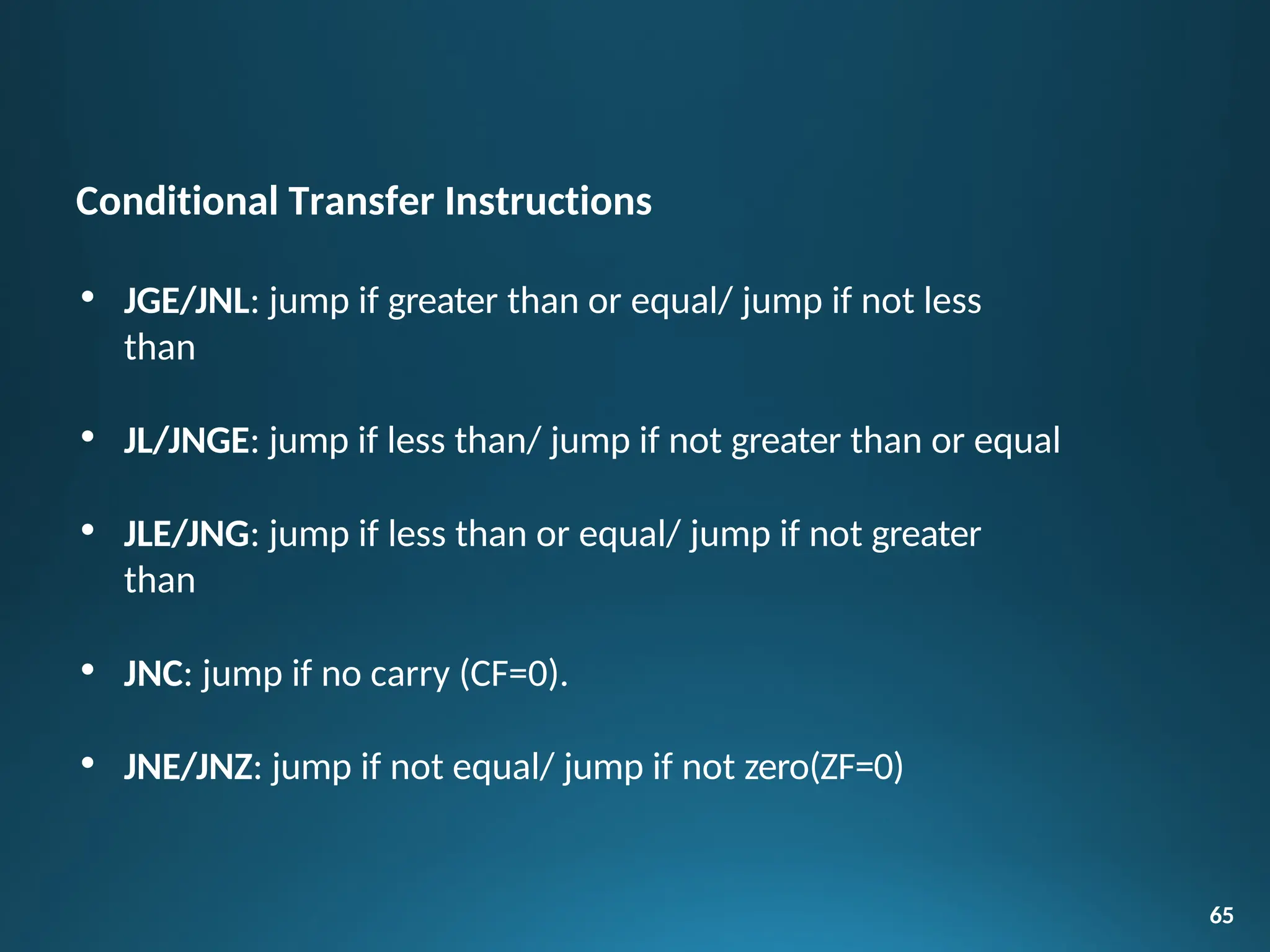
Conditional Transfer Instructions
• JGE/JNL: jump if greater than or equal/ jump if not less
than
• JL/JNGE: jump if less than/ jump if not greater than or equal
• JLE/JNG: jump if less than or equal/ jump if not greater
than
• JNC: jump if no carry (CF=0).
• JNE/JNZ: jump if not equal/ jump if not zero(ZF=0)
65
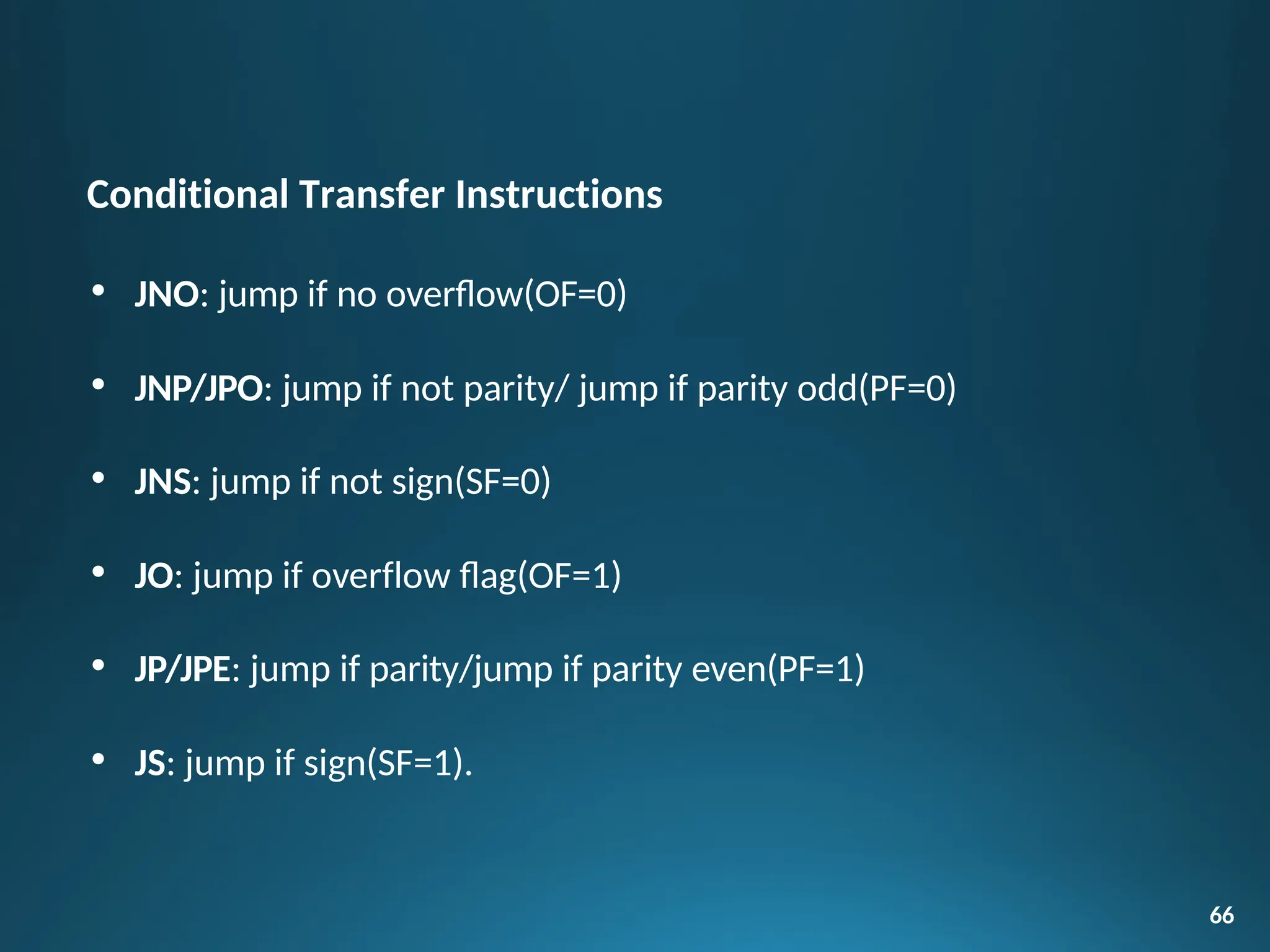
Conditional Transfer Instructions
• JNO: jump if no overflow(OF=0)
• JNP/JPO: jump if not parity/ jump if parity odd(PF=0)
• JNS: jump if not sign(SF=0)
• JO: jump if overflow flag(OF=1)
• JP/JPE: jump if parity/jump if parity even(PF=1)
• JS: jump if sign(SF=1).
66
Iteration Control Instructions
 These instructions are used to execute a series of instructions
for
certain number of times.
 LOOP: Loop through a sequence of instructions until CX=0.
67
instructions while
 LOOPE/LOOPZ : Loop through a sequence of
ZF=1 and instructions CX = 0.
 LOOPNE/LOOPNZ : Loop through a sequence of instructions while
ZF=0 and CX =0.
 JCXZ : jump to specified address if CX=0.
68
Two types of interrupt instructions:
 Hardware Interrupts (External Interrupts)
 Software Interrupts (Internal Interrupts and Instructions)
Hardware Interrupts:
• INTR is a maskable hardware interrupt.
• NMI is a non-maskable interrupt.
Software Interrupts
• INT : Interrupt program execution, call service procedure
• INTO : Interrupt program execution if OF=1
• IRET: Return from interrupt service procedure to main program.
69
Processor Control Instructions
70
I. Flag set/clear instructions
 STC: Set carry flag CF to 1
 CLC: Clear carry flag CF to 0
 CMC: Complement the state of the carry flag CF
 STD: Set direction flag DF to 1 (decrement string pointers)
 CLD: Clear direction flag DF to 0
 STI: Set interrupt enable flag to 1(enable INTR input)
 CLI: Clear interrupt enable Flag to 0 (disable INTR input)
II. External Hardware synchronizationinstructions
HLT: Halt (do nothing) until interrupt or reset.
WAIT: Wait (Do nothing) until signal on the test pin islow.
ESC: Escape to external coprocessor such as 8087 or 8089.
LOCK: An instruction prefix. Prevents another processor from taking
the bus while the adjacent instruction executes.
NOP: No operation. This instruction simply takes up three clock
cycles and does no processing.
71
Processor Control Instructions
Procedures:
• While writing programs, it may be the case that a particular sequence of
instructions is used several times. To avoid writing the sequence of
instructions again and again in the program, the same sequence can be
written as a separate subprogram called a procedure.
Defining Procedures:
72
• Assembler provides PROC and ENDP directives in order to
define
procedures. The directive PROC indicates beginning of a procedure.
Its general form is:
Procedure_name PROC [NEAR|FAR]
Procedures and Macros
Passing parameters to and from procedures:
The data values or addresses passed between procedures and
main
program are called parameters. There are four ways of
passing
parameters:
 Passing parameters in registers
 Passing parameters in dedicated memory locations
 Passing parameters with pointers passed in registers
 Passing parameters using the stack
73
Procedures and Macros
MACROS:
 When the repeated group of instruction is too short or not suitable to be
implemented as a procedure, we use a MACRO. A macro is a group of
instructions to which a name is given. Each time a macro is called in a
program, the assembler will replace the macro name with the group of
instructions.
Defining MACROS:
 Before using macros, we have to define them. MACRO directive
informs the assembler the beginning of a macro. The general form is:
130
 Macro_name MACRO argument1, argument2, …Arguments are optional.
ENDM informs the assembler the end of the macro. Its general form is :
ENDM
Procedures and Macros
Minimum mode operation in
8086:
75
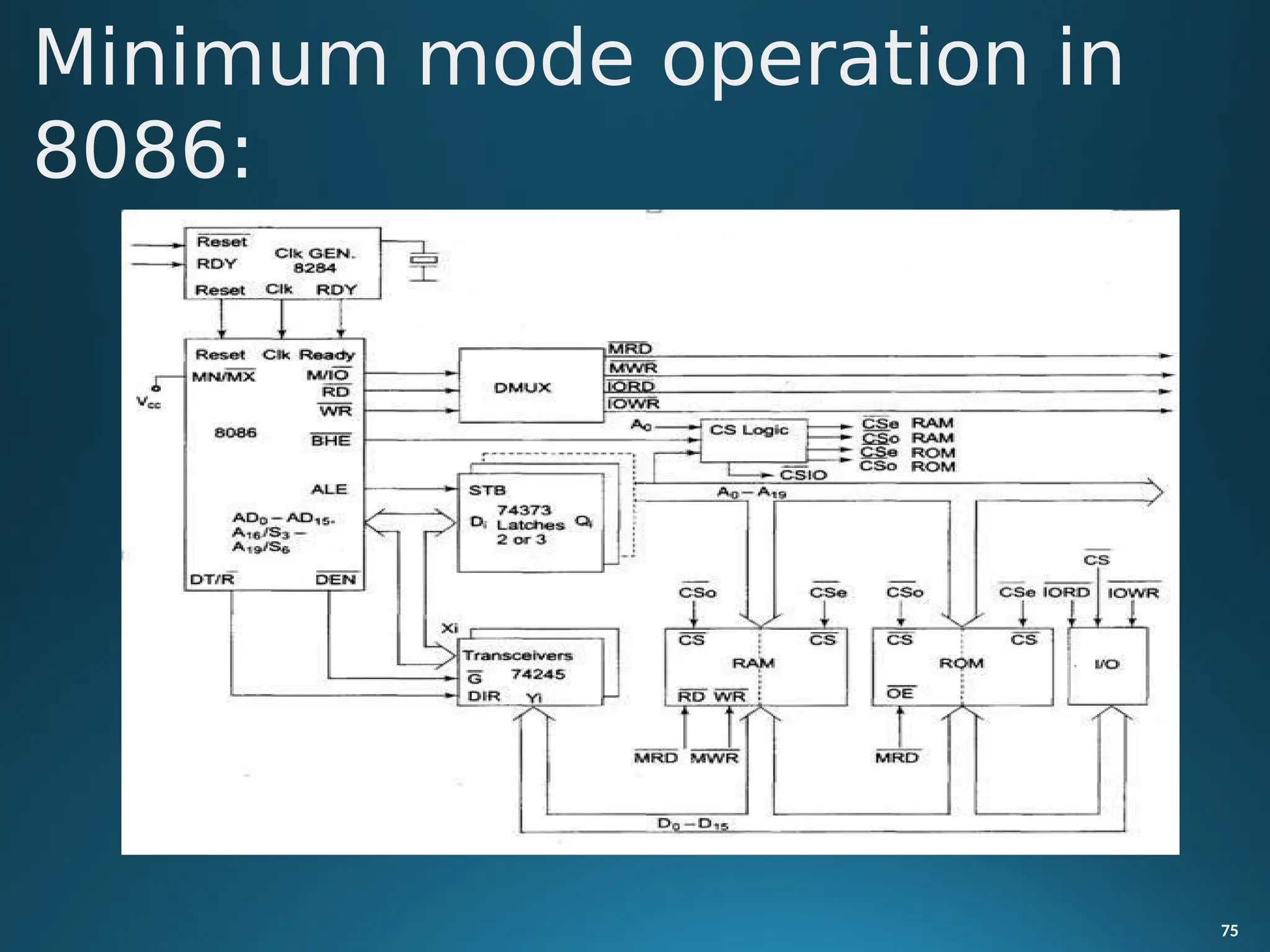
 In a minimum mode 8086 system, the microprocessor 8086 is operated in
minimum mode by strapping its MN/MX pin to logic 1.
 In this mode, all the control signals are given out by the microprocessor
chip itself. There is a single microprocessor in the minimum mode system.
 The remaining components in the system are latches, transceivers, clock
generator, memory and I/O devices. Some type of chip selection logic may
be required for selecting memory or I/O devices, depending upon the
address map of the system.
 Latches are generally buffered output D-type flip-flops like 74LS373 or
8282. They are used for separating the valid address from the multiplexed
address/data signals and are controlled by the ALE signal generated by
8086.
76
Minimum mode operation in
8086:
 Transceivers are the bidirectional buffers and sometimes they are called as
data amplifiers. They are required to separate the valid data from the time
multiplexed address/data signals.
 They are controlled by two signals namely, DEN and DT/R.
 The DEN signal indicates the direction of data, i.e. from or to the processor.
The system contains memory for the monitor and users program storage.
 Usually, EPROM is used for monitor storage, while RAM for users
program
storage. A system may contain I/O devices.
77
Minimum mode operation in
8086:
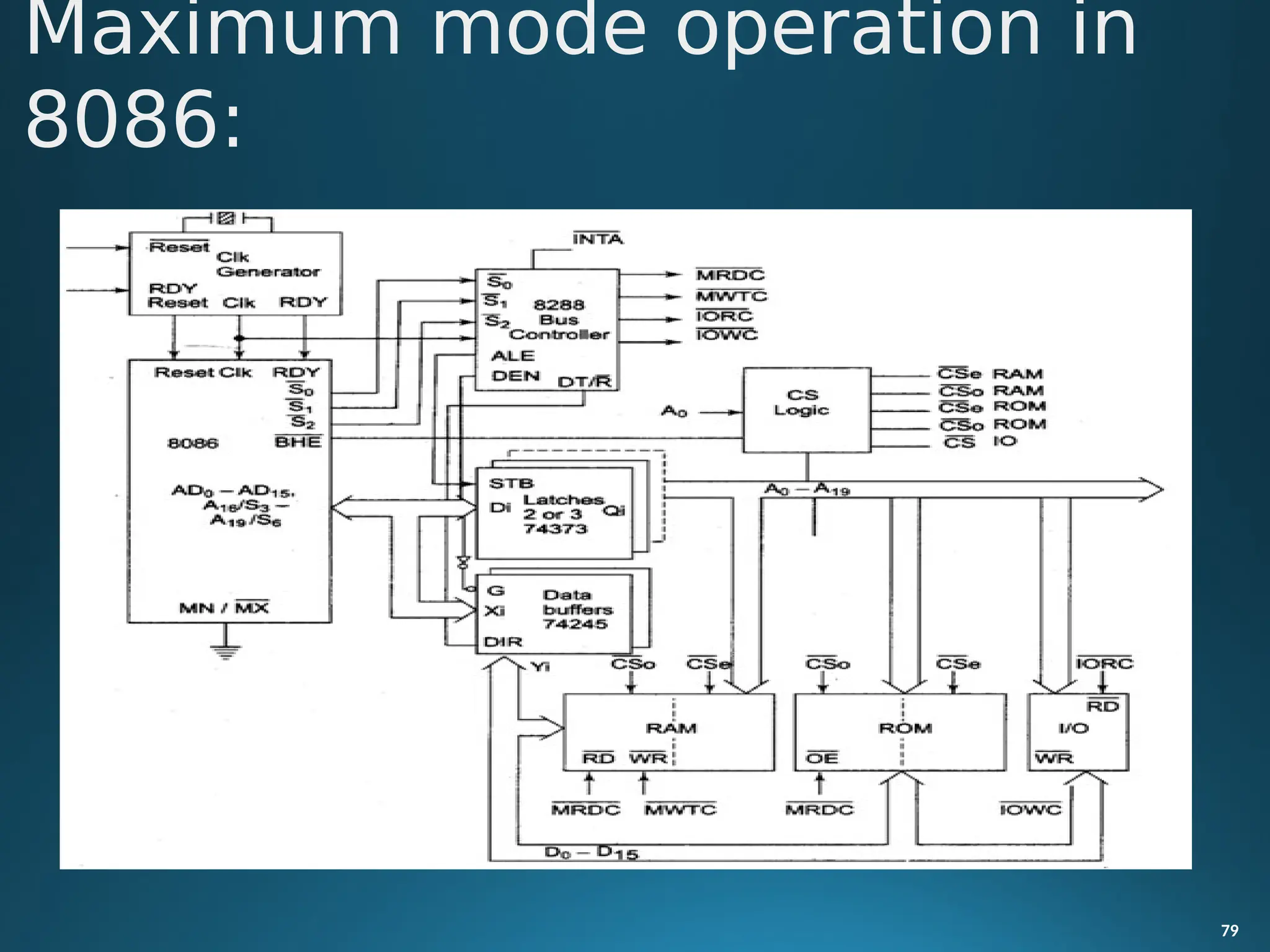
In the maximum mode, the 8086 is operated by strapping the MN/MX
pin to ground.
In this mode, the processor derives the status signal S2, S1, S0.
Another chip called bus controller derives the control signal using this
status information.
In the maximum mode, there may be more than one
78
microprocessor in the system configuration.
The components in the system are same as in the minimum
mode system.
The basic function of the bus controller chip IC8288 is to derive contro
l
signals like RD and WR (for memory and I/O devices), DEN, DT/R, ALE etc.
using the information by the processor on the status lines.
The bus controller chip has input lines S2, S1, S0 and CLK. These inputs to
8288 are driven by CPU.
Maximum mode operation in
8086:
Maximum mode operation in
8086:
79
IOW
C
140
• It derives the outputs ALE, DEN, DT/R, MRDC, MWTC, AMWC, IORC,
and AIOWC. The AEN, IOB and CEN pins are especially useful
for
multiprocessor systems.
• AEN and IOB are generally grounded. CEN pin is usually tied to +5V. The
significance of the MCE/PDEN output depends upon the status of the IOB
pin.
• If IOB is grounded, it acts as master cascade enable to control cascade 8259A,
else it acts as peripheral data enable used in the multiple bus configurations.
Maximum mode operation in
8086:
• INTA pin used to issue two interrupt acknowledge pulses to the interrupt
140
controller or to an interrupting device.
• IORC, IOWC are I/O read
command
respectively.
and I/O write command
signals
• These signals enable an IO interface to read or write the data from or to the
address port.
• The MRDC, MWTC are memory read command and memory write
command signals respectively and may be used as memory read or write
signals.
Maximum mode operation in
8086:
• The MRDC, MWTC are memory read command and memory
write
write
Maximum mode operation in
8086:
82
command signals respectively and may be used as memory read or
signals.
• All these command signals instructs the memory to accept or send
from or to the bus.
dat
a
• For both of these write command signals, the advanced signals namely
AIOWC and AMWTC are available.
• Here the only difference between in timing diagram between minimum
mode and maximum mode is the status signals used and the available
control and advanced command signals.
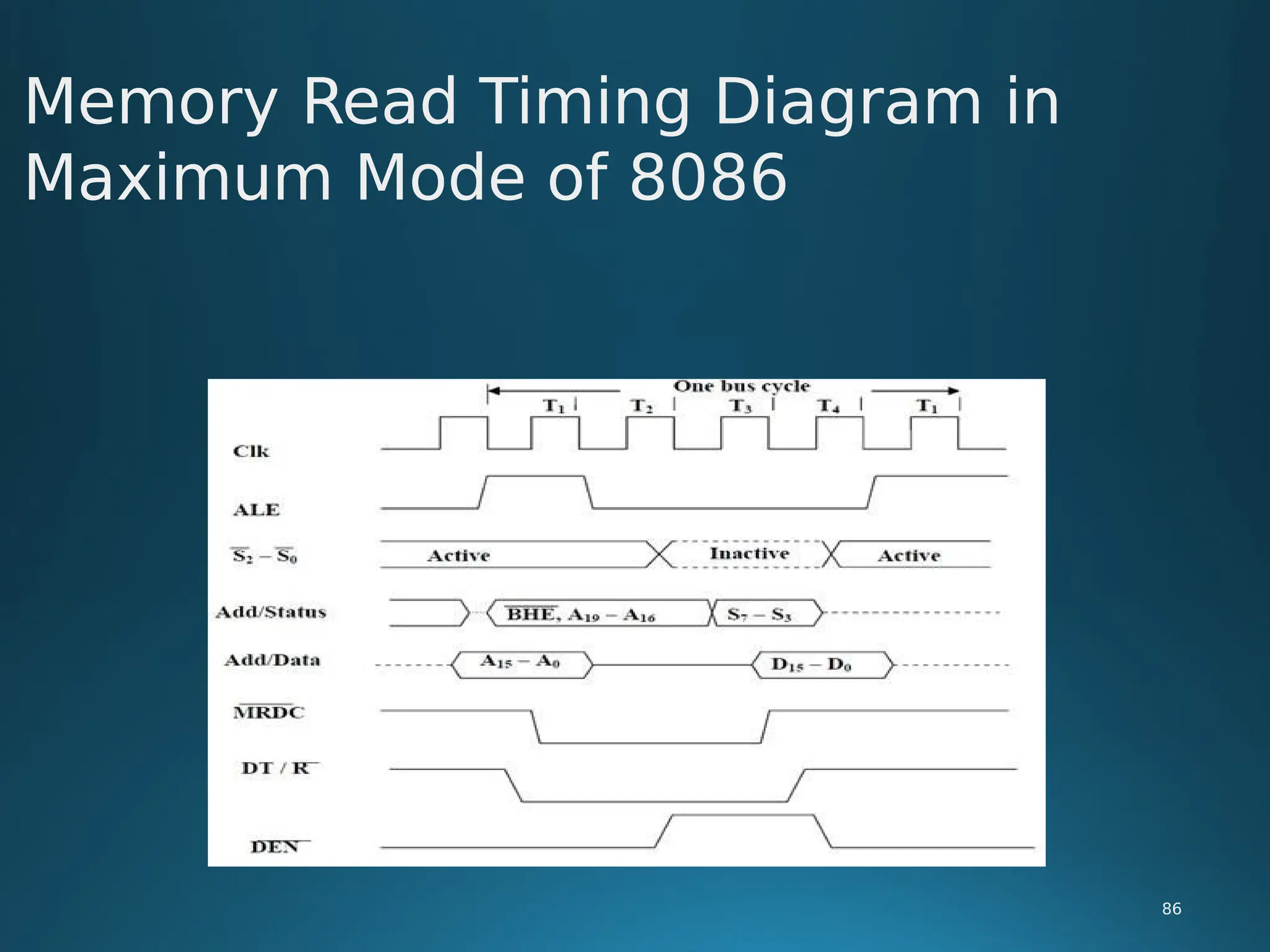
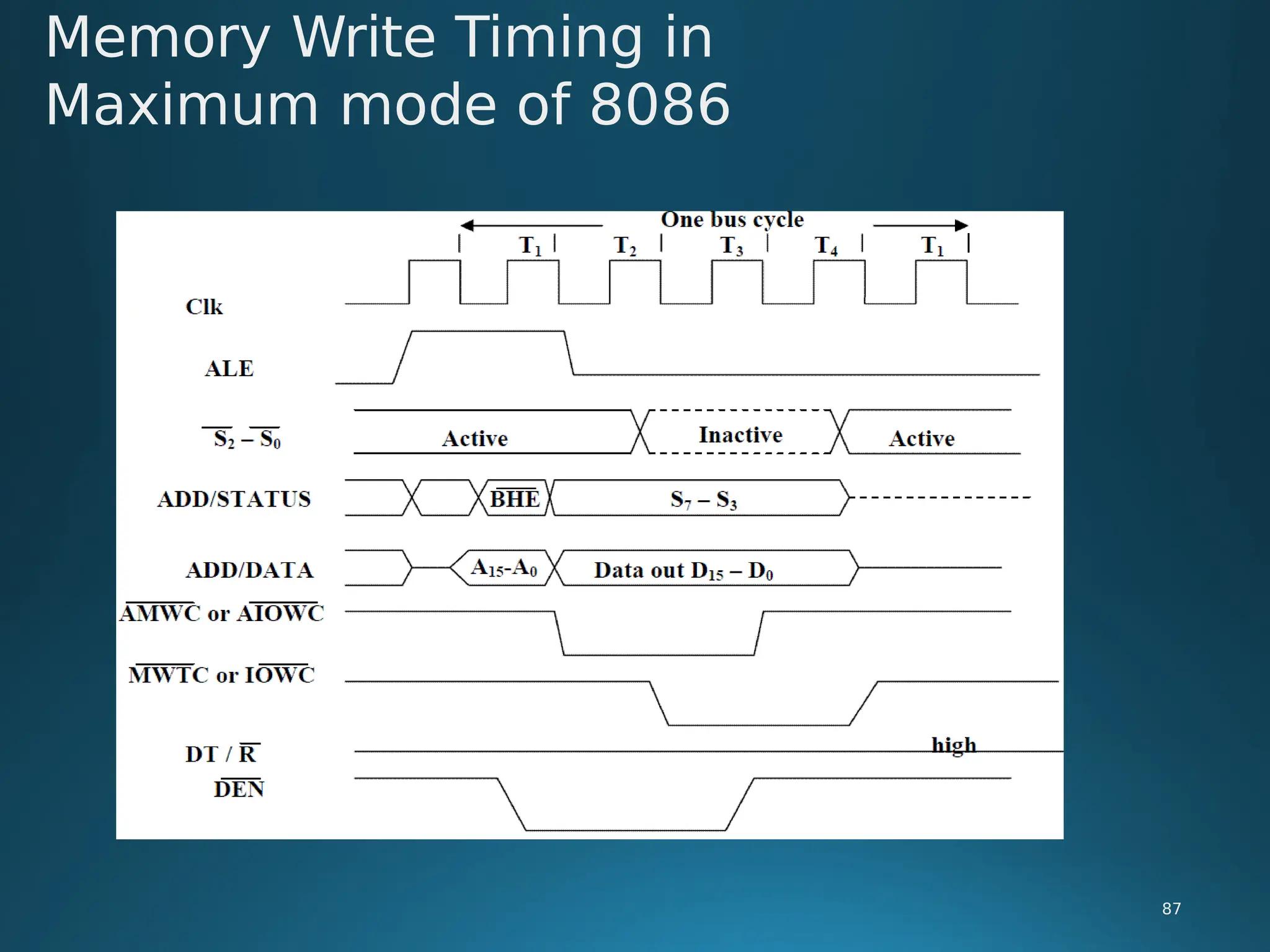
• R0, S1, S2 are set at the beginning of bus cycle.8288 bus controller will output
a pulse as on the ALE and apply a required signal to its DT / R pin during T1.
• In T2, 8288 will set DEN=1 thus enabling transceivers, and for an input it will
activate MRDC or IORC. These signals are activated until T4. For an output,
the AMWC or AIOWC is activated from T2 to T4 and MWTC or IOWC is
activated from T3 to T4.
Maximum mode operation in
8086:
83
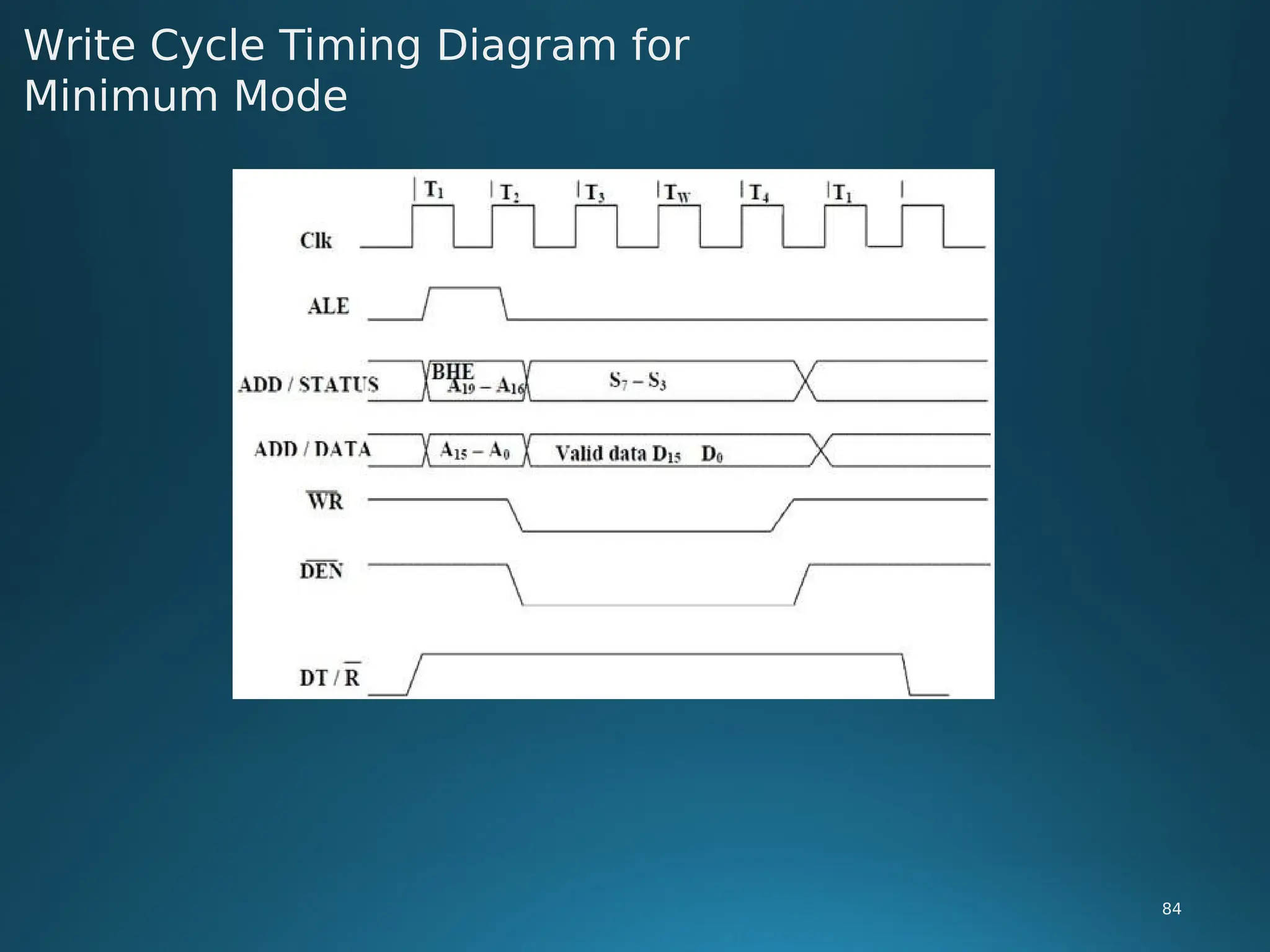
Write Cycle Timing Diagram for
Minimum Mode
84
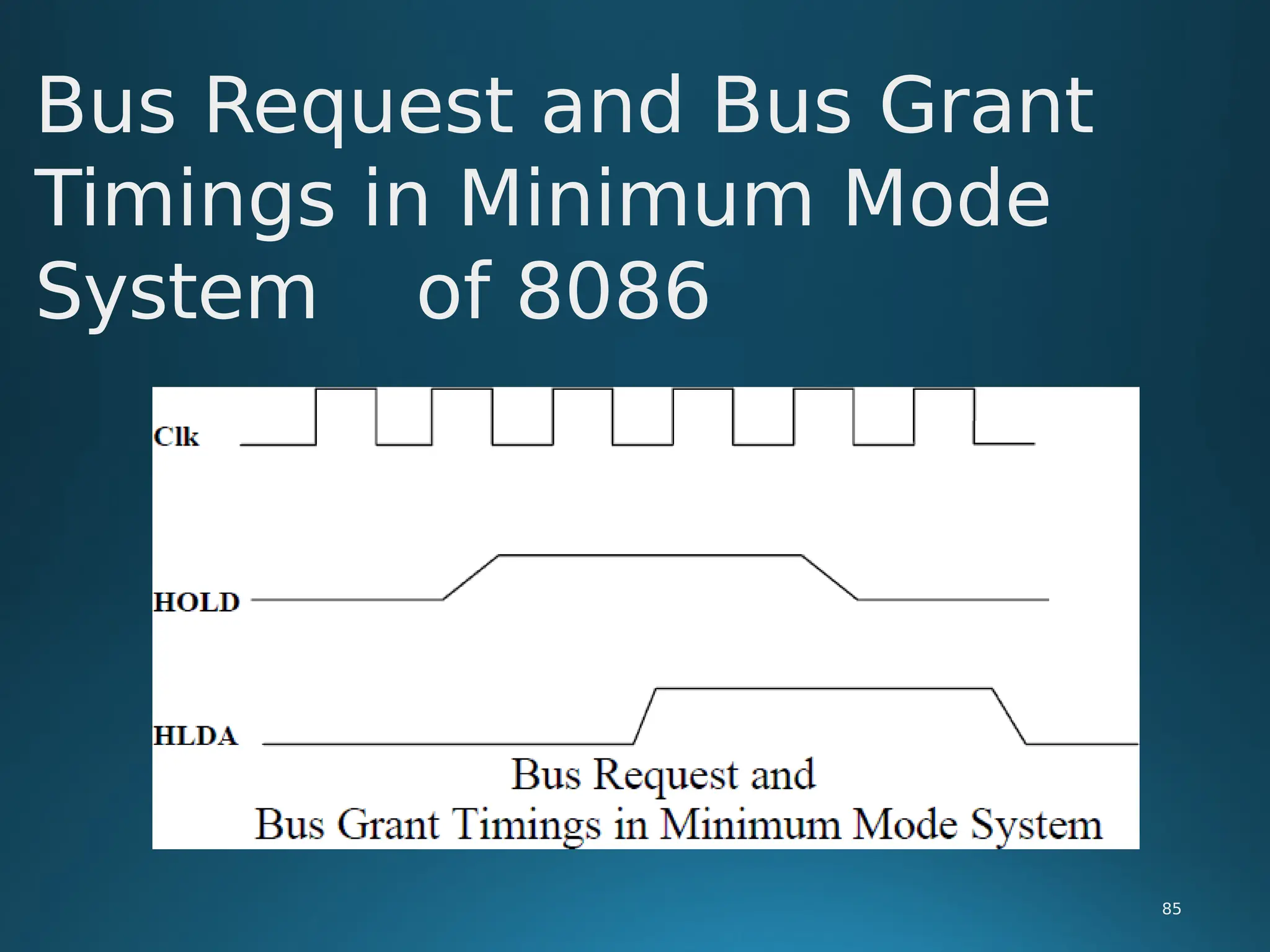
Bus Request and Bus Grant
Timings in Minimum Mode
System of 8086
85
Memory Read Timing Diagram in
Maximum Mode of 8086
86
Memory Write Timing in
Maximum mode of 8086
87
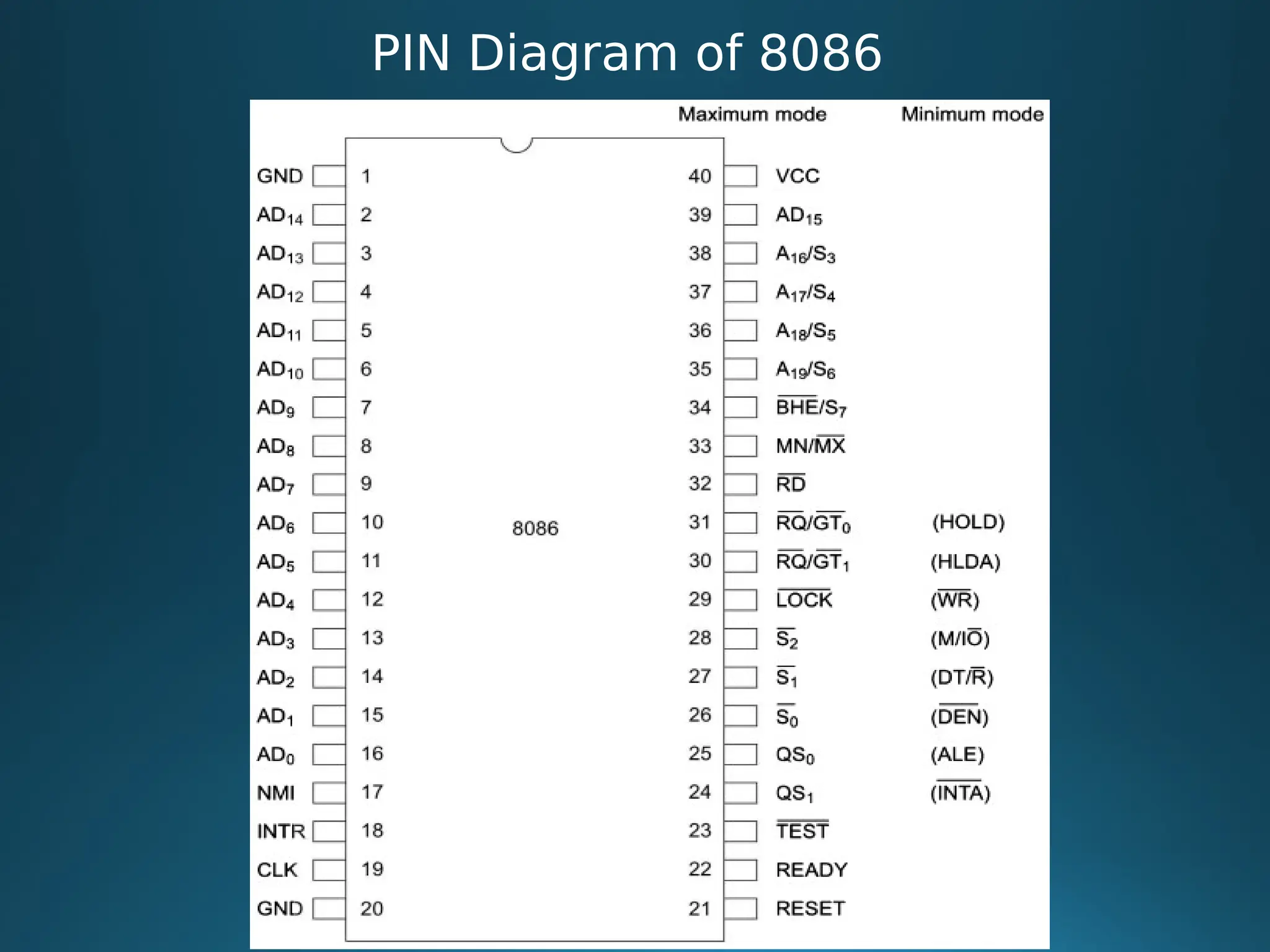
PIN Diagram of 8086
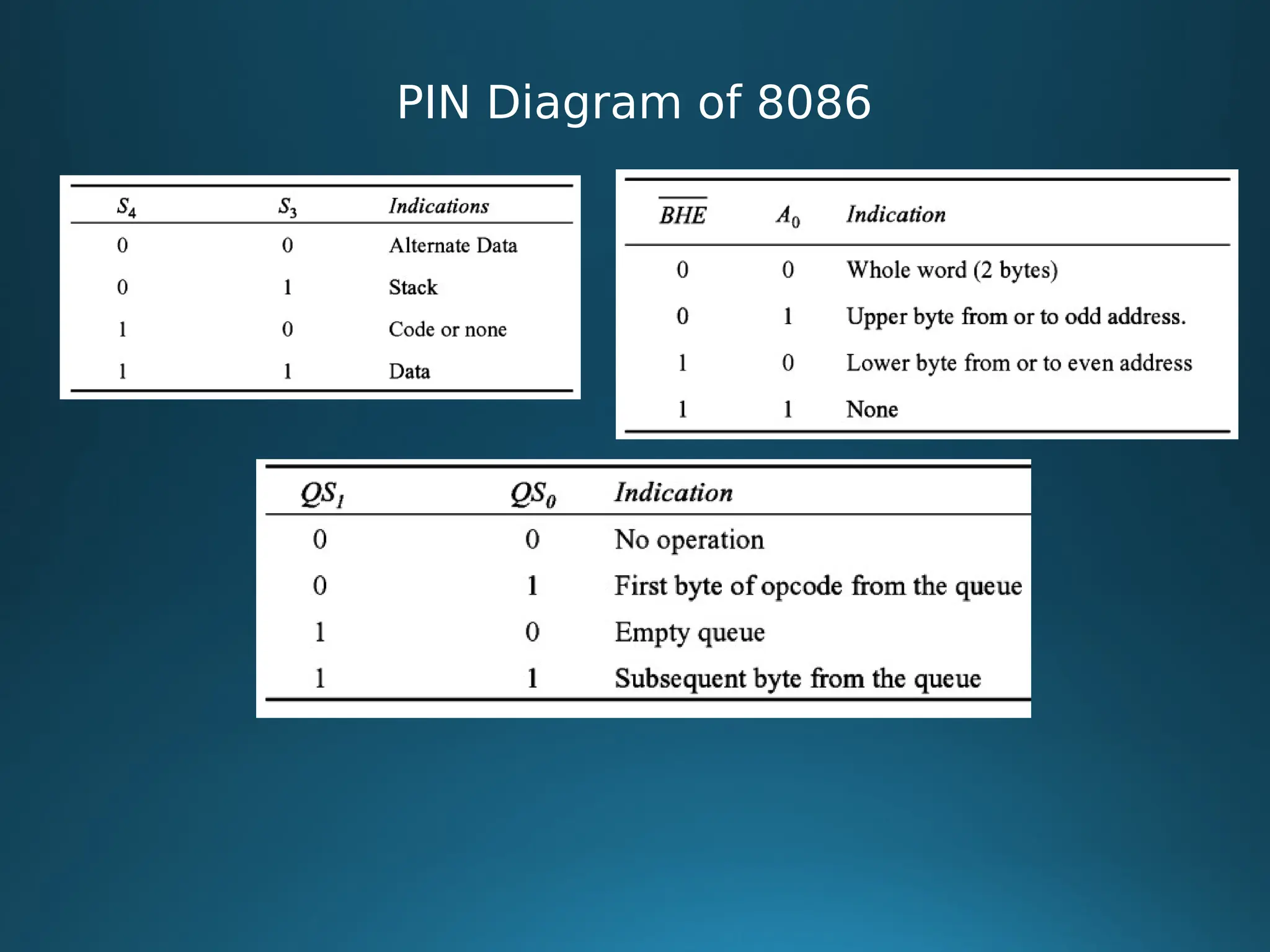
PIN Diagram of 8086
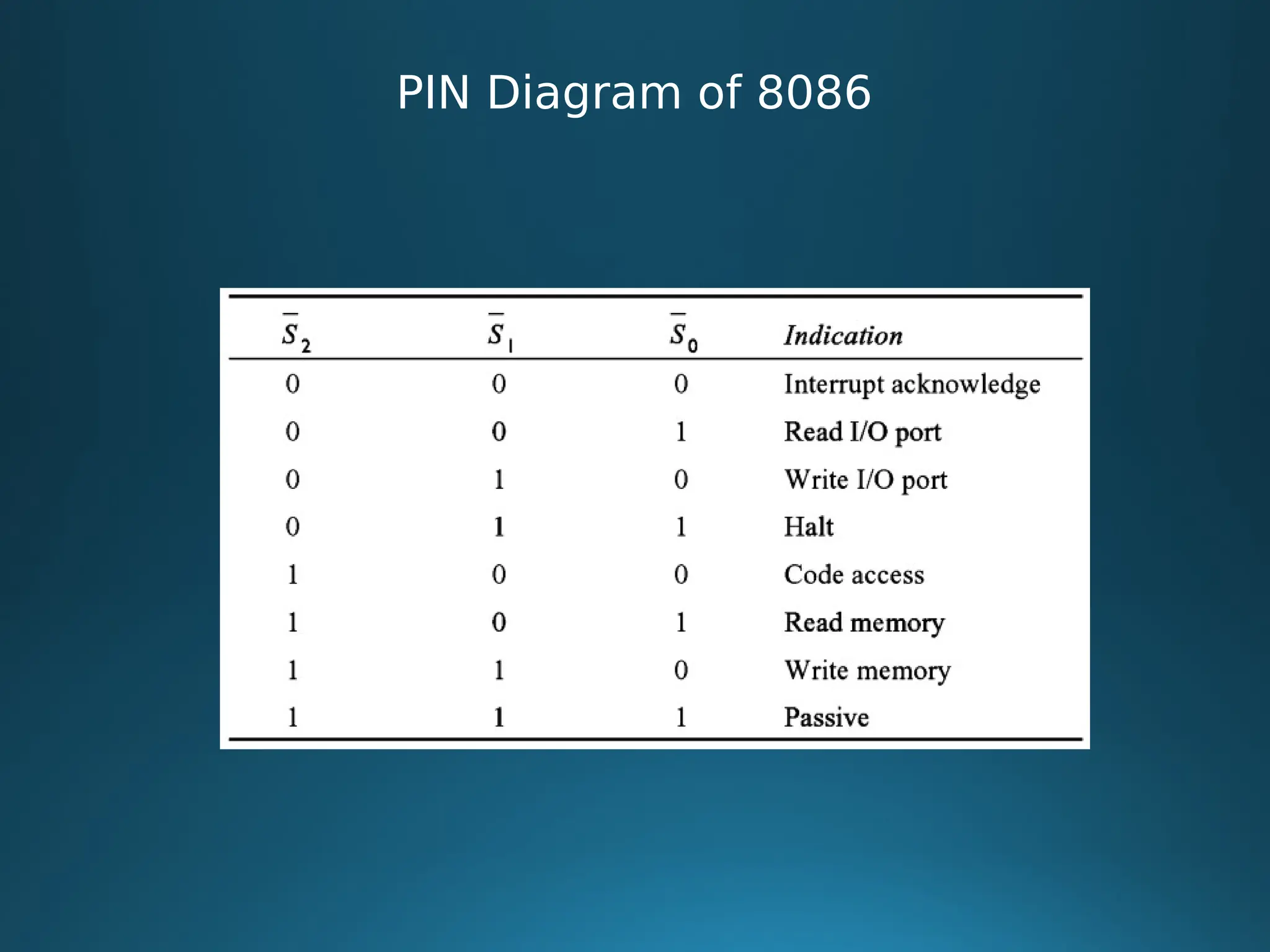
PIN Diagram of 8086
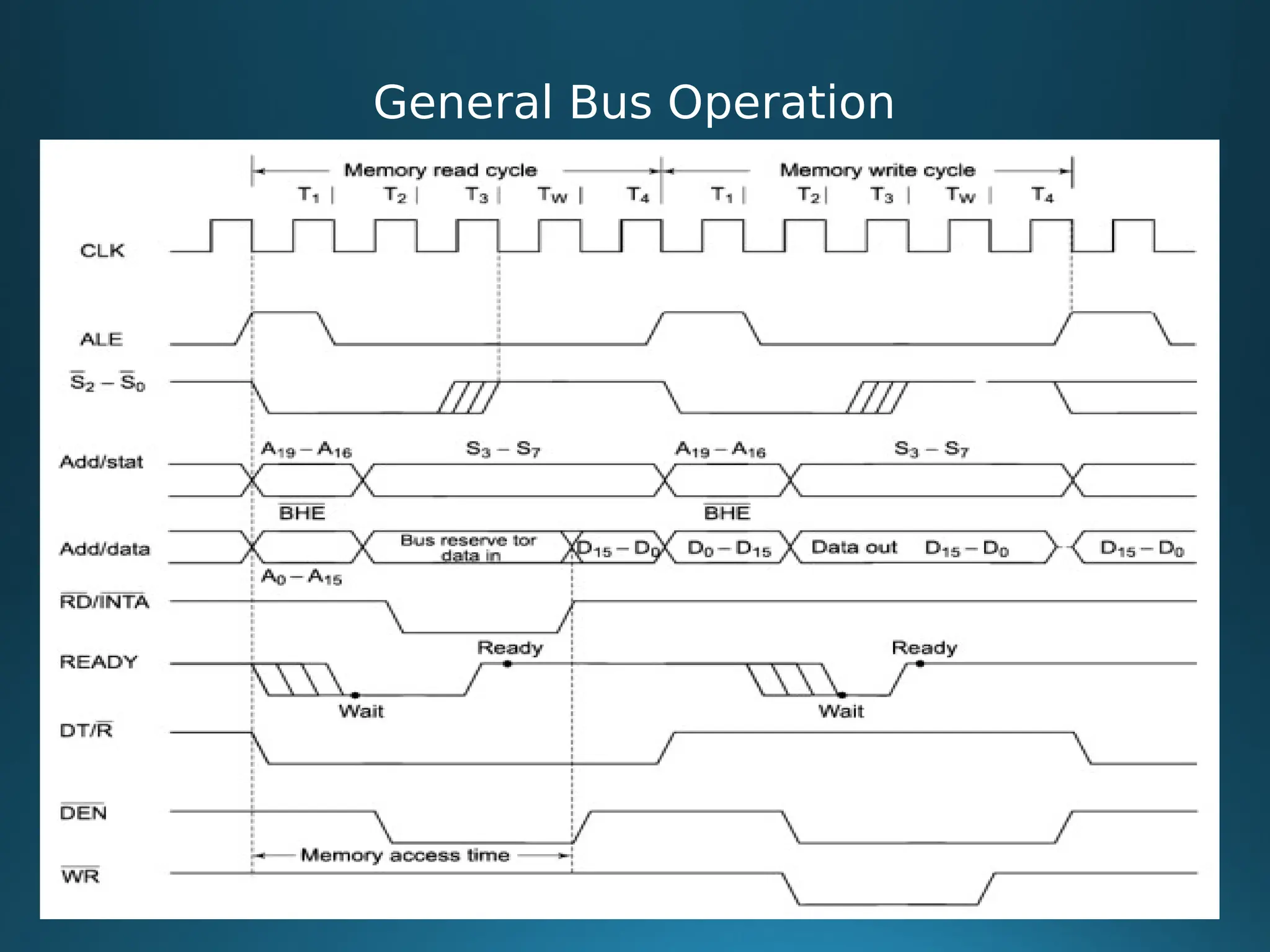
General Bus Operation
Interrupts
92
Definition:
The meaning of ‘interrupts’ is to break the sequence of operation. While
the CPU is executing a program, on ‘interrupt’ breaks the normal sequence
of execution of instructions, diverts its execution to some other program
called Interrupt Service Routine (ISR).After executing ISR , the control is
transferred back again to the main program.
Interrupt processing is an alternative to polling.
Interrupts
93
Need for Interrupt:
Interrupts are particularly useful when interfacing I/O devices that
provide or require data at relatively low data transfer rate.
Interrupt is a mechanism that allows hardware or software to suspend
normal execution on microprocessor in order to switch to interrupt service
routine for hardware / software.
Interrupt can also describe as asynchronous electrical signal that sent to
a microprocessor in order to stop current execution and switch to the
execution signaled (depends on priority). Whether an interrupt is prioritized
or not depends on the interrupt flag register which controlled by priority /
programmable interrupt
Interrupt Cycle of 8086
94
 Sometimes it is necessary to have the computer automatically execute one
of a collection of special routines whenever certain conditions exist within a
program or in the microcomputer system.
 For example,, it is necessary that microcomputer system should give
response to devices such as keyboard, sensor and other components when
they request for service.
 The most common methods for servicing such device are
 Polling method: In this method the processor must test each device in
sequence and in effect ‘ask’ each one if it needs communication with the
processor
 Such a method would have a serious and decrementing effect on system
throughput.
Interrupt Cycle of 8086
95
 Interrupt Method: Another method would be the one that allows the
microprocessor to execute its main program and only stop to service
peripheral devices when it is told to do so by the device itself.
 In this method the processor would provide an external asynchronous input
that would inform the processor that it should complete whatever
instruction that currently being executed and fetch a new routine that will
service the requesting device.
 Once this servicing is completed, the processor would resume exactly
where it left off.
 This method is called Interrupt Method.
 This method increases the system throughput
Interrupt Cycle of 8086
96
 When a microprocessor is interrupted, it stops executing its current
program and calls special routine which services the interrupt.
 The event that causes the interruption is call interrupt and the special
routine executed to service the interrupt is called interrupt service routine
(ISR) / Procedures.
 The interrupt can came from any of the three sources

By external signal

By a special instruction in the program

By the occurrence of some condition
 An interrupt caused by an external signal is referred as Hardware interrupt.
 A condition interrupts or interrupts caused by special instructions are called
software interrupts.
Interrupt Cycle of 8086
97
 Other type of interrupts are
 Vectored and Non vectored interrupts

The interrupts which are having fixed address location for ISR are called
vectored interrupts.

The interrupts which are not having fixed address location for ISR are
called non vectored interrupts.
 Maskable and Non maskable interrupts

The interrupts which can be ignored are called maskable interrupts.

The interrupts which cannot be ignored are called non maskable
interrupts.


Interrupt Cycle of 8086
98
 An 8086 interrupt can come from any one the three sources:

Exernal signal: An 8086 can get interrupt from an external signal applied to
the nonmaskable interrupt (NMI) input pin, or the interrupt (INTR) input
pin.

Special instruction: An execution of the Interrupt instruction (INT). This is
referred as software interrupt.

Condition produced by Instruciton: An 8086 is interrupted by some
condition produced in the program by the execution of an instruction
 At the end of each instruction cycle, 8086 checks to see if any interrupts
have been requested

Interrupt Cycle of 8086
99
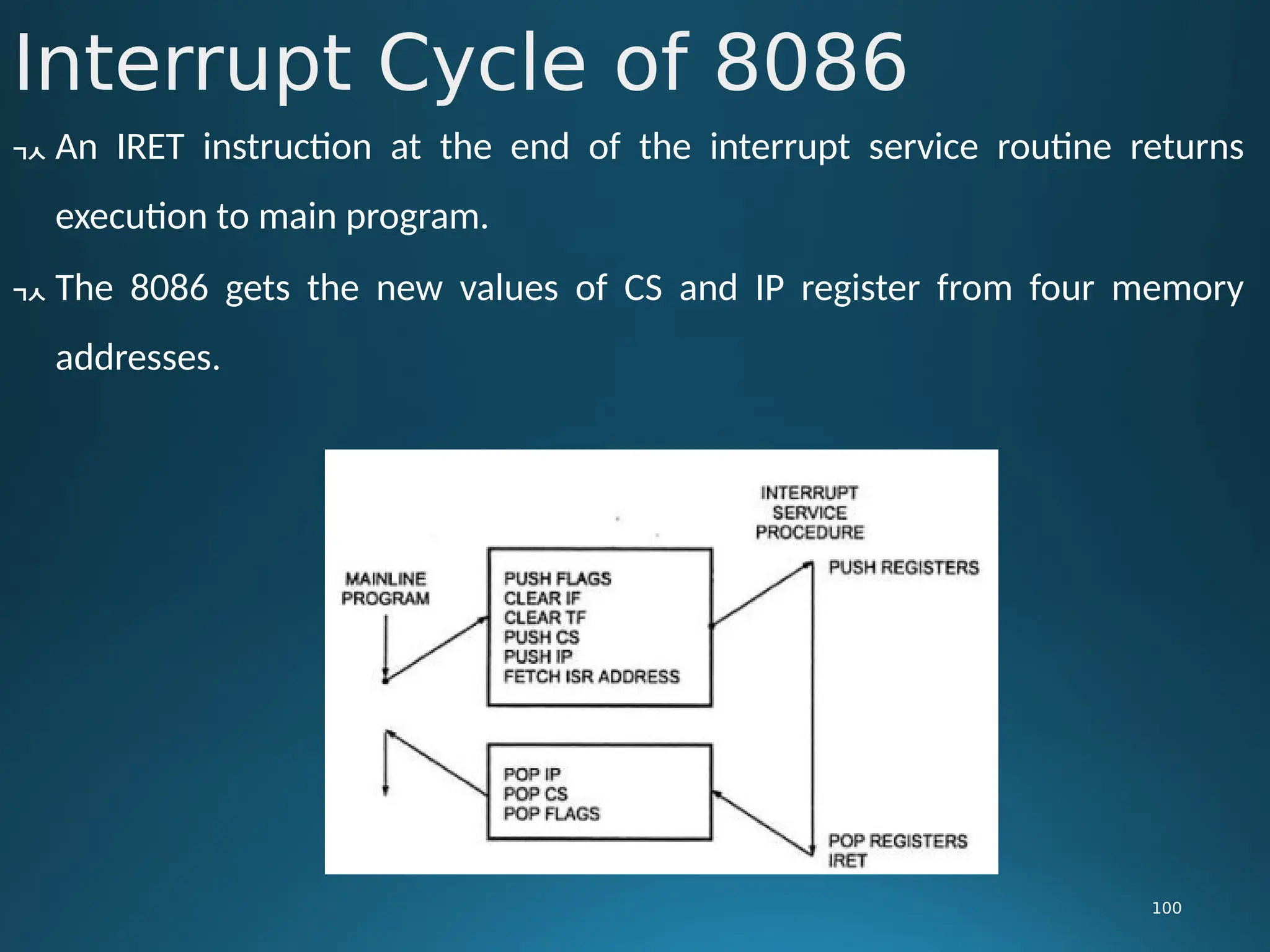
 If an interrupt has been requested, the 8086 responds to interrupt by
stepping through the following series of major steps:

It decrements the stack pointer by 2 pushes the flag register on the stack.

It disables the 8086 INTR interrupt input by clearing the interrupt flag(IF) in
the flag register.

It resets the trap flag (TF) in the flag register.

It decrements the stack pointer by 2 and pushes the current code segment
register contents on the stack.

It decrements the stack pointer again by 2 and pushes the current
instruction pointer contents on the stack.

It does an indirect far jump to start of the procedure by loading the CS and
IP values for the start of the interrupt service routine.
Interrupt Cycle of 8086
100
 An IRET instruction at the end of the interrupt service routine returns
execution to main program.
 The 8086 gets the new values of CS and IP register from four memory
addresses.
Interrupt Cycle of 8086
101
 When it responds to an interrupt, the 8086 goes to memory locations to
get the CS an IP values to start of the interrupt service routine.
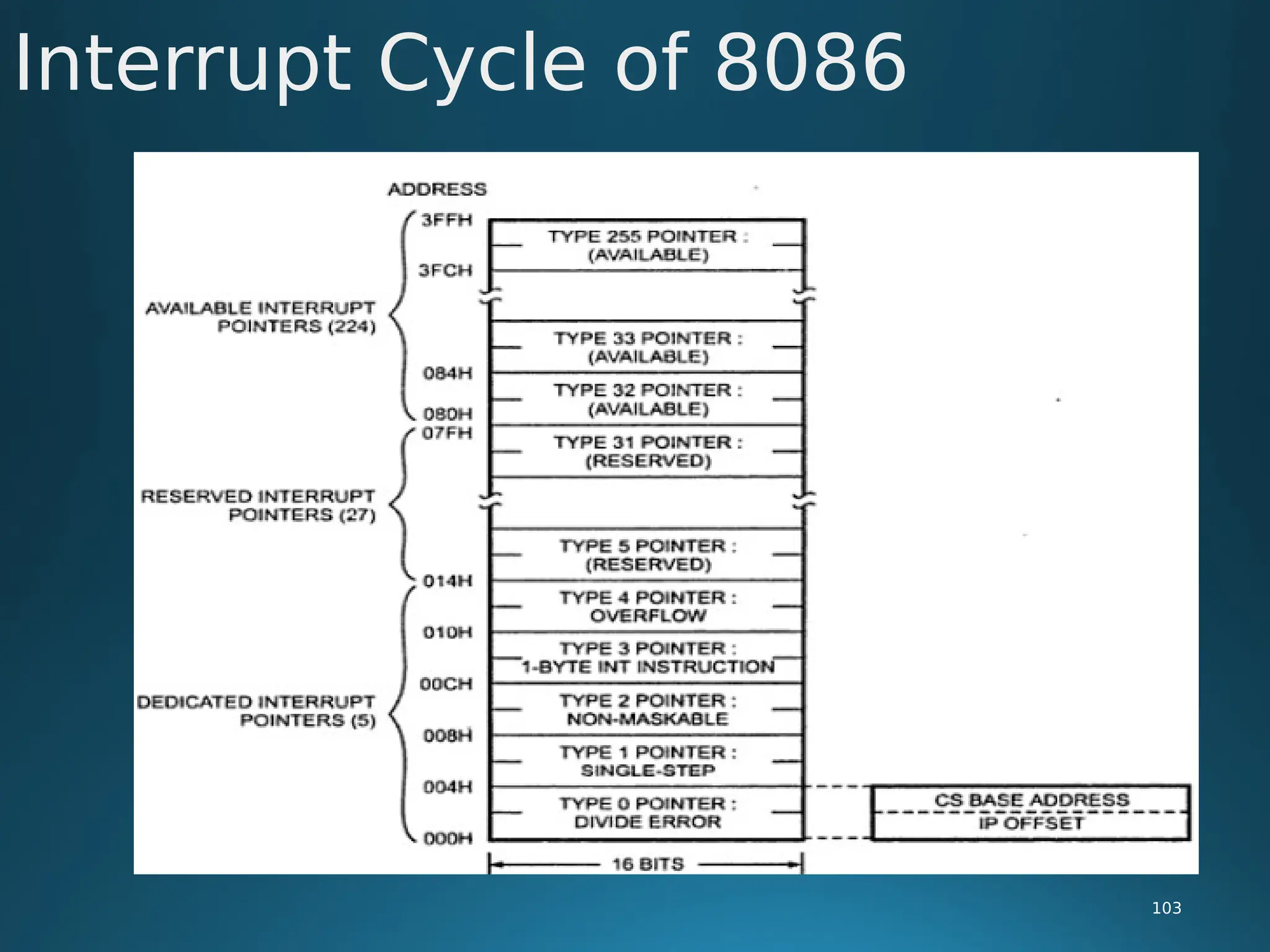
 In an 8086 system the first 1 Kb of memory from 00000H to 003FFH is
reserved for storing the starting addresses of interrupt service routines.
 This block of memory is often called the INTERRUPT VECTOR TABLE or the
INTERRUPT POINTER TABLE.
 Since 4 bytes are required to store the CS and IP values for each interrupt
service procedure, the table can hold the starting addresses for 256
interrupt service routines.
 Each interrupt type is given a number between 0 to 255 and the address of
each interrupt is found by multiplying the type by 4 e.g. for type 11,
interrupt address is 11×4=4410=0002CH
Interrupt Cycle of 8086
102
 Only the first five types have explicit definitions.
 The next 27 interrupt types, from 5 to 31, are reserved by Intel for use in
future microprocessors.
 The upper 224 interrupt types, from 32 to 255, available for user for
hardware or software interrupts.
 When 8086 responds to an interrupt, it automatically goes to specified
location in the interrupt vector table to get the starting address of interrupt
service routine.
Interrupt Cycle of 8086
103
Interrupts of 8086
104
 1. Divide by Zero Interrupt (Type 0):

When the quotient from either a DIV or IDIV instruction is too large to fit in
the result register; 8086 will automatically execute type 0 interrupt.
 2. Single Step Interrupt (Type 1):

The type 1 interrupt is single step trap. In the single step mode, system will
execute one instruction and wait for further direction from user. The user
can examine the contents of registers and memory locations and if they are
correct, user can tell the system to execute the next instruction. This
feature is useful for debugging assembly language programs.
Interrupts of 8086
105
 3. Non Maskable Interrupt (Type 2):

As the name suggests, this interrupt cannot be disabled by any software
instruction. This interrupt is activated by low to high transition on 8086
NMI input pin. In response, 8086 will do a type 2 interrupt.
 4. Break Point Interrupt (Type 3):

The type 3 interrupt is used to implement breakpoint function in the
system. The type 3 interrupt is produced by execution of the INT 3
instruction. Breakpoint function is often used as debugging aids in cases
where single stepping provides more details than wanted.
Interrupts of 8086
106
 5. Overflow Interrupt (Type 4):
 The type 4 interrupt is used to check overflow condition after any signed
arithmetic operation in the system. The 8086 overflow flag, OF, will be
represented in the destination register or memory location.
 Software Interrupts (Type 0-255):
 The 8086 INT instruction can be used to cause 8086 to do one of the 256
possible interrupt types.
 The interrupt type is specified by the number as a part of the instruction.
DOS & BIOS Interrupts of 8086
107
 In IBM PC, part of the operating system is located in the permanent
memory (ROM) and part is loaded during power up.
 The part located in ROM is referred to as ROM-BIOS (Basic Input/ Output
System).
 The other part which is loaded in RAM during power-up from hard disk is
known as DOS(Disk Operating System)
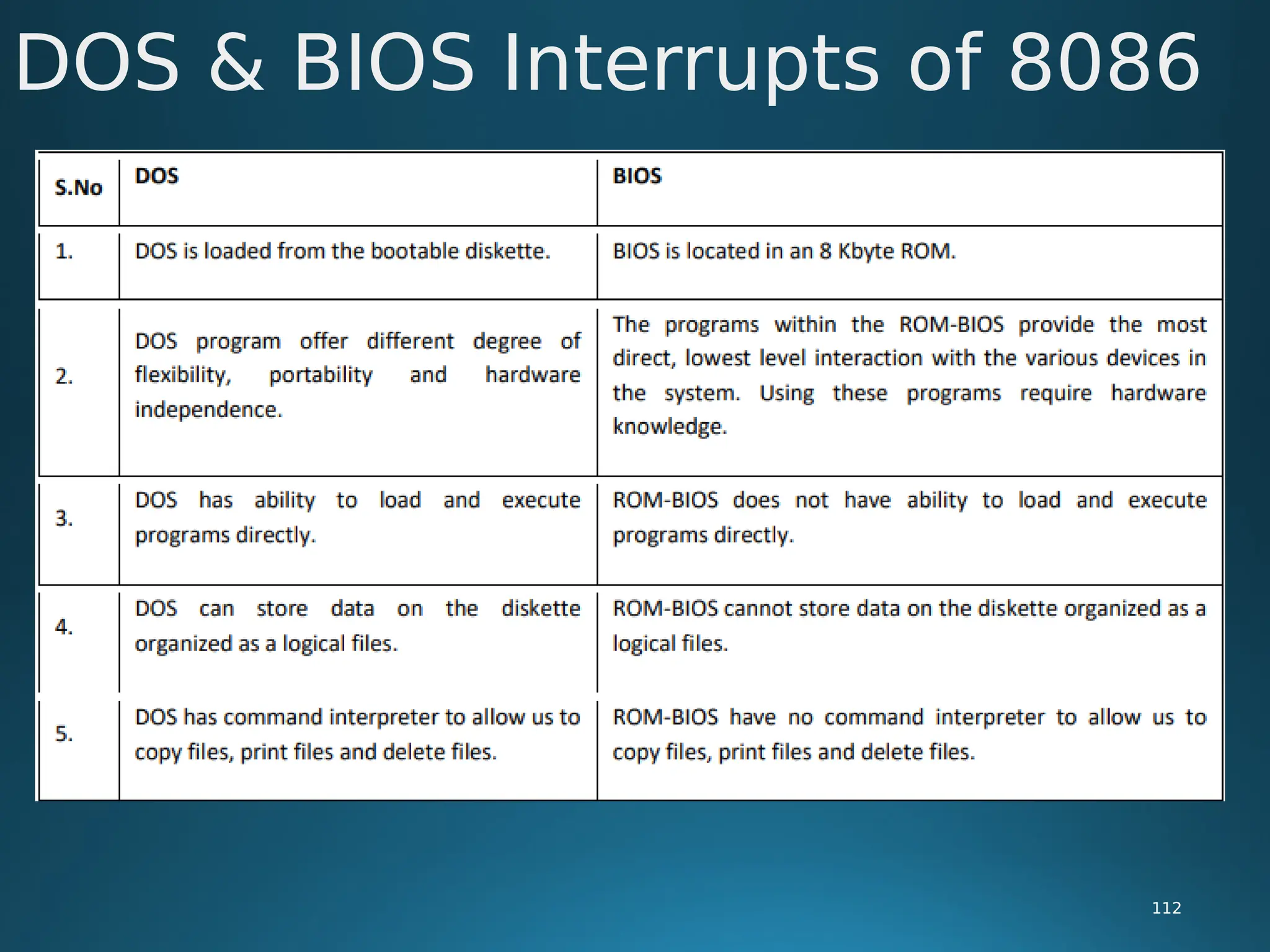
 BIOS is located in a 8 Kbyte ROM at the top of memory, the address range
being from FE000H to FFFFFH
 The programs with ROM-BIOS provide the most direct, lowest level
interaction with the various devices in the system.
DOS & BIOS Interrupts of 8086
108
 The ROM-BIOS contains routines for

Power-on self test

System configuration analysis

Time of the day

Print screen

Boot strap loader

I/O support program for

a. Asynchronous communication

b. Keyboard

c. Printer

d. Display
DOS & BIOS Interrupts of 8086
109
 Most of these programs are accessible to ALP through software interrupt
instruction (INT).
 The design goal for the ROM-BIOS programs is to provide a device-
independent interface to the various physical devices in the system.
 Using ROM-BIOS one can output characters to various physical devices like
the printer or display, one can read character from keyboard.
 But still few things are not possible with ROM-BIOS

It is not possible to provide ability to load and execute programs directly

It is not possible to store data on the diskette organized as logical files.

ROM-BIOS have no command-interpreter to allow copying files, print files,
deleting files.
DOS & BIOS Interrupts of 8086
110
 It is the DOS that provides these services.
 When we turn ON our computer, we expect to see message or a prompt.
 We expect to be able to look at the diskette directory to see what data files
or programs the diskette contains.
 We expect to run a program by typing name.
 We want to copy programs from one diskette to another, print programs
and delete programs.
 All these services are provided by group of programs called DOS.
 The services provided by DOS can be grouped into following categories.

DOS & BIOS Interrupts of 8086
111
 The services provided by DOS can be grouped into following categories.
 1. Character Device I/O
 2. File Management
 3. Memory Management
 4. Directory Management
 5. Executive Functions
 6. Command Interpreter
 7. Utility Programs


https://slideplayer.com/slide/17586751/
DOS & BIOS Interrupts of 8086
112
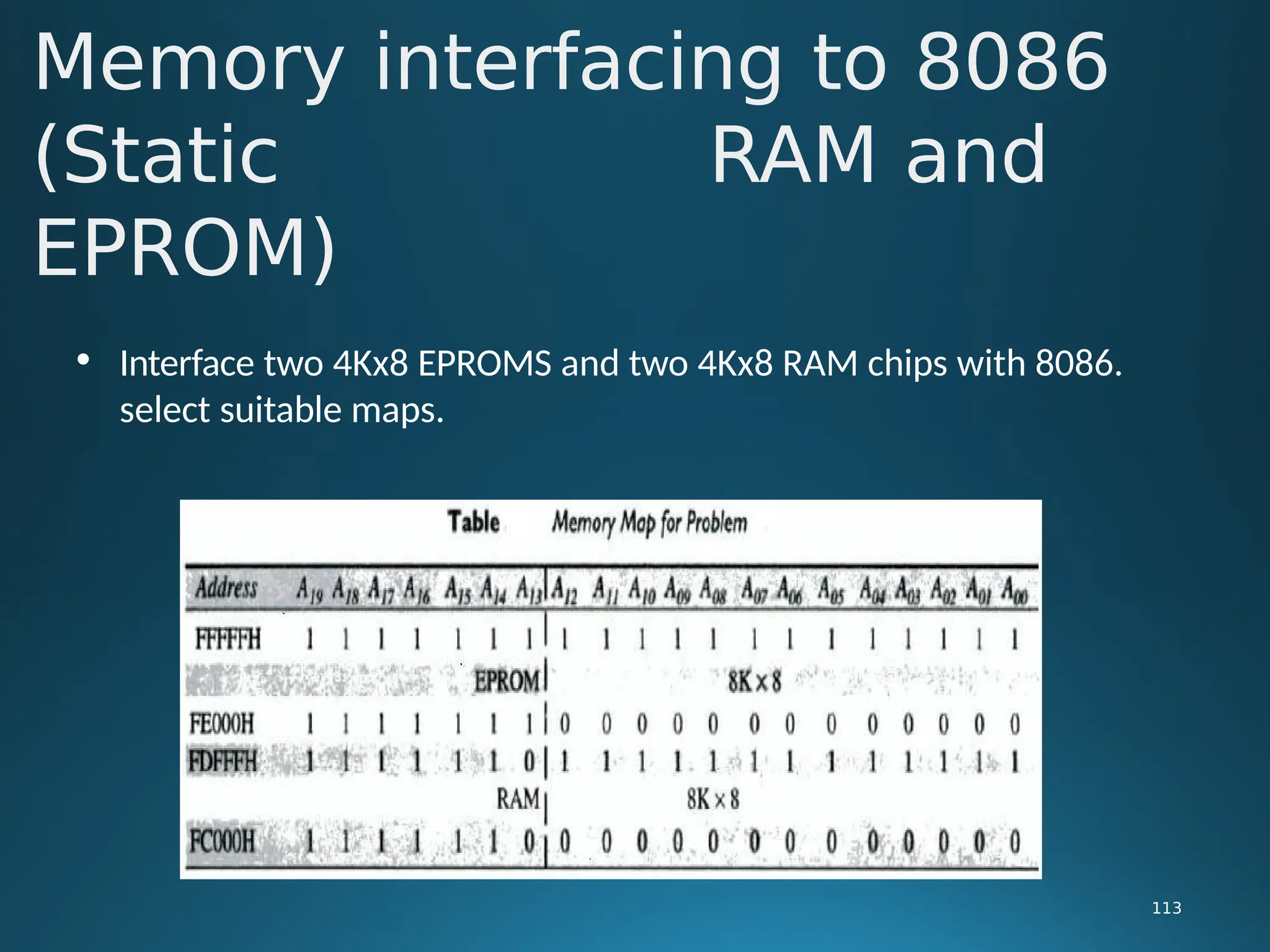
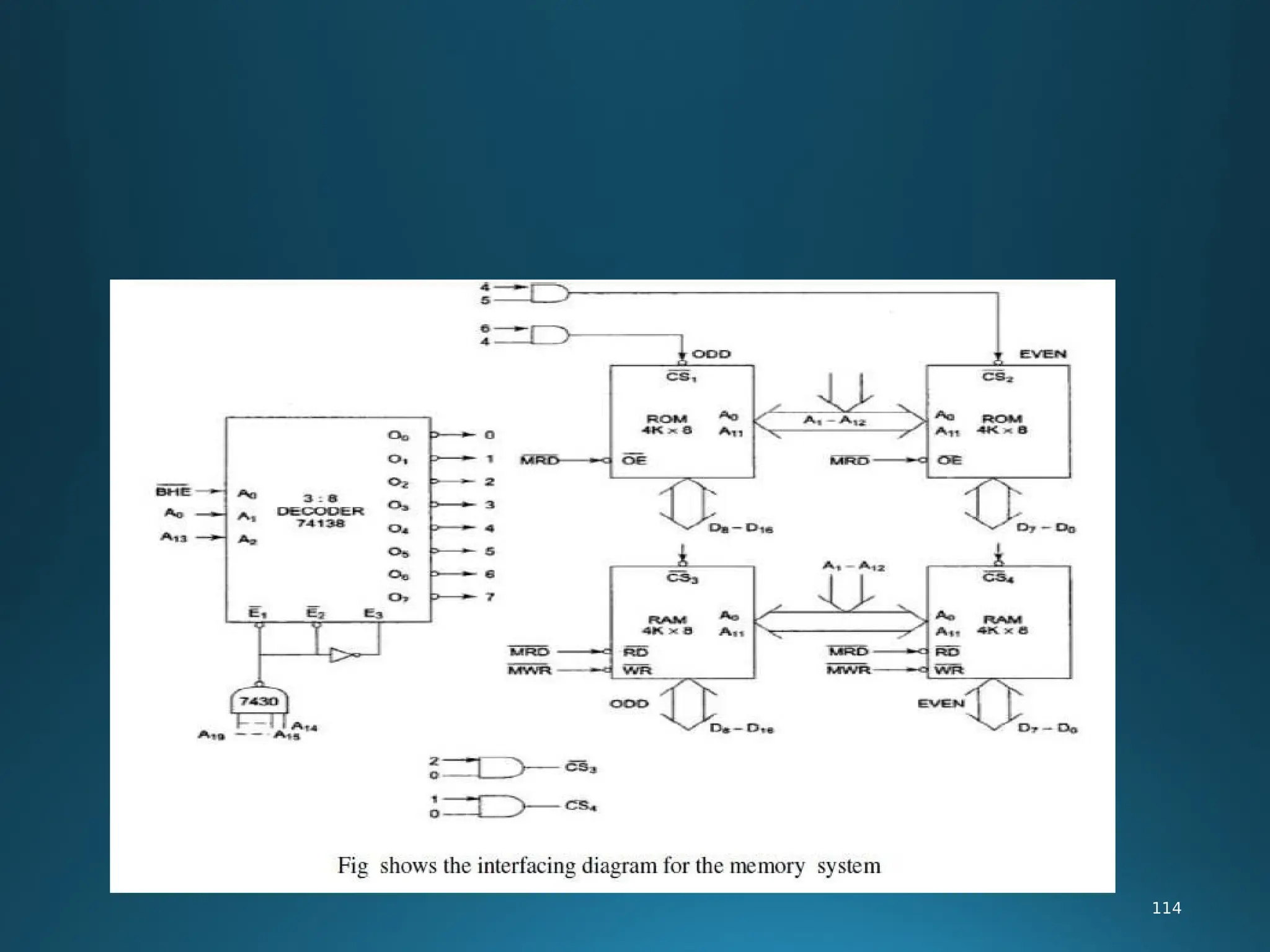
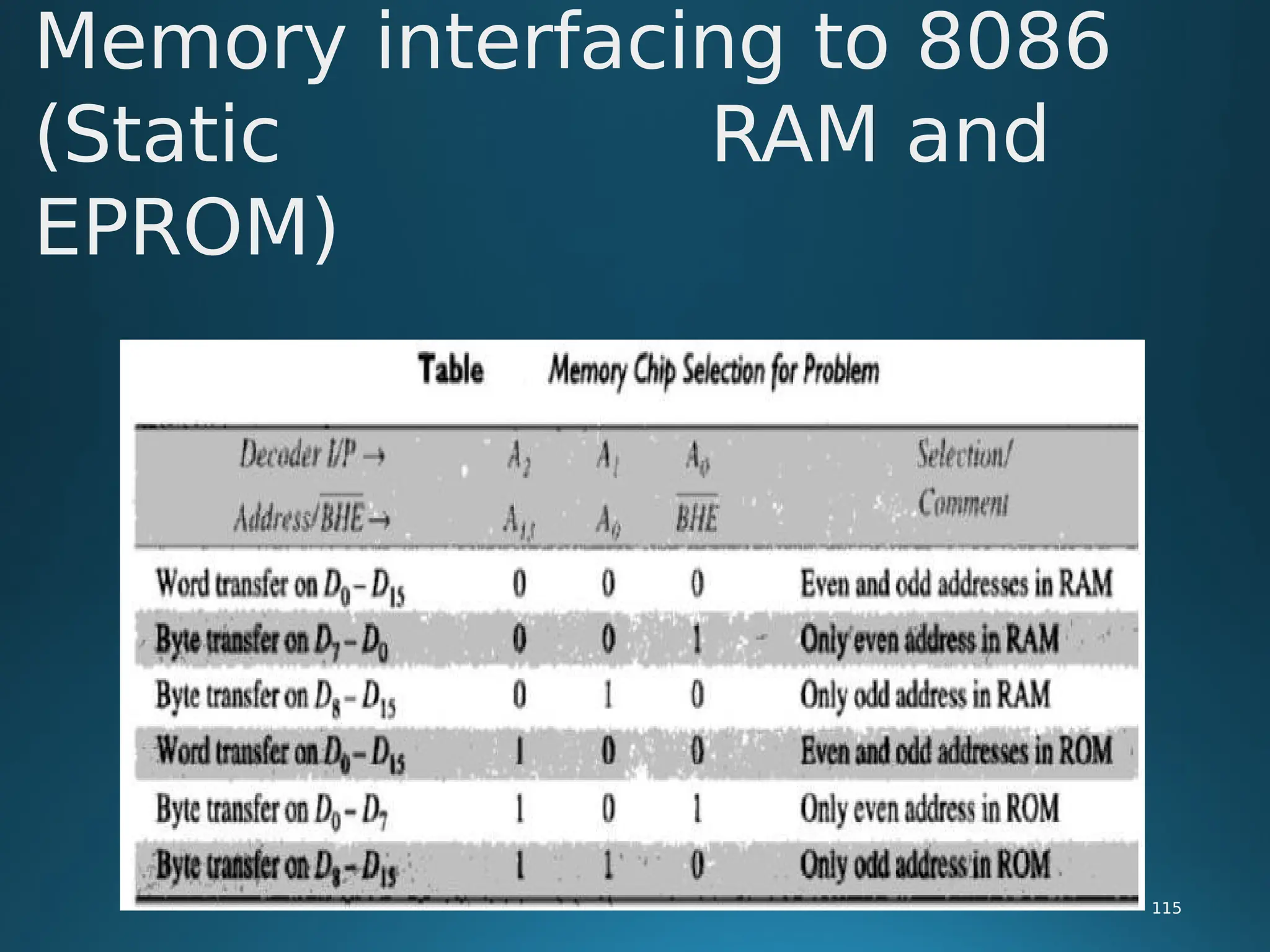
• Interface two 4Kx8 EPROMS and two 4Kx8 RAM chips with 8086.
select suitable maps.
Memory interfacing to 8086
(Static RAM and
EPROM)
113
114
Memory interfacing to 8086
(Static RAM and
EPROM)
115
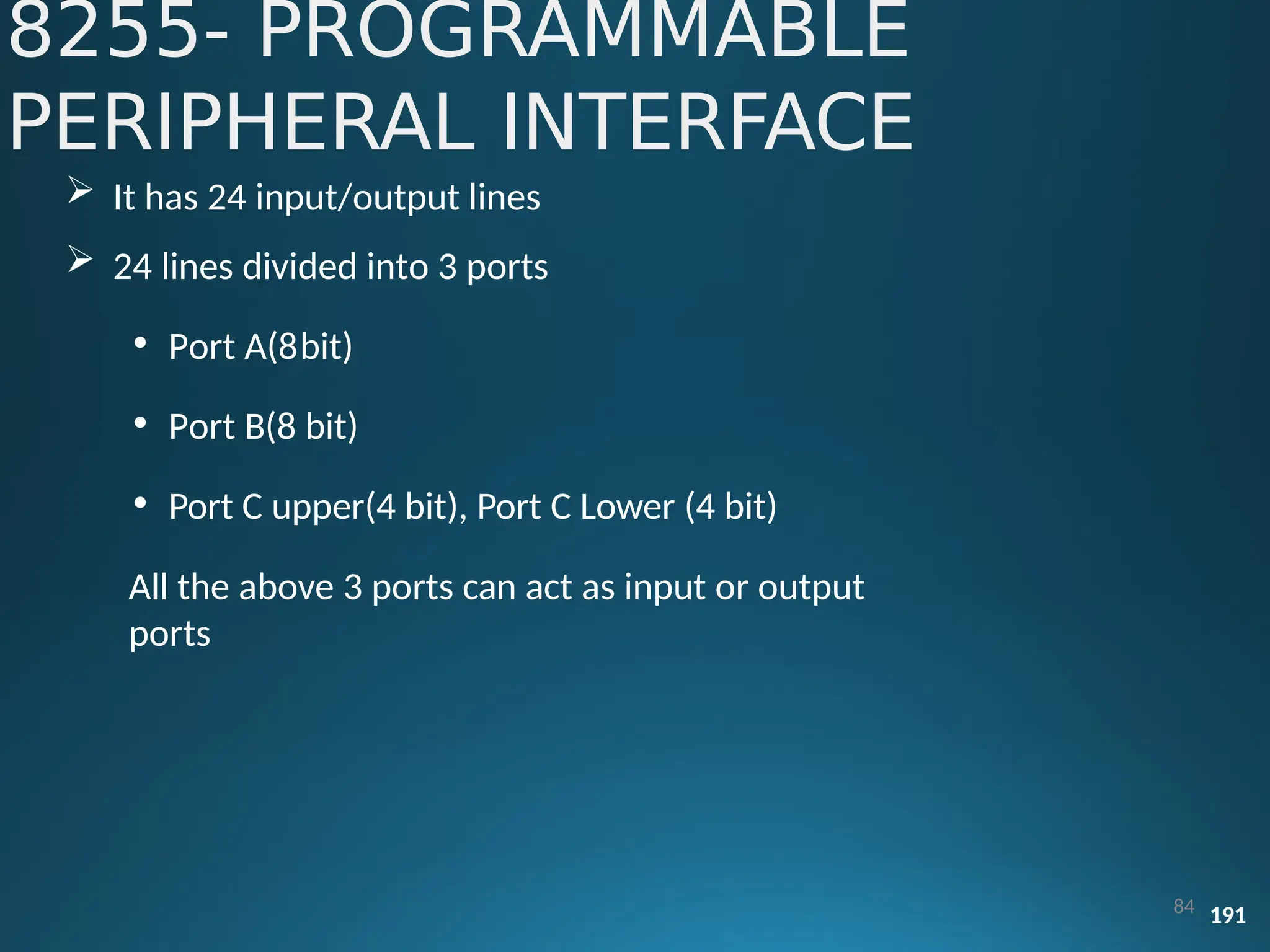
8255- PROGRAMMABLE
PERIPHERAL INTERFACE
84 191
 It has 24 input/output lines
 24 lines divided into 3 ports
• Port A(8bit)
• Port B(8 bit)
• Port C upper(4 bit), Port C Lower (4 bit)
All the above 3 ports can act as input or output
ports
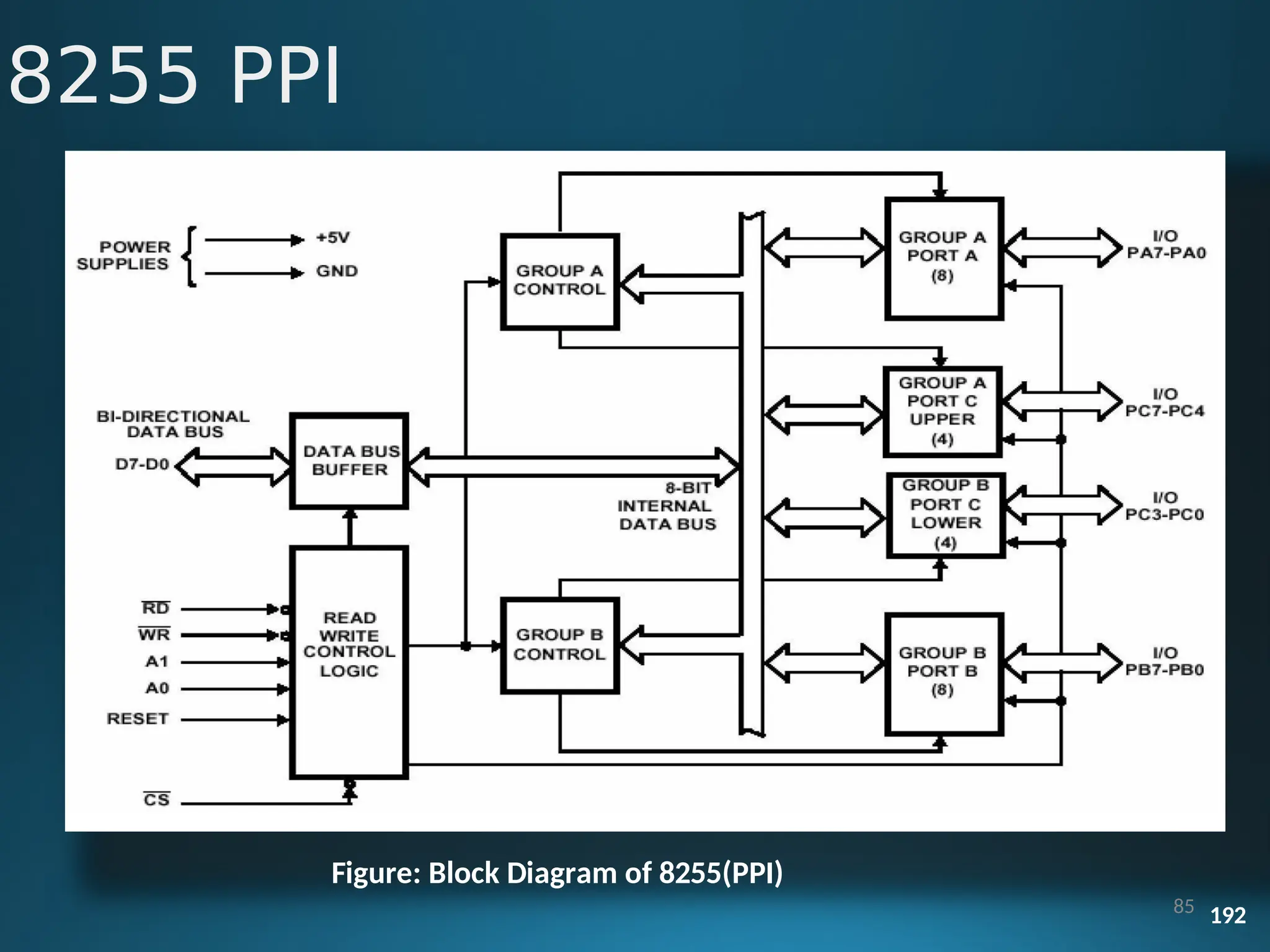
Block
Diagram
Figure: Block Diagram of 8255(PPI)
85 192
8255 PPI
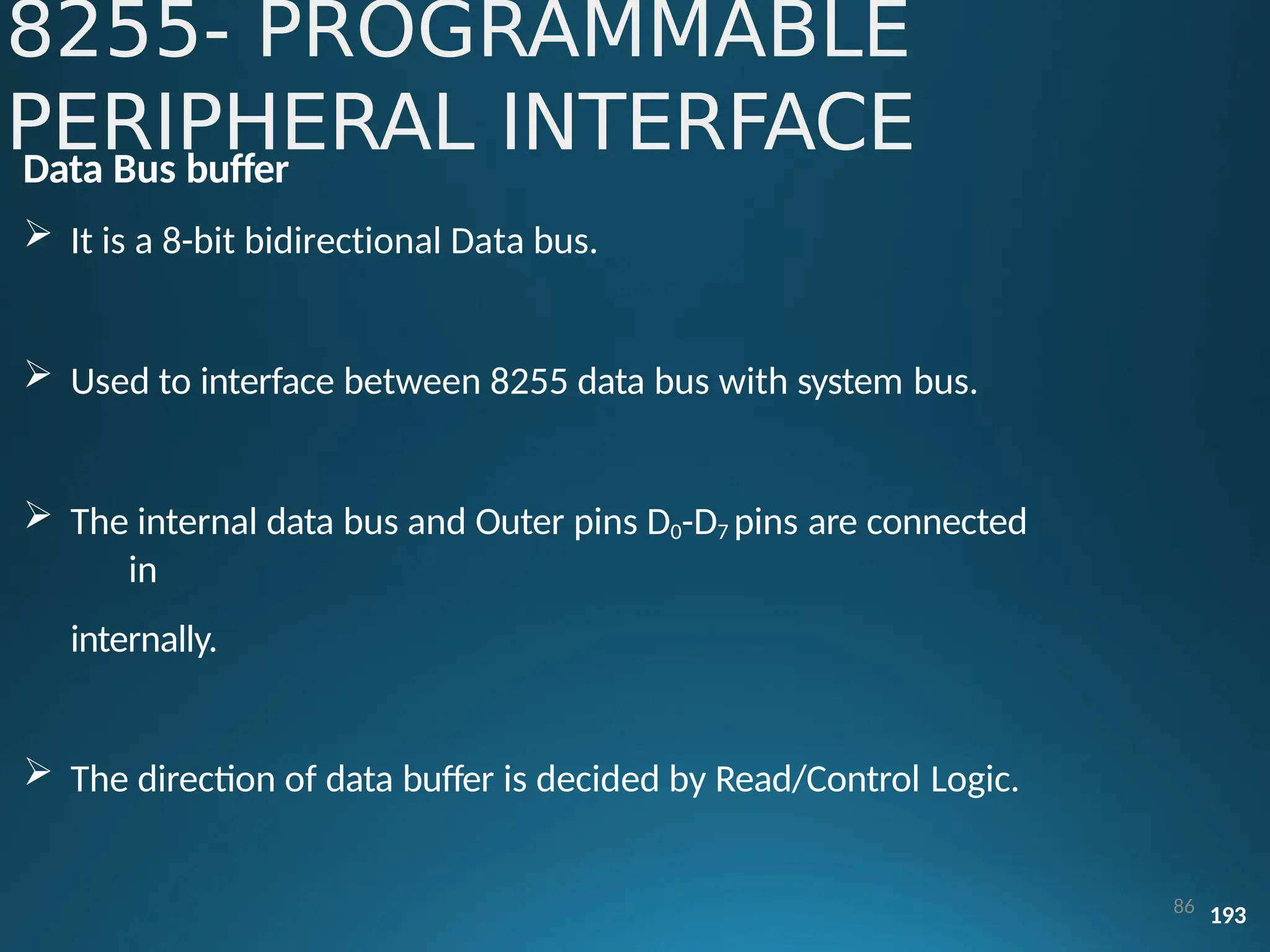
Data Bus buffer
 It is a 8-bit bidirectional Data bus.
 Used to interface between 8255 data bus with system bus.
 The internal data bus and Outer pins D0-D7 pins are connected
in
internally.
 The direction of data buffer is decided by Read/Control Logic.
86 193
8255- PROGRAMMABLE
PERIPHERAL INTERFACE
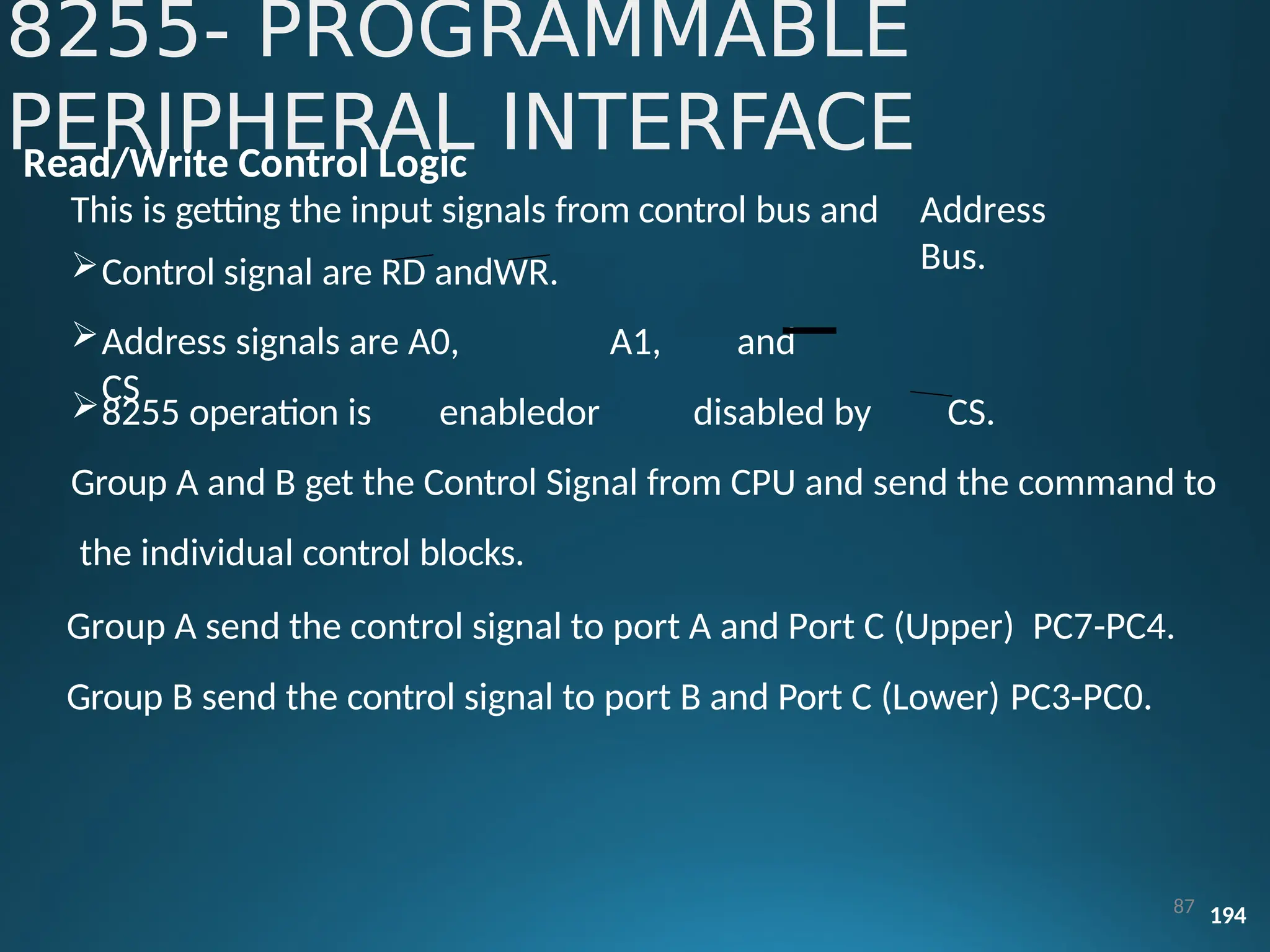
Read/Write Control Logic
This is getting the input signals from control bus and
Control signal are RD andWR.
Address signals are A0, A1, and
CS
Address
Bus.
8255 operation is enabledor disabled by CS.
Group A and B get the Control Signal from CPU and send the command to
the individual control blocks.
Group A send the control signal to port A and Port C (Upper) PC7-PC4.
Group B send the control signal to port B and Port C (Lower) PC3-PC0.
8255- PROGRAMMABLE
PERIPHERAL INTERFACE
87 194
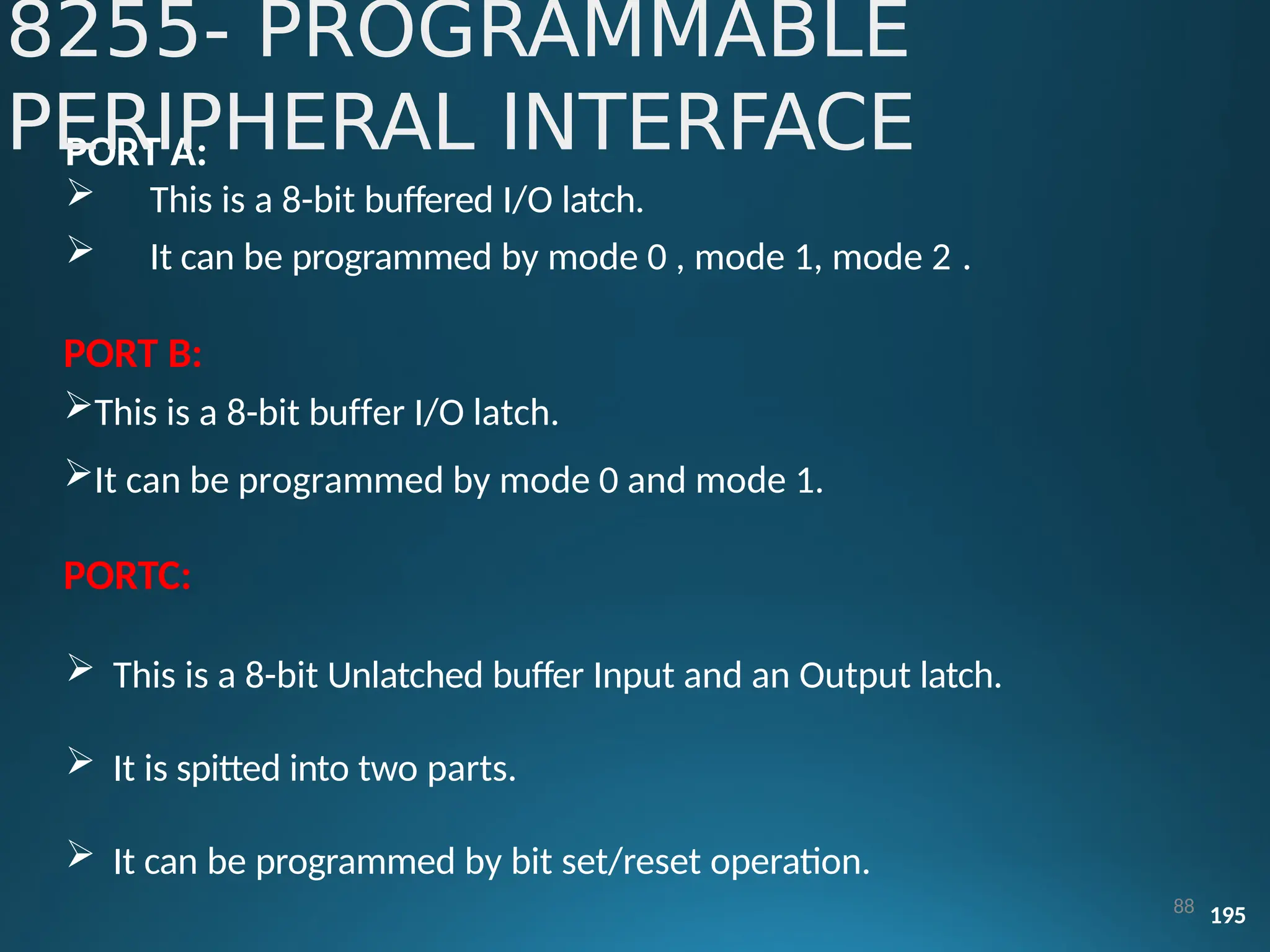
PORT A:
 This is a 8-bit buffered I/O latch.
 It can be programmed by mode 0 , mode 1, mode 2 .
PORT B:
This is a 8-bit buffer I/O latch.
It can be programmed by mode 0 and mode 1.
PORTC:
 This is a 8-bit Unlatched buffer Input and an Output latch.
 It is spitted into two parts.
 It can be programmed by bit set/reset operation.
88 195
8255- PROGRAMMABLE
PERIPHERAL INTERFACE
Pin Description of
8255
91 199
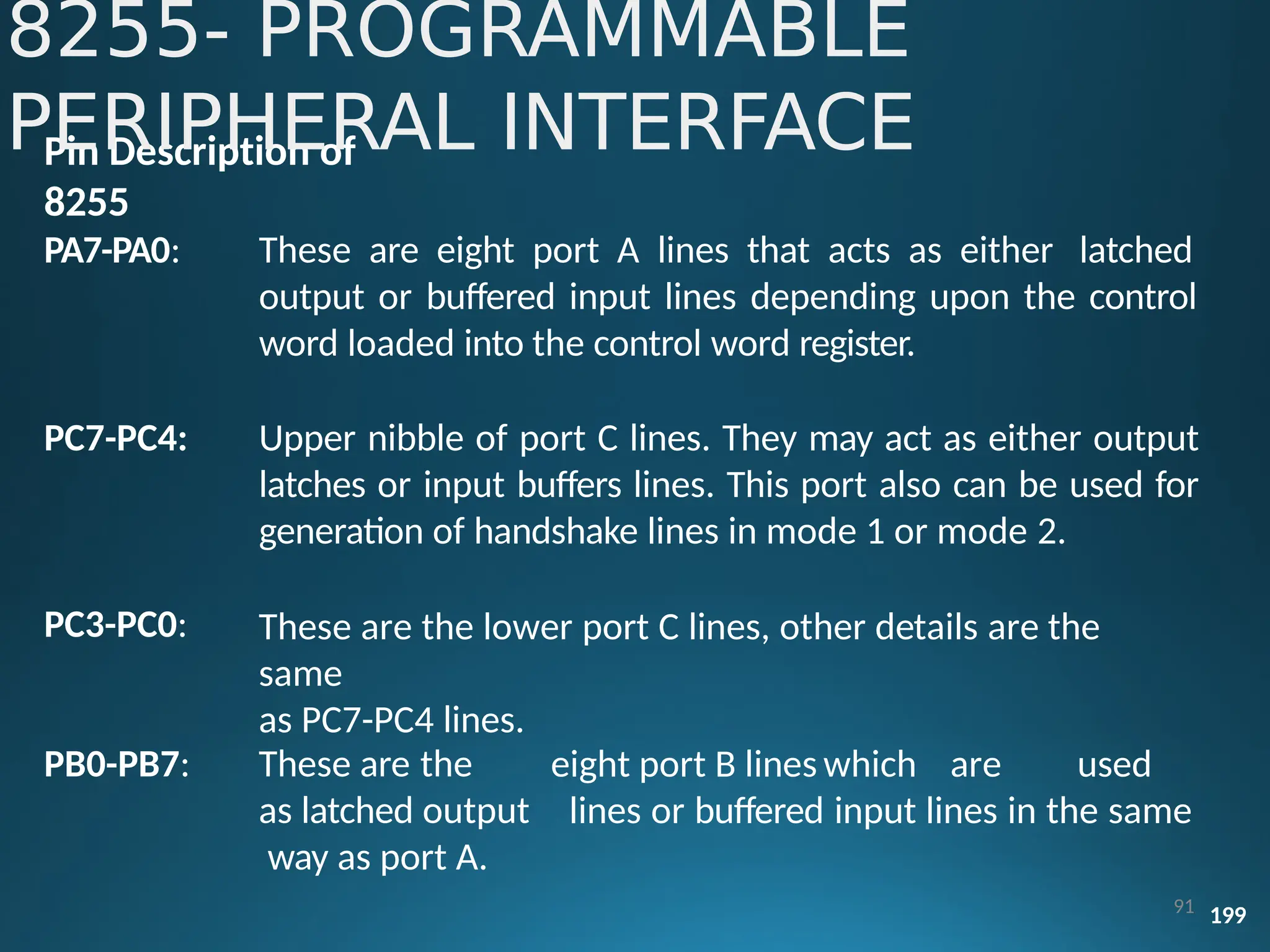
PA7-PA0: These are eight port A lines that acts as either latched
output or buffered input lines depending upon the control
word loaded into the control word register.
PC7-PC4:
PC3-PC0:
Upper nibble of port C lines. They may act as either output
latches or input buffers lines. This port also can be used for
generation of handshake lines in mode 1 or mode 2.
These are the lower port C lines, other details are the
same
as PC7-PC4 lines.
PB0-PB7: eight port B lines which are used
lines or buffered input lines in the same
These are the
as latched output
way as port A.
8255- PROGRAMMABLE
PERIPHERAL INTERFACE
Pin Description of 8255
RD: This is the input line driven by the microprocessor and should be
low
to indicate read operation to8255.
8255- PROGRAMMABLE
PERIPHERAL INTERFACE
122
line
WR: This is an input line driven by the microprocessor. A low on this
indicates writeoperation.
CS : This is a chip select line. If this line goes low, it enables the 8255
to respond to RD and WR signals, otherwise RD and WR signal are
neglected.
A1-A0: These are the address input lines and are driven by the
microprocessor.
 RESET: The 8255 is placed into its reset state if this input line is a
logical 1. All peripheral ports are set to the input
mode.
Various modes of 8255:
These are two basic modes of operation of 8255. I/O mode and Bit Set-Reset
mode (BSR).
In I/O Mode:
The 8255 ports work as programmable I/O ports, while in BSR mode only port
C (PC0-PC7) can be used to set or reset its individual port bits.
Under the I/O mode of operation, further there are three modes of operation
of 8255, so as to support different types of applications, mode 0, mode 1 and
mode 2.
8255- PROGRAMMABLE
PERIPHERAL INTERFACE
123
 Mode 0 (Basic I/O mode): This mode is also called as basic input/output
Mode. This mode provides simple input and output capabilities using each
of the three ports. Data can be simply read from and written to the input
and output ports respectively, after appropriate initialization.
8255- PROGRAMMABLE
PERIPHERAL INTERFACE
124
Mode 1: (Strobed input/output mode) in this mode the handshaking
control the input and output action of the specified port. Port C lines PC0-
PC2, provide strobe or handshake lines for port B.
This group which includes port B and PC0-PC2 is called as group B for
Strobed data input/output. Port C lines PC3-PC5 provides strobe lines for port
A.
This group including port A and PC3-PC5 from group A. Thus port C is
utilized for generating handshake signals.
8255- PROGRAMMABLE
PERIPHERAL INTERFACE
125
 Mode 2 (Strobed bidirectional I/O): This mode of operation of 8255 is also
called as strobed bidirectional I/O. This mode of operation provides 8255
with additional features for communicating with a peripheral device on an
8-bit data bus.
8255- PROGRAMMABLE
PERIPHERAL INTERFACE
126
 Handshaking signals are provided to maintain
proper synchronization between the data transmitter and
receiver.
data flow
and
 The interrupt generation and other functions are similar to mode 1.
 BSR Mode:
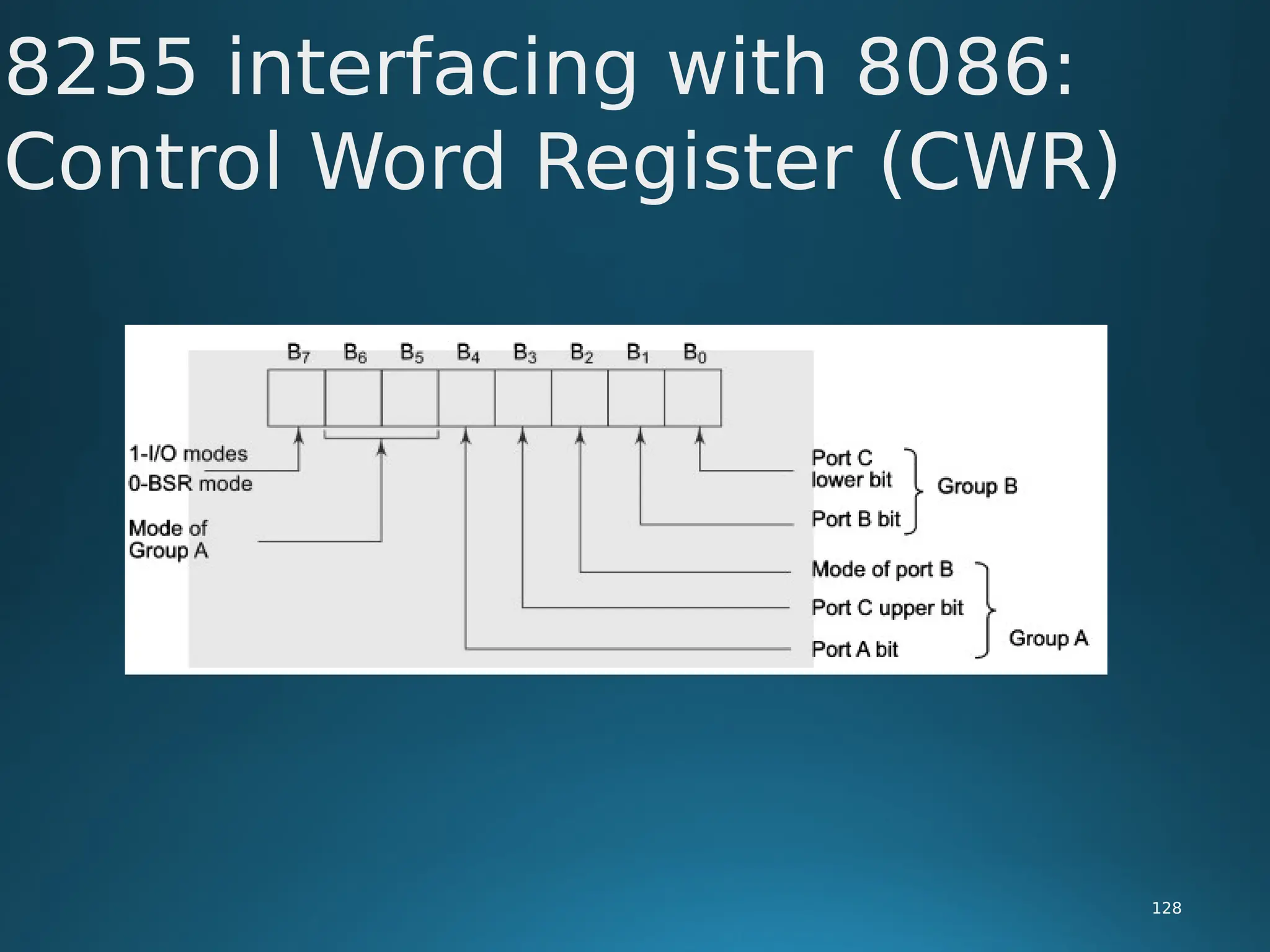
In this mode any of the 8-bits of port C can be set or reset depending on D0
of the control word. The bit to be set or reset is selected by bit select flags
D3, D2 and D1 of the CWR as given in table.
8255- PROGRAMMABLE
PERIPHERAL INTERFACE
127
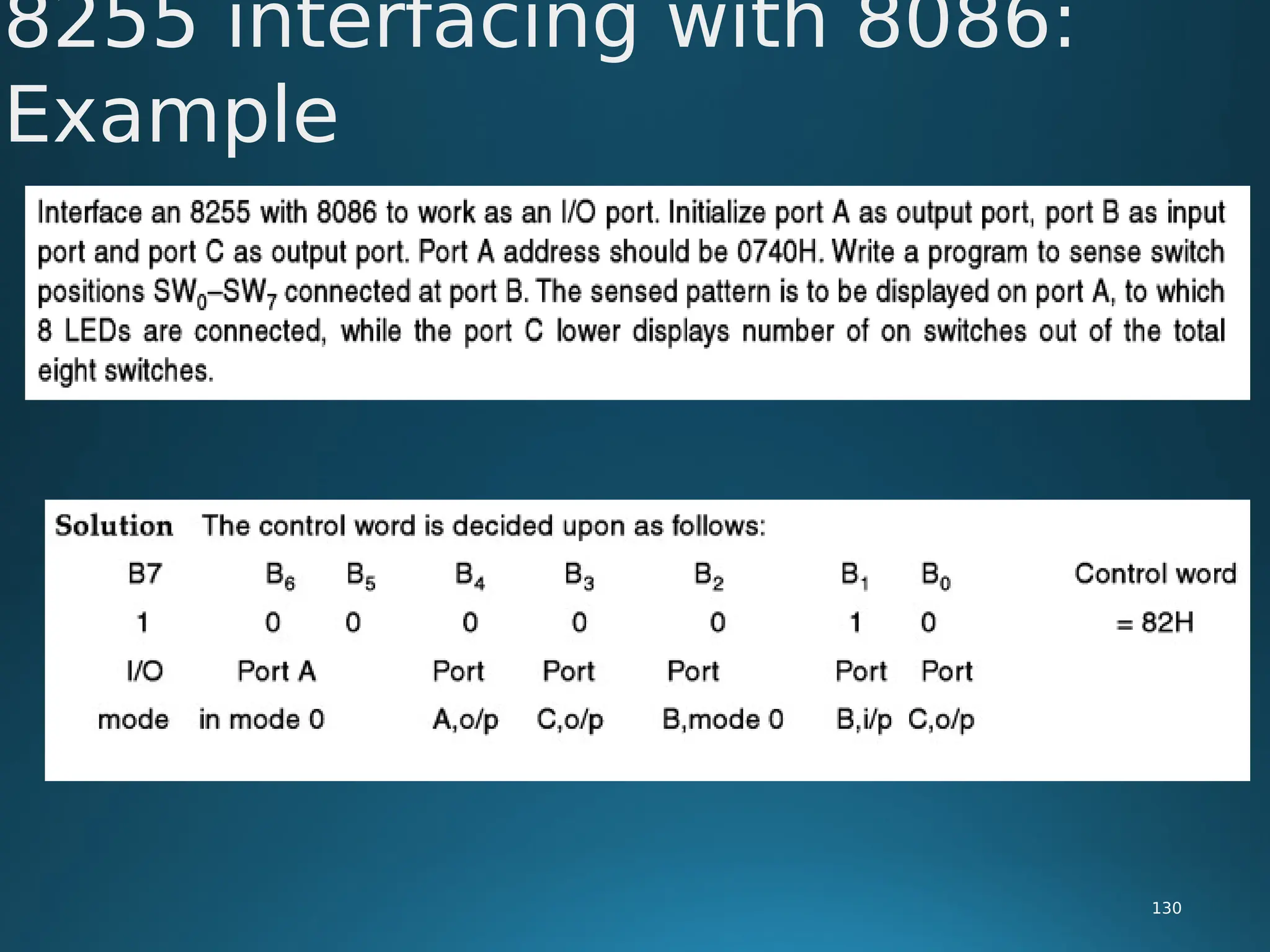
8255 interfacing with 8086:
Control Word Register (CWR)
128
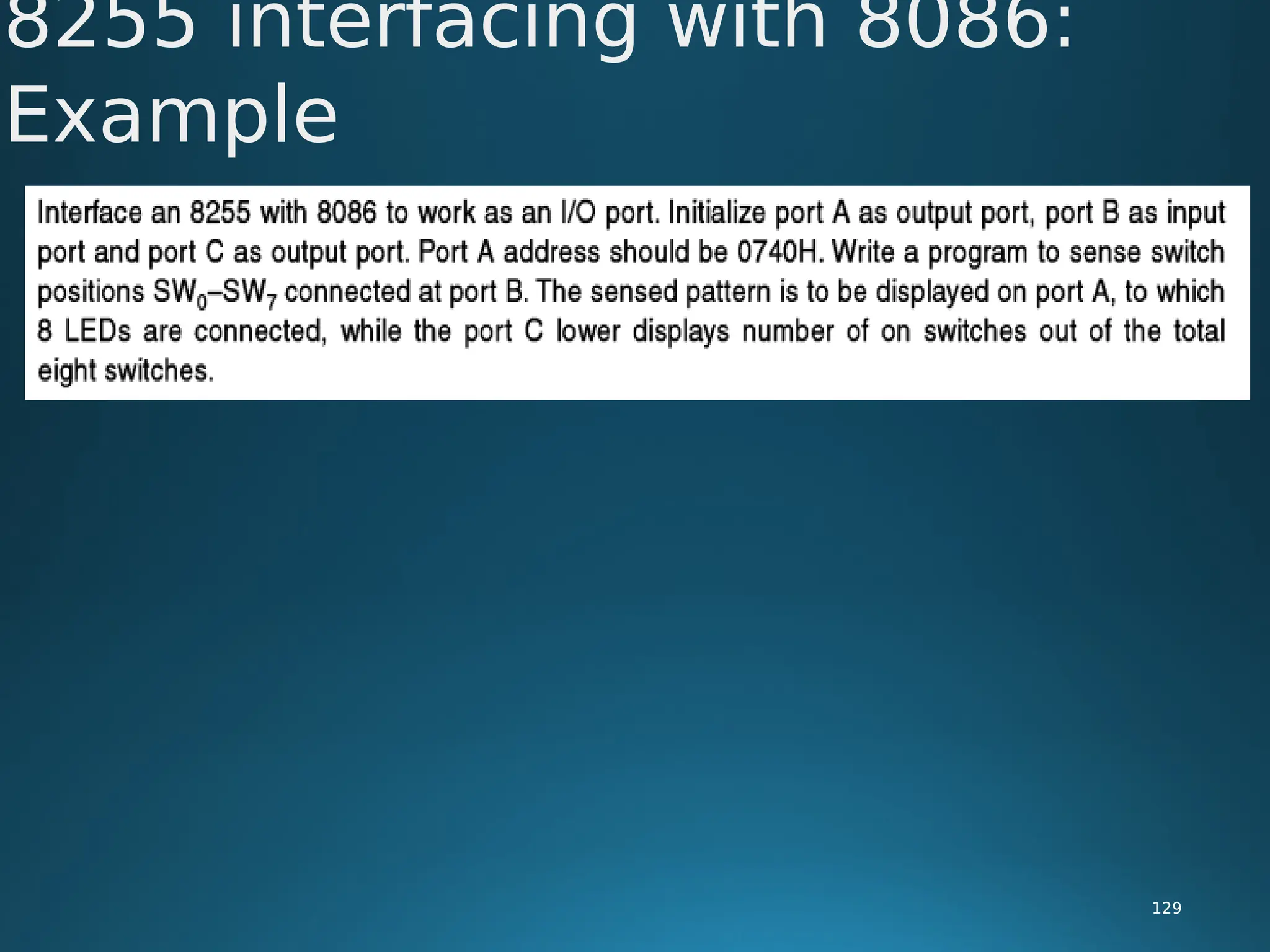
8255 interfacing with 8086:
Example
129
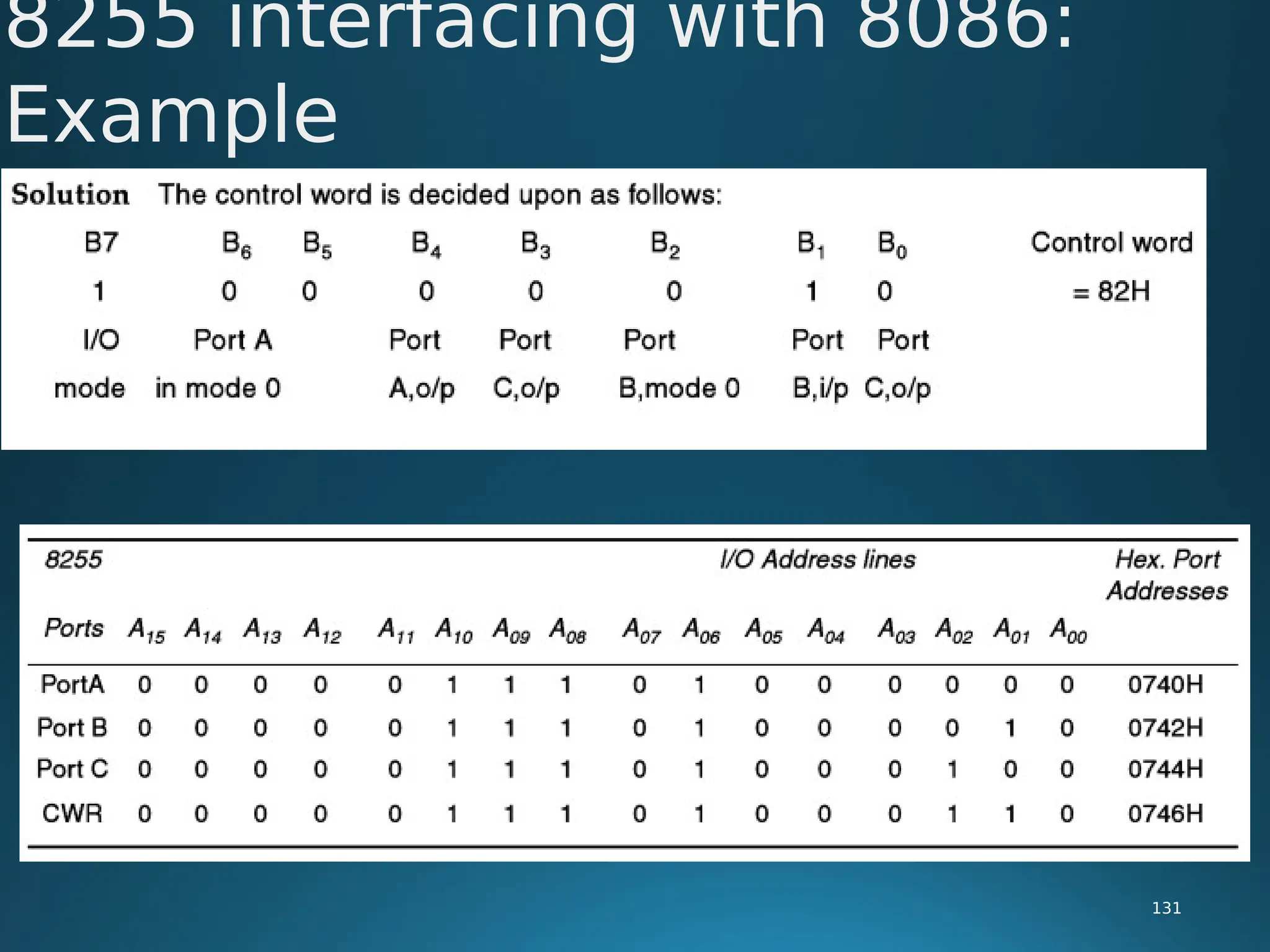
8255 interfacing with 8086:
Example
130
8255 interfacing with 8086:
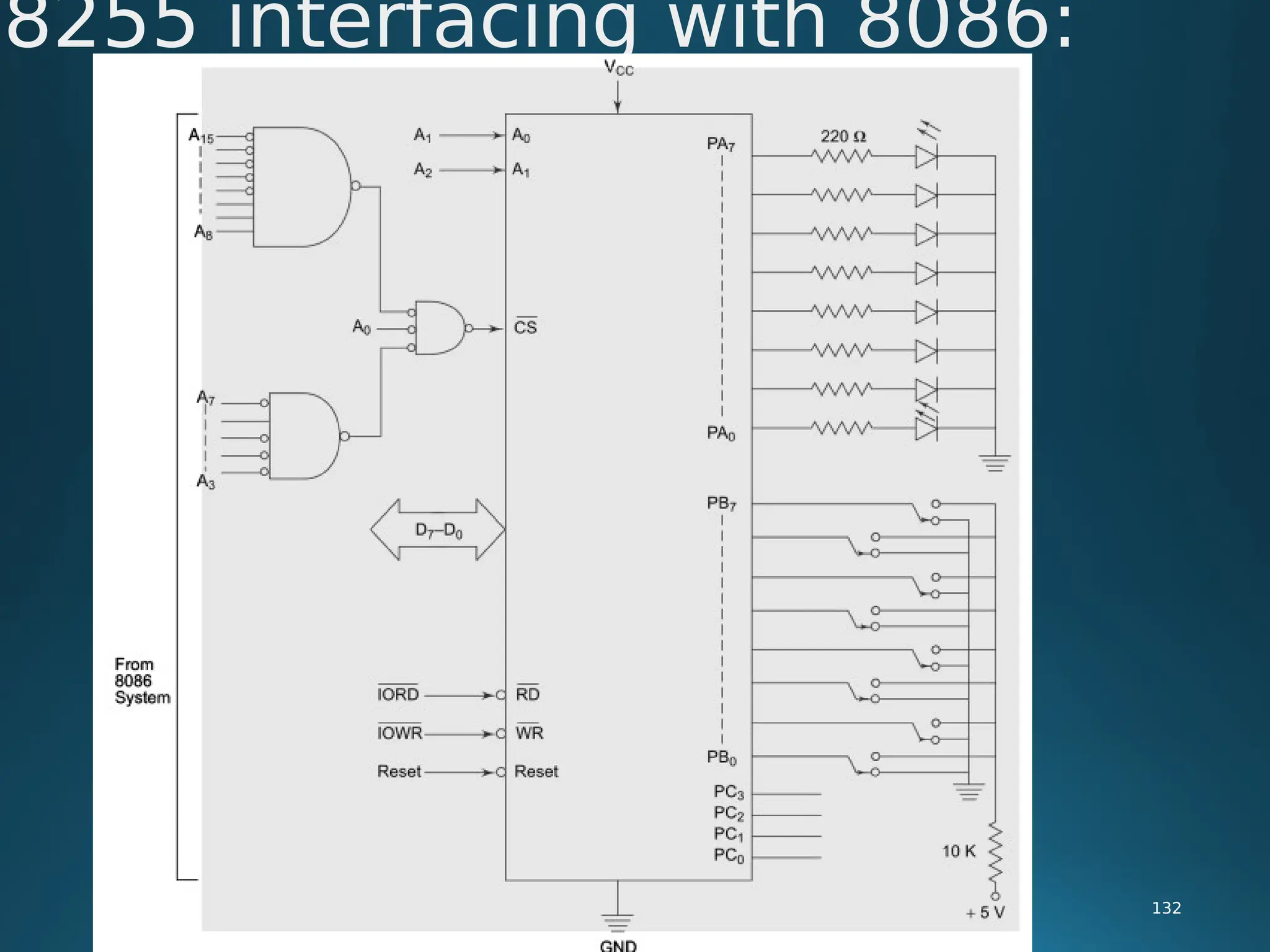
Example
131
8255 interfacing with 8086:
132
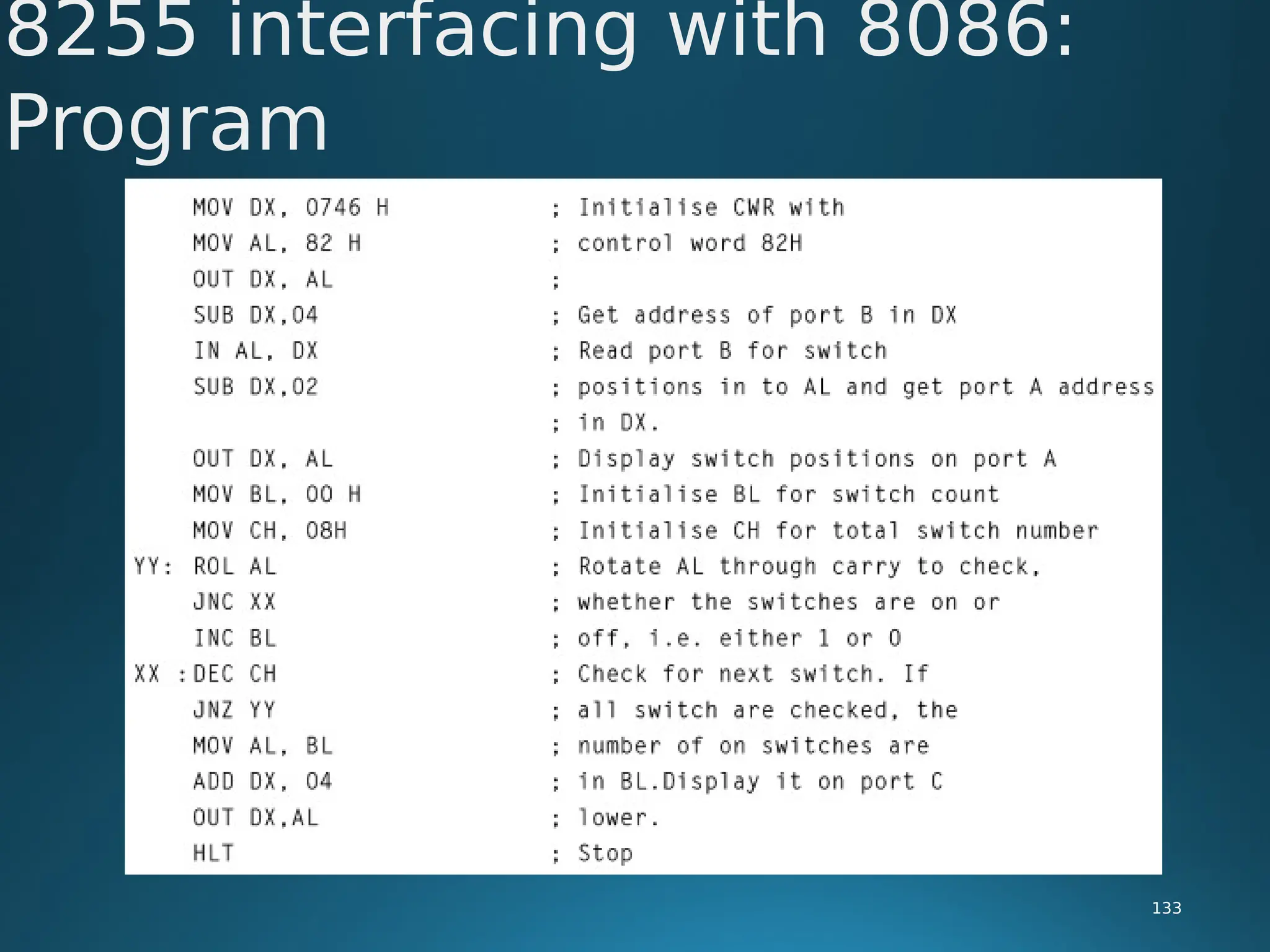
8255 interfacing with 8086:
Program
133
• Direct memory access (DMA) is a feature of modern computer systems that
allows certain hardware subsystems to read/write data to/from memory
without microprocessor intervention, allowing the processor to do other
work.
• Used in disk controllers, video/sound cards etc, or between memory
locations.
• Typically, the CPU initiates DMA transfer, does other operations while the
transfer is in progress, and receives an interrupt from the DMA controller
once the operation is complete.
• Can create cache coherency problems (the data in the cache may be
different from the data in the external memory after DMA)
Need For DMA
134
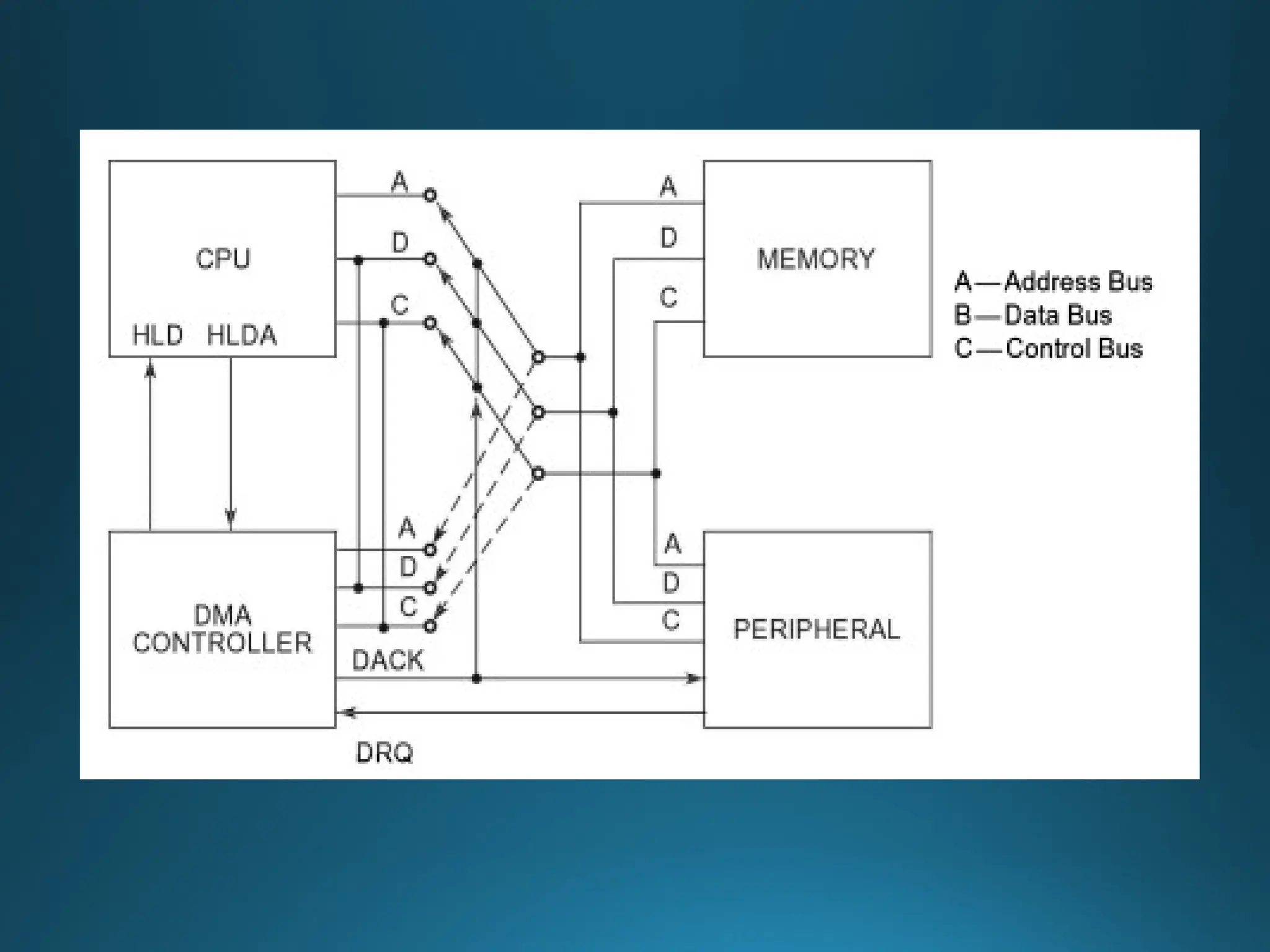
• The I/O device asserts the appropriate DRQ signal for the channel.
• The DMA controller will enable appropriate channel, and ask the CPU to
release the bus so that the DMA may use the bus. The DMA requests the
bus by asserting the HOLD signal which goes to the CPU.
• The CPU detects the HOLD signal, and will complete executing the current
instruction. Now all of the signals normally generated by the CPU are placed
in a tri-stated condition (neither high or low) and then the CPU asserts the
HLDA signal which tells the DMA controller that it is now in charge of the
bus.
• The CPU may have to wait (hold cycles).
DMA Data Transfer Method
136
• DMA activates its -MEMR, -MEMW, -IOR, -IOW output signals, and the
address outputs from the DMA are set to the target address, which will be
used to direct the byte that is about to transferred to a specific memory
location.
• The DMA will then let the device that requested the DMA transfer know
that the transfer is commencing by asserting the -DACK signal.
• The peripheral places the byte to be transferred on the bus Data lines.
• Once the data has been transferred, The DMA will de-assert the - DACK2
signal, so that the FDC knows it must stop placing data on the bus.
DMA Data Transfer Method
137
• The DMA will now check to see if any of the other DMA channels have any
work to do. If none of the channels have their DRQ lines asserted, the DMA
controller has completed its work and will now tri-state the -MEMR, -
MEMW, -IOR, -IOW and address signals.
• Finally, the DMA will de-assert the HOLD signal. The CPU sees this, and de-
asserts the HOLDA signal. Now the CPU resumes control of the buses and
address lines, and it resumes executing instructions and accessing main
memory and the peripherals.
250
DMA Data Transfer
Method
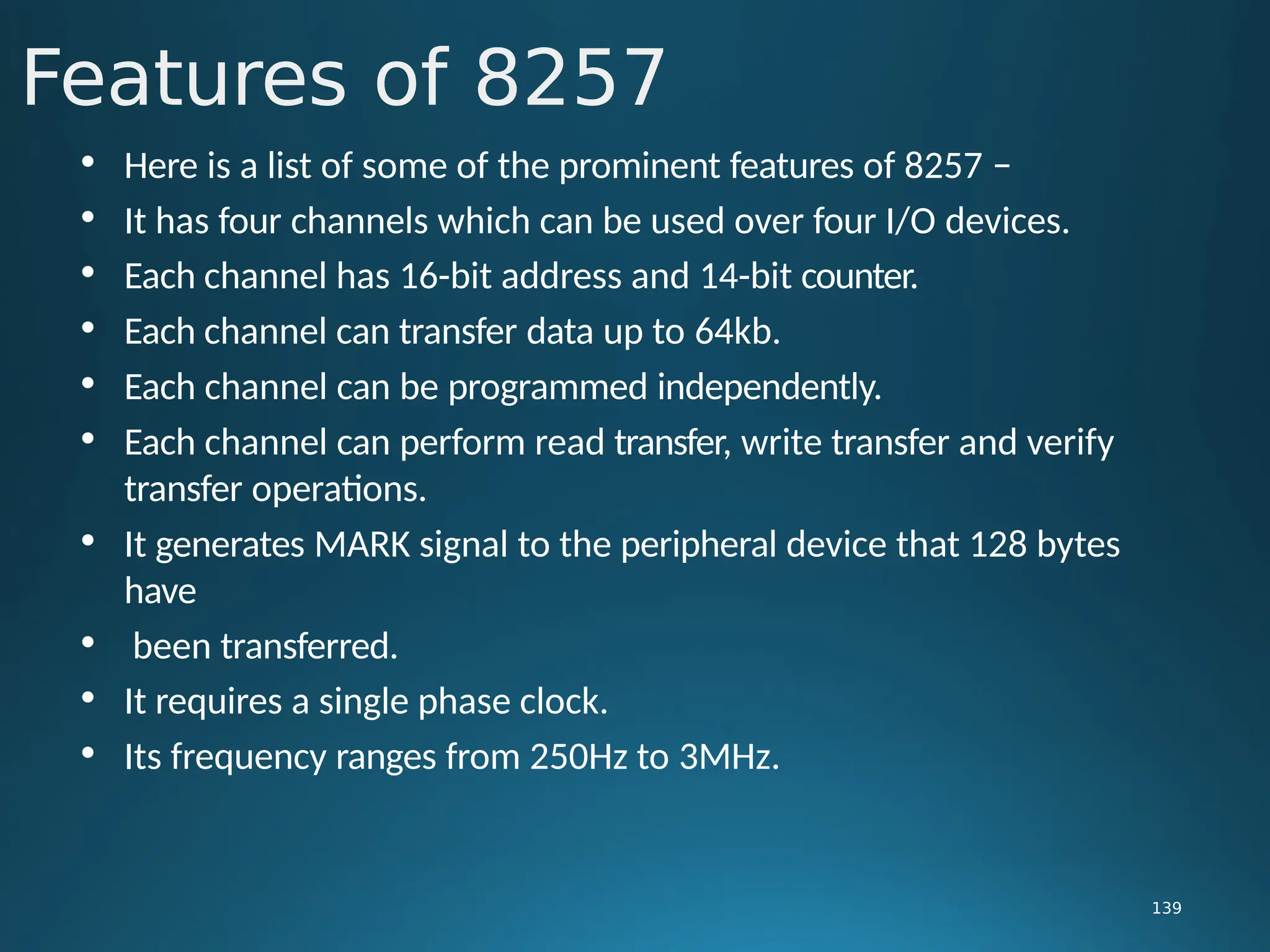
• Here is a list of some of the prominent features of 8257 −
• It has four channels which can be used over four I/O devices.
• Each channel has 16-bit address and 14-bit counter.
• Each channel can transfer data up to 64kb.
• Each channel can be programmed independently.
• Each channel can perform read transfer, write transfer and verify
transfer operations.
• It generates MARK signal to the peripheral device that 128 bytes
have
• been transferred.
• It requires a single phase clock.
• Its frequency ranges from 250Hz to 3MHz.
Features of 8257
139
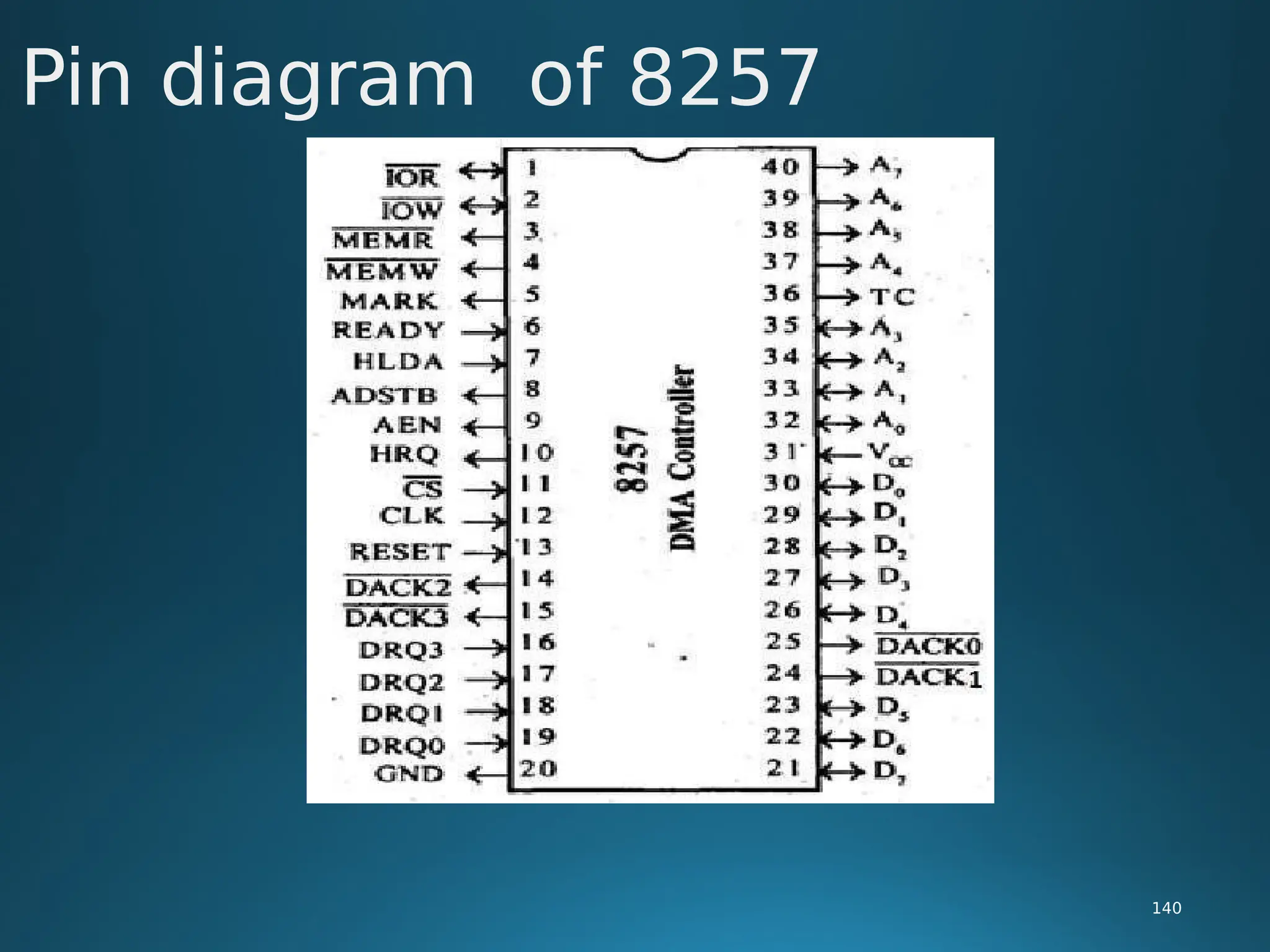
Pin diagram of 8257
140
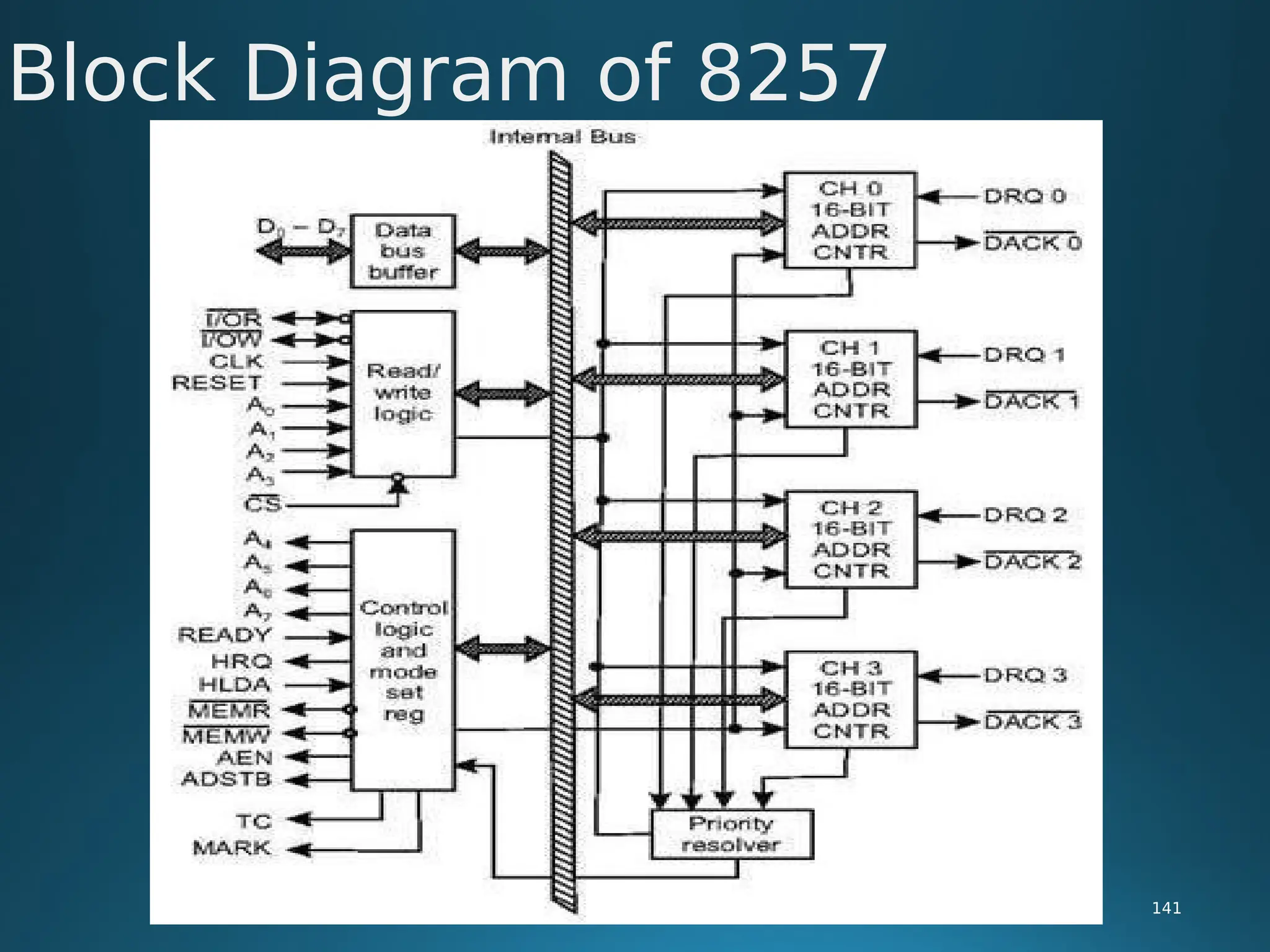
Block Diagram of 8257
141
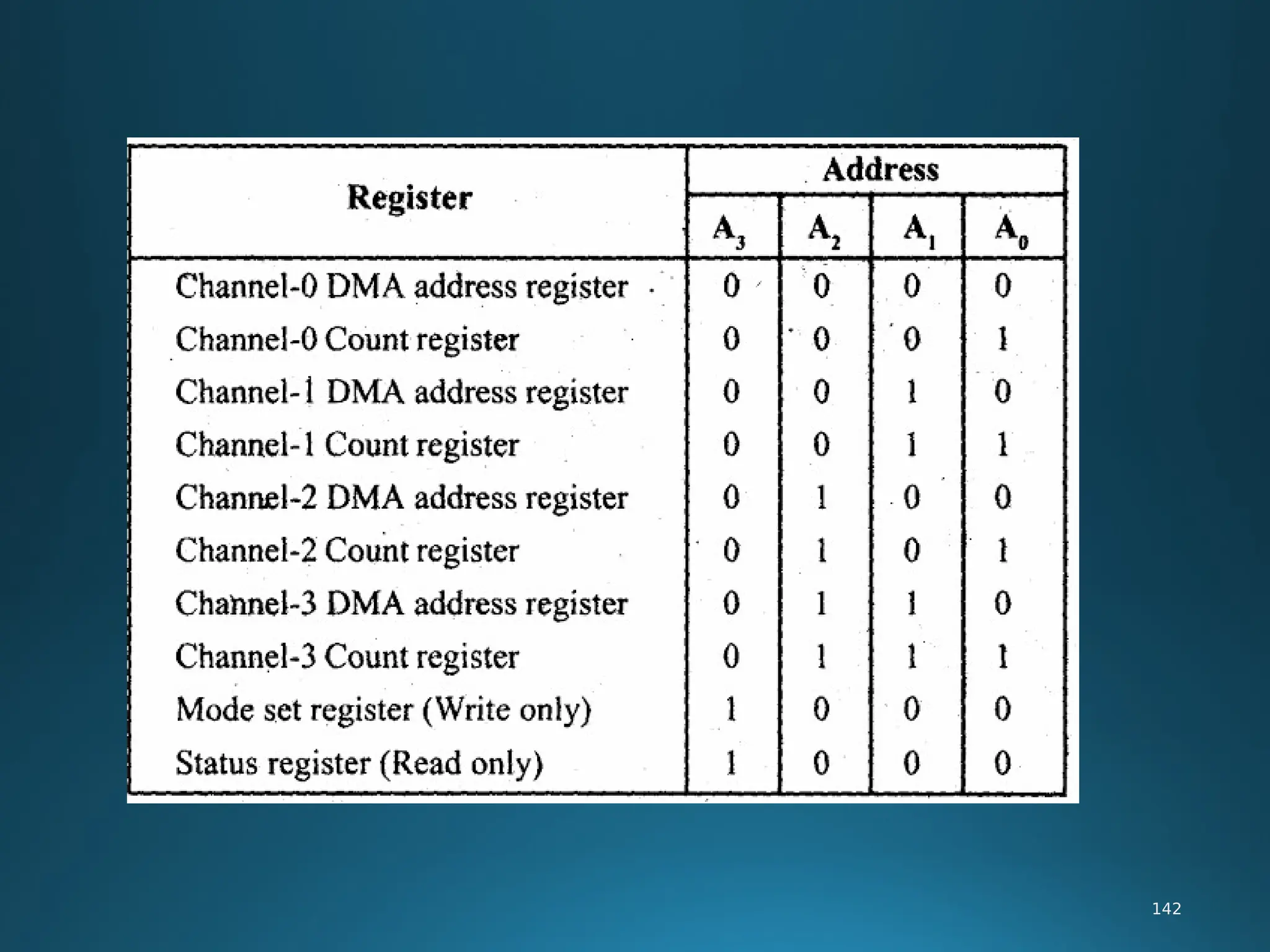
142

MPMC PPT_MODULE 1&2 Jan202mmmmmmmmmmm4.pdf

  • 1.
    MICROPROCESSORS AND MICROCONTROLLERS Course code:ECPE12 II.B.Tech IV semester BY Dr. Srinivasulu Jogi DEPARTMENT OF ELECTRONICS AND COMMUNICATION ENGINEERING National Institute of Technology, Tiruchirappalli, Tiruchirappalli, Tamilnadu - 620015 1
  • 2.
    Module– I &II 8086 MICROPROCESSORS 2
  • 3.
    Introduction to processor: 3 •A processor is the logic circuitry that responds to and processes the basic instructions that drives a computer. • The term processor has generally replaced the term central processing unit . The processor in a personal computer or embedded in small devices is often called a microprocessor. • The processor (CPU, for Central Processing Unit) is the computer's brain. It allows the processing of numeric data, meaning information entered in binary form, and the execution of instructions stored in memory.
  • 4.
    Evolution of Microprocessor: 4 •A microprocessor is used as the CPU in a microcomputer. There are now many different microprocessors available. • Microprocessor is a program-controlled device, which fetches the instructions from memory, decodes and executes the instructions. Most Micro Processor are single- chip devices. • Microprocessor is a backbone of computer system. which is called CPU • Microprocessor speed depends on the processing speed depends on DATA BUS WIDTH. • A common way of categorizing microprocessors is by the no. of bits that their ALU can Work with at a time
  • 5.
     The addressbus is unidirectional because the address information is always given by the Micro Processor to address a memory location of an input / output devices.  The data bus is Bi-directional because the same bus is used for transfer of data between Micro Processor and memory or input / output devices in both the direction.  It has limitations on the size of data. Most Microprocessor does not support floating-point operations.  Microprocessor contain ROM chip because it contain instructions to execute data.  Storage capacity is limited. It has a volatile memory. In secondary storage device the storage capacity is larger. It is a nonvolatile memory. 5 Evolution of Microprocessor:
  • 6.
     Primary devicesare: RAM (Read / Write memory, High Speed, Volatile Memory) / ROM (Read only memory, Low Speed, Non Volatile Memory) Compiler:  Compiler is used to translate the high-level language program into machine code at a time. It doesn’t require special instruction to store in a memory, it stores automatically. The Execution time is less compared to Interpreter 6 Evolution of Microprocessor:
  • 7.
    RISC (Reduced InstructionSet Computer): • RISC stands for Reduced Instruction Set Computer. To execute each instruction, if there is separate • electronic circuitry in the control unit, which produces all the necessary signals, this approach of the design of the control section of the processor is called RISC design. It is also called hardwired approach. Examples of RISC processors: • IBM RS6000, MC88100 • DEC’s Alpha 21064, 21164 and 21264 processors 7 Evolution of Microprocessor:
  • 8.
  • 9.
     8086 Microprocessoris divided into two EU(Execution Unit) and BIU (Bus Interface Unit). 9 functional units, i.e., EU (Execution Unit): Execution unit gives instructions to BIU stating from where to fetch the data and then decode and execute those instructions. Its function is to control operations on data using the instruction decoder & ALU. EU has no direct connection with system buses as shown in the above figure, it performs operations over data through BIU. 8086 Architecture :
  • 10.
    • BIU(Bus InterfaceUnit):  BIU takes care of all data and addresses transfers on the buses for the EU like sending addresses, fetching instructions from the memory, reading data from the ports and the memory as well as writing data to the ports and the memory. EU has no direction connection with System Buses so this is possible with the BIU. EU and BIU are connected with the Internal Bus. • Instruction queue:  BIU contains the instruction queue. BIU gets up to 6 bytes of next instructions and stores them in the instruction queue. When EU executes instructions and is ready for its next instruction, then it simply reads the instruction from this instruction queue resulting in increased execution speed. 10 8086 Architecture :
  • 11.
    • Segment register: BIU has 4 segment buses, i.e. CS, DS, SS& ES. It holds the addresses of instructions and data in memory, which are used by the processor to access memory locations. It also contains 1 pointer register IP, which holds the address of the next instruction to executed by the EU. 11 8086 Architecture :
  • 12.
    AX & DXregisters:  In 8 bit multiplication, one of the operands must be in AL. The other operand can be a byte in memory location or in another 8 bit register. The resulting 16 bit product is stored in AX, with AH storing the MS byte.  In 16 bit multiplication, one of the operands must be in AX.  The other operand can be a word in memory location or in another 16 bit register. The resulting 32 bit product is stored in DX and AX, with DX storing the MS word and AX storing the LS word. 12 Special functions of general purpose register
  • 13.
    Special functions ofgeneral purpose register 13 BX register : In instructions where we need to specify in a general purpose register the 16 bit effective address of a memory location, the register BX is used (register indirect). CX register : In Loop Instructions, CX register will be always used as the implied counter. In I/O instructions, the 8086 receives into or sends out data from AX or AL depending as a word or byte operation.
  • 14.
    • Segment register: BIU has 4 segment buses, i.e. CS, DS, SS& ES. It 14 holds the addresses of instructions and data in memory, which are used by the processor to access memory locations. It also contains 1 pointer register IP, which holds the address of the next instruction to executed by the EU. Segment register:
  • 15.
     Flag Registercontains a group of status bits called flags that indicate the status of the CPU or the result of arithmetic operations.  There are two types of flags:  The status flags which reflect the result of executing an instruction. The programmer cannot set/reset these flags directly.  The control flags enable or disable certain CPU operations.  The programmer can set/reset these bits to control the CPU's operation. 15 Flag Register and Functions of 8086 Flags
  • 16.
    • Nine individualbits of the status register are used as control flags (3 of them) and status flags (6 of them).The remaining 7 are not used. • A flag can only take on the values 0 and 1. We say a flag is set if it has the value 1.The status flags are used to record specific characteristics of arithmetic and of logical instructions. 16 Flag Register and Functions of 8086 Flags
  • 17.
  • 18.
    • Control Flags:There are three control flags • The Direction Flag (D): Affects the direction of moving data blocks by such instructions as MOVS, CMPS and SCAS. The flag values are 0 = up and 1 = down and can be set/reset by the STD (set D) and CLD (clear D) instructions. • The Interrupt Flag (I): Dictates whether or not system interrupts can occur. Interrupts are actions initiated by hardware block such as input devices that will interrupt the normal execution of programs. The flag values are 0 = disable interrupts or 1 = enable interrupts and can be manipulated by the CLI (clear I) and STI (set I) instructions. 18 Flag Register and Functions of 8086 Flags
  • 19.
    • The TrapFlag (T): Determines whether or not the CPU is halted after the execution of each instruction. When this flag is set (i.e. = 1), the programmer can single step through his program to debug any errors. When this flag = 0 this feature is off. This flag can be set by the INT 3 instruction. • Status Flags: There are six status flags • The Carry Flag (C): This flag is set when the result of an unsigned arithmetic operation is too large to fit in the destination register. This happens when there is an end carry in an addition operation or there an end borrows in a subtraction operation. A value of 1 = carry and 0 = no carry. 19 Flag Register and Functions of 8086 Flags
  • 20.
    • The OverflowFlag (O): This flag is set when the result of a signed arithmetic operation is too large to fit in the destination register (i.e. when an overflow occurs). Overflow can occur when adding two numbers with the same sign (i.e. both positive or both negative). A value of 1 = overflow and 0 = no overflow. • The Sign Flag (S): This flag is set when the result of an arithmetic or logic operation is negative. This flag is a copy of the MSB of the result (i.e. the sign bit). A value of 1 means negative and 0 = positive. 20 Flag Register and Functions of 8086 Flags
  • 21.
    • The ZeroFlag (Z): This flag is set when the result of an arithmetic or logic operation is equal to zero. A value of 1 means the result is zero and a value of 0 means the result is not zero. • The Auxiliary Carry Flag (A): This flag is set when an operation causes a carry from bit 3 to bit 4 (or a borrow from bit 4 to bit 3) of an operand. A value of 1 = carry and 0 = no carry. • The Parity Flag (P): This flags reflects the number of 1s in the result of an operation. If the number of 1s is even its value = 1 and if the number of 1s is odd then its value = 0. 21 Flag Register and Functions of 8086 Flags
  • 22.
    • Addressing modeindicates a way of locating data or operands. Depending up on the data type used in the instruction and the memory addressing modes, any instruction may belong to one or more addressing modes or same instruction may not belong to any of the addressing modes. • The addressing mode describes the types of operands and the way they are 22 accessed for executing an instruction. According to the execution, the instructions may be categorized as  Sequential control flow instructions and  Control transfer instructions. flow of instruction Addressing Modes of 8086
  • 23.
    • Sequential controlflow instructions are the instructions which after execution, transfer control to the next instruction appearing immediately after it (in the sequence) in the program. For example the arithmetic, logic, data transfer and processor control instructions are Sequential control flow instructions. • The control transfer instructions on the other hand transfer control to some predefined address or the address somehow specified in the instruction, after their execution. For example INT, CALL, RET & JUMP instructions fall under this category. 23 Addressing Modes of 8086
  • 24.
     The addressingmodes for Sequential and control flow instructions are explained as follows.  Immediate addressing mode:  In this type of addressing, immediate data is a part of instruction, and appears in the form of successive byte or bytes. 24  Example: MOV AX, 0005H.  In the above example, 0005H is the immediate data. The immediate may be 8- bit or 16-bit in size. dat a Addressing Modes of 8086
  • 25.
    Direct addressing mode: •In the direct addressing mode, a 16-bit memory address (offset) directly specified in the instruction as a part of it. Example: MOV AX, [5000H]. Register addressing mode: 25 • In the register addressing mode, the data is stored in a register and it is referred using the particular register. All the registers, except IP, used in this mode. may be Example: MOV BX, AX Addressing Modes of 8086
  • 26.
    Register indirect addressingmode: • Sometimes, the address of the memory location which contains data or operands is determined in an indirect way, using the offset registers. The mode of addressing is known as register indirect mode. • In this addressing mode, the offset address of data is in either BX or SI or DI Register. The default segment is either DS or ES. E• xample: MOV AX, [BX]. 26 Addressing Modes of 8086
  • 27.
    Indexed addressing mode: •In this addressing mode, offset of the operand is stored one of the index registers. DS & ES are the default segments for index registers SI & DI respectively. Example: MOV AX, [SI] • Here, data is available at an offset address stored in SI in DS. 27 Addressing Modes of 8086
  • 28.
    Register relative addressingmode: • In this addressing mode, the data is available at an effective address formed by adding an 8-bit or 16-bit displacement with the content of any one of the register BX, BP, SI & DI in the default (either in DS & ES) segment. 28 Example: MOV AX, 50H [BX] Addressing Modes of 8086
  • 29.
    • 29 • Based indexed addressingmode: • The effective address of data is formed in this addressing mode, by adding content of a base register (any one of BX or BP) to the content of an index register (any one of SI or DI). The default segment register may be ES or DS. Example: MOV AX, [BX][SI] Relative based indexed: • The effective address is formed by adding an 8 or 16-bit displacement with the sum of contents of any of the base registers (BX or BP) and any one of the index registers, in a default segment. Example: MOV AX, 50H [BX] [SI] • Addressing Modes of 8086
  • 30.
    • Addressing Modesfor control transfer instructions: • Intersegment – Intersegment direct – Intersegment indirect • Intrasegment – Intrasegment direct – Intrasegment indirect 30 Addressing Modes of 8086
  • 31.
    • Intersegment direct: In this mode, the address to which the control is to be transferred is in a different segment. This addressing mode provides a means of branching from one code segment to another code segment. Here, the CS and IP of the destination address are specified directly in the instruction. Example: JMP 5000H: 2000H; • Jump to effective address 2000H in segment 5000H. 31 Addressing Modes of 8086
  • 32.
    Intersegment indirect:  Inthis mode, the address to which the control is to be transferred lies in a different segment and it is passed to the instruction indirectly, i.e. contents of a memory block containing four bytes, i.e. IP(LSB), IP(MSB), CS(LSB) and CS(MSB) sequentially. The starting address of the memory block may be referred using any of the addressing modes, except immediate mode.  Example: JMP [2000H]. 32  Jump to an address in the other segment specified at effective 2000H in DS. address Modes of 8086
  • 33.
    • Intrasegment directmode:  In this mode, the address to which the control is to be transferred lies in the same segment in which the control transfers instruction lies and appears directly in the instruction as an immediate displacement value. In this addressing mode, the displacement is computed relative to the content of the instruction pointer. 33
  • 34.
    • The effectiveaddress to which the control will be transferred is given by 34 the sum of 8 or 16 bit displacement and current content of jump instruction, if the signed displacement (d) is of 8- IP. In case of bits (i.e. - 128<d<+127), it as short jump and if it is of 16 bits (i.e. - 32768<d<+32767), it is termed as long jump. Example: JMP SHORT LABEL.
  • 35.
    • Intrasegment indirectmode: • In this mode, the displacement to which the control is to be transferred is in the same segment in which the control transfer instruction lies, but it is passed to the instruction directly. Here, the branch address is found as the content of a register or a memory location. • This addressing mode may be used in unconditional branch instructions. • Example: JMP [BX]; Jump to effective address stored in BX. 35 Addressing Modes
  • 36.
    • The contentsof different registers are given below. Form the effective or physical address of the following instructions • [AX]=1000H, [BX]=2000H, [SI]=3000H, [DI]=4000H, [BP]=5000H, [SP]=6000H, [CS]= 0000H, [DS]= 1000H, [SS]= 2000H, [ES]=3000H, [IP]=7000H • 1. MOV AX, [5000H] • 2. MOV AX, [BP] • 3. MOV AX, 5000[BX] • 4. MOV AX, [BX][SI] • 5. MOV AX, 5000[BX][SI] • 6. MOV AX, [DI] 36 Addressing Modes
  • 37.
    INSTRUCTION SET OF8086 37 • The Instruction set of 8086 microprocessor is classified into 7 Types, they are:- • Data transfer instructions • Arithmetic& logical instructions • Program control transfer instructions • Machine Control Instructions • Shift / rotate instructions • Flag manipulation instructions • String instructions
  • 38.
    • Data transferinstruction, as the name suggests is for the transfer of data from memory to internal register, from internal register to memory, from one register to another register, from input port to internal register, from internal register to output port etc MOV instruction • It is a general purpose instruction to transfer byte or word from register to register, memory to register, register to memory or with immediate addressing. 38 Data Transfer instructions
  • 39.
    General Form: • MOVdestination, source • Here the source and destination needs to be of the same size, that is both 8 bit or both 16 bit. • MOV instruction does not affect any flags. Example:- 39 • • MOV BX, 00F2H; load the immediate number 00F2H in BX register • MOV CL, [2000H] ;Copy the 8 bit content of the memory location, at a displacement of2000H from data segment base to the CL register Data Transfer instructions
  • 40.
    •MOV [589H], BX;Copy the 16 bit content of BX register on to the memory location, which at a displacement of 589H from the data segment base. • MOV DS, CX; Move the content of CX to DS PUSH instruction • The PUSH instruction decrements the stack pointer by two and copies the word from source to the location where stack pointer now points. Here the source must of word size data. Source can be a general purpose register, segment register or a memory location. 40
  • 41.
    The PUSH instructionfirst pushes the most significant byte to sp-1, then the least significant to the sp-2. Push instruction does not affect any flags. 41
  • 42.
    Example:- • PUSH CX 42 ;Decrements SP by 2, copy content of CX to the stack (figure shows execution of this instruction) ; Decrement SP by 2 and copy DS to stack • PUSH DS • POP instruction The POP instruction copies a word from the stack location pointed by the stack pointer to the destination. The destination can be a General purpose register, a segment register or a memory location. Here after the content is copied the stack pointer is automatically incremented by two. • The execution pattern is similar to that of the PUSH instruction. Example: • POP CX ; Copy a word from the top of the stack to CX and increment SP by 2.
  • 43.
    Move 8 bitdata from 30F8H port Move 16 bit data from 30F8H port Copy contents of AL to 8 bit port 047H 43 • IN & OUT instructions • The IN instruction will copy data from a port to the accumulator. If 8 bit is read the data will go to AL and if 16 bit then to AX. Similarly OUT instruction is used to copy data from accumulator to an output port. • Both IN and OUT instructions can be done using direct and indirect addressing modes. Example: • IN AL, 0F8H; Copy a byte from the port 0F8H to AL • MOV DX, 30F8H;Copy port address in DX • IN AL, DX; • IN AX, DX; • OUT 047H, AL; • MOV DX, 30F8H;Copy port address in DX
  • 44.
    XCHG instruction • TheXCHG instruction exchanges contents of the destination and source. Here destination and source can be register and register or register and memory location, but XCHG cannot interchange the value of 2 memory locations. General Format • XCHG Destination, Source Example: • XCHG BX, CX; exchange word in CX with the word in BX • XCHG AL, CL; exchange byte in CL with the byte in AL • XCHG AX, SUM[BX];here physical address, which is DS+SUM+[BX]. The content at physical address and the content of AX are interchanged. 44
  • 45.
    Mnemonic Meaning FormatOperation Flags affected ADD Addition ADD D,S (S)+(D)  (D) carry  (CF) ALL ADC Add with carry ADC D,S (S)+(D)+(CF)  (D) carry  (CF) ALL INC Increment by one INC D (D)+1  (D) ALL but CY AAA ASCII adjust for addition AAA If the sum is >9,AH is incremented by 1 AF,CF DAA Decimal adjust for addition DAA Adjust AL for decimal Packed BCD ALL 45 Arithmetic Instructions: ADD, ADC, INC, AAA, DAA
  • 46.
    Arithmetic Instructions–SUB, SBB, DEC,AAS, DAS, NEG 46 Mnemonic Meaning Format Operation Flags affected SUB Subtract SUB D,S (D) - (S)  (D) Borrow  (CF) All SBB Subtract with borrow SBB D,S (D) - (S) - (CF)  (D) All DEC Decrement by one DEC D (D) - 1  (D) All but CF NEG Negate NEG D All DAS Decimal adjust for subtraction DAS Convert the result in AL to packed decimal format All AAS ASCII adjust for subtractio AAS (AL) difference (AH) dec by 1 if borrow CY,AC
  • 47.
  • 48.
  • 49.
    AND instruction • Thisinstruction logically ANDs each bit of the source byte/word with the corresponding bit in the destination and stores the result in destination. The source can be an immediate number, register or memory location, register can be a register or memory location. • The CF and OF flags are both made zero, PF, ZF, SF are affected by the operation and AF is undefined. • General Format: • AND Destination, Source Example: 49 • AND BL, AL ;suppose BL=1000 0110 and AL = 1100 1010 then after the operation BL would be BL= 1000 0010. • AND CX, AX ;CX <= CX AND AX • AND CL, 08 ;CL<= CL AND (0000 1000) Logical Instructions
  • 50.
    OR instruction • Thisinstruction logically ORs each bit of the source byte/word with the corresponding bit in the destination and stores the result in destination. The source can be an immediate number, register or memory location, register can be a register or memory location. • The CF and OF flags are both made zero, PF, ZF, SF are affected by the operation and AF is undefined. • General Format: • OR Destination, Source 50
  • 51.
    Example: • OR BL,AL; suppose BL=1000 0110 and AL = 1100 1010 then after the operation BL would be BL= 1100 1110. • OR CX, AX;CX <= CX AND AX • OR CL, 08;CL<= CL AND (0000 1000) NOT instruction • The NOT instruction complements (inverts) the contents of an operand register or a memory location, bit by bit. The examples are as follows: Example: • NOT AX (BEFORE AX= (1011)2= (B) 16 AFTER EXECUTION AX= (0100)2= (4)16). • NOT [5000H] 51
  • 52.
    XOR instruction • TheXOR operation is again carried out in a similar way to the AND and OR operation. The constraints on the operands are also similar. The XOR operation gives a high output, when the 2 input bits are dissimilar. Otherwise, the output is zero. The example instructions are as follows: Example: • XOR AX,0098H • XOR AX,BX • XOR AX,[5000H] 52
  • 53.
    Shift / RotateInstructions • Shift instructions move the binary data to the left or right by them within the register or memory location. They also can multiplication of powers of 2+n and division of powers of 2-n. 53 shifting perform • There are two type of shifts logical shifting and arithmetic shifting, later is used with signed numbers while former with unsigned.
  • 54.
    SHL/SAL instruction • Boththe instruction shifts each bit to left, and places the MSB in CF and LSB is made 0. The destination can be of byte size or of word size, also it can be a register or a memory location. Number of shifts is indicated by the count. • All flags are affected. General Format: • SAL/SHL destination, count 54
  • 55.
    SHR instruction 55 • Thisinstruction shifts each bit in the specified destination to the right and 0 is stored in the MSB position. The LSB is shifted into the carry flag. The destination can be of byte size or of word size, also it can be a register or a memory location. Number of shifts is indicated by the count. • All flags are affected • General Format: SHR destination, count
  • 56.
    String - abyte or word array located in memory. Operations that can be performed with string instructions: • copy a string into another string • search a string for a particular byte or word • store characters in a string • compare strings of characters alphanumerically 56 String Instruction Basics
  • 57.
     Source DS:SI,Destination ES:DI – You must ensure DS and ES are correct – You must ensure SI and DI are offsets into DS and ES respectively  Direction Flag (0 = Up, 1 = Down) – CLD - Increment addresses (left to right) – STD - Decrement addresses (right to left) 57
  • 58.
    String Control Instructions 58 1) MOVS/MOVSB/ MOVSW Dest string name, src string name This instruction moves data byte or word from location in DS to location in ES. 2) REP / REPE / REPZ / REPNE / REPNZ Repeat string instructions until specified conditions exist. This is prefix a instruction. 3) CMPS / CMPSB / CMPSW Compare string bytes or string words.
  • 59.
    4)SCAS / SCASB/ SCASW Scan a string byte or string word. Compares byte in AL or word in AX. String address is to be loaded in DI. 5)STOS / STOSB / STOSW Store byte or word in a string. Copies a byte or word in AL or AX to memory location pointed by DI. 6)LODS / LODSB /LODSW Load a byte or word in AL or AX Copies byte or word from memory location pointed by SI into AL or AX register. 59
  • 60.
    60 These instructions aresimilar to branching or looping instructions. These instructions include unconditional jump or loop instructions. Classification: •Unconditional transfer instructions •Conditional transfer instructions •Iteration control instructions •Interrupt instructions
  • 61.
    Unconditional transfer instructions CALL: Call a procedure, save return address on stack  RET: Return from procedure to the main program.  JMP: Goto specified address to get next instruction CALL instruction: The CALL instruction is used to transfer execution of program to a subprogram or procedure. 61
  • 62.
    CALL instruction  Nearcall 1.Direct Near CALL: The destination address is specified in the instruction itself. 2.Indirect Near CALL: The destination address is specified in any 62 16-bit register, except IP.  Far call 1.DirectFar CALL: The destination address is specified in the instruction itself. It will be in different Code Segment. 2. Indirect Far CALL: The destination address is specified in two word memory locations pointed by a register.
  • 63.
    JMP instruction The processorjumps to the specified location rather than the instruction after the JMP instruction.  Intra segment jump  Inter segment jump RET RET instruction will return execution from a procedure to the next instruction after the CALL instruction in the calling program. 63
  • 64.
    Conditional TransferInstructions • JA/JNBE:Jump if above / jump if not below or equal • JAE/JNB: Jump if above /jump if not below • JBE/JNA: Jump if below or equal/ Jump if not above • JC: jump if carry flag CF=1 • JE/JZ: jump if equal/jump if zero flag ZF=1 • JG/JNLE: Jump if greater/ jump if not less than or equal. 64
  • 65.
    Conditional Transfer Instructions •JGE/JNL: jump if greater than or equal/ jump if not less than • JL/JNGE: jump if less than/ jump if not greater than or equal • JLE/JNG: jump if less than or equal/ jump if not greater than • JNC: jump if no carry (CF=0). • JNE/JNZ: jump if not equal/ jump if not zero(ZF=0) 65
  • 66.
    Conditional Transfer Instructions •JNO: jump if no overflow(OF=0) • JNP/JPO: jump if not parity/ jump if parity odd(PF=0) • JNS: jump if not sign(SF=0) • JO: jump if overflow flag(OF=1) • JP/JPE: jump if parity/jump if parity even(PF=1) • JS: jump if sign(SF=1). 66
  • 67.
    Iteration Control Instructions These instructions are used to execute a series of instructions for certain number of times.  LOOP: Loop through a sequence of instructions until CX=0. 67 instructions while  LOOPE/LOOPZ : Loop through a sequence of ZF=1 and instructions CX = 0.  LOOPNE/LOOPNZ : Loop through a sequence of instructions while ZF=0 and CX =0.  JCXZ : jump to specified address if CX=0.
  • 68.
    68 Two types ofinterrupt instructions:  Hardware Interrupts (External Interrupts)  Software Interrupts (Internal Interrupts and Instructions) Hardware Interrupts: • INTR is a maskable hardware interrupt. • NMI is a non-maskable interrupt.
  • 69.
    Software Interrupts • INT: Interrupt program execution, call service procedure • INTO : Interrupt program execution if OF=1 • IRET: Return from interrupt service procedure to main program. 69
  • 70.
    Processor Control Instructions 70 I.Flag set/clear instructions  STC: Set carry flag CF to 1  CLC: Clear carry flag CF to 0  CMC: Complement the state of the carry flag CF  STD: Set direction flag DF to 1 (decrement string pointers)  CLD: Clear direction flag DF to 0  STI: Set interrupt enable flag to 1(enable INTR input)  CLI: Clear interrupt enable Flag to 0 (disable INTR input)
  • 71.
    II. External Hardwaresynchronizationinstructions HLT: Halt (do nothing) until interrupt or reset. WAIT: Wait (Do nothing) until signal on the test pin islow. ESC: Escape to external coprocessor such as 8087 or 8089. LOCK: An instruction prefix. Prevents another processor from taking the bus while the adjacent instruction executes. NOP: No operation. This instruction simply takes up three clock cycles and does no processing. 71 Processor Control Instructions
  • 72.
    Procedures: • While writingprograms, it may be the case that a particular sequence of instructions is used several times. To avoid writing the sequence of instructions again and again in the program, the same sequence can be written as a separate subprogram called a procedure. Defining Procedures: 72 • Assembler provides PROC and ENDP directives in order to define procedures. The directive PROC indicates beginning of a procedure. Its general form is: Procedure_name PROC [NEAR|FAR] Procedures and Macros
  • 73.
    Passing parameters toand from procedures: The data values or addresses passed between procedures and main program are called parameters. There are four ways of passing parameters:  Passing parameters in registers  Passing parameters in dedicated memory locations  Passing parameters with pointers passed in registers  Passing parameters using the stack 73 Procedures and Macros
  • 74.
    MACROS:  When therepeated group of instruction is too short or not suitable to be implemented as a procedure, we use a MACRO. A macro is a group of instructions to which a name is given. Each time a macro is called in a program, the assembler will replace the macro name with the group of instructions. Defining MACROS:  Before using macros, we have to define them. MACRO directive informs the assembler the beginning of a macro. The general form is: 130  Macro_name MACRO argument1, argument2, …Arguments are optional. ENDM informs the assembler the end of the macro. Its general form is : ENDM Procedures and Macros
  • 75.
  • 76.
     In aminimum mode 8086 system, the microprocessor 8086 is operated in minimum mode by strapping its MN/MX pin to logic 1.  In this mode, all the control signals are given out by the microprocessor chip itself. There is a single microprocessor in the minimum mode system.  The remaining components in the system are latches, transceivers, clock generator, memory and I/O devices. Some type of chip selection logic may be required for selecting memory or I/O devices, depending upon the address map of the system.  Latches are generally buffered output D-type flip-flops like 74LS373 or 8282. They are used for separating the valid address from the multiplexed address/data signals and are controlled by the ALE signal generated by 8086. 76 Minimum mode operation in 8086:
  • 77.
     Transceivers arethe bidirectional buffers and sometimes they are called as data amplifiers. They are required to separate the valid data from the time multiplexed address/data signals.  They are controlled by two signals namely, DEN and DT/R.  The DEN signal indicates the direction of data, i.e. from or to the processor. The system contains memory for the monitor and users program storage.  Usually, EPROM is used for monitor storage, while RAM for users program storage. A system may contain I/O devices. 77 Minimum mode operation in 8086:
  • 78.
    In the maximummode, the 8086 is operated by strapping the MN/MX pin to ground. In this mode, the processor derives the status signal S2, S1, S0. Another chip called bus controller derives the control signal using this status information. In the maximum mode, there may be more than one 78 microprocessor in the system configuration. The components in the system are same as in the minimum mode system. The basic function of the bus controller chip IC8288 is to derive contro l signals like RD and WR (for memory and I/O devices), DEN, DT/R, ALE etc. using the information by the processor on the status lines. The bus controller chip has input lines S2, S1, S0 and CLK. These inputs to 8288 are driven by CPU. Maximum mode operation in 8086:
  • 79.
  • 80.
    IOW C 140 • It derivesthe outputs ALE, DEN, DT/R, MRDC, MWTC, AMWC, IORC, and AIOWC. The AEN, IOB and CEN pins are especially useful for multiprocessor systems. • AEN and IOB are generally grounded. CEN pin is usually tied to +5V. The significance of the MCE/PDEN output depends upon the status of the IOB pin. • If IOB is grounded, it acts as master cascade enable to control cascade 8259A, else it acts as peripheral data enable used in the multiple bus configurations. Maximum mode operation in 8086:
  • 81.
    • INTA pinused to issue two interrupt acknowledge pulses to the interrupt 140 controller or to an interrupting device. • IORC, IOWC are I/O read command respectively. and I/O write command signals • These signals enable an IO interface to read or write the data from or to the address port. • The MRDC, MWTC are memory read command and memory write command signals respectively and may be used as memory read or write signals. Maximum mode operation in 8086:
  • 82.
    • The MRDC,MWTC are memory read command and memory write write Maximum mode operation in 8086: 82 command signals respectively and may be used as memory read or signals. • All these command signals instructs the memory to accept or send from or to the bus. dat a • For both of these write command signals, the advanced signals namely AIOWC and AMWTC are available. • Here the only difference between in timing diagram between minimum mode and maximum mode is the status signals used and the available control and advanced command signals.
  • 83.
    • R0, S1,S2 are set at the beginning of bus cycle.8288 bus controller will output a pulse as on the ALE and apply a required signal to its DT / R pin during T1. • In T2, 8288 will set DEN=1 thus enabling transceivers, and for an input it will activate MRDC or IORC. These signals are activated until T4. For an output, the AMWC or AIOWC is activated from T2 to T4 and MWTC or IOWC is activated from T3 to T4. Maximum mode operation in 8086: 83
  • 84.
    Write Cycle TimingDiagram for Minimum Mode 84
  • 85.
    Bus Request andBus Grant Timings in Minimum Mode System of 8086 85
  • 86.
    Memory Read TimingDiagram in Maximum Mode of 8086 86
  • 87.
    Memory Write Timingin Maximum mode of 8086 87
  • 88.
  • 89.
  • 90.
  • 91.
  • 92.
    Interrupts 92 Definition: The meaning of‘interrupts’ is to break the sequence of operation. While the CPU is executing a program, on ‘interrupt’ breaks the normal sequence of execution of instructions, diverts its execution to some other program called Interrupt Service Routine (ISR).After executing ISR , the control is transferred back again to the main program. Interrupt processing is an alternative to polling.
  • 93.
    Interrupts 93 Need for Interrupt: Interruptsare particularly useful when interfacing I/O devices that provide or require data at relatively low data transfer rate. Interrupt is a mechanism that allows hardware or software to suspend normal execution on microprocessor in order to switch to interrupt service routine for hardware / software. Interrupt can also describe as asynchronous electrical signal that sent to a microprocessor in order to stop current execution and switch to the execution signaled (depends on priority). Whether an interrupt is prioritized or not depends on the interrupt flag register which controlled by priority / programmable interrupt
  • 94.
    Interrupt Cycle of8086 94  Sometimes it is necessary to have the computer automatically execute one of a collection of special routines whenever certain conditions exist within a program or in the microcomputer system.  For example,, it is necessary that microcomputer system should give response to devices such as keyboard, sensor and other components when they request for service.  The most common methods for servicing such device are  Polling method: In this method the processor must test each device in sequence and in effect ‘ask’ each one if it needs communication with the processor  Such a method would have a serious and decrementing effect on system throughput.
  • 95.
    Interrupt Cycle of8086 95  Interrupt Method: Another method would be the one that allows the microprocessor to execute its main program and only stop to service peripheral devices when it is told to do so by the device itself.  In this method the processor would provide an external asynchronous input that would inform the processor that it should complete whatever instruction that currently being executed and fetch a new routine that will service the requesting device.  Once this servicing is completed, the processor would resume exactly where it left off.  This method is called Interrupt Method.  This method increases the system throughput
  • 96.
    Interrupt Cycle of8086 96  When a microprocessor is interrupted, it stops executing its current program and calls special routine which services the interrupt.  The event that causes the interruption is call interrupt and the special routine executed to service the interrupt is called interrupt service routine (ISR) / Procedures.  The interrupt can came from any of the three sources  By external signal  By a special instruction in the program  By the occurrence of some condition  An interrupt caused by an external signal is referred as Hardware interrupt.  A condition interrupts or interrupts caused by special instructions are called software interrupts.
  • 97.
    Interrupt Cycle of8086 97  Other type of interrupts are  Vectored and Non vectored interrupts  The interrupts which are having fixed address location for ISR are called vectored interrupts.  The interrupts which are not having fixed address location for ISR are called non vectored interrupts.  Maskable and Non maskable interrupts  The interrupts which can be ignored are called maskable interrupts.  The interrupts which cannot be ignored are called non maskable interrupts.  
  • 98.
    Interrupt Cycle of8086 98  An 8086 interrupt can come from any one the three sources:  Exernal signal: An 8086 can get interrupt from an external signal applied to the nonmaskable interrupt (NMI) input pin, or the interrupt (INTR) input pin.  Special instruction: An execution of the Interrupt instruction (INT). This is referred as software interrupt.  Condition produced by Instruciton: An 8086 is interrupted by some condition produced in the program by the execution of an instruction  At the end of each instruction cycle, 8086 checks to see if any interrupts have been requested 
  • 99.
    Interrupt Cycle of8086 99  If an interrupt has been requested, the 8086 responds to interrupt by stepping through the following series of major steps:  It decrements the stack pointer by 2 pushes the flag register on the stack.  It disables the 8086 INTR interrupt input by clearing the interrupt flag(IF) in the flag register.  It resets the trap flag (TF) in the flag register.  It decrements the stack pointer by 2 and pushes the current code segment register contents on the stack.  It decrements the stack pointer again by 2 and pushes the current instruction pointer contents on the stack.  It does an indirect far jump to start of the procedure by loading the CS and IP values for the start of the interrupt service routine.
  • 100.
    Interrupt Cycle of8086 100  An IRET instruction at the end of the interrupt service routine returns execution to main program.  The 8086 gets the new values of CS and IP register from four memory addresses.
  • 101.
    Interrupt Cycle of8086 101  When it responds to an interrupt, the 8086 goes to memory locations to get the CS an IP values to start of the interrupt service routine.  In an 8086 system the first 1 Kb of memory from 00000H to 003FFH is reserved for storing the starting addresses of interrupt service routines.  This block of memory is often called the INTERRUPT VECTOR TABLE or the INTERRUPT POINTER TABLE.  Since 4 bytes are required to store the CS and IP values for each interrupt service procedure, the table can hold the starting addresses for 256 interrupt service routines.  Each interrupt type is given a number between 0 to 255 and the address of each interrupt is found by multiplying the type by 4 e.g. for type 11, interrupt address is 11×4=4410=0002CH
  • 102.
    Interrupt Cycle of8086 102  Only the first five types have explicit definitions.  The next 27 interrupt types, from 5 to 31, are reserved by Intel for use in future microprocessors.  The upper 224 interrupt types, from 32 to 255, available for user for hardware or software interrupts.  When 8086 responds to an interrupt, it automatically goes to specified location in the interrupt vector table to get the starting address of interrupt service routine.
  • 103.
  • 104.
    Interrupts of 8086 104 1. Divide by Zero Interrupt (Type 0):  When the quotient from either a DIV or IDIV instruction is too large to fit in the result register; 8086 will automatically execute type 0 interrupt.  2. Single Step Interrupt (Type 1):  The type 1 interrupt is single step trap. In the single step mode, system will execute one instruction and wait for further direction from user. The user can examine the contents of registers and memory locations and if they are correct, user can tell the system to execute the next instruction. This feature is useful for debugging assembly language programs.
  • 105.
    Interrupts of 8086 105 3. Non Maskable Interrupt (Type 2):  As the name suggests, this interrupt cannot be disabled by any software instruction. This interrupt is activated by low to high transition on 8086 NMI input pin. In response, 8086 will do a type 2 interrupt.  4. Break Point Interrupt (Type 3):  The type 3 interrupt is used to implement breakpoint function in the system. The type 3 interrupt is produced by execution of the INT 3 instruction. Breakpoint function is often used as debugging aids in cases where single stepping provides more details than wanted.
  • 106.
    Interrupts of 8086 106 5. Overflow Interrupt (Type 4):  The type 4 interrupt is used to check overflow condition after any signed arithmetic operation in the system. The 8086 overflow flag, OF, will be represented in the destination register or memory location.  Software Interrupts (Type 0-255):  The 8086 INT instruction can be used to cause 8086 to do one of the 256 possible interrupt types.  The interrupt type is specified by the number as a part of the instruction.
  • 107.
    DOS & BIOSInterrupts of 8086 107  In IBM PC, part of the operating system is located in the permanent memory (ROM) and part is loaded during power up.  The part located in ROM is referred to as ROM-BIOS (Basic Input/ Output System).  The other part which is loaded in RAM during power-up from hard disk is known as DOS(Disk Operating System)  BIOS is located in a 8 Kbyte ROM at the top of memory, the address range being from FE000H to FFFFFH  The programs with ROM-BIOS provide the most direct, lowest level interaction with the various devices in the system.
  • 108.
    DOS & BIOSInterrupts of 8086 108  The ROM-BIOS contains routines for  Power-on self test  System configuration analysis  Time of the day  Print screen  Boot strap loader  I/O support program for  a. Asynchronous communication  b. Keyboard  c. Printer  d. Display
  • 109.
    DOS & BIOSInterrupts of 8086 109  Most of these programs are accessible to ALP through software interrupt instruction (INT).  The design goal for the ROM-BIOS programs is to provide a device- independent interface to the various physical devices in the system.  Using ROM-BIOS one can output characters to various physical devices like the printer or display, one can read character from keyboard.  But still few things are not possible with ROM-BIOS  It is not possible to provide ability to load and execute programs directly  It is not possible to store data on the diskette organized as logical files.  ROM-BIOS have no command-interpreter to allow copying files, print files, deleting files.
  • 110.
    DOS & BIOSInterrupts of 8086 110  It is the DOS that provides these services.  When we turn ON our computer, we expect to see message or a prompt.  We expect to be able to look at the diskette directory to see what data files or programs the diskette contains.  We expect to run a program by typing name.  We want to copy programs from one diskette to another, print programs and delete programs.  All these services are provided by group of programs called DOS.  The services provided by DOS can be grouped into following categories. 
  • 111.
    DOS & BIOSInterrupts of 8086 111  The services provided by DOS can be grouped into following categories.  1. Character Device I/O  2. File Management  3. Memory Management  4. Directory Management  5. Executive Functions  6. Command Interpreter  7. Utility Programs   https://slideplayer.com/slide/17586751/
  • 112.
    DOS & BIOSInterrupts of 8086 112
  • 113.
    • Interface two4Kx8 EPROMS and two 4Kx8 RAM chips with 8086. select suitable maps. Memory interfacing to 8086 (Static RAM and EPROM) 113
  • 114.
  • 115.
    Memory interfacing to8086 (Static RAM and EPROM) 115
  • 116.
    8255- PROGRAMMABLE PERIPHERAL INTERFACE 84191  It has 24 input/output lines  24 lines divided into 3 ports • Port A(8bit) • Port B(8 bit) • Port C upper(4 bit), Port C Lower (4 bit) All the above 3 ports can act as input or output ports
  • 117.
    Block Diagram Figure: Block Diagramof 8255(PPI) 85 192 8255 PPI
  • 118.
    Data Bus buffer It is a 8-bit bidirectional Data bus.  Used to interface between 8255 data bus with system bus.  The internal data bus and Outer pins D0-D7 pins are connected in internally.  The direction of data buffer is decided by Read/Control Logic. 86 193 8255- PROGRAMMABLE PERIPHERAL INTERFACE
  • 119.
    Read/Write Control Logic Thisis getting the input signals from control bus and Control signal are RD andWR. Address signals are A0, A1, and CS Address Bus. 8255 operation is enabledor disabled by CS. Group A and B get the Control Signal from CPU and send the command to the individual control blocks. Group A send the control signal to port A and Port C (Upper) PC7-PC4. Group B send the control signal to port B and Port C (Lower) PC3-PC0. 8255- PROGRAMMABLE PERIPHERAL INTERFACE 87 194
  • 120.
    PORT A:  Thisis a 8-bit buffered I/O latch.  It can be programmed by mode 0 , mode 1, mode 2 . PORT B: This is a 8-bit buffer I/O latch. It can be programmed by mode 0 and mode 1. PORTC:  This is a 8-bit Unlatched buffer Input and an Output latch.  It is spitted into two parts.  It can be programmed by bit set/reset operation. 88 195 8255- PROGRAMMABLE PERIPHERAL INTERFACE
  • 121.
    Pin Description of 8255 91199 PA7-PA0: These are eight port A lines that acts as either latched output or buffered input lines depending upon the control word loaded into the control word register. PC7-PC4: PC3-PC0: Upper nibble of port C lines. They may act as either output latches or input buffers lines. This port also can be used for generation of handshake lines in mode 1 or mode 2. These are the lower port C lines, other details are the same as PC7-PC4 lines. PB0-PB7: eight port B lines which are used lines or buffered input lines in the same These are the as latched output way as port A. 8255- PROGRAMMABLE PERIPHERAL INTERFACE
  • 122.
    Pin Description of8255 RD: This is the input line driven by the microprocessor and should be low to indicate read operation to8255. 8255- PROGRAMMABLE PERIPHERAL INTERFACE 122 line WR: This is an input line driven by the microprocessor. A low on this indicates writeoperation. CS : This is a chip select line. If this line goes low, it enables the 8255 to respond to RD and WR signals, otherwise RD and WR signal are neglected. A1-A0: These are the address input lines and are driven by the microprocessor.  RESET: The 8255 is placed into its reset state if this input line is a logical 1. All peripheral ports are set to the input mode.
  • 123.
    Various modes of8255: These are two basic modes of operation of 8255. I/O mode and Bit Set-Reset mode (BSR). In I/O Mode: The 8255 ports work as programmable I/O ports, while in BSR mode only port C (PC0-PC7) can be used to set or reset its individual port bits. Under the I/O mode of operation, further there are three modes of operation of 8255, so as to support different types of applications, mode 0, mode 1 and mode 2. 8255- PROGRAMMABLE PERIPHERAL INTERFACE 123
  • 124.
     Mode 0(Basic I/O mode): This mode is also called as basic input/output Mode. This mode provides simple input and output capabilities using each of the three ports. Data can be simply read from and written to the input and output ports respectively, after appropriate initialization. 8255- PROGRAMMABLE PERIPHERAL INTERFACE 124
  • 125.
    Mode 1: (Strobedinput/output mode) in this mode the handshaking control the input and output action of the specified port. Port C lines PC0- PC2, provide strobe or handshake lines for port B. This group which includes port B and PC0-PC2 is called as group B for Strobed data input/output. Port C lines PC3-PC5 provides strobe lines for port A. This group including port A and PC3-PC5 from group A. Thus port C is utilized for generating handshake signals. 8255- PROGRAMMABLE PERIPHERAL INTERFACE 125
  • 126.
     Mode 2(Strobed bidirectional I/O): This mode of operation of 8255 is also called as strobed bidirectional I/O. This mode of operation provides 8255 with additional features for communicating with a peripheral device on an 8-bit data bus. 8255- PROGRAMMABLE PERIPHERAL INTERFACE 126  Handshaking signals are provided to maintain proper synchronization between the data transmitter and receiver. data flow and  The interrupt generation and other functions are similar to mode 1.
  • 127.
     BSR Mode: Inthis mode any of the 8-bits of port C can be set or reset depending on D0 of the control word. The bit to be set or reset is selected by bit select flags D3, D2 and D1 of the CWR as given in table. 8255- PROGRAMMABLE PERIPHERAL INTERFACE 127
  • 128.
    8255 interfacing with8086: Control Word Register (CWR) 128
  • 129.
    8255 interfacing with8086: Example 129
  • 130.
    8255 interfacing with8086: Example 130
  • 131.
    8255 interfacing with8086: Example 131
  • 132.
  • 133.
    8255 interfacing with8086: Program 133
  • 134.
    • Direct memoryaccess (DMA) is a feature of modern computer systems that allows certain hardware subsystems to read/write data to/from memory without microprocessor intervention, allowing the processor to do other work. • Used in disk controllers, video/sound cards etc, or between memory locations. • Typically, the CPU initiates DMA transfer, does other operations while the transfer is in progress, and receives an interrupt from the DMA controller once the operation is complete. • Can create cache coherency problems (the data in the cache may be different from the data in the external memory after DMA) Need For DMA 134
  • 136.
    • The I/Odevice asserts the appropriate DRQ signal for the channel. • The DMA controller will enable appropriate channel, and ask the CPU to release the bus so that the DMA may use the bus. The DMA requests the bus by asserting the HOLD signal which goes to the CPU. • The CPU detects the HOLD signal, and will complete executing the current instruction. Now all of the signals normally generated by the CPU are placed in a tri-stated condition (neither high or low) and then the CPU asserts the HLDA signal which tells the DMA controller that it is now in charge of the bus. • The CPU may have to wait (hold cycles). DMA Data Transfer Method 136
  • 137.
    • DMA activatesits -MEMR, -MEMW, -IOR, -IOW output signals, and the address outputs from the DMA are set to the target address, which will be used to direct the byte that is about to transferred to a specific memory location. • The DMA will then let the device that requested the DMA transfer know that the transfer is commencing by asserting the -DACK signal. • The peripheral places the byte to be transferred on the bus Data lines. • Once the data has been transferred, The DMA will de-assert the - DACK2 signal, so that the FDC knows it must stop placing data on the bus. DMA Data Transfer Method 137
  • 138.
    • The DMAwill now check to see if any of the other DMA channels have any work to do. If none of the channels have their DRQ lines asserted, the DMA controller has completed its work and will now tri-state the -MEMR, - MEMW, -IOR, -IOW and address signals. • Finally, the DMA will de-assert the HOLD signal. The CPU sees this, and de- asserts the HOLDA signal. Now the CPU resumes control of the buses and address lines, and it resumes executing instructions and accessing main memory and the peripherals. 250 DMA Data Transfer Method
  • 139.
    • Here isa list of some of the prominent features of 8257 − • It has four channels which can be used over four I/O devices. • Each channel has 16-bit address and 14-bit counter. • Each channel can transfer data up to 64kb. • Each channel can be programmed independently. • Each channel can perform read transfer, write transfer and verify transfer operations. • It generates MARK signal to the peripheral device that 128 bytes have • been transferred. • It requires a single phase clock. • Its frequency ranges from 250Hz to 3MHz. Features of 8257 139
  • 140.
  • 141.
  • 142.