Movie Data Analysis using
Hive QL
SUBMITTED TO: DR. JONGWOOK WOO
1
Kumari Parul Bisen
Krutik Shah
Manvi Chandra
Table of Contents
 Movies
 Project Description
 Hadoop,Hive,PowerView
 Cloudberry Explorer for Azure Blob Storage
 Flowchart
 Relation to SDLC
 Hive Queries for data analysis
 Output and Visualization on graphs
 Dashboard
CIS 520: Software Engineering
2
What is Movie Dataset ?
 We have extracted data related to movies from http://www.the-
numbers.com/ .
 The-Numbers has tracked over 20,000 movies.
 This data analysis is based on MPAA(Motion Picture Association
of America) Ratings, Rankings, Genre, Gross Profit and Tickets
sold.
CIS 520: Software Engineering
3
Project Description
 We are basically analyzing the movie data using Hive QL
 The results obtained are exported into excel sheets.
 The visualization of the analyzed data is done using Power View
query in MS-Excel.
CIS 520: Software Engineering
4
Hadoop
 Hadoop- Hadoop is an open source framework utilized for
processing humungous datasets and also used for distributed
storage.
 A particular special type of computational cluster is built in order
to store and analyze large volumes of unstructured data is known as
a Hadoop cluster.
 Hadoop clusters are gaining popularity for enhancing the speed of
data analysis applications. Hadoop clusters are extremely scalable.
 Hadoop clusters are highly efficient as they are resistant to failures.
CIS 520: Software Engineering
5
Hive
 Hive is a data warehouse system for Hadoop.
 It allows querying, data analysis utilizing HiveQL etc.
 Hive enables users to potray structure on huge unstructured data.
 Hive has the ability to understand organized and unorganized data
which may include text files where fields are circumscribed by
specific characters.
CIS 520: Software Engineering
6
PowerView
 PowerView is an add in which allows customers collect ,store,build
and analyze huge volumes of data in excel.
 PowerView is capable of providing intuitive data & visualization of
power pivot models.
 PowerView is similar to excel visualization layer.
CIS 520: Software Engineering
7
Cloudberry Explorer for Blob Storage
CIS 520: Software Engineering
8
 It is leveraged by Microsoft Azure Storage Analytics.
 It is available in two versions freeware and Pro.
 We have used this tool to upload data from local to Azure
storage blob.
Flowchart
Download
data from
data source
Format the
file in the
form of txt
Uploading
the files on
Cloudberry
Explorer for
Microsoft
Azure Blob
Storage
Use HiveQL
to create
external
tables.
Use Query
results and
powerview
to analyze
data
Dashbo
ard
visualizti
on
CIS 520: Software Engineering
9
Relation with SDLC
Determining
the Scope,
Time
Estimation and
Expected
Output
Gathering Data
through The-
Numbers.com
and analysing.
Designing –
acquire
necessary
software for
executing i.e.,
OBDC, HD
Insight,
Microsoft
azure.
Implement -
Developed
programs,
prepared
documents
Testing and
Maintaining
CIS 520: Software Engineering
10
Transfer data from Local to HD Insight
CIS 520: Software Engineering
11
Hive Queries
CIS 520: Software Engineering
12
Recommendation based on the Analysis
 We are using recommendation technique named content based
filtering on the basis of which we are trying to figure out the most
popular movies.
 Content-based filtering approach utilizes a series of discrete
characteristics of an item in order to recommend additional items
with similar properties.
 In our dataset in order to find the most popular movies we are
considering Rank, Gross revenue earned and the Number of
Tickets sold.
CIS 520: Software Engineering
13
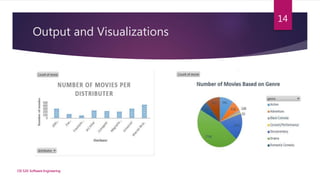
Output and Visualizations
CIS 520: Software Engineering
14
Output and Visualizations
CIS 520: Software Engineering
15
Output and Visualizations
CIS 520: Software Engineering
16
Output and Visualizations
CIS 520: Software Engineering
17
Output and Visualizations
CIS 520: Software Engineering
18
Conclusion:
 Data analysis using HiveQl.
 Exporting of analyzed data to Excel and data representation using
PowerView .
 Visualization using Dashboard.
CIS 520: Software Engineering
19
References
 Github.com
 https://azure.microsoft.com/en-us/documentation/samples/
 http://hortonworks.com/hadoop-tutorial/how-to-process-data-with-
apache-hive/
CIS 520: Software Engineering
20
THANK YOU 😊
CIS 520: Software Engineering
21

Movie data analysis

  • 1.
    Movie Data Analysisusing Hive QL SUBMITTED TO: DR. JONGWOOK WOO 1 Kumari Parul Bisen Krutik Shah Manvi Chandra
  • 2.
    Table of Contents Movies  Project Description  Hadoop,Hive,PowerView  Cloudberry Explorer for Azure Blob Storage  Flowchart  Relation to SDLC  Hive Queries for data analysis  Output and Visualization on graphs  Dashboard CIS 520: Software Engineering 2
  • 3.
    What is MovieDataset ?  We have extracted data related to movies from http://www.the- numbers.com/ .  The-Numbers has tracked over 20,000 movies.  This data analysis is based on MPAA(Motion Picture Association of America) Ratings, Rankings, Genre, Gross Profit and Tickets sold. CIS 520: Software Engineering 3
  • 4.
    Project Description  Weare basically analyzing the movie data using Hive QL  The results obtained are exported into excel sheets.  The visualization of the analyzed data is done using Power View query in MS-Excel. CIS 520: Software Engineering 4
  • 5.
    Hadoop  Hadoop- Hadoopis an open source framework utilized for processing humungous datasets and also used for distributed storage.  A particular special type of computational cluster is built in order to store and analyze large volumes of unstructured data is known as a Hadoop cluster.  Hadoop clusters are gaining popularity for enhancing the speed of data analysis applications. Hadoop clusters are extremely scalable.  Hadoop clusters are highly efficient as they are resistant to failures. CIS 520: Software Engineering 5
  • 6.
    Hive  Hive isa data warehouse system for Hadoop.  It allows querying, data analysis utilizing HiveQL etc.  Hive enables users to potray structure on huge unstructured data.  Hive has the ability to understand organized and unorganized data which may include text files where fields are circumscribed by specific characters. CIS 520: Software Engineering 6
  • 7.
    PowerView  PowerView isan add in which allows customers collect ,store,build and analyze huge volumes of data in excel.  PowerView is capable of providing intuitive data & visualization of power pivot models.  PowerView is similar to excel visualization layer. CIS 520: Software Engineering 7
  • 8.
    Cloudberry Explorer forBlob Storage CIS 520: Software Engineering 8  It is leveraged by Microsoft Azure Storage Analytics.  It is available in two versions freeware and Pro.  We have used this tool to upload data from local to Azure storage blob.
  • 9.
    Flowchart Download data from data source Formatthe file in the form of txt Uploading the files on Cloudberry Explorer for Microsoft Azure Blob Storage Use HiveQL to create external tables. Use Query results and powerview to analyze data Dashbo ard visualizti on CIS 520: Software Engineering 9
  • 10.
    Relation with SDLC Determining theScope, Time Estimation and Expected Output Gathering Data through The- Numbers.com and analysing. Designing – acquire necessary software for executing i.e., OBDC, HD Insight, Microsoft azure. Implement - Developed programs, prepared documents Testing and Maintaining CIS 520: Software Engineering 10
  • 11.
    Transfer data fromLocal to HD Insight CIS 520: Software Engineering 11
  • 12.
    Hive Queries CIS 520:Software Engineering 12
  • 13.
    Recommendation based onthe Analysis  We are using recommendation technique named content based filtering on the basis of which we are trying to figure out the most popular movies.  Content-based filtering approach utilizes a series of discrete characteristics of an item in order to recommend additional items with similar properties.  In our dataset in order to find the most popular movies we are considering Rank, Gross revenue earned and the Number of Tickets sold. CIS 520: Software Engineering 13
  • 14.
    Output and Visualizations CIS520: Software Engineering 14
  • 15.
    Output and Visualizations CIS520: Software Engineering 15
  • 16.
    Output and Visualizations CIS520: Software Engineering 16
  • 17.
    Output and Visualizations CIS520: Software Engineering 17
  • 18.
    Output and Visualizations CIS520: Software Engineering 18
  • 19.
    Conclusion:  Data analysisusing HiveQl.  Exporting of analyzed data to Excel and data representation using PowerView .  Visualization using Dashboard. CIS 520: Software Engineering 19
  • 20.
    References  Github.com  https://azure.microsoft.com/en-us/documentation/samples/ http://hortonworks.com/hadoop-tutorial/how-to-process-data-with- apache-hive/ CIS 520: Software Engineering 20
  • 21.
    THANK YOU 😊 CIS520: Software Engineering 21