GRAPHICAL USER
INTERFACES
PLANNING
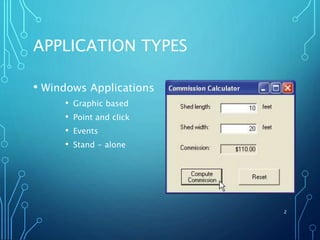
APPLICATION TYPES
• Windows Applications
• Graphic based
• Point and click
• Events
• Stand - alone
2
INTERFACE DESIGN
• User Interface (UI)
• Accepts data from user and presents
results
• Graphical User Interface (GUI)
• Provides visual cues to the user
• Aesthetics verses Function
• Visual aesthetics should follow function
• Consistent Design Principles
• Follow basic graphic design principles
• Consistent visually and functionally
• Real-World Experience
• Use concepts familiar to users
3
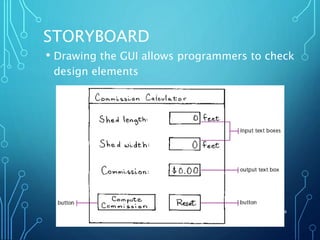
STORYBOARD
4
• Drawing the GUI allows programmers to check
design elements
WHEN DESIGNING A USER
INTERFACE
• Based on your previous experience with
Window applications, draw a storyboard of
a user interface.
• Describe the events (control objects on
the form) and methods (code behind the
control objects).
• Referring to the user interface you
designed, what mistakes could a user
make?
• What will your application do in response
to those mistakes? 5

Module 3 GUI Design

  • 1.
  • 2.
    APPLICATION TYPES • WindowsApplications • Graphic based • Point and click • Events • Stand - alone 2
  • 3.
    INTERFACE DESIGN • UserInterface (UI) • Accepts data from user and presents results • Graphical User Interface (GUI) • Provides visual cues to the user • Aesthetics verses Function • Visual aesthetics should follow function • Consistent Design Principles • Follow basic graphic design principles • Consistent visually and functionally • Real-World Experience • Use concepts familiar to users 3
  • 4.
    STORYBOARD 4 • Drawing theGUI allows programmers to check design elements
  • 5.
    WHEN DESIGNING AUSER INTERFACE • Based on your previous experience with Window applications, draw a storyboard of a user interface. • Describe the events (control objects on the form) and methods (code behind the control objects). • Referring to the user interface you designed, what mistakes could a user make? • What will your application do in response to those mistakes? 5