CSI3030 Internetworking with TCP/IP
Dr.S.SREETHAR
Associate Professor
Department of Computational Intelligence
Course Objectives:
1. To build an understanding of the fundamental
concepts of Internetworking.
• 2. To explore and understanding TCP/IP.
Course Outcomes:
1. Describe the underlying network technologies and
internetworking concept.
2. Understand the concepts of the network layer and
design subnets.
3. Understand the concepts IPv4, IPv6, and various
routing protocols.
4. Identify suitable transport layer protocols for real-time
applications.
5. Identify the suitable application layer protocols for
specific applications.
Module:1 Introduction and Underlying Network
Technologies
• The motivation for Internetworking,
• The TCP/IP Internet, Internet Services,
• History and Scope of the Internet,
• The Internet Architecture Board,
• The IAB reorganization,
• The Internet Society,
• Internet Request For Comments,
• Internet Protocols and Standardization,
• Future growth and technology.
• Two approaches to network communication,
• Wide Area and Local Area Networks,
• Ethernet technology
Module:2 Internetworking concept and Architecture Model
• Introduction,
• Application-level Interconnection,
• Network-Level Interconnection,
• Properties of the Internet,
• Internet Architecture,
• Interconnection through IP routers.
Module:3 Network Layer
• Switching,
• Packet Switching at the network layer, network
layer services,
• other network layer issues,
• IPv4 addresses –
• Classful addressing, Classless addressing,
• special addresses, NAT, Data rams, fragmentation,
options, checksum,
• IPv6 Addresses.
Module:4 Internet Protocol
• IPv4 - Datagram, Fragmentation, Options,
Checksum, Security,
• IPv6 Protocol - Introduction, Packet format,
Transition from IPv4 to IPv6.
Module:5 Unicast Routing Protocols
• Introduction,
• Infra and Interdomain routing,
• Distance vector routing,
• RIP,
• Link state routing,
• OSPF,
• Path vector routing,
• BGP.
Module:6 Transport Layer
• User Datagram,
• UDP services,
• UDP applications,
• TCP services,
• TCP features,
• Segment,
• A TCP Connection,
• Windows in TCP,
• Flow control, Error control, Congestion control.
Module:7 Application layer
• Client-Server paradigm,
• Peer-to-Peer paradigm,
• DHCP operation, Configuration,
• TELNET, SSH,
• SNMP — Concept, Management components,
SMI, MIB, SNMP.
• Module:8 Contemporary Issues
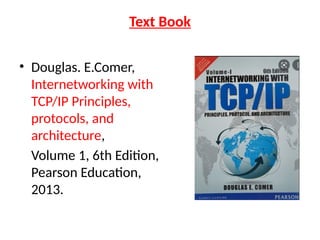
Text Book
• Douglas. E.Comer,
Internetworking with
TCP/IP Principles,
protocols, and
architecture,
Volume 1, 6th Edition,
Pearson Education,
2013.
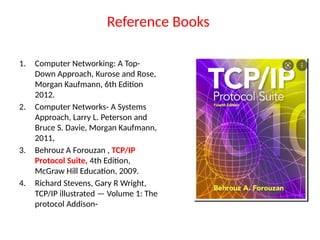
Reference Books
1. Computer Networking: A Top-
Down Approach, Kurose and Rose,
Morgan Kaufmann, 6th Edition
2012.
2. Computer Networks- A Systems
Approach, Larry L. Peterson and
Bruce S. Davie, Morgan Kaufmann,
2011,
3. Behrouz A Forouzan , TCP/IP
Protocol Suite, 4th Edition,
McGraw Hill Education, 2009.
4. Richard Stevens, Gary R Wright,
TCP/IP illustrated — Volume 1: The
protocol Addison-
Motivation for Internetworking
• Network is a group of connected,
communicating devices such as computers
and printers.
• internet (note the lowercase i) is two or more
networks that can communicate with each
other.
• Internet (uppercase I ), composed of hundreds
of thousands of interconnected networks.
• An internetwork is a collection of individual networks,
connected by intermediate networking devices, that
functions as a single large network.
• Example of internetworking is the Internet.
• network Vs Internetworking.
• Merely exploitation of either a switch or a hub to attach
2 local area networks is an extension of LAN
• Connecting them via the router is an associate degree
example of Internetworking. Internetworking is enforced
in Layer three (Network Layer) of the OSI-ISO model.
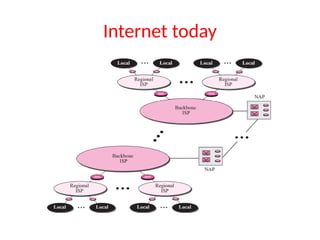
Internet today
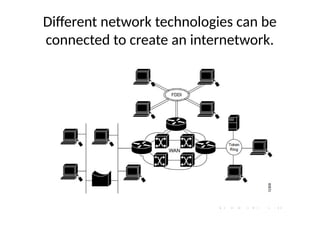
Different network technologies can be
connected to create an internetwork.
• Internet technology is an example of open
system interconnection.
– any individual or company can build the hardware
and software needed to communicate across the
Internet.
TCP/IP Internet
• TCP/IP protocol suite, was designed in 1970s
by 2 DARPA [
Defense Advanced Research Projects Agency]
scientists
• It is the set of communications protocols used
for the Internet and other similar networks.
Why we use the Internet?
• Seek information on anything across the globe on a real-time basis.
• Communicate, collaborate with others.
• Telecommute to the office or work from home.
• Do transactions with business entities.
• Down load files from a remote.
• Get educated and entertained.
• Carry out social.
• Do group activities.
• Collect operational data from remote equipment (stationary as well as moving).
• Process data while it is streamed to the central server.
• Get real-time data on the surrounding devices, systems, weather to automate
activities.
• Design a decision-taking system as against the decision support system.
• Connect people, stakeholders, machines and everything.
Applications of Internet
• Tracking the Vehicle – Fleet Management system
• Monitoring the health of the moving vehicle –
Telematics
• Autonomous and Driverless vehicle – 5G networks
• Remote diagnostics and triggering preventive
maintenance of equipment
• Monitoring Children in the home from outside
• Online streaming of events
• Entertainment – Contents sharing platform (OTT),
Internet TV, Web Serials
• Connected Machines – Manufacturing
Internet Services
Services will focus on standards called protocols.
• TCP and IP, define the syntactic and semantic
rules for communication.
• Describe how a computer responds when a
message arrives
• How a computer handles errors or other
abnormal conditions.
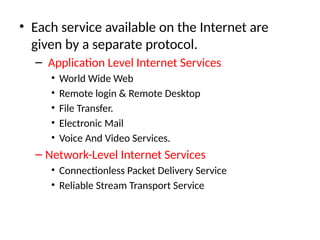
• Each service available on the Internet are
given by a separate protocol.
– Application Level Internet Services
• World Wide Web
• Remote login & Remote Desktop
• File Transfer.
• Electronic Mail
• Voice And Video Services.
– Network-Level Internet Services
• Connectionless Packet Delivery Service
• Reliable Stream Transport Service
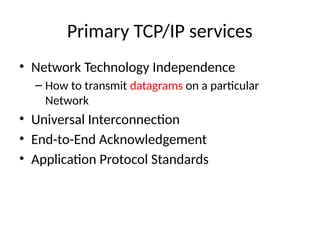
Primary TCP/IP services
• Network Technology Independence
– How to transmit datagrams on a particular
Network
• Universal Interconnection
• End-to-End Acknowledgement
• Application Protocol Standards
History And Scope Of The Internet
• 1969. Four-node ARPANET (Advanced Research Project Agency)
established.
• 1970. ARPA hosts implement NCP(Network Control Protocol).
• 1973. Development of TCP/IP suite begins.
• 1977. An internet tested using TCP/IP.
• 1978. UNIX distributed to academic/research sites.
• 1981. CSNET established.
• 1983. TCP/IP becomes the official protocol for ARPANET.
• 1983. MILNET was born.
• 1986. NSFNET [National Science Foundation Network] established.
• 1990. ARPANET decommissioned and replaced by NSFNET.
• 1995. NSFNET goes back to being a research network.
• 1995. Companies known as Internet Service Providers (ISPs) started.
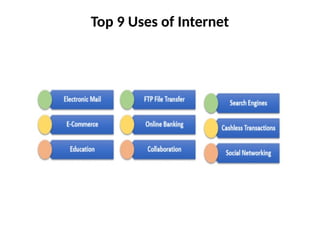
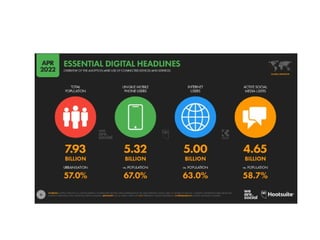
Top 9 Uses of Internet
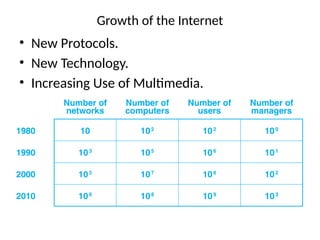
Growth of the Internet
• New Protocols.
• New Technology.
• Increasing Use of Multimedia.
The Internet Architecture Board
• TCP/IP Internet protocol suite did not arise from a
specific vendor or from a recognized professional
society
• Internet Architecture Board (IAB) was formed in 1983.
• IAB provided the focus and coordination for research
and development underlying the TCP/IP protocols,
and guided the evolution of the Internet.
• The IAB decided which protocols were a required part
of the TCP/IP suite and set official policies.
The IAB Reorganization
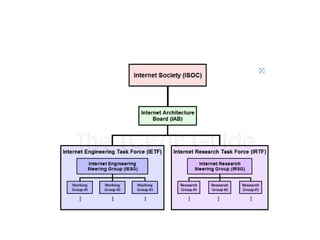
• IAB was reorganized in 1989.
• Researchers were moved from the IAB to a
subsidiary group known as the Internet
Research Task Force (IRTF)
• Responsibility for protocol standards and
other technical aspects passed to a group
known as the Internet Engineering Task Force
(IETF).
• IETF was divided into over 20 working groups,
each of which focused on a specific problem
• IETF now refers to the entire body, including
the chairperson, area managers, and all
members of working groups.
Internet Request For Comments (RFCs)
• No vendor owns the TCP/IP technology, nor does
any professional society or standards body.
• Documentation of protocols, standards, and
policies cannot be obtained from a vendor.
• RFC documents contain technical specifications and
organizational notes for the Internet.
• IETF manages the standardization process.
• The resulting protocol documents are kept in an
on-line repository and made available at no charge.
• Documentation of work on the Internet, proposals
for new or revised protocols, and TCP/IP protocol
standards all appear in a series of technical reports
called Internet Requests For Comments.
• RFCs can be short or long, can cover broad concepts
• While RFCs are not refereed in the same way as
academic research papers, they are reviewed and
edited.
• The task of editing RFCs now falls to area
managers of the IETF
• The RFC series is numbered sequentially in the
chronological order RFCs are written. Each
new or revised RFC is assigned a new number,
so readers must be careful to obtain the
highest numbered version of a document.
• RFCs and Internet Drafts can be obtained from:
www.ietf.org
Protocols and Standards
• The key elements of a protocol are
– syntax,
– semantics,
– and timing
• Standards
– provide guidelines to manufacturers, vendors, government
agencies, and other service providers to ensure the kind of
interconnectivity
– Data communication standards fall into two categories: de
facto (meaning “by fact” or “by convention”) and de jure
(meaning “by law” or “by regulation”).
• De facto standards are often established
originally by manufacturers that seek to define
the functionality of a new product or
technology. Examples of de facto standards
are MS Office and various DVD standards.
• De jure. De jure standards are those that have
been legislated by an officially recognized
body.
Standards Creation Committees
• International Standards Organization (ISO)
• International Telecommunications Union–
Telecommunications Standards Sector (ITU-T).
• American National Standards Institute (ANSI)
• Institute of Electrical and Electronics Engineers
(IEEE).
• Electronic Industries Association (EIA).
• World Wide Web Consortium (W3C)
• Open Mobile Alliance (OMA).
Two Approaches To Network Communication
• Connection oriented /Circuit-switched
– Guaranteed capacity
– Circuits costs are fixed
• Connectionless / packet-switched
Wide Area & Local Area Networks
• WAN technologies /long haul networks,
provide communication over long distances.
• WAN range from 100 Mbps to 10 Gbps
• LAN technologies cover short distances,
• LAN operates between 1 Gbps and 10 Gbps.
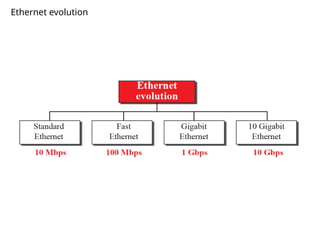
Ethernet (IEEE 802.3)
• Ethernet has become the most popular LAN
technology
• Ethernet data transfer rates have been
increased from the original 2.94 Mbit/s to the
latest 400 Gbit/s,
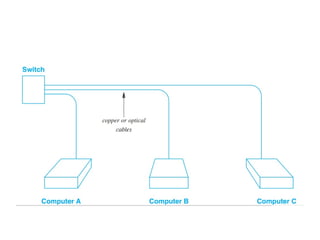
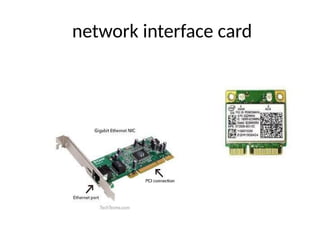
• Each computer must have a Network Interface
Card (NIC) that operates as an I/O device that
can send and receive packets.
Important Properties Of An Ethernet
• Broadcast Capability.
• Best-Effort Delivery Semantics.
– hardware does not guarantee delivery and does
not inform a sender if the packet cannot be
delivered.
48-Bit Ethernet MAC (Hardware) Addresses
• IEEE defines a 48-bit MAC addressing scheme
• An Ethernet address is assigned to a network
interface card, not to a computer
• Ethernet hardware manufacturer must
purchase a block of MAC addresses from IEEE
and must assign one address to each NIC
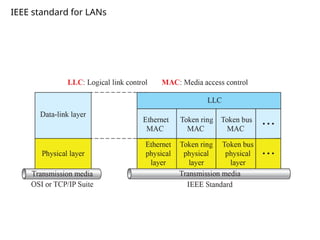
IEEE Project 802
IEEE divided the Data link layer into two
sublayer:
 upper layer : logical link control (LLC); flow
and error control.
 Lower sublayer : Multiple access (MAC);
media access control.
 Multiple access (MAC) :for resolving
access to the shared media.
 If channel is dedicated ( point to point)
we do not need the (MAC); sublayer.
IEEE standard for LANs
LLC (Logical link control)and MAC (Media Access
Control)
 In IEEE project 802, flow control , error control, and part of
the framing duties are collected into one sublayer called the
logical link control (LLC )
 LLC provides one single data link control for all IEEE LANs.
 IEEE project 802 has created a sublayerMAC that defines the
specific access method for each LAN. In contrast to the LLC,
MAC contains a number of distinct modules: each defines the
access method and the framing format specific to the
corresponding LAN protocol
For example:
• CSMA/CD as media access method for Ethernet LANs.
• Token passing method for Token Ring and Token Bus LANs
Framing is handled in both the LLC and MAC sublayer.
Ethernet evolution
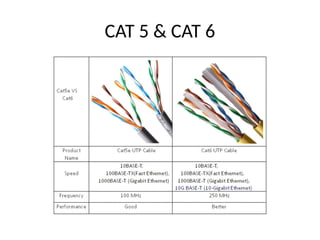
CAT 5 & CAT 6
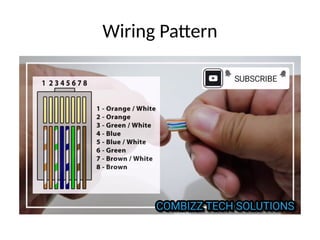
Wiring Pattern
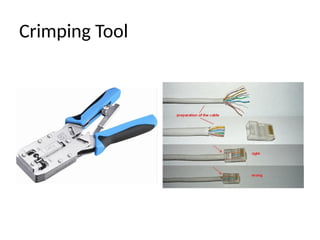
Crimping Tool
Frame format
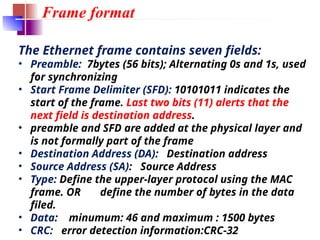
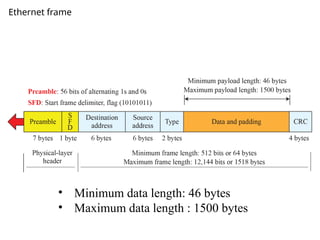
The Ethernet frame contains seven fields:
• Preamble: 7bytes (56 bits); Alternating 0s and 1s, used
for synchronizing
• Start Frame Delimiter (SFD): 10101011 indicates the
start of the frame. Last two bits (11) alerts that the
next field is destination address.
• preamble and SFD are added at the physical layer and
is not formally part of the frame
• Destination Address (DA): Destination address
• Source Address (SA): Source Address
• Type: Define the upper-layer protocol using the MAC
frame. OR define the number of bytes in the data
filed.
• Data: minumum: 46 and maximum : 1500 bytes
• CRC: error detection information:CRC-32
Ethernet frame
• Minimum data length: 46 bytes
• Maximum data length : 1500 bytes
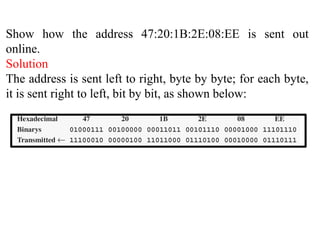
Show how the address 47:20:1B:2E:08:EE is sent out
online.
Solution
The address is sent left to right, byte by byte; for each byte,
it is sent right to left, bit by bit, as shown below:
Addressing
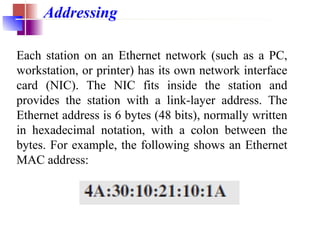
Each station on an Ethernet network (such as a PC,
workstation, or printer) has its own network interface
card (NIC). The NIC fits inside the station and
provides the station with a link-layer address. The
Ethernet address is 6 bytes (48 bits), normally written
in hexadecimal notation, with a colon between the
bytes. For example, the following shows an Ethernet
MAC address:
network interface card
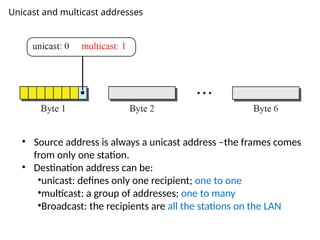
Unicast and multicast addresses
• Source address is always a unicast address –the frames comes
from only one station.
• Destination address can be:
•unicast: defines only one recipient; one to one
•multicast: a group of addresses; one to many
•Broadcast: the recipients are all the stations on the LAN
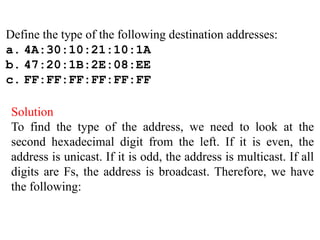
Define the type of the following destination addresses:
a. 4A:30:10:21:10:1A
b. 47:20:1B:2E:08:EE
c. FF:FF:FF:FF:FF:FF
Solution
To find the type of the address, we need to look at the
second hexadecimal digit from the left. If it is even, the
address is unicast. If it is odd, the address is multicast. If all
digits are Fs, the address is broadcast. Therefore, we have
the following:
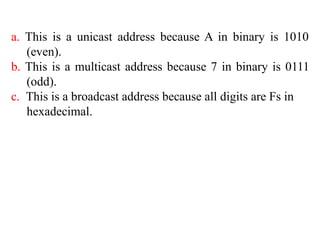
a. This is a unicast address because A in binary is 1010
(even).
b. This is a multicast address because 7 in binary is 0111
(odd).
c. This is a broadcast address because all digits are Fs in
hexadecimal.

Modular representation of TCP IP Network protocols

  • 1.
    CSI3030 Internetworking withTCP/IP Dr.S.SREETHAR Associate Professor Department of Computational Intelligence
  • 2.
    Course Objectives: 1. Tobuild an understanding of the fundamental concepts of Internetworking. • 2. To explore and understanding TCP/IP.
  • 3.
    Course Outcomes: 1. Describethe underlying network technologies and internetworking concept. 2. Understand the concepts of the network layer and design subnets. 3. Understand the concepts IPv4, IPv6, and various routing protocols. 4. Identify suitable transport layer protocols for real-time applications. 5. Identify the suitable application layer protocols for specific applications.
  • 4.
    Module:1 Introduction andUnderlying Network Technologies • The motivation for Internetworking, • The TCP/IP Internet, Internet Services, • History and Scope of the Internet, • The Internet Architecture Board, • The IAB reorganization, • The Internet Society, • Internet Request For Comments, • Internet Protocols and Standardization, • Future growth and technology. • Two approaches to network communication, • Wide Area and Local Area Networks, • Ethernet technology
  • 5.
    Module:2 Internetworking conceptand Architecture Model • Introduction, • Application-level Interconnection, • Network-Level Interconnection, • Properties of the Internet, • Internet Architecture, • Interconnection through IP routers.
  • 6.
    Module:3 Network Layer •Switching, • Packet Switching at the network layer, network layer services, • other network layer issues, • IPv4 addresses – • Classful addressing, Classless addressing, • special addresses, NAT, Data rams, fragmentation, options, checksum, • IPv6 Addresses.
  • 7.
    Module:4 Internet Protocol •IPv4 - Datagram, Fragmentation, Options, Checksum, Security, • IPv6 Protocol - Introduction, Packet format, Transition from IPv4 to IPv6.
  • 8.
    Module:5 Unicast RoutingProtocols • Introduction, • Infra and Interdomain routing, • Distance vector routing, • RIP, • Link state routing, • OSPF, • Path vector routing, • BGP.
  • 9.
    Module:6 Transport Layer •User Datagram, • UDP services, • UDP applications, • TCP services, • TCP features, • Segment, • A TCP Connection, • Windows in TCP, • Flow control, Error control, Congestion control.
  • 10.
    Module:7 Application layer •Client-Server paradigm, • Peer-to-Peer paradigm, • DHCP operation, Configuration, • TELNET, SSH, • SNMP — Concept, Management components, SMI, MIB, SNMP. • Module:8 Contemporary Issues
  • 11.
    Text Book • Douglas.E.Comer, Internetworking with TCP/IP Principles, protocols, and architecture, Volume 1, 6th Edition, Pearson Education, 2013.
  • 12.
    Reference Books 1. ComputerNetworking: A Top- Down Approach, Kurose and Rose, Morgan Kaufmann, 6th Edition 2012. 2. Computer Networks- A Systems Approach, Larry L. Peterson and Bruce S. Davie, Morgan Kaufmann, 2011, 3. Behrouz A Forouzan , TCP/IP Protocol Suite, 4th Edition, McGraw Hill Education, 2009. 4. Richard Stevens, Gary R Wright, TCP/IP illustrated — Volume 1: The protocol Addison-
  • 13.
    Motivation for Internetworking •Network is a group of connected, communicating devices such as computers and printers. • internet (note the lowercase i) is two or more networks that can communicate with each other. • Internet (uppercase I ), composed of hundreds of thousands of interconnected networks.
  • 14.
    • An internetworkis a collection of individual networks, connected by intermediate networking devices, that functions as a single large network. • Example of internetworking is the Internet. • network Vs Internetworking. • Merely exploitation of either a switch or a hub to attach 2 local area networks is an extension of LAN • Connecting them via the router is an associate degree example of Internetworking. Internetworking is enforced in Layer three (Network Layer) of the OSI-ISO model.
  • 15.
  • 16.
    Different network technologiescan be connected to create an internetwork.
  • 17.
    • Internet technologyis an example of open system interconnection. – any individual or company can build the hardware and software needed to communicate across the Internet.
  • 18.
    TCP/IP Internet • TCP/IPprotocol suite, was designed in 1970s by 2 DARPA [ Defense Advanced Research Projects Agency] scientists • It is the set of communications protocols used for the Internet and other similar networks.
  • 19.
    Why we usethe Internet? • Seek information on anything across the globe on a real-time basis. • Communicate, collaborate with others. • Telecommute to the office or work from home. • Do transactions with business entities. • Down load files from a remote. • Get educated and entertained. • Carry out social. • Do group activities. • Collect operational data from remote equipment (stationary as well as moving). • Process data while it is streamed to the central server. • Get real-time data on the surrounding devices, systems, weather to automate activities. • Design a decision-taking system as against the decision support system. • Connect people, stakeholders, machines and everything.
  • 20.
    Applications of Internet •Tracking the Vehicle – Fleet Management system • Monitoring the health of the moving vehicle – Telematics • Autonomous and Driverless vehicle – 5G networks • Remote diagnostics and triggering preventive maintenance of equipment • Monitoring Children in the home from outside • Online streaming of events • Entertainment – Contents sharing platform (OTT), Internet TV, Web Serials • Connected Machines – Manufacturing
  • 21.
    Internet Services Services willfocus on standards called protocols. • TCP and IP, define the syntactic and semantic rules for communication. • Describe how a computer responds when a message arrives • How a computer handles errors or other abnormal conditions.
  • 22.
    • Each serviceavailable on the Internet are given by a separate protocol. – Application Level Internet Services • World Wide Web • Remote login & Remote Desktop • File Transfer. • Electronic Mail • Voice And Video Services. – Network-Level Internet Services • Connectionless Packet Delivery Service • Reliable Stream Transport Service
  • 23.
    Primary TCP/IP services •Network Technology Independence – How to transmit datagrams on a particular Network • Universal Interconnection • End-to-End Acknowledgement • Application Protocol Standards
  • 24.
    History And ScopeOf The Internet • 1969. Four-node ARPANET (Advanced Research Project Agency) established. • 1970. ARPA hosts implement NCP(Network Control Protocol). • 1973. Development of TCP/IP suite begins. • 1977. An internet tested using TCP/IP. • 1978. UNIX distributed to academic/research sites. • 1981. CSNET established. • 1983. TCP/IP becomes the official protocol for ARPANET. • 1983. MILNET was born. • 1986. NSFNET [National Science Foundation Network] established. • 1990. ARPANET decommissioned and replaced by NSFNET. • 1995. NSFNET goes back to being a research network. • 1995. Companies known as Internet Service Providers (ISPs) started.
  • 25.
    Top 9 Usesof Internet
  • 26.
    Growth of theInternet • New Protocols. • New Technology. • Increasing Use of Multimedia.
  • 28.
    The Internet ArchitectureBoard • TCP/IP Internet protocol suite did not arise from a specific vendor or from a recognized professional society • Internet Architecture Board (IAB) was formed in 1983. • IAB provided the focus and coordination for research and development underlying the TCP/IP protocols, and guided the evolution of the Internet. • The IAB decided which protocols were a required part of the TCP/IP suite and set official policies.
  • 29.
    The IAB Reorganization •IAB was reorganized in 1989. • Researchers were moved from the IAB to a subsidiary group known as the Internet Research Task Force (IRTF) • Responsibility for protocol standards and other technical aspects passed to a group known as the Internet Engineering Task Force (IETF).
  • 31.
    • IETF wasdivided into over 20 working groups, each of which focused on a specific problem • IETF now refers to the entire body, including the chairperson, area managers, and all members of working groups.
  • 32.
    Internet Request ForComments (RFCs) • No vendor owns the TCP/IP technology, nor does any professional society or standards body. • Documentation of protocols, standards, and policies cannot be obtained from a vendor. • RFC documents contain technical specifications and organizational notes for the Internet. • IETF manages the standardization process. • The resulting protocol documents are kept in an on-line repository and made available at no charge.
  • 33.
    • Documentation ofwork on the Internet, proposals for new or revised protocols, and TCP/IP protocol standards all appear in a series of technical reports called Internet Requests For Comments. • RFCs can be short or long, can cover broad concepts • While RFCs are not refereed in the same way as academic research papers, they are reviewed and edited.
  • 34.
    • The taskof editing RFCs now falls to area managers of the IETF • The RFC series is numbered sequentially in the chronological order RFCs are written. Each new or revised RFC is assigned a new number, so readers must be careful to obtain the highest numbered version of a document. • RFCs and Internet Drafts can be obtained from: www.ietf.org
  • 35.
    Protocols and Standards •The key elements of a protocol are – syntax, – semantics, – and timing • Standards – provide guidelines to manufacturers, vendors, government agencies, and other service providers to ensure the kind of interconnectivity – Data communication standards fall into two categories: de facto (meaning “by fact” or “by convention”) and de jure (meaning “by law” or “by regulation”).
  • 36.
    • De factostandards are often established originally by manufacturers that seek to define the functionality of a new product or technology. Examples of de facto standards are MS Office and various DVD standards. • De jure. De jure standards are those that have been legislated by an officially recognized body.
  • 37.
    Standards Creation Committees •International Standards Organization (ISO) • International Telecommunications Union– Telecommunications Standards Sector (ITU-T). • American National Standards Institute (ANSI) • Institute of Electrical and Electronics Engineers (IEEE). • Electronic Industries Association (EIA). • World Wide Web Consortium (W3C) • Open Mobile Alliance (OMA).
  • 38.
    Two Approaches ToNetwork Communication • Connection oriented /Circuit-switched – Guaranteed capacity – Circuits costs are fixed • Connectionless / packet-switched
  • 39.
    Wide Area &Local Area Networks • WAN technologies /long haul networks, provide communication over long distances. • WAN range from 100 Mbps to 10 Gbps • LAN technologies cover short distances, • LAN operates between 1 Gbps and 10 Gbps.
  • 40.
    Ethernet (IEEE 802.3) •Ethernet has become the most popular LAN technology • Ethernet data transfer rates have been increased from the original 2.94 Mbit/s to the latest 400 Gbit/s, • Each computer must have a Network Interface Card (NIC) that operates as an I/O device that can send and receive packets.
  • 42.
    Important Properties OfAn Ethernet • Broadcast Capability. • Best-Effort Delivery Semantics. – hardware does not guarantee delivery and does not inform a sender if the packet cannot be delivered.
  • 43.
    48-Bit Ethernet MAC(Hardware) Addresses • IEEE defines a 48-bit MAC addressing scheme • An Ethernet address is assigned to a network interface card, not to a computer • Ethernet hardware manufacturer must purchase a block of MAC addresses from IEEE and must assign one address to each NIC
  • 44.
    IEEE Project 802 IEEEdivided the Data link layer into two sublayer:  upper layer : logical link control (LLC); flow and error control.  Lower sublayer : Multiple access (MAC); media access control.  Multiple access (MAC) :for resolving access to the shared media.  If channel is dedicated ( point to point) we do not need the (MAC); sublayer.
  • 45.
  • 46.
    LLC (Logical linkcontrol)and MAC (Media Access Control)  In IEEE project 802, flow control , error control, and part of the framing duties are collected into one sublayer called the logical link control (LLC )  LLC provides one single data link control for all IEEE LANs.  IEEE project 802 has created a sublayerMAC that defines the specific access method for each LAN. In contrast to the LLC, MAC contains a number of distinct modules: each defines the access method and the framing format specific to the corresponding LAN protocol For example: • CSMA/CD as media access method for Ethernet LANs. • Token passing method for Token Ring and Token Bus LANs Framing is handled in both the LLC and MAC sublayer.
  • 47.
  • 48.
    CAT 5 &CAT 6
  • 49.
  • 50.
  • 51.
    Frame format The Ethernetframe contains seven fields: • Preamble: 7bytes (56 bits); Alternating 0s and 1s, used for synchronizing • Start Frame Delimiter (SFD): 10101011 indicates the start of the frame. Last two bits (11) alerts that the next field is destination address. • preamble and SFD are added at the physical layer and is not formally part of the frame • Destination Address (DA): Destination address • Source Address (SA): Source Address • Type: Define the upper-layer protocol using the MAC frame. OR define the number of bytes in the data filed. • Data: minumum: 46 and maximum : 1500 bytes • CRC: error detection information:CRC-32
  • 52.
    Ethernet frame • Minimumdata length: 46 bytes • Maximum data length : 1500 bytes
  • 53.
    Show how theaddress 47:20:1B:2E:08:EE is sent out online. Solution The address is sent left to right, byte by byte; for each byte, it is sent right to left, bit by bit, as shown below:
  • 54.
    Addressing Each station onan Ethernet network (such as a PC, workstation, or printer) has its own network interface card (NIC). The NIC fits inside the station and provides the station with a link-layer address. The Ethernet address is 6 bytes (48 bits), normally written in hexadecimal notation, with a colon between the bytes. For example, the following shows an Ethernet MAC address:
  • 55.
  • 56.
    Unicast and multicastaddresses • Source address is always a unicast address –the frames comes from only one station. • Destination address can be: •unicast: defines only one recipient; one to one •multicast: a group of addresses; one to many •Broadcast: the recipients are all the stations on the LAN
  • 57.
    Define the typeof the following destination addresses: a. 4A:30:10:21:10:1A b. 47:20:1B:2E:08:EE c. FF:FF:FF:FF:FF:FF Solution To find the type of the address, we need to look at the second hexadecimal digit from the left. If it is even, the address is unicast. If it is odd, the address is multicast. If all digits are Fs, the address is broadcast. Therefore, we have the following:
  • 58.
    a. This isa unicast address because A in binary is 1010 (even). b. This is a multicast address because 7 in binary is 0111 (odd). c. This is a broadcast address because all digits are Fs in hexadecimal.