Chapter-1
INTERconnected NETwork: Internet
Internet and the Web
• Both are different terms, not synonymous.
• Internet: Huge network of networks connecting millions of
computers together.
• Web: One of the popular services offered on the internet. It is one
of the ways in which information is disseminated and accessed
over the medium of internet.
Internet: The Giant WAN
• It started as a federal funded research project ARPANET initiated by the
Advanced Research Project Agency (ARPA), Department of Defense of the
US Government in 1969.
• The experiments were initially to link researchers with a remote computer
centers, allowing them to share hardware and software resources such as
computer disk space and databases. Later, it was renamed Internet.
• As the internet evolved it become challenging to allow communication with
different networks.
• The problem was solved by developing the Internet Protocol (IP) which
truly created networks of networks, the current architecture of the
internet.
Packet Switching and TCP
• It operates with a technique: Packet Switching.
• In packet switching, digital data is transmitted in small bundles called
packets.
• These packets contains information about the address, error control and
the sequence in which the packets are to be sent.
• There was no centralized control. If a portion of a network failed the
remaining working portion will still route packets.
• ARPANET used Transmission Control Protocol known as TCP for
communication.
• TCP ensured the messages were properly routed from sender to receiver.
• As a meta-network, or network of networks, the Internet (acronym for
INTERconnected NETwork) emerged to be a promising technology for
providing ubiquitous access
• A network is a communication system for connecting end-systems (a.k.a.
“hosts,” PCs, workstations, dedicated computers, network components,
nodes) and an Internetwork (INTERconnected NETwork or Internet) is
an arbitrary collection of physical networks interconnected by routers to
provide some sort of host-to-host packet delivery service.
• The Internet is defined as the globally distributed network of networks
that consists of millions of private, public, academic, business, and
government networks, which are linked by an extensive range of
electronic, wireless, and optical networking technologies.
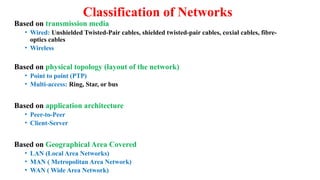
Classification of Networks
Based on transmission media
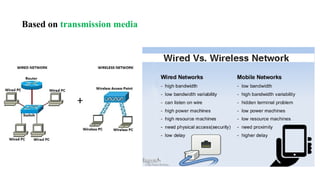
• Wired: Unshielded Twisted-Pair cables, shielded twisted-pair cables, coxial cables,
fibre-optics cables
• Wireless
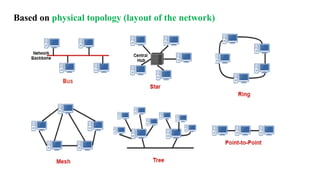
Based on physical topology (layout of the network)
• Point to point (PTP)
• Multi-access: Ring, Star, or bus
Based on application architecture
• Peer-to-Peer
• Client-Server
Based on Geographical Area Covered
• LAN (Local Area Networks)
• MAN ( Metropolitan Area Network)
• WAN ( Wide Area Network)
Based on transmission media
Classification of Networks
Based on transmission media
• Wired: Unshielded Twisted-Pair cables, shielded twisted-pair cables, coxial cables, fibre-
optics cables
• Wireless
Based on physical topology (layout of the network)
• Point to point (PTP)
• Multi-access: Ring, Star, or bus
Based on application architecture
• Peer-to-Peer
• Client-Server
Based on Geographical Area Covered
• LAN (Local Area Networks)
• MAN ( Metropolitan Area Network)
• WAN ( Wide Area Network)
Based on physical topology (layout of the network)
Classification of Networks
Based on transmission media
• Wired: Unshielded Twisted-Pair cables, shielded twisted-pair cables, coxial cables, fibre-
optics cables
• Wireless
Based on physical topology (layout of the network)
• Point to point (PTP)
• Multi-access: Ring, Star, or bus
Based on application architecture
• Peer-to-Peer
• Client-Server
Based on Geographical Area Covered
• LAN (Local Area Networks)
• MAN ( Metropolitan Area Network)
• WAN ( Wide Area Network)
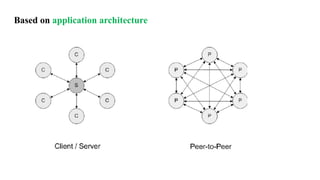
Based on application architecture
Client/Server Network
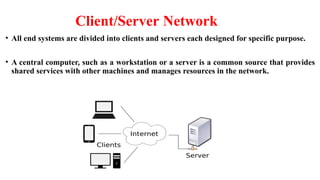
• All end systems are divided into clients and servers each designed for specific purpose.
• A central computer, such as a workstation or a server is a common source that provides
shared services with other machines and manages resources in the network.
• Clients initiates the communication by sending requests to server.
• Clients communicate with servers only.
• Servers have passive role and respond to their clients by acting on each
request and returning results.
• One server generally supports numerous clients.
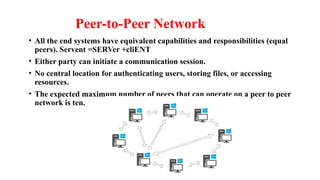
Peer-to-Peer Network
• All the end systems have equivalent capabilities and responsibilities (equal
peers). Servent =SERVer +cliENT
• Either party can initiate a communication session.
• No central location for authenticating users, storing files, or accessing
resources.
• The expected maximum number of peers that can operate on a peer to peer
network is ten.
Types of P2P networks
• Pure P2P network: No central service of any kind i.e the entire communication
occurs among connected peers without any assistance. E.g.- Workgroup in
Microsoft, Freenet. Gnutella
• Hybrid P2P Network: Depends partially on servers or allocate selected
functions to a subset of dedicated peers. Dedicated peers directly control
information among the other peers. E.g.- Skype, BitTorrent
Classification of Networks
Based on transmission media
• Wired: Unshielded Twisted-Pair cables, shielded twisted-pair cables, coxial cables, fibre-
optics cables
• Wireless
Based on physical topology (layout of the network)
• Point to point (PTP)
• Multi-access: Ring, Star, or bus
Based on application architecture
• Peer-to-Peer
• Client-Server
Based on Geographical Area Covered
• LAN (Local Area Networks)
• MAN ( Metropolitan Area Network)
• WAN ( Wide Area Network)
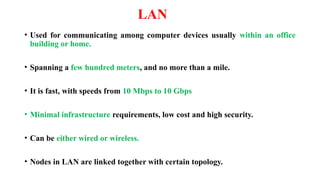
LAN
• Used for communicating among computer devices usually within an office
building or home.
• Spanning a few hundred meters, and no more than a mile.
• It is fast, with speeds from 10 Mbps to 10 Gbps
• Minimal infrastructure requirements, low cost and high security.
• Can be either wired or wireless.
• Nodes in LAN are linked together with certain topology.
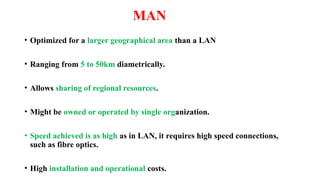
MAN
• Optimized for a larger geographical area than a LAN
• Ranging from 5 to 50km diametrically.
• Allows sharing of regional resources.
• Might be owned or operated by single organization.
• Speed achieved is as high as in LAN, it requires high speed connections,
such as fibre optics.
• High installation and operational costs.
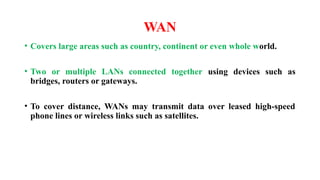
WAN
• Covers large areas such as country, continent or even whole world.
• Two or multiple LANs connected together using devices such as
bridges, routers or gateways.
• To cover distance, WANs may transmit data over leased high-speed
phone lines or wireless links such as satellites.
Communicating over the Internet
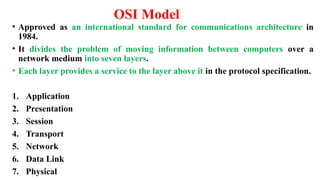
OSI Model
• Approved as an international standard for communications architecture in
1984.
• It divides the problem of moving information between computers over a
network medium into seven layers.
• Each layer provides a service to the layer above it in the protocol specification.
1. Application
2. Presentation
3. Session
4. Transport
5. Network
6. Data Link
7. Physical
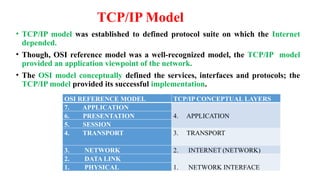
TCP/IP Model
• TCP/IP model was established to defined protocol suite on which the Internet
depended.
• Though, OSI reference model was a well-recognized model, the TCP/IP model
provided an application viewpoint of the network.
• The OSI model conceptually defined the services, interfaces and protocols; the
TCP/IP model provided its successful implementation.
OSI REFERENCE MODEL TCP/IP CONCEPTUAL LAYERS
7. APPLICATION
4. APPLICATION
6. PRESENTATION
5. SESSION
4. TRANSPORT 3. TRANSPORT
3. NETWORK 2. INTERNET (NETWORK)
2. DATA LINK
1. NETWORK INTERFACE
1. PHYSICAL
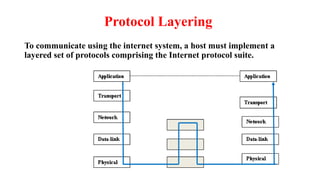
Protocol Layering
To communicate using the internet system, a host must implement a
layered set of protocols comprising the Internet protocol suite.
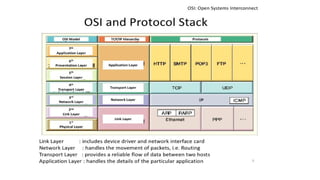
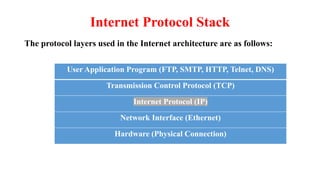
Internet Protocol Stack
The protocol layers used in the Internet architecture are as follows:
User Application Program (FTP, SMTP, HTTP, Telnet, DNS)
Transmission Control Protocol (TCP)
Internet Protocol (IP)
Network Interface (Ethernet)
Hardware (Physical Connection)
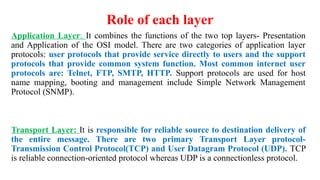
Role of each layer
Application Layer: It combines the functions of the two top layers- Presentation
and Application of the OSI model. There are two categories of application layer
protocols: user protocols that provide service directly to users and the support
protocols that provide common system function. Most common internet user
protocols are: Telnet, FTP, SMTP, HTTP. Support protocols are used for host
name mapping, booting and management include Simple Network Management
Protocol (SNMP).
Transport Layer: It is responsible for reliable source to destination delivery of
the entire message. There are two primary Transport Layer protocol-
Transmission Control Protocol(TCP) and User Datagram Protocol (UDP). TCP
is reliable connection-oriented protocol whereas UDP is a connectionless protocol.
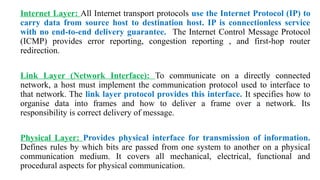
Internet Layer: All Internet transport protocols use the Internet Protocol (IP) to
carry data from source host to destination host. IP is connectionless service
with no end-to-end delivery guarantee. The Internet Control Message Protocol
(ICMP) provides error reporting, congestion reporting , and first-hop router
redirection.
Link Layer (Network Interface): To communicate on a directly connected
network, a host must implement the communication protocol used to interface to
that network. The link layer protocol provides this interface. It specifies how to
organise data into frames and how to deliver a frame over a network. Its
responsibility is correct delivery of message.
Physical Layer: Provides physical interface for transmission of information.
Defines rules by which bits are passed from one system to another on a physical
communication medium. It covers all mechanical, electrical, functional and
procedural aspects for physical communication.
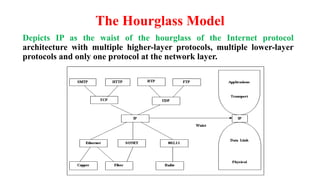
The Hourglass Model
Depicts IP as the waist of the hourglass of the Internet protocol
architecture with multiple higher-layer protocols, multiple lower-layer
protocols and only one protocol at the network layer.
Curse of Narrow Waist: As the number of service interfaces doubles,
changes are desired below and above the waist to avoid interoperability
problems.
Moreover, below the waist bulge is apparent too as the lower layers
mostly seem to just make IP’s harder with cells, circuits, QoS, multicasts,
large clouds, opaque clouds.
Many researchers have suggested a promising fitness goal to trim down
from an hourglass to wineglass architecture.
Internet Addressing – IPAddress
• IP address is a unique global address for a network interface.
• It is 32-bit logical address, composed of four 8-bit fields, called octets.
• Each octet represents a decimal number in the range 0-255. For eg-
17.112.152.32
• It is divided into two parts: a prefix and a suffix.
• Prefix: Identifies the physical network to which the host is attached.
• Suffix: Identifies a specific computer(host/node) on the network.
• A single address in never assigned to more than one computer.
• Network number (prefix) assignments must be coordinated globally
whereas suffixes are assigned locally without global coordination.
Uniform Resource Locators (URL)
• It specifies the internet address of any resource.
• They are translated into numeric addresses using a Domain Name Server
(DNS).
• When we type a URL, this application-layer service called DNS translates
the human friendly URL into the computer friendly IP address. DNS
Performs this translation by consulting the databases maintained by the
Domain Name Registrars.
• DNS is the “phone book” of the internet: look up a name, and find its
number. DNS associates host names to their equivalent IP address.
• The domain name or IP address gives the destination location for the
URL.
The generic anatomy of a URL is:
protocol://domain name/path/filename
• Protocol specifies the transfer protocol that will be used for the retrieval of
desired resource. Example- http, https, ftp.
• Domain Name is also known as website name or host name.
It is divided into three parts: www (optional), second level name (dtu.ac in
www.dtu.ac.in), and top level name. It can be organizational 3-character code
(.com, .org, .edu) or geographical 2 character code (.uk, .au).
• Path is the directory or the folder on the server. File name is the file name within
that directory, with an extension as html or php etc.
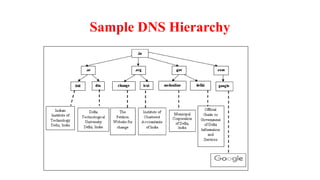
DNS
• It is implemented as a distributed system and has a hierarchical
structure ( can be represented as a tree).
• Each node represents a DNS name. Each branch below a node is a DNS
domain. DNS domain can contain hosts or other domains. The top level
domains are the root of the tree followed by the top-down sub domains.
Sample DNS Hierarchy
A URL is now considered to be a subset of Uniform Resource Identifier
(URI).
A URI is a string of characters used to identify a name or a resource on the
Internet and is recognised as a more general form of URL. It identifies a
resource either by location, or a name or both.
URL and URN (Uniform Resource Name) are two specializations of URI.
URL: Contains information about how to fetch a resource from its location.
URN: Identifies a resource by a unique and persistent name.
URI: Encompasses URLs, URNs, and other ways to identify a resource.
Internet Configuration
• Every computer connected to the Internet accesses the Internet through
an Internet Service Provider(ISP).
• The ISP, in turn, may connect to a larger network such as a Network
Service Provider (NSP) that provides backbone services to the ISP.
• These connections are collectively known as Internet Backbone.
Basic Building Blocks of the Internet
• An Internet backbone is a collection of routers (nation or worldwide) connected
by high-speed point-to-point networks.
• A Network Access Point (NAP) is a router that connects multiple backbones
(sometimes referred to as peers).
• Regional networks are smaller backbones that cover smaller geographical areas.
• A point of presence (POP) is a machine that is connected to the internet.
• Internet Service Providers (ISPs) provide dial-up or direct access to POPs.
Internet service provider offers Internet accounts to configure the network
connections either by using a dial-up access, high-speed access or wireless access.
Dial-up Access: Dial-up connection works over an ordinary phone line, using analog
modems establishing the Point-to-Point (PPP). As the personal computers are
mostly equipped with analog modems, there is usually no additional money needed
for hardware.
High-speed Access: A High-speed connection also knows as the broadband
connection comprises of divergent options such as Digital Subscriber Line (DSL),
Integrated Services Digital Network (ISDN) Lines, leased lines and cable Internet
connections.
Wireless Access: Wireless access uses Wi-Fi technology. A Wi-Fi enabled device
such as a PC, game console, cell phone, MP3 player or PDA can connect to the
Internet when within range of a wireless network connected to the Internet.
Web Browser
• A web browser is a software program that retrieves, presents, and
traverses information resources on the Web. Primary function of a
browser is to identify the URL and bring the information resource to
user.
• To identify a Web pages’ exact location, Web browsers rely on Uniform
Resource Locator (URL).
URL is a four-part addressing scheme that tells the Web browser:
• What transfer protocol to use for transporting the file.
• The domain name of he computer on which the file resides.
• The pathname of the folder or directory on the computer on which the file resides.
• The name of the file.
All major browsers allow users to access multiple information resources
at the same time in different windows or in tabs. They also include pop up
blockers to open windows with users consent.
Examples of web browsers: Internet Explorer, Netscape Navigator,
Opera, Google Chrome, Safari etc.
Basic Functions of a Web Browser
• Interpret HTML markup and present documents visually.
• Support hyperlinks in HTML documents so the clicking on such a hyperlink
can lead to the corresponding HTML file being downloaded from the same
or another web server and presented.
• Use HTML form and HTTP protocol to send requests and data to web
applications and download HTML documents.
• Maintain cookies (name-value pairs) deposited on client computers by a
web application and send all cookies back to a web site if they are deposited
by the web application at that web site.
Internet Organizations
No one actually owns the Internet, and no single person or organization controls
the Internet in its entirety.
The Internet is more of a concept than an actual tangible entity, and it relies on a
physical infrastructure that connects networks to other networks.
A number of loosely coupled organizations are concerned with governing the
development of the Internet.
ISOC: Internet Society, concerned with the long-tern coordination of the
Internet development.
IETF: Internet Engineering Task Force, concerned with producing high quality
technical documents for improving the Internet’s quality and performance.
ICANN: Internet Corporation for Assigned Names and Numbers, responsible for
IP address space allocation, gTLD (generic Top Level Domain) and
ccTLD(country code TLD), DNS management, Root server system management,
ad Protocol identifier assignment.
IANA: Internet Assigned Numbers Authority, manages different duties of ICANN,
namely the TLD, protocol number, IP address and AS number management.
IAB: Internet Architecture Board, responsible for the Internet architecture as a
whole and protocol development.
IESG: Internet Engineering Steering Group, carries out the technical
management of IEFT activities and the Internet standards process.
IRFT: Internet Research Task Force, conducts research on protocols,
applications, architecture and technology.
IRSG: Internet Research Steering Group, responsible for steering IRFT
and provides good conditions for research carried out by IRTF.
W3C: World Wide Web Consortium, develops web technology standards.
Registries: RIRs are responsible for the management and allocation of
Internet number resources, namely IP addresses and AS numbers.
Cyber Ethics
• Ethics which should be practiced to be good “cyber citizens” include:
• Communicating, sharing and contributing to e-society.
• To be respectful and courteous in communication
• Avoid harming others (do not spread pictures, viruses, gossip,
information about others or impersonate others).
• Sharing network resources, being honest and trustworthy.
• Honor property rights and copyrights

INTERconnected NETwork:Internet and Network

  • 1.
  • 2.
    Internet and theWeb • Both are different terms, not synonymous. • Internet: Huge network of networks connecting millions of computers together. • Web: One of the popular services offered on the internet. It is one of the ways in which information is disseminated and accessed over the medium of internet.
  • 3.
    Internet: The GiantWAN • It started as a federal funded research project ARPANET initiated by the Advanced Research Project Agency (ARPA), Department of Defense of the US Government in 1969. • The experiments were initially to link researchers with a remote computer centers, allowing them to share hardware and software resources such as computer disk space and databases. Later, it was renamed Internet. • As the internet evolved it become challenging to allow communication with different networks. • The problem was solved by developing the Internet Protocol (IP) which truly created networks of networks, the current architecture of the internet.
  • 4.
    Packet Switching andTCP • It operates with a technique: Packet Switching. • In packet switching, digital data is transmitted in small bundles called packets. • These packets contains information about the address, error control and the sequence in which the packets are to be sent. • There was no centralized control. If a portion of a network failed the remaining working portion will still route packets. • ARPANET used Transmission Control Protocol known as TCP for communication. • TCP ensured the messages were properly routed from sender to receiver.
  • 5.
    • As ameta-network, or network of networks, the Internet (acronym for INTERconnected NETwork) emerged to be a promising technology for providing ubiquitous access • A network is a communication system for connecting end-systems (a.k.a. “hosts,” PCs, workstations, dedicated computers, network components, nodes) and an Internetwork (INTERconnected NETwork or Internet) is an arbitrary collection of physical networks interconnected by routers to provide some sort of host-to-host packet delivery service. • The Internet is defined as the globally distributed network of networks that consists of millions of private, public, academic, business, and government networks, which are linked by an extensive range of electronic, wireless, and optical networking technologies.
  • 6.
    Classification of Networks Basedon transmission media • Wired: Unshielded Twisted-Pair cables, shielded twisted-pair cables, coxial cables, fibre-optics cables • Wireless Based on physical topology (layout of the network) • Point to point (PTP) • Multi-access: Ring, Star, or bus Based on application architecture • Peer-to-Peer • Client-Server Based on Geographical Area Covered • LAN (Local Area Networks) • MAN ( Metropolitan Area Network) • WAN ( Wide Area Network)
  • 7.
  • 8.
    Classification of Networks Basedon transmission media • Wired: Unshielded Twisted-Pair cables, shielded twisted-pair cables, coxial cables, fibre- optics cables • Wireless Based on physical topology (layout of the network) • Point to point (PTP) • Multi-access: Ring, Star, or bus Based on application architecture • Peer-to-Peer • Client-Server Based on Geographical Area Covered • LAN (Local Area Networks) • MAN ( Metropolitan Area Network) • WAN ( Wide Area Network)
  • 9.
    Based on physicaltopology (layout of the network)
  • 10.
    Classification of Networks Basedon transmission media • Wired: Unshielded Twisted-Pair cables, shielded twisted-pair cables, coxial cables, fibre- optics cables • Wireless Based on physical topology (layout of the network) • Point to point (PTP) • Multi-access: Ring, Star, or bus Based on application architecture • Peer-to-Peer • Client-Server Based on Geographical Area Covered • LAN (Local Area Networks) • MAN ( Metropolitan Area Network) • WAN ( Wide Area Network)
  • 11.
  • 12.
    Client/Server Network • Allend systems are divided into clients and servers each designed for specific purpose. • A central computer, such as a workstation or a server is a common source that provides shared services with other machines and manages resources in the network.
  • 13.
    • Clients initiatesthe communication by sending requests to server. • Clients communicate with servers only. • Servers have passive role and respond to their clients by acting on each request and returning results. • One server generally supports numerous clients.
  • 14.
    Peer-to-Peer Network • Allthe end systems have equivalent capabilities and responsibilities (equal peers). Servent =SERVer +cliENT • Either party can initiate a communication session. • No central location for authenticating users, storing files, or accessing resources. • The expected maximum number of peers that can operate on a peer to peer network is ten.
  • 15.
    Types of P2Pnetworks • Pure P2P network: No central service of any kind i.e the entire communication occurs among connected peers without any assistance. E.g.- Workgroup in Microsoft, Freenet. Gnutella • Hybrid P2P Network: Depends partially on servers or allocate selected functions to a subset of dedicated peers. Dedicated peers directly control information among the other peers. E.g.- Skype, BitTorrent
  • 16.
    Classification of Networks Basedon transmission media • Wired: Unshielded Twisted-Pair cables, shielded twisted-pair cables, coxial cables, fibre- optics cables • Wireless Based on physical topology (layout of the network) • Point to point (PTP) • Multi-access: Ring, Star, or bus Based on application architecture • Peer-to-Peer • Client-Server Based on Geographical Area Covered • LAN (Local Area Networks) • MAN ( Metropolitan Area Network) • WAN ( Wide Area Network)
  • 17.
    LAN • Used forcommunicating among computer devices usually within an office building or home. • Spanning a few hundred meters, and no more than a mile. • It is fast, with speeds from 10 Mbps to 10 Gbps • Minimal infrastructure requirements, low cost and high security. • Can be either wired or wireless. • Nodes in LAN are linked together with certain topology.
  • 18.
    MAN • Optimized fora larger geographical area than a LAN • Ranging from 5 to 50km diametrically. • Allows sharing of regional resources. • Might be owned or operated by single organization. • Speed achieved is as high as in LAN, it requires high speed connections, such as fibre optics. • High installation and operational costs.
  • 19.
    WAN • Covers largeareas such as country, continent or even whole world. • Two or multiple LANs connected together using devices such as bridges, routers or gateways. • To cover distance, WANs may transmit data over leased high-speed phone lines or wireless links such as satellites.
  • 20.
  • 21.
    OSI Model • Approvedas an international standard for communications architecture in 1984. • It divides the problem of moving information between computers over a network medium into seven layers. • Each layer provides a service to the layer above it in the protocol specification. 1. Application 2. Presentation 3. Session 4. Transport 5. Network 6. Data Link 7. Physical
  • 23.
    TCP/IP Model • TCP/IPmodel was established to defined protocol suite on which the Internet depended. • Though, OSI reference model was a well-recognized model, the TCP/IP model provided an application viewpoint of the network. • The OSI model conceptually defined the services, interfaces and protocols; the TCP/IP model provided its successful implementation. OSI REFERENCE MODEL TCP/IP CONCEPTUAL LAYERS 7. APPLICATION 4. APPLICATION 6. PRESENTATION 5. SESSION 4. TRANSPORT 3. TRANSPORT 3. NETWORK 2. INTERNET (NETWORK) 2. DATA LINK 1. NETWORK INTERFACE 1. PHYSICAL
  • 24.
    Protocol Layering To communicateusing the internet system, a host must implement a layered set of protocols comprising the Internet protocol suite.
  • 25.
    Internet Protocol Stack Theprotocol layers used in the Internet architecture are as follows: User Application Program (FTP, SMTP, HTTP, Telnet, DNS) Transmission Control Protocol (TCP) Internet Protocol (IP) Network Interface (Ethernet) Hardware (Physical Connection)
  • 26.
    Role of eachlayer Application Layer: It combines the functions of the two top layers- Presentation and Application of the OSI model. There are two categories of application layer protocols: user protocols that provide service directly to users and the support protocols that provide common system function. Most common internet user protocols are: Telnet, FTP, SMTP, HTTP. Support protocols are used for host name mapping, booting and management include Simple Network Management Protocol (SNMP). Transport Layer: It is responsible for reliable source to destination delivery of the entire message. There are two primary Transport Layer protocol- Transmission Control Protocol(TCP) and User Datagram Protocol (UDP). TCP is reliable connection-oriented protocol whereas UDP is a connectionless protocol.
  • 27.
    Internet Layer: AllInternet transport protocols use the Internet Protocol (IP) to carry data from source host to destination host. IP is connectionless service with no end-to-end delivery guarantee. The Internet Control Message Protocol (ICMP) provides error reporting, congestion reporting , and first-hop router redirection. Link Layer (Network Interface): To communicate on a directly connected network, a host must implement the communication protocol used to interface to that network. The link layer protocol provides this interface. It specifies how to organise data into frames and how to deliver a frame over a network. Its responsibility is correct delivery of message. Physical Layer: Provides physical interface for transmission of information. Defines rules by which bits are passed from one system to another on a physical communication medium. It covers all mechanical, electrical, functional and procedural aspects for physical communication.
  • 28.
    The Hourglass Model DepictsIP as the waist of the hourglass of the Internet protocol architecture with multiple higher-layer protocols, multiple lower-layer protocols and only one protocol at the network layer.
  • 29.
    Curse of NarrowWaist: As the number of service interfaces doubles, changes are desired below and above the waist to avoid interoperability problems. Moreover, below the waist bulge is apparent too as the lower layers mostly seem to just make IP’s harder with cells, circuits, QoS, multicasts, large clouds, opaque clouds. Many researchers have suggested a promising fitness goal to trim down from an hourglass to wineglass architecture.
  • 30.
    Internet Addressing –IPAddress • IP address is a unique global address for a network interface. • It is 32-bit logical address, composed of four 8-bit fields, called octets. • Each octet represents a decimal number in the range 0-255. For eg- 17.112.152.32 • It is divided into two parts: a prefix and a suffix. • Prefix: Identifies the physical network to which the host is attached. • Suffix: Identifies a specific computer(host/node) on the network. • A single address in never assigned to more than one computer. • Network number (prefix) assignments must be coordinated globally whereas suffixes are assigned locally without global coordination.
  • 31.
    Uniform Resource Locators(URL) • It specifies the internet address of any resource. • They are translated into numeric addresses using a Domain Name Server (DNS). • When we type a URL, this application-layer service called DNS translates the human friendly URL into the computer friendly IP address. DNS Performs this translation by consulting the databases maintained by the Domain Name Registrars. • DNS is the “phone book” of the internet: look up a name, and find its number. DNS associates host names to their equivalent IP address. • The domain name or IP address gives the destination location for the URL.
  • 32.
    The generic anatomyof a URL is: protocol://domain name/path/filename • Protocol specifies the transfer protocol that will be used for the retrieval of desired resource. Example- http, https, ftp. • Domain Name is also known as website name or host name. It is divided into three parts: www (optional), second level name (dtu.ac in www.dtu.ac.in), and top level name. It can be organizational 3-character code (.com, .org, .edu) or geographical 2 character code (.uk, .au). • Path is the directory or the folder on the server. File name is the file name within that directory, with an extension as html or php etc.
  • 33.
    DNS • It isimplemented as a distributed system and has a hierarchical structure ( can be represented as a tree). • Each node represents a DNS name. Each branch below a node is a DNS domain. DNS domain can contain hosts or other domains. The top level domains are the root of the tree followed by the top-down sub domains.
  • 34.
  • 35.
    A URL isnow considered to be a subset of Uniform Resource Identifier (URI). A URI is a string of characters used to identify a name or a resource on the Internet and is recognised as a more general form of URL. It identifies a resource either by location, or a name or both. URL and URN (Uniform Resource Name) are two specializations of URI. URL: Contains information about how to fetch a resource from its location. URN: Identifies a resource by a unique and persistent name. URI: Encompasses URLs, URNs, and other ways to identify a resource.
  • 36.
    Internet Configuration • Everycomputer connected to the Internet accesses the Internet through an Internet Service Provider(ISP). • The ISP, in turn, may connect to a larger network such as a Network Service Provider (NSP) that provides backbone services to the ISP. • These connections are collectively known as Internet Backbone.
  • 37.
    Basic Building Blocksof the Internet • An Internet backbone is a collection of routers (nation or worldwide) connected by high-speed point-to-point networks. • A Network Access Point (NAP) is a router that connects multiple backbones (sometimes referred to as peers). • Regional networks are smaller backbones that cover smaller geographical areas. • A point of presence (POP) is a machine that is connected to the internet. • Internet Service Providers (ISPs) provide dial-up or direct access to POPs.
  • 38.
    Internet service provideroffers Internet accounts to configure the network connections either by using a dial-up access, high-speed access or wireless access. Dial-up Access: Dial-up connection works over an ordinary phone line, using analog modems establishing the Point-to-Point (PPP). As the personal computers are mostly equipped with analog modems, there is usually no additional money needed for hardware. High-speed Access: A High-speed connection also knows as the broadband connection comprises of divergent options such as Digital Subscriber Line (DSL), Integrated Services Digital Network (ISDN) Lines, leased lines and cable Internet connections. Wireless Access: Wireless access uses Wi-Fi technology. A Wi-Fi enabled device such as a PC, game console, cell phone, MP3 player or PDA can connect to the Internet when within range of a wireless network connected to the Internet.
  • 39.
    Web Browser • Aweb browser is a software program that retrieves, presents, and traverses information resources on the Web. Primary function of a browser is to identify the URL and bring the information resource to user. • To identify a Web pages’ exact location, Web browsers rely on Uniform Resource Locator (URL).
  • 40.
    URL is afour-part addressing scheme that tells the Web browser: • What transfer protocol to use for transporting the file. • The domain name of he computer on which the file resides. • The pathname of the folder or directory on the computer on which the file resides. • The name of the file. All major browsers allow users to access multiple information resources at the same time in different windows or in tabs. They also include pop up blockers to open windows with users consent. Examples of web browsers: Internet Explorer, Netscape Navigator, Opera, Google Chrome, Safari etc.
  • 41.
    Basic Functions ofa Web Browser • Interpret HTML markup and present documents visually. • Support hyperlinks in HTML documents so the clicking on such a hyperlink can lead to the corresponding HTML file being downloaded from the same or another web server and presented. • Use HTML form and HTTP protocol to send requests and data to web applications and download HTML documents. • Maintain cookies (name-value pairs) deposited on client computers by a web application and send all cookies back to a web site if they are deposited by the web application at that web site.
  • 42.
    Internet Organizations No oneactually owns the Internet, and no single person or organization controls the Internet in its entirety. The Internet is more of a concept than an actual tangible entity, and it relies on a physical infrastructure that connects networks to other networks. A number of loosely coupled organizations are concerned with governing the development of the Internet. ISOC: Internet Society, concerned with the long-tern coordination of the Internet development. IETF: Internet Engineering Task Force, concerned with producing high quality technical documents for improving the Internet’s quality and performance.
  • 43.
    ICANN: Internet Corporationfor Assigned Names and Numbers, responsible for IP address space allocation, gTLD (generic Top Level Domain) and ccTLD(country code TLD), DNS management, Root server system management, ad Protocol identifier assignment. IANA: Internet Assigned Numbers Authority, manages different duties of ICANN, namely the TLD, protocol number, IP address and AS number management. IAB: Internet Architecture Board, responsible for the Internet architecture as a whole and protocol development. IESG: Internet Engineering Steering Group, carries out the technical management of IEFT activities and the Internet standards process.
  • 44.
    IRFT: Internet ResearchTask Force, conducts research on protocols, applications, architecture and technology. IRSG: Internet Research Steering Group, responsible for steering IRFT and provides good conditions for research carried out by IRTF. W3C: World Wide Web Consortium, develops web technology standards. Registries: RIRs are responsible for the management and allocation of Internet number resources, namely IP addresses and AS numbers.
  • 45.
    Cyber Ethics • Ethicswhich should be practiced to be good “cyber citizens” include: • Communicating, sharing and contributing to e-society. • To be respectful and courteous in communication • Avoid harming others (do not spread pictures, viruses, gossip, information about others or impersonate others). • Sharing network resources, being honest and trustworthy. • Honor property rights and copyrights