Presented By
Christopher Ignace
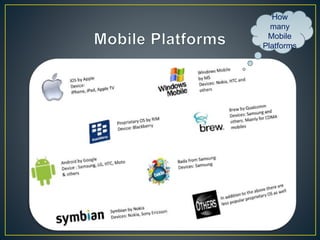
How
many
Mobile
Platforms
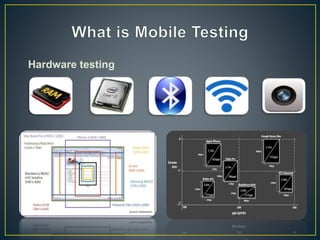
Hardware testing
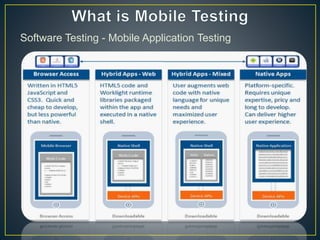
Software Testing - Mobile Application Testing
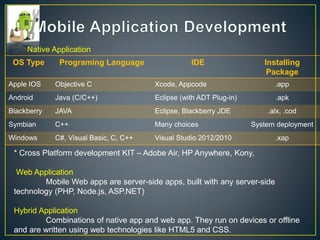
OS Type Programing Language IDE Installing
Package
Apple IOS Objective C Xcode, Appcode .app
Android Java (C/C++) Eclipse (with ADT Plug-in) .apk
Blackberry JAVA Eclipse, Blackberry JDE .alx, .cod
Symbian C++ Many choices System deployment
Windows C#, Visual Basic, C, C++ Visual Studio 2012/2010 .xap
Native Application
* Cross Platform development KIT – Adobe Air, HP Anywhere, Kony,
Web Application
Mobile Web apps are server-side apps, built with any server-side
technology (PHP, Node.js, ASP.NET)
Hybrid Application
Combinations of native app and web app. They run on devices or offline
and are written using web technologies like HTML5 and CSS.
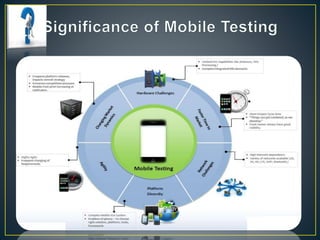
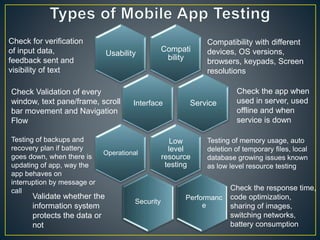
Compati
bility
Usability
Interface Service
Low
level
resource
testing
Operational
Security
Performanc
e
Check for verification
of input data,
feedback sent and
visibility of text
Compatibility with different
devices, OS versions,
browsers, keypads, Screen
resolutions
Check Validation of every
window, text pane/frame, scroll
bar movement and Navigation
Flow
Check the app when
used in server, used
offline and when
service is down
Testing of backups and
recovery plan if battery
goes down, when there is
updating of app, way the
app behaves on
interruption by message or
call
Testing of memory usage, auto
deletion of temporary files, local
database growing issues known
as low level resource testing
Validate whether the
information system
protects the data or
not
Check the response time,
code optimization,
sharing of images,
switching networks,
battery consumption
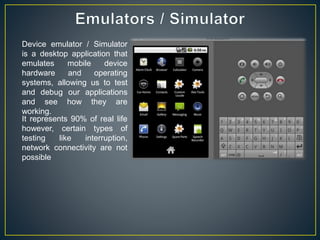
Device emulator / Simulator
is a desktop application that
emulates mobile device
hardware and operating
systems, allowing us to test
and debug our applications
and see how they are
working.
It represents 90% of real life
however, certain types of
testing like interruption,
network connectivity are not
possible
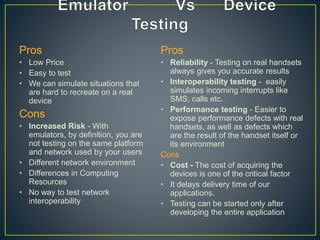
Pros
• Low Price
• Easy to test
• We can simulate situations that
are hard to recreate on a real
device
Cons
• Increased Risk - With
emulators, by definition, you are
not testing on the same platform
and network used by your users
• Different network environment
• Differences in Computing
Resources
• No way to test network
interoperability
Pros
• Reliability - Testing on real handsets
always gives you accurate results
• Interoperability testing - easily
simulates incoming interrupts like
SMS, calls etc.
• Performance testing - Easier to
expose performance defects with real
handsets, as well as defects which
are the result of the handset itself or
its environment
Cons
• Cost - The cost of acquiring the
devices is one of the critical factor
• It delays delivery time of our
applications.
• Testing can be started only after
developing the entire application
• Emulators are very suitable for the initial stages of
application development. However, to avoid the costly
scenario of releasing a business-critical application with
defects, enterprises should perform the major part of their
mobile testing on real devices before commercial
availability
• Each organization will need to determine at what stage
to introduce real devices, how many devices are
sufficient to cover market needs
Christopher

Mobile Testing

  • 1.
  • 4.
  • 5.
  • 6.
    Software Testing -Mobile Application Testing
  • 7.
    OS Type ProgramingLanguage IDE Installing Package Apple IOS Objective C Xcode, Appcode .app Android Java (C/C++) Eclipse (with ADT Plug-in) .apk Blackberry JAVA Eclipse, Blackberry JDE .alx, .cod Symbian C++ Many choices System deployment Windows C#, Visual Basic, C, C++ Visual Studio 2012/2010 .xap Native Application * Cross Platform development KIT – Adobe Air, HP Anywhere, Kony, Web Application Mobile Web apps are server-side apps, built with any server-side technology (PHP, Node.js, ASP.NET) Hybrid Application Combinations of native app and web app. They run on devices or offline and are written using web technologies like HTML5 and CSS.
  • 9.
    Compati bility Usability Interface Service Low level resource testing Operational Security Performanc e Check forverification of input data, feedback sent and visibility of text Compatibility with different devices, OS versions, browsers, keypads, Screen resolutions Check Validation of every window, text pane/frame, scroll bar movement and Navigation Flow Check the app when used in server, used offline and when service is down Testing of backups and recovery plan if battery goes down, when there is updating of app, way the app behaves on interruption by message or call Testing of memory usage, auto deletion of temporary files, local database growing issues known as low level resource testing Validate whether the information system protects the data or not Check the response time, code optimization, sharing of images, switching networks, battery consumption
  • 10.
    Device emulator /Simulator is a desktop application that emulates mobile device hardware and operating systems, allowing us to test and debug our applications and see how they are working. It represents 90% of real life however, certain types of testing like interruption, network connectivity are not possible
  • 11.
    Pros • Low Price •Easy to test • We can simulate situations that are hard to recreate on a real device Cons • Increased Risk - With emulators, by definition, you are not testing on the same platform and network used by your users • Different network environment • Differences in Computing Resources • No way to test network interoperability Pros • Reliability - Testing on real handsets always gives you accurate results • Interoperability testing - easily simulates incoming interrupts like SMS, calls etc. • Performance testing - Easier to expose performance defects with real handsets, as well as defects which are the result of the handset itself or its environment Cons • Cost - The cost of acquiring the devices is one of the critical factor • It delays delivery time of our applications. • Testing can be started only after developing the entire application
  • 12.
    • Emulators arevery suitable for the initial stages of application development. However, to avoid the costly scenario of releasing a business-critical application with defects, enterprises should perform the major part of their mobile testing on real devices before commercial availability • Each organization will need to determine at what stage to introduce real devices, how many devices are sufficient to cover market needs
  • 13.