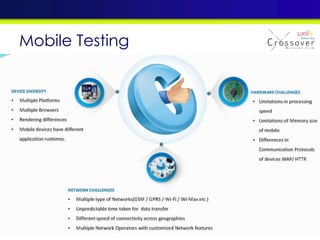

Mobile testing trend
Agenda
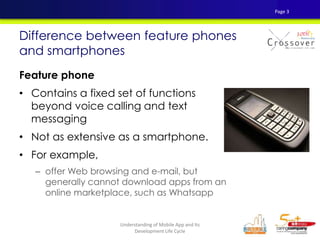
Feature phone
• Contains a fixed set of functions
beyond voice calling and text
messaging
• Not as extensive as a smartphone.
• For example,
– offer Web browsing and e-mail, but
generally cannot download apps from an
online marketplace, such as Whatsapp
Difference between feature phones
and smartphones
Page 3
Understanding of Mobile App and Its
Development Life Cycle
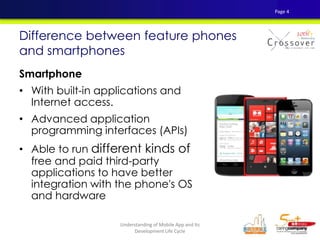
Smartphone
• With built-in applications and
Internet access.
• Advanced application
programming interfaces (APIs)
• Able to run different kinds of
free and paid third-party
applications to have better
integration with the phone's OS
and hardware
Difference between feature phones
and smartphones
Page 4
Understanding of Mobile App and Its
Development Life Cycle
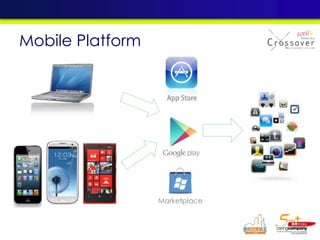
Marketplace
Mobile Platform
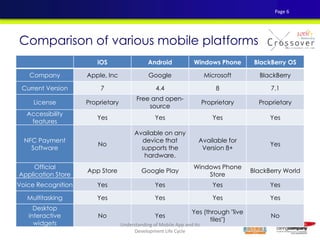
iOS Android Windows Phone BlackBerry OS
Company Apple, Inc Google Microsoft BlackBerry
Current Version 7 4.4 8 7.1
License Proprietary
Free and open-
source
Proprietary Proprietary
Accessibility
features
Yes Yes Yes Yes
NFC Payment
Software
No
Available on any
device that
supports the
hardware.
Available for
Version 8+
Yes
Official
Application Store
App Store Google Play
Windows Phone
Store
BlackBerry World
Voice Recognition Yes Yes Yes Yes
Multitasking Yes Yes Yes Yes
Desktop
interactive
widgets
No Yes
Yes (through "live
tiles")
No
Comparison of various mobile platforms
Page 6
Understanding of Mobile App and Its
Development Life Cycle
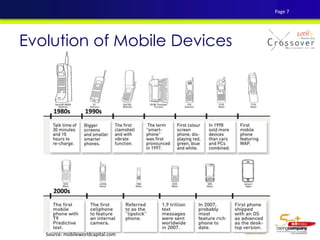
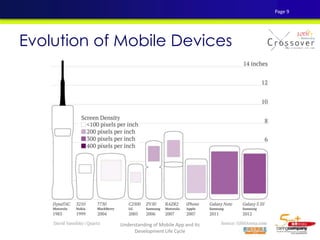
Evolution of Mobile Devices
Source: mobileworldcapital.com
Page 7
Evolution of Mobile Devices
Page 8
Understanding of Mobile App and Its
Development Life Cycle
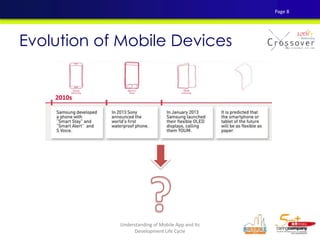
Evolution of Mobile Devices
Page 9
Understanding of Mobile App and Its
Development Life Cycle
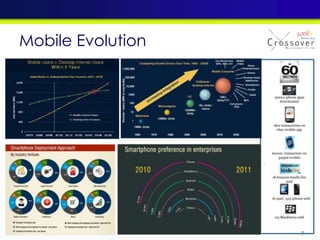
Mobile Evolution
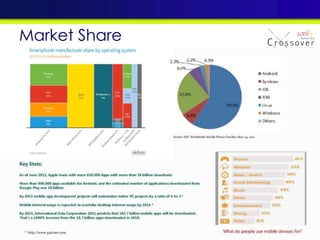
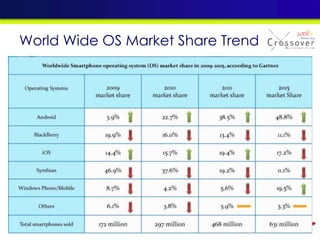
Market Share
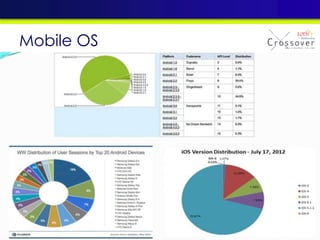
Mobile OS
World Wide OS Market Share Trend
• Type of Apps:
– Communication, calendar, clock, calculator
– Photos, weather, maps
– Games, eBooks
– Tablet applications
• Total Apps Number:
– Over 800,000 Apps available on Google Play
(2013 May)
– Around 850,000 mobile apps in the Apple App
Store (2013 May)
Evolution of Mobile Applications
Page 14
Understanding of Mobile App and Its
Development Life Cycle
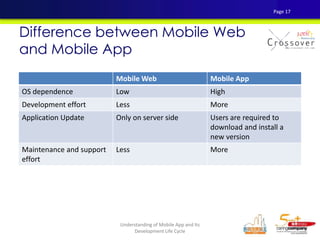
Difference between Mobile Web
and Mobile App
What is a Mobile Web?
• Similar to any other website, designed for the
smaller handheld display and touch-screen
interface
• Linked and accessed over the Internet through
mobile device’s web browser
What is a Native App?
• A native mobile app is installed directly onto
the device
• Download and install through an online store or
marketplace for a given operating system.
Page 15
Understanding of Mobile App and Its
Development Life Cycle
Difference between Mobile Web
and Mobile App
Mobile Web Mobile App
Storage of application In server side Download and install to
the mobile device
Activation of application Access through mobile
browser
Directly access by clicking
the icon
Require user to install any
application
No Yes
Data traffic over network More Less
Integration with phone
specific features
No Yes
User experience Normal Richer
Page 16
Understanding of Mobile App and Its
Development Life Cycle
Difference between Mobile Web
and Mobile App
Mobile Web Mobile App
OS dependence Low High
Development effort Less More
Application Update Only on server side Users are required to
download and install a
new version
Maintenance and support
effort
Less More
Page 17
Understanding of Mobile App and Its
Development Life Cycle
APP DEVELOPMENT
METHODOLOGIES
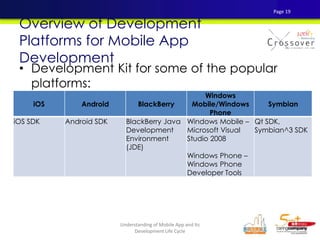
• Development Kit for some of the popular
platforms:
Overview of Development
Platforms for Mobile App
Development
iOS Android BlackBerry
Windows
Mobile/Windows
Phone
Symbian
iOS SDK Android SDK BlackBerry Java
Development
Environment
(JDE)
Windows Mobile –
Microsoft Visual
Studio 2008
Windows Phone –
Windows Phone
Developer Tools
Qt SDK,
Symbian^3 SDK
Page 19
Understanding of Mobile App and Its
Development Life Cycle
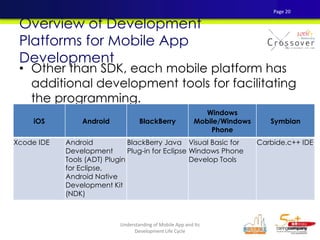
• Other than SDK, each mobile platform has
additional development tools for facilitating
the programming.
Overview of Development
Platforms for Mobile App
Development
iOS Android BlackBerry
Windows
Mobile/Windows
Phone
Symbian
Xcode IDE Android
Development
Tools (ADT) Plugin
for Eclipse,
Android Native
Development Kit
(NDK)
BlackBerry Java
Plug-in for Eclipse
Visual Basic for
Windows Phone
Develop Tools
Carbide.c++ IDE
Page 20
Understanding of Mobile App and Its
Development Life Cycle
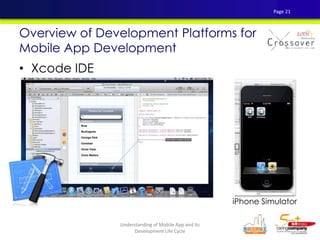
• Xcode IDE
Overview of Development Platforms for
Mobile App Development
iPhone Simulator
Page 21
Understanding of Mobile App and Its
Development Life Cycle
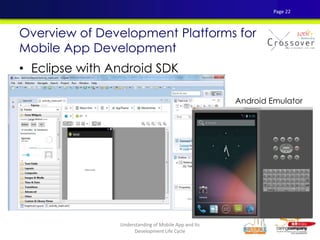
• Eclipse with Android SDK
Overview of Development Platforms for
Mobile App Development
Android Emulator
Page 22
Understanding of Mobile App and Its
Development Life Cycle
• Developing multiple mobile apps with single
source code
• Some tools use web standards for development
while some need to use proprietary
programming languages.
• For development tools using web standards,
they work in two approaches.
– generate the codes as embedded web content
within the mobile app (e.g. PhoneGap)
– recompile the web codes into native codes (e.g.
Titanium Mobile)
Cross-Platform Development Tools
Page 23
Understanding of Mobile App and Its
Development Life Cycle
These tools have some common limitations:
• Most of the tools cannot support all common
mobile OS platforms.
• Although web standards are used by some of
these tools, some advanced features like AJAX
are not supported by tools like MotherApp.
• Performance of mobile apps developed by
these tools may not as good as those
developed by native programming language.
• Most of the tools do not provide API for
interfacing with Bluetooth and video capture.
Cross-Platform Development Tools
Page 24
Understanding of Mobile App and Its
Development Life Cycle
PhoneGap
Titanium
Mobile
MotherApp Rhodes Corona
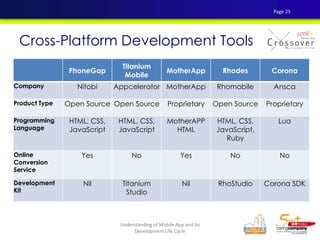
Company Nitobi Appcelerator MotherApp Rhomobile Ansca
Product Type Open Source Open Source Proprietary Open Source Proprietary
Programming
Language
HTML, CSS,
JavaScript
HTML, CSS,
JavaScript
MotherAPP
HTML
HTML, CSS,
JavaScript,
Ruby
Lua
Online
Conversion
Service
Yes No Yes No No
Development
Kit
Nil Titanium
Studio
Nil RhoStudio Corona SDK
Cross-Platform Development Tools
Page 25
Understanding of Mobile App and Its
Development Life Cycle
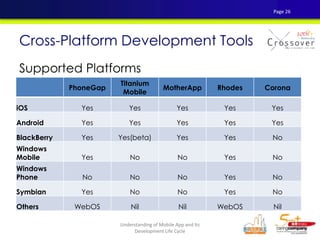
Supported Platforms
Cross-Platform Development Tools
PhoneGap
Titanium
Mobile
MotherApp Rhodes Corona
iOS Yes Yes Yes Yes Yes
Android Yes Yes Yes Yes Yes
BlackBerry Yes Yes(beta) Yes Yes No
Windows
Mobile Yes No No Yes No
Windows
Phone No No No Yes No
Symbian Yes No No Yes No
Others WebOS Nil Nil WebOS Nil
Page 26
Understanding of Mobile App and Its
Development Life Cycle
MOBILE APPLICATION TESTING
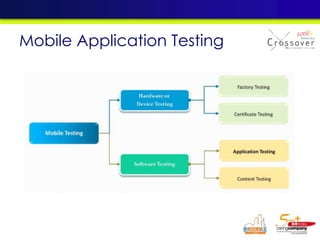
Mobile Application Testing
Mobile Testing
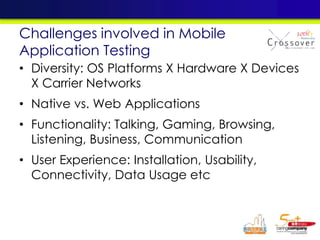
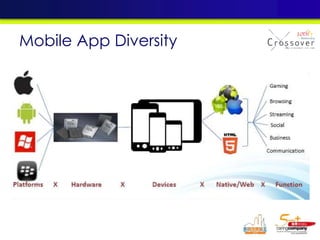
• Diversity: OS Platforms X Hardware X Devices
X Carrier Networks
• Native vs. Web Applications
• Functionality: Talking, Gaming, Browsing,
Listening, Business, Communication
• User Experience: Installation, Usability,
Connectivity, Data Usage etc
Challenges involved in Mobile
Application Testing
Mobile App Diversity
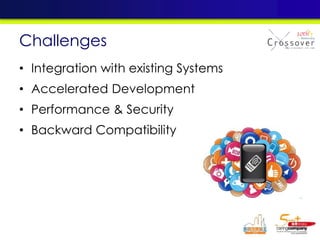
• Integration with existing Systems
• Accelerated Development
• Performance & Security
• Backward Compatibility
Challenges
Customers Challenges in Mobile
Testing
• Variety of mobile devices in market and multiple
manufacturers
• Coping with the short lifestyle of the mobile
application in market
• Huge variety of hardware capabilities
• Shorter duration of device life in the market
• Variety of network models like 2G/3G/4G/Wi-Fi
• Huge investment and high time frame to set up an
test lab
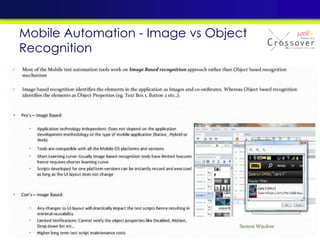
• Most of the tools are image based comparison
tool
• One test tool may not support all platforms versions
• Testing on latest technologies like HTML5, NFC, etc.
• High rise of localized app capability
• Choice between simulators and real devices for
testing
• Test the application with different models if
possible
• Conduct testing on different connection
speeds
– GPRS for low connection speed and
– 3G/HSPA/Wi-Fi for high connection speed.
• Conduct testing in new mobile OS version when
a new mobile OS version upgrades.
• Make sure that the application has undergone
full testing with bug-free before submitting to a
mobile application store.
Testing Strategy for Mobile
App
Page 34
Understanding of Mobile App and Its
Development Life Cycle
• Quick swipe (user experience, quit app
scenarios)
• Orientation
• Different devices (resolutions, compatibility)
• No network scenario
• Features Test (esp. cross app cases)
• Stress Test (including server side)
Testing Strategy for Mobile
App
Page 35
Understanding of Mobile App and Its
Development Life Cycle
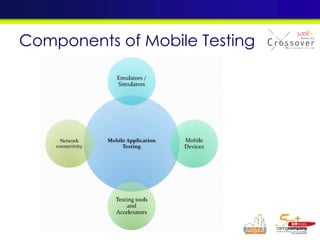
Components of Mobile Testing
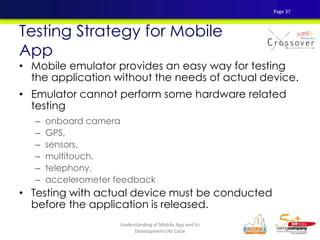
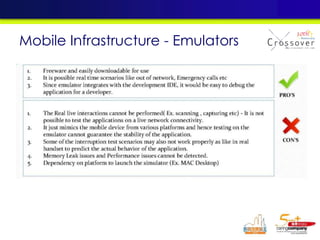
• Mobile emulator provides an easy way for testing
the application without the needs of actual device.
• Emulator cannot perform some hardware related
testing
– onboard camera
– GPS,
– sensors,
– multitouch,
– telephony,
– accelerometer feedback
• Testing with actual device must be conducted
before the application is released.
Testing Strategy for Mobile
App
Page 37
Understanding of Mobile App and Its
Development Life Cycle
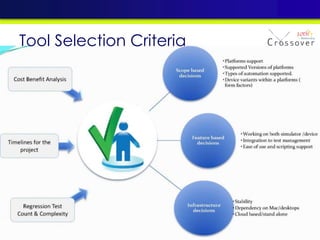
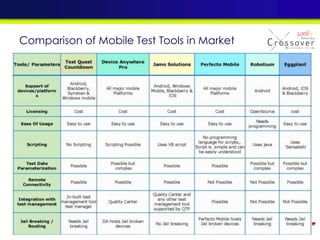
Tool Selection Criteria
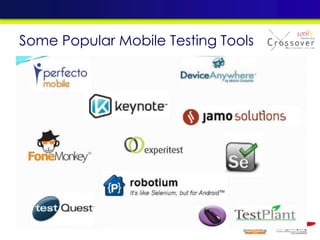
Some Popular Mobile Testing Tools
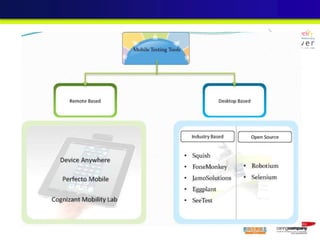
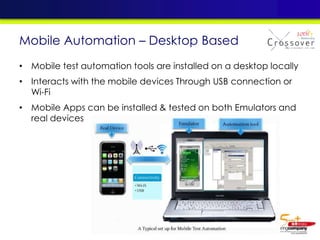
Mobile Automation – Desktop Based
• Mobile test automation tools are installed on a desktop locally
• Interacts with the mobile devices Through USB connection or
Wi-Fi
• Mobile Apps can be installed & tested on both Emulators and
real devices
Mobile Automation - Image vs Object
Recognition
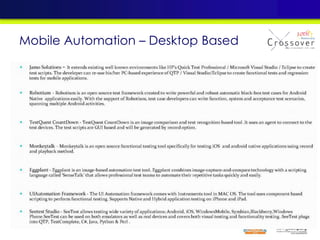
Mobile Automation – Desktop Based
Comparison of Mobile Test Tools in Market
• Stable Automation Framework
useful across multiple
Platforms
• Use Emulators for Automation
early in the development
cycle
• Use Real device for
automation only to emulate
real time usage
When to plan Automation?
1. Define the automation scope
2. Select the Test Automation Tool suitable for
your application and supports multiple Oss
3. Start by building automation scripts for
smoke testing
4. Gradually build a basic test suite for
regression testing that represents business
critical use cases
How to implement Automation
Tools?
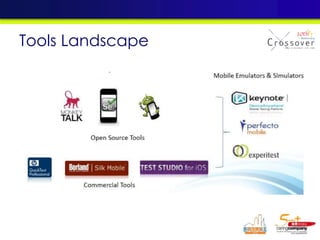
Tools Landscape
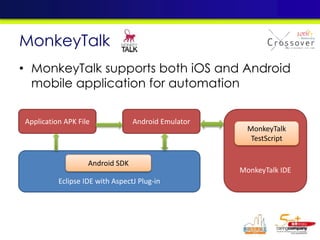
• MonkeyTalk supports both iOS and Android
mobile application for automation
MonkeyTalk
Application APK File Android Emulator
MonkeyTalk IDE
MonkeyTalk
TestScript
Eclipse IDE with AspectJ Plug-in
Android SDK
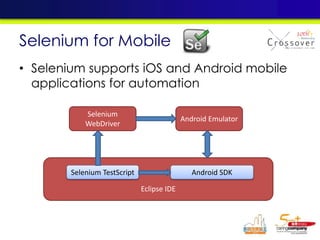
• Selenium supports iOS and Android mobile
applications for automation
Selenium for Mobile
Eclipse IDE
Selenium
WebDriver
Android Emulator
Selenium TestScript Android SDK
• Supports Android applications for
Auotmation
• Robotium RC can be utilized to run
testscripts in a Test Lab setup
Robotium
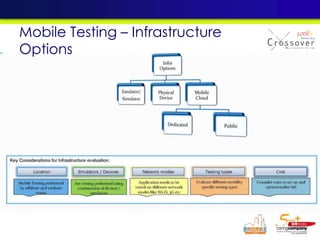
Mobile Testing – Infrastructure
Options
Mobile Infrastructure - Emulators
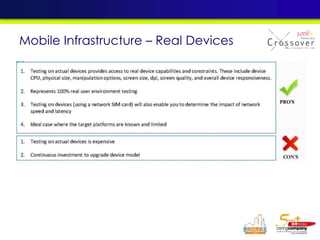
Mobile Infrastructure – Real Devices
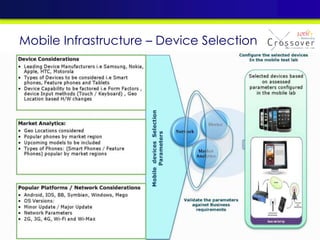
Mobile Infrastructure – Device Selection
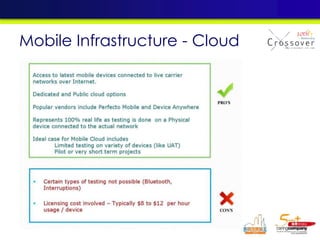
Mobile Infrastructure - Cloud
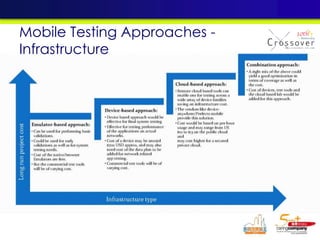
Mobile Testing Approaches -
Infrastructure
• Test Early and Often
• Create matrix of Platforms, Device, Network
Connections (2G, 3G, wi-fi, LTE, etc.),
Carriers for Testing (Including different OS
versions)
• Test for Performance and Security
• Keep Target Audience in mind while testing
• Tool selection should take into account
emulator and real device support across
platfomrs
Best Practices
CASE STUDY
搜尋孫中山
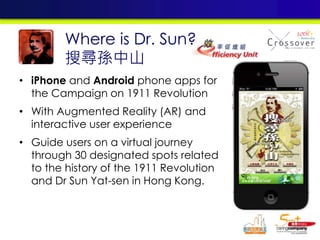
• iPhone and Android phone apps for
the Campaign on 1911 Revolution
• With Augmented Reality (AR) and
interactive user experience
• Guide users on a virtual journey
through 30 designated spots related
to the history of the 1911 Revolution
and Dr Sun Yat-sen in Hong Kong.
Where is Dr. Sun?
搜尋孫中山
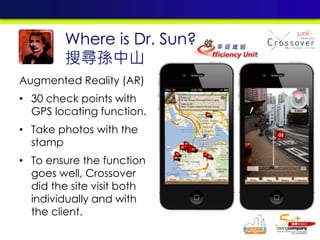
Augmented Reality (AR)
• 30 check points with
GPS locating function.
• Take photos with the
stamp
• To ensure the function
goes well, Crossover
did the site visit both
individually and with
the client.
Where is Dr. Sun?
搜尋孫中山
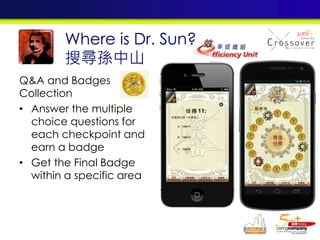
Q&A and Badges
Collection
• Answer the multiple
choice questions for
each checkpoint and
earn a badge
• Get the Final Badge
within a specific area
Where is Dr. Sun?
搜尋孫中山
-END-

Mobile testing

  • 1.
  • 2.
  • 3.
    Feature phone • Containsa fixed set of functions beyond voice calling and text messaging • Not as extensive as a smartphone. • For example, – offer Web browsing and e-mail, but generally cannot download apps from an online marketplace, such as Whatsapp Difference between feature phones and smartphones Page 3 Understanding of Mobile App and Its Development Life Cycle
  • 4.
    Smartphone • With built-inapplications and Internet access. • Advanced application programming interfaces (APIs) • Able to run different kinds of free and paid third-party applications to have better integration with the phone's OS and hardware Difference between feature phones and smartphones Page 4 Understanding of Mobile App and Its Development Life Cycle
  • 5.
  • 6.
    iOS Android WindowsPhone BlackBerry OS Company Apple, Inc Google Microsoft BlackBerry Current Version 7 4.4 8 7.1 License Proprietary Free and open- source Proprietary Proprietary Accessibility features Yes Yes Yes Yes NFC Payment Software No Available on any device that supports the hardware. Available for Version 8+ Yes Official Application Store App Store Google Play Windows Phone Store BlackBerry World Voice Recognition Yes Yes Yes Yes Multitasking Yes Yes Yes Yes Desktop interactive widgets No Yes Yes (through "live tiles") No Comparison of various mobile platforms Page 6 Understanding of Mobile App and Its Development Life Cycle
  • 7.
    Evolution of MobileDevices Source: mobileworldcapital.com Page 7
  • 8.
    Evolution of MobileDevices Page 8 Understanding of Mobile App and Its Development Life Cycle
  • 9.
    Evolution of MobileDevices Page 9 Understanding of Mobile App and Its Development Life Cycle
  • 10.
  • 11.
  • 12.
  • 13.
    World Wide OSMarket Share Trend
  • 14.
    • Type ofApps: – Communication, calendar, clock, calculator – Photos, weather, maps – Games, eBooks – Tablet applications • Total Apps Number: – Over 800,000 Apps available on Google Play (2013 May) – Around 850,000 mobile apps in the Apple App Store (2013 May) Evolution of Mobile Applications Page 14 Understanding of Mobile App and Its Development Life Cycle
  • 15.
    Difference between MobileWeb and Mobile App What is a Mobile Web? • Similar to any other website, designed for the smaller handheld display and touch-screen interface • Linked and accessed over the Internet through mobile device’s web browser What is a Native App? • A native mobile app is installed directly onto the device • Download and install through an online store or marketplace for a given operating system. Page 15 Understanding of Mobile App and Its Development Life Cycle
  • 16.
    Difference between MobileWeb and Mobile App Mobile Web Mobile App Storage of application In server side Download and install to the mobile device Activation of application Access through mobile browser Directly access by clicking the icon Require user to install any application No Yes Data traffic over network More Less Integration with phone specific features No Yes User experience Normal Richer Page 16 Understanding of Mobile App and Its Development Life Cycle
  • 17.
    Difference between MobileWeb and Mobile App Mobile Web Mobile App OS dependence Low High Development effort Less More Application Update Only on server side Users are required to download and install a new version Maintenance and support effort Less More Page 17 Understanding of Mobile App and Its Development Life Cycle
  • 18.
  • 19.
    • Development Kitfor some of the popular platforms: Overview of Development Platforms for Mobile App Development iOS Android BlackBerry Windows Mobile/Windows Phone Symbian iOS SDK Android SDK BlackBerry Java Development Environment (JDE) Windows Mobile – Microsoft Visual Studio 2008 Windows Phone – Windows Phone Developer Tools Qt SDK, Symbian^3 SDK Page 19 Understanding of Mobile App and Its Development Life Cycle
  • 20.
    • Other thanSDK, each mobile platform has additional development tools for facilitating the programming. Overview of Development Platforms for Mobile App Development iOS Android BlackBerry Windows Mobile/Windows Phone Symbian Xcode IDE Android Development Tools (ADT) Plugin for Eclipse, Android Native Development Kit (NDK) BlackBerry Java Plug-in for Eclipse Visual Basic for Windows Phone Develop Tools Carbide.c++ IDE Page 20 Understanding of Mobile App and Its Development Life Cycle
  • 21.
    • Xcode IDE Overviewof Development Platforms for Mobile App Development iPhone Simulator Page 21 Understanding of Mobile App and Its Development Life Cycle
  • 22.
    • Eclipse withAndroid SDK Overview of Development Platforms for Mobile App Development Android Emulator Page 22 Understanding of Mobile App and Its Development Life Cycle
  • 23.
    • Developing multiplemobile apps with single source code • Some tools use web standards for development while some need to use proprietary programming languages. • For development tools using web standards, they work in two approaches. – generate the codes as embedded web content within the mobile app (e.g. PhoneGap) – recompile the web codes into native codes (e.g. Titanium Mobile) Cross-Platform Development Tools Page 23 Understanding of Mobile App and Its Development Life Cycle
  • 24.
    These tools havesome common limitations: • Most of the tools cannot support all common mobile OS platforms. • Although web standards are used by some of these tools, some advanced features like AJAX are not supported by tools like MotherApp. • Performance of mobile apps developed by these tools may not as good as those developed by native programming language. • Most of the tools do not provide API for interfacing with Bluetooth and video capture. Cross-Platform Development Tools Page 24 Understanding of Mobile App and Its Development Life Cycle
  • 25.
    PhoneGap Titanium Mobile MotherApp Rhodes Corona CompanyNitobi Appcelerator MotherApp Rhomobile Ansca Product Type Open Source Open Source Proprietary Open Source Proprietary Programming Language HTML, CSS, JavaScript HTML, CSS, JavaScript MotherAPP HTML HTML, CSS, JavaScript, Ruby Lua Online Conversion Service Yes No Yes No No Development Kit Nil Titanium Studio Nil RhoStudio Corona SDK Cross-Platform Development Tools Page 25 Understanding of Mobile App and Its Development Life Cycle
  • 26.
    Supported Platforms Cross-Platform DevelopmentTools PhoneGap Titanium Mobile MotherApp Rhodes Corona iOS Yes Yes Yes Yes Yes Android Yes Yes Yes Yes Yes BlackBerry Yes Yes(beta) Yes Yes No Windows Mobile Yes No No Yes No Windows Phone No No No Yes No Symbian Yes No No Yes No Others WebOS Nil Nil WebOS Nil Page 26 Understanding of Mobile App and Its Development Life Cycle
  • 27.
  • 28.
  • 29.
  • 30.
    • Diversity: OSPlatforms X Hardware X Devices X Carrier Networks • Native vs. Web Applications • Functionality: Talking, Gaming, Browsing, Listening, Business, Communication • User Experience: Installation, Usability, Connectivity, Data Usage etc Challenges involved in Mobile Application Testing
  • 31.
  • 32.
    • Integration withexisting Systems • Accelerated Development • Performance & Security • Backward Compatibility Challenges
  • 33.
    Customers Challenges inMobile Testing • Variety of mobile devices in market and multiple manufacturers • Coping with the short lifestyle of the mobile application in market • Huge variety of hardware capabilities • Shorter duration of device life in the market • Variety of network models like 2G/3G/4G/Wi-Fi • Huge investment and high time frame to set up an test lab • Most of the tools are image based comparison tool • One test tool may not support all platforms versions • Testing on latest technologies like HTML5, NFC, etc. • High rise of localized app capability • Choice between simulators and real devices for testing
  • 34.
    • Test theapplication with different models if possible • Conduct testing on different connection speeds – GPRS for low connection speed and – 3G/HSPA/Wi-Fi for high connection speed. • Conduct testing in new mobile OS version when a new mobile OS version upgrades. • Make sure that the application has undergone full testing with bug-free before submitting to a mobile application store. Testing Strategy for Mobile App Page 34 Understanding of Mobile App and Its Development Life Cycle
  • 35.
    • Quick swipe(user experience, quit app scenarios) • Orientation • Different devices (resolutions, compatibility) • No network scenario • Features Test (esp. cross app cases) • Stress Test (including server side) Testing Strategy for Mobile App Page 35 Understanding of Mobile App and Its Development Life Cycle
  • 36.
  • 37.
    • Mobile emulatorprovides an easy way for testing the application without the needs of actual device. • Emulator cannot perform some hardware related testing – onboard camera – GPS, – sensors, – multitouch, – telephony, – accelerometer feedback • Testing with actual device must be conducted before the application is released. Testing Strategy for Mobile App Page 37 Understanding of Mobile App and Its Development Life Cycle
  • 39.
  • 40.
    Some Popular MobileTesting Tools
  • 41.
    Mobile Automation –Desktop Based • Mobile test automation tools are installed on a desktop locally • Interacts with the mobile devices Through USB connection or Wi-Fi • Mobile Apps can be installed & tested on both Emulators and real devices
  • 42.
    Mobile Automation -Image vs Object Recognition
  • 43.
    Mobile Automation –Desktop Based
  • 44.
    Comparison of MobileTest Tools in Market
  • 45.
    • Stable AutomationFramework useful across multiple Platforms • Use Emulators for Automation early in the development cycle • Use Real device for automation only to emulate real time usage When to plan Automation?
  • 46.
    1. Define theautomation scope 2. Select the Test Automation Tool suitable for your application and supports multiple Oss 3. Start by building automation scripts for smoke testing 4. Gradually build a basic test suite for regression testing that represents business critical use cases How to implement Automation Tools?
  • 47.
  • 48.
    • MonkeyTalk supportsboth iOS and Android mobile application for automation MonkeyTalk Application APK File Android Emulator MonkeyTalk IDE MonkeyTalk TestScript Eclipse IDE with AspectJ Plug-in Android SDK
  • 49.
    • Selenium supportsiOS and Android mobile applications for automation Selenium for Mobile Eclipse IDE Selenium WebDriver Android Emulator Selenium TestScript Android SDK
  • 50.
    • Supports Androidapplications for Auotmation • Robotium RC can be utilized to run testscripts in a Test Lab setup Robotium
  • 51.
    Mobile Testing –Infrastructure Options
  • 52.
  • 53.
  • 54.
    Mobile Infrastructure –Device Selection
  • 55.
  • 56.
    Mobile Testing Approaches- Infrastructure
  • 57.
    • Test Earlyand Often • Create matrix of Platforms, Device, Network Connections (2G, 3G, wi-fi, LTE, etc.), Carriers for Testing (Including different OS versions) • Test for Performance and Security • Keep Target Audience in mind while testing • Tool selection should take into account emulator and real device support across platfomrs Best Practices
  • 58.
  • 59.
    • iPhone andAndroid phone apps for the Campaign on 1911 Revolution • With Augmented Reality (AR) and interactive user experience • Guide users on a virtual journey through 30 designated spots related to the history of the 1911 Revolution and Dr Sun Yat-sen in Hong Kong. Where is Dr. Sun? 搜尋孫中山
  • 60.
    Augmented Reality (AR) •30 check points with GPS locating function. • Take photos with the stamp • To ensure the function goes well, Crossover did the site visit both individually and with the client. Where is Dr. Sun? 搜尋孫中山
  • 61.
    Q&A and Badges Collection •Answer the multiple choice questions for each checkpoint and earn a badge • Get the Final Badge within a specific area Where is Dr. Sun? 搜尋孫中山
  • 62.