Mobile SEO
2017/03/14
Asuka Ishikawa
Index
• Objective of this seminar
• Backgrounds
• Issues
– Google’s Issue
– Web site Owner’s Issue
• Mobile SEO Measures
Objective of this seminar
• Target
– Web Director
– Web Marketer
– Web Engineer
– Web Designer
• Goal
Understand and be able to execute
Mobile SEO measures.
Backgrounds
Paradigm shift is happening
in the world of information search.
The device we use to search info is
shifting from PC to Mobile devices.
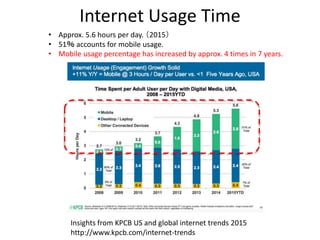
Internet Usage Time
Insights from KPCB US and global internet trends 2015
http://www.kpcb.com/internet-trends
• Approx. 5.6 hours per day. (2015)
• 51% accounts for mobile usage.
• Mobile usage percentage has increased by approx. 4 times in 7 years.
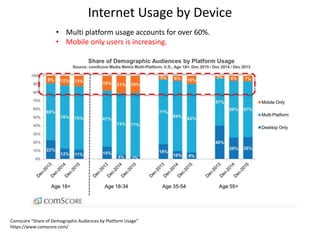
Internet Usage by Device
Comscore “Share of Demographic Audiences by Platform Usage”
https://www.comscore.com/
• Multi platform usage accounts for over 60%.
• Mobile only users is increasing.
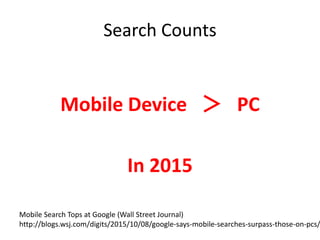
Search Counts
Mobile Device > PC
In 2015
Mobile Search Tops at Google (Wall Street Journal)
http://blogs.wsj.com/digits/2015/10/08/google-says-mobile-searches-surpass-those-on-pcs/
Google’s Issue
How to incorporate
mobile-oriented search algorithms?
Otherwise, there is a risk that other
mobile-optimized search engines may take over the Google’s position.
This is critical business risk for Google as
77% of their revenue is made up by Search Ad(AdWords).
The Business of Google
http://www.investopedia.com/articles/investing/020515/business-google.asp
Google’s Current Status
“Mobile Friendly”
Mobile-oriented search appraisal
Google’s Current Status
Mobile Friendly algorithm is not taking significant effect, yet.
Reason:
Putting too much emphasis on the mobile friendly algorithm causes confusion
as the current search rankings may change drastically.
In user’s perspective, Web sites that provides high quality information should
be given a higher search ranking than those with low quality information but
mobile friendly.
∴Google’s Wish (Speculation)
Probation period for the moment.
They wish quality web sites to conform Mobile Friendly requirements ASAP.
Then、Google can further incorporate mobile-oriented algorithms,
which makes their search engine mobile-optimized and
selected by mobile users.
Which, in turn, allows them to grow revenue from AdWords.
Web site owner‘s issues
If we don’t implement Mobile SEO,
our Web sites’ search rank may fall.
Cause serious potential risks to our business.
How can we implement Mobile SEO measures?
Index
• Objective of this seminar
• Backgrounds
• Issues
– Google’s issue
– Web site owners’ issue
• Mobile SEO Measures
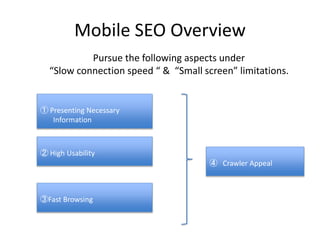
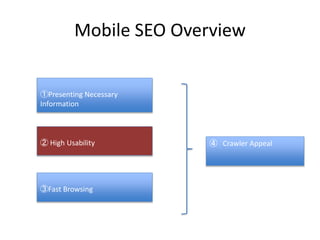
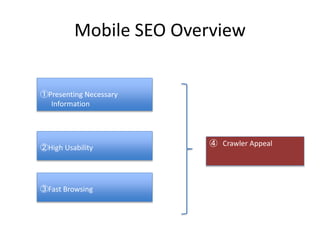
Mobile SEO Overview
① Presenting Necessary
Information
② High Usability
③Fast Browsing
④ Crawler Appeal
Pursue the following aspects under
“Slow connection speed “ & “Small screen” limitations.
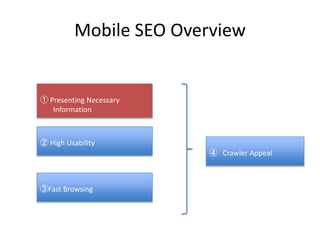
Mobile SEO Overview
① Presenting Necessary
Information
② High Usability
③Fast Browsing
④ Crawler Appeal
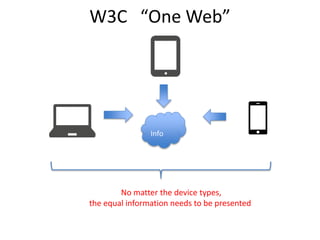
Info
No matter the device types,
the equal information needs to be presented
W3C “One Web”
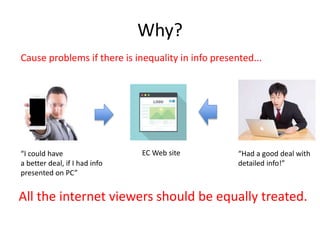
Why?
Cause problems if there is inequality in info presented...
EC Web site “Had a good deal with
detailed info!”
“I could have
a better deal, if I had info
presented on PC”
All the internet viewers should be equally treated.
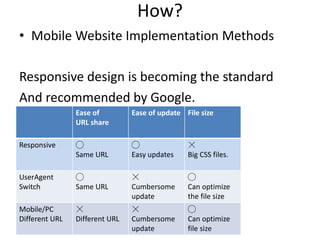
How?
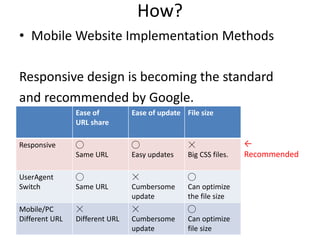
• Mobile Website Implementation Methods
Responsive design is becoming the standard
And recommended by Google.
Ease of
URL share
Ease of update File size
Responsive ◯
Same URL
◯
Easy updates
☓
Big CSS files.
UserAgent
Switch
◯
Same URL
☓
Cumbersome
update
◯
Can optimize
the file size
Mobile/PC
Different URL
☓
Different URL
☓
Cumbersome
update
◯
Can optimize
file size
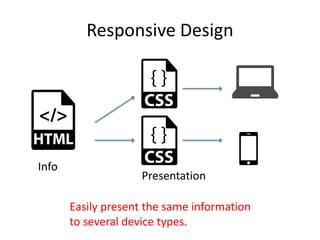
Responsive Design
Easily present the same information
to several device types.
Info
Presentation
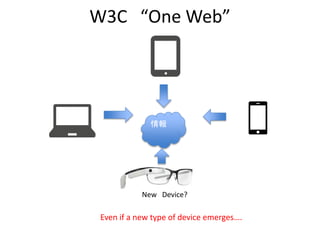
W3C “One Web”
情報
Even if a new type of device emerges….
New Device?
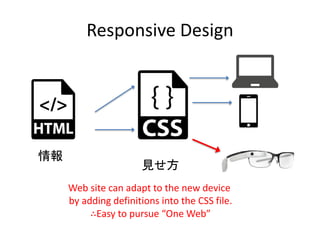
Responsive Design
Web site can adapt to the new device
by adding definitions into the CSS file.
∴Easy to pursue “One Web”
情報
見せ方
How?
• Mobile Website Implementation Methods
Responsive design is becoming the standard
and recommended by Google.
Ease of
URL share
Ease of update File size
Responsive ◯
Same URL
◯
Easy updates
☓
Big CSS files.
UserAgent
Switch
◯
Same URL
☓
Cumbersome
update
◯
Can optimize
the file size
Mobile/PC
Different URL
☓
Different URL
☓
Cumbersome
update
◯
Can optimize
file size
←
Recommended
Mobile SEO Overview
② High Usability
③Fast Browsing
④ Crawler Appeal
①Presenting Necessary
Information
Understandable Web site
• Understandable “Web Site Structure”
• Understandable “Web Page Structure”
• Understandable “Web Page Design”
Understandable Web Site
• Destination First
- Getting the desired information in the shortest path.
• Principles of Mobile Site Design
“Principles of Mobile Site Design”(Google)
http://static.googleusercontent.com/media/www.google.com/en
//intl/ALL_ALL/think/multiscreen/pdf/multi-screen-moblie-whitepaper_research-studies.pdf
With those guidelines, we need to design
understandable “Web site Structure”,
“Web Page Structure” and “Web Page Design”
Understandable Web site Structure
• Tree Structure
• Generate Sitemap (HTML&XML)
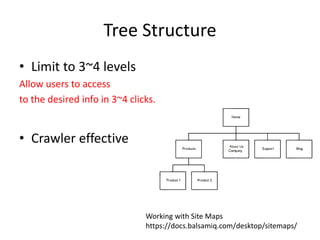
Tree Structure
• Limit to 3~4 levels
Allow users to access
to the desired info in 3~4 clicks.
• Crawler effective
Working with Site Maps
https://docs.balsamiq.com/desktop/sitemaps/
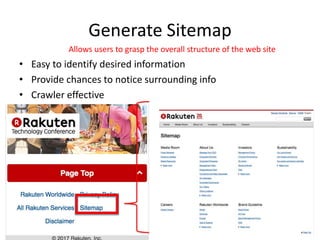
Generate Sitemap
• Easy to identify desired information
• Provide chances to notice surrounding info
• Crawler effective
Allows users to grasp the overall structure of the web site
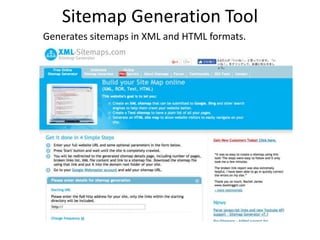
Sitemap Generation Tool
Generates sitemaps in XML and HTML formats.
Understandable “Page Structure”
• Call To Action
• Create Concise Menu
• Easy Return to Yop page
• Layering Contents
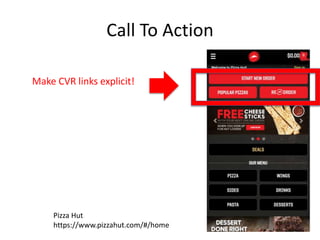
Call To Action
Make CVR links explicit!
Pizza Hut
https://www.pizzahut.com/#/home
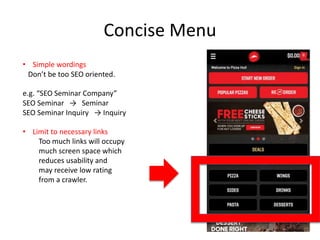
Concise Menu
• Simple wordings
Don’t be too SEO oriented.
e.g. “SEO Seminar Company”
SEO Seminar → Seminar
SEO Seminar Inquiry → Inquiry
• Limit to necessary links
Too much links will occupy
much screen space which
reduces usability and
may receive low rating
from a crawler.
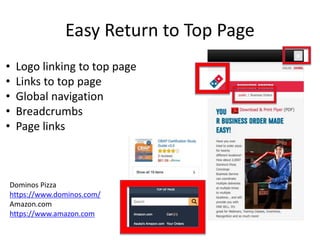
Easy Return to Top Page
• Logo linking to top page
• Links to top page
• Global navigation
• Breadcrumbs
• Page links
Dominos Pizza
https://www.dominos.com/
Amazon.com
https://www.amazon.com
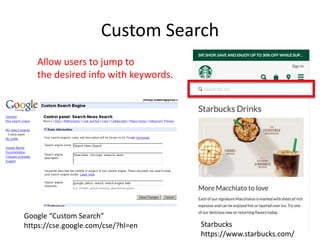
Custom Search
Google “Custom Search”
https://cse.google.com/cse/?hl=en
Allow users to jump to
the desired info with keywords.
Starbucks
https://www.starbucks.com/
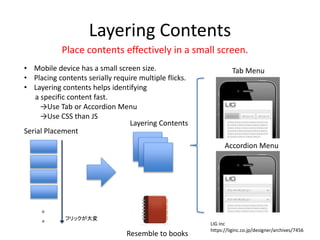
Layering Contents
• Mobile device has a small screen size.
• Placing contents serially require multiple flicks.
• Layering contents helps identifying
a specific content fast.
→Use Tab or Accordion Menu
→Use CSS than JS
。
。 フリックが大変
Tab Menu
Accordion Menu
Serial Placement
Layering Contents
Place contents effectively in a small screen.
Resemble to books
LIG inc
https://liginc.co.jp/designer/archives/7456
Understandable “Page Design”
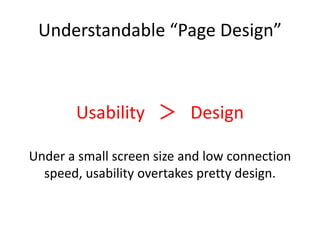
Usability > Design
Under a small screen size and low connection
speed, usability overtakes pretty design.
Mobile Friendly Requirements
1. Avoids software that is not common on mobile devices, like Flash
2. Uses text that is readable without zooming
3. Sizes content to the screen so users
don't have to scroll horizontally or zoom
4. Places links far enough apart
so that the correct one can be easily tapped
“Helping users find mobile-friendly pages” (Google Webmaster Central Blog )
https://webmasters.googleblog.com/2014/11/helping-users-find-mobile-friendly-pages.html
Use readable font size
1. Use a base font size of 16 CSS pixels. Adjust the size as
needed based on properties of the font being used.
2. Use sizes relative to the base size to define the
typographic scale.
3. Text needs vertical space between its characters and may
need to be adjusted for each font. The general
recommendation is to use the browser default line-height
of 1.2em.
4. Restrict the number of fonts used and the typographic
scale: too many fonts and font sizes lead to messy and
overly complex page layouts.
“Use Large Font Size”(Google Developers )
https://developers.google.com/speed/docs/insights/UseLegibleFontSizes?hl=en
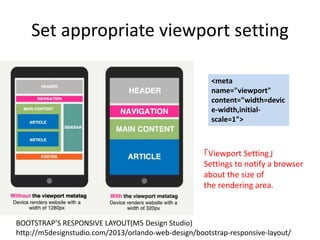
Set appropriate viewport setting
BOOTSTRAP’S RESPONSIVE LAYOUT(M5 Design Studio)
http://m5designstudio.com/2013/orlando-web-design/bootstrap-responsive-layout/
<meta
name="viewport"
content="width=devic
e-width,initial-
scale=1">
「Viewport Setting」
Settings to notify a browser
about the size of
the rendering area.
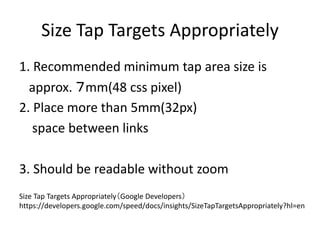
Size Tap Targets Appropriately
1. Recommended minimum tap area size is
approx. 7mm(48 css pixel)
2. Place more than 5mm(32px)
space between links
3. Should be readable without zoom
Size Tap Targets Appropriately(Google Developers)
https://developers.google.com/speed/docs/insights/SizeTapTargetsAppropriately?hl=en
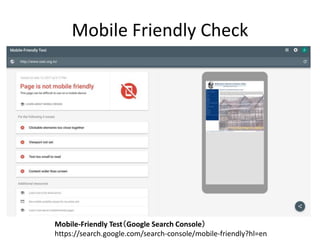
Mobile Friendly Check
Mobile-Friendly Test(Google Search Console)
https://search.google.com/search-console/mobile-friendly?hl=en
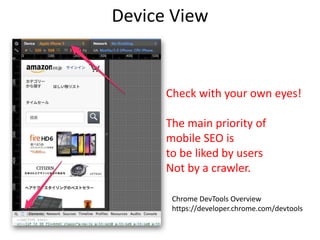
Device View
Chrome DevTools Overview
https://developer.chrome.com/devtools
Check with your own eyes!
The main priority of
mobile SEO is
to be liked by users
Not by a crawler.
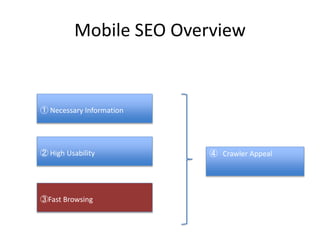
Mobile SEO Overview
① Necessary Information
② High Usability
③Fast Browsing
④ Crawler Appeal
Fast Browsing
• Reduce Transactions
• Reduce Coding
• Avoid using images and JS
• Use appropriate image formats
• Resource Compression
• Use Check Tools
Reduce Transactions
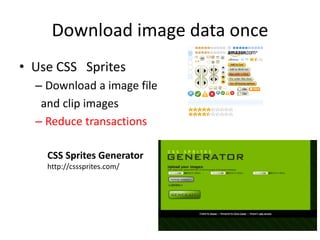
• Download image data once
• Use cache
• Use inline CSS
Download image data once
• Use CSS Sprites
– Download a image file
and clip images
– Reduce transactions
CSS Sprites Generator
http://csssprites.com/
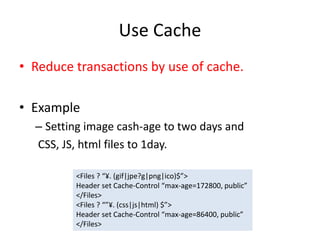
Use Cache
• Reduce transactions by use of cache.
• Example
– Setting image cash-age to two days and
CSS, JS, html files to 1day.
<Files ? “¥. (gif|jpe?g|png|ico)$”>
Header set Cache-Control “max-age=172800, public”
</Files>
<Files ? “”¥. (css|js|html) $”>
Header set Cache-Control “max-age=86400, public”
</Files>
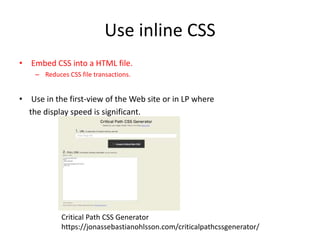
Use inline CSS
• Embed CSS into a HTML file.
– Reduces CSS file transactions.
• Use in the first-view of the Web site or in LP where
the display speed is significant.
Critical Path CSS Generator
https://jonassebastianohlsson.com/criticalpathcssgenerator/
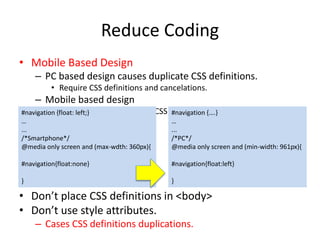
Reduce Coding
• Mobile Based Design
– PC based design causes duplicate CSS definitions.
• Require CSS definitions and cancelations.
– Mobile based design
• Only requires additions of CSS definitions.
• Don’t place CSS definitions in <body>
• Don’t use style attributes.
– Causes CSS definitions duplication.
#navigation {float: left;}
…
...
/*Smartphone*/
@media only screen and (max-wdth: 360px){
#navigation{float:none}
}
#navigation {….}
…
...
/*PC*/
@media only screen and (min-width: 961px){
#navigation{float:left}
}
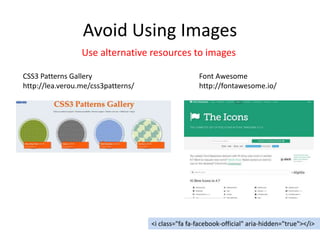
Avoid Using Images
CSS3 Patterns Gallery
http://lea.verou.me/css3patterns/
<i class="fa fa-facebook-official" aria-hidden="true"></i>
Font Awesome
http://fontawesome.io/
Use alternative resources to images
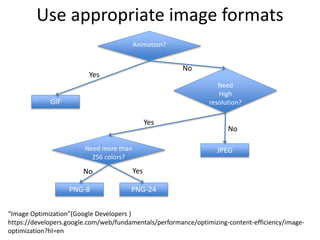
Use appropriate image formats
“Image Optimization”(Google Developers )
https://developers.google.com/web/fundamentals/performance/optimizing-content-efficiency/image-
optimization?hl=en
Animation?
Need
High
resolution?
Need more than
256 colors?
JPEG
PNG-8 PNG-24
GIF
Yes
No
No
No
Yes
Yes
Resource Compression
• Image Compression
– JPEGmini, tinypng etc
• Text Compression(HTML、CSS etc)
DigitalCoding.Com etc
http://www.digitalcoding.com/
Use Check Tools
• Download Speed Check
• Usability Check
• Code Check
To get some ideas for improvement.
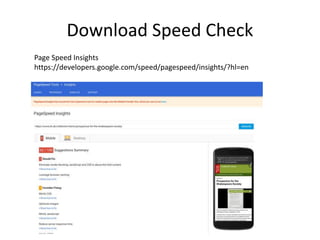
Download Speed Check
Page Speed Insights
https://developers.google.com/speed/pagespeed/insights/?hl=en
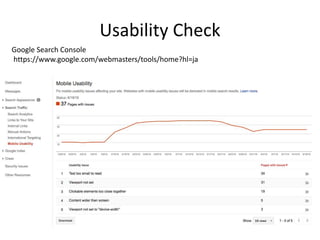
Usability Check
Google Search Console
https://www.google.com/webmasters/tools/home?hl=ja
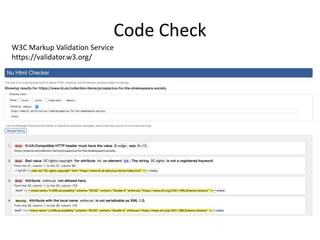
Code Check
W3C Markup Validation Service
https://validator.w3.org/
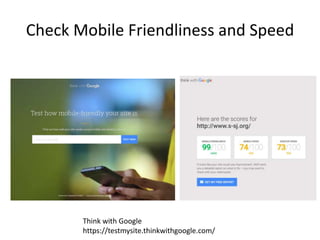
Check Mobile Friendliness and Speed
Think with Google
https://testmysite.thinkwithgoogle.com/
Mobile SEO Overview
③Fast Browsing
④ Crawler Appeal
①Presenting Necessary
Information
②High Usability
Crawler Appeal
• Use HTML5 Semantic Elements
• Set appropriate title and description
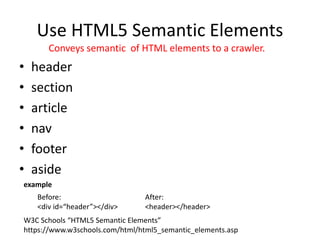
Use HTML5 Semantic Elements
• header
• section
• article
• nav
• footer
• aside
W3C Schools “HTML5 Semantic Elements”
https://www.w3schools.com/html/html5_semantic_elements.asp
Before:
<div id=“header”></div>
After:
<header></header>
example
Conveys semantic of HTML elements to a crawler.
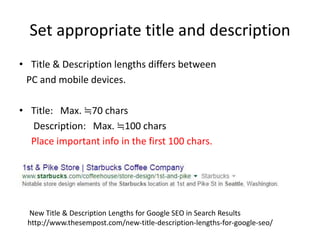
Set appropriate title and description
• Title & Description lengths differs between
PC and mobile devices.
• Title: Max. ≒70 chars
Description: Max. ≒100 chars
Place important info in the first 100 chars.
New Title & Description Lengths for Google SEO in Search Results
http://www.thesempost.com/new-title-description-lengths-for-google-seo/
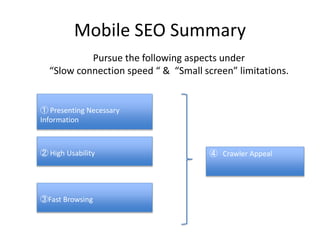
Mobile SEO Summary
① Presenting Necessary
Information
② High Usability
③Fast Browsing
④ Crawler Appeal
Pursue the following aspects under
“Slow connection speed “ & “Small screen” limitations.
References
• Insights from KPCB US and global internet trends 2015
http://www.kpcb.com/internet-trends
• Comscore “Share of Demographic Audiences by Platform Usage”
https://www.comscore.com/
• Mobile Search Tops at Google (Wall Street Journal)
http://blogs.wsj.com/digits/2015/10/08/google-says-mobile-searches-surpass-those-on-pcs/
• The Business of Google
http://www.investopedia.com/articles/investing/020515/business-google.asp
• “Principles of Mobile Site Design”(Google)
http://static.googleusercontent.com/media/www.google.com/en//intl/ALL_ALL/think/multiscreen/pdf/multi-screen-moblie-
whitepaper_research-studies.pdf
• “Helping users find mobile-friendly pages” (Google Webmaster Central Blog )
https://webmasters.googleblog.com/2014/11/helping-users-find-mobile-friendly-pages.html
References
• Size Tap Targets Appropriately(Google Developers)
https://developers.google.com/speed/docs/insights/SizeTapTargetsAppropriately?hl=en
• “Use Large Font Size”(Google Developers )
https://developers.google.com/speed/docs/insights/UseLegibleFontSizes?hl=en
• Mobile-Friendly Test(Google Search Console)
https://search.google.com/search-console/mobile-friendly?hl=en
• Chrome DevTools Overview(Chrome Developer Tools)
https://developer.chrome.com/devtools
• “Image Optimization”(Google Developers )
https://developers.google.com/web/fundamentals/performance/optimizing-content-efficiency/image-optimization?hl=en
• W3C Schools “HTML5 Semantic Elements”
https://www.w3schools.com/html/html5_semantic_elements.asp
• New Title & Description Lengths for Google SEO in Search Results
http://www.thesempost.com/new-title-description-lengths-for-google-seo/

Mobile SEO (English Version)

  • 1.
  • 2.
    Index • Objective ofthis seminar • Backgrounds • Issues – Google’s Issue – Web site Owner’s Issue • Mobile SEO Measures
  • 3.
    Objective of thisseminar • Target – Web Director – Web Marketer – Web Engineer – Web Designer • Goal Understand and be able to execute Mobile SEO measures.
  • 4.
    Backgrounds Paradigm shift ishappening in the world of information search. The device we use to search info is shifting from PC to Mobile devices.
  • 5.
    Internet Usage Time Insightsfrom KPCB US and global internet trends 2015 http://www.kpcb.com/internet-trends • Approx. 5.6 hours per day. (2015) • 51% accounts for mobile usage. • Mobile usage percentage has increased by approx. 4 times in 7 years.
  • 6.
    Internet Usage byDevice Comscore “Share of Demographic Audiences by Platform Usage” https://www.comscore.com/ • Multi platform usage accounts for over 60%. • Mobile only users is increasing.
  • 7.
    Search Counts Mobile Device> PC In 2015 Mobile Search Tops at Google (Wall Street Journal) http://blogs.wsj.com/digits/2015/10/08/google-says-mobile-searches-surpass-those-on-pcs/
  • 8.
    Google’s Issue How toincorporate mobile-oriented search algorithms? Otherwise, there is a risk that other mobile-optimized search engines may take over the Google’s position. This is critical business risk for Google as 77% of their revenue is made up by Search Ad(AdWords). The Business of Google http://www.investopedia.com/articles/investing/020515/business-google.asp
  • 9.
    Google’s Current Status “MobileFriendly” Mobile-oriented search appraisal
  • 10.
    Google’s Current Status MobileFriendly algorithm is not taking significant effect, yet. Reason: Putting too much emphasis on the mobile friendly algorithm causes confusion as the current search rankings may change drastically. In user’s perspective, Web sites that provides high quality information should be given a higher search ranking than those with low quality information but mobile friendly. ∴Google’s Wish (Speculation) Probation period for the moment. They wish quality web sites to conform Mobile Friendly requirements ASAP. Then、Google can further incorporate mobile-oriented algorithms, which makes their search engine mobile-optimized and selected by mobile users. Which, in turn, allows them to grow revenue from AdWords.
  • 11.
    Web site owner‘sissues If we don’t implement Mobile SEO, our Web sites’ search rank may fall. Cause serious potential risks to our business. How can we implement Mobile SEO measures?
  • 12.
    Index • Objective ofthis seminar • Backgrounds • Issues – Google’s issue – Web site owners’ issue • Mobile SEO Measures
  • 13.
    Mobile SEO Overview ①Presenting Necessary Information ② High Usability ③Fast Browsing ④ Crawler Appeal Pursue the following aspects under “Slow connection speed “ & “Small screen” limitations.
  • 14.
    Mobile SEO Overview ①Presenting Necessary Information ② High Usability ③Fast Browsing ④ Crawler Appeal
  • 15.
    Info No matter thedevice types, the equal information needs to be presented W3C “One Web”
  • 16.
    Why? Cause problems ifthere is inequality in info presented... EC Web site “Had a good deal with detailed info!” “I could have a better deal, if I had info presented on PC” All the internet viewers should be equally treated.
  • 17.
    How? • Mobile WebsiteImplementation Methods Responsive design is becoming the standard And recommended by Google. Ease of URL share Ease of update File size Responsive ◯ Same URL ◯ Easy updates ☓ Big CSS files. UserAgent Switch ◯ Same URL ☓ Cumbersome update ◯ Can optimize the file size Mobile/PC Different URL ☓ Different URL ☓ Cumbersome update ◯ Can optimize file size
  • 18.
    Responsive Design Easily presentthe same information to several device types. Info Presentation
  • 19.
    W3C “One Web” 情報 Evenif a new type of device emerges…. New Device?
  • 20.
    Responsive Design Web sitecan adapt to the new device by adding definitions into the CSS file. ∴Easy to pursue “One Web” 情報 見せ方
  • 21.
    How? • Mobile WebsiteImplementation Methods Responsive design is becoming the standard and recommended by Google. Ease of URL share Ease of update File size Responsive ◯ Same URL ◯ Easy updates ☓ Big CSS files. UserAgent Switch ◯ Same URL ☓ Cumbersome update ◯ Can optimize the file size Mobile/PC Different URL ☓ Different URL ☓ Cumbersome update ◯ Can optimize file size ← Recommended
  • 22.
    Mobile SEO Overview ②High Usability ③Fast Browsing ④ Crawler Appeal ①Presenting Necessary Information
  • 23.
    Understandable Web site •Understandable “Web Site Structure” • Understandable “Web Page Structure” • Understandable “Web Page Design”
  • 24.
    Understandable Web Site •Destination First - Getting the desired information in the shortest path. • Principles of Mobile Site Design “Principles of Mobile Site Design”(Google) http://static.googleusercontent.com/media/www.google.com/en //intl/ALL_ALL/think/multiscreen/pdf/multi-screen-moblie-whitepaper_research-studies.pdf With those guidelines, we need to design understandable “Web site Structure”, “Web Page Structure” and “Web Page Design”
  • 25.
    Understandable Web siteStructure • Tree Structure • Generate Sitemap (HTML&XML)
  • 26.
    Tree Structure • Limitto 3~4 levels Allow users to access to the desired info in 3~4 clicks. • Crawler effective Working with Site Maps https://docs.balsamiq.com/desktop/sitemaps/
  • 27.
    Generate Sitemap • Easyto identify desired information • Provide chances to notice surrounding info • Crawler effective Allows users to grasp the overall structure of the web site
  • 28.
    Sitemap Generation Tool Generatessitemaps in XML and HTML formats.
  • 29.
    Understandable “Page Structure” •Call To Action • Create Concise Menu • Easy Return to Yop page • Layering Contents
  • 30.
    Call To Action MakeCVR links explicit! Pizza Hut https://www.pizzahut.com/#/home
  • 31.
    Concise Menu • Simplewordings Don’t be too SEO oriented. e.g. “SEO Seminar Company” SEO Seminar → Seminar SEO Seminar Inquiry → Inquiry • Limit to necessary links Too much links will occupy much screen space which reduces usability and may receive low rating from a crawler.
  • 32.
    Easy Return toTop Page • Logo linking to top page • Links to top page • Global navigation • Breadcrumbs • Page links Dominos Pizza https://www.dominos.com/ Amazon.com https://www.amazon.com
  • 33.
    Custom Search Google “CustomSearch” https://cse.google.com/cse/?hl=en Allow users to jump to the desired info with keywords. Starbucks https://www.starbucks.com/
  • 34.
    Layering Contents • Mobiledevice has a small screen size. • Placing contents serially require multiple flicks. • Layering contents helps identifying a specific content fast. →Use Tab or Accordion Menu →Use CSS than JS 。 。 フリックが大変 Tab Menu Accordion Menu Serial Placement Layering Contents Place contents effectively in a small screen. Resemble to books LIG inc https://liginc.co.jp/designer/archives/7456
  • 35.
    Understandable “Page Design” Usability> Design Under a small screen size and low connection speed, usability overtakes pretty design.
  • 36.
    Mobile Friendly Requirements 1.Avoids software that is not common on mobile devices, like Flash 2. Uses text that is readable without zooming 3. Sizes content to the screen so users don't have to scroll horizontally or zoom 4. Places links far enough apart so that the correct one can be easily tapped “Helping users find mobile-friendly pages” (Google Webmaster Central Blog ) https://webmasters.googleblog.com/2014/11/helping-users-find-mobile-friendly-pages.html
  • 37.
    Use readable fontsize 1. Use a base font size of 16 CSS pixels. Adjust the size as needed based on properties of the font being used. 2. Use sizes relative to the base size to define the typographic scale. 3. Text needs vertical space between its characters and may need to be adjusted for each font. The general recommendation is to use the browser default line-height of 1.2em. 4. Restrict the number of fonts used and the typographic scale: too many fonts and font sizes lead to messy and overly complex page layouts. “Use Large Font Size”(Google Developers ) https://developers.google.com/speed/docs/insights/UseLegibleFontSizes?hl=en
  • 38.
    Set appropriate viewportsetting BOOTSTRAP’S RESPONSIVE LAYOUT(M5 Design Studio) http://m5designstudio.com/2013/orlando-web-design/bootstrap-responsive-layout/ <meta name="viewport" content="width=devic e-width,initial- scale=1"> 「Viewport Setting」 Settings to notify a browser about the size of the rendering area.
  • 39.
    Size Tap TargetsAppropriately 1. Recommended minimum tap area size is approx. 7mm(48 css pixel) 2. Place more than 5mm(32px) space between links 3. Should be readable without zoom Size Tap Targets Appropriately(Google Developers) https://developers.google.com/speed/docs/insights/SizeTapTargetsAppropriately?hl=en
  • 40.
    Mobile Friendly Check Mobile-FriendlyTest(Google Search Console) https://search.google.com/search-console/mobile-friendly?hl=en
  • 41.
    Device View Chrome DevToolsOverview https://developer.chrome.com/devtools Check with your own eyes! The main priority of mobile SEO is to be liked by users Not by a crawler.
  • 42.
    Mobile SEO Overview ①Necessary Information ② High Usability ③Fast Browsing ④ Crawler Appeal
  • 43.
    Fast Browsing • ReduceTransactions • Reduce Coding • Avoid using images and JS • Use appropriate image formats • Resource Compression • Use Check Tools
  • 44.
    Reduce Transactions • Downloadimage data once • Use cache • Use inline CSS
  • 45.
    Download image dataonce • Use CSS Sprites – Download a image file and clip images – Reduce transactions CSS Sprites Generator http://csssprites.com/
  • 46.
    Use Cache • Reducetransactions by use of cache. • Example – Setting image cash-age to two days and CSS, JS, html files to 1day. <Files ? “¥. (gif|jpe?g|png|ico)$”> Header set Cache-Control “max-age=172800, public” </Files> <Files ? “”¥. (css|js|html) $”> Header set Cache-Control “max-age=86400, public” </Files>
  • 47.
    Use inline CSS •Embed CSS into a HTML file. – Reduces CSS file transactions. • Use in the first-view of the Web site or in LP where the display speed is significant. Critical Path CSS Generator https://jonassebastianohlsson.com/criticalpathcssgenerator/
  • 48.
    Reduce Coding • MobileBased Design – PC based design causes duplicate CSS definitions. • Require CSS definitions and cancelations. – Mobile based design • Only requires additions of CSS definitions. • Don’t place CSS definitions in <body> • Don’t use style attributes. – Causes CSS definitions duplication. #navigation {float: left;} … ... /*Smartphone*/ @media only screen and (max-wdth: 360px){ #navigation{float:none} } #navigation {….} … ... /*PC*/ @media only screen and (min-width: 961px){ #navigation{float:left} }
  • 49.
    Avoid Using Images CSS3Patterns Gallery http://lea.verou.me/css3patterns/ <i class="fa fa-facebook-official" aria-hidden="true"></i> Font Awesome http://fontawesome.io/ Use alternative resources to images
  • 50.
    Use appropriate imageformats “Image Optimization”(Google Developers ) https://developers.google.com/web/fundamentals/performance/optimizing-content-efficiency/image- optimization?hl=en Animation? Need High resolution? Need more than 256 colors? JPEG PNG-8 PNG-24 GIF Yes No No No Yes Yes
  • 51.
    Resource Compression • ImageCompression – JPEGmini, tinypng etc • Text Compression(HTML、CSS etc) DigitalCoding.Com etc http://www.digitalcoding.com/
  • 52.
    Use Check Tools •Download Speed Check • Usability Check • Code Check To get some ideas for improvement.
  • 53.
    Download Speed Check PageSpeed Insights https://developers.google.com/speed/pagespeed/insights/?hl=en
  • 54.
    Usability Check Google SearchConsole https://www.google.com/webmasters/tools/home?hl=ja
  • 55.
    Code Check W3C MarkupValidation Service https://validator.w3.org/
  • 56.
    Check Mobile Friendlinessand Speed Think with Google https://testmysite.thinkwithgoogle.com/
  • 57.
    Mobile SEO Overview ③FastBrowsing ④ Crawler Appeal ①Presenting Necessary Information ②High Usability
  • 58.
    Crawler Appeal • UseHTML5 Semantic Elements • Set appropriate title and description
  • 59.
    Use HTML5 SemanticElements • header • section • article • nav • footer • aside W3C Schools “HTML5 Semantic Elements” https://www.w3schools.com/html/html5_semantic_elements.asp Before: <div id=“header”></div> After: <header></header> example Conveys semantic of HTML elements to a crawler.
  • 60.
    Set appropriate titleand description • Title & Description lengths differs between PC and mobile devices. • Title: Max. ≒70 chars Description: Max. ≒100 chars Place important info in the first 100 chars. New Title & Description Lengths for Google SEO in Search Results http://www.thesempost.com/new-title-description-lengths-for-google-seo/
  • 61.
    Mobile SEO Summary ①Presenting Necessary Information ② High Usability ③Fast Browsing ④ Crawler Appeal Pursue the following aspects under “Slow connection speed “ & “Small screen” limitations.
  • 62.
    References • Insights fromKPCB US and global internet trends 2015 http://www.kpcb.com/internet-trends • Comscore “Share of Demographic Audiences by Platform Usage” https://www.comscore.com/ • Mobile Search Tops at Google (Wall Street Journal) http://blogs.wsj.com/digits/2015/10/08/google-says-mobile-searches-surpass-those-on-pcs/ • The Business of Google http://www.investopedia.com/articles/investing/020515/business-google.asp • “Principles of Mobile Site Design”(Google) http://static.googleusercontent.com/media/www.google.com/en//intl/ALL_ALL/think/multiscreen/pdf/multi-screen-moblie- whitepaper_research-studies.pdf • “Helping users find mobile-friendly pages” (Google Webmaster Central Blog ) https://webmasters.googleblog.com/2014/11/helping-users-find-mobile-friendly-pages.html
  • 63.
    References • Size TapTargets Appropriately(Google Developers) https://developers.google.com/speed/docs/insights/SizeTapTargetsAppropriately?hl=en • “Use Large Font Size”(Google Developers ) https://developers.google.com/speed/docs/insights/UseLegibleFontSizes?hl=en • Mobile-Friendly Test(Google Search Console) https://search.google.com/search-console/mobile-friendly?hl=en • Chrome DevTools Overview(Chrome Developer Tools) https://developer.chrome.com/devtools • “Image Optimization”(Google Developers ) https://developers.google.com/web/fundamentals/performance/optimizing-content-efficiency/image-optimization?hl=en • W3C Schools “HTML5 Semantic Elements” https://www.w3schools.com/html/html5_semantic_elements.asp • New Title & Description Lengths for Google SEO in Search Results http://www.thesempost.com/new-title-description-lengths-for-google-seo/