ca Opscenter 
Hands-On Lab: Mobile 
Integration 
Marc Chéné 
OCX19L #CAWorld 
 CA Technologies 
 Application Performance Management
2 
© 2014 CA. ALL RIGHTS RESERVED. 
Abstract 
In the CA APM 9.7 release we have introduced the ability for solutions that monitor End User Endpoints such as CA Mobile Application Analytics to tag their business transactions with information so they can be followed through an application’s backend systems using CA APM. 
Marc Chéné 
CA Technologies 
APM Product Manager
3 
© 2014 CA. ALL RIGHTS RESERVED. 
Agenda 
WHAT IS END-USER ENDPOINTMONITORING? 
CA MOBILE APP ANALYTICS (MAA) + CA APM 
Q&A 
SETUP AND CONFIGURATION 
LAB 1: MOBILE INTEGRATION TRANSACTION TRACING 
LAB 2: MOBILE PROBLEM ANALYSIS USING THE TRIAGE MAP 
1 
2 
3 
4 
5 
6
4 
© 2014 CA. ALL RIGHTS RESERVED. 
CA App Synthetic Monitor (formerly known as Cloud Monitor) 
Related Technologies 
CA Mobile Application Analytics (MAA)
5 
© 2014 CA. ALL RIGHTS RESERVED. 
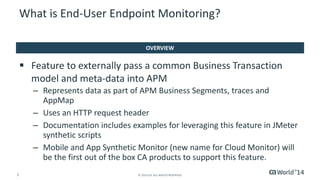
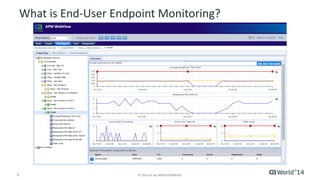
Feature to externally pass a common Business Transaction model and meta-data into APM 
–Represents data as part of APM Business Segments, traces and AppMap 
–Uses an HTTP request header 
–Documentation includes examples for leveraging this feature in JMeter synthetic scripts 
–Mobile and App Synthetic Monitor (new name for Cloud Monitor) will be the first out of the box CA products to support this feature. 
What is End-User Endpoint Monitoring? 
OVERVIEW
6 
© 2014 CA. ALL RIGHTS RESERVED. 
What is End-User Endpoint Monitoring?
7 
© 2014 CA. ALL RIGHTS RESERVED. 
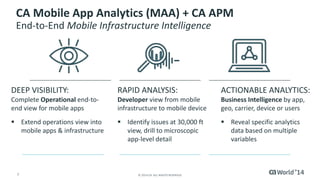
DEEP VISIBILITY: Complete Operational end-to- end view for mobile apps 
Extend operations view into mobile apps & infrastructure 
RAPID ANALYSIS: Developerview from mobile infrastructure to mobile device 
Identify issues at 30,000 ftview, drill to microscopic app-level detail 
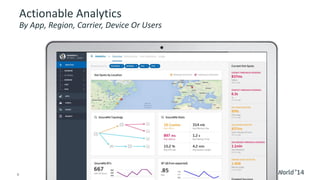
ACTIONABLE ANALYTICS: Business Intelligenceby app, geo, carrier, device or users 
Reveal specific analytics data based on multiple variables 
CA Mobile App Analytics (MAA) + CA APMEnd-to-End Mobile Infrastructure Intelligence
8 
© 2014 CA. ALL RIGHTS RESERVED. 
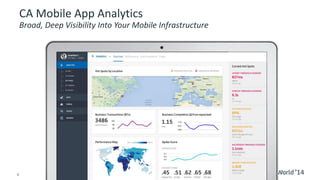
CA Mobile App AnalyticsBroad, Deep Visibility Into Your Mobile Infrastructure
9 
© 2014 CA. ALL RIGHTS RESERVED. 
Actionable AnalyticsBy App, Region, Carrier, Device Or Users
10 
© 2014 CA. ALL RIGHTS RESERVED. 
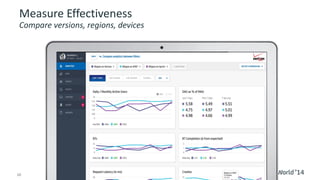
Measure EffectivenessCompare versions, regions, devices
11 
© 2014 CA. ALL RIGHTS RESERVED. 
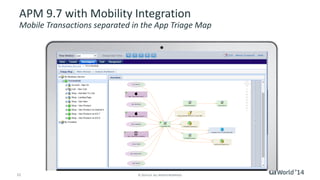
APM 9.7 with Mobility IntegrationMobile Transactions separated in the App Triage Map
12 
© 2014 CA. ALL RIGHTS RESERVED. 
Setup and Configuration 
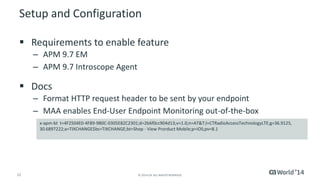
Requirements to enable feature 
–APM 9.7 EM 
–APM 9.7 IntroscopeAgent 
Docs 
–Format HTTP request header to be sent by your endpoint 
–MAA enables End-User Endpoint Monitoring out-of-the-box 
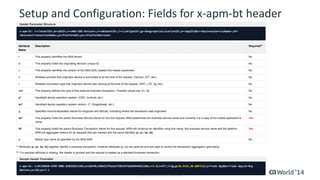
x-apm-btt=4F2504E0-4F89-9B0C-0305E82C2301;d=2b6f0cc904d13;v=1.0;n=AT&T;l=CTRadioAccessTechnologyLTE;g=36.9125, 30.6897222;a=TIXCHANGE$bs=TIXCHANGE;bt=Shop -View ProrductMobile;p=iOS;pv=8.1
13 
© 2014 CA. ALL RIGHTS RESERVED. 
Setup and Configuration: Fields for x-apm-btheader
14 
© 2014 CA. ALL RIGHTS RESERVED. 
Setup and Configuration 
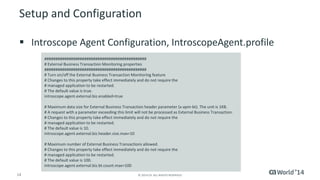
IntroscopeAgent Configuration, IntroscopeAgent.profile 
############################################## 
# External Business Transaction Monitoring properties 
############################################## 
# Turn on/off the External Business Transaction Monitoring feature 
# Changes to this property take effect immediately and do not require the 
# managed application to be restarted. 
# The default value is true. 
introscope.agent.external.biz.enabled=true 
# Maximum data size for External Business Transaction header parameter (x-apm-bt). The unit is 1KB. 
# A request with a parameter exceeding this limit will not be processed as External Business Transaction. 
# Changes to this property take effect immediately and do not require the 
# managed application to be restarted. 
# The default value is 10. 
introscope.agent.external.biz.header.size.max=10 
# Maximum number of External Business Transactions allowed. 
# Changes to this property take effect immediately and do not require the 
# managed application to be restarted. 
# The default value is 100. 
introscope.agent.external.biz.bt.count.max=100
15 
© 2014 CA. ALL RIGHTS RESERVED. 
Hands-On Lab Information 
Environment Overview 
–Demo Application: TIXCHANGE 
–Application Server: Tomcat 7 
CA APM 9.7 Wiki Documentation: https://wiki.ca.com/display/APMDEVOPSCV/CA+Application+ Performance+Management 
–User ID: APMuser97@gmail.com 
–Password: CAworld14
16 
© 2014 CA. ALL RIGHTS RESERVED. 
LAB 1: Mobile Integration Transaction Tracing 
Documentation: CAW-OCX19L-Lab1- MobileIntegrationTransactionTracing.pdf
17 
© 2014 CA. ALL RIGHTS RESERVED. 
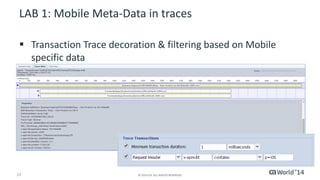
LAB 1: Mobile Meta-Data in traces 
Transaction Trace decoration & filtering based on Mobile specific data
18 
© 2014 CA. ALL RIGHTS RESERVED. 
LAB 2: Mobile Problem Analysis Using the Triage Map 
Documentation: CAW-OCX19L-Lab2- MobileProblemAnalysis.pdf
19 
© 2014 CA. ALL RIGHTS RESERVED. 
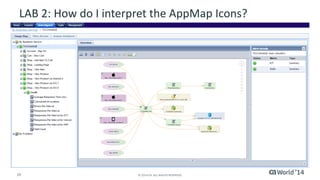
End-User Monitoring 
–Icons represent aggregate performance data for the Business Transactions as they are seen by the App Server. 
–Business Transaction names and platform information as provided by the end user data sources and not determined by APM 
LAB 2: How do I interpret the AppMapIcons? 
TASK: Open the APM WebViewIcon on your desktop
20 
© 2014 CA. ALL RIGHTS RESERVED. 
LAB 2: How do I interpret the AppMapIcons?
21 
© 2014 CA. ALL RIGHTS RESERVED. 
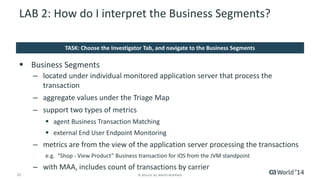
Business Segments 
–located under individual monitored application server that process the transaction 
–aggregate values under the Triage Map 
–support two types of metrics 
agent Business Transaction Matching 
external End User Endpoint Monitoring 
–metrics are from the view of the application server processing the transactions 
e.g. “Shop -View Product” Business transaction for iOS from the JVM standpoint 
–with MAA, includes count of transactions by carrier 
LAB 2: How do I interpret the Business Segments? 
TASK: Choose the Investigator Tab, and navigate to the Business Segments
22 
© 2014 CA. ALL RIGHTS RESERVED. 
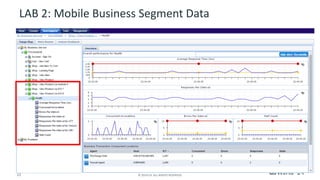
LAB 2: Mobile Business Segment Data
23 
© 2014 CA. ALL RIGHTS RESERVED. 
Summary 
A Few Words to Review 
Results 
CA APM 9.7 combined with a supported end user monitoring solution such as CA Mobile Application Analytics (MAA) helps characterize how the APM monitored environment support the business transactions for those end users. 
The APM Analyst can also choose to trace individual users as they traverse the APM monitored environment, by specifying end user properties such as device platform to filter transaction traces.
24 
© 2014 CA. ALL RIGHTS RESERVED. 
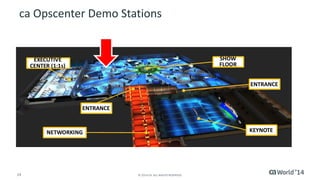
ca OpscenterDemo Stations
25 
© 2014 CA. ALL RIGHTS RESERVED. 
For More Information 
To learn more about DevOps, please visit: 
http://bit.ly/1wbjjqX 
Insert appropriate screenshot and textoverlayfrom following“More Info Graphics” slide here; ensure it links to correct page 
DevOps
26 
© 2014 CA. ALL RIGHTS RESERVED. 
For Informational Purposes Only 
© 2014CA. All rights reserved. All trademarks referenced herein belong to their respective companies. 
This presentation provided at CA World 2014 is intended for information purposes only and does not form any type of warranty. Some of the specific slides with customer references relate to customer's specific use and experience of CA products and solutionssoactual results may vary. 
Terms of this Presentation

Hands-On Lab: Mobile Integration

  • 1.
    ca Opscenter Hands-OnLab: Mobile Integration Marc Chéné OCX19L #CAWorld  CA Technologies  Application Performance Management
  • 2.
    2 © 2014CA. ALL RIGHTS RESERVED. Abstract In the CA APM 9.7 release we have introduced the ability for solutions that monitor End User Endpoints such as CA Mobile Application Analytics to tag their business transactions with information so they can be followed through an application’s backend systems using CA APM. Marc Chéné CA Technologies APM Product Manager
  • 3.
    3 © 2014CA. ALL RIGHTS RESERVED. Agenda WHAT IS END-USER ENDPOINTMONITORING? CA MOBILE APP ANALYTICS (MAA) + CA APM Q&A SETUP AND CONFIGURATION LAB 1: MOBILE INTEGRATION TRANSACTION TRACING LAB 2: MOBILE PROBLEM ANALYSIS USING THE TRIAGE MAP 1 2 3 4 5 6
  • 4.
    4 © 2014CA. ALL RIGHTS RESERVED. CA App Synthetic Monitor (formerly known as Cloud Monitor) Related Technologies CA Mobile Application Analytics (MAA)
  • 5.
    5 © 2014CA. ALL RIGHTS RESERVED. Feature to externally pass a common Business Transaction model and meta-data into APM –Represents data as part of APM Business Segments, traces and AppMap –Uses an HTTP request header –Documentation includes examples for leveraging this feature in JMeter synthetic scripts –Mobile and App Synthetic Monitor (new name for Cloud Monitor) will be the first out of the box CA products to support this feature. What is End-User Endpoint Monitoring? OVERVIEW
  • 6.
    6 © 2014CA. ALL RIGHTS RESERVED. What is End-User Endpoint Monitoring?
  • 7.
    7 © 2014CA. ALL RIGHTS RESERVED. DEEP VISIBILITY: Complete Operational end-to- end view for mobile apps Extend operations view into mobile apps & infrastructure RAPID ANALYSIS: Developerview from mobile infrastructure to mobile device Identify issues at 30,000 ftview, drill to microscopic app-level detail ACTIONABLE ANALYTICS: Business Intelligenceby app, geo, carrier, device or users Reveal specific analytics data based on multiple variables CA Mobile App Analytics (MAA) + CA APMEnd-to-End Mobile Infrastructure Intelligence
  • 8.
    8 © 2014CA. ALL RIGHTS RESERVED. CA Mobile App AnalyticsBroad, Deep Visibility Into Your Mobile Infrastructure
  • 9.
    9 © 2014CA. ALL RIGHTS RESERVED. Actionable AnalyticsBy App, Region, Carrier, Device Or Users
  • 10.
    10 © 2014CA. ALL RIGHTS RESERVED. Measure EffectivenessCompare versions, regions, devices
  • 11.
    11 © 2014CA. ALL RIGHTS RESERVED. APM 9.7 with Mobility IntegrationMobile Transactions separated in the App Triage Map
  • 12.
    12 © 2014CA. ALL RIGHTS RESERVED. Setup and Configuration Requirements to enable feature –APM 9.7 EM –APM 9.7 IntroscopeAgent Docs –Format HTTP request header to be sent by your endpoint –MAA enables End-User Endpoint Monitoring out-of-the-box x-apm-btt=4F2504E0-4F89-9B0C-0305E82C2301;d=2b6f0cc904d13;v=1.0;n=AT&T;l=CTRadioAccessTechnologyLTE;g=36.9125, 30.6897222;a=TIXCHANGE$bs=TIXCHANGE;bt=Shop -View ProrductMobile;p=iOS;pv=8.1
  • 13.
    13 © 2014CA. ALL RIGHTS RESERVED. Setup and Configuration: Fields for x-apm-btheader
  • 14.
    14 © 2014CA. ALL RIGHTS RESERVED. Setup and Configuration IntroscopeAgent Configuration, IntroscopeAgent.profile ############################################## # External Business Transaction Monitoring properties ############################################## # Turn on/off the External Business Transaction Monitoring feature # Changes to this property take effect immediately and do not require the # managed application to be restarted. # The default value is true. introscope.agent.external.biz.enabled=true # Maximum data size for External Business Transaction header parameter (x-apm-bt). The unit is 1KB. # A request with a parameter exceeding this limit will not be processed as External Business Transaction. # Changes to this property take effect immediately and do not require the # managed application to be restarted. # The default value is 10. introscope.agent.external.biz.header.size.max=10 # Maximum number of External Business Transactions allowed. # Changes to this property take effect immediately and do not require the # managed application to be restarted. # The default value is 100. introscope.agent.external.biz.bt.count.max=100
  • 15.
    15 © 2014CA. ALL RIGHTS RESERVED. Hands-On Lab Information Environment Overview –Demo Application: TIXCHANGE –Application Server: Tomcat 7 CA APM 9.7 Wiki Documentation: https://wiki.ca.com/display/APMDEVOPSCV/CA+Application+ Performance+Management –User ID: APMuser97@gmail.com –Password: CAworld14
  • 16.
    16 © 2014CA. ALL RIGHTS RESERVED. LAB 1: Mobile Integration Transaction Tracing Documentation: CAW-OCX19L-Lab1- MobileIntegrationTransactionTracing.pdf
  • 17.
    17 © 2014CA. ALL RIGHTS RESERVED. LAB 1: Mobile Meta-Data in traces Transaction Trace decoration & filtering based on Mobile specific data
  • 18.
    18 © 2014CA. ALL RIGHTS RESERVED. LAB 2: Mobile Problem Analysis Using the Triage Map Documentation: CAW-OCX19L-Lab2- MobileProblemAnalysis.pdf
  • 19.
    19 © 2014CA. ALL RIGHTS RESERVED. End-User Monitoring –Icons represent aggregate performance data for the Business Transactions as they are seen by the App Server. –Business Transaction names and platform information as provided by the end user data sources and not determined by APM LAB 2: How do I interpret the AppMapIcons? TASK: Open the APM WebViewIcon on your desktop
  • 20.
    20 © 2014CA. ALL RIGHTS RESERVED. LAB 2: How do I interpret the AppMapIcons?
  • 21.
    21 © 2014CA. ALL RIGHTS RESERVED. Business Segments –located under individual monitored application server that process the transaction –aggregate values under the Triage Map –support two types of metrics agent Business Transaction Matching external End User Endpoint Monitoring –metrics are from the view of the application server processing the transactions e.g. “Shop -View Product” Business transaction for iOS from the JVM standpoint –with MAA, includes count of transactions by carrier LAB 2: How do I interpret the Business Segments? TASK: Choose the Investigator Tab, and navigate to the Business Segments
  • 22.
    22 © 2014CA. ALL RIGHTS RESERVED. LAB 2: Mobile Business Segment Data
  • 23.
    23 © 2014CA. ALL RIGHTS RESERVED. Summary A Few Words to Review Results CA APM 9.7 combined with a supported end user monitoring solution such as CA Mobile Application Analytics (MAA) helps characterize how the APM monitored environment support the business transactions for those end users. The APM Analyst can also choose to trace individual users as they traverse the APM monitored environment, by specifying end user properties such as device platform to filter transaction traces.
  • 24.
    24 © 2014CA. ALL RIGHTS RESERVED. ca OpscenterDemo Stations
  • 25.
    25 © 2014CA. ALL RIGHTS RESERVED. For More Information To learn more about DevOps, please visit: http://bit.ly/1wbjjqX Insert appropriate screenshot and textoverlayfrom following“More Info Graphics” slide here; ensure it links to correct page DevOps
  • 26.
    26 © 2014CA. ALL RIGHTS RESERVED. For Informational Purposes Only © 2014CA. All rights reserved. All trademarks referenced herein belong to their respective companies. This presentation provided at CA World 2014 is intended for information purposes only and does not form any type of warranty. Some of the specific slides with customer references relate to customer's specific use and experience of CA products and solutionssoactual results may vary. Terms of this Presentation