Lecture 1
Introduction to
Mobile Computing
Lecture Outline
 Definitions
 Mobile System Applications
 Mobile Devices
 Introduction to Cellular Systems
 Clusters, Frequency Reuse and Reuse Distance
 Cell Splitting and Cell Sectoring
 Wireless Communication vs. wired Communication
 Mobile Systems Constraints
1) Definitions
 Mobile computing the ability to use portable computing devices in wireless
enabled networks to stay connected and access data while on the move.
 Mobile computing involves mobile communication, mobile hardware, and
mobile software.
o Mobile Communication issues include network infrastructure as well as
communication properties, protocols, data formats ...
o Mobile Hardware includes mobile devices and components.
o Mobile software the applications that provides services.
 Mobile System is an entity that includes mobile hardware and/or mobile
software and provides mobility and computing.
 Mobile Operating System allows mobile devices to access hardware
components and run applications.
2) Types of Mobile Systems
 Some examples of types of mobile systems are:
1. Wireless Local Area Networks (WLAN)
2. Blootooth, Wi-Fi, Li-Fi, …
3. Near Field Communication (NFC) and Radio Frequency ID (RFID)
4. Sensor networks
5. Cellular systems
6. Satellite and Geographical Positioning Systems (GPS)
7. Internet of Things (IoT)
8. Vehicular Ad-Hoc Networks (VANETS)
…
3) Applications of Mobile Systems (1)
 The importance of mobile systems has been highlighted in
many fields of which a few are described below:
1. Vehicles (Vehicular networks): Music, news, traffic
conditions, weather reports, anti-collision systems and other
broadcast information.
2. Emergencies: An ambulance with a high-quality wireless
connection to a hospital can carry vital information about
injured persons to the hospital from the scene of the accident.
Applications of Mobile Systems (2)
3. Business: Managers can use mobile computers for critical
presentations to major customers and to quickly access the
latest market share information (mobile commerce).
4. Credit Card Verification: At Point of Sale (POS) terminals
in shops and supermarkets, when customers use credit cards
for transactions.
5. Replacement of Wired Networks: wireless networks can
also be used to replace wired networks, e.g., network
development in historic buildings. In addition, mobile
applications are replacing computer applications including
internet browsing, gaming, …
4) An Overview of Mobile Devices
 A mobile device is an electronic device that communicates
to other devices through a wireless connection.
 The device provides computing and connectivity
capabilities.
 It communicates through an access point.
 Cell Phones are mobile devices that communicate in a cell
environment. They emerged in the 1990s and started with
telephone features only.
 They developed over time to include more advanced
features and capabilities.
Types of Mobile Devices
 Mobile devices can be classified into:
1. Handheld Mobiles (Smartphones).
2. Smart Cards.
3. Smart Sensors.
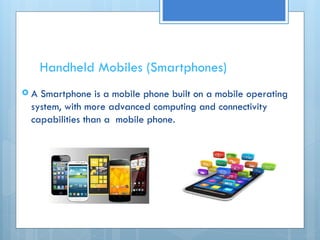
Handheld Mobiles (Smartphones)
 A Smartphone is a mobile phone built on a mobile operating
system, with more advanced computing and connectivity
capabilities than a mobile phone.
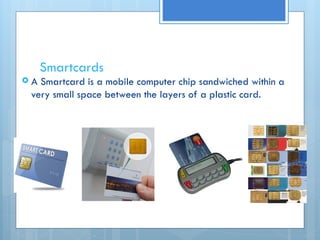
Smartcards
 A Smartcard is a mobile computer chip sandwiched within a
very small space between the layers of a plastic card.
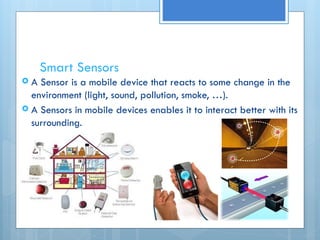
Smart Sensors
 A Sensor is a mobile device that reacts to some change in the
environment (light, sound, pollution, smoke, …).
 A Sensors in mobile devices enables it to interact better with its
surrounding.
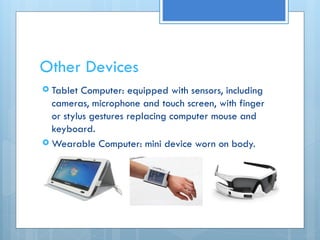
Other Devices
 Tablet Computer: equipped with sensors, including
cameras, microphone and touch screen, with finger
or stylus gestures replacing computer mouse and
keyboard.
 Wearable Computer: mini device worn on body.
4) Cellular Systems
 Consists of:
 A cell.
 A cellular device (cellphone, mobile device).
 Mobility.
 Connectivity.
 Computing.
 A type of mobile systems.
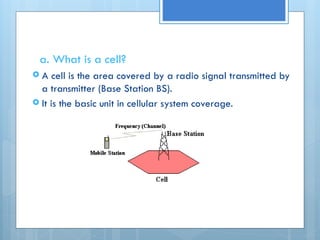
a. What is a cell?
 A cell is the area covered by a radio signal transmitted by
a transmitter (Base Station BS).
 It is the basic unit in cellular system coverage.
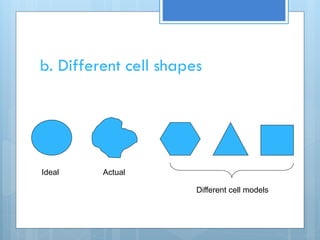
b. Different cell shapes
Ideal Actual
Different cell models
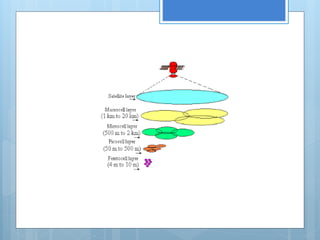
c. Cell sizes
Different types of cells are given different names according to their size and function:
 Macrocells: are large cells that are usually used for remote or sparsely populated
areas. These may be 10 km or possibly more in diameter.
 Microcells: are those that are normally found in densely populated areas which may
have a diameter of around 1 km.
 Picocells: are generally used for covering very small areas such as particular areas of
buildings, or possibly tunnels where coverage from a larger cell in the cellular system is
not possible.
 Femtocells: are small, low-power cellular base stations, typically designed for use in a
home or small business.
Cell sizes cont..
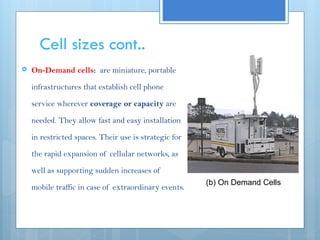
 On-Demand cells: are miniature, portable
infrastructures that establish cell phone
service wherever coverage or capacity are
needed. They allow fast and easy installation
in restricted spaces. Their use is strategic for
the rapid expansion of cellular networks, as
well as supporting sudden increases of
mobile traffic in case of extraordinary events.
(b) On Demand Cells
d. Antennas
 An antenna is the medium for releasing radio signals into the
air interface as well as trapping the signals in reception.
 The spatial distribution of power radiating from the antenna
classifies the antenna type.
 There are three main types of antennas:
 Omni-directional antennas.
 Directional antennas.
 Smart antennas.
1. Omni-directional antennas
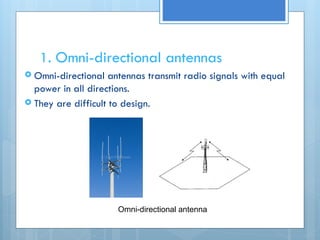
 Omni-directional antennas transmit radio signals with equal
power in all directions.
 They are difficult to design.
Omni-directional antenna
2. Directional antennas
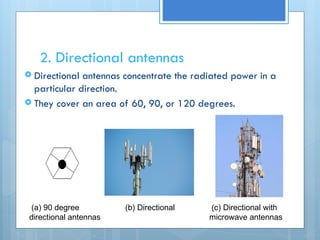
 Directional antennas concentrate the radiated power in a
particular direction.
 They cover an area of 60, 90, or 120 degrees.
(a) 90 degree (b) Directional (c) Directional with
directional antennas microwave antennas
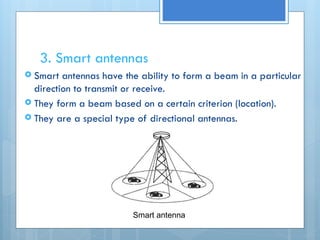
3. Smart antennas
 Smart antennas have the ability to form a beam in a particular
direction to transmit or receive.
 They form a beam based on a certain criterion (location).
 They are a special type of directional antennas.
Smart antenna
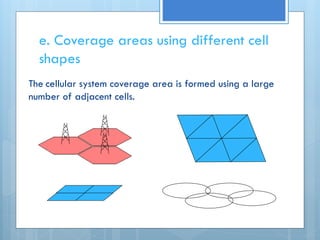
e. Coverage areas using different cell
shapes
The cellular system coverage area is formed using a large
number of adjacent cells.
Signal strength
 Down link: the radio signal sent by the Base Station
(BS) and received by the Mobile Station (MS).
 Up link: the radio signal sent by the MS and received
by the BS.
 The signal strength is a function of the distance of
the mobile from the base station.
 The signal goes dawn as the MS moves away from
the base station.
Cell capacity and traffic load
 Cell capacity is the maximum number of calls the cell can handle
per unit time.
 Traffic load is an indicator of the current traffic that the cell is
handling.
Traffic load a = λT Erlang
 The arrival rate λ: is the average number of MSs requesting the
service per second (call/time unit).
 Holding time T: the average length of time the MS requires in
seconds (call duration).
Example: In a cell, if 300 calls are generated per hour, with an
average of 24 seconds per call, find the traffic load.
a = 300 X 24 = 2 Erlang
60 X 60
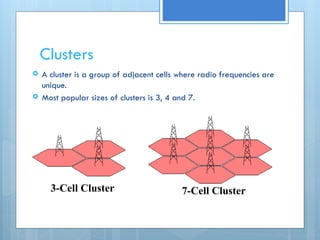
Clusters
 A cluster is a group of adjacent cells where radio frequencies are
unique.
 Most popular sizes of clusters is 3, 4 and 7.
3-Cell Cluster 7-Cell Cluster
6) Frequency reuse
 The same frequency can be reused in another cell
as long as the cells are far apart and the signals
do not interfere with each other.
 Frequency reuse increases the network capacity.
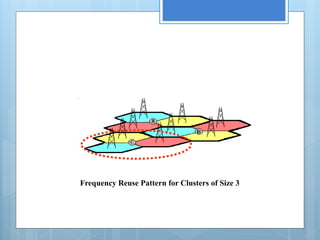
Frequency Reuse Pattern for Clusters of Size 3
Reuse distance
Reuse distance D is the minimum distance between the
two cells using the same frequency band.
D = R √3N
 R: the cell radius
 N: the number of cells in a cluster
Example: find the reuse distance for a cellular system
where the cell radius is 20 meters and the cluster size
is 3 cells.
D = 20 X √3 X3 = 20 X 3 = 60 meters
Interference
 Interference is a phenomenon that occurs when two or more
waves meet while travelling along the same medium.
 During interference, the medium carries the wave that
results from the net effect of the waves.
 In wireless transmission, interference is undesired as it
effects the transmitted signal (data) and should be kept to
a minimum.
Cochannel interference
 Cochannel interference is the interference caused by the
same frequencies in different cells.
 The reuse distance is set to minimize cochannel interference.
 In a 7-cell cluster, for each cell there are 6 cells “M” using
cochannels at the reuse distance.
 Cochannel Interference Ratio (CCIR) =
Carrier (C) = C
Interference (I)
where Ik is the cochannel interference from BSk
M
Σ Ik
k=1
7) Cochannel interference solutions
a. Cell splitting
b. Cell sectoring
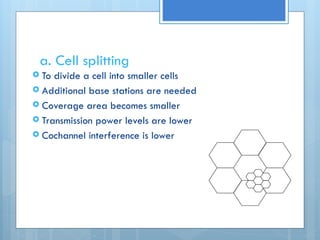
a. Cell splitting
 To divide a cell into smaller cells
 Additional base stations are needed
 Coverage area becomes smaller
 Transmission power levels are lower
 Cochannel interference is lower
Advantages of cell splitting
 Preserve frequency reuse plan.
 Reduce transmission power.
 Co-channel interference is lower.
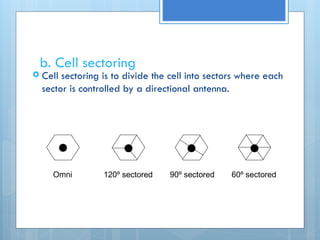
b. Cell sectoring
 Cell sectoring is to divide the cell into sectors where each
sector is controlled by a directional antenna.
Omni 120º sectored 90º sectored 60º sectored
Advantages of cell sectoring
 Smaller coverage area
 Lower power levels in the cell
 Decreased interference
 Overall system efficiency is enhanced
8) Wireless communication vs. wired
communication (1)
Wireless connections are lower in quality than wired connections due to:
 Disconnection
Mobile applications can hide short disconnections by caching programs on the
device to work locally (asynchronously) while disconnections. Although some
applications such as live video streaming cannot cover the disconnections.
 Low bandwidth
Bandwidth in wireless networks is lower than fixed networks and is shared by
users in the area. The goal is to utilize the use of bandwidth by data
compression, reduce transmission range, and combining many short transmissions
into a single large one.
Wireless communication vs. wired
communication (2)
 High bandwidth variability
Applications can cope with bandwidth variability in the following ways:
1. Assume high bandwidth and only operate when its available
2. Assume low bandwidth and not take advantage of extra bandwidth
3. Adapting to the currently available bandwidth
 Heterogeneous networks
Applications should be aware that mobile users move. Which means leaving the house
implies no Wi-Fi can be used. Also moving from cellular coverage to satellite coverage.
 Security risk
Different levels of security are applied to mobile applications depending on the type
of application.
9) Problems in mobile systems due to
mobility
a. address migration
b. location dependent information
c. migrating locality
a. Address Migration
When a mobile moves from an area to another, it changes its address.
There are several ways the network keeps track of users addresses:
1. Paging: Paging is the network initial contact to a mobile device in order to
locate the device for further communication.
• When a mobile is paged and does not reply, the network searches for it in the
coverage area.
• Instead of broadcasting all network areas, a broadcast is made to the last known
location and adjacent areas.
• The network will expand the search area, depending on the time elapsed and
the device’s mobility profile.
2. Central services: a centralized database is updated by mobiles whenever
they change their address.
3. Home bases: each mobile has a home base server which knows its current
address. Home bases communicate with each other.
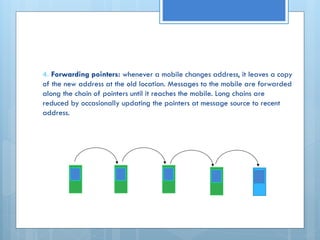
4. Forwarding pointers: whenever a mobile changes address, it leaves a copy
of the new address at the old location. Messages to the mobile are forwarded
along the chain of pointers until it reaches the mobile. Long chains are
reduced by occasionally updating the pointers at message source to recent
address.
b. Location Dependent Information
 Some applications depend on local information, which
changes with the mobiles movement. (where is the nearest
restaurant?)
 Other applications depend on information of other mobile
devices. (Where is the nearest taxi?)
 Mobile applications need to deal with wrong information that
might happen due to slow connection or disconnections,
particularly for sensitive applications.
c. Migrating Locality
 A mobile device may find the closest server for a given
service, but when the mobile migrates, the server might no
longer be the closest.
 The closest server can be determined by communication path
rather than by physical distance. Load balancing is sometimes
more important than locality.
 Long communication paths result in longer latency and higher
risk of disconnection, therefore, it is necessary to regularly
transfer service connections when a device migrates.
10) Problems in in mobile systems due
to portability(1)
 Low power
Reducing the mobile size reduces the battery size and thus the
battery life. Power can be minimized by minimizing the amount of
computation, transmission and memory used in applications.
Components of the device not used can be switched off.
 Risk to data
Including unauthorized access, loss and theft. Data can be
protected using encryption, removable memory cards and remote
servers to store data.
Portability constraints in mobile systems
(2)
 Small user interface
The smaller the mobile, the smaller is the display. Applications need
large user interfaces for multi windows, buttons and other multimedia
applications. Programs should be designed to work easily on small
user interfaces, with no mouse. The pen and touch screen are used in
mobiles to replace the mouse, and handwriting recognition to help with
inputs.
 Limited memory
Limited mobile size and power limits the storage space. Some of the
capacity solutions are compressing the file system, using a network to
access remote storage, sharing code libraries, and compressing virtual
memory pages. Using script languages reduces the size of the code.
The End

mobile computing Introduction-Mobile Computing.pptx

  • 1.
  • 2.
    Lecture Outline  Definitions Mobile System Applications  Mobile Devices  Introduction to Cellular Systems  Clusters, Frequency Reuse and Reuse Distance  Cell Splitting and Cell Sectoring  Wireless Communication vs. wired Communication  Mobile Systems Constraints
  • 3.
    1) Definitions  Mobilecomputing the ability to use portable computing devices in wireless enabled networks to stay connected and access data while on the move.  Mobile computing involves mobile communication, mobile hardware, and mobile software. o Mobile Communication issues include network infrastructure as well as communication properties, protocols, data formats ... o Mobile Hardware includes mobile devices and components. o Mobile software the applications that provides services.  Mobile System is an entity that includes mobile hardware and/or mobile software and provides mobility and computing.  Mobile Operating System allows mobile devices to access hardware components and run applications.
  • 4.
    2) Types ofMobile Systems  Some examples of types of mobile systems are: 1. Wireless Local Area Networks (WLAN) 2. Blootooth, Wi-Fi, Li-Fi, … 3. Near Field Communication (NFC) and Radio Frequency ID (RFID) 4. Sensor networks 5. Cellular systems 6. Satellite and Geographical Positioning Systems (GPS) 7. Internet of Things (IoT) 8. Vehicular Ad-Hoc Networks (VANETS) …
  • 5.
    3) Applications ofMobile Systems (1)  The importance of mobile systems has been highlighted in many fields of which a few are described below: 1. Vehicles (Vehicular networks): Music, news, traffic conditions, weather reports, anti-collision systems and other broadcast information. 2. Emergencies: An ambulance with a high-quality wireless connection to a hospital can carry vital information about injured persons to the hospital from the scene of the accident.
  • 6.
    Applications of MobileSystems (2) 3. Business: Managers can use mobile computers for critical presentations to major customers and to quickly access the latest market share information (mobile commerce). 4. Credit Card Verification: At Point of Sale (POS) terminals in shops and supermarkets, when customers use credit cards for transactions. 5. Replacement of Wired Networks: wireless networks can also be used to replace wired networks, e.g., network development in historic buildings. In addition, mobile applications are replacing computer applications including internet browsing, gaming, …
  • 7.
    4) An Overviewof Mobile Devices  A mobile device is an electronic device that communicates to other devices through a wireless connection.  The device provides computing and connectivity capabilities.  It communicates through an access point.  Cell Phones are mobile devices that communicate in a cell environment. They emerged in the 1990s and started with telephone features only.  They developed over time to include more advanced features and capabilities.
  • 8.
    Types of MobileDevices  Mobile devices can be classified into: 1. Handheld Mobiles (Smartphones). 2. Smart Cards. 3. Smart Sensors.
  • 9.
    Handheld Mobiles (Smartphones) A Smartphone is a mobile phone built on a mobile operating system, with more advanced computing and connectivity capabilities than a mobile phone.
  • 10.
    Smartcards  A Smartcardis a mobile computer chip sandwiched within a very small space between the layers of a plastic card.
  • 11.
    Smart Sensors  ASensor is a mobile device that reacts to some change in the environment (light, sound, pollution, smoke, …).  A Sensors in mobile devices enables it to interact better with its surrounding.
  • 12.
    Other Devices  TabletComputer: equipped with sensors, including cameras, microphone and touch screen, with finger or stylus gestures replacing computer mouse and keyboard.  Wearable Computer: mini device worn on body.
  • 13.
    4) Cellular Systems Consists of:  A cell.  A cellular device (cellphone, mobile device).  Mobility.  Connectivity.  Computing.  A type of mobile systems.
  • 14.
    a. What isa cell?  A cell is the area covered by a radio signal transmitted by a transmitter (Base Station BS).  It is the basic unit in cellular system coverage.
  • 15.
    b. Different cellshapes Ideal Actual Different cell models
  • 16.
    c. Cell sizes Differenttypes of cells are given different names according to their size and function:  Macrocells: are large cells that are usually used for remote or sparsely populated areas. These may be 10 km or possibly more in diameter.  Microcells: are those that are normally found in densely populated areas which may have a diameter of around 1 km.  Picocells: are generally used for covering very small areas such as particular areas of buildings, or possibly tunnels where coverage from a larger cell in the cellular system is not possible.  Femtocells: are small, low-power cellular base stations, typically designed for use in a home or small business.
  • 18.
    Cell sizes cont.. On-Demand cells: are miniature, portable infrastructures that establish cell phone service wherever coverage or capacity are needed. They allow fast and easy installation in restricted spaces. Their use is strategic for the rapid expansion of cellular networks, as well as supporting sudden increases of mobile traffic in case of extraordinary events. (b) On Demand Cells
  • 19.
    d. Antennas  Anantenna is the medium for releasing radio signals into the air interface as well as trapping the signals in reception.  The spatial distribution of power radiating from the antenna classifies the antenna type.  There are three main types of antennas:  Omni-directional antennas.  Directional antennas.  Smart antennas.
  • 20.
    1. Omni-directional antennas Omni-directional antennas transmit radio signals with equal power in all directions.  They are difficult to design. Omni-directional antenna
  • 21.
    2. Directional antennas Directional antennas concentrate the radiated power in a particular direction.  They cover an area of 60, 90, or 120 degrees. (a) 90 degree (b) Directional (c) Directional with directional antennas microwave antennas
  • 22.
    3. Smart antennas Smart antennas have the ability to form a beam in a particular direction to transmit or receive.  They form a beam based on a certain criterion (location).  They are a special type of directional antennas. Smart antenna
  • 23.
    e. Coverage areasusing different cell shapes The cellular system coverage area is formed using a large number of adjacent cells.
  • 24.
    Signal strength  Downlink: the radio signal sent by the Base Station (BS) and received by the Mobile Station (MS).  Up link: the radio signal sent by the MS and received by the BS.  The signal strength is a function of the distance of the mobile from the base station.  The signal goes dawn as the MS moves away from the base station.
  • 25.
    Cell capacity andtraffic load  Cell capacity is the maximum number of calls the cell can handle per unit time.  Traffic load is an indicator of the current traffic that the cell is handling. Traffic load a = λT Erlang  The arrival rate λ: is the average number of MSs requesting the service per second (call/time unit).  Holding time T: the average length of time the MS requires in seconds (call duration). Example: In a cell, if 300 calls are generated per hour, with an average of 24 seconds per call, find the traffic load. a = 300 X 24 = 2 Erlang 60 X 60
  • 26.
    Clusters  A clusteris a group of adjacent cells where radio frequencies are unique.  Most popular sizes of clusters is 3, 4 and 7. 3-Cell Cluster 7-Cell Cluster
  • 27.
    6) Frequency reuse The same frequency can be reused in another cell as long as the cells are far apart and the signals do not interfere with each other.  Frequency reuse increases the network capacity.
  • 28.
    Frequency Reuse Patternfor Clusters of Size 3
  • 29.
    Reuse distance Reuse distanceD is the minimum distance between the two cells using the same frequency band. D = R √3N  R: the cell radius  N: the number of cells in a cluster Example: find the reuse distance for a cellular system where the cell radius is 20 meters and the cluster size is 3 cells. D = 20 X √3 X3 = 20 X 3 = 60 meters
  • 30.
    Interference  Interference isa phenomenon that occurs when two or more waves meet while travelling along the same medium.  During interference, the medium carries the wave that results from the net effect of the waves.  In wireless transmission, interference is undesired as it effects the transmitted signal (data) and should be kept to a minimum.
  • 31.
    Cochannel interference  Cochannelinterference is the interference caused by the same frequencies in different cells.  The reuse distance is set to minimize cochannel interference.  In a 7-cell cluster, for each cell there are 6 cells “M” using cochannels at the reuse distance.  Cochannel Interference Ratio (CCIR) = Carrier (C) = C Interference (I) where Ik is the cochannel interference from BSk M Σ Ik k=1
  • 32.
    7) Cochannel interferencesolutions a. Cell splitting b. Cell sectoring
  • 33.
    a. Cell splitting To divide a cell into smaller cells  Additional base stations are needed  Coverage area becomes smaller  Transmission power levels are lower  Cochannel interference is lower
  • 34.
    Advantages of cellsplitting  Preserve frequency reuse plan.  Reduce transmission power.  Co-channel interference is lower.
  • 35.
    b. Cell sectoring Cell sectoring is to divide the cell into sectors where each sector is controlled by a directional antenna. Omni 120º sectored 90º sectored 60º sectored
  • 36.
    Advantages of cellsectoring  Smaller coverage area  Lower power levels in the cell  Decreased interference  Overall system efficiency is enhanced
  • 37.
    8) Wireless communicationvs. wired communication (1) Wireless connections are lower in quality than wired connections due to:  Disconnection Mobile applications can hide short disconnections by caching programs on the device to work locally (asynchronously) while disconnections. Although some applications such as live video streaming cannot cover the disconnections.  Low bandwidth Bandwidth in wireless networks is lower than fixed networks and is shared by users in the area. The goal is to utilize the use of bandwidth by data compression, reduce transmission range, and combining many short transmissions into a single large one.
  • 38.
    Wireless communication vs.wired communication (2)  High bandwidth variability Applications can cope with bandwidth variability in the following ways: 1. Assume high bandwidth and only operate when its available 2. Assume low bandwidth and not take advantage of extra bandwidth 3. Adapting to the currently available bandwidth  Heterogeneous networks Applications should be aware that mobile users move. Which means leaving the house implies no Wi-Fi can be used. Also moving from cellular coverage to satellite coverage.  Security risk Different levels of security are applied to mobile applications depending on the type of application.
  • 39.
    9) Problems inmobile systems due to mobility a. address migration b. location dependent information c. migrating locality
  • 40.
    a. Address Migration Whena mobile moves from an area to another, it changes its address. There are several ways the network keeps track of users addresses: 1. Paging: Paging is the network initial contact to a mobile device in order to locate the device for further communication. • When a mobile is paged and does not reply, the network searches for it in the coverage area. • Instead of broadcasting all network areas, a broadcast is made to the last known location and adjacent areas. • The network will expand the search area, depending on the time elapsed and the device’s mobility profile. 2. Central services: a centralized database is updated by mobiles whenever they change their address. 3. Home bases: each mobile has a home base server which knows its current address. Home bases communicate with each other.
  • 41.
    4. Forwarding pointers:whenever a mobile changes address, it leaves a copy of the new address at the old location. Messages to the mobile are forwarded along the chain of pointers until it reaches the mobile. Long chains are reduced by occasionally updating the pointers at message source to recent address.
  • 42.
    b. Location DependentInformation  Some applications depend on local information, which changes with the mobiles movement. (where is the nearest restaurant?)  Other applications depend on information of other mobile devices. (Where is the nearest taxi?)  Mobile applications need to deal with wrong information that might happen due to slow connection or disconnections, particularly for sensitive applications.
  • 43.
    c. Migrating Locality A mobile device may find the closest server for a given service, but when the mobile migrates, the server might no longer be the closest.  The closest server can be determined by communication path rather than by physical distance. Load balancing is sometimes more important than locality.  Long communication paths result in longer latency and higher risk of disconnection, therefore, it is necessary to regularly transfer service connections when a device migrates.
  • 44.
    10) Problems inin mobile systems due to portability(1)  Low power Reducing the mobile size reduces the battery size and thus the battery life. Power can be minimized by minimizing the amount of computation, transmission and memory used in applications. Components of the device not used can be switched off.  Risk to data Including unauthorized access, loss and theft. Data can be protected using encryption, removable memory cards and remote servers to store data.
  • 45.
    Portability constraints inmobile systems (2)  Small user interface The smaller the mobile, the smaller is the display. Applications need large user interfaces for multi windows, buttons and other multimedia applications. Programs should be designed to work easily on small user interfaces, with no mouse. The pen and touch screen are used in mobiles to replace the mouse, and handwriting recognition to help with inputs.  Limited memory Limited mobile size and power limits the storage space. Some of the capacity solutions are compressing the file system, using a network to access remote storage, sharing code libraries, and compressing virtual memory pages. Using script languages reduces the size of the code.
  • 46.