

Off-the-Shelf vs Platform

What Approach
Makes Sense
For Your
Business
Dipesh Mukerji,
Kony Inc.
Possible Methods

Off-the-Shelf
vs

Platform

…

(It Depends)

…
Off-the-Shelf
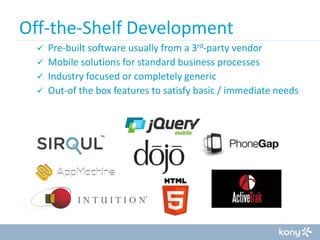
Off-the-Shelf Development
Pre-built software usually from a 3rd-party vendor
 Mobile solutions for standard business processes
 Industry focused or completely generic
 Out-of the box features to satisfy basic / immediate needs

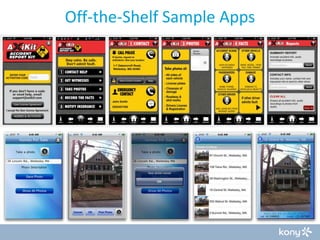
Off-the-Shelf Sample Apps
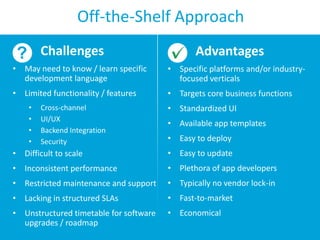
Off-the-Shelf Approach
Challenges

Advantages

• May need to know / learn specific
development language

• Specific platforms and/or industryfocused verticals

• Limited functionality / features

• Targets core business functions

•
•
•
•

Cross-channel
UI/UX
Backend Integration
Security

• Standardized UI

• Available app templates
• Easy to deploy

• Difficult to scale

• Easy to update

• Inconsistent performance

• Plethora of app developers

• Restricted maintenance and support

• Typically no vendor lock-in

• Lacking in structured SLAs

• Fast-to-market

• Unstructured timetable for software
upgrades / roadmap

• Economical
Off-the-Shelf Approach
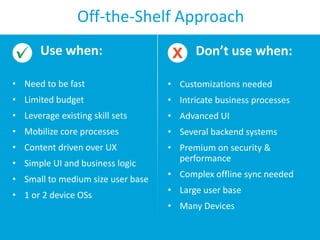
Use when:

Don’t use when:

• Need to be fast

• Customizations needed

• Limited budget

• Intricate business processes

• Leverage existing skill sets

• Advanced UI

• Mobilize core processes

• Several backend systems

• Content driven over UX

• Premium on security &
performance

• Simple UI and business logic
• Small to medium size user base
• 1 or 2 device OSs

• Complex offline sync needed
• Large user base
• Many Devices
Platform
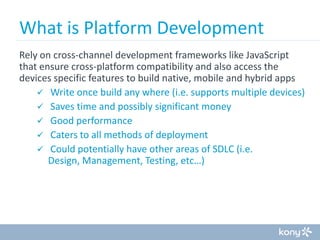
What is Platform Development
Rely on cross-channel development frameworks like JavaScript
that ensure cross-platform compatibility and also access the
devices specific features to build native, mobile and hybrid apps
 Write once build any where (i.e. supports multiple devices)
 Saves time and possibly significant money
 Good performance
 Caters to all methods of deployment
 Could potentially have other areas of SDLC (i.e.
Design, Management, Testing, etc…)
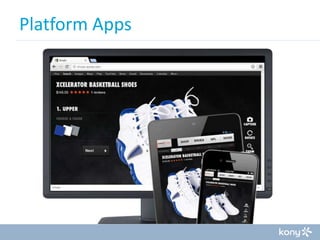
Platform Apps
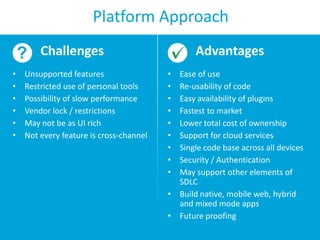
Platform Approach
Challenges
•
•
•
•
•
•

Unsupported features
Restricted use of personal tools
Possibility of slow performance
Vendor lock / restrictions
May not be as UI rich
Not every feature is cross-channel

Advantages
•
•
•
•
•
•
•
•
•

Ease of use
Re-usability of code
Easy availability of plugins
Fastest to market
Lower total cost of ownership
Support for cloud services
Single code base across all devices
Security / Authentication
May support other elements of
SDLC
• Build native, mobile web, hybrid
and mixed mode apps
• Future proofing
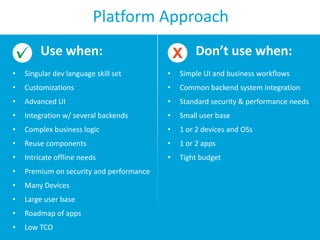
Platform Approach
Use when:

Don’t use when:

•

Singular dev language skill set

•

Simple UI and business workflows

•

Customizations

•

Common backend system integration

•

Advanced UI

•

Standard security & performance needs

•

Integration w/ several backends

•

Small user base

•

Complex business logic

•

1 or 2 devices and OSs

•

Reuse components

•

1 or 2 apps

•

Intricate offline needs

•

Tight budget

•

Premium on security and performance

•

Many Devices

•

Large user base

•

Roadmap of apps

•

Low TCO
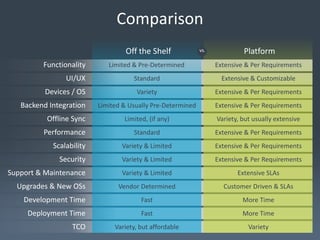
Comparison
Off the Shelf
Functionality

vs.

Platform

Limited & Pre-Determined

Extensive & Per Requirements

Standard

Extensive & Customizable

Variety

Extensive & Per Requirements

Limited & Usually Pre-Determined

Extensive & Per Requirements

Offline Sync

Limited, (if any)

Variety, but usually extensive

Performance

Standard

Extensive & Per Requirements

Scalability

Variety & Limited

Extensive & Per Requirements

Security

Variety & Limited

Extensive & Per Requirements

Support & Maintenance

Variety & Limited

Extensive SLAs

Vendor Determined

Customer Driven & SLAs

Development Time

Fast

More Time

Deployment Time

Fast

More Time

Variety, but affordable

Variety

UI/UX
Devices / OS

Backend Integration

Upgrades & New OSs

TCO
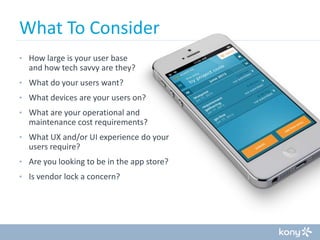
What To Consider
• How large is your user base

and how tech savvy are they?
• What do your users want?
• What devices are your users on?
• What are your operational and

maintenance cost requirements?
• What UX and/or UI experience do your

users require?
• Are you looking to be in the app store?
• Is vendor lock a concern?
What To Consider
How much does content matter to your users?
•

Industry like publishing put content at a premium

How do your users access and consume content?
•

Mobile, Desktop, Other

How does mobile satisfy your business needs?
•

Revenue driven?

Does your business need to evolve as fast as technology?
•

Gaming vs Publishing
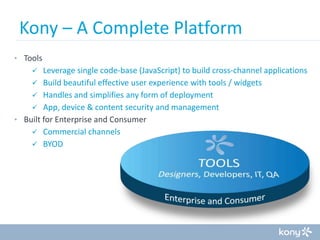
Kony – A Complete Platform
• Tools

Leverage single code-base (JavaScript) to build cross-channel applications
 Build beautiful effective user experience with tools / widgets
 Handles and simplifies any form of deployment
 App, device & content security and management
• Built for Enterprise and Consumer
 Commercial channels
 BYOD

Mobile App Development: Off the-Shelf vs Platform

Mobile App Development: Off the-Shelf vs Platform

  • 1.
    Off-the-Shelf vs Platform WhatApproach Makes Sense For Your Business Dipesh Mukerji, Kony Inc.
  • 2.
  • 3.
  • 4.
    Off-the-Shelf Development Pre-built softwareusually from a 3rd-party vendor  Mobile solutions for standard business processes  Industry focused or completely generic  Out-of the box features to satisfy basic / immediate needs 
  • 5.
  • 6.
    Off-the-Shelf Approach Challenges Advantages • Mayneed to know / learn specific development language • Specific platforms and/or industryfocused verticals • Limited functionality / features • Targets core business functions • • • • Cross-channel UI/UX Backend Integration Security • Standardized UI • Available app templates • Easy to deploy • Difficult to scale • Easy to update • Inconsistent performance • Plethora of app developers • Restricted maintenance and support • Typically no vendor lock-in • Lacking in structured SLAs • Fast-to-market • Unstructured timetable for software upgrades / roadmap • Economical
  • 7.
    Off-the-Shelf Approach Use when: Don’tuse when: • Need to be fast • Customizations needed • Limited budget • Intricate business processes • Leverage existing skill sets • Advanced UI • Mobilize core processes • Several backend systems • Content driven over UX • Premium on security & performance • Simple UI and business logic • Small to medium size user base • 1 or 2 device OSs • Complex offline sync needed • Large user base • Many Devices
  • 8.
  • 9.
    What is PlatformDevelopment Rely on cross-channel development frameworks like JavaScript that ensure cross-platform compatibility and also access the devices specific features to build native, mobile and hybrid apps  Write once build any where (i.e. supports multiple devices)  Saves time and possibly significant money  Good performance  Caters to all methods of deployment  Could potentially have other areas of SDLC (i.e. Design, Management, Testing, etc…)
  • 10.
  • 11.
    Platform Approach Challenges • • • • • • Unsupported features Restricteduse of personal tools Possibility of slow performance Vendor lock / restrictions May not be as UI rich Not every feature is cross-channel Advantages • • • • • • • • • Ease of use Re-usability of code Easy availability of plugins Fastest to market Lower total cost of ownership Support for cloud services Single code base across all devices Security / Authentication May support other elements of SDLC • Build native, mobile web, hybrid and mixed mode apps • Future proofing
  • 12.
    Platform Approach Use when: Don’tuse when: • Singular dev language skill set • Simple UI and business workflows • Customizations • Common backend system integration • Advanced UI • Standard security & performance needs • Integration w/ several backends • Small user base • Complex business logic • 1 or 2 devices and OSs • Reuse components • 1 or 2 apps • Intricate offline needs • Tight budget • Premium on security and performance • Many Devices • Large user base • Roadmap of apps • Low TCO
  • 13.
    Comparison Off the Shelf Functionality vs. Platform Limited& Pre-Determined Extensive & Per Requirements Standard Extensive & Customizable Variety Extensive & Per Requirements Limited & Usually Pre-Determined Extensive & Per Requirements Offline Sync Limited, (if any) Variety, but usually extensive Performance Standard Extensive & Per Requirements Scalability Variety & Limited Extensive & Per Requirements Security Variety & Limited Extensive & Per Requirements Support & Maintenance Variety & Limited Extensive SLAs Vendor Determined Customer Driven & SLAs Development Time Fast More Time Deployment Time Fast More Time Variety, but affordable Variety UI/UX Devices / OS Backend Integration Upgrades & New OSs TCO
  • 14.
    What To Consider •How large is your user base and how tech savvy are they? • What do your users want? • What devices are your users on? • What are your operational and maintenance cost requirements? • What UX and/or UI experience do your users require? • Are you looking to be in the app store? • Is vendor lock a concern?
  • 15.
    What To Consider Howmuch does content matter to your users? • Industry like publishing put content at a premium How do your users access and consume content? • Mobile, Desktop, Other How does mobile satisfy your business needs? • Revenue driven? Does your business need to evolve as fast as technology? • Gaming vs Publishing
  • 16.
    Kony – AComplete Platform • Tools Leverage single code-base (JavaScript) to build cross-channel applications  Build beautiful effective user experience with tools / widgets  Handles and simplifies any form of deployment  App, device & content security and management • Built for Enterprise and Consumer  Commercial channels  BYOD 