Thin Clients for InduSoft Web Studio
Agenda
• Thin Clients Explained
• Features/Architectures/Differences
• Web Thin Client
• Secure Viewer
• Studio Mobile Access (SMA) a.k.a MA
• When to use each type
• Demonstrations
• Resources
Thin Clients Explained
• NOT hardware thin client (centrally managed
computer)
• Remote access to screens and data (Tags)
Runtime Server
Thin Clients
Screens
Tags
Tag Scope
• Local vs. Server
Web Tunneling
Port 80/443
Port 1234
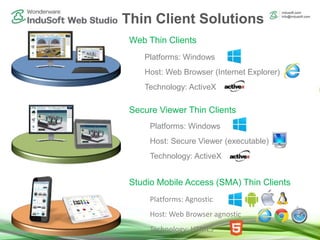
Thin Client Solutions
Platforms: Agnostic
Host: Web Browser agnostic
Technology: HTML5
Platforms: Windows
Host: Secure Viewer (executable)
Technology: ActiveX
Platforms: Windows
Host: Web Browser (Internet Explorer)
Technology: ActiveX
Studio Mobile Access (SMA) Thin Clients
Web Thin Clients
Secure Viewer Thin Clients
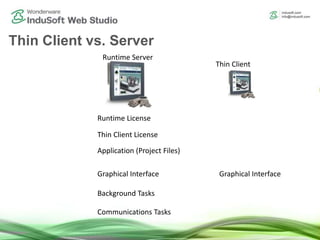
Thin Client vs. Server
Runtime Server
Thin Client
Runtime License
Thin Client License
Application (Project Files)
Graphical InterfaceGraphical Interface
Background Tasks
Communications Tasks
Deployment
Deployment of IWS
• Develop and Runtime
One Runtime to:
• One PLC
• Multiple PLCs
• Database(s)
• OPC
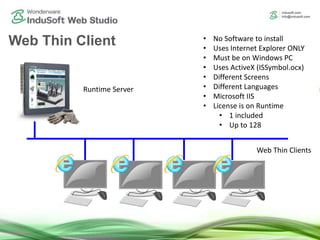
Web Thin Client
Runtime Server
• No Software to install
• Uses Internet Explorer ONLY
• Must be on Windows PC
• Uses ActiveX (ISSymbol.ocx)
• Different Screens
• Different Languages
• Microsoft IIS
• License is on Runtime
• 1 included
• Up to 128
Web Thin Clients
Secure Viewer
Runtime Server
Secure Viewer
Thin Clients
• Small Software to install
• Uses Internet Explorer ONLY
• Must be on Windows PC
• Uses ActiveX (ISSymbol.ocx)
• Different Screens
• Different Languages
• Microsoft IIS or Shared Folder
• License is on Runtime
• 1 included
• Up to 128
SMA
Runtime Server
SMA
Thin Clients
• No Software to install
• Uses Internet Explorer ONLY
• Must be on Windows PC
• Any HTML5 Browser
• Uses ActiveX (ISSymbol.ocx)
• Different Screens
• Different Languages
• Microsoft IIS or CGI
• License is on Runtime
• 1 included
• Up to 128
Typical Uses
Typical Uses
• Web Thin Client
– Office Environment
– Remote
– No need or want to install software
• Secure Viewer
– Large/Long Machine or Process
– Behaves as another HMI
– As ANDON or Production Monitor
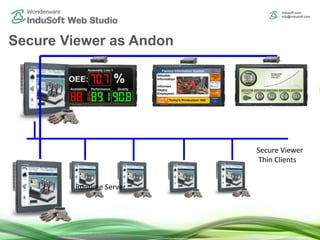
Secure Viewer as Andon
Runtime Server
Secure Viewer
Thin Clients
Runtime Server
Why use Andon/Production Monitoring?
• Called many different things, Andon, Production Monitoring,
Digital Signage, Factory Information System
• Quickly visualize status (KPIs) remotely
• Machines are like printing presses for money.
• Keep it running
• If stopped, get it running quickly
• Understand what is going on from a distance
• Encourage Safety and inform employees
Span Multiple Screens
SetViewerPos()
Architecture – Video Wall
Benefits:
• Visualize from very far away
• Easily create screens that span
many monitors
InduSoft Web Studio
Runtime Server
Typical Uses (continued)
• SMA
– Remote but nearby, maintenance staff
– Remote but at facility
– Remote but not at facility
– When using IoTview (No Local Viewer)
Demonstrations
IIS Configuration
• Install
• Configure
– ASP, ASP.Net and ISAPI
– Mime Types
– Folder
Resources
Resources
• Thin Client Tech Note
– Is the project running?
– Can you ping
– 404 Error
– Red “X”
• Training Videos
• Previous Webinars
• Mobile Brochure
How to contact indusoft
Email
(US) info@indusoft.com
(Brazil) info@indusoft.com.br
(Germany) info@indusoft.com.de
Support support@indusoft.com
Web site
(English) www.indusoft.com
(Portuguese) www.indusoft.com.br
(German) www.indusoft.com.de
Phone +1 (512) 349-0334 (US)
+55 (11) 3293-9139 (Brazil)
+49 (0) 6227-732510 (Germany)
Toll-Free 877-INDUSOFT (877-463-8763)
Fax +1 (512) 349-0375
Contact InduSoft Today
Germany
USA
Brazil

Thin Clients for InduSoft Web Studio

  • 1.
    Thin Clients forInduSoft Web Studio
  • 2.
    Agenda • Thin ClientsExplained • Features/Architectures/Differences • Web Thin Client • Secure Viewer • Studio Mobile Access (SMA) a.k.a MA • When to use each type • Demonstrations • Resources
  • 3.
    Thin Clients Explained •NOT hardware thin client (centrally managed computer) • Remote access to screens and data (Tags) Runtime Server Thin Clients Screens Tags Tag Scope • Local vs. Server Web Tunneling Port 80/443 Port 1234
  • 4.
    Thin Client Solutions Platforms:Agnostic Host: Web Browser agnostic Technology: HTML5 Platforms: Windows Host: Secure Viewer (executable) Technology: ActiveX Platforms: Windows Host: Web Browser (Internet Explorer) Technology: ActiveX Studio Mobile Access (SMA) Thin Clients Web Thin Clients Secure Viewer Thin Clients
  • 5.
    Thin Client vs.Server Runtime Server Thin Client Runtime License Thin Client License Application (Project Files) Graphical InterfaceGraphical Interface Background Tasks Communications Tasks
  • 6.
  • 7.
    Deployment of IWS •Develop and Runtime One Runtime to: • One PLC • Multiple PLCs • Database(s) • OPC
  • 8.
    Web Thin Client RuntimeServer • No Software to install • Uses Internet Explorer ONLY • Must be on Windows PC • Uses ActiveX (ISSymbol.ocx) • Different Screens • Different Languages • Microsoft IIS • License is on Runtime • 1 included • Up to 128 Web Thin Clients
  • 9.
    Secure Viewer Runtime Server SecureViewer Thin Clients • Small Software to install • Uses Internet Explorer ONLY • Must be on Windows PC • Uses ActiveX (ISSymbol.ocx) • Different Screens • Different Languages • Microsoft IIS or Shared Folder • License is on Runtime • 1 included • Up to 128
  • 10.
    SMA Runtime Server SMA Thin Clients •No Software to install • Uses Internet Explorer ONLY • Must be on Windows PC • Any HTML5 Browser • Uses ActiveX (ISSymbol.ocx) • Different Screens • Different Languages • Microsoft IIS or CGI • License is on Runtime • 1 included • Up to 128
  • 11.
  • 12.
    Typical Uses • WebThin Client – Office Environment – Remote – No need or want to install software • Secure Viewer – Large/Long Machine or Process – Behaves as another HMI – As ANDON or Production Monitor
  • 13.
    Secure Viewer asAndon Runtime Server Secure Viewer Thin Clients Runtime Server
  • 14.
    Why use Andon/ProductionMonitoring? • Called many different things, Andon, Production Monitoring, Digital Signage, Factory Information System • Quickly visualize status (KPIs) remotely • Machines are like printing presses for money. • Keep it running • If stopped, get it running quickly • Understand what is going on from a distance • Encourage Safety and inform employees
  • 15.
  • 16.
    Architecture – VideoWall Benefits: • Visualize from very far away • Easily create screens that span many monitors InduSoft Web Studio Runtime Server
  • 17.
    Typical Uses (continued) •SMA – Remote but nearby, maintenance staff – Remote but at facility – Remote but not at facility – When using IoTview (No Local Viewer)
  • 18.
  • 19.
    IIS Configuration • Install •Configure – ASP, ASP.Net and ISAPI – Mime Types – Folder
  • 20.
  • 21.
    Resources • Thin ClientTech Note – Is the project running? – Can you ping – 404 Error – Red “X” • Training Videos • Previous Webinars • Mobile Brochure
  • 22.
  • 23.
    Email (US) info@indusoft.com (Brazil) info@indusoft.com.br (Germany)info@indusoft.com.de Support support@indusoft.com Web site (English) www.indusoft.com (Portuguese) www.indusoft.com.br (German) www.indusoft.com.de Phone +1 (512) 349-0334 (US) +55 (11) 3293-9139 (Brazil) +49 (0) 6227-732510 (Germany) Toll-Free 877-INDUSOFT (877-463-8763) Fax +1 (512) 349-0375 Contact InduSoft Today Germany USA Brazil