Mobile
May 21, 2012
STATS
Smartphone Users –
                             Highlight Video


http://www.youtube.com/watch?v=CjUcq_E4I-
s&list=PL371A061320ACD090&index=12&feat
ure=plpp_video
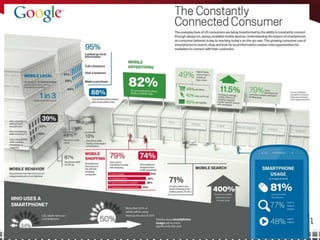
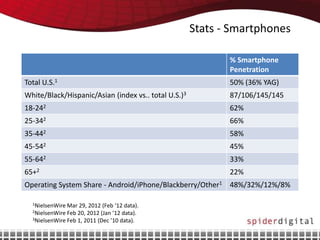
Stats - Smartphones

                                                             % Smartphone
                                                             Penetration
Total U.S.1                                                  50% (36% YAG)
White/Black/Hispanic/Asian (index vs.. total U.S.)3          87/106/145/145
18-242                                                       62%
25-342                                                       66%
35-442                                                       58%
45-542                                                       45%
55-642                                                       33%
65+2                                                         22%
Operating System Share - Android/iPhone/Blackberry/Other1 48%/32%/12%/8%

  1NielsenWire Mar 29, 2012 (Feb ‘12 data).
  2NielsenWire Feb 20, 2012 (Jan ’12 data).
  3NielsenWire Feb 1, 2011 (Dec ’10 data).
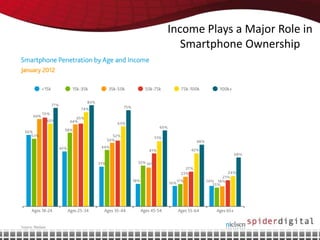
Income Plays a Major Role in
   Smartphone Ownership
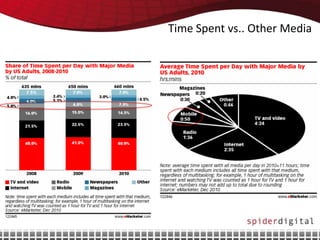
Time Spent vs.. Other Media
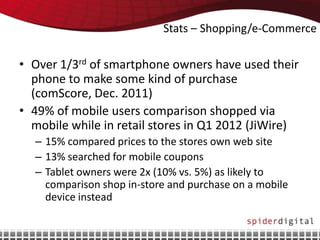
Stats – Shopping/e-Commerce

• Over 1/3rd of smartphone owners have used their
  phone to make some kind of purchase
  (comScore, Dec. 2011)
• 49% of mobile users comparison shopped via
  mobile while in retail stores in Q1 2012 (JiWire)
  – 15% compared prices to the stores own web site
  – 13% searched for mobile coupons
  – Tablet owners were 2x (10% vs. 5%) as likely to
    comparison shop in-store and purchase on a mobile
    device instead
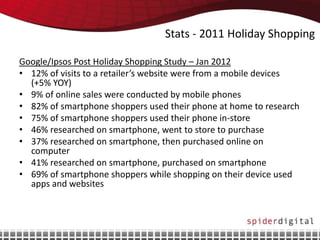
Stats - 2011 Holiday Shopping

Google/Ipsos Post Holiday Shopping Study – Jan 2012
• 12% of visits to a retailer’s website were from a mobile devices
  (+5% YOY)
• 9% of online sales were conducted by mobile phones
• 82% of smartphone shoppers used their phone at home to research
• 75% of smartphone shoppers used their phone in-store
• 46% researched on smartphone, went to store to purchase
• 37% researched on smartphone, then purchased online on
  computer
• 41% researched on smartphone, purchased on smartphone
• 69% of smartphone shoppers while shopping on their device used
  apps and websites
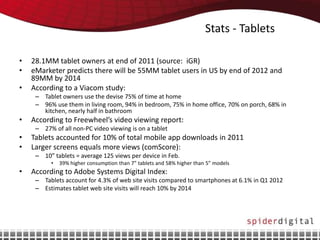
Stats - Tablets

•   28.1MM tablet owners at end of 2011 (source: iGR)
•   eMarketer predicts there will be 55MM tablet users in US by end of 2012 and
    89MM by 2014
•   According to a Viacom study:
     – Tablet owners use the devise 75% of time at home
     – 96% use them in living room, 94% in bedroom, 75% in home office, 70% on porch, 68% in
       kitchen, nearly half in bathroom
•   According to Freewheel’s video viewing report:
     – 27% of all non-PC video viewing is on a tablet
•   Tablets accounted for 10% of total mobile app downloads in 2011
•   Larger screens equals more views (comScore):
     – 10” tablets = average 125 views per device in Feb.
          •   39% higher consumption than 7” tablets and 58% higher than 5” models
•   According to Adobe Systems Digital Index:
     – Tablets account for 4.3% of web site visits compared to smartphones at 6.1% in Q1 2012
     – Estimates tablet web site visits will reach 10% by 2014
PROS/CONS
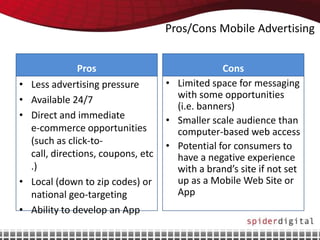
Pros/Cons Mobile Advertising


                 Pros                             Cons
•   Less advertising pressure        • Limited space for messaging
•   Available 24/7                     with some opportunities
                                       (i.e. banners)
•   Direct and immediate             • Smaller scale audience than
    e-commerce opportunities           computer-based web access
    (such as click-to-               • Potential for consumers to
    call, directions, coupons, etc     have a negative experience
    .)                                 with a brand’s site if not set
•   Local (down to zip codes) or       up as a Mobile Web Site or
    national geo-targeting             App
•   Ability to develop an App
AD CAPABILITIES
Ad Capabilities

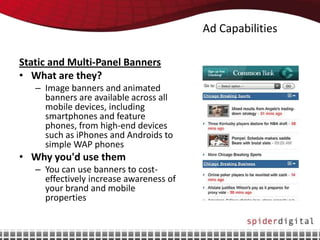
Static and Multi-Panel Banners
• What are they?
   – Image banners and animated
     banners are available across all
     mobile devices, including
     smartphones and feature
     phones, from high-end devices
     such as iPhones and Androids to
     simple WAP phones
• Why you'd use them
   – You can use banners to cost-
     effectively increase awareness of
     your brand and mobile
     properties
Ad Capabilities

Text (SMS) Ads
• What is it?
  – SMS advertising uses text messages, which are limited to
    160 characters or less
• Why you'd use it
  – Can reach mass audience down to niche audience
  – Increase engagement with consumer through different
    tactics such as voting, offering coupons, etc.
  – Recommended to only send SMS message to consumers
    that have opted-in
Ad Capabilities

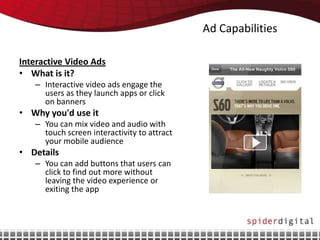
Interactive Video Ads
• What is it?
   – Interactive video ads engage the
     users as they launch apps or click
     on banners
• Why you'd use it
   – You can mix video and audio with
     touch screen interactivity to attract
     your mobile audience
• Details
   – You can add buttons that users can
     click to find out more without
     leaving the video experience or
     exiting the app
Ad Capabilities

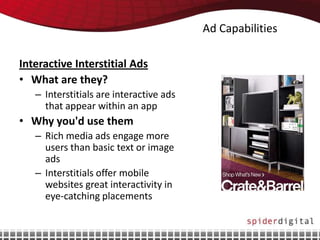
Interactive Interstitial Ads
• What are they?
   – Interstitials are interactive ads
     that appear within an app
• Why you'd use them
   – Rich media ads engage more
     users than basic text or image
     ads
   – Interstitials offer mobile
     websites great interactivity in
     eye-catching placements
Ad Capabilities

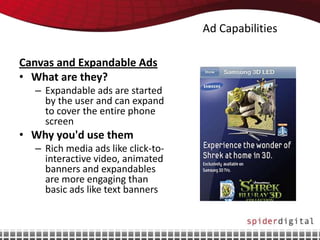
Canvas and Expandable Ads
• What are they?
  – Expandable ads are started
    by the user and can expand
    to cover the entire phone
    screen
• Why you'd use them
  – Rich media ads like click-to-
    interactive video, animated
    banners and expandables
    are more engaging than
    basic ads like text banners
Ad Capabilities

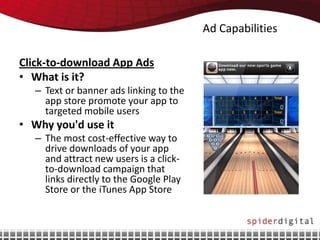
Click-to-download App Ads
• What is it?
   – Text or banner ads linking to the
     app store promote your app to
     targeted mobile users
• Why you'd use it
   – The most cost-effective way to
     drive downloads of your app
     and attract new users is a click-
     to-download campaign that
     links directly to the Google Play
     Store or the iTunes App Store
Ad Capabilities

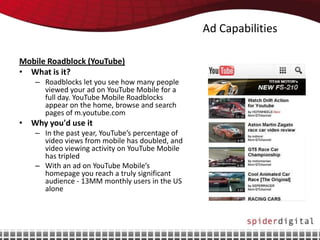
Mobile Roadblock (YouTube)
• What is it?
   – Roadblocks let you see how many people
     viewed your ad on YouTube Mobile for a
     full day. YouTube Mobile Roadblocks
     appear on the home, browse and search
     pages of m.youtube.com
• Why you'd use it
   – In the past year, YouTube’s percentage of
     video views from mobile has doubled, and
     video viewing activity on YouTube Mobile
     has tripled
   – With an ad on YouTube Mobile’s
     homepage you reach a truly significant
     audience - 13MM monthly users in the US
     alone
Ad Capabilities

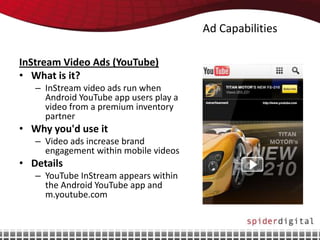
InStream Video Ads (YouTube)
• What is it?
   – InStream video ads run when
     Android YouTube app users play a
     video from a premium inventory
     partner
• Why you'd use it
   – Video ads increase brand
     engagement within mobile videos
• Details
   – YouTube InStream appears within
     the Android YouTube app and
     m.youtube.com
Ad Capabilities

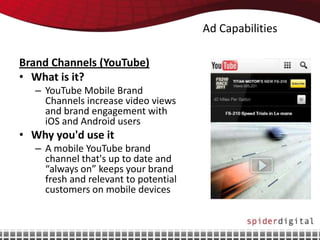
Brand Channels (YouTube)
• What is it?
   – YouTube Mobile Brand
     Channels increase video views
     and brand engagement with
     iOS and Android users
• Why you'd use it
   – A mobile YouTube brand
     channel that's up to date and
     “always on” keeps your brand
     fresh and relevant to potential
     customers on mobile devices
You Might be a Mobile
                                                          Power User if…
• You routinely use your phone to find places and things around you
• Attending a conference, you live Tweet from your smartphone, although your laptop is in your
  bag
• You have both the SoundHound and the Shazam apps to be sure you can identify any song
  you hear anytime
• You figured out how to do the workaround to get Google Wallet loaded and functioning on
  your Android with Ice Cream Sandwich (and, of course, you know what Ice Cream Sandwich
  is)
• Your utilities include a speedometer app such as Ulysse Speedometer or Speed-o-Meter and
  a flashlight such as TeslaLED (Android) or Flashlight (iPhone)
• Your 2D barcode readers include Scanlife and SnapTag Reader -- and you use them
• You routinely price-check in stores using ShopSavvy, Red Laser or Amazon’s Price Check
  without giving it a second thought
• You use your phone for navigation
• Your primary weather checking device is your phone
• You have at least three airline apps and three hotel apps, and are registered at all
• If you travel, you regularly use travel apps such as OnTheFly, Kayak, AutoPilot or Flight sites
  while in transit
• You regularly use check-in apps, such as Foursquare for location and Shopkick for rewards
• You are self-equipped to use mobile payments such as via Square, MoneySend, Google
  Wallet or Serve, and are just waiting for the market to catch up
• You have your phone synced to your computer and/or your other mobile phone and are
  comfortable with syncing apps such as SugarSync or Dropbox
• Your reward card numbers all are in your phone in Key Ring or CardStar
• You program your DVR remotely from your phone

Mobile 5.21.12

  • 1.
  • 2.
  • 3.
    Smartphone Users – Highlight Video http://www.youtube.com/watch?v=CjUcq_E4I- s&list=PL371A061320ACD090&index=12&feat ure=plpp_video
  • 5.
    Stats - Smartphones % Smartphone Penetration Total U.S.1 50% (36% YAG) White/Black/Hispanic/Asian (index vs.. total U.S.)3 87/106/145/145 18-242 62% 25-342 66% 35-442 58% 45-542 45% 55-642 33% 65+2 22% Operating System Share - Android/iPhone/Blackberry/Other1 48%/32%/12%/8% 1NielsenWire Mar 29, 2012 (Feb ‘12 data). 2NielsenWire Feb 20, 2012 (Jan ’12 data). 3NielsenWire Feb 1, 2011 (Dec ’10 data).
  • 6.
    Income Plays aMajor Role in Smartphone Ownership
  • 7.
    Time Spent vs..Other Media
  • 8.
    Stats – Shopping/e-Commerce •Over 1/3rd of smartphone owners have used their phone to make some kind of purchase (comScore, Dec. 2011) • 49% of mobile users comparison shopped via mobile while in retail stores in Q1 2012 (JiWire) – 15% compared prices to the stores own web site – 13% searched for mobile coupons – Tablet owners were 2x (10% vs. 5%) as likely to comparison shop in-store and purchase on a mobile device instead
  • 9.
    Stats - 2011Holiday Shopping Google/Ipsos Post Holiday Shopping Study – Jan 2012 • 12% of visits to a retailer’s website were from a mobile devices (+5% YOY) • 9% of online sales were conducted by mobile phones • 82% of smartphone shoppers used their phone at home to research • 75% of smartphone shoppers used their phone in-store • 46% researched on smartphone, went to store to purchase • 37% researched on smartphone, then purchased online on computer • 41% researched on smartphone, purchased on smartphone • 69% of smartphone shoppers while shopping on their device used apps and websites
  • 10.
    Stats - Tablets • 28.1MM tablet owners at end of 2011 (source: iGR) • eMarketer predicts there will be 55MM tablet users in US by end of 2012 and 89MM by 2014 • According to a Viacom study: – Tablet owners use the devise 75% of time at home – 96% use them in living room, 94% in bedroom, 75% in home office, 70% on porch, 68% in kitchen, nearly half in bathroom • According to Freewheel’s video viewing report: – 27% of all non-PC video viewing is on a tablet • Tablets accounted for 10% of total mobile app downloads in 2011 • Larger screens equals more views (comScore): – 10” tablets = average 125 views per device in Feb. • 39% higher consumption than 7” tablets and 58% higher than 5” models • According to Adobe Systems Digital Index: – Tablets account for 4.3% of web site visits compared to smartphones at 6.1% in Q1 2012 – Estimates tablet web site visits will reach 10% by 2014
  • 11.
  • 12.
    Pros/Cons Mobile Advertising Pros Cons • Less advertising pressure • Limited space for messaging • Available 24/7 with some opportunities (i.e. banners) • Direct and immediate • Smaller scale audience than e-commerce opportunities computer-based web access (such as click-to- • Potential for consumers to call, directions, coupons, etc have a negative experience .) with a brand’s site if not set • Local (down to zip codes) or up as a Mobile Web Site or national geo-targeting App • Ability to develop an App
  • 13.
  • 14.
    Ad Capabilities Static andMulti-Panel Banners • What are they? – Image banners and animated banners are available across all mobile devices, including smartphones and feature phones, from high-end devices such as iPhones and Androids to simple WAP phones • Why you'd use them – You can use banners to cost- effectively increase awareness of your brand and mobile properties
  • 15.
    Ad Capabilities Text (SMS)Ads • What is it? – SMS advertising uses text messages, which are limited to 160 characters or less • Why you'd use it – Can reach mass audience down to niche audience – Increase engagement with consumer through different tactics such as voting, offering coupons, etc. – Recommended to only send SMS message to consumers that have opted-in
  • 16.
    Ad Capabilities Interactive VideoAds • What is it? – Interactive video ads engage the users as they launch apps or click on banners • Why you'd use it – You can mix video and audio with touch screen interactivity to attract your mobile audience • Details – You can add buttons that users can click to find out more without leaving the video experience or exiting the app
  • 17.
    Ad Capabilities Interactive InterstitialAds • What are they? – Interstitials are interactive ads that appear within an app • Why you'd use them – Rich media ads engage more users than basic text or image ads – Interstitials offer mobile websites great interactivity in eye-catching placements
  • 18.
    Ad Capabilities Canvas andExpandable Ads • What are they? – Expandable ads are started by the user and can expand to cover the entire phone screen • Why you'd use them – Rich media ads like click-to- interactive video, animated banners and expandables are more engaging than basic ads like text banners
  • 19.
    Ad Capabilities Click-to-download AppAds • What is it? – Text or banner ads linking to the app store promote your app to targeted mobile users • Why you'd use it – The most cost-effective way to drive downloads of your app and attract new users is a click- to-download campaign that links directly to the Google Play Store or the iTunes App Store
  • 20.
    Ad Capabilities Mobile Roadblock(YouTube) • What is it? – Roadblocks let you see how many people viewed your ad on YouTube Mobile for a full day. YouTube Mobile Roadblocks appear on the home, browse and search pages of m.youtube.com • Why you'd use it – In the past year, YouTube’s percentage of video views from mobile has doubled, and video viewing activity on YouTube Mobile has tripled – With an ad on YouTube Mobile’s homepage you reach a truly significant audience - 13MM monthly users in the US alone
  • 21.
    Ad Capabilities InStream VideoAds (YouTube) • What is it? – InStream video ads run when Android YouTube app users play a video from a premium inventory partner • Why you'd use it – Video ads increase brand engagement within mobile videos • Details – YouTube InStream appears within the Android YouTube app and m.youtube.com
  • 22.
    Ad Capabilities Brand Channels(YouTube) • What is it? – YouTube Mobile Brand Channels increase video views and brand engagement with iOS and Android users • Why you'd use it – A mobile YouTube brand channel that's up to date and “always on” keeps your brand fresh and relevant to potential customers on mobile devices
  • 23.
    You Might bea Mobile Power User if… • You routinely use your phone to find places and things around you • Attending a conference, you live Tweet from your smartphone, although your laptop is in your bag • You have both the SoundHound and the Shazam apps to be sure you can identify any song you hear anytime • You figured out how to do the workaround to get Google Wallet loaded and functioning on your Android with Ice Cream Sandwich (and, of course, you know what Ice Cream Sandwich is) • Your utilities include a speedometer app such as Ulysse Speedometer or Speed-o-Meter and a flashlight such as TeslaLED (Android) or Flashlight (iPhone) • Your 2D barcode readers include Scanlife and SnapTag Reader -- and you use them • You routinely price-check in stores using ShopSavvy, Red Laser or Amazon’s Price Check without giving it a second thought • You use your phone for navigation • Your primary weather checking device is your phone • You have at least three airline apps and three hotel apps, and are registered at all • If you travel, you regularly use travel apps such as OnTheFly, Kayak, AutoPilot or Flight sites while in transit • You regularly use check-in apps, such as Foursquare for location and Shopkick for rewards • You are self-equipped to use mobile payments such as via Square, MoneySend, Google Wallet or Serve, and are just waiting for the market to catch up • You have your phone synced to your computer and/or your other mobile phone and are comfortable with syncing apps such as SugarSync or Dropbox • Your reward card numbers all are in your phone in Key Ring or CardStar • You program your DVR remotely from your phone