MLA STYLE—PART I
•Basic Formatting
•Works Cited Formatting
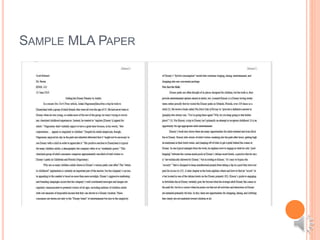
SAMPLE MLA PAPER
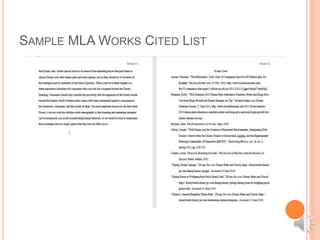
SAMPLE MLA WORKS CITED LIST
PAPER FORMATTING BASICS
 One inch margins all around (except for page numbers,
which should be ½ inch below the top).
 Font: Times New Roman, 12 pt. recommended
 No title page needed
 Page 1 headings:
 Your name
 Your instructor’s name
 The course number
 The date in day/month/year format
 Centered title 1 double space below the headings
 Name and page number in the upper right hand corner
(half-inch margin) on all pages
 Last page=Works Cited page
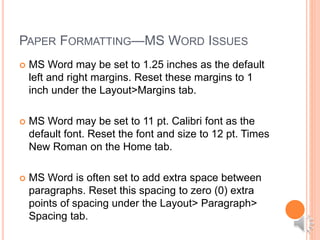
PAPER FORMATTING—MS WORD ISSUES
 MS Word may be set to 1.25 inches as the default
left and right margins. Reset these margins to 1
inch under the Layout>Margins tab.
 MS Word may be set to 11 pt. Calibri font as the
default font. Reset the font and size to 12 pt. Times
New Roman on the Home tab.
 MS Word is often set to add extra space between
paragraphs. Reset this spacing to zero (0) extra
points of spacing under the Layout> Paragraph>
Spacing tab.
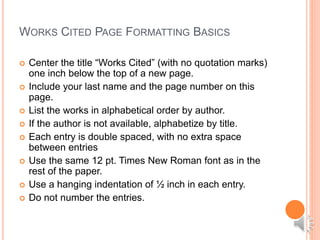
WORKS CITED PAGE FORMATTING BASICS
 Center the title “Works Cited” (with no quotation marks)
one inch below the top of a new page.
 Include your last name and the page number on this
page.
 List the works in alphabetical order by author.
 If the author is not available, alphabetize by title.
 Each entry is double spaced, with no extra space
between entries
 Use the same 12 pt. Times New Roman font as in the
rest of the paper.
 Use a hanging indentation of ½ inch in each entry.
 Do not number the entries.
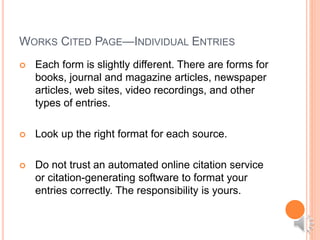
WORKS CITED PAGE—INDIVIDUAL ENTRIES
 Each form is slightly different. There are forms for
books, journal and magazine articles, newspaper
articles, web sites, video recordings, and other
types of entries.
 Look up the right format for each source.
 Do not trust an automated online citation service
or citation-generating software to format your
entries correctly. The responsibility is yours.
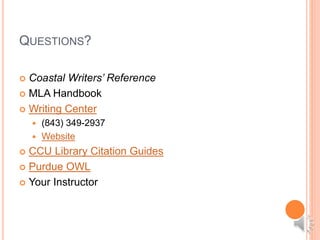
QUESTIONS?
 Coastal Writers’ Reference
 MLA Handbook
 Writing Center
 (843) 349-2937
 Website
 CCU Library Citation Guides
 Purdue OWL
 Your Instructor

Mla part i

  • 1.
    MLA STYLE—PART I •BasicFormatting •Works Cited Formatting
  • 2.
  • 3.
    SAMPLE MLA WORKSCITED LIST
  • 4.
    PAPER FORMATTING BASICS One inch margins all around (except for page numbers, which should be ½ inch below the top).  Font: Times New Roman, 12 pt. recommended  No title page needed  Page 1 headings:  Your name  Your instructor’s name  The course number  The date in day/month/year format  Centered title 1 double space below the headings  Name and page number in the upper right hand corner (half-inch margin) on all pages  Last page=Works Cited page
  • 5.
    PAPER FORMATTING—MS WORDISSUES  MS Word may be set to 1.25 inches as the default left and right margins. Reset these margins to 1 inch under the Layout>Margins tab.  MS Word may be set to 11 pt. Calibri font as the default font. Reset the font and size to 12 pt. Times New Roman on the Home tab.  MS Word is often set to add extra space between paragraphs. Reset this spacing to zero (0) extra points of spacing under the Layout> Paragraph> Spacing tab.
  • 6.
    WORKS CITED PAGEFORMATTING BASICS  Center the title “Works Cited” (with no quotation marks) one inch below the top of a new page.  Include your last name and the page number on this page.  List the works in alphabetical order by author.  If the author is not available, alphabetize by title.  Each entry is double spaced, with no extra space between entries  Use the same 12 pt. Times New Roman font as in the rest of the paper.  Use a hanging indentation of ½ inch in each entry.  Do not number the entries.
  • 7.
    WORKS CITED PAGE—INDIVIDUALENTRIES  Each form is slightly different. There are forms for books, journal and magazine articles, newspaper articles, web sites, video recordings, and other types of entries.  Look up the right format for each source.  Do not trust an automated online citation service or citation-generating software to format your entries correctly. The responsibility is yours.
  • 8.
    QUESTIONS?  Coastal Writers’Reference  MLA Handbook  Writing Center  (843) 349-2937  Website  CCU Library Citation Guides  Purdue OWL  Your Instructor