MLA Citation Style
Help for Humanities Classes at RCTC
Presentation by Pam O’Hara, Librarian
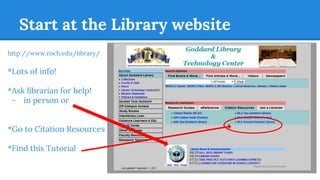
Start at the Library website
http://www.roch.edu/library/
*Lots of info!
*Ask librarian for help!
- in person or
*Go to Citation Resources
*Find this Tutorial
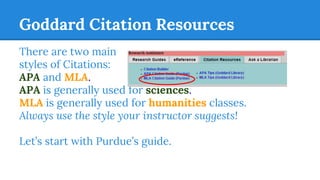
Goddard Citation Resources
There are two main
styles of Citations:
APA and MLA.
APA is generally used for sciences.
MLA is generally used for humanities classes.
Always use the style your instructor suggests!
Let’s start with Purdue’s guide.
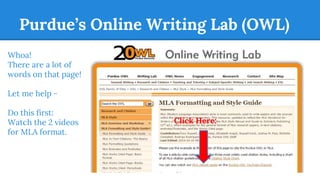
Purdue’s Online Writing Lab (OWL)
Whoa!
There are a lot of
words on that page!
Let me help -
Do this first:
Watch the 2 videos
for MLA format.
Click Here:
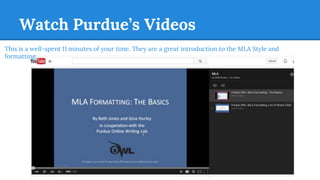
Watch Purdue’s Videos
This is a well-spent 11 minutes of your time. They are a great introduction to the MLA Style and
formatting.
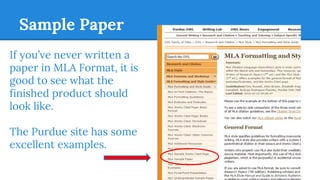
Sample Paper
If you’ve never written a
paper in MLA Format, it is
good to see what the
finished product should
look like.
The Purdue site has some
excellent examples.
Sample Paper
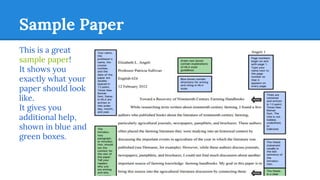
This is a great
sample paper!
It shows you
exactly what your
paper should look
like.
It gives you
additional help,
shown in blue and
green boxes.
Sample Works Cited
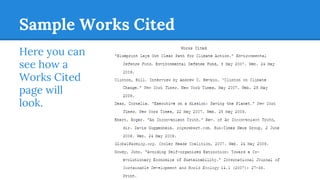
Here you can
see how a
Works Cited
page will
look.
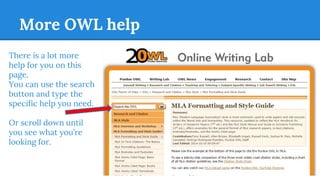
More OWL help
There is a lot more
help for you on this
page.
You can use the search
button and type the
specific help you need.
Or scroll down until
you see what you’re
looking for.
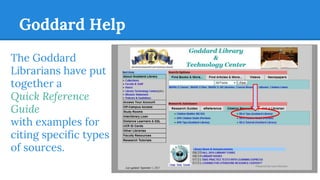
Goddard Help
The Goddard
Librarians have put
together a
Quick Reference
Guide
with examples for
citing specific types
of sources.
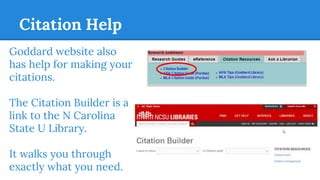
Citation Help
Goddard website also
has help for making your
citations.
The Citation Builder is a
link to the N Carolina
State U Library.
It walks you through
exactly what you need.
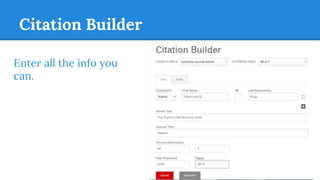
Citation Builder
Enter all the info you
can.
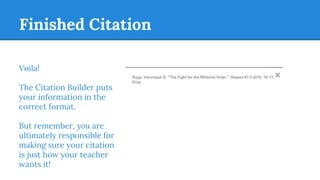
Finished Citation
Voila!
The Citation Builder puts
your information in the
correct format.
But remember, you are
ultimately responsible for
making sure your citation
is just how your teacher
wants it!
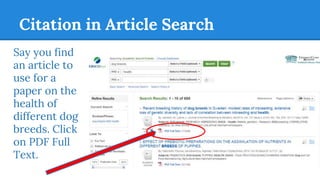
Citation in Article Search
Say you find
an article to
use for a
paper on the
health of
different dog
breeds. Click
on PDF Full
Text.
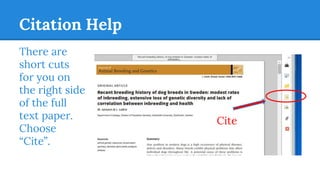
Citation Help
There are
short cuts
for you on
the right side
of the full
text paper.
Choose
“Cite”.
Cite
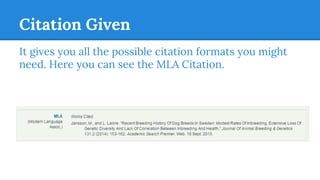
Citation Given
It gives you all the possible citation formats you might
need. Here you can see the MLA Citation.
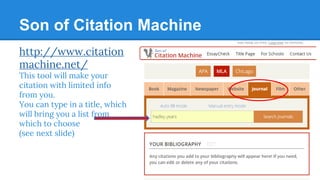
Son of Citation Machine
http://www.citation
machine.net/
This tool will make your
citation with limited info
from you.
You can type in a title, which
will bring you a list from
which to choose
(see next slide)
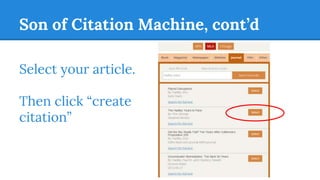
Son of Citation Machine, cont’d
Select your article.
Then click “create
citation”
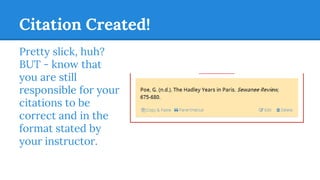
Citation Created!
Pretty slick, huh?
BUT - know that
you are still
responsible for your
citations to be
correct and in the
format stated by
your instructor.
Remember
*Always use the guidelines or rubric given to
you by your instructor.
*See a librarian for help.
*Seek out examples.

Mla citation style

  • 1.
    MLA Citation Style Helpfor Humanities Classes at RCTC Presentation by Pam O’Hara, Librarian
  • 2.
    Start at theLibrary website http://www.roch.edu/library/ *Lots of info! *Ask librarian for help! - in person or *Go to Citation Resources *Find this Tutorial
  • 3.
    Goddard Citation Resources Thereare two main styles of Citations: APA and MLA. APA is generally used for sciences. MLA is generally used for humanities classes. Always use the style your instructor suggests! Let’s start with Purdue’s guide.
  • 4.
    Purdue’s Online WritingLab (OWL) Whoa! There are a lot of words on that page! Let me help - Do this first: Watch the 2 videos for MLA format. Click Here:
  • 5.
    Watch Purdue’s Videos Thisis a well-spent 11 minutes of your time. They are a great introduction to the MLA Style and formatting.
  • 6.
    Sample Paper If you’venever written a paper in MLA Format, it is good to see what the finished product should look like. The Purdue site has some excellent examples.
  • 7.
    Sample Paper This isa great sample paper! It shows you exactly what your paper should look like. It gives you additional help, shown in blue and green boxes.
  • 8.
    Sample Works Cited Hereyou can see how a Works Cited page will look.
  • 9.
    More OWL help Thereis a lot more help for you on this page. You can use the search button and type the specific help you need. Or scroll down until you see what you’re looking for.
  • 10.
    Goddard Help The Goddard Librarianshave put together a Quick Reference Guide with examples for citing specific types of sources.
  • 11.
    Citation Help Goddard websitealso has help for making your citations. The Citation Builder is a link to the N Carolina State U Library. It walks you through exactly what you need.
  • 12.
    Citation Builder Enter allthe info you can.
  • 13.
    Finished Citation Voila! The CitationBuilder puts your information in the correct format. But remember, you are ultimately responsible for making sure your citation is just how your teacher wants it!
  • 14.
    Citation in ArticleSearch Say you find an article to use for a paper on the health of different dog breeds. Click on PDF Full Text.
  • 15.
    Citation Help There are shortcuts for you on the right side of the full text paper. Choose “Cite”. Cite
  • 16.
    Citation Given It givesyou all the possible citation formats you might need. Here you can see the MLA Citation.
  • 17.
    Son of CitationMachine http://www.citation machine.net/ This tool will make your citation with limited info from you. You can type in a title, which will bring you a list from which to choose (see next slide)
  • 18.
    Son of CitationMachine, cont’d Select your article. Then click “create citation”
  • 19.
    Citation Created! Pretty slick,huh? BUT - know that you are still responsible for your citations to be correct and in the format stated by your instructor.
  • 20.
    Remember *Always use theguidelines or rubric given to you by your instructor. *See a librarian for help. *Seek out examples.