MANAGEMENT INFORMATION
SYSTEM
Chapter 5
Computing and Communications Resources
1
OVERVIEW
 Hardware, Processor, Memory, Storage, I/O Devices
 Multimedia
 Personal Computing Devices
 Cell Phones with Interactive Messaging and Video
 Home Networks
 Home Computing Security
 Software
 Communication Networks
 LAN, VLAN, VPN
 Data Organization
 The Data Hierarchy 2
HARDWARE AND PROCESSORS
 Mainframes
 are large computers used for centralized information
systems.
 Microcomputers or PCs
 are computers used by one person.
 Processor (CPU)
 is where data processing is performed.
 Processor
 speed is measured by the number of cycles that occur
per second.
3
PROCESSORS
 MHz
 stands for millions of cycles per second.
 Word
 is the measure of how many bits can be moved with one
cycle of the processor.
 Word size
 is how many characters, “A”, can be moved in a single
cycle of the processor.
 Power
 is affected by both word size and processor speed.
4
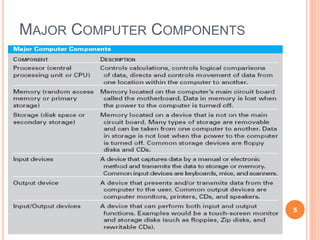
MAJOR COMPUTER COMPONENTS
5
MEMORY AND STORAGE
 Memory (primary storage or RAM)
 is the storage area on the computer’s circuit board.
 Volatile
 Extremely fast
 Fixed storage
 is permanently installed in the computer.
 Removable storage
 media–tape, disk, CD, DVD, USB flash drive, etc.
6
INPUT DEVICES
 Human-captured data
 refers to input captured by a person typing on a
keyboard, clicking a mouse, speaking into a
microphone, or a similar interaction.
 Machine-captured data
 is data captured by an electronic or mechanical device.
 Point-of-sale terminals
 are scanners used in retail stores.
7
OUTPUT DEVICES
 Monitor
 Screen resolution, size 17-19’’ diagonals
 Graphic user interface (GUI)
 Printers
 Lasers are like copier machines.
 Ink-jets spray ink.
 Multimedia is the use of more than one medium at
a time.
8
PERSONAL COMPUTING DEVICES
 Cell phones with interactive messaging and video
 Smart cell phones are phones that perform tasks
associated with PCs, i.e., BlackBerry 7270, Treo
650.
 Global Systems for Mobile Communications (GSM)
digital cellular phone protocol
9
HOME NETWORKS
 Home computer networks assess the Internet via
cable modems or DSL modems.
 Setup usually requires the modem, network card(s),
wireless router.
 Wireless security uses Wired equivalent privacy
(WEP) which encrypts the data transferred between
the computer and wireless router.
10
HOME COMPUTING SECURITY
 Updates for OS and application software.
 For security and efficiency
 Microsoft Update
 Hackers are people who try to break into computer
systems in order to
 Gather information;
 Deny the owner access to his resources;
 Delete files;
 Disrupt the use by the owner.
 Viruses
 are small computer programs that replicate by inserting
themselves into computer resources such as programs
or files. 11
HOME COMPUTING SECURITY (CONT’D)
 Worms
 are self-contained files or programs
 Does not have to attach to program or file.
 Can delete, change files, send e-mails, and cause
problems.
 Denial-of-service attack
 is when the user is denied access to the services of the
computer because it is overwhelmed with e-mail.
 Antivirus software
 Norton, MacAfee, etc. Keep virus definitions updated.
 Spyware
 Microsoft Defender, Lava_soft Ad-Aware, etc. Free from
Microsoft. 12
SOFTWARE
 System software (OS)
 performs certain tasks that all computers
require.
 Hardware interfaces, device drivers
 Manage computer’s processes
 OS–Windows XP, Unix, Mac OS X, Linux
 Application software
 processes the user’s data.
 Prewritten application software
 is produced by suppliers and sold to users.
13
APPLICATION SOFTWARE
 Custom application software
 is when programmers for the business write the
software.
 User-written software
 in End-User Computing is created by the user,
such as Excel Macros, Access Wizards.
 User-friendly software
 is computer software that is simple and intuitive
to use.
14
COMMUNICATIONS
 Protocol
 is the specification for formatting data to be transferred
between communications equipment.
 Public connections
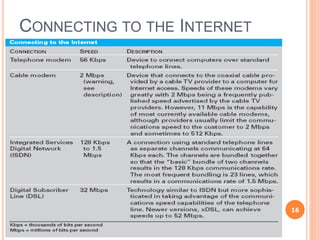
 Telephone modems
 Integrated Services Digital Network (ISDN)
 Digital Subscriber Line (DSL)
15
CONNECTING TO THE INTERNET
16
COMMUNICATIONS (CONT’D)
 Packet
 is a piece of the total data to be communicated, includes
sender and receiver addresses.
 Cable modems
 connect to the Internet via coaxial cable.
 Asynchronous transfer mode (ATM)
 Improve data transmission rates
 Provides increased speed
17
VIRTUAL PRIVATE NETWORKS
 Virtual Private Networks (VPNs)
 allow you to use the security and speed of a
private line but still use the low-cost Internet.
 Tunneling software
 establishes the set of intermediary locations of
the telephone equipment that will host a given
data communications transfer.
 Privacy is attained because the tunnel is not
established unless the sending and receiving
computers authenticate one another.
18
COMMUNICATIONS-NETWORKS
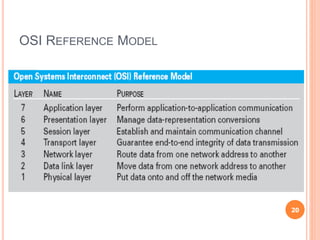
 Open Systems Interconnection (OSI)
 standard architecture for network connections
established by the ISO.
 Terminal
 is a device that has no storage or processor; it
allows for entering and displaying data for the
computer.
 Systems Network Architecture (SNA)
 is a protocol for large computers; it polls other
computers connected by the network for
transfers.
19
OSI REFERENCE MODEL
20
COMMUNICATIONS-NETWORKS (CONT’D)
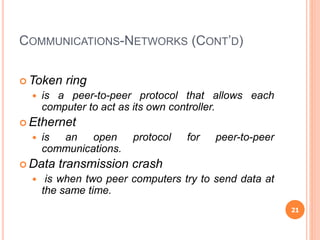
 Token ring
 is a peer-to-peer protocol that allows each
computer to act as its own controller.
 Ethernet
 is an open protocol for peer-to-peer
communications.
 Data transmission crash
 is when two peer computers try to send data at
the same time.
21
COMMUNICATIONS-NETWORKS (CONT’D)
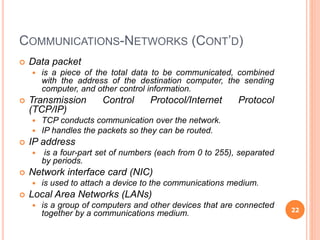
 Data packet
 is a piece of the total data to be communicated, combined
with the address of the destination computer, the sending
computer, and other control information.
 Transmission Control Protocol/Internet Protocol
(TCP/IP)
 TCP conducts communication over the network.
 IP handles the packets so they can be routed.
 IP address
 is a four-part set of numbers (each from 0 to 255), separated
by periods.
 Network interface card (NIC)
 is used to attach a device to the communications medium.
 Local Area Networks (LANs)
 is a group of computers and other devices that are connected
together by a communications medium. 22
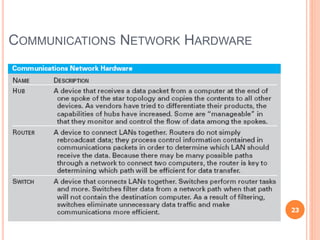
COMMUNICATIONS NETWORK HARDWARE
23
COMMUNICATIONS-NETWORKS (CONT’D)
 Medium used by LANs can be copper wire, wireless,
fiber-optics, or other media.
 LANs join computers that are physically located
together.
 Same room or building
 Total distance is less than ½ mile.
 60 ft. between devices
 Metropolitan area network (MAN)
 is a network that has a physical distance limit of roughly 30
miles.
 Wide area networks (WANs)
 are used to connect computers and other devices when the
distance exceeds the constraints of LANs and MANs.
 Uses common carrier, public telephone system
 WANs have been replaced by the Internet. 24
INTERNET, INTRANET AND EXTRANET
 Internet
 is just a collection of networks that can be joined
together; Public.
 Intranet
 uses the same network protocols as the Internet but
limits accessibility to computer resources to a select
group of persons in the organization.
 Extranet
 is when the intranet is expanded to include users
beyond the firm; Trusted customers and business
partners.
25
THE CONVERGENCE OF COMPUTING AND
COMMUNICATIONS
 Computing devices and communications devices
are now incorporating features of the other into
themselves.
 Voice over Internet Protocol (VoIP) is the routing
of voice communications over the Internet as if they
were digital communications.
 WWW.SKYPE.COM – free software
26

MIS Chap # 5...

  • 1.
  • 2.
    OVERVIEW  Hardware, Processor,Memory, Storage, I/O Devices  Multimedia  Personal Computing Devices  Cell Phones with Interactive Messaging and Video  Home Networks  Home Computing Security  Software  Communication Networks  LAN, VLAN, VPN  Data Organization  The Data Hierarchy 2
  • 3.
    HARDWARE AND PROCESSORS Mainframes  are large computers used for centralized information systems.  Microcomputers or PCs  are computers used by one person.  Processor (CPU)  is where data processing is performed.  Processor  speed is measured by the number of cycles that occur per second. 3
  • 4.
    PROCESSORS  MHz  standsfor millions of cycles per second.  Word  is the measure of how many bits can be moved with one cycle of the processor.  Word size  is how many characters, “A”, can be moved in a single cycle of the processor.  Power  is affected by both word size and processor speed. 4
  • 5.
  • 6.
    MEMORY AND STORAGE Memory (primary storage or RAM)  is the storage area on the computer’s circuit board.  Volatile  Extremely fast  Fixed storage  is permanently installed in the computer.  Removable storage  media–tape, disk, CD, DVD, USB flash drive, etc. 6
  • 7.
    INPUT DEVICES  Human-captureddata  refers to input captured by a person typing on a keyboard, clicking a mouse, speaking into a microphone, or a similar interaction.  Machine-captured data  is data captured by an electronic or mechanical device.  Point-of-sale terminals  are scanners used in retail stores. 7
  • 8.
    OUTPUT DEVICES  Monitor Screen resolution, size 17-19’’ diagonals  Graphic user interface (GUI)  Printers  Lasers are like copier machines.  Ink-jets spray ink.  Multimedia is the use of more than one medium at a time. 8
  • 9.
    PERSONAL COMPUTING DEVICES Cell phones with interactive messaging and video  Smart cell phones are phones that perform tasks associated with PCs, i.e., BlackBerry 7270, Treo 650.  Global Systems for Mobile Communications (GSM) digital cellular phone protocol 9
  • 10.
    HOME NETWORKS  Homecomputer networks assess the Internet via cable modems or DSL modems.  Setup usually requires the modem, network card(s), wireless router.  Wireless security uses Wired equivalent privacy (WEP) which encrypts the data transferred between the computer and wireless router. 10
  • 11.
    HOME COMPUTING SECURITY Updates for OS and application software.  For security and efficiency  Microsoft Update  Hackers are people who try to break into computer systems in order to  Gather information;  Deny the owner access to his resources;  Delete files;  Disrupt the use by the owner.  Viruses  are small computer programs that replicate by inserting themselves into computer resources such as programs or files. 11
  • 12.
    HOME COMPUTING SECURITY(CONT’D)  Worms  are self-contained files or programs  Does not have to attach to program or file.  Can delete, change files, send e-mails, and cause problems.  Denial-of-service attack  is when the user is denied access to the services of the computer because it is overwhelmed with e-mail.  Antivirus software  Norton, MacAfee, etc. Keep virus definitions updated.  Spyware  Microsoft Defender, Lava_soft Ad-Aware, etc. Free from Microsoft. 12
  • 13.
    SOFTWARE  System software(OS)  performs certain tasks that all computers require.  Hardware interfaces, device drivers  Manage computer’s processes  OS–Windows XP, Unix, Mac OS X, Linux  Application software  processes the user’s data.  Prewritten application software  is produced by suppliers and sold to users. 13
  • 14.
    APPLICATION SOFTWARE  Customapplication software  is when programmers for the business write the software.  User-written software  in End-User Computing is created by the user, such as Excel Macros, Access Wizards.  User-friendly software  is computer software that is simple and intuitive to use. 14
  • 15.
    COMMUNICATIONS  Protocol  isthe specification for formatting data to be transferred between communications equipment.  Public connections  Telephone modems  Integrated Services Digital Network (ISDN)  Digital Subscriber Line (DSL) 15
  • 16.
    CONNECTING TO THEINTERNET 16
  • 17.
    COMMUNICATIONS (CONT’D)  Packet is a piece of the total data to be communicated, includes sender and receiver addresses.  Cable modems  connect to the Internet via coaxial cable.  Asynchronous transfer mode (ATM)  Improve data transmission rates  Provides increased speed 17
  • 18.
    VIRTUAL PRIVATE NETWORKS Virtual Private Networks (VPNs)  allow you to use the security and speed of a private line but still use the low-cost Internet.  Tunneling software  establishes the set of intermediary locations of the telephone equipment that will host a given data communications transfer.  Privacy is attained because the tunnel is not established unless the sending and receiving computers authenticate one another. 18
  • 19.
    COMMUNICATIONS-NETWORKS  Open SystemsInterconnection (OSI)  standard architecture for network connections established by the ISO.  Terminal  is a device that has no storage or processor; it allows for entering and displaying data for the computer.  Systems Network Architecture (SNA)  is a protocol for large computers; it polls other computers connected by the network for transfers. 19
  • 20.
  • 21.
    COMMUNICATIONS-NETWORKS (CONT’D)  Tokenring  is a peer-to-peer protocol that allows each computer to act as its own controller.  Ethernet  is an open protocol for peer-to-peer communications.  Data transmission crash  is when two peer computers try to send data at the same time. 21
  • 22.
    COMMUNICATIONS-NETWORKS (CONT’D)  Datapacket  is a piece of the total data to be communicated, combined with the address of the destination computer, the sending computer, and other control information.  Transmission Control Protocol/Internet Protocol (TCP/IP)  TCP conducts communication over the network.  IP handles the packets so they can be routed.  IP address  is a four-part set of numbers (each from 0 to 255), separated by periods.  Network interface card (NIC)  is used to attach a device to the communications medium.  Local Area Networks (LANs)  is a group of computers and other devices that are connected together by a communications medium. 22
  • 23.
  • 24.
    COMMUNICATIONS-NETWORKS (CONT’D)  Mediumused by LANs can be copper wire, wireless, fiber-optics, or other media.  LANs join computers that are physically located together.  Same room or building  Total distance is less than ½ mile.  60 ft. between devices  Metropolitan area network (MAN)  is a network that has a physical distance limit of roughly 30 miles.  Wide area networks (WANs)  are used to connect computers and other devices when the distance exceeds the constraints of LANs and MANs.  Uses common carrier, public telephone system  WANs have been replaced by the Internet. 24
  • 25.
    INTERNET, INTRANET ANDEXTRANET  Internet  is just a collection of networks that can be joined together; Public.  Intranet  uses the same network protocols as the Internet but limits accessibility to computer resources to a select group of persons in the organization.  Extranet  is when the intranet is expanded to include users beyond the firm; Trusted customers and business partners. 25
  • 26.
    THE CONVERGENCE OFCOMPUTING AND COMMUNICATIONS  Computing devices and communications devices are now incorporating features of the other into themselves.  Voice over Internet Protocol (VoIP) is the routing of voice communications over the Internet as if they were digital communications.  WWW.SKYPE.COM – free software 26