Enterprise Integration Patterns 
with Spring Integration 
[Mihalache Catalin] 
[Pentalog] 
[25th of October 2014]
Agenda 
• Spring Integration – 10.000 foot view 
• Enterprise Integration Patterns - WGRUS 
– What is integration? 
– How to address integration challenges 
– Messaging / what are EIP Patterns ? 
• EIP with Spring Integration (SI) 
• WGRUS flows 
• Study resources
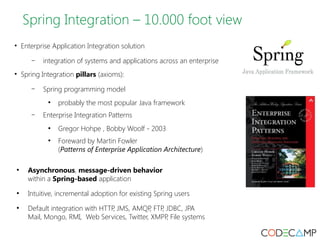
Spring Integration – 10.000 foot view 
• Enterprise Application Integration solution 
– integration of systems and applications across an enterprise 
• Spring Integration pillars (axioms): 
– Spring programming model 
● probably the most popular Java framework 
– Enterprise Integration Patterns 
● Gregor Hohpe , Bobby Woolf - 2003 
● Foreward by Martin Fowler 
(Patterns of Enterprise Application Architecture) 
● Asynchronous, message-driven behavior 
within a Spring-based application 
● Intuitive, incremental adoption for existing Spring users 
● Default integration with HTTP, JMS, AMQP, FTP, JDBC, JPA 
Mail, Mongo, RMI, Web Services, Twitter, XMPP, File systems
EIP – What is integration? 
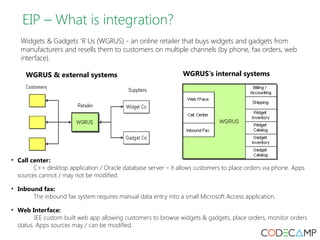
Widgets & Gadgets ‘R Us (WGRUS) - an online retailer that buys widgets and gadgets from 
manufacturers and resells them to customers on multiple channels (by phone, fax orders, web 
interface). 
WGRUS & external systems WGRUS's internal systems 
• Call center: 
C++ desktop application / Oracle database server – it allows customers to place orders via phone. Apps 
sources cannot / may not be modified. 
• Inbound fax: 
The inbound fax system requires manual data entry into a small Microsoft Access application. 
• Web Interface: 
JEE custom built web app allowing customers to browse widgets & gadgets, place orders, monitor orders 
status. Apps sources may / can be modified.
EIP – Why integration is necessary ? 
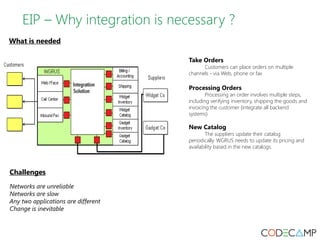
What is needed 
Take Orders 
Customers can place orders on multiple 
channels - via Web, phone or fax 
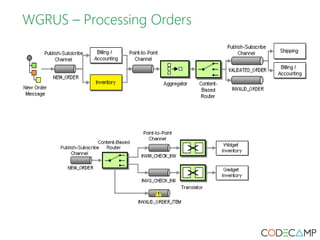
Processing Orders 
Processing an order involves multiple steps, 
including verifying inventory, shipping the goods and 
invoicing the customer (integrate all backend 
systems) 
New Catalog 
The suppliers update their catalog 
periodically. WGRUS needs to update its pricing and 
availability based in the new catalogs. 
Challenges 
Networks are unreliable 
Networks are slow 
Any two applications are different 
Change is inevitable
EIP – How to address integration challenges 
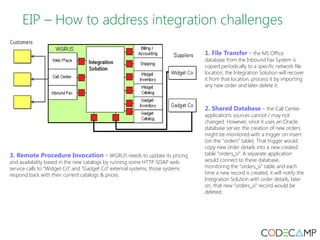
1. File Transfer - the MS Office 
database from the Inbound Fax System is 
copied periodically to a specific network file 
location; the Integration Solution will recover 
it from that location, process it by importing 
any new order and later delete it. 
2. Shared Database - the Call Center 
application's sources cannot / may not 
changed. However, since it uses an Oracle 
database server, the creation of new orders 
might be monitored with a trigger on insert 
(on the “orders” table). That trigger would 
copy new order details into a new created 
table “orders_si”. A separate application 
would connect to these database, 
monitoring the “orders_si” table and each 
time a new record is created, it will notify the 
Integration Solution with order details; later 
on, that new “orders_si” record would be 
deleted. 
3. Remote Procedure Invocation - WGRUS needs to update its pricing 
and availability based in the new catalogs by running some HTTP SOAP web 
service calls to “Widget Co” and “Gadget Co” external systems; those systems 
respond back with their current catalogs & prices.
EIP – How to address integration challenges 
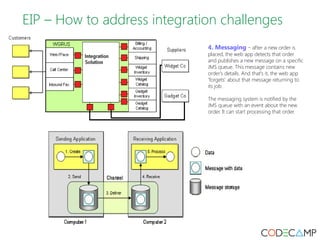
4. Messaging - after a new order is 
placed, the web app detects that order 
and publishes a new message on a specific 
JMS queue. This message contains new 
order's details. And that's it, the web app 
'forgets' about that message returning to 
its job. 
The messaging system is notified by the 
JMS queue with an event about the new 
order. It can start processing that order.
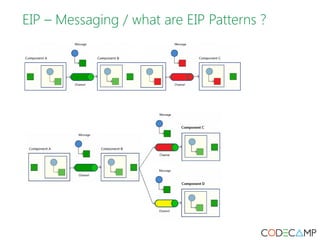
EIP – Messaging / what are EIP Patterns ?
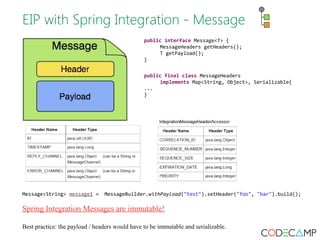
EIP with Spring Integration - Message 
public interface Message<T> { 
MessageHeaders getHeaders(); 
T getPayload(); 
} 
public final class MessageHeaders 
implements Map<String, Object>, Serializable{ 
... 
} 
Message<String> message1 = MessageBuilder.withPayload("test").setHeader("foo", "bar").build(); 
Spring Integration Messages are immutable! 
Best practice: the payload / headers would have to be immutable and serializable.
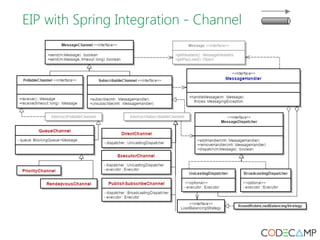
EIP with Spring Integration - Channel
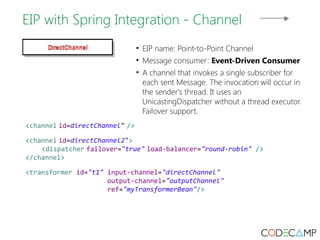
EIP with Spring Integration - Channel 
• EIP name: Point-to-Point Channel 
• Message consumer: Event-Driven Consumer 
• A channel that invokes a single subscriber for 
each sent Message. The invocation will occur in 
the sender's thread. It uses an 
UnicastingDispatcher without a thread executor. 
Failover support. 
<channel id=directChannel" /> 
<channel id=directChannel2"> 
<dispatcher failover="true" load-balancer="round-robin" /> 
</channel> 
<transformer id="t1" input-channel="directChannel" 
output-channel="outputChannel" 
ref="myTransformerBean"/>
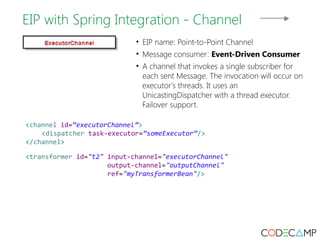
EIP with Spring Integration - Channel 
• EIP name: Point-to-Point Channel 
• Message consumer: Event-Driven Consumer 
• A channel that invokes a single subscriber for 
each sent Message. The invocation will occur on 
executor's threads. It uses an 
UnicastingDispatcher with a thread executor. 
Failover support. 
<channel id=”executorChannel”> 
<dispatcher task-executor=”someExecutor”/> 
</channel> 
<transformer id="t2" input-channel="executorChannel" 
output-channel="outputChannel" 
ref="myTransformerBean"/>
EIP with Spring Integration - Channel 
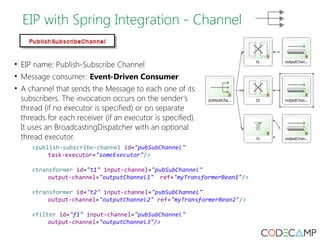
• EIP name: Publish-Subscribe Channel 
• Message consumer: Event-Driven Consumer 
• A channel that sends the Message to each one of its 
subscribers. The invocation occurs on the sender's 
thread (if no executor is specified) or on separate 
threads for each receiver (if an executor is specified). 
It uses an BroadcastingDispatcher with an optional 
thread executor. 
<publish-subscribe-channel id="pubSubChannel" 
task-executor="someExecutor"/> 
<transformer id="t1" input-channel="pubSubChannel" 
output-channel="outputChannel1" ref="myTransformerBean1"/> 
<transformer id="t2" input-channel="pubSubChannel" 
output-channel="outputChannel2" ref="myTransformerBean2"/> 
<filter id="f1" input-channel="pubSubChannel" 
output-channel="outputChannel3"/>
EIP with Spring Integration - Channel 
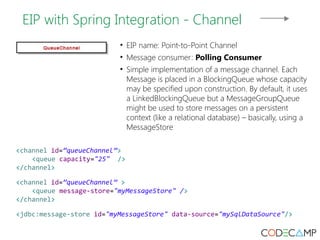
• EIP name: Point-to-Point Channel 
• Message consumer: Polling Consumer 
• Simple implementation of a message channel. Each 
Message is placed in a BlockingQueue whose capacity 
may be specified upon construction. By default, it uses 
a LinkedBlockingQueue but a MessageGroupQueue 
might be used to store messages on a persistent 
context (like a relational database) – basically, using a 
MessageStore 
<channel id=”queueChannel”> 
<queue capacity="25" /> 
</channel> 
<channel id=”queueChannel” > 
<queue message-store="myMessageStore" /> 
</channel> 
<jdbc:message-store id="myMessageStore" data-source="mySqlDataSource"/>
EIP with Spring Integration - Channel 
• Sending messages on a channel: 
@Autowired 
@Qualifier(“myChannelID”); 
private DirectChannel channel; 
public void sendMessage(String msgPayload) { 
final MessagingTemplate mt = new MessagingTemplate(); 
final Message<String> msg = 
MessageBuilder.withPayload(msgPayload).build(); 
mt.send(channel, msg); 
}
EIP with SI – Polling Consumer 
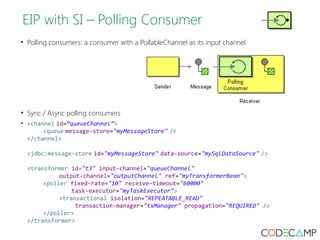
• Polling consumers: a consumer with a PollableChannel as its input channel 
• Sync / Async polling consumers 
• <channel id=”queueChannel”> 
<queue message-store="myMessageStore" /> 
</channel> 
<jdbc:message-store id="myMessageStore" data-source="mySqlDataSource" /> 
<transformer id="t3" input-channel="queueChannel" 
output-channel="outputChannel" ref="myTransformerBean"> 
<poller fixed-rate="10" receive-timeout="60000" 
task-executor="myTaskExecutor"> 
<transactional isolation="REPEATABLE_READ" 
transaction-manager="txManager" propagation="REQUIRED" /> 
</poller> 
</transformer>
EIP with SI – Event-driven Consumers 
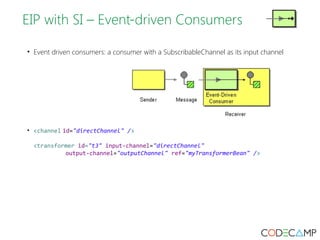
• Event driven consumers: a consumer with a SubscribableChannel as its input channel 
• <channel id="directChannel" /> 
<transformer id="t3" input-channel="directChannel" 
output-channel="outputChannel" ref="myTransformerBean" />
EIP with SI – Channel Adapter 
• A Channel Adapter is a component that connects a single sender or receiver to a Message Channel. 
(outside of the sender/receiver; one way communication) 
• JMS inbound channel adapter: 
<jms:message-driven-channel-adapter id="jmsIn" destination="requestQueue" 
channel="jmsInChannel" /> 
<channel id="jmsInChannel" /> 
• JMS outbound channel adapter: 
<channel id="stdinToJmsoutChannel"/> 
<jms:outbound-channel-adapter id="jmsout" channel="stdinToJmsoutChannel" 
destination="requestQueue"/> 
• Predefined channel adapters: JMS, AMQP, JDBC, JPA, Mongo, Redis, FTP, Twitter
EIP with SI – Gateways 
• A Gateway is a Message Endpoint that connects an application that is both a sender and receiver to a 
Message Channel. (inside the application; two-way communication). 
• The 'default' gateway allows Java code to call a Spring Integration flow as a Spring service: 
<gateway id="myGateway" default-request-channel="inputChannel" 
default-reply-channel="outputChannel" service-interface="fr.pentalog.si.MyGateway"> 
<method name="process"> 
<header name="configuredHeader" value="abc"/> 
</method> 
</gateway> 
<channel id="inputChannel" /> 
<channel id="outputChannel" /> 
• Async gateways: 
public interface MyGateway { 
public String process(String thing, 
<gateway id="myGateway" default-request-channel="inputChannel" 
default-reply-channel="outputChannel" service-interface="fr.pentalog.si.MyGatewayy" 
async-executor="myExecutor"> 
<method name="process" /> 
</gateway> 
• Predefined gateways: 
– JMS, AMQP, HTTP, Web Services, Redis, JDBC 
@Header(FileHeaders.FILENAME) 
String fileName); 
} 
public interface MyGateway { 
public Feature<String> process(String thing, 
@Header(FileHeaders.FILENAME) 
String fileName); 
}
EIP with SI – Service Activator 
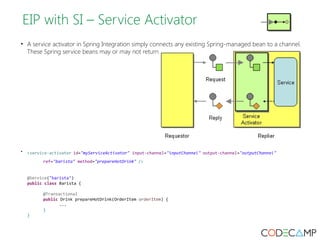
• A service activator in Spring Integration simply connects any existing Spring-managed bean to a channel. 
These Spring service beans may or may not return a result. 
• <service-activator id="myServiceActivator" input-channel="inputChannel" output-channel="outputChannel" 
ref="barista" method="prepareHotDrink" /> 
@Service("barista") 
public class Barista { 
@Transactional 
public Drink prepareHotDrink(OrderItem orderItem) { 
... 
} 
}
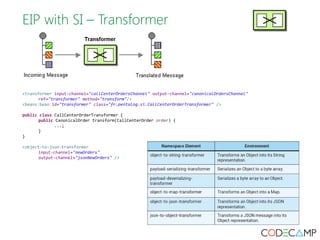
EIP with SI – Transformer 
<transformer input-channel="callCenterOrdersChannel" output-channel="canonicalOrdersChannel" 
ref="transformer" method="transform"/> 
<beans:bean id="transformer" class="fr.pentalog.si.CallCenterOrderTransformer" /> 
public class CallCenterOrderTransformer { 
public CanonicalOrder transform(CallCenterOrder order) { 
...; 
} 
} 
<object-to-json-transformer 
input-channel="newOrders" 
output-channel="jsonNewOrders" />
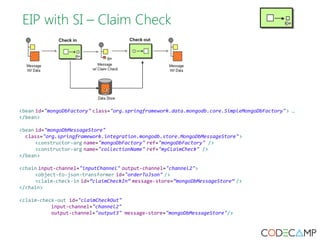
EIP with SI – Claim Check 
<bean id="mongoDbFactory" class="org.springframework.data.mongodb.core.SimpleMongoDbFactory"> … 
</bean> 
<bean id="mongoDbMessageStore" 
class="org.springframework.integration.mongodb.store.MongoDbMessageStore"> 
<constructor-arg name="mongoDbFactory" ref="mongoDbFactory" /> 
<constructor-arg name="collectionName" ref="myClaimCheck" /> 
</bean> 
<chain input-channel="inputChannel" output-channel="channel2"> 
<object-to-json-transformer id="orderToJson" /> 
<claim-check-in id=”claimCheckIn” message-store=”mongoDbMessageStore” /> 
</chain> 
<claim-check-out id="claimCheckOut" 
input-channel="channel2" 
output-channel="output3" message-store="mongoDbMessageStore"/>
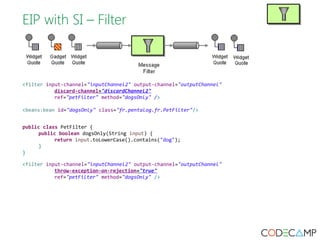
EIP with SI – Filter 
<filter input-channel="inputChannel2" output-channel="outputChannel" 
discard-channel="discardChannel2" 
ref="petFilter" method="dogsOnly" /> 
<beans:bean id="dogsOnly" class="fr.pentalog.fr.PetFilter"/> 
public class PetFilter { 
public boolean dogsOnly(String input) { 
return input.toLowerCase().contains("dog"); 
} 
} 
<filter input-channel="inputChannel2" output-channel="outputChannel" 
throw-exception-on-rejection="true" 
ref="petFilter" method="dogsOnly" />
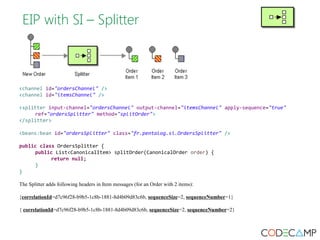
EIP with SI – Splitter 
<channel id="ordersChannel" /> 
<channel id="itemsChannel" /> 
<splitter input-channel="ordersChannel" output-channel="itemsChannel" apply-sequence="true" 
ref="ordersSplitter" method="splitOrder"> 
</splitter> 
<beans:bean id="ordersSplitter" class="fr.pentalog.si.OrdersSplitter" /> 
public class OrdersSplitter { 
public List<CanonicalItem> splitOrder(CanonicalOrder order) { 
return null; 
} 
} 
The Splitter adds following headers in Item messages (for an Order with 2 items): 
{correlationId=d7c96f28-b9b5-1c8b-1881-8d4b09d83c6b, sequenceSize=2, sequenceNumber=1} 
{ correlationId=d7c96f28-b9b5-1c8b-1881-8d4b09d83c6b, sequenceSize=2, sequenceNumber=2}
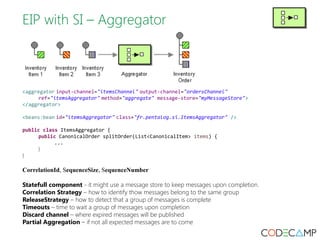
EIP with SI – Aggregator 
<aggregator input-channel="itemsChannel" output-channel="ordersChannel" 
ref="itemsAggregator" method="aggregate" message-store="myMessageStore"> 
</aggregator> 
<beans:bean id="itemsAggregator" class="fr.pentalog.si.ItemsAggregator" /> 
public class ItemsAggregator { 
public CanonicalOrder splitOrder(List<CanonicalItem> items) { 
... 
} 
} 
CorrelationId, SequenceSize, SequenceNumber 
Statefull component - it might use a message store to keep messages upon completion. 
Correlation Strategy – how to identify thow messages belong to the same group 
ReleaseStrategy – how to detect that a group of messages is complete 
Timeouts – time to wait a group of messages upon completion 
Discard channel – where expired messages will be published 
Partial Aggregation – if not all expected messages are to come
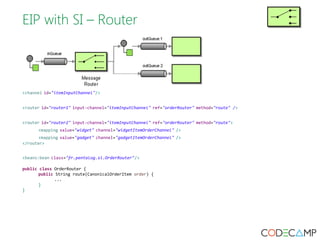
EIP with SI – Router 
<channel id="itemInputChannel"/> 
<router id="router1" input-channel="itemInputChannel" ref="orderRouter" method="route" /> 
<router id="router2" input-channel="itemInputChannel" ref="orderRouter" method="route"> 
<mapping value="widget" channel="widgetItemOrderChannel" /> 
<mapping value="gadget" channel="gadgetItemOrderChannel" /> 
</router> 
<beans:bean class="fr.pentalog.si.OrderRouter"/> 
public class OrderRouter { 
public String route(CanonicalOrderItem order) { 
... 
} 
}
Spring Integration – Error Handling 
Default channels: 
errorChannel 
used internally for sending error messages and may be overridden with a custom configuration 
nullChannel 
acts like /dev/null, simply logging any Message sent to it at DEBUG level and returning immediately
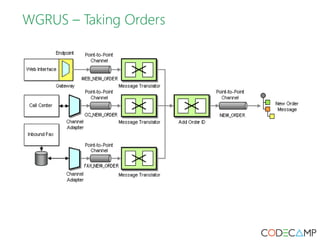
WGRUS – Taking Orders
WGRUS – Processing Orders
Study resources 
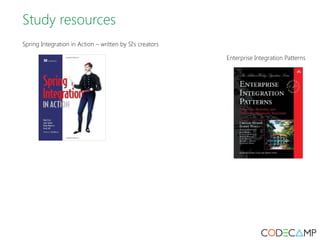
Spring Integration in Action – written by SI's creators 
Enterprise Integration Patterns
Please fill the online evaluation form after event 
[Enterprise Integration Patterns with Spring Integration] 
[Mihalache Catalin] 
[Pentalog] 
[25th of October 2014]

Mihalache catalin eip with spring integration

  • 1.
    Enterprise Integration Patterns with Spring Integration [Mihalache Catalin] [Pentalog] [25th of October 2014]
  • 3.
    Agenda • SpringIntegration – 10.000 foot view • Enterprise Integration Patterns - WGRUS – What is integration? – How to address integration challenges – Messaging / what are EIP Patterns ? • EIP with Spring Integration (SI) • WGRUS flows • Study resources
  • 4.
    Spring Integration –10.000 foot view • Enterprise Application Integration solution – integration of systems and applications across an enterprise • Spring Integration pillars (axioms): – Spring programming model ● probably the most popular Java framework – Enterprise Integration Patterns ● Gregor Hohpe , Bobby Woolf - 2003 ● Foreward by Martin Fowler (Patterns of Enterprise Application Architecture) ● Asynchronous, message-driven behavior within a Spring-based application ● Intuitive, incremental adoption for existing Spring users ● Default integration with HTTP, JMS, AMQP, FTP, JDBC, JPA Mail, Mongo, RMI, Web Services, Twitter, XMPP, File systems
  • 5.
    EIP – Whatis integration? Widgets & Gadgets ‘R Us (WGRUS) - an online retailer that buys widgets and gadgets from manufacturers and resells them to customers on multiple channels (by phone, fax orders, web interface). WGRUS & external systems WGRUS's internal systems • Call center: C++ desktop application / Oracle database server – it allows customers to place orders via phone. Apps sources cannot / may not be modified. • Inbound fax: The inbound fax system requires manual data entry into a small Microsoft Access application. • Web Interface: JEE custom built web app allowing customers to browse widgets & gadgets, place orders, monitor orders status. Apps sources may / can be modified.
  • 6.
    EIP – Whyintegration is necessary ? What is needed Take Orders Customers can place orders on multiple channels - via Web, phone or fax Processing Orders Processing an order involves multiple steps, including verifying inventory, shipping the goods and invoicing the customer (integrate all backend systems) New Catalog The suppliers update their catalog periodically. WGRUS needs to update its pricing and availability based in the new catalogs. Challenges Networks are unreliable Networks are slow Any two applications are different Change is inevitable
  • 7.
    EIP – Howto address integration challenges 1. File Transfer - the MS Office database from the Inbound Fax System is copied periodically to a specific network file location; the Integration Solution will recover it from that location, process it by importing any new order and later delete it. 2. Shared Database - the Call Center application's sources cannot / may not changed. However, since it uses an Oracle database server, the creation of new orders might be monitored with a trigger on insert (on the “orders” table). That trigger would copy new order details into a new created table “orders_si”. A separate application would connect to these database, monitoring the “orders_si” table and each time a new record is created, it will notify the Integration Solution with order details; later on, that new “orders_si” record would be deleted. 3. Remote Procedure Invocation - WGRUS needs to update its pricing and availability based in the new catalogs by running some HTTP SOAP web service calls to “Widget Co” and “Gadget Co” external systems; those systems respond back with their current catalogs & prices.
  • 8.
    EIP – Howto address integration challenges 4. Messaging - after a new order is placed, the web app detects that order and publishes a new message on a specific JMS queue. This message contains new order's details. And that's it, the web app 'forgets' about that message returning to its job. The messaging system is notified by the JMS queue with an event about the new order. It can start processing that order.
  • 9.
    EIP – Messaging/ what are EIP Patterns ?
  • 10.
    EIP with SpringIntegration - Message public interface Message<T> { MessageHeaders getHeaders(); T getPayload(); } public final class MessageHeaders implements Map<String, Object>, Serializable{ ... } Message<String> message1 = MessageBuilder.withPayload("test").setHeader("foo", "bar").build(); Spring Integration Messages are immutable! Best practice: the payload / headers would have to be immutable and serializable.
  • 11.
    EIP with SpringIntegration - Channel
  • 12.
    EIP with SpringIntegration - Channel • EIP name: Point-to-Point Channel • Message consumer: Event-Driven Consumer • A channel that invokes a single subscriber for each sent Message. The invocation will occur in the sender's thread. It uses an UnicastingDispatcher without a thread executor. Failover support. <channel id=directChannel" /> <channel id=directChannel2"> <dispatcher failover="true" load-balancer="round-robin" /> </channel> <transformer id="t1" input-channel="directChannel" output-channel="outputChannel" ref="myTransformerBean"/>
  • 13.
    EIP with SpringIntegration - Channel • EIP name: Point-to-Point Channel • Message consumer: Event-Driven Consumer • A channel that invokes a single subscriber for each sent Message. The invocation will occur on executor's threads. It uses an UnicastingDispatcher with a thread executor. Failover support. <channel id=”executorChannel”> <dispatcher task-executor=”someExecutor”/> </channel> <transformer id="t2" input-channel="executorChannel" output-channel="outputChannel" ref="myTransformerBean"/>
  • 14.
    EIP with SpringIntegration - Channel • EIP name: Publish-Subscribe Channel • Message consumer: Event-Driven Consumer • A channel that sends the Message to each one of its subscribers. The invocation occurs on the sender's thread (if no executor is specified) or on separate threads for each receiver (if an executor is specified). It uses an BroadcastingDispatcher with an optional thread executor. <publish-subscribe-channel id="pubSubChannel" task-executor="someExecutor"/> <transformer id="t1" input-channel="pubSubChannel" output-channel="outputChannel1" ref="myTransformerBean1"/> <transformer id="t2" input-channel="pubSubChannel" output-channel="outputChannel2" ref="myTransformerBean2"/> <filter id="f1" input-channel="pubSubChannel" output-channel="outputChannel3"/>
  • 15.
    EIP with SpringIntegration - Channel • EIP name: Point-to-Point Channel • Message consumer: Polling Consumer • Simple implementation of a message channel. Each Message is placed in a BlockingQueue whose capacity may be specified upon construction. By default, it uses a LinkedBlockingQueue but a MessageGroupQueue might be used to store messages on a persistent context (like a relational database) – basically, using a MessageStore <channel id=”queueChannel”> <queue capacity="25" /> </channel> <channel id=”queueChannel” > <queue message-store="myMessageStore" /> </channel> <jdbc:message-store id="myMessageStore" data-source="mySqlDataSource"/>
  • 16.
    EIP with SpringIntegration - Channel • Sending messages on a channel: @Autowired @Qualifier(“myChannelID”); private DirectChannel channel; public void sendMessage(String msgPayload) { final MessagingTemplate mt = new MessagingTemplate(); final Message<String> msg = MessageBuilder.withPayload(msgPayload).build(); mt.send(channel, msg); }
  • 17.
    EIP with SI– Polling Consumer • Polling consumers: a consumer with a PollableChannel as its input channel • Sync / Async polling consumers • <channel id=”queueChannel”> <queue message-store="myMessageStore" /> </channel> <jdbc:message-store id="myMessageStore" data-source="mySqlDataSource" /> <transformer id="t3" input-channel="queueChannel" output-channel="outputChannel" ref="myTransformerBean"> <poller fixed-rate="10" receive-timeout="60000" task-executor="myTaskExecutor"> <transactional isolation="REPEATABLE_READ" transaction-manager="txManager" propagation="REQUIRED" /> </poller> </transformer>
  • 18.
    EIP with SI– Event-driven Consumers • Event driven consumers: a consumer with a SubscribableChannel as its input channel • <channel id="directChannel" /> <transformer id="t3" input-channel="directChannel" output-channel="outputChannel" ref="myTransformerBean" />
  • 19.
    EIP with SI– Channel Adapter • A Channel Adapter is a component that connects a single sender or receiver to a Message Channel. (outside of the sender/receiver; one way communication) • JMS inbound channel adapter: <jms:message-driven-channel-adapter id="jmsIn" destination="requestQueue" channel="jmsInChannel" /> <channel id="jmsInChannel" /> • JMS outbound channel adapter: <channel id="stdinToJmsoutChannel"/> <jms:outbound-channel-adapter id="jmsout" channel="stdinToJmsoutChannel" destination="requestQueue"/> • Predefined channel adapters: JMS, AMQP, JDBC, JPA, Mongo, Redis, FTP, Twitter
  • 20.
    EIP with SI– Gateways • A Gateway is a Message Endpoint that connects an application that is both a sender and receiver to a Message Channel. (inside the application; two-way communication). • The 'default' gateway allows Java code to call a Spring Integration flow as a Spring service: <gateway id="myGateway" default-request-channel="inputChannel" default-reply-channel="outputChannel" service-interface="fr.pentalog.si.MyGateway"> <method name="process"> <header name="configuredHeader" value="abc"/> </method> </gateway> <channel id="inputChannel" /> <channel id="outputChannel" /> • Async gateways: public interface MyGateway { public String process(String thing, <gateway id="myGateway" default-request-channel="inputChannel" default-reply-channel="outputChannel" service-interface="fr.pentalog.si.MyGatewayy" async-executor="myExecutor"> <method name="process" /> </gateway> • Predefined gateways: – JMS, AMQP, HTTP, Web Services, Redis, JDBC @Header(FileHeaders.FILENAME) String fileName); } public interface MyGateway { public Feature<String> process(String thing, @Header(FileHeaders.FILENAME) String fileName); }
  • 21.
    EIP with SI– Service Activator • A service activator in Spring Integration simply connects any existing Spring-managed bean to a channel. These Spring service beans may or may not return a result. • <service-activator id="myServiceActivator" input-channel="inputChannel" output-channel="outputChannel" ref="barista" method="prepareHotDrink" /> @Service("barista") public class Barista { @Transactional public Drink prepareHotDrink(OrderItem orderItem) { ... } }
  • 22.
    EIP with SI– Transformer <transformer input-channel="callCenterOrdersChannel" output-channel="canonicalOrdersChannel" ref="transformer" method="transform"/> <beans:bean id="transformer" class="fr.pentalog.si.CallCenterOrderTransformer" /> public class CallCenterOrderTransformer { public CanonicalOrder transform(CallCenterOrder order) { ...; } } <object-to-json-transformer input-channel="newOrders" output-channel="jsonNewOrders" />
  • 23.
    EIP with SI– Claim Check <bean id="mongoDbFactory" class="org.springframework.data.mongodb.core.SimpleMongoDbFactory"> … </bean> <bean id="mongoDbMessageStore" class="org.springframework.integration.mongodb.store.MongoDbMessageStore"> <constructor-arg name="mongoDbFactory" ref="mongoDbFactory" /> <constructor-arg name="collectionName" ref="myClaimCheck" /> </bean> <chain input-channel="inputChannel" output-channel="channel2"> <object-to-json-transformer id="orderToJson" /> <claim-check-in id=”claimCheckIn” message-store=”mongoDbMessageStore” /> </chain> <claim-check-out id="claimCheckOut" input-channel="channel2" output-channel="output3" message-store="mongoDbMessageStore"/>
  • 24.
    EIP with SI– Filter <filter input-channel="inputChannel2" output-channel="outputChannel" discard-channel="discardChannel2" ref="petFilter" method="dogsOnly" /> <beans:bean id="dogsOnly" class="fr.pentalog.fr.PetFilter"/> public class PetFilter { public boolean dogsOnly(String input) { return input.toLowerCase().contains("dog"); } } <filter input-channel="inputChannel2" output-channel="outputChannel" throw-exception-on-rejection="true" ref="petFilter" method="dogsOnly" />
  • 25.
    EIP with SI– Splitter <channel id="ordersChannel" /> <channel id="itemsChannel" /> <splitter input-channel="ordersChannel" output-channel="itemsChannel" apply-sequence="true" ref="ordersSplitter" method="splitOrder"> </splitter> <beans:bean id="ordersSplitter" class="fr.pentalog.si.OrdersSplitter" /> public class OrdersSplitter { public List<CanonicalItem> splitOrder(CanonicalOrder order) { return null; } } The Splitter adds following headers in Item messages (for an Order with 2 items): {correlationId=d7c96f28-b9b5-1c8b-1881-8d4b09d83c6b, sequenceSize=2, sequenceNumber=1} { correlationId=d7c96f28-b9b5-1c8b-1881-8d4b09d83c6b, sequenceSize=2, sequenceNumber=2}
  • 26.
    EIP with SI– Aggregator <aggregator input-channel="itemsChannel" output-channel="ordersChannel" ref="itemsAggregator" method="aggregate" message-store="myMessageStore"> </aggregator> <beans:bean id="itemsAggregator" class="fr.pentalog.si.ItemsAggregator" /> public class ItemsAggregator { public CanonicalOrder splitOrder(List<CanonicalItem> items) { ... } } CorrelationId, SequenceSize, SequenceNumber Statefull component - it might use a message store to keep messages upon completion. Correlation Strategy – how to identify thow messages belong to the same group ReleaseStrategy – how to detect that a group of messages is complete Timeouts – time to wait a group of messages upon completion Discard channel – where expired messages will be published Partial Aggregation – if not all expected messages are to come
  • 27.
    EIP with SI– Router <channel id="itemInputChannel"/> <router id="router1" input-channel="itemInputChannel" ref="orderRouter" method="route" /> <router id="router2" input-channel="itemInputChannel" ref="orderRouter" method="route"> <mapping value="widget" channel="widgetItemOrderChannel" /> <mapping value="gadget" channel="gadgetItemOrderChannel" /> </router> <beans:bean class="fr.pentalog.si.OrderRouter"/> public class OrderRouter { public String route(CanonicalOrderItem order) { ... } }
  • 28.
    Spring Integration –Error Handling Default channels: errorChannel used internally for sending error messages and may be overridden with a custom configuration nullChannel acts like /dev/null, simply logging any Message sent to it at DEBUG level and returning immediately
  • 29.
  • 30.
  • 31.
    Study resources SpringIntegration in Action – written by SI's creators Enterprise Integration Patterns
  • 33.
    Please fill theonline evaluation form after event [Enterprise Integration Patterns with Spring Integration] [Mihalache Catalin] [Pentalog] [25th of October 2014]