Microsoft
Web Technology Stack
By Sivaneasharajah Lushanthan
Agenda
 Introduction
 Web Application Development
 Trending Technologies
 Client Side Development (HTML, CSS, JavaScript)
 ASP.NET MVC
 MS SQL Server
 Microsoft Azure
 Playing with your Data – Power BI
Introduction : HTTP, Browsers and Servers
 HTTP
Just like people communicate with each other following certain protocols, HTTP is the
protocol between the client (your computer using web browsers) and the server (web
server serving web pages and similar online resources).
HTTP stands for HyperText Transfer Protocol. It’s what browsers and web servers rely
on for exchanging data so that you can surf the web, browse web pages, search Google,
download pictures, and viewing YouTube.
 Browser
Application that translates web code into rendered web pages.
 Firefox
 Chrome
 Internet Explorer
 Safari
 Opera
What is a server?
 Term is “overloaded” – can mean many things
 Physical hardware (will refer to as “machine”)
 Virtual instance (will refer to as “Virtual Machine” or “VM”)
 Software package (will refer to as “server”)
 A server will…
 Accept requests
 Process (compile, parse, etc.) request
 Prepare response
 Deliver response
 Web Servers
 IIS (Internet Information System)
 Apache etc.
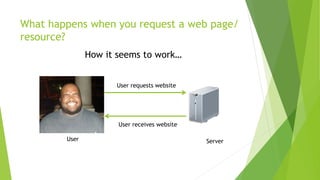
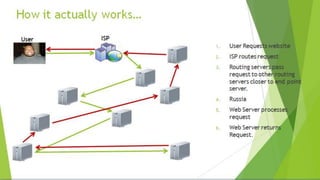
What happens when you request a web page/
resource?
How it seems to work…
User
User requests website
User receives website
Server
Introduction
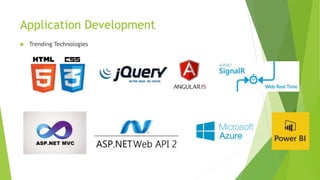
Application Development
 Trending Technologies
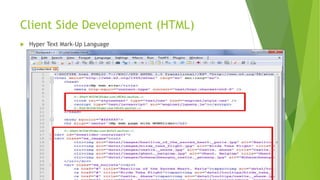
Client Side Development (HTML)
 Hyper Text Mark-Up Language
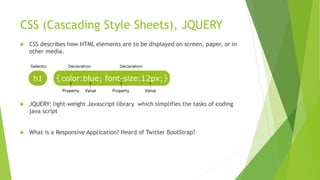
CSS (Cascading Style Sheets), JQUERY
 CSS describes how HTML elements are to be displayed on screen, paper, or in
other media.
 JQUERY: light-weight Javascript library which simplifies the tasks of coding
java script
 What is a Responsive Application? Heard of Twitter BootStrap?
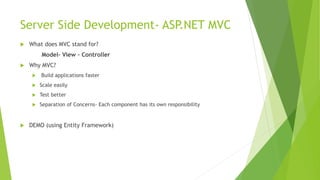
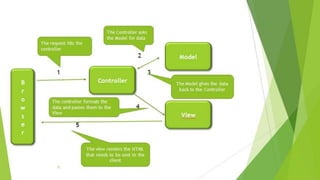
Server Side Development- ASP.NET MVC
 What does MVC stand for?
Model- View – Controller
 Why MVC?
 Build applications faster
 Scale easily
 Test better
 Separation of Concerns- Each component has its own responsibility
 DEMO (using Entity Framework)
MS SQL SERVER
 Relational Database Management System developed by Microsoft
 Free version available- SQL Server Express!
 DEMO
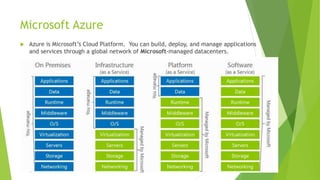
Microsoft Azure
 Azure is Microsoft’s Cloud Platform. You can build, deploy, and manage applications
and services through a global network of Microsoft-managed datacenters.
 DEMO
Playing with your Data – Power BI
Thank you!
“Start building today!”

Microsoft Web Technology Stack

  • 1.
    Microsoft Web Technology Stack BySivaneasharajah Lushanthan
  • 2.
    Agenda  Introduction  WebApplication Development  Trending Technologies  Client Side Development (HTML, CSS, JavaScript)  ASP.NET MVC  MS SQL Server  Microsoft Azure  Playing with your Data – Power BI
  • 3.
    Introduction : HTTP,Browsers and Servers  HTTP Just like people communicate with each other following certain protocols, HTTP is the protocol between the client (your computer using web browsers) and the server (web server serving web pages and similar online resources). HTTP stands for HyperText Transfer Protocol. It’s what browsers and web servers rely on for exchanging data so that you can surf the web, browse web pages, search Google, download pictures, and viewing YouTube.  Browser Application that translates web code into rendered web pages.  Firefox  Chrome  Internet Explorer  Safari  Opera
  • 4.
    What is aserver?  Term is “overloaded” – can mean many things  Physical hardware (will refer to as “machine”)  Virtual instance (will refer to as “Virtual Machine” or “VM”)  Software package (will refer to as “server”)  A server will…  Accept requests  Process (compile, parse, etc.) request  Prepare response  Deliver response  Web Servers  IIS (Internet Information System)  Apache etc.
  • 5.
    What happens whenyou request a web page/ resource? How it seems to work… User User requests website User receives website Server
  • 6.
  • 7.
  • 8.
    Client Side Development(HTML)  Hyper Text Mark-Up Language
  • 9.
    CSS (Cascading StyleSheets), JQUERY  CSS describes how HTML elements are to be displayed on screen, paper, or in other media.  JQUERY: light-weight Javascript library which simplifies the tasks of coding java script  What is a Responsive Application? Heard of Twitter BootStrap?
  • 11.
    Server Side Development-ASP.NET MVC  What does MVC stand for? Model- View – Controller  Why MVC?  Build applications faster  Scale easily  Test better  Separation of Concerns- Each component has its own responsibility  DEMO (using Entity Framework)
  • 13.
    MS SQL SERVER Relational Database Management System developed by Microsoft  Free version available- SQL Server Express!  DEMO
  • 14.
    Microsoft Azure  Azureis Microsoft’s Cloud Platform. You can build, deploy, and manage applications and services through a global network of Microsoft-managed datacenters.  DEMO
  • 15.
    Playing with yourData – Power BI
  • 16.