A White Paper by Justin S Whyte
MICROSOFT SQL
HIGH AVAILABILITY AND SCALING
MICROSOFT SQL HIGH-AVAILABILITY AND SCALING
OPTIONS
INTENDED FOR INTERNAL USE ONLY
1
MICROSOFT SQL HIGH-AVAILABILITY AND SCALING
TABLE OF CONTENTS
I. SYNOPSYS ..............................................................................................................................................2
II. TERMS AND DEFINITIONS ........................................................................................................................2
SQL SERVER HIGH-AVAILABILITY (HA) ..................................................................................................2
DISASTER RECOVERY (DR)....................................................................................................................2
SQL SCALING ......................................................................................................................................2
III. LOG SHIPPING ........................................................................................................................................3
LOG SHIPPING DEFINITION....................................................................................................................3
LOG SHIPPING USE-CASES: WHEN TO USE? WHEN NOT TO USE? ............................................................4
RECOVERY TIME AND RECOVERY POINT OBJECTIVES ................................................................................4
PROS AND CONS ..................................................................................................................................5
IV. SQL MIRRORING ....................................................................................................................................5
SQL MIRRORING DEFINITION................................................................................................................5
SQL MIRRORING USE-CASES: WHEN TO USE? WHEN NOT TO USE? ........................................................7
RECOVERY TIME AND RECOVERY POINT OBJECTIVES ................................................................................7
PROS AND CONS ..................................................................................................................................8
V. SQL CLUSTERING ....................................................................................................................................8
SQL CLUSTERING DEFINITION ...............................................................................................................8
SQL CLUSTERING USE-CASES: WHEN TO USE? WHEN NOT TO USE?......................................................10
RECOVERY TIME AND RECOVERY POINT OBJECTIVES ..............................................................................10
PROS AND CONS ................................................................................................................................10
MICROSOFT SQL HIGH-AVAILABILITY AND SCALING
OPTIONS
INTENDED FOR INTERNAL USE ONLY
2
I. SYNOPSYS
The purpose of this document is to clearly define the types of technologies available for
Microsoft SQL High Availability, Disaster Recovery and SQL Scaling. The goal being to provide a
methodology for determining when each technology should be applied. The intended audience
for this document is a Sales Account Executive or a Sales Engineer.
II. TERMS AND DEFINITIONS
SQL Server High-Availability (HA)
High-Availability refers to the ability of the SQL Server to run continuously without
interruption of service in the event of a system failure. Although completely uninterrupted
service (“100% operational” or “never failing”) is highly desirable, it is not always cost
effective. A measured approach, taking into account the amount of time projected to
reestablish SQL connectivity, the amount of potential data loss during the incident, and the
overall impact on business operations can be used to determine the best fit HA solution. HA
entails setting up one or more additional SQL servers to maintain redundancy of data. In the
event of an outage, SQL connectivity will be restored, either automatically or manually by
failing-over to the redundant SQL server.
Disaster Recovery (DR)
A subset of business continuity, Disaster Recovery entails implementing a set of policies and
procedures to enable the recovery of vital systems and services, in the event of a partial or
total geographical outage. Given the importance of the SQL server(s) role within an IT
infrastructure, it is almost always included in a comprehensive DR plan. The DR SQL server
should reside in a separate geography that will presumably be unaffected by the outage. In
the event of an interruption of service, either planned or unplanned, traffic can be redirect to
the DR site until service is restored.
SQL Scaling
When an SQL server is running at maximum load, or the workload is projected to increase
beyond the available resources, it is time to consider SQL scaling. There are two primary types
of SQL scaling, vertical scaling (scale-up) and horizontal scaling (scale-out). Vertical scaling
entails implementing a bigger, more powerful server —adding more RAM, using more
powerful processors, or upgrading to faster storage. Vertical scaling offers the advantage of
not requiring significant changes to the database, or the application. In most cases, you just
install your database on a more powerful server. The database continues to run in the same
fashion that it always has. It is now just running on a “bigger” server, with more available
resources to handle the heavier load.
Horizontal Scaling means adding an additional server(s) to divide the load between multiple
servers. The most common form of horizontal scaling is called Read-Write Splitting. Read-
MICROSOFT SQL HIGH-AVAILABILITY AND SCALING
OPTIONS
INTENDED FOR INTERNAL USE ONLY
3
Write splitting implements one SQL server for read operations and one SQL server for write
operations, allowing the load to be divided between multiple servers. Another example of
horizontal scaling is called Data partitioning. Data is partitioned between several databases so
that each database server will handle a portion of the data, effectively splitting the load
between several database servers.
The amount of flexibility you have in redesigning the application that is accessing the database
will have a large impact on which horizontal scaling methods are possible. It is also worthy to
note that cost savings is not always an advantage of horizontal scaling. Often the savings from
using multiple less expensive servers is cancelled out by the cost of licensing and maintenance
fees, however the redundancy offered by a scale-out solution is useful from an availability
perspective.
III. LOG SHIPPING
Log Shipping Definition
Log shipping is an inexpensive and powerful method for increasing database availability. Log
Shipping is a feature of Microsoft SQL Server in which recorded changes to a database
(transaction logs) are automatically transferred and executed on a secondary database server.
In the event that the primary database becomes unavailable, the secondary database server
can be quickly promoted to the primary server role to resume service until the primary server
is restored. The ability to move database changes in real time from one database to another is
not unique to Microsoft SQL Server. Log shipping is simply Microsoft’s implementation of the
concept.
MICROSOFT SQL HIGH-AVAILABILITY AND SCALING
OPTIONS
INTENDED FOR INTERNAL USE ONLY
4
Log Shipping Use-Cases
When to Use?
 When cost is a consideration. The secondary SQL server can reside on less powerful
system, unlike with SQL mirroring. If the secondary server is a cold standby, it does
not need to be licensed.
 When SQL Mirroring does not support functionality that is required by the client—
Cross-database transactions and distributed transactions are not supported by SQL mirroring.
Atomicity/integrity cannot be guaranteed when using these transaction types. Logical
inconsistencies could occur if the database fails-over before the transaction is committed.
 When a client requires a read-only secondary server to improve performance on the
primary system, or to prevent the primary database from becoming locked during
certain operations such as reporting.
 When read/write splitting is being used for horizontal scaling, and read data can be
out of sync due to log shipping backup intervals.
 When the projected amount of data loss during a primary server failure is acceptable.
 When the projected amount of downtime during a primary server failure is acceptable.
When NOT to Use?
 When the business impact of an hour of possible downtime is unacceptable.
 When the business impact of 15 minutes of possible data loss is unacceptable.
 When “100% operational” is a requirement of your business continuity plan.
Recovery Time and Recovery Point Objectives
Recovery Time Objective—(What is the maximum tolerable amount of time required to bring a
system back online before it significantly impacts business?) Approximately 30 minutes to an
hour. The failover process for log shipping is manual, not automatic. When a database failure
alarm is triggered at EWH, a support person will contact the customer and confirm that the
customer wants to failover to the secondary database. The failover process entails promoting
the secondary database and repointing a host file, or Active Directory (if available) to the
secondary database. If there are several servers that are pointed to the failed database, the
host file on each server will need to be updated, adding additional time to the failover
process.
Recovery Point Objective—(What is the maximum tolerable amount of data that could be lost
in the event of a failure?) The default setting for the transaction log backup interval is 15
minutes. That said, if the backup interval is setup for 15 minute, the RPO would also be 15
minutes. With proper testing it is possible to reduce the backup interval.
It is important to note that timed intervals need to be defined for three different jobs when
configuring log shipping—backup, copy and restore. These routines need to be timed at
appropriate intervals so that each process completes before the next process begins. For
MICROSOFT SQL HIGH-AVAILABILITY AND SCALING
OPTIONS
INTENDED FOR INTERNAL USE ONLY
5
instance, if a backup job has not completed before a copy job kicks off, the copy job will be
unable to retrieve the most recent backup. This could effectively double the acceptable RPO.
Pros and Cons
Pros
 Inexpensive – The secondary server does not need to be as robust as the primary
server. If the secondary server is a cold standby, it does not need to be licensed. It
also does not require shared storage.
 Less resource intensive than other HA methods –Log shipping is asynchronous, it
requires less resources than synchronous HA technologies that are constantly
updating, monitoring, and maintaining synchronousness.
 Provides a redundant copy of a database that can also be used in a DR scenario.
 Allows for easy restoration to specific recovery points—Transaction logs can be
restored to a specific point in time.
 More than one secondary server instance can be implemented, unlike with SQL
mirroring where it is a one-to-one ratio.
Cons
 RTO—In the event of a failure, there will be definite downtime, albeit generally less
than an hour.
 RPO—In the event of a failure, there will be a certain amount of data loss—as much as
15 minutes worth of data.
 Manual failover—Database failover is a manual process.
 Asynchronous—The secondary database will almost certainly be out of sync with the
primary database at any given time.
IV. SQL MIRRORING
SQL Mirroring Definition
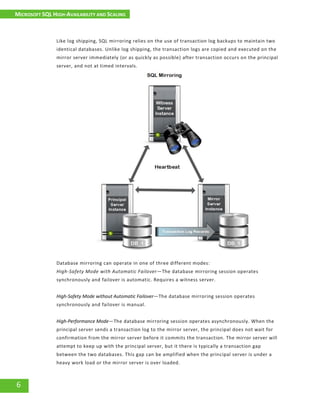
Database mirroring was introduced with Microsoft SQL Server 2005. It is designed to maintain
two transitionally consistent copies of a single database. The databases must reside on two
separate instances of SQL Server. The primary server instance that is actively serving the
database is known as a Principal Server. The replica instance acts as a “hot” (synchronous) or
“warm” (asynchronous) standby and is known as a Mirror Server. A third server instance called
a Witness Server is used to monitor the principal server and determine if a failure has
occurred. If a failure has been confirmed, it will initiate an automatic failover to the mirror
server. During the failover process, the mirror server is promoted to the principal server role.
When the failed principal server is back online, the witness server will bring it back into the
mirroring session as a mirror server. This process is known as Role Switching. In the interest of
cost savings, and because the witness server role does not require much overhead, the
witness server instance can be installed on a server that has other roles, such as a web server
or application server.
MICROSOFT SQL HIGH-AVAILABILITY AND SCALING
OPTIONS
INTENDED FOR INTERNAL USE ONLY
6
Like log shipping, SQL mirroring relies on the use of transaction log backups to maintain two
identical databases. Unlike log shipping, the transaction logs are copied and executed on the
mirror server immediately (or as quickly as possible) after transaction occurs on the principal
server, and not at timed intervals.
Database mirroring can operate in one of three different modes:
High-Safety Mode with Automatic Failover—The database mirroring session operates
synchronously and failover is automatic. Requires a witness server.
High-Safety Mode without Automatic Failover—The database mirroring session operates
synchronously and failover is manual.
High-Performance Mode—The database mirroring session operates asynchronously. When the
principal server sends a transaction log to the mirror server, the principal does not wait for
confirmation from the mirror server before it commits the transaction. The mirror server will
attempt to keep up with the principal server, but it there is typically a transaction gap
between the two databases. This gap can be amplified when the principal server is under a
heavy work load or the mirror server is over loaded.
MICROSOFT SQL HIGH-AVAILABILITY AND SCALING
OPTIONS
INTENDED FOR INTERNAL USE ONLY
7
SQL Mirroring Use-Cases
When to Use?
 When automatic failover is required for business continuity, but the cost of SQL
clustering is too great.
 When the RTO/RPO associated with log shipping is unacceptable, but the cost of SQL
clustering is too great.
 When cost is a consideration. It is not possible to run SQL mirroring with a cold
secondary (mirror) database like it is with log shipping, however, multiple principal
database servers can point to a single mirror server. It is important to note that this is
not the most optimal configuration. It is recommended to use a one to one server
ratio when possible; one mirror server for each principal server.
When not to use?
 When the Microsoft SQL edition is not compatible. For instance SQL mirroring is not an option
with Microsoft SQL Server 2008 Web Edition.
 When SQL Mirroring does not support functionality that is required by the client—
Cross-database transactions and distributed transactions are not supported by SQL mirroring.
Atomicity/integrity cannot be guaranteed when using these transaction types. Logical
inconsistencies could occur if the database fails-over before the transaction is committed.
 When the storage I/O requirements dictate that external storage (SAN) should be used.
 When the possibility of losing a few lines of transactions in the event of a failover is
unacceptable.
Recovery Time and Recovery Point Objectives
Recovery Time Objective—(What is the maximum tolerable amount of time required to bring a system
back online before it significantly impacts business?) Depending on the configuration options, failover to
the mirror server can be almost immediate. If the failover partner is specified in the ODBC connection
string, the client application should be able to find the newly promoted Principal Server without
additional configuration.
Recovery Point Objective—(What is the maximum tolerable amount of data that could be lost
in the event of a failure?) During the failover, only transactions that have not been committed
will be rolled back. Because the mirror database is an exact copy of the primary database,
there will be minimal to no data loss.
Pros and Cons
Pros
 Provides a redundant copy of a database that can also be used in a DR scenario.
 A cost effective solution that does not require expensive shared storage.
MICROSOFT SQL HIGH-AVAILABILITY AND SCALING
OPTIONS
INTENDED FOR INTERNAL USE ONLY
8
 Provides automatic failover, unlike log shipping
Cons
 Requires additional storage capacity.
 Automatic Failover only with Witness (ideally on separate host).
 Application may need to be re-configured for failover.
 SQL Mirroring has been marked for deprecation as of Microsoft SQL Server 2012
 Only user databases can be mirrored. System databases cannot be mirrored (master,
msdb, tempdb, or model databases).
V. SQL Clustering
SQL Clustering Definition
Unlike SQL Mirroring and Log Shipping which provide redundancy at the database level, SQL
Clustering provides protection at the SQL Server instance level. There are a two different
types of SQL Failover Clusters, Multi-Instance Clustering (Active/Active) and Single-Instance
Clustering (Active/Passive). This document is focused solely on Single-Instance Clustering, as it
is the type of clustering that is most commonly used.
When Microsoft released NT 4.0 Enterprise Edition in 1997, it included a new feature called
Microsoft Clustering Server (MSCS). Around the same time SQL Server 6.5 Enterprise Edition
was released, allowing SQL server to be clustered. Hence, SQL Clustering was born. Although
the technology was initially crude and rarely implemented in the real world, it has matured
through the years and has become the gold standard for increased reliability and uptime.
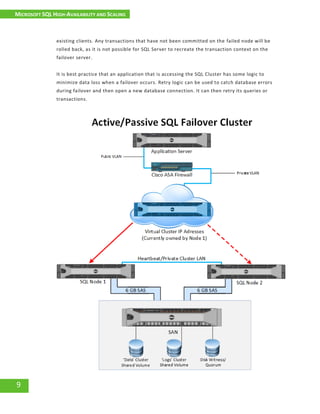
To understand SQL Clustering, it is important to know a little bit about Windows Failover
Clusters. A Windows Failover Cluster consists of a group of independent servers that work
together to increase availability of applications and services. Windows Failover Cluster uses
shared storage, typically on a SAN. The shared storage is used to host the Cluster Shared
Volume (CSV) and the Disk Witness (Quorum). The CSV stores the SQL system and user
databases. The Disk Witness tells the cluster which cluster node should be active, preventing
more than one node from writing to the shared volume at the same time. It also contains the
cluster configuration database and plays an integral part in the voting process that takes place
in the event of a node failure.
When SQL Server is installed into a Windows Failover Cluster, it is known as a SQL Server
Failover Cluster. In a SQL Cluster, the system and user databases must reside on shared
storage. Each SQL Server in the cluster is known as a node. Each SQL node in a cluster is
attached to the same databases on the same shared storage. In the event that a node fails, the
Windows Failover Cluster service will determine that a node has failed and start the SQL
Server Services on the second node. This failover appears as a services stop and restart to
MICROSOFT SQL HIGH-AVAILABILITY AND SCALING
OPTIONS
INTENDED FOR INTERNAL USE ONLY
9
existing clients. Any transactions that have not been committed on the failed node will be
rolled back, as it is not possible for SQL Server to recreate the transaction context on the
failover server.
It is best practice that an application that is accessing the SQL Cluster has some logic to
minimize data loss when a failover occurs. Retry logic can be used to catch database errors
during failover and then open a new database connection. It can then retry its queries or
transactions.
MICROSOFT SQL HIGH-AVAILABILITY AND SCALING
OPTIONS
INTENDED FOR INTERNAL USE ONLY
10
SQL Clustering Use-Cases
When to Use?
 When mission critical applications require automatic failover for the entire instance of
SQL Server.
 When the database design dictates that mirroring is not a viable option (Cross-database
transactions and Distributed Transactions).
 When multi-instance clustering (Active-Active) is required.
 The cost and pain associated with possible downtime outweighs the cost associated
with SQL Clustering
When not to use?
 When RTO/RPO of other, less expensive HA technologies is acceptable
 When cost associated with SQL Clustering outweighs the cost and pain of possible downtime.
Recovery Time and Recovery Point Objectives
Recovery Time Objective—(What is the maximum tolerable amount of time required to bring a system
back online before it significantly impacts business?) Failover occurs almost immediately. If retry logic
exists in the application that is accessing the database, it will automatically open a new connection.
Recovery Point Objective—(What is the maximum tolerable amount of data that could be lost
in the event of a failure?) There is little to no data loss. Only transactions that have not been
committed at the time of failure will be lost.
Pros and Cons
Pros
 Failover is automatic. It can be manual as well.
 It provides SQL Server instance level protection
 Upgrades can be performed on a single (passive) node to minimize downtime.
Cons
 SQL Failover Clustering is strictly a high-availability solution, and does not provide
disaster recovery functionalities. Therefore it requires Microsoft certified third-party
hardware and software for a geographically dispersed cluster across multiple
datacenters
 It is expensive, as it requires shared storage and redundant hardware. Additionally,
clusters larger than two nodes require SQL Server Enterprise Edition and Software
Assurance.
 Shared storage presents a single point of failure, as the SQL data is stored on a single
shared data resource
 Support is limited to specific editions of SQL Server

Microsoft SQL High Availability and Scaling

  • 1.
    A White Paperby Justin S Whyte MICROSOFT SQL HIGH AVAILABILITY AND SCALING
  • 2.
    MICROSOFT SQL HIGH-AVAILABILITYAND SCALING OPTIONS INTENDED FOR INTERNAL USE ONLY 1 MICROSOFT SQL HIGH-AVAILABILITY AND SCALING TABLE OF CONTENTS I. SYNOPSYS ..............................................................................................................................................2 II. TERMS AND DEFINITIONS ........................................................................................................................2 SQL SERVER HIGH-AVAILABILITY (HA) ..................................................................................................2 DISASTER RECOVERY (DR)....................................................................................................................2 SQL SCALING ......................................................................................................................................2 III. LOG SHIPPING ........................................................................................................................................3 LOG SHIPPING DEFINITION....................................................................................................................3 LOG SHIPPING USE-CASES: WHEN TO USE? WHEN NOT TO USE? ............................................................4 RECOVERY TIME AND RECOVERY POINT OBJECTIVES ................................................................................4 PROS AND CONS ..................................................................................................................................5 IV. SQL MIRRORING ....................................................................................................................................5 SQL MIRRORING DEFINITION................................................................................................................5 SQL MIRRORING USE-CASES: WHEN TO USE? WHEN NOT TO USE? ........................................................7 RECOVERY TIME AND RECOVERY POINT OBJECTIVES ................................................................................7 PROS AND CONS ..................................................................................................................................8 V. SQL CLUSTERING ....................................................................................................................................8 SQL CLUSTERING DEFINITION ...............................................................................................................8 SQL CLUSTERING USE-CASES: WHEN TO USE? WHEN NOT TO USE?......................................................10 RECOVERY TIME AND RECOVERY POINT OBJECTIVES ..............................................................................10 PROS AND CONS ................................................................................................................................10
  • 3.
    MICROSOFT SQL HIGH-AVAILABILITYAND SCALING OPTIONS INTENDED FOR INTERNAL USE ONLY 2 I. SYNOPSYS The purpose of this document is to clearly define the types of technologies available for Microsoft SQL High Availability, Disaster Recovery and SQL Scaling. The goal being to provide a methodology for determining when each technology should be applied. The intended audience for this document is a Sales Account Executive or a Sales Engineer. II. TERMS AND DEFINITIONS SQL Server High-Availability (HA) High-Availability refers to the ability of the SQL Server to run continuously without interruption of service in the event of a system failure. Although completely uninterrupted service (“100% operational” or “never failing”) is highly desirable, it is not always cost effective. A measured approach, taking into account the amount of time projected to reestablish SQL connectivity, the amount of potential data loss during the incident, and the overall impact on business operations can be used to determine the best fit HA solution. HA entails setting up one or more additional SQL servers to maintain redundancy of data. In the event of an outage, SQL connectivity will be restored, either automatically or manually by failing-over to the redundant SQL server. Disaster Recovery (DR) A subset of business continuity, Disaster Recovery entails implementing a set of policies and procedures to enable the recovery of vital systems and services, in the event of a partial or total geographical outage. Given the importance of the SQL server(s) role within an IT infrastructure, it is almost always included in a comprehensive DR plan. The DR SQL server should reside in a separate geography that will presumably be unaffected by the outage. In the event of an interruption of service, either planned or unplanned, traffic can be redirect to the DR site until service is restored. SQL Scaling When an SQL server is running at maximum load, or the workload is projected to increase beyond the available resources, it is time to consider SQL scaling. There are two primary types of SQL scaling, vertical scaling (scale-up) and horizontal scaling (scale-out). Vertical scaling entails implementing a bigger, more powerful server —adding more RAM, using more powerful processors, or upgrading to faster storage. Vertical scaling offers the advantage of not requiring significant changes to the database, or the application. In most cases, you just install your database on a more powerful server. The database continues to run in the same fashion that it always has. It is now just running on a “bigger” server, with more available resources to handle the heavier load. Horizontal Scaling means adding an additional server(s) to divide the load between multiple servers. The most common form of horizontal scaling is called Read-Write Splitting. Read-
  • 4.
    MICROSOFT SQL HIGH-AVAILABILITYAND SCALING OPTIONS INTENDED FOR INTERNAL USE ONLY 3 Write splitting implements one SQL server for read operations and one SQL server for write operations, allowing the load to be divided between multiple servers. Another example of horizontal scaling is called Data partitioning. Data is partitioned between several databases so that each database server will handle a portion of the data, effectively splitting the load between several database servers. The amount of flexibility you have in redesigning the application that is accessing the database will have a large impact on which horizontal scaling methods are possible. It is also worthy to note that cost savings is not always an advantage of horizontal scaling. Often the savings from using multiple less expensive servers is cancelled out by the cost of licensing and maintenance fees, however the redundancy offered by a scale-out solution is useful from an availability perspective. III. LOG SHIPPING Log Shipping Definition Log shipping is an inexpensive and powerful method for increasing database availability. Log Shipping is a feature of Microsoft SQL Server in which recorded changes to a database (transaction logs) are automatically transferred and executed on a secondary database server. In the event that the primary database becomes unavailable, the secondary database server can be quickly promoted to the primary server role to resume service until the primary server is restored. The ability to move database changes in real time from one database to another is not unique to Microsoft SQL Server. Log shipping is simply Microsoft’s implementation of the concept.
  • 5.
    MICROSOFT SQL HIGH-AVAILABILITYAND SCALING OPTIONS INTENDED FOR INTERNAL USE ONLY 4 Log Shipping Use-Cases When to Use?  When cost is a consideration. The secondary SQL server can reside on less powerful system, unlike with SQL mirroring. If the secondary server is a cold standby, it does not need to be licensed.  When SQL Mirroring does not support functionality that is required by the client— Cross-database transactions and distributed transactions are not supported by SQL mirroring. Atomicity/integrity cannot be guaranteed when using these transaction types. Logical inconsistencies could occur if the database fails-over before the transaction is committed.  When a client requires a read-only secondary server to improve performance on the primary system, or to prevent the primary database from becoming locked during certain operations such as reporting.  When read/write splitting is being used for horizontal scaling, and read data can be out of sync due to log shipping backup intervals.  When the projected amount of data loss during a primary server failure is acceptable.  When the projected amount of downtime during a primary server failure is acceptable. When NOT to Use?  When the business impact of an hour of possible downtime is unacceptable.  When the business impact of 15 minutes of possible data loss is unacceptable.  When “100% operational” is a requirement of your business continuity plan. Recovery Time and Recovery Point Objectives Recovery Time Objective—(What is the maximum tolerable amount of time required to bring a system back online before it significantly impacts business?) Approximately 30 minutes to an hour. The failover process for log shipping is manual, not automatic. When a database failure alarm is triggered at EWH, a support person will contact the customer and confirm that the customer wants to failover to the secondary database. The failover process entails promoting the secondary database and repointing a host file, or Active Directory (if available) to the secondary database. If there are several servers that are pointed to the failed database, the host file on each server will need to be updated, adding additional time to the failover process. Recovery Point Objective—(What is the maximum tolerable amount of data that could be lost in the event of a failure?) The default setting for the transaction log backup interval is 15 minutes. That said, if the backup interval is setup for 15 minute, the RPO would also be 15 minutes. With proper testing it is possible to reduce the backup interval. It is important to note that timed intervals need to be defined for three different jobs when configuring log shipping—backup, copy and restore. These routines need to be timed at appropriate intervals so that each process completes before the next process begins. For
  • 6.
    MICROSOFT SQL HIGH-AVAILABILITYAND SCALING OPTIONS INTENDED FOR INTERNAL USE ONLY 5 instance, if a backup job has not completed before a copy job kicks off, the copy job will be unable to retrieve the most recent backup. This could effectively double the acceptable RPO. Pros and Cons Pros  Inexpensive – The secondary server does not need to be as robust as the primary server. If the secondary server is a cold standby, it does not need to be licensed. It also does not require shared storage.  Less resource intensive than other HA methods –Log shipping is asynchronous, it requires less resources than synchronous HA technologies that are constantly updating, monitoring, and maintaining synchronousness.  Provides a redundant copy of a database that can also be used in a DR scenario.  Allows for easy restoration to specific recovery points—Transaction logs can be restored to a specific point in time.  More than one secondary server instance can be implemented, unlike with SQL mirroring where it is a one-to-one ratio. Cons  RTO—In the event of a failure, there will be definite downtime, albeit generally less than an hour.  RPO—In the event of a failure, there will be a certain amount of data loss—as much as 15 minutes worth of data.  Manual failover—Database failover is a manual process.  Asynchronous—The secondary database will almost certainly be out of sync with the primary database at any given time. IV. SQL MIRRORING SQL Mirroring Definition Database mirroring was introduced with Microsoft SQL Server 2005. It is designed to maintain two transitionally consistent copies of a single database. The databases must reside on two separate instances of SQL Server. The primary server instance that is actively serving the database is known as a Principal Server. The replica instance acts as a “hot” (synchronous) or “warm” (asynchronous) standby and is known as a Mirror Server. A third server instance called a Witness Server is used to monitor the principal server and determine if a failure has occurred. If a failure has been confirmed, it will initiate an automatic failover to the mirror server. During the failover process, the mirror server is promoted to the principal server role. When the failed principal server is back online, the witness server will bring it back into the mirroring session as a mirror server. This process is known as Role Switching. In the interest of cost savings, and because the witness server role does not require much overhead, the witness server instance can be installed on a server that has other roles, such as a web server or application server.
  • 7.
    MICROSOFT SQL HIGH-AVAILABILITYAND SCALING OPTIONS INTENDED FOR INTERNAL USE ONLY 6 Like log shipping, SQL mirroring relies on the use of transaction log backups to maintain two identical databases. Unlike log shipping, the transaction logs are copied and executed on the mirror server immediately (or as quickly as possible) after transaction occurs on the principal server, and not at timed intervals. Database mirroring can operate in one of three different modes: High-Safety Mode with Automatic Failover—The database mirroring session operates synchronously and failover is automatic. Requires a witness server. High-Safety Mode without Automatic Failover—The database mirroring session operates synchronously and failover is manual. High-Performance Mode—The database mirroring session operates asynchronously. When the principal server sends a transaction log to the mirror server, the principal does not wait for confirmation from the mirror server before it commits the transaction. The mirror server will attempt to keep up with the principal server, but it there is typically a transaction gap between the two databases. This gap can be amplified when the principal server is under a heavy work load or the mirror server is over loaded.
  • 8.
    MICROSOFT SQL HIGH-AVAILABILITYAND SCALING OPTIONS INTENDED FOR INTERNAL USE ONLY 7 SQL Mirroring Use-Cases When to Use?  When automatic failover is required for business continuity, but the cost of SQL clustering is too great.  When the RTO/RPO associated with log shipping is unacceptable, but the cost of SQL clustering is too great.  When cost is a consideration. It is not possible to run SQL mirroring with a cold secondary (mirror) database like it is with log shipping, however, multiple principal database servers can point to a single mirror server. It is important to note that this is not the most optimal configuration. It is recommended to use a one to one server ratio when possible; one mirror server for each principal server. When not to use?  When the Microsoft SQL edition is not compatible. For instance SQL mirroring is not an option with Microsoft SQL Server 2008 Web Edition.  When SQL Mirroring does not support functionality that is required by the client— Cross-database transactions and distributed transactions are not supported by SQL mirroring. Atomicity/integrity cannot be guaranteed when using these transaction types. Logical inconsistencies could occur if the database fails-over before the transaction is committed.  When the storage I/O requirements dictate that external storage (SAN) should be used.  When the possibility of losing a few lines of transactions in the event of a failover is unacceptable. Recovery Time and Recovery Point Objectives Recovery Time Objective—(What is the maximum tolerable amount of time required to bring a system back online before it significantly impacts business?) Depending on the configuration options, failover to the mirror server can be almost immediate. If the failover partner is specified in the ODBC connection string, the client application should be able to find the newly promoted Principal Server without additional configuration. Recovery Point Objective—(What is the maximum tolerable amount of data that could be lost in the event of a failure?) During the failover, only transactions that have not been committed will be rolled back. Because the mirror database is an exact copy of the primary database, there will be minimal to no data loss. Pros and Cons Pros  Provides a redundant copy of a database that can also be used in a DR scenario.  A cost effective solution that does not require expensive shared storage.
  • 9.
    MICROSOFT SQL HIGH-AVAILABILITYAND SCALING OPTIONS INTENDED FOR INTERNAL USE ONLY 8  Provides automatic failover, unlike log shipping Cons  Requires additional storage capacity.  Automatic Failover only with Witness (ideally on separate host).  Application may need to be re-configured for failover.  SQL Mirroring has been marked for deprecation as of Microsoft SQL Server 2012  Only user databases can be mirrored. System databases cannot be mirrored (master, msdb, tempdb, or model databases). V. SQL Clustering SQL Clustering Definition Unlike SQL Mirroring and Log Shipping which provide redundancy at the database level, SQL Clustering provides protection at the SQL Server instance level. There are a two different types of SQL Failover Clusters, Multi-Instance Clustering (Active/Active) and Single-Instance Clustering (Active/Passive). This document is focused solely on Single-Instance Clustering, as it is the type of clustering that is most commonly used. When Microsoft released NT 4.0 Enterprise Edition in 1997, it included a new feature called Microsoft Clustering Server (MSCS). Around the same time SQL Server 6.5 Enterprise Edition was released, allowing SQL server to be clustered. Hence, SQL Clustering was born. Although the technology was initially crude and rarely implemented in the real world, it has matured through the years and has become the gold standard for increased reliability and uptime. To understand SQL Clustering, it is important to know a little bit about Windows Failover Clusters. A Windows Failover Cluster consists of a group of independent servers that work together to increase availability of applications and services. Windows Failover Cluster uses shared storage, typically on a SAN. The shared storage is used to host the Cluster Shared Volume (CSV) and the Disk Witness (Quorum). The CSV stores the SQL system and user databases. The Disk Witness tells the cluster which cluster node should be active, preventing more than one node from writing to the shared volume at the same time. It also contains the cluster configuration database and plays an integral part in the voting process that takes place in the event of a node failure. When SQL Server is installed into a Windows Failover Cluster, it is known as a SQL Server Failover Cluster. In a SQL Cluster, the system and user databases must reside on shared storage. Each SQL Server in the cluster is known as a node. Each SQL node in a cluster is attached to the same databases on the same shared storage. In the event that a node fails, the Windows Failover Cluster service will determine that a node has failed and start the SQL Server Services on the second node. This failover appears as a services stop and restart to
  • 10.
    MICROSOFT SQL HIGH-AVAILABILITYAND SCALING OPTIONS INTENDED FOR INTERNAL USE ONLY 9 existing clients. Any transactions that have not been committed on the failed node will be rolled back, as it is not possible for SQL Server to recreate the transaction context on the failover server. It is best practice that an application that is accessing the SQL Cluster has some logic to minimize data loss when a failover occurs. Retry logic can be used to catch database errors during failover and then open a new database connection. It can then retry its queries or transactions.
  • 11.
    MICROSOFT SQL HIGH-AVAILABILITYAND SCALING OPTIONS INTENDED FOR INTERNAL USE ONLY 10 SQL Clustering Use-Cases When to Use?  When mission critical applications require automatic failover for the entire instance of SQL Server.  When the database design dictates that mirroring is not a viable option (Cross-database transactions and Distributed Transactions).  When multi-instance clustering (Active-Active) is required.  The cost and pain associated with possible downtime outweighs the cost associated with SQL Clustering When not to use?  When RTO/RPO of other, less expensive HA technologies is acceptable  When cost associated with SQL Clustering outweighs the cost and pain of possible downtime. Recovery Time and Recovery Point Objectives Recovery Time Objective—(What is the maximum tolerable amount of time required to bring a system back online before it significantly impacts business?) Failover occurs almost immediately. If retry logic exists in the application that is accessing the database, it will automatically open a new connection. Recovery Point Objective—(What is the maximum tolerable amount of data that could be lost in the event of a failure?) There is little to no data loss. Only transactions that have not been committed at the time of failure will be lost. Pros and Cons Pros  Failover is automatic. It can be manual as well.  It provides SQL Server instance level protection  Upgrades can be performed on a single (passive) node to minimize downtime. Cons  SQL Failover Clustering is strictly a high-availability solution, and does not provide disaster recovery functionalities. Therefore it requires Microsoft certified third-party hardware and software for a geographically dispersed cluster across multiple datacenters  It is expensive, as it requires shared storage and redundant hardware. Additionally, clusters larger than two nodes require SQL Server Enterprise Edition and Software Assurance.  Shared storage presents a single point of failure, as the SQL data is stored on a single shared data resource  Support is limited to specific editions of SQL Server