Global AI Bootcamp
Use #GlobalAIBootcamp on socialmedia!
Schedule
Democratizing & Accelerating AI Through
Automated Machine Learning
Why Automated Machine Learning
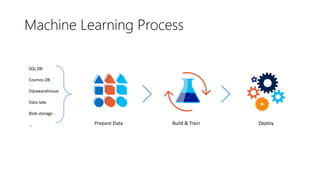
SQL DB
Cosmos DB
Datawarehouse
Data lake
Blob storage
… Prepare Data Build & Train Deploy
Machine Learning Process
How much is this car worth?
Machine Learning Problem Example
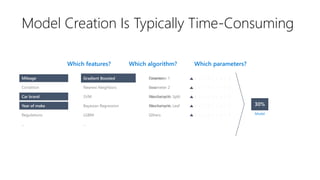
Model Creation Is Typically Time-Consuming
Mileage
Condition
Car brand
Year of make
Regulations
…
Parameter 1
Parameter 2
Parameter 3
Parameter 4
…
Gradient Boosted
Nearest Neighbors
SVM
Bayesian Regression
LGBM
…
Mileage Gradient Boosted Criterion
Loss
Min Samples Split
Min Samples Leaf
Others Model
Which algorithm? Which parameters?Which features?
Car brand
Year of make
Criterion
Loss
Min Samples Split
Min Samples Leaf
Others
N Neighbors
Weights
Metric
P
Others
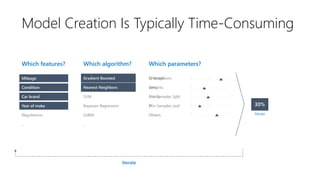
Which algorithm? Which parameters?Which features?
Mileage
Condition
Car brand
Year of make
Regulations
…
Gradient Boosted
Nearest Neighbors
SVM
Bayesian Regression
LGBM
…
Nearest Neighbors
Model
Iterate
Gradient BoostedMileage
Car brand
Year of make
Car brand
Year of make
Condition
Model Creation Is Typically Time-Consuming
Which algorithm? Which parameters?Which features?
Iterate
Model Creation Is Typically Time-Consuming
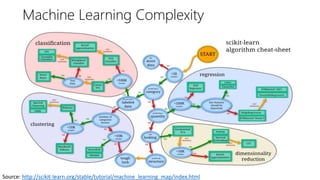
Source: http://scikit-learn.org/stable/tutorial/machine_learning_map/index.html
Machine Learning Complexity
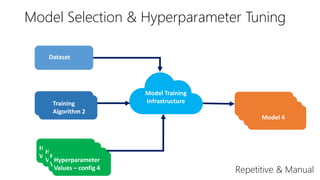
Dataset
Training
Algorithm 1
Hyperparameter
Values – config 1
Model 1
Hyperparameter
Values – config 2
Model 2
Hyperparameter
Values – config 3
Model 3
Model Training
InfrastructureTraining
Algorithm 2
Hyperparameter
Values – config 4
Model 4
Model Selection & Hyperparameter Tuning
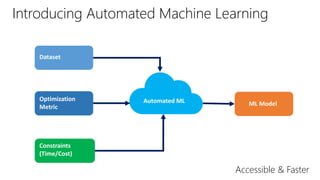
Introducing Automated Machine Learning
Dataset
Optimization
Metric
Constraints
(Time/Cost)
ML ModelAutomated ML
Accessible & Faster
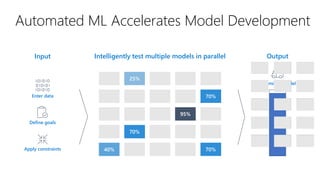
Enter data
Define goals
Apply constraints
Output
Automated ML Accelerates Model Development
Input Intelligently test multiple models in parallel
Optimized model
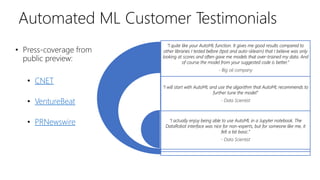
Automated ML Customer Testimonials
• Press-coverage from
public preview:
• CNET
• VentureBeat
• PRNewswire
“I quite like your AutoML function. It gives me good results compared to
other libraries I tested before (tpot and auto-sklearn) that I believe was only
looking at scores and often gave me models that over-trained my data. And
of course the model from your suggested code is better.”
- Big oil company
“I will start with AutoML and use the algorithm that AutoML recommends to
further tune the model”
- Data Scientist
“I actually enjoy being able to use AutoML in a Jupyter notebook. The
DataRobot interface was nice for non-experts, but for someone like me, it
felt a bit basic.”
- Data Scientist
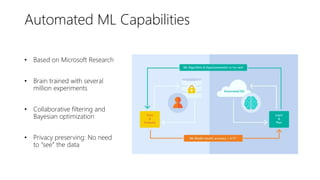
Automated ML Capabilities
• Based on Microsoft Research
• Brain trained with several
million experiments
• Collaborative filtering and
Bayesian optimization
• Privacy preserving: No need
to “see” the data
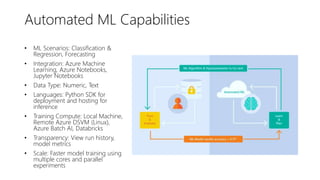
Automated ML Capabilities
• ML Scenarios: Classification &
Regression, Forecasting
• Integration: Azure Machine
Learning, Azure Notebooks,
Jupyter Notebooks
• Data Type: Numeric, Text
• Languages: Python SDK for
deployment and hosting for
inference
• Training Compute: Local Machine,
Remote Azure DSVM (Linux),
Azure Batch AI, Databricks
• Transparency: View run history,
model metrics
• Scale: Faster model training using
multiple cores and parallel
experiments
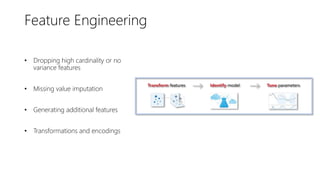
• Dropping high cardinality or no
variance features
• Missing value imputation
• Generating additional features
• Transformations and encodings
Feature Engineering
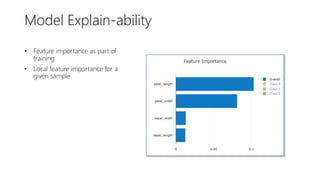
• Feature importance as part of
training
• Local feature importance for a
given sample
Model Explain-ability
Workshop
1. Go to https://notebooks.azure.com/setuchokshi/projects/automl-bootcamp
2. Click on Clone
3.Enter Project name, Project ID and uncheck Public tick box
4. Open notebook and follow instructions
Start with the automl package
In your Azure virtual machine:
sudo –i
conda env list
pip install --upgrade azureml-sdk[notebooks,automl]
Thank You!
Resources
• AskAutomatedML@microsoft.com
• https://aka.ms/AutomatedML
• https://aka.ms/AutomatedMLDocs
• https://github.com/Azure/MachineLearningNotebooks

Microsoft Introduction to Automated Machine Learning

  • 1.
    Global AI Bootcamp Use#GlobalAIBootcamp on socialmedia!
  • 2.
  • 3.
  • 4.
    Democratizing & AcceleratingAI Through Automated Machine Learning
  • 5.
  • 6.
    SQL DB Cosmos DB Datawarehouse Datalake Blob storage … Prepare Data Build & Train Deploy Machine Learning Process
  • 7.
    How much isthis car worth? Machine Learning Problem Example
  • 8.
    Model Creation IsTypically Time-Consuming Mileage Condition Car brand Year of make Regulations … Parameter 1 Parameter 2 Parameter 3 Parameter 4 … Gradient Boosted Nearest Neighbors SVM Bayesian Regression LGBM … Mileage Gradient Boosted Criterion Loss Min Samples Split Min Samples Leaf Others Model Which algorithm? Which parameters?Which features? Car brand Year of make
  • 9.
    Criterion Loss Min Samples Split MinSamples Leaf Others N Neighbors Weights Metric P Others Which algorithm? Which parameters?Which features? Mileage Condition Car brand Year of make Regulations … Gradient Boosted Nearest Neighbors SVM Bayesian Regression LGBM … Nearest Neighbors Model Iterate Gradient BoostedMileage Car brand Year of make Car brand Year of make Condition Model Creation Is Typically Time-Consuming
  • 10.
    Which algorithm? Whichparameters?Which features? Iterate Model Creation Is Typically Time-Consuming
  • 11.
  • 12.
    Dataset Training Algorithm 1 Hyperparameter Values –config 1 Model 1 Hyperparameter Values – config 2 Model 2 Hyperparameter Values – config 3 Model 3 Model Training InfrastructureTraining Algorithm 2 Hyperparameter Values – config 4 Model 4 Model Selection & Hyperparameter Tuning
  • 13.
    Introducing Automated MachineLearning Dataset Optimization Metric Constraints (Time/Cost) ML ModelAutomated ML Accessible & Faster
  • 14.
    Enter data Define goals Applyconstraints Output Automated ML Accelerates Model Development Input Intelligently test multiple models in parallel Optimized model
  • 15.
    Automated ML CustomerTestimonials • Press-coverage from public preview: • CNET • VentureBeat • PRNewswire “I quite like your AutoML function. It gives me good results compared to other libraries I tested before (tpot and auto-sklearn) that I believe was only looking at scores and often gave me models that over-trained my data. And of course the model from your suggested code is better.” - Big oil company “I will start with AutoML and use the algorithm that AutoML recommends to further tune the model” - Data Scientist “I actually enjoy being able to use AutoML in a Jupyter notebook. The DataRobot interface was nice for non-experts, but for someone like me, it felt a bit basic.” - Data Scientist
  • 16.
  • 17.
    Automated ML Capabilities •Based on Microsoft Research • Brain trained with several million experiments • Collaborative filtering and Bayesian optimization • Privacy preserving: No need to “see” the data
  • 18.
    Automated ML Capabilities •ML Scenarios: Classification & Regression, Forecasting • Integration: Azure Machine Learning, Azure Notebooks, Jupyter Notebooks • Data Type: Numeric, Text • Languages: Python SDK for deployment and hosting for inference • Training Compute: Local Machine, Remote Azure DSVM (Linux), Azure Batch AI, Databricks • Transparency: View run history, model metrics • Scale: Faster model training using multiple cores and parallel experiments
  • 19.
    • Dropping highcardinality or no variance features • Missing value imputation • Generating additional features • Transformations and encodings Feature Engineering
  • 20.
    • Feature importanceas part of training • Local feature importance for a given sample Model Explain-ability
  • 21.
  • 22.
    1. Go tohttps://notebooks.azure.com/setuchokshi/projects/automl-bootcamp 2. Click on Clone 3.Enter Project name, Project ID and uncheck Public tick box 4. Open notebook and follow instructions
  • 23.
    Start with theautoml package In your Azure virtual machine: sudo –i conda env list pip install --upgrade azureml-sdk[notebooks,automl]
  • 24.
  • 25.
    Resources • AskAutomatedML@microsoft.com • https://aka.ms/AutomatedML •https://aka.ms/AutomatedMLDocs • https://github.com/Azure/MachineLearningNotebooks