V1.5
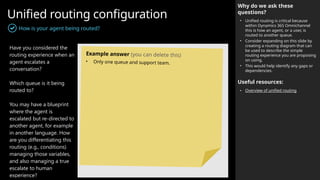
Implementation
Guide
Workshop date: YYYY-MM-
Copilot Studio
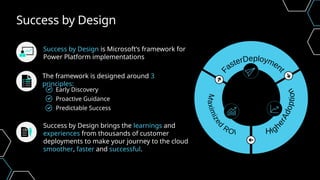
Success by Design
The framework is designed around 3
principles:
Early Discovery
Proactive Guidance
Predictable Success
Success by Design brings the learnings and
experiences from thousands of customer
deployments to make your journey to the cloud
smoother, faster and successful.
Success by Design is Microsoft’s framework for
Power Platform implementations
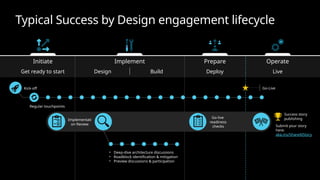
Typical Success by Design engagement lifecycle
Implement Prepare
Initiate Operate
Get ready to start Design Build Deploy Live
Regular touchpoints
• Deep-dive architecture discussions
• Roadblock identification & mitigation
• Preview discussions & participation
Go-Live
Success story
publishing
Go-live
readiness
checks
Kick-off
Implementati
on Review Submit your story
here:
aka.ms/ShareAIStory
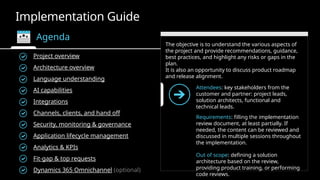
Implementation Guide
Agenda
The objective is to understand the various aspects of
the project and provide recommendations, guidance,
best practices, and highlight any risks or gaps in the
plan.
It is also an opportunity to discuss product roadmap
and release alignment.
Project overview
Attendees: key stakeholders from the
customer and partner: project leads,
solution architects, functional and
technical leads.
Requirements: filling the implementation
review document, at least partially. If
needed, the content can be reviewed and
discussed in multiple sessions throughout
the implementation.
Out of scope: defining a solution
architecture based on the review,
providing product training, or performing
code reviews.
Architecture overview
Language understanding
Integrations
Security, monitoring & governance
Application lifecycle management
Analytics & KPIs
Fit-gap & top requests
Dynamics 365 Omnichannel (optional)
AI capabilities
Channels, clients, and hand off
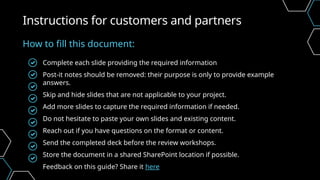
Complete each slide providing the required information
Post-it notes should be removed: their purpose is only to provide example
answers.
Skip and hide slides that are not applicable to your project.
Add more slides to capture the required information if needed.
Do not hesitate to paste your own slides and existing content.
Reach out if you have questions on the format or content.
Send the completed deck before the review workshops.
Store the document in a shared SharePoint location if possible.
Feedback on this guide? Share it here
Instructions for customers and partners
How to fill this document:
Project
Overview
 Business overview
 Project overview & agent purpose
 Stakeholders
 Project planning
 Target KPIs
 Assumption & concerns
Throughout this document, we refer to agents instead of bots or chatbots.
This reflects the new branding of agents.
Microsoft Copilot Studio is an end-to-end conversational AI platform that
empowers you to create and customize agents using natural language or a
graphical interface. With Copilot Studio, you can easily design, test, and publish
agents that suit your specific needs for internal or external scenarios across your
industry, department, or role.
With more immersive UX and next-generation AI capabilities, agents are the new
chatbots.
Why agents?
Agents are the new chatbots
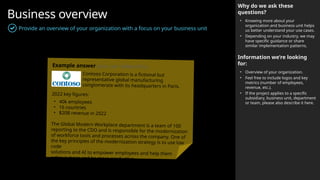
Business overview
Provide an overview of your organization with a focus on your business unit
Why do we ask these
questions?
• Knowing more about your
organization and business unit helps
us better understand your use cases.
• Depending on your industry, we may
have specific guidance or share
similar implementation patterns.
Information we’re looking
for:
• Overview of your organization.
• Feel free to include logos and key
metrics (number of employees,
revenue, etc.).
• If the project applies to a specific
subsidiary, business unit, department
or team, please also describe it here.
Example answer (you can delete this)
Contoso Corporation is a fictional but
representative global manufacturing
conglomerate with its headquarters in Paris.
2022 key figures:
• 40k employees
• 16 countries
• $20B revenue in 2022
The Global Modern Workplace department is a team of 100
reporting to the CDO and is responsible for the modernization
of workforce tools and processes across the company. One of
the key principles of the modernization strategy is to use low
code
solutions and AI to empower employees and help them
achieve more and be more productive.
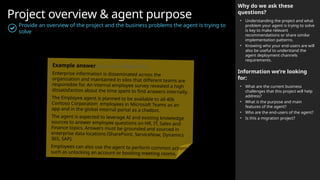
Project overview & agent purpose
Provide an overview of the project and the business problems the agent is trying to
solve
Why do we ask these
questions?
• Understanding the project and what
problem your agent is trying to solve
is key to make relevant
recommendations or share similar
implementation patterns.
• Knowing who your end-users are will
also be useful to understand the
agent deployment channels
requirements.
Information we’re looking
for:
• What are the current business
challenges that this project will help
address?
• What is the purpose and main
features of the agent?
• Who are the end-users of the agent?
• Is this a migration project?
Example answer (you can delete this)
Enterprise information is disseminated across the
organization and maintained in silos that different teams are
responsible for. An internal employee survey revealed a high
dissatisfaction about the time spent to find answers internally.
The Employee agent is planned to be available to all 40k
Contoso Corporation employees in Microsoft Teams as an
app and in the global internal portal as a chatbot.
The agent is expected to leverage AI and existing knowledge
sources to answer employee questions on HR, IT, Sales and
Finance topics. Answers must be grounded and sourced in
enterprise data locations (SharePoint, ServiceNow, Dynamics
365, SAP).
Employees can also use the agent to perform common actions
such as unlocking an account or booking meeting rooms.
Key stakeholders
Customer, Partner and Microsoft teams
Why do we ask these
questions?
• This helps us know who the key
stakeholders are for the projects.
• The Microsoft team can also be
described below.
Microsoft Team
Account Executive
[John Doe jdoe@microsoft.com]
Account Technology Strategist
[John Doe jdoe@microsoft.com]
Customer Success Account Manager
[John Doe jdoe@microsoft.com]
Sales Specialist
[John Doe jdoe@microsoft.com]
Technical Specialist
[John Doe jdoe@microsoft.com]
Cloud Solution Architect
[John Doe jdoe@microsoft.com]
Engineering Sponsor
[John Doe jdoe@microsoft.com]
Power CAT Program Manager
[John Doe jdoe@microsoft.com]
FastTrack Solution Architect
[John Doe jdoe@microsoft.com]
Customer team
Role Name Email Title
Business Sponsor [Jane Doe] [jane.doe@contoso.com] [CIO]
Project Lead
Product Owner
Technical Lead
Solution Architect
Conversation Designer
Tenant Admin
Partner team (if applicable)
Role Name Email Title
Project Manager [John Smith] [john.smith@fabrikam.com] [Program Lead]
Architect
Developer
Functional Consultant
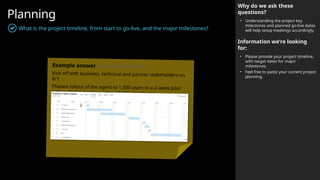
Planning
What is the project timeline, from start to go-live, and the major milestones?
Why do we ask these
questions?
• Understanding the project key
milestones and planned go-live dates
will help setup meetings accordingly.
Information we’re looking
for:
• Please provide your project timeline,
with target dates for major
milestones.
• Feel free to paste your current project
planning.
Example answer (you can delete this)
Kick off with business, technical and partner stakeholders on
8/1.
Phased rollout of the agent to 1,000 users in a 2-week pilot
before global deployment to all 40k employees.
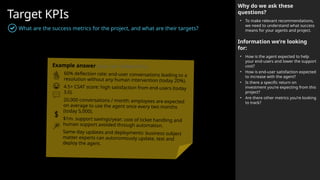
Target KPIs
What are the success metrics for the project, and what are their targets?
Why do we ask these
questions?
• To make relevant recommendations,
we need to understand what success
means for your agents and project.
Information we’re looking
for:
• How is the agent expected to help
your end-users and lower the support
cost?
• How is end-user satisfaction expected
to increase with the agent?
• Is there a specific return on
investment you’re expecting from this
project?
• Are there other metrics you’re looking
to track?
Example answer (you can delete this)
60% deflection rate: end-user conversations leading to a
resolution without any human intervention (today 20%).
4.5+ CSAT score: high satisfaction from end-users (today
3.0).
20,000 conversations / month: employees are expected
on average to use the agent once every two months
(today 5,000).
$1m. support savings/year: cost of ticket handling and
human support avoided through automation.
Same-day updates and deployments: business subject
matter experts can autonomously update, test and
deploy the agent.
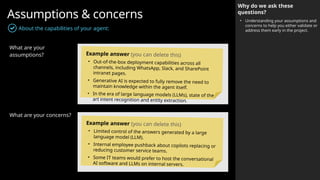
Assumptions & concerns
Why do we ask these
questions?
• Understanding your assumptions and
concerns to help you either validate or
address them early in the project.
About the capabilities of your agent:
What are your
assumptions?
What are your concerns?
Example answer (you can delete this)
• Out-of-the-box deployment capabilities across all
channels, including WhatsApp, Slack, and SharePoint
intranet pages.
• Generative AI is expected to fully remove the need to
maintain knowledge within the agent itself.
• In the era of large language models (LLMs), state of the
art intent recognition and entity extraction.
Example answer (you can delete this)
• Limited control of the answers generated by a large
language model (LLM).
• Internal employee pushback about copilots replacing or
reducing customer service teams.
• Some IT teams would prefer to host the conversational
AI software and LLMs on internal servers.
Architecture
Overview
 Solution architecture
 Conversation volumes
 Performance
 Identified technical challenges
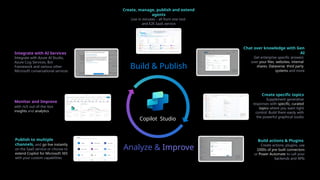
Publish to multiple
channels, and go live instantly
on the SaaS service or choose to
extend Copilot for Microsoft 365
with your custom capabilities
Create specific topics
Supplement generative
responses with specific, curated
topics where you want tight
control. Build them easily with
the powerful graphical studio
Build actions & Plugins
Create actions, plugins, use
1000s of pre-built connectors
or Power Automate to call your
backends and APIs
Integrate with AI Services
Integrate with Azure AI Studio,
Azure Cog Services, Bot
Framework and various other
Microsoft conversational services
Monitor and Improve
with rich out-of-the-box
insights and analytics
Chat over knowledge with Gen
AI
Get enterprise specific answers
over your files, websites, internal
shares, Dataverse, third party
systems and more
Create, manage, publish and extend
agents
Live in minutes - all from one tool
and E2E SaaS service
Build & Publish
Copilot Studio
Analyze & Improve
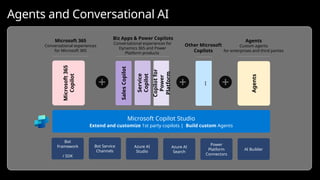
Microsoft
Security
Copilot
Windows
Copilot
GitHub
Copilot
Microsoft
365
Copilot
Biz Apps & Power Copilots
Conversational experiences for
Dynamics 365 and Power
Platform products
Sales
Copilot
Service
Copilot
Microsoft Copilot Studio
Extend and customize 1st party copilots | Build custom Agents
Agents
Agents
Custom agents
for enterprises and third parties
Microsoft 365
Conversational experiences
for Microsoft 365
Bot
Framework
/ SDK
Bot Service
Channels
Azure AI
Studio
Azure AI
Search
Power
Platform
Connectors
AI Builder
Copilot
for
Power
Platform
…
Other Microsoft
Copilots
Agents and Conversational AI
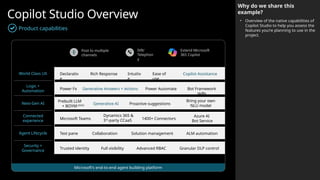
Copilot Studio Overview
Product capabilities
Why do we share this
example?
• Overview of the native capabilities of
Copilot Studio to help you assess the
features you’re planning to use in the
project.
World Class UX
Logic +
Automation
Next-Gen AI
Connected
experience
Agent Lifecycle
Security +
Governance
Microsoft’s end-to-end agent building platform
Declarativ
e
Rich Response Copilot Assistance
Intuitiv
e
Ease of
use
Power Fx Generative Answers + Actions Bot Framework
skills
Power Automate
Prebuilt LLM
+ BOYM (2025) Generative AI
Bring your own
NLU model
Proactive suggestions
Microsoft Teams
Dynamics 365 &
3rd
-party CCaaS
Azure AI
Bot Service
1400+ Connectors
Test pane Collaboration ALM automation
Solution management
Trusted identity Full visibility Granular DLP control
Advanced RBAC
IVR/
Telephon
y
Extend Microsoft
365 Copilot
Post to multiple
channels
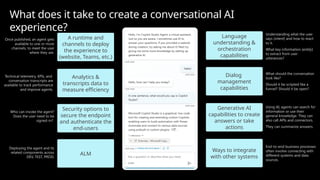
Language
understanding &
orchestration
capabilities
Generative AI
capabilities to create
answers or take
actions
Ways to integrate
with other systems
A runtime and
channels to deploy
the experience to
(website, Teams, etc.)
Analytics &
transcripts data to
measure efficiency
Dialog
management
capabilities
Security options to
secure the endpoint
and authenticate the
end-users
ALM
Understanding what the user
says (intent) and how to react
to it.
What key information (entity)
to extract from user
utterances?
What should the conversation
look like?
Should it be scripted like a
funnel? Should it be open?
Using AI, agents can search for
information or use their
general knowledge. They can
also call APIs and connectors.
They can summarize answers.
End-to-end business processes
often involve connecting with
different systems and data
sources.
Once published, an agent gets
available to one or more
channels, to meet the user
where they are.
Technical telemetry, KPIs, and
conversation transcripts are
available to track performance
and improve agents.
Who can invoke the agent?
Does the user need to be
signed-in?
Deploying the agent and its
related components across
DEV, TEST, PROD.
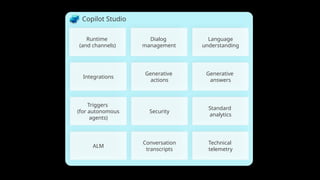
What does it take to create a conversational AI
experience?
Copilot Studio
Dialog
management
Security
Language
understanding
Runtime
(and channels)
Integrations
Generative
answers
Triggers
(for autonomous
agents)
Standard
analytics
Technical
telemetry
Conversation
transcripts
Generative
actions
ALM
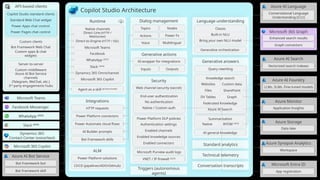
Dialog management
Security
Web channel security (secret)
End-user authentication
No authentication
Native / Custom auth
Power Platform DLP policies
Authentication settings
Enabled channels
Enabled knowledge sources
Enabled connectors
Microsoft Purview audit logs
Language understanding
Classic
Built-in NLU
Bring your own NLU model
Generative orchestration
Runtime
Native channels
Direct Line (HTTP /
WebSocket)
Microsoft Teams
Facebook
WhatsApp (2025)
Integrations
HTTP requests
Power Platform connectors
Power Automate cloud flows
AI Builder prompts
Bot Framework skills
Generative answers
Knowledge search
Websites
DV Tables
Federated Knowledge
AI general knowledge
ALM
Power Platform solutions
CI/CD (pipelines/ADO/GitHub)
Standard analytics
Technical telemetry
Conversation transcripts
Topics Nodes
Power Fx
Actions
Multilingual
Voice
Generative actions
AI-wrapper for integrations
Outputs
Inputs
Azure AI Bot Service
Bot Framework bot
Bot Framework skill
API-based clients
Copilot Studio standard clients
Standard Web Chat widget
Power Apps chat control
Power Pages chat control
Custom clients
Bot Framework Web Chat
Custom apps & chat
widgets
Server-to-server
Custom middleware
Azure AI Bot Service
channels
(Telegram, WeChat, etc.)
3rd
-party engagements hubs
Microsoft Teams
Facebook Messenger
Dynamics 365
Contact Center (voice/text)
Azure AI Language
Conversational Language
Understanding (CLU)
Azure AI Search
Vectorized search indexes
Azure AI Foundry
LLMs, SLMs, Fine-tuned models
Azure Monitor
Application Insights
Azure Storage
Data lake
Azure Synapse Analytics
Workspace
Microsoft 365 Copilot
Agent as a skill (private preview)
Microsoft Entra ID
App registration
Triggers (autonomous
agents)
Custom data
Files SharePoint
Azure AI Search
Query rewriting
Summarization
Native BYOM (2025)
Direct-to-Engine (HTTP / SSE)
Slack (2025)
Dynamics 365 Omnichannel
Microsoft 365 Copilot
WhatsApp (2025)
Slack (2025)
Copilot Studio Architecture
Graph
Microsoft 365 Graph
Enhanced search results
Graph connectors
VNET / IP firewall (2025)
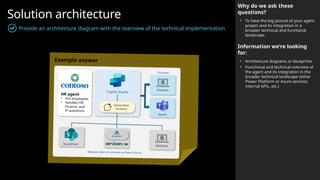
Solution architecture
Provide an architecture diagram with the overview of the technical implementation
Why do we ask these
questions?
• To have the big picture of your agent
project and its integration in a
broader technical and functional
landscape.
Information we’re looking
for:
• Architecture diagrams or blueprints
• Functional and technical overview of
the agent and its integration in the
broader technical landscape (other
Power Platform or Azure services,
internal APIs, etc.)
Example answer (you can delete this)
Websites
Generative
answers
Copilot Studio
Intranet
Teams
SharePoint
Multiple internal and external data sources
Channels
Power
Automate
HR agent
• 41k employees
• Handles HR,
Finance, and
IT questions.
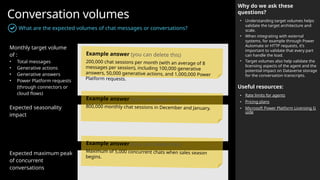
Conversation volumes
What are the expected volumes of chat messages or conversations?
Monthly target volume
of :
• Total messages
• Generative actions
• Generative answers
• Power Platform requests
(through connectors or
cloud flows)
Expected seasonality
impact
Expected maximum peak
of concurrent
conversations
Why do we ask these
questions?
• Understanding target volumes helps
validate the target architecture and
scale.
• When integrating with external
systems, for example through Power
Automate or HTTP requests, it’s
important to validate that every part
can handle the load.
• Target volumes also help validate the
licensing aspects of the agent and the
potential impact on Dataverse storage
for the conversation transcripts.
Useful resources:
• Rate limits for agents
• Pricing plans
• Microsoft Power Platform Licensing G
uide
Example answer (you can delete this)
200,000 chat sessions per month (with an average of 8
messages per session), including 100,000 generative
answers, 50,000 generative actions, and 1,000,000 Power
Platform requests.
Example answer (you can delete this)
800,000 monthly chat sessions in December and January.
Example answer (you can delete this)
Maximum of 5,000 concurrent chats when sales season
begins.
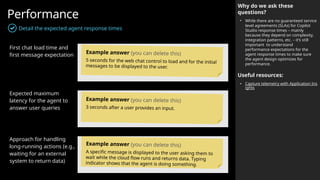
Performance
Detail the expected agent response times
Why do we ask these
questions?
• While there are no guaranteed service
level agreements (SLAs) for Copilot
Studio response times – mainly
because they depend on complexity,
integration patterns, etc. – it’s still
important to understand
performance expectations for the
agent response times to make sure
the agent design optimizes for
performance.
Useful resources:
• Capture telemetry with Application Ins
ights
First chat load time and
first message expectation
Expected maximum
latency for the agent to
answer user queries
Approach for handling
long-running actions (e.g.,
waiting for an external
system to return data)
Example answer (you can delete this)
5 seconds for the web chat control to load and for the initial
messages to be displayed to the user.
Example answer (you can delete this)
3 seconds after a user provides an input.
Example answer (you can delete this)
A specific message is displayed to the user asking them to
wait while the cloud flow runs and returns data. Typing
indicator shows that the agent is doing something.
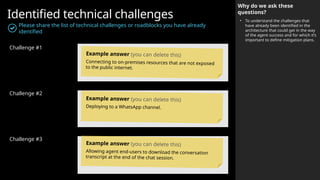
Identified technical challenges
Please share the list of technical challenges or roadblocks you have already
identified
Challenge #1
Challenge #2
Challenge #3
Why do we ask these
questions?
• To understand the challenges that
have already been identified in the
architecture that could get in the way
of the agent success and for which it’s
important to define mitigation plans.
Example answer (you can delete this)
Connecting to on-premises resources that are not exposed
to the public internet.
Example answer (you can delete this)
Deploying to a WhatsApp channel.
Example answer (you can delete this)
Allowing agent end-users to download the conversation
transcript at the end of the chat session.
Language
understanding
 Natural Language Understanding
 Intent recognition and slot filling
 Azure CLU integration
 Topic structure
 Handling unrecognized intents
 Localization & languages
 Miscellaneous
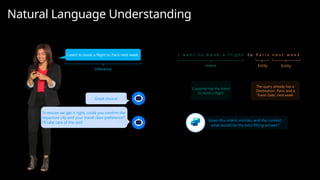
Given this intent, entities, and the context,
what would be the best fitting answer?
I want to book a flight to Paris next week.
Great choice!
I w a n t t o b o o k a f l i g h t
Intent Entity Entity
Customer has the intent
to ‘book a flight’
The query already has a
‘Destination’, Paris, and a
‘Travel Date’, next week.
To ensure we get it right, could you confirm the
departure city and your travel class preference?
I’ll take care of the rest!
Utterance
t o n e x t w e e k
P a r i s
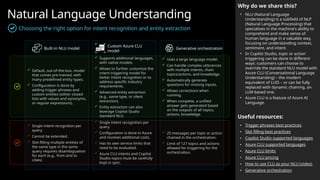
Natural Language Understanding
Why do we share this?
• NLU (Natural Language
Understanding) is a subfield of NLP
(Natural Language Processing) that
specializes in the machine's ability to
comprehend and make sense of
human language in a valuable way,
focusing on understanding context,
sentiment, and intent.
• In Copilot Studio, topic or action
triggering can be done in different
ways: customers can choose to
override the standard NLU model with
Azure CLU (Conversational Language
Understanding) – the modern
equivalent of LUIS – or can be fully
replaced with dynamic chaining, an
LLM-based one.
• Azure CLU is a feature of Azure AI
Language.
Useful resources:
• Trigger phrases best practices
• Slot filling best practices
• Copilot Studio supported languages
• Azure CLU supported languages
• Azure CLU limits
• Azure CLU pricing
• How to use CLU as your NLU (video)
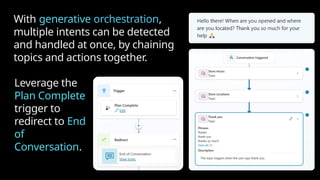
• Generative orchestration
 Default, out-of-the-box, model
that comes pre-trained, with
many predefined entity types.
 Configuration is done by
adding trigger phrases and
custom entities (either closed
lists with values and synonyms,
or regular expressions).
 Supports additional languages,
with native models.
 Allows to further customize the
intent triggering model for
better intent recognition or to
address specific industry
requirements.
 Advanced entity extraction
(e.g., same type, or silent
extraction).
 Entity extraction can also
leverage Copilot Studio
standard NLU.
 Single intent recognition per
query.
 Configuration is done in Azure
and involves additional costs.
 Has its own service limits that
need to be evaluated.
 Azure CLU intents and Copilot
Studio topics must be carefully
kept in sync.
 Uses a large language model.
 Can handle complex utterances
with multiple intents, chain
topics/actions, and knowledge.
 Automatically generate
questions for missing inputs.
 Allows corrections when
running.
 When complete, a unified
answer gets generated based
on the outputs of all topics,
actions, knowledge.
Built-in NLU model
Custom Azure CLU
model
Generative orchestration
 25 messages per topic or action
chained in the orchestration.
 Limit of 127 topics and actions
allowed for triggering for the
orchestration.
 Single intent recognition per
query.
 Cannot be extended.
 Slot-filling multiple entities of
the same type in the same
query requires disambiguation
for each (e.g., from and to
cities)
Choosing the right option for intent recognition and entity extraction
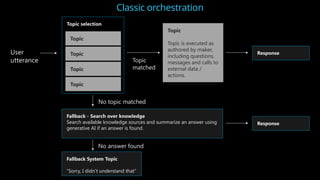
User
utterance
Fallback - Search over knowledge
Search available knowledge sources and summarize an answer using
generative AI if an answer is found.
Topic selection
Fallback System Topic
“Sorry, I didn’t understand that”
Topic
Topic
Topic
Topic
Topic
Topic is executed as
authored by maker,
including questions,
messages and calls to
external data /
actions.
No topic matched
No answer found
Topic
matched
Response
Response
Classic orchestration
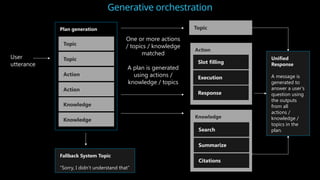
Generative orchestration
User
utterance
Plan generation
Fallback System Topic
“Sorry, I didn’t understand that”
Topic
Topic
Action
Action
Topic
One or more actions
/ topics / knowledge
matched
A plan is generated
using actions /
knowledge / topics
Action
Slot filling
Execution
Response
Knowledge
Knowledge
Knowledge
Search
Summarize
Citations
Unified
Response
A message is
generated to
answer a user’s
question using
the outputs
from all
actions /
knowledge /
topics in the
plan.
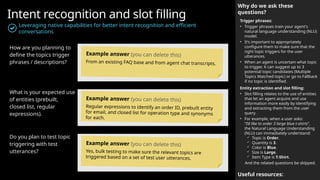
Intent recognition and slot filling
Leveraging native capabilities for better intent recognition and efficient
conversations
Why do we ask these
questions?
Trigger phrases:
• Trigger phrases train your agent's
natural language understanding (NLU)
model.
• It’s important to appropriately
configure them to make sure that the
right topic triggers for the user
utterances.
• When an agent is uncertain what topic
to trigger, it can suggest up to 3
potential topic candidates (Multiple
Topics Matched topic) or go to Fallback
if no topic is identified.
Entity extraction and slot filling:
• Slot filling relates to the use of entities
that let an agent acquire and use
information more easily by identifying
and extracting them from the user
query.
• For example, when a user asks:
“I’d like to order 3 large blue t-shirts”,
the Natural Language Understanding
(NLU) can immediately understand:
 Topic is Order.
 Quantity is 3.
 Color is Blue.
 Size is Large.
 Item Type is T-Shirt.
And the related questions be skipped.
Useful resources:
How are you planning to
define the topics trigger
phrases / descriptions?
What is your expected use
of entities (prebuilt,
closed list, regular
expressions).
Do you plan to test topic
triggering with test
utterances?
Example answer (you can delete this)
From an existing FAQ base and from agent chat transcripts.
Example answer (you can delete this)
Regular expressions to identify an order ID, prebuilt entity
for email, and closed list for operation type and synonyms
for each.
Example answer (you can delete this)
Yes, bulk testing to make sure the relevant topics are
triggered based on a set of test user utterances.
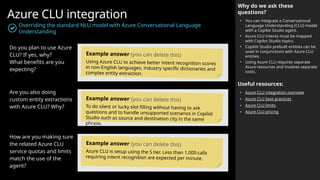
Azure CLU integration
Overriding the standard NLU model with Azure Conversational Language
Understanding
Why do we ask these
questions?
• You can integrate a Conversational
Language Understanding (CLU) model
with a Copilot Studio agent.
• Azure CLU intents must be mapped
with Copilot Studio topics.
• Copilot Studio prebuilt entities can be
used in conjunctions with Azure CLU
entities.
• Using Azure CLU requires separate
Azure resources and involves separate
costs.
Useful resources:
• Azure CLU integration overview
• Azure CLU best practices
• Azure CLU limits
• Azure CLU pricing
Do you plan to use Azure
CLU? If yes, why?
What benefits are you
expecting?
Are you also doing
custom entity extractions
with Azure CLU? Why?
How are you making sure
the related Azure CLU
service quotas and limits
match the use of the
agent?
Example answer (you can delete this)
Using Azure CLU to achieve better intent recognition scores
in non-English languages, industry specific dictionaries and
complex entity extraction.
Example answer (you can delete this)
To do silent or lucky slot filling without having to ask
questions and to handle unsupported scenarios in Copilot
Studio such as source and destination city in the same
phrase.
Example answer (you can delete this)
Azure CLU is setup using the S tier. Less than 1,000 calls
requiring intent recognition are expected per minute.
Natural Language Understanding
Trigger phrases
“Trigger Phrases” Topics
Triggered from trigger phrases or redirects
Reusable, Bite-Size, Topics
Explicitly called by topics
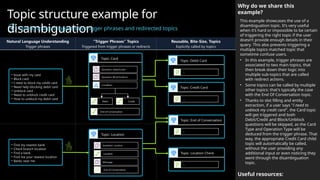
Topic structure example for
disambiguation
Mixing topics triggered by trigger phrases and redirected topics
Why do we share this
example?
This example showcases the use of a
disambiguation topic. It’s very useful
when it’s hard or impossible to be certain
of triggering the right topic if the user
doesn’t provide enough details in their
query. This also prevents triggering a
multiple topics matched topic that
sometime confuse users.
• In this example, trigger phrases are
associated to two main topics, that
then break down their logic into
multiple sub-topics that are called
with redirect actions.
• Some topics can be called by multiple
other topics: that's typically the case
with the End Of Conversation topic.
• Thanks to slot filling and entity
extraction, if a user says "I need to
unblock my credit card", the Card topic
will get triggered and both
Debit/Credit and Block/Unblock
questions will be skipped, as the Card
Type and Operation Type will be
deduced from the trigger phrase. That
way, the appropriate Credit Card child
topic will automatically be called,
without the user providing any
additional input or even noticing they
went through the disambiguation
topic.
Useful resources:
…
…
…
• Issue with my card
• Block card
• I need to block my credit card
• Need help blocking debit card
• Unblock card
• Need to unblock credit card
• How to unblock my debit card
• Find my nearest bank
• Check branch location
• Find a bank
• Find me your nearest location
• Banks near me
Question: Location
End of Conversation
Message
Location
Topic: Credit Card
Topic: End of Conversation
…
Debit
Question: Debit/Credit
Question: Block/Unblock
Condition
Credit
End of Conversation
Topic: Card
Topic: Debit Card
Topic: Location Check
Topic: Location
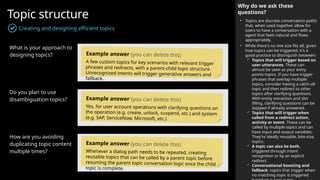
Topic structure
Creating and designing efficient topics
What is your approach to
designing topics?
Do you plan to use
disambiguation topics?
How are you avoiding
duplicating topic content
multiple times?
Why do we ask these
questions?
• Topics are discrete conversation paths
that, when used together, allow for
users to have a conversation with a
agent that feels natural and flows
appropriately.
• While there's no one size fits all, given
how topics can be triggered, it's a
good practice to distinguish between:
 Topics that will trigger based on
user utterances. These can
almost be seen as your entry
points topics. If you have trigger
phrases that overlap multiple
topics, consider having a catch-all
topic and then redirect to other
topics after clarifying questions.
With entity extraction and slot
filling, clarifying questions can be
skipped if already answered.
 Topics that will trigger when
called from a redirect action,
activity or event. These can be
called by multiple topics and can
have input and output variables.
They're ideally reusable, bite-size,
topics.
 A topic can also be both,
triggered through intent
recognition or by an explicit
redirect.
 Conversational boosting and
fallback: topics that trigger when
no matching topic is triggered
Example answer (you can delete this)
A few custom topics for key scenarios with relevant trigger
phrases and redirects, with a parent-child topic structure.
Unrecognized intents will trigger generative answers and
fallback.
Example answer (you can delete this)
Yes, for user account operations with clarifying questions on
the operation (e.g. create, unlock, suspend, etc.) and system
(e.g. SAP, ServiceNow, Microsoft, etc.)
Example answer (you can delete this)
Whenever a dialog path needs to be repeated, creating
reusable topics that can be called by a parent topic before
resuming the parent topic conversation logic once the child
topic is complete.
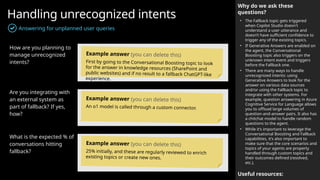
Handling unrecognized intents
Answering for unplanned user queries
Why do we ask these
questions?
• The Fallback topic gets triggered
when Copilot Studio doesn't
understand a user utterance and
doesn’t have sufficient confidence to
trigger any of the existing topics.
• If Generative Answers are enabled on
the agent, the Conversational
Boosting topic also triggers on the
unknown intent event and triggers
before the Fallback one.
• There are many ways to handle
unrecognized intents: using
Generative Answers to look for the
answer on various data sources
and/or using the Fallback topic to
integrate with other systems. For
example, question answering in Azure
Cognitive Service for Language allows
you to offload large volumes of
question-and-answer pairs. It also has
a chitchat model to handle random
questions to the agent.
• While it’s important to leverage the
Conversational Boosting and Fallback
capabilities, it’s also important to
make sure that the core scenarios and
topics of your agents are property
handled through custom topics and
their outcomes defined (resolved,
etc.).
Useful resources:
How are you planning to
manage unrecognized
intents?
Are you integrating with
an external system as
part of fallback? If yes,
how?
What is the expected % of
conversations hitting
fallback?
Example answer (you can delete this)
First by going to the Conversational Boosting topic to look
for the answer in knowledge resources (SharePoint and
public websites) and if no result to a fallback ChatGPT-like
experience.
Example answer (you can delete this)
An o1 model is called through a custom connector.
Example answer (you can delete this)
25% initially, and these are regularly reviewed to enrich
existing topics or create new ones.
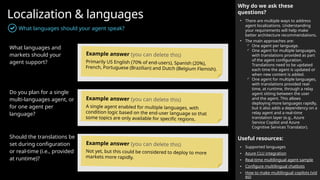
Localization & languages
What languages should your agent speak?
What languages and
markets should your
agent support?
Do you plan for a single
multi-languages agent, or
for one agent per
language?
Should the translations be
set during configuration
or real-time (i.e., provided
at runtime)?
Why do we ask these
questions?
• There are multiple ways to address
agent localizations. Understanding
your requirements will help make
better architecture recommendations.
• The main approaches are:
 One agent per language.
 One agent for multiple languages,
with translations provided as part
of the agent configuration.
Translations need to be updated
each time the agent is updated or
when new content is added.
 One agent for multiple languages,
with translations provided real-
time, at runtime, through a relay
agent sitting between the user
and the agent. This allows
deploying more languages rapidly,
but it also adds a dependency on a
relay agent and a real-time
translation layer (e.g., Azure
Service Copilot and Azure
Cognitive Services Translator).
Useful resources:
• Supported languages
• Azure CLU integration
• Real-time multilingual agent sample
• Configure multilingual chatbots
• How to make multilingual copilots (vid
eo)
Example answer (you can delete this)
Primarily US English (70% of end-users), Spanish (20%),
French, Portuguese (Brazilian) and Dutch (Belgium Flemish).
Example answer (you can delete this)
A single agent enabled for multiple languages, with
condition logic based on the end-user language so that
some topics are only available for specific regions.
Example answer (you can delete this)
Not yet, but this could be considered to deploy to more
markets more rapidly.
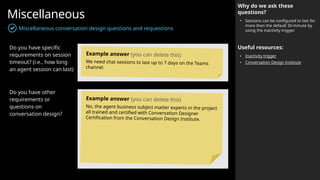
Miscellaneous
Miscellaneous conversation design questions and requestions
Why do we ask these
questions?
• Sessions can be configured to last for
more than the default 30-minute by
using the inactivity trigger.
Useful resources:
• Inactivity trigger
• Conversation Design Institute
Do you have specific
requirements on session
timeout? (i.e., how long
an agent session can last)
Do you have other
requirements or
questions on
conversation design?
Example answer (you can delete this)
We need chat sessions to last up to 7 days on the Teams
channel.
Example answer (you can delete this)
No, the agent business subject matter experts in the project
all trained and certified with Conversation Designer
Certification from the Conversation Design Institute.
AI capabilities  Generative AI is changing conversational
AI
 Generative answers
 Generative actions and dynamic chaining
 Generative builder (Copilot)
 Other AI requirements
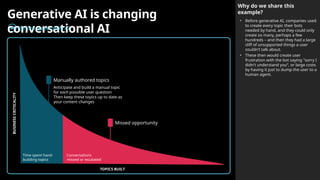
Generative AI is changing
conversational AI
Before generative AI
Why do we share this
example?
• Before generative AI, companies used
to create every topic their bots
needed by hand, and they could only
create so many, perhaps a few
hundreds – and then they had a large
cliff of unsupported things a user
couldn’t talk about.
• These then would create user
frustration with the bot saying "sorry I
didn't understand you“, or large costs
by having it just to dump the user to a
human agent.
TOPICS BUILT
BUSINESS
CRITICALITY
Time spent hand-
building topics
Conversations
missed or escalated
Missed opportunity
Manually authored topics
Anticipate and build a manual topic
for each possible user question
Then keep these topics up to date as
your content changes
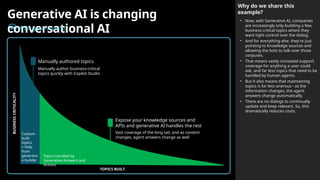
Generative AI is changing
conversational AI
After generative AI
Why do we share this
example?
• Now, with Generative AI, companies
are increasingly only building a few,
business critical topics where they
want tight control over the dialog.
• And for everything else, they're just
pointing to knowledge sources and
allowing the bots to talk over those
corpuses.
• That means vastly increased support
coverage for anything a user could
ask, and far less topics that need to be
handled by human agents.
• But it also means that maintaining
topics is far less onerous - as the
information changes, the agent
answers change automatically.
• There are no dialogs to continually
update and keep relevant. So, this
dramatically reduces costs.
TOPICS BUILT
BUSINESS
CRITICALITY
Custom-
built
topics
+ help
from
generativ
e builder
Topics handled by
Generative Answers and
Actions
Expose your knowledge sources and
APIs and generative AI handles the rest
Manually authored topics
Manually author business-critical
topics quickly with Copilot Studio
Vast coverage of the long tail, and as content
changes, agent answers change as well
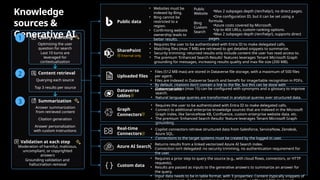
Knowledge
sources &
Generative AI
Custom data
• Requires a prior step to query the source (e.g., with cloud flows, connectors, or HTTP
requests).
• Results are passed as inputs to the generative answers to summarize an answer for
the query.
• Input data needs to be in table format, with 3 properties: Content (typically snippets of
SharePoint
• Requires the user to be authenticated with Entra ID to make delegated calls.
• Matching files (max 7 MB) are retrieved to get detailed snippets to summarize.
• Security trimming: returned results only include content the user has read access to.
• The premium 'Enhanced Search Results' features leverages Tenant Microsoft Graph
grounding for messages, increasing results quality and max file size (200 MB).
Internal only
Public data
• Websites must be
indexed by Bing.
• Bing cannot be
restricted to a
region.
• Confirming website
ownership leads to
better results.
•One configuration ID, but it can be set using a
formula.
•Azure costs covered by Microsoft.
•Up to 400 URLs, custom ranking options.
•Max 2 subpages depth (/en/help/), supports direct
pages.
•Max 2 subpages depth (/en/help/), no direct pages.
Bing
Custom
Search
Public
Website
Grounding validation and
hallucination removal
Content retrieval
Querying each source
Top 3 results per source
Query rewriting
Optimizing the user
question for search
Last 10 turns are
leveraged for
contextualization
Summarization
Answer personalization
with custom instructions
Answer summarization
from retrieved content
Citation generation
Validation at each step
Moderation of harmful, malicious,
uncompliant, or copyrighted
answers
2
3
1
Uploaded files
• Files (512 MB max) are stored in Dataverse file storage, with a maximum of 500 files
per agent.
• Files are indexed in Dataverse Search and benefit for image/table recognition in PDFs.
• By default, citations don’t contain a link to the file, but this can be done with
customizations.
Dataverse
tables
• Dataverse tables (max 15) can be configured with synonyms and a glossary to improve
search.
• Natural language queries are transformed in analytical queries over structured data.
Graph
Connectors
• Requires the user to be authenticated with Entra ID to make delegated calls.
• Connect to additional enterprise knowledge sources that are indexed in the Microsoft
Graph index, like ServiceNow KB, Confluence, custom enterprise website data, etc.
• The premium 'Enhanced Search Results' feature leverages Tenant Microsoft Graph
grounding.
Azure AI Search
• Returns results from a linked vectorized Azure AI Search index.
• Connection isn’t delegated: no security trimming, no authentication requirement for
the user.
Real-time
Connectors
• Copilot connectors retrieve structured data from Salesforce, ServiceNow, Zendesk,
Azure SQL.
• Connections to the target systems must be created by the logged-in user.
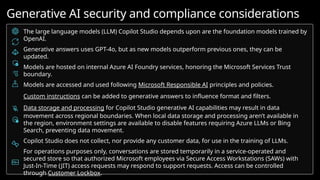
The large language models (LLM) Copilot Studio depends upon are the foundation models trained by
OpenAI.
Generative answers uses GPT-4o, but as new models outperform previous ones, they can be
updated.
Models are hosted on internal Azure AI Foundry services, honoring the Microsoft Services Trust
boundary.
Models are accessed and used following Microsoft Responsible AI principles and policies.
Custom instructions can be added to generative answers to influence format and filters.
Data storage and processing for Copilot Studio generative AI capabilities may result in data
movement across regional boundaries. When local data storage and processing aren’t available in
the region, environment settings are available to disable features requiring Azure LLMs or Bing
Search, preventing data movement.
Copilot Studio does not collect, nor provide any customer data, for use in the training of LLMs.
For operations purposes only, conversations are stored temporarily in a service-operated and
secured store so that authorized Microsoft employees via Secure Access Workstations (SAWs) with
Just-In-Time (JIT) access requests may respond to support requests. Access can be controlled
through Customer Lockbox.
Generative AI security and compliance considerations
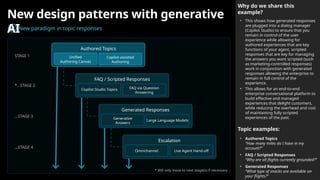
New design patterns with generative
AINew paradigm in topic responses
Why do we share this
example?
• This shows how generated responses
are plugged into a dialog manager
(Copilot Studio) to ensure that you
remain in control of the user
experience while allowing for
authored experiences that are key
functions of your agent, scripted
responses that are key for managing
the answers you want scripted (such
as marketing-controlled responses)
work in conjunction with generated
responses allowing the enterprise to
remain in full control of the
experience.
• This allows for an end-to-end
enterprise conversational platform to
build effective and managed
experiences that delight customers,
while reducing the overhead and cost
of maintaining fully scripted
experiences of the past.
Topic examples:
• Authored Topics
“How many miles do I have in my
account?”
• FAQ / Scripted Responses
“Why are all flights currently grounded?”
• Generated Responses
“What type of snacks are available on
your flights?”
Authored Topics
Unified
Authoring Canvas
Copilot-assisted
Authoring
FAQ / Scripted Responses
Copilot Studio Topics FAQ via Question
Answering
Generated Responses
Generative
Answers
Large Language Models
Escalation
Omnichannel Live Agent Hand-off
STAGE 1
*…STAGE 2
…STAGE 3
…STAGE 4
* Will only move to next stage(s) if necessary
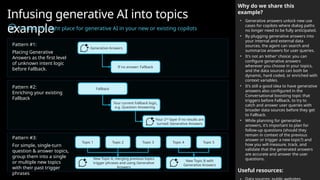
Infusing generative AI into topics
example
Finding the right place for generative AI in your new or existing copilots
Why do we share this
example?
• Generative answers unlock new use
cases for copilots where dialog paths
no longer need to be fully anticipated.
• By plugging generative answers into
your internal and external data
sources, the agent can search and
summarize answers for user queries.
• It’s not an ‘either’ choice: you can
configure generative answers
wherever you choose in your topics,
and the data sources can both be
dynamic, hard coded, or enriched with
context variables.
• It’s still a good idea to have generative
answers also configured in the
Conversational boosting topic that
triggers before Fallback, to try to
catch and answer user queries with
broader data sources before they get
to Fallback.
• While planning for generative
answers, it’s important to plan for
follow-up questions (should they
remain in context of the previous
answer or trigger a new topic?) and
how you will measure, track, and
validate that the generated answers
are accurate and answer the user
questions.
Useful resources:
Pattern #2:
Enriching your existing
Fallback
Fallback
Your 2nd
layer if no results are
turned: Generative Answers
Your current Fallback logic,
e.g. Question Answering
Pattern #3:
For simple, single-turn
question & answer topics,
group them into a single
or multiple new topics
with their past trigger
phrases
Topic 1
New Topic A, merging previous topics
trigger phrases and using Generative
Answers
Topic 2 Topic 3 Topic 4 Topic 5
New Topic B with
Generative Answers
Pattern #1:
Placing Generative
Answers as the first level
of unknown intent logic
before Fallback.
Generative Answers
If no answer: Fallback
Child Topic
Child Topic
Intent Recognition
No Intent Recognized
#1
No Intent Recognized
#2
Service Desk KB
If no matching
topic trigger phrase
If no matching
Conversational
Boosting content
Child Topic
Customer FAQ
Conversational
Boosting
Fallback
Trigger Topic Topic Logic
User Query
Utterance
Child Topic
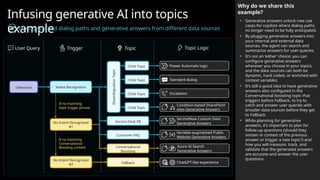
Infusing generative AI into topics
example
Mixing scripted dialog paths and generative answers from different data sources
Why do we share this
example?
• Generative answers unlock new use
cases for copilots where dialog paths
no longer need to be fully anticipated.
• By plugging generative answers into
your internal and external data
sources, the agent can search and
summarize answers for user queries.
• It’s not an ‘either’ choice: you can
configure generative answers
wherever you choose in your topics,
and the data sources can both be
dynamic, hard coded, or enriched with
context variables.
• It’s still a good idea to have generative
answers also configured in the
Conversational boosting topic that
triggers before Fallback, to try to
catch and answer user queries with
broader data sources before they get
to Fallback.
• While planning for generative
answers, it’s important to plan for
follow-up questions (should they
remain in context of the previous
answer or trigger a new topic?) and
how you will measure, track, and
validate that the generated answers
are accurate and answer the user
questions.
Disambiguation
Topic
Power Automate logic
Standard dialog
Escalation
Condition-based SharePoint
sites Generative Answers
ServiceNow Custom Data
Generative Answers
Variable-augmented Public
Website Generative Answers
Azure AI Search
Generative Answers
ChatGPT-like experience
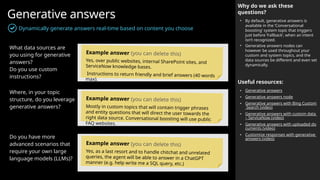
Generative answers
Dynamically generate answers real-time based on content you choose
Why do we ask these
questions?
• By default, generative answers is
available in the ‘Conversational
boosting’ system topic that triggers
just before ‘Fallback’, when an intent
isn’t recognized.
• Generative answers nodes can
however be used throughout your
custom and system topics, and the
data sources be different and even set
dynamically.
Useful resources:
• Generative answers
• Generative answers node
• Generative answers with Bing Custom
Search (video)
• Generative answers with custom data
– ServiceNow (video)
• Generative answers with uploaded do
cuments (video)
• Customize responses with generative
answers (video)
What data sources are
you using for generative
answers?
Do you use custom
instructions?
Where, in your topic
structure, do you leverage
generative answers?
Do you have more
advanced scenarios that
require your own large
language models (LLMs)?
Example answer (you can delete this)
Yes, over public websites, internal SharePoint sites, and
ServiceNow knowledge bases.
Instructions to return friendly and brief answers (40 words
max).
Example answer (you can delete this)
Mostly in custom topics that will contain trigger phrases
and entity questions that will direct the user towards the
right data source. Conversational boosting will use public
FAQ websites.
Example answer (you can delete this)
Yes, as a last resort and to handle chitchat and unrelated
queries, the agent will be able to answer in a ChatGPT
manner (e.g. help write me a SQL query, etc.)
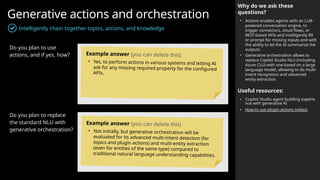
Generative actions and orchestration
Intelligently chain together topics, actions, and knowledge
Why do we ask these
questions?
• Actions enables agents with an LLM-
powered conversation engine, to
trigger connectors, cloud flows, or
REST-based APIs and intelligently fill
or prompt for missing inputs and with
the ability to let the AI summarize the
outputs.
• Generative orchestration allows to
replace Copilot Studio NLU (including
Azure CLU) with one based on a large
language model, allowing to do multi-
intent recognition and advanced
entity extraction.
Useful resources:
• Copilot Studio agent building experie
nce with generative AI
• How to use plugin actions (video)
Do you plan to use
actions, and if yes, how?
Do you plan to replace
the standard NLU with
generative orchestration?
Example answer (you can delete this)
• Yes, to perform actions in various systems and letting AI
ask for any missing required property for the configured
APIs.
Example answer (you can delete this)
• Not initially, but generative orchestration will be
evaluated for its advanced multi-intent detection (for
topics and plugin actions) and multi-entity extraction
(even for entities of the same type) compared to
traditional natural language understanding capabilities.
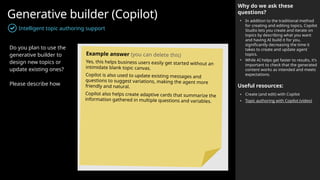
Generative builder (Copilot)
Intelligent topic authoring support
Why do we ask these
questions?
• In addition to the traditional method
for creating and editing topics, Copilot
Studio lets you create and iterate on
topics by describing what you want
and having AI build it for you,
significantly decreasing the time it
takes to create and update agent
topics.
• While AI helps get faster to results, it’s
important to check that the generated
content works as intended and meets
expectations.
Useful resources:
• Create (and edit) with Copilot
• Topic authoring with Copilot (video)
Do you plan to use the
generative builder to
design new topics or
update existing ones?
Please describe how
Example answer (you can delete this)
Yes, this helps business users easily get started without an
intimidate blank topic canvas.
Copilot is also used to update existing messages and
questions to suggest variations, making the agent more
friendly and natural.
Copilot also helps create adaptive cards that summarize the
information gathered in multiple questions and variables.
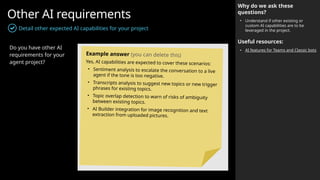
Other AI requirements
Detail other expected AI capabilities for your project
Why do we ask these
questions?
• Understand if other existing or
custom AI capabilities are to be
leveraged in the project.
Useful resources:
• AI features for Teams and Classic bots
Do you have other AI
requirements for your
agent project?
Example answer (you can delete this)
Yes, AI capabilities are expected to cover these scenarios:
• Sentiment analysis to escalate the conversation to a live
agent if the tone is too negative.
• Transcripts analysis to suggest new topics or new trigger
phrases for existing topics.
• Topic overlap detection to warn of risks of ambiguity
between existing topics.
• AI Builder integration for image recognition and text
extraction from uploaded pictures.
Integrations  Integrations
 Power Automate and HTTP/Connectors
 Handling cloud flow timeouts examples
 Custom connectors
 Custom connectors – SAP example
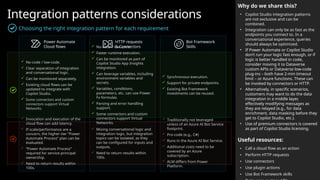
Integration patterns considerations
Choosing the right integration pattern for each requirement
Why do we share this?
• Copilot Studio integration patterns
are not exclusive and can be
combined.
• Integration can only be as fast as the
endpoints you connect to. In a
conversational experience, queries
should always be optimized.
• If Power Automate or Copilot Studio
don’t run your logic fast enough, or if
logic is better handled in code,
consider moving it to Dataverse
custom APIs or Dataverse low-code
plug-ins – both have 2-min timeout
limit – or Azure functions. These can
be invoked by connectors or HTTP.
• Alternatively, in specific scenarios,
customers may want to do the data
integration in a middle layer,
effectively modifying messages as
they are relayed (e.g., for data
enrichment, data masking before they
get to Copilot Studio, etc.).
• Use of premium connectors is covered
as part of Copilot Studio licensing.
Useful resources:
• Call a cloud flow as an action
• Perform HTTP requests
• Use connectors
• Use plugin actions
• Use Bot Framework skills
Power Automate
Cloud flows
HTTP requests
& Connectors
Bot Framework
Skills
 No-code / low-code.
 Clear separation of integration
and conversational logic.
 Can be monitored separately.
 Existing cloud flows can be
updated to integrate with
Copilot Studio.
 Some connectors and custom
connectors support Virtual
Networks.
 No-code / low-code.
 Faster runtime execution.
 Can be monitored as part of
Copilot Studio App Insights
integration.
 Can leverage variables, including
environment variables and
secrets.
 Variables, conditions,
parameters, etc. can use Power
Fx formulas.
 Parsing and error handling
support.
 Some connectors and custom
connectors support Virtual
Networks.
 Traditionally not leveraged
unless of an Azure AI Bot Service
footprint.
 Pro-code (e.g., C#)
 Runs in the Azure AI Bot Service.
 Additional costs need to be
covered by an Azure
subscription.
 ALM differs from Power
Platform.
 Synchronous execution.
 Support for private endpoints.
 Existing Bot Framework
investments can be reused.
 Mixing conversational logic and
integration logic, but integration
topics can be isolated, as they
can be configured for inputs and
outputs.
 Need to return results within
100s.
 Invocation and execution of the
cloud flow can add latency.
 If scale/performance are a
concern, the higher-tier “Power
Automate Process” plan can be
evaluated.
 “Power Automate Process”
required for service principal
ownership.
 Need to return results within
100s.
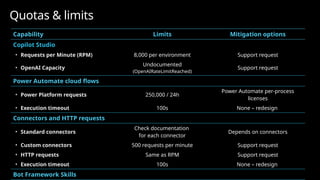
Capability Limits Mitigation options
Copilot Studio
• Requests per Minute (RPM) 8,000 per environment Support request
• OpenAI Capacity
Undocumented
(OpenAIRateLimitReached)
Support request
Power Automate cloud flows
• Power Platform requests 250,000 / 24h
Power Automate per-process
licenses
• Execution timeout 100s None – redesign
Connectors and HTTP requests
• Standard connectors
Check documentation
for each connector
Depends on connectors
• Custom connectors 500 requests per minute Support request
• HTTP requests Same as RPM Support request
• Execution timeout 100s None – redesign
Bot Framework Skills
Quotas & limits
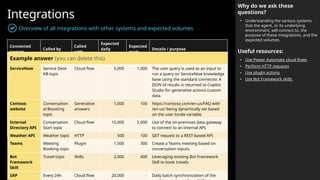
Integrations
Overview of all integrations with other systems and expected volumes
Why do we ask these
questions?
• Understanding the various systems
that the agent, or its underlying
environment, will connect to, the
purpose of these integrations, and the
expected volumes.
Useful resources:
• Use Power Automate cloud flows
• Perform HTTP requests
• Use plugin actions
• Use Bot Framework skills
Connected
system
Called by
Called
with
Expected
daily
volume
Expected
peak
Details / purpose
Example answer (you can delete this)
ServiceNow Service Desk
KB topic
Cloud flow 5,000 1,000 The user query is used as an input to
run a query on ServiceNow knowledge
base using the standard connector. A
JSON of results is returned to Copilot
Studio for generative actions custom
data.
Contoso
website
Conversation
al Boosting
topic
Generative
answers
1,000 100 https://contoso.com/en-us/FAQ with
/en-us/ being dynamically set based
on the user locale variable.
Internal
Directory API
Conversation
Start topic
Cloud flow 15,000 5,000 Use of the on-premises data gateway
to connect to an internal API.
Weather API Weather topic HTTP 500 100 GET request to a REST-based API
Teams Meeting
Booking topic
Plugin 1,500 300 Create a Teams meeting based on
conversation inputs.
Bot
Framework
Skill
Travel topic Skills 2,000 400 Leveraging existing Bot Framework
Skill to book travels.
SAP Every 24h Cloud flow 20,000 - Daily batch synchronization of the
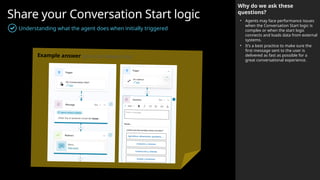
Share your Conversation Start logic
Understanding what the agent does when initially triggered
Why do we ask these
questions?
• Agents may face performance issues
when the Conversation Start logic is
complex or when the start logic
connects and loads data from external
systems.
• It’s a best practice to make sure the
first message sent to the user is
delivered as fast as possible for a
great conversational experience.
Example answer (you can delete this)
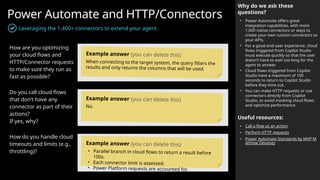
Power Automate and HTTP/Connectors
Leveraging the 1,400+ connectors to extend your agent
Why do we ask these
questions?
• Power Automate offers great
integration capabilities, with more
1,000 native connectors or ways to
create your own custom connectors to
your APIs.
• For a good end-user experience, cloud
flows triggered from Copilot Studio
must execute quickly so that the user
doesn’t have to wait too long for the
agent to answer.
• Cloud flows triggered from Copilot
Studio have a maximum of 100
seconds to return to Copilot Studio
before they time out.
• You can make HTTP requests or use
connectors directly from Copilot
Studio, to avoid invoking cloud flows
and optimize performance.
Useful resources:
• Call a flow as an action
• Perform HTTP requests
• Power Automate Standards by MVP M
atthew Devaney
How are you optimizing
your cloud flows and
HTTP/Connector requests
to make sure they run as
fast as possible?
Do you call cloud flows
that don’t have any
connector as part of their
actions?
If yes, why?
How do you handle cloud
timeouts and limits (e.g.,
throttling)?
Example answer (you can delete this)
When connecting to the target system, the query filters the
results and only returns the columns that will be used.
Example answer (you can delete this)
No.
Example answer (you can delete this)
• Parallel branch in cloud flows to return a result before
100s.
• Each connector limit is assessed.
• Power Platform requests are accounted for.
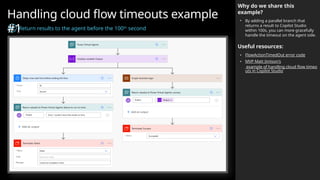
Handling cloud flow timeouts example
#1
Return results to the agent before the 100th
second
Why do we share this
example?
• By adding a parallel branch that
returns a result to Copilot Studio
within 100s, you can more gracefully
handle the timeout on the agent side.
Useful resources:
• FlowActionTimedOut error code
• MVP Matt Jimison's
example of handling cloud flow timeo
uts in Copilot Studio
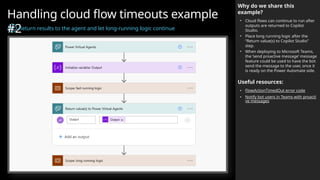
Handling cloud flow timeouts example
#2
Return results to the agent and let long-running logic continue
Why do we share this
example?
• Cloud flows can continue to run after
outputs are returned to Copilot
Studio.
• Place long running logic after the
“Return value(s) to Copilot Studio”
step.
• When deploying to Microsoft Teams,
the ‘send proactive message’ message
feature could be used to have the bot
send the message to the user, once it
is ready on the Power Automate side.
Useful resources:
• FlowActionTimedOut error code
• Notify bot users in Teams with proacti
ve messages
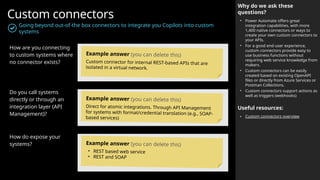
Custom connectors
Going beyond out-of-the box connectors to integrate you Copilots into custom
systems
Why do we ask these
questions?
• Power Automate offers great
integration capabilities, with more
1,400 native connectors or ways to
create your own custom connectors to
your APIs.
• For a good end-user experience,
custom connectors provide easy to
use business functions without
requiring web service knowledge from
makers.
• Custom connectors can be easily
created based on existing OpenAPI
files or directly from Azure Services or
Postman Collections.
• Custom connectors support actions as
well as triggers (webhooks)
Useful resources:
• Custom connectors overview
How are you connecting
to custom systems where
no connector exists?
Do you call systems
directly or through an
integration layer (API
Management)?
How do expose your
systems?
Example answer (you can delete this)
Custom connector for internal REST-based APIs that are
isolated in a virtual network.
Example answer (you can delete this)
Direct for atomic integrations. Through API Management
for systems with format/credential translation (e.g., SOAP-
based services)
Example answer (you can delete this)
• REST based web service
• REST and SOAP
Channels,
clients, and
hand off
 Deployed channels
 Chat clients
 Hand off management
Deployed channels
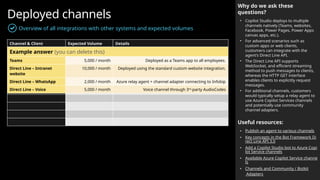
Overview of all integrations with other systems and expected volumes
Why do we ask these
questions?
• Copilot Studio deploys to multiple
channels natively (Teams, websites,
Facebook, Power Pages, Power Apps
canvas apps, etc.).
• For advanced scenarios such as
custom apps or web clients,
customers can integrate with the
agent’s Direct Line API.
• The Direct Line API supports
WebSocket, and efficient streaming
method to push messages to clients,
whereas the HTTP GET interface
enables clients to explicitly request
messages.
• For additional channels, customers
would typically setup a relay agent to
use Azure Copilot Services channels
and potentially use community
channel adapters.
Useful resources:
• Publish an agent to various channels
• Key concepts in the Bot Framework Di
rect Line API 3.0
• Add a Copilot Studio bot to Azure Copi
lot Service channels
• Available Azure Copilot Service channe
ls
• Channels and Community / Botkit
Adapters
Channel & Client Expected Volume Details
Example answer (you can delete this)
Teams 5,000 / month Deployed as a Teams app to all employees.
Direct Line – Intranet
website
10,000 / month Deployed using the standard custom website integration.
Direct Line – WhatsApp 2,000 / month Azure relay agent + channel adapter connecting to Infobip
Direct Line – Voice 5,000 / month Voice channel through 3rd
-party AudioCodes
Deployed clients
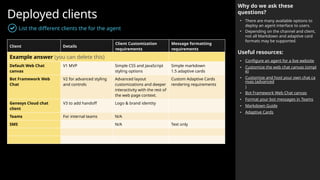
List the different clients the for the agent
Why do we ask these
questions?
• There are many available options to
deploy an agent interface to users.
• Depending on the channel and client,
not all Markdown and adaptive card
formats may be supported.
Useful resources:
• Configure an agent for a live website
• Customize the web chat canvas (simpl
e)
• Customize and host your own chat ca
nvas (advanced
)
• Bot Framework Web Chat canvas
• Format your bot messages in Teams
• Markdown Guide
• Adaptive Cards
Client Details
Client Customization
requirements
Message formatting
requirements
Example answer (you can delete this)
Default Web Chat
canvas
V1 MVP Simple CSS and JavaScript
styling options
Simple markdown
1.5 adaptive cards
Bot Framework Web
Chat
V2 for advanced styling
and controls
Advanced layout
customizations and deeper
interactivity with the rest of
the web page context.
Custom Adaptive Cards
rendering requirements
Genesys Cloud chat
client
V3 to add handoff Logo & brand identity
Teams For internal teams N/A
SMS N/A Text only
Hand off to a live agent
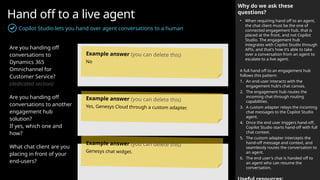
Copilot Studio lets you hand over agent conversations to a human
Why do we ask these
questions?
• When requiring hand off to an agent,
the chat client must be the one of
connected engagement hub, that is
placed at the front, and not Copilot
Studio. The engagement hub
integrates with Copilot Studio through
APIs, and that’s how it’s able to take
over a conversation from an agent to
escalate to a live agent.
A full hand off to an engagement hub
follows this pattern:
1. An end-user interacts with the
engagement hub's chat canvas.
2. The engagement hub routes the
incoming chat through routing
capabilities.
3. A custom adapter relays the incoming
chat messages to the Copilot Studio
agent.
4. Once the end user triggers hand-off,
Copilot Studio starts hand-off with full
chat context.
5. The custom adapter intercepts the
hand-off message and context, and
seamlessly routes the conversation to
an agent.
6. The end user's chat is handed off to
an agent who can resume the
conversation.
Are you handing off
conversations to
Dynamics 365
Omnichannel for
Customer Service?
(dedicated section)
Are you handing off
conversations to another
engagement hub
solution?
If yes, which one and
how?
What chat client are you
placing in front of your
end-users?
Example answer (you can delete this)
No
Example answer (you can delete this)
Yes, Genesys Cloud through a custom adapter.
Example answer (you can delete this)
Genesys chat widget.
Handing off to a live agent
Why do we share this?
• The preferred and most standard
approach to handle hand off with a
live agent is to use the engagement
hub chat canvas at the front.
• This is how most standard
integrations with 1st
-party or 3rd
-party
contact centers are done and made
available.
• Pros:
 Easier to setup without too much
overhead (frontend configuration).
 Agent messaging and capability
maintain full fidelity.
 Existing engagement hub
capabilities (agent takeover,
sentiment analysis, supervisory…)
continue to work as-is.
• Cons:
× No ability to intercept human
agent messages upon escalation
(unless engagement hub supports
an API).
× No whisper mode (unless
engagement hub supports it)
× No control over user experience of
responses (messages, cards)
emitted from bot.
Useful resources:
• Hand off to a live agent
• Hand off with Dynamics 365 Customer
Service
Engagement
Hub Chat
Canvas
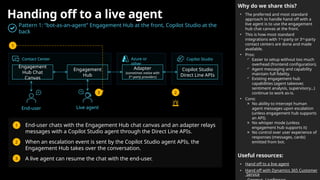
Pattern 1: “bot-as-an-agent” Engagement Hub at the front, Copilot Studio at the
back
Engagement
Hub
Adapter
(sometimes native with
3rd
-party providers)
Copilot Studio
Direct Line APIs
End-user Live agent
Contact Center Azure or
other
Copilot Studio
1. End-user chats with the Engagement Hub chat canvas and an adapter relays
messages with a Copilot Studio agent through the Direct Line APIs.
2. When an escalation event is sent by the Copilot Studio agent APIs, the
Engagement Hub takes over the conversation.
3. A live agent can resume the chat with the end-user.
1
2
1
2
3
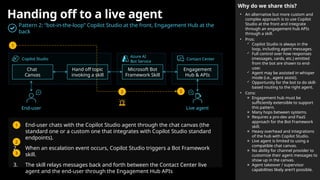
3
Handing off to a live agent
Why do we share this?
• An alternative but more custom and
complex approach is to use Copilot
Studio at the front and integrate
through an engagement hub APIs
through a skill.
• Pros:
 Copilot Studio is always in the
loop, including agent messages.
 Full control over how responses
(messages, cards, etc.) emitted
from the bot are shown to end-
user.
 Agent may be assisted in whisper
mode (i.e., agent assist).
 Opportunity for the bot to do skill-
based routing to the right agent.
• Cons:
× Engagement hub must be
sufficiently extensible to support
this pattern.
× Many hops between systems.
× Requires a pro-dev and PaaS
approach for the Bot Framework
skill.
× Heavy overhead and integrations
of the hub with Copilot Studio.
× Live agent is limited to using a
compatible chat canvas.
× No ability for channel provider to
customize their agent messages to
show up in the canvas.
× Agent takeover / supervisor
capabilities likely aren’t possible.
Chat
Canvas
Pattern 2: “bot-in-the-loop” Copilot Studio at the front, Engagement Hub at the
back
Hand off topic
invoking a skill
Microsoft Bot
Framework Skill
Engagement
Hub & APIs
End-user Live agent
Copilot Studio
Azure AI
Bot Service
Contact Center
1. End-user chats with the Copilot Studio agent through the chat canvas (the
standard one or a custom one that integrates with Copilot Studio standard
endpoints).
2. When an escalation event occurs, Copilot Studio triggers a Bot Framework
skill.
3. The skill relays messages back and forth between the Contact Center live
agent and the end-user through the Engagement Hub APIs
1
2 3
1
2
3
Security,
monitoring &
governance
 Security and administration controls
 Copilot security configuration
 Data loss prevention policies
 Tenant and environment security
 Authentication & channel security
 Single sign-on
 Monitoring
 Governance
 Compliance
Security and administration controls
Why do we share this?
• Data loss prevention (DLP) policies can
be configured at tenant-level to apply
either to all environments, only
specific environments, or all
environments except specific ones.
DLP policies can enforce agent
settings like authentication, and block
specific channels, knowledge sources,
connectors, etc.
• The publishing of agents using
generative AI features can be
completely blocked at the tenant level.
Useful resources:
• Security and governance in Copilot St
udio
• Enforce DLP policies for Copilot Studio
• Exempt an agent from DLP policies
• Assign Copilot Studio user licenses
• Control user access to environments
• Manage app permissions in Microsoft
Teams to block the Teams app
• Disable self-service trial sign-ups: set
AllowAdHocSubscriptions to $false
• Share an agent for collaborative autho
ring
• Configure web channel security
• Enterprise security with Power Platfor
m
 Data loss prevention (DLP) policies can be
enforced to all Power Platform environments to:
• Allow/block unauthenticated usage.
• Allow/block individual channels.
• Allow/block knowledge sources.
• Allow/block individual connectors.
• Allow/block connecting to skills.
• Allow/block integrating with Application
Insights.
 Allow/block publishing of agents that use
generative AI.
 Access to the Copilot Studio authoring experience
(i.e., copilotstudio.microsoft.com) can be controlled
by:
• Assignment of a Copilot Studio User license or
Microsoft 365 Copilot user license (application),
Copilot Author settings for pay-as-you-go.
• Allow/block self-service trials for the tenant.
 Allow/block access to the Copilot Studio Teams app
(i.e., aka.ms/CopilotStudioForTeams)
Copilot Studio features controls Copilot Studio maker access controls
Available controls at the Power Platform tenant, environment, or agent level
TENANT
 Data loss prevention (DLP) policies can be scoped
to include/exclude specific environments.
 Allow/block the public data source (i.e., Bing).
 For environments with no regional Azure OpenAI
capacity, allow/block generative AI features.
 Network isolation (virtual network and IP firewall)
 Allow/block environment access with security
groups.
 Allow/block permissions to create, read, update or
delete agents through security roles. Dataverse
tables:
• Copilot (bot)
• Copilot Subcomponent (botcomponent)
• Conversation Transcript (conversationtranscript)
ENVIRONMEN
T
 Enable/disable generative orchestration at agent
level.
 Enable/disable AI knowledge at agent level.
 Enable/disable generative answers at agent level.
 Enable/disable intelligent topic authoring at user
level.
 Set agent authentication (None, authenticate with
Microsoft, and Manual – i.e., app registration)
 Enforce Web Channel security at agent level.
 Share/unshare agents with other users for
authoring.
 Users with a System Administrator role can read
and update all agents and transcripts.
AGENT
Assign licenses to users through Entra ID groups
Grant the ‘Microsoft Copilot Studio User’ license to users through a group instead of individual assignment.
Manage user access to environments through Entra ID groups
Only bot authors and a just-in-time admins should have access to your environments and data stores.
Manage security role assignment through Entra ID group teams
Within each Dataverse environment, leverage group teams to assign security roles to users.
Apply restrictive Data Loss Prevention policies to your environment
DLP policies can be applied to your environments to block all connectors that are not required by the project
as well as any channel or setting that isn’t useful for the project (e.g., unauthenticated use, use skills, etc.).
Review and only enable tenant, environment and agent settings that are relevant
Tenant admins can disable publishing of GenAI-powered bots. Environment admins can disable GenAI
features that require data movement outside of their region. Agent authors can require secured access for
the web channel.
Internal agents can be limited for use by specific groups instead of being available to all.
Review and tighten security of all integrations
Connections should require strong authentication. Secrets should be stored in a secure location (e.g., Azure
Key Vault). Leverage delegation, impersonation or filtering for data access in the context of an end-user.
Have a gated release process to production
Deploying changes from dev to test and to prod should require reviews and be part of a gated process.
Explore additional Power Platform, Dataverse and Entra ID security features
E.g., audit logs, customer-managed keys, customer lockbox, IP firewall, network isolation, multi-factor
authentication, continuous access evaluation, etc.
Security, agent, & user management
Best practices to secure your Copilot Studio project
Why do we share this?
• Entra ID groups should be leveraged
to fully drive user license assignment,
environment access, and security
roles assignment.
• You should apply a most-restrictive
approach by default and relax
requirements on an exception basis.
Useful resources:
• Enterprise security with Power Platfor
m
• Assign licenses to a group
• Control user access to environments
• Use group teams to assign security rol
es
• Manage data loss prevention policies
• Disable the ability to publish copilots
with generative answers and actions
• Configure data movement across geo
graphic locations for generative AI
• Configure web channel security
• Share and collaborate on chatbots
• Connecting and authenticating to sou
rces
• Use environment variables for secrets
• Authentication variables
• Pipelines in Power Platform
• Activity logging
• Customer-managed encryption
• Customer lockbox
Copilot Studio security roles
Overview of standard Dataverse security roles and impact on Copilot Studio
Why do we share this?
• These security roles grant permissions
to Copilot Studio configuration and
data tables in Dataverse.
• To start creating and working on
agents, users can be assigned the
standard Environment Maker security
role. With this role, users only see
their own agents or the agents that
have been shared with them. If too
permissive, custom roles may also be
used.
• The Environment Maker role also lets
users create other related Power
Platform artefacts (e.g., solutions,
cloud flows, connection references,
environment variables, etc.)
• To see transcripts, users must be
granted at least one role giving read
access to the Conversation Transcript
table.
Useful resources:
• Use group teams to assign security rol
es
• Security concepts in Dataverse
• Copilot (bot) table/entity reference
• Copilot subcomponent (botcomponen
t) table/entity reference
• conversationtranscript table/entity ref
erence
Security Role / Table
Copilot
bot
Copilot Subcomponent
botcomponent
Conversation Transcript
conversationtranscript
System administrator Org (CRUD) Org (CRUD) Org (CRUD)
System customizer Org (CRUD) Org (CRUD) None
Environment maker User (CRUD) User (CRUD) None
Bot Transcript Viewer None None User (Read)
Bot Author (deprecated) User (CRUD) User (CRUD) User (CRU)
Bot Contributor
(deprecated)
User (Read) User (CRUD) None
Omnichannel
administrator
Org (Read) None None
How are Copilot Studio records secured in Dataverse?
• When an agent is created, a team gets also created and the chatbot is shared with that team.
• Copilot subcomponents (e.g., topics, entities, files, etc.) are shared with the same team.
• Conversation Transcripts are implicitly shared with their parent agent’s team, but only users
that have a read access on the Conversation Transcript table can access them.
Copilot security configuration
Detail your security requirements
Why do we ask these
questions?
• Understanding your key requirements
around security and making sure they
are mapped with existing features.
• Identify alternatives for scenarios not
natively covered.
Useful resources:
• Copilot Studio security
Do you have a list of
security requirements for
your agent?
How are you going to
implement these?
Example answer (you can delete this)
Enterprise copilots:
• Users need to be authenticated using Microsoft Entra ID.
• Users need to be automatically signed in.
• IPs need to be allow-listed in the corporate firewall.
• Need to integrate with internal, on-premises, APIs.
• Integrations must use service principals.
• Secrets must be stored in key vaults.
• Only specific apps should be able to call the agent as a
skill.
Citizen-developer copilots:
• The unauthenticated configuration need to be blocked
on all copilots and all channels.
• Copilot usage (inventory and conversations) need to be
monitored at the tenant level).
Data loss prevention policies
Enforcing security settings as well as exceptions at a global level
Why do we ask these
questions?
• Administrators can govern copilots in
their organization by using data loss
prevention (DLP) policies with specific
Copilot Studio connectors.
• Channels (Teams, Direct Line,
Facebook, Omnichannel),
unauthenticated use, knowledge
sources, Azure Application Insights,
and Bot Framework skills can be
allowed or blocked.
Useful resources:
• Security and governance in Copilot St
udio
• Apply data loss prevention policies to
copilots
• Connector endpoint filtering
How do you ensure that
internal confidential data
doesn’t get available
externally?
Do you plan to use DLP
policies to enforce Copilot
Studio allowed channels
and authentication
settings?
Do you plan to use DLP
policies to enforce
allowed or blocked Power
Automate connectors or
HTTP requests?
Example answer (you can delete this)
Strong governance of connectors and authentication
settings, especially for generative answers data sources.
Example answer (you can delete this)
Yes, by default no unauthenticated copilots are allowed and
only the Microsoft Teams channel can be used, to make
sure they’re internal.
Example answer (you can delete this)
Yes, with Copilot Studio, only related business applications
such as Dynamics 365, ServiceNow and SharePoint are
allowed. Endpoint filtering will be used for allowed HTTP
APIs.
Tenant and environment security
Securing access to data
Why do we ask these
questions?
• Copilot conversation transcripts are
automatically stored in Dataverse.
• These can contain sensitive customer
information that need to be
protected.
Useful resources:
• Power Platform security
• Microsoft Entra multifactor authentica
tion
• Microsoft Entra Conditional Access
• Use Azure Key Vault secrets
• Just-In-Time Access Management
• Manage application users
• Manage group teams
• Customer Lockbox
Do you enforce strong
requirements for
authentication?
How do you control privileged
users access to sensitive data?
How do you manage secrets?
Do you use service principals
or managed identities?
Do you have network security
requirements?
Do you audit and review
access periodically?
Multi-factor authentication and conditional access.
Just-in-time access to production.
Azure Key Vault and Environment Variables
Service principals for integrations and deployments.
Some internal APIs are only accessible in a VNET.
Yes, every month. Roles only granted through groups.
Authentication & channel security
Authentication requirements
Why do we ask these
questions?
• Authentication allows users to sign in,
giving your agent access to a
restricted resource or information.
Users can sign in with Microsoft Entra
ID, or with any OAuth2 identity
provider such as Google or Facebook.
• With Direct Line-based security, you
can enable access only to locations
that you control by enabling secured
access with Direct Line secrets or
tokens.
Useful resources:
• Configure user authentication
• Configure user authentication with Mi
crosoft Entra ID
• Configure web channel security
Is the agent working
unauthenticated,
authenticated, or both?
If yes, what is the
authentication service?
Do you need to enforce
web channel security?
Example answer (you can delete this)
External agent: hybrid authentication. The public website
can start chat sessions and handle FAQ questions
unauthenticated, but specific operations require the user to
authenticate
Example answer (you can delete this)
Internal agent: “Manual” (AAD) or “Only for Teams and
Power Apps”. External agent: “Manual” (Generic OAuth2)
Example answer (you can delete this)
Internal agent: yes.
External agent: no.
Single sign-on (SSO)
Automatic signing in authenticated users
Why do we ask these
questions?
• Copilot Studio supports single sign-on
(SSO), which means agents can sign
the user in.
• SSO needs to be implemented on
your web pages, mobile applications.
• For Microsoft Teams, SSO is seamless
if you select the “Only in Teams”
authentication. It can also be
configured with Manual Entra ID v2,
but in this case the Teams app must
be deployed as a zip file, not with the
1-click Teams deployment from
Copilot Studio.
Useful resources:
• Configure SSO with Entra ID for web/a
pps
• Configure SSO with Entra ID for Teams
Do you have SSO
requirements?
How are you going to
implement these?
Example answer (you can delete this)
Internal agent:
• Teams users and intranet website users must be
automatically signed in (Entra ID v2).
• SSO must also work on the internal SharePoint intranet.
External agent:
• SSO with Generic OAuth 2.
Monitoring
Capture telemetry, measure performance, and setup alerts with Application
Insights
Why do we ask these
questions?
• In addition to the native analytics
features within Copilot Studio, you
can send telemetry data to
Application Insights.
• You can send custom events to Azure
Application Insights.
Useful resources:
• Capture Copilot Studio telemetry with
Azure Application Insights
• Set up Application Insights with Power
Automate
How do you plan to
technically monitor your
agents?
How do you plan to
technically monitor your
integrations and cloud
flows?
Do you have other
technical monitoring
requirements and plans?
Example answer (you can delete this)
Azure Application Insights to log activities, errors, and
custom events. Also used to monitor Generative Answers
and details on failed or moderated answers.
Example answer (you can delete this)
Azure Application Insights for cloud flows.
Example answer (you can delete this)
Yes, the agent client load time on the web page will be
monitored with our web analytics tools.
Azure Application Insights example
Monitoring generative answers results and moderation
customEvents
| where name == "GenerativeAnswers"
// | where cloud_RoleInstance == "MS Learn Chatbot"
| extend cd = todynamic(customDimensions)
| extend conversationId = tostring(cd.conversationId)
| extend topic = tostring(cd.TopicName)
| extend message = tostring(cd.Message)
| extend result = tostring(cd.Result)
| extend SerializedData = tostring(cd.SerializedData)
| extend Summary = tostring(cd.Summary)
| extend feedback =
tostring(todynamic(replace_string(SerializedData,"$","")).value)
| project cloud_RoleInstance, name, timestamp, conversationId, topic,
message, result, feedback, Summary
| order by timestamp desc
Governance
How to you govern Copilot Studio at scale?
Why do we ask these
questions?
• As customers expand their use of
Microsoft Power Platform to enable
citizen developers across their
organizations, they also seek
capabilities to govern and monitor
usage.
• The Microsoft Power Platform CoE
Starter Kit is a collection of
components and tools that are
designed to help organizations
develop a strategy for adopting and
supporting Power Platform.
CoE Starter Kit features for
Copilot Studio
• Keep track of the number of
conversations per agent over time,
with daily aggregates.
• Allocate a number of conversations
per environment
• Receive capacity email alerts when
environment add-ons get near or over
their allocated number of
conversations.
• Get an overview dashboard of Copilot
Studio usage in a tenant over time as
well as an all-up conversation
consumption versus allocation.
Useful resources:
Do you plan to use the
Center of Excellence
Starter Kit to monitor
your agents in your
tenant?
Do you have specific
governance
requirements?
Do you allow users to
create copilots using
Copilot Studio for Teams?
Do you allow users to
create Copilot Studio
trials?
Example answer (you can delete this)
Yes, the central CoE team already uses the Starter Kit to
monitor Power Apps and Power Automate. Copilot Studio
monitoring will allow track usage across copilots and
environments.
Example answer (you can delete this)
As capacity is purchased globally and pooled at the tenant
level, tenant-wide analytics are required to implement a
charge-back model.
Example answer (you can delete this)
No, Copilot Studio for Teams is blocked as an app in
Microsoft Teams. Trials of Copilot Studio are blocked, and
users need a license to create copilots.
Compliance
Understand how regulatory requirements impact your project
Why do we ask these
questions?
• Microsoft complies with data
protection and privacy laws applicable
to cloud services. Our compliance
with world-class industry standards is
verified.
• Environments can be created in
specific regions, even if different from
the region the tenant resides in.
• By default, conversation transcripts
are only kept for 30 days in Dataverse.
This can be updated on per-
environment basis.
Useful resources:
• Copilot Studio compliance offerings
• Copilot Studio GDPR compliance
• Copilot Studio Data Locations
• Managing compliance in the cloud
• Service Trust Portal
• Change the default retention period f
or conversation transcripts
• Move data across geographic location
s for generative AI features outside U
nited States
What the regulatory
requirements and norms
you need to comply with?
Do you have hard
requirements as to where
the data must be located?
Do you have other
compliance
requirements?
Example answer (you can delete this)
GDPR compliance.
Example answer (you can delete this)
Data location and processing must stay within the European
Union boundary.
Example answer (you can delete this)
• Transcripts must be kept for 2 years in a compliant
location.
• Sensitive data must be obfuscated from transcripts
Application
Lifecycle
Management
 Application Lifecyle Management
example
 ALM strategy
 Environments
 Capacity
 Test strategy
 Training
 Run & maintenance
Test Q.A. Production
Development
Application Lifecyle Management
Safely deploy customizations across environments and keep track of changes.
Why is ALM important?
• Copilot Studio ALM is based on the
broader Power Platform ALM
principles.
• They use the concept of solutions to
package and deploy customizations.
What are ALM golden rules?
• Work in the context of solutions
• Create separate solutions only if you
need to deploy components
independently.
• Use a custom publisher and prefix.
• Use environment variables for
settings and secrets that change
across those.
• Export and deploy solutions as
managed, unless setting up a dev
environment.
• Don’t do customizations outside of
dev.
• Consider automating ALM for source
control and automated deployments.
What needs to be set
manually?
• Azure Application Insights integration.
• Deployed channels.
• Some security settings.
Useful resources:
• Use environment variables
Agent
 Contoso Agent
 Agent Components
1.0
Cloud Flows
 ServiceNow Flow
 Internal API Flow
1.2
Connectors & Variables
 Connection Reference
 Env. Variables
 Custom Connector
1.3
Agent
 Contoso Agent
 Agent Components
1.0 Agent
 Contoso Agent
 Agent Components
1.0 Agent
 Contoso Agent
 Agent Components
1.0
Cloud Flows
 ServiceNow Flow
 Internal API Flow
1.1 Cloud Flows
 ServiceNow Flow
 Internal API Flow
1.1 Cloud Flows
 ServiceNow Flow
 Internal API Flow
1.1
Connectors & Variables
 Connection Reference
 Env. Variables
 Custom Connector
1.3 Connectors & Variables
 Connection Reference
 Env. Variables
 Custom Connector
1.3 Connectors & Variables
 Connection Reference
 Env. Variables
 Custom Connector
1.2
Learn from agent usage in production to make improvements in dev for future releases
Automate
Test
Evaluate options from simple to advanced continuous integration & delivery (CI/CD)
• Manual deployment of solutions
• Automated deployment with user-friendly pipelines in Power Platform (no source control)
• Automated deployment + source control with Azure DevOps or GitHub Power Platform tools.
• Use of the ALM Accelerator for #2 + #3 and advanced deployment options for both no-code and pro
developers.
• Automated testing of the agent as part of the deployment process.
Example solution configuration
Contoso DEV
Environment
Contoso TEST
Environment
Contoso PROD
Environment
IT and HR DEV
Environment
Component collections
Multiple development environments and teams working on different parts of the
agent
Why use component
collections?
• A component collection is a collection
of reusable agent components.
Components include topics,
knowledge, actions, and entities.
• The main benefit of component
collections is that you can share
component collections between
multiple agents within your
environment.
• Because you can also use a solution to
export and import component
collections to move their content
across multiple environments to meet
your application lifecycle
management (ALM) scenarios, this
means you can have parts of your
agents developed in multiple
environments, by multiple teams, and
with their own release cadence.
Useful resources:
• Create reusable component collection
s
• How To Use Component Collections in
Copilot Studio
(video)
• How To Use Component Collections &
Solutions To Distribute Reusable Asset
s for Copilot Studio
(video)
Example solution and component collection configuration
IT Collection
 IT Topics
 IT Actions
 IT Knowledge
1.5
Contoso Agent
 Contoso Topics
 Contoso Actions
 Contoso Knowledge
1.1 Contoso Agent
 Contoso Topics
 Contoso Actions
 Contoso Knowledge
1.1 Contoso Agent
 Contoso Topics
 Contoso Actions
 Contoso Knowledge
1.0
IT Collection
 IT Topics
 IT Actions
 IT Knowledge
1.5 IT Collection
 IT Topics
 IT Actions
 IT Knowledge
1.4 IT Collection
 IT Topics
 IT Actions
 IT Knowledge
1.3
HR Collection
 HR Topics
 HR Actions
 HR Knowledge
1.3 HR Collection
 HR Topics
 HR Actions
 HR Knowledge
1.3 HR Collection
 HR Topics
 HR Actions
 HR Knowledge
1.3 HR Collection
 HR Topics
 HR Actions
 HR Knowledge
1.3
The Contoso Agents references
topics, actions, and knowledge
from the HR and IT collections.
ALM Strategy
Detail your CI/CD processes
Why do we ask these
questions?
• It’s key to have a healthy ALM process
to avoid production issues and catch
and fix any regression early.
Useful resources:
• Power Platform ALM
• Use segmented solutions
How to you deploy your
customizations, variables
and connections?
How do you organize
your solutions?
Do you source control
your customizations?
Example answer (you can delete this)
Deployment are done using Azure DevOps pipelines and
managed solutions. Environment variables are used for
settings and secrets. Connections are configured by a
service account.
Example answer (you can delete this)
A single solution with the agent, cloud flows, connection
references, environment variables.
A single publisher, “Contoso” (cto_) is used.
Example answer (you can delete this)
Azure DevOps. Pull requests require peer reviews before
customizations are merged into the main branch and
deployed to downstream environments.
Environments
List the different environments and copilots for your project
Why do we ask these
questions?
• Knowing your tenant, environment,
and agent ids can be useful for
proactive monitoring.
• Understanding how you setup your
environments is also important in
relation with your ALM processes.
• The region can be meaningful for
releases and availability of certain
features.
• It’s a best practice to limit access to an
environment to the specific members
of a Microsoft Entra ID security group.
Useful resources:
• Create and use environments
• Control user access to environments
Name Type Region Required apps Environment Id
Agents(s) and Bot
Id(s)
Example answer (you can delete this)
Contoso DEV Sandbox Europe D365 + OC
Voice
7f8448e4-b056-e6f9-
a235-ddec0aa85c0d
Contoso Copilot
cb093eb6-ec05-ee11-
8f6e-000d3a5c61dd
Contoso TEST Sandbox Europe D365 + OC
Voice
47378d94-f56c-eed0-
b8cd-89d17d7e31b3
Contoso Copilot
d182abc5-7335-ee11-
bdf4-000d3a37044a
Contoso QA Sandbox Europe D365 + OC
Voice
20bb12c3-1a5c-e8ff-
b0f7-4f32adef8616
Contoso Copilot
64c03bd0-04c4-499a-
8fa6-77de5d1d27aa
Contoso Productio
n
Europe D365 + OC
Voice
c53bf002-7923-4d1c-
b5ae-3265093d59e1
Contoso Copilot
65d3b807-8cd7-4b58-
afae-768ecd914db7
Tenant ID 8a235459-3d2c-415d-8c1e-e2fe133509ad
Licensing & capacity
Aligning product, user licenses & add-ons to technical and business requirements
Why do we ask these
questions?
• Understanding what you have
purchased in terms of capacity for the
project.
• Potential impact of design on capacity
and licensing. E.g., keeping
conversation transcripts will grow
database storage.
• Additional services, such as Azure AI
Foundry and AI Search (if used as the
Azure AI Search knowledge source in
generative answers, or as a custom
model for summarization), Data Lake
(if used to store conversation
transcripts) or Application Insights (to
log additional telemetry) require an
Azure subscription.
• Power Automate cloud flows owned
by a service principals require a Power
Platform Process license. If owned by
a user, they’re covered for premium
connectors and come with a base
capacity of 250,000 requests per
month.
Useful resources:
• Assign user licenses and manage acce
ss
• Quotas in Copilot Studio
• Licensing overview for Power Platform
• Copilot Studio pricing
Product Quantity Capacity Comments
Copilot Studio User
Copilot Studio Messages
Dataverse Database Storage
Dataverse File Storage
Dataverse Log Storage
Power Platform Requests
Power Automate Process
Azure AI Foundry P1
Azure AI Search Service
Azure Storage
Azure Application Insights
Example answer (you can delete this)
50 50 users For Copilot Studio bot authors
100 2,500,000 messages /
month
To allocate per environment
50 50 GB + 10 GB Database base capacity
5 5 GB + 20 GB Database base capacity
5 5 GB + 2 GB Database base capacity
1 50,000 requests / 24h + 250,000 requests / 24h base
capacity
4 4 processes / month To run flows with service principals
1 Standard 1 gpt-4o model
1 Basic Tier 1 Replica, 1 Partition, 1 Search unit
1 StorageV2 RA-GRS
Test strategy
Test plan and non-functional requirements
Why do we ask these
questions?
• Understand your plans to validate
that your agents and integrations
work as expected.
Useful resources:
• Bulk test with the Copilot Studio Kit
• How To Use Copilot Studio Kit for Test
Automation
(video)
What is your test strategy
for your agents and
integrations?
Do you have non-
functional requirements?
Example answer (you can delete this)
Use of the Copilot Studio Kit to bulk test user utterances
and validate that the appropriate topic triggers or that the
first ‘did you mean’ option is the correct one in 90% of the
time and validate that generated answers meet
expectations.
Example answer (you can delete this)
Chat widget on the website should load and start the
conversation in less then 5 seconds when clicked.
Cloud flows triggered to return information to the user
need to return the desired data in a maximum of 10s.
Analytics
& KPIs
 Engagement and outcomes
 Analytics strategy
 Optimization strategy
Conversation
design &
outcome
tracking
Welcome, I’m a virtual agent.
You can ask me about our
stores and policies.
Hi!
Hello, how can I help you?
When are you opened?
Our store is open from 8am to
6pm, Monday to Saturday.
Did that answer your question?
Yes
Thank you.
Can I help with anything else?
Great!
Please rate your experience
Yes, what is your
address?
User triggers the Greeting topic.
User triggers the Store Hours topic.
Because the query is assumed to be
addressed, the virtual agent redirects the
user to the End of Conversation topic.
Through multiple questions, the user:
• Confirms resolution.
• Provides a CSAT score.
• Is offered to ask new questions.
User triggers the Store Locations topic,
leading to a new session and outcome.
The virtual agent greets the user with the
Conversation start topic.
When designing conversations,
finish the flow with a redirect
to the End of Conversation topic.
With generative orchestration,
multiple intents can be detected
and handled at once, by chaining
topics and actions together.
Leverage the
Plan Complete
trigger to
redirect to End
of
Conversation.
The End of Conversation topic
is customizable.
It doesn’t have to be ugly or
complex for your users.
You can go a long way with
Adaptive Cards and a good
conversation design.
Engagement and outcomes
How do you track engagement rates & session
outcomes?
Why do we ask these
questions?
• Tracking conversation engagement and
outcomes is crucial to measure the agent
performance metrics and spot areas for
improvements in the analytics
dashboard.
• A single conversation with an agent can
generate one or multiple sessions.
• A conversation can have multiple
sessions when a user has new questions
after the End of Conversation topic is
reached ( ).
4 ️ 4️⃣
• Sessions are either Unengaged or
Engaged. Unengaged session’s outcome
is None.
• A session is engaged ( ) by either
1️⃣
triggering a custom topic, the Escalate,
Fallback, or Conversational Boosting
topics.
• Engaged sessions outcome can either be:
 Abandoned
 Resolved
 Escalated
• It’s important to end conversation with
the End of Conversation topic ( ) so
2 ️ 2️⃣
that the end-user can confirm their query
was resolved or not (and potentially
escalate).
• The Confirmed Success path displays a
CSAT survey ( ) to capture a 0-5 score.
3️⃣
• A conversationOutcome can also be set
at the node level in the YAML code editor
view, but the End of Conversation topic
must then be traversed to be taken into
account.
1 ️
1️⃣
2️⃣
3 ️
3️⃣
4️⃣
Example answer (you can delete this)
• Every conversation path, including Generative Answers ones,
end with the End of Conversation topic.
• End of Conversation topic is customized to make the
resolution validation as simple as possible for the end-user.
• Conversation outcomes are also set at specific node levels
(in the YAML).
Analytics strategy
Detail your strategy to monitor your agent key performance indicators
Why do we ask these
questions?
• Copilot Studio provides
comprehensive out-of-the-box
analytics that allow customers to
understand an agent's usage and key
performance indicators.
• Customers can view reports related
to:
 Performance and usage.
 Customer satisfaction.
 Session information.
 Topic usage.
 Top knowledge sources.
• However, there are often scenarios
where you'll need to create or use
custom analytics. For example, you
may need to:
 Share analytics with non-makers
or users.
 Report on conversation transcripts
data for a period longer than the
default last 90 days.
 Design a report not covered by
out-of-the-box analytics.
Useful resources:
• Custom analytics strategy
• Copilot Studio Kit to ease the creation
of custom analytics dashboards
Do you have an analytics
strategy?
Do you plan to develop
your own custom
analytics?
If you are going to create
your own reports, please
detail how and where you
plan to store the data.
Example answer (you can delete this)
• Initially, only a few set of KPIs will be defined for the
agent success, essentially the engagement rate,
resolution rate and the defection rate.
• In phase 1, assess the native dashboards, even though
they’re limited to 90-day of data.
• In phase 2, develop a Power BI report consuming the
agent and Conversation Transcript data directly from
Dataverse. This will also be the opportunity to enrich
agent data with other business metrics such as sales or
website traffic.
• In phase 3, move data to cheaper long-term storage
option (e.g., Azure Data Lake) and update the Power BI
report to point to these storage points.
Optimization strategy
What is your plan to keep improving your agent’s performance and ROI?
Why do we ask these
questions?
• Return on investment (ROI) and
improved customer satisfaction (CSAT)
are top priorities for the organizations
that implement Copilot Studio
copilots.
• Optimizing the agent deflection rate is
one of the top focus areas for
organizations to achieve their
business goals around ROI and CSAT,
and to improve the agent's overall
performance. There are major
indicators in Copilot Studio that help
improve agent performance, such as
resolution rate, escalation rate, and
CSAT.
• While the metrics continue to evolve,
there are several things you can do as
an agent builder to improve the
deflection rate of your agent. In these
articles, we cover the importance of
deflection in conversational AI and
general techniques/considerations
that are universal for optimizing
deflection for copilots.
Useful resources:
• Deflection optimization
Detail your strategy to
regularly improve your
agent
Example answer (you can delete this)
Monthly review of the agent performance
• Deflection rate
• Resolution rate
• Engagement rate
• Topics with low resolution
• Unrecognized utterances
• Analysis per channel
This review helps prioritize the backlog of agent updates.
For example, unrecognized utterances are used to either
train existing topic or create new topic where there is
demand.
Gaps & top
requests
 Gaps
 Top requests
Gaps
What are the main feature gaps you have identified
Gap #1
Gap #2
Gap #3
Why do we ask these
questions?
• Help us prioritize our future
investments by flagging gaps and
submitting feature requests.
• Detailing the business impacts for
your organization helps build a
business case for them.
Useful resources:
• aka.ms/CopilotStudioFeatureRequest
Example answer (you can delete this)
No native first-party IVR without Dynamics 365
Omnichannel Voice
Example answer (you can delete this)
No native integration with WhatsApp
Example answer (you can delete this)
Pro-code is required for a SharePoint integration with single
sign-on support.
Top requests
What are the top gaps, feature requests, and priorities?
Request #1
Request #2
Request #3
Why do we ask these
questions?
• Help us prioritize our future
investments by submitting feature
requests and detailing the business
impact they have for your
organization by using the link below.
Useful resources:
• aka.ms/CopilotStudioFeatureRequest
Example answer (you can delete this)
P1: native file upload support by end-users to upload
pictures that are then analyzed with OCR.
Example answer (you can delete this)
P1: support for right-to-left languages Arabic and Hebrew.
Example answer (you can delete this)
Ability to disable adaptive card buttons once they have been
actioned.
Dynamics 365
Omnichannel for
Customer Service
(optional)
 Chat widget integration & customizations
 Omnichannel hand-off
 Unified Routing Configuration
Note: it is expected for Dynamics 365 Omnichannel for Customer Service to have an extended implementation review, typically with
FastTrack teams. This chapter calls specific items which are important for the Copilot Studio and Omnichannel integration.
Chat widget integration &
customization
How are you modifying the chat widget in Dynamics 365 Omnichannel?
Why do we ask these
questions?
• Within Dynamics 365 Omnichannel for
Customer Service, there is a
customized Copilot Studio chat widget
which is utilized rather than the native
Copilot Studio widget without
Dynamics 365 Omnichannel. This
customized out-of-the-box widget is a
component that Dynamics 365
customers can utilize to get a greater
number of options to tailor the widget
without having to spend a lot of time
on the configuration every single
time.
• Some of these options include the
design but also include functionality
like business hours and even channel
specific behavior like persistent chat
experiences.
• Ensure you have reviewed these
options within the chat widget
• Additionally, ensuring you take into
consideration the connection
experience between Copilot Studio
and Omnichannel in the ‘Agent Hand-
off’ area of the Copilot Studio portal,
and track your environments based
on your environment structure, as
well as the agent users within each
environment
Useful resources:
• Configure the chat widget
Please describe the planned
use of the chat widget.
Do you plan to develop a
custom version of the
widget?
Do you have other client
requirements for specific
channels?
What your expectations for
the widget load time and
first message display?
How are you making sure
the first message is fast?
Example answer (you can delete this)
• Use of the LCW v2 configured with the brand theme.
• Many context variables, including web page, user ID,
locale, etc. must be passed from the website to the chat
widget.
• Widget and first message should load in less than 5
seconds.
• Internal mobile app teams are also looking to integrate
their native app with Omnichannel through APIs.
Copilot Studio & Omnichannel hand-off
Connect your Copilot Studio agent to Dynamics 365 Omnichannel
Why do we ask these
questions?
• You can directly use the ‘Escalate’
system topic to be able to escalate to
a live agent in Dynamics 365
Omnichannel within Copilot Studio.
• Make sure you consider the
experience of both the user and the
agent when designing this
functionality.
• Consider what data you wish the
Dynamics 365 Omnichannel agent to
receive from the agent when a
handover is successfully taken place
e.g., data passed to the agent.
Useful resources:
• Configure the Copilot Studio agent
Which topics within will link
to the ‘Escalate’ topic?
Do you need to extend the
‘Escalate’ topic? If so, how
and why?
Would you be utilizing both
the ‘Escalate’ and ‘Fallback’
topic?
Have you considered what
the waiting experience for a
handover to Dynamics 365
looks like and any
limitations of the default
experience?
Example answer (you can delete this)
• Standard behavior will be maintained to escalate.
• Over the voice channel, DTMF key 0 will escalate to a live
agent.
• Fallback topic will not be used over the voice channel but
will be used on the website: generative answers will be
used before the user can escalate.
Unified routing configuration
How is your agent being routed?
Why do we ask these
questions?
• Unified routing is critical because
within Dynamics 365 Omnichannel
this is how an agent, or a user, is
routed to another queue.
• Consider expanding on this slide by
creating a routing diagram that can
be used to describe the simple
routing experience you are proposing
on using.
• This would help identify any gaps or
dependencies.
Useful resources:
• Overview of unified routing
Have you considered the
routing experience when an
agent escalates a
conversation?
Which queue is it being
routed to?
You may have a blueprint
where the agent is
escalated but re-directed to
another agent, for example
in another language. How
are you differentiating this
routing (e.g., conditions)
managing those variables,
and also managing a true
escalate to human
experience?
Example answer (you can delete this)
• Only one queue and support team.
Omnichannel Voice integration
Using Copilot Studio as an Interactive Voice Response (IVR)
Why do we ask these
questions?
• To route customers call to the best
department, diagnose issues, collect
information, and give
recommendations, conversational IVR
copilots speak to customers when
they call in. Copilot Studio makes it
easy to author IVR copilots and you
can use the same copilots for other
channels, like chat and voice.
• It’s important that the
implementation of Voice with Copilot
Studio as an IVR is well planned and
expectations appropriately set.
Useful resources:
• Voice channel in Omnichannel
• Configure Copilot Studio bots for voic
e
• Use SSML to customize speech respon
ses
Do you plan to use
Omnichannel Voice? If yes,
please detail how.
Do you plan to have
different conversation paths
and formats, or even
copilots based on the
channel?
How are you planning to
test it in real-life scenarios?
(E.g., with background
noises, etc.)
Do you have specific
requirements for the voice
channel? (E.g., DTMF,
barge-in, silence
Example answer (you can delete this)
• Omnichannel Voice is used.
• Conversations and messages in general are designed to
be shorter for the voice channel.
• Topics will have branching logic based on the channel.
• DTMF options are offered as much as possible, to
navigate menus and to provide client IDs.
• Tests will be performed by group of pilot users testing in
real-life conditions.
• Silence detection, barge-in, noise cancelation, are crucial
for the voice channel success.
Thank you
aka.ms/TryCopilotStudio
Get
started today
Learn more
Copilot Studio website aka.ms/CopilotStudio
Blog aka.ms/CopilotStudioBlog
Demo aka.ms/CopilotStudioDemo
Product
documentation
aka.ms/CopilotStudioDocs
Product guidance aka.ms/CopilotStudioGuidance
Implementation guide
aka.ms/
CopilotStudioImplementationGuide
Community page aka.ms/CopilotStudioCommunity

Microsoft Copilot Studio - Implementation Guide (1.5).pptx

  • 1.
  • 2.
    Success by Design Theframework is designed around 3 principles: Early Discovery Proactive Guidance Predictable Success Success by Design brings the learnings and experiences from thousands of customer deployments to make your journey to the cloud smoother, faster and successful. Success by Design is Microsoft’s framework for Power Platform implementations
  • 3.
    Typical Success byDesign engagement lifecycle Implement Prepare Initiate Operate Get ready to start Design Build Deploy Live Regular touchpoints • Deep-dive architecture discussions • Roadblock identification & mitigation • Preview discussions & participation Go-Live Success story publishing Go-live readiness checks Kick-off Implementati on Review Submit your story here: aka.ms/ShareAIStory
  • 4.
    Implementation Guide Agenda The objectiveis to understand the various aspects of the project and provide recommendations, guidance, best practices, and highlight any risks or gaps in the plan. It is also an opportunity to discuss product roadmap and release alignment. Project overview Attendees: key stakeholders from the customer and partner: project leads, solution architects, functional and technical leads. Requirements: filling the implementation review document, at least partially. If needed, the content can be reviewed and discussed in multiple sessions throughout the implementation. Out of scope: defining a solution architecture based on the review, providing product training, or performing code reviews. Architecture overview Language understanding Integrations Security, monitoring & governance Application lifecycle management Analytics & KPIs Fit-gap & top requests Dynamics 365 Omnichannel (optional) AI capabilities Channels, clients, and hand off
  • 5.
    Complete each slideproviding the required information Post-it notes should be removed: their purpose is only to provide example answers. Skip and hide slides that are not applicable to your project. Add more slides to capture the required information if needed. Do not hesitate to paste your own slides and existing content. Reach out if you have questions on the format or content. Send the completed deck before the review workshops. Store the document in a shared SharePoint location if possible. Feedback on this guide? Share it here Instructions for customers and partners How to fill this document:
  • 6.
    Project Overview  Business overview Project overview & agent purpose  Stakeholders  Project planning  Target KPIs  Assumption & concerns
  • 7.
    Throughout this document,we refer to agents instead of bots or chatbots. This reflects the new branding of agents. Microsoft Copilot Studio is an end-to-end conversational AI platform that empowers you to create and customize agents using natural language or a graphical interface. With Copilot Studio, you can easily design, test, and publish agents that suit your specific needs for internal or external scenarios across your industry, department, or role. With more immersive UX and next-generation AI capabilities, agents are the new chatbots. Why agents? Agents are the new chatbots
  • 8.
    Business overview Provide anoverview of your organization with a focus on your business unit Why do we ask these questions? • Knowing more about your organization and business unit helps us better understand your use cases. • Depending on your industry, we may have specific guidance or share similar implementation patterns. Information we’re looking for: • Overview of your organization. • Feel free to include logos and key metrics (number of employees, revenue, etc.). • If the project applies to a specific subsidiary, business unit, department or team, please also describe it here. Example answer (you can delete this) Contoso Corporation is a fictional but representative global manufacturing conglomerate with its headquarters in Paris. 2022 key figures: • 40k employees • 16 countries • $20B revenue in 2022 The Global Modern Workplace department is a team of 100 reporting to the CDO and is responsible for the modernization of workforce tools and processes across the company. One of the key principles of the modernization strategy is to use low code solutions and AI to empower employees and help them achieve more and be more productive.
  • 9.
    Project overview &agent purpose Provide an overview of the project and the business problems the agent is trying to solve Why do we ask these questions? • Understanding the project and what problem your agent is trying to solve is key to make relevant recommendations or share similar implementation patterns. • Knowing who your end-users are will also be useful to understand the agent deployment channels requirements. Information we’re looking for: • What are the current business challenges that this project will help address? • What is the purpose and main features of the agent? • Who are the end-users of the agent? • Is this a migration project? Example answer (you can delete this) Enterprise information is disseminated across the organization and maintained in silos that different teams are responsible for. An internal employee survey revealed a high dissatisfaction about the time spent to find answers internally. The Employee agent is planned to be available to all 40k Contoso Corporation employees in Microsoft Teams as an app and in the global internal portal as a chatbot. The agent is expected to leverage AI and existing knowledge sources to answer employee questions on HR, IT, Sales and Finance topics. Answers must be grounded and sourced in enterprise data locations (SharePoint, ServiceNow, Dynamics 365, SAP). Employees can also use the agent to perform common actions such as unlocking an account or booking meeting rooms.
  • 10.
    Key stakeholders Customer, Partnerand Microsoft teams Why do we ask these questions? • This helps us know who the key stakeholders are for the projects. • The Microsoft team can also be described below. Microsoft Team Account Executive [John Doe jdoe@microsoft.com] Account Technology Strategist [John Doe jdoe@microsoft.com] Customer Success Account Manager [John Doe jdoe@microsoft.com] Sales Specialist [John Doe jdoe@microsoft.com] Technical Specialist [John Doe jdoe@microsoft.com] Cloud Solution Architect [John Doe jdoe@microsoft.com] Engineering Sponsor [John Doe jdoe@microsoft.com] Power CAT Program Manager [John Doe jdoe@microsoft.com] FastTrack Solution Architect [John Doe jdoe@microsoft.com] Customer team Role Name Email Title Business Sponsor [Jane Doe] [jane.doe@contoso.com] [CIO] Project Lead Product Owner Technical Lead Solution Architect Conversation Designer Tenant Admin Partner team (if applicable) Role Name Email Title Project Manager [John Smith] [john.smith@fabrikam.com] [Program Lead] Architect Developer Functional Consultant
  • 11.
    Planning What is theproject timeline, from start to go-live, and the major milestones? Why do we ask these questions? • Understanding the project key milestones and planned go-live dates will help setup meetings accordingly. Information we’re looking for: • Please provide your project timeline, with target dates for major milestones. • Feel free to paste your current project planning. Example answer (you can delete this) Kick off with business, technical and partner stakeholders on 8/1. Phased rollout of the agent to 1,000 users in a 2-week pilot before global deployment to all 40k employees.
  • 12.
    Target KPIs What arethe success metrics for the project, and what are their targets? Why do we ask these questions? • To make relevant recommendations, we need to understand what success means for your agents and project. Information we’re looking for: • How is the agent expected to help your end-users and lower the support cost? • How is end-user satisfaction expected to increase with the agent? • Is there a specific return on investment you’re expecting from this project? • Are there other metrics you’re looking to track? Example answer (you can delete this) 60% deflection rate: end-user conversations leading to a resolution without any human intervention (today 20%). 4.5+ CSAT score: high satisfaction from end-users (today 3.0). 20,000 conversations / month: employees are expected on average to use the agent once every two months (today 5,000). $1m. support savings/year: cost of ticket handling and human support avoided through automation. Same-day updates and deployments: business subject matter experts can autonomously update, test and deploy the agent.
  • 13.
    Assumptions & concerns Whydo we ask these questions? • Understanding your assumptions and concerns to help you either validate or address them early in the project. About the capabilities of your agent: What are your assumptions? What are your concerns? Example answer (you can delete this) • Out-of-the-box deployment capabilities across all channels, including WhatsApp, Slack, and SharePoint intranet pages. • Generative AI is expected to fully remove the need to maintain knowledge within the agent itself. • In the era of large language models (LLMs), state of the art intent recognition and entity extraction. Example answer (you can delete this) • Limited control of the answers generated by a large language model (LLM). • Internal employee pushback about copilots replacing or reducing customer service teams. • Some IT teams would prefer to host the conversational AI software and LLMs on internal servers.
  • 14.
    Architecture Overview  Solution architecture Conversation volumes  Performance  Identified technical challenges
  • 15.
    Publish to multiple channels,and go live instantly on the SaaS service or choose to extend Copilot for Microsoft 365 with your custom capabilities Create specific topics Supplement generative responses with specific, curated topics where you want tight control. Build them easily with the powerful graphical studio Build actions & Plugins Create actions, plugins, use 1000s of pre-built connectors or Power Automate to call your backends and APIs Integrate with AI Services Integrate with Azure AI Studio, Azure Cog Services, Bot Framework and various other Microsoft conversational services Monitor and Improve with rich out-of-the-box insights and analytics Chat over knowledge with Gen AI Get enterprise specific answers over your files, websites, internal shares, Dataverse, third party systems and more Create, manage, publish and extend agents Live in minutes - all from one tool and E2E SaaS service Build & Publish Copilot Studio Analyze & Improve
  • 16.
    Microsoft Security Copilot Windows Copilot GitHub Copilot Microsoft 365 Copilot Biz Apps &Power Copilots Conversational experiences for Dynamics 365 and Power Platform products Sales Copilot Service Copilot Microsoft Copilot Studio Extend and customize 1st party copilots | Build custom Agents Agents Agents Custom agents for enterprises and third parties Microsoft 365 Conversational experiences for Microsoft 365 Bot Framework / SDK Bot Service Channels Azure AI Studio Azure AI Search Power Platform Connectors AI Builder Copilot for Power Platform … Other Microsoft Copilots Agents and Conversational AI
  • 17.
    Copilot Studio Overview Productcapabilities Why do we share this example? • Overview of the native capabilities of Copilot Studio to help you assess the features you’re planning to use in the project. World Class UX Logic + Automation Next-Gen AI Connected experience Agent Lifecycle Security + Governance Microsoft’s end-to-end agent building platform Declarativ e Rich Response Copilot Assistance Intuitiv e Ease of use Power Fx Generative Answers + Actions Bot Framework skills Power Automate Prebuilt LLM + BOYM (2025) Generative AI Bring your own NLU model Proactive suggestions Microsoft Teams Dynamics 365 & 3rd -party CCaaS Azure AI Bot Service 1400+ Connectors Test pane Collaboration ALM automation Solution management Trusted identity Full visibility Granular DLP control Advanced RBAC IVR/ Telephon y Extend Microsoft 365 Copilot Post to multiple channels
  • 18.
    Language understanding & orchestration capabilities Generative AI capabilitiesto create answers or take actions Ways to integrate with other systems A runtime and channels to deploy the experience to (website, Teams, etc.) Analytics & transcripts data to measure efficiency Dialog management capabilities Security options to secure the endpoint and authenticate the end-users ALM Understanding what the user says (intent) and how to react to it. What key information (entity) to extract from user utterances? What should the conversation look like? Should it be scripted like a funnel? Should it be open? Using AI, agents can search for information or use their general knowledge. They can also call APIs and connectors. They can summarize answers. End-to-end business processes often involve connecting with different systems and data sources. Once published, an agent gets available to one or more channels, to meet the user where they are. Technical telemetry, KPIs, and conversation transcripts are available to track performance and improve agents. Who can invoke the agent? Does the user need to be signed-in? Deploying the agent and its related components across DEV, TEST, PROD. What does it take to create a conversational AI experience?
  • 19.
    Copilot Studio Dialog management Security Language understanding Runtime (and channels) Integrations Generative answers Triggers (forautonomous agents) Standard analytics Technical telemetry Conversation transcripts Generative actions ALM
  • 20.
    Dialog management Security Web channelsecurity (secret) End-user authentication No authentication Native / Custom auth Power Platform DLP policies Authentication settings Enabled channels Enabled knowledge sources Enabled connectors Microsoft Purview audit logs Language understanding Classic Built-in NLU Bring your own NLU model Generative orchestration Runtime Native channels Direct Line (HTTP / WebSocket) Microsoft Teams Facebook WhatsApp (2025) Integrations HTTP requests Power Platform connectors Power Automate cloud flows AI Builder prompts Bot Framework skills Generative answers Knowledge search Websites DV Tables Federated Knowledge AI general knowledge ALM Power Platform solutions CI/CD (pipelines/ADO/GitHub) Standard analytics Technical telemetry Conversation transcripts Topics Nodes Power Fx Actions Multilingual Voice Generative actions AI-wrapper for integrations Outputs Inputs Azure AI Bot Service Bot Framework bot Bot Framework skill API-based clients Copilot Studio standard clients Standard Web Chat widget Power Apps chat control Power Pages chat control Custom clients Bot Framework Web Chat Custom apps & chat widgets Server-to-server Custom middleware Azure AI Bot Service channels (Telegram, WeChat, etc.) 3rd -party engagements hubs Microsoft Teams Facebook Messenger Dynamics 365 Contact Center (voice/text) Azure AI Language Conversational Language Understanding (CLU) Azure AI Search Vectorized search indexes Azure AI Foundry LLMs, SLMs, Fine-tuned models Azure Monitor Application Insights Azure Storage Data lake Azure Synapse Analytics Workspace Microsoft 365 Copilot Agent as a skill (private preview) Microsoft Entra ID App registration Triggers (autonomous agents) Custom data Files SharePoint Azure AI Search Query rewriting Summarization Native BYOM (2025) Direct-to-Engine (HTTP / SSE) Slack (2025) Dynamics 365 Omnichannel Microsoft 365 Copilot WhatsApp (2025) Slack (2025) Copilot Studio Architecture Graph Microsoft 365 Graph Enhanced search results Graph connectors VNET / IP firewall (2025)
  • 21.
    Solution architecture Provide anarchitecture diagram with the overview of the technical implementation Why do we ask these questions? • To have the big picture of your agent project and its integration in a broader technical and functional landscape. Information we’re looking for: • Architecture diagrams or blueprints • Functional and technical overview of the agent and its integration in the broader technical landscape (other Power Platform or Azure services, internal APIs, etc.) Example answer (you can delete this) Websites Generative answers Copilot Studio Intranet Teams SharePoint Multiple internal and external data sources Channels Power Automate HR agent • 41k employees • Handles HR, Finance, and IT questions.
  • 22.
    Conversation volumes What arethe expected volumes of chat messages or conversations? Monthly target volume of : • Total messages • Generative actions • Generative answers • Power Platform requests (through connectors or cloud flows) Expected seasonality impact Expected maximum peak of concurrent conversations Why do we ask these questions? • Understanding target volumes helps validate the target architecture and scale. • When integrating with external systems, for example through Power Automate or HTTP requests, it’s important to validate that every part can handle the load. • Target volumes also help validate the licensing aspects of the agent and the potential impact on Dataverse storage for the conversation transcripts. Useful resources: • Rate limits for agents • Pricing plans • Microsoft Power Platform Licensing G uide Example answer (you can delete this) 200,000 chat sessions per month (with an average of 8 messages per session), including 100,000 generative answers, 50,000 generative actions, and 1,000,000 Power Platform requests. Example answer (you can delete this) 800,000 monthly chat sessions in December and January. Example answer (you can delete this) Maximum of 5,000 concurrent chats when sales season begins.
  • 23.
    Performance Detail the expectedagent response times Why do we ask these questions? • While there are no guaranteed service level agreements (SLAs) for Copilot Studio response times – mainly because they depend on complexity, integration patterns, etc. – it’s still important to understand performance expectations for the agent response times to make sure the agent design optimizes for performance. Useful resources: • Capture telemetry with Application Ins ights First chat load time and first message expectation Expected maximum latency for the agent to answer user queries Approach for handling long-running actions (e.g., waiting for an external system to return data) Example answer (you can delete this) 5 seconds for the web chat control to load and for the initial messages to be displayed to the user. Example answer (you can delete this) 3 seconds after a user provides an input. Example answer (you can delete this) A specific message is displayed to the user asking them to wait while the cloud flow runs and returns data. Typing indicator shows that the agent is doing something.
  • 24.
    Identified technical challenges Pleaseshare the list of technical challenges or roadblocks you have already identified Challenge #1 Challenge #2 Challenge #3 Why do we ask these questions? • To understand the challenges that have already been identified in the architecture that could get in the way of the agent success and for which it’s important to define mitigation plans. Example answer (you can delete this) Connecting to on-premises resources that are not exposed to the public internet. Example answer (you can delete this) Deploying to a WhatsApp channel. Example answer (you can delete this) Allowing agent end-users to download the conversation transcript at the end of the chat session.
  • 25.
    Language understanding  Natural LanguageUnderstanding  Intent recognition and slot filling  Azure CLU integration  Topic structure  Handling unrecognized intents  Localization & languages  Miscellaneous
  • 26.
    Given this intent,entities, and the context, what would be the best fitting answer? I want to book a flight to Paris next week. Great choice! I w a n t t o b o o k a f l i g h t Intent Entity Entity Customer has the intent to ‘book a flight’ The query already has a ‘Destination’, Paris, and a ‘Travel Date’, next week. To ensure we get it right, could you confirm the departure city and your travel class preference? I’ll take care of the rest! Utterance t o n e x t w e e k P a r i s Natural Language Understanding
  • 27.
    Natural Language Understanding Whydo we share this? • NLU (Natural Language Understanding) is a subfield of NLP (Natural Language Processing) that specializes in the machine's ability to comprehend and make sense of human language in a valuable way, focusing on understanding context, sentiment, and intent. • In Copilot Studio, topic or action triggering can be done in different ways: customers can choose to override the standard NLU model with Azure CLU (Conversational Language Understanding) – the modern equivalent of LUIS – or can be fully replaced with dynamic chaining, an LLM-based one. • Azure CLU is a feature of Azure AI Language. Useful resources: • Trigger phrases best practices • Slot filling best practices • Copilot Studio supported languages • Azure CLU supported languages • Azure CLU limits • Azure CLU pricing • How to use CLU as your NLU (video) • Generative orchestration  Default, out-of-the-box, model that comes pre-trained, with many predefined entity types.  Configuration is done by adding trigger phrases and custom entities (either closed lists with values and synonyms, or regular expressions).  Supports additional languages, with native models.  Allows to further customize the intent triggering model for better intent recognition or to address specific industry requirements.  Advanced entity extraction (e.g., same type, or silent extraction).  Entity extraction can also leverage Copilot Studio standard NLU.  Single intent recognition per query.  Configuration is done in Azure and involves additional costs.  Has its own service limits that need to be evaluated.  Azure CLU intents and Copilot Studio topics must be carefully kept in sync.  Uses a large language model.  Can handle complex utterances with multiple intents, chain topics/actions, and knowledge.  Automatically generate questions for missing inputs.  Allows corrections when running.  When complete, a unified answer gets generated based on the outputs of all topics, actions, knowledge. Built-in NLU model Custom Azure CLU model Generative orchestration  25 messages per topic or action chained in the orchestration.  Limit of 127 topics and actions allowed for triggering for the orchestration.  Single intent recognition per query.  Cannot be extended.  Slot-filling multiple entities of the same type in the same query requires disambiguation for each (e.g., from and to cities) Choosing the right option for intent recognition and entity extraction
  • 28.
    User utterance Fallback - Searchover knowledge Search available knowledge sources and summarize an answer using generative AI if an answer is found. Topic selection Fallback System Topic “Sorry, I didn’t understand that” Topic Topic Topic Topic Topic Topic is executed as authored by maker, including questions, messages and calls to external data / actions. No topic matched No answer found Topic matched Response Response Classic orchestration
  • 29.
    Generative orchestration User utterance Plan generation FallbackSystem Topic “Sorry, I didn’t understand that” Topic Topic Action Action Topic One or more actions / topics / knowledge matched A plan is generated using actions / knowledge / topics Action Slot filling Execution Response Knowledge Knowledge Knowledge Search Summarize Citations Unified Response A message is generated to answer a user’s question using the outputs from all actions / knowledge / topics in the plan.
  • 30.
    Intent recognition andslot filling Leveraging native capabilities for better intent recognition and efficient conversations Why do we ask these questions? Trigger phrases: • Trigger phrases train your agent's natural language understanding (NLU) model. • It’s important to appropriately configure them to make sure that the right topic triggers for the user utterances. • When an agent is uncertain what topic to trigger, it can suggest up to 3 potential topic candidates (Multiple Topics Matched topic) or go to Fallback if no topic is identified. Entity extraction and slot filling: • Slot filling relates to the use of entities that let an agent acquire and use information more easily by identifying and extracting them from the user query. • For example, when a user asks: “I’d like to order 3 large blue t-shirts”, the Natural Language Understanding (NLU) can immediately understand:  Topic is Order.  Quantity is 3.  Color is Blue.  Size is Large.  Item Type is T-Shirt. And the related questions be skipped. Useful resources: How are you planning to define the topics trigger phrases / descriptions? What is your expected use of entities (prebuilt, closed list, regular expressions). Do you plan to test topic triggering with test utterances? Example answer (you can delete this) From an existing FAQ base and from agent chat transcripts. Example answer (you can delete this) Regular expressions to identify an order ID, prebuilt entity for email, and closed list for operation type and synonyms for each. Example answer (you can delete this) Yes, bulk testing to make sure the relevant topics are triggered based on a set of test user utterances.
  • 31.
    Azure CLU integration Overridingthe standard NLU model with Azure Conversational Language Understanding Why do we ask these questions? • You can integrate a Conversational Language Understanding (CLU) model with a Copilot Studio agent. • Azure CLU intents must be mapped with Copilot Studio topics. • Copilot Studio prebuilt entities can be used in conjunctions with Azure CLU entities. • Using Azure CLU requires separate Azure resources and involves separate costs. Useful resources: • Azure CLU integration overview • Azure CLU best practices • Azure CLU limits • Azure CLU pricing Do you plan to use Azure CLU? If yes, why? What benefits are you expecting? Are you also doing custom entity extractions with Azure CLU? Why? How are you making sure the related Azure CLU service quotas and limits match the use of the agent? Example answer (you can delete this) Using Azure CLU to achieve better intent recognition scores in non-English languages, industry specific dictionaries and complex entity extraction. Example answer (you can delete this) To do silent or lucky slot filling without having to ask questions and to handle unsupported scenarios in Copilot Studio such as source and destination city in the same phrase. Example answer (you can delete this) Azure CLU is setup using the S tier. Less than 1,000 calls requiring intent recognition are expected per minute.
  • 32.
    Natural Language Understanding Triggerphrases “Trigger Phrases” Topics Triggered from trigger phrases or redirects Reusable, Bite-Size, Topics Explicitly called by topics Topic structure example for disambiguation Mixing topics triggered by trigger phrases and redirected topics Why do we share this example? This example showcases the use of a disambiguation topic. It’s very useful when it’s hard or impossible to be certain of triggering the right topic if the user doesn’t provide enough details in their query. This also prevents triggering a multiple topics matched topic that sometime confuse users. • In this example, trigger phrases are associated to two main topics, that then break down their logic into multiple sub-topics that are called with redirect actions. • Some topics can be called by multiple other topics: that's typically the case with the End Of Conversation topic. • Thanks to slot filling and entity extraction, if a user says "I need to unblock my credit card", the Card topic will get triggered and both Debit/Credit and Block/Unblock questions will be skipped, as the Card Type and Operation Type will be deduced from the trigger phrase. That way, the appropriate Credit Card child topic will automatically be called, without the user providing any additional input or even noticing they went through the disambiguation topic. Useful resources: … … … • Issue with my card • Block card • I need to block my credit card • Need help blocking debit card • Unblock card • Need to unblock credit card • How to unblock my debit card • Find my nearest bank • Check branch location • Find a bank • Find me your nearest location • Banks near me Question: Location End of Conversation Message Location Topic: Credit Card Topic: End of Conversation … Debit Question: Debit/Credit Question: Block/Unblock Condition Credit End of Conversation Topic: Card Topic: Debit Card Topic: Location Check Topic: Location
  • 33.
    Topic structure Creating anddesigning efficient topics What is your approach to designing topics? Do you plan to use disambiguation topics? How are you avoiding duplicating topic content multiple times? Why do we ask these questions? • Topics are discrete conversation paths that, when used together, allow for users to have a conversation with a agent that feels natural and flows appropriately. • While there's no one size fits all, given how topics can be triggered, it's a good practice to distinguish between:  Topics that will trigger based on user utterances. These can almost be seen as your entry points topics. If you have trigger phrases that overlap multiple topics, consider having a catch-all topic and then redirect to other topics after clarifying questions. With entity extraction and slot filling, clarifying questions can be skipped if already answered.  Topics that will trigger when called from a redirect action, activity or event. These can be called by multiple topics and can have input and output variables. They're ideally reusable, bite-size, topics.  A topic can also be both, triggered through intent recognition or by an explicit redirect.  Conversational boosting and fallback: topics that trigger when no matching topic is triggered Example answer (you can delete this) A few custom topics for key scenarios with relevant trigger phrases and redirects, with a parent-child topic structure. Unrecognized intents will trigger generative answers and fallback. Example answer (you can delete this) Yes, for user account operations with clarifying questions on the operation (e.g. create, unlock, suspend, etc.) and system (e.g. SAP, ServiceNow, Microsoft, etc.) Example answer (you can delete this) Whenever a dialog path needs to be repeated, creating reusable topics that can be called by a parent topic before resuming the parent topic conversation logic once the child topic is complete.
  • 34.
    Handling unrecognized intents Answeringfor unplanned user queries Why do we ask these questions? • The Fallback topic gets triggered when Copilot Studio doesn't understand a user utterance and doesn’t have sufficient confidence to trigger any of the existing topics. • If Generative Answers are enabled on the agent, the Conversational Boosting topic also triggers on the unknown intent event and triggers before the Fallback one. • There are many ways to handle unrecognized intents: using Generative Answers to look for the answer on various data sources and/or using the Fallback topic to integrate with other systems. For example, question answering in Azure Cognitive Service for Language allows you to offload large volumes of question-and-answer pairs. It also has a chitchat model to handle random questions to the agent. • While it’s important to leverage the Conversational Boosting and Fallback capabilities, it’s also important to make sure that the core scenarios and topics of your agents are property handled through custom topics and their outcomes defined (resolved, etc.). Useful resources: How are you planning to manage unrecognized intents? Are you integrating with an external system as part of fallback? If yes, how? What is the expected % of conversations hitting fallback? Example answer (you can delete this) First by going to the Conversational Boosting topic to look for the answer in knowledge resources (SharePoint and public websites) and if no result to a fallback ChatGPT-like experience. Example answer (you can delete this) An o1 model is called through a custom connector. Example answer (you can delete this) 25% initially, and these are regularly reviewed to enrich existing topics or create new ones.
  • 35.
    Localization & languages Whatlanguages should your agent speak? What languages and markets should your agent support? Do you plan for a single multi-languages agent, or for one agent per language? Should the translations be set during configuration or real-time (i.e., provided at runtime)? Why do we ask these questions? • There are multiple ways to address agent localizations. Understanding your requirements will help make better architecture recommendations. • The main approaches are:  One agent per language.  One agent for multiple languages, with translations provided as part of the agent configuration. Translations need to be updated each time the agent is updated or when new content is added.  One agent for multiple languages, with translations provided real- time, at runtime, through a relay agent sitting between the user and the agent. This allows deploying more languages rapidly, but it also adds a dependency on a relay agent and a real-time translation layer (e.g., Azure Service Copilot and Azure Cognitive Services Translator). Useful resources: • Supported languages • Azure CLU integration • Real-time multilingual agent sample • Configure multilingual chatbots • How to make multilingual copilots (vid eo) Example answer (you can delete this) Primarily US English (70% of end-users), Spanish (20%), French, Portuguese (Brazilian) and Dutch (Belgium Flemish). Example answer (you can delete this) A single agent enabled for multiple languages, with condition logic based on the end-user language so that some topics are only available for specific regions. Example answer (you can delete this) Not yet, but this could be considered to deploy to more markets more rapidly.
  • 36.
    Miscellaneous Miscellaneous conversation designquestions and requestions Why do we ask these questions? • Sessions can be configured to last for more than the default 30-minute by using the inactivity trigger. Useful resources: • Inactivity trigger • Conversation Design Institute Do you have specific requirements on session timeout? (i.e., how long an agent session can last) Do you have other requirements or questions on conversation design? Example answer (you can delete this) We need chat sessions to last up to 7 days on the Teams channel. Example answer (you can delete this) No, the agent business subject matter experts in the project all trained and certified with Conversation Designer Certification from the Conversation Design Institute.
  • 37.
    AI capabilities Generative AI is changing conversational AI  Generative answers  Generative actions and dynamic chaining  Generative builder (Copilot)  Other AI requirements
  • 38.
    Generative AI ischanging conversational AI Before generative AI Why do we share this example? • Before generative AI, companies used to create every topic their bots needed by hand, and they could only create so many, perhaps a few hundreds – and then they had a large cliff of unsupported things a user couldn’t talk about. • These then would create user frustration with the bot saying "sorry I didn't understand you“, or large costs by having it just to dump the user to a human agent. TOPICS BUILT BUSINESS CRITICALITY Time spent hand- building topics Conversations missed or escalated Missed opportunity Manually authored topics Anticipate and build a manual topic for each possible user question Then keep these topics up to date as your content changes
  • 39.
    Generative AI ischanging conversational AI After generative AI Why do we share this example? • Now, with Generative AI, companies are increasingly only building a few, business critical topics where they want tight control over the dialog. • And for everything else, they're just pointing to knowledge sources and allowing the bots to talk over those corpuses. • That means vastly increased support coverage for anything a user could ask, and far less topics that need to be handled by human agents. • But it also means that maintaining topics is far less onerous - as the information changes, the agent answers change automatically. • There are no dialogs to continually update and keep relevant. So, this dramatically reduces costs. TOPICS BUILT BUSINESS CRITICALITY Custom- built topics + help from generativ e builder Topics handled by Generative Answers and Actions Expose your knowledge sources and APIs and generative AI handles the rest Manually authored topics Manually author business-critical topics quickly with Copilot Studio Vast coverage of the long tail, and as content changes, agent answers change as well
  • 40.
    Knowledge sources & Generative AI Customdata • Requires a prior step to query the source (e.g., with cloud flows, connectors, or HTTP requests). • Results are passed as inputs to the generative answers to summarize an answer for the query. • Input data needs to be in table format, with 3 properties: Content (typically snippets of SharePoint • Requires the user to be authenticated with Entra ID to make delegated calls. • Matching files (max 7 MB) are retrieved to get detailed snippets to summarize. • Security trimming: returned results only include content the user has read access to. • The premium 'Enhanced Search Results' features leverages Tenant Microsoft Graph grounding for messages, increasing results quality and max file size (200 MB). Internal only Public data • Websites must be indexed by Bing. • Bing cannot be restricted to a region. • Confirming website ownership leads to better results. •One configuration ID, but it can be set using a formula. •Azure costs covered by Microsoft. •Up to 400 URLs, custom ranking options. •Max 2 subpages depth (/en/help/), supports direct pages. •Max 2 subpages depth (/en/help/), no direct pages. Bing Custom Search Public Website Grounding validation and hallucination removal Content retrieval Querying each source Top 3 results per source Query rewriting Optimizing the user question for search Last 10 turns are leveraged for contextualization Summarization Answer personalization with custom instructions Answer summarization from retrieved content Citation generation Validation at each step Moderation of harmful, malicious, uncompliant, or copyrighted answers 2 3 1 Uploaded files • Files (512 MB max) are stored in Dataverse file storage, with a maximum of 500 files per agent. • Files are indexed in Dataverse Search and benefit for image/table recognition in PDFs. • By default, citations don’t contain a link to the file, but this can be done with customizations. Dataverse tables • Dataverse tables (max 15) can be configured with synonyms and a glossary to improve search. • Natural language queries are transformed in analytical queries over structured data. Graph Connectors • Requires the user to be authenticated with Entra ID to make delegated calls. • Connect to additional enterprise knowledge sources that are indexed in the Microsoft Graph index, like ServiceNow KB, Confluence, custom enterprise website data, etc. • The premium 'Enhanced Search Results' feature leverages Tenant Microsoft Graph grounding. Azure AI Search • Returns results from a linked vectorized Azure AI Search index. • Connection isn’t delegated: no security trimming, no authentication requirement for the user. Real-time Connectors • Copilot connectors retrieve structured data from Salesforce, ServiceNow, Zendesk, Azure SQL. • Connections to the target systems must be created by the logged-in user.
  • 41.
    The large languagemodels (LLM) Copilot Studio depends upon are the foundation models trained by OpenAI. Generative answers uses GPT-4o, but as new models outperform previous ones, they can be updated. Models are hosted on internal Azure AI Foundry services, honoring the Microsoft Services Trust boundary. Models are accessed and used following Microsoft Responsible AI principles and policies. Custom instructions can be added to generative answers to influence format and filters. Data storage and processing for Copilot Studio generative AI capabilities may result in data movement across regional boundaries. When local data storage and processing aren’t available in the region, environment settings are available to disable features requiring Azure LLMs or Bing Search, preventing data movement. Copilot Studio does not collect, nor provide any customer data, for use in the training of LLMs. For operations purposes only, conversations are stored temporarily in a service-operated and secured store so that authorized Microsoft employees via Secure Access Workstations (SAWs) with Just-In-Time (JIT) access requests may respond to support requests. Access can be controlled through Customer Lockbox. Generative AI security and compliance considerations
  • 42.
    New design patternswith generative AINew paradigm in topic responses Why do we share this example? • This shows how generated responses are plugged into a dialog manager (Copilot Studio) to ensure that you remain in control of the user experience while allowing for authored experiences that are key functions of your agent, scripted responses that are key for managing the answers you want scripted (such as marketing-controlled responses) work in conjunction with generated responses allowing the enterprise to remain in full control of the experience. • This allows for an end-to-end enterprise conversational platform to build effective and managed experiences that delight customers, while reducing the overhead and cost of maintaining fully scripted experiences of the past. Topic examples: • Authored Topics “How many miles do I have in my account?” • FAQ / Scripted Responses “Why are all flights currently grounded?” • Generated Responses “What type of snacks are available on your flights?” Authored Topics Unified Authoring Canvas Copilot-assisted Authoring FAQ / Scripted Responses Copilot Studio Topics FAQ via Question Answering Generated Responses Generative Answers Large Language Models Escalation Omnichannel Live Agent Hand-off STAGE 1 *…STAGE 2 …STAGE 3 …STAGE 4 * Will only move to next stage(s) if necessary
  • 43.
    Infusing generative AIinto topics example Finding the right place for generative AI in your new or existing copilots Why do we share this example? • Generative answers unlock new use cases for copilots where dialog paths no longer need to be fully anticipated. • By plugging generative answers into your internal and external data sources, the agent can search and summarize answers for user queries. • It’s not an ‘either’ choice: you can configure generative answers wherever you choose in your topics, and the data sources can both be dynamic, hard coded, or enriched with context variables. • It’s still a good idea to have generative answers also configured in the Conversational boosting topic that triggers before Fallback, to try to catch and answer user queries with broader data sources before they get to Fallback. • While planning for generative answers, it’s important to plan for follow-up questions (should they remain in context of the previous answer or trigger a new topic?) and how you will measure, track, and validate that the generated answers are accurate and answer the user questions. Useful resources: Pattern #2: Enriching your existing Fallback Fallback Your 2nd layer if no results are turned: Generative Answers Your current Fallback logic, e.g. Question Answering Pattern #3: For simple, single-turn question & answer topics, group them into a single or multiple new topics with their past trigger phrases Topic 1 New Topic A, merging previous topics trigger phrases and using Generative Answers Topic 2 Topic 3 Topic 4 Topic 5 New Topic B with Generative Answers Pattern #1: Placing Generative Answers as the first level of unknown intent logic before Fallback. Generative Answers If no answer: Fallback
  • 44.
    Child Topic Child Topic IntentRecognition No Intent Recognized #1 No Intent Recognized #2 Service Desk KB If no matching topic trigger phrase If no matching Conversational Boosting content Child Topic Customer FAQ Conversational Boosting Fallback Trigger Topic Topic Logic User Query Utterance Child Topic Infusing generative AI into topics example Mixing scripted dialog paths and generative answers from different data sources Why do we share this example? • Generative answers unlock new use cases for copilots where dialog paths no longer need to be fully anticipated. • By plugging generative answers into your internal and external data sources, the agent can search and summarize answers for user queries. • It’s not an ‘either’ choice: you can configure generative answers wherever you choose in your topics, and the data sources can both be dynamic, hard coded, or enriched with context variables. • It’s still a good idea to have generative answers also configured in the Conversational boosting topic that triggers before Fallback, to try to catch and answer user queries with broader data sources before they get to Fallback. • While planning for generative answers, it’s important to plan for follow-up questions (should they remain in context of the previous answer or trigger a new topic?) and how you will measure, track, and validate that the generated answers are accurate and answer the user questions. Disambiguation Topic Power Automate logic Standard dialog Escalation Condition-based SharePoint sites Generative Answers ServiceNow Custom Data Generative Answers Variable-augmented Public Website Generative Answers Azure AI Search Generative Answers ChatGPT-like experience
  • 45.
    Generative answers Dynamically generateanswers real-time based on content you choose Why do we ask these questions? • By default, generative answers is available in the ‘Conversational boosting’ system topic that triggers just before ‘Fallback’, when an intent isn’t recognized. • Generative answers nodes can however be used throughout your custom and system topics, and the data sources be different and even set dynamically. Useful resources: • Generative answers • Generative answers node • Generative answers with Bing Custom Search (video) • Generative answers with custom data – ServiceNow (video) • Generative answers with uploaded do cuments (video) • Customize responses with generative answers (video) What data sources are you using for generative answers? Do you use custom instructions? Where, in your topic structure, do you leverage generative answers? Do you have more advanced scenarios that require your own large language models (LLMs)? Example answer (you can delete this) Yes, over public websites, internal SharePoint sites, and ServiceNow knowledge bases. Instructions to return friendly and brief answers (40 words max). Example answer (you can delete this) Mostly in custom topics that will contain trigger phrases and entity questions that will direct the user towards the right data source. Conversational boosting will use public FAQ websites. Example answer (you can delete this) Yes, as a last resort and to handle chitchat and unrelated queries, the agent will be able to answer in a ChatGPT manner (e.g. help write me a SQL query, etc.)
  • 46.
    Generative actions andorchestration Intelligently chain together topics, actions, and knowledge Why do we ask these questions? • Actions enables agents with an LLM- powered conversation engine, to trigger connectors, cloud flows, or REST-based APIs and intelligently fill or prompt for missing inputs and with the ability to let the AI summarize the outputs. • Generative orchestration allows to replace Copilot Studio NLU (including Azure CLU) with one based on a large language model, allowing to do multi- intent recognition and advanced entity extraction. Useful resources: • Copilot Studio agent building experie nce with generative AI • How to use plugin actions (video) Do you plan to use actions, and if yes, how? Do you plan to replace the standard NLU with generative orchestration? Example answer (you can delete this) • Yes, to perform actions in various systems and letting AI ask for any missing required property for the configured APIs. Example answer (you can delete this) • Not initially, but generative orchestration will be evaluated for its advanced multi-intent detection (for topics and plugin actions) and multi-entity extraction (even for entities of the same type) compared to traditional natural language understanding capabilities.
  • 47.
    Generative builder (Copilot) Intelligenttopic authoring support Why do we ask these questions? • In addition to the traditional method for creating and editing topics, Copilot Studio lets you create and iterate on topics by describing what you want and having AI build it for you, significantly decreasing the time it takes to create and update agent topics. • While AI helps get faster to results, it’s important to check that the generated content works as intended and meets expectations. Useful resources: • Create (and edit) with Copilot • Topic authoring with Copilot (video) Do you plan to use the generative builder to design new topics or update existing ones? Please describe how Example answer (you can delete this) Yes, this helps business users easily get started without an intimidate blank topic canvas. Copilot is also used to update existing messages and questions to suggest variations, making the agent more friendly and natural. Copilot also helps create adaptive cards that summarize the information gathered in multiple questions and variables.
  • 48.
    Other AI requirements Detailother expected AI capabilities for your project Why do we ask these questions? • Understand if other existing or custom AI capabilities are to be leveraged in the project. Useful resources: • AI features for Teams and Classic bots Do you have other AI requirements for your agent project? Example answer (you can delete this) Yes, AI capabilities are expected to cover these scenarios: • Sentiment analysis to escalate the conversation to a live agent if the tone is too negative. • Transcripts analysis to suggest new topics or new trigger phrases for existing topics. • Topic overlap detection to warn of risks of ambiguity between existing topics. • AI Builder integration for image recognition and text extraction from uploaded pictures.
  • 49.
    Integrations  Integrations Power Automate and HTTP/Connectors  Handling cloud flow timeouts examples  Custom connectors  Custom connectors – SAP example
  • 50.
    Integration patterns considerations Choosingthe right integration pattern for each requirement Why do we share this? • Copilot Studio integration patterns are not exclusive and can be combined. • Integration can only be as fast as the endpoints you connect to. In a conversational experience, queries should always be optimized. • If Power Automate or Copilot Studio don’t run your logic fast enough, or if logic is better handled in code, consider moving it to Dataverse custom APIs or Dataverse low-code plug-ins – both have 2-min timeout limit – or Azure functions. These can be invoked by connectors or HTTP. • Alternatively, in specific scenarios, customers may want to do the data integration in a middle layer, effectively modifying messages as they are relayed (e.g., for data enrichment, data masking before they get to Copilot Studio, etc.). • Use of premium connectors is covered as part of Copilot Studio licensing. Useful resources: • Call a cloud flow as an action • Perform HTTP requests • Use connectors • Use plugin actions • Use Bot Framework skills Power Automate Cloud flows HTTP requests & Connectors Bot Framework Skills  No-code / low-code.  Clear separation of integration and conversational logic.  Can be monitored separately.  Existing cloud flows can be updated to integrate with Copilot Studio.  Some connectors and custom connectors support Virtual Networks.  No-code / low-code.  Faster runtime execution.  Can be monitored as part of Copilot Studio App Insights integration.  Can leverage variables, including environment variables and secrets.  Variables, conditions, parameters, etc. can use Power Fx formulas.  Parsing and error handling support.  Some connectors and custom connectors support Virtual Networks.  Traditionally not leveraged unless of an Azure AI Bot Service footprint.  Pro-code (e.g., C#)  Runs in the Azure AI Bot Service.  Additional costs need to be covered by an Azure subscription.  ALM differs from Power Platform.  Synchronous execution.  Support for private endpoints.  Existing Bot Framework investments can be reused.  Mixing conversational logic and integration logic, but integration topics can be isolated, as they can be configured for inputs and outputs.  Need to return results within 100s.  Invocation and execution of the cloud flow can add latency.  If scale/performance are a concern, the higher-tier “Power Automate Process” plan can be evaluated.  “Power Automate Process” required for service principal ownership.  Need to return results within 100s.
  • 51.
    Capability Limits Mitigationoptions Copilot Studio • Requests per Minute (RPM) 8,000 per environment Support request • OpenAI Capacity Undocumented (OpenAIRateLimitReached) Support request Power Automate cloud flows • Power Platform requests 250,000 / 24h Power Automate per-process licenses • Execution timeout 100s None – redesign Connectors and HTTP requests • Standard connectors Check documentation for each connector Depends on connectors • Custom connectors 500 requests per minute Support request • HTTP requests Same as RPM Support request • Execution timeout 100s None – redesign Bot Framework Skills Quotas & limits
  • 52.
    Integrations Overview of allintegrations with other systems and expected volumes Why do we ask these questions? • Understanding the various systems that the agent, or its underlying environment, will connect to, the purpose of these integrations, and the expected volumes. Useful resources: • Use Power Automate cloud flows • Perform HTTP requests • Use plugin actions • Use Bot Framework skills Connected system Called by Called with Expected daily volume Expected peak Details / purpose Example answer (you can delete this) ServiceNow Service Desk KB topic Cloud flow 5,000 1,000 The user query is used as an input to run a query on ServiceNow knowledge base using the standard connector. A JSON of results is returned to Copilot Studio for generative actions custom data. Contoso website Conversation al Boosting topic Generative answers 1,000 100 https://contoso.com/en-us/FAQ with /en-us/ being dynamically set based on the user locale variable. Internal Directory API Conversation Start topic Cloud flow 15,000 5,000 Use of the on-premises data gateway to connect to an internal API. Weather API Weather topic HTTP 500 100 GET request to a REST-based API Teams Meeting Booking topic Plugin 1,500 300 Create a Teams meeting based on conversation inputs. Bot Framework Skill Travel topic Skills 2,000 400 Leveraging existing Bot Framework Skill to book travels. SAP Every 24h Cloud flow 20,000 - Daily batch synchronization of the
  • 53.
    Share your ConversationStart logic Understanding what the agent does when initially triggered Why do we ask these questions? • Agents may face performance issues when the Conversation Start logic is complex or when the start logic connects and loads data from external systems. • It’s a best practice to make sure the first message sent to the user is delivered as fast as possible for a great conversational experience. Example answer (you can delete this)
  • 54.
    Power Automate andHTTP/Connectors Leveraging the 1,400+ connectors to extend your agent Why do we ask these questions? • Power Automate offers great integration capabilities, with more 1,000 native connectors or ways to create your own custom connectors to your APIs. • For a good end-user experience, cloud flows triggered from Copilot Studio must execute quickly so that the user doesn’t have to wait too long for the agent to answer. • Cloud flows triggered from Copilot Studio have a maximum of 100 seconds to return to Copilot Studio before they time out. • You can make HTTP requests or use connectors directly from Copilot Studio, to avoid invoking cloud flows and optimize performance. Useful resources: • Call a flow as an action • Perform HTTP requests • Power Automate Standards by MVP M atthew Devaney How are you optimizing your cloud flows and HTTP/Connector requests to make sure they run as fast as possible? Do you call cloud flows that don’t have any connector as part of their actions? If yes, why? How do you handle cloud timeouts and limits (e.g., throttling)? Example answer (you can delete this) When connecting to the target system, the query filters the results and only returns the columns that will be used. Example answer (you can delete this) No. Example answer (you can delete this) • Parallel branch in cloud flows to return a result before 100s. • Each connector limit is assessed. • Power Platform requests are accounted for.
  • 55.
    Handling cloud flowtimeouts example #1 Return results to the agent before the 100th second Why do we share this example? • By adding a parallel branch that returns a result to Copilot Studio within 100s, you can more gracefully handle the timeout on the agent side. Useful resources: • FlowActionTimedOut error code • MVP Matt Jimison's example of handling cloud flow timeo uts in Copilot Studio
  • 56.
    Handling cloud flowtimeouts example #2 Return results to the agent and let long-running logic continue Why do we share this example? • Cloud flows can continue to run after outputs are returned to Copilot Studio. • Place long running logic after the “Return value(s) to Copilot Studio” step. • When deploying to Microsoft Teams, the ‘send proactive message’ message feature could be used to have the bot send the message to the user, once it is ready on the Power Automate side. Useful resources: • FlowActionTimedOut error code • Notify bot users in Teams with proacti ve messages
  • 57.
    Custom connectors Going beyondout-of-the box connectors to integrate you Copilots into custom systems Why do we ask these questions? • Power Automate offers great integration capabilities, with more 1,400 native connectors or ways to create your own custom connectors to your APIs. • For a good end-user experience, custom connectors provide easy to use business functions without requiring web service knowledge from makers. • Custom connectors can be easily created based on existing OpenAPI files or directly from Azure Services or Postman Collections. • Custom connectors support actions as well as triggers (webhooks) Useful resources: • Custom connectors overview How are you connecting to custom systems where no connector exists? Do you call systems directly or through an integration layer (API Management)? How do expose your systems? Example answer (you can delete this) Custom connector for internal REST-based APIs that are isolated in a virtual network. Example answer (you can delete this) Direct for atomic integrations. Through API Management for systems with format/credential translation (e.g., SOAP- based services) Example answer (you can delete this) • REST based web service • REST and SOAP
  • 58.
    Channels, clients, and hand off Deployed channels  Chat clients  Hand off management
  • 59.
    Deployed channels Overview ofall integrations with other systems and expected volumes Why do we ask these questions? • Copilot Studio deploys to multiple channels natively (Teams, websites, Facebook, Power Pages, Power Apps canvas apps, etc.). • For advanced scenarios such as custom apps or web clients, customers can integrate with the agent’s Direct Line API. • The Direct Line API supports WebSocket, and efficient streaming method to push messages to clients, whereas the HTTP GET interface enables clients to explicitly request messages. • For additional channels, customers would typically setup a relay agent to use Azure Copilot Services channels and potentially use community channel adapters. Useful resources: • Publish an agent to various channels • Key concepts in the Bot Framework Di rect Line API 3.0 • Add a Copilot Studio bot to Azure Copi lot Service channels • Available Azure Copilot Service channe ls • Channels and Community / Botkit Adapters Channel & Client Expected Volume Details Example answer (you can delete this) Teams 5,000 / month Deployed as a Teams app to all employees. Direct Line – Intranet website 10,000 / month Deployed using the standard custom website integration. Direct Line – WhatsApp 2,000 / month Azure relay agent + channel adapter connecting to Infobip Direct Line – Voice 5,000 / month Voice channel through 3rd -party AudioCodes
  • 60.
    Deployed clients List thedifferent clients the for the agent Why do we ask these questions? • There are many available options to deploy an agent interface to users. • Depending on the channel and client, not all Markdown and adaptive card formats may be supported. Useful resources: • Configure an agent for a live website • Customize the web chat canvas (simpl e) • Customize and host your own chat ca nvas (advanced ) • Bot Framework Web Chat canvas • Format your bot messages in Teams • Markdown Guide • Adaptive Cards Client Details Client Customization requirements Message formatting requirements Example answer (you can delete this) Default Web Chat canvas V1 MVP Simple CSS and JavaScript styling options Simple markdown 1.5 adaptive cards Bot Framework Web Chat V2 for advanced styling and controls Advanced layout customizations and deeper interactivity with the rest of the web page context. Custom Adaptive Cards rendering requirements Genesys Cloud chat client V3 to add handoff Logo & brand identity Teams For internal teams N/A SMS N/A Text only
  • 61.
    Hand off toa live agent Copilot Studio lets you hand over agent conversations to a human Why do we ask these questions? • When requiring hand off to an agent, the chat client must be the one of connected engagement hub, that is placed at the front, and not Copilot Studio. The engagement hub integrates with Copilot Studio through APIs, and that’s how it’s able to take over a conversation from an agent to escalate to a live agent. A full hand off to an engagement hub follows this pattern: 1. An end-user interacts with the engagement hub's chat canvas. 2. The engagement hub routes the incoming chat through routing capabilities. 3. A custom adapter relays the incoming chat messages to the Copilot Studio agent. 4. Once the end user triggers hand-off, Copilot Studio starts hand-off with full chat context. 5. The custom adapter intercepts the hand-off message and context, and seamlessly routes the conversation to an agent. 6. The end user's chat is handed off to an agent who can resume the conversation. Are you handing off conversations to Dynamics 365 Omnichannel for Customer Service? (dedicated section) Are you handing off conversations to another engagement hub solution? If yes, which one and how? What chat client are you placing in front of your end-users? Example answer (you can delete this) No Example answer (you can delete this) Yes, Genesys Cloud through a custom adapter. Example answer (you can delete this) Genesys chat widget.
  • 62.
    Handing off toa live agent Why do we share this? • The preferred and most standard approach to handle hand off with a live agent is to use the engagement hub chat canvas at the front. • This is how most standard integrations with 1st -party or 3rd -party contact centers are done and made available. • Pros:  Easier to setup without too much overhead (frontend configuration).  Agent messaging and capability maintain full fidelity.  Existing engagement hub capabilities (agent takeover, sentiment analysis, supervisory…) continue to work as-is. • Cons: × No ability to intercept human agent messages upon escalation (unless engagement hub supports an API). × No whisper mode (unless engagement hub supports it) × No control over user experience of responses (messages, cards) emitted from bot. Useful resources: • Hand off to a live agent • Hand off with Dynamics 365 Customer Service Engagement Hub Chat Canvas Pattern 1: “bot-as-an-agent” Engagement Hub at the front, Copilot Studio at the back Engagement Hub Adapter (sometimes native with 3rd -party providers) Copilot Studio Direct Line APIs End-user Live agent Contact Center Azure or other Copilot Studio 1. End-user chats with the Engagement Hub chat canvas and an adapter relays messages with a Copilot Studio agent through the Direct Line APIs. 2. When an escalation event is sent by the Copilot Studio agent APIs, the Engagement Hub takes over the conversation. 3. A live agent can resume the chat with the end-user. 1 2 1 2 3 3
  • 63.
    Handing off toa live agent Why do we share this? • An alternative but more custom and complex approach is to use Copilot Studio at the front and integrate through an engagement hub APIs through a skill. • Pros:  Copilot Studio is always in the loop, including agent messages.  Full control over how responses (messages, cards, etc.) emitted from the bot are shown to end- user.  Agent may be assisted in whisper mode (i.e., agent assist).  Opportunity for the bot to do skill- based routing to the right agent. • Cons: × Engagement hub must be sufficiently extensible to support this pattern. × Many hops between systems. × Requires a pro-dev and PaaS approach for the Bot Framework skill. × Heavy overhead and integrations of the hub with Copilot Studio. × Live agent is limited to using a compatible chat canvas. × No ability for channel provider to customize their agent messages to show up in the canvas. × Agent takeover / supervisor capabilities likely aren’t possible. Chat Canvas Pattern 2: “bot-in-the-loop” Copilot Studio at the front, Engagement Hub at the back Hand off topic invoking a skill Microsoft Bot Framework Skill Engagement Hub & APIs End-user Live agent Copilot Studio Azure AI Bot Service Contact Center 1. End-user chats with the Copilot Studio agent through the chat canvas (the standard one or a custom one that integrates with Copilot Studio standard endpoints). 2. When an escalation event occurs, Copilot Studio triggers a Bot Framework skill. 3. The skill relays messages back and forth between the Contact Center live agent and the end-user through the Engagement Hub APIs 1 2 3 1 2 3
  • 64.
    Security, monitoring & governance  Securityand administration controls  Copilot security configuration  Data loss prevention policies  Tenant and environment security  Authentication & channel security  Single sign-on  Monitoring  Governance  Compliance
  • 65.
    Security and administrationcontrols Why do we share this? • Data loss prevention (DLP) policies can be configured at tenant-level to apply either to all environments, only specific environments, or all environments except specific ones. DLP policies can enforce agent settings like authentication, and block specific channels, knowledge sources, connectors, etc. • The publishing of agents using generative AI features can be completely blocked at the tenant level. Useful resources: • Security and governance in Copilot St udio • Enforce DLP policies for Copilot Studio • Exempt an agent from DLP policies • Assign Copilot Studio user licenses • Control user access to environments • Manage app permissions in Microsoft Teams to block the Teams app • Disable self-service trial sign-ups: set AllowAdHocSubscriptions to $false • Share an agent for collaborative autho ring • Configure web channel security • Enterprise security with Power Platfor m  Data loss prevention (DLP) policies can be enforced to all Power Platform environments to: • Allow/block unauthenticated usage. • Allow/block individual channels. • Allow/block knowledge sources. • Allow/block individual connectors. • Allow/block connecting to skills. • Allow/block integrating with Application Insights.  Allow/block publishing of agents that use generative AI.  Access to the Copilot Studio authoring experience (i.e., copilotstudio.microsoft.com) can be controlled by: • Assignment of a Copilot Studio User license or Microsoft 365 Copilot user license (application), Copilot Author settings for pay-as-you-go. • Allow/block self-service trials for the tenant.  Allow/block access to the Copilot Studio Teams app (i.e., aka.ms/CopilotStudioForTeams) Copilot Studio features controls Copilot Studio maker access controls Available controls at the Power Platform tenant, environment, or agent level TENANT  Data loss prevention (DLP) policies can be scoped to include/exclude specific environments.  Allow/block the public data source (i.e., Bing).  For environments with no regional Azure OpenAI capacity, allow/block generative AI features.  Network isolation (virtual network and IP firewall)  Allow/block environment access with security groups.  Allow/block permissions to create, read, update or delete agents through security roles. Dataverse tables: • Copilot (bot) • Copilot Subcomponent (botcomponent) • Conversation Transcript (conversationtranscript) ENVIRONMEN T  Enable/disable generative orchestration at agent level.  Enable/disable AI knowledge at agent level.  Enable/disable generative answers at agent level.  Enable/disable intelligent topic authoring at user level.  Set agent authentication (None, authenticate with Microsoft, and Manual – i.e., app registration)  Enforce Web Channel security at agent level.  Share/unshare agents with other users for authoring.  Users with a System Administrator role can read and update all agents and transcripts. AGENT
  • 66.
    Assign licenses tousers through Entra ID groups Grant the ‘Microsoft Copilot Studio User’ license to users through a group instead of individual assignment. Manage user access to environments through Entra ID groups Only bot authors and a just-in-time admins should have access to your environments and data stores. Manage security role assignment through Entra ID group teams Within each Dataverse environment, leverage group teams to assign security roles to users. Apply restrictive Data Loss Prevention policies to your environment DLP policies can be applied to your environments to block all connectors that are not required by the project as well as any channel or setting that isn’t useful for the project (e.g., unauthenticated use, use skills, etc.). Review and only enable tenant, environment and agent settings that are relevant Tenant admins can disable publishing of GenAI-powered bots. Environment admins can disable GenAI features that require data movement outside of their region. Agent authors can require secured access for the web channel. Internal agents can be limited for use by specific groups instead of being available to all. Review and tighten security of all integrations Connections should require strong authentication. Secrets should be stored in a secure location (e.g., Azure Key Vault). Leverage delegation, impersonation or filtering for data access in the context of an end-user. Have a gated release process to production Deploying changes from dev to test and to prod should require reviews and be part of a gated process. Explore additional Power Platform, Dataverse and Entra ID security features E.g., audit logs, customer-managed keys, customer lockbox, IP firewall, network isolation, multi-factor authentication, continuous access evaluation, etc. Security, agent, & user management Best practices to secure your Copilot Studio project Why do we share this? • Entra ID groups should be leveraged to fully drive user license assignment, environment access, and security roles assignment. • You should apply a most-restrictive approach by default and relax requirements on an exception basis. Useful resources: • Enterprise security with Power Platfor m • Assign licenses to a group • Control user access to environments • Use group teams to assign security rol es • Manage data loss prevention policies • Disable the ability to publish copilots with generative answers and actions • Configure data movement across geo graphic locations for generative AI • Configure web channel security • Share and collaborate on chatbots • Connecting and authenticating to sou rces • Use environment variables for secrets • Authentication variables • Pipelines in Power Platform • Activity logging • Customer-managed encryption • Customer lockbox
  • 67.
    Copilot Studio securityroles Overview of standard Dataverse security roles and impact on Copilot Studio Why do we share this? • These security roles grant permissions to Copilot Studio configuration and data tables in Dataverse. • To start creating and working on agents, users can be assigned the standard Environment Maker security role. With this role, users only see their own agents or the agents that have been shared with them. If too permissive, custom roles may also be used. • The Environment Maker role also lets users create other related Power Platform artefacts (e.g., solutions, cloud flows, connection references, environment variables, etc.) • To see transcripts, users must be granted at least one role giving read access to the Conversation Transcript table. Useful resources: • Use group teams to assign security rol es • Security concepts in Dataverse • Copilot (bot) table/entity reference • Copilot subcomponent (botcomponen t) table/entity reference • conversationtranscript table/entity ref erence Security Role / Table Copilot bot Copilot Subcomponent botcomponent Conversation Transcript conversationtranscript System administrator Org (CRUD) Org (CRUD) Org (CRUD) System customizer Org (CRUD) Org (CRUD) None Environment maker User (CRUD) User (CRUD) None Bot Transcript Viewer None None User (Read) Bot Author (deprecated) User (CRUD) User (CRUD) User (CRU) Bot Contributor (deprecated) User (Read) User (CRUD) None Omnichannel administrator Org (Read) None None How are Copilot Studio records secured in Dataverse? • When an agent is created, a team gets also created and the chatbot is shared with that team. • Copilot subcomponents (e.g., topics, entities, files, etc.) are shared with the same team. • Conversation Transcripts are implicitly shared with their parent agent’s team, but only users that have a read access on the Conversation Transcript table can access them.
  • 68.
    Copilot security configuration Detailyour security requirements Why do we ask these questions? • Understanding your key requirements around security and making sure they are mapped with existing features. • Identify alternatives for scenarios not natively covered. Useful resources: • Copilot Studio security Do you have a list of security requirements for your agent? How are you going to implement these? Example answer (you can delete this) Enterprise copilots: • Users need to be authenticated using Microsoft Entra ID. • Users need to be automatically signed in. • IPs need to be allow-listed in the corporate firewall. • Need to integrate with internal, on-premises, APIs. • Integrations must use service principals. • Secrets must be stored in key vaults. • Only specific apps should be able to call the agent as a skill. Citizen-developer copilots: • The unauthenticated configuration need to be blocked on all copilots and all channels. • Copilot usage (inventory and conversations) need to be monitored at the tenant level).
  • 69.
    Data loss preventionpolicies Enforcing security settings as well as exceptions at a global level Why do we ask these questions? • Administrators can govern copilots in their organization by using data loss prevention (DLP) policies with specific Copilot Studio connectors. • Channels (Teams, Direct Line, Facebook, Omnichannel), unauthenticated use, knowledge sources, Azure Application Insights, and Bot Framework skills can be allowed or blocked. Useful resources: • Security and governance in Copilot St udio • Apply data loss prevention policies to copilots • Connector endpoint filtering How do you ensure that internal confidential data doesn’t get available externally? Do you plan to use DLP policies to enforce Copilot Studio allowed channels and authentication settings? Do you plan to use DLP policies to enforce allowed or blocked Power Automate connectors or HTTP requests? Example answer (you can delete this) Strong governance of connectors and authentication settings, especially for generative answers data sources. Example answer (you can delete this) Yes, by default no unauthenticated copilots are allowed and only the Microsoft Teams channel can be used, to make sure they’re internal. Example answer (you can delete this) Yes, with Copilot Studio, only related business applications such as Dynamics 365, ServiceNow and SharePoint are allowed. Endpoint filtering will be used for allowed HTTP APIs.
  • 70.
    Tenant and environmentsecurity Securing access to data Why do we ask these questions? • Copilot conversation transcripts are automatically stored in Dataverse. • These can contain sensitive customer information that need to be protected. Useful resources: • Power Platform security • Microsoft Entra multifactor authentica tion • Microsoft Entra Conditional Access • Use Azure Key Vault secrets • Just-In-Time Access Management • Manage application users • Manage group teams • Customer Lockbox Do you enforce strong requirements for authentication? How do you control privileged users access to sensitive data? How do you manage secrets? Do you use service principals or managed identities? Do you have network security requirements? Do you audit and review access periodically? Multi-factor authentication and conditional access. Just-in-time access to production. Azure Key Vault and Environment Variables Service principals for integrations and deployments. Some internal APIs are only accessible in a VNET. Yes, every month. Roles only granted through groups.
  • 71.
    Authentication & channelsecurity Authentication requirements Why do we ask these questions? • Authentication allows users to sign in, giving your agent access to a restricted resource or information. Users can sign in with Microsoft Entra ID, or with any OAuth2 identity provider such as Google or Facebook. • With Direct Line-based security, you can enable access only to locations that you control by enabling secured access with Direct Line secrets or tokens. Useful resources: • Configure user authentication • Configure user authentication with Mi crosoft Entra ID • Configure web channel security Is the agent working unauthenticated, authenticated, or both? If yes, what is the authentication service? Do you need to enforce web channel security? Example answer (you can delete this) External agent: hybrid authentication. The public website can start chat sessions and handle FAQ questions unauthenticated, but specific operations require the user to authenticate Example answer (you can delete this) Internal agent: “Manual” (AAD) or “Only for Teams and Power Apps”. External agent: “Manual” (Generic OAuth2) Example answer (you can delete this) Internal agent: yes. External agent: no.
  • 72.
    Single sign-on (SSO) Automaticsigning in authenticated users Why do we ask these questions? • Copilot Studio supports single sign-on (SSO), which means agents can sign the user in. • SSO needs to be implemented on your web pages, mobile applications. • For Microsoft Teams, SSO is seamless if you select the “Only in Teams” authentication. It can also be configured with Manual Entra ID v2, but in this case the Teams app must be deployed as a zip file, not with the 1-click Teams deployment from Copilot Studio. Useful resources: • Configure SSO with Entra ID for web/a pps • Configure SSO with Entra ID for Teams Do you have SSO requirements? How are you going to implement these? Example answer (you can delete this) Internal agent: • Teams users and intranet website users must be automatically signed in (Entra ID v2). • SSO must also work on the internal SharePoint intranet. External agent: • SSO with Generic OAuth 2.
  • 73.
    Monitoring Capture telemetry, measureperformance, and setup alerts with Application Insights Why do we ask these questions? • In addition to the native analytics features within Copilot Studio, you can send telemetry data to Application Insights. • You can send custom events to Azure Application Insights. Useful resources: • Capture Copilot Studio telemetry with Azure Application Insights • Set up Application Insights with Power Automate How do you plan to technically monitor your agents? How do you plan to technically monitor your integrations and cloud flows? Do you have other technical monitoring requirements and plans? Example answer (you can delete this) Azure Application Insights to log activities, errors, and custom events. Also used to monitor Generative Answers and details on failed or moderated answers. Example answer (you can delete this) Azure Application Insights for cloud flows. Example answer (you can delete this) Yes, the agent client load time on the web page will be monitored with our web analytics tools.
  • 74.
    Azure Application Insightsexample Monitoring generative answers results and moderation customEvents | where name == "GenerativeAnswers" // | where cloud_RoleInstance == "MS Learn Chatbot" | extend cd = todynamic(customDimensions) | extend conversationId = tostring(cd.conversationId) | extend topic = tostring(cd.TopicName) | extend message = tostring(cd.Message) | extend result = tostring(cd.Result) | extend SerializedData = tostring(cd.SerializedData) | extend Summary = tostring(cd.Summary) | extend feedback = tostring(todynamic(replace_string(SerializedData,"$","")).value) | project cloud_RoleInstance, name, timestamp, conversationId, topic, message, result, feedback, Summary | order by timestamp desc
  • 75.
    Governance How to yougovern Copilot Studio at scale? Why do we ask these questions? • As customers expand their use of Microsoft Power Platform to enable citizen developers across their organizations, they also seek capabilities to govern and monitor usage. • The Microsoft Power Platform CoE Starter Kit is a collection of components and tools that are designed to help organizations develop a strategy for adopting and supporting Power Platform. CoE Starter Kit features for Copilot Studio • Keep track of the number of conversations per agent over time, with daily aggregates. • Allocate a number of conversations per environment • Receive capacity email alerts when environment add-ons get near or over their allocated number of conversations. • Get an overview dashboard of Copilot Studio usage in a tenant over time as well as an all-up conversation consumption versus allocation. Useful resources: Do you plan to use the Center of Excellence Starter Kit to monitor your agents in your tenant? Do you have specific governance requirements? Do you allow users to create copilots using Copilot Studio for Teams? Do you allow users to create Copilot Studio trials? Example answer (you can delete this) Yes, the central CoE team already uses the Starter Kit to monitor Power Apps and Power Automate. Copilot Studio monitoring will allow track usage across copilots and environments. Example answer (you can delete this) As capacity is purchased globally and pooled at the tenant level, tenant-wide analytics are required to implement a charge-back model. Example answer (you can delete this) No, Copilot Studio for Teams is blocked as an app in Microsoft Teams. Trials of Copilot Studio are blocked, and users need a license to create copilots.
  • 76.
    Compliance Understand how regulatoryrequirements impact your project Why do we ask these questions? • Microsoft complies with data protection and privacy laws applicable to cloud services. Our compliance with world-class industry standards is verified. • Environments can be created in specific regions, even if different from the region the tenant resides in. • By default, conversation transcripts are only kept for 30 days in Dataverse. This can be updated on per- environment basis. Useful resources: • Copilot Studio compliance offerings • Copilot Studio GDPR compliance • Copilot Studio Data Locations • Managing compliance in the cloud • Service Trust Portal • Change the default retention period f or conversation transcripts • Move data across geographic location s for generative AI features outside U nited States What the regulatory requirements and norms you need to comply with? Do you have hard requirements as to where the data must be located? Do you have other compliance requirements? Example answer (you can delete this) GDPR compliance. Example answer (you can delete this) Data location and processing must stay within the European Union boundary. Example answer (you can delete this) • Transcripts must be kept for 2 years in a compliant location. • Sensitive data must be obfuscated from transcripts
  • 77.
    Application Lifecycle Management  Application LifecyleManagement example  ALM strategy  Environments  Capacity  Test strategy  Training  Run & maintenance
  • 78.
    Test Q.A. Production Development ApplicationLifecyle Management Safely deploy customizations across environments and keep track of changes. Why is ALM important? • Copilot Studio ALM is based on the broader Power Platform ALM principles. • They use the concept of solutions to package and deploy customizations. What are ALM golden rules? • Work in the context of solutions • Create separate solutions only if you need to deploy components independently. • Use a custom publisher and prefix. • Use environment variables for settings and secrets that change across those. • Export and deploy solutions as managed, unless setting up a dev environment. • Don’t do customizations outside of dev. • Consider automating ALM for source control and automated deployments. What needs to be set manually? • Azure Application Insights integration. • Deployed channels. • Some security settings. Useful resources: • Use environment variables Agent  Contoso Agent  Agent Components 1.0 Cloud Flows  ServiceNow Flow  Internal API Flow 1.2 Connectors & Variables  Connection Reference  Env. Variables  Custom Connector 1.3 Agent  Contoso Agent  Agent Components 1.0 Agent  Contoso Agent  Agent Components 1.0 Agent  Contoso Agent  Agent Components 1.0 Cloud Flows  ServiceNow Flow  Internal API Flow 1.1 Cloud Flows  ServiceNow Flow  Internal API Flow 1.1 Cloud Flows  ServiceNow Flow  Internal API Flow 1.1 Connectors & Variables  Connection Reference  Env. Variables  Custom Connector 1.3 Connectors & Variables  Connection Reference  Env. Variables  Custom Connector 1.3 Connectors & Variables  Connection Reference  Env. Variables  Custom Connector 1.2 Learn from agent usage in production to make improvements in dev for future releases Automate Test Evaluate options from simple to advanced continuous integration & delivery (CI/CD) • Manual deployment of solutions • Automated deployment with user-friendly pipelines in Power Platform (no source control) • Automated deployment + source control with Azure DevOps or GitHub Power Platform tools. • Use of the ALM Accelerator for #2 + #3 and advanced deployment options for both no-code and pro developers. • Automated testing of the agent as part of the deployment process. Example solution configuration
  • 79.
    Contoso DEV Environment Contoso TEST Environment ContosoPROD Environment IT and HR DEV Environment Component collections Multiple development environments and teams working on different parts of the agent Why use component collections? • A component collection is a collection of reusable agent components. Components include topics, knowledge, actions, and entities. • The main benefit of component collections is that you can share component collections between multiple agents within your environment. • Because you can also use a solution to export and import component collections to move their content across multiple environments to meet your application lifecycle management (ALM) scenarios, this means you can have parts of your agents developed in multiple environments, by multiple teams, and with their own release cadence. Useful resources: • Create reusable component collection s • How To Use Component Collections in Copilot Studio (video) • How To Use Component Collections & Solutions To Distribute Reusable Asset s for Copilot Studio (video) Example solution and component collection configuration IT Collection  IT Topics  IT Actions  IT Knowledge 1.5 Contoso Agent  Contoso Topics  Contoso Actions  Contoso Knowledge 1.1 Contoso Agent  Contoso Topics  Contoso Actions  Contoso Knowledge 1.1 Contoso Agent  Contoso Topics  Contoso Actions  Contoso Knowledge 1.0 IT Collection  IT Topics  IT Actions  IT Knowledge 1.5 IT Collection  IT Topics  IT Actions  IT Knowledge 1.4 IT Collection  IT Topics  IT Actions  IT Knowledge 1.3 HR Collection  HR Topics  HR Actions  HR Knowledge 1.3 HR Collection  HR Topics  HR Actions  HR Knowledge 1.3 HR Collection  HR Topics  HR Actions  HR Knowledge 1.3 HR Collection  HR Topics  HR Actions  HR Knowledge 1.3 The Contoso Agents references topics, actions, and knowledge from the HR and IT collections.
  • 80.
    ALM Strategy Detail yourCI/CD processes Why do we ask these questions? • It’s key to have a healthy ALM process to avoid production issues and catch and fix any regression early. Useful resources: • Power Platform ALM • Use segmented solutions How to you deploy your customizations, variables and connections? How do you organize your solutions? Do you source control your customizations? Example answer (you can delete this) Deployment are done using Azure DevOps pipelines and managed solutions. Environment variables are used for settings and secrets. Connections are configured by a service account. Example answer (you can delete this) A single solution with the agent, cloud flows, connection references, environment variables. A single publisher, “Contoso” (cto_) is used. Example answer (you can delete this) Azure DevOps. Pull requests require peer reviews before customizations are merged into the main branch and deployed to downstream environments.
  • 81.
    Environments List the differentenvironments and copilots for your project Why do we ask these questions? • Knowing your tenant, environment, and agent ids can be useful for proactive monitoring. • Understanding how you setup your environments is also important in relation with your ALM processes. • The region can be meaningful for releases and availability of certain features. • It’s a best practice to limit access to an environment to the specific members of a Microsoft Entra ID security group. Useful resources: • Create and use environments • Control user access to environments Name Type Region Required apps Environment Id Agents(s) and Bot Id(s) Example answer (you can delete this) Contoso DEV Sandbox Europe D365 + OC Voice 7f8448e4-b056-e6f9- a235-ddec0aa85c0d Contoso Copilot cb093eb6-ec05-ee11- 8f6e-000d3a5c61dd Contoso TEST Sandbox Europe D365 + OC Voice 47378d94-f56c-eed0- b8cd-89d17d7e31b3 Contoso Copilot d182abc5-7335-ee11- bdf4-000d3a37044a Contoso QA Sandbox Europe D365 + OC Voice 20bb12c3-1a5c-e8ff- b0f7-4f32adef8616 Contoso Copilot 64c03bd0-04c4-499a- 8fa6-77de5d1d27aa Contoso Productio n Europe D365 + OC Voice c53bf002-7923-4d1c- b5ae-3265093d59e1 Contoso Copilot 65d3b807-8cd7-4b58- afae-768ecd914db7 Tenant ID 8a235459-3d2c-415d-8c1e-e2fe133509ad
  • 82.
    Licensing & capacity Aligningproduct, user licenses & add-ons to technical and business requirements Why do we ask these questions? • Understanding what you have purchased in terms of capacity for the project. • Potential impact of design on capacity and licensing. E.g., keeping conversation transcripts will grow database storage. • Additional services, such as Azure AI Foundry and AI Search (if used as the Azure AI Search knowledge source in generative answers, or as a custom model for summarization), Data Lake (if used to store conversation transcripts) or Application Insights (to log additional telemetry) require an Azure subscription. • Power Automate cloud flows owned by a service principals require a Power Platform Process license. If owned by a user, they’re covered for premium connectors and come with a base capacity of 250,000 requests per month. Useful resources: • Assign user licenses and manage acce ss • Quotas in Copilot Studio • Licensing overview for Power Platform • Copilot Studio pricing Product Quantity Capacity Comments Copilot Studio User Copilot Studio Messages Dataverse Database Storage Dataverse File Storage Dataverse Log Storage Power Platform Requests Power Automate Process Azure AI Foundry P1 Azure AI Search Service Azure Storage Azure Application Insights Example answer (you can delete this) 50 50 users For Copilot Studio bot authors 100 2,500,000 messages / month To allocate per environment 50 50 GB + 10 GB Database base capacity 5 5 GB + 20 GB Database base capacity 5 5 GB + 2 GB Database base capacity 1 50,000 requests / 24h + 250,000 requests / 24h base capacity 4 4 processes / month To run flows with service principals 1 Standard 1 gpt-4o model 1 Basic Tier 1 Replica, 1 Partition, 1 Search unit 1 StorageV2 RA-GRS
  • 83.
    Test strategy Test planand non-functional requirements Why do we ask these questions? • Understand your plans to validate that your agents and integrations work as expected. Useful resources: • Bulk test with the Copilot Studio Kit • How To Use Copilot Studio Kit for Test Automation (video) What is your test strategy for your agents and integrations? Do you have non- functional requirements? Example answer (you can delete this) Use of the Copilot Studio Kit to bulk test user utterances and validate that the appropriate topic triggers or that the first ‘did you mean’ option is the correct one in 90% of the time and validate that generated answers meet expectations. Example answer (you can delete this) Chat widget on the website should load and start the conversation in less then 5 seconds when clicked. Cloud flows triggered to return information to the user need to return the desired data in a maximum of 10s.
  • 84.
    Analytics & KPIs  Engagementand outcomes  Analytics strategy  Optimization strategy
  • 85.
    Conversation design & outcome tracking Welcome, I’ma virtual agent. You can ask me about our stores and policies. Hi! Hello, how can I help you? When are you opened? Our store is open from 8am to 6pm, Monday to Saturday. Did that answer your question? Yes Thank you. Can I help with anything else? Great! Please rate your experience Yes, what is your address? User triggers the Greeting topic. User triggers the Store Hours topic. Because the query is assumed to be addressed, the virtual agent redirects the user to the End of Conversation topic. Through multiple questions, the user: • Confirms resolution. • Provides a CSAT score. • Is offered to ask new questions. User triggers the Store Locations topic, leading to a new session and outcome. The virtual agent greets the user with the Conversation start topic.
  • 86.
    When designing conversations, finishthe flow with a redirect to the End of Conversation topic.
  • 87.
    With generative orchestration, multipleintents can be detected and handled at once, by chaining topics and actions together. Leverage the Plan Complete trigger to redirect to End of Conversation.
  • 88.
    The End ofConversation topic is customizable. It doesn’t have to be ugly or complex for your users.
  • 89.
    You can goa long way with Adaptive Cards and a good conversation design.
  • 90.
    Engagement and outcomes Howdo you track engagement rates & session outcomes? Why do we ask these questions? • Tracking conversation engagement and outcomes is crucial to measure the agent performance metrics and spot areas for improvements in the analytics dashboard. • A single conversation with an agent can generate one or multiple sessions. • A conversation can have multiple sessions when a user has new questions after the End of Conversation topic is reached ( ). 4 ️ 4️⃣ • Sessions are either Unengaged or Engaged. Unengaged session’s outcome is None. • A session is engaged ( ) by either 1️⃣ triggering a custom topic, the Escalate, Fallback, or Conversational Boosting topics. • Engaged sessions outcome can either be:  Abandoned  Resolved  Escalated • It’s important to end conversation with the End of Conversation topic ( ) so 2 ️ 2️⃣ that the end-user can confirm their query was resolved or not (and potentially escalate). • The Confirmed Success path displays a CSAT survey ( ) to capture a 0-5 score. 3️⃣ • A conversationOutcome can also be set at the node level in the YAML code editor view, but the End of Conversation topic must then be traversed to be taken into account. 1 ️ 1️⃣ 2️⃣ 3 ️ 3️⃣ 4️⃣ Example answer (you can delete this) • Every conversation path, including Generative Answers ones, end with the End of Conversation topic. • End of Conversation topic is customized to make the resolution validation as simple as possible for the end-user. • Conversation outcomes are also set at specific node levels (in the YAML).
  • 91.
    Analytics strategy Detail yourstrategy to monitor your agent key performance indicators Why do we ask these questions? • Copilot Studio provides comprehensive out-of-the-box analytics that allow customers to understand an agent's usage and key performance indicators. • Customers can view reports related to:  Performance and usage.  Customer satisfaction.  Session information.  Topic usage.  Top knowledge sources. • However, there are often scenarios where you'll need to create or use custom analytics. For example, you may need to:  Share analytics with non-makers or users.  Report on conversation transcripts data for a period longer than the default last 90 days.  Design a report not covered by out-of-the-box analytics. Useful resources: • Custom analytics strategy • Copilot Studio Kit to ease the creation of custom analytics dashboards Do you have an analytics strategy? Do you plan to develop your own custom analytics? If you are going to create your own reports, please detail how and where you plan to store the data. Example answer (you can delete this) • Initially, only a few set of KPIs will be defined for the agent success, essentially the engagement rate, resolution rate and the defection rate. • In phase 1, assess the native dashboards, even though they’re limited to 90-day of data. • In phase 2, develop a Power BI report consuming the agent and Conversation Transcript data directly from Dataverse. This will also be the opportunity to enrich agent data with other business metrics such as sales or website traffic. • In phase 3, move data to cheaper long-term storage option (e.g., Azure Data Lake) and update the Power BI report to point to these storage points.
  • 92.
    Optimization strategy What isyour plan to keep improving your agent’s performance and ROI? Why do we ask these questions? • Return on investment (ROI) and improved customer satisfaction (CSAT) are top priorities for the organizations that implement Copilot Studio copilots. • Optimizing the agent deflection rate is one of the top focus areas for organizations to achieve their business goals around ROI and CSAT, and to improve the agent's overall performance. There are major indicators in Copilot Studio that help improve agent performance, such as resolution rate, escalation rate, and CSAT. • While the metrics continue to evolve, there are several things you can do as an agent builder to improve the deflection rate of your agent. In these articles, we cover the importance of deflection in conversational AI and general techniques/considerations that are universal for optimizing deflection for copilots. Useful resources: • Deflection optimization Detail your strategy to regularly improve your agent Example answer (you can delete this) Monthly review of the agent performance • Deflection rate • Resolution rate • Engagement rate • Topics with low resolution • Unrecognized utterances • Analysis per channel This review helps prioritize the backlog of agent updates. For example, unrecognized utterances are used to either train existing topic or create new topic where there is demand.
  • 93.
    Gaps & top requests Gaps  Top requests
  • 94.
    Gaps What are themain feature gaps you have identified Gap #1 Gap #2 Gap #3 Why do we ask these questions? • Help us prioritize our future investments by flagging gaps and submitting feature requests. • Detailing the business impacts for your organization helps build a business case for them. Useful resources: • aka.ms/CopilotStudioFeatureRequest Example answer (you can delete this) No native first-party IVR without Dynamics 365 Omnichannel Voice Example answer (you can delete this) No native integration with WhatsApp Example answer (you can delete this) Pro-code is required for a SharePoint integration with single sign-on support.
  • 95.
    Top requests What arethe top gaps, feature requests, and priorities? Request #1 Request #2 Request #3 Why do we ask these questions? • Help us prioritize our future investments by submitting feature requests and detailing the business impact they have for your organization by using the link below. Useful resources: • aka.ms/CopilotStudioFeatureRequest Example answer (you can delete this) P1: native file upload support by end-users to upload pictures that are then analyzed with OCR. Example answer (you can delete this) P1: support for right-to-left languages Arabic and Hebrew. Example answer (you can delete this) Ability to disable adaptive card buttons once they have been actioned.
  • 96.
    Dynamics 365 Omnichannel for CustomerService (optional)  Chat widget integration & customizations  Omnichannel hand-off  Unified Routing Configuration Note: it is expected for Dynamics 365 Omnichannel for Customer Service to have an extended implementation review, typically with FastTrack teams. This chapter calls specific items which are important for the Copilot Studio and Omnichannel integration.
  • 97.
    Chat widget integration& customization How are you modifying the chat widget in Dynamics 365 Omnichannel? Why do we ask these questions? • Within Dynamics 365 Omnichannel for Customer Service, there is a customized Copilot Studio chat widget which is utilized rather than the native Copilot Studio widget without Dynamics 365 Omnichannel. This customized out-of-the-box widget is a component that Dynamics 365 customers can utilize to get a greater number of options to tailor the widget without having to spend a lot of time on the configuration every single time. • Some of these options include the design but also include functionality like business hours and even channel specific behavior like persistent chat experiences. • Ensure you have reviewed these options within the chat widget • Additionally, ensuring you take into consideration the connection experience between Copilot Studio and Omnichannel in the ‘Agent Hand- off’ area of the Copilot Studio portal, and track your environments based on your environment structure, as well as the agent users within each environment Useful resources: • Configure the chat widget Please describe the planned use of the chat widget. Do you plan to develop a custom version of the widget? Do you have other client requirements for specific channels? What your expectations for the widget load time and first message display? How are you making sure the first message is fast? Example answer (you can delete this) • Use of the LCW v2 configured with the brand theme. • Many context variables, including web page, user ID, locale, etc. must be passed from the website to the chat widget. • Widget and first message should load in less than 5 seconds. • Internal mobile app teams are also looking to integrate their native app with Omnichannel through APIs.
  • 98.
    Copilot Studio &Omnichannel hand-off Connect your Copilot Studio agent to Dynamics 365 Omnichannel Why do we ask these questions? • You can directly use the ‘Escalate’ system topic to be able to escalate to a live agent in Dynamics 365 Omnichannel within Copilot Studio. • Make sure you consider the experience of both the user and the agent when designing this functionality. • Consider what data you wish the Dynamics 365 Omnichannel agent to receive from the agent when a handover is successfully taken place e.g., data passed to the agent. Useful resources: • Configure the Copilot Studio agent Which topics within will link to the ‘Escalate’ topic? Do you need to extend the ‘Escalate’ topic? If so, how and why? Would you be utilizing both the ‘Escalate’ and ‘Fallback’ topic? Have you considered what the waiting experience for a handover to Dynamics 365 looks like and any limitations of the default experience? Example answer (you can delete this) • Standard behavior will be maintained to escalate. • Over the voice channel, DTMF key 0 will escalate to a live agent. • Fallback topic will not be used over the voice channel but will be used on the website: generative answers will be used before the user can escalate.
  • 99.
    Unified routing configuration Howis your agent being routed? Why do we ask these questions? • Unified routing is critical because within Dynamics 365 Omnichannel this is how an agent, or a user, is routed to another queue. • Consider expanding on this slide by creating a routing diagram that can be used to describe the simple routing experience you are proposing on using. • This would help identify any gaps or dependencies. Useful resources: • Overview of unified routing Have you considered the routing experience when an agent escalates a conversation? Which queue is it being routed to? You may have a blueprint where the agent is escalated but re-directed to another agent, for example in another language. How are you differentiating this routing (e.g., conditions) managing those variables, and also managing a true escalate to human experience? Example answer (you can delete this) • Only one queue and support team.
  • 100.
    Omnichannel Voice integration UsingCopilot Studio as an Interactive Voice Response (IVR) Why do we ask these questions? • To route customers call to the best department, diagnose issues, collect information, and give recommendations, conversational IVR copilots speak to customers when they call in. Copilot Studio makes it easy to author IVR copilots and you can use the same copilots for other channels, like chat and voice. • It’s important that the implementation of Voice with Copilot Studio as an IVR is well planned and expectations appropriately set. Useful resources: • Voice channel in Omnichannel • Configure Copilot Studio bots for voic e • Use SSML to customize speech respon ses Do you plan to use Omnichannel Voice? If yes, please detail how. Do you plan to have different conversation paths and formats, or even copilots based on the channel? How are you planning to test it in real-life scenarios? (E.g., with background noises, etc.) Do you have specific requirements for the voice channel? (E.g., DTMF, barge-in, silence Example answer (you can delete this) • Omnichannel Voice is used. • Conversations and messages in general are designed to be shorter for the voice channel. • Topics will have branching logic based on the channel. • DTMF options are offered as much as possible, to navigate menus and to provide client IDs. • Tests will be performed by group of pilot users testing in real-life conditions. • Silence detection, barge-in, noise cancelation, are crucial for the voice channel success.
  • 101.
  • 102.
    aka.ms/TryCopilotStudio Get started today Learn more CopilotStudio website aka.ms/CopilotStudio Blog aka.ms/CopilotStudioBlog Demo aka.ms/CopilotStudioDemo Product documentation aka.ms/CopilotStudioDocs Product guidance aka.ms/CopilotStudioGuidance Implementation guide aka.ms/ CopilotStudioImplementationGuide Community page aka.ms/CopilotStudioCommunity