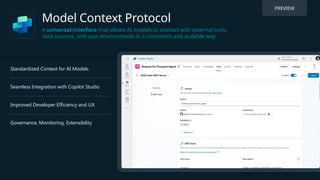
Model Context Protocol
Auniversal interface that allows AI models to interact with external tools,
data sources, and user environments in a consistent and scalable way
PREVIEW
Standardized Context for AI Models
Seamless Integration with Copilot Studio
Improved Developer Efficiency and UX
Governance, Monitoring, Extensibility
4.
Model Context Protocol(MCP):
Unlocking AI’s potential with Copilot Studio
What is MCP?
• A universal protocol by Anthropic (Nov 2024) enabling Large
Language Models (LLMs) to seamlessly interact with external
tools and data sources without custom integrations.
• Acts as a universal connector (think USB-C for AI), providing
standardized, real-time interaction between AI and various
apps, services, or data.
5.
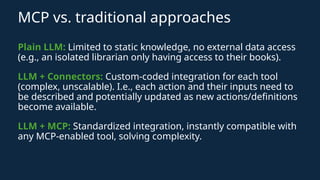
MCP vs. traditionalapproaches
Plain LLM: Limited to static knowledge, no external data access
(e.g., an isolated librarian only having access to their books).
LLM + Connectors: Custom-coded integration for each tool
(complex, unscalable). I.e., each action and their inputs need to
be described and potentially updated as new actions/definitions
become available.
LLM + MCP: Standardized integration, instantly compatible with
any MCP-enabled tool, solving complexity.
6.
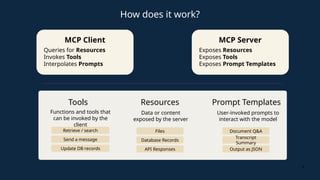
MCP Server
Exposes Resources
ExposesTools
Exposes Prompt Templates
6
MCP Client
Queries for Resources
Invokes Tools
Interpolates Prompts
How does it work?
Tools
Functions and tools that
can be invoked by the
client
Prompt Templates
User-invoked prompts to
interact with the model
Retrieve / search
Send a message
Update DB records
Document Q&A
Transcript
Summary
Output as JSON
Resources
Data or content
exposed by the server
Files
Database Records
API Responses
7.
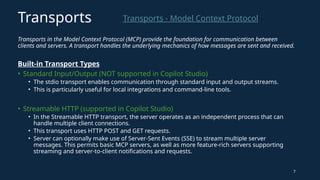
Transports in theModel Context Protocol (MCP) provide the foundation for communication between
clients and servers. A transport handles the underlying mechanics of how messages are sent and received.
Built-in Transport Types
• Standard Input/Output (NOT supported in Copilot Studio)
• The stdio transport enables communication through standard input and output streams.
• This is particularly useful for local integrations and command-line tools.
• Streamable HTTP (supported in Copilot Studio)
• In the Streamable HTTP transport, the server operates as an independent process that can
handle multiple client connections.
• This transport uses HTTP POST and GET requests.
• Server can optionally make use of Server-Sent Events (SSE) to stream multiple server
messages. This permits basic MCP servers, as well as more feature-rich servers supporting
streaming and server-to-client notifications and requests.
7
Transports - Model Context Protocol
Transports
8.
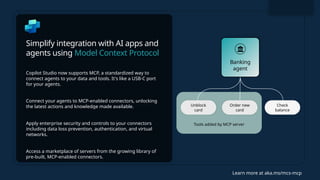
Simplify integration withAI apps and
agents using Model Context Protocol
Copilot Studio now supports MCP, a standardized way to
connect agents to your data and tools. It's like a USB-C port
for your agents.
Connect your agents to MCP-enabled connectors, unlocking
the latest actions and knowledge made available.
Apply enterprise security and controls to your connectors
including data loss prevention, authentication, and virtual
networks.
Access a marketplace of servers from the growing library of
pre-built, MCP-enabled connectors.
Learn more at aka.ms/mcs-mcp
Tools added by MCP server
Check
balance
Unblock
card
Order new
card
Banking
agent
9.
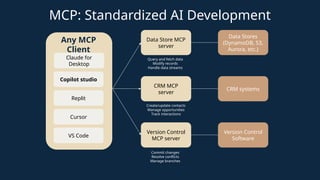
MCP: Standardized AIDevelopment
Data Store MCP
server
CRM MCP
server
Version Control
MCP server
Data Stores
(DynamoDB, S3,
Aurora, etc.)
CRM systems
Version Control
Software
Query and fetch data
Modify records
Handle data streams
Create/update contacts
Manage opportunities
Track interactions
Commit changes
Resolve conflicts
Manage branches
Claude for
Desktop
Copilot studio
Cursor
Any MCP
Client
Replit
VS Code
10.
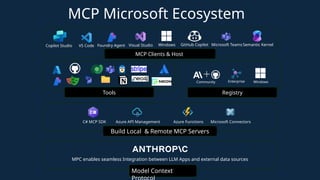
MCP Microsoft Ecosystem
ModelContext
MPC enables seamless Integration between LLM Apps and external data sources
Azure API Management
Build Local & Remote MCP Servers
Tools
Community Enterprise Windows
MCP Clients & Host
Copilot Studio VS Code Foundry Agent Visual Studio Semantic Kernel
Registry
GitHub Copilot
C# MCP SDK Microsoft Connectors
Azure Functions
Microsoft Teams
Windows
11.
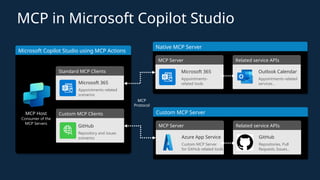
MCP in MicrosoftCopilot Studio
Microsoft Copilot Studio using MCP Actions
MCP Host
Consumer of the
MCP Servers
Standard MCP Clients
Microsoft 365
Appointments-related
scenarios
Custom MCP Clients
GitHub
Repository and issues
scenarios
Native MCP Server
MCP Server
Microsoft 365
Appointments-
related tools
Related service APIs
Outlook Calendar
Appointments-related
services…
Custom MCP Server
MCP Server
Azure App Service
Custom MCP Server
for GitHub related tools
Related service APIs
GitHub
Repositories, Pull
Requests, Issues…
MCP
Protocol
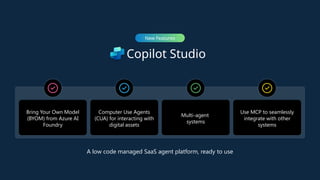
Copilot Studio
New Features
BringYour Own Model
(BYOM) from Azure AI
Foundry
Computer Use Agents
(CUA) for interacting with
digital assets
Multi-agent
systems
Use MCP to seamlessly
integrate with other
systems
A low code managed SaaS agent platform, ready to use
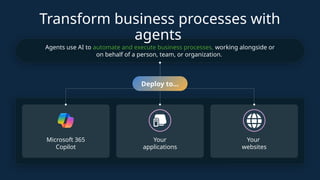
Transform business processeswith
agents
Agents use AI to automate and execute business processes, working alongside or
on behalf of a person, team, or organization.
Deploy to…
Microsoft 365
Copilot
Your
applications
Your
websites
22.
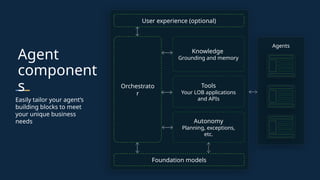
Agent
component
s
Easily tailor youragent’s
building blocks to meet
your unique business
needs
User experience (optional)
Orchestrato
r
Knowledge
Grounding and memory
Tools
Your LOB applications
and APIs
Autonomy
Planning, exceptions,
etc.
Foundation models
Agents
23.
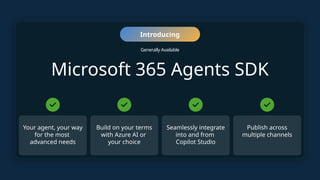
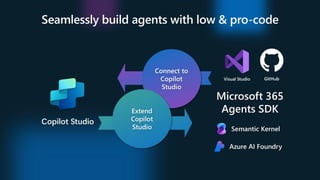
Microsoft 365 AgentsSDK
Introducing
Generally Available
Your agent, your way
for the most
advanced needs
Build on your terms
with Azure AI or
your choice
Seamlessly integrate
into and from
Copilot Studio
Publish across
multiple channels
24.
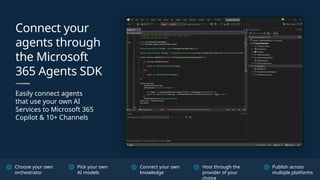
Connect your
agents through
theMicrosoft
365 Agents SDK
Easily connect agents
that use your own AI
Services to Microsoft 365
Copilot & 10+ Channels
Choose your own
orchestrator
Pick your own
AI models
Connect your own
knowledge
Host through the
provider of your
choice
Publish across
multiple platforms
25.
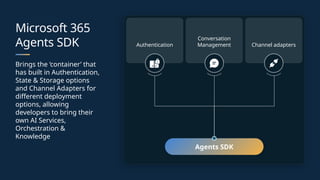
Microsoft 365
Agents SDK
Bringsthe ‘container’ that
has built in Authentication,
State & Storage options
and Channel Adapters for
different deployment
options, allowing
developers to bring their
own AI Services,
Orchestration &
Knowledge
Authentication
Conversation
Management Channel adapters
Agents SDK
27.
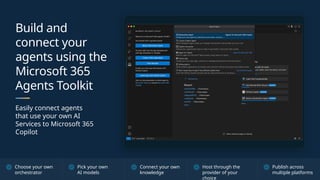
Build and
connect your
agentsusing the
Microsoft 365
Agents Toolkit
Easily connect agents
that use your own AI
Services to Microsoft 365
Copilot
Choose your own
orchestrator
Pick your own
AI models
Connect your own
knowledge
Host through the
provider of your
choice
Publish across
multiple platforms
#1 Speaker Notes:
Welcome to our session, “Uncover High-Value ROI AI Use Cases.” This session is designed to help us identify and evaluate opportunities where AI can deliver the highest impact and return on investment within your organization.
During this session, we will:
• Explore characteristics of high-value use cases.
• Discuss the intersection of AI readiness and organizational needs.
• Highlight examples of how Copilot conversational AI and autonomous agents can transform processes and add measurable value.
Let’s dive in and discover how to align AI capabilities with strategic goals!
#7 his slide provides an overview of Transports in the Model Context Protocol (MCP), which are mechanisms that handle communication between clients and servers.
Key Points:
Purpose: Transports manage how messages are sent and received in MCP.
Built-in Transport Types:
Standard Input/Output (stdio): Enables communication via standard input/output streams. It is ideal for local integrations and command-line tools.
Streamable HTTP: Allows servers to handle multiple client connections using HTTP POST and GET. It supports Server-Sent Events (SSE) to stream multiple messages from server to client, making it suitable for both basic and advanced MCP server implementations.
#21
The last few years have been amazing for AI and for technology
SHIFT to a conversation first approach when interacting with tech
--
Now it is super common for us to open BANKING apps and see an agent ready to help us, with context
In Microsoft we can open our AskHR agent in Microsoft Teams and get answers we need
Our lives are better as a result, why? Not just because we are getting information and getting it faster, they give us focus, provide us with information based on permissions or situation and they are driving towards a resolution
#22 This slide illustrates the Agent Components architecture, outlining the modular building blocks that enable you to tailor AI agents to suit your specific business needs.
Key Elements:
🧠 Orchestrator (Core Logic)
Acts as the central brain coordinating various components:
Interfaces with Knowledge, Tools, and Autonomy
Facilitates communication between modules
Manages workflow and execution flow
📚 Knowledge
Represents grounding and memory
Provides contextual understanding and long-term memory
Enables the agent to retain and retrieve relevant business information
🔧 Tools
Refers to Line-of-Business (LOB) applications and APIs
Powers agent actions (e.g., CRM lookups, scheduling, data retrieval)
Critical for operational utility and integration with enterprise systems
🤖 Autonomy
Handles planning, decision-making, and exception handling
Gives the agent the ability to act independently and adapt to changes
🧱 Foundation Models
Large language models or other foundational AI models
Provide generative and interpretative capabilities
Serve as the base intelligence layer
👤 User Experience (Optional)
Front-end or UI components interacting with the user
Optional layer based on the implementation context (e.g., chatbots, voice interfaces)
🤝 Agents
Multiple agents can be instantiated using this architecture
Each agent can have its own configuration, purpose, and capabilities
#23
*This is where the Microsoft 365 Agents SDK comes in, which does exactly that.
CLICK*** (Yes fast)
#24 **CLICK STRAIGHT AWAY*** (YES AGAIN)
The Microsoft 365 Agents SDK is an open source SDK from Microsoft
that is available in C#, JS, PYTHON
It allows you to bring your own MODE, ORCHestrator and knowledge
**CLICK**
make use of the CONV MANAGEMENT capabilities of the SDK including state, storage and auth.
It then takes that and allows you to DEPLOY it to a channel where your customers are, WHERE YOUR USERS ARE such as Microsoft Teams or Microsoft 365 Copilot
**CLICK**
#25 -> make use of the CONV MANAGEMENT capabilities of the SDK including state, storage and auth.
-> It then takes that and allows you to DEPLOY it to a channel where your customers are, such as Microsoft Teams or Microsoft 365 Copilot
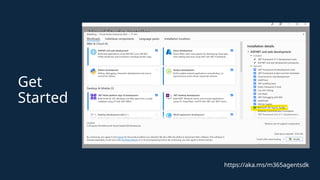
#27 Now what is facilitating this, enabling this, and making it super easy is the Microsoft 365 Agents Toolkit.
*CLICK**





![How Big Brands are Taking Your Traffic in Alberta [Data Inside].pptx](https://cdn.slidesharecdn.com/ss_thumbnails/howbigbrandsaretakingyourtrafficinalbertadatainside-260123180142-42d276f3-thumbnail.jpg?width=640&height=640&fit=bounds)


