Presented By - Pratik Sawant
Guided By - prof. K. K. Joshi
Contents
 Overview
 Compute Services
 Storage Services
 Core Infrastructure – AppFabric
 Azure Platform Architecture
 SQL Azure
 SQL Azure Architecture
 Azure Virtual Network
 Azure Content Delivery Network
 Azure Platform Appliance
Overview
 Cloud Operating System by Microsoft
 Scalable runtime environment for web and distributed
applications
 Concept of role is the base to organize applications
 It offers
 Compute Services
 Storage Services
 Other Services
 Hence, Platform-as-a-Service
Compute Services
 Computing is core of Azure
 It offers different roles i.e. a runtime environment
customized for specific compute task
 Roles managed and instantiated by Azure
 Three roles are –
 Web Role
 Worker Role
 Virtual Machine Role
Web Role
 Configuration and Customization to run web
applications
 Requires programming languages/ technologies
supported by IIS (Internet Information Srvices)
 Eg. ASP.NET, PHP, WCF (Windows Communication
Foundation), Fast CGI
Worker Role
 Runs applications and services level tasks, which does
not requires IIS
 Supporting background tasks like compressing
uploaded image, running scripts for database etc.
Virtual Machine Role
 Allows developers to fully control the computing stack
of their compute service by defining a custom image of
the Windows Server
 Based on the Windows Hyper-V virtualization
technology
 Provides finer control on compute service and
resources
 additional administrative effort is required for
configuration, installation, and management of
services
Storage Services
 Compute resources stores data in the local file system
temporarily i.e. until current execution cycle of the role
 Hence, data loss on while restarting or activating on
different physical machine
 Azure provides more durable and redundant storage
 It can be accessed by multiple clients simultaniously
 Storage services are –
 Blob
 Azure Drive
 Tables
 Queues
 Storage services are geo-replicated 3 times
Blob
 Stores Large data in form of binary objects
 Allows adding of metadata for description
 Allows to take snapshots for backup purpose
 For optimal distribution, blobs are kept close to user
requesting them
 Two types of Blob –
 Block Blob
 Page Blob
Block Blob
 Composed of blocks
 Optimized for sequential access
 Can vary from 4MB to 200GB dimension
Page Blob
 Stored in form of pages and identified according to
offset from beginning
 Optimized for random access
 Can store maximum 1 TB of data
Azure Drive
 A page blob mounted as a part of NTFS tree
 Single Virtual Hard Drive (VHD) stores entire file
system
 VHD Can be mounted as NTFS file system by Azure
Compute Resources
 Persistent and Durable storage
Tables
 Allows to store entities with their properties
 Entities are stored in form of table
 Each row is identified as by a key or unique index build
on the table
 No schema enforcing done neither entity relationship
can be shown, so more analogous to spreadsheet than
to SQL table
 Can handle large amount of data
 Tables are partitioned among several servers for load
balancing
Table
 Maximum storage capacity of Table
 Contains Maximum of 100 TB data
 Rows can have maximum 255 properties
 Maximum 1 MB data per row
 Maximum dimension of row and partition key is 1 KB
Queues
 Allows inter applications communication by
exchanging messages
 After reading message, it is set invisible and not
available for other applications
 After processing message, it is deleted from queue
 After reading message, on timeout, message is again
made visible
 Hence, FIFO is not followed strictly
 Peeking is alternate way, peeked messages are not
considered as processed
Core Infrastructure : AppFabric
 A middleware for developing, deploying and managing
applications on cloud or for integrating existing
applications with cloud services
 AppFabric implements an optimized infrastructure
supporting
 scaling out and high availability
 sandboxing and multitenancy
 State management
 dynamic address resolution and routing
Core Infrastructure : AppFabric
 To simplify common tasks in distributed environment,
middleware offers collection of services like –
 Communication
 Authentication
 Authorization
 Data Access
 Services are available through language-agnostic
interface to support heterogeneous applications
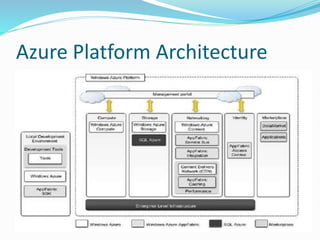
Azure Platform Architecture
Access Control
 Flexible Access control to resources and services
 Flexibility is in terms of ability to secure components
of application and defile access control policy for the
user or group of users
 Integrate several authentication providers into a single
coherent identity management framework
 Allows easy building of hybrid systems, with some
parts existing in the private premises and others
deployed in the public cloud
Service Bus
 It’s connectivity infrastructure working with AppFabric
 Allows applications to interact with different protocols
and patterns
 Reliable i.e. guaranteed delivery
 Main Motto –
 Allows transparent network traversal
 simplify the development of loosely coupled
applications
 To avoid renouncing security and reliability
Service Bus
 Services are available on URL
 It supports
 Publish-subscribe model
 Full duplex communication
 Peer-to-peer or point to point communication
 Unicast and multicast delivery in one way
communication
 Asynchronous messaging
 Prices on a pay-as-you-go basis i.e. Pay only when you
use
Azure Cache
 Cache is used over durable storage solution to avoid
bottleneckness due to
 Client requests
 Dataset size dimensions
 Stores .NET objects and common data formats like
xml, table rows and binary data
 Easily integrates with ASP.NET applications
 Available cache sizes are ranging from 128 MB to 4 GB
SQL Azure
 Relational Database service hosted on windows Azure
 Extends capacity of SQL server to cloud
 Scalable, highly available, fault-tolerant relational
database
 Fully compatible with interface of SQL server
 Manageable by REST API
 Max size for web application is 1 GB or 5 GB
 Max size for enterprise application is 10 GB to 50 GB
SQL Azure Architecture
Azure Virtual Network
 Networking services which includes –
 Azure Connect
 Azure Traffic Manager
 Azure Connect
 Setup for IP-based network connectivity in private
premises
 Roles deployed on Azure Cloud
 Useful for VM role
 Cloud becomes part of private network of enterprise
Azure Virtual Network
 Azure Traffic Manager
 Load Balancing to HTTP and HTTPS ports
 Allows to choose load balancing strategies-
 Performance
 Round-Robin
 Failover
Azure Content Delivery Network
 Improves Content Delivery capability
 Allows serving
 Web objects
 Streaming content
 Distributed at 24 different places across the world
Azure Platform Appliance
 Making Azure platform available for third party data
centre
 Includes
 Windows Azure
 Azure SQL
 MS Specifies network, storage and server hardware
 It is ideal for two major scenarios
 Organization with very large computing needs
 Organizations which can not afford sending data
outside their premises
Thank You!

Microsoft Azure

  • 1.
    Presented By -Pratik Sawant Guided By - prof. K. K. Joshi
  • 2.
    Contents  Overview  ComputeServices  Storage Services  Core Infrastructure – AppFabric  Azure Platform Architecture  SQL Azure  SQL Azure Architecture  Azure Virtual Network  Azure Content Delivery Network  Azure Platform Appliance
  • 3.
    Overview  Cloud OperatingSystem by Microsoft  Scalable runtime environment for web and distributed applications  Concept of role is the base to organize applications  It offers  Compute Services  Storage Services  Other Services  Hence, Platform-as-a-Service
  • 4.
    Compute Services  Computingis core of Azure  It offers different roles i.e. a runtime environment customized for specific compute task  Roles managed and instantiated by Azure  Three roles are –  Web Role  Worker Role  Virtual Machine Role
  • 5.
    Web Role  Configurationand Customization to run web applications  Requires programming languages/ technologies supported by IIS (Internet Information Srvices)  Eg. ASP.NET, PHP, WCF (Windows Communication Foundation), Fast CGI
  • 6.
    Worker Role  Runsapplications and services level tasks, which does not requires IIS  Supporting background tasks like compressing uploaded image, running scripts for database etc.
  • 7.
    Virtual Machine Role Allows developers to fully control the computing stack of their compute service by defining a custom image of the Windows Server  Based on the Windows Hyper-V virtualization technology  Provides finer control on compute service and resources  additional administrative effort is required for configuration, installation, and management of services
  • 8.
    Storage Services  Computeresources stores data in the local file system temporarily i.e. until current execution cycle of the role  Hence, data loss on while restarting or activating on different physical machine  Azure provides more durable and redundant storage  It can be accessed by multiple clients simultaniously  Storage services are –  Blob  Azure Drive  Tables  Queues  Storage services are geo-replicated 3 times
  • 9.
    Blob  Stores Largedata in form of binary objects  Allows adding of metadata for description  Allows to take snapshots for backup purpose  For optimal distribution, blobs are kept close to user requesting them  Two types of Blob –  Block Blob  Page Blob
  • 10.
    Block Blob  Composedof blocks  Optimized for sequential access  Can vary from 4MB to 200GB dimension
  • 11.
    Page Blob  Storedin form of pages and identified according to offset from beginning  Optimized for random access  Can store maximum 1 TB of data
  • 12.
    Azure Drive  Apage blob mounted as a part of NTFS tree  Single Virtual Hard Drive (VHD) stores entire file system  VHD Can be mounted as NTFS file system by Azure Compute Resources  Persistent and Durable storage
  • 13.
    Tables  Allows tostore entities with their properties  Entities are stored in form of table  Each row is identified as by a key or unique index build on the table  No schema enforcing done neither entity relationship can be shown, so more analogous to spreadsheet than to SQL table  Can handle large amount of data  Tables are partitioned among several servers for load balancing
  • 14.
    Table  Maximum storagecapacity of Table  Contains Maximum of 100 TB data  Rows can have maximum 255 properties  Maximum 1 MB data per row  Maximum dimension of row and partition key is 1 KB
  • 15.
    Queues  Allows interapplications communication by exchanging messages  After reading message, it is set invisible and not available for other applications  After processing message, it is deleted from queue  After reading message, on timeout, message is again made visible  Hence, FIFO is not followed strictly  Peeking is alternate way, peeked messages are not considered as processed
  • 16.
    Core Infrastructure :AppFabric  A middleware for developing, deploying and managing applications on cloud or for integrating existing applications with cloud services  AppFabric implements an optimized infrastructure supporting  scaling out and high availability  sandboxing and multitenancy  State management  dynamic address resolution and routing
  • 17.
    Core Infrastructure :AppFabric  To simplify common tasks in distributed environment, middleware offers collection of services like –  Communication  Authentication  Authorization  Data Access  Services are available through language-agnostic interface to support heterogeneous applications
  • 18.
  • 19.
    Access Control  FlexibleAccess control to resources and services  Flexibility is in terms of ability to secure components of application and defile access control policy for the user or group of users  Integrate several authentication providers into a single coherent identity management framework  Allows easy building of hybrid systems, with some parts existing in the private premises and others deployed in the public cloud
  • 20.
    Service Bus  It’sconnectivity infrastructure working with AppFabric  Allows applications to interact with different protocols and patterns  Reliable i.e. guaranteed delivery  Main Motto –  Allows transparent network traversal  simplify the development of loosely coupled applications  To avoid renouncing security and reliability
  • 21.
    Service Bus  Servicesare available on URL  It supports  Publish-subscribe model  Full duplex communication  Peer-to-peer or point to point communication  Unicast and multicast delivery in one way communication  Asynchronous messaging  Prices on a pay-as-you-go basis i.e. Pay only when you use
  • 22.
    Azure Cache  Cacheis used over durable storage solution to avoid bottleneckness due to  Client requests  Dataset size dimensions  Stores .NET objects and common data formats like xml, table rows and binary data  Easily integrates with ASP.NET applications  Available cache sizes are ranging from 128 MB to 4 GB
  • 23.
    SQL Azure  RelationalDatabase service hosted on windows Azure  Extends capacity of SQL server to cloud  Scalable, highly available, fault-tolerant relational database  Fully compatible with interface of SQL server  Manageable by REST API  Max size for web application is 1 GB or 5 GB  Max size for enterprise application is 10 GB to 50 GB
  • 24.
  • 25.
    Azure Virtual Network Networking services which includes –  Azure Connect  Azure Traffic Manager  Azure Connect  Setup for IP-based network connectivity in private premises  Roles deployed on Azure Cloud  Useful for VM role  Cloud becomes part of private network of enterprise
  • 26.
    Azure Virtual Network Azure Traffic Manager  Load Balancing to HTTP and HTTPS ports  Allows to choose load balancing strategies-  Performance  Round-Robin  Failover
  • 27.
    Azure Content DeliveryNetwork  Improves Content Delivery capability  Allows serving  Web objects  Streaming content  Distributed at 24 different places across the world
  • 28.
    Azure Platform Appliance Making Azure platform available for third party data centre  Includes  Windows Azure  Azure SQL  MS Specifies network, storage and server hardware  It is ideal for two major scenarios  Organization with very large computing needs  Organizations which can not afford sending data outside their premises
  • 29.