KONGUNADU COLLEGE OF ENGINEERING &
TECHNOLOGY
(AUTONOMOUS)
20EE807PE – MICROCONTROLLER BASED SYSTEM
DESIGN
UNIT – II
PIC PROGRAMMING AND TIMERS
TAMILNESAN P,
AP/EEE
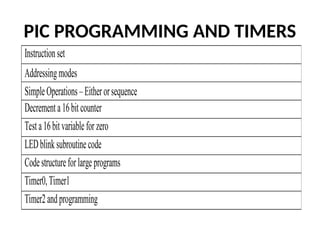
PIC PROGRAMMING AND TIMERS
Instructionset
Addressingmodes
SimpleOperations–Eitherorsequence
Decrementa16bitcounter
Testa16bitvariableforzero
LEDblinksubroutinecode
Codestructureforlargeprograms
Timer0,Timer1
Timer2andprogramming
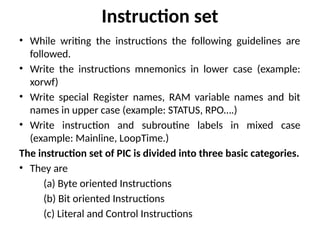
Instruction set
• While writing the instructions the following guidelines are
followed.
• Write the instructions mnemonics in lower case (example:
xorwf)
• Write special Register names, RAM variable names and bit
names in upper case (example: STATUS, RPO….)
• Write instruction and subroutine labels in mixed case
(example: Mainline, LoopTime.)
The instruction set of PIC is divided into three basic categories.
• They are
(a) Byte oriented Instructions
(b) Bit oriented Instructions
(c) Literal and Control Instructions
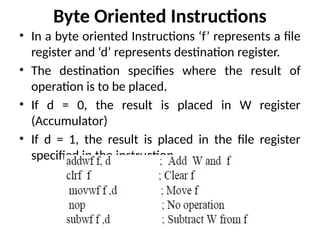
Byte Oriented Instructions
• In a byte oriented Instructions ‘f’ represents a file
register and ‘d’ represents destination register.
• The destination specifies where the result of
operation is to be placed.
• If d = 0, the result is placed in W register
(Accumulator)
• If d = 1, the result is placed in the file register
specified in the instruction.
Bit Oriented Instruction
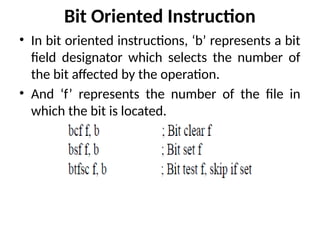
• In bit oriented instructions, ‘b’ represents a bit
field designator which selects the number of
the bit affected by the operation.
• And ‘f’ represents the number of the file in
which the bit is located.
Literal and Control Instructions
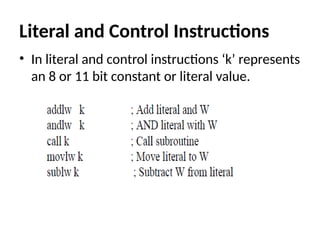
• In literal and control instructions ‘k’ represents
an 8 or 11 bit constant or literal value.
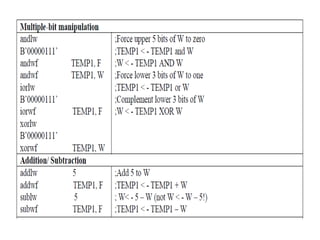
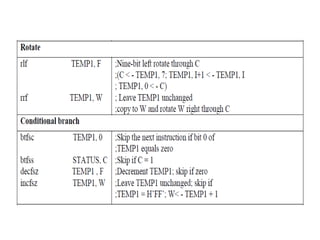
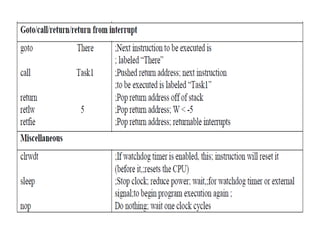
CLASSIFICATION OF INSTRUCTIONS: [Based
on Operation]
• All the instructions of the PIC microcontroller are classified into
nearly 9 groups. They are given below with examples.
Addressing modes
The PIC microcontroller supports
• Immediate addressing mode
• Register operand addressing mode
• Memory operand addressing mode
1. Direct Addressing Mode
2. Indirect Addressing mode
Immediate addressing mode:
• In this mode, the operand is a number or
constant, not an address as MOVLW43H.
• The operand here is a data not an address.
• So in this addressing mode of PIC
microcontroller data is direct transfer and data
is immediately after opcode.
Register operand addressing mode
• In this mode the operand is a register which
holds the data to be execute.
• Register operand addressing mode deals with
registers like W, FSR (File Select Register), INDT
(Indirect Register)
Memory Operand addressing mode
• In this mode, the operand is an address of
memory location which holds the data to be
execute.
• The memory operand addressing mode is
classified into,
Direct addressing mode
Indirect addressing mode
Direct Addressing Mode
• In direct addressing mode 7 bits (0-6) of the
instruction identify the register file address and the
8th bit of the register file address register bank select
bit (RP0).
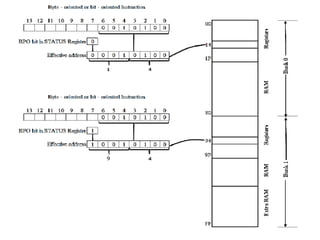
• The figure illustrates direct addressing being used to
access register file address 14H or 94H depending on
the value of RP0.
• If the RP0 bit in STATUS register is 0, then the effective
address feeds the 14H in to the Register in the Bank 0.
• If the RP0 bit is 1, then the effective address feeds the
94H in to the register in the Bank 1.
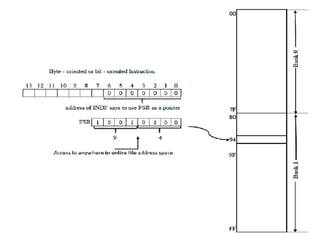
Indirect Addressing Mode
• Every instruction that can employ the direct addressing mode
can employ the indirect addressing mode.
• In the indirect addressing mode the full 8-bit register file
address is first written into a File Select Register (FSR) using
direct addressing.
• FSR serves as an address pointer to any address throughout
the entire register file.
• A subsequent direct access of INDF will actually access the
register file using the content of FSR as a pointer to the
desired location of the operand.
• This is possible by making the value of the register bank
select bit RP0, the FSR register is accessed at either address
14H or 94H.
14 H = 00010100 94 H = 10010100
Microcontroller Based System Design Unit-II  PIC Interrupts.pptx

Microcontroller Based System Design Unit-II PIC Interrupts.pptx

  • 1.
    KONGUNADU COLLEGE OFENGINEERING & TECHNOLOGY (AUTONOMOUS) 20EE807PE – MICROCONTROLLER BASED SYSTEM DESIGN UNIT – II PIC PROGRAMMING AND TIMERS TAMILNESAN P, AP/EEE
  • 2.
    PIC PROGRAMMING ANDTIMERS Instructionset Addressingmodes SimpleOperations–Eitherorsequence Decrementa16bitcounter Testa16bitvariableforzero LEDblinksubroutinecode Codestructureforlargeprograms Timer0,Timer1 Timer2andprogramming
  • 3.
    Instruction set • Whilewriting the instructions the following guidelines are followed. • Write the instructions mnemonics in lower case (example: xorwf) • Write special Register names, RAM variable names and bit names in upper case (example: STATUS, RPO….) • Write instruction and subroutine labels in mixed case (example: Mainline, LoopTime.) The instruction set of PIC is divided into three basic categories. • They are (a) Byte oriented Instructions (b) Bit oriented Instructions (c) Literal and Control Instructions
  • 4.
    Byte Oriented Instructions •In a byte oriented Instructions ‘f’ represents a file register and ‘d’ represents destination register. • The destination specifies where the result of operation is to be placed. • If d = 0, the result is placed in W register (Accumulator) • If d = 1, the result is placed in the file register specified in the instruction.
  • 5.
    Bit Oriented Instruction •In bit oriented instructions, ‘b’ represents a bit field designator which selects the number of the bit affected by the operation. • And ‘f’ represents the number of the file in which the bit is located.
  • 6.
    Literal and ControlInstructions • In literal and control instructions ‘k’ represents an 8 or 11 bit constant or literal value.
  • 7.
    CLASSIFICATION OF INSTRUCTIONS:[Based on Operation] • All the instructions of the PIC microcontroller are classified into nearly 9 groups. They are given below with examples.
  • 11.
    Addressing modes The PICmicrocontroller supports • Immediate addressing mode • Register operand addressing mode • Memory operand addressing mode 1. Direct Addressing Mode 2. Indirect Addressing mode
  • 12.
    Immediate addressing mode: •In this mode, the operand is a number or constant, not an address as MOVLW43H. • The operand here is a data not an address. • So in this addressing mode of PIC microcontroller data is direct transfer and data is immediately after opcode.
  • 13.
    Register operand addressingmode • In this mode the operand is a register which holds the data to be execute. • Register operand addressing mode deals with registers like W, FSR (File Select Register), INDT (Indirect Register)
  • 14.
    Memory Operand addressingmode • In this mode, the operand is an address of memory location which holds the data to be execute. • The memory operand addressing mode is classified into, Direct addressing mode Indirect addressing mode
  • 15.
    Direct Addressing Mode •In direct addressing mode 7 bits (0-6) of the instruction identify the register file address and the 8th bit of the register file address register bank select bit (RP0). • The figure illustrates direct addressing being used to access register file address 14H or 94H depending on the value of RP0. • If the RP0 bit in STATUS register is 0, then the effective address feeds the 14H in to the Register in the Bank 0. • If the RP0 bit is 1, then the effective address feeds the 94H in to the register in the Bank 1.
  • 17.
    Indirect Addressing Mode •Every instruction that can employ the direct addressing mode can employ the indirect addressing mode. • In the indirect addressing mode the full 8-bit register file address is first written into a File Select Register (FSR) using direct addressing. • FSR serves as an address pointer to any address throughout the entire register file. • A subsequent direct access of INDF will actually access the register file using the content of FSR as a pointer to the desired location of the operand. • This is possible by making the value of the register bank select bit RP0, the FSR register is accessed at either address 14H or 94H. 14 H = 00010100 94 H = 10010100