DEPARTMENT OF ELECTRONICS
AND COMMUNICATION
ENGINEERING
EC8691
MICROPROCESSORS AND MICROCONTROLLERS
COURSE MATERIAL
UNIT -1
THE 8086 MICROPROCESSORS
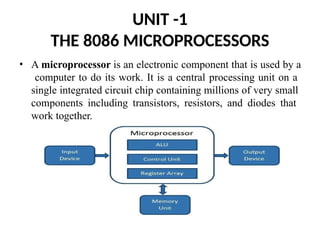
• A microprocessor is an electronic component that is used by a
computer to do its work. It is a central processing unit on a
single integrated circuit chip containing millions of very small
components including transistors, resistors, and diodes that
work together.
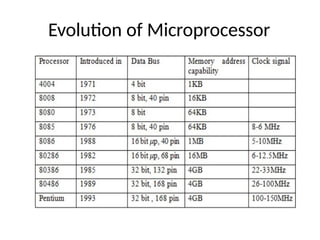
Evolution of Microprocessor
UNIT 1
THE 8086 MICROPROCESSOR
Introduction to 8086 – Microprocessor
architecture – Addressing modes -
Instruction
language programming –
set and assembler directives – Assembly
Modular
Programming - Linking and Relocation - Stacks
- Procedures – Macros – Interrupts and
interrupt service routines – Byte and String
Manipulation.
UNIT 1
THE 8086 MICROPROCESSOR
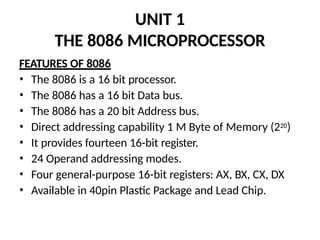
FEATURES OF 8086
• The 8086 is a 16 bit processor.
• The 8086 has a 16 bit Data bus.
• The 8086 has a 20 bit Address bus.
• Direct addressing capability 1 M Byte of Memory (220)
• It provides fourteen 16-bit register.
• 24 Operand addressing modes.
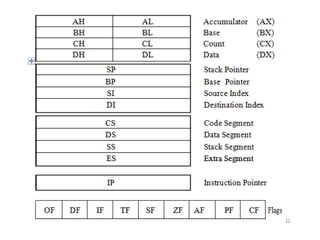
• Four general-purpose 16-bit registers: AX, BX, CX, DX
• Available in 40pin Plastic Package and Lead Chip.
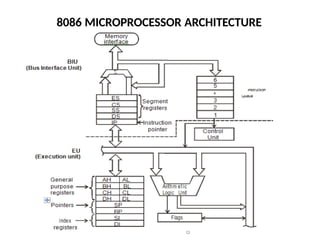
8086 MICROPROCESSOR ARCHITECTURE
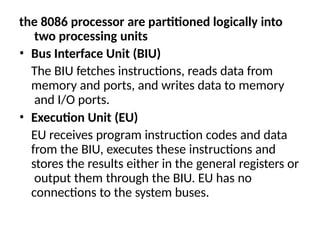
the 8086 processor are partitioned logically into
two processing units
• Bus Interface Unit (BIU)
The BIU fetches instructions, reads data from
memory and ports, and writes data to memory
and I/O ports.
• Execution Unit (EU)
EU receives program instruction codes and data
from the BIU, executes these instructions and
stores the results either in the general registers or
output them through the BIU. EU has no
connections to the system buses.
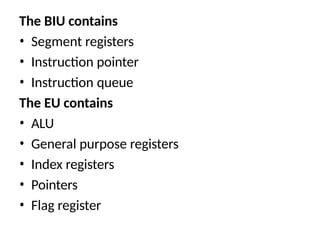
The BIU contains
• Segment registers
• Instruction pointer
• Instruction queue
The EU contains
• ALU
• General purpose registers
• Index registers
• Pointers
• Flag register
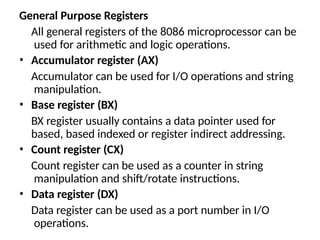
General Purpose Registers
All general registers of the 8086 microprocessor can be
used for arithmetic and logic operations.
• Accumulator register (AX)
Accumulator can be used for I/O operations and string
manipulation.
• Base register (BX)
BX register usually contains a data pointer used for
based, based indexed or register indirect addressing.
• Count register (CX)
Count register can be used as a counter in string
manipulation and shift/rotate instructions.
• Data register (DX)
Data register can be used as a port number in I/O
operations.
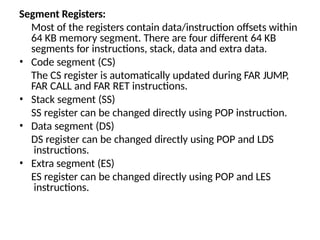
Segment Registers:
Most of the registers contain data/instruction offsets within
64 KB memory segment. There are four different 64 KB
segments for instructions, stack, data and extra data.
• Code segment (CS)
The CS register is automatically updated during FAR JUMP,
FAR CALL and FAR RET instructions.
• Stack segment (SS)
SS register can be changed directly using POP instruction.
• Data segment (DS)
DS register can be changed directly using POP and LDS
instructions.
• Extra segment (ES)
ES register can be changed directly using POP and LES
instructions.
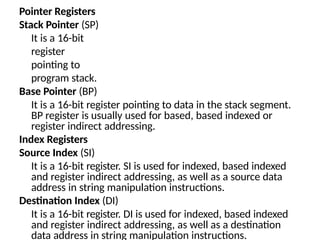
Pointer Registers
Stack Pointer (SP)
It is a 16-bit
register
pointing to
program stack.
Base Pointer (BP)
It is a 16-bit register pointing to data in the stack segment.
BP register is usually used for based, based indexed or
register indirect addressing.
Index Registers
Source Index (SI)
It is a 16-bit register. SI is used for indexed, based indexed
and register indirect addressing, as well as a source data
address in string manipulation instructions.
Destination Index (DI)
It is a 16-bit register. DI is used for indexed, based indexed
and register indirect addressing, as well as a destination
data address in string manipulation instructions.
Instruction Pointer (IP)
It is a 16-bit register. The operation is same as the
program counter. The IP register is updated by
the BIU to point to the address of the next
instruction. Programs do not have direct access
to the IP, but during execution of a program the IP
can be modified or saved and restored from the
stack.
Flag register
It is a 16-bit register containing nine 1-bit flags:
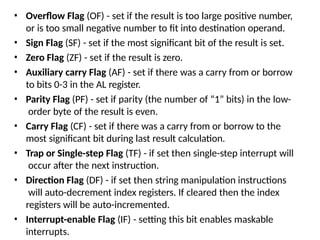
• Six status or condition flags (OF, SF, ZF, AF, PF, CF)
• Three control flags ( TF, DF, IF)
• Overflow Flag (OF) - set if the result is too large positive number,
or is too small negative number to fit into destination operand.
• Sign Flag (SF) - set if the most significant bit of the result is set.
• Zero Flag (ZF) - set if the result is zero.
• Auxiliary carry Flag (AF) - set if there was a carry from or borrow
to bits 0-3 in the AL register.
• Parity Flag (PF) - set if parity (the number of “1” bits) in the low-
order byte of the result is even.
• Carry Flag (CF) - set if there was a carry from or borrow to the
most significant bit during last result calculation.
• Trap or Single-step Flag (TF) - if set then single-step interrupt will
occur after the next instruction.
• Direction Flag (DF) - if set then string manipulation instructions
will auto-decrement index registers. If cleared then the index
registers will be auto-incremented.
• Interrupt-enable Flag (IF) - setting this bit enables maskable
interrupts.
Instruction Queue
The instruction queue is a First-In-First-out (FIFO)
group of registers where 6 bytes of instruction
code is pre-fetched from memory ahead of time.
It is being done to speed-up program execution
by overlapping instruction fetch and execution.
This mechanism is known as PIPELINING.
ALU
It is a 16 bit register. It can add, subtract,
increment, decrement, complement, shift
numbers and performs AND, OR, XOR operations.
Control unit
The control unit in the EU directs the internal
operations like RD , WR , M/IO
Instruction Set
• Data moving instructions.
• Arithmetic instructions - add, subtract, increment,
decrement, convert byte/word and compare.
• Logic instructions - AND, OR, exclusive OR,
shift/rotate and test.
• String manipulation instructions - load, store,
move, compare and scan for byte/ word.
• Control transfer instructions - conditional,
unconditional, call subroutine and return from
subroutine.
• Input/Output instructions.
• Other instructions - setting/clearing flag bits, stack
operations, software interrupts, etc.
Addressing modes
• Implied - the data value/data address is implicitly associated with the
instruction.
• Register - references the data in a register or in a register pair.
• Immediate - the data is provided in the instruction.
• Direct - the instruction operand specifies the memory address where
data is
located.
• Register indirect - instruction specifies a register containing an address,
where data is located. This addressing mode works with SI, DI, BX and BP
registers.
• Based - 8-bit or 16-bit instruction operand is added to the contents of a
base register (BX or BP), the resulting value is a pointer to location where
data resides.
• Indexed - 8-bit or 16-bit instruction operand is added to the contents of an
index register (SI or DI), the resulting value is a pointer to location where
data resides.
• Based Indexed - the contents of a base register (BX or BP) is added to the
contents of an index register (SI or DI), the resulting value is a pointer to
location where data resides.
• Based Indexed with displacement - 8-bit or 16-bit instruction operand is
added to the contents of a base register (BX or BP) and index register (SI or
DI), the resulting value is a pointer to location where data resides.
Interrupts
Hardware interrupts
Maskable and non-
maskable interrupts
Software interrupts
ADDRESSING MODES
• An addressing mode is the way the 8086 identifies the operands for
the instruction. All instructions that access the data use one or
more of the addressing modes.
• The memory address of an operand consists of two components
1.Starting address of the memory segment
2.Offset
• When an operand is stored in a memory location, how for the
operand’s memory location is within a memory segment from the
starting address of the segment, is called Offset or Effective
Address (EA).
• The 8086 uses 20 bit memory address. The segment register gives
16 MSBs of the starting address of the memory segment. The BIU
generates 20 bit starting address of the memory segment by
shifting the content of the segment register left by 4 bits. In other
words it puts 4 zeros in 4 LSB positions.
• Memory Address = Starting address of the memory
segment + Offset
The 8086 has the following addressing modes:
• Register Addressing Mode
• Immediate Addressing Mode
• Direct Addressing Mode
• Register Indirect Addressing Mode
• Base Addressing Mode
• Indexed Addressing Mode
• Based Indexed Addressing Mode
• String Addressing Mode
• I/O Port Addressing Mode
• Relative Addressing Mode
• Implied Addressing Mode
Register Addressing Mode
• Both source and destination operands are
registers. The operand sizes must match. MOV
destination, source
• Examples:
• MOV AL, AH
• MOV AX, BX
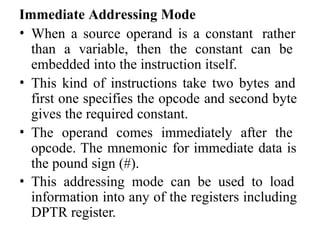
Immediate Addressing Mode
• The data operand is supplied as part of the
instruction. The immediate operand can only be a
source.
• Examples:
• MOV CH, 3A H
• MOV DX, 0C1A5 H
Direct Addressing Mode
• One of the operands is a memory location, given by a
constant offset.
• In this mode the 16 bit effective address (EA) is taken
directly from the displacement field of the instruction.
• Examples:
• MOV AX,[1234 H]
• MOV DL, [3BD2 H],
Register Indirect Addressing Mode
• One of the operands is a memory location, with the
offset given by one of the BP, BX, SI, or DI registers.
• Example:
• MOV [BX], CL
• MOV DL, [BX]
Base Addressing Mode
• In this mode EA is obtained by adding a
displacement (signed 8 bit or unsigned 16 bit)
value to the contents of BX or BP. The segment
registers used are DS and SS.
• Example:
• MOV AX, [BP + 200]
Indexed Addressing Mode
• The operand’s offset is the sum of the content of
an index register SI or DI and an 8-bit or 16-bit
displacement.
• Example:
• MOV AH, [DI]
Based Indexed Addressing Mode
• In this mode, the EA is computed by adding a base
register (BX or BP), an index register (SI or DI) and a
displacement (unsigned 16 bit or sign extended 8
bit)
• Example:
• MOV AX, [BX + SI + 1234 H]
• MOV CX, [BP][SI] + 4
String Addressing Mode
• The instruction is a string instruction, which uses
index registers implicitly to access memory.
• Example:
• MOVS B
• MOVS W
I/O Port Addressing Mode
• The destination or source of the data is an I/O port.
Either direct port addressing (including an 8-bit port
address) or indirect addressing (DX must contain the
port address) may be used.
• Examples:
• IN AX, 50H ; Direct
• OUT DX, AL ; Indirect
Relative Addressing Mode
• In this mode, the operand is specified as a signed 8
bit displacement, relative to PC(Program Counter).
• Examples:
• JMP 0200 H
• JNC START
Implied Addressing Mode
• Instructions using this mode have no operands.
• Examples:
• CLC, STC, CMC
INSTRUCTION SET
• Intel 8086 has approximately 117 instructions. These
instructions are used to transfer data between
registers, register to memory, memory to register or
register to I/O ports and other instructions are used for
data manipulation.
• But in Intel 8086 operations between memory to
memory is not permitted. These instructions are
classified in to six-groups as follows.
1.Data Transfer Instructions
2.Arithmetic Instructions
3.Bit Manipulation Instructions
4.String Instructions
5.Program Execution Transfer Instructions
6.Processor Control Instructions
Data Transfer Instructions
1.MOV
• MOV destination,
source
• This (Move) instruction transfers a byte or a word
from the source operand to the destination
operand.
• (DEST) (SRC)
• DEST = Destination
• SRC = Source
• Example :
• MOV AX, BX
• MOV AX, 2150H
2.PUSH
• PUSH Source
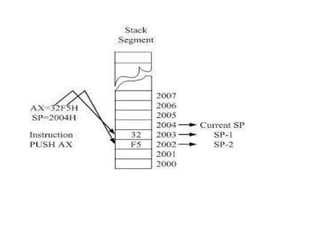
• This instruction decrements SP (stack pointer)
by 2 and then transfers a word from the
source operand to the top of the stack now
pointed to by stack pointer.
• (SP) (SP) 2
• ((SP)+1 : (SP))
• Example :
• PUSH SI
• PUSH BX
(SRC)
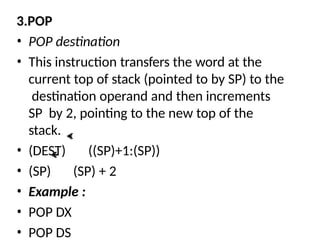
3.POP
• POP destination
• This instruction transfers the word at the
current top of stack (pointed to by SP) to the
destination operand and then increments
SP by 2, pointing to the new top of the
stack.
• (DEST) ((SP)+1:(SP))
• (SP) (SP) + 2
• Example :
• POP DX
• POP DS
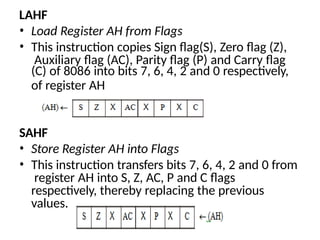
LAHF
• Load Register AH from Flags
• This instruction copies Sign flag(S), Zero flag (Z),
Auxiliary flag (AC), Parity flag (P) and Carry flag
(C) of 8086 into bits 7, 6, 4, 2 and 0 respectively,
of register AH
SAHF
• Store Register AH into Flags
• This instruction transfers bits 7, 6, 4, 2 and 0 from
register AH into S, Z, AC, P and C flags
respectively, thereby replacing the previous
values.
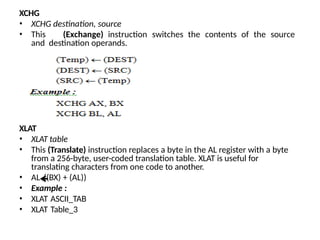
XCHG
• XCHG destination, source
• This (Exchange) instruction switches the contents of the source
and destination operands.
XLAT
• XLAT table
• This (Translate) instruction replaces a byte in the AL register with a byte
from a 256-byte, user-coded translation table. XLAT is useful for
translating characters from one code to another.
• AL ((BX) + (AL))
• Example :
• XLAT ASCII_TAB
• XLAT Table_3
LEA
• LEA destination, source
• This (Load Effective Address) instruction transfers the offset of the
source operand (memory) to the destination operand (16-bit
general register).
• (REG) EA
• Example :
• LEA BX, [BP] [DI]
• LEA SI, [BX + 02AF H]
LDS
• LDS destination, source
• This (Load pointer using DS) instruction transfers a 32-bit pointer
variable from the source operand (memory operand) to the
destination operand and register DS.
(EA)
(EA+2)
• (REG)
• (DS)
• Example :
• LDS SI, [6AC1H]
LES
• LES destination, source
• This (Load pointer using ES) instruction transfers a 32-bit pointer variable from the
source operand (memory operand) to the destination operand and register ES.
(EA)
(EA+2)
• (REG)
• (ES)
• Example :
• LES DI, [BX]
IN
• IN accumulator, port
• This (Input) instruction transfers a byte or a word from an input port to the
accumulator (AL or AX).
• (DEST) (SRC)
• Example :
• IN AX, DX
• IN AL, 062H
OUT
• OUT port, accumulator
• This (Output) instruction transfers a byte or a word from the accumulator
(AL or AX)
to an output port.
• (DEST) (SRC)
• Example :
• OUT DX, AL
• OUT 31, AX
Arithmetic Instructions
ADD
• ADD destination, source
• This (Add) instruction adds the two operands (byte or word) and stores
the result in destination operand.
• (DEST) (DEST) + (SRC)
• Example :
• ADD CX, DX
• ADD AX, 1257 H
• ADD BX, [CX]
ADC
• ADC destination, source
• This (Add with carry) instruction adds the two operands and adds one if
carry flag (CF) is set and stores the result in destination operand.
• (DEST) (DEST) + (SRC) + 1
• Example :
• ADC AX, BX
• ADC AL, 8
• ADC CX, [BX]
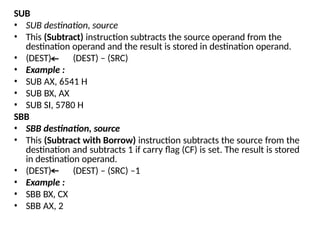
SUB
• SUB destination, source
• This (Subtract) instruction subtracts the source operand from the
destination operand and the result is stored in destination operand.
• (DEST) (DEST) – (SRC)
• Example :
• SUB AX, 6541 H
• SUB BX, AX
• SUB SI, 5780 H
SBB
• SBB destination, source
• This (Subtract with Borrow) instruction subtracts the source from the
destination and subtracts 1 if carry flag (CF) is set. The result is stored
in destination operand.
• (DEST) (DEST) – (SRC) –1
• Example :
• SBB BX, CX
• SBB AX, 2
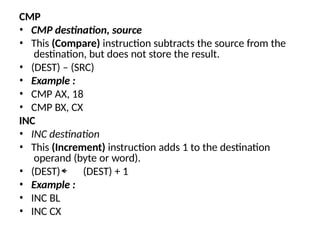
CMP
• CMP destination, source
• This (Compare) instruction subtracts the source from the
destination, but does not store the result.
• (DEST) – (SRC)
• Example :
• CMP AX, 18
• CMP BX, CX
INC
• INC destination
• This (Increment) instruction adds 1 to the destination
operand (byte or word).
• (DEST) (DEST) + 1
• Example :
• INC BL
• INC CX
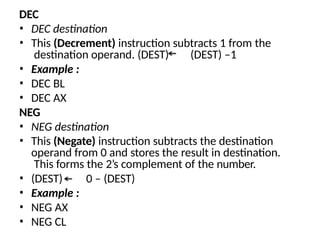
DEC
• DEC destination
• This (Decrement) instruction subtracts 1 from the
destination operand. (DEST) (DEST) –1
• Example :
• DEC BL
• DEC AX
NEG
• NEG destination
• This (Negate) instruction subtracts the destination
operand from 0 and stores the result in destination.
This forms the 2’s complement of the number.
• (DEST) 0 – (DEST)
• Example :
• NEG AX
• NEG CL
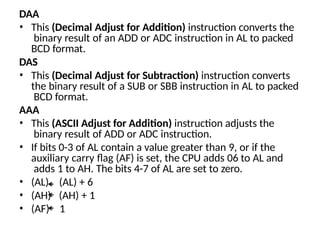
DAA
• This (Decimal Adjust for Addition) instruction converts the
binary result of an ADD or ADC instruction in AL to packed
BCD format.
DAS
• This (Decimal Adjust for Subtraction) instruction converts
the binary result of a SUB or SBB instruction in AL to packed
BCD format.
AAA
• This (ASCII Adjust for Addition) instruction adjusts the
binary result of ADD or ADC instruction.
• If bits 0-3 of AL contain a value greater than 9, or if the
auxiliary carry flag (AF) is set, the CPU adds 06 to AL and
adds 1 to AH. The bits 4-7 of AL are set to zero.
• (AL)
• (AH)
• (AF)
(AL) + 6
(AH) + 1
1
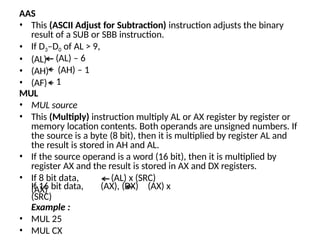
AAS
• This (ASCII Adjust for Subtraction) instruction adjusts the binary
result of a SUB or SBB instruction.
• If D3–D0 of AL > 9,
• (AL)
• (AH)
• (AF)
(AL) – 6
(AH) – 1
1
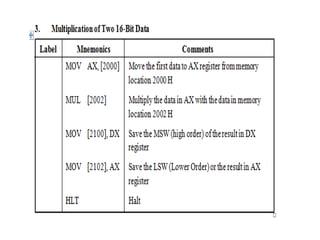
MUL
• MUL source
• This (Multiply) instruction multiply AL or AX register by register or
memory location contents. Both operands are unsigned numbers. If
the source is a byte (8 bit), then it is multiplied by register AL and
the result is stored in AH and AL.
• If the source operand is a word (16 bit), then it is multiplied by
register AX and the result is stored in AX and DX registers.
• If 8 bit data,
(AX)
(AL) x (SRC)
If 16 bit data, (AX), (DX) (AX) x
(SRC)
Example :
• MUL 25
• MUL CX
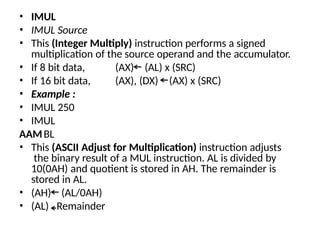
• IMUL
• IMUL Source
• This (Integer Multiply) instruction performs a signed
multiplication of the source operand and the accumulator.
(AX) (AL) x (SRC)
(AX), (DX) (AX) x (SRC)
• If 8 bit data,
• If 16 bit data,
• Example :
• IMUL 250
• IMUL
BL
AAM
• This (ASCII Adjust for Multiplication) instruction adjusts
the binary result of a MUL instruction. AL is divided by
10(0AH) and quotient is stored in AH. The remainder is
stored in AL.
• (AH)
• (AL)
(AL/0AH)
Remainder
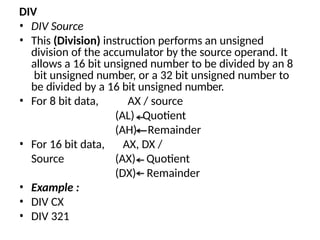
DIV
• DIV Source
• This (Division) instruction performs an unsigned
division of the accumulator by the source operand. It
allows a 16 bit unsigned number to be divided by an 8
bit unsigned number, or a 32 bit unsigned number to
be divided by a 16 bit unsigned number.
• For 8 bit data, AX / source
(AL)
(AH)
Quotient
Remainder
• For 16 bit data, AX, DX /
Source (AX)
(DX)
Quotient
Remainder
• Example :
• DIV CX
• DIV 321
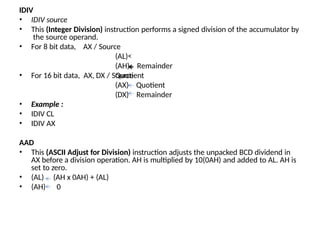
IDIV
• IDIV source
• This (Integer Division) instruction performs a signed division of the accumulator by
the source operand.
• For 8 bit data, AX / Source
(AL)
Quotient
Remainder
(AH)
• For 16 bit data, AX, DX / Source
(AX)
(DX)
• Example :
• IDIV CL
• IDIV AX
Quotient
Remainder
AAD
• This (ASCII Adjust for Division) instruction adjusts the unpacked BCD dividend in
AX before a division operation. AH is multiplied by 10(0AH) and added to AL. AH is
set to zero.
• (AL)
• (AH)
(AH x 0AH) + (AL)
0
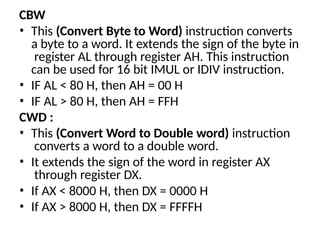
CBW
• This (Convert Byte to Word) instruction converts
a byte to a word. It extends the sign of the byte in
register AL through register AH. This instruction
can be used for 16 bit IMUL or IDIV instruction.
• IF AL < 80 H, then AH = 00 H
• IF AL > 80 H, then AH = FFH
CWD :
• This (Convert Word to Double word) instruction
converts a word to a double word.
• It extends the sign of the word in register AX
through register DX.
• If AX < 8000 H, then DX = 0000 H
• If AX > 8000 H, then DX = FFFFH
Bit Manipulation Instructions
(i)Logical Instructions: AND, OR, XOR, NOT,
TEST
(ii)Shift Instructions: SHL, SAL, SHR, SAR
(iii)Rotate Instructions: ROL, ROR, RCL, RCR
AND
• AND destination, source
• This (AND) instruction performs the logical “AND” of the source
operand with the destination operand and the result is stored in
destination.
• (DEST) ¬ (DEST) “AND” (SRC)
• Example :
• AND BL, CL
• AND AL, 0011 1100 B
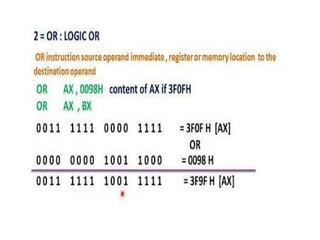
OR
• OR destination, source
• This (OR) instruction performs the logical “OR” of the source
operand with the destination operand and the result is stored in
destination.
• (DEST) ¬ (DEST) “OR” (SRC)
• Example :
• OR AX, BX
• OR AL, 0000 1111B
XOR
• XOR destination, source
• This (Exclusive OR) instruction performs the logical “XOR”
of the two operands and the result is stored in destination
operand.
• (DEST) ¬ (DEST) “XOR” (SRC)
• Example :
• XOR BX, AX
• XOR AL, 1111 1111B
NOT
• NOT destination
• This (NOT) instruction inverts the bits (forms the 1’s
complement) of the byte or word.
• (DEST) ¬ 1’s complement of (DEST)
• Example :
• NOT AX
TEST
• TEST destination, source
• This (TEST) instruction performs the logical “AND” of the two operands and
updates the flags but does not store the result.
• (DEST) “AND” (SRC)
• Example :
• TEST AL, 15 H
• TEST SI, DI
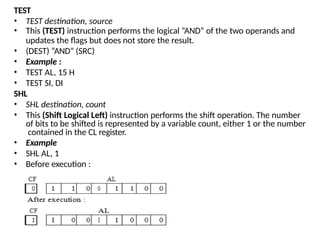
SHL
• SHL destination, count
• This (Shift Logical Left) instruction performs the shift operation. The number
of bits to be shifted is represented by a variable count, either 1 or the number
contained in the CL register.
• Example
• SHL AL, 1
• Before execution :
SAL
• SAL destination, count
• SAL (Shift Arithmetric Left) and SHL (Shift Logical Left) instructions perform the same
operation and are physically the same instruction.
• Example
• SAL AL, CL
• SAL AL, 1
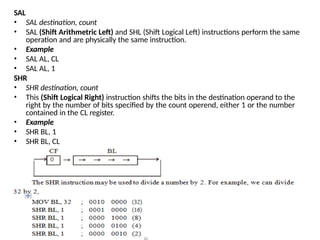
SHR
• SHR destination, count
• This (Shift Logical Right) instruction shifts the bits in the destination operand to the
right by the number of bits specified by the count operend, either 1 or the number
contained in the CL register.
• Example
• SHR BL, 1
• SHR BL, CL
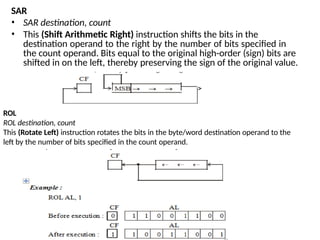
SAR
• SAR destination, count
• This (Shift Arithmetic Right) instruction shifts the bits in the
destination operand to the right by the number of bits specified in
the count operand. Bits equal to the original high-order (sign) bits are
shifted in on the left, thereby preserving the sign of the original value.
ROL
ROL destination, count
This (Rotate Left) instruction rotates the bits in the byte/word destination operand to the
left by the number of bits specified in the count operand.
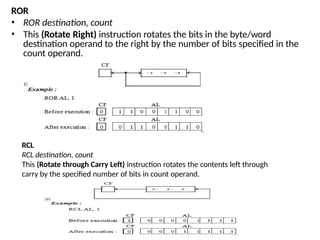
ROR
• ROR destination, count
• This (Rotate Right) instruction rotates the bits in the byte/word
destination operand to the right by the number of bits specified in the
count operand.
RCL
RCL destination, count
This (Rotate through Carry Left) instruction rotates the contents left through
carry by the specified number of bits in count operand.
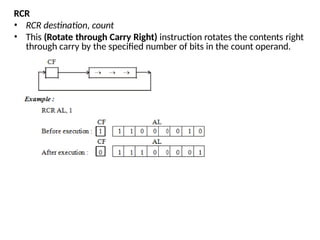
RCR
• RCR destination, count
• This (Rotate through Carry Right) instruction rotates the contents right
through carry by the specified number of bits in the count operand.
STRING INSTRUCTIONS
REP
• REP MOVS destination, Source
• This (Repeat) instruction converts any string primitive
instruction into a re-executing loop. It specifies a termination
condition which causes the string primitive instruction to
continue executing until the termination condition is met.
• Example :
• REP MOVS CL, AL
• The other Repeat instructions are :
• REPE - Repeat while Equal
• REPZ - Repeat while zero
• REPNE - Repeat while Not Equal
• REPNZ - Repeat while Not Zero
• The above instructions are used with the CMPS and SCAS
instructions.
MOVS
• MOVS destination - string, source-string
• This (Move String) instruction transfers a byte/word
from the source string (addressed by SI) to the
destination string (addressed by DI) and updates SI and
DI to point to the next string element.
• (DEST) (SRC)
• Example :
• MOVS Buffer 1, Buffer 2
CMPS
• CMPS destination-string, source-string
• This (Compare String) instruction subtracts the
destination byte/word (addressed by DI) from the source
byte/word (addressed by SI). It affects the flags but does
not affect the operands.
• Example :
• CMPS Buffer 1, Buffer 2
SCAS
• SCAS destination-string
• This (Scan String) instruction subtracts the destination string element (addressed by
DI) from the contents of AL or AX and updates the flags.
• Example :
• SCAS Buffer
LODS
• LODS source-string
• This (Load String) instruction transfers the byte/word string element addressed by SI
to register AL or AX and updates SI to point to the next element in the string.
• (DEST) (SRC)
• Example :
• LODSB name
• LODSW name
STOS
• STOS destination - string
• This (Store String) instruction transfers a byte/word from register AL or AX to the
string element addressed by DI and updates DI to point to the next location in the
string.
• (DEST) (SRC)
• Example :
• STOS display
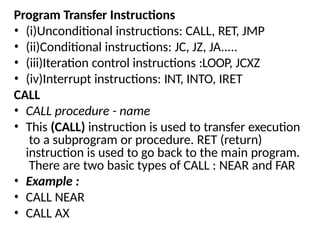
Program Transfer Instructions
• (i)Unconditional instructions: CALL, RET, JMP
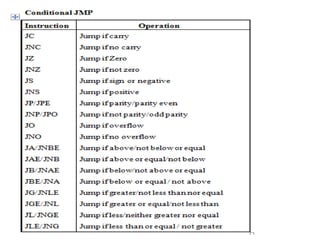
• (ii)Conditional instructions: JC, JZ, JA.....
• (iii)Iteration control instructions :LOOP, JCXZ
• (iv)Interrupt instructions: INT, INTO, IRET
CALL
• CALL procedure - name
• This (CALL) instruction is used to transfer execution
to a subprogram or procedure. RET (return)
instruction is used to go back to the main program.
There are two basic types of CALL : NEAR and FAR
• Example :
• CALL NEAR
• CALL AX
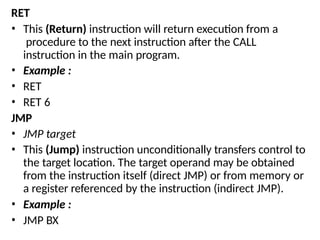
RET
• This (Return) instruction will return execution from a
procedure to the next instruction after the CALL
instruction in the main program.
• Example :
• RET
• RET 6
JMP
• JMP target
• This (Jump) instruction unconditionally transfers control to
the target location. The target operand may be obtained
from the instruction itself (direct JMP) or from memory or
a register referenced by the instruction (indirect JMP).
• Example :
• JMP BX
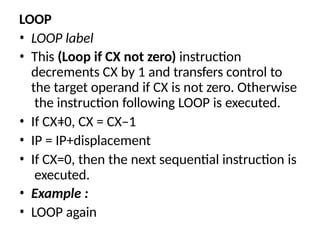
LOOP
• LOOP label
• This (Loop if CX not zero) instruction
decrements CX by 1 and transfers control to
the target operand if CX is not zero. Otherwise
the instruction following LOOP is executed.
• If CX=0, CX = CX–1
• IP = IP+displacement
• If CX=0, then the next sequential instruction is
executed.
• Example :
• LOOP again
Processor Control Instructions
HLT
• This (Halt) instruction will cause the 8086 to stop fetching
and executing instructions. The 8086 will enter a halt
state.
WAIT
• This (Wait) instruction causes the 8086 to enter the wait
state while its test line is not active.
ESC
• This (Escape) instruction provides a mechanism by which
other coprocessors may receive their instructions from
the 8086 instruction stream and make use of the 8086
addressing modes. The 8086 does a no operation (NOP)
for the ESC instruction other than to access a memory
operand and place it on the bus.
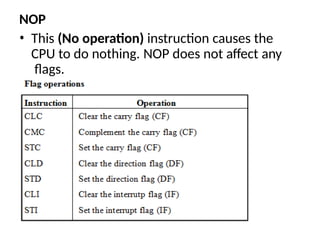
NOP
• This (No operation) instruction causes the
CPU to do nothing. NOP does not affect any
flags.
ASSEMBLER DIRECTIVES
• An assembler is a program which translates an
assembly language program into machine language
program.
• An assembler directive is a statement to give
direction to the assembler to perform the task of
assembly process.
• The assembler directives control organization of the
program and provide necessary information to the
assembler to understand assembly language
programs to generate machine codes.
• An assembler supports directives to define data, to
organize segments, to control procedures, to define
macros etc.
• An assembly language program consists of two
types of statements: Instructions and Directives.
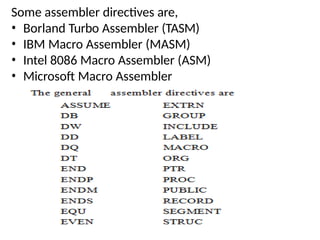
Some assembler directives are,
• Borland Turbo Assembler (TASM)
• IBM Macro Assembler (MASM)
• Intel 8086 Macro Assembler (ASM)
• Microsoft Macro Assembler
ASSUME
• The ASSUME directive enables error-checking
for register values.
• It is used to inform the assembler the names
of the logical segments, which are to be
assigned to the different segments used in an
assembly language program
• Format:
• ASSUME segregister:name [ [, segregister:name]]...
• ASSUME dataregister:type [[, dataregister:type]]...
• ASSUME register:ERROR [[, register:ERROR]]...
• ASSUME [[register:]] NOTHING [[, register:NOTHING]]...
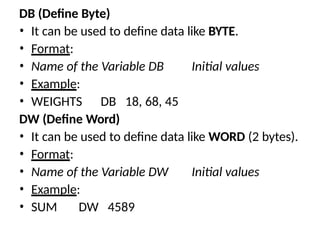
DB (Define Byte)
• It can be used to define data like BYTE.
• Format:
• Name of the Variable DB Initial values
• Example:
• WEIGHTS DB 18, 68, 45
DW (Define Word)
• It can be used to define data like WORD (2 bytes).
• Format:
• Name of the Variable DW Initial values
• Example:
• SUM DW 4589
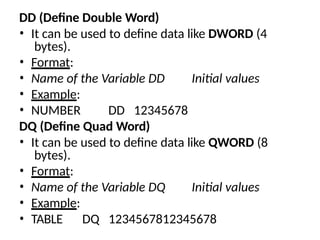
DD (Define Double Word)
• It can be used to define data like DWORD (4
bytes).
• Format:
• Name of the Variable DD Initial values
• Example:
• NUMBER DD 12345678
DQ (Define Quad Word)
• It can be used to define data like QWORD (8
bytes).
• Format:
• Name of the Variable DQ Initial values
• Example:
• TABLE DQ 1234567812345678
DT (Define Ten Bytes)
• It can be used to define data like TBYTE (10 bytes).
• Format:
• Name of the Variable DT Initial values
• Example:
• AMOUNT DT 12345678123456781234
END (End of program)
• It marks the end of a program module and, optionally,
sets the program entry point to address.
• Format:
• END [ [address] ]
• Example:
• END label
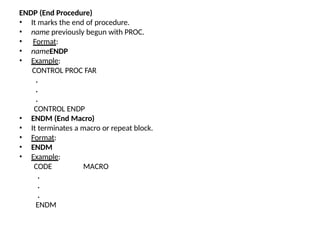
ENDP (End Procedure)
• It marks the end of procedure.
• name previously begun with PROC.
• Format:
• nameENDP
• Example:
CONTROL PROC FAR
.
.
.
CONTROL ENDP
• ENDM (End Macro)
• It terminates a macro or repeat block.
• Format:
• ENDM
• Example:
MACRO
CODE
.
.
.
ENDM
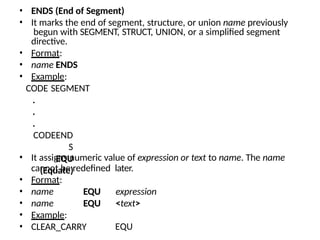
• ENDS (End of Segment)
• It marks the end of segment, structure, or union name previously
begun with SEGMENT, STRUCT, UNION, or a simplified segment
directive.
• Format:
• name ENDS
• Example:
CODE SEGMENT
.
.
.
CODEEND
S
EQU
(Equate)
• It assigns numeric value of expression or text to name. The name
cannot be redefined later.
• Format:
• name
• name
• Example:
• CLEAR_CARRY
EQU expression
EQU <text>
EQU
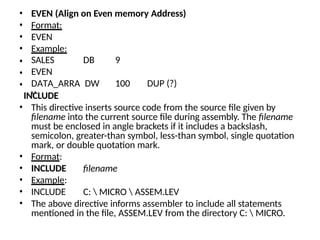
• EVEN (Align on Even memory Address)
• Format:
• EVEN
• Example:
• SALES DB 9
• EVEN
• DATA_ARRA
Y
DW 100 DUP (?)
filename
C:  MICRO  ASSEM.LEV
INCLUDE
• This directive inserts source code from the source file given by
filename into the current source file during assembly. The filename
must be enclosed in angle brackets if it includes a backslash,
semicolon, greater-than symbol, less-than symbol, single quotation
mark, or double quotation mark.
• Format:
• INCLUDE
• Example:
• INCLUDE
• The above directive informs assembler to include all statements
mentioned in the file, ASSEM.LEV from the directory C:  MICRO.
MACRO
• A sequence of instructions to which a name is
assigned is called a macro. The name of a macro
is used in assembly language programming.
Macros and subroutines are similar. Macros are
used for short sequences of instructions, where
as subroutines for longer ones. Macros execute
faster than subroutines. A subroutine requires
CALL and RET instructions whereas macros do
not.
• Format:
• name MACRO [ optional arguments ]
• statements ENDM
ASSEMBLY LANGUAGE
PROGRAMMING
Program
A computer can only do what the programmer
asks to do. To perform a particular task the
programmer prepares a sequence of instructions,
called a program.
Programming languages
• Microcomputer programming languages can
typically be divided into three main types:
1.Machine language
2.Assembly language
3.High-level language
Machine language
• A program written in the form of 0s and 1s is
called a machine language program. In the
machine language program there is a specific
binary code for each instruction.
• A microprocessor has a unique set of machine
language instructions defined by its
manufacturer.
• For example, the Intel 8085 uses the code
1000 11102 for its addition instruction while
the Motorola 6800 uses the code 1011 10012.
The machine language program has the following
demerits:
• It is very difficult to understand or debug a
program.
• Program writing is difficult.
• Programs are long.
• More errors occur in writing the program.
• Since each bit has to be entered individually
the entry of a program is very slow.
Assembly language
• Assembly language programming is writing machine
instructions in mnemonic form, using an assembler to
convert these mnemonics into actual processor
instructions and associated data.
The advantages of assembly language programming
1.The computation time is less.
2.It is faster to produce result.
The disadvantages of assembly
language programming
• many instructions are required to
achieve small tasks
• source programs tend to be large
High-level language
• High level language programs composed of English-
language-type statements rectify all deficiencies of
machine and assembly language programming. The
high level languages are FORTRON, COBAL, BASIC, C,
C++, Pascal, Visual Basic etc.
The high level language program has the following
demerits:
• One has to learn the special rules for writing
programs in a particular high level
language.
• Low speed.
• A compiler has to be provided to convert a high level
language program into a machine language
program. The compiler is costly.
Assembly language program
• Assembly language statements are written one
per line.
• A machine code program thus consists of a
sequence of assembly language statements,
where each statement contains a mnemonic.
• Each line of an assembly language program is split
into four fields, as below:
1.Label field
2.Mnemonic or Opcode field
3.Operand field
4.Comment field
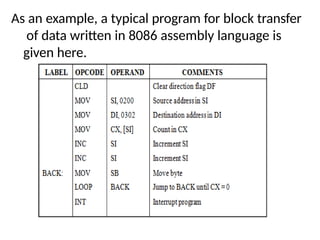
As an example, a typical program for block transfer
of data written in 8086 assembly language is
given here.
LABEL
• The label field is optional. A label is an identifier.
• A label can be used to refer to a memory location
the value of a piece of data the address of a
program, sub-routine, code portion etc.
START: LDAA #24H
JMP START
• Here, the label START is equal to the address of the
instruction LDAA #24H. The label is used in the
program as a reference. This would result in the
processor jumping to the location (address)
associated with the label START, thus executing the
instruction LDAA #24H immediately after the JMP
instruction.
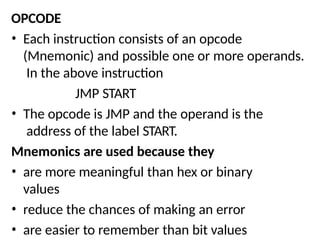
OPCODE
• Each instruction consists of an opcode
(Mnemonic) and possible one or more operands.
In the above instruction
JMP START
• The opcode is JMP and the operand is the
address of the label START.
Mnemonics are used because they
• are more meaningful than hex or binary
values
• reduce the chances of making an error
• are easier to remember than bit values
OPERAND
• The operand field consists of additional information or data that the
opcode requires. In certain types of addressing modes, the operand is
used to specify
• constants or labels
• immediate data
• data contained in another accumulator or register
• an address
Examples of operands are
• JNZ STEP1
• MOV AX, 5000 H
• MOV AX, BX
• MOV AX, [3000 H]
COMMENTS
• The comment field is optional, and is used by the programmer to
explain how the coded program works. Comments are preceded by a
semi-colon. The assembler, when generating instructions from the
source file, ignores all comments.
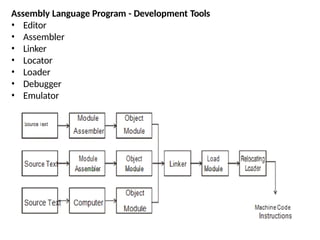
Assembly Language Program - Development Tools
• Editor
• Assembler
• Linker
• Locator
• Loader
• Debugger
• Emulator
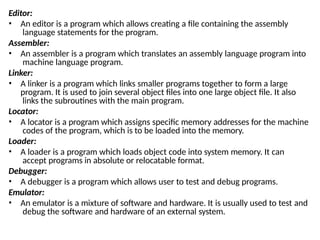
Editor:
• An editor is a program which allows creating a file containing the assembly
language statements for the program.
Assembler:
• An assembler is a program which translates an assembly language program into
machine language program.
Linker:
• A linker is a program which links smaller programs together to form a large
program. It is used to join several object files into one large object file. It also
links the subroutines with the main program.
Locator:
• A locator is a program which assigns specific memory addresses for the machine
codes of the program, which is to be loaded into the memory.
Loader:
• A loader is a program which loads object code into system memory. It can
accept programs in absolute or relocatable format.
Debugger:
• A debugger is a program which allows user to test and debug programs.
Emulator:
• An emulator is a mixture of software and hardware. It is usually used to test and
debug the software and hardware of an external system.
MODULAR PROGRAMMING
• Modular programming is subdividing the complex
program into separate subprograms such as
functions and subroutines.
• Similar functions are grouped in the same unit of
programming code and separate functions are
developed as separate units of code so that the code
can be reused by other applications.
• For example, if a program needs initial and boundary
conditions, use subroutines to set them.
• Then if someone else wants to compute a different
solution using the program, only these
subroutines need to be changed. This is very
easier than having to read through a program line
by line, trying to figure out what each line is
supposed to do and whether it needs to be
changed.
• Subprograms make the actual program shorter,
hence easier to read and understand. Further, the
arguments show exactly what information a
subprogram is using. That makes it easier to
figure out whether it needs to be changed when
modifying the program.
ALPs are developed by essentially the same
procedure as high-level language programs by,
• Exactly stating what the program is to do.
• Splitting the overall problem into tasks.
• Defining exactly what each task must do and how
it is to communicate with the other tasks.
• Putting the tasks into assembler language
modules and connecting the modules together to
form the program.
• Debugging and testing the program.
• Documenting the program.
The benefits of using modular programming are,
• Modular programming allows many
programmers to collaborate on the same
application.
• Same code can be used in many
applications.
• Code is short, simple and easy to
understand.
• Code is stored across multiple files.
• A single procedure can be developed for reuse,
eliminating the need to retype the code many
times.
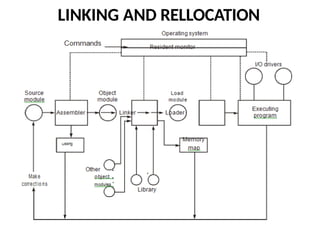
LINKING AND RELLOCATION
The process combines the following.
• Find the object modules to be linked.
• Construct the load module by assigning the
positions of all of all the segments in all of the
object modules being linked.
• Fill in all offset that could not be determined by
the assembler.
• Fill in all segment address.
• Load the program for execution.
Segment combination
• In addition to the linker commands, the
assembler provides a means of regulating the way
segments in different object modules are
organized by the linker. Segments with same
name are joined together by using the modifiers
attached to the SEGMENT directives. SEGMENT
directive may have the form:
• Segment name SEGMENT Combination-
type
PROCEDURES & MACROS
• A single instruction that expands automatically
into a set of instructions to perform a particular
task.
• A macro (which stands for "macroinstruction") is
a programmable pattern which translates a
certain sequence of input into a preset sequence
of output. Macros can be used to make tasks less
repetitive by representing a complicated
sequence of keystrokes, mouse movements,
commands, or other types of input.
Macro definition:
name MACRO [parameters,...]
statements >
ENDM
Advantages of macros
• Repeated small groups of instructions replaced by one macro
• Errors in macros are fixed only once, in the definition
• Duplication of effort is reduced
• In effect, new higher level instructions can be created
• Programming is made easier, less error prone
• Generally quicker in execution than subroutines
Disadvantages of macros
• In large programs, produce greater code size than procedures
When to use Macros
• To replace small groups of instructions not worthy of
subroutines
• To create a higher instruction set for specific
applications
• To create compatibility with other computers
• To replace code portions which are repeated often throughout
the program
Procedure (PROC)
• This directive marks the start and end of a
procedure block called label. The statements in
the block can be called with the CALL instruction.
PROC definition:
label PROC [ [near / far] ]
<Procedure instructions>
label ENDP
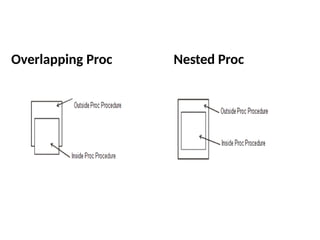
Overlapping Proc Nested Proc
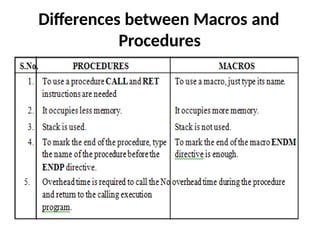
Differences between Macros and
Procedures
INTERRUPTS AND INTERRUPT SERVICE
ROUTINES
Interrupts
• A signal to the processor to halt its current
operation and immediately transfer control to
an interrupt service routine is called as
interrupt. Interrupts are triggered either by
hardware, as when the keyboard detects a key
press, or by software, as when a program
executes the INT instruction.
• Interrupts can be seen as a number of functions.
These functions make the programming much
easier, instead of writing a code to print a character,
simply call the interrupt and it will do everything.
• There are also interrupt functions that work with
disk drive and other hardware. They are called as
software interrupts.
• Interrupts are also triggered by different hardware,
these are called hardware interrupts.
• To make a software interrupt there is an INT
instruction, it has very simple syntax: INT value.
• Where value can be a number between 0 to 255 (or
00 to FF H).
Interrupt Service Routines (ISRs)
• ISR is a routine that receives processor control
when a specific interrupt occurs.
• The 8086 will directly call the service routine
for 256 vectored interrupts without any
software processing. This is in contrast to non
vectored interrupts that transfer control
directly to a single interrupt service routine,
regardless of the interrupt source.
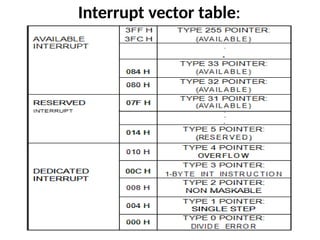
Interrupt vector table:
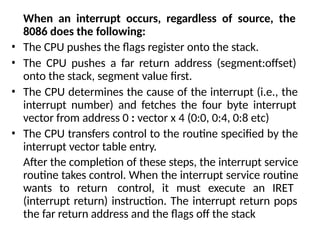
When an interrupt occurs, regardless of source, the
8086 does the following:
• The CPU pushes the flags register onto the stack.
• The CPU pushes a far return address (segment:offset)
onto the stack, segment value first.
• The CPU determines the cause of the interrupt (i.e., the
interrupt number) and fetches the four byte interrupt
vector from address 0 : vector x 4 (0:0, 0:4, 0:8 etc)
• The CPU transfers control to the routine specified by the
interrupt vector table entry.
After the completion of these steps, the interrupt service
routine takes control. When the interrupt service routine
wants to return control, it must execute an IRET
(interrupt return) instruction. The interrupt return pops
the far return address and the flags off the stack
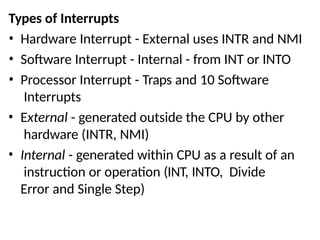
Types of Interrupts
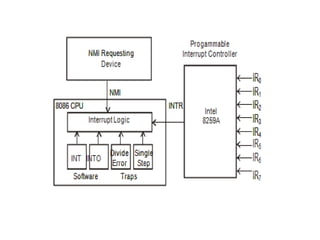
• Hardware Interrupt - External uses INTR and NMI
• Software Interrupt - Internal - from INT or INTO
• Processor Interrupt - Traps and 10 Software
Interrupts
• External - generated outside the CPU by other
hardware (INTR, NMI)
• Internal - generated within CPU as a result of an
instruction or operation (INT, INTO, Divide
Error and Single Step)
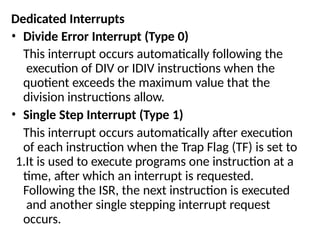
Dedicated Interrupts
• Divide Error Interrupt (Type 0)
This interrupt occurs automatically following the
execution of DIV or IDIV instructions when the
quotient exceeds the maximum value that the
division instructions allow.
• Single Step Interrupt (Type 1)
This interrupt occurs automatically after execution
of each instruction when the Trap Flag (TF) is set to
1.It is used to execute programs one instruction at a
time, after which an interrupt is requested.
Following the ISR, the next instruction is executed
and another single stepping interrupt request
occurs.
• Non Maskable Interrupt (Type 2)
It is the highest priority hardware interrupt that
triggers on the positive edge.
This interrupt occurs automatically when it
receives a low-to-high transition on its NMI input
pin.
This interrupt cannot be disabled or masked. It is
used to save program data or processor status in
case of system power failure.
• Breakpoint Interrupt (Type 3)
This interrupt is used to set break points in
software debugging programs.
• Overflow Interrupt (Type 4)
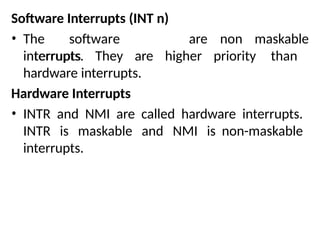
Software Interrupts (INT n)
• The software
interrupts
are non maskable
interrupts. They are higher priority than
hardware interrupts.
Hardware Interrupts
• INTR and NMI are called hardware interrupts.
INTR is maskable and NMI is non-maskable
interrupts.
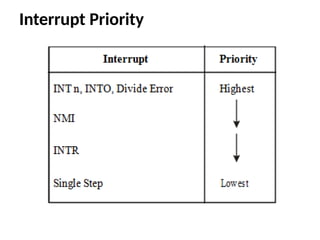
Interrupt Priority
Byte And String Manipulation
• The 8086 microprocessor is equipped with
special instructions to handle string
operations.
• By string we mean a series of data words or
bytes that reside in consecutive memory
locations.
• The string instructions of the 8086 permit a
programmer to implement operations such as
to move data from one block of memory to a
block elsewhere in memory.
• A second type of operation that is easily
performed is to scan a string and data elements
stored in memory looking for a specific value.
• Other examples are to compare the elements
and two strings together in order to determine
whether they are the same or different.
• Move String : MOV SB, MOV SW: An element
of the string specified by the source index (SI)
register with respect to the current data
segment (DS) register is moved to the location
specified by the destination index (DI) register
with respect to the current extra segment (ES)
register.
• The move can be performed on a byte (MOV SB)
or a word (MOV SW) of data. After the move is
complete, the contents of both SI & DI are
automatically incremented or decremented by 1
for a byte move and by 2 for a word move.
• Address pointers SI and DI increment or
decrement depends on how the direction flag DF
is set.
• Load and store strings : (LOD SB/LOD SW and STO
SB/STO SW) LOD SB: Loads a byte from a string in
memory into AL. The address in SI is used relative to
DS to determine the address of the memory location
of the string element. (AL) <= [(DS) + (SI)] (SI) <= (SI)
+ 1
• LOD SW : The word string element at the physical
address derived from DS and SI is to be loaded into
AX. SI is automatically incremented by 2. (AX) <=
[(DS) + (SI)] (SI) <= (SI) + 2
• STO SB : Stores a byte from AL into a string location
in memory. This time the contents of ES and DI are
used to form the address of the storage location in
memory [(ES) + (DI)] <= (AL) (DI) <=(DI) + 1
• STO SW : [(ES) + (DI)] <= (AX) (DI) <= (DI) + 2
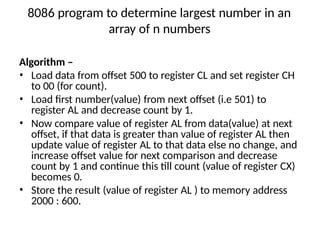
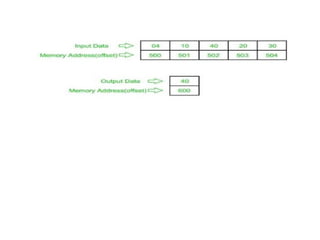
8086 program to determine largest number in an
array of n numbers
Algorithm –
• Load data from offset 500 to register CL and set register CH
to 00 (for count).
• Load first number(value) from next offset (i.e 501) to
register AL and decrease count by 1.
• Now compare value of register AL from data(value) at next
offset, if that data is greater than value of register AL then
update value of register AL to that data else no change, and
increase offset value for next comparison and decrease
count by 1 and continue this till count (value of register CX)
becomes 0.
• Store the result (value of register AL ) to memory address
2000 : 600.
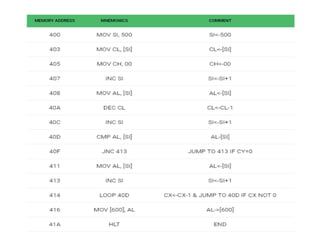
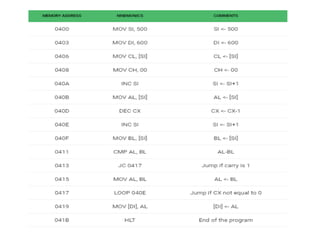
Explanation –
• MOV SI, 500 : set the value of SI to 500
• MOV CL, [SI] : load data from offset SI to register CL
• MOV CH, 00 : set value of register CH to 00
• INC SI : increase value of SI by 1.
• MOV AL, [SI] : load value from offset SI to register AL
• DEC CL : decrease value of register CL by 1
• INC SI : increase value of SI by 1
• CMP AL, [SI] : compares value of register AL and [SI] (AL-[SI])
• JNC 413 : jump to address 413 if carry not generated
• MOV AL, [SI] : transfer data at offset SI to register AL
• INC SI : increase value of SI by 1
• LOOP 40C : decrease value of register CX by 1 and jump to address
40D if value of register CX is not zero
• MOV [600], AL : store the value of register AL to offset 600
• HLT : stop
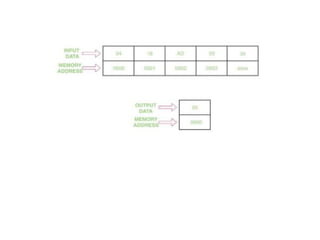
8086 program to find the min value in
a given array
Algorithm –
• Assign value 500 in SI and 600 in DI
• Move the contents of [SI] in CL and increment SI by 1
• Assign the value 00 H to CH
• Move the content of [SI] in AL
• Decrease the value of CX by 1
• Increase the value of SI by 1
• Move the contents of [SI] in BL
• Compare the value of BL with AL
• Jump to step 11 if carry flag is set
• Move the contents of BL in AL
• Jump to step 6 until the value of CX becomes 0, and decrease CX by 1
• Move the contents of AL in [DI]
• Halt the program
UNIT -2
8086 SYSTEM BUS
STRUCTURE
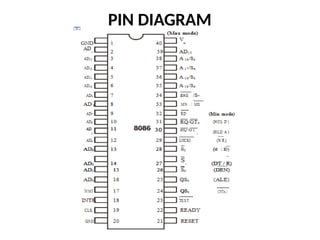
PIN DIAGRAM
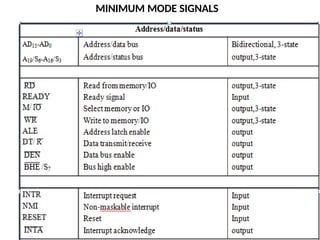
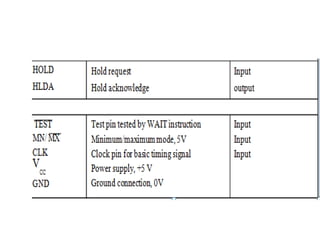
MINIMUM MODE SIGNALS
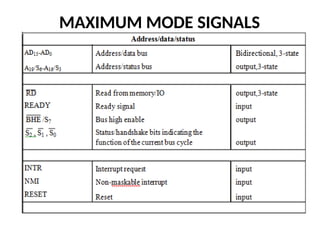
MAXIMUM MODE SIGNALS
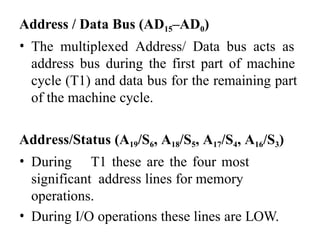
Address / Data Bus (AD15–AD0)
• The multiplexed Address/ Data bus acts as
address bus during the first part of machine
cycle (T1) and data bus for the remaining part
of the machine cycle.
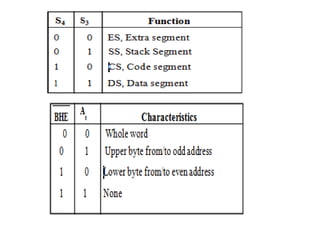
Address/Status (A19/S6, A18/S5, A17/S4, A16/S3)
• During T1 these are the four most
significant address lines for memory
operations.
• During I/O operations these lines are LOW.
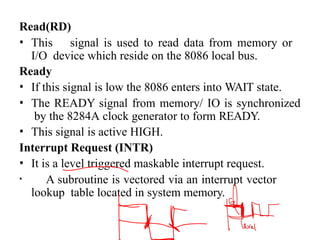
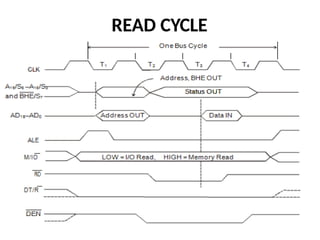
Read(RD)
• This signal is used to read data from memory or
I/O device which reside on the 8086 local bus.
Ready
• If this signal is low the 8086 enters into WAIT state.
• The READY signal from memory/ IO is synchronized
by the 8284A clock generator to form READY.
• This signal is active HIGH.
Interrupt Request (INTR)
• It is a level triggered maskable interrupt request.
• A subroutine is vectored via an interrupt vector
lookup table located in system memory.
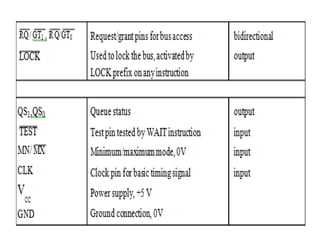
TEST
• This input is examined by the “Wait” instruction.
• If the TEST input is LOW execution continues,
• otherwise the processor waits in an ``Idle’’ state.
Non-Maskable Interrupt (NMI)
• It is an edge triggered input which causes a type 2 interrupt.
• NMI is not maskable internally by software.
Reset
• This signal is used to reset the 8086.
• It causes the processor to immediately terminate its present
activity.
• The signal must be active HIGH for at least four
clock cycles.
• It restarts execution when RESET returns LOW.
Clock (CLK)
• This signal provides the basic timing for
the processor and bus controller.
• The clock frequency may be 5 MHz or 8 MHz or
10 MHz depending on the version of 8086.
VCC
• It is a +5V power supply pin.
Ground (GND)
• Two pins (1 and 20) are connected to ground ie, 0
V power supply.
Minimum/Maximum (MN/ MX )
• This pin indicates what mode the processor is to
operate in.
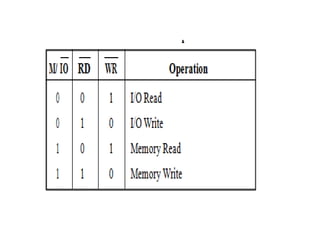
MEMORY / IO (M/ IO )
• It is used to distinguish a memory access from an
I/O access. M = HIGH, I/O = LOW.
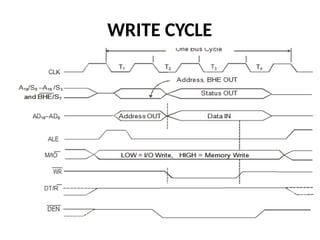
WRITE( WR )
• It indicates that the processor is performing a
write memory or write I/O cycle, depending on
the state of the M/ IO signal.
• Interrupt Acknowledge ( INTA )
This signal indicates recognition of an interrupt
request. It is used as a read strobe for interrupt
acknowledge cycles.
Address Latch Enable (ALE)
• This signal is used to demultiplex the AD0-AD15
into A0-A15 and D0-D15. It is a HIGH pulse active
during T1 of any bus cycle.
Data Enable( DEN )
This signal informs the transceivers
(8286/8287) that the 8086 is ready to send
or receive data.
Hold
• This signal indicates that another master
(DMA or processor) is requesting the host
8086 to handover the system bus.
Hold Acknowledge (HLDA)
• On receiving HOLD signal 8086 outputs
HLDA signal HIGH as an acknowledgement.
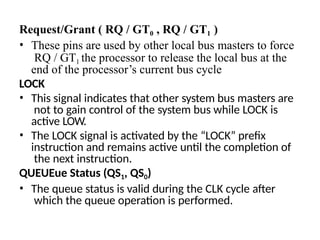
Request/Grant ( RQ / GT0 , RQ / GT1 )
• These pins are used by other local bus masters to force
RQ / GT1 the processor to release the local bus at the
end of the processor’s current bus cycle
LOCK
• This signal indicates that other system bus masters are
not to gain control of the system bus while LOCK is
active LOW.
• The LOCK signal is activated by the “LOCK” prefix
instruction and remains active until the completion of
the next instruction.
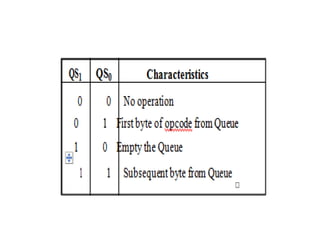
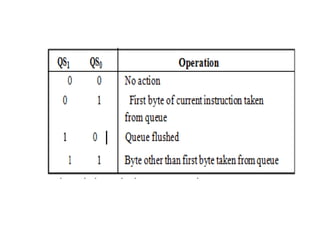
QUEUEue Status (QS1, QS0)
• The queue status is valid during the CLK cycle after
which the queue operation is performed.
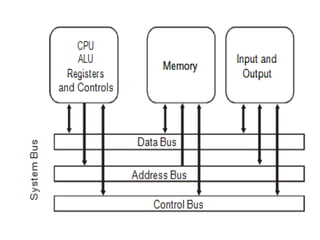
SYSTEM BUS STRUCTURE
• System bus is a single computer bus that
connects the major components of a computer
system.
• It consists of data bus, address bus and control
bus.
• To communicate with external world,
microprocessor make use of buses.
DATA
BUS
• It is used for the exchange of data between the
processor, memory and peripherals.
• It is bi-directional so that it allows data flow in
both directions.
• The width of the data bus can differ for every
microprocessor.
• When the microprocessor issues the address of
the instruction, it gets back the instruction
through the data bus.
ADDRESS BUS
• The address bus contains the connections
between the microprocessor and memory or
output devices
• It is unidirectional.
• The width of the address bus corresponds
to the maximum addressing capacity
CONTROL BUS
• The control bus carries the signals relating to
the control and coordination of the various
activities across the computer, which can be
sent from the control unit within the CPU.
• Microprocessor uses control bus to process
data, that is what to do with the selected
memory location.
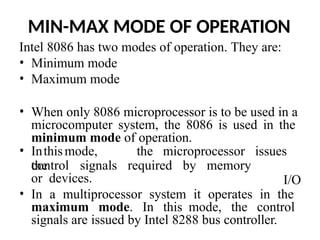
MIN-MAX MODE OF OPERATION
Intel 8086 has two modes of operation. They are:
• Minimum mode
• Maximum mode
• When only 8086 microprocessor is to be used in a
microcomputer system, the 8086 is used in the
minimum mode of operation.
• Inthismode, the microprocessor issues
the
I/O
control signals required by memory
or devices.
• In a multiprocessor system it operates in the
maximum mode. In this mode, the control
signals are issued by Intel 8288 bus controller.
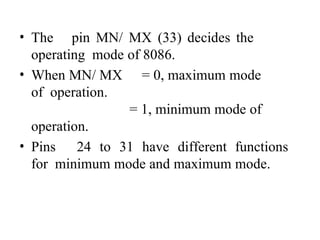
• The pin MN/ MX (33) decides the
operating mode of 8086.
• When MN/ MX = 0, maximum mode
of operation.
= 1, minimum mode of
operation.
• Pins 24 to 31 have different functions
for minimum mode and maximum mode.
Minimum Mode
• For minimum mode of operation MN/ MX is
connected to VCC (+5 volts).
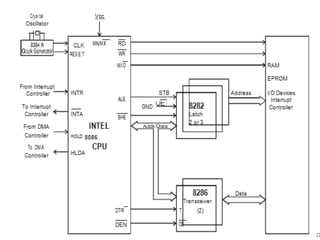
• All control signals for controlling memory and
I/O devices are generated inside the 8086
microprocessor.
• In this mode , peripheral devices can be used
with the microprocessor without any special
consideration
READ CYCLE
WRITE CYCLE
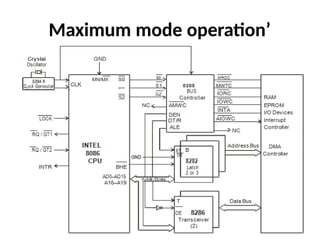
Maximum mode operation’
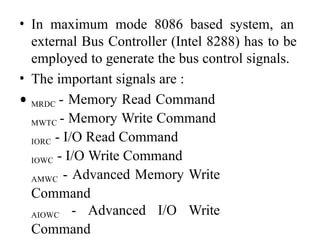
• In maximum mode 8086 based system, an
external Bus Controller (Intel 8288) has to be
employed to generate the bus control signals.
• The important signals are :
• MRDC - Memory Read Command
MWTC - Memory Write Command
IORC - I/O Read Command
IOWC - I/O Write Command
AMWC - Advanced Memory Write
Command
AIOWC - Advanced I/O Write
Command
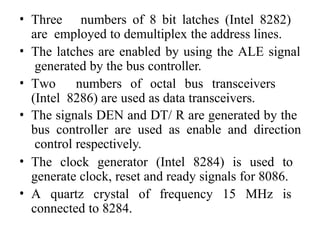
• Three numbers of 8 bit latches (Intel 8282)
are employed to demultiplex the address lines.
• The latches are enabled by using the ALE signal
generated by the bus controller.
• Two numbers of octal bus transceivers
(Intel 8286) are used as data transceivers.
• The signals DEN and DT/ R are generated by the
bus controller are used as enable and direction
control respectively.
• The clock generator (Intel 8284) is used to
generate clock, reset and ready signals for 8086.
• A quartz crystal of frequency 15 MHz is
connected to 8284.
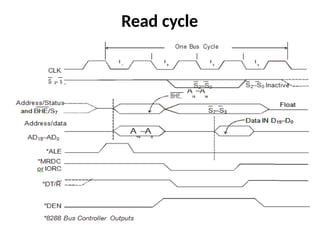
Read cycle
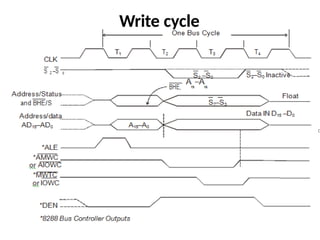
Write cycle
SYSTEM DESIGN USING 8086
The specification of the system
includes the following:
• I/O devices
• Memory requirement
• System clock frequency
• Peripheral devices required
• Application
I/O devices
Input
devices
controller
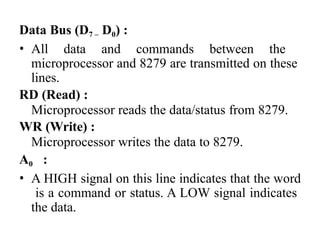
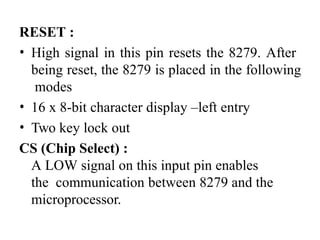
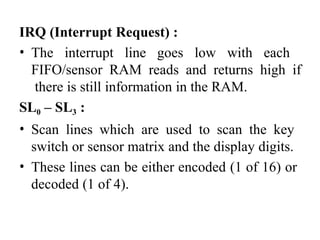
: 8279 – keyboard and display
The popular output devices are,
• LED display
• LCD
• Printer
• Floppy disk / CD
• CRT terminal
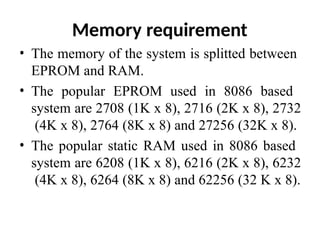
Memory requirement
• The memory of the system is splitted between
EPROM and RAM.
• The popular EPROM used in 8086 based
system are 2708 (1K x 8), 2716 (2K x 8), 2732
(4K x 8), 2764 (8K x 8) and 27256 (32K x 8).
• The popular static RAM used in 8086 based
system are 6208 (1K x 8), 6216 (2K x 8), 6232
(4K x 8), 6264 (8K x 8) and 62256 (32 K x 8).
System clock frequency
• The 8086 does not have an internal clock
circuit. Hence clock has to be supplied from an
external device.
• The Intel 8284 clock generator is employed to
generate the clock.
• An external quartz crystal has to be
connected to 8284 to generate the clock
signal.
Peripheral devices
• Intel 8253 - Programmable Interval Timer
• Intel 8251 - USART
• Intel 8255 - Programmable
Peripheral Interface
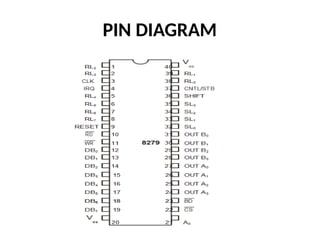
• Intel 8279 - Keyboard / Display controller
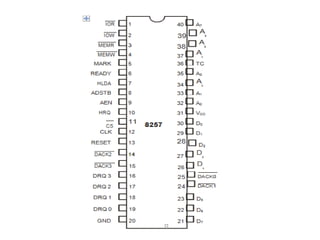
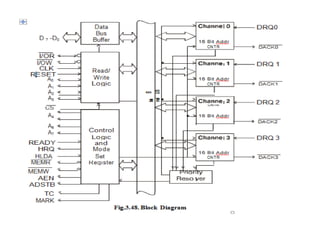
• Intel 8257 - DMA controller
• ADC, DAC etc.
Application
• The specifications of the microprocessor itself
depends on the applications for the proposed
system and the nature of work.
• The I/O device, memory, peripheral device are
all depends on the nature of work to be
performed by the system.
I/O PROGRAMMING
• Information can be transferred between input-
output devices or mass storage devices and the
CPU or memory.
• The three modes of transfer of device data,
commands and status are,
• Programmed I/O
• Interrupt driven I/O
• DMA transfer
PROGRAMMED I/O
• The program determines which interfaces need
servicing by testing the ready bits in their
status registers.
• Programmed testing of ready bits or signals is
known as polling.
INTERRUPT DRIVEN I/O
• An external interrupt is sent to the CPU from
the interface when the interface has data to
input or is ready to accept data.
• The I/O operation is performed by an interrupt
routine.
DMA TRANSFER
• The interface requests the use of the bus by
sending a signal through the control line and
makes the necessary transfer without the help
of the CPU.
PROGRAMMED I /O
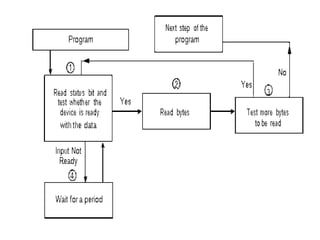
Read input in programmed I/O mode
• Each input is read after first testing whether
the device is ready with the input or whether
the device input buffer is not empty.
• The program waits for the ready status by
repeatedly testing the status bit and till all
targeted bytes are read from the input device.
• The program is in busy state only after the
device gets ready else in wait state.
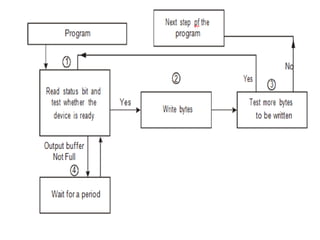
Output write in programmed I/O
mode
• Each output written after first testing whether
the device is ready to accept the bytes at its
output register or output buffer is empty.
• The program waits for the ready status by
repeatedly testing the status bit and till all the
targeted bytes are written to the device.
• The program in busy state only after the device
gets ready else wait state.
Interrupt driven I /O
i) Polling
ii)Daisy chaining
iii) Interrupt
priority
management
hardware
POLLING
• Polling is constantly testing a port to see if data is
available. i.e, the CPU polls (asks) the port if it
has data available or if it is capable of accepting
data.
• Polling notifies the part of the computer
containing the I/O interface that a device is ready
to be read but does not indicate which device.
• The interrupt controller must poll (send a signal
out to) each device to determine which one made
the request.
LIMITATION
S
• It is wasteful of the processors time, as
it needlessly checks the status of all device.
• Priority of the device is determined by
the order in the polling loop.
• When fast devices are connected to a
system, polling may simply not be fast
enough.
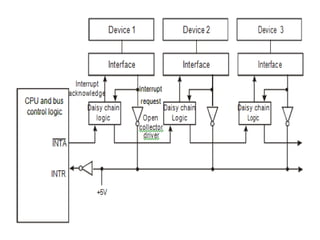
Daisy chaining
• It is a simple hardware means of attaining a
priority scheme.
• It consists of associating a logic circuit with
each interface and passing the interrupt
acknowledge signal
• A daisy chain is used to identify the device
requesting service.
• Daisy chaining is used for level sensitive
interrupts
Interrupt priority management
hardware
• By designing a programmable interrupt
priority management circuit and bus control
logic.
• The duty is placed on the requesting device to
request the interrupt and identify itself.
• The identity could be a branching address .
• If the device just supplies an identification
number, this can be used in conjunction with a
lookup table to determine the address of the
required service routine.
Direct Memory Access Block Transfer
• A DMA controller allows devices to transfer
data to or from the system’s memory without
the intervention of the processor.
• Components connected to the system bus is
given control of the bus.
• This component is said to be the master during
that cycle and the component it is
communicating with is said to be the slave.
• Taking control of the bus for a bus cycle is
called cycle stealing.
• The interface sends the DMA controller a
request for DMA service.
• A Bus request is made to the HOLD pin
(active High) on the 8086 microprocessor and
the controller gains control of the bus.
• A Bus grant is returned to the DMA controller
from the Hold Acknowledge (HLDA) pin
(active High) on the 8086 microprocessor.
• The DMA controller places contents of the
address register onto the address bus.
• The controller sends the interface a DMA
acknowledgment, which tells the interface to
put data on the data bus.
• The data byte is transferred to the memory
location indicated by the address bus.
• The interface latches the data.
• The Bus request is dropped, the HOLD pin
goes Low, and the controller relinquishes the
bus.
• The Bus grant from the 8086 microprocessor
is dropped and the HLDA pin goes Low.
• The address register is incremented by 1.
• The byte count is decremented by 1.
• If the byte count is non-zero, return to step
1, otherwise stop.
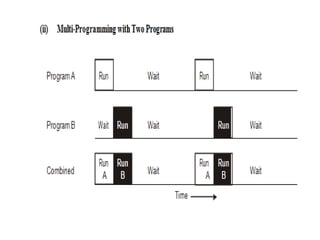
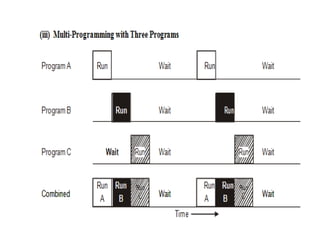
MULTIPROGRAMMING
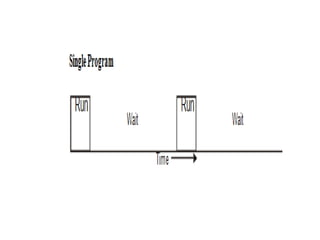
• Multiprogramming can execute several jobs
concurrently by switching the attention of the
CPU back and forth among them.
• Multiprogramming
enable
the CPU to
be utilizedmore efficiently.If the
operating
system can quickly switch the CPU to
another task
Advantages of multiprogramming
• It increases CPU utilization.
• It decreases total read time needed to
execute a job.
• It maximizes the total job throughput of computer.
Disadvantages of multiprogramming
• It is fairly sophisticated and more complex.
• A multiprogramming operating system must keep
track of all kinds of jobs it is concurrently
running.
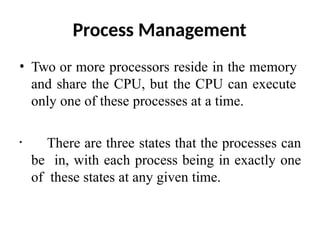
Process Management
• Two or more processors reside in the memory
and share the CPU, but the CPU can execute
only one of these processes at a time.
• There are three states that the processes can
be in, with each process being in exactly one
of these states at any given time.
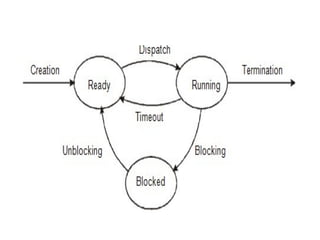
States
• Ready
• Running
• Blocked
TRANSISTIONS
Creation
• The creation transition is caused by a syscall
for loading a program.
• A process control block is created for the
program.
• Usually the operating system sets up three
open files: standard input, standard output, and
standard error.
Dispatch
• A process is dispatched when a processor is
free to execute the process and the operating
system has scheduled the process to run next
• Scheduling involves selecting one of the
ready processes to run next.
Timeout
• A timeout is triggered by an external interrupt
from a timer device.
• Information about the process’s register and
PC contents is saved into the PCB for the
process.
Blocking
• It is caused by the process making an
operating system request (syscall) that must
be satisfied before it can continue executing.
Unblocking
• The unblocking transition is triggered
by satisfaction of the request that lead to
blocking.
• After the operating system has handled the
request satisfaction it puts the process into the
ready state, entering it into the ready queue.
Termination
• The termination transition may be triggered by
an exit syscall from the process(normal
termination) or by a processor exception
(abnormal termination).
• The operating system frees up any resources
used by the process.
• If the termination is abnormal an error
message is displayed.
MULTIPROCESSORS
• A multiprocessor system will have two or more
processors that can execute instructions or
perform operations simultaneously.
Need for Multiprocessor Systems
• Some processor like DMA controllers can help
8086 with low level operations, while the CPU
can take care of the high level operations
• Due to limited data width and lack of floating
point arithmetic instructions, 8086 requires many
instructions for computing even single floating
point operation. For this Numeric Data Processor
(8087), can help 8086 processor.
Advantages
• Several low cost processors may be combined to fit the
needs of an application while avoiding the expense of the
unneeded capabilities of a centralized system.
• It is easy to add more processor for expansion as
per requirement.
• When a failure occurs, it is easier to replace the
faulty processor.
• In a multiprocessor system implementation of
modular processing of task can be achieved.
BASIC CONFIGURATIONS
• Co processor configuration
• Closely coupled configuration
• Loosely coupled configuration
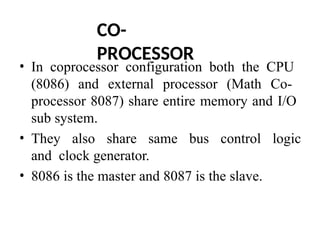
CO-
PROCESSOR
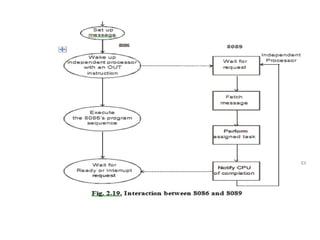
• In coprocessor configuration both the CPU
(8086) and external processor (Math Co-
processor 8087) share entire memory and I/O
sub system.
• They also share same bus control logic
and clock generator.
• 8086 is the master and 8087 is the slave.
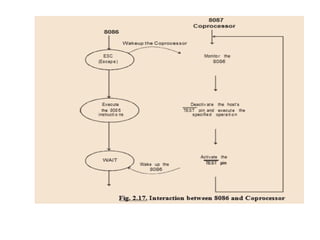
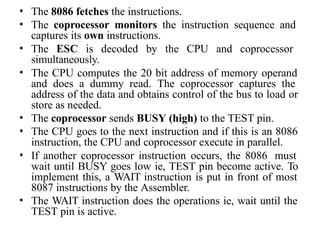
• The 8086 fetches the instructions.
• The coprocessor monitors the instruction sequence and
captures its own instructions.
• The ESC is decoded by the CPU and coprocessor
simultaneously.
• The CPU computes the 20 bit address of memory operand
and does a dummy read. The coprocessor captures the
address of the data and obtains control of the bus to load or
store as needed.
• The coprocessor sends BUSY (high) to the TEST pin.
• The CPU goes to the next instruction and if this is an 8086
instruction, the CPU and coprocessor execute in parallel.
• If another coprocessor instruction occurs, the 8086 must
wait until BUSY goes low ie, TEST pin become active. To
implement this, a WAIT instruction is put in front of most
8087 instructions by the Assembler.
• The WAIT instruction does the operations ie, wait until the
TEST pin is active.
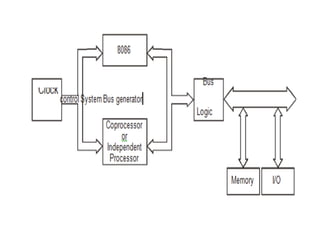
CLOSELY COUPLED CONFIGURATION
Share :
• Memory
• I/O system
• Bus and Bus control logic
• Clock generator
LOOSELY COUPLED CONFIGURATION
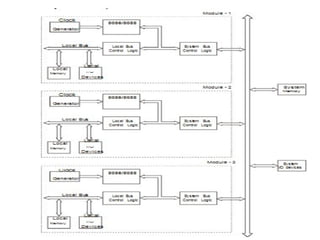
• In loosely coupled configuration a number of
modules of 8086 can be interfaced through a
common system bus to work as a
multiprocessor.
• Each module has an independent
microprocessor based system with its own
clock source, and its own memory and I/O
devices interfaced through a local bus.
• Each module can also be a closely coupled
configuration of a processor or coprocessor.
Advantages
• Better system throughput by having more than
one processor.
• The system can be expanded in modular form.
• A failure in one module normally does not
affect the breakdown of the entire system and
faulty module can be easily detected and
replaced.
Bus allocation schemes
• Daisy chaining
• Polling method
• Independent Priority
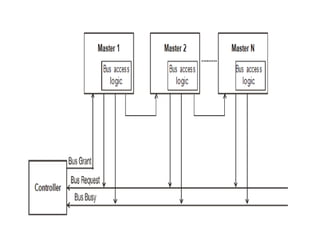
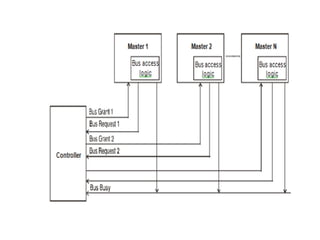
DAISY CHAINING METHOD
• In daisy chaining method all masters make use of
the same line for bus request.
• In response to a bus request, the controller
sends a bus grant if the bus is free.
• The bus grant signal serially propagates through
each master until it encounters the first one that is
requesting access to the bus.
• This master blocks the propagation of the bus
grant signal, activates the busy line and gains
control of the bus.
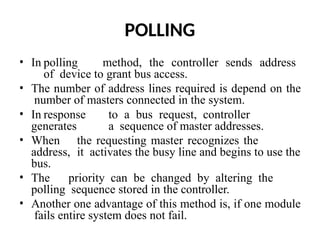
POLLING
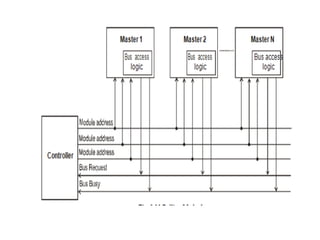
• In polling method, the controller sends address
of device to grant bus access.
• The number of address lines required is depend on the
number of masters connected in the system.
• In response to a bus request, controller
generates a sequence of master addresses.
• When the requesting master recognizes the
address, it activates the busy line and begins to use the
bus.
• The priority can be changed by altering the
polling sequence stored in the controller.
• Another one advantage of this method is, if one module
fails entire system does not fail.
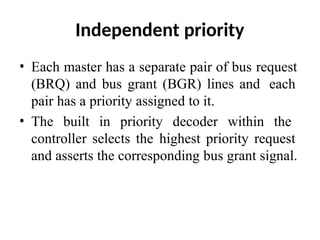
Independent priority
• Each master has a separate pair of bus request
(BRQ) and bus grant (BGR) lines and each
pair has a priority assigned to it.
• The built in priority decoder within the
controller selects the highest priority request
and asserts the corresponding bus grant signal.
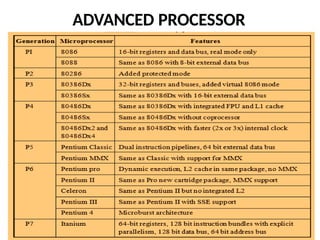
ADVANCED PROCESSOR
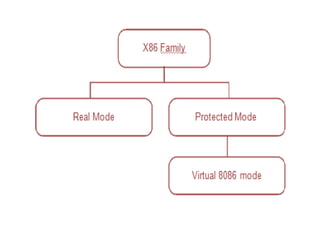
• In real mode, the advanced processors,
including the Pentium, simply operate like
very fast 8086, with the associated 1 MB
memory limit.
• Real mode operation is automatically selected
upon power-up.
• Pentium-based PC that boots up into DOS is
operating in real mode.
• In protected mode, the full 4 GB of memory
is available to the processor.
• It supports for multitasking, virtual memory
addressing, memory management, protection
and control over the internal data and
instruction cache.
• The Windows operating system runs in
protected mode to take advantage of these
improvements.
PENTIUM PROCESSOR
• The term ‘’Pentium processor’ refers to a family
of microprocessors that share a common
architecture and instruction set.
• The first Pentium processors were introduced in
1993.
• It runs at a clock frequency of either 60 or 66
MHz and has 3.1 million transistors.
The features of Pentium architecture are
• Improved instruction execution time
• Bus cycle pipelining
• Address parity .
• Internal parity checking
• Functional redundancy checking
FEATURES
• Wider (64-bit) Data Bus: With its 64-bit-wide external data
bus the Pentium processor can handle up to twice the data
load of the Intel486 processor at the same clock frequency.
• Superscalar Architecture: Dual Instruction Pipeline
• Dynamic Branch Prediction Logic: The Pentium processor
fetches the branch target instruction before it executes the
branch instruction.
• Enhanced Floating Point Unit: The Pentium processor
executes individual instructions faster through execution
pipelining, which allows multiple floating point instructions
to be executed at the same time.
• Dedicated Instruction and Data Cache: The Pentium
processor has two separate 8 KB caches on chip-one for
instructions and one for data.
• Write-Back MESI Protocol in Data Cache: When data is
modified; only the data in the cache is changed.
STAGES OF PENTIUM PROCESSOR
• Pre-fetch/Fetch : Instructions are fetched from the
instruction cache and aligned in pre-fetch buffers for
decoding.
• Decode1 : Instructions are decoded into the Pentium's
internal instruction format. Branch prediction also takes
place at this stage.
• Decode2 : Same as above, and microcode ROM kicks
in here, if necessary. Also, address computations take
place at this stage.
• Execute : The integer hardware executes the
instruction.
• Write-back : The results of the computation are written
back to the register file.
FLOATING POINT UNIT
• There are 8 general-purpose 80-bit
floating point registers.
• Floating point unit has 8 stages of
pipelining. First five are similar to integer
unit.
• Since the possibility of error is more
in floating point unit (FPU) than in integer
unit
Multi-core processor
• Amulti-core processor is a single chip
that contains more than one microprocessor
core.
• Each core can simultaneously
execute processor instructions in parallel.
• This effectively multiplies the
processor’s potential performance by the
number of cores.
• Because the cores are physically close to each
other, they can communicate with each other
much faster than separate processors in a
multiprocessor system.
• It improves overall system performance.
UNIT- 3
I/O INTERFACING
Memory Interfacing
• While executing a program, the microprocessor
needs to access memory frequently to read
instruction code and data stored in memory; the
interfacing circuit enables that access.
• Memory has some signal requirements to write
into and read from its registers.
• Similary, the microprocessor initiates a set of
signals when it wants to read from and write into
memory.
I/O INTERFACING
• The Input/Output devices such as keyboards and
displays are the communication channels to the
outside world.
• Latches and buffers are used for I/O interfacing.
They once hardwired, perform only one function
(either as input device if it is buffer and as output
device if it is a latch). Thus limiting their
capabilities.
• To improve the overall system performance the
Intel has designed various programmable I/O
devices.
• Some of the peripheral devices developed
by Intel for 8085/8086/8088 based system are:
• 8255 - Parallel Communication Interface
• 8251 - Serial Communication Interface
• 8254 - Programmable Timer
• 8279 - Keyboard / Display Controller
• 8257 - DMA Controller
• 8259 - Programmable Interrupt Controller
• The microprocessor can communicate with
external world or other systems using two
types of communication interfaces. They are:
• Serial Communication Interface
• Parallel Communication Interface.
Serial Communication Interface
• The serial communication interface gets a byte
of data from the microprocessor and sends
it bit by bit to the other system serially or it
receives data bit by bit serially from the
external system.
• Then it converts the data into bytes and sends
to the microprocessor.
Parallel Communication Interface
• A parallel communication interface gets a byte
from the microprocessor and sends all the bits
in that byte simultaneously (parallel) to the
external system and vice-versa.
SERIAL COMMUNICATION INTERFACE
• The primary difference between parallel I/O and
serial I/O is the number of lines used for data
transfer; the parallel I/O uses the entire data bus
and serial I/O uses one data line.
• In serial I/O transmission the microprocessor
selects the peripheral through chip select ( CS )
and uses the control signals read to receive data
and write to transmit data.
• The address decoding can be either I/O-mapped
I/O or memory-mapped I/O.
• Serial data transmission is classified as
• Simplex
• Half duplex
• Full duplex
Simplex
• The data are transmitted in only one direction.
There is no possibility of data transfer in the
other direction.
• Example : Transmission from a computer to
the printer.
Half duplex
• The data are transmitted in both directions, but
not simultaneously.
• Example : Walky - Talky
Full duplex
• The data are transmitted in both
directions simultaneously.
• Example : Telephone
The data in the serialcommunication
may be sent in two formats:
• Asynchronous
• Synchronous
Synchronous Transmission
• In synchronous transmission, a receiver and
transmitter work in same speed and could be
synchronized.
• Both will use a common clock and start at the
same time
Asynchronous transmission
• The asynchronous transmission is character-
oriented. Each character carries the information of
the Start and Stop bits
• When no data are being transmitted, a receiver
stays high at logic 1, called Mark and logic 0 is
called Space.
• Transmission begins with one start bit (Low),
followed by 7 or 8 bits to represent a character
and 1 or 2 Stop bits (high).
• A start bit, character and stop bits are called as
Frame.
PARALLEL COMMUNICATION INTERFACE OR
(8255 A - Programmable Peripheral
Interface)
• It has a 3-state bi-directional 8-bit buffer which
interfaces the 8255A to the sys-tem data bus.
• It has 24 programmable I/O Pins.
• It reduces the external logic normally
needed to interface peripheral devices.
• It has two 8 bit ports: Port A, Port B, and two
4 bit ports: CUPPER and CLOWER.
• Available in 40-Pin DIP and 44-Pin PLCC.
OPERATING MODES
• It can be operated in two basic modes:
– Bit Set/Reset Mode
– I/O Mode
• I/O mode is further divided into 3
modes:
– Simple I/O mode (Mode 0)
– Strobed I/O mode (Mode 1)
– Bidirectional Data Transfer mode (Mode 2)
Pin diagram of 8255A
• The 8255 consists of Four sections
namely
• Data Bus Buffer
• Read/Write Control Logic
• Group A Control
• Group B Control
DATA BUS BUFFER
• Used to interface the internal data bus of
8255A to the system data bus of 8085.
• Using IN or OUT instructions, CPU can read
or write the data from/to the data bus buffer.
• It can also be used to transfer control words
and status information between CPU and
8255A.
Read/Write Control Logic
• This block controls the Chip Selection ( CS ),
Read ( RD ) and Write ( WR ) operations.
• It consists of A0 and A1 signals which are
generally connected to the CPU address lines
A0 and A1 respectively.
• When CS (Chip Select) signal goes LOW,
different values of A0 and A1 select one of the
I/O ports or control register
• Group A : Port A and Most Significant Bits
(MSB) of Port C (PC4 – PC7)
• Group B : Port B and Least Significant Bits
(LSB) of Port C (PC0 – PC3)
• Port A: One 8-bit data output latch/buffer and
one 8-bit input latch buffer.
• Port B: One 8-bit data input/output latch/buffer.
• Port C: One 8-bit data output latch/buffer and
one 8-bit data input buffer. This port can be
divided into two 4-bit ports and it can be used for
the control signal outputs and status signal inputs
in conjunction with ports A and B.
BSR (Bit Set/Reset) Mode
• This mode is applicable only for Port C.
• A control word with bit D7 = 0 is
recognized as BSR control word.
• This control word can set or reset a single bit
in the Port C.
The I/O mode is divided into three modes
Mode 0, Mode 1 and Mode 2 as given below.
• Mode 0 – Basic I/O Mode
• Mode 1 – Strobed I/O Mode
• Mode 2 – Bi-directional data transfer
mode
Mode 0 – Basic I/O mode
• The features of Mode 0 are :
• Two 8-bit ports (Port A, Port B) and two 4-bit
ports (Port CU, Port CL). Any port can be input
or output.
• Outputs are latched.
• Inputs are not latched.
Mode 1 - Strobed Input/Output
• In this mode, handshake signals are exchanged between the
microprocessor and peripherals prior to data transfer
The features of mode 1 are :
• Two Groups (Group A and Group B).
• Each group contains one 8-bit data port and one 4-bit
control/data port. The 8-bit data port can be either input or
output
• The 4-bit port is used for control and status of the 8-bit data
port.
• If Port A is in mode 1 (input), then PC3, PC4, PC5 are used
as control signals. If Port B is in mode 1 (input), then PC0,
PC1, PC2 are used as control signals.
• Both inputs and outputs are latched.
• STB (Strobe Input) – A “low” signal on this
pin indicates that the peripheral device has
transmitted a byte of data.
• The 8255A in response to STB , generates
IBF and INTR.
• IBF (Input Buffer Full) – A “high” signal
issued by 8255A is an acknowledge to indicate
that the input latch has received the data byte.
This is reset when the CPU reads the data.
• INTR (Interrupt Request) – This is an output
signal, used to interrupt the CPU. This will be
in active state when STB , IBF and INTE
(internal Flip-Flop) are all at logic 1. This will
be reset by the falling edge of RD signal.
• INTE (Interrupt Enable) – This is an Internal
Flip-Flop used to enable or disable the
generation of INTR signal. There are two Flip-
Flops INTEA and INTEB are set/reset using the
BSR mode.
Mode 2 – Bi-directional Data
Transfer Mode
• This mode provides a means for communicating
with a peripheral device or structure on a single 8-
bit bus for both transmitting and receiving data
(bidirectional bus I/O).
• The features of Mode 2 are :
• Used in Group A only.
• Port A only acts as bi-directional bus port
• Port C (PC3-PC7) is used for
handshaking purpose.
INTR (Interrupt Request):
• A high on this output can be used to
interrupt the CPU for input or output
operations.
OBF(Output Buffer Full):
This signal will go LOW to indicate that
the CPU has written data out to Port A.
ACK(Acknowledge):
A LOW on this input enables the tri-state
output buffer of Port A to send out the
data.
• Otherwise, the output buffer will be in the high
impedance state.
DIGITAL TO
ANALOG
CONVERTERS (DAC)
• The digital
to
converters
analog
convert binary
numbers
into their
equivalent voltages or currents.
(DAC)
analog
Several
techniques are employed for digital to
analog conversion.
• Weighted resistor network
• R-2R ladder network
• Current output D/A converter
APPLICATION
S
• Digitally controlled gains
• Motor speed control
• Programmable gain amplifiers
• Digital voltmeters
• Panel meters, etc.
• Resolution: It is a change in analog output
for one LSB change in digital input.
(1/2n )*Vref
• 1/256*5 V=39.06 mV (since n=8 for 8-
bit DAC)
• Settling time: It is the time required for
the DAC to settle for a full scale code change.
DAC 0800 8-bit Digital to Analog
converter
• DAC0800 is a monolithic 8-bit
DAC manufactured by National
semiconductor.
• It has settling time around 100ms.
• It can operate on a range of power
supply voltage i.e. from 4.5V to +18V.
• Usually the supply V+ is 5V or +12V. The V-
pin can be kept at a minimum of –12V.
• Resolution of the DAC is 39.06mV
• The Vref+ should be tied to +5 V to
generate a wave of +5V amplitude.
• The required frequency of the output is
500 Hz, i.e. the period is 2 ms.
• Assuming the wave to be generated
• is symmetric, the waveform will rise for 1 ms
and fall for 1 ms.
• This will be repeated continuously.
ANALOG TO DIGITAL INTERFACE
• ADC 0808/0809
8254 - Timer/Counter
• It is designed to solve the common timing
control problems in microcomputer system
design.
• Compatible with all Intel and most other
microprocessors.
• It can be operated at count rates upto 10 MHz
• Six programmable counter modes and all
modes are software programmable.
• Three independent 16-bit counters
Applications of 8254
• Real time clock
• Event-counter
• Digital one-shot
• Programmable rate generator
• Square wave generator
PIN DIAGRAM
BLOCK DIAGRAM
Data Bus Buffer
• This 3-state, bi-directional, 8-bit buffer is used
to interface the 8254 to the system bus.
Read/Write Logic
• The Read/Write logic accepts inputs from the
system bus and generates control signals
for the other functional blocks of the 8254.
• A1 and A0 select one of the three counters or
the control word register to be read
from/written into.
Control Word Register
• The control word register is selected by
the Read/Write logic when A1, A0=11.
• If the CPU then does a write operation to the
8254, the data is stored in the control word
register and is interpreted as a control word
used to define the operation of the counters.
• The control word register can only be written
to; status information is available with the
Read-Back command.
Counter 0, Counter 1, Counter 2
• Each is a 16 bit down counter
• The counters are fully independent. Each
counter may operate in a different mode.
• Each counter has a separate clock input, count
enable (gate) input lines and output line.
• The control word register is not a part of the
counter itself, but its contents determine how
the counter operates.
OPERATING MODES
• Mode 0: Interrupt On Terminal Count
• Mode 1: Hardware Retriggerable One-
Shot
• Mode 2: Rate Generator
• Mode 3: Square Wave Mode
• Mode 4: Software Triggered Strobe
• Mode 5: Hardware Triggered Strobe
Mode 0: Interrupt On Terminal Count
• Mode 0 is typically used for event counting.
• After the control word is written, OUT is
initially low, and will remain low until the
counter reaches zero. OUT then goes high and
remains high until a new count or a new Mode
0 control word is written into the counter.
• GATE = 1 enables counting;
• GATE = 0 disables counting. GATE has no
effect on OUT
Mode 1: Hardware Re-triggerable
One-Shot
• OUT will be initially high. OUT will go low on the CLK pulse
following a trigger to begin the one-shot pulse, and will remain low
until the counter reaches zero.
• OUT will then go high and remain high until the CLK pulse after the
next trigger. Thus generating a one-shot pulse.
• After writing the control word and initial count, the counter is
armed.
• A trigger results in loading the counter and setting OUT low on the
next CLK pulse, thus starting the one-shot pulse. An initial count of
N will result in a one-shot pulse ‘N’ CLK cycles in duration.
Mode 2: Rate Generator
• This mode functions like a divide-by-N counter.
• It is typically used to generate a real time clock
interrupt.
• OUT will initially be high. When the initial count
has decremented to 1, OUT goes low for one CLK
pulse. OUT then goes high again, the counter
reloads the initial count and the process is
repeated.
• Mode 2 is periodic; the same sequence is repeated
indefinitely.
• For an initial count of N, the sequence repeats
every N CLK cycles.
Mode 3: Square Wave Mode
• Mode 3 is typically
used generation.
for baud
rate
• Mode 3 is similar to Mode 2 except for the
duty cycle of OUT. OUT will initially be high.
When half the initial count has expired, OUT
goes low for the remainder of the count.
• Mode 3 is periodic; the sequence above is
repeated indefinitely. An initial count of N
results in a square wave with a period of N
CLK cycles.
METHODS TO IMPLEMENT
MODE 3
Even counts:
• OUT is initially high. The initial count is loaded
on one CLK pulse and then is decremented by
two on succeeding CLK pulses. When the count
expires OUT changes value and the counter is
reloaded with the initial count. The above process
is repeated indefinitely.
Odd counts:
• For odd counts, OUT will be high for (N +1)/2
counts and low for (N - 1)/2 counts.
Mode 4: Software Triggered Strobe
• The output goes high on setting the mode.
After terminal count, the output goes low for
one clock period and then goes high again.
• In this mode the OUT is initially high; it goes
low for one clock period at the end of the
count. The count must be reloaded for
subsequent outputs.
Mode 5: Hardware Triggered Strobe
• This mode is similar to mode 4, but a trigger at
the gate initiates the counting.
• This mode is similar to mode 4, except that
it is triggered by the rising pulse at the gate.
• Initially the OUT is high and when the gate
pulse is triggered from low to high, the count
begins, at the end of the count, the OUT goes
low for one clock period.
Programming the 8254
Write Operations
• For each counter, the control word must be
written before the initial count is written.
• The initial count must follow the count format
specified in the control word (least significant
byte only, most significant byte only, or least
significant byte and then most significant
byte).
Read Operations
• It is often desirable to read the value of a
counter without disturbing the count in
progress. This is easily done in the 8254.
• There are three possible methods for
reading the counters:
• Simple read operation,
• Counter latch command, and
• Read-Back command.
CONTROL WORD FORMAT
OF 8254
KEYBOARD/DISPLAY CONTROLLER
• Intel 8279 is an LSI device.
• It simultaneously drives the display of a system
and interfaces a keyboard with the
microprocessor.
• The keyboard display interface scans the
keyboard to identify if any key has been pressed
and sends the code of the pressed key to the
microprocessor.
• It also transmits the data received from
microprocessor to the display device.
Features of 8279
• 8279 has 3 input modes for keyboard
interface
– Scanned keyboard mode
– Scanned sensor matrix mode
– Strobed input mode
• 8279 has 2 output modes for display interface
– Left entry
– Right entry
• It has two key depression modes
– 2 key lockout mode
– N key rollover mode
PIN DIAGRAM
Data Bus (D7 – D0) :
• All data and commands between the
microprocessor and 8279 are transmitted on these
lines.
RD (Read) :
Microprocessor reads the data/status from 8279.
WR (Write) :
Microprocessor writes the data to 8279.
A0 :
• A HIGH signal on this line indicates that the word
is a command or status. A LOW signal indicates
the data.
RESET :
• High signal in this pin resets the 8279. After
being reset, the 8279 is placed in the following
modes
• 16 x 8-bit character display –left entry
• Two key lock out
CS (Chip Select) :
A LOW signal on this input pin enables
the communication between 8279 and the
microprocessor.
IRQ (Interrupt Request) :
• The interrupt line goes low with each
FIFO/sensor RAM reads and returns high if
there is still information in the RAM.
SL0 – SL3 :
• Scan lines which are used to scan the key
switch or sensor matrix and the display digits.
• These lines can be either encoded (1 of 16) or
decoded (1 of 4).
RL0 – RL7 :
• Input return lines which are connected to the
scan lines through the keys or sensor switches.
• They have active internal pull-ups to keep
them high until a switch closure pull one low.
These also serve as an 8-bit input in the
strobed input mode.
SHIFT :
• It has an active internal pullup to keep it high
until a switch closure pulls it low.
CNTL/STB :
• For keyboard mode, this line is used as a control
input and stored like status on a key closure.
• The line is also the strobed line to enter the data
in to the FIFO in the strobed input mode.
OUT A0 – OUT A3, OUT B0 – OUT B3 :
• These two ports are the outputs for the 16´4
display refresh registers. These two ports may
also be considered as one 8-bit port.
• The two 4-bit ports may be blanked
independently.
BD :
This output is used to blank the display during
digit switching or by a display blanking
command.
Block Diagram of 8279
• The 8279 has the following four sections.
• CPU Interface Section
• Keyboard Section
• Scan Section
• Display Section
CPU Interface Section
• This section has bi-directional data buffer
(DB0 – DB7), I/O control lines ( RD , WR , CS ,
A0) and Interrupt Request line (IRQ).
• The A0 signal determines whether
transmit/receive control word or data is used.
• An active high in the IRQ line is generated to
interrupt the microprocessor whenever the data
is available.
Keyboard Section
• This section has keyboard debounce and
control, 8x8 FIFO/Sensor RAM, 8 Return lines
(RL0 – RL7) and CNTL/STB and shift lines.
• In the keyboard debounce and control unit,
keys are automatically debounced and the
keyboard can be operated in two modes.
• Two key lock out
• N – key roll over
• In the two key lock out mode, if two keys are
pressed simultaneously, the first key only
recognized.
• In the N-key roll over mode, it stores the codes of
simultaneous keys pressed in the internal buffer, it
can also be setup so that no key is
recognized until only one key remains pressed.
• The 8´8 FIFO/Sensor RAM consists of 8 registers
that are used to store eight keyboard entries.
• The return lines (RL0 – RL7) are connected to
eight columns of keyboard.
• The status of shift and CNTL/STB lines are stored
along with the key closure.
Scan Section
• This section has scan counter and four
scan lines (SL0–SL3).
• These lines are decoded by 4 to16 decoder
to generate 16 scan lines.
• Generally SL0 – SL3 are connected with
the rows of a matrix keyboard.
Display Section
• This section has two groups of output lines A0
– A3 and B0–B3.
• These lines are used to send data to
display drivers.
• BD line is used blank the display.
• It also has 16 x 8 display RAM.
Programming the 8279
INTERRUPT CONTROLLER
• The 8259A programmable interrupt controller
extends the hardware interrupt facility provided in
a microprocessor.
• It manages up to 8 vectored priority interrupts for
a processor.
• It has built-in features for expandability to other
8259A’s (up to 64 vectored priority interrupts).
• It is programmed by the system’s software as an
I/O peripheral.
Features of 8259 A
• It can manage 8 priority interrupts.
• By cascading 8259s it is possible to get 64
priority interrupts.
• It can be programmed to accept either the level
triggered or the edge triggered interrupt
request.
• Reading of interrupt request register (IRR) and
in-service register (ISR) through data bus.
VARIOUS MODES OF OPERATION
• Fully nested mode
• Special fully nested mode.
• Special mask mode
• Buffered mode
• Poll command mode
• Cascade mode with master or slave
selection
• Automatic end-of-interrupt mode
PIN DIAGRAM
BLOCK DIAGRAM
Interrupt Request Register (IRR)
• The interrupts at the IR input lines are handled
by two registers in cascade, the Interrupt
Request Register (IRR) and the In-Service
Register (ISR).
• The IRR is used to store all the interrupt
levels which are requesting service.
In-Service Register (ISR)
• The ISR is used to store all the interrupt
levels which are being serviced.
Priority Resolver
• This logic block determines the priorities of
the bits set in the IRR. The highest priority is
selected and strobed into the corresponding bit
of the ISR during INTA pulse.
Interrupt Mask Register (IMR)
• The IMR stores the bits which mask the
interrupt lines to be masked. The IMR operates
on the IRR. Masking of a higher priority input
will not affect the interrupt request lines of
lower quality.
Data Bus Buffer
• This 3-state, bidirectional 8-bit buffer is used
to interface the 8259A to the system data bus.
Control words and status information are
transferred through the Data Bus Buffer.
Read/Write Control Logic
• The function of this block is to accept output
commands from the Microprocessor.
• It contains the Initialization Command Word
(ICW) registers and Operation Command
Word (OCW) registers which store the various
control formats for device operation.
• This function block also allows the status of
the 8259A to be transferred onto the data bus.
Cascade Buffer/Comparator
• This block is used to expand the number of
interrupt levels by cascading two or more 8259s.
• This function block stores and compares the IDs
of all 8259A’s used in the system.
• The associated three I/O pins (CAS0-2) are
outputs when the 8259A is used as a master and
are inputs when the 8259A is used as a slave.
• As a master, the 8259A sends the ID of the
interrupting slave device onto the CAS0±2 lines.
Control Logic
• This block has two pins INT and INTA.
INT (Interrupt)
• This output goes directly to the CPU interrupt
input. The voltage level on this line is designed to
be fully compatible with the 8080A, 8085A and
8086 input levels.
INTA (Interrupt Acknowledge)
• INTA pulses will cause the 8259A to release
vectoring information onto the data bus.
• The format of this data depends on the system
mode of the 8259A
PRIORITY MODES
• Fully Nested Mode
• This mode is entered after initialization unless
another mode is programmed.
• The interrupt requests are ordered in priority
from 0 through 7 (0 highest).
• When an interrupt is acknowledged the highest
priority request is determined and its vector
placed on the bus.
• Automatic End of Interrupt (AEOI) Mode
• If AEOI = 1 in ICW4, then the 8259A will operate in
AEOI mode continuously until reprogrammed by
ICW4.
• In this mode the 8259A will automatically perform a
non-specific EOI operation at the trailing edge of the
last interrupt acknowledge pulse.
• Automatic Rotation (Equal Priority Devices)
• In some applications there are a number of interrupting
devices of equal priority.
• In this mode a device after being serviced, receives the
lowest priority. So a device requesting an interrupt will
have to wait.
• In the worst case until each of 7 other devices are
serviced at most once.
• Specific Rotation (Specific Priority)
• The programmer can change priorities by
programming the bottom priority and thus fixing
all other priorities; i.e., if IR4 is programmed as
the lowest priority device, then IR5 will have the
highest one.
• Special Mask Mode
• In the special mask mode, when a mask bit is set
in OCW1, it inhibits further interrupts at that level
and enables interrupts from all other levels (lower
as well as higher) that are not masked.
• Thus, any interrupts may be selectively enabled
by loading the mask register.
• Poll Command
• Inpoll mode the INT output functions as
it normally does.
• The microprocessor should ignore this output.
• This can be accomplished either by not
connecting the INT output or by masking
interrupts within the microprocessor, thereby
disabling its interrupt input.
• Service to devices is achieved by software
using a poll command.
• Special Fully Nest Mode
• This mode will be used in the case of a big
system where cascading is used, and the
priority has to be conserved within each slave.
• In this case the fully nested mode will be
programmed to the master.
• Buffered Mode
• When the 8259A is used in a large system
where bus driving buffers are required on the
data bus and the cascading mode is used, there
exists the problem of enabling buffers.
• This modification forces the use of software
programming to determine whether the 8259A
is a master or a slave.
INITIALIZATION COMMAND WORD
ICW 1
• A write command issued to the 8259 with A0=0
and D4=1 is interpreted as ICW 1, which starts the
initialization sequence. It specifies,
• Single or Multiple 8259s in the system.
• 4 or8 bit, interval between the interrupt
vector Locations.
• The address bits A7–A5 of the CALL instruction.
• Edge triggered or Level triggered interrupts.
• ICW 4 is needed or not.
ICW 2
• ICW 2 is issued following, ICW 1 with A0 = 1
• ICW 2 specified the high-order byte of the
CALL instruction.
• Since A0 input of 8259 is connected to address
line A1, ICW1 should be addressed to ‘C0’ H
& ICW 2 should be addressed to ‘C2’ H
• ICW 3 :
• ICW 3 is required if there is more than
one 8259 in the system and if they are
cascaded.
• An ICW 3 operation loads a slave register
in the 8259.
• The format of the byte to be loaded as an ICW
3 for a MASTER 8259 or a SLAVE
• ICW 4 :
• It is loaded only if the D0 bit of ICW 1 is set.
• It specifies,
• Whether to use special fully nested mode or non
special fully nested mode.
• Whether to use buffered mode or non
buffered mode.
• Whether to use Automatic EOI or Normal EOI.
• CPU used – 8085 or 8086 / 8088
OCW
• After intialization, the 8259 is ready to process IRs.
• However during operation, it might be necessary to
change the mode of processing the interrupt OCWs
which are used for this purpose.
• They may be loaded anytime after the initialization of
8259 to operate in various interrupt modes.
These modes are
• Fully nested mode
• Rotating Binary mode
• Special Mask mode
• Polled mode
OCW1
• Issued with A0=1, used to mask the interrupts.
To enable all the IR lines, the command word
is 00 H.
OCW 2:
• A write command with A0 = 1 and D4D3=00 is
interpreted as OCW2.
• R–Rotate
• SL–Select Level
• EOI - End of Interrupt
• The R, SL, EOI bits control the Rotate and
End of Interrupt Modes and combinations of
the two.
OCW 3 :
• OCW 3 is used to read the status of the
registers and to set or reset the Special Mask
and Polled Modes.
8257-PROGRAMMABLE DMA
CONTROLLER
• The ability of an I/O sub system is to transfer
data to and from a memory subsystem,
which is used for high speed data transfer.
• Ex : Data transfer between a floppy disk and
memory.
DMA Controller :
• It is a device that can control data transfer
between an I/O subsystem and a memory
subsystem without the help of CPU.
DMA Operation sequence
• Once interface is ready to receive data, DMA request is
made.
• Bus request is made by the DMA.
• Bus grant is returned by the processor.
• DMA places address on the address bus.
• DMA request is acknowledged.
• Memory places data on the data bus.
• Interface latches data.
• Bus request is dropped and control is returned to
the processor
• Bus grant is dropped by the processor.
Features of 8257
• Enable / Disable control of individual
DMA Requests.
• Four Independent DMA channels - CH0,
CH1, CH2 and CH3.
• Independent auto-intialization of all channels.
• Memory to memory transfer.
• Memory block initialization.
Data Bus Buffer :
• It is a tri-state, bidirectional, 8 bit buffer which
interfaces the 8257 to the system data bus.
• In the slave mode, it is used to transfer data
between microprocessor and internal registers
of 8257.
• In master mode, it is used to send higher byte
address (A8–A15) on the data bus.
Read/Write Logic :
• During DMA cycles (ie, Master mode) the
Read/Write logic generates the I/O read and
memory write (DMA write cycle) or I/O Write
and Memory read (DMA read cycle) signals
which control the data transfer between
peripheral and memory device.
DMA Channels
• The 8257 provides four identical channels
labelled CH0, CH1, CH2 and CH3. Each channel
has two-16 bit registers
• DMA address register
• Terminal Count register
DMA address Register:
• It specifies the address of the first memory
location to be accessed. It is necessary to load
valid memory address in the DMA address
register before channel is enabled.
Terminal Count Register :
• The value loaded into the low order 14 bits (C13–
C0) of TCR specifies the number of DMA cycles
minus one (N–1) before TC output is activated.
TERMINAL COUNT REGISTER
Control Logic :
• It controls the sequence of operations
during all DMA cycles (DMA read, DMA
write, DMA verify) by generating the
appropriate control signals and the 16-bit
address that specifies the memory location to
be accessed.
• It consists of mode set register and status
register.
Mode Set Register
• LSB 4 bits are the enable 4 DMA channels
• MSB 4 bits are the enable Autoload, TC Stop,
Extended Write, Rotating Priority Modes.
• It is normally programmed by the CPU after
initializing the DMA address registers and
terminal count registers.
• It is cleared by RESET input, this disabling
all options, inhibiting all channels, and
preventing bus conflicts on power-up.
STATUS BIT REGISTER
• It indicates which channels have reached a
terminal count condition and includes the update
flag.
• The TC status bit = 1, terminal count has been
reached for that channel.
• TC bit remains set until the status register is read
or the 8257 is reset.
• Update flag = 1, 8257 is executing update cycle.
• In update cycle 8257 load parameters in channel 3
to channel 2.
Priority Resolver :
• It resolves the peripherals request. It can be
programmed to work in two modes, either in
fixed mode or rotating priority mode.
UNIT – 4
MICROCONTROLLERS
BASIC BLOCK DIAGRAM
FEATURES
High integration of
functionality :
• Microcontrollers are called as
single
chip
computersbecause they have on -
chip
memory and I/O circuitry and other circuitries
that enable them to function as small stand -
alone computers without other supporting
circuitry.
• Field
programmability,
Microcontrollers often
use
flexibility :
EPROM
or
E2PROM as their storage device to allow field
programmability so they are flexible to use.
• Once the program is tested to be correct then
large quantities of microcontrollers can be
programmed to be used in embedded systems.
• Easy to use.
Advantages of microcontrollers
• The overall system cost is low, as the
peripherals are integrated in a single chip.
• The product is of small size as compared to the
microprocessor based system and is very
handy.
• The system is more reliable.
• The system is easy to troubleshoot and
maintain.
• If required additional RAM, ROM and I/O
ports may be interfaced
ARCHITECTURE OF 8051
The features of the 8051 are :
• 8 bit CPU with registers A (the accumulator) and B
• 16 bit Program Counter (PC) and Data Pointer (DPTR)
• 8 bit Program Status Word (PSW)
• 64K Program memory address space
• 64K Data memory address space
• 128 bytes of on chip data memory
• 32 I/O pins for four 8 bit ports : Port 0, Port 1, Port 2,
Port 3
• Two 16 bit timers / counters : T0 and T1
• Full duplex UART : SBUF
• Two external and three internal interrupt sources
• On chip clock oscillator.
Central processing unit
• The CPU is the brain of the microcontrollers
reading user’s programs and executing the
expected task as per instructions stored
there in. It’s primary elements are an
Accumulator (ACC), B register (B), Stack
pointer (SP), Program counter (PC), Program
status word (PSW), Data pointer register
(DPTR) and few more 8 bit registers.
Accumulator
• The accumulator performs arithmetic and logic
functions on 8 bit input variables.
• Arithmetic operations include basic addition,
subtraction, multiplication and division.
• Logical operations are AND, OR XOR as well
as rotate, clear, complement etc.
• Apart from all the above, accumulator is
responsible for conditional branching decisions
and provides a temporary place in a data
transfer operations within the device.
B Register
• B register is used in multiply and divide
operations.
• During execution B register either keeps
one of the two inputs and then retains a
portion of the result.
• For other instructions it is used as general
purpose register.
Stack Pointer
• Stack Pointer (SP) is an 8 bit register.
• This pointer keeps track of memory space where
the important register information are stored when
the program flow gets into executing a
subroutine.
• The stack portion may be placed in anywhere in
the onchip RAM.
• But normally SP is initialized to 07H after a
device reset and grows up from the location 08H.
• The SP is automatically incremented or
decremented for all PUSH or POP instructions
and for all subroutine calls and returns.
Program Counter
• The Program Counter (PC) is the 16 bit
register giving address of next instruction to be
executed during program execution.
• It always points to the program memory space.
Data Pointer Register
• The Data Pointer Register (DPTR) is the 16 bit
addressing register that can be used to fetch
any 8 bit data from the data memory space.
• When it is not being used for this purpose, it
can be used as two eight bit registers, DPH and
DPL.
Program Status Word
• The Program Status Word
(PSW)
keeps
the current statusof the arithmetic and
logic
operations in different bits.
• The 8051 has four math flags that respond
automatically to the outcomes of arithmetic and
logic operations and 3 general purpose user flags
that can be set 1 or cleared to 0 by the
programmer as desired.
• The math flags are carry (C), auxiliary carry
(AC), overflow (OV) and parity (P).
• User flags are named flag 0 (F0), Register bank
select bits RS0 and RS1.
Input / Output Ports
• 8051 has 32 I/O pins configured as 4 eight bit
parallel ports (P0, P1, P2 and P3).
• Each pin can be used as an input or as an
output under the software control.
• These I/O pins can be accessed directly by
memory instructions during program execution
to get require flexibility.
Timers / Counters
• 8051 has two 16 bit Timers / Counters, T0 and T1
capable of working in different modes.
• Each consists of a ‘HIGH’ byte and a ‘LOW’
byte which can be accessed under software.
• There is a mode control register (TMOD)
and a control register (TCON) to configure
these timers
/ counters in number of ways.
• These timers are used to measure time intervals,
determine pulse widths or initiate events with one
microsecond resolution upto a maximum 65ms.
Serial Port
• The 8051 has a high speed full duplex serial
port which is software configurable in 4 basic
modes :
• Shift register mode
• Standard UART mode
• Multiprocessor mode
• 9 bit UART mode
Interrupts
• The 8051 has five interrupt sources : One from
the serial port (RI / TI) when a transmission or
reception operation is executed : two from the
timers (TF0, TF1) when overflow occurs and two
come from the two input pins INT0, INT1.
• Each interrupt may be independently enabled or
disabled to allow polling on same sources and
each may be classified as high or low priority.
• These operations are selected by Interrupt Enable
(IE) and Interrupt Priority (IP) registers.
Oscillator and Clock
• The 8051 generates the clock pulses by which
all internal operations are synchronized.
• Pins XTAL 1 and XTAL 2 are provided for
connecting a resonant network to form an
oscillator.
• A quartz crystal is used for oscillator.
• The crystal frequency is the basic internal
clock frequency of the microcontroller.
SPECIAL FUNCTION REGISTERS (SFRS)
• The address of the Special Function Registers
are above 80H, since the addresses 00H to
7FH are the addresses of RAM memory.
• The SFRs have addresses between 80H
and FFH.
• But all the address space of 80H to FFH is not
used by the SFRs.
• The unused locations are reserved and
must not be used by the programmer.
ADDRESSING MODES
• Immediate addressing mode
• Register addressing mode
• Direct addressing mode
• Register indirect addressing
mode
• Indexed addressing mode
Immediate Addressing Mode
• When a source operand is a constant rather
than a variable, then the constant can be
embedded into the instruction itself.
• This kind of instructions take two bytes and
first one specifies the opcode and second byte
gives the required constant.
• The operand comes immediately after the
opcode. The mnemonic for immediate data is
the pound sign (#).
• This addressing mode can be used to load
information into any of the registers including
DPTR register.
Register Addressing Mode
• Register addressing accesses the eight working
registers (R0 - R7) of the selected register
bank.
• The least significant three bits of the
instruction opcode indicate which register is to
be used for the operation.
• One of the four banks of registers is to be
predefined in the PSW before using register
addressing instruction.
• ACC, B and DPTR can also be addressed in
this mode.
Direct Addressing Mode
• In the direct addressing mode, all 128 bytes of
internal RAM and the SFRs may be addressed
directly using the single - byte address
assigned to each RAM location and each SFR.
• Internal RAM uses address from 00H to 7FH
to address each byte.
Register Indirect Addressing Mode
• In this mode a register is used as a pointer to
the data.
• If the data is inside the CPU, only registers
R0 and R1 are used for this purpose.
• When R0 and R1 hold the addresses of RAM
locations, they must be preceded by the “@”
sign.
Indexed Addressing Mode
• Only the program memory can be accessed by this
mode.
• This mode is intended for reading lookup tables in the
program memory.
• A 16 bit base register (DPTR or PC) points to the base
of the lookup tables and accumulator carries the
constant indicating table entry number.
• The address of the exact location of the table is formed
by adding the accumulator data to the base pointer.
Example
MOVC A, @A + DPTR
• The contents of A are added to the DPTR to form the
16 bit address of the needed data. ‘C’ means code.
I/OPORTS
Port 0 (P0.0 - 0.7)
• Port 0 is used for both address and data bus (AD0
– AD7).
• When the microcontroller chip is connected to an
external memory, Port 0 provides both address
and data.
• ALE pin indicates if Port 0 has address or data.
• When ALE = 0, Port 0 provides data (D0 – D7)
= 1, Port 0 provides address (A0 – A7)
• ALE is used for demultiplexing address and data
with the help of a latch
Port 1 (P1.0 - P1.7)
• Port 1 pins are used as input or output.
• To make port 1 as an input port, write 1 to all
its 8 bits.
• To make port 1 as output port, write 0 to all its
8 bits.
• Thus port 1 pins have no dual functions.
Port 2 (P2.0 - P2.7)
• Port 2 pins are used as input / output pins
similar in operation to port 1.
• The alternate use of port 2 is to supply a high
order address byte (A8 – A15) when the
microcontroller is connected to external
memory
Port 3 (P3.0 - P3.7)
• Port 3 pins are used as input or output
INSTRUCTION SET
• An instruction is a command given to the
computer to perform a specified operation on
given data.
instructions that the microcontroller
• The instruction set is the collection
of
is
designed to execute.
• The programmer can write the program
in assembly language using these
instructions.
• Data transfer group
• Arithmetic group
• Logical group
• Boolean variable manipulation
• Program branching
Data Transfer Instructions
ARITHMETIC INSTRUCTIONS
UNIT – 5
INTERFACING
MICROCONTROLLER
PROGRAMMING 8051 TIMERS
Mode 1 Programming
Operations of mode 1:
• It allows values of 0000 H to FFFF H to be
loaded
into the timer’s registers TL and TH.
• After TH and TL are loaded with a 16 - bit initial value,
the timer must be started.
• This is done by “SET B TR0” for Timer 0 and “SET B
TR1” for Timer 1.
• After the timer is started, it starts to count up. It counts
up until it reaches its limit of FFFF H. When it rolls
over from FFFF H to 0000H, it sets high a flag bit
called TF (Timer Flag). This timer flag can be
monitored. When this timer flag is raised, one option
would be to stop the timer with the instructions “CLR
TR0” or “CLR TR1” for Timer 0 and Timer 1
respectively.
• After the timer reaches its limit and rolls over to repeat
the process the registers TH and TL must be reloaded
with the original value and TF must be reset to 0
TIMER FOR MODE 1
PROCEDURE
• Load the TMOD value register indicating which
timer (Timer 0 or Timer 1) is to be used and
which timer mode (0 or 1) is selected.
• Load registers TL and TH with initial count
values.
• Start the Timer.
• Keep monitoring the timer flag (TF). When
TF becomes high get out of the loop.
• Stop the timer.
• Clear the TF flag for the next round.
PROGRAM
Mode 2 Programming
Operations of Mode 2:
• Mode 2 allows only values of 00 H to FF H to be loaded
into the timer’s register TH.
• After TH is loaded with the 8 bit value, the 8051 gives a
copy of it to TL. Then the timer must be started. This is
done by “SET B TR0” for Timer 0 and “SET B TR 1” for
Timer 1.
• After the timer is started, it started it starts to count up by
incrementing the TL register. It counts up until it reaches its
limit of FFH. When it rolls over from FFH to 00H, it sets
high the timer flag (TF) TF0 is raised for Timer 0 and TF 1
is raised for Timer 1.
• When the TL register rolls from FF H to 00 H and TF is set
to 1, TL is reloaded automatically with the original value
kept by the TH register. To repeat the process clear TF (anti
- reloading).
PROCEDURE
• Load the TMOD value register indicating which
timer (Timer 0 or 1) is to be used and select the
timer mode 2.
• Load the TH registers with the initial count
value.
• Start the timer.
• Keep monitoring the timer flag (TF) with “JNB
TFx” instruction. When TF becomes high get out
of the loop.
• Clear the TF flag
• Go back to step 4, since Mode 2 is auto - reload.
COUNTER PROGRAMMING
• When C/T = 1, the timer is used as a counter and gets
its pulses from outside the 8051. The counter counts up
as pulses are fed from pins T0 (Timer 0 input) and T1
(Timer 1 input). These two pins belong to port 3. For
Timer 0, when C/T = 1 pin 3.4 provides the clock pulse
and counter counts up for each clock pulse coming
from that pin.
• Similarly for Timer 1, when C/T = 1 each clock pulse
coming in from pin 3.5 makes the counter countup.
P3.4 -
T0 P3.5
-
T1
- Timer/Counter 0 external input
- Timer/Counter 1 external input
• In counter mode, the TMOD, TH and TL registers are
the same as for the timer. Counter programming also
same as timer programming.
SERIAL PORT PROGRAMMING
Programming the 8051 to
transfer serially
data
• The TMOD register is loaded with the value
20H, indicating the use of Timer 1 in mode 2
(8 bit auto - reload) to set the baud rate.
• The TH 1 is loaded with one of the values in
Table to set the baud rate for serial data
transfer.
• The SCON register is loaded with the value 50
H, indicating serial mode 1, where 8-bit data is
framed with start and stop bits.
• TR 1 is set to start Timer 1.
• TI is cleared by the “CLR TI” instruction.
• The character byte to be transferred serially is
written into the SBUF registers.
• The TI flag bit is monitored with the use of the
instruction “JNB TI, XX ” to see if the
character has been transferred completely.
• To transfer next character, go to step 5.
Programming the 8051 to receive data serially
• The first 4 steps are as same in
programming to transfer data serially.
• RI is cleared with “CLR RI “ instruction.
• The RI flag bit is monitored with the use of the
instruction “JNB RI, XX” to see if the
character has been received yet.
• When RI is raised, SBUF has the byte. Its
contents are moved into a safe place.
• To receive the next character, go to step 5.
INTERRUPT PROGRAMMING
• An interrupt is an internal or external event that
interrupts the microcontroller to inform it that a device
needs its service. Every interrupt has a program
associated with it called the interrupt service routine
(ISR).
• The 8051 has 6 interrupts:
• Reset
• Timer interrupts :Timer 0 interrupt and
Timer 1 interrupt
• External hardware interrupts : INT 0 INT 1
• Serial communication interrupt
• The 8051 can be programmed to enable or disable an
interrupt and the interrupt priority can be altered.
Register IE is responsible for enabling and disabling the
interrupts.
Programming Timer Interrupts
• The timer flag (TF) is raised when the timer rolls over.
In polling TF, we have to wait until the TF is raised.
• In problem with polling method is that the
microcontroller is tied down while waiting for TF to be
raised and cannot do anything else.
• Using interrupts solves this problem and avoids tying
down the microcontroller.
• If the timer interrupt in the IE register is enabled,
whenever the timer rolls over, TF is raised and the
microcontroller is interrupted in whatever it is doing
and jumps to the interrupt vector table to service the
ISR.
• In this way the microcontroller can do other things until
it is notified that the timer has rolled over.
Programming External Hardware Interrupts
• The 8051 has two external hardware interrupts
INT 0 and INT 1.
• Upon activation of these interrupts through
Port pins P3.2 and P3.3, the 8051 gets
interrupted in whatever it is doing and
jumps to the interrupt vector table to perform
the interrupt service routine (ISR).
• There are two types of activation for the
external hardware interrupts: Level triggered
and Edge triggered.
KEYBOARD INTERFACING
• The rows are connected to an output port and
the columns are connected to an input port.
• When a key is pressed, a row and a column
make a contact, otherwise there is no
connection between rows and columns.
• If all the rows are grounded and a key is
pressed, one of the columns will have 0 since
the key pressed provides the path to ground.
• If no key has been pressed, reading the input
port will yield 1s for all columns since they are
connected to Vcc.
• If any key is pressed, the columns are scanned
again and again until one of them has a 0 on it.
• After the key press detection, it waits 20 milli
seconds for the bounce and then scans the
columns again.
• After 20 ms delay, the key is still pressed, it goes
to detect which row it belongs to. To detect the
row it grounds one row at a time, reading the
columns each time.
• If all columns are high, the pressed key cannot
belong to that row. Therefore it grounds the next
row and continues until it finds the row the key
press belongs to.
• After finding the row, it sets up the starting
address for the look-up table holding the
ASCII codes for that row and goes to the next
stage to identify the key.
• Now it rotates the column bits, one bit at a
time into the carry flag and checks if it is low.
• When carry flag is zero, it pulls out the ASCII
code for that key from look-up table; otherwise
it increments the pointer to point to the next
element of the look-up table.
LCD INTERFACING
• The various types of LCD displays are, 16x2,
20x1, 20x2, 20x4, 40x2 and 40x4 LCDs. 16x2
LCD means that it having two lines, 16
characters per line.
• The 8 bit data pins (D0–D7) are used to send
information tot he LCD or read the contents of
the LCD’s internal registers.
• The data lines are connected to Port 1. Register
Select (RS),
• Read/Write ( R/W ) and Enable (EN) plans are
connected to Port 3.
• There are two important registers are available inside the LCD. They
are (i) instruction command register, (ii) data register.
• The RS pin is used to select the register. If RS=0, the instruction
command code register is selected, allowing the user to send a
command. If RS=1, the data register is selected, allowing the user to
send data to be displayed on the LCD.
• R/W pin is used to write information to the LCD or read information
from it. EN (enable) pin is used to latch information presented to its
data pins.
• When data is supplied to data pins, a high-to-low pulse must be
applied to EN pin in order for the LCD to latch in the data present at
the data pins.
• This pulse must be a minimum of 450 ns.
• If RS=0 and R/W = 0
When busy flag (D7)=1, the LCD is busy and will not accept any
new information.
• When busy flag (D7) = 0, the LCD is ready to receive
new information.
ADC interfacing
• ADCs are used to convert the analog signals to digital
numbers so that the microcontroller can read them.
• ADC [like ADC 0804 IC] works with +5 volts and has a
resolution of 8 bits.
• Conversion time is defined as the time taken to convert the
analog input to digital (binary) number. The conversion
time varies depending upon the clock signals; it cannot be
faster than 110 μs .
• Analog input is given to the pins Vin (+) and Vin (-).
• Vin (-) is connected to ground.
• Digital output pins are D0 - D7. D7 is the MSB and D0 is the
LSB.
• There are two pins for ground, analog ground and digital
ground. Analog ground is connected to the ground of the
analog Vin and digital ground is connected to the ground of
the VCC pin.
• The following steps are followed for data
conversion :
• Make chip select ( CS ) = 0 and send a low -
to
- high pulse to pin WR to start the conversion.
• Keep monitoring the INTR pin. If INTR is
low, the conversion is finished and go to the
next step. If INTR is high, keep polling until it
goes low.
• After the INTR has become low, we make CS
= 0 and send a high- to-low pulse to the RD
pin to get the data out.
The program presents the concept to monitor the
INTR pins and bring an analog input into
register A. Then call a hex - to - ASCII
conversion and data display subroutines
continuously.
• P2.6 = WR (start conversion needs to low - to -
high pulse)
• P2.7 = INTR, when low, end - of - conversion
• P2.5 = RD (a high-to-low will read the data
from ADC chip)
• P1.0 - P1.7 = D0 - D7 of ADC 804
DAC INTERFACING
• The digital - to - analog converter (DAC) is used
to convert digital pulses to analog signals.
The methods of creating a DAC are:
• Binary weighted
• R/2R ladder.
• Mostly R/2R method with DAC 0808 (MC 1408)
is used since it can achieve a much higher degree
of precision. Port 1 furnishes the digital byte to be
converted to an analog Voltage and port 3
controls the conversion process.
• In DAC 0808, the digital inputs are converted to
current. The total courrent provided by the Iout pin
is a function of the binary numbers at the D0 – D7
inputs of DAC and the reference current Iref.
SENSOR INTERFACING
Sensor :
• Sensor converts the physical Pressure, Temperature or other variable
to a proportional voltage or current.
Types of Sensors :
• Light Sensor
• Temperature Sensor
• Pressure Sensor
• Force Sensor
• Flow Sensor
Temperature Sensor
• There are many types of temperature sensors. Now we discuss about
Semiconductor Temperature Sensor (LM 35). The LM35 series
sensors are precision integrated circuit temperature sensor whose
output voltage is proportional to the Celsius (centigrade)
temperature.
• It outputs 10 mV for each degree of centigrade temperature. If the
output is connected to a negative reference voltage VS, the sensor
will give a meaningful output for a temperature range of –550C to
+1500C. The output voltage can be amplified or filtered for a
particular application.
EXTERNAL MEMORY INTERFACING
• When the data is located in the code space of
8051, MOVC instruction is used to get the data,
where ‘C’ stands for code.
implemented externally, MOVX instruction
• When the data memory space must
be
is
used, where ‘X’ stands for external.
External data RAM interfacing
• To connect the 8051 to an external SRAM, we
must use both RD (P3.7) and WR (P3.6).
• In writing data to external data RAM, the
instruction “MOVX @DPTR, A” is used, where
the contents of register A are written to external
RAM whose address is pointed to by the DPTR
register.
STEPPER MOTOR INTERFACING
• A stepper motor is a widely used device that translates electrical
pulses into mechanical movement. In applications such as disk
drives, dot matrix printers and robotics the stepper motor is used for
position control. Every stepper motor has a permanent magnet rotor
surrounded by four stator windings, that are paired with a center-
tapped common.
• The center tap allows a change of current direction in each of two
coils when a winding is grounded, thereby resulting in a polarity
change of the stator. The stepper motor shaft runs in a fixed
repeatable increment which allows one to move it to a precise
position.
• This repeatable fixed movement is possible as a result of basic
magnetic theory where poles of the same polarity repel and opposite
poles attract. The direction of the rotation is dictated by the stator
poles. The stator poles are determined by the current sent through
the wire coils.
• As the direction of the current is changed, the polarity is also
changed causing the reverse motion of the rotor As the sequence of
power is applied to each stator winding, the rotor will rotate. There
are several used sequences where each has a different degree of
precision.
WAVEFORM GENERATION:
• Steps to generate sine wave on 8051 microcontroller.
• Generate digital values of sine wave on a port that is 8 bit binary value.
• Convert that digital value into analog value to take that 8 bit output on 1
pin.
• Generated sine wave is in steps hence to obtain a pure sine wave, pass it
through low pass filter. Thus by remove high frequency part, obtain
smoother sine wave.
• First, generate digital values for sine wave. For this example take 16 points
in 1 cycle. Thus 1 value will hold for 1/16th of 360 degree. Hence use
sine(360 * (i/16)) where i runs from 0 to 15.
• This will cover 16 equally spaced points in one cycle. Place this cycle in
while (1) loop so that will get continuous sine wave.
• In a cycle of sine wave, half cycle is positive and remaining half cycle is
negative. Since microcontroller cannot have negative voltage, will shift
sine wave to half of maximum value.
• As maximum value is 255 for 8 bits, half of it is 127.5.Thus digital value to
be assigned to port is 127.5 + 127.5 * sine(360*(i/16)) where i runs from 0
to 15. Here minimum value is 127.5 - 127.5 = 0 and maximum value is
127.5 + 127.5 = 255
• Hence sine wave will be between 0 and 255 and which can be assigned
to port. Since most of the values will come in fraction, have to round
figure to assign integer value.
COMPARISON OF MICROPROCESSOR,
PIC AND ARM
MICROCONTROLLER,
PROCESSORS
Microprocessor
• Microprocessor has only a CPU inside them in one or
few Integrated Circuits. Like microcontrollers it does
not have RAM, ROM and other peripherals. They are
dependent on external circuits of peripherals to work.
But microprocessors are not made for specific task but
they are required where tasks are complex and tricky
like development of software’s, games and other
applications that require high memory and where input
and output are not defined. It may be called heart of a
computer system. Some examples of microprocessor
are Pentium, I3, and I5 etc.
Microcontroller
• A micro-controller can be comparable to a little stand alone
computer; it is an extremely powerful device, which is able
of executing a series of pre-programmed tasks and
interacting with extra hardware devices. Being packed in a
tiny integrated circuit (IC) whose size and weight is
regularly negligible, it is becoming the perfect controller for
as robots or any machines required some type of intelligent
automation.
• A single microcontroller can be enough to manage a small
mobile robot, an automatic washer machine or a security
system. Several microcontrollers contains a memory to
store the program to be executed, and a lot of input/output
lines that can be a used to act jointly with other devices, like
reading the state of a sensor or controlling a motor.8051
microcontroller is an 8-bit family of microcontroller is
developed by the Intel in the year 1981.
PIC Microcontroller
• Peripheral Interface Controller (PIC) is microcontroller
developed by a Microchip, PIC microcontroller is fast and
simple to implement program when we contrast other
microcontrollers like 8051. The ease of programming and
simple to interfacing with other peripherals PIC become
successful microcontroller. Microcontroller is an integrated
chip which is consists of RAM, ROM, CPU, TIMER and
COUNTERS.
• The PIC is a microcontroller which as well consists of
RAM, ROM, CPU, timer, counter, ADC (analog to digital
converters), DAC (digital to analog converter). PIC
Microcontroller also support the protocols like CAN, SPI,
UART for an interfacing with additional peripherals. PIC
mostly used to modify Harvard architecture and also
supports RISC (Reduced Instruction Set Computer) by the
above requirement RISC and Harvard we can simply that
PIC is faster than the 8051 based controllers which is
prepared up of Von-Newman architecture.
ARM Processor
• An ARM processor is also one of a family of CPUs based
on the RISC (Reduced Instruction Set Computer)
architecture developed by Advanced RISC Machines
(ARM). An ARM makes at 32-bit and 64-bit RISC multi-
core processors. RISC processors are designed to perform a
smaller number of types of computer instructions so that
they can operate at a higher speed, performing extra
millions of instructions per second (MIPS).
• By stripping out unnecessary instructions and optimizing
pathways, RISC processors give outstanding performance at
a part of the power demand of CISC (complex instruction
set computing) procedure. ARM processors are widely used
in customer electronic devices such as smart phones,
tablets, multimedia players and other mobile devices, such
as wearables. Because of their reduced to instruction set,
they need fewer transistors, which enable a smaller die size
of the integrated circuitry(IC).

Micro-Processor and Micro-Controller subject

  • 1.
    DEPARTMENT OF ELECTRONICS ANDCOMMUNICATION ENGINEERING EC8691 MICROPROCESSORS AND MICROCONTROLLERS COURSE MATERIAL
  • 2.
    UNIT -1 THE 8086MICROPROCESSORS • A microprocessor is an electronic component that is used by a computer to do its work. It is a central processing unit on a single integrated circuit chip containing millions of very small components including transistors, resistors, and diodes that work together.
  • 3.
  • 5.
    UNIT 1 THE 8086MICROPROCESSOR Introduction to 8086 – Microprocessor architecture – Addressing modes - Instruction language programming – set and assembler directives – Assembly Modular Programming - Linking and Relocation - Stacks - Procedures – Macros – Interrupts and interrupt service routines – Byte and String Manipulation.
  • 6.
    UNIT 1 THE 8086MICROPROCESSOR FEATURES OF 8086 • The 8086 is a 16 bit processor. • The 8086 has a 16 bit Data bus. • The 8086 has a 20 bit Address bus. • Direct addressing capability 1 M Byte of Memory (220) • It provides fourteen 16-bit register. • 24 Operand addressing modes. • Four general-purpose 16-bit registers: AX, BX, CX, DX • Available in 40pin Plastic Package and Lead Chip.
  • 7.
  • 8.
    the 8086 processorare partitioned logically into two processing units • Bus Interface Unit (BIU) The BIU fetches instructions, reads data from memory and ports, and writes data to memory and I/O ports. • Execution Unit (EU) EU receives program instruction codes and data from the BIU, executes these instructions and stores the results either in the general registers or output them through the BIU. EU has no connections to the system buses.
  • 9.
    The BIU contains •Segment registers • Instruction pointer • Instruction queue The EU contains • ALU • General purpose registers • Index registers • Pointers • Flag register
  • 10.
    General Purpose Registers Allgeneral registers of the 8086 microprocessor can be used for arithmetic and logic operations. • Accumulator register (AX) Accumulator can be used for I/O operations and string manipulation. • Base register (BX) BX register usually contains a data pointer used for based, based indexed or register indirect addressing. • Count register (CX) Count register can be used as a counter in string manipulation and shift/rotate instructions. • Data register (DX) Data register can be used as a port number in I/O operations.
  • 11.
    Segment Registers: Most ofthe registers contain data/instruction offsets within 64 KB memory segment. There are four different 64 KB segments for instructions, stack, data and extra data. • Code segment (CS) The CS register is automatically updated during FAR JUMP, FAR CALL and FAR RET instructions. • Stack segment (SS) SS register can be changed directly using POP instruction. • Data segment (DS) DS register can be changed directly using POP and LDS instructions. • Extra segment (ES) ES register can be changed directly using POP and LES instructions.
  • 12.
    Pointer Registers Stack Pointer(SP) It is a 16-bit register pointing to program stack. Base Pointer (BP) It is a 16-bit register pointing to data in the stack segment. BP register is usually used for based, based indexed or register indirect addressing. Index Registers Source Index (SI) It is a 16-bit register. SI is used for indexed, based indexed and register indirect addressing, as well as a source data address in string manipulation instructions. Destination Index (DI) It is a 16-bit register. DI is used for indexed, based indexed and register indirect addressing, as well as a destination data address in string manipulation instructions.
  • 13.
    Instruction Pointer (IP) Itis a 16-bit register. The operation is same as the program counter. The IP register is updated by the BIU to point to the address of the next instruction. Programs do not have direct access to the IP, but during execution of a program the IP can be modified or saved and restored from the stack. Flag register It is a 16-bit register containing nine 1-bit flags: • Six status or condition flags (OF, SF, ZF, AF, PF, CF) • Three control flags ( TF, DF, IF)
  • 14.
    • Overflow Flag(OF) - set if the result is too large positive number, or is too small negative number to fit into destination operand. • Sign Flag (SF) - set if the most significant bit of the result is set. • Zero Flag (ZF) - set if the result is zero. • Auxiliary carry Flag (AF) - set if there was a carry from or borrow to bits 0-3 in the AL register. • Parity Flag (PF) - set if parity (the number of “1” bits) in the low- order byte of the result is even. • Carry Flag (CF) - set if there was a carry from or borrow to the most significant bit during last result calculation. • Trap or Single-step Flag (TF) - if set then single-step interrupt will occur after the next instruction. • Direction Flag (DF) - if set then string manipulation instructions will auto-decrement index registers. If cleared then the index registers will be auto-incremented. • Interrupt-enable Flag (IF) - setting this bit enables maskable interrupts.
  • 16.
    Instruction Queue The instructionqueue is a First-In-First-out (FIFO) group of registers where 6 bytes of instruction code is pre-fetched from memory ahead of time. It is being done to speed-up program execution by overlapping instruction fetch and execution. This mechanism is known as PIPELINING. ALU It is a 16 bit register. It can add, subtract, increment, decrement, complement, shift numbers and performs AND, OR, XOR operations. Control unit The control unit in the EU directs the internal operations like RD , WR , M/IO
  • 17.
    Instruction Set • Datamoving instructions. • Arithmetic instructions - add, subtract, increment, decrement, convert byte/word and compare. • Logic instructions - AND, OR, exclusive OR, shift/rotate and test. • String manipulation instructions - load, store, move, compare and scan for byte/ word. • Control transfer instructions - conditional, unconditional, call subroutine and return from subroutine. • Input/Output instructions. • Other instructions - setting/clearing flag bits, stack operations, software interrupts, etc.
  • 18.
    Addressing modes • Implied- the data value/data address is implicitly associated with the instruction. • Register - references the data in a register or in a register pair. • Immediate - the data is provided in the instruction. • Direct - the instruction operand specifies the memory address where data is located. • Register indirect - instruction specifies a register containing an address, where data is located. This addressing mode works with SI, DI, BX and BP registers. • Based - 8-bit or 16-bit instruction operand is added to the contents of a base register (BX or BP), the resulting value is a pointer to location where data resides. • Indexed - 8-bit or 16-bit instruction operand is added to the contents of an index register (SI or DI), the resulting value is a pointer to location where data resides. • Based Indexed - the contents of a base register (BX or BP) is added to the contents of an index register (SI or DI), the resulting value is a pointer to location where data resides. • Based Indexed with displacement - 8-bit or 16-bit instruction operand is added to the contents of a base register (BX or BP) and index register (SI or DI), the resulting value is a pointer to location where data resides.
  • 19.
    Interrupts Hardware interrupts Maskable andnon- maskable interrupts Software interrupts
  • 20.
    ADDRESSING MODES • Anaddressing mode is the way the 8086 identifies the operands for the instruction. All instructions that access the data use one or more of the addressing modes. • The memory address of an operand consists of two components 1.Starting address of the memory segment 2.Offset • When an operand is stored in a memory location, how for the operand’s memory location is within a memory segment from the starting address of the segment, is called Offset or Effective Address (EA). • The 8086 uses 20 bit memory address. The segment register gives 16 MSBs of the starting address of the memory segment. The BIU generates 20 bit starting address of the memory segment by shifting the content of the segment register left by 4 bits. In other words it puts 4 zeros in 4 LSB positions. • Memory Address = Starting address of the memory segment + Offset
  • 21.
    The 8086 hasthe following addressing modes: • Register Addressing Mode • Immediate Addressing Mode • Direct Addressing Mode • Register Indirect Addressing Mode • Base Addressing Mode • Indexed Addressing Mode • Based Indexed Addressing Mode • String Addressing Mode • I/O Port Addressing Mode • Relative Addressing Mode • Implied Addressing Mode
  • 22.
    Register Addressing Mode •Both source and destination operands are registers. The operand sizes must match. MOV destination, source • Examples: • MOV AL, AH • MOV AX, BX Immediate Addressing Mode • The data operand is supplied as part of the instruction. The immediate operand can only be a source. • Examples: • MOV CH, 3A H • MOV DX, 0C1A5 H
  • 23.
    Direct Addressing Mode •One of the operands is a memory location, given by a constant offset. • In this mode the 16 bit effective address (EA) is taken directly from the displacement field of the instruction. • Examples: • MOV AX,[1234 H] • MOV DL, [3BD2 H], Register Indirect Addressing Mode • One of the operands is a memory location, with the offset given by one of the BP, BX, SI, or DI registers. • Example: • MOV [BX], CL • MOV DL, [BX]
  • 24.
    Base Addressing Mode •In this mode EA is obtained by adding a displacement (signed 8 bit or unsigned 16 bit) value to the contents of BX or BP. The segment registers used are DS and SS. • Example: • MOV AX, [BP + 200] Indexed Addressing Mode • The operand’s offset is the sum of the content of an index register SI or DI and an 8-bit or 16-bit displacement. • Example: • MOV AH, [DI]
  • 25.
    Based Indexed AddressingMode • In this mode, the EA is computed by adding a base register (BX or BP), an index register (SI or DI) and a displacement (unsigned 16 bit or sign extended 8 bit) • Example: • MOV AX, [BX + SI + 1234 H] • MOV CX, [BP][SI] + 4 String Addressing Mode • The instruction is a string instruction, which uses index registers implicitly to access memory. • Example: • MOVS B • MOVS W
  • 26.
    I/O Port AddressingMode • The destination or source of the data is an I/O port. Either direct port addressing (including an 8-bit port address) or indirect addressing (DX must contain the port address) may be used. • Examples: • IN AX, 50H ; Direct • OUT DX, AL ; Indirect Relative Addressing Mode • In this mode, the operand is specified as a signed 8 bit displacement, relative to PC(Program Counter). • Examples: • JMP 0200 H • JNC START
  • 27.
    Implied Addressing Mode •Instructions using this mode have no operands. • Examples: • CLC, STC, CMC
  • 28.
    INSTRUCTION SET • Intel8086 has approximately 117 instructions. These instructions are used to transfer data between registers, register to memory, memory to register or register to I/O ports and other instructions are used for data manipulation. • But in Intel 8086 operations between memory to memory is not permitted. These instructions are classified in to six-groups as follows. 1.Data Transfer Instructions 2.Arithmetic Instructions 3.Bit Manipulation Instructions 4.String Instructions 5.Program Execution Transfer Instructions 6.Processor Control Instructions
  • 29.
    Data Transfer Instructions 1.MOV •MOV destination, source • This (Move) instruction transfers a byte or a word from the source operand to the destination operand. • (DEST) (SRC) • DEST = Destination • SRC = Source • Example : • MOV AX, BX • MOV AX, 2150H
  • 30.
    2.PUSH • PUSH Source •This instruction decrements SP (stack pointer) by 2 and then transfers a word from the source operand to the top of the stack now pointed to by stack pointer. • (SP) (SP) 2 • ((SP)+1 : (SP)) • Example : • PUSH SI • PUSH BX (SRC)
  • 32.
    3.POP • POP destination •This instruction transfers the word at the current top of stack (pointed to by SP) to the destination operand and then increments SP by 2, pointing to the new top of the stack. • (DEST) ((SP)+1:(SP)) • (SP) (SP) + 2 • Example : • POP DX • POP DS
  • 33.
    LAHF • Load RegisterAH from Flags • This instruction copies Sign flag(S), Zero flag (Z), Auxiliary flag (AC), Parity flag (P) and Carry flag (C) of 8086 into bits 7, 6, 4, 2 and 0 respectively, of register AH SAHF • Store Register AH into Flags • This instruction transfers bits 7, 6, 4, 2 and 0 from register AH into S, Z, AC, P and C flags respectively, thereby replacing the previous values.
  • 34.
    XCHG • XCHG destination,source • This (Exchange) instruction switches the contents of the source and destination operands. XLAT • XLAT table • This (Translate) instruction replaces a byte in the AL register with a byte from a 256-byte, user-coded translation table. XLAT is useful for translating characters from one code to another. • AL ((BX) + (AL)) • Example : • XLAT ASCII_TAB • XLAT Table_3
  • 35.
    LEA • LEA destination,source • This (Load Effective Address) instruction transfers the offset of the source operand (memory) to the destination operand (16-bit general register). • (REG) EA • Example : • LEA BX, [BP] [DI] • LEA SI, [BX + 02AF H] LDS • LDS destination, source • This (Load pointer using DS) instruction transfers a 32-bit pointer variable from the source operand (memory operand) to the destination operand and register DS. (EA) (EA+2) • (REG) • (DS) • Example : • LDS SI, [6AC1H]
  • 36.
    LES • LES destination,source • This (Load pointer using ES) instruction transfers a 32-bit pointer variable from the source operand (memory operand) to the destination operand and register ES. (EA) (EA+2) • (REG) • (ES) • Example : • LES DI, [BX] IN • IN accumulator, port • This (Input) instruction transfers a byte or a word from an input port to the accumulator (AL or AX). • (DEST) (SRC) • Example : • IN AX, DX • IN AL, 062H OUT • OUT port, accumulator • This (Output) instruction transfers a byte or a word from the accumulator (AL or AX) to an output port. • (DEST) (SRC) • Example : • OUT DX, AL • OUT 31, AX
  • 37.
    Arithmetic Instructions ADD • ADDdestination, source • This (Add) instruction adds the two operands (byte or word) and stores the result in destination operand. • (DEST) (DEST) + (SRC) • Example : • ADD CX, DX • ADD AX, 1257 H • ADD BX, [CX] ADC • ADC destination, source • This (Add with carry) instruction adds the two operands and adds one if carry flag (CF) is set and stores the result in destination operand. • (DEST) (DEST) + (SRC) + 1 • Example : • ADC AX, BX • ADC AL, 8 • ADC CX, [BX]
  • 38.
    SUB • SUB destination,source • This (Subtract) instruction subtracts the source operand from the destination operand and the result is stored in destination operand. • (DEST) (DEST) – (SRC) • Example : • SUB AX, 6541 H • SUB BX, AX • SUB SI, 5780 H SBB • SBB destination, source • This (Subtract with Borrow) instruction subtracts the source from the destination and subtracts 1 if carry flag (CF) is set. The result is stored in destination operand. • (DEST) (DEST) – (SRC) –1 • Example : • SBB BX, CX • SBB AX, 2
  • 39.
    CMP • CMP destination,source • This (Compare) instruction subtracts the source from the destination, but does not store the result. • (DEST) – (SRC) • Example : • CMP AX, 18 • CMP BX, CX INC • INC destination • This (Increment) instruction adds 1 to the destination operand (byte or word). • (DEST) (DEST) + 1 • Example : • INC BL • INC CX
  • 40.
    DEC • DEC destination •This (Decrement) instruction subtracts 1 from the destination operand. (DEST) (DEST) –1 • Example : • DEC BL • DEC AX NEG • NEG destination • This (Negate) instruction subtracts the destination operand from 0 and stores the result in destination. This forms the 2’s complement of the number. • (DEST) 0 – (DEST) • Example : • NEG AX • NEG CL
  • 41.
    DAA • This (DecimalAdjust for Addition) instruction converts the binary result of an ADD or ADC instruction in AL to packed BCD format. DAS • This (Decimal Adjust for Subtraction) instruction converts the binary result of a SUB or SBB instruction in AL to packed BCD format. AAA • This (ASCII Adjust for Addition) instruction adjusts the binary result of ADD or ADC instruction. • If bits 0-3 of AL contain a value greater than 9, or if the auxiliary carry flag (AF) is set, the CPU adds 06 to AL and adds 1 to AH. The bits 4-7 of AL are set to zero. • (AL) • (AH) • (AF) (AL) + 6 (AH) + 1 1
  • 42.
    AAS • This (ASCIIAdjust for Subtraction) instruction adjusts the binary result of a SUB or SBB instruction. • If D3–D0 of AL > 9, • (AL) • (AH) • (AF) (AL) – 6 (AH) – 1 1 MUL • MUL source • This (Multiply) instruction multiply AL or AX register by register or memory location contents. Both operands are unsigned numbers. If the source is a byte (8 bit), then it is multiplied by register AL and the result is stored in AH and AL. • If the source operand is a word (16 bit), then it is multiplied by register AX and the result is stored in AX and DX registers. • If 8 bit data, (AX) (AL) x (SRC) If 16 bit data, (AX), (DX) (AX) x (SRC) Example : • MUL 25 • MUL CX
  • 43.
    • IMUL • IMULSource • This (Integer Multiply) instruction performs a signed multiplication of the source operand and the accumulator. (AX) (AL) x (SRC) (AX), (DX) (AX) x (SRC) • If 8 bit data, • If 16 bit data, • Example : • IMUL 250 • IMUL BL AAM • This (ASCII Adjust for Multiplication) instruction adjusts the binary result of a MUL instruction. AL is divided by 10(0AH) and quotient is stored in AH. The remainder is stored in AL. • (AH) • (AL) (AL/0AH) Remainder
  • 44.
    DIV • DIV Source •This (Division) instruction performs an unsigned division of the accumulator by the source operand. It allows a 16 bit unsigned number to be divided by an 8 bit unsigned number, or a 32 bit unsigned number to be divided by a 16 bit unsigned number. • For 8 bit data, AX / source (AL) (AH) Quotient Remainder • For 16 bit data, AX, DX / Source (AX) (DX) Quotient Remainder • Example : • DIV CX • DIV 321
  • 45.
    IDIV • IDIV source •This (Integer Division) instruction performs a signed division of the accumulator by the source operand. • For 8 bit data, AX / Source (AL) Quotient Remainder (AH) • For 16 bit data, AX, DX / Source (AX) (DX) • Example : • IDIV CL • IDIV AX Quotient Remainder AAD • This (ASCII Adjust for Division) instruction adjusts the unpacked BCD dividend in AX before a division operation. AH is multiplied by 10(0AH) and added to AL. AH is set to zero. • (AL) • (AH) (AH x 0AH) + (AL) 0
  • 46.
    CBW • This (ConvertByte to Word) instruction converts a byte to a word. It extends the sign of the byte in register AL through register AH. This instruction can be used for 16 bit IMUL or IDIV instruction. • IF AL < 80 H, then AH = 00 H • IF AL > 80 H, then AH = FFH CWD : • This (Convert Word to Double word) instruction converts a word to a double word. • It extends the sign of the word in register AX through register DX. • If AX < 8000 H, then DX = 0000 H • If AX > 8000 H, then DX = FFFFH
  • 47.
    Bit Manipulation Instructions (i)LogicalInstructions: AND, OR, XOR, NOT, TEST (ii)Shift Instructions: SHL, SAL, SHR, SAR (iii)Rotate Instructions: ROL, ROR, RCL, RCR
  • 48.
    AND • AND destination,source • This (AND) instruction performs the logical “AND” of the source operand with the destination operand and the result is stored in destination. • (DEST) ¬ (DEST) “AND” (SRC) • Example : • AND BL, CL • AND AL, 0011 1100 B OR • OR destination, source • This (OR) instruction performs the logical “OR” of the source operand with the destination operand and the result is stored in destination. • (DEST) ¬ (DEST) “OR” (SRC) • Example : • OR AX, BX • OR AL, 0000 1111B
  • 50.
    XOR • XOR destination,source • This (Exclusive OR) instruction performs the logical “XOR” of the two operands and the result is stored in destination operand. • (DEST) ¬ (DEST) “XOR” (SRC) • Example : • XOR BX, AX • XOR AL, 1111 1111B NOT • NOT destination • This (NOT) instruction inverts the bits (forms the 1’s complement) of the byte or word. • (DEST) ¬ 1’s complement of (DEST) • Example : • NOT AX
  • 51.
    TEST • TEST destination,source • This (TEST) instruction performs the logical “AND” of the two operands and updates the flags but does not store the result. • (DEST) “AND” (SRC) • Example : • TEST AL, 15 H • TEST SI, DI SHL • SHL destination, count • This (Shift Logical Left) instruction performs the shift operation. The number of bits to be shifted is represented by a variable count, either 1 or the number contained in the CL register. • Example • SHL AL, 1 • Before execution :
  • 52.
    SAL • SAL destination,count • SAL (Shift Arithmetric Left) and SHL (Shift Logical Left) instructions perform the same operation and are physically the same instruction. • Example • SAL AL, CL • SAL AL, 1 SHR • SHR destination, count • This (Shift Logical Right) instruction shifts the bits in the destination operand to the right by the number of bits specified by the count operend, either 1 or the number contained in the CL register. • Example • SHR BL, 1 • SHR BL, CL
  • 53.
    SAR • SAR destination,count • This (Shift Arithmetic Right) instruction shifts the bits in the destination operand to the right by the number of bits specified in the count operand. Bits equal to the original high-order (sign) bits are shifted in on the left, thereby preserving the sign of the original value. ROL ROL destination, count This (Rotate Left) instruction rotates the bits in the byte/word destination operand to the left by the number of bits specified in the count operand.
  • 54.
    ROR • ROR destination,count • This (Rotate Right) instruction rotates the bits in the byte/word destination operand to the right by the number of bits specified in the count operand. RCL RCL destination, count This (Rotate through Carry Left) instruction rotates the contents left through carry by the specified number of bits in count operand.
  • 55.
    RCR • RCR destination,count • This (Rotate through Carry Right) instruction rotates the contents right through carry by the specified number of bits in the count operand.
  • 56.
    STRING INSTRUCTIONS REP • REPMOVS destination, Source • This (Repeat) instruction converts any string primitive instruction into a re-executing loop. It specifies a termination condition which causes the string primitive instruction to continue executing until the termination condition is met. • Example : • REP MOVS CL, AL • The other Repeat instructions are : • REPE - Repeat while Equal • REPZ - Repeat while zero • REPNE - Repeat while Not Equal • REPNZ - Repeat while Not Zero • The above instructions are used with the CMPS and SCAS instructions.
  • 57.
    MOVS • MOVS destination- string, source-string • This (Move String) instruction transfers a byte/word from the source string (addressed by SI) to the destination string (addressed by DI) and updates SI and DI to point to the next string element. • (DEST) (SRC) • Example : • MOVS Buffer 1, Buffer 2 CMPS • CMPS destination-string, source-string • This (Compare String) instruction subtracts the destination byte/word (addressed by DI) from the source byte/word (addressed by SI). It affects the flags but does not affect the operands. • Example : • CMPS Buffer 1, Buffer 2
  • 58.
    SCAS • SCAS destination-string •This (Scan String) instruction subtracts the destination string element (addressed by DI) from the contents of AL or AX and updates the flags. • Example : • SCAS Buffer LODS • LODS source-string • This (Load String) instruction transfers the byte/word string element addressed by SI to register AL or AX and updates SI to point to the next element in the string. • (DEST) (SRC) • Example : • LODSB name • LODSW name STOS • STOS destination - string • This (Store String) instruction transfers a byte/word from register AL or AX to the string element addressed by DI and updates DI to point to the next location in the string. • (DEST) (SRC) • Example : • STOS display
  • 59.
    Program Transfer Instructions •(i)Unconditional instructions: CALL, RET, JMP • (ii)Conditional instructions: JC, JZ, JA..... • (iii)Iteration control instructions :LOOP, JCXZ • (iv)Interrupt instructions: INT, INTO, IRET CALL • CALL procedure - name • This (CALL) instruction is used to transfer execution to a subprogram or procedure. RET (return) instruction is used to go back to the main program. There are two basic types of CALL : NEAR and FAR • Example : • CALL NEAR • CALL AX
  • 60.
    RET • This (Return)instruction will return execution from a procedure to the next instruction after the CALL instruction in the main program. • Example : • RET • RET 6 JMP • JMP target • This (Jump) instruction unconditionally transfers control to the target location. The target operand may be obtained from the instruction itself (direct JMP) or from memory or a register referenced by the instruction (indirect JMP). • Example : • JMP BX
  • 62.
    LOOP • LOOP label •This (Loop if CX not zero) instruction decrements CX by 1 and transfers control to the target operand if CX is not zero. Otherwise the instruction following LOOP is executed. • If CX=0, CX = CX–1 • IP = IP+displacement • If CX=0, then the next sequential instruction is executed. • Example : • LOOP again
  • 63.
    Processor Control Instructions HLT •This (Halt) instruction will cause the 8086 to stop fetching and executing instructions. The 8086 will enter a halt state. WAIT • This (Wait) instruction causes the 8086 to enter the wait state while its test line is not active. ESC • This (Escape) instruction provides a mechanism by which other coprocessors may receive their instructions from the 8086 instruction stream and make use of the 8086 addressing modes. The 8086 does a no operation (NOP) for the ESC instruction other than to access a memory operand and place it on the bus.
  • 64.
    NOP • This (Nooperation) instruction causes the CPU to do nothing. NOP does not affect any flags.
  • 65.
    ASSEMBLER DIRECTIVES • Anassembler is a program which translates an assembly language program into machine language program. • An assembler directive is a statement to give direction to the assembler to perform the task of assembly process. • The assembler directives control organization of the program and provide necessary information to the assembler to understand assembly language programs to generate machine codes. • An assembler supports directives to define data, to organize segments, to control procedures, to define macros etc. • An assembly language program consists of two types of statements: Instructions and Directives.
  • 66.
    Some assembler directivesare, • Borland Turbo Assembler (TASM) • IBM Macro Assembler (MASM) • Intel 8086 Macro Assembler (ASM) • Microsoft Macro Assembler
  • 67.
    ASSUME • The ASSUMEdirective enables error-checking for register values. • It is used to inform the assembler the names of the logical segments, which are to be assigned to the different segments used in an assembly language program • Format: • ASSUME segregister:name [ [, segregister:name]]... • ASSUME dataregister:type [[, dataregister:type]]... • ASSUME register:ERROR [[, register:ERROR]]... • ASSUME [[register:]] NOTHING [[, register:NOTHING]]...
  • 68.
    DB (Define Byte) •It can be used to define data like BYTE. • Format: • Name of the Variable DB Initial values • Example: • WEIGHTS DB 18, 68, 45 DW (Define Word) • It can be used to define data like WORD (2 bytes). • Format: • Name of the Variable DW Initial values • Example: • SUM DW 4589
  • 69.
    DD (Define DoubleWord) • It can be used to define data like DWORD (4 bytes). • Format: • Name of the Variable DD Initial values • Example: • NUMBER DD 12345678 DQ (Define Quad Word) • It can be used to define data like QWORD (8 bytes). • Format: • Name of the Variable DQ Initial values • Example: • TABLE DQ 1234567812345678
  • 70.
    DT (Define TenBytes) • It can be used to define data like TBYTE (10 bytes). • Format: • Name of the Variable DT Initial values • Example: • AMOUNT DT 12345678123456781234 END (End of program) • It marks the end of a program module and, optionally, sets the program entry point to address. • Format: • END [ [address] ] • Example: • END label
  • 71.
    ENDP (End Procedure) •It marks the end of procedure. • name previously begun with PROC. • Format: • nameENDP • Example: CONTROL PROC FAR . . . CONTROL ENDP • ENDM (End Macro) • It terminates a macro or repeat block. • Format: • ENDM • Example: MACRO CODE . . . ENDM
  • 72.
    • ENDS (Endof Segment) • It marks the end of segment, structure, or union name previously begun with SEGMENT, STRUCT, UNION, or a simplified segment directive. • Format: • name ENDS • Example: CODE SEGMENT . . . CODEEND S EQU (Equate) • It assigns numeric value of expression or text to name. The name cannot be redefined later. • Format: • name • name • Example: • CLEAR_CARRY EQU expression EQU <text> EQU
  • 73.
    • EVEN (Alignon Even memory Address) • Format: • EVEN • Example: • SALES DB 9 • EVEN • DATA_ARRA Y DW 100 DUP (?) filename C: MICRO ASSEM.LEV INCLUDE • This directive inserts source code from the source file given by filename into the current source file during assembly. The filename must be enclosed in angle brackets if it includes a backslash, semicolon, greater-than symbol, less-than symbol, single quotation mark, or double quotation mark. • Format: • INCLUDE • Example: • INCLUDE • The above directive informs assembler to include all statements mentioned in the file, ASSEM.LEV from the directory C: MICRO.
  • 74.
    MACRO • A sequenceof instructions to which a name is assigned is called a macro. The name of a macro is used in assembly language programming. Macros and subroutines are similar. Macros are used for short sequences of instructions, where as subroutines for longer ones. Macros execute faster than subroutines. A subroutine requires CALL and RET instructions whereas macros do not. • Format: • name MACRO [ optional arguments ] • statements ENDM
  • 75.
    ASSEMBLY LANGUAGE PROGRAMMING Program A computercan only do what the programmer asks to do. To perform a particular task the programmer prepares a sequence of instructions, called a program. Programming languages • Microcomputer programming languages can typically be divided into three main types: 1.Machine language 2.Assembly language 3.High-level language
  • 76.
    Machine language • Aprogram written in the form of 0s and 1s is called a machine language program. In the machine language program there is a specific binary code for each instruction. • A microprocessor has a unique set of machine language instructions defined by its manufacturer. • For example, the Intel 8085 uses the code 1000 11102 for its addition instruction while the Motorola 6800 uses the code 1011 10012.
  • 77.
    The machine languageprogram has the following demerits: • It is very difficult to understand or debug a program. • Program writing is difficult. • Programs are long. • More errors occur in writing the program. • Since each bit has to be entered individually the entry of a program is very slow.
  • 78.
    Assembly language • Assemblylanguage programming is writing machine instructions in mnemonic form, using an assembler to convert these mnemonics into actual processor instructions and associated data. The advantages of assembly language programming 1.The computation time is less. 2.It is faster to produce result. The disadvantages of assembly language programming • many instructions are required to achieve small tasks • source programs tend to be large
  • 79.
    High-level language • Highlevel language programs composed of English- language-type statements rectify all deficiencies of machine and assembly language programming. The high level languages are FORTRON, COBAL, BASIC, C, C++, Pascal, Visual Basic etc. The high level language program has the following demerits: • One has to learn the special rules for writing programs in a particular high level language. • Low speed. • A compiler has to be provided to convert a high level language program into a machine language program. The compiler is costly.
  • 80.
    Assembly language program •Assembly language statements are written one per line. • A machine code program thus consists of a sequence of assembly language statements, where each statement contains a mnemonic. • Each line of an assembly language program is split into four fields, as below: 1.Label field 2.Mnemonic or Opcode field 3.Operand field 4.Comment field
  • 81.
    As an example,a typical program for block transfer of data written in 8086 assembly language is given here.
  • 82.
    LABEL • The labelfield is optional. A label is an identifier. • A label can be used to refer to a memory location the value of a piece of data the address of a program, sub-routine, code portion etc. START: LDAA #24H JMP START • Here, the label START is equal to the address of the instruction LDAA #24H. The label is used in the program as a reference. This would result in the processor jumping to the location (address) associated with the label START, thus executing the instruction LDAA #24H immediately after the JMP instruction.
  • 83.
    OPCODE • Each instructionconsists of an opcode (Mnemonic) and possible one or more operands. In the above instruction JMP START • The opcode is JMP and the operand is the address of the label START. Mnemonics are used because they • are more meaningful than hex or binary values • reduce the chances of making an error • are easier to remember than bit values
  • 84.
    OPERAND • The operandfield consists of additional information or data that the opcode requires. In certain types of addressing modes, the operand is used to specify • constants or labels • immediate data • data contained in another accumulator or register • an address Examples of operands are • JNZ STEP1 • MOV AX, 5000 H • MOV AX, BX • MOV AX, [3000 H] COMMENTS • The comment field is optional, and is used by the programmer to explain how the coded program works. Comments are preceded by a semi-colon. The assembler, when generating instructions from the source file, ignores all comments.
  • 85.
    Assembly Language Program- Development Tools • Editor • Assembler • Linker • Locator • Loader • Debugger • Emulator
  • 86.
    Editor: • An editoris a program which allows creating a file containing the assembly language statements for the program. Assembler: • An assembler is a program which translates an assembly language program into machine language program. Linker: • A linker is a program which links smaller programs together to form a large program. It is used to join several object files into one large object file. It also links the subroutines with the main program. Locator: • A locator is a program which assigns specific memory addresses for the machine codes of the program, which is to be loaded into the memory. Loader: • A loader is a program which loads object code into system memory. It can accept programs in absolute or relocatable format. Debugger: • A debugger is a program which allows user to test and debug programs. Emulator: • An emulator is a mixture of software and hardware. It is usually used to test and debug the software and hardware of an external system.
  • 89.
    MODULAR PROGRAMMING • Modularprogramming is subdividing the complex program into separate subprograms such as functions and subroutines. • Similar functions are grouped in the same unit of programming code and separate functions are developed as separate units of code so that the code can be reused by other applications. • For example, if a program needs initial and boundary conditions, use subroutines to set them. • Then if someone else wants to compute a different solution using the program, only these subroutines need to be changed. This is very easier than having to read through a program line by line, trying to figure out what each line is supposed to do and whether it needs to be changed.
  • 90.
    • Subprograms makethe actual program shorter, hence easier to read and understand. Further, the arguments show exactly what information a subprogram is using. That makes it easier to figure out whether it needs to be changed when modifying the program.
  • 91.
    ALPs are developedby essentially the same procedure as high-level language programs by, • Exactly stating what the program is to do. • Splitting the overall problem into tasks. • Defining exactly what each task must do and how it is to communicate with the other tasks. • Putting the tasks into assembler language modules and connecting the modules together to form the program. • Debugging and testing the program. • Documenting the program.
  • 92.
    The benefits ofusing modular programming are, • Modular programming allows many programmers to collaborate on the same application. • Same code can be used in many applications. • Code is short, simple and easy to understand. • Code is stored across multiple files. • A single procedure can be developed for reuse, eliminating the need to retype the code many times.
  • 93.
  • 94.
    The process combinesthe following. • Find the object modules to be linked. • Construct the load module by assigning the positions of all of all the segments in all of the object modules being linked. • Fill in all offset that could not be determined by the assembler. • Fill in all segment address. • Load the program for execution.
  • 95.
    Segment combination • Inaddition to the linker commands, the assembler provides a means of regulating the way segments in different object modules are organized by the linker. Segments with same name are joined together by using the modifiers attached to the SEGMENT directives. SEGMENT directive may have the form: • Segment name SEGMENT Combination- type
  • 96.
    PROCEDURES & MACROS •A single instruction that expands automatically into a set of instructions to perform a particular task. • A macro (which stands for "macroinstruction") is a programmable pattern which translates a certain sequence of input into a preset sequence of output. Macros can be used to make tasks less repetitive by representing a complicated sequence of keystrokes, mouse movements, commands, or other types of input.
  • 97.
    Macro definition: name MACRO[parameters,...] statements > ENDM
  • 98.
    Advantages of macros •Repeated small groups of instructions replaced by one macro • Errors in macros are fixed only once, in the definition • Duplication of effort is reduced • In effect, new higher level instructions can be created • Programming is made easier, less error prone • Generally quicker in execution than subroutines Disadvantages of macros • In large programs, produce greater code size than procedures When to use Macros • To replace small groups of instructions not worthy of subroutines • To create a higher instruction set for specific applications • To create compatibility with other computers • To replace code portions which are repeated often throughout the program
  • 99.
    Procedure (PROC) • Thisdirective marks the start and end of a procedure block called label. The statements in the block can be called with the CALL instruction. PROC definition: label PROC [ [near / far] ] <Procedure instructions> label ENDP
  • 100.
  • 101.
  • 102.
    INTERRUPTS AND INTERRUPTSERVICE ROUTINES Interrupts • A signal to the processor to halt its current operation and immediately transfer control to an interrupt service routine is called as interrupt. Interrupts are triggered either by hardware, as when the keyboard detects a key press, or by software, as when a program executes the INT instruction.
  • 103.
    • Interrupts canbe seen as a number of functions. These functions make the programming much easier, instead of writing a code to print a character, simply call the interrupt and it will do everything. • There are also interrupt functions that work with disk drive and other hardware. They are called as software interrupts. • Interrupts are also triggered by different hardware, these are called hardware interrupts. • To make a software interrupt there is an INT instruction, it has very simple syntax: INT value. • Where value can be a number between 0 to 255 (or 00 to FF H).
  • 104.
    Interrupt Service Routines(ISRs) • ISR is a routine that receives processor control when a specific interrupt occurs. • The 8086 will directly call the service routine for 256 vectored interrupts without any software processing. This is in contrast to non vectored interrupts that transfer control directly to a single interrupt service routine, regardless of the interrupt source.
  • 105.
  • 106.
    When an interruptoccurs, regardless of source, the 8086 does the following: • The CPU pushes the flags register onto the stack. • The CPU pushes a far return address (segment:offset) onto the stack, segment value first. • The CPU determines the cause of the interrupt (i.e., the interrupt number) and fetches the four byte interrupt vector from address 0 : vector x 4 (0:0, 0:4, 0:8 etc) • The CPU transfers control to the routine specified by the interrupt vector table entry. After the completion of these steps, the interrupt service routine takes control. When the interrupt service routine wants to return control, it must execute an IRET (interrupt return) instruction. The interrupt return pops the far return address and the flags off the stack
  • 107.
    Types of Interrupts •Hardware Interrupt - External uses INTR and NMI • Software Interrupt - Internal - from INT or INTO • Processor Interrupt - Traps and 10 Software Interrupts • External - generated outside the CPU by other hardware (INTR, NMI) • Internal - generated within CPU as a result of an instruction or operation (INT, INTO, Divide Error and Single Step)
  • 109.
    Dedicated Interrupts • DivideError Interrupt (Type 0) This interrupt occurs automatically following the execution of DIV or IDIV instructions when the quotient exceeds the maximum value that the division instructions allow. • Single Step Interrupt (Type 1) This interrupt occurs automatically after execution of each instruction when the Trap Flag (TF) is set to 1.It is used to execute programs one instruction at a time, after which an interrupt is requested. Following the ISR, the next instruction is executed and another single stepping interrupt request occurs.
  • 110.
    • Non MaskableInterrupt (Type 2) It is the highest priority hardware interrupt that triggers on the positive edge. This interrupt occurs automatically when it receives a low-to-high transition on its NMI input pin. This interrupt cannot be disabled or masked. It is used to save program data or processor status in case of system power failure. • Breakpoint Interrupt (Type 3) This interrupt is used to set break points in software debugging programs. • Overflow Interrupt (Type 4)
  • 111.
    Software Interrupts (INTn) • The software interrupts are non maskable interrupts. They are higher priority than hardware interrupts. Hardware Interrupts • INTR and NMI are called hardware interrupts. INTR is maskable and NMI is non-maskable interrupts.
  • 112.
  • 113.
    Byte And StringManipulation • The 8086 microprocessor is equipped with special instructions to handle string operations. • By string we mean a series of data words or bytes that reside in consecutive memory locations. • The string instructions of the 8086 permit a programmer to implement operations such as to move data from one block of memory to a block elsewhere in memory.
  • 114.
    • A secondtype of operation that is easily performed is to scan a string and data elements stored in memory looking for a specific value. • Other examples are to compare the elements and two strings together in order to determine whether they are the same or different. • Move String : MOV SB, MOV SW: An element of the string specified by the source index (SI) register with respect to the current data segment (DS) register is moved to the location specified by the destination index (DI) register with respect to the current extra segment (ES) register.
  • 115.
    • The movecan be performed on a byte (MOV SB) or a word (MOV SW) of data. After the move is complete, the contents of both SI & DI are automatically incremented or decremented by 1 for a byte move and by 2 for a word move. • Address pointers SI and DI increment or decrement depends on how the direction flag DF is set.
  • 116.
    • Load andstore strings : (LOD SB/LOD SW and STO SB/STO SW) LOD SB: Loads a byte from a string in memory into AL. The address in SI is used relative to DS to determine the address of the memory location of the string element. (AL) <= [(DS) + (SI)] (SI) <= (SI) + 1 • LOD SW : The word string element at the physical address derived from DS and SI is to be loaded into AX. SI is automatically incremented by 2. (AX) <= [(DS) + (SI)] (SI) <= (SI) + 2 • STO SB : Stores a byte from AL into a string location in memory. This time the contents of ES and DI are used to form the address of the storage location in memory [(ES) + (DI)] <= (AL) (DI) <=(DI) + 1 • STO SW : [(ES) + (DI)] <= (AX) (DI) <= (DI) + 2
  • 125.
    8086 program todetermine largest number in an array of n numbers Algorithm – • Load data from offset 500 to register CL and set register CH to 00 (for count). • Load first number(value) from next offset (i.e 501) to register AL and decrease count by 1. • Now compare value of register AL from data(value) at next offset, if that data is greater than value of register AL then update value of register AL to that data else no change, and increase offset value for next comparison and decrease count by 1 and continue this till count (value of register CX) becomes 0. • Store the result (value of register AL ) to memory address 2000 : 600.
  • 128.
    Explanation – • MOVSI, 500 : set the value of SI to 500 • MOV CL, [SI] : load data from offset SI to register CL • MOV CH, 00 : set value of register CH to 00 • INC SI : increase value of SI by 1. • MOV AL, [SI] : load value from offset SI to register AL • DEC CL : decrease value of register CL by 1 • INC SI : increase value of SI by 1 • CMP AL, [SI] : compares value of register AL and [SI] (AL-[SI]) • JNC 413 : jump to address 413 if carry not generated • MOV AL, [SI] : transfer data at offset SI to register AL • INC SI : increase value of SI by 1 • LOOP 40C : decrease value of register CX by 1 and jump to address 40D if value of register CX is not zero • MOV [600], AL : store the value of register AL to offset 600 • HLT : stop
  • 129.
    8086 program tofind the min value in a given array Algorithm – • Assign value 500 in SI and 600 in DI • Move the contents of [SI] in CL and increment SI by 1 • Assign the value 00 H to CH • Move the content of [SI] in AL • Decrease the value of CX by 1 • Increase the value of SI by 1 • Move the contents of [SI] in BL • Compare the value of BL with AL • Jump to step 11 if carry flag is set • Move the contents of BL in AL • Jump to step 6 until the value of CX becomes 0, and decrease CX by 1 • Move the contents of AL in [DI] • Halt the program
  • 132.
    UNIT -2 8086 SYSTEMBUS STRUCTURE
  • 133.
  • 134.
  • 136.
  • 138.
    Address / DataBus (AD15–AD0) • The multiplexed Address/ Data bus acts as address bus during the first part of machine cycle (T1) and data bus for the remaining part of the machine cycle. Address/Status (A19/S6, A18/S5, A17/S4, A16/S3) • During T1 these are the four most significant address lines for memory operations. • During I/O operations these lines are LOW.
  • 140.
    Read(RD) • This signalis used to read data from memory or I/O device which reside on the 8086 local bus. Ready • If this signal is low the 8086 enters into WAIT state. • The READY signal from memory/ IO is synchronized by the 8284A clock generator to form READY. • This signal is active HIGH. Interrupt Request (INTR) • It is a level triggered maskable interrupt request. • A subroutine is vectored via an interrupt vector lookup table located in system memory.
  • 141.
    TEST • This inputis examined by the “Wait” instruction. • If the TEST input is LOW execution continues, • otherwise the processor waits in an ``Idle’’ state. Non-Maskable Interrupt (NMI) • It is an edge triggered input which causes a type 2 interrupt. • NMI is not maskable internally by software. Reset • This signal is used to reset the 8086. • It causes the processor to immediately terminate its present activity. • The signal must be active HIGH for at least four clock cycles. • It restarts execution when RESET returns LOW.
  • 142.
    Clock (CLK) • Thissignal provides the basic timing for the processor and bus controller. • The clock frequency may be 5 MHz or 8 MHz or 10 MHz depending on the version of 8086. VCC • It is a +5V power supply pin. Ground (GND) • Two pins (1 and 20) are connected to ground ie, 0 V power supply. Minimum/Maximum (MN/ MX ) • This pin indicates what mode the processor is to operate in.
  • 143.
    MEMORY / IO(M/ IO ) • It is used to distinguish a memory access from an I/O access. M = HIGH, I/O = LOW. WRITE( WR ) • It indicates that the processor is performing a write memory or write I/O cycle, depending on the state of the M/ IO signal. • Interrupt Acknowledge ( INTA ) This signal indicates recognition of an interrupt request. It is used as a read strobe for interrupt acknowledge cycles. Address Latch Enable (ALE) • This signal is used to demultiplex the AD0-AD15 into A0-A15 and D0-D15. It is a HIGH pulse active during T1 of any bus cycle.
  • 144.
    Data Enable( DEN) This signal informs the transceivers (8286/8287) that the 8086 is ready to send or receive data. Hold • This signal indicates that another master (DMA or processor) is requesting the host 8086 to handover the system bus. Hold Acknowledge (HLDA) • On receiving HOLD signal 8086 outputs HLDA signal HIGH as an acknowledgement.
  • 146.
    Request/Grant ( RQ/ GT0 , RQ / GT1 ) • These pins are used by other local bus masters to force RQ / GT1 the processor to release the local bus at the end of the processor’s current bus cycle LOCK • This signal indicates that other system bus masters are not to gain control of the system bus while LOCK is active LOW. • The LOCK signal is activated by the “LOCK” prefix instruction and remains active until the completion of the next instruction. QUEUEue Status (QS1, QS0) • The queue status is valid during the CLK cycle after which the queue operation is performed.
  • 148.
    SYSTEM BUS STRUCTURE •System bus is a single computer bus that connects the major components of a computer system. • It consists of data bus, address bus and control bus. • To communicate with external world, microprocessor make use of buses.
  • 149.
    DATA BUS • It isused for the exchange of data between the processor, memory and peripherals. • It is bi-directional so that it allows data flow in both directions. • The width of the data bus can differ for every microprocessor. • When the microprocessor issues the address of the instruction, it gets back the instruction through the data bus.
  • 150.
    ADDRESS BUS • Theaddress bus contains the connections between the microprocessor and memory or output devices • It is unidirectional. • The width of the address bus corresponds to the maximum addressing capacity
  • 151.
    CONTROL BUS • Thecontrol bus carries the signals relating to the control and coordination of the various activities across the computer, which can be sent from the control unit within the CPU. • Microprocessor uses control bus to process data, that is what to do with the selected memory location.
  • 153.
    MIN-MAX MODE OFOPERATION Intel 8086 has two modes of operation. They are: • Minimum mode • Maximum mode • When only 8086 microprocessor is to be used in a microcomputer system, the 8086 is used in the minimum mode of operation. • Inthismode, the microprocessor issues the I/O control signals required by memory or devices. • In a multiprocessor system it operates in the maximum mode. In this mode, the control signals are issued by Intel 8288 bus controller.
  • 154.
    • The pinMN/ MX (33) decides the operating mode of 8086. • When MN/ MX = 0, maximum mode of operation. = 1, minimum mode of operation. • Pins 24 to 31 have different functions for minimum mode and maximum mode.
  • 155.
    Minimum Mode • Forminimum mode of operation MN/ MX is connected to VCC (+5 volts). • All control signals for controlling memory and I/O devices are generated inside the 8086 microprocessor. • In this mode , peripheral devices can be used with the microprocessor without any special consideration
  • 158.
  • 159.
  • 160.
  • 161.
    • In maximummode 8086 based system, an external Bus Controller (Intel 8288) has to be employed to generate the bus control signals. • The important signals are : • MRDC - Memory Read Command MWTC - Memory Write Command IORC - I/O Read Command IOWC - I/O Write Command AMWC - Advanced Memory Write Command AIOWC - Advanced I/O Write Command
  • 162.
    • Three numbersof 8 bit latches (Intel 8282) are employed to demultiplex the address lines. • The latches are enabled by using the ALE signal generated by the bus controller. • Two numbers of octal bus transceivers (Intel 8286) are used as data transceivers. • The signals DEN and DT/ R are generated by the bus controller are used as enable and direction control respectively. • The clock generator (Intel 8284) is used to generate clock, reset and ready signals for 8086. • A quartz crystal of frequency 15 MHz is connected to 8284.
  • 163.
  • 164.
  • 165.
    SYSTEM DESIGN USING8086 The specification of the system includes the following: • I/O devices • Memory requirement • System clock frequency • Peripheral devices required • Application
  • 166.
    I/O devices Input devices controller : 8279– keyboard and display The popular output devices are, • LED display • LCD • Printer • Floppy disk / CD • CRT terminal
  • 167.
    Memory requirement • Thememory of the system is splitted between EPROM and RAM. • The popular EPROM used in 8086 based system are 2708 (1K x 8), 2716 (2K x 8), 2732 (4K x 8), 2764 (8K x 8) and 27256 (32K x 8). • The popular static RAM used in 8086 based system are 6208 (1K x 8), 6216 (2K x 8), 6232 (4K x 8), 6264 (8K x 8) and 62256 (32 K x 8).
  • 168.
    System clock frequency •The 8086 does not have an internal clock circuit. Hence clock has to be supplied from an external device. • The Intel 8284 clock generator is employed to generate the clock. • An external quartz crystal has to be connected to 8284 to generate the clock signal.
  • 169.
    Peripheral devices • Intel8253 - Programmable Interval Timer • Intel 8251 - USART • Intel 8255 - Programmable Peripheral Interface • Intel 8279 - Keyboard / Display controller • Intel 8257 - DMA controller • ADC, DAC etc.
  • 170.
    Application • The specificationsof the microprocessor itself depends on the applications for the proposed system and the nature of work. • The I/O device, memory, peripheral device are all depends on the nature of work to be performed by the system.
  • 171.
    I/O PROGRAMMING • Informationcan be transferred between input- output devices or mass storage devices and the CPU or memory. • The three modes of transfer of device data, commands and status are, • Programmed I/O • Interrupt driven I/O • DMA transfer
  • 172.
    PROGRAMMED I/O • Theprogram determines which interfaces need servicing by testing the ready bits in their status registers. • Programmed testing of ready bits or signals is known as polling.
  • 173.
    INTERRUPT DRIVEN I/O •An external interrupt is sent to the CPU from the interface when the interface has data to input or is ready to accept data. • The I/O operation is performed by an interrupt routine.
  • 174.
    DMA TRANSFER • Theinterface requests the use of the bus by sending a signal through the control line and makes the necessary transfer without the help of the CPU.
  • 175.
    PROGRAMMED I /O Readinput in programmed I/O mode • Each input is read after first testing whether the device is ready with the input or whether the device input buffer is not empty. • The program waits for the ready status by repeatedly testing the status bit and till all targeted bytes are read from the input device. • The program is in busy state only after the device gets ready else in wait state.
  • 177.
    Output write inprogrammed I/O mode • Each output written after first testing whether the device is ready to accept the bytes at its output register or output buffer is empty. • The program waits for the ready status by repeatedly testing the status bit and till all the targeted bytes are written to the device. • The program in busy state only after the device gets ready else wait state.
  • 179.
    Interrupt driven I/O i) Polling ii)Daisy chaining iii) Interrupt priority management hardware
  • 180.
    POLLING • Polling isconstantly testing a port to see if data is available. i.e, the CPU polls (asks) the port if it has data available or if it is capable of accepting data. • Polling notifies the part of the computer containing the I/O interface that a device is ready to be read but does not indicate which device. • The interrupt controller must poll (send a signal out to) each device to determine which one made the request.
  • 181.
    LIMITATION S • It iswasteful of the processors time, as it needlessly checks the status of all device. • Priority of the device is determined by the order in the polling loop. • When fast devices are connected to a system, polling may simply not be fast enough.
  • 182.
    Daisy chaining • Itis a simple hardware means of attaining a priority scheme. • It consists of associating a logic circuit with each interface and passing the interrupt acknowledge signal • A daisy chain is used to identify the device requesting service. • Daisy chaining is used for level sensitive interrupts
  • 184.
    Interrupt priority management hardware •By designing a programmable interrupt priority management circuit and bus control logic. • The duty is placed on the requesting device to request the interrupt and identify itself. • The identity could be a branching address . • If the device just supplies an identification number, this can be used in conjunction with a lookup table to determine the address of the required service routine.
  • 185.
    Direct Memory AccessBlock Transfer • A DMA controller allows devices to transfer data to or from the system’s memory without the intervention of the processor. • Components connected to the system bus is given control of the bus. • This component is said to be the master during that cycle and the component it is communicating with is said to be the slave.
  • 186.
    • Taking controlof the bus for a bus cycle is called cycle stealing. • The interface sends the DMA controller a request for DMA service. • A Bus request is made to the HOLD pin (active High) on the 8086 microprocessor and the controller gains control of the bus.
  • 187.
    • A Busgrant is returned to the DMA controller from the Hold Acknowledge (HLDA) pin (active High) on the 8086 microprocessor. • The DMA controller places contents of the address register onto the address bus. • The controller sends the interface a DMA acknowledgment, which tells the interface to put data on the data bus.
  • 188.
    • The databyte is transferred to the memory location indicated by the address bus. • The interface latches the data. • The Bus request is dropped, the HOLD pin goes Low, and the controller relinquishes the bus.
  • 189.
    • The Busgrant from the 8086 microprocessor is dropped and the HLDA pin goes Low. • The address register is incremented by 1. • The byte count is decremented by 1. • If the byte count is non-zero, return to step 1, otherwise stop.
  • 190.
    MULTIPROGRAMMING • Multiprogramming canexecute several jobs concurrently by switching the attention of the CPU back and forth among them. • Multiprogramming enable the CPU to be utilizedmore efficiently.If the operating system can quickly switch the CPU to another task
  • 191.
    Advantages of multiprogramming •It increases CPU utilization. • It decreases total read time needed to execute a job. • It maximizes the total job throughput of computer. Disadvantages of multiprogramming • It is fairly sophisticated and more complex. • A multiprogramming operating system must keep track of all kinds of jobs it is concurrently running.
  • 195.
    Process Management • Twoor more processors reside in the memory and share the CPU, but the CPU can execute only one of these processes at a time. • There are three states that the processes can be in, with each process being in exactly one of these states at any given time.
  • 197.
  • 198.
    TRANSISTIONS Creation • The creationtransition is caused by a syscall for loading a program. • A process control block is created for the program. • Usually the operating system sets up three open files: standard input, standard output, and standard error.
  • 199.
    Dispatch • A processis dispatched when a processor is free to execute the process and the operating system has scheduled the process to run next • Scheduling involves selecting one of the ready processes to run next.
  • 200.
    Timeout • A timeoutis triggered by an external interrupt from a timer device. • Information about the process’s register and PC contents is saved into the PCB for the process. Blocking • It is caused by the process making an operating system request (syscall) that must be satisfied before it can continue executing.
  • 201.
    Unblocking • The unblockingtransition is triggered by satisfaction of the request that lead to blocking. • After the operating system has handled the request satisfaction it puts the process into the ready state, entering it into the ready queue.
  • 202.
    Termination • The terminationtransition may be triggered by an exit syscall from the process(normal termination) or by a processor exception (abnormal termination). • The operating system frees up any resources used by the process. • If the termination is abnormal an error message is displayed.
  • 203.
    MULTIPROCESSORS • A multiprocessorsystem will have two or more processors that can execute instructions or perform operations simultaneously. Need for Multiprocessor Systems • Some processor like DMA controllers can help 8086 with low level operations, while the CPU can take care of the high level operations • Due to limited data width and lack of floating point arithmetic instructions, 8086 requires many instructions for computing even single floating point operation. For this Numeric Data Processor (8087), can help 8086 processor.
  • 204.
    Advantages • Several lowcost processors may be combined to fit the needs of an application while avoiding the expense of the unneeded capabilities of a centralized system. • It is easy to add more processor for expansion as per requirement. • When a failure occurs, it is easier to replace the faulty processor. • In a multiprocessor system implementation of modular processing of task can be achieved.
  • 205.
    BASIC CONFIGURATIONS • Coprocessor configuration • Closely coupled configuration • Loosely coupled configuration
  • 206.
    CO- PROCESSOR • In coprocessorconfiguration both the CPU (8086) and external processor (Math Co- processor 8087) share entire memory and I/O sub system. • They also share same bus control logic and clock generator. • 8086 is the master and 8087 is the slave.
  • 208.
    • The 8086fetches the instructions. • The coprocessor monitors the instruction sequence and captures its own instructions. • The ESC is decoded by the CPU and coprocessor simultaneously. • The CPU computes the 20 bit address of memory operand and does a dummy read. The coprocessor captures the address of the data and obtains control of the bus to load or store as needed. • The coprocessor sends BUSY (high) to the TEST pin. • The CPU goes to the next instruction and if this is an 8086 instruction, the CPU and coprocessor execute in parallel. • If another coprocessor instruction occurs, the 8086 must wait until BUSY goes low ie, TEST pin become active. To implement this, a WAIT instruction is put in front of most 8087 instructions by the Assembler. • The WAIT instruction does the operations ie, wait until the TEST pin is active.
  • 210.
    CLOSELY COUPLED CONFIGURATION Share: • Memory • I/O system • Bus and Bus control logic • Clock generator
  • 213.
    LOOSELY COUPLED CONFIGURATION •In loosely coupled configuration a number of modules of 8086 can be interfaced through a common system bus to work as a multiprocessor. • Each module has an independent microprocessor based system with its own clock source, and its own memory and I/O devices interfaced through a local bus. • Each module can also be a closely coupled configuration of a processor or coprocessor.
  • 215.
    Advantages • Better systemthroughput by having more than one processor. • The system can be expanded in modular form. • A failure in one module normally does not affect the breakdown of the entire system and faulty module can be easily detected and replaced.
  • 216.
    Bus allocation schemes •Daisy chaining • Polling method • Independent Priority
  • 217.
    DAISY CHAINING METHOD •In daisy chaining method all masters make use of the same line for bus request. • In response to a bus request, the controller sends a bus grant if the bus is free. • The bus grant signal serially propagates through each master until it encounters the first one that is requesting access to the bus. • This master blocks the propagation of the bus grant signal, activates the busy line and gains control of the bus.
  • 219.
    POLLING • In pollingmethod, the controller sends address of device to grant bus access. • The number of address lines required is depend on the number of masters connected in the system. • In response to a bus request, controller generates a sequence of master addresses. • When the requesting master recognizes the address, it activates the busy line and begins to use the bus. • The priority can be changed by altering the polling sequence stored in the controller. • Another one advantage of this method is, if one module fails entire system does not fail.
  • 221.
    Independent priority • Eachmaster has a separate pair of bus request (BRQ) and bus grant (BGR) lines and each pair has a priority assigned to it. • The built in priority decoder within the controller selects the highest priority request and asserts the corresponding bus grant signal.
  • 223.
  • 225.
    • In realmode, the advanced processors, including the Pentium, simply operate like very fast 8086, with the associated 1 MB memory limit. • Real mode operation is automatically selected upon power-up. • Pentium-based PC that boots up into DOS is operating in real mode.
  • 226.
    • In protectedmode, the full 4 GB of memory is available to the processor. • It supports for multitasking, virtual memory addressing, memory management, protection and control over the internal data and instruction cache. • The Windows operating system runs in protected mode to take advantage of these improvements.
  • 227.
    PENTIUM PROCESSOR • Theterm ‘’Pentium processor’ refers to a family of microprocessors that share a common architecture and instruction set. • The first Pentium processors were introduced in 1993. • It runs at a clock frequency of either 60 or 66 MHz and has 3.1 million transistors. The features of Pentium architecture are • Improved instruction execution time • Bus cycle pipelining • Address parity . • Internal parity checking • Functional redundancy checking
  • 228.
    FEATURES • Wider (64-bit)Data Bus: With its 64-bit-wide external data bus the Pentium processor can handle up to twice the data load of the Intel486 processor at the same clock frequency. • Superscalar Architecture: Dual Instruction Pipeline • Dynamic Branch Prediction Logic: The Pentium processor fetches the branch target instruction before it executes the branch instruction. • Enhanced Floating Point Unit: The Pentium processor executes individual instructions faster through execution pipelining, which allows multiple floating point instructions to be executed at the same time. • Dedicated Instruction and Data Cache: The Pentium processor has two separate 8 KB caches on chip-one for instructions and one for data. • Write-Back MESI Protocol in Data Cache: When data is modified; only the data in the cache is changed.
  • 229.
    STAGES OF PENTIUMPROCESSOR • Pre-fetch/Fetch : Instructions are fetched from the instruction cache and aligned in pre-fetch buffers for decoding. • Decode1 : Instructions are decoded into the Pentium's internal instruction format. Branch prediction also takes place at this stage. • Decode2 : Same as above, and microcode ROM kicks in here, if necessary. Also, address computations take place at this stage. • Execute : The integer hardware executes the instruction. • Write-back : The results of the computation are written back to the register file.
  • 230.
    FLOATING POINT UNIT •There are 8 general-purpose 80-bit floating point registers. • Floating point unit has 8 stages of pipelining. First five are similar to integer unit. • Since the possibility of error is more in floating point unit (FPU) than in integer unit
  • 232.
    Multi-core processor • Amulti-coreprocessor is a single chip that contains more than one microprocessor core. • Each core can simultaneously execute processor instructions in parallel. • This effectively multiplies the processor’s potential performance by the number of cores.
  • 233.
    • Because thecores are physically close to each other, they can communicate with each other much faster than separate processors in a multiprocessor system. • It improves overall system performance.
  • 235.
  • 236.
    Memory Interfacing • Whileexecuting a program, the microprocessor needs to access memory frequently to read instruction code and data stored in memory; the interfacing circuit enables that access. • Memory has some signal requirements to write into and read from its registers. • Similary, the microprocessor initiates a set of signals when it wants to read from and write into memory.
  • 237.
    I/O INTERFACING • TheInput/Output devices such as keyboards and displays are the communication channels to the outside world. • Latches and buffers are used for I/O interfacing. They once hardwired, perform only one function (either as input device if it is buffer and as output device if it is a latch). Thus limiting their capabilities. • To improve the overall system performance the Intel has designed various programmable I/O devices.
  • 238.
    • Some ofthe peripheral devices developed by Intel for 8085/8086/8088 based system are: • 8255 - Parallel Communication Interface • 8251 - Serial Communication Interface • 8254 - Programmable Timer • 8279 - Keyboard / Display Controller • 8257 - DMA Controller • 8259 - Programmable Interrupt Controller
  • 239.
    • The microprocessorcan communicate with external world or other systems using two types of communication interfaces. They are: • Serial Communication Interface • Parallel Communication Interface.
  • 240.
    Serial Communication Interface •The serial communication interface gets a byte of data from the microprocessor and sends it bit by bit to the other system serially or it receives data bit by bit serially from the external system. • Then it converts the data into bytes and sends to the microprocessor.
  • 241.
    Parallel Communication Interface •A parallel communication interface gets a byte from the microprocessor and sends all the bits in that byte simultaneously (parallel) to the external system and vice-versa.
  • 242.
    SERIAL COMMUNICATION INTERFACE •The primary difference between parallel I/O and serial I/O is the number of lines used for data transfer; the parallel I/O uses the entire data bus and serial I/O uses one data line. • In serial I/O transmission the microprocessor selects the peripheral through chip select ( CS ) and uses the control signals read to receive data and write to transmit data. • The address decoding can be either I/O-mapped I/O or memory-mapped I/O.
  • 243.
    • Serial datatransmission is classified as • Simplex • Half duplex • Full duplex
  • 244.
    Simplex • The dataare transmitted in only one direction. There is no possibility of data transfer in the other direction. • Example : Transmission from a computer to the printer. Half duplex • The data are transmitted in both directions, but not simultaneously. • Example : Walky - Talky
  • 245.
    Full duplex • Thedata are transmitted in both directions simultaneously. • Example : Telephone The data in the serialcommunication may be sent in two formats: • Asynchronous • Synchronous
  • 246.
    Synchronous Transmission • Insynchronous transmission, a receiver and transmitter work in same speed and could be synchronized. • Both will use a common clock and start at the same time
  • 248.
    Asynchronous transmission • Theasynchronous transmission is character- oriented. Each character carries the information of the Start and Stop bits • When no data are being transmitted, a receiver stays high at logic 1, called Mark and logic 0 is called Space. • Transmission begins with one start bit (Low), followed by 7 or 8 bits to represent a character and 1 or 2 Stop bits (high). • A start bit, character and stop bits are called as Frame.
  • 250.
    PARALLEL COMMUNICATION INTERFACEOR (8255 A - Programmable Peripheral Interface) • It has a 3-state bi-directional 8-bit buffer which interfaces the 8255A to the sys-tem data bus. • It has 24 programmable I/O Pins. • It reduces the external logic normally needed to interface peripheral devices. • It has two 8 bit ports: Port A, Port B, and two 4 bit ports: CUPPER and CLOWER. • Available in 40-Pin DIP and 44-Pin PLCC.
  • 251.
    OPERATING MODES • Itcan be operated in two basic modes: – Bit Set/Reset Mode – I/O Mode • I/O mode is further divided into 3 modes: – Simple I/O mode (Mode 0) – Strobed I/O mode (Mode 1) – Bidirectional Data Transfer mode (Mode 2)
  • 252.
  • 253.
    • The 8255consists of Four sections namely • Data Bus Buffer • Read/Write Control Logic • Group A Control • Group B Control
  • 255.
    DATA BUS BUFFER •Used to interface the internal data bus of 8255A to the system data bus of 8085. • Using IN or OUT instructions, CPU can read or write the data from/to the data bus buffer. • It can also be used to transfer control words and status information between CPU and 8255A.
  • 256.
    Read/Write Control Logic •This block controls the Chip Selection ( CS ), Read ( RD ) and Write ( WR ) operations. • It consists of A0 and A1 signals which are generally connected to the CPU address lines A0 and A1 respectively. • When CS (Chip Select) signal goes LOW, different values of A0 and A1 select one of the I/O ports or control register
  • 259.
    • Group A: Port A and Most Significant Bits (MSB) of Port C (PC4 – PC7) • Group B : Port B and Least Significant Bits (LSB) of Port C (PC0 – PC3) • Port A: One 8-bit data output latch/buffer and one 8-bit input latch buffer. • Port B: One 8-bit data input/output latch/buffer. • Port C: One 8-bit data output latch/buffer and one 8-bit data input buffer. This port can be divided into two 4-bit ports and it can be used for the control signal outputs and status signal inputs in conjunction with ports A and B.
  • 261.
    BSR (Bit Set/Reset)Mode • This mode is applicable only for Port C. • A control word with bit D7 = 0 is recognized as BSR control word. • This control word can set or reset a single bit in the Port C.
  • 263.
    The I/O modeis divided into three modes Mode 0, Mode 1 and Mode 2 as given below. • Mode 0 – Basic I/O Mode • Mode 1 – Strobed I/O Mode • Mode 2 – Bi-directional data transfer mode
  • 265.
    Mode 0 –Basic I/O mode • The features of Mode 0 are : • Two 8-bit ports (Port A, Port B) and two 4-bit ports (Port CU, Port CL). Any port can be input or output. • Outputs are latched. • Inputs are not latched.
  • 267.
    Mode 1 -Strobed Input/Output • In this mode, handshake signals are exchanged between the microprocessor and peripherals prior to data transfer The features of mode 1 are : • Two Groups (Group A and Group B). • Each group contains one 8-bit data port and one 4-bit control/data port. The 8-bit data port can be either input or output • The 4-bit port is used for control and status of the 8-bit data port. • If Port A is in mode 1 (input), then PC3, PC4, PC5 are used as control signals. If Port B is in mode 1 (input), then PC0, PC1, PC2 are used as control signals. • Both inputs and outputs are latched.
  • 269.
    • STB (StrobeInput) – A “low” signal on this pin indicates that the peripheral device has transmitted a byte of data. • The 8255A in response to STB , generates IBF and INTR. • IBF (Input Buffer Full) – A “high” signal issued by 8255A is an acknowledge to indicate that the input latch has received the data byte. This is reset when the CPU reads the data.
  • 270.
    • INTR (InterruptRequest) – This is an output signal, used to interrupt the CPU. This will be in active state when STB , IBF and INTE (internal Flip-Flop) are all at logic 1. This will be reset by the falling edge of RD signal. • INTE (Interrupt Enable) – This is an Internal Flip-Flop used to enable or disable the generation of INTR signal. There are two Flip- Flops INTEA and INTEB are set/reset using the BSR mode.
  • 271.
    Mode 2 –Bi-directional Data Transfer Mode • This mode provides a means for communicating with a peripheral device or structure on a single 8- bit bus for both transmitting and receiving data (bidirectional bus I/O). • The features of Mode 2 are : • Used in Group A only. • Port A only acts as bi-directional bus port • Port C (PC3-PC7) is used for handshaking purpose.
  • 273.
    INTR (Interrupt Request): •A high on this output can be used to interrupt the CPU for input or output operations. OBF(Output Buffer Full): This signal will go LOW to indicate that the CPU has written data out to Port A. ACK(Acknowledge): A LOW on this input enables the tri-state output buffer of Port A to send out the data. • Otherwise, the output buffer will be in the high impedance state.
  • 275.
    DIGITAL TO ANALOG CONVERTERS (DAC) •The digital to converters analog convert binary numbers into their equivalent voltages or currents. (DAC) analog Several techniques are employed for digital to analog conversion. • Weighted resistor network • R-2R ladder network • Current output D/A converter
  • 276.
    APPLICATION S • Digitally controlledgains • Motor speed control • Programmable gain amplifiers • Digital voltmeters • Panel meters, etc.
  • 277.
    • Resolution: Itis a change in analog output for one LSB change in digital input. (1/2n )*Vref • 1/256*5 V=39.06 mV (since n=8 for 8- bit DAC) • Settling time: It is the time required for the DAC to settle for a full scale code change.
  • 278.
    DAC 0800 8-bitDigital to Analog converter • DAC0800 is a monolithic 8-bit DAC manufactured by National semiconductor. • It has settling time around 100ms. • It can operate on a range of power supply voltage i.e. from 4.5V to +18V. • Usually the supply V+ is 5V or +12V. The V- pin can be kept at a minimum of –12V. • Resolution of the DAC is 39.06mV
  • 281.
    • The Vref+should be tied to +5 V to generate a wave of +5V amplitude. • The required frequency of the output is 500 Hz, i.e. the period is 2 ms. • Assuming the wave to be generated • is symmetric, the waveform will rise for 1 ms and fall for 1 ms. • This will be repeated continuously.
  • 283.
    ANALOG TO DIGITALINTERFACE • ADC 0808/0809
  • 284.
    8254 - Timer/Counter •It is designed to solve the common timing control problems in microcomputer system design. • Compatible with all Intel and most other microprocessors. • It can be operated at count rates upto 10 MHz • Six programmable counter modes and all modes are software programmable. • Three independent 16-bit counters
  • 285.
    Applications of 8254 •Real time clock • Event-counter • Digital one-shot • Programmable rate generator • Square wave generator
  • 286.
  • 287.
  • 288.
    Data Bus Buffer •This 3-state, bi-directional, 8-bit buffer is used to interface the 8254 to the system bus. Read/Write Logic • The Read/Write logic accepts inputs from the system bus and generates control signals for the other functional blocks of the 8254. • A1 and A0 select one of the three counters or the control word register to be read from/written into.
  • 289.
    Control Word Register •The control word register is selected by the Read/Write logic when A1, A0=11. • If the CPU then does a write operation to the 8254, the data is stored in the control word register and is interpreted as a control word used to define the operation of the counters. • The control word register can only be written to; status information is available with the Read-Back command.
  • 290.
    Counter 0, Counter1, Counter 2 • Each is a 16 bit down counter • The counters are fully independent. Each counter may operate in a different mode. • Each counter has a separate clock input, count enable (gate) input lines and output line. • The control word register is not a part of the counter itself, but its contents determine how the counter operates.
  • 291.
    OPERATING MODES • Mode0: Interrupt On Terminal Count • Mode 1: Hardware Retriggerable One- Shot • Mode 2: Rate Generator • Mode 3: Square Wave Mode • Mode 4: Software Triggered Strobe • Mode 5: Hardware Triggered Strobe
  • 292.
    Mode 0: InterruptOn Terminal Count • Mode 0 is typically used for event counting. • After the control word is written, OUT is initially low, and will remain low until the counter reaches zero. OUT then goes high and remains high until a new count or a new Mode 0 control word is written into the counter. • GATE = 1 enables counting; • GATE = 0 disables counting. GATE has no effect on OUT
  • 294.
    Mode 1: HardwareRe-triggerable One-Shot • OUT will be initially high. OUT will go low on the CLK pulse following a trigger to begin the one-shot pulse, and will remain low until the counter reaches zero. • OUT will then go high and remain high until the CLK pulse after the next trigger. Thus generating a one-shot pulse. • After writing the control word and initial count, the counter is armed. • A trigger results in loading the counter and setting OUT low on the next CLK pulse, thus starting the one-shot pulse. An initial count of N will result in a one-shot pulse ‘N’ CLK cycles in duration.
  • 296.
    Mode 2: RateGenerator • This mode functions like a divide-by-N counter. • It is typically used to generate a real time clock interrupt. • OUT will initially be high. When the initial count has decremented to 1, OUT goes low for one CLK pulse. OUT then goes high again, the counter reloads the initial count and the process is repeated. • Mode 2 is periodic; the same sequence is repeated indefinitely. • For an initial count of N, the sequence repeats every N CLK cycles.
  • 298.
    Mode 3: SquareWave Mode • Mode 3 is typically used generation. for baud rate • Mode 3 is similar to Mode 2 except for the duty cycle of OUT. OUT will initially be high. When half the initial count has expired, OUT goes low for the remainder of the count. • Mode 3 is periodic; the sequence above is repeated indefinitely. An initial count of N results in a square wave with a period of N CLK cycles.
  • 299.
    METHODS TO IMPLEMENT MODE3 Even counts: • OUT is initially high. The initial count is loaded on one CLK pulse and then is decremented by two on succeeding CLK pulses. When the count expires OUT changes value and the counter is reloaded with the initial count. The above process is repeated indefinitely. Odd counts: • For odd counts, OUT will be high for (N +1)/2 counts and low for (N - 1)/2 counts.
  • 301.
    Mode 4: SoftwareTriggered Strobe • The output goes high on setting the mode. After terminal count, the output goes low for one clock period and then goes high again. • In this mode the OUT is initially high; it goes low for one clock period at the end of the count. The count must be reloaded for subsequent outputs.
  • 303.
    Mode 5: HardwareTriggered Strobe • This mode is similar to mode 4, but a trigger at the gate initiates the counting. • This mode is similar to mode 4, except that it is triggered by the rising pulse at the gate. • Initially the OUT is high and when the gate pulse is triggered from low to high, the count begins, at the end of the count, the OUT goes low for one clock period.
  • 305.
    Programming the 8254 WriteOperations • For each counter, the control word must be written before the initial count is written. • The initial count must follow the count format specified in the control word (least significant byte only, most significant byte only, or least significant byte and then most significant byte).
  • 306.
    Read Operations • Itis often desirable to read the value of a counter without disturbing the count in progress. This is easily done in the 8254. • There are three possible methods for reading the counters: • Simple read operation, • Counter latch command, and • Read-Back command.
  • 307.
  • 308.
    KEYBOARD/DISPLAY CONTROLLER • Intel8279 is an LSI device. • It simultaneously drives the display of a system and interfaces a keyboard with the microprocessor. • The keyboard display interface scans the keyboard to identify if any key has been pressed and sends the code of the pressed key to the microprocessor. • It also transmits the data received from microprocessor to the display device.
  • 309.
    Features of 8279 •8279 has 3 input modes for keyboard interface – Scanned keyboard mode – Scanned sensor matrix mode – Strobed input mode • 8279 has 2 output modes for display interface – Left entry – Right entry • It has two key depression modes – 2 key lockout mode – N key rollover mode
  • 310.
  • 311.
    Data Bus (D7– D0) : • All data and commands between the microprocessor and 8279 are transmitted on these lines. RD (Read) : Microprocessor reads the data/status from 8279. WR (Write) : Microprocessor writes the data to 8279. A0 : • A HIGH signal on this line indicates that the word is a command or status. A LOW signal indicates the data.
  • 312.
    RESET : • Highsignal in this pin resets the 8279. After being reset, the 8279 is placed in the following modes • 16 x 8-bit character display –left entry • Two key lock out CS (Chip Select) : A LOW signal on this input pin enables the communication between 8279 and the microprocessor.
  • 313.
    IRQ (Interrupt Request): • The interrupt line goes low with each FIFO/sensor RAM reads and returns high if there is still information in the RAM. SL0 – SL3 : • Scan lines which are used to scan the key switch or sensor matrix and the display digits. • These lines can be either encoded (1 of 16) or decoded (1 of 4).
  • 314.
    RL0 – RL7: • Input return lines which are connected to the scan lines through the keys or sensor switches. • They have active internal pull-ups to keep them high until a switch closure pull one low. These also serve as an 8-bit input in the strobed input mode. SHIFT : • It has an active internal pullup to keep it high until a switch closure pulls it low.
  • 315.
    CNTL/STB : • Forkeyboard mode, this line is used as a control input and stored like status on a key closure. • The line is also the strobed line to enter the data in to the FIFO in the strobed input mode. OUT A0 – OUT A3, OUT B0 – OUT B3 : • These two ports are the outputs for the 16´4 display refresh registers. These two ports may also be considered as one 8-bit port. • The two 4-bit ports may be blanked independently.
  • 316.
    BD : This outputis used to blank the display during digit switching or by a display blanking command. Block Diagram of 8279 • The 8279 has the following four sections. • CPU Interface Section • Keyboard Section • Scan Section • Display Section
  • 318.
    CPU Interface Section •This section has bi-directional data buffer (DB0 – DB7), I/O control lines ( RD , WR , CS , A0) and Interrupt Request line (IRQ). • The A0 signal determines whether transmit/receive control word or data is used. • An active high in the IRQ line is generated to interrupt the microprocessor whenever the data is available.
  • 320.
    Keyboard Section • Thissection has keyboard debounce and control, 8x8 FIFO/Sensor RAM, 8 Return lines (RL0 – RL7) and CNTL/STB and shift lines. • In the keyboard debounce and control unit, keys are automatically debounced and the keyboard can be operated in two modes. • Two key lock out • N – key roll over
  • 321.
    • In thetwo key lock out mode, if two keys are pressed simultaneously, the first key only recognized. • In the N-key roll over mode, it stores the codes of simultaneous keys pressed in the internal buffer, it can also be setup so that no key is recognized until only one key remains pressed. • The 8´8 FIFO/Sensor RAM consists of 8 registers that are used to store eight keyboard entries. • The return lines (RL0 – RL7) are connected to eight columns of keyboard. • The status of shift and CNTL/STB lines are stored along with the key closure.
  • 322.
    Scan Section • Thissection has scan counter and four scan lines (SL0–SL3). • These lines are decoded by 4 to16 decoder to generate 16 scan lines. • Generally SL0 – SL3 are connected with the rows of a matrix keyboard.
  • 323.
    Display Section • Thissection has two groups of output lines A0 – A3 and B0–B3. • These lines are used to send data to display drivers. • BD line is used blank the display. • It also has 16 x 8 display RAM.
  • 324.
  • 332.
    INTERRUPT CONTROLLER • The8259A programmable interrupt controller extends the hardware interrupt facility provided in a microprocessor. • It manages up to 8 vectored priority interrupts for a processor. • It has built-in features for expandability to other 8259A’s (up to 64 vectored priority interrupts). • It is programmed by the system’s software as an I/O peripheral.
  • 333.
    Features of 8259A • It can manage 8 priority interrupts. • By cascading 8259s it is possible to get 64 priority interrupts. • It can be programmed to accept either the level triggered or the edge triggered interrupt request. • Reading of interrupt request register (IRR) and in-service register (ISR) through data bus.
  • 334.
    VARIOUS MODES OFOPERATION • Fully nested mode • Special fully nested mode. • Special mask mode • Buffered mode • Poll command mode • Cascade mode with master or slave selection • Automatic end-of-interrupt mode
  • 335.
  • 336.
  • 337.
    Interrupt Request Register(IRR) • The interrupts at the IR input lines are handled by two registers in cascade, the Interrupt Request Register (IRR) and the In-Service Register (ISR). • The IRR is used to store all the interrupt levels which are requesting service.
  • 338.
    In-Service Register (ISR) •The ISR is used to store all the interrupt levels which are being serviced. Priority Resolver • This logic block determines the priorities of the bits set in the IRR. The highest priority is selected and strobed into the corresponding bit of the ISR during INTA pulse.
  • 339.
    Interrupt Mask Register(IMR) • The IMR stores the bits which mask the interrupt lines to be masked. The IMR operates on the IRR. Masking of a higher priority input will not affect the interrupt request lines of lower quality. Data Bus Buffer • This 3-state, bidirectional 8-bit buffer is used to interface the 8259A to the system data bus. Control words and status information are transferred through the Data Bus Buffer.
  • 340.
    Read/Write Control Logic •The function of this block is to accept output commands from the Microprocessor. • It contains the Initialization Command Word (ICW) registers and Operation Command Word (OCW) registers which store the various control formats for device operation. • This function block also allows the status of the 8259A to be transferred onto the data bus.
  • 341.
    Cascade Buffer/Comparator • Thisblock is used to expand the number of interrupt levels by cascading two or more 8259s. • This function block stores and compares the IDs of all 8259A’s used in the system. • The associated three I/O pins (CAS0-2) are outputs when the 8259A is used as a master and are inputs when the 8259A is used as a slave. • As a master, the 8259A sends the ID of the interrupting slave device onto the CAS0±2 lines.
  • 342.
    Control Logic • Thisblock has two pins INT and INTA. INT (Interrupt) • This output goes directly to the CPU interrupt input. The voltage level on this line is designed to be fully compatible with the 8080A, 8085A and 8086 input levels. INTA (Interrupt Acknowledge) • INTA pulses will cause the 8259A to release vectoring information onto the data bus. • The format of this data depends on the system mode of the 8259A
  • 343.
    PRIORITY MODES • FullyNested Mode • This mode is entered after initialization unless another mode is programmed. • The interrupt requests are ordered in priority from 0 through 7 (0 highest). • When an interrupt is acknowledged the highest priority request is determined and its vector placed on the bus.
  • 344.
    • Automatic Endof Interrupt (AEOI) Mode • If AEOI = 1 in ICW4, then the 8259A will operate in AEOI mode continuously until reprogrammed by ICW4. • In this mode the 8259A will automatically perform a non-specific EOI operation at the trailing edge of the last interrupt acknowledge pulse. • Automatic Rotation (Equal Priority Devices) • In some applications there are a number of interrupting devices of equal priority. • In this mode a device after being serviced, receives the lowest priority. So a device requesting an interrupt will have to wait. • In the worst case until each of 7 other devices are serviced at most once.
  • 345.
    • Specific Rotation(Specific Priority) • The programmer can change priorities by programming the bottom priority and thus fixing all other priorities; i.e., if IR4 is programmed as the lowest priority device, then IR5 will have the highest one. • Special Mask Mode • In the special mask mode, when a mask bit is set in OCW1, it inhibits further interrupts at that level and enables interrupts from all other levels (lower as well as higher) that are not masked. • Thus, any interrupts may be selectively enabled by loading the mask register.
  • 346.
    • Poll Command •Inpoll mode the INT output functions as it normally does. • The microprocessor should ignore this output. • This can be accomplished either by not connecting the INT output or by masking interrupts within the microprocessor, thereby disabling its interrupt input. • Service to devices is achieved by software using a poll command.
  • 347.
    • Special FullyNest Mode • This mode will be used in the case of a big system where cascading is used, and the priority has to be conserved within each slave. • In this case the fully nested mode will be programmed to the master.
  • 348.
    • Buffered Mode •When the 8259A is used in a large system where bus driving buffers are required on the data bus and the cascading mode is used, there exists the problem of enabling buffers. • This modification forces the use of software programming to determine whether the 8259A is a master or a slave.
  • 349.
  • 350.
    ICW 1 • Awrite command issued to the 8259 with A0=0 and D4=1 is interpreted as ICW 1, which starts the initialization sequence. It specifies, • Single or Multiple 8259s in the system. • 4 or8 bit, interval between the interrupt vector Locations. • The address bits A7–A5 of the CALL instruction. • Edge triggered or Level triggered interrupts. • ICW 4 is needed or not.
  • 352.
    ICW 2 • ICW2 is issued following, ICW 1 with A0 = 1 • ICW 2 specified the high-order byte of the CALL instruction. • Since A0 input of 8259 is connected to address line A1, ICW1 should be addressed to ‘C0’ H & ICW 2 should be addressed to ‘C2’ H
  • 354.
    • ICW 3: • ICW 3 is required if there is more than one 8259 in the system and if they are cascaded. • An ICW 3 operation loads a slave register in the 8259. • The format of the byte to be loaded as an ICW 3 for a MASTER 8259 or a SLAVE
  • 356.
    • ICW 4: • It is loaded only if the D0 bit of ICW 1 is set. • It specifies, • Whether to use special fully nested mode or non special fully nested mode. • Whether to use buffered mode or non buffered mode. • Whether to use Automatic EOI or Normal EOI. • CPU used – 8085 or 8086 / 8088
  • 358.
    OCW • After intialization,the 8259 is ready to process IRs. • However during operation, it might be necessary to change the mode of processing the interrupt OCWs which are used for this purpose. • They may be loaded anytime after the initialization of 8259 to operate in various interrupt modes. These modes are • Fully nested mode • Rotating Binary mode • Special Mask mode • Polled mode
  • 359.
    OCW1 • Issued withA0=1, used to mask the interrupts. To enable all the IR lines, the command word is 00 H.
  • 360.
    OCW 2: • Awrite command with A0 = 1 and D4D3=00 is interpreted as OCW2. • R–Rotate • SL–Select Level • EOI - End of Interrupt • The R, SL, EOI bits control the Rotate and End of Interrupt Modes and combinations of the two.
  • 362.
    OCW 3 : •OCW 3 is used to read the status of the registers and to set or reset the Special Mask and Polled Modes.
  • 363.
    8257-PROGRAMMABLE DMA CONTROLLER • Theability of an I/O sub system is to transfer data to and from a memory subsystem, which is used for high speed data transfer. • Ex : Data transfer between a floppy disk and memory. DMA Controller : • It is a device that can control data transfer between an I/O subsystem and a memory subsystem without the help of CPU.
  • 364.
    DMA Operation sequence •Once interface is ready to receive data, DMA request is made. • Bus request is made by the DMA. • Bus grant is returned by the processor. • DMA places address on the address bus. • DMA request is acknowledged. • Memory places data on the data bus. • Interface latches data. • Bus request is dropped and control is returned to the processor • Bus grant is dropped by the processor.
  • 365.
    Features of 8257 •Enable / Disable control of individual DMA Requests. • Four Independent DMA channels - CH0, CH1, CH2 and CH3. • Independent auto-intialization of all channels. • Memory to memory transfer. • Memory block initialization.
  • 368.
    Data Bus Buffer: • It is a tri-state, bidirectional, 8 bit buffer which interfaces the 8257 to the system data bus. • In the slave mode, it is used to transfer data between microprocessor and internal registers of 8257. • In master mode, it is used to send higher byte address (A8–A15) on the data bus.
  • 369.
    Read/Write Logic : •During DMA cycles (ie, Master mode) the Read/Write logic generates the I/O read and memory write (DMA write cycle) or I/O Write and Memory read (DMA read cycle) signals which control the data transfer between peripheral and memory device.
  • 370.
    DMA Channels • The8257 provides four identical channels labelled CH0, CH1, CH2 and CH3. Each channel has two-16 bit registers • DMA address register • Terminal Count register DMA address Register: • It specifies the address of the first memory location to be accessed. It is necessary to load valid memory address in the DMA address register before channel is enabled. Terminal Count Register : • The value loaded into the low order 14 bits (C13– C0) of TCR specifies the number of DMA cycles minus one (N–1) before TC output is activated.
  • 371.
  • 372.
    Control Logic : •It controls the sequence of operations during all DMA cycles (DMA read, DMA write, DMA verify) by generating the appropriate control signals and the 16-bit address that specifies the memory location to be accessed. • It consists of mode set register and status register.
  • 373.
    Mode Set Register •LSB 4 bits are the enable 4 DMA channels • MSB 4 bits are the enable Autoload, TC Stop, Extended Write, Rotating Priority Modes. • It is normally programmed by the CPU after initializing the DMA address registers and terminal count registers. • It is cleared by RESET input, this disabling all options, inhibiting all channels, and preventing bus conflicts on power-up.
  • 375.
    STATUS BIT REGISTER •It indicates which channels have reached a terminal count condition and includes the update flag. • The TC status bit = 1, terminal count has been reached for that channel. • TC bit remains set until the status register is read or the 8257 is reset. • Update flag = 1, 8257 is executing update cycle. • In update cycle 8257 load parameters in channel 3 to channel 2.
  • 377.
    Priority Resolver : •It resolves the peripherals request. It can be programmed to work in two modes, either in fixed mode or rotating priority mode.
  • 378.
  • 379.
  • 380.
    FEATURES High integration of functionality: • Microcontrollers are called as single chip computersbecause they have on - chip memory and I/O circuitry and other circuitries that enable them to function as small stand - alone computers without other supporting circuitry.
  • 381.
    • Field programmability, Microcontrollers often use flexibility: EPROM or E2PROM as their storage device to allow field programmability so they are flexible to use. • Once the program is tested to be correct then large quantities of microcontrollers can be programmed to be used in embedded systems. • Easy to use.
  • 382.
    Advantages of microcontrollers •The overall system cost is low, as the peripherals are integrated in a single chip. • The product is of small size as compared to the microprocessor based system and is very handy. • The system is more reliable. • The system is easy to troubleshoot and maintain. • If required additional RAM, ROM and I/O ports may be interfaced
  • 383.
  • 384.
    The features ofthe 8051 are : • 8 bit CPU with registers A (the accumulator) and B • 16 bit Program Counter (PC) and Data Pointer (DPTR) • 8 bit Program Status Word (PSW) • 64K Program memory address space • 64K Data memory address space • 128 bytes of on chip data memory • 32 I/O pins for four 8 bit ports : Port 0, Port 1, Port 2, Port 3 • Two 16 bit timers / counters : T0 and T1 • Full duplex UART : SBUF • Two external and three internal interrupt sources • On chip clock oscillator.
  • 385.
    Central processing unit •The CPU is the brain of the microcontrollers reading user’s programs and executing the expected task as per instructions stored there in. It’s primary elements are an Accumulator (ACC), B register (B), Stack pointer (SP), Program counter (PC), Program status word (PSW), Data pointer register (DPTR) and few more 8 bit registers.
  • 386.
    Accumulator • The accumulatorperforms arithmetic and logic functions on 8 bit input variables. • Arithmetic operations include basic addition, subtraction, multiplication and division. • Logical operations are AND, OR XOR as well as rotate, clear, complement etc. • Apart from all the above, accumulator is responsible for conditional branching decisions and provides a temporary place in a data transfer operations within the device.
  • 387.
    B Register • Bregister is used in multiply and divide operations. • During execution B register either keeps one of the two inputs and then retains a portion of the result. • For other instructions it is used as general purpose register.
  • 388.
    Stack Pointer • StackPointer (SP) is an 8 bit register. • This pointer keeps track of memory space where the important register information are stored when the program flow gets into executing a subroutine. • The stack portion may be placed in anywhere in the onchip RAM. • But normally SP is initialized to 07H after a device reset and grows up from the location 08H. • The SP is automatically incremented or decremented for all PUSH or POP instructions and for all subroutine calls and returns.
  • 389.
    Program Counter • TheProgram Counter (PC) is the 16 bit register giving address of next instruction to be executed during program execution. • It always points to the program memory space.
  • 390.
    Data Pointer Register •The Data Pointer Register (DPTR) is the 16 bit addressing register that can be used to fetch any 8 bit data from the data memory space. • When it is not being used for this purpose, it can be used as two eight bit registers, DPH and DPL.
  • 391.
    Program Status Word •The Program Status Word (PSW) keeps the current statusof the arithmetic and logic operations in different bits. • The 8051 has four math flags that respond automatically to the outcomes of arithmetic and logic operations and 3 general purpose user flags that can be set 1 or cleared to 0 by the programmer as desired. • The math flags are carry (C), auxiliary carry (AC), overflow (OV) and parity (P). • User flags are named flag 0 (F0), Register bank select bits RS0 and RS1.
  • 393.
    Input / OutputPorts • 8051 has 32 I/O pins configured as 4 eight bit parallel ports (P0, P1, P2 and P3). • Each pin can be used as an input or as an output under the software control. • These I/O pins can be accessed directly by memory instructions during program execution to get require flexibility.
  • 394.
    Timers / Counters •8051 has two 16 bit Timers / Counters, T0 and T1 capable of working in different modes. • Each consists of a ‘HIGH’ byte and a ‘LOW’ byte which can be accessed under software. • There is a mode control register (TMOD) and a control register (TCON) to configure these timers / counters in number of ways. • These timers are used to measure time intervals, determine pulse widths or initiate events with one microsecond resolution upto a maximum 65ms.
  • 395.
    Serial Port • The8051 has a high speed full duplex serial port which is software configurable in 4 basic modes : • Shift register mode • Standard UART mode • Multiprocessor mode • 9 bit UART mode
  • 396.
    Interrupts • The 8051has five interrupt sources : One from the serial port (RI / TI) when a transmission or reception operation is executed : two from the timers (TF0, TF1) when overflow occurs and two come from the two input pins INT0, INT1. • Each interrupt may be independently enabled or disabled to allow polling on same sources and each may be classified as high or low priority. • These operations are selected by Interrupt Enable (IE) and Interrupt Priority (IP) registers.
  • 397.
    Oscillator and Clock •The 8051 generates the clock pulses by which all internal operations are synchronized. • Pins XTAL 1 and XTAL 2 are provided for connecting a resonant network to form an oscillator. • A quartz crystal is used for oscillator. • The crystal frequency is the basic internal clock frequency of the microcontroller.
  • 398.
    SPECIAL FUNCTION REGISTERS(SFRS) • The address of the Special Function Registers are above 80H, since the addresses 00H to 7FH are the addresses of RAM memory. • The SFRs have addresses between 80H and FFH. • But all the address space of 80H to FFH is not used by the SFRs. • The unused locations are reserved and must not be used by the programmer.
  • 400.
    ADDRESSING MODES • Immediateaddressing mode • Register addressing mode • Direct addressing mode • Register indirect addressing mode • Indexed addressing mode
  • 401.
    Immediate Addressing Mode •When a source operand is a constant rather than a variable, then the constant can be embedded into the instruction itself. • This kind of instructions take two bytes and first one specifies the opcode and second byte gives the required constant. • The operand comes immediately after the opcode. The mnemonic for immediate data is the pound sign (#). • This addressing mode can be used to load information into any of the registers including DPTR register.
  • 403.
    Register Addressing Mode •Register addressing accesses the eight working registers (R0 - R7) of the selected register bank. • The least significant three bits of the instruction opcode indicate which register is to be used for the operation. • One of the four banks of registers is to be predefined in the PSW before using register addressing instruction. • ACC, B and DPTR can also be addressed in this mode.
  • 405.
    Direct Addressing Mode •In the direct addressing mode, all 128 bytes of internal RAM and the SFRs may be addressed directly using the single - byte address assigned to each RAM location and each SFR. • Internal RAM uses address from 00H to 7FH to address each byte.
  • 407.
    Register Indirect AddressingMode • In this mode a register is used as a pointer to the data. • If the data is inside the CPU, only registers R0 and R1 are used for this purpose. • When R0 and R1 hold the addresses of RAM locations, they must be preceded by the “@” sign.
  • 409.
    Indexed Addressing Mode •Only the program memory can be accessed by this mode. • This mode is intended for reading lookup tables in the program memory. • A 16 bit base register (DPTR or PC) points to the base of the lookup tables and accumulator carries the constant indicating table entry number. • The address of the exact location of the table is formed by adding the accumulator data to the base pointer. Example MOVC A, @A + DPTR • The contents of A are added to the DPTR to form the 16 bit address of the needed data. ‘C’ means code.
  • 410.
    I/OPORTS Port 0 (P0.0- 0.7) • Port 0 is used for both address and data bus (AD0 – AD7). • When the microcontroller chip is connected to an external memory, Port 0 provides both address and data. • ALE pin indicates if Port 0 has address or data. • When ALE = 0, Port 0 provides data (D0 – D7) = 1, Port 0 provides address (A0 – A7) • ALE is used for demultiplexing address and data with the help of a latch
  • 411.
    Port 1 (P1.0- P1.7) • Port 1 pins are used as input or output. • To make port 1 as an input port, write 1 to all its 8 bits. • To make port 1 as output port, write 0 to all its 8 bits. • Thus port 1 pins have no dual functions.
  • 412.
    Port 2 (P2.0- P2.7) • Port 2 pins are used as input / output pins similar in operation to port 1. • The alternate use of port 2 is to supply a high order address byte (A8 – A15) when the microcontroller is connected to external memory
  • 413.
    Port 3 (P3.0- P3.7) • Port 3 pins are used as input or output
  • 414.
    INSTRUCTION SET • Aninstruction is a command given to the computer to perform a specified operation on given data. instructions that the microcontroller • The instruction set is the collection of is designed to execute. • The programmer can write the program in assembly language using these instructions.
  • 415.
    • Data transfergroup • Arithmetic group • Logical group • Boolean variable manipulation • Program branching
  • 416.
  • 418.
  • 423.
  • 424.
    PROGRAMMING 8051 TIMERS Mode1 Programming Operations of mode 1: • It allows values of 0000 H to FFFF H to be loaded into the timer’s registers TL and TH. • After TH and TL are loaded with a 16 - bit initial value, the timer must be started. • This is done by “SET B TR0” for Timer 0 and “SET B TR1” for Timer 1.
  • 425.
    • After thetimer is started, it starts to count up. It counts up until it reaches its limit of FFFF H. When it rolls over from FFFF H to 0000H, it sets high a flag bit called TF (Timer Flag). This timer flag can be monitored. When this timer flag is raised, one option would be to stop the timer with the instructions “CLR TR0” or “CLR TR1” for Timer 0 and Timer 1 respectively. • After the timer reaches its limit and rolls over to repeat the process the registers TH and TL must be reloaded with the original value and TF must be reset to 0
  • 426.
  • 427.
    PROCEDURE • Load theTMOD value register indicating which timer (Timer 0 or Timer 1) is to be used and which timer mode (0 or 1) is selected. • Load registers TL and TH with initial count values. • Start the Timer. • Keep monitoring the timer flag (TF). When TF becomes high get out of the loop. • Stop the timer. • Clear the TF flag for the next round.
  • 429.
  • 432.
    Mode 2 Programming Operationsof Mode 2: • Mode 2 allows only values of 00 H to FF H to be loaded into the timer’s register TH. • After TH is loaded with the 8 bit value, the 8051 gives a copy of it to TL. Then the timer must be started. This is done by “SET B TR0” for Timer 0 and “SET B TR 1” for Timer 1. • After the timer is started, it started it starts to count up by incrementing the TL register. It counts up until it reaches its limit of FFH. When it rolls over from FFH to 00H, it sets high the timer flag (TF) TF0 is raised for Timer 0 and TF 1 is raised for Timer 1. • When the TL register rolls from FF H to 00 H and TF is set to 1, TL is reloaded automatically with the original value kept by the TH register. To repeat the process clear TF (anti - reloading).
  • 434.
    PROCEDURE • Load theTMOD value register indicating which timer (Timer 0 or 1) is to be used and select the timer mode 2. • Load the TH registers with the initial count value. • Start the timer. • Keep monitoring the timer flag (TF) with “JNB TFx” instruction. When TF becomes high get out of the loop. • Clear the TF flag • Go back to step 4, since Mode 2 is auto - reload.
  • 436.
    COUNTER PROGRAMMING • WhenC/T = 1, the timer is used as a counter and gets its pulses from outside the 8051. The counter counts up as pulses are fed from pins T0 (Timer 0 input) and T1 (Timer 1 input). These two pins belong to port 3. For Timer 0, when C/T = 1 pin 3.4 provides the clock pulse and counter counts up for each clock pulse coming from that pin. • Similarly for Timer 1, when C/T = 1 each clock pulse coming in from pin 3.5 makes the counter countup. P3.4 - T0 P3.5 - T1 - Timer/Counter 0 external input - Timer/Counter 1 external input • In counter mode, the TMOD, TH and TL registers are the same as for the timer. Counter programming also same as timer programming.
  • 438.
    SERIAL PORT PROGRAMMING Programmingthe 8051 to transfer serially data • The TMOD register is loaded with the value 20H, indicating the use of Timer 1 in mode 2 (8 bit auto - reload) to set the baud rate.
  • 439.
    • The TH1 is loaded with one of the values in Table to set the baud rate for serial data transfer.
  • 440.
    • The SCONregister is loaded with the value 50 H, indicating serial mode 1, where 8-bit data is framed with start and stop bits.
  • 441.
    • TR 1is set to start Timer 1. • TI is cleared by the “CLR TI” instruction. • The character byte to be transferred serially is written into the SBUF registers. • The TI flag bit is monitored with the use of the instruction “JNB TI, XX ” to see if the character has been transferred completely. • To transfer next character, go to step 5.
  • 443.
    Programming the 8051to receive data serially • The first 4 steps are as same in programming to transfer data serially. • RI is cleared with “CLR RI “ instruction. • The RI flag bit is monitored with the use of the instruction “JNB RI, XX” to see if the character has been received yet. • When RI is raised, SBUF has the byte. Its contents are moved into a safe place. • To receive the next character, go to step 5.
  • 445.
    INTERRUPT PROGRAMMING • Aninterrupt is an internal or external event that interrupts the microcontroller to inform it that a device needs its service. Every interrupt has a program associated with it called the interrupt service routine (ISR). • The 8051 has 6 interrupts: • Reset • Timer interrupts :Timer 0 interrupt and Timer 1 interrupt • External hardware interrupts : INT 0 INT 1 • Serial communication interrupt • The 8051 can be programmed to enable or disable an interrupt and the interrupt priority can be altered. Register IE is responsible for enabling and disabling the interrupts.
  • 446.
    Programming Timer Interrupts •The timer flag (TF) is raised when the timer rolls over. In polling TF, we have to wait until the TF is raised. • In problem with polling method is that the microcontroller is tied down while waiting for TF to be raised and cannot do anything else. • Using interrupts solves this problem and avoids tying down the microcontroller. • If the timer interrupt in the IE register is enabled, whenever the timer rolls over, TF is raised and the microcontroller is interrupted in whatever it is doing and jumps to the interrupt vector table to service the ISR. • In this way the microcontroller can do other things until it is notified that the timer has rolled over.
  • 448.
    Programming External HardwareInterrupts • The 8051 has two external hardware interrupts INT 0 and INT 1. • Upon activation of these interrupts through Port pins P3.2 and P3.3, the 8051 gets interrupted in whatever it is doing and jumps to the interrupt vector table to perform the interrupt service routine (ISR). • There are two types of activation for the external hardware interrupts: Level triggered and Edge triggered.
  • 449.
    KEYBOARD INTERFACING • Therows are connected to an output port and the columns are connected to an input port. • When a key is pressed, a row and a column make a contact, otherwise there is no connection between rows and columns. • If all the rows are grounded and a key is pressed, one of the columns will have 0 since the key pressed provides the path to ground. • If no key has been pressed, reading the input port will yield 1s for all columns since they are connected to Vcc.
  • 451.
    • If anykey is pressed, the columns are scanned again and again until one of them has a 0 on it. • After the key press detection, it waits 20 milli seconds for the bounce and then scans the columns again. • After 20 ms delay, the key is still pressed, it goes to detect which row it belongs to. To detect the row it grounds one row at a time, reading the columns each time. • If all columns are high, the pressed key cannot belong to that row. Therefore it grounds the next row and continues until it finds the row the key press belongs to.
  • 452.
    • After findingthe row, it sets up the starting address for the look-up table holding the ASCII codes for that row and goes to the next stage to identify the key. • Now it rotates the column bits, one bit at a time into the carry flag and checks if it is low. • When carry flag is zero, it pulls out the ASCII code for that key from look-up table; otherwise it increments the pointer to point to the next element of the look-up table.
  • 456.
    LCD INTERFACING • Thevarious types of LCD displays are, 16x2, 20x1, 20x2, 20x4, 40x2 and 40x4 LCDs. 16x2 LCD means that it having two lines, 16 characters per line. • The 8 bit data pins (D0–D7) are used to send information tot he LCD or read the contents of the LCD’s internal registers. • The data lines are connected to Port 1. Register Select (RS), • Read/Write ( R/W ) and Enable (EN) plans are connected to Port 3.
  • 458.
    • There aretwo important registers are available inside the LCD. They are (i) instruction command register, (ii) data register. • The RS pin is used to select the register. If RS=0, the instruction command code register is selected, allowing the user to send a command. If RS=1, the data register is selected, allowing the user to send data to be displayed on the LCD. • R/W pin is used to write information to the LCD or read information from it. EN (enable) pin is used to latch information presented to its data pins. • When data is supplied to data pins, a high-to-low pulse must be applied to EN pin in order for the LCD to latch in the data present at the data pins. • This pulse must be a minimum of 450 ns. • If RS=0 and R/W = 0 When busy flag (D7)=1, the LCD is busy and will not accept any new information. • When busy flag (D7) = 0, the LCD is ready to receive new information.
  • 459.
    ADC interfacing • ADCsare used to convert the analog signals to digital numbers so that the microcontroller can read them. • ADC [like ADC 0804 IC] works with +5 volts and has a resolution of 8 bits. • Conversion time is defined as the time taken to convert the analog input to digital (binary) number. The conversion time varies depending upon the clock signals; it cannot be faster than 110 μs . • Analog input is given to the pins Vin (+) and Vin (-). • Vin (-) is connected to ground. • Digital output pins are D0 - D7. D7 is the MSB and D0 is the LSB. • There are two pins for ground, analog ground and digital ground. Analog ground is connected to the ground of the analog Vin and digital ground is connected to the ground of the VCC pin.
  • 460.
    • The followingsteps are followed for data conversion : • Make chip select ( CS ) = 0 and send a low - to - high pulse to pin WR to start the conversion. • Keep monitoring the INTR pin. If INTR is low, the conversion is finished and go to the next step. If INTR is high, keep polling until it goes low. • After the INTR has become low, we make CS = 0 and send a high- to-low pulse to the RD pin to get the data out.
  • 462.
    The program presentsthe concept to monitor the INTR pins and bring an analog input into register A. Then call a hex - to - ASCII conversion and data display subroutines continuously. • P2.6 = WR (start conversion needs to low - to - high pulse) • P2.7 = INTR, when low, end - of - conversion • P2.5 = RD (a high-to-low will read the data from ADC chip) • P1.0 - P1.7 = D0 - D7 of ADC 804
  • 464.
  • 465.
    • The digital- to - analog converter (DAC) is used to convert digital pulses to analog signals. The methods of creating a DAC are: • Binary weighted • R/2R ladder. • Mostly R/2R method with DAC 0808 (MC 1408) is used since it can achieve a much higher degree of precision. Port 1 furnishes the digital byte to be converted to an analog Voltage and port 3 controls the conversion process. • In DAC 0808, the digital inputs are converted to current. The total courrent provided by the Iout pin is a function of the binary numbers at the D0 – D7 inputs of DAC and the reference current Iref.
  • 467.
    SENSOR INTERFACING Sensor : •Sensor converts the physical Pressure, Temperature or other variable to a proportional voltage or current. Types of Sensors : • Light Sensor • Temperature Sensor • Pressure Sensor • Force Sensor • Flow Sensor Temperature Sensor • There are many types of temperature sensors. Now we discuss about Semiconductor Temperature Sensor (LM 35). The LM35 series sensors are precision integrated circuit temperature sensor whose output voltage is proportional to the Celsius (centigrade) temperature. • It outputs 10 mV for each degree of centigrade temperature. If the output is connected to a negative reference voltage VS, the sensor will give a meaningful output for a temperature range of –550C to +1500C. The output voltage can be amplified or filtered for a particular application.
  • 469.
    EXTERNAL MEMORY INTERFACING •When the data is located in the code space of 8051, MOVC instruction is used to get the data, where ‘C’ stands for code. implemented externally, MOVX instruction • When the data memory space must be is used, where ‘X’ stands for external. External data RAM interfacing • To connect the 8051 to an external SRAM, we must use both RD (P3.7) and WR (P3.6). • In writing data to external data RAM, the instruction “MOVX @DPTR, A” is used, where the contents of register A are written to external RAM whose address is pointed to by the DPTR register.
  • 472.
    STEPPER MOTOR INTERFACING •A stepper motor is a widely used device that translates electrical pulses into mechanical movement. In applications such as disk drives, dot matrix printers and robotics the stepper motor is used for position control. Every stepper motor has a permanent magnet rotor surrounded by four stator windings, that are paired with a center- tapped common. • The center tap allows a change of current direction in each of two coils when a winding is grounded, thereby resulting in a polarity change of the stator. The stepper motor shaft runs in a fixed repeatable increment which allows one to move it to a precise position. • This repeatable fixed movement is possible as a result of basic magnetic theory where poles of the same polarity repel and opposite poles attract. The direction of the rotation is dictated by the stator poles. The stator poles are determined by the current sent through the wire coils. • As the direction of the current is changed, the polarity is also changed causing the reverse motion of the rotor As the sequence of power is applied to each stator winding, the rotor will rotate. There are several used sequences where each has a different degree of precision.
  • 474.
    WAVEFORM GENERATION: • Stepsto generate sine wave on 8051 microcontroller. • Generate digital values of sine wave on a port that is 8 bit binary value. • Convert that digital value into analog value to take that 8 bit output on 1 pin. • Generated sine wave is in steps hence to obtain a pure sine wave, pass it through low pass filter. Thus by remove high frequency part, obtain smoother sine wave. • First, generate digital values for sine wave. For this example take 16 points in 1 cycle. Thus 1 value will hold for 1/16th of 360 degree. Hence use sine(360 * (i/16)) where i runs from 0 to 15. • This will cover 16 equally spaced points in one cycle. Place this cycle in while (1) loop so that will get continuous sine wave. • In a cycle of sine wave, half cycle is positive and remaining half cycle is negative. Since microcontroller cannot have negative voltage, will shift sine wave to half of maximum value. • As maximum value is 255 for 8 bits, half of it is 127.5.Thus digital value to be assigned to port is 127.5 + 127.5 * sine(360*(i/16)) where i runs from 0 to 15. Here minimum value is 127.5 - 127.5 = 0 and maximum value is 127.5 + 127.5 = 255 • Hence sine wave will be between 0 and 255 and which can be assigned to port. Since most of the values will come in fraction, have to round figure to assign integer value.
  • 477.
    COMPARISON OF MICROPROCESSOR, PICAND ARM MICROCONTROLLER, PROCESSORS Microprocessor • Microprocessor has only a CPU inside them in one or few Integrated Circuits. Like microcontrollers it does not have RAM, ROM and other peripherals. They are dependent on external circuits of peripherals to work. But microprocessors are not made for specific task but they are required where tasks are complex and tricky like development of software’s, games and other applications that require high memory and where input and output are not defined. It may be called heart of a computer system. Some examples of microprocessor are Pentium, I3, and I5 etc.
  • 478.
    Microcontroller • A micro-controllercan be comparable to a little stand alone computer; it is an extremely powerful device, which is able of executing a series of pre-programmed tasks and interacting with extra hardware devices. Being packed in a tiny integrated circuit (IC) whose size and weight is regularly negligible, it is becoming the perfect controller for as robots or any machines required some type of intelligent automation. • A single microcontroller can be enough to manage a small mobile robot, an automatic washer machine or a security system. Several microcontrollers contains a memory to store the program to be executed, and a lot of input/output lines that can be a used to act jointly with other devices, like reading the state of a sensor or controlling a motor.8051 microcontroller is an 8-bit family of microcontroller is developed by the Intel in the year 1981.
  • 479.
    PIC Microcontroller • PeripheralInterface Controller (PIC) is microcontroller developed by a Microchip, PIC microcontroller is fast and simple to implement program when we contrast other microcontrollers like 8051. The ease of programming and simple to interfacing with other peripherals PIC become successful microcontroller. Microcontroller is an integrated chip which is consists of RAM, ROM, CPU, TIMER and COUNTERS. • The PIC is a microcontroller which as well consists of RAM, ROM, CPU, timer, counter, ADC (analog to digital converters), DAC (digital to analog converter). PIC Microcontroller also support the protocols like CAN, SPI, UART for an interfacing with additional peripherals. PIC mostly used to modify Harvard architecture and also supports RISC (Reduced Instruction Set Computer) by the above requirement RISC and Harvard we can simply that PIC is faster than the 8051 based controllers which is prepared up of Von-Newman architecture.
  • 480.
    ARM Processor • AnARM processor is also one of a family of CPUs based on the RISC (Reduced Instruction Set Computer) architecture developed by Advanced RISC Machines (ARM). An ARM makes at 32-bit and 64-bit RISC multi- core processors. RISC processors are designed to perform a smaller number of types of computer instructions so that they can operate at a higher speed, performing extra millions of instructions per second (MIPS). • By stripping out unnecessary instructions and optimizing pathways, RISC processors give outstanding performance at a part of the power demand of CISC (complex instruction set computing) procedure. ARM processors are widely used in customer electronic devices such as smart phones, tablets, multimedia players and other mobile devices, such as wearables. Because of their reduced to instruction set, they need fewer transistors, which enable a smaller die size of the integrated circuitry(IC).