Abdhesh Kumar
abdhesh@knoldus.com
Initial release 2009
1. What is AngularJs?
2. Key Points
3. Core Features of AngularJS
4. How is it works?
5. AngularJs Terminologies
6. AngularJs directives
7. How we start work on AngularJs?
8. AngularJs Tags
9. How we use Yeoman?
10. Advantages and Disadvantages
Agenda
What is Angular?
AngularJS is an open-source JavaScript framework,
maintained by Google, that assists with running single-page
applications. Its goal is to augment browser-based applications
with model–view–controller (MVC) capability, in an effort to
make both development and testing easier.
Key points of AngularJs
1. AngularJS is a client-side JavaScript framework used to
make single-page web applications
It means the browser only loads the page once, but then makes asynchronous
calls to the server to fetch new information
2. It helps you build front-ends for web-based applications
3. Makes creating a user interface (UI) easier through data-binding
4. It helps organize and architect an application means it is
prescribing a way for you to divide your application up into
smaller parts.
5. It runs in the web browser.
Core Features of AngularJS
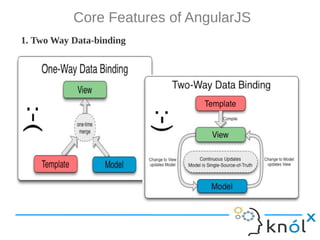
1. Two Way Data-binding
Core Features of AngularJS ...
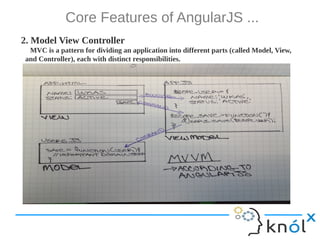
2. Model View Controller
MVC is a pattern for dividing an application into different parts (called Model, View,
and Controller), each with distinct responsibilities.
Core Features of AngularJS ...
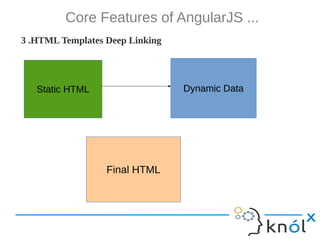
3 .HTML Templates Deep Linking
Static HTML Dynamic Data
Final HTML
Core Features of AngularJS ...
4 .Deep Linking
Deep linking allows you to encode the state of the application in the
URL so that it can be bookmarked and the application can be restored
from the URL to the same state.
5 .Dependency Injection Directives
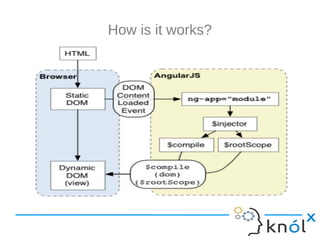
How is it works?
How is it works? ...
1. The browser loads the HTML and parses it into a DOM
2. The browser loads angular.js script
3. Angular waits for DOMContentLoaded event
4. Angular looks for ng-app directive, which designates the application boundary
5. The Module specified in ng-app (if any) is used to configure the $injector
6. The $injector is used to create the $compile service as well as $rootScope
7. The $compile service is used to compile the DOM and link it with $rootScope
8. The ng-init directive assigns World to the name property on the scope
9. The {{name}} interpolates the expression to Hello World!
AngularJs Terminologies
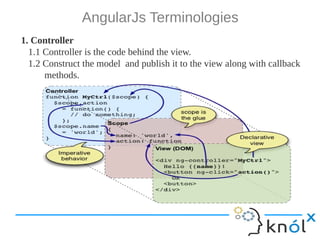
1. Controller
1.1 Controller is the code behind the view.
1.2 Construct the model and publish it to the view along with callback
methods.
AngularJs Terminologies ...
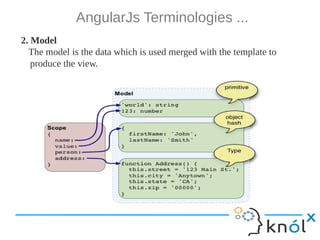
2. Model
The model is the data which is used merged with the template to
produce the view.
AngularJs Terminologies ...
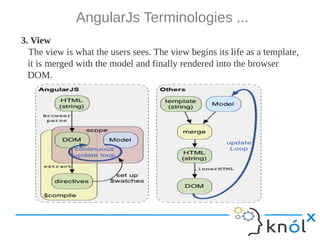
3. View
The view is what the users sees. The view begins its life as a template,
it is merged with the model and finally rendered into the browser
DOM.
AngularJs Terminologies ...
4. Scope
The scope is responsible for detecting changes to the model
section and provides the execution context for expressions.
5. Directives
A directive is a behavior or DOM transformation which is
triggered by the presence of a custom attribute, element name,
or a class name.
6. Filters
Filters perform data transformation. Typically they are used in
conjunction with the locale to format the data in locale specific
output.
AngularJs directives
ng-app
Declares an element as a root element of the application allowing behavior to be modified through custom
HTML tags.
ng-bind
Automatically changes the text of a HTML element to the value of a given expression.
ng-model
Similar to ng-bind, but allows two-way data binding between the view and the scope.
ng-class
Allows class attributes to be dynamically loaded.
ng-controller
Specifies a JavaScript controller class that evaluates HTML expressions.
ng-repeat
Instantiate an element once per item from a collection.
ng-show & ng-hide
Conditionally show or hide an element, depending on the value of a boolean expression.
ng-switch
Conditionally instantiate one template from a set of choices, depending on the value of a selection
expression.
ng-view
The base directive responsible for handling routes that resolve JSON before rendering templates driven by
specified controllers.
ng-if
Basic if statement directive which allow to show the following element if the conditions are true.
How to use AngularJs
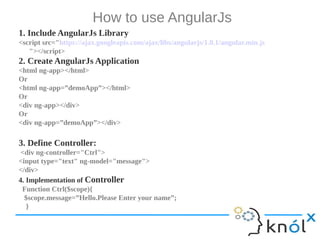
1. Include AngularJs Library
<script src="https://ajax.googleapis.com/ajax/libs/angularjs/1.0.1/angular.min.js
"></script>
2. Create AngularJs Application
<html ng-app></html>
Or
<html ng-app=”demoApp”></html>
Or
<div ng-app></div>
Or
<div ng-app=”demoApp”></div>
3. Define Controller:
<div ng-controller="Ctrl">
<input type="text" ng-model="message">
</div>
4. Implementation of Controller
Function Ctrl($scope){
$scope.message=”Hello.Please Enter your name”;
}
AngularJs Tags
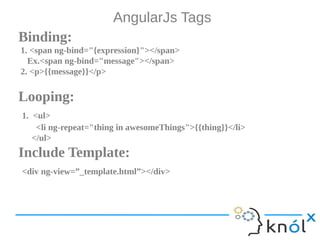
Binding:
1. <span ng-bind="{expression}"></span>
Ex.<span ng-bind="message"></span>
2. <p>{{message}}</p>
Looping:
1. <ul>
<li ng-repeat="thing in awesomeThings">{{thing}}</li>
</ul>
Include Template:
<div ng-view=”_template.html”></div>
How we begin?
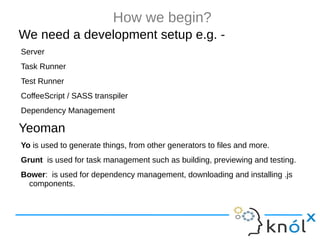
We need a development setup e.g. -
Server
Task Runner
Test Runner
CoffeeScript / SASS transpiler
Dependency Management
Yeoman
Yo is used to generate things, from other generators to files and more.
Grunt is used for task management such as building, previewing and testing.
Bower: is used for dependency management, downloading and installing .js
components.
How we begin?
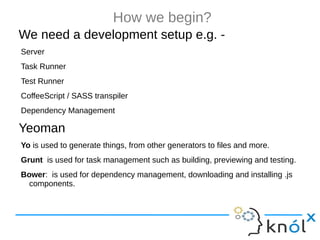
We need a development setup e.g. -
Server
Task Runner
Test Runner
CoffeeScript / SASS transpiler
Dependency Management
Yeoman
Yo is used to generate things, from other generators to files and more.
Grunt is used for task management such as building, previewing and testing.
Bower: is used for dependency management, downloading and installing .js
components.
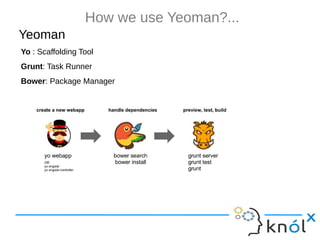
How we use Yeoman?...
Yeoman
Yo : Scaffolding Tool
Grunt: Task Runner
Bower: Package Manager
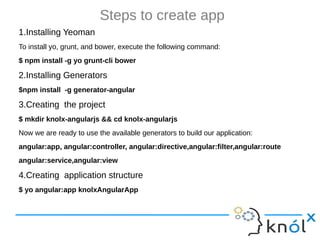
Steps to create app
1.Installing Yeoman
To install yo, grunt, and bower, execute the following command:
$ npm install -g yo grunt-cli bower
2.Installing Generators
$npm install -g generator-angular
3.Creating the project
$ mkdir knolx-angularjs && cd knolx-angularjs
Now we are ready to use the available generators to build our application:
angular:app, angular:controller, angular:directive,angular:filter,angular:route
angular:service,angular:view
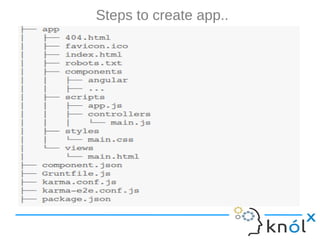
4.Creating application structure
$ yo angular:app knolxAngularApp
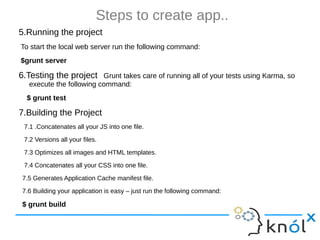
Steps to create app..
5.Running the project
To start the local web server run the following command:
$grunt server
6.Testing the project Grunt takes care of running all of your tests using Karma, so
execute the following command:
$ grunt test
7.Building the Project
7.1 .Concatenates all your JS into one file.
7.2 Versions all your files.
7.3 Optimizes all images and HTML templates.
7.4 Concatenates all your CSS into one file.
7.5 Generates Application Cache manifest file.
7.6 Building your application is easy – just run the following command:
$ grunt build
Advantages
Super fast development
Makes developing SPA easy
Awesome performance
Make apps scalable
Data-binding and automatic DOM manipulation
XHR/JSONP
Disadvantages
Good for IO driven apps only (not games)
SEO?
References
http://docs.angularjs.org
Thank you

AngularJs

  • 1.
  • 2.
    1. What isAngularJs? 2. Key Points 3. Core Features of AngularJS 4. How is it works? 5. AngularJs Terminologies 6. AngularJs directives 7. How we start work on AngularJs? 8. AngularJs Tags 9. How we use Yeoman? 10. Advantages and Disadvantages Agenda
  • 3.
    What is Angular? AngularJSis an open-source JavaScript framework, maintained by Google, that assists with running single-page applications. Its goal is to augment browser-based applications with model–view–controller (MVC) capability, in an effort to make both development and testing easier.
  • 4.
    Key points ofAngularJs 1. AngularJS is a client-side JavaScript framework used to make single-page web applications It means the browser only loads the page once, but then makes asynchronous calls to the server to fetch new information 2. It helps you build front-ends for web-based applications 3. Makes creating a user interface (UI) easier through data-binding 4. It helps organize and architect an application means it is prescribing a way for you to divide your application up into smaller parts. 5. It runs in the web browser.
  • 5.
    Core Features ofAngularJS 1. Two Way Data-binding
  • 6.
    Core Features ofAngularJS ... 2. Model View Controller MVC is a pattern for dividing an application into different parts (called Model, View, and Controller), each with distinct responsibilities.
  • 7.
    Core Features ofAngularJS ... 3 .HTML Templates Deep Linking Static HTML Dynamic Data Final HTML
  • 8.
    Core Features ofAngularJS ... 4 .Deep Linking Deep linking allows you to encode the state of the application in the URL so that it can be bookmarked and the application can be restored from the URL to the same state. 5 .Dependency Injection Directives
  • 9.
    How is itworks?
  • 10.
    How is itworks? ... 1. The browser loads the HTML and parses it into a DOM 2. The browser loads angular.js script 3. Angular waits for DOMContentLoaded event 4. Angular looks for ng-app directive, which designates the application boundary 5. The Module specified in ng-app (if any) is used to configure the $injector 6. The $injector is used to create the $compile service as well as $rootScope 7. The $compile service is used to compile the DOM and link it with $rootScope 8. The ng-init directive assigns World to the name property on the scope 9. The {{name}} interpolates the expression to Hello World!
  • 11.
    AngularJs Terminologies 1. Controller 1.1Controller is the code behind the view. 1.2 Construct the model and publish it to the view along with callback methods.
  • 12.
    AngularJs Terminologies ... 2.Model The model is the data which is used merged with the template to produce the view.
  • 13.
    AngularJs Terminologies ... 3.View The view is what the users sees. The view begins its life as a template, it is merged with the model and finally rendered into the browser DOM.
  • 14.
    AngularJs Terminologies ... 4.Scope The scope is responsible for detecting changes to the model section and provides the execution context for expressions. 5. Directives A directive is a behavior or DOM transformation which is triggered by the presence of a custom attribute, element name, or a class name. 6. Filters Filters perform data transformation. Typically they are used in conjunction with the locale to format the data in locale specific output.
  • 15.
    AngularJs directives ng-app Declares anelement as a root element of the application allowing behavior to be modified through custom HTML tags. ng-bind Automatically changes the text of a HTML element to the value of a given expression. ng-model Similar to ng-bind, but allows two-way data binding between the view and the scope. ng-class Allows class attributes to be dynamically loaded. ng-controller Specifies a JavaScript controller class that evaluates HTML expressions. ng-repeat Instantiate an element once per item from a collection. ng-show & ng-hide Conditionally show or hide an element, depending on the value of a boolean expression. ng-switch Conditionally instantiate one template from a set of choices, depending on the value of a selection expression. ng-view The base directive responsible for handling routes that resolve JSON before rendering templates driven by specified controllers. ng-if Basic if statement directive which allow to show the following element if the conditions are true.
  • 16.
    How to useAngularJs 1. Include AngularJs Library <script src="https://ajax.googleapis.com/ajax/libs/angularjs/1.0.1/angular.min.js "></script> 2. Create AngularJs Application <html ng-app></html> Or <html ng-app=”demoApp”></html> Or <div ng-app></div> Or <div ng-app=”demoApp”></div> 3. Define Controller: <div ng-controller="Ctrl"> <input type="text" ng-model="message"> </div> 4. Implementation of Controller Function Ctrl($scope){ $scope.message=”Hello.Please Enter your name”; }
  • 17.
    AngularJs Tags Binding: 1. <spanng-bind="{expression}"></span> Ex.<span ng-bind="message"></span> 2. <p>{{message}}</p> Looping: 1. <ul> <li ng-repeat="thing in awesomeThings">{{thing}}</li> </ul> Include Template: <div ng-view=”_template.html”></div>
  • 18.
    How we begin? Weneed a development setup e.g. - Server Task Runner Test Runner CoffeeScript / SASS transpiler Dependency Management Yeoman Yo is used to generate things, from other generators to files and more. Grunt is used for task management such as building, previewing and testing. Bower: is used for dependency management, downloading and installing .js components.
  • 19.
    How we begin? Weneed a development setup e.g. - Server Task Runner Test Runner CoffeeScript / SASS transpiler Dependency Management Yeoman Yo is used to generate things, from other generators to files and more. Grunt is used for task management such as building, previewing and testing. Bower: is used for dependency management, downloading and installing .js components.
  • 20.
    How we useYeoman?... Yeoman Yo : Scaffolding Tool Grunt: Task Runner Bower: Package Manager
  • 21.
    Steps to createapp 1.Installing Yeoman To install yo, grunt, and bower, execute the following command: $ npm install -g yo grunt-cli bower 2.Installing Generators $npm install -g generator-angular 3.Creating the project $ mkdir knolx-angularjs && cd knolx-angularjs Now we are ready to use the available generators to build our application: angular:app, angular:controller, angular:directive,angular:filter,angular:route angular:service,angular:view 4.Creating application structure $ yo angular:app knolxAngularApp
  • 22.
  • 23.
    Steps to createapp.. 5.Running the project To start the local web server run the following command: $grunt server 6.Testing the project Grunt takes care of running all of your tests using Karma, so execute the following command: $ grunt test 7.Building the Project 7.1 .Concatenates all your JS into one file. 7.2 Versions all your files. 7.3 Optimizes all images and HTML templates. 7.4 Concatenates all your CSS into one file. 7.5 Generates Application Cache manifest file. 7.6 Building your application is easy – just run the following command: $ grunt build
  • 24.
    Advantages Super fast development Makesdeveloping SPA easy Awesome performance Make apps scalable Data-binding and automatic DOM manipulation XHR/JSONP
  • 25.
    Disadvantages Good for IOdriven apps only (not games) SEO?
  • 26.
  • 27.