Maximize Your oXygen Usage
George Bina
@georgebina
george@oxygenxml.com
Copyright @ Syncro Soft, 2016. All rights reserved.
Maximize Your oXygen Usage
About me
•  Syncro Soft / oXygen XML Editor
•  Working with XML since 1998
•  DITA NG – DITA implementation in Relax NG,
which resulted in DITA 1.3 being defined in
Relax NG as the normative schema language
•  Contributions to other open source projects
•  Getting from ideas to reality
Copyright @ Syncro Soft, 2016. All rights reserved.
Maximize Your oXygen Usage
Note
All the examples presented below are
implemented in the following GitHub repository:
https://github.com/georgebina/sampleFrameworkExtension
Copyright @ Syncro Soft, 2016. All rights reserved.
Maximize Your oXygen Usage
oXygen support for XML
XML
document DITA? DocBook?
DITA specific
support
DocBook
specific
support
Generic
XML
support
Generic
XML
support
Generic
XML
support
Copyright @ Syncro Soft, 2016. All rights reserved.
Maximize Your oXygen Usage
oXygen frameworks
oXygen provides ready-to-use frameworks for
- DITA
- DocBook
- XHTML
- TEI
etc.
Copyright @ Syncro Soft, 2016. All rights reserved.
Maximize Your oXygen Usage
DITA frameworks
dita.framework – DITA topics
ditamap.framework – DITA maps
ditaval.framework – DITAVAL filters
dita-lw.framework – Lightweight DITA topics
ditamap-lw.framework – Lightweight DITA maps
Copyright @ Syncro Soft, 2016. All rights reserved.
Maximize Your oXygen Usage
Demo – the DITA frameworks
Resources
•  CSS files
•  DITA-OT
•  images
•  refactoring actions
•  XSLT scripts for smart copy, reporting
•  document templates
Configuration information
•  stored in *.framework files
•  custom actions
•  validation
•  publishing scenarios
Copyright @ Syncro Soft, 2016. All rights reserved.
Maximize Your oXygen Usage
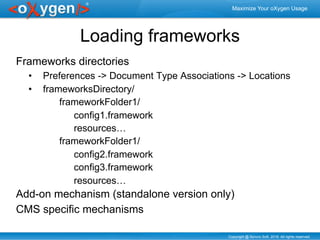
Loading frameworks
Frameworks directories
•  Preferences -> Document Type Associations -> Locations
•  frameworksDirectory/
frameworkFolder1/
config1.framework
resources…
frameworkFolder1/
config2.framework
config3.framework
resources…
Add-on mechanism (standalone version only)
CMS specific mechanisms
Copyright @ Syncro Soft, 2016. All rights reserved.
Maximize Your oXygen Usage
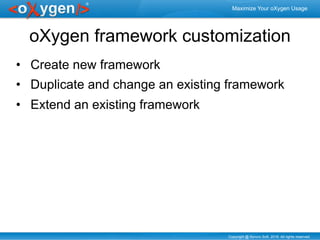
oXygen framework customization
•  Create new framework
•  Duplicate and change an existing framework
•  Extend an existing framework
Copyright @ Syncro Soft, 2016. All rights reserved.
Maximize Your oXygen Usage
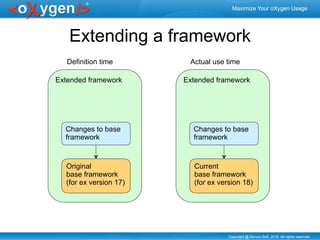
Extended framework
Extending a framework
Original
base framework
(for ex version 17)
Changes to base
framework
Extended framework
Current
base framework
(for ex version 18)
Changes to base
framework
Definition time Actual use time
Copyright @ Syncro Soft, 2016. All rights reserved.
Maximize Your oXygen Usage
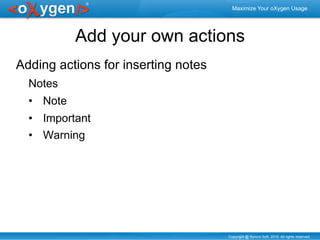
Add your own actions
Adding actions for inserting notes
Notes
•  Note
•  Important
•  Warning
Copyright @ Syncro Soft, 2016. All rights reserved.
Maximize Your oXygen Usage
Demo: add your own actions
Create an extended DITA framework
Define 3 new actions for inserting simple notes,
important notes and warning notes
Contribute the actions to the DITA toolbar
Test the new actions
Copyright @ Syncro Soft, 2016. All rights reserved.
Maximize Your oXygen Usage
Set your own rendering
Set a yellow background on warnings
Copyright @ Syncro Soft, 2016. All rights reserved.
Maximize Your oXygen Usage
Demo: control rendering
Create a new CSS and contribute it to the DITA
extension
Add a warning note and check that the
background is yellow
Copyright @ Syncro Soft, 2016. All rights reserved.
Maximize Your oXygen Usage
Increase markup and content quality
Use Schematron to
•  Enforce business rules
•  Provide automatic fixes
Copyright @ Syncro Soft, 2016. All rights reserved.
Maximize Your oXygen Usage
Enforce DITA markup for notes
Use Schematron to detect paragraphs that start
with “Warning:” and direct the user to create a
note with type=“warning”
Add the Schematron to the DITA validation
Offer a quick fix to create the note automatically
Copyright @ Syncro Soft, 2016. All rights reserved.
Maximize Your oXygen Usage
Constraining DITA
•  Define new DITA constrained topic types
•  Enforce constraints through Schematron
•  Enforce constrained editor behavior though
configuration files:
•  Remove elements/attributes so users cannot add them
•  Control available attribute values
•  Control default content for elements
•  Control rendering labels for elements and attributes
Copyright @ Syncro Soft, 2016. All rights reserved.
Maximize Your oXygen Usage
Removing highlight domain
elements
Make it difficult to insert b, i and u elements
Copyright @ Syncro Soft, 2016. All rights reserved.
Maximize Your oXygen Usage
Demo: Use configuration file to
remove elements
Use the cc_config.xml to remove b, i and u
elements from content completion
Also, remove the B, I, U actions from the toolbar
Copyright @ Syncro Soft, 2016. All rights reserved.
Maximize Your oXygen Usage
Control the authoring experience
Lightweight DITA provides an example of controlled
authoring experience:
•  use of cc_config.xml to
•  add attribute values (format, translate, dir, etc.)
•  insert usual elements (title and p inside a section, etc.)
•  render the elements with more friendly names (shortdesc as
Short Description, etc.)
•  use CSS to add
•  hints
•  placeholders
•  inline actions
•  editable elements/attributes through form controls
Copyright @ Syncro Soft, 2016. All rights reserved.
Maximize Your oXygen Usage
Demo AX for Lightweight DITA
•  Hints and placeholders
•  User-friendly element names
•  Inline actions to add structure
•  Inline editing actions
Note the direct Markdown support!
Copyright @ Syncro Soft, 2016. All rights reserved.
Maximize Your oXygen Usage
Use LESS to do more
LESS can be used as a replacement for CSS and
provides many interesting features
•  allows defining a library of templates and instantiate
them
•  makes style specification compact and declarative
LESS can be compiled to CSS or used directly
Copyright @ Syncro Soft, 2016. All rights reserved.
Maximize Your oXygen Usage
Control AX for our framework
Rename shortdesc as Short Description
Insert title and p in a new section
Add a hint for short descriptions
Control the placeholder information for short
descriptions
Make links editable directly within the document
Copyright @ Syncro Soft, 2016. All rights reserved.
Maximize Your oXygen Usage
Demo AX setup
Setup the plus.css as another CSS for our
framework
Add a short description and see the placeholder
and hint information
Add a link and see the inline edit action
Look at the plus.less file to see how all these are
done
Copyright @ Syncro Soft, 2016. All rights reserved.
Maximize Your oXygen Usage
Implement user-controlled templates
Using a few lines of CSS we can implement:
•  inline hints
Specify HTML content as hint with <?hint HTML-content ?>
•  inline placeholders
Specify the placeholder text with <?placeholder text?>
•  read-only elements
Use <?readonly?> and <?editable?> to mark corresponding
elements in the document to be readonly or editable,
respecively
Copyright @ Syncro Soft, 2016. All rights reserved.
Maximize Your oXygen Usage
Style guide integration
•  Use the @see attribute to link a Schematron rule to
the style guide page that explains that problem
•  Configuration file to provide links from elements to
style guide pages that describe how those elements
should be used
Copyright @ Syncro Soft, 2016. All rights reserved.
Maximize Your oXygen Usage
DIM project
DIM = Dynamic Information Model
Intelligent style guide - provides the previous
resources automatically from the style guide
itself
Removes the need for IA to know Schematron by
providing a UI to instantiate generic rules
Generally available at
http://github.com/oxygenxml/dim
Copyright @ Syncro Soft, 2016. All rights reserved.
Maximize Your oXygen Usage
DIM in action
Demo DIM
•  Show a task with a short description with 1
word and no error
•  Add a rule in the short description topic to
enforce word limits
•  Show the same task and the errors that link to
the styleguide
Copyright @ Syncro Soft, 2016. All rights reserved.
Maximize Your oXygen Usage
Thank you
Questions?
george@oxygenxml.com
@georgebina
http://www.oxygenxml.com

Maximize Your oXygen Usage - oXygen XML, Syncro Soft

  • 1.
    Maximize Your oXygenUsage George Bina @georgebina george@oxygenxml.com
  • 2.
    Copyright @ SyncroSoft, 2016. All rights reserved. Maximize Your oXygen Usage About me •  Syncro Soft / oXygen XML Editor •  Working with XML since 1998 •  DITA NG – DITA implementation in Relax NG, which resulted in DITA 1.3 being defined in Relax NG as the normative schema language •  Contributions to other open source projects •  Getting from ideas to reality
  • 3.
    Copyright @ SyncroSoft, 2016. All rights reserved. Maximize Your oXygen Usage Note All the examples presented below are implemented in the following GitHub repository: https://github.com/georgebina/sampleFrameworkExtension
  • 4.
    Copyright @ SyncroSoft, 2016. All rights reserved. Maximize Your oXygen Usage oXygen support for XML XML document DITA? DocBook? DITA specific support DocBook specific support Generic XML support Generic XML support Generic XML support
  • 5.
    Copyright @ SyncroSoft, 2016. All rights reserved. Maximize Your oXygen Usage oXygen frameworks oXygen provides ready-to-use frameworks for - DITA - DocBook - XHTML - TEI etc.
  • 6.
    Copyright @ SyncroSoft, 2016. All rights reserved. Maximize Your oXygen Usage DITA frameworks dita.framework – DITA topics ditamap.framework – DITA maps ditaval.framework – DITAVAL filters dita-lw.framework – Lightweight DITA topics ditamap-lw.framework – Lightweight DITA maps
  • 7.
    Copyright @ SyncroSoft, 2016. All rights reserved. Maximize Your oXygen Usage Demo – the DITA frameworks Resources •  CSS files •  DITA-OT •  images •  refactoring actions •  XSLT scripts for smart copy, reporting •  document templates Configuration information •  stored in *.framework files •  custom actions •  validation •  publishing scenarios
  • 8.
    Copyright @ SyncroSoft, 2016. All rights reserved. Maximize Your oXygen Usage Loading frameworks Frameworks directories •  Preferences -> Document Type Associations -> Locations •  frameworksDirectory/ frameworkFolder1/ config1.framework resources… frameworkFolder1/ config2.framework config3.framework resources… Add-on mechanism (standalone version only) CMS specific mechanisms
  • 9.
    Copyright @ SyncroSoft, 2016. All rights reserved. Maximize Your oXygen Usage oXygen framework customization •  Create new framework •  Duplicate and change an existing framework •  Extend an existing framework
  • 10.
    Copyright @ SyncroSoft, 2016. All rights reserved. Maximize Your oXygen Usage Extended framework Extending a framework Original base framework (for ex version 17) Changes to base framework Extended framework Current base framework (for ex version 18) Changes to base framework Definition time Actual use time
  • 11.
    Copyright @ SyncroSoft, 2016. All rights reserved. Maximize Your oXygen Usage Add your own actions Adding actions for inserting notes Notes •  Note •  Important •  Warning
  • 12.
    Copyright @ SyncroSoft, 2016. All rights reserved. Maximize Your oXygen Usage Demo: add your own actions Create an extended DITA framework Define 3 new actions for inserting simple notes, important notes and warning notes Contribute the actions to the DITA toolbar Test the new actions
  • 13.
    Copyright @ SyncroSoft, 2016. All rights reserved. Maximize Your oXygen Usage Set your own rendering Set a yellow background on warnings
  • 14.
    Copyright @ SyncroSoft, 2016. All rights reserved. Maximize Your oXygen Usage Demo: control rendering Create a new CSS and contribute it to the DITA extension Add a warning note and check that the background is yellow
  • 15.
    Copyright @ SyncroSoft, 2016. All rights reserved. Maximize Your oXygen Usage Increase markup and content quality Use Schematron to •  Enforce business rules •  Provide automatic fixes
  • 16.
    Copyright @ SyncroSoft, 2016. All rights reserved. Maximize Your oXygen Usage Enforce DITA markup for notes Use Schematron to detect paragraphs that start with “Warning:” and direct the user to create a note with type=“warning” Add the Schematron to the DITA validation Offer a quick fix to create the note automatically
  • 17.
    Copyright @ SyncroSoft, 2016. All rights reserved. Maximize Your oXygen Usage Constraining DITA •  Define new DITA constrained topic types •  Enforce constraints through Schematron •  Enforce constrained editor behavior though configuration files: •  Remove elements/attributes so users cannot add them •  Control available attribute values •  Control default content for elements •  Control rendering labels for elements and attributes
  • 18.
    Copyright @ SyncroSoft, 2016. All rights reserved. Maximize Your oXygen Usage Removing highlight domain elements Make it difficult to insert b, i and u elements
  • 19.
    Copyright @ SyncroSoft, 2016. All rights reserved. Maximize Your oXygen Usage Demo: Use configuration file to remove elements Use the cc_config.xml to remove b, i and u elements from content completion Also, remove the B, I, U actions from the toolbar
  • 20.
    Copyright @ SyncroSoft, 2016. All rights reserved. Maximize Your oXygen Usage Control the authoring experience Lightweight DITA provides an example of controlled authoring experience: •  use of cc_config.xml to •  add attribute values (format, translate, dir, etc.) •  insert usual elements (title and p inside a section, etc.) •  render the elements with more friendly names (shortdesc as Short Description, etc.) •  use CSS to add •  hints •  placeholders •  inline actions •  editable elements/attributes through form controls
  • 21.
    Copyright @ SyncroSoft, 2016. All rights reserved. Maximize Your oXygen Usage Demo AX for Lightweight DITA •  Hints and placeholders •  User-friendly element names •  Inline actions to add structure •  Inline editing actions Note the direct Markdown support!
  • 22.
    Copyright @ SyncroSoft, 2016. All rights reserved. Maximize Your oXygen Usage Use LESS to do more LESS can be used as a replacement for CSS and provides many interesting features •  allows defining a library of templates and instantiate them •  makes style specification compact and declarative LESS can be compiled to CSS or used directly
  • 23.
    Copyright @ SyncroSoft, 2016. All rights reserved. Maximize Your oXygen Usage Control AX for our framework Rename shortdesc as Short Description Insert title and p in a new section Add a hint for short descriptions Control the placeholder information for short descriptions Make links editable directly within the document
  • 24.
    Copyright @ SyncroSoft, 2016. All rights reserved. Maximize Your oXygen Usage Demo AX setup Setup the plus.css as another CSS for our framework Add a short description and see the placeholder and hint information Add a link and see the inline edit action Look at the plus.less file to see how all these are done
  • 25.
    Copyright @ SyncroSoft, 2016. All rights reserved. Maximize Your oXygen Usage Implement user-controlled templates Using a few lines of CSS we can implement: •  inline hints Specify HTML content as hint with <?hint HTML-content ?> •  inline placeholders Specify the placeholder text with <?placeholder text?> •  read-only elements Use <?readonly?> and <?editable?> to mark corresponding elements in the document to be readonly or editable, respecively
  • 26.
    Copyright @ SyncroSoft, 2016. All rights reserved. Maximize Your oXygen Usage Style guide integration •  Use the @see attribute to link a Schematron rule to the style guide page that explains that problem •  Configuration file to provide links from elements to style guide pages that describe how those elements should be used
  • 27.
    Copyright @ SyncroSoft, 2016. All rights reserved. Maximize Your oXygen Usage DIM project DIM = Dynamic Information Model Intelligent style guide - provides the previous resources automatically from the style guide itself Removes the need for IA to know Schematron by providing a UI to instantiate generic rules Generally available at http://github.com/oxygenxml/dim
  • 28.
    Copyright @ SyncroSoft, 2016. All rights reserved. Maximize Your oXygen Usage DIM in action Demo DIM •  Show a task with a short description with 1 word and no error •  Add a rule in the short description topic to enforce word limits •  Show the same task and the errors that link to the styleguide
  • 29.
    Copyright @ SyncroSoft, 2016. All rights reserved. Maximize Your oXygen Usage Thank you Questions? george@oxygenxml.com @georgebina http://www.oxygenxml.com