Using forms in
<oXygen/> XML editor
Introduction
• Mario Cesar (developer in Yan’s minions team)
• Goal of this session
 What can be done with <oXygen/>
 Provide samples you can take home
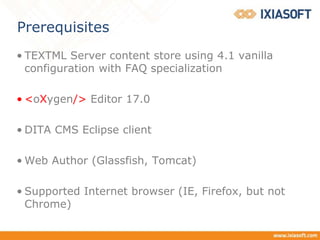
Prerequisites
• TEXTML Server content store using 4.1 vanilla
configuration with FAQ specialization
• <oXygen/> Editor 17.0
• DITA CMS Eclipse client
• Web Author (Glassfish, Tomcat)
• Supported Internet browser (IE, Firefox, but not
Chrome)
Overview
• We will…
 Establish our requirements for this practical sceMario
 Take a look at local <oXygen/> framework (CSS, Actions)
• Defining <oXygen/> actions
 CSS files
 Binding button to actions in CSS files
 Dynamically reading configuration files
 Show the rendering in Web Author
Describe the practical scenario
• Notes
 <oXygen/> files bundle called Framework that is used
in Author mode
 Focusing on <oXygen/> DITA Framework
 Rendering is done throughout CSS files
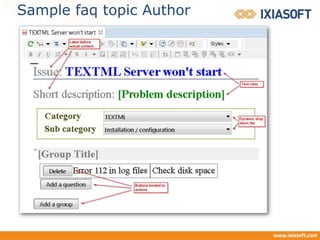
• FAQ topic created will have the following elements:
 Title and short description
 Dynamic selection of category and sub category using
metadata elements
 Group’s title
 Pairs of questions / answers elements
Sample faq topic
<?xml version="1.0" encoding="UTF-8"?>
<!DOCTYPE faq PUBLIC "-//IXIA//DTD IXIA DITA Composite//EN"
"IxiaDitabase.dtd">
<faq id="faq">
<title>[Problem title]</title>
<shortdesc>[Problem description]</shortdesc>
<prolog>
<metadata>
<othermeta content="" name="category"/>
<othermeta content="" name="subcategory"/>
</metadata>
</prolog>
<faqbody>
<faqgroup>
<title>[Group Title]</title>
<faqlist>
<faqitem>
<faqquest>[Question]</faqquest>
<faqans>[Answer]</faqans>
</faqitem>
</faqlist>
</faqgroup>
</faqbody>
</faq>
Sample faq topic Author
Practical scenario in
DITA CMS Eclipse client
Take a look at local <oXygen/> framework
(CSS, Actions)
• Declaring actions in <oXygen/> framework.
(add.question, add.groupQuestion, del.question)
• Location of the files
• The Dita Framework, CSS files location
• dita.css is the top CSS.
• Adding faq.css to dita.css
• Taking a look at faq.css
Practical scenario in
Web Author
Thank you!

Using forms in oXygen XML editor

  • 1.
  • 2.
    Introduction • Mario Cesar(developer in Yan’s minions team) • Goal of this session  What can be done with <oXygen/>  Provide samples you can take home
  • 3.
    Prerequisites • TEXTML Servercontent store using 4.1 vanilla configuration with FAQ specialization • <oXygen/> Editor 17.0 • DITA CMS Eclipse client • Web Author (Glassfish, Tomcat) • Supported Internet browser (IE, Firefox, but not Chrome)
  • 4.
    Overview • We will… Establish our requirements for this practical sceMario  Take a look at local <oXygen/> framework (CSS, Actions) • Defining <oXygen/> actions  CSS files  Binding button to actions in CSS files  Dynamically reading configuration files  Show the rendering in Web Author
  • 5.
    Describe the practicalscenario • Notes  <oXygen/> files bundle called Framework that is used in Author mode  Focusing on <oXygen/> DITA Framework  Rendering is done throughout CSS files • FAQ topic created will have the following elements:  Title and short description  Dynamic selection of category and sub category using metadata elements  Group’s title  Pairs of questions / answers elements
  • 6.
    Sample faq topic <?xmlversion="1.0" encoding="UTF-8"?> <!DOCTYPE faq PUBLIC "-//IXIA//DTD IXIA DITA Composite//EN" "IxiaDitabase.dtd"> <faq id="faq"> <title>[Problem title]</title> <shortdesc>[Problem description]</shortdesc> <prolog> <metadata> <othermeta content="" name="category"/> <othermeta content="" name="subcategory"/> </metadata> </prolog> <faqbody> <faqgroup> <title>[Group Title]</title> <faqlist> <faqitem> <faqquest>[Question]</faqquest> <faqans>[Answer]</faqans> </faqitem> </faqlist> </faqgroup> </faqbody> </faq>
  • 7.
  • 8.
    Practical scenario in DITACMS Eclipse client
  • 9.
    Take a lookat local <oXygen/> framework (CSS, Actions) • Declaring actions in <oXygen/> framework. (add.question, add.groupQuestion, del.question) • Location of the files • The Dita Framework, CSS files location • dita.css is the top CSS. • Adding faq.css to dita.css • Taking a look at faq.css
  • 10.
  • 11.