Maximising Your Productivity
Pete Jakob
pete@purplesalix.com
+44 (0)7710 820512
Sound like you?
2
“My Time Sheets/Expense
Claims are always late”
“I was so busy I forgot to…”
“I’m running late
because my meeting
overran…”
“I haven’t had the time to….”
Developing a Trusted System for work puts YOU
back in control
3
Capture
Clarify
Do
Review Trusted
System
Capture – Empty Your Head
 Identify your potential
sources of actions
 Consider a capture
mechanism for each (eg
notepad by bed)
Digital
Verbal
Physical
Cerebral
Clarify – Is it an action? What’s the next step?
Clarify – What Is the right thing to do Now!
 LOCATION
– HOME
– WORK
– ERRANDS
– COMPUTER
– PHONE
 ENERGY
– FULL FOCUS
– QUICK TASKS
– BRAIN DEAD
 WHEN
– THIS WEEK
– NEXT WEEK
– LATER
– SOMEDAY
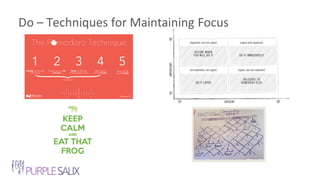
Do – Techniques for Maintaining Focus
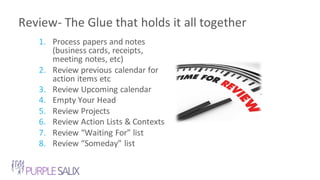
Review- The Glue that holds it all together
1. Process papers and notes
(business cards, receipts,
meeting notes, etc)
2. Review previous calendar for
action items etc
3. Review Upcoming calendar
4. Empty Your Head
5. Review Projects
6. Review Action Lists & Contexts
7. Review “Waiting For” list
8. Review “Someday” list
Email Tips - Get to “Inbox Zero” most days
 Turn off Alerts
 Process email to clarify actions – at
set points during the day
 Minimise your incoming
– Unsubscribe from Newsletters or group
all into a single email (eg Unroll.me)
– Automate repetitive tasks via Rules (or
tools like IFTTT) and Templates/Snippets
9
Calendar Tips – It’s not just for others’ priorities
 Use your calendar for scheduling time for your
Priorities (including weekly review)
 Include Objective, Agenda, Attachments in
meeting invite
 Avoid overlap between meetings – they don’t
have to start at the top of the hour
 Default to 30 minutes rather than 1 hour
 Use colours for different projects,
responsibilities, types of meeting, etc
10
Task List Tips – Define your priorities, or you’ll work
on someone else’s
 Make it clear what the task is to minimise brain-
processing required
– Add verb
– Add telephone number to “Call Fred”
 Write tomorrow’s todo list before you leave
tonight
 Identify the 3 things that require significant focus
today, and start there
 Keep your list in front of you
11
Reference Store – not everything is an action
 Create a repository for all the non-action items
that you want to keep that you may want to refer
to at some point in the future
– Documents, Checklists, Scanned images, Quotes, Web
clippings, journals etc (great list of ideas here)
 Evernote and Microsoft OneNote are the most
popular applications
 Security: Be cautious with putting personal
confidential information on any cloud-based
system
12
Learn More?
 Purple Patch – Weekly curated newsletter of Productivity (and Marketing) content
– purplesalix.com/the-purple-patch/
 Purple Salix Guide to Productivity Tools – A review of over 50 tools including task
managers, time tracking utilities, note taking apps and much more
– http://productivityguideform.purplesalix.com/productivityguide
 Purple Salix Blog – a collection of posts spanning several years of my productivity
journey
– purplesalix.com/category/personal_productivity/
13
Thank
You!Pete Jakob
pete@purplesalix.com
+44 (0)7710 820512

Maximising your productivity

  • 1.
    Maximising Your Productivity PeteJakob pete@purplesalix.com +44 (0)7710 820512
  • 2.
    Sound like you? 2 “MyTime Sheets/Expense Claims are always late” “I was so busy I forgot to…” “I’m running late because my meeting overran…” “I haven’t had the time to….”
  • 3.
    Developing a TrustedSystem for work puts YOU back in control 3 Capture Clarify Do Review Trusted System
  • 4.
    Capture – EmptyYour Head  Identify your potential sources of actions  Consider a capture mechanism for each (eg notepad by bed) Digital Verbal Physical Cerebral
  • 5.
    Clarify – Isit an action? What’s the next step?
  • 6.
    Clarify – WhatIs the right thing to do Now!  LOCATION – HOME – WORK – ERRANDS – COMPUTER – PHONE  ENERGY – FULL FOCUS – QUICK TASKS – BRAIN DEAD  WHEN – THIS WEEK – NEXT WEEK – LATER – SOMEDAY
  • 7.
    Do – Techniquesfor Maintaining Focus
  • 8.
    Review- The Gluethat holds it all together 1. Process papers and notes (business cards, receipts, meeting notes, etc) 2. Review previous calendar for action items etc 3. Review Upcoming calendar 4. Empty Your Head 5. Review Projects 6. Review Action Lists & Contexts 7. Review “Waiting For” list 8. Review “Someday” list
  • 9.
    Email Tips -Get to “Inbox Zero” most days  Turn off Alerts  Process email to clarify actions – at set points during the day  Minimise your incoming – Unsubscribe from Newsletters or group all into a single email (eg Unroll.me) – Automate repetitive tasks via Rules (or tools like IFTTT) and Templates/Snippets 9
  • 10.
    Calendar Tips –It’s not just for others’ priorities  Use your calendar for scheduling time for your Priorities (including weekly review)  Include Objective, Agenda, Attachments in meeting invite  Avoid overlap between meetings – they don’t have to start at the top of the hour  Default to 30 minutes rather than 1 hour  Use colours for different projects, responsibilities, types of meeting, etc 10
  • 11.
    Task List Tips– Define your priorities, or you’ll work on someone else’s  Make it clear what the task is to minimise brain- processing required – Add verb – Add telephone number to “Call Fred”  Write tomorrow’s todo list before you leave tonight  Identify the 3 things that require significant focus today, and start there  Keep your list in front of you 11
  • 12.
    Reference Store –not everything is an action  Create a repository for all the non-action items that you want to keep that you may want to refer to at some point in the future – Documents, Checklists, Scanned images, Quotes, Web clippings, journals etc (great list of ideas here)  Evernote and Microsoft OneNote are the most popular applications  Security: Be cautious with putting personal confidential information on any cloud-based system 12
  • 13.
    Learn More?  PurplePatch – Weekly curated newsletter of Productivity (and Marketing) content – purplesalix.com/the-purple-patch/  Purple Salix Guide to Productivity Tools – A review of over 50 tools including task managers, time tracking utilities, note taking apps and much more – http://productivityguideform.purplesalix.com/productivityguide  Purple Salix Blog – a collection of posts spanning several years of my productivity journey – purplesalix.com/category/personal_productivity/ 13
  • 14.

Editor's Notes

  • #8 The Pomodoro Technique is a time management method developed by Francesco Cirillo in the late 1980s There are six stages in the technique: 1 Decide on the task to be done 2 Set the pomodoro timer to n minutes (traditionally n = 25) 3 Work on the task until the timer rings. If a distraction pops into your head, write it down, but immediately get back on task. 4 After the timer rings, put a checkmark on a piece of paper 5 If you have fewer than four checkmarks, take a short break (3–5 minutes), then go to step 1 6 Else (i.e. after four pomodoros) take a longer break (15–30 minutes), reset your checkmark count to zero, then go to step 1 More: https://en.wikipedia.org/wiki/Pomodoro_Technique