
MAXDIFF SCALING
Get More Quantifiable Data and Less Respondent Fatigue

Friday, October 18, 13
MAXDIFF SCALING
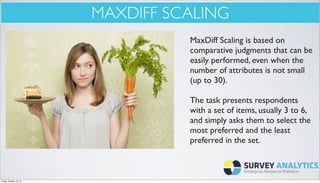
MaxDiff Scaling is based on
comparative judgments that can be
easily performed, even when the
number of attributes is not small
(up to 30).
The task presents respondents
with a set of items, usually 3 to 6,
and simply asks them to select the
most preferred and the least
preferred in the set.

Friday, October 18, 13
MAXDIFF SCALING
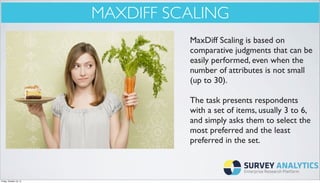
MaxDiff Scaling is based on
comparative judgments that can be
easily performed, even when the
number of attributes is not small
(up to 30).
The task presents respondents
with a set of items, usually 3 to 6,
and simply asks them to select the
most preferred and the least
preferred in the set.

Friday, October 18, 13
MAXDIFF SCALING (CONTINUED)
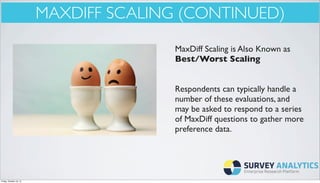
MaxDiff Scaling is Also Known as
Best/Worst Scaling
Respondents can typically handle a
number of these evaluations, and
may be asked to respond to a series
of MaxDiff questions to gather more
preference data.

Friday, October 18, 13
*Cool New Stuff*

MAXDIFF VS. RATING SCALES
MaxDiff has less much less respondent
fatigue compared to rating scale
questions.
Survey fatigue is so low that you can
run even up to 15-20 different MaxDiff
questions if needed.
Why? because you are only asking for
Most/Least or Love/Hate combos.

Friday, October 18, 13
*Cool New Stuff*

MAXDIFF VS. RATING SCALES
MaxDiff has less much less respondent
fatigue compared to rating scale
questions.
Survey fatigue is so low that you can
run even up to 15-20 different MaxDiff
questions if needed.
Why? because you are only asking for
Most/Least or Love/Hate combos.

Friday, October 18, 13
*Cool New Stuff*

MAXDIFF VS. RATING SCALES (CONTINUED)
The MaxDiff Share of Preference Data
is up to100%, or a 100 point count.
If there is a 68% preference to
Hawaiian vacation vs. 48% Vegas
vacations then you can conclude there
is a 20% difference in preference
between the two vacations.

Friday, October 18, 13
*Cool New Stuff*

MAXDIFF VS. RATING SCALES (CONTINUED)
In rating scales, it’s hard to measure what
a 4/5 vs. 2/5 scale really means. Sure you
can say a 2 point difference, but what does
that 2 point equate to?
Rating scales are more difficult to quantify
than MaxDiff data output

Friday, October 18, 13
*Cool New Stuff*

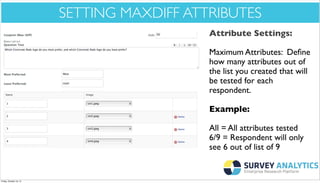
SETTING MAXDIFF ATTRIBUTES
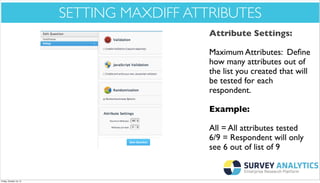
Attribute Settings:
Maximum Attributes: Define
how many attributes out of
the list you created that will
be tested for each
respondent.
Example:
All = All attributes tested
6/9 = Respondent will only
see 6 out of list of 9

Friday, October 18, 13
*Cool New Stuff*

SETTING MAXDIFF ATTRIBUTES
Attribute Settings:
Maximum Attributes: Define
how many attributes out of
the list you created that will
be tested for each
respondent.
Example:
All = All attributes tested
6/9 = Respondent will only
see 6 out of list of 9

Friday, October 18, 13
*Cool New Stuff*

SETTING MAXDIFF ATTRIBUTES
Attribute Settings:
Maximum Attributes: Define
how many attributes out of
the list you created that will
be tested for each
respondent.
Example:
All = All attributes tested
6/9 = Respondent will only
see 6 out of list of 9

Friday, October 18, 13
*Cool New Stuff*

SETTING MAXDIFF ATTRIBUTES
Attribute Settings:
Maximum Attributes: Define
how many attributes out of
the list you created that will
be tested for each
respondent.
Example:
All = All attributes tested
6/9 = Respondent will only
see 6 out of list of 9

Friday, October 18, 13
*Cool New Stuff*

SETTING MAXDIFF ATTRIBUTES
Attribute Settings:
Maximum Attributes: Define
how many attributes out of
the list you created that will
be tested for each
respondent.
Example:
All = All attributes tested
6/9 = Respondent will only
see 6 out of list of 9

Friday, October 18, 13
*Cool New Stuff*

SETTING MAXDIFF ATTRIBUTES
Attribute Settings:
Maximum Attributes: Define
how many attributes out of
the list you created that will
be tested for each
respondent.
Example:
All = All attributes tested
6/9 = Respondent will only
see 6 out of list of 9

Friday, October 18, 13
*Cool New Stuff*

SETTING MAXDIFF ATTRIBUTES
Attribute Settings:
Maximum Attributes: Define
how many attributes out of
the list you created that will
be tested for each
respondent.
Example:
All = All attributes tested
6/9 = Respondent will only
see 6 out of list of 9

Friday, October 18, 13
*Cool New Stuff*

SETTING MAXDIFF ATTRIBUTES
Attribute Settings:
Maximum Attributes: Define
how many attributes out of
the list you created that will
be tested for each
respondent.
Example:
All = All attributes tested
6/9 = Respondent will only
see 6 out of list of 9

Friday, October 18, 13
*Cool New Stuff*

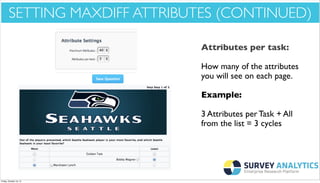
SETTING MAXDIFF ATTRIBUTES (CONTINUED)
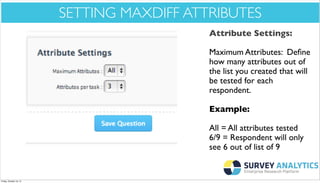
Attributes per task:
How many of the attributes
you will see on each page.
Example:
3 Attributes per Task + All
from the list = 3 cycles

Friday, October 18, 13
*Cool New Stuff*

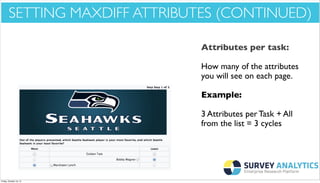
SETTING MAXDIFF ATTRIBUTES (CONTINUED)
Attributes per task:
How many of the attributes
you will see on each page.
Example:
3 Attributes per Task + All
from the list = 3 cycles

Friday, October 18, 13
*Cool New Stuff*

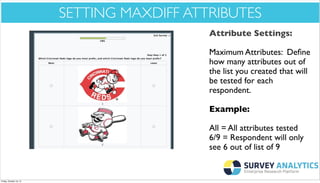
USING IMAGES

Friday, October 18, 13
*Cool New Stuff*

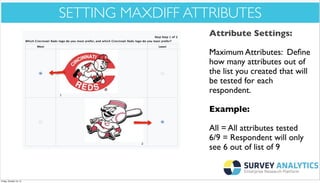
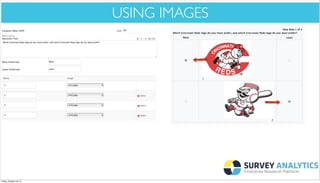
USING IMAGES

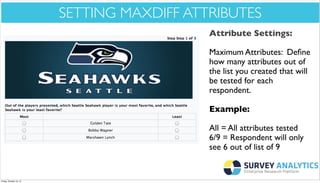
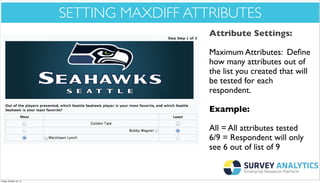
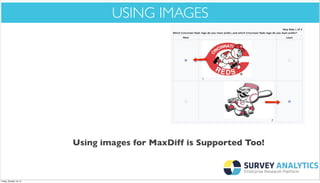
Using images for MaxDiff is Supported Too!

Friday, October 18, 13
*Cool New Stuff*

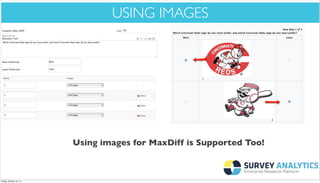
USING IMAGES

Using images for MaxDiff is Supported Too!

Friday, October 18, 13
*Cool New Stuff*

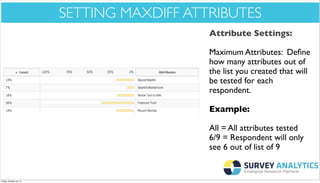
ANALYZING MAXDIFF
Preference Analysis
Overview:
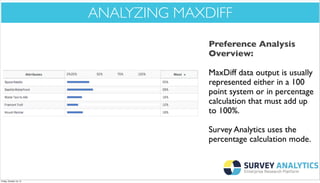
MaxDiff data output is usually
represented either in a 100
point system or in percentage
calculation that must add up
to 100%.
Survey Analytics uses the
percentage calculation mode.

Friday, October 18, 13
*Cool New Stuff*

ANALYZING MAXDIFF
Preference Analysis
Overview:
MaxDiff data output is usually
represented either in a 100
point system or in percentage
calculation that must add up
to 100%.
Survey Analytics uses the
percentage calculation mode.

Friday, October 18, 13
*Cool New Stuff*

ANALYZING MAXDIFF
Preference Analysis
Overview:
MaxDiff data output is usually
represented either in a 100
point system or in percentage
calculation that must add up
to 100%.
Survey Analytics uses the
percentage calculation mode.

Friday, October 18, 13
*Cool New Stuff*

ANALYZING MAXDIFF (CONTINUED)
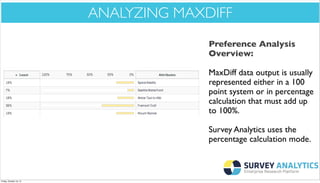
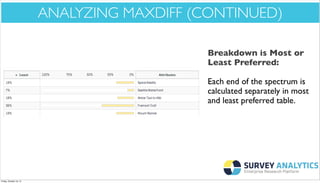
Breakdown is Most or
Least Preferred:
Each end of the spectrum is
calculated separately in most
and least preferred table.

Friday, October 18, 13
*Cool New Stuff*

ANALYZING MAXDIFF (CONTINUED)
Breakdown is Most or
Least Preferred:
Each end of the spectrum is
calculated separately in most
and least preferred table.

Friday, October 18, 13
*Cool New Stuff*

ANALYZING MAXDIFF (CONTINUED)
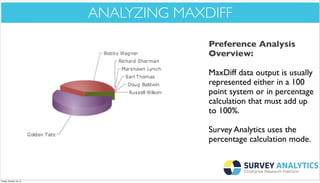
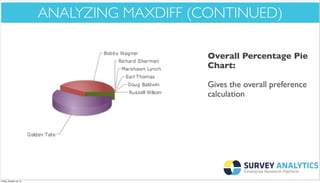
Overall Percentage Pie
Chart:
Gives the overall preference
calculation

Friday, October 18, 13
*Cool New Stuff*

ANALYZING MAXDIFF (CONTINUED)
Overall Percentage Pie
Chart:
Gives the overall preference
calculation

Friday, October 18, 13
CONTACT US
If you are not using Survey Analytics and would like to learn more
or be setup with a free evaluation license, please contact us.

1(800) 326-5570
www.surveyanalytics.com/contact

Friday, October 18, 13

MaxDiff Scaling: More Quantifiable Data and Less Respondent Fatigue

  • 1.
    MAXDIFF SCALING Get MoreQuantifiable Data and Less Respondent Fatigue Friday, October 18, 13
  • 2.
    MAXDIFF SCALING MaxDiff Scalingis based on comparative judgments that can be easily performed, even when the number of attributes is not small (up to 30). The task presents respondents with a set of items, usually 3 to 6, and simply asks them to select the most preferred and the least preferred in the set. Friday, October 18, 13
  • 3.
    MAXDIFF SCALING MaxDiff Scalingis based on comparative judgments that can be easily performed, even when the number of attributes is not small (up to 30). The task presents respondents with a set of items, usually 3 to 6, and simply asks them to select the most preferred and the least preferred in the set. Friday, October 18, 13
  • 4.
    MAXDIFF SCALING (CONTINUED) MaxDiffScaling is Also Known as Best/Worst Scaling Respondents can typically handle a number of these evaluations, and may be asked to respond to a series of MaxDiff questions to gather more preference data. Friday, October 18, 13
  • 5.
    *Cool New Stuff* MAXDIFFVS. RATING SCALES MaxDiff has less much less respondent fatigue compared to rating scale questions. Survey fatigue is so low that you can run even up to 15-20 different MaxDiff questions if needed. Why? because you are only asking for Most/Least or Love/Hate combos. Friday, October 18, 13
  • 6.
    *Cool New Stuff* MAXDIFFVS. RATING SCALES MaxDiff has less much less respondent fatigue compared to rating scale questions. Survey fatigue is so low that you can run even up to 15-20 different MaxDiff questions if needed. Why? because you are only asking for Most/Least or Love/Hate combos. Friday, October 18, 13
  • 7.
    *Cool New Stuff* MAXDIFFVS. RATING SCALES (CONTINUED) The MaxDiff Share of Preference Data is up to100%, or a 100 point count. If there is a 68% preference to Hawaiian vacation vs. 48% Vegas vacations then you can conclude there is a 20% difference in preference between the two vacations. Friday, October 18, 13
  • 8.
    *Cool New Stuff* MAXDIFFVS. RATING SCALES (CONTINUED) In rating scales, it’s hard to measure what a 4/5 vs. 2/5 scale really means. Sure you can say a 2 point difference, but what does that 2 point equate to? Rating scales are more difficult to quantify than MaxDiff data output Friday, October 18, 13
  • 9.
    *Cool New Stuff* SETTINGMAXDIFF ATTRIBUTES Attribute Settings: Maximum Attributes: Define how many attributes out of the list you created that will be tested for each respondent. Example: All = All attributes tested 6/9 = Respondent will only see 6 out of list of 9 Friday, October 18, 13
  • 10.
    *Cool New Stuff* SETTINGMAXDIFF ATTRIBUTES Attribute Settings: Maximum Attributes: Define how many attributes out of the list you created that will be tested for each respondent. Example: All = All attributes tested 6/9 = Respondent will only see 6 out of list of 9 Friday, October 18, 13
  • 11.
    *Cool New Stuff* SETTINGMAXDIFF ATTRIBUTES Attribute Settings: Maximum Attributes: Define how many attributes out of the list you created that will be tested for each respondent. Example: All = All attributes tested 6/9 = Respondent will only see 6 out of list of 9 Friday, October 18, 13
  • 12.
    *Cool New Stuff* SETTINGMAXDIFF ATTRIBUTES Attribute Settings: Maximum Attributes: Define how many attributes out of the list you created that will be tested for each respondent. Example: All = All attributes tested 6/9 = Respondent will only see 6 out of list of 9 Friday, October 18, 13
  • 13.
    *Cool New Stuff* SETTINGMAXDIFF ATTRIBUTES Attribute Settings: Maximum Attributes: Define how many attributes out of the list you created that will be tested for each respondent. Example: All = All attributes tested 6/9 = Respondent will only see 6 out of list of 9 Friday, October 18, 13
  • 14.
    *Cool New Stuff* SETTINGMAXDIFF ATTRIBUTES Attribute Settings: Maximum Attributes: Define how many attributes out of the list you created that will be tested for each respondent. Example: All = All attributes tested 6/9 = Respondent will only see 6 out of list of 9 Friday, October 18, 13
  • 15.
    *Cool New Stuff* SETTINGMAXDIFF ATTRIBUTES Attribute Settings: Maximum Attributes: Define how many attributes out of the list you created that will be tested for each respondent. Example: All = All attributes tested 6/9 = Respondent will only see 6 out of list of 9 Friday, October 18, 13
  • 16.
    *Cool New Stuff* SETTINGMAXDIFF ATTRIBUTES Attribute Settings: Maximum Attributes: Define how many attributes out of the list you created that will be tested for each respondent. Example: All = All attributes tested 6/9 = Respondent will only see 6 out of list of 9 Friday, October 18, 13
  • 17.
    *Cool New Stuff* SETTINGMAXDIFF ATTRIBUTES (CONTINUED) Attributes per task: How many of the attributes you will see on each page. Example: 3 Attributes per Task + All from the list = 3 cycles Friday, October 18, 13
  • 18.
    *Cool New Stuff* SETTINGMAXDIFF ATTRIBUTES (CONTINUED) Attributes per task: How many of the attributes you will see on each page. Example: 3 Attributes per Task + All from the list = 3 cycles Friday, October 18, 13
  • 19.
    *Cool New Stuff* USINGIMAGES Friday, October 18, 13
  • 20.
    *Cool New Stuff* USINGIMAGES Using images for MaxDiff is Supported Too! Friday, October 18, 13
  • 21.
    *Cool New Stuff* USINGIMAGES Using images for MaxDiff is Supported Too! Friday, October 18, 13
  • 22.
    *Cool New Stuff* ANALYZINGMAXDIFF Preference Analysis Overview: MaxDiff data output is usually represented either in a 100 point system or in percentage calculation that must add up to 100%. Survey Analytics uses the percentage calculation mode. Friday, October 18, 13
  • 23.
    *Cool New Stuff* ANALYZINGMAXDIFF Preference Analysis Overview: MaxDiff data output is usually represented either in a 100 point system or in percentage calculation that must add up to 100%. Survey Analytics uses the percentage calculation mode. Friday, October 18, 13
  • 24.
    *Cool New Stuff* ANALYZINGMAXDIFF Preference Analysis Overview: MaxDiff data output is usually represented either in a 100 point system or in percentage calculation that must add up to 100%. Survey Analytics uses the percentage calculation mode. Friday, October 18, 13
  • 25.
    *Cool New Stuff* ANALYZINGMAXDIFF (CONTINUED) Breakdown is Most or Least Preferred: Each end of the spectrum is calculated separately in most and least preferred table. Friday, October 18, 13
  • 26.
    *Cool New Stuff* ANALYZINGMAXDIFF (CONTINUED) Breakdown is Most or Least Preferred: Each end of the spectrum is calculated separately in most and least preferred table. Friday, October 18, 13
  • 27.
    *Cool New Stuff* ANALYZINGMAXDIFF (CONTINUED) Overall Percentage Pie Chart: Gives the overall preference calculation Friday, October 18, 13
  • 28.
    *Cool New Stuff* ANALYZINGMAXDIFF (CONTINUED) Overall Percentage Pie Chart: Gives the overall preference calculation Friday, October 18, 13
  • 29.
    CONTACT US If youare not using Survey Analytics and would like to learn more or be setup with a free evaluation license, please contact us. 1(800) 326-5570 www.surveyanalytics.com/contact Friday, October 18, 13